
Extremely reliable pre-production
The visual side of pre-production,
on an AI canvas.
StudioBinder runs the production paperwork. Storyflow is the AI canvas for the creative thinking that comes first: moodboard, storyboard, and shot list on one board, drafted from a prompt, with reference frames grabbed from YouTube and Vimeo.


Creatives working for these brands already got early access
- Red Bull
- Canon
- Artlist
- Porsche
See how easy it is to get started
Watch a real project come together, from a blank board to a finished plan, clicked through step by step.
Start from a ready-made template
Pick a board to see what you can build, then let AI fill it in. Every template is a real, editable starting point on the same infinite canvas.

Pre-Production
Pull the brief, script, shot list, and moodboard into one pre-production hub so the whole shoot is planned in one place.
Looking for a StudioBinder alternative?
StudioBinder is a polished, industry-standard production management suite. Its call sheets, shooting schedules, and crew management are built for running a working set, and its shot lists and storyboards plug into that structured system. When the job is the logistics of a production, StudioBinder does it well.
People look for a StudioBinder alternative when they want a more flexible visual space, or AI that drafts the boards instead of forms to fill in. That is the gap Storyflow fills for the creative side of pre-production.
Storyflow is an AI-native infinite canvas. Describe a scene and the AI lays out a storyboard and shot list beside the moodboard, all on one board that keeps the context of your whole project. Grab reference stills from YouTube and Vimeo, and turn a moodboard into a shot list on the same surface.
One honest note on scope: Storyflow does not do formal call sheets, stripboard scheduling, or crew management the way StudioBinder does. For that side, keep StudioBinder. For the visual thinking that comes first, Storyflow is the option. Plenty of filmmakers use both.
Ultra fast from brief to board
From reference to a boarded scene in four steps.
Bring the idea. The AI lays out the first board.
01
Open your canvas
Sign up in seconds, and your infinite canvas opens in the browser.
02
Set the look
Drag in references, grab frames from YouTube or Vimeo, and block out a treatment.
03
Board it out with AI
Describe the scene and the AI lays out a storyboard and shot list as cards.
04
Share or hand off
Send a view-only link, export a PDF, or take a locked plan into StudioBinder.
The creative side, all on one canvas.
Moodboard, storyboard, and shot list together, drafted by AI, with no object cap.
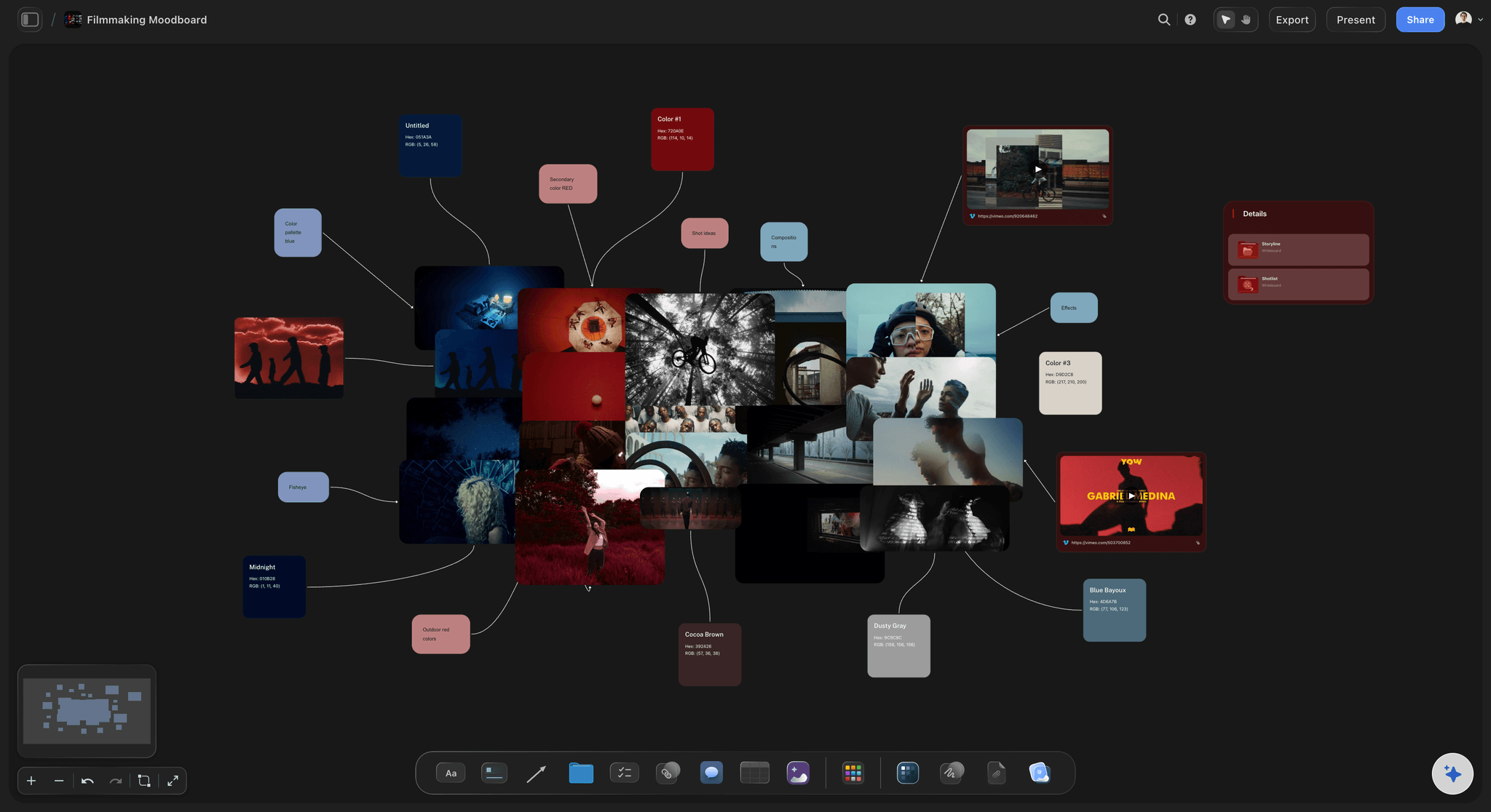
The look lives beside the shots
Moodboard and storyboard together
The moodboard sits on the same board as the storyboard and shot list, so the look stays visible while you plan coverage.
See film lookbooks →
Frames from a scene description
AI drafts the scene, you refine it
Describe the scene and the AI lays out a sequence of frames to react to, so you refine shots instead of starting from a blank board.
See the AI storyboard generator →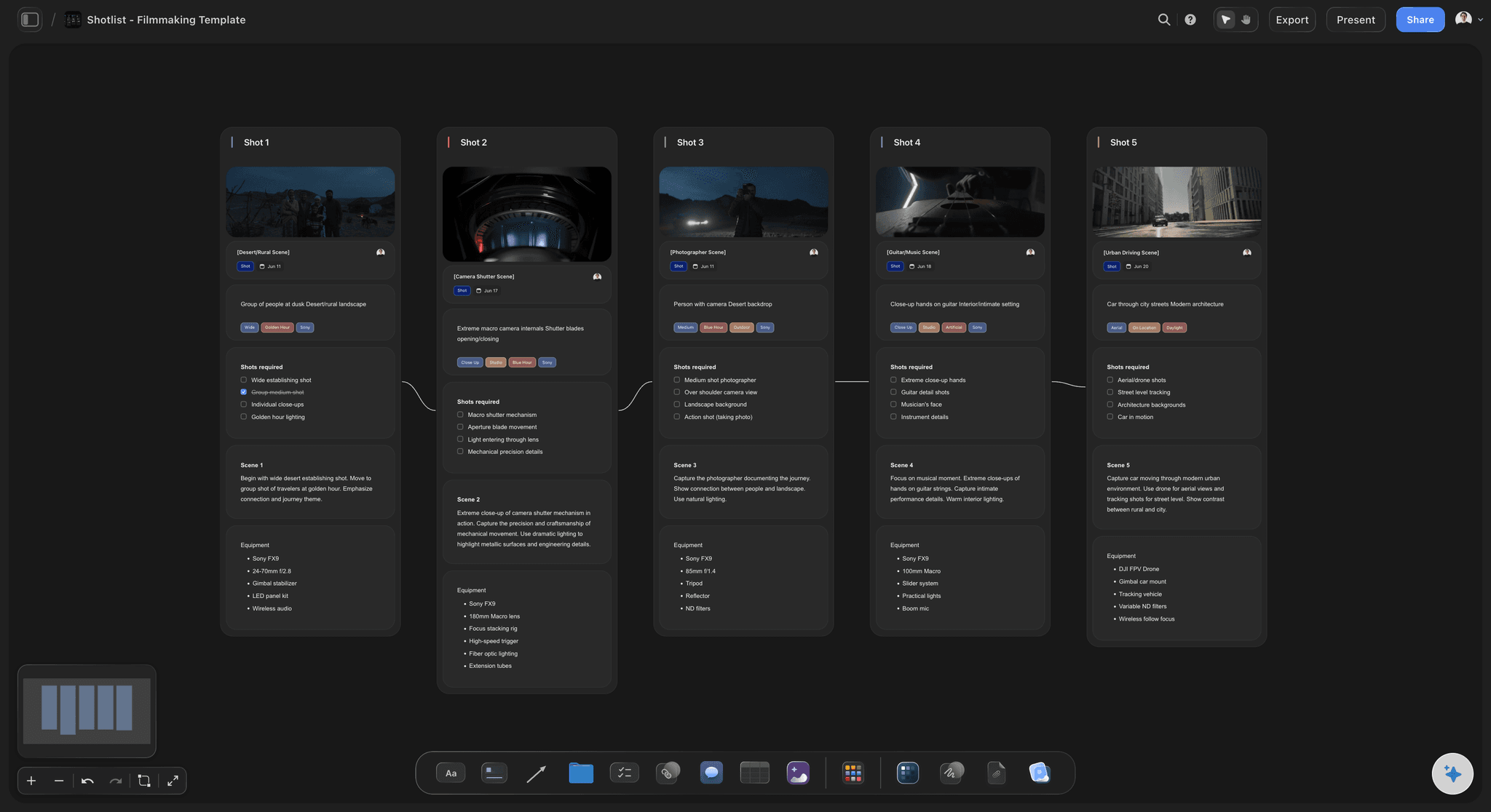
The shot list stays with the frames
Shot list beside the storyboard
Each shot sits next to the frame it covers, with angle, lens, and movement in view, then you can carry it into StudioBinder when the plan locks.
See shot list software →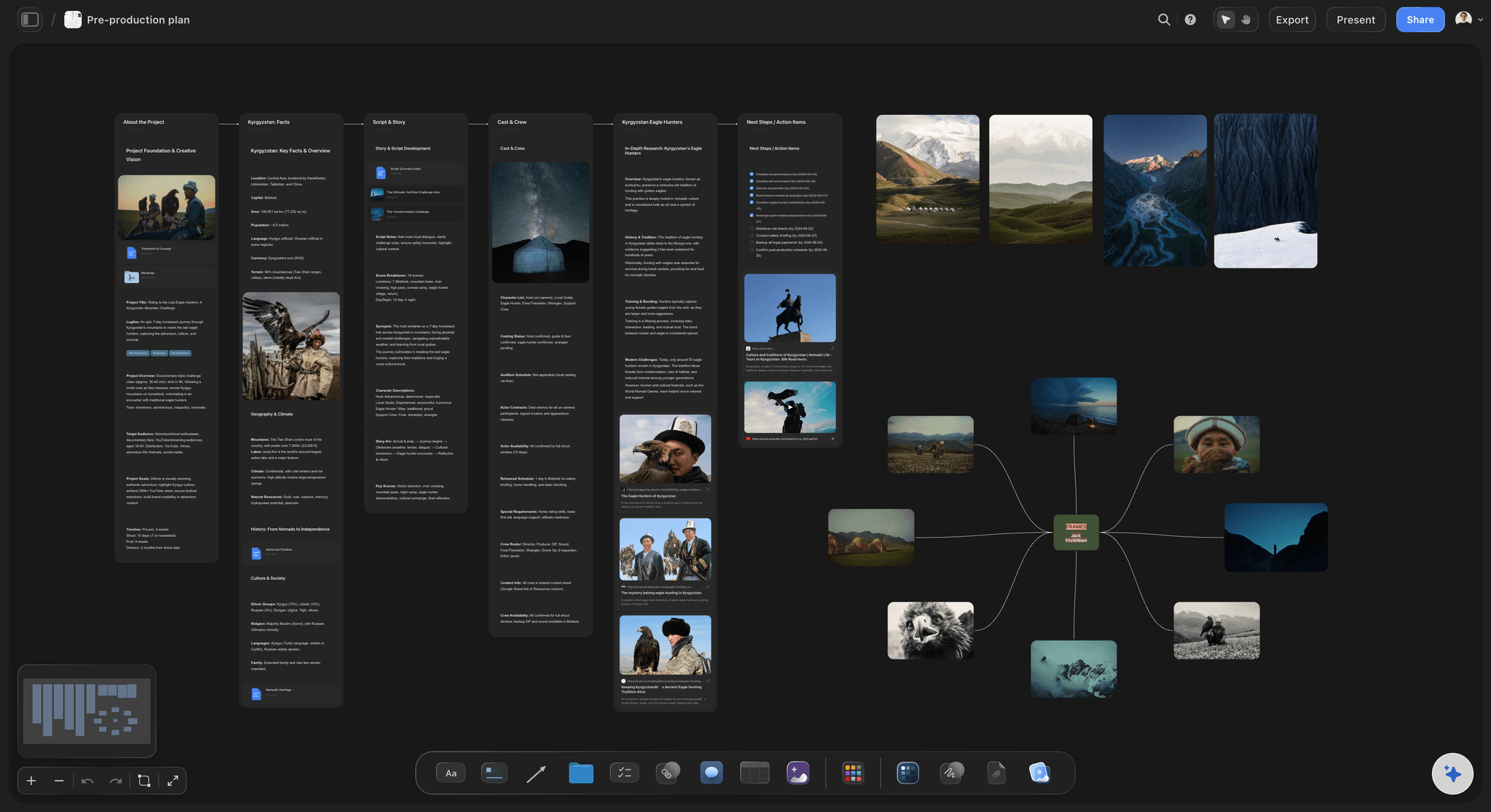
No object cap
Plan a whole shoot on one canvas
A feature's worth of boards fits on one infinite canvas with no object cap and no expiry.
See pre-production tools →A free plan is coming before the end of 2026.
Storyflow is paid-only during early access, with Plus starting at $7.99 a month. The free plan launching before the end of 2026 will include:
Unlimited boards on an infinite canvas, no object cap
Basic AI usage to board scenes and build shot lists
3 starter frameworks built in
20 file uploads for scripts, references, and stills
Built for people with taste
Made for the thinking that comes before the call sheet.
Storyflow is an AI-native canvas, so the visual side of pre-production is drafted and connected.
Reference that stays live
A lookbook the whole shoot reads from
Pull frames from anywhere: Grab stills from YouTube and Vimeo and drop in scouts and wardrobe.
Group the look by scene: Cluster references by sequence so the palette and mood read at a glance.
The mood informs the plan: Keep the moodboard beside the shot list it shaped, not in a separate file.
AI that reads the board
Coverage that matches the look
Reads your active board: New frames and shots match the look and tone you have already set.
Works from your script: Point it at a treatment or scene notes for the storyboard to follow.
Re-prompt to refine: Ask for a wider establishing shot or more coverage and it reworks the frames.

Beat sheet to shot list
Break the story down on the canvas
Beats before boards: Lay the story out as beats, then expand them into a shot list and storyboard.
Shots beside their frames: Reordering is a drag, not a re-typed record, and it stays in step with the boards.
One board, no cap: A feature's worth of beats, shots, and frames fits on one canvas.
Ready to hand off
From boards to a plan you can share
Share view-only: A director or client walks the whole board in the browser without an account.
Export for the deck: Export the canvas as a clean image or PDF for a treatment or pitch.
Hand off to StudioBinder: Take a locked shot list and plan into StudioBinder for the schedule and call sheets.
Explore templates for your project
Every template opens as a real, editable board on the infinite canvas. Pick the closest fit and make it your own.
Pre-Production
Pull the brief, script, shot list, and moodboard into one pre-production hub so the whole shoot is planned in one place.
One app instead of five
Storyflow vs StudioBinder, Celtx, and Milanote.
A fair look: StudioBinder owns the production paperwork, Storyflow owns the visual thinking that comes first.
Storyflow
Recommended
Unlimited projects, no board caps
AI boards the scene from a prompt or script
Moodboard, storyboard, and shot list on one canvas
Infinite visual canvas
Formal call sheets, scheduling, and crew management
StudioBinder
Unlimited projects, no board caps
AI boards the scene from a prompt or script
Moodboard, storyboard, and shot list on one canvas
Infinite visual canvas
Formal call sheets, scheduling, and crew management
Celtx
Unlimited projects, no board caps
AI boards the scene from a prompt or script
Moodboard, storyboard, and shot list on one canvas
Infinite visual canvas
Formal call sheets, scheduling, and crew management
Milanote
Unlimited projects, no board caps
AI boards the scene from a prompt or script
Moodboard, storyboard, and shot list on one canvas
Infinite visual canvas
Formal call sheets, scheduling, and crew management
What creators are saying
Join early creators getting structured workspaces and AI that remembers their projects
“Storyflow has sped up my workflow by at least 3x, which means more flow state and more projects I can actually ship. It truly changed the way me and my team create.”

Reilin Joey
Director & YouTuber
“One prompt gets me a structured board. But the tactics are my favorite. I run my YouTube scripts through them and my intros and retention got better. It's amazing.”

Justkay
YouTuber & Freelance Filmmaker
“I used to juggle five apps to plan a project. Now I describe what I am making and get boards, lists, and a schedule. All in one place.”

George
@fernwehchronicles
StudioBinder alternative, answered.
What filmmakers ask about switching to Storyflow.
For the visual side of pre-production, yes. Storyflow puts the moodboard, storyboard, and shot list on one AI canvas and drafts them from a prompt. It does not do formal call sheets, scheduling, or crew management the way StudioBinder does, so many filmmakers use Storyflow for the creative thinking and StudioBinder for the paperwork.
Not during early access. Storyflow is paid-only right now, with Plus starting at $7.99 a month billed annually ($9.99 month-to-month) for unlimited boards, no object cap, and basic AI usage. A free plan is planned before the end of 2026, and anyone a paid member invites to a board joins free today.
StudioBinder is a structured production-management suite for call sheets, scheduling, and crew. Storyflow is an infinite AI canvas for the visual thinking that comes first, where the moodboard, storyboard, and shot list sit together and the AI boards a scene from a prompt.
Yes. Lay out storyboard panels in sequence, keep shot notes like camera, lens, and movement beside each frame, and build a shot list next to the boards. The AI can draft a first pass from your scene or treatment, and you can grab reference stills from YouTube and Vimeo.
Not the formal, structured version StudioBinder is built for. Storyflow can build a call sheet and a schedule as boards on the canvas, but for stripboard scheduling and crew management on a working production, StudioBinder is the better pick.
When you need formal call sheets, stripboard scheduling, contact and crew management, and a structured production system for a working set. Storyflow is for the visual pre-production thinking that comes first, and plenty of filmmakers use it alongside StudioBinder.
No. Storyflow runs in your browser. Sign up, open a board, and start planning on any device.
Do the visual thinking first.
Set the look, board the coverage with AI, and keep it all on one canvas.