
Site plans that look finished from day one
Settle the structure
before you design a pixel.
Describe the site and AI lays out a sitemap and page cards on an infinite canvas. Drag the structure around, pin competitor screenshots and references beside it, and write the actual page copy in the built-in document editor.


Creatives working for these brands already got early access
- Red Bull
- Canon
- Artlist
- Porsche
See how easy it is to get started
Watch a real project come together, from a blank board to a finished plan, clicked through step by step.
Start from a ready-made template
Pick a board to see what you can build, then let AI fill it in. Every template is a real, editable starting point on the same infinite canvas.

Website Plan
Map your site's pages, structure, and content in one plan before you build.
What is a website planner?
A website planner is a tool for deciding what a website is made of and how it fits together, before anybody opens a design tool. Storyflow is an AI visual workspace that plans a website before the build on one infinite canvas: a sitemap the AI drafts, page cards you drag into order, competitor screenshots and references, and page copy written in the built-in document editor. A planner holds the site's goals, the sitemap, what each page is supposed to do, the content that has to be written and by whom, and the routes visitors take from landing to converting. It is the stage of a web project where decisions are still cheap.
The expensive mistakes on a website project almost all happen here, and almost none of them are visual. A sitemap that mirrors the company's internal departments instead of how customers look for things. Pages nobody can explain the purpose of. A navigation label that means something to the founder and nothing to a visitor. Twelve pages of copy that were assumed to exist and were never assigned. Those problems cost a rebuild when you find them in a design file, and an afternoon when you find them on a planning board.
Storyflow is an AI-native infinite canvas built for that stage. Describe the site in a prompt and the AI lays out a sitemap with page cards, sections, and a starting structure. Then you drag the pages into a hierarchy that actually reflects how people search, pin competitor screenshots and reference sites right next to the pages they inform, mark who owns each piece of content, and write the real page copy in the built-in document editor on the same canvas rather than in a separate doc that drifts out of date.
Planning a website usually means working across six connected layers: goals and audience (what the site is for commercially and who it has to serve), sitemap and information architecture (the page hierarchy and the navigation labels visitors read), page-level intent (what each page must do, what it must say, and what the one action on it is), content inventory and ownership (every page's copy, images, and assets with a named owner and a status), user journeys (the routes from entry point to conversion, and the dead ends), and visual direction (references, competitor screenshots, and the tone the design has to hit). Storyflow keeps all six on one canvas, which is what stops the plan from fragmenting across a spreadsheet, a doc, and a folder of screenshots.
Ultra fast from brief to board
From a rough idea to a structure the designer can build from.
No project template to configure, no spreadsheet to maintain. Describe the site and start moving pages around.
01
Open a canvas
Sign up in seconds. No download. Your infinite website planning canvas opens in the browser.
02
Describe the site
Type what the business does, who the site is for, and roughly what it needs. The AI lays out a sitemap with page cards and sections, so you start from a draft structure rather than a blank page.
03
Move the structure until it works
Drag pages into a hierarchy that matches how people actually look for things. Rename navigation labels, split or merge pages, mark the purpose and the primary action for each one, and draw the journeys between them.
04
Fill it with content and hand it over
Pin references and competitor screenshots beside the pages they inform, write the copy in the built-in document editor, assign owners, then share a view-only link with the designer, the developer, or the client.
The whole site, visible and movable.
Sitemap, page intent, content, journeys, and references on one infinite canvas.
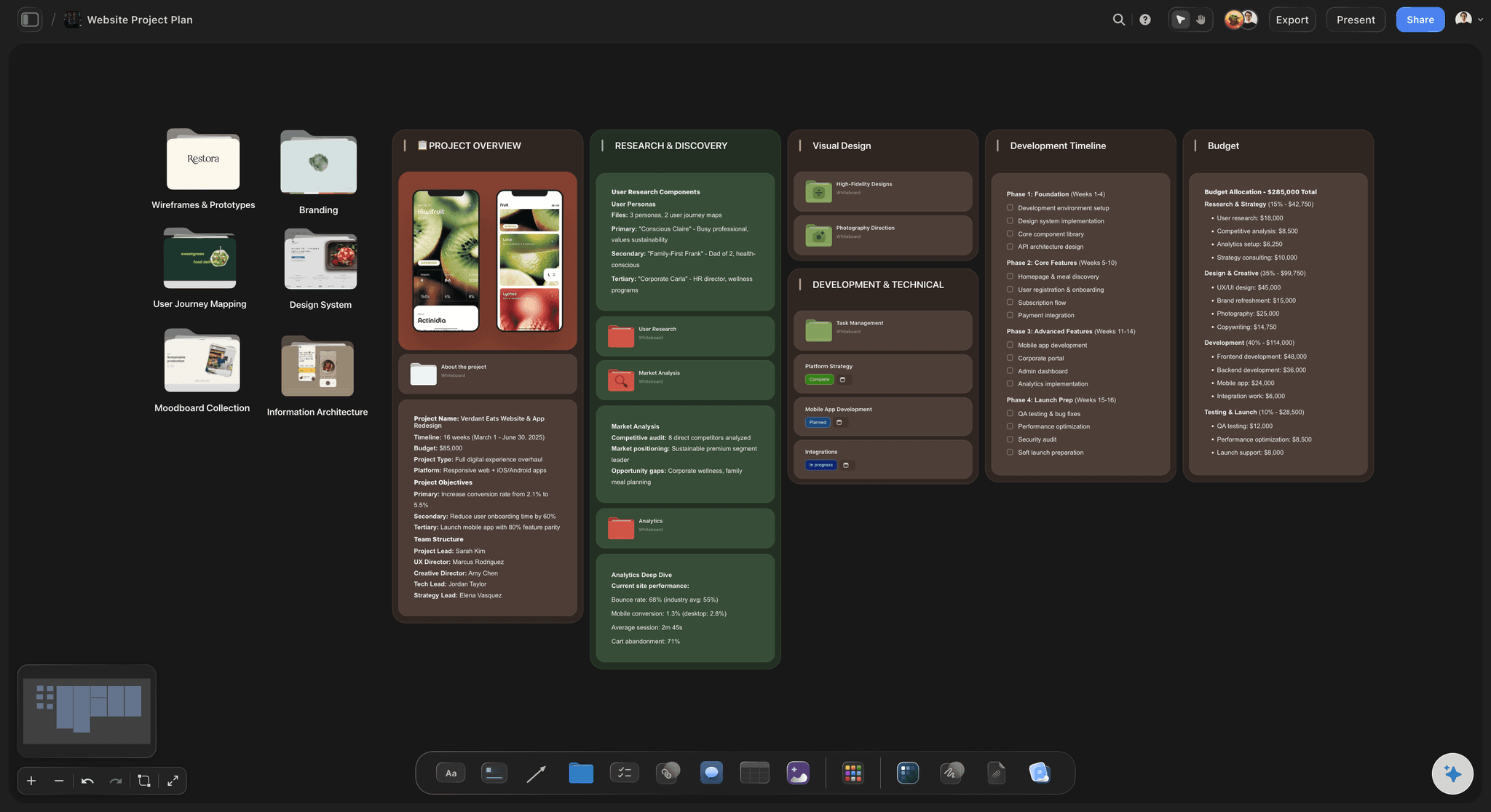
AI drafts a sitemap and page cards from a description
Start from a structure, not a blank page
Describe the business and the audience and the AI lays out a sitemap with page cards, sections, and suggested navigation. Arguing with a draft structure is far faster than inventing one from nothing.
See the AI sitemap generator →
Drag pages into a hierarchy that matches real behaviour
Rearranging the site is the whole job
Most bad navigation is a structure problem, not a design problem. Page cards move with a drag, so you can try services as three pages instead of one and immediately see what it does to the menu, rather than finding out after the build.
Explore the wireframe tool →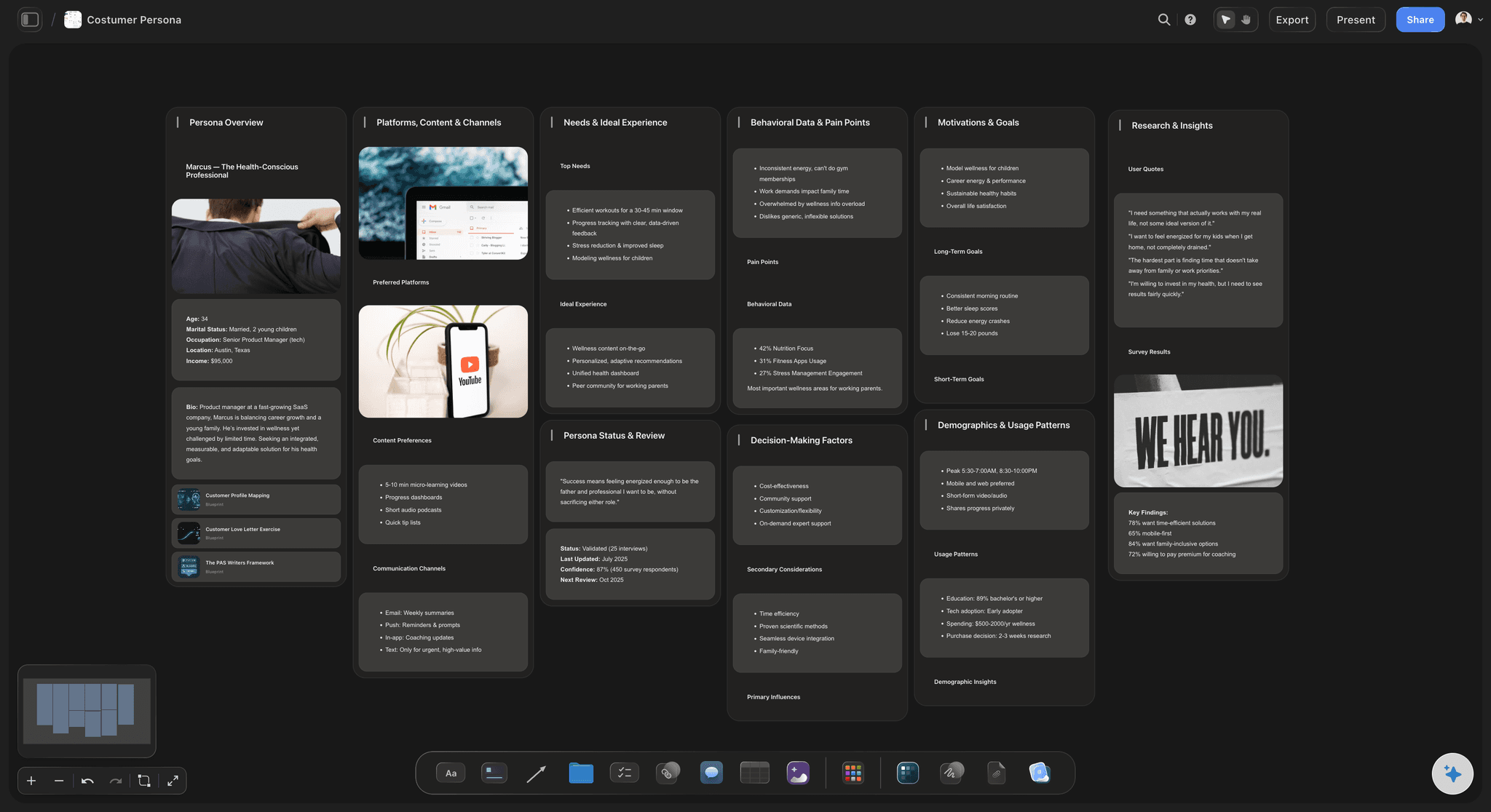
Journeys drawn across the pages they run through
See the route, not just the map
Draw the path from a search result to a converted enquiry across the actual page cards. A journey that needs five clicks or passes through a page with no next step becomes obvious the moment you draw it.
See the user journey map →
References, screenshots, and copy on the same surface
Keep the whole plan in one place
Pin competitor screenshots, brand assets, and reference sites beside the pages they inform, and write the actual page copy in the built-in document editor on the canvas. Nothing lives in a separate doc that quietly goes stale.
Try the design planning tool →Unlimited boards. No object cap.
Open a canvas, describe the site, and start planning. Storyflow is paid-only during early access, with plans from $9.99 a month, and a Free plan launches before the end of 2026.
Unlimited website planning boards on an infinite canvas
Basic AI usage to generate sitemaps and page cards from prompts
Built-in document editor for page copy on the same board
Share view-only links with clients, designers, and developers
Built for people with taste
More than a sitemap in a diagram.
A diagram shows the boxes. A plan has to hold the purpose, the copy, the owner, and the reference too.
Goals, sitemap, page intent, content, journeys, direction
Work across every layer of the plan
Sitemap and navigation: Lay the page hierarchy out as cards you can drag, with the navigation labels visitors will actually read. Seeing the whole tree at once is how you catch the third-level page that should have been in the main menu.
Page-level intent: Give every page card a job: who it is for, what it has to say, and the single action it drives. Any page you cannot write that down for is a page you probably should not build.
Content inventory and owners: Track every page's copy, images, and assets with a named owner and a status. The most common reason a website launch slips is content nobody was ever asked to write.
User journeys across the pages: Draw the routes from entry point to conversion straight across the page cards. Dead ends, loops, and pages with no onward step show up before they cost a redesign.
AI that can see the site you have already planned
Plan with an AI that knows the project
Prompt your way to a first structure: Describe the business, the audience, and the goal and the AI lays out a sitemap with page cards and sections. It gives you something specific to react to, which is a much faster start than a blank canvas.
It keeps the whole board in context: Ask it to suggest the pages a services section is missing, to draft the H1 and subhead for a page card, or to sanity-check the navigation labels. Because it can see what you have already built, the suggestions fit this site rather than a generic one.
Iterate without losing your work: Re-prompt as many times as you like. Pages you have already written, ordered, and assigned stay exactly where they are while the AI builds around them.
Copy, references, and competitor screenshots on one canvas
Write the site while you plan it
A document editor on the board: Open a document beside a page card and write the real copy there, with the structure visible next to it. Page copy written against a defined purpose reads very differently from copy written into an empty doc.
Competitor screenshots beside the page they inform: Drop in screenshots of competitor homepages, pricing pages, and case studies and place them next to your equivalent page. The comparison is only useful when it is in the same eyeline as your plan.
Brand and visual direction in the same eyeline: Pin logos, palettes, type samples, and reference sites on the canvas. Drag in PDFs, images, and links, or grab frames from YouTube and Vimeo, so the direction is agreed before the design starts.

Share with a client, a designer, or a developer
Get the plan signed off before the build starts
View-only links for client sign-off: Send a link and the client sees the whole site plan in a browser with no account. Approving a structure they can see is far more reliable than approving a sitemap pasted into an email.
Plan together as a team: Strategists, designers, writers, and developers can work on the same canvas, so a website project has one plan rather than four versions of it.
Export for a brief or a proposal: Export the board as a high-quality image or PDF to drop into a proposal, a scope document, or a design brief. Handing over a structure beats handing over a bullet list of pages.
Explore templates for your project
Every template opens as a real, editable board on the infinite canvas. Pick the closest fit and make it your own.
Website Plan
Map your site's pages, structure, and content in one plan before you build.
One app instead of five
Storyflow vs Figma, Whimsical, and Notion.
Every tool here is genuinely good at something. Here is where they differ so you can pick the right one for the stage you are at.
Storyflow
Recommended
AI drafts the sitemap from a description
AI uses your whole board as context
Infinite canvas for structure and journeys
Page copy written on the same canvas
References and screenshots beside the pages
High-fidelity UI design and final build
Figma
AI drafts the sitemap from a description
AI uses your whole board as context
Infinite canvas for structure and journeys
Page copy written on the same canvas
References and screenshots beside the pages
High-fidelity UI design and final build
Whimsical
AI drafts the sitemap from a description
AI uses your whole board as context
Infinite canvas for structure and journeys
Page copy written on the same canvas
References and screenshots beside the pages
High-fidelity UI design and final build
Notion
AI drafts the sitemap from a description
AI uses your whole board as context
Infinite canvas for structure and journeys
Page copy written on the same canvas
References and screenshots beside the pages
High-fidelity UI design and final build
What creators are saying
Join early creators getting structured workspaces and AI that remembers their projects
“Storyflow has sped up my workflow by at least 3x, which means more flow state and more projects I can actually ship. It truly changed the way me and my team create.”

Reilin Joey
Director & YouTuber
“One prompt gets me a structured board. But the tactics are my favorite. I run my YouTube scripts through them and my intros and retention got better. It's amazing.”

Justkay
YouTuber & Freelance Filmmaker
“I used to juggle five apps to plan a project. Now I describe what I am making and get boards, lists, and a schedule. All in one place.”

George
@fernwehchronicles
Website planning questions, answered.
What to decide before you design, how to structure a site, and where the AI actually helps.
Start with what the site is for commercially and who it has to serve, because every later decision is judged against that. Then draft a sitemap and drag it into a hierarchy that matches how people search, not how the company is organised. Give each page card a purpose, an audience, and one primary action. Build a content inventory with a named owner and a status for every page. Draw the journeys from entry point to conversion across the pages. Only then gather visual direction and hand it to design. Storyflow holds all six of those layers on one canvas so nothing gets planned in isolation.
It depends on which part you find hard. Whimsical is excellent if you mainly need a fast, clean site diagram or a quick wireframe. Notion is strong if your problem is tracking copy status and owners page by page. Figma is where you should be once you are designing real screens, and FigJam covers loose planning next to that work. Storyflow is an AI-native infinite canvas built for the layer before design, where the sitemap, page intent, content, journeys, and references need to sit together and be argued about. If your structure keeps changing and your plan is scattered across three tools, a canvas wins.
Yes, and it is the cheapest hour you will spend on the project. The expensive mistakes on a website are structural: a navigation that mirrors internal departments, pages with no defined purpose, journeys that dead end, and copy nobody was assigned to write. Every one of those is a five-minute fix on a planning board and a rebuild once it exists in a design file or a CMS. Designing without a plan also tends to produce beautiful pages filled with placeholder text, which is exactly when a project stalls for three weeks waiting on content.
It builds a first draft you then argue with, which is the useful version. Describe the business, the audience, and what the site needs to achieve, and the AI lays out a sitemap with page cards, sections, and suggested navigation. Because it keeps your whole board in context, you can then ask it to fill a gap in the services section, draft a page's H1 and subhead, or sanity-check the labels, and the suggestions fit this site. The judgment about what the site should be stays with you. The AI removes the blank page, not the thinking.
Yes, and it is one of the strongest use cases. Card out every page of the existing site, mark each one keep, merge, rewrite, or kill, and lay the proposed new structure directly beside the old one. Seeing both at the same time is how you catch the pages that need redirects, the content that would be orphaned, and the section everyone assumed someone else was rewriting. It also makes the case to a stakeholder far more concrete than a spreadsheet, because they can see what is disappearing and what is replacing it.
Figma genuinely owns high-fidelity UI design and the final visual build, and nothing here competes with that. The difference is stage. Storyflow is the layer before, where you are still deciding what pages exist, what each one is for, who writes the content, and how visitors move through the site. FigJam can hold a loose sitemap, but the copy, the content owners, and the reference material usually end up somewhere else. Most teams plan in Storyflow, agree the structure, then design the approved pages in Figma. The two are sequential rather than alternatives.
Not during early access. Storyflow is paid-only right now, with plans starting at $9.99 a month, and a Free plan for solo use launches before the end of 2026. Anyone a paid member invites to a board joins free today, so a client, a developer, or a copywriter can join and contribute without paying anything. If you need a free option this minute, Notion's free tier can hold a page-by-page content list, and a wall of sticky notes is still a perfectly good way to argue about a sitemap for an afternoon.
Yes. There is a built-in document editor, so you can open a document beside a page card and write the real copy on the same canvas as the structure. That matters more than it sounds: copy written against a page whose purpose and primary action are defined is much sharper than copy written into an empty doc. You can also assign an owner and a status per page, so the copy that is missing is visible rather than assumed. Many teams write here and paste the approved text straight into the CMS.
Yes, and doing it on top of the sitemap rather than in a separate diagram is the point. Draw the route from a search result or an ad through the pages a visitor actually touches to the moment they convert. Because the journey runs across the real page cards, a route that needs five clicks, passes through a page with no onward action, or skips the page you built the whole campaign around becomes obvious immediately. You can run several journeys for different audiences on the same board and see where they diverge.
Build a content inventory before anyone starts writing. For every page card, record what copy is needed, what images or assets it depends on, who owns it, and where it currently stands. Content that nobody was explicitly asked to produce is the single most common reason a website launch slips, and it is invisible until the design is done and the pages are empty. On a canvas you can see the whole inventory at once, which makes an unassigned page or a stalled draft impossible to miss in a status meeting.
Yes. Share a view-only link and they open the whole plan in a browser with no account, which makes structural sign-off far more reliable than approving a sitemap pasted into an email. If you want them to contribute, invite them to the board and they can work on the canvas with you, and anyone a paid member invites joins free. You can also export the board as a high-quality image or PDF to drop into a proposal, a scope document, or a design brief.
At minimum, a page card should answer four things: who this page is for, what question it answers, the one action it is trying to drive, and who is writing it. Add the key messages or sections in rough order and any reference example you are working from. That is enough for a designer to lay the page out and a writer to draft it without guessing. Pages you cannot fill that in for are usually pages that exist because a competitor has one, and cutting them at the planning stage is free.
More from Storyflow
Design brief
AI sitemap generator
Wireframe tool
User journey map
Free user flow diagram
Design planning tool
Service blueprint
UX storyboard
For web designers
For UX designers
Best website planning tools 2026
Content audit template
Brand messaging framework
Connect Claude to Storyflow
Website project plan
Website storyboard
Get the structure right before anyone opens a design tool.
Open a canvas, describe the site, and let AI draft the first sitemap. No download.