
A workspace with taste, for people with taste
Map frontstage and backstage
on one infinite canvas.
Storyflow is a service blueprint maker on a truly infinite canvas. Lay out what the customer does across the journey, the frontstage they see, the backstage staff actions they never see, and the support processes underneath, with the lines of interaction and visibility drawn in. Describe the service once and AI drafts the first pass for you to reshape.


Creatives working for these brands already got early access
- Red Bull
- Canon
- Artlist
- Porsche
See how easy it is to get started
Watch a real project come together, from a blank board to a finished plan, clicked through step by step.
Start from a ready-made template
Pick a board to see what you can build, then let AI fill it in. Every template is a real, editable starting point on the same infinite canvas.

Design Planner
Plan a design project from brief to delivery, with references, tasks, and feedback side by side.
What is a service blueprint, and how do you build one?
A service blueprint is a map of everything it takes to deliver a service, seen top to bottom in swimlanes. Along the top run the customer actions across the journey. Below them sits the frontstage: the people, screens, and touchpoints the customer actually interacts with. Under that comes the backstage: the staff actions and handoffs the customer never sees. At the bottom are the support processes and systems that make the rest possible. A service blueprint extends a user journey map by adding everything happening behind the counter, so a smooth moment for the customer and the scramble that produces it sit in one view.
You build one by drawing the horizontal lanes and the two lines that divide them. The line of interaction sits between the customer and the frontstage, marking every point where a person meets your service. The line of visibility sits between frontstage and backstage, separating what the customer sees from what they do not. Work left to right along the customer's journey, and for each step fill the lanes downward: what the customer does, what they touch, which staff member or system responds behind the scenes, and which support process it leans on. Vertical connectors tie a single moment together from top to bottom, so a failure in a support system traces straight up to the customer experience it breaks.
Most tools make that layout a fight. A slide of boxes runs out of room past a few steps, a spreadsheet flattens the swimlanes into rows nobody can read across, and a rigid template cracks the moment your service has more lanes than it planned for. Storyflow builds the blueprint on an open infinite canvas where every action, touchpoint, and support process is a real card you drag, recolor, and regroup, and the lines of interaction and visibility are yours to place. AI can draft the first pass from a journey or a brief, so you are editing a real blueprint in minutes instead of ruling an empty grid, and once it is agreed you can turn the fixes into a plan on the same canvas.
Ultra fast from brief to board
Build a service blueprint in four steps.
Start from a blank canvas or a single prompt. Either way the blueprint stays yours to reshape.
01
Start your canvas
Start in the browser. Nothing to install, just an infinite canvas ready for the first customer action.
02
Lay out the swimlanes
Add the customer actions across the top and the frontstage, backstage, and support lanes underneath, or describe the service once in the AI chat and let Storyflow draft the lanes for you.
03
Fill the lanes and draw the lines
Under each customer action, map the touchpoints, staff actions, and support processes as cards, then place the line of interaction and the line of visibility to separate what the customer sees from what they do not.
04
Mark the fixes and share
Flag the fail points and handoffs that need work, share a view-only link with the team, or export the blueprint as an image or PDF for the readout.
Service blueprinting that does not dead-end at the diagram.
Keep the swimlanes and the lines of interaction and visibility you know. Lose the cramped slide, the rigid template, and the blueprint nobody opens twice.

Swimlanes on a canvas
Frontstage and backstage visible at once
Lay customer actions across the top and stack frontstage, backstage, and support processes in lanes underneath. Every cell is a card you drag and recolor, and the line of interaction and line of visibility are yours to place, so a moment the customer sees lines up with the backstage work that delivers it.
See the visual collaboration tool →
AI drafts the first pass
Describe the service, get a starting blueprint
Tell the AI chat about the service and the journey, and it lays out a full board: customer actions across the top with frontstage, backstage, and support processes underneath. It reads your current canvas as context, so it builds on the journey map or brief you placed instead of a generic template.
See the mind mapping tool →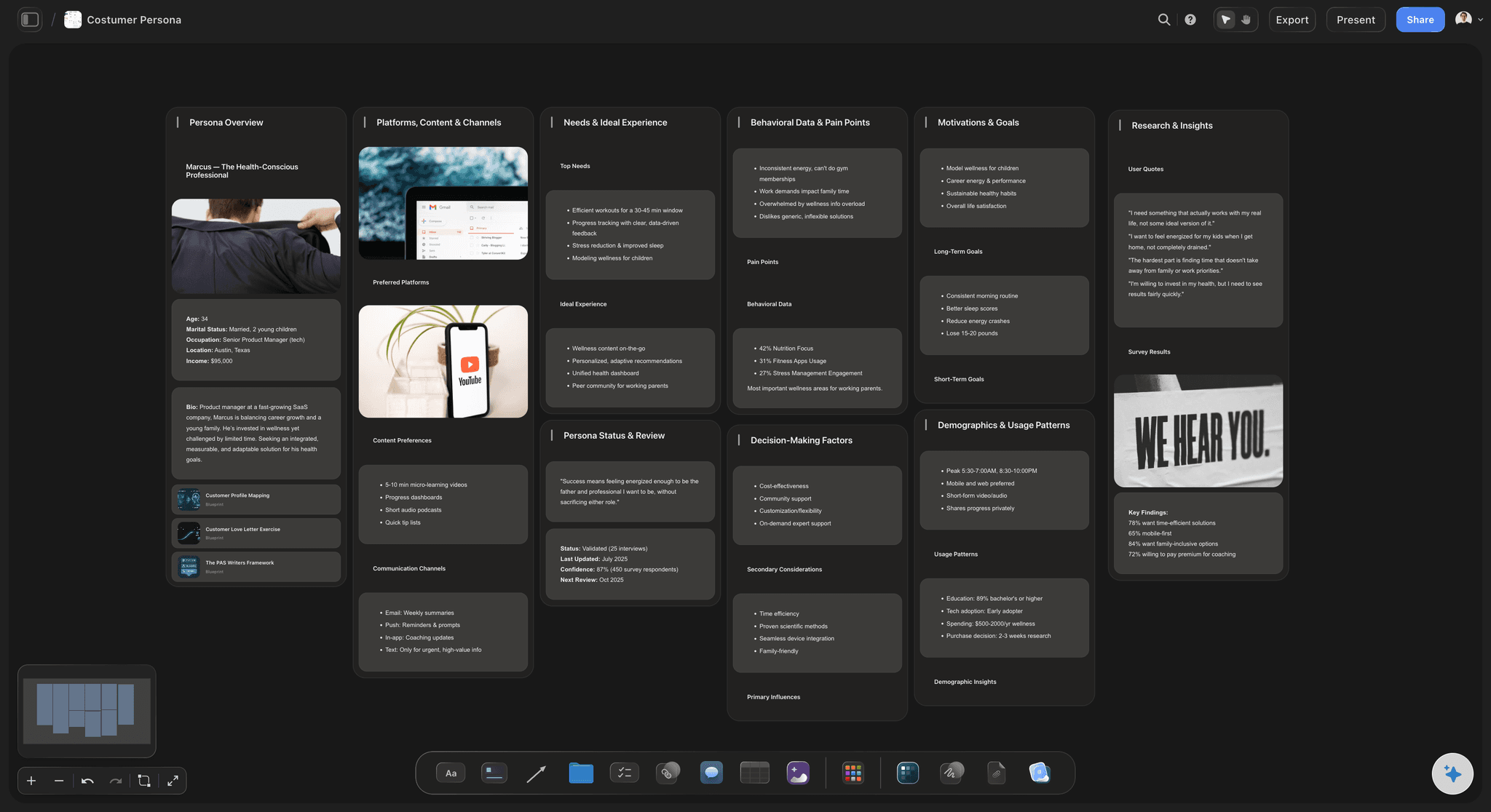
Grounded in a real customer
Blueprint the service for a named persona
Build the customer persona on the same canvas and keep it beside the blueprint it belongs to. Every frontstage touchpoint and backstage handoff is grounded in who the customer actually is, not an average nobody in the room recognizes.
See the customer persona generator →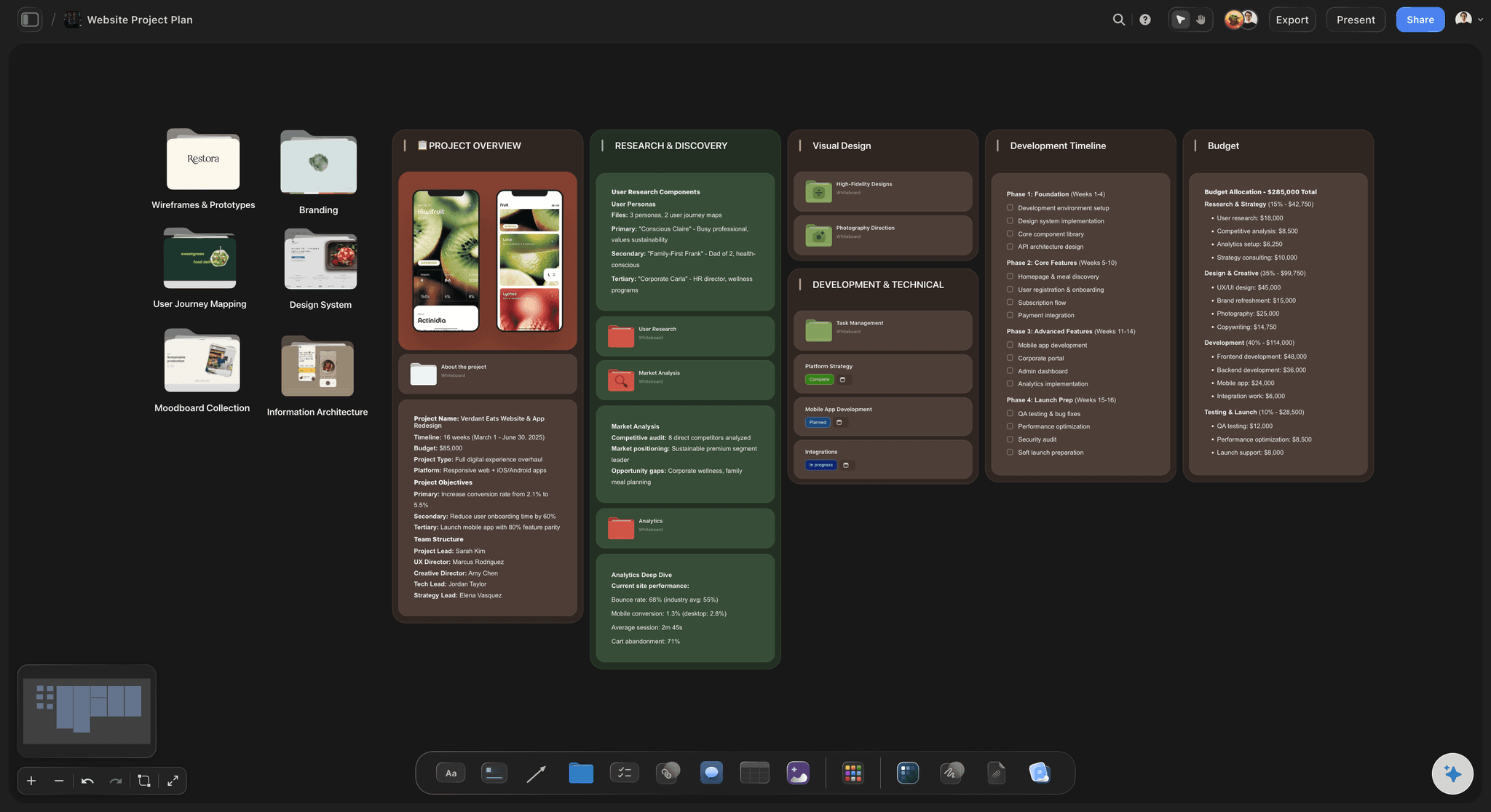
Room for every lane
An infinite canvas, no object cap
A real service has more steps and support processes than a slide can hold. With a truly infinite canvas and no object cap, no backstage lane gets cut for space and the blueprint never runs into an edge.
See the infinite canvas →Plans start at $7.99 a month.
Open a board and start mapping the service. No object cap and no time limit, so a full frontstage-to-backstage blueprint never pushes you to upgrade mid-project.
Unlimited service blueprints with room for every lane
AI usage to draft frontstage, backstage, and support
Attach research notes, screenshots, PDFs, video, and links
Share the blueprint view-only, or invite collaborators free
Built for people with taste
Built for the way service designers actually work.
Lay out the swimlanes, draw the lines, tie the moments together, and hand off a blueprint the team can read.
Structure without a straitjacket
Swimlanes and lines that flex to the service
Customer actions across the top: Lay out the steps the customer takes, from first contact to resolution, as columns you add or reorder by dragging. The blueprint matches the real service instead of a fixed set of preset stages.
Frontstage, backstage, support underneath: Track touchpoints, staff actions, and support processes in their own lanes, so each customer step reads down the page as a full moment of delivery from what is seen to what powers it.
Lines of interaction and visibility: Place the line of interaction between the customer and frontstage and the line of visibility between frontstage and backstage, so what the customer sees and what they never see are unmistakable.
AI that reads the board
AI drafts the blueprint from your journey
First pass in minutes: Describe the service and the AI lays out customer actions with frontstage, backstage, and support processes underneath, so you start by editing a real blueprint instead of a blank grid.
Bring in your sources: Add up to five documents and three boards as context from the + menu, so a journey map, a research report, or a process doc shapes the lanes and handoffs the AI drafts.
Re-prompt to refocus: Ask for a digital-only channel, a support-desk lens, or a tighter set of steps. The AI reworks the blueprint while keeping the cards you already edited.
Grounded in real evidence
Personas and proof beside the blueprint
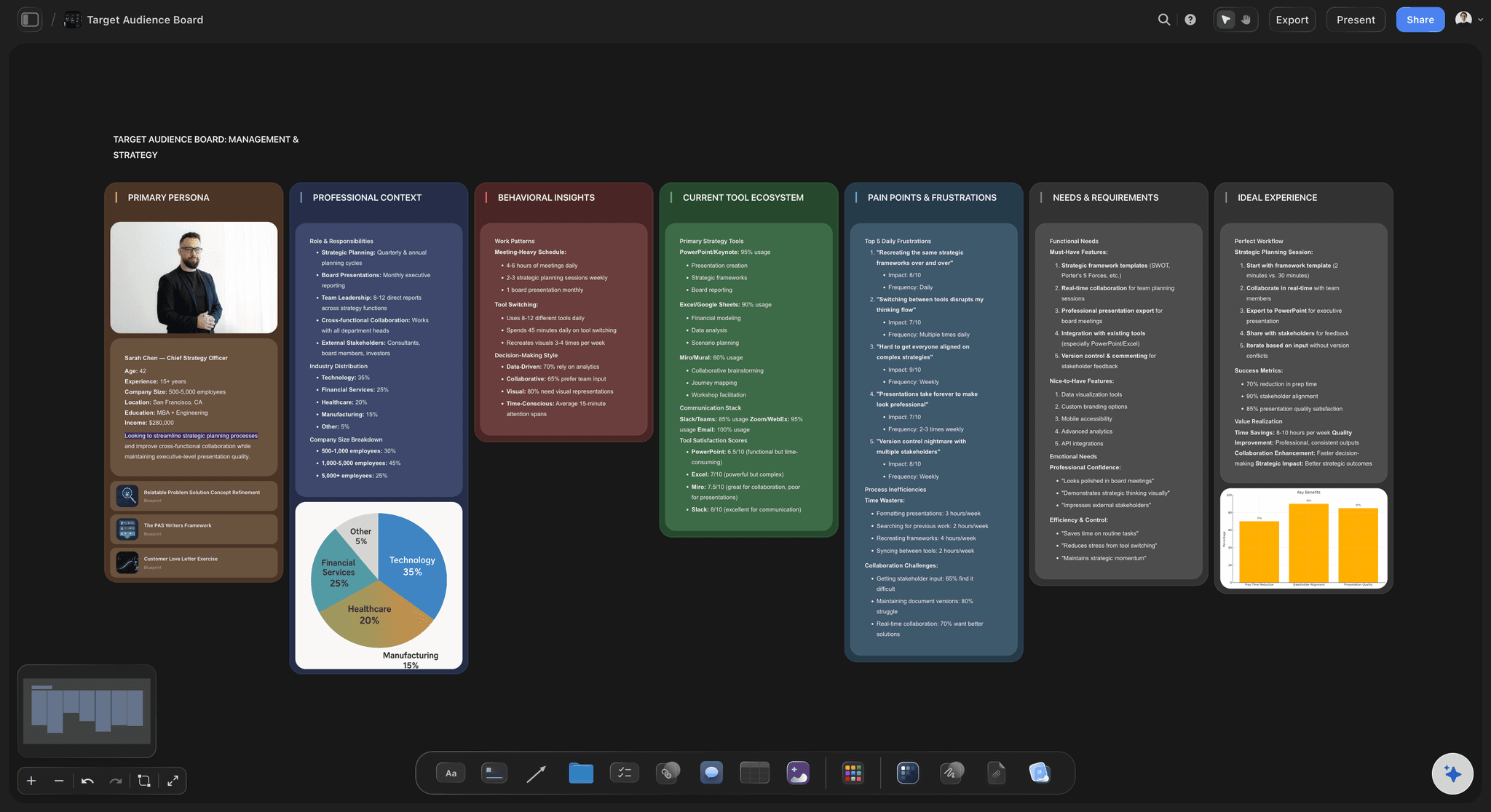
Blueprint a named persona: Build the persona on the same canvas and blueprint the service through their eyes, so the touchpoints and fail points belong to a real customer rather than an average.
Pin the evidence: Drop interview quotes, screenshots, PDFs, and links next to the step they support, so a fail point is backed by what a customer or a frontline staff member actually said.
Frame grabs from video: Pull stills from a service walkthrough on YouTube or Vimeo straight onto the blueprint, so a moment of friction is shown, not just described.
The blueprint is step one
From service blueprint to a real plan
Turn fail points into work: Convert the fail points and handoffs you flagged into a project plan, a content calendar, or a task board on the same canvas, with the AI carrying the fixes across.
Share the thinking: Send a view-only link so operations, product, or frontline staff can walk the whole service in the browser without an account, then invite collaborators to build it with you.
Export for the readout: Export the blueprint as a clean image or PDF for a stakeholder deck or a workshop readout in one step.
Explore templates for your project
Every template opens as a real, editable board on the infinite canvas. Pick the closest fit and make it your own.
Design Planner
Plan a design project from brief to delivery, with references, tasks, and feedback side by side.
One app instead of five
How Storyflow compares for service blueprinting.
Plenty of tools let you draw swimlanes. The question is how fast you get there and what the blueprint becomes.
Storyflow
Recommended
AI drafts a full service blueprint from your board
Truly infinite canvas with no object cap on any paid plan
Blueprint becomes a plan on the same canvas
View-only stakeholder links, no account to view
Miro
AI drafts a full service blueprint from your board
Truly infinite canvas with no free object cap
Blueprint becomes a plan on the same canvas
View-only stakeholder links, no account to view
FigJam
AI drafts a full service blueprint from your board
Truly infinite canvas with no free object cap
Blueprint becomes a plan on the same canvas
View-only stakeholder links, no account to view
Milanote
AI drafts a full service blueprint from your board
Truly infinite canvas with no free object cap
Blueprint becomes a plan on the same canvas
View-only stakeholder links, no account to view
What creators are saying
Join early creators getting structured workspaces and AI that remembers their projects
“Storyflow has sped up my workflow by at least 3x, which means more flow state and more projects I can actually ship. It truly changed the way me and my team create.”

Reilin Joey
Director & YouTuber
“One prompt gets me a structured board. But the tactics are my favorite. I run my YouTube scripts through them and my intros and retention got better. It's amazing.”

Justkay
YouTuber & Freelance Filmmaker
“I used to juggle five apps to plan a project. Now I describe what I am making and get boards, lists, and a schedule. All in one place.”

George
@fernwehchronicles
Service blueprinting questions, answered.
Everything people ask about service blueprints in Storyflow.
A service blueprint is a map of everything it takes to deliver a service, laid out in swimlanes. Across the top run the customer actions, and underneath sit the frontstage the customer sees, the backstage staff actions they do not, and the support processes that power both, divided by the line of interaction and the line of visibility. Storyflow builds this on an infinite canvas where every cell is a real card you can move, edit, and group.
A user journey map captures the customer's experience: their actions, touchpoints, emotions, and pain points. A service blueprint extends that map downward, adding the frontstage, the backstage staff actions the customer never sees, and the support processes underneath, so you see the delivery behind each moment. In Storyflow you can build the journey map first and turn it into a full blueprint on the same canvas.
Not during early access. Storyflow is paid-only for now: paid plans include unlimited blueprints, AI usage to draft frontstage, backstage, and support lanes, unlimited file uploads and view-only sharing, starting at $9.99 per month. A Free plan is planned before the end of 2026.
Both. You can start from a blank canvas and lay out the swimlanes, the lines of interaction and visibility, and every card entirely by hand, dragging and grouping yourself. The AI is there when you want it, to draft a first-pass blueprint from a prompt or a journey map, but the board is always yours to reshape.
You can start a blueprint by hand in seconds, or ask the AI to lay out the standard structure, customer actions across the top with frontstage, backstage, and support processes underneath, so you begin from a real board.
Miro and FigJam are strong, general whiteboards, and plenty of teams blueprint services on them. Storyflow adds an AI that drafts a full service blueprint from your current board as context, a truly infinite canvas with no object cap, and the ability to turn the blueprint into a real plan on the same surface. It is opinionated toward the thinking rather than a blank canvas.
Yes, and that is the point of a blueprint. Track the frontstage touchpoints, the backstage staff actions the customer never sees, and the support processes and systems underneath in their own lanes, divided by the line of visibility. Because everything is on one canvas, a failure in a support system traces straight up to the customer moment it breaks.
Yes. Share a view-only link so anyone can walk the full service in their browser without an account, invite collaborators to build it with you, or export the blueprint as an image or PDF. When it is agreed, turn the fail points and handoffs into a project plan or task board on the same canvas.
The service is in your head. Get it mapped, front and back.
Lay out the swimlanes by hand or from a prompt, draw the lines of interaction and visibility, and mark the fixes.