
Site plans that look finished from day one
Draw the journey
before you draw a page.
Every screen as a frame, every route between them as a line, and the copy that has to live on each one pinned underneath. Dead ends are cheapest to find here.


Creatives working for these brands already got early access
- Red Bull
- Canon
- Artlist
- Porsche
See how easy it is to get started
Watch a real project come together, from a blank board to a finished plan, clicked through step by step.
Start from a ready-made template
Pick a board to see what you can build, then let AI fill it in. Every template is a real, editable starting point on the same infinite canvas.

Website Plan
Map your site's pages, structure, and content in one plan before you build.
What is a website storyboard?
A website storyboard is a frame by frame map of a site before any of it is designed. Storyflow is an AI visual workspace that storyboards your website on one infinite canvas: every screen as a frame, the routes drawn between them, and the copy pinned beside each one. Each screen becomes a frame holding what that screen has to do, what it says, and what the visitor can do next, and the connections between frames show the routes people actually take through the site. It borrows the idea from film, where a storyboard exists to prove a sequence works before anyone spends a day shooting it, and the reason for borrowing it is identical: the expensive mistakes in a website are sequence mistakes, and they are almost free to fix at this stage.
It sits between a sitemap and a wireframe and does a job neither of them does. A sitemap is a hierarchy: it tells you what pages exist and how they nest, and it says nothing about how anyone moves. A wireframe is one screen's layout: it tells you where the elements sit and says nothing about what came before or after. The storyboard is the connective layer, and it answers the questions that cause most redesigns to disappoint. Where does someone land, what do they understand at that moment, what do they need next, and does the path they will actually take exist.
The failure it prevents is specific and extremely common. A site is designed page by page, each page is good, and the journey between them was never anyone's job. Someone arrives on a service page from an advertisement with no idea who the company is and the page assumes they read the homepage. The pricing page answers an objection that the case study three clicks earlier had already raised and left unanswered. There is a form nobody can reach without going backwards. None of these are page problems, which is why reviewing pages one at a time never surfaces them.
Storyflow is an AI-native infinite canvas, and a canvas is the natural surface for this because a storyboard is a shape rather than a list. Describe the site and the AI lays out the screens as frames with the obvious routes drawn between them. Then you do the real work: rearranging frames until the sequence makes sense, writing the actual headline for each one rather than a placeholder, pinning the reference sites and the content that has to appear, and drawing the paths a visitor takes rather than the paths the navigation offers.
Ultra fast from brief to board
From a page list to a journey you can walk.
No design tool, no prototype, no code. Frames and the lines between them.
01
Open a canvas
Sign up in seconds. No download. Your infinite storyboard canvas opens in the browser.
02
Describe the site
Type what the site is for and who it is for. The AI lays out the screens as frames with the obvious routes between them, so you begin with a draft to correct.
03
Walk the paths and fix the dead ends
Draw the route a visitor arriving from an advertisement takes, and the route someone comparing two options takes. Where a path runs out, you have found the page nobody scoped.
04
Hand it to whoever designs it
Send a view-only link to the designer, the client, or the developer, invite them onto the canvas, or export the storyboard as an image or PDF for the brief.
Frames, routes, copy, and reference on one board.
Everything the design brief needs, in the order a visitor will meet it.
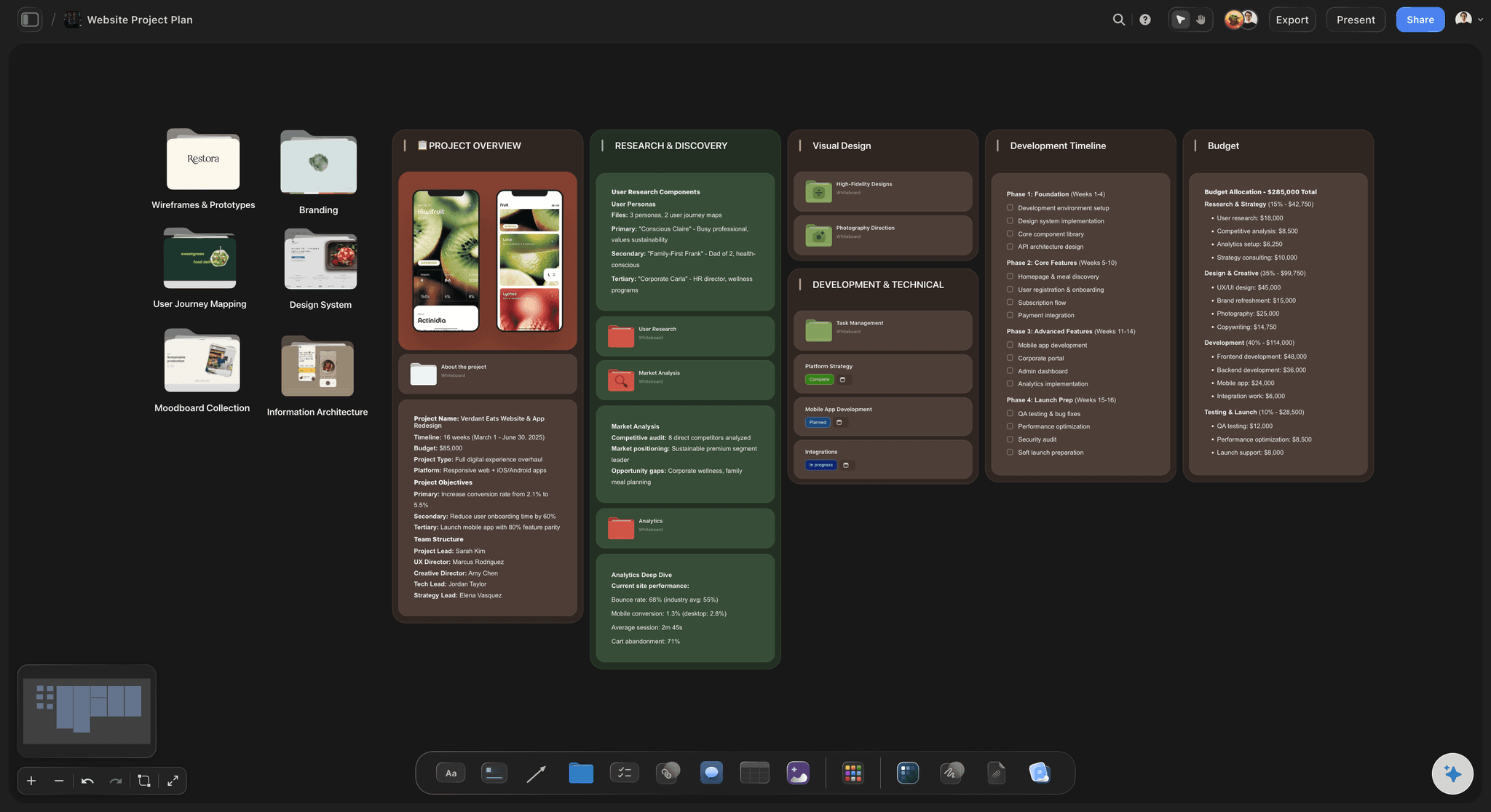
AI lays out the screens from a description of the site
Start from a drawn site, not a blank page
Describe what the site does and who it serves and the AI produces frames for each screen with routes between them. Rearranging a drawn structure is much faster than inventing one.
See the website planner →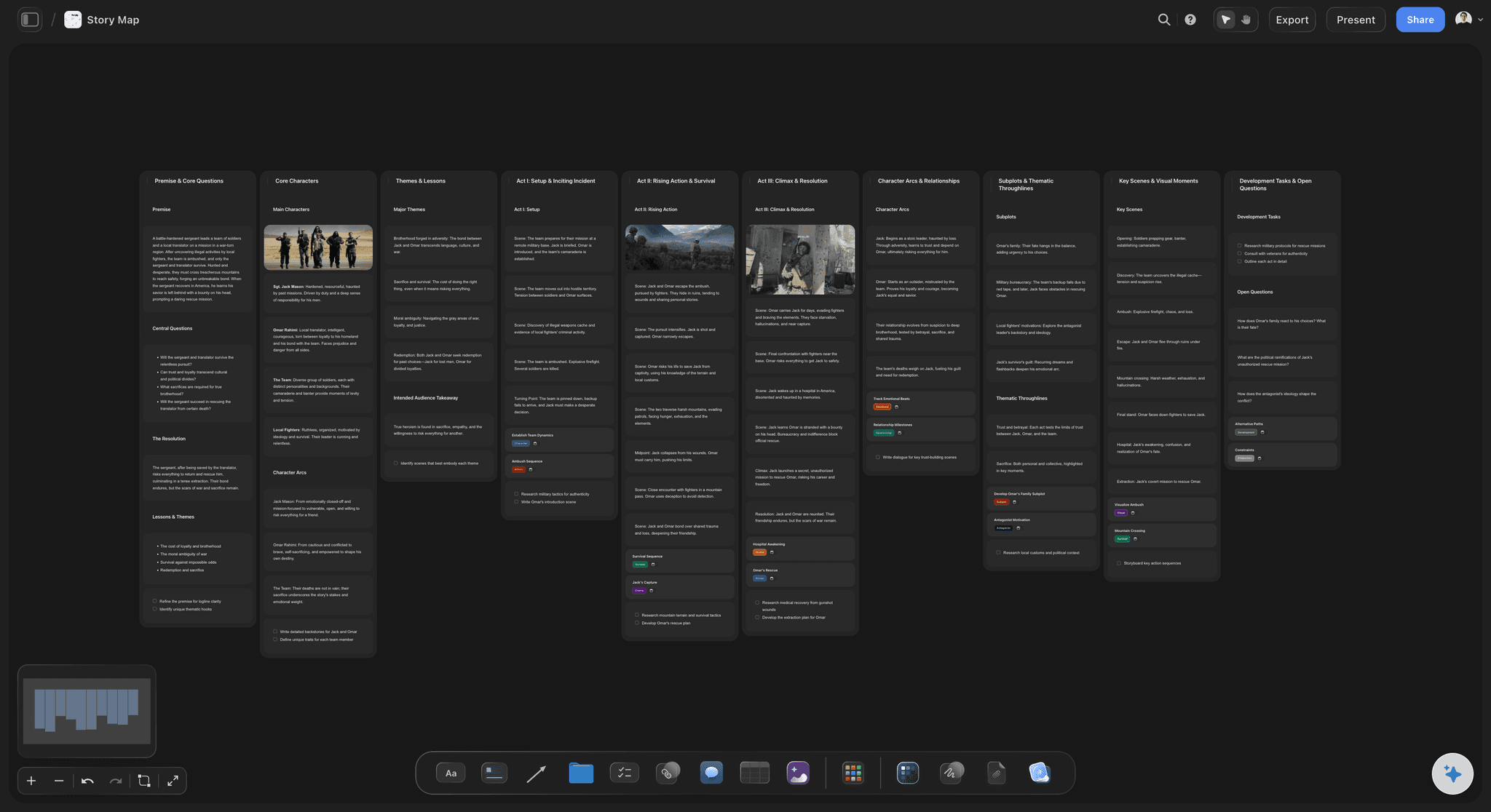
Routes drawn as connectors, not implied by a menu
Map the path people take, not the one you offer
Navigation describes what is possible. A drawn route describes what actually happens: ad to service page to proof to form. The gap between the two is where conversions leak.
Explore the user flow mapping tool →
Real headlines on the frames, not lorem ipsum
Write the words while the sequence is still movable
A frame carrying the actual headline and the actual call to action is checkable. A frame carrying placeholder text hides the fact that two screens are making the same promise.
See the content brief template →
Reference and moodboard beside the frames they inform
Keep the visual direction next to the structure
Pin screenshots of sites you admire, brand assets, and photography beside the frame they apply to, so the designer inherits the reasoning rather than a separate moodboard file.
Try the UI moodboard →Unlimited boards. No object cap.
Open a canvas, describe the site, and let AI lay out the frames. Storyflow is paid-only during early access, with plans from $7.99 a month billed annually, and a Free plan launches before the end of 2026.
Unlimited storyboards on an infinite canvas
Basic AI usage to generate screen frames and routes from a prompt
Starter templates for website plans, user flows, and design planning
Share view-only links with clients and developers, no account required
Built for people with taste
The expensive website mistakes are sequence mistakes.
Every page can be good and the site still fail, because nobody owned what happens between them.
Entry points are not all the homepage
Storyboard the arrivals, not just the site
The advertisement arrival: Someone clicking a paid ad lands mid-site with no context. Storyboard that frame first and check it answers who you are, what this is, and why it is relevant, because the homepage that would have said all three is not in this path.
The search arrival: Organic traffic lands on whichever page matched the query, which is usually a deep one. Each of those pages is a first impression, and treating it as an interior page is the single most common structural error.
The referral and the returning visitor: A visitor sent by a friend arrives warm; a returning visitor arrives with a specific job. Neither needs the introduction the homepage gives, and both need a route to the thing they came for.
The route that does not exist yet: Walking each arrival to its conclusion is how you find the page nobody scoped. It is nearly always a proof page, a comparison, or an answer to the objection that stops the sale.
AI that reads the whole board as context
Ask the board where a visitor gets stuck
Generate the structure from a description: Describe the business and the audience and the AI lays out the screens and the obvious connections, turning a blank canvas into a first draft in seconds.
Interrogate the journey once it exists: Ask which frames have no route into them, where a path ends without a next step, or which question a visitor would have at frame three that the board never answers.
It structures, it does not decide: Storyflow arranges and suggests; what the site should say and who it should serve stays yours. That judgment is the reason the site exists.
Re-prompt as the scope changes: Add a section mid-project and ask the AI to build the frames around what you have already placed. Nothing you positioned by hand moves.
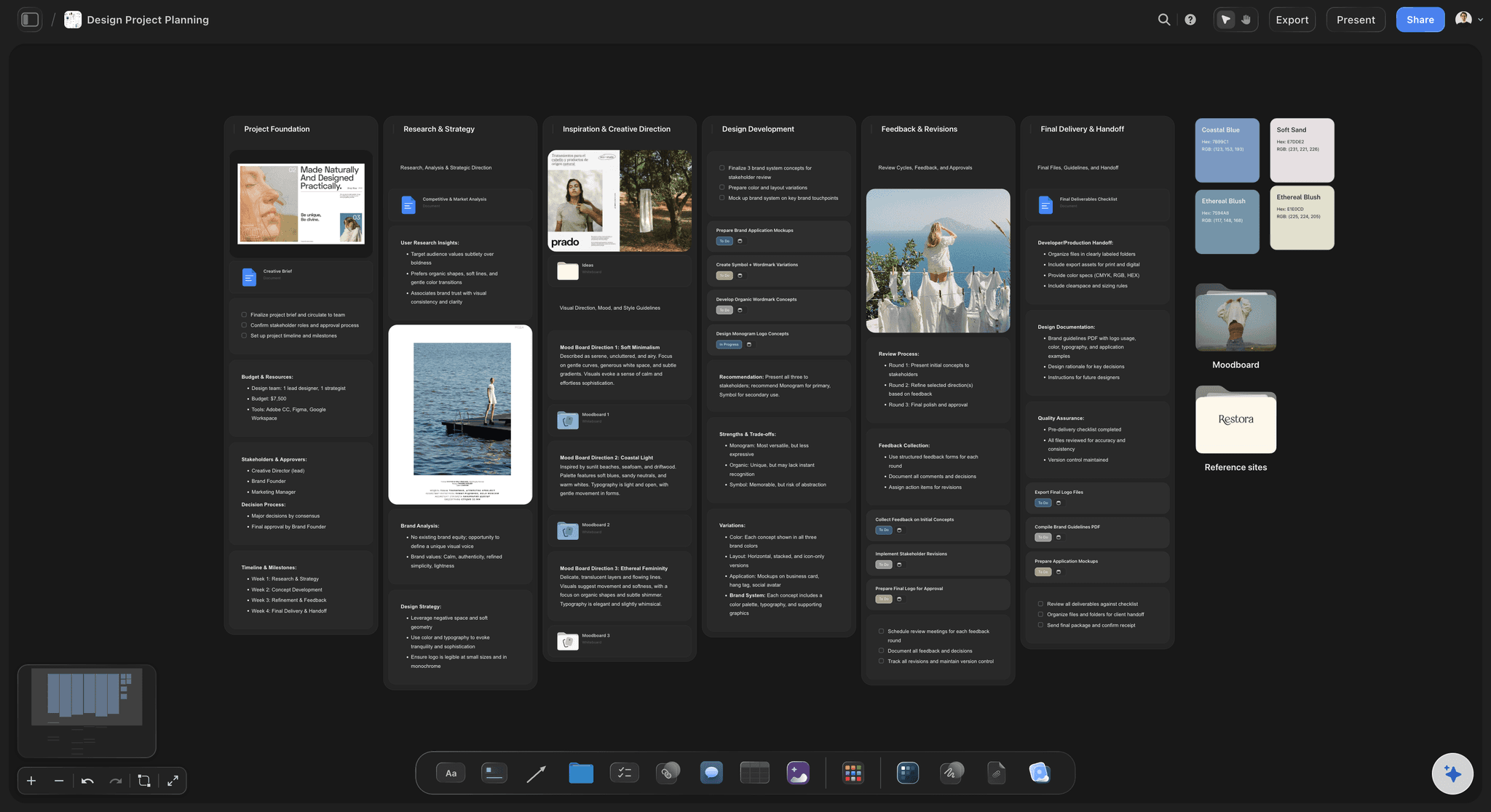
Content, copy, and the assets each screen needs
Find the content problem before the build, not during it
What each frame actually requires: List the copy, photography, case study, or data a screen depends on, directly on the frame. Most late website projects are late because content nobody assigned was discovered in week nine.
Who owns each piece: Mark an owner on the frame. A storyboard doubles as a content inventory, and it is the only version of that inventory anyone will actually look at.
Reference from anywhere on the web: Paste screenshots, links, brand files, and frames from video. The visual direction sits beside the structural decision it belongs to instead of in a separate document.

Client, designer, and developer reading one board
Approve the structure before anyone designs a pixel
View-only links for clients: Send a link and a client walks the journey in a browser with no account. Approving a storyboard is a far cheaper conversation than approving finished designs.
Comments on the frame in question: Feedback about the enquiry step sits on the enquiry frame. Nobody has to work out which screen a comment in an email referred to.
A brief the design team can build from: Hand over the canvas, or export it as a high-quality image or PDF. Either way the designer inherits the sequence, the copy, and the reference together.
Explore templates for your project
Every template opens as a real, editable board on the infinite canvas. Pick the closest fit and make it your own.
Website Plan
Map your site's pages, structure, and content in one plan before you build.
One app instead of five
Storyflow vs Figma, Miro, and a sitemap document.
Each is good at its own stage: Figma is where the site actually gets designed and prototyped, Miro is a strong general whiteboard with good flow shapes, and a sitemap document is still the clearest way to state a hierarchy. Here is where they differ for this specific job.
Storyflow
Recommended
Screen frames with routes drawn between them
AI lays out the screens from a description
Real copy and content requirements on each frame
Reference and moodboard on the same canvas
High-fidelity visual design and clickable prototypes
View-only links with no account required
Figma
Screen frames with routes drawn between them
AI lays out the screens from a description
Real copy and content requirements on each frame
Reference and moodboard on the same canvas
High-fidelity visual design and clickable prototypes
View-only links with no account required
Miro
Screen frames with routes drawn between them
AI lays out the screens from a description
Real copy and content requirements on each frame
Reference and moodboard on the same canvas
High-fidelity visual design and clickable prototypes
View-only links with no account required
A sitemap document
Screen frames with routes drawn between them
AI lays out the screens from a description
Real copy and content requirements on each frame
Reference and moodboard on the same canvas
High-fidelity visual design and clickable prototypes
View-only links with no account required
What creators are saying
Join early creators getting structured workspaces and AI that remembers their projects
“Storyflow has sped up my workflow by at least 3x, which means more flow state and more projects I can actually ship. It truly changed the way me and my team create.”

Reilin Joey
Director & YouTuber
“One prompt gets me a structured board. But the tactics are my favorite. I run my YouTube scripts through them and my intros and retention got better. It's amazing.”

Justkay
YouTuber & Freelance Filmmaker
“I used to juggle five apps to plan a project. Now I describe what I am making and get boards, lists, and a schedule. All in one place.”

George
@fernwehchronicles
Website storyboard questions, answered.
What it is, how it differs from a wireframe, and how much detail to put in.
A website storyboard is a frame by frame map of a site made before any of it is designed. Each screen is a frame that states what the screen has to achieve, roughly what it says, and what the visitor can do next, and lines between frames show the routes people take through the site. The idea comes from film, where a storyboard exists to test a sequence before anyone spends money shooting it. The same logic applies to a website: the mistakes that cost the most are mistakes of order and omission, and both are nearly free to fix while the site is still a set of movable frames. It is deliberately low fidelity. Its job is to prove the journey works, not to show what anything looks like.
Storyflow is built for this step, before any visual design begins: every screen of the site is a frame, you draw the routes a visitor takes between them, and the copy, references and content for each frame are pinned beside it. Describe the site and the AI lays out the screens for you. Figma still does what Storyflow does not: high-fidelity visual design and clickable prototypes.
They answer three different questions and a project usually wants all three. A sitemap answers what pages exist and how they nest, which is a hierarchy and says nothing about movement. A wireframe answers how one screen is laid out, which is a composition and says nothing about what came before it. A storyboard answers what happens in what order, which is the connective layer between the two. In practice the storyboard should come first, because both of the others are cheaper to make once you know the sequence, and because the questions the storyboard surfaces, chiefly the page nobody scoped and the path that dead-ends, are structural questions that are painful to answer once designs exist.
Start with arrivals rather than with the homepage. List the ways people actually reach you, which is usually an advertisement, a search result on a deep page, a referral link, and a direct visit from someone returning, and make a frame for each landing point. On each frame write what that visitor knows at that moment, what they need next, and the one action the screen is asking for. Then draw the route forward from each arrival to the thing you want them to do, adding a frame wherever the path needs a screen. When a route runs out, you have found a missing page, and it is almost always a proof point, a comparison, or an answer to the objection that stops the decision. Only once every path completes should you go back and check the navigation supports the journeys you drew.
Enough that the sequence is checkable and no more. That means the actual headline and the actual call to action on each frame, because real words expose problems placeholder text hides, chiefly two screens making the same promise or a page whose purpose nobody can state. It also means listing what content the frame depends on, such as a case study, photography, or pricing detail, and who owns it. What it should not have is layout: the moment you start positioning elements you have started wireframing, and the frames stop being cheap to move, which was the entire advantage. If someone asks where the image sits on the page, that is a good sign the storyboard is finished and the next document should start.
Not during early access. Storyflow is paid-only right now, with plans from $7.99 a month billed annually, and a Free plan launches before the end of 2026. Anyone a paid member invites to a board joins free today, so a client or a developer can view and contribute without paying. If you need something free this minute, Figma's free tier handles frames and connectors perfectly well, and index cards on a table remain a completely serious way to storyboard a small site, with the advantage that rearranging them is faster than any software. What you give up in both cases is the AI first draft and having the reference, the copy, and the content inventory on the same surface as the structure.
It can produce a solid first structure and it cannot make the judgment calls. Describe the business, the audience, and what you want visitors to do, and Storyflow's AI lays out the screens as frames with the conventional routes drawn between them. That is genuinely valuable because the conventional structure is right about seventy percent of the time and correcting a drawn version is far quicker than starting from nothing. What it does not know is which objection actually stops your customers, which proof they need and when, or what your business is unusual about, and those are precisely the things that determine whether the journey works. The division Storyflow is built on is that the AI proposes and arranges, and the decisions stay with the person who knows the business.
Yes, and for a landing page the storyboard covers the sections rather than the pages. A landing page is a sequence: the visitor arrives with a promise in their head from wherever they clicked, and each section either advances the argument or wastes their attention. Make a frame per section, write the actual heading of each, and read them top to bottom as if you were the visitor. Two failures show up almost immediately. The first is a section that repeats an earlier claim in different words, which reads as padding. The second is an objection that arrives in the reader's mind at section three and is not answered until section seven, by which point they have gone. Both are obvious in frames and nearly invisible in a design file.
Whoever knows why people buy, whoever will write the words, and whoever will build it. That is often three people and occasionally one. The reason to include the writer early is that real copy on frames is what makes the storyboard useful, and a writer brought in after the structure is fixed inherits problems they could have prevented. The reason to include the builder is that a structural choice with a large technical cost is much better known now than after client approval. The client or the business owner should see the result but does not need to be present for the drafting; approving a walked journey is a good conversation, and watching one be assembled is usually a long one.
Yes. Send a view-only link and anyone opens the full board in a browser with no account and no download, which is what makes storyboard approval practical: a client can walk the journey themselves rather than have it described. Comments attach to the frame they concern, so a note about the enquiry step stays on the enquiry step rather than becoming line four of an email about six different things. If you want people contributing, invite them onto the canvas so a copywriter can fill in headlines and a developer can flag the frames with technical implications. For a formal handover or a document that has to be filed, export the board as a high-quality image or PDF.
Wireframes for the screens that need them, then design, then build, and the storyboard should stay open through all three. Its ongoing job is to be the thing you check against when a change is proposed, because the question that gets lost during design is what a change does to the journey rather than to the page. In Storyflow the storyboard can also become the project board: the frames carry the content each screen needs and its owner, so the same canvas that proved the sequence tracks the work, and the reasoning behind a structural decision is one scroll away when somebody asks in week six why the comparison page exists.
Find the missing page while it still costs nothing.
Open a canvas, describe the site, and let AI lay out the frames. No download.