
A workspace with taste, for people with taste
Wireframe the structure first,
before you touch the pixels.
Storyflow is where you plan a site or app at low fidelity: sitemaps, user flows, and layout blocks on an infinite canvas, with AI to lay out the structure from a prompt. Get the skeleton right, then take it into Figma for high-fidelity design.


Creatives working for these brands already got early access
- Red Bull
- Canon
- Artlist
- Porsche
See how easy it is to get started
Watch a real project come together, from a blank board to a finished plan, clicked through step by step.
Start from a ready-made template
Pick a board to see what you can build, then let AI fill it in. Every template is a real, editable starting point on the same infinite canvas.

Design Planner
Plan a design project from brief to delivery, with references, tasks, and feedback side by side.
What is a wireframe tool?
A wireframe is a low-fidelity blueprint of a page or app: structure, layout blocks, hierarchy, and flow, drawn before any visual design. It answers the questions that matter first. What pages exist, how a user moves between them, what sits at the top of each screen, and what the content plan is. A wireframe tool is where you work all of that out with boxes and labels instead of finished UI, so you can change your mind cheaply.
Storyflow is a wireframe tool for that early, structure-planning phase. On an infinite canvas you map a sitemap, draw a user flow, block out a page with simple shapes and cards, and pin the content plan and references right next to it. Describe the site or app in the AI chat and it lays out the structure for you: the page list, the flow between screens, and the rough blocks of a layout. Everything is a real canvas object, so you drag, relabel, and regroup as the plan changes.
Be clear on the boundary. Storyflow is for low-fidelity wireframing and ideation, not high-fidelity UI. There are no component or UI libraries and no clickable prototypes here. You use it to get structure, flow, and layout blocks settled while they are still easy to move, then move to Figma for high-fidelity wireframes, real components, and interactive prototypes. The plan you build in Storyflow is the brief you bring over.
Ultra fast from brief to board
Wireframe a site in four steps.
You describe the project. The AI lays out the structure, so you start from a draft instead of a blank canvas.
01
Open a canvas
Start in the browser with a Storyflow plan. There is no app to install, just an empty infinite canvas ready for the first screen.
02
Describe the site or app
One sentence is enough: a marketing site for a launch, a five-screen onboarding flow, a dashboard with three main sections.
03
AI lays out the structure
The AI places the pieces on the canvas: a sitemap of pages, a user flow between them, and rough layout blocks for the key screens, grouped so the structure reads at a glance.
04
Rearrange, then hand off to Figma
Drag blocks to restructure the flow, pin the content plan beside each screen, then export as image or PDF or share a view-only link, and take the approved structure into Figma for high-fidelity design.
A wireframe tool built for structure, not styling.
Settle the sitemap, the flows, and the layout blocks here. Save the visual design for Figma.
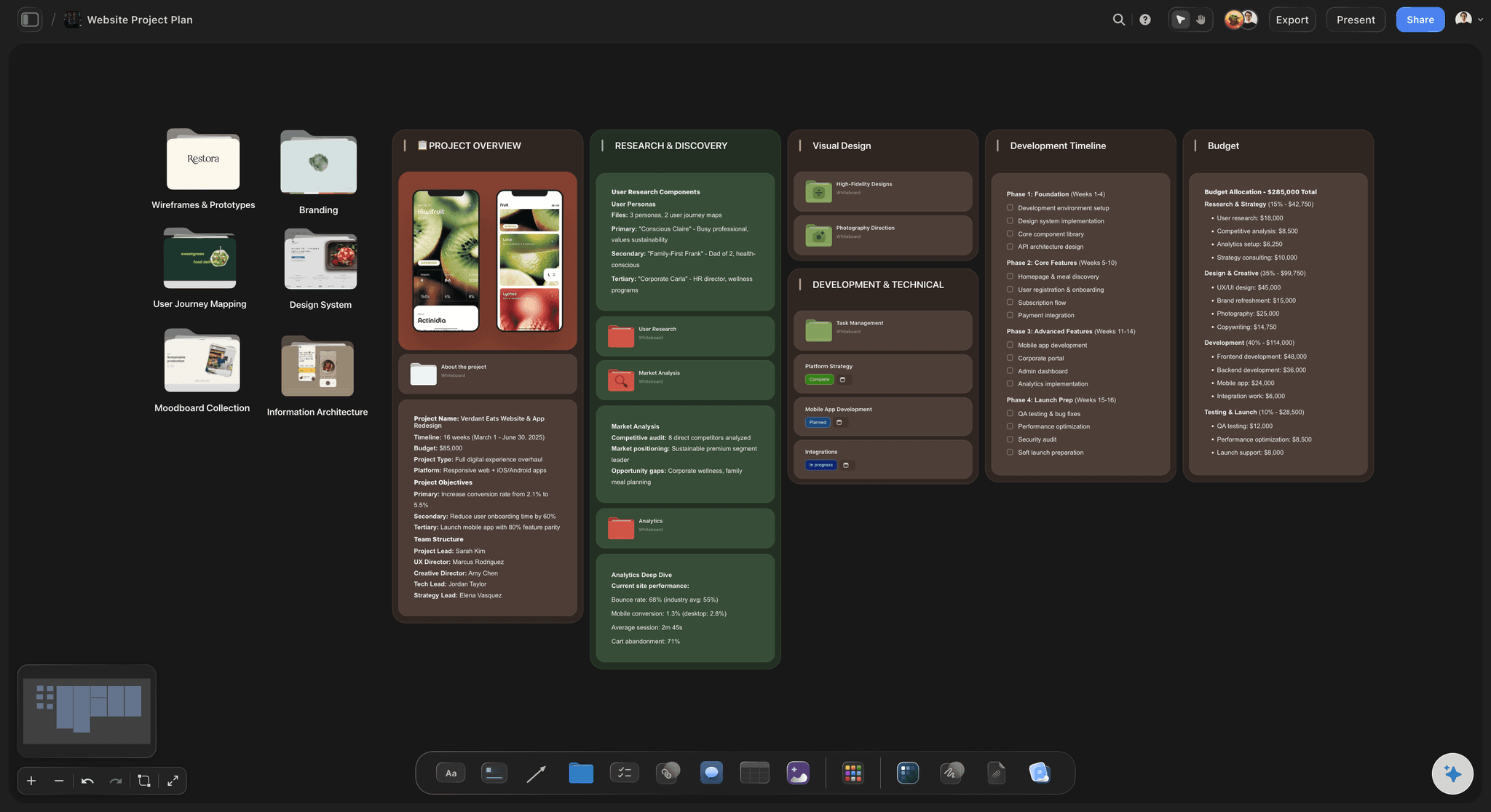
Sitemap and page structure from a prompt
Lay out the whole site at once
Describe the project and the AI maps every page and how it nests: top-level pages, sub-pages, and the routes between them, laid out as cards you can drag and relabel. See the full structure before you design a single screen.
See the design planning tool →
Low-fidelity layout blocks
Block out a screen in seconds
Use shapes and cards as wireframe blocks: a header, a hero, a content grid, a footer. Keep it grey-box and label-driven so the conversation stays on structure and hierarchy, not colors and copy.
See the infinite canvas →
User flows and site-structure diagrams
Map how users move through it
Draw the flow between screens as a diagram on the same board as your blocks: sign-up to onboarding to dashboard, or browse to cart to checkout. The AI can sketch the first version of the flow from your description.
See the flowchart maker →
One board the whole team can read
Plan the build alongside the structure
Keep the page list, the flows, the content plan, and the open questions on a single canvas, then share a view-only link so stakeholders sign off on the structure before any design work starts.
See the online whiteboard →No time limit. No object cap.
Open a canvas, describe the project, and watch the structure lay itself out. Storyflow is paid-only during early access, with plans from $9.99 a month; a Free plan launches before the end of 2026, and there is no time limit on the canvas.
Unlimited wireframe boards, with no object cap
Basic AI usage to lay out sitemaps and flows
Attach screenshots, PDFs, and reference links to any screen
Share the wireframe view-only, or invite collaborators free

Built for people with taste
Everything the early phase needs, nothing it does not.
Map the structure, plan the content, gather references, and keep it all visible. Then take the plan to Figma.
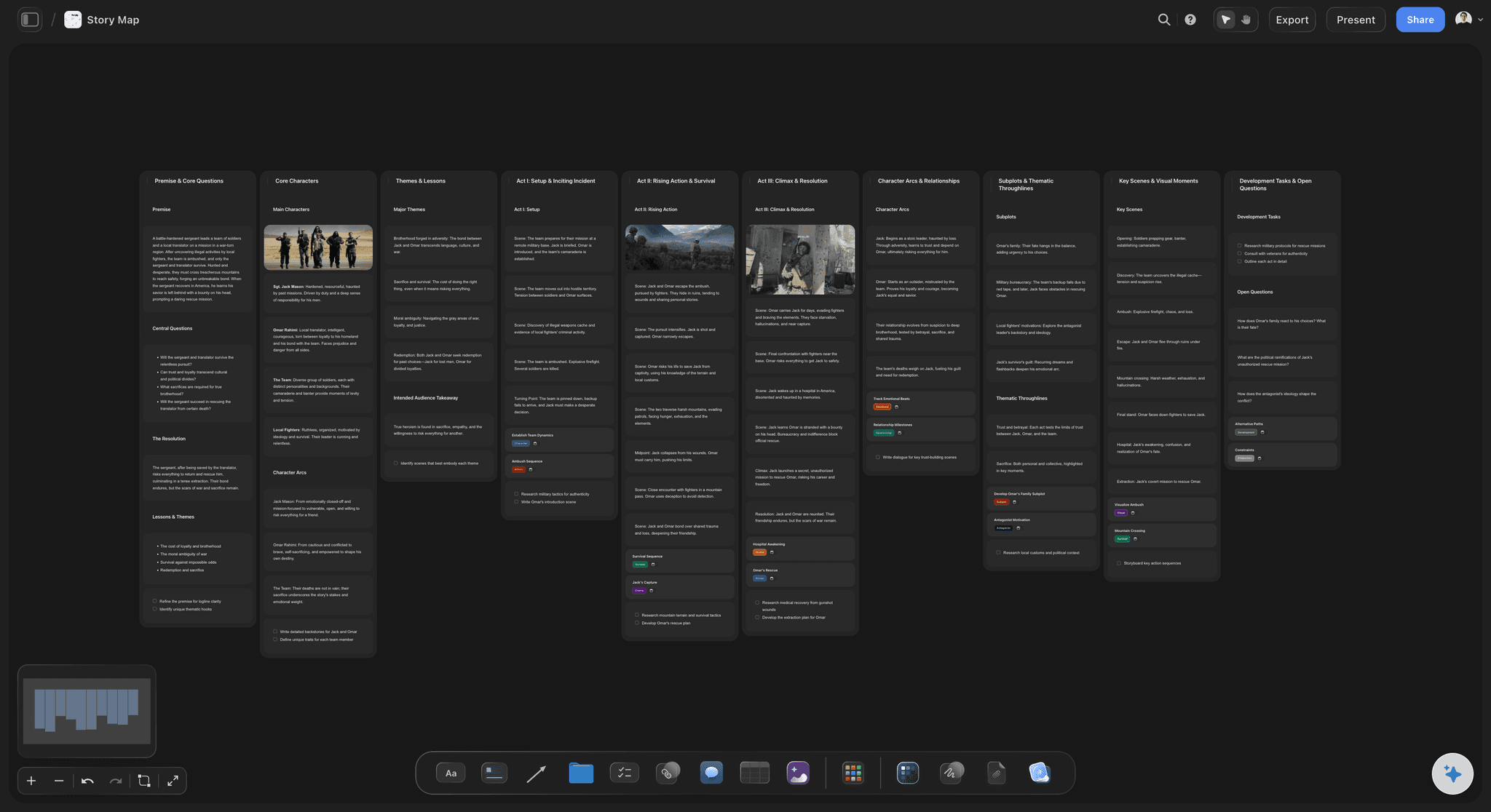
Pages, flows, and blocks as movable objects
Wireframe structure you can restructure
Sitemaps as card groups: Pages and sub-pages are laid out as grouped cards, so the shape of the site is visible without a rigid tool locking it down.
Drag to rework the flow: Move a screen and the path moves with your thinking. Reordering an onboarding flow is a drag, not a rebuild.
Grey-box layout blocks: Block out a screen with plain shapes and labels, on purpose, so feedback stays on structure and hierarchy rather than visuals.
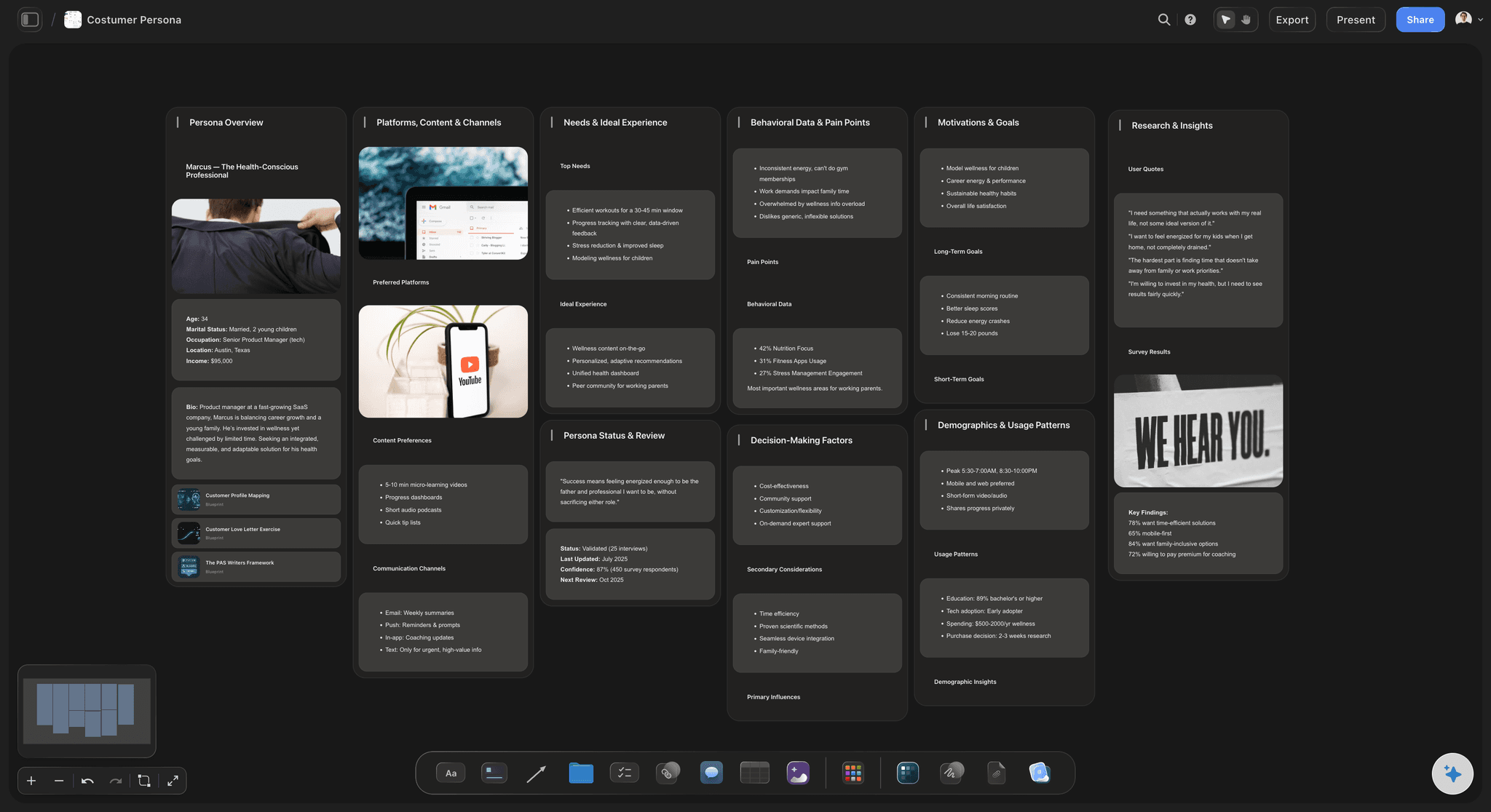
Context from the board you are planning on
AI that builds on what is already there
Reads your active board: The AI uses what is on the board you have open, so a new flow or page list connects to the structure you already mapped.
Attach your sources: Add up to five documents and three boards as context: a product brief, a content inventory, or research notes the wireframe should follow.
Re-prompt to refocus: Ask for a simpler navigation, a different flow, or fewer pages. The AI reworks the structure while keeping the parts you arranged by hand.

References and content beside every screen
Plan the content, not just the boxes
Drop in references: Screenshots of sites you like, competitor pages, PDFs, and links attach to the canvas next to the screen they inform. A wireframe with receipts.
Frame grabs from video: Capture stills from YouTube and Vimeo straight onto the board when a walkthrough shows the interaction better than a label.
Copy and notes in place: Draft the real headings and content plan as documents on the same canvas, so the wireframe carries the words the layout will hold.

The plan is the brief for design
From low-fi structure to Figma handoff
Sign off before design: Share a view-only link so stakeholders approve the sitemap and flows while changes are still cheap, before high-fidelity work begins.
Export the structure: Export the wireframe as a clean image or PDF to drop into a spec, a ticket, or a kickoff deck for the design team.
Hand off to Figma: Take the approved structure into Figma for high-fidelity wireframes, real UI components, and clickable prototypes. Storyflow settles the plan; Figma renders it.
Explore templates for your project
Every template opens as a real, editable board on the infinite canvas. Pick the closest fit and make it your own.
Design Planner
Plan a design project from brief to delivery, with references, tasks, and feedback side by side.
One app instead of five
How Storyflow compares to other wireframe tools.
Storyflow owns the low-fidelity, structure-planning phase. For high-fidelity design and prototypes, it hands off to Figma.
Storyflow
Recommended
AI lays out site structure and user flows from a prompt
An infinite canvas for sitemaps, flows, and layout blocks
Quick low-fidelity layout blocks and wireframe sketches
No object or board caps
Figma
AI lays out site structure and user flows from a prompt
An infinite canvas for sitemaps, flows, and layout blocks
Quick low-fidelity layout blocks and wireframe sketches
No object or board caps
Balsamiq
AI lays out site structure and user flows from a prompt
An infinite canvas for sitemaps, flows, and layout blocks
Quick low-fidelity layout blocks and wireframe sketches
No object or board caps
Whimsical
AI lays out site structure and user flows from a prompt
An infinite canvas for sitemaps, flows, and layout blocks
Quick low-fidelity layout blocks and wireframe sketches
No object or board caps
What creators are saying
Join early creators getting structured workspaces and AI that remembers their projects
“Storyflow has sped up my workflow by at least 3x, which means more flow state and more projects I can actually ship. It truly changed the way me and my team create.”

Reilin Joey
Director & YouTuber
“One prompt gets me a structured board. But the tactics are my favorite. I run my YouTube scripts through them and my intros and retention got better. It's amazing.”

Justkay
YouTuber & Freelance Filmmaker
“I used to juggle five apps to plan a project. Now I describe what I am making and get boards, lists, and a schedule. All in one place.”

George
@fernwehchronicles
Wireframing questions, answered.
Everything people ask about planning and wireframing a site in Storyflow.
A wireframe tool is where you plan a page or app at low fidelity before visual design: the sitemap, the user flows, the layout blocks, and the content plan. In Storyflow you do all of that on an infinite canvas, and the AI can lay out the structure for you from a short description, so you start from a draft instead of a blank board.
No. Storyflow is for low-fidelity structure and flow planning, not high-fidelity UI. There are no component or UI libraries and no interactive prototypes here. Use it to settle the sitemap, the flows, and the layout blocks, then move to Figma for high-fidelity wireframes, real components, and clickable prototypes, and bring the plan over as your brief.
Not during early access. Storyflow is currently paid-only, with plans starting at $9.99 per month for basic AI usage to lay out sitemaps and flows, unlimited boards with no object cap, 20 file uploads, and view-only sharing. A Free plan launches before the end of 2026, and anyone a paid member invites to a board joins free today.
No, and that is deliberate. Storyflow uses plain shapes and cards as low-fidelity layout blocks, which keeps the work focused on structure and hierarchy rather than styling. When you need a real component library and pixel-level UI, that is the point where you hand the structure to Figma.
Describe the site or app in the AI chat and it lays out the structure on the canvas: a sitemap of pages, a user flow between screens, and rough layout blocks for the key pages, grouped so the structure reads at a glance. Everything it generates is a movable card, so you can drag, relabel, and regroup the whole plan after.
Yes. The AI reads your active board, so anything already on the canvas shapes the structure it generates. You can also attach up to five documents and three boards, such as a product brief or a content inventory, for the AI to build the wireframe from.
Yes. Export the wireframe as a high-quality image or a PDF for a spec, a ticket, or a kickoff deck, or share a view-only link so stakeholders can explore the full canvas in their browser without an account and sign off on the structure.
Figma is built for high-fidelity design: real components, pixel layouts, and interactive prototypes. Storyflow is built for the phase before that, where you decide structure, flows, and low-fi layout fast on an infinite canvas with AI. The two pair up. Plan and get sign-off in Storyflow, then design and prototype in Figma.
Get the structure right before you design a thing.
Describe the site once, watch the sitemap and flows lay themselves out, then hand a clean plan to Figma.