
Category
Web Design Tools
Author

Justkay
Documentary Filmmaker & Founder at Storyflow
Topics
2026-05-17
•
Updated August 11, 2026
•
22 min read
•
Web Design Tools- best website planning tools 2026
- website planning software
- how to plan a website
- sitemap tool
- Slickplan alternative
- Storyflow website planning
What are the best website planning tools in 2026?
The best website planning tools in 2026 are Milanote (best visual canvas for the early planning stages), Storyflow (best AI canvas for planning purpose, structure, and content together), Slickplan (best dedicated sitemap and information architecture tool), and FigJam (best for wireframe-stage planning). Most websites are designed before they are planned. A website is built in five stages, Purpose, Structure, Content, Wireframe, Design, and the redesign a site needs within a year is the planning that was skipped.

All 12 Website Planning Tools, Ranked
- Milanote: best visual canvas for the early planning stages
- Storyflow: best AI canvas for purpose, structure, and content together
- Slickplan: best dedicated sitemap and information architecture tool
- FigJam: best for wireframe-stage planning next to the Figma file
- Miro: best for collaborative website planning workshops
- FlowMapp: best for visual sitemaps and UX planning together
- Octopus.do: best for building a visual sitemap fast
- Whimsical: best for clean flowcharts and low-fidelity wireframes
- Notion: best for a structured per-page content plan
- GlooMaps: best free quick-sitemap tool
- Figma: best for the late wireframe and design stages
- Balsamiq: best for deliberately low-fidelity wireframes
Full disclosure: Storyflow is our own product, and we do not rank it #1 here. Milanote is the stronger visual canvas for the early planning stages, and Slickplan goes deeper on sitemaps and information architecture. Storyflow earns its #2 spot for one job: holding purpose, structure, and content on a single canvas the AI can read. It is not a wireframe or design tool, and it has no structured sitemap export, so pair it with Figma or Slickplan for those stages. We link to every tool so you can judge the fit.
Quick Comparison: Best Website Planning Tools
These four cover the early build-order stages where planning actually happens: a visual canvas, an AI-readable canvas, a dedicated sitemap tool, and wireframe-stage planning.
| Tool | Best For | AI Features | Price |
|---|---|---|---|
| Storyflow | Purpose, structure, and content together | AI reads full canvas + @-docs and Tactics | $7.99 mo annual (free plan late 2026) |
| Milanote | Visual early-stage planning | Light AI on a visual canvas | Free / $9.99 mo |
| Slickplan | Sitemap and information architecture | Light AI, IA-focused | From ~$11 mo |
| FigJam | Wireframe-stage planning | Standard FigJam AI | Free / from ~$5 mo |
1) Quick Answer: The Best Website Planning Tools in 2026
The best website planning tools in 2026 are Milanote (best visual canvas for the early planning stages), Storyflow (best AI canvas for planning purpose, structure, and content together), Slickplan (best dedicated sitemap and information architecture tool), and FigJam (best for wireframe-stage planning). The right pick depends on which stage of the build order you are at.
Most websites are designed before they are planned. A project starts and someone opens a design tool and begins the homepage. The homepage is the last thing to design and the first thing everyone designs. The structure, the content, the actual job the site does for visitors, all of it gets decided after the visuals, which means the visuals get rebuilt once the structure problems surface.
I have planned websites for creative ventures and watched the redesign-in-a-year pattern again and again: the redesign is the planning that was skipped. The Build Order framework in section 3 ranks all 12 tools by how early in the planning sequence they serve, because the early stages are where a website is actually won.
For content strategy specifically, see What is Content Strategy? The Complete Guide. For content planning, see The 12 Best Content Planning Tools in 2026.
2) Comparison Table: 12 Website Planning Tools at a Glance
Pricing reflects publicly listed plans as of early 2026 and changes often. Ratings weigh build-order stage, planning-stage depth, collaboration, AI support, and pricing for freelancers and small teams.
3) The Build Order
A website is built in five stages, and they have a correct order. Most teams run it backwards.
Stage 1: Purpose. Who the site is for, what they need to do, what the business needs them to do. The site's job, stated before anything is built.
Stage 2: Structure. The sitemap and information architecture. Which pages exist, how they nest, how a visitor moves between them.
Stage 3: Content. What each page actually says. The copy, the message, the proof, the call to action, planned per page.
Stage 4: Wireframe. The low-fidelity layout. Where things sit on each page, before any visual styling.
Stage 5: Design. The visual layer. Color, typography, imagery, polish.
Here is the rule that decides tool choice. Most teams start at Stage 5 and discover Stages 1 through 4 after the build. Someone opens Figma and designs a beautiful homepage. Then the structure does not hold, the content does not fit the layout, and the purpose was never sharp. The design gets rebuilt around problems that a day of planning would have caught. The redesign every site needs within a year is the planning the team skipped.
The early stages are cheap to change and the late stages are expensive. Moving a page in a sitemap takes seconds. Moving it after the site is designed and built takes a developer a week. A website planning tool's real value is letting you make the cheap changes, in Purpose, Structure, and Content, before the expensive stages lock them in.
The 12 tools below are ranked by how early in the build order they serve. Tools that hold the Purpose, Structure, and Content stages sit at the top, because that is where planning happens and where the redesign is prevented.
4) How We Evaluated These Tools
Five criteria, weighted in this order:
- Build-order stage. Which stages does the tool serve? Tools that hold the early stages, Purpose through Content, are weighted highest.
- Planning-stage depth. Can the tool actually hold a sitemap, an IA, and a per-page content plan, or only wireframes and visuals?
- Cheap-change speed. How fast can you move a page, restructure the IA, or rewrite a content plan? Early-stage value is in fast, cheap iteration.
- Collaboration. Website projects involve clients, designers, writers, and developers. Tools that keep them aligned rank higher.
- Pricing for freelancers and small teams. Most websites are built by freelancers or small teams. Per-seat and enterprise pricing is marked down.
Testing covered a startup marketing site, a portfolio site, and a small-business site, each planned from purpose through wireframe.
5) Quick Picks by Website Planning Need
Best visual canvas for early-stage planning: Milanote. Purpose, structure, and content references on a freeform canvas.
Best AI canvas for planning the whole site: Storyflow. Purpose, sitemap, and content plan on one canvas the AI reads.
Best dedicated sitemap and IA tool: Slickplan. Built specifically for information architecture.
Best for fast visual sitemaps: Octopus.do. Build and reorganize a sitemap in minutes.
Best for wireframe-stage planning: FigJam or Balsamiq. Low-fidelity layout before design.
Best free website planning: GlooMaps for a quick free sitemap. Storyflow's Free plan is not out yet; it launches before the end of 2026, with Plus at $7.99/month billed annually in the meantime.
Best cheapest working stack: Figma Free for wireframes, genuinely $0. Add Storyflow for purpose, structure, and content once you are ready to pay: Plus is $7.99/month billed annually during early access.
6) Detailed Reviews: 12 Website Planning Tools
1. Storyflow
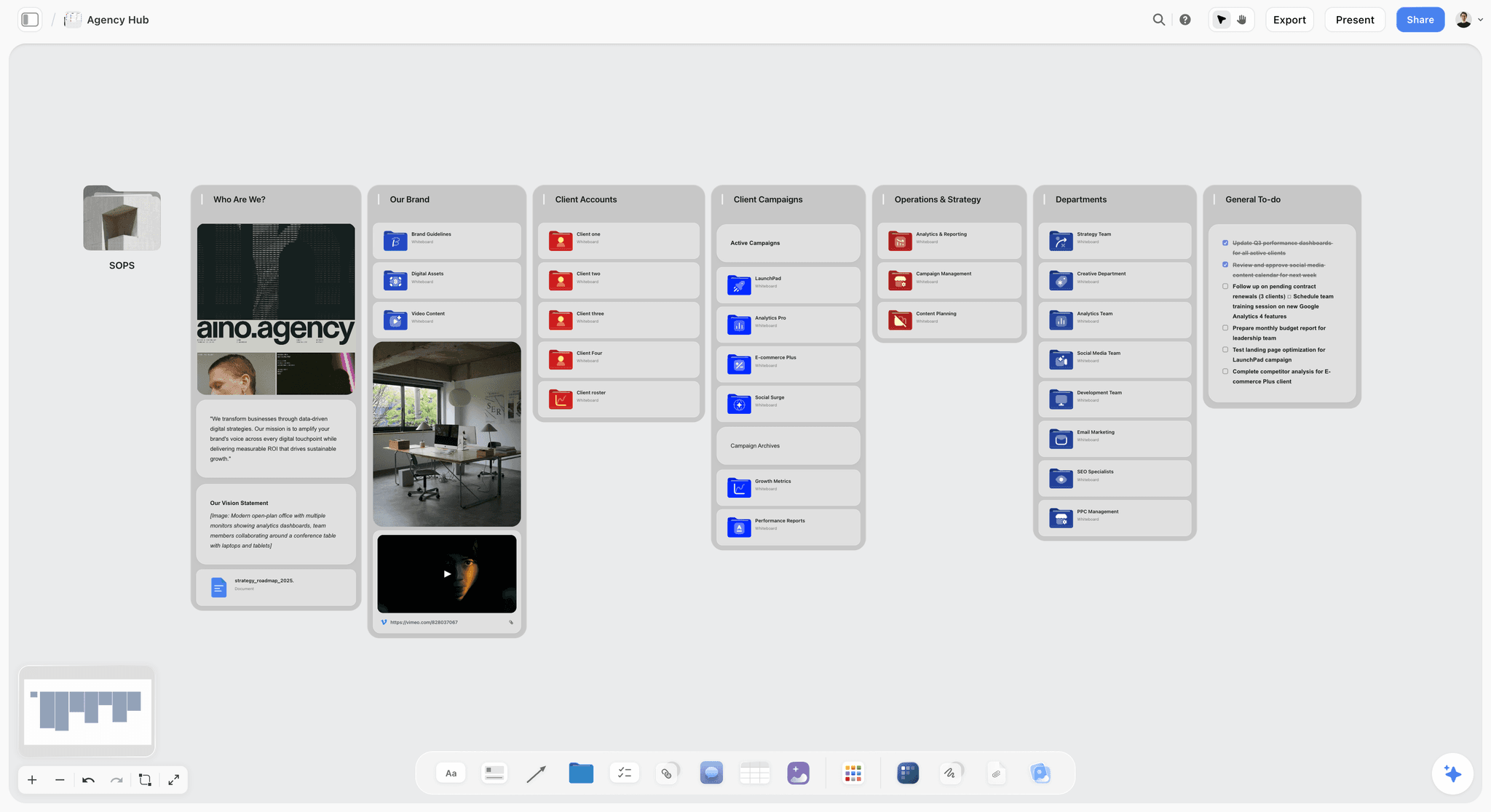
Storyflow holds the early build-order stages on one canvas: the site's purpose, the sitemap, and a per-page content plan, all connected. The AI reads the full canvas, so you can ask whether the sitemap actually serves the stated purpose, or whether a page's content plan delivers what the audience needs. The Story Blueprints library includes content-planning and brief templates that scaffold the planning stages.
Best for: Planners who want purpose, structure, and content connected on one AI-readable canvas.
Verdict: The strongest AI canvas for the early stages. For wireframes and design, pair it with Figma.
Key features
- Canvas for purpose, sitemap, and per-page content.
- AI reads the full canvas plus up to 1 Tactic and 3 Documents you @-mention.
- AI checks whether the structure serves the stated purpose.
- Story Blueprints library with content-planning templates.
- Unlimited collaboration on every plan, with free invited collaborators, for clients, writers, and designers.
Pricing
Paid-only during early access. Free plan (unlimited boards and cards, unlimited collaboration, basic AI, 20 file uploads) launches before the end of 2026; invited collaborators join free now. Plus: $7.99/mo annual. Full Story Blueprints, unlimited uploads. Pro: $14/mo annual. AI image generation, 20x AI usage. Max: $39/mo annual. 40x more AI, team workspace with roles.
Pros
- Holds purpose, structure, and content in one connected view.
- AI checks that the sitemap serves the purpose.
- Invited collaborators join free across the whole project team.
Cons
- Not a wireframe or design tool; pair with Figma.
- No structured sitemap export format.
- Newer platform with a smaller template library than Milanote.
2. Milanote
Milanote is a visual canvas that suits the early build-order stages. Purpose notes, audience profiles, sitemap sketches, page content plans, and reference imagery all live on freeform boards. Because the early stages are mostly thinking, a canvas that holds them together is exactly what they need. Milanote's website planning guides have made it a common starting point.
Best for: Planners who want a visual canvas for purpose, structure, and content.
Verdict: The strongest visual tool for the early stages. Hand off to a wireframe tool for layout.
Key features
- Freeform canvas for purpose, sitemap, and content.
- Web clipper for references.
- Templates for website planning.
- Shareable boards with comments.
- Column structure for page organization.
Pricing
Free with 100 cards. Individual: $9.99/mo. Team: $49/mo flat.
Pros
- Strong for the early planning stages.
- Visual layout holds the whole plan in view.
- Website planning templates.
Cons
- No structured sitemap export.
- The 100-card free limit fills on a full site.
- Light AI compared to canvas-AI tools.
3. Slickplan
Slickplan is a dedicated tool for sitemaps and information architecture, the Structure stage. It builds visual sitemaps, plans page hierarchy, and includes content planning and a design mockup feature. For projects where the IA is complex, Slickplan is the specialist.
Best for: Planners who need a dedicated sitemap and information architecture tool.
Verdict: The strongest dedicated structure tool. Pair it with an early-stage canvas for purpose.
Key features
- Visual sitemap builder.
- Information architecture planning.
- Content planning per page.
- Design mockup and diagram tools.
Pricing
Subscription from roughly $11/mo, with team options.
Pros
- Purpose-built for sitemaps and IA.
- Strong structure-stage depth.
- Content planning included.
Cons
- Less suited to the Purpose stage.
- Subscription pricing for a focused tool.
- Interface is functional, not modern.
4. FigJam
FigJam, Figma's whiteboard, bridges the Structure and Wireframe stages. Teams build sitemaps and low-fidelity wireframes in FigJam, then move into Figma for design. For design-led teams, keeping planning next to the design file is a real advantage.
Best for: Design-led teams who want structure and wireframe planning next to the Figma design file.
Verdict: A strong structure-to-wireframe tool for Figma teams. Generic for the Purpose stage.
Key features
- FigJam whiteboard for sitemaps and wireframes.
- Real-time collaboration.
- Bridges into Figma for design.
- Templates for web planning.
Pricing
Free for 3 files. Paid plans from roughly $5/mo.
Pros
- Connects planning to the Figma design file.
- Strong collaboration.
- Good for sitemaps and wireframes.
Cons
- Generic for the Purpose stage.
- 3-file free cap.
- Best value only inside Figma.
5. Miro
Miro is the collaborative whiteboard for website planning workshops. Purpose canvases, sitemap diagrams, user flows, and wireframe sketches all run as real-time team sessions. It covers the early-to-mid build order well and is strong when planning is collaborative.
Best for: Teams that plan websites collaboratively in real time.
Verdict: Strong for collaborative early-to-mid planning. Pair it with a design tool for Stage 5.
Key features
- Infinite collaborative canvas.
- Sitemap and user-flow diagramming.
- Wireframe templates.
- Real-time editing and comments.
Pricing
Free for 3 boards. Starter: $8/mo annual. Business: $16/mo.
Pros
- Strong real-time collaboration.
- Covers purpose through wireframe.
- Familiar to most teams.
Cons
- The 3-board free limit is tight.
- No structured sitemap export.
- Built for general teams, not web specifically.
6. FlowMapp
FlowMapp is a UX planning tool focused on visual sitemaps, user flows, and content planning. It is purpose-built for the Structure and Content stages of a website, with a cleaner, more modern feel than older IA tools.
Best for: UX planners who want visual sitemaps and user flows together.
Verdict: A strong modern structure-and-content tool. Pair it with an early-stage canvas for purpose.
Key features
- Visual sitemap builder.
- User flow diagrams.
- Content planning per page.
- Personas and customer journey tools.
Pricing
Free tier. Paid plans from roughly $15/mo.
Pros
- Modern, visual UX planning.
- Sitemaps and user flows together.
- Content planning included.
Cons
- Subscription pricing climbs for teams.
- Less suited to the Purpose stage.
- Smaller community than Slickplan.
7. Octopus.do
Octopus.do is a fast visual sitemap tool. It builds and reorganizes a sitemap in minutes, with a clean drag-and-drop interface. It is a focused Structure-stage tool, ideal for getting the IA right quickly before anything else.
Best for: Planners who want to build a visual sitemap fast.
Verdict: The fastest visual sitemap tool. A focused Structure-stage specialist.
Key features
- Fast drag-and-drop sitemap building.
- Visual page hierarchy.
- Real-time collaboration.
- Mockup and content blocks.
Pricing
Free tier. Paid plans from roughly $10/mo.
Pros
- Very fast sitemap building.
- Clean, simple interface.
- Good free tier.
Cons
- Structure stage only.
- Light on content and purpose.
- Thin for complex IA.
8. Whimsical
Whimsical is a diagramming tool strong for the Structure and Wireframe stages: flowcharts for user flows, and a wireframe tool for low-fidelity layouts. It is clean and fast, useful for planning structure and rough layout before design.
Best for: Planners who want clean flowcharts and low-fidelity wireframes.
Verdict: A clean structure-and-wireframe tool. Pair it with an early-stage canvas for purpose and content.
Key features
- Flowcharts for user flows.
- Wireframe tool for layouts.
- Clean, fast interface.
- Light AI.
Pricing
Free tier. Paid plans from roughly $10/mo.
Pros
- Clean, fast diagramming and wireframes.
- Good for structure and layout.
- Easy to use.
Cons
- Light for the Purpose and Content stages.
- Not a full sitemap tool.
- Wireframes are basic.
9. Notion
Notion holds the Content stage well: a page database with copy, message, proof, and call-to-action planned per page. It is a strong content planner for a website, and it does little for structure diagrams or wireframes.
Best for: Planners who want a structured per-page content plan.
Verdict: A strong content-stage tool. Pair it with a sitemap tool for structure.
Key features
- Page database for per-page content plans.
- Documents for copy and messaging.
- Templates for website content.
- Standard AI features.
Pricing
Free for personal use. Plus: $10/mo. Business: $18/mo.
Pros
- Strong per-page content planning.
- Easy to keep current.
- Large template community.
Cons
- No visual sitemap or wireframes.
- Content stage only.
- Database feel, not spatial.
10. GlooMaps
GlooMaps is a free, no-account tool for quick visual sitemaps. Drag pages into a tree, export the result, done. It is the fastest free way to sketch a site structure, with nothing for the other stages.
Best for: Planners who want a free, quick sitemap sketch.
Verdict: The best free quick-sitemap tool. Structure stage only.
Key features
- Free visual sitemap builder.
- No account needed to start.
- Export to image or file.
- Simple drag-and-drop.
Pricing
Free.
Pros
- Genuinely free.
- No account barrier.
- Fast for a quick sitemap.
Cons
- Structure stage only.
- No content or wireframe tools.
- Minimal collaboration.
11. Figma
Figma is the design standard, and it serves the Wireframe and Design stages. It can hold low-fidelity wireframes and high-fidelity design in one file. It is reviewed here for those late stages; it is not an early-stage planning tool, and using it as one is the build-order mistake itself.
Best for: The wireframe and design stages, once the early planning is done.
Verdict: The strongest tool for the late stages. Do not start the project here.
Key features
- Wireframing and high-fidelity design.
- Real-time collaboration.
- Component systems.
- Large plugin ecosystem.
Pricing
Free tier. Professional: roughly $16/mo.
Pros
- Industry-standard for design.
- Wireframes and design in one file.
- Strong collaboration.
Cons
- Late-stage only; not for planning.
- Starting here is the build-order mistake.
- Overkill for the early stages.
12. Balsamiq
Balsamiq is a low-fidelity wireframing tool with a deliberately rough, sketch-like style. The roughness is the point: it keeps the Wireframe stage about layout, not visual polish. It is a focused Wireframe-stage tool.
Best for: Planners who want deliberately low-fidelity wireframes.
Verdict: A focused low-fidelity wireframe tool. The sketch style keeps wireframing honest.
Key features
- Low-fidelity, sketch-style wireframes.
- Large UI component library.
- Fast wireframe building.
- Click-through linking.
Pricing
Subscription from roughly $9/mo, with project-based options.
Pros
- Sketch style keeps wireframes about layout.
- Fast to build.
- Prevents premature polishing.
Cons
- Wireframe stage only.
- Subscription for a focused tool.
- Dated visual style is divisive.
7) Where the Plan Lands: Choosing the Builder
Every tool ranked above serves Stages 1 through 4. None of them produce a website. At some point the plan has to be built, and the builder you pick decides whether the plan survives the transfer or gets quietly redesigned inside a template.
Three things decide that, and none of them are the feature list.
Does the builder let you keep your structure? A sitemap with fourteen pages nested three deep is a normal small-business site and an awkward fit for a builder with a page cap. Check the page limit against your actual sitemap before you commit, not after.
Can you change it in an afternoon? The reason so many sites still show work from three seasons ago is not laziness. It is that the update is spread across a builder, a separate gallery service, and a separate storefront, so the smallest refresh feels like a project. A plan that cannot be cheaply revised stops being a plan.
Does the builder cover what the site actually has to do? Most planning articles stop at "then pick Webflow or Wix", which is fine when the site is pages and a contact form. It stops being fine the moment the site also has to deliver client work, gate a download, or sell something, because each of those becomes another subscription and another place the branding drifts.
Builders worth knowing, by what the site has to do
Webflow is the strongest answer when the design is bespoke and someone on the project is comfortable with CSS concepts. It gives the most faithful translation from a Figma wireframe of anything here, and it is also the most demanding to learn.

Squarespace is the reliable default for a content site: templates that look good untouched, a short learning curve, and very little that can go wrong. It is the right answer more often than design-led people like to admit.
Framekit is the answer when the site is not only pages. It is an all-in-one creative toolkit for freelancers where the AI website builder shares one account with client galleries, timecoded video review, and a store for digital products. For a freelancer or small studio, the build stage usually reveals that the site has three jobs rather than one: show the work, deliver the work, and sell something. Doing that on a general builder means bolting on a gallery service and a checkout, which is two more subscriptions and two more places to keep on brand.
What it gives you at the build stage: pages generated from a prompt or started from a template, a custom domain, custom fonts, custom code injection, hosting and SSL, forms with email capture, translation, and branding removal on paid tiers. Free covers 10 pages. Starter at $9 per month, or $7 billed annually, adds the custom domain and 15GB of site storage. Pro at $19 per month, or $15 annually, removes the storage ceiling. Business at $39 per month, or $31 annually, gives unlimited pages and forms plus zero transaction fees on the store.
Where it is the wrong answer: if you want pixel-exact control over a bespoke layout, Webflow wins outright. If the site is purely editorial with nothing to deliver and nothing to sell, you are paying for surfaces you will not use and Squarespace is simpler. And like every builder in this section, it is emphatically not a planning tool, which is the entire point of the section that follows.
The handoff itself is the part to be deliberate about. Take the sitemap into the builder page by page, in the order the plan has them, and resist starting with the homepage. The homepage is the last page to build for the same reason it is the last page to design: it is a summary of everything else, and you cannot summarise pages that do not exist yet.
8) Recommended Website Planning Stacks
Stack 1: Solo Freelancer or Founder. Figma Free (wireframes and design), genuinely $0. Add Storyflow (purpose, sitemap, content plan) once you are ready to pay: Plus is $7.99/month billed annually during early access. For the build itself, Framekit's free tier covers 10 pages, which is the whole site for most one-person businesses.
Stack 2: Agency Web Project. Milanote or Storyflow (purpose and content) + Slickplan or FlowMapp (sitemap and IA) + Figma (wireframe and design). The structured agency setup.
Stack 3: Collaborative Team. Miro (collaborative purpose-to-wireframe planning) + Storyflow or Notion (content plan) + Figma (design). Strong when planning is a team effort.
Stack 4: Cheapest Working Stack. GlooMaps (free sitemap) + Figma Free (wireframe and design), genuinely $0. Add Storyflow for the early stages once you are ready to pay: Plus is $7.99/month billed annually during early access.
The pattern across every stack: a tool for the early stages, Purpose through Content, then a design tool for the late stages. The websites that do not need a redesign in a year are the ones planned in the right order.
9) Honorable Mentions
- Webflow. A site builder, useful once planning and design are done. See Section 7 for how to choose between it, Squarespace, and Framekit.
- Sketch. A design tool alternative to Figma for the late stages.
- Lucidchart. Diagramming that can handle sitemaps and flows.
- Google Docs. A free fallback for a written content plan.
- MURAL. A collaborative canvas alternative to Miro for planning workshops.
10) Tools to Avoid for Website Planning
- A design tool used to start the project. Opening Figma first is the build-order mistake. Plan purpose, structure, and content before design.
- A homepage mockup treated as the plan. The homepage is the last page to design. Designing it first locks in a structure nobody planned.
- A site builder for planning. Builders like Webflow, Squarespace, and Framekit are for execution. Planning inside a builder means rebuilding when the structure changes, which is expensive in exactly the way Section 3 describes. Pick the builder deliberately, as Section 7 sets out, and pick it after the plan exists.
- Memory for the sitemap. A site structure held in your head will not survive contact with the content. Externalize it where you can move pages cheaply.
11) FAQ: Website Planning Tools
What is the best website planning tool in 2026?
Milanote is the strongest visual canvas for the early stages. Storyflow is the best AI canvas for planning purpose, structure, and content together. Slickplan is the best dedicated sitemap tool. FigJam is the best for wireframe-stage planning. Most teams use an early-stage tool plus a design tool.
How do I plan a website step by step?
Follow the build order: define the Purpose (who it is for, what they do), build the Structure (sitemap and IA), plan the Content per page, create low-fidelity Wireframes, then move to Design. Planning in this order prevents the redesign that comes from designing first.
What is the difference between a website planning tool and a website builder?
A planning tool helps you decide the purpose, structure, and content before anything is built. A builder, like Webflow, Squarespace, or Framekit, is where you assemble the live site. Planning tools serve the early build-order stages; builders serve execution. Section 7 covers how to pick the builder, which mostly comes down to whether the site is only pages or also has to deliver client work and sell something.
Do I need a sitemap before designing a website?
Yes. The sitemap is the Structure stage, and it should be settled before design. Moving a page in a sitemap takes seconds; moving it after the site is designed and built takes far longer. The sitemap is a cheap change that prevents an expensive one.
Which website builder should I use after planning?
It depends on what the site has to do beyond showing pages. Webflow for bespoke design control, Squarespace for a straightforward content site, and Framekit when the site also has to deliver client work or sell digital products, because its AI site builder shares one account with client galleries, video review, and a store rather than needing a separate subscription for each. Section 7 covers the tradeoffs. None of the three is a planning tool, so pick the builder after the sitemap and content plan exist, not before.
What is the cheapest website planning setup?
GlooMaps is free for a quick sitemap, and Figma's free tier covers wireframes and design, so a website planning and design workflow can cost nothing today for those stages. Storyflow's own Free plan, which will hold purpose, structure, and content on one canvas, is not out yet; it launches before the end of 2026, with Plus at $7.99/month billed annually in the meantime.
Can AI help plan a website?
Yes. AI can draft a sitemap from a site's purpose, generate per-page content plans, and check that the structure serves the goal. Storyflow's canvas AI reads the whole plan and can flag where the sitemap drifts from the stated purpose. The AI accelerates planning; the planner still decides.
What is information architecture, and which tool is best for it?
Information architecture is how a site's pages are organized and connected, the Structure stage. Slickplan and FlowMapp are the strongest dedicated IA tools. Octopus.do and GlooMaps are faster, lighter options for simpler sites.
Should I plan website content before or after design?
Before. Content is Stage 3 in the build order; design is Stage 5. Designing before the content is planned produces layouts that the real copy does not fit, forcing redesign. Plan what each page says, then design around it.
Is Milanote or Miro better for website planning?
Milanote is better for an individual or small team planning visually on a canvas. Miro is better for collaborative, real-time planning workshops with a larger group. Both cover the early stages well; the choice is solo versus team.
Why do websites need a redesign so often?
Because they were designed before they were planned. A site built without a clear purpose, structure, and content plan accumulates structural problems that only a redesign can fix. The redesign is the planning that was skipped. Planning in the build order prevents it.
What tools do web designers use to plan a site?
Web designers commonly use Milanote or Miro for early planning, Slickplan or FlowMapp for sitemaps and IA, and Figma for wireframes and design. The constant is planning the early stages somewhere before opening the design tool.
How do I keep a website plan organized across stages?
Use a tool that holds the early stages, Purpose through Content, in one connected place, so the content plan stays tied to the sitemap and the sitemap stays tied to the purpose. Storyflow's canvas does this; scattered tools per stage lose the connections between them.
12) The Bottom Line
The best website planning tools in 2026 are the ones that serve the early build-order stages, where planning actually happens. Milanote is the strongest visual early-stage canvas. Storyflow is the best AI canvas for purpose, structure, and content together. Slickplan is the best dedicated sitemap tool. Figma owns the late stages.
Most websites are designed before they are planned. Follow the build order: Purpose, Structure, Content, Wireframe, Design. Make the cheap changes in the early stages, before the expensive late stages lock them in. The websites that do not need a redesign in a year are the ones planned in the right order.
For your next site, plan the early stages on a Storyflow canvas and settle the purpose, sitemap, and content before anyone opens a design tool.
Table of Contents
- Quick Answer: The Best Website Planning Tools in 2026
- Comparison Table: 12 Website Planning Tools at a Glance
- The Build Order
- How We Evaluated These Tools
- Quick Picks by Website Planning Need
- Detailed Reviews: 12 Website Planning Tools
- Where the Plan Lands: Choosing the Builder
- Recommended Website Planning Stacks
- Honorable Mentions
- Tools to Avoid for Website Planning
- FAQ: Website Planning Tools
- The Bottom Line
- Author
- Related Reading
Templates to check out for this topic


Templates you can use in Storyflow
Every Storyflow board starts from real structure and an AI that reads the whole canvas. Open one of these templates and make it yours.


See Storyflow in Action
A visual AI workspace where every feature lives inside one canvas. No tab-switching, no context lost.
Build your entire board from a single message
Type what you need in the AI chat at the bottom of your canvas. The AI adds cards, headings, and structure directly onto your board.
Use expert frameworks as AI context
Type @ in the AI chat and choose any Tactic. The AI tailors every response to that framework instead of giving generic advice.
Turn your board into a mind map in seconds
Ask the AI to restructure your canvas as a mindmap. It connects your ideas into a visual hierarchy so you can see how everything relates.
Why Storyflow Exists
Storyflow actually began as a personal tool while working on creative and research projects.
We kept running into the same problem: ideas were scattered everywhere: notes, documents, and whiteboards.
Nothing helped us see how everything connected.
So we started building a workspace designed around how ideas actually grow.
→ Read how Storyflow was createdJustkay
Documentary Filmmaker & Founder at Storyflow
Published: 2026-05-17
Extremely simple, seriously capable


See how easy it is to get started
Watch a real project come together, from a blank board to a finished plan, clicked through step by step.
Start creating with AI and become more productive
Transform your creative workflow with AI-powered tools. Generate ideas, create content, and boost your productivity in minutes instead of hours.