
A workspace with taste, for people with taste
Plan your design project
on an infinite canvas.
Type a prompt and Storyflow's AI builds a full structured board for your design project: briefs, moodboards, roadmaps, and frameworks, all on one canvas the whole team can see.


Creatives working for these brands already got early access
- Red Bull
- Canon
- Artlist
- Porsche
See how easy it is to get started
Watch a real project come together, from a blank board to a finished plan, clicked through step by step.
Start from a ready-made template
Pick a board to see what you can build, then let AI fill it in. Every template is a real, editable starting point on the same infinite canvas.

Design Planner
Plan a design project from brief to delivery, with references, tasks, and feedback side by side.
What is a design planning tool?
A design planning tool is a workspace where creative teams organize the thinking, briefs, references, and timelines that need to exist before a design can be made. Storyflow is an AI visual workspace that plans your design project on one infinite canvas: the creative brief, the moodboard, the roadmap and the frameworks, built as one structured board from a prompt. A design planning tool is not the software used to draw or produce the final design files. It is the layer before that: the strategy, the moodboard, the creative brief, the project roadmap, and the shared reference board that everyone on the project agrees on.
Every design project moves through the same core stages before a pixel gets pushed in Figma or Sketch. First comes the creative brief: defining the problem, audience, deliverables, and success criteria. Next is research and discovery: gathering competitor examples, audience insights, and reference material. Then moodboarding: assembling visual tone, color direction, and stylistic references. From there teams move into information architecture and wireframe planning, where the structure of what will be built gets mapped out. Design system planning follows, establishing typography, color tokens, and component conventions before production begins. Then come feedback rounds: collecting stakeholder input and aligning on direction. Finally, developer handoff: packaging specs, assets, and context so engineers can build without guessing. A good design planning tool covers all of these stages in one place.
Storyflow is an AI-native design planning tool built on an infinite canvas. You start by describing your project in a prompt, and the AI builds a full structured board with cards and contextual notes covering the stages your project needs. From there you drag and drop cards, add sticky notes, sketch rough ideas with the pen tool, and drop PDFs, spreadsheets, images, and links directly onto the canvas. The AI stays with you throughout, keeping context of your whole board so you can keep prompting it to rework the structure or add new sections without losing what you already placed.
Because Storyflow runs entirely in the browser with no download required, your design project planner is ready the moment you open it. Share a view-only link with clients for approvals, invite the team to collaborate in real time, or export the board as an image or PDF for presentations and decks. It does not replace Figma, Sketch, or any design production tool. It plans and aligns the project so those tools get used with intention rather than guesswork.
Ultra fast from brief to board
From blank canvas to full design project plan in minutes.
No templates to fill out one field at a time. The AI reads your prompt and builds the board.
01
Open a canvas
Sign up in seconds. No download. Your infinite canvas is waiting in the browser.
02
Describe your design project
Type a prompt describing the project: the brief, the audience, the deliverables, or the problem you are solving. The AI does the rest.
03
AI builds a structured board
Storyflow lays out the whole project plan with cards, sections, and notes covering your project stages on the canvas.
04
Refine, share, and export
Drag and drop cards, add references and PDFs, sketch ideas with the pen tool, then share a view-only link or export as an image or PDF.
A design project planner that thinks with you.
The AI builds the first version of the plan. You shape it into something the team can actually use.

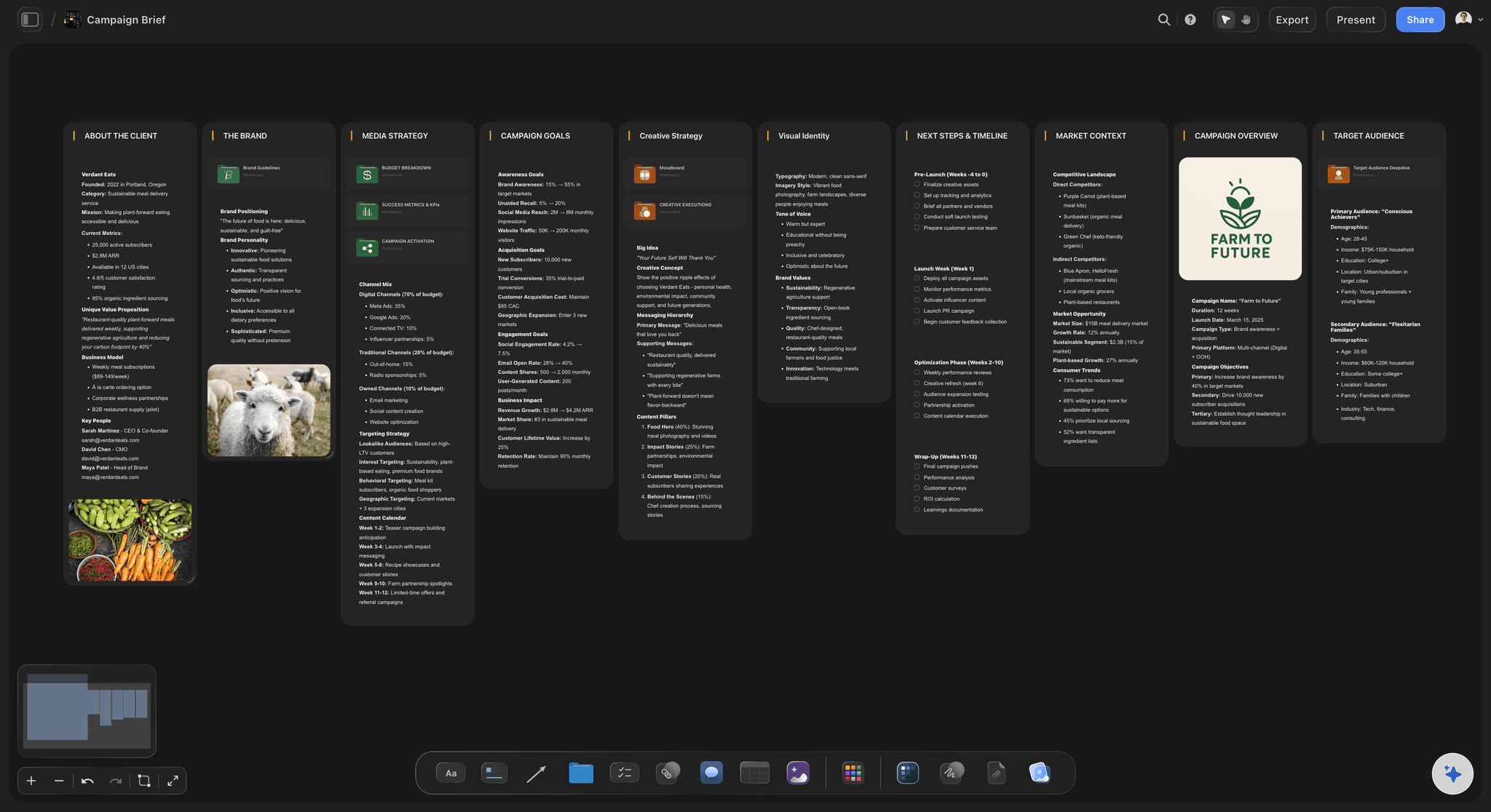
Full project board generated from a single prompt
Start with a board, not a blank page
Describe your design project and the AI generates a structured board covering the stages your project needs: brief, research, moodboard, information architecture, and feedback rounds. Use it as the foundation instead of starting from scratch every time.
See the AI canvas →
Moodboards, references, and visual direction on one canvas
Build the visual brief alongside the plan
Drop images, grab frames from YouTube and Vimeo, and organize references next to the project brief so the creative direction and the plan live in one place. No tab-switching between five tools.
See moodboarding in Storyflow →
Real-time collaboration and client-ready sharing
Keep the whole team on the same plan
Invite your team to collaborate in real time or send a view-only link so clients can review the plan without signing up. Export the board as an image or PDF for decks and approvals.
See team planning →Free plan coming late 2026.
Open a canvas, describe your project, and get a full design plan in seconds. Storyflow is paid-only during early access, with Plus from $7.99 a month; a no-time-limit, no-board-limit Free plan is planned before the end of 2026.
Unlimited boards on an infinite canvas
Basic AI usage to generate project plans and boards
3 starter frameworks built in
20 file uploads for PDFs, images, and documents
Built for people with taste
More than a design planning tool.
Storyflow is an AI-native canvas, so strategy, references, briefs, and timelines all connect on the same infinite board.

Drop anything onto the canvas and keep it with the plan
Every file type your project needs
PDFs and documents: Drop briefs, brand guidelines, or research PDFs directly onto the canvas. They stay next to the plan as the source of truth through every feedback round.
Images and references: Drag images in, grab frames from YouTube and Vimeo, or paste links to keep all visual references inside the design planner during the moodboard and research stages.
Spreadsheets and links: Add budgets, timelines, or any linked resource to the board so the project lives in one place, not scattered across inboxes.

AI that keeps the context of your whole project
Keep prompting until the plan is right
Canvas-aware AI: The AI reads your entire board, not just the last message. Ask it to restructure the plan, add a wireframe-planning phase, or tighten the brief and it updates everything in context.
Sticky notes and freeform cards: Mix AI-generated structure with your own sticky notes and freeform cards. The canvas adapts to how your team actually thinks through a project.
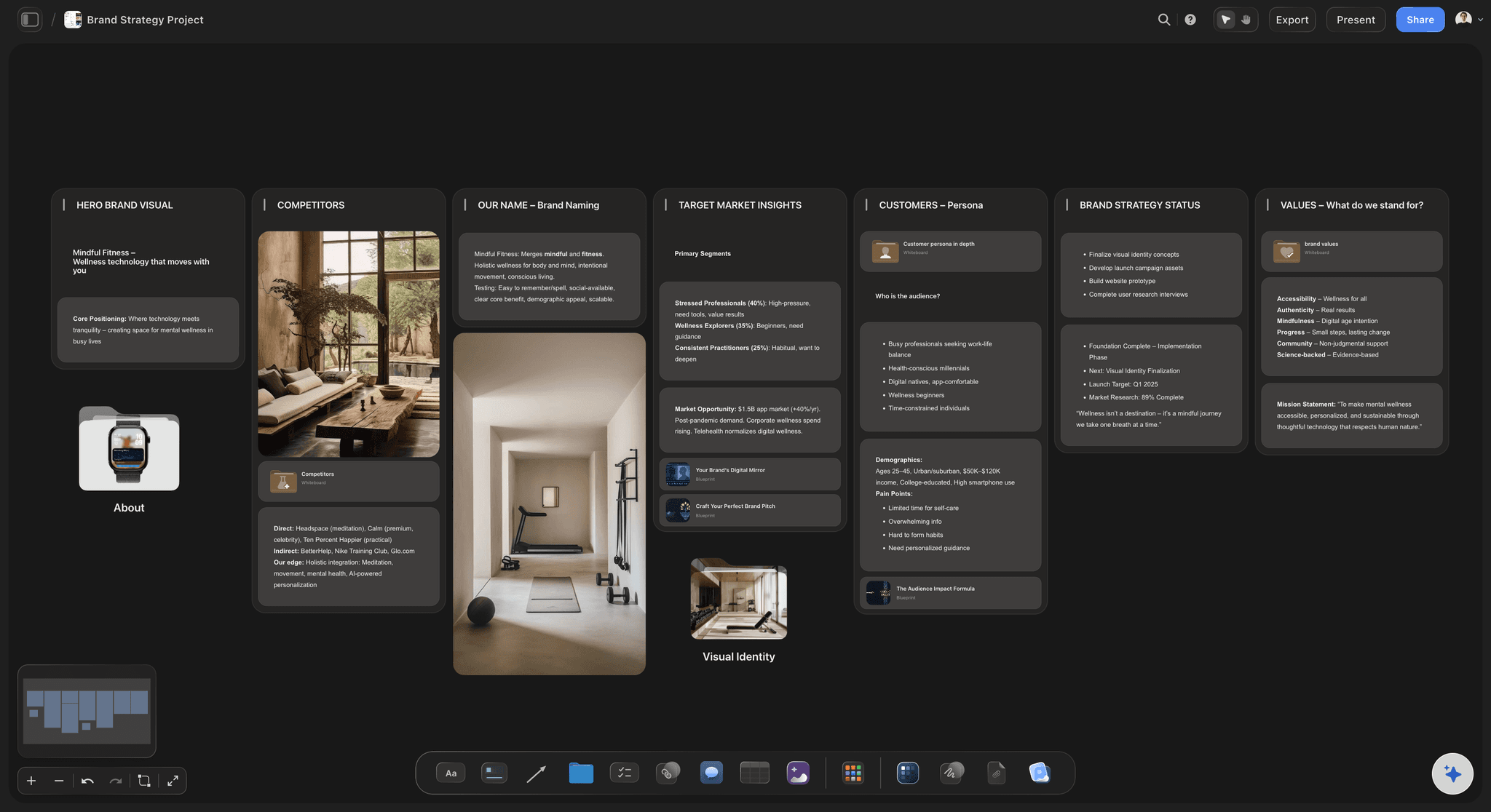
Strategy, moodboard, and brief on one board
Plan the design work before it starts
Creative briefs: Generate a brief on the canvas with the AI, then refine it with the team. Everyone reads the same version, not an email chain of edits.
Brand strategy and design system planning: Build positioning, audience, visual direction, and component conventions in one board that doubles as the reference for the entire project through to developer handoff.
Moodboards and references: Collect visual tone, color palettes, and competitor examples next to the project plan so creative direction stays grounded in strategy from the research stage onward.

From planning to sharing without switching apps
Share the plan when it is ready
View-only links: Send a client a link to the design plan. They see the full board without signing up. No PDF exports needed for every feedback round.
Export as image or PDF: Export the board as a high-quality image or PDF for stakeholder decks, kick-off presentations, and sign-off documents.
Team collaboration: Invite collaborators to edit in real time or view the board. One source of truth, no version confusion.
Explore templates for your project
Every template opens as a real, editable board on the infinite canvas. Pick the closest fit and make it your own.
Design Planner
Plan a design project from brief to delivery, with references, tasks, and feedback side by side.
One app instead of five
Storyflow vs Milanote, Notion, and FigJam.
A fair look at how these tools compare for planning a design project from brief through developer handoff.
Storyflow
Recommended
Unlimited boards on any plan
AI builds the design plan from a prompt
AI uses your whole canvas as context
Brief, moodboard, and roadmap on one canvas
Infinite visual canvas
Milanote
Free plan with unlimited boards
AI builds the design plan from a prompt
AI uses your whole canvas as context
Brief, moodboard, and roadmap on one canvas
Infinite visual canvas
Notion
Free plan with unlimited boards
AI builds the design plan from a prompt
AI uses your whole canvas as context
Brief, moodboard, and roadmap on one canvas
Infinite visual canvas
FigJam
Free plan with unlimited boards
AI builds the design plan from a prompt
AI uses your whole canvas as context
Brief, moodboard, and roadmap on one canvas
Infinite visual canvas
What creators are saying
Join early creators getting structured workspaces and AI that remembers their projects
“Storyflow has sped up my workflow by at least 3x, which means more flow state and more projects I can actually ship. It truly changed the way me and my team create.”

Reilin Joey
Director & YouTuber
“One prompt gets me a structured board. But the tactics are my favorite. I run my YouTube scripts through them and my intros and retention got better. It's amazing.”

Justkay
YouTuber & Freelance Filmmaker
“I used to juggle five apps to plan a project. Now I describe what I am making and get boards, lists, and a schedule. All in one place.”

George
@fernwehchronicles
Design planning tool, answered.
Common questions about planning and organizing design projects in Storyflow.
A design planning tool is a workspace for organizing the strategy, briefs, references, and project structure that need to exist before any design work begins. It is not Figma or Photoshop: it does not produce the final design files. It plans and organizes the design project so the team starts with a shared, structured foundation rather than scattered notes and email chains.
Storyflow is a design planning tool with an AI that builds the first board: type a prompt and you get a structured plan with the brief, the moodboard and the roadmap on one canvas the whole team can see. The AI uses the whole canvas as context, so you can keep prompting until the plan is right. Storyflow does not draw or produce the final design files: it is the layer before that.
A thorough design project plan covers eight stages: the creative brief (problem, audience, deliverables, success criteria); research and discovery (competitor analysis, audience insights, reference gathering); moodboarding (visual tone, color direction, stylistic references); information architecture (content hierarchy, navigation structure, user flows); wireframe planning (layout sketches, screen inventory, interaction notes); design system planning (typography scale, color tokens, component conventions); feedback rounds (stakeholder review cycles, revision tracking, approval gates); and developer handoff (spec packaging, asset export, annotation). Not every project needs all eight, but a good design planning tool should be able to hold whichever stages apply.
Not yet. Storyflow is paid-only during early access, with Plus starting at $7.99 per month billed annually for no board limit and an AI that generates structured project boards from a single prompt. A Free plan is planned before the end of 2026. If you need something free today for basic manual moodboarding, Milanote's free plan covers that; for AI-assisted planning across the whole project lifecycle, Storyflow's paid plans are worth trying before you settle on a workflow.
Milanote is a visual board tool focused on gathering and organizing references manually. It is well suited to moodboarding and early creative direction work, and its free plan covers basic use. Storyflow adds an AI layer that reads your whole board and generates structured project plans from a prompt, and lets you drop PDFs, spreadsheets, and video frames alongside references. Both work for design planning. Storyflow leans into AI-assisted structure across the full project lifecycle; Milanote leans into manual curation of visual references.
No. Storyflow is a planning and organizing tool for design projects, not a UI design or image editing application. It does not produce design files, components, or production-ready assets. Use it to plan the brief, run the moodboard, map information architecture, and coordinate feedback rounds. Once the plan exists and the team is aligned, switch to Figma or Sketch for the actual design work. Storyflow and Figma are complementary: Storyflow covers the stages before production; Figma covers production itself.
Design planning tools are used by anyone who coordinates design work before it gets made: creative directors briefing a team, brand designers building strategy boards, product and UX teams mapping information architecture and design sprints, design agencies running client kick-offs, marketing teams planning campaign creative, and freelancers organizing client projects. If your work involves aligning a team around a creative direction before anyone opens Figma, a design planning tool saves time and reduces back-and-forth.
Yes. Storyflow supports real-time collaboration so multiple team members can edit the same board at once. You can also share a view-only link with clients or stakeholders who want to see the plan without signing up. Inviting collaborators and sharing view-only links is free on every plan.
Brand identity projects, campaign creative, product design sprints, UX research and mapping, content production, design ops workflows, and more. If you can describe it in a prompt, the AI can generate a starting board for it.
Not during early access. Storyflow is paid-only right now, with Plus starting at $7.99 per month billed annually for unlimited boards and file uploads on an infinite canvas. A Free plan is planned before the end of 2026, and anyone a paid member invites to a board joins free today.
Yes. Drop PDFs, images, and spreadsheets directly onto the canvas. You can also paste links and grab frames from YouTube and Vimeo videos to pull in visual references for the moodboard and research stages. Everything stays on the board next to the plan so nothing gets lost in a separate folder or email thread.
More from Storyflow
Your design project starts with a plan.
Type a prompt, let the AI build the board, and walk into the project with a structure the whole team can see.