
Audience insight without the busywork
Turn two hundred observations
into findings that hold up.
Put every observation from interviews and tests on its own card, drag cards into themes on an infinite canvas, and keep the recording link, transcript quote, or screenshot attached to each one.


Creatives working for these brands already got early access
- Red Bull
- Canon
- Artlist
- Porsche
See how easy it is to get started
Watch a real project come together, from a blank board to a finished plan, clicked through step by step.
Start from a ready-made template
Pick a board to see what you can build, then let AI fill it in. Every template is a real, editable starting point on the same infinite canvas.

Customer Persona
Map who your customer is, what they need, and what holds them back, all in one profile.
What is a UX research board?
A UX research board is a workspace for turning raw research into findings. Storyflow is an AI visual workspace that turns interviews and tests into findings on one infinite canvas: every observation on its own card, themes you form by dragging, and the recording link, quote or screenshot attached to each one. The board holds the observations from your interviews, usability tests, and surveys as individual cards, the themes those observations cluster into, the findings you are willing to defend, and the evidence each finding rests on. The point is not to store research. Dovetail and a folder of transcripts already store research. The point is to do the synthesis: the step where two hundred scattered observations become five things the team can act on.
Research does not fail at collection. It fails at synthesis. Twelve interviews produce two hundred observations, and the connections between them live in one researcher's head, which means the findings are only as durable as that person's memory and only as persuasive as their retelling. Synthesis is a spatial problem: which observations belong together, whether a theme is actually three themes, whether a finding rests on eight participants or on one loud one. Those questions are nearly impossible to answer scrolling through transcripts, and almost trivial once everything is laid out in front of you.
Storyflow is an AI-native infinite canvas built for exactly that. Describe your study in a prompt and the AI lays out a structured research board with sections for observations, themes, and findings. Then you do the part that matters: drag observation cards into affinity groups until the clusters feel true, attach the source to each card so nothing floats free of its evidence, and re-prompt the AI to build around what you have already placed without moving it.
Organizing UX research means working across five connected layers: raw observations (one card per thing a participant said or did), source evidence (the recording link, transcript quote, or screenshot behind each observation), themes (the affinity groups the observations form), findings (the claims you are prepared to defend, each traceable back to its cluster), and the artifacts the research produces (personas, journey maps, and recommendations that sit beside the evidence that justifies them). Storyflow keeps all five visible at once, which is what makes weak findings findable before a stakeholder finds them for you.
Ultra fast from brief to board
From a pile of notes to findings you can defend.
No tagging taxonomy to configure, no database to design. Describe the study and start grouping.
01
Open a canvas
Sign up in seconds. No download. Your infinite research canvas opens in the browser.
02
Describe the study
Type what you researched, how many sessions you ran, and what you were trying to learn, and the AI lays out a structured board with spaces for observations, themes, and findings. You start from a frame rather than a blank wall.
03
Group observations into themes
Put each observation on its own card with its source attached, then drag cards into affinity groups. Split clusters that turn out to be two things, merge ones that turn out to be one, and watch the findings emerge from the arrangement.
04
Share what you found
Build personas and journey maps beside the evidence, send stakeholders a view-only link, or export the board as an image or PDF for the readout deck.
The whole study, laid out and movable.
Observations, themes, evidence, and the artifacts they produce on one infinite canvas.

Drag observations into themes until the clusters feel true
Affinity mapping is the whole job
Synthesis happens by arrangement, not by tagging. Cards on a canvas move with a drag, so you can test whether two clusters are really one theme in seconds, instead of renaming tags in a database to find out.
See the affinity diagram maker →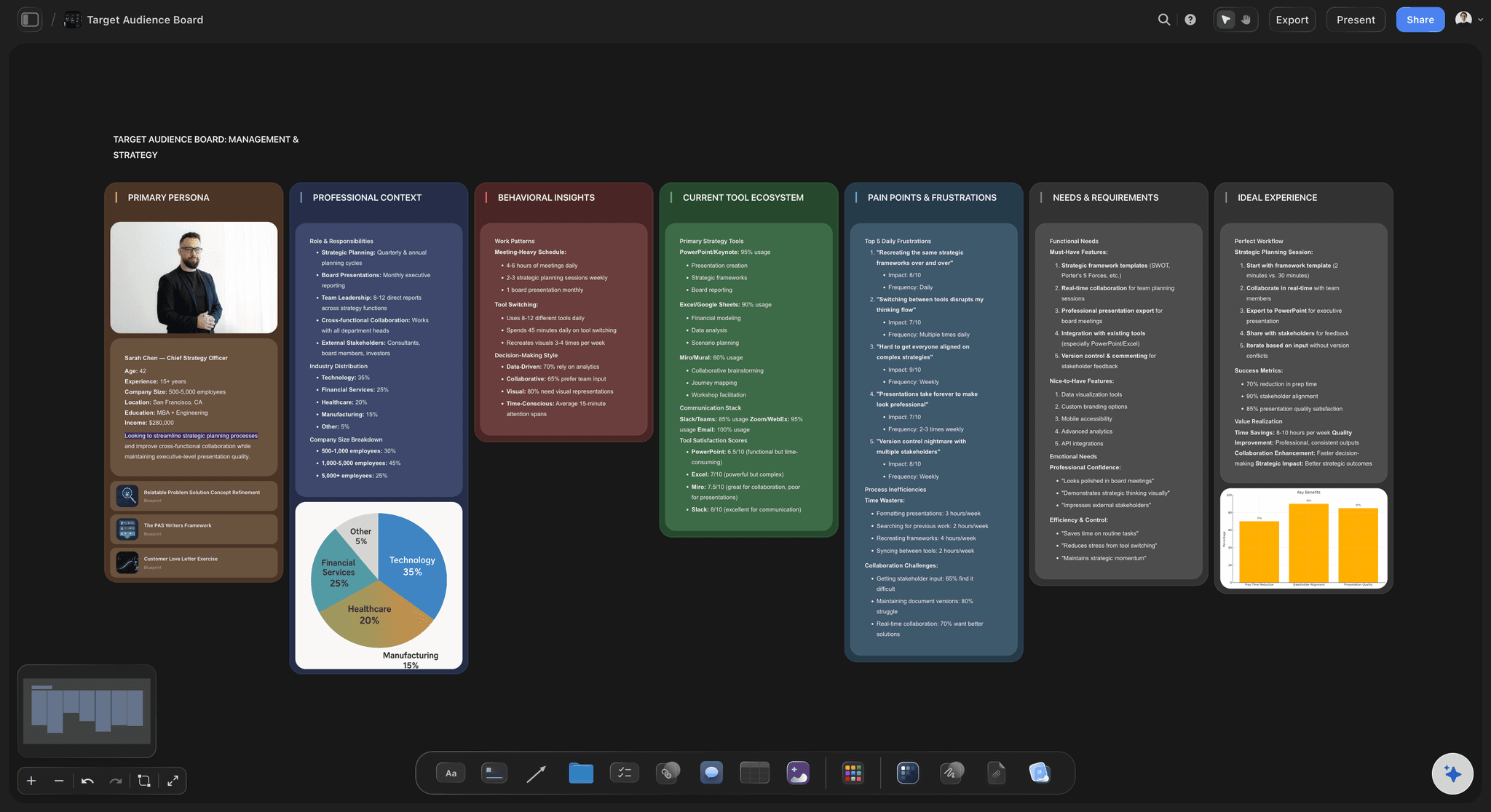
Map what users said, thought, felt, and did
Empathy maps built from real observations
Because the observations are already on the board, an empathy map stops being guesswork. Drag actual quotes and behaviors into the quadrants and the map inherits the evidence behind it.
Explore the empathy map →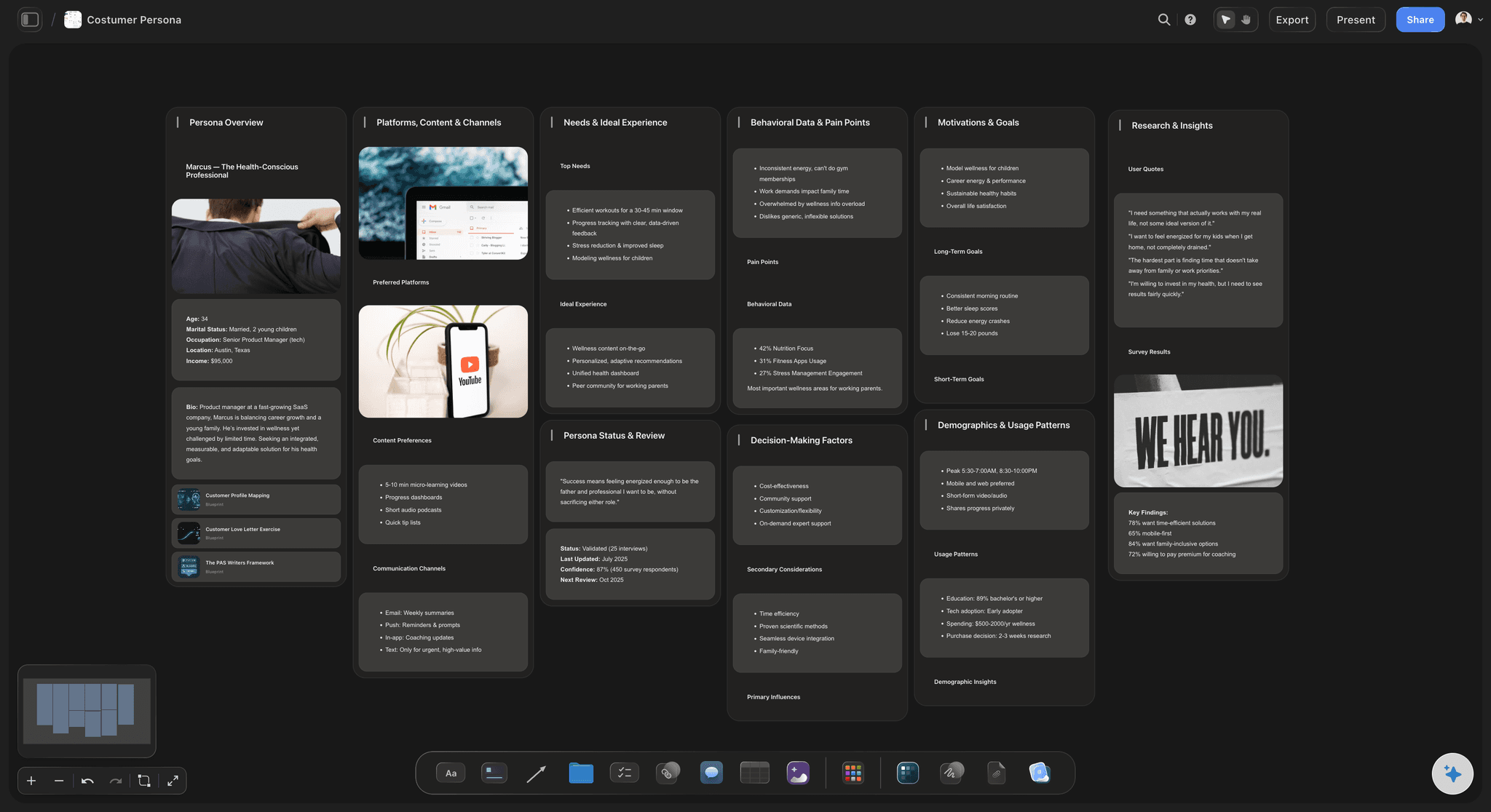
Personas that sit beside the research that justifies them
Personas grounded in evidence
A persona built two scrolls away from the interview data it came from is a persona people can interrogate. When someone asks where a trait came from, the answer is on the same canvas.
Try the customer persona generator →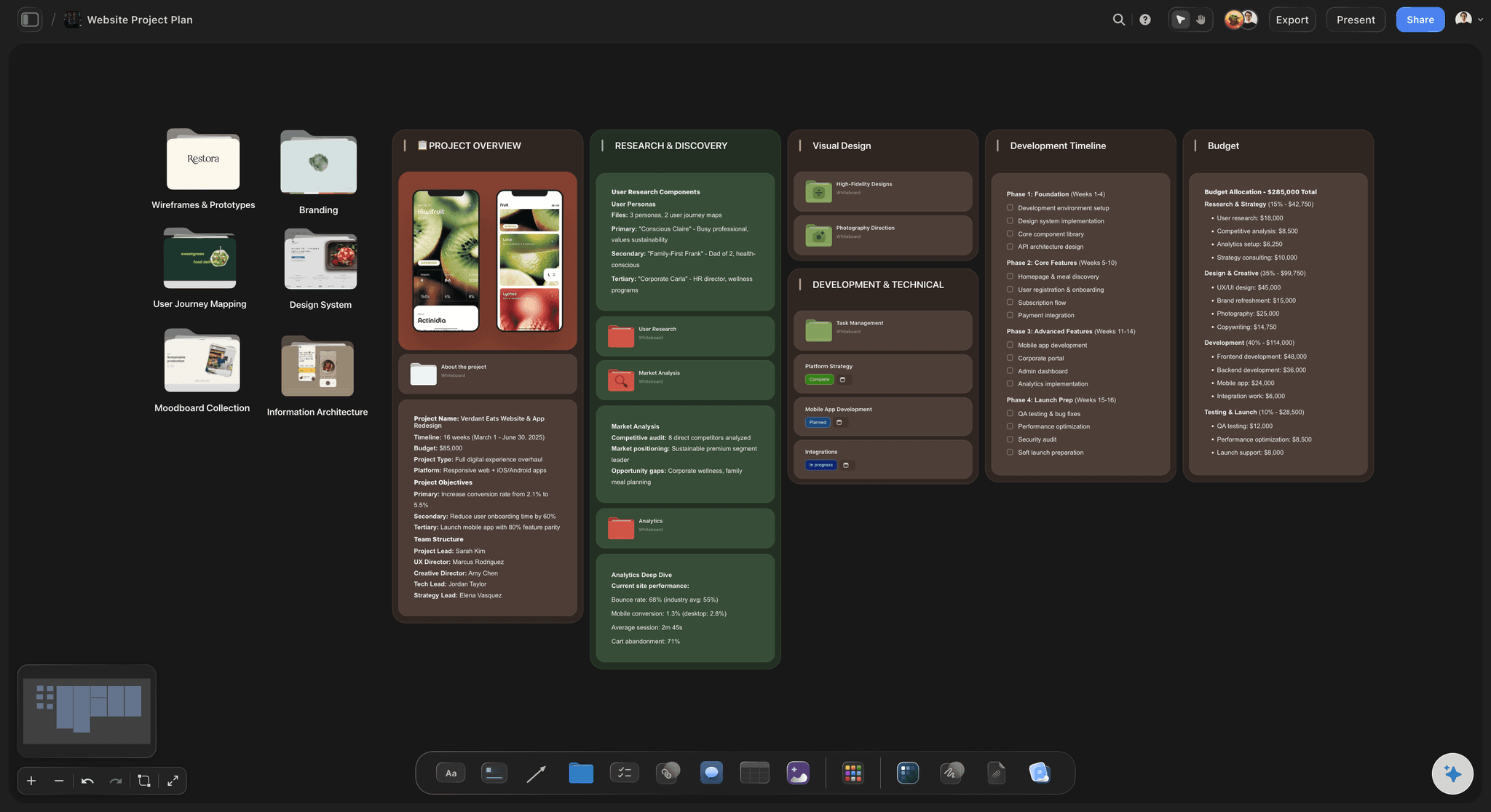
Journey maps drawn from what participants actually did
Journeys next to the raw sessions
Lay the journey map out beside the usability test observations that produced it. Every pain point on the journey traces back to the sessions where users actually hit it.
See the user journey map →Unlimited boards. No object cap.
Open a canvas, describe the study, and start grouping. Storyflow is paid-only during early access, with plans from $9.99 a month, and a Free plan launches before the end of 2026.
Unlimited research boards on an infinite canvas
Basic AI usage to generate boards from prompts
Starter research templates built in
Share view-only links with stakeholders

Built for people with taste
More than a repository of transcripts.
A repository can tell you what was said. It cannot tell you what it means. Meaning comes from arrangement, and arrangement needs a surface.
Observations, themes, findings, and the evidence chain
Work across every layer of the synthesis
One card per observation: Break sessions into atomic observations, one card each, rather than summarizing whole interviews. Atomic cards can regroup freely, which is what lets the themes come from the data instead of from your first impression.
Affinity groups you can argue with: Drag cards into clusters, name the clusters, and keep moving. A theme with fifteen cards from nine participants is a finding. A theme with three cards from one participant is an anecdote, and the board makes the difference visible.
Findings that trace back: Write each finding as its own card and connect it to the cluster it came from. When a stakeholder challenges a recommendation, you walk the connection back to the evidence instead of relying on memory.
Sections for each study phase: Frame off interviews, usability tests, and survey results into their own sections, then synthesize across them. Patterns that only appear when two methods agree are the ones worth acting on.
AI that can see the study you have already laid out
Synthesize with an AI that knows your research
Prompt to work through a problem: Ask it to lay out a board for a diary study, to suggest how a sprawling cluster might split, or to draft a structure for the findings section. It keeps the whole board in context, so suggestions fit your study rather than a generic one.
It structures, it does not conclude: Storyflow is a synthesis canvas rather than an insight generator. The AI helps you arrange and see the research; deciding what the evidence actually supports stays with you, which is the only arrangement a stakeholder should trust.
Iterate without losing work: Re-prompt as many times as you need. Cards you have already grouped stay exactly where you put them while the AI builds around them.

Recordings, quotes, and screenshots attached to the cards
Evidence lives on the board
Sources attached where they belong: Paste the recording link, the transcript quote, or the screenshot onto the observation card it supports. No finding floats free of its evidence, and no one has to trust your memory of session four.
Drag in the raw material: Drop PDFs, screenshots, and links straight onto the canvas, and grab frames from YouTube or Vimeo session recordings to pin the exact moment a participant got stuck.
Notes beside the wall: Draft the research report in the built-in document editor with the board in view, so the writeup quotes the evidence instead of paraphrasing it from memory.
From findings to artifacts to stakeholders
Ship the research, not just the readout
Artifacts beside their evidence: Build personas, empathy maps, and journey maps on the same canvas as the observations that justify them. Artifacts that sit next to their evidence age better than slides that left it behind.
View-only links for stakeholders: Send a link and stakeholders open the whole wall in a browser with no account. Watching the evidence trail from finding to cluster to quote is far more persuasive than a summary slide.
Work on it together: Invite teammates to the same canvas so synthesis is a shared activity rather than one researcher's private conclusion. Invited collaborators join free.
Export for the deck: Export the board as a high-quality image or PDF when the readout needs to live in a presentation or a document.
Explore templates for your project
Every template opens as a real, editable board on the infinite canvas. Pick the closest fit and make it your own.
Customer Persona
Map who your customer is, what they need, and what holds them back, all in one profile.
One app instead of five
Storyflow vs Miro, Notion, and Dovetail.
Every tool here is genuinely good at something. Dovetail owns transcription, tagging pipelines, and the searchable research repository at scale. Miro owns workshop facilitation and enterprise rollouts. Notion owns research wikis and databases. Storyflow owns the visual synthesis wall, where observations become themes and findings sit beside their evidence.
Storyflow
Recommended
Infinite canvas for spatial affinity mapping
AI lays out a research board from a study description
AI uses your whole board as context
Findings linked to their source evidence
Personas and journey maps beside the raw research
Runs in the browser, nothing to install
Miro
Infinite canvas for spatial affinity mapping
AI lays out a research board from a study description
AI uses your whole board as context
Findings linked to their source evidence
Personas and journey maps beside the raw research
Runs in the browser, nothing to install
Notion
Infinite canvas for spatial affinity mapping
AI lays out a research board from a study description
AI uses your whole board as context
Findings linked to their source evidence
Personas and journey maps beside the raw research
Runs in the browser, nothing to install
Dovetail
Infinite canvas for spatial affinity mapping
AI lays out a research board from a study description
AI uses your whole board as context
Findings linked to their source evidence
Personas and journey maps beside the raw research
Runs in the browser, nothing to install
What creators are saying
Join early creators getting structured workspaces and AI that remembers their projects
“Storyflow has sped up my workflow by at least 3x, which means more flow state and more projects I can actually ship. It truly changed the way me and my team create.”

Reilin Joey
Director & YouTuber
“One prompt gets me a structured board. But the tactics are my favorite. I run my YouTube scripts through them and my intros and retention got better. It's amazing.”

Justkay
YouTuber & Freelance Filmmaker
“I used to juggle five apps to plan a project. Now I describe what I am making and get boards, lists, and a schedule. All in one place.”

George
@fernwehchronicles
UX research organization, answered.
How synthesis works on a canvas, where Dovetail fits, and what the AI actually does.
It depends on which part of the job is hurting. If your bottleneck is processing raw sessions at scale, Dovetail is the standard: automatic transcription, tagging pipelines, and a searchable repository that holds years of studies. If you run live workshops with sticky notes, Miro's facilitation features and enterprise footprint are hard to beat. If your team already lives in Notion, its databases make a serviceable research wiki on a genuinely free tier. Storyflow is built for the synthesis step specifically: an AI lays out a research board from your study description, you affinity-group observation cards on an infinite canvas, and personas and journey maps sit beside the evidence that justifies them. If collection is solved and meaning is the problem, a canvas beats a repository.
Break every session into atomic observations, one card each, with the source attached: the recording link, the transcript quote, or the screenshot. Spread the cards on a canvas and group the ones that describe the same underlying thing, ignoring which participant they came from. Name each cluster only after it forms, so the theme comes from the data rather than from your expectations. Then read the clusters critically: a theme spanning nine participants is a finding, a theme built from one vocal participant is an anecdote. Write the findings as their own cards and connect each one to its cluster. The result is a wall where every claim can be walked back to the evidence, which is what separates findings from opinions.
They do different jobs, and plenty of teams would use both. Dovetail is a research repository: it transcribes recordings automatically, supports structured tagging pipelines, and makes years of studies searchable, which matters enormously at scale. Storyflow does not transcribe and is not trying to be your archive. It is the synthesis wall: the spatial surface where observations get affinity-grouped into themes by dragging, where findings connect visibly to their evidence, and where personas and journey maps are built next to the raw research. If your pain is processing and retrieving sessions, choose Dovetail. If your pain is that collection is fine but the findings feel thin and untraceable, that is the synthesis gap, and it is the gap Storyflow is built for.
No, and that is deliberate. Storyflow's AI is structural: it lays out a research board from your study description so you are not starting from a blank wall, it can suggest how an overloaded cluster might split, and it can draft a frame for the findings section. Because it sees the whole canvas, its suggestions fit the study you actually ran. What it does not do is decide what your evidence supports. Synthesis is a judgment call about which observations belong together and which claims the data can carry, and a finding a machine produced is a finding a stakeholder can dismiss. The AI accelerates the arrangement; the conclusions stay yours, which is precisely why they hold up in the readout.
Not during early access. Storyflow is paid-only right now, with plans starting at $9.99 a month, and a Free plan for solo use launches before the end of 2026. Anyone a paid member invites to a board joins free today, so teammates and stakeholders can collaborate on your research wall without paying. If you need a free option this minute, Notion's free tier is genuinely capable as a research wiki if you are willing to build the structure yourself, and physical sticky notes on a wall remain a perfectly honest way to run a first affinity mapping session.
Attach the source at the observation level, not the findings level. Every observation card carries its own recording link, transcript quote, or screenshot from the moment you create it, so evidence travels with the card no matter how many times you regroup it. Findings then connect to clusters, and clusters are made of sourced cards, which gives you an unbroken chain: recommendation to finding to theme to observation to the exact minute of the session. This matters most six weeks later, when someone questions a decision and nobody remembers session four. On a board, you do not defend the finding from memory. You walk the connection back and let the participant make the argument.
Yes, and it is one of the main reasons to synthesize on a canvas rather than in slides. Build the persona on the same board as the interview observations it came from, and every trait can point to the cluster that produced it. Lay the journey map beside the usability test evidence, and every pain point traces to the sessions where participants actually hit it. Artifacts made this way are harder to dismiss and easier to update: when the next study lands, you can see immediately which parts of the persona the new evidence supports and which parts it breaks. An artifact that left its evidence behind in another tool tends to drift into fiction.
Send a view-only link. Stakeholders open the whole wall in a browser with no account: the findings, the themes behind them, and the quotes and screenshots behind those. That evidence trail is what makes research persuasive, because a stakeholder who can see nine participants hitting the same wall stops arguing with the recommendation. Comments let them ask questions on the board itself rather than in a meeting three days later. For readouts that have to live in a deck or a document, export the board as a high-quality image or PDF. The link usually works better than the deck, though, because it invites people to follow the reasoning instead of just receiving the summary.
Yes. Invite teammates to the canvas and they join free, so synthesis becomes a group activity rather than one researcher disappearing for a week and returning with conclusions. Group synthesis is genuinely better practice: when a designer, a PM, and a researcher cluster the same observations, the disagreements about where a card belongs surface assumptions that would otherwise stay buried until the roadmap argument. It also builds buy-in cheaply, because people rarely dismiss findings they helped construct. Stakeholders who only need to see the result get a view-only link instead, which keeps the wall itself in the hands of the people doing the work.
Five layers. Raw observations, one card per thing a participant said or did, kept atomic so they can regroup freely. Source evidence attached to each card: recording links, transcript quotes, screenshots. Themes, the named affinity clusters the observations form. Findings, written as explicit claims and connected to the clusters that support them. And the artifacts the research feeds: personas, empathy maps, journey maps, and recommendations, built beside their evidence. Frame each study into its own section so you can also synthesize across studies over time. What should not go on the board is anything you cannot source. An observation without evidence is an opinion wearing a lanyard, and the board is more useful when it refuses them.
More from Storyflow
For UX designers
User journey map
Empathy map
Affinity diagram maker
Free user flow diagram
Customer persona generator
AI persona generator
Free customer journey map maker
User story mapping
Free reference board
Customer journey mapping tool
Free image annotation tool
Customer discovery board
Affinity map with ChatGPT
Card sorting tool
Research board with Claude
Lay the research out and find what it actually says.
Open a canvas, describe your study, and let AI build the first research board. No download.