
Extremely clear strategy, zero busywork
Build the research board in ChatGPT,
every source pinned where the team can check it.
For founders and marketing teams with a decision to make: ChatGPT finds the sources, puts each one on a Storyflow board with its link, sorts them into themes and writes up what they add up to.


Creatives working for these brands already got early access
- Red Bull
- Canon
- Artlist
- Porsche
See how easy it is to get started
Watch a real project come together, from a blank board to a finished plan, clicked through step by step.
Start from a ready-made template
Pick a board to see what you can build, then let AI fill it in. Every template is a real, editable starting point on the same infinite canvas.

Marketing Plan
Lay out your goals, channels, and initiatives for the quarter on one board.
Can ChatGPT make a research board?
Yes, ChatGPT can make a research board: it searches the web, reads what it finds and tells you what the sources agree on, but its answer is a long reply with links in a chat that nobody else on the team opens. Storyflow is an AI visual workspace that builds a research board on one infinite canvas: a card for every source with its link and what it claims, a wall for each theme, the files you already have and a findings document, side by side. With the Storyflow plugin installed, ChatGPT puts its sources on your board and sorts them there, on ChatGPT's own model, so it uses none of your Storyflow AI credits.
ChatGPT is already a good researcher with nothing connected. Ask whether shoppers in a new market will pay for refills and it comes back with reports, retailer pages, competitor prices and the forum thread where buyers complain. The trouble starts the next day. The answer is prose in one person's chat. You cannot see which claim came from which link, move a source from one theme to another, or hand the picture to a co-founder who was not in the conversation. A week later someone asks the same question again and gets a slightly different answer.
With the plugin, the research lands on a board. ChatGPT's own web search finds the sources; Storyflow's connector does not search the web. ChatGPT then puts each source on the board as a link card with the page title and a short description, plus a note that says what the source claims, who published it and when. It builds a wall per theme with the cards inside, puts up to four labels on each note, such as the source type and how much you trust it, and draws arrows with a few words on them, such as "contradicts" or "same cause", between sources that clash or agree. Reports and spreadsheets you already have go on the board as files, and ChatGPT reads them there. Last, it writes a findings document beside the walls, one section at a time.
An example, with a made-up company. Fernway, a five-person brand of refillable cleaning products, has to decide by 30 November whether to launch in Germany next spring. The marketing lead asks ChatGPT one question: will German shoppers pay for refills? The board that comes back holds 16 sources: 6 reports and articles, 4 competitor pages, 3 retailer pages and 3 YouTube reviews, which play on the board. They sit in four walls: price (5 sources), packaging rules (3), where people buy (4) and competitors (4). A table logs all 16 with the date, the type, the link and a trust rating from 1 to 5. Two arrows marked "contradicts" join a report that puts the refill price ceiling at €4 to a retailer page selling refills at €5.49. The findings document gives the answer in one paragraph, three findings with their sources, two open questions and the one fact that would change the decision.
Web research goes wrong in the same few places, whoever does it. A claim gets cited from an article about a report instead of the report itself, so ask ChatGPT for the original and put both on the board. A number with no date gets treated as current, so every note carries the month it was published. A theme that rests on one source looks as solid as one that rests on five, so count the cards in each wall before you trust it. And the sources that disagree get smoothed into one tidy sentence, so mark them with an arrow instead. Open every link before a claim goes into the findings: ChatGPT can misread a page or pass on a link that no longer works.
The limits. A link card keeps the title, the description and your note, not the page, so copy the line that matters into the note before the page changes or disappears. ChatGPT reads the first 40,000 characters of a file on the board, files up to 25 MB, and cannot read a scanned PDF with no text in it. A file or photo you attach in the ChatGPT chat does not reach Storyflow. ChatGPT cannot read the comments on a board, and it has no tool that deletes a card, so a source added twice stays twice until you remove one.
Ultra fast from brief to board
Four steps from one question to a board of findings.
ChatGPT does the finding and the first sort. The team does the arguing, which is the part that matters.
01
Install Storyflow from the plugin directory
Open the Storyflow listing in ChatGPT's plugin directory and select Install plugin. Sign in to Storyflow when asked, then choose which projects ChatGPT may use.
02
Write the question on the board
Put the decision at the top of a board as one question with a date, such as "Launch in Germany next spring? Decide by 30 November." Add the reports, survey exports and interview notes you already have as files.
03
Ask ChatGPT to research and pin the sources
For example: "Research whether German shoppers will pay for refills. Put every source on the Germany board as a link card with a note on what it claims and when it was published, then sort them into a wall per theme and log them in a table." The cards, walls and table appear on the board.
04
Check the sources, then ask for the findings
Open the links, move or relabel any card, and tell ChatGPT which sources to drop from the findings. Then ask for the findings document, and share the board with the team before the decision meeting.

The sources, the themes, the files and the findings, in one place.
ChatGPT does the searching. Storyflow keeps every source next to what it supports, where the whole team can check it.
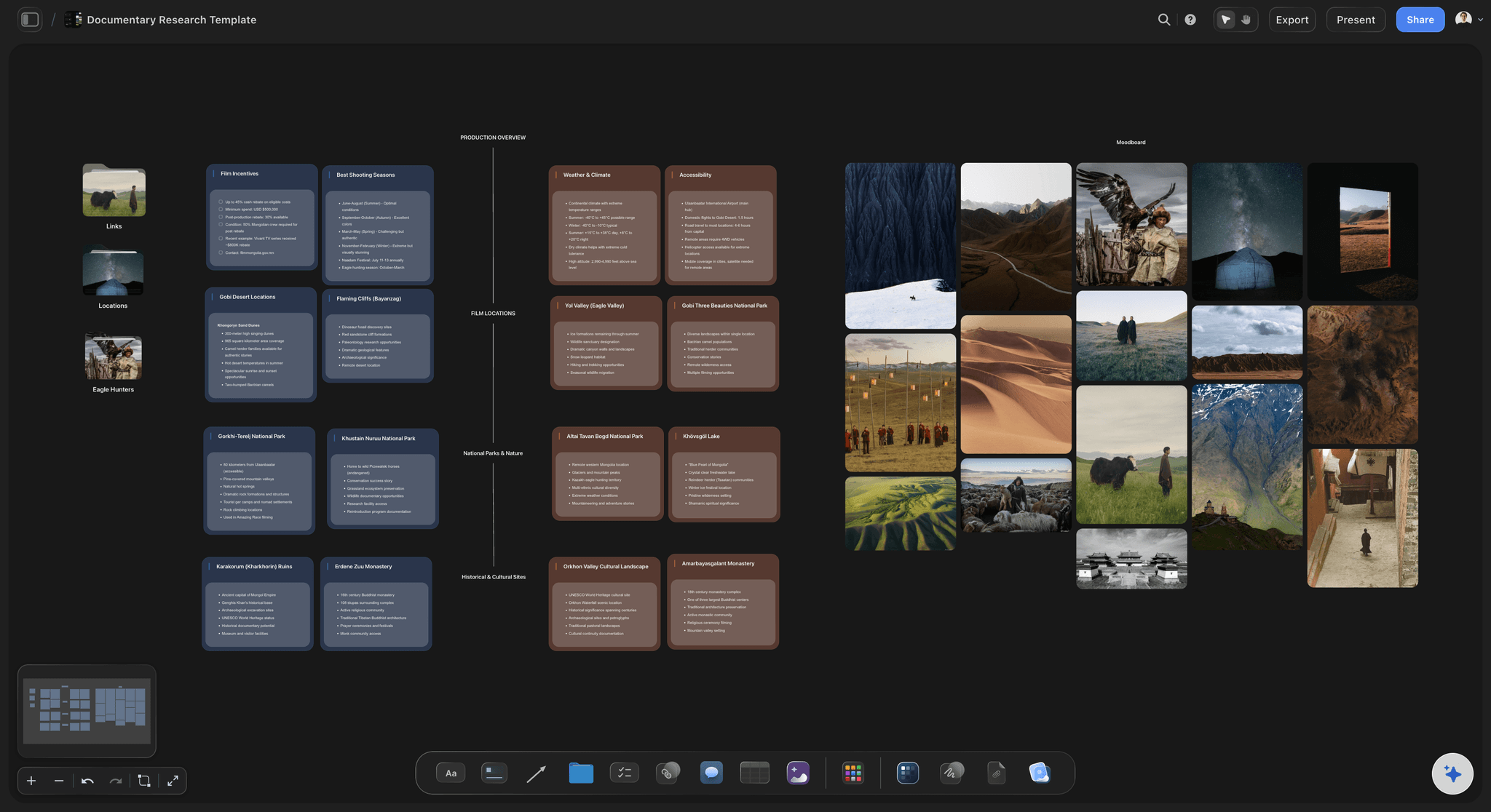
The sources
A card for every source, with its link
Each source is a link card with the page title and a short description, beside a note on what it claims and when, labelled with its type and how far you trust it. Click the card and the page opens.
See competitor analysis with ChatGPT →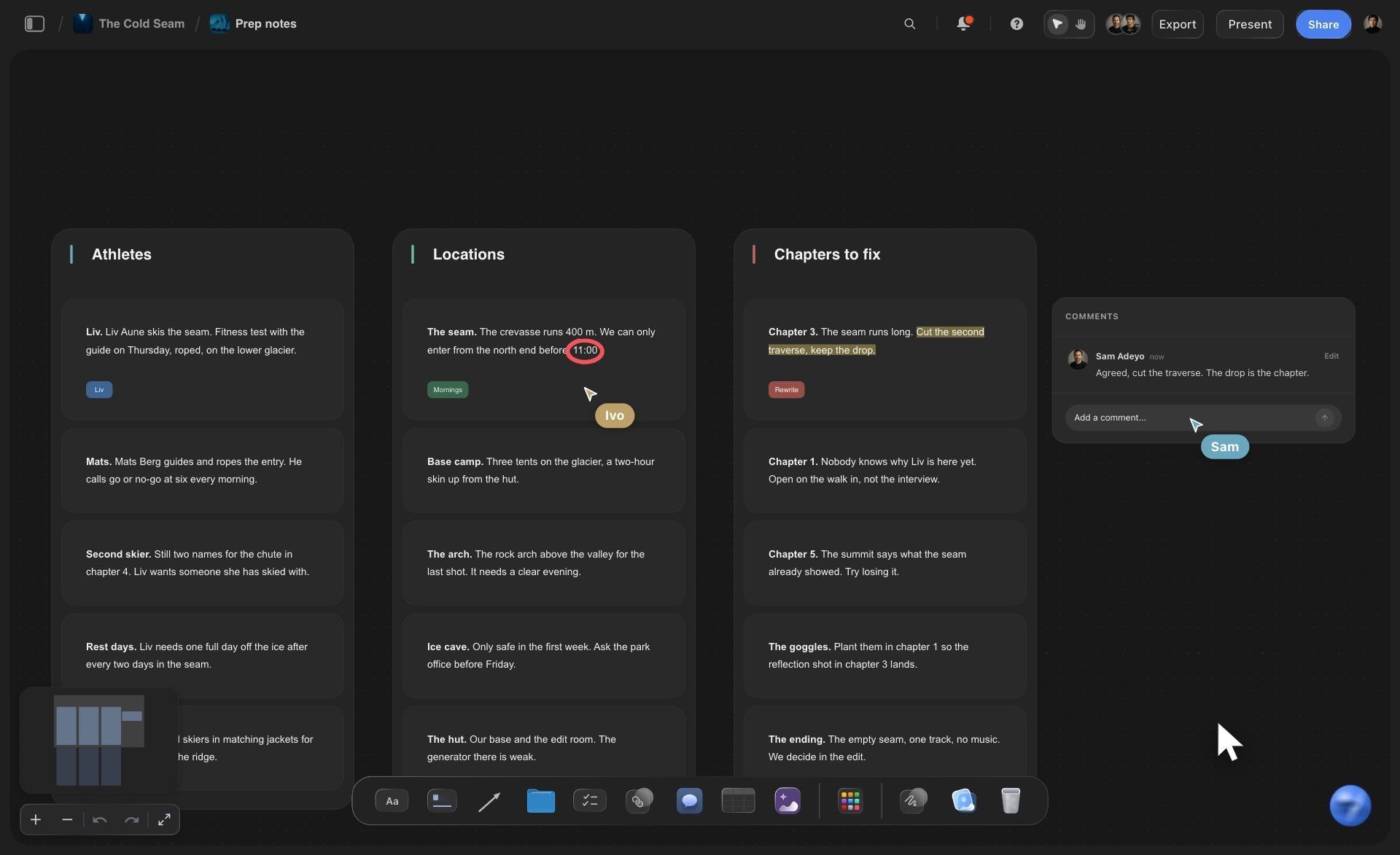
The themes
A wall per theme, cards you can move
Sources sit in walls named after what they say. Drag a card to another wall when it fits better, or ask ChatGPT to sort a pile of loose cards into walls in one go.
See the affinity map with ChatGPT →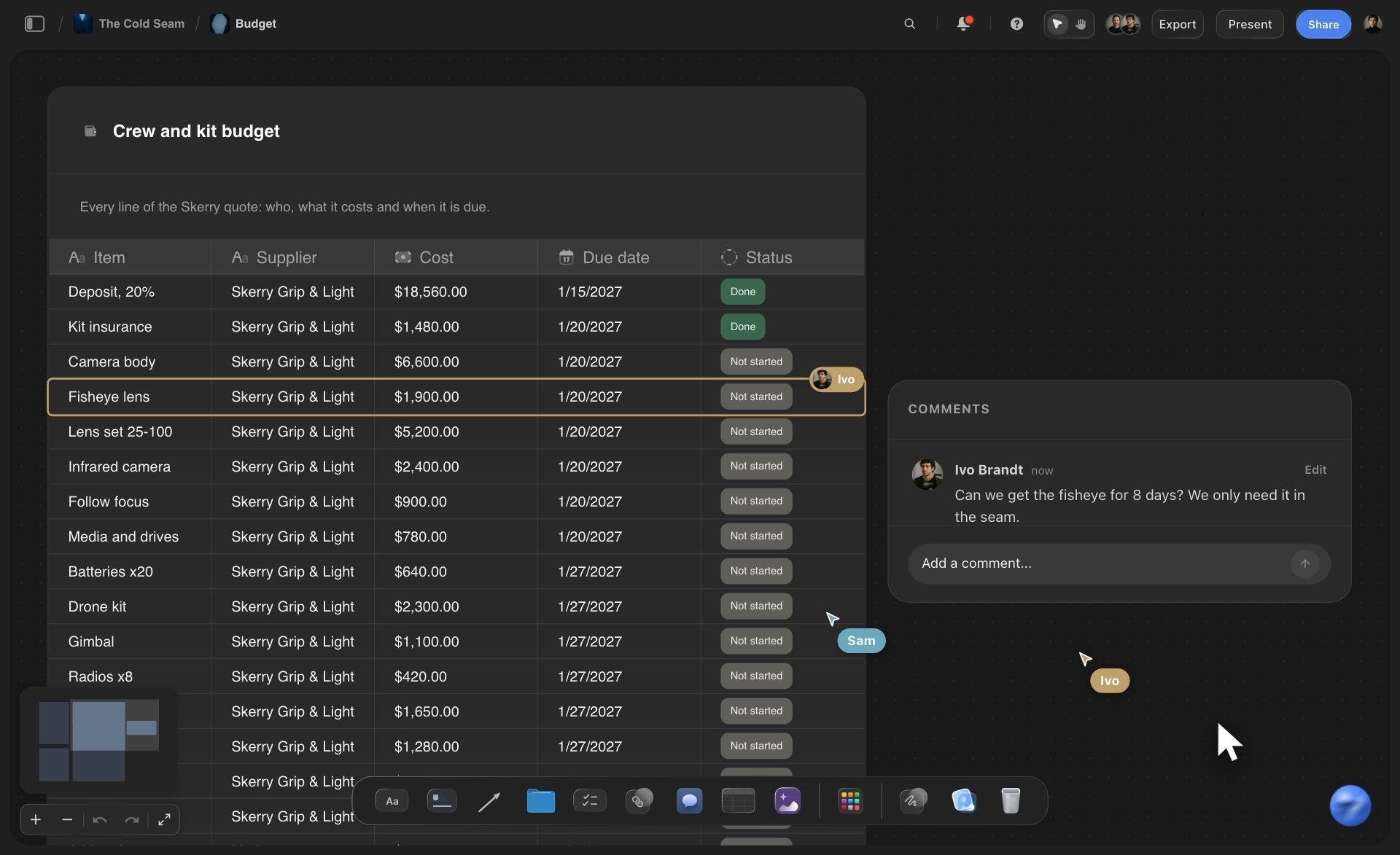
The files
The reports you already have, read on the board
Put the survey export, the analyst PDF or last year's sales sheet on the board as files. ChatGPT reads them there and can turn a table inside a PDF into a table on the board.
See document to project board →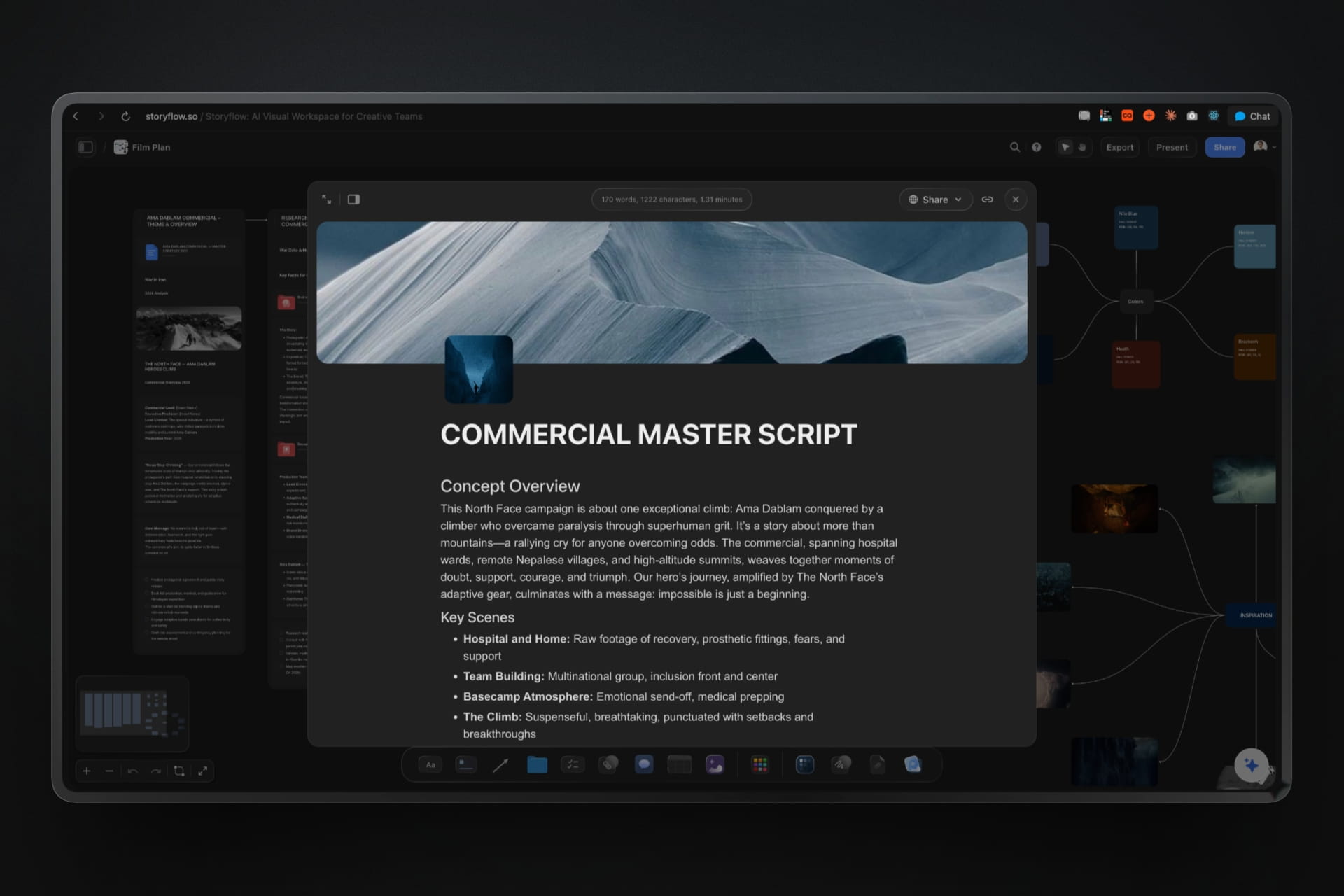
The findings
A findings document beside its sources
ChatGPT writes the findings section by section: the answer, the findings with their sources, the open questions. It sits on the same board, so every claim is a scroll from its card. Export it as a PDF or a Word file.
See the one-pager with ChatGPT →ChatGPT does the research. Your Storyflow credits stay untouched.
ChatGPT runs on its own model, so the cards, walls and documents it builds through the plugin use no Storyflow AI credits. An invited free Storyflow account can make 25 plugin actions a week, reset every Monday (UTC), and Plus, Pro and Max have no weekly limit. Storyflow is paid-only during early access, from $7.99 a month billed annually ($9.99 monthly), and anyone a paid member invites to a board joins free.
No Storyflow AI credits spent on research ChatGPT pins
No weekly limit on plugin actions on Plus, Pro and Max
Co-founders and teammates you invite join free
Findings document exports as PDF, Word or plain text
You choose which projects ChatGPT may open, and whether it may change them
Built for people with taste
Where research done in a chat gets lost.
ChatGPT finds good sources fast. Then they sit in one person's chat history, and the decision gets made from memory.
The sources
Twenty tabs and a chat history
One card per source: A link card for each page ChatGPT used, with a note on the claim and the date. Nobody has to scroll a chat to find where a number came from.
Labels on every note: Source type, theme and trust as labels on each source's note, up to four per note. A glance at a wall shows whether it rests on reports or on forum posts.
A source log in a table: A table with the link, the date, the type and a 1 to 5 trust rating per source. Tables in Storyflow cannot be sorted, so ask for the rows in date order.
Video sources that play: A YouTube or Vimeo review goes on the board as a video card that plays in place, next to the note on what the reviewer said.
The themes
Findings that only make sense together
A wall per theme: Price, packaging rules, where people buy, competitors. Each wall holds its sources, so the size of a wall shows how much evidence a theme has.
Sorted again in one request: When the themes change, ask ChatGPT to move the cards into new walls. It moves the cards you have instead of making copies.
Arrows that say why: An arrow between two sources carries a few words, such as "contradicts" or "same cause", so a disagreement stays visible instead of averaged away.
A map of the question: Ask for a mind map with the decision in the middle and the sub-questions around it, to see which ones the research has not touched yet.
The decision
A recommendation nobody can trace
Findings with their sources: The findings document names the source behind each finding. In the meeting, anyone can open the source instead of taking the summary on trust.
What changed this week: Ask ChatGPT what changed on the board this week and who changed it, so the source a teammate added on Thursday makes the findings.
A link for the team: Share the board from Storyflow with a view-only link that opens with no account. Teammates who want to comment sign in, free when invited.
The same board next quarter: When the question comes back, the sources, the themes and last time's answer are still on the board. Ask ChatGPT to look for what has changed since.
Explore templates for your project
Every template opens as a real, editable board on the infinite canvas. Pick the closest fit and make it your own.
Marketing Plan
Lay out your goals, channels, and initiatives for the quarter on one board.
One app instead of five
ChatGPT with a research board, ChatGPT alone, or Notion.
Storyflow lays the research out where the team can see it. Notion, also in ChatGPT's plugin directory, keeps sources as database rows you can sort and filter; OpenAI's help centre says ChatGPT searches and reads authorized Notion pages and may create or update them.
Storyflow with ChatGPT
Recommended
Sources found with ChatGPT's web search
A card per source, with its link and a note
Themes side by side on one canvas
Labelled arrows between sources that agree or clash
Findings document next to its sources
The team reads it without opening ChatGPT
Sort and filter the source list
ChatGPT on its own
Sources found with ChatGPT's web search
A card per source, with its link and a note
Themes side by side on one canvas
Labelled arrows between sources that agree or clash
Findings document next to its sources
The team reads it without opening ChatGPT
Sort and filter the source list
Notion
Sources found with ChatGPT's web search
A card per source, with its link and a note
Themes side by side on one canvas
Labelled arrows between sources that agree or clash
Findings document next to its sources
The team reads it without opening ChatGPT
Sort and filter the source list
What creators are saying
Join early creators getting structured workspaces and AI that remembers their projects
“Storyflow has sped up my workflow by at least 3x, which means more flow state and more projects I can actually ship. It truly changed the way me and my team create.”

Reilin Joey
Director & YouTuber
“One prompt gets me a structured board. But the tactics are my favorite. I run my YouTube scripts through them and my intros and retention got better. It's amazing.”

Justkay
YouTuber & Freelance Filmmaker
“I used to juggle five apps to plan a project. Now I describe what I am making and get boards, lists, and a schedule. All in one place.”

George
@fernwehchronicles
Research boards with ChatGPT: questions
What founders and marketing leads ask before a decision rests on research ChatGPT found.
Yes. ChatGPT searches the web and reads what it finds, and with the Storyflow plugin it puts that research on a Storyflow board: a link card for every source with a note on what it claims, a wall for each theme, labelled arrows between sources that clash, a table logging the sources and a findings document beside them.
Storyflow is our pick first when the team needs to see the research laid out: every source as a card, themes side by side and the findings beside them, on a board people open without ChatGPT. Storyflow is our product. Notion, also in ChatGPT's plugin directory, is the better fit for a long source list you want to sort, filter and keep as a wiki.
Open the Storyflow listing in ChatGPT's plugin directory and select Install plugin. Sign in to Storyflow when asked, then choose which projects ChatGPT may use and whether it may make changes. In a chat, type @ and pick Storyflow, or choose it from the + menu. Availability depends on your ChatGPT plan, workspace and region.
Yes. The searching is ChatGPT's own: Storyflow's connector does not search the web or read web pages. ChatGPT finds the pages, then puts each one on your Storyflow board as a link card with the title, a short description and a note on what the source claims. Ask it to say who published each source and when.
Start with the decision as one dated question at the top. Give every source its own card with the link, the claim and the date. Group the cards into walls named after what they say, not after a topic. Mark sources that disagree with an arrow. End with a findings document: the answer, the evidence and what would change your mind.
Open every link before a claim goes into the findings. Ask ChatGPT for the original report behind any article that quotes one, and put both on the board. Check each note's date, label each card with how far you trust it, and count the cards in each wall: a theme with one source is a lead, not a finding.
PDF, Word, Excel, CSV and plain-text files on your Storyflow board, plus Final Draft and Apple iWork files, up to 25 MB each. ChatGPT gets the first 40,000 characters of a file, so split a long report into parts. A scanned PDF with no text in it is not read, and a file attached in the ChatGPT chat stays in ChatGPT.
Yes. A picture attached in the ChatGPT chat does not reach Storyflow, so ask ChatGPT for the "Add your photos" link: it works for 15 minutes and takes up to 200 pictures. ChatGPT can also add pictures from direct image addresses it found, twelve per request, and Storyflow keeps its own copy of each.
Yes. Ask for a findings document and ChatGPT writes it on the same Storyflow board, one section at a time: the answer in a paragraph, the findings with the sources behind them, the open questions. Ask for a shorter version and it rewrites the document. Export it from Storyflow as a PDF, a Word file or plain text.
Ask ChatGPT to add the new sources to the walls they belong in, or to move cards into new themes. Ask what changed on the board this week first, so it sees what teammates added. ChatGPT has no tool that deletes a card, so remove outdated sources by hand, and expect a source added twice to show up twice.
Yes. Share the board from Storyflow with a view-only link and it opens in a browser with no account. To comment, the visitor signs in, and anyone a paid member invites joins free. To share only part of a project, put the research in a folder and share that folder. ChatGPT does not share boards for you.
No credits. The plugin runs on ChatGPT's own model and your ChatGPT plan. An invited free Storyflow account can make 25 plugin actions a week, reset every Monday (UTC), and Plus, Pro and Max have no weekly limit. Storyflow is paid-only during early access: Plus is $7.99 a month billed annually, Pro $14 and Max $39.
The board is the same; only the way in differs. ChatGPT installs Storyflow from its plugin directory, while Claude adds https://mcp.storyflow.so/mcp as a custom connector, with steps at storyflow.so/mcp. Both reach the same Storyflow account, so a teammate on Claude can add sources to the walls ChatGPT built, and you can open the findings document from either.
Through the plugin, ChatGPT cannot read board comments, delete cards, generate pictures or read a scanned PDF. Storyflow's connector does not search the web itself, and a link card keeps a note, not a copy of the page. Storyflow tables cannot be sorted. Every connection ends after 30 days, and then ChatGPT asks you to sign in again.
More from Storyflow
Connect ChatGPT to Storyflow
Storyflow MCP server for every assistant
Research board with Claude, from your files
Competitor analysis with ChatGPT
Affinity map with ChatGPT
Buyer persona with ChatGPT
Charts with ChatGPT, beside the research
One-pager with ChatGPT
Customer discovery board
Document to project board
UX research board
Best AI research tools in 2026
Best ChatGPT plugins for marketing teams
Pin the research where the decision gets made.
One question, every source on a card, a wall per theme and the findings beside them, on a board the whole team can open.