
Ultra-fast planning, extremely simple
Project management for
creative freelancers.
One board per client with the brief, the moodboard, the deliverables you agreed, the dates and what the client still owes you. Send the client a link and most status emails stop.


Creatives working for these brands already got early access
- Red Bull
- Canon
- Artlist
- Porsche
See how easy it is to get started
Watch a real project come together, from a blank board to a finished plan, clicked through step by step.
Start from a ready-made template
Pick a board to see what you can build, then let AI fill it in. Every template is a real, editable starting point on the same infinite canvas.

Mind Map
Branch one central idea out into themes and sub-points, then drag the connections around until the structure makes sense.
What does project management look like for a creative freelancer?
Storyflow is project management for creative freelancers whose work is visual: each client gets one board holding the brief, the moodboard, the agreed deliverables, the dates and what you are waiting on, and the client opens it by link with no account. Describe the job and the AI lays out the board, which you then edit. Use Trello if your projects are simple cards moving through columns, Notion if you want structured databases you build yourself, and Bonsai if you need proposals, contracts and invoices in the same tool.
Freelance project management is not agency project management at a smaller size. Agencies need assignment, status and handoffs between people. A freelancer has none of those problems and three sharper ones: scope that grows one small request at a time, work that stalls while the client owes you something, and two jobs whose busy weeks land on top of each other.
All three are visibility problems. If the deliverables list sits where the client can see it, an extra request becomes a visible change you can price. If every project shows what it is waiting on, a stall is obvious on day two instead of day ten. If every deadline sits on one overview, you see the collision before you say yes to the next job.
The creative part matters too. A moodboard in one app, the brief in an email and the plan in a spreadsheet means every client call starts with finding things. On one canvas the look, the scope and the schedule sit side by side, so the concept you sold stays attached to the plan that delivers it. If you run a one-person studio and want the full phase-by-phase method, read our guide to solo studio project planning.
Ultra fast from brief to board
From enquiry to delivery in four steps.
Runs in your browser, nothing to install. Clients view without an account.
01
Open a board per client
Each client gets a board, and one overview board lists every active job with its phase, next deadline and what it is waiting on.
02
Turn the brief into the project
Paste the brief into the AI chat. It lays out phases, deliverables, review points and a moodboard area to fill, and you delete what does not fit.
03
Agree scope where the client can see it
List the deliverables and the number of revision rounds on the board. A later request is then an addition to a visible list, not a favour.
04
Share the link and track the waiting
The client opens a view-only link with no account, and signs in to comment. Mark every item you are waiting on so a stall shows up the day it starts.
Scope, look, dates and the client's to-do list.
What a creative freelancer has to keep straight, on boards a client can read.
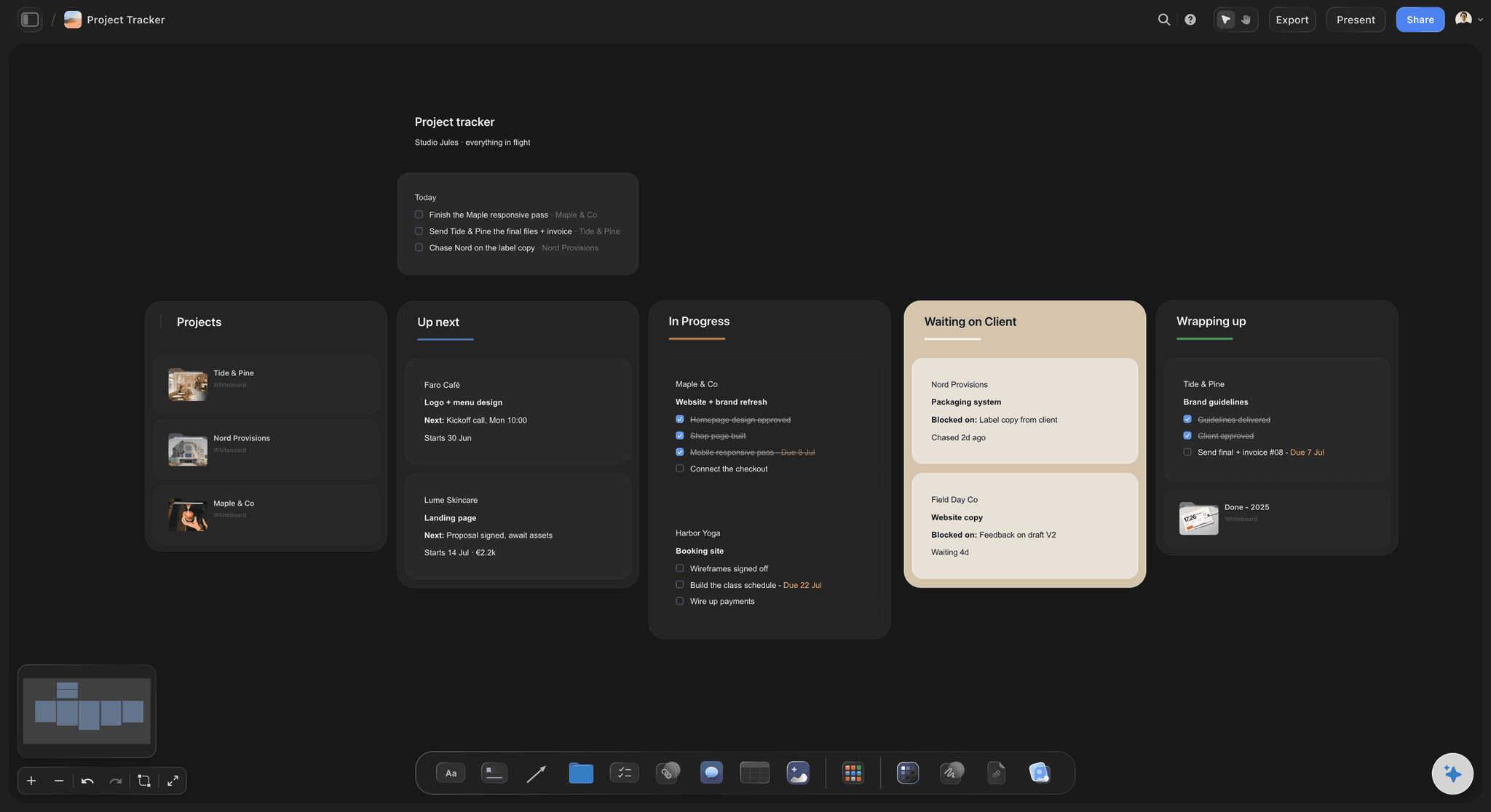
Every client on one overview
Capacity you can see
Client, phase, next deadline and what each job is waiting on, in one table. Two busy weeks landing on each other show up before you accept the third project.
See solo studio project planning →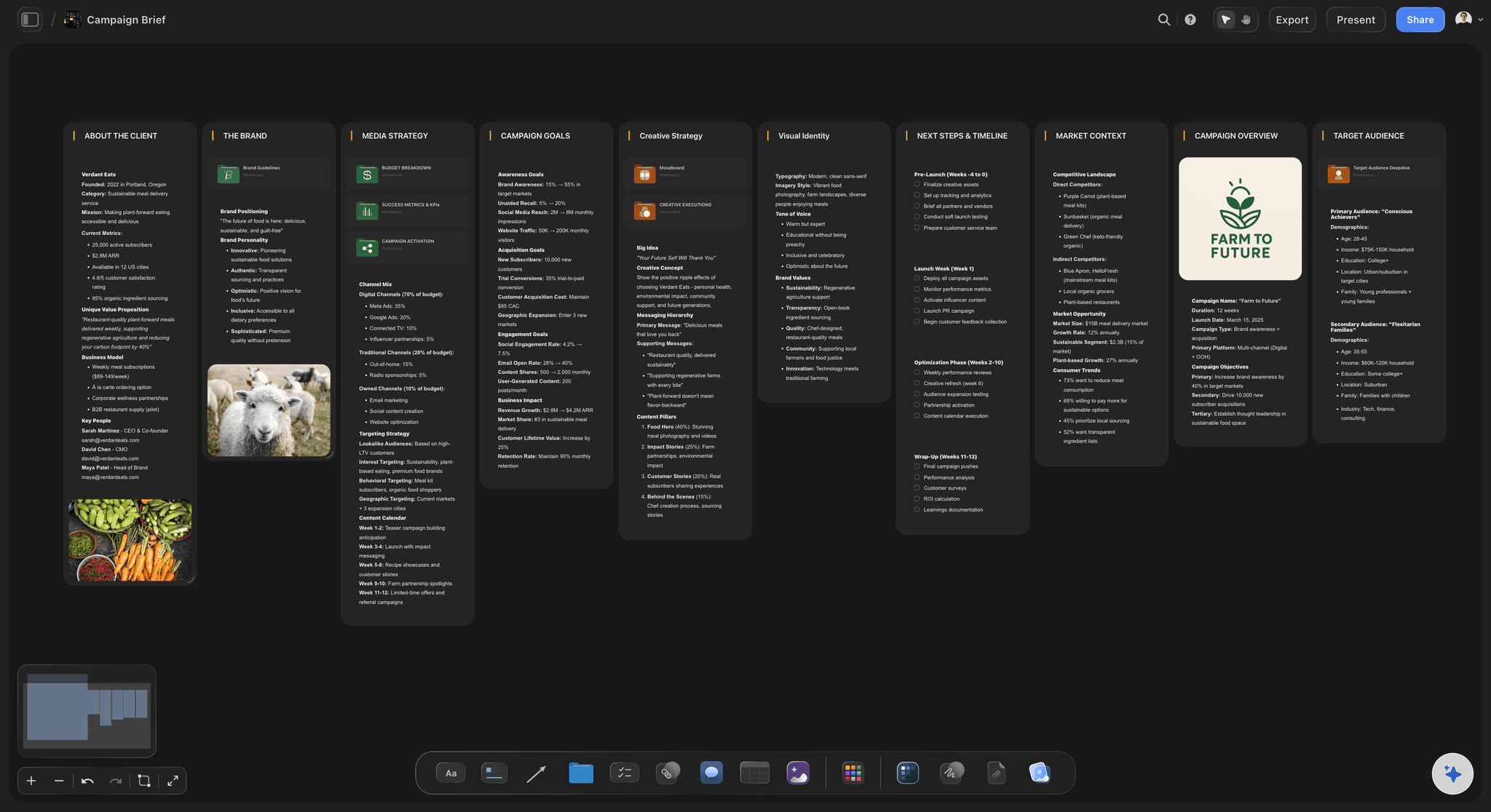
The deliverables list the client can read
Scope that holds
Deliverables, formats and revision rounds sit on the shared board. A change request lands next to the list it changes, which makes pricing it a normal conversation.
See the creative brief template →
The look beside the plan
Moodboard and schedule together
References, palette and frame grabs sit next to the dates that deliver them. The concept the client approved stays attached to the work it sets.
See the moodboard for clients →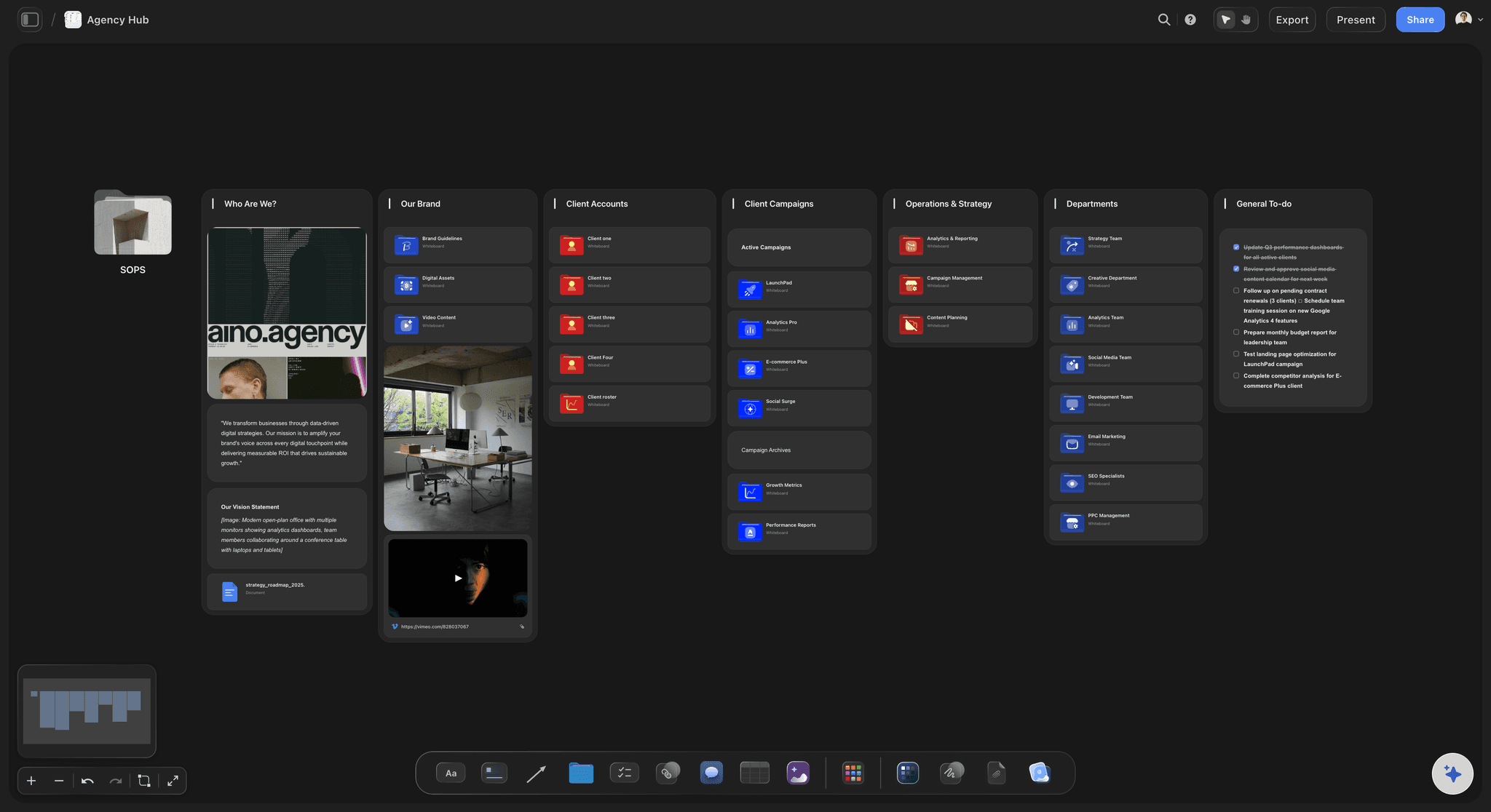
Reviews on the real work
Client feedback in one place
The client opens the board by link with no account. Signed in, they comment on the specific piece, so notes arrive attached to what they are about.
See the client review board →Unlimited client boards. No object cap.
Storyflow is paid-only during early access, with plans from $7.99 a month billed annually ($9.99 monthly). A free plan launches before the end of 2026, and anyone a paid member invites to a board joins free.
Unlimited boards and file uploads on every paid plan
AI that lays out a client project from a brief, with one-click Undo
Tables, Kanban, Tickets and To-dos beside the moodboard
View-only links clients open with no account

Built for people with taste
Where freelance projects actually go wrong.
Scope, stalls, collisions and feedback. Each has a mechanical fix.
Before you say yes
Scope the job on the board
Six answers before you quote: Goal, deliverables, deadline, budget, decision maker and what the client owes you. The decision maker and the client's dependencies are the two most often skipped.
Revision rounds as a number: Two rounds is a common default for design work. Write the number on the board, and price a third round as new work before anyone asks for it.
Change requests as visible additions: Add each request to the deliverables list with a note: in scope, out of scope, or priced. The list grows in view, so nothing is absorbed quietly.
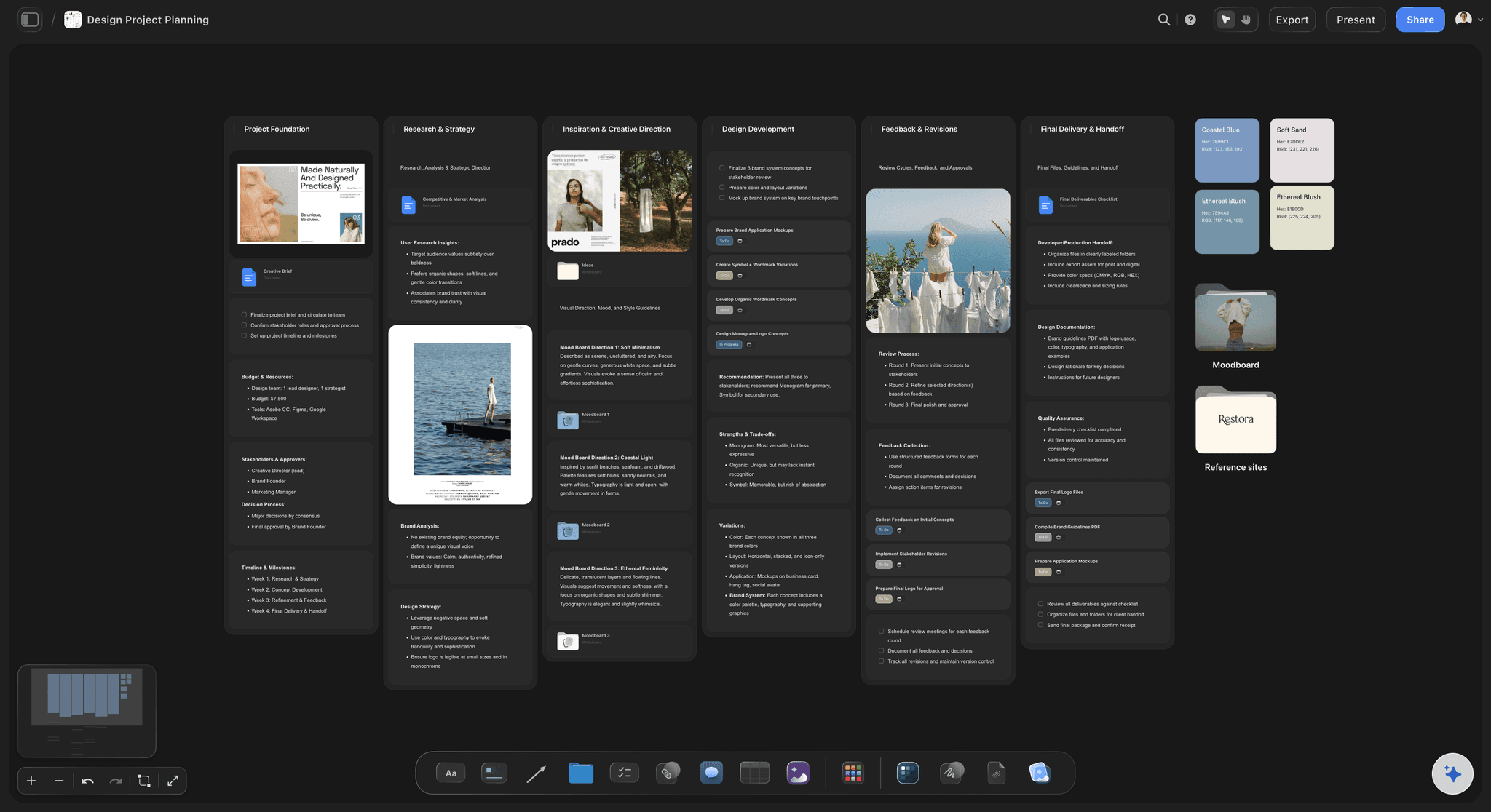
Phases, not a hundred tasks
The same four phases every time
Discovery, concept, refinement, delivery: Clients follow milestones better than task lists. Four phases per project keep the board short enough to read in one glance.
Dates in a table: Keep review dates and the delivery date in a table with a date column, rows kept in date order. Tickets carry an assignee and a due date when a subcontractor joins.
A delivery checklist you reuse: Final files, source files, approval in writing, invoice sent, portfolio permission asked. Duplicate a finished board and the checklist comes with it.

Capacity across clients
See the collision before it happens
One overview board: A row per active project with its phase, next date and what it is waiting on. This is the board you open every morning.
Plan the heavy weeks: Discovery and the final push take most of the attention. Three or four projects work when those weeks are staggered and hurt when two overlap.
Keep a buffer: Leave about a tenth of the week unbooked for late feedback and extra rounds. A fully booked week has nowhere to put the round a client forgot to mention.

AI that reads the board
The second opinion you do not have
Lay out the project from the brief: The AI reads the brief and up to five documents and three boards you attach, then lays out the phases and deliverables. Edits apply with one-click Undo.
Ask what is stuck: Ask which items have no next step or are waiting on the client. The answer comes from your board, not a generic checklist.
It proposes, you decide: What to charge, what to take on and whether the work is good stay with you. The AI arranges and suggests.
Explore templates for your project
Every template opens as a real, editable board on the infinite canvas. Pick the closest fit and make it your own.
Mind Map
Branch one central idea out into themes and sub-points, then drag the connections around until the structure makes sense.
One app instead of five
Storyflow vs Notion, Trello and ClickUp for freelancers.
Trello is simple cards, Notion is databases you design, ClickUp is structure and automation. Here is where they differ for one person with visual client work.
Storyflow
Recommended
Moodboard and plan on one canvas
AI workflows for moodboards and shot lists
Client views by link with no account
Built-in time tracking
Rule-based automations
Notion
Moodboard and plan on one canvas
AI workflows for moodboards and shot lists
Client views by link with no account
Built-in time tracking
Rule-based automations
Trello
Moodboard and plan on one canvas
AI workflows for moodboards and shot lists
Client views by link with no account
Built-in time tracking
Rule-based automations
ClickUp
Moodboard and plan on one canvas
AI workflows for moodboards and shot lists
Client views by link with no account
Built-in time tracking
Rule-based automations
What creators are saying
Join early creators getting structured workspaces and AI that remembers their projects
“Storyflow has sped up my workflow by at least 3x, which means more flow state and more projects I can actually ship. It truly changed the way me and my team create.”

Reilin Joey
Director & YouTuber
“One prompt gets me a structured board. But the tactics are my favorite. I run my YouTube scripts through them and my intros and retention got better. It's amazing.”

Justkay
YouTuber & Freelance Filmmaker
“I used to juggle five apps to plan a project. Now I describe what I am making and get boards, lists, and a schedule. All in one place.”

George
@fernwehchronicles
Freelance project management, answered.
Scope, capacity, clients and tools, for the person who is the whole business.
Storyflow, when the work is visual: each client gets one board with the brief, moodboard, agreed deliverables, dates and what you are waiting on, and the client opens it by link with no account. The AI lays out a project from a brief. Trello suits simple card workflows, Notion suits structured databases, and Bonsai suits freelancers who want proposals, contracts and invoicing in one tool.
In Storyflow, give each project the same four phases (discovery, concept, refinement, delivery) and track three things per project: what you owe, what is next and what the client owes you. Keep one overview across every client, because the daily question is which job needs you today. Our solo studio project planning guide walks through the full method phase by phase.
Write the deliverables and the number of revision rounds where the client can see them, then add every new request to that list marked in scope, out of scope or priced. In Storyflow that list sits on the shared client board. Scope rarely grows through one big ask. It grows through small requests that each feel easier to absorb than to price.
Plan around the heavy weeks, not total hours. Discovery and the final push of a project take most of your attention, and the middle is often waiting on feedback. Put every project's heavy weeks on one overview board and keep about a tenth of each week unbooked. Before accepting a new job, check which of your current projects it would collide with.
Yes. Turn on sharing and the client opens a view-only link in any browser with no account. They see the latest version each time they open or reload it. To leave comments they sign in. Keep your working board private and share a separate client board with the brief, deliverables, current state and what you are waiting on them for.
Yes, and for visual work that is the point. In Storyflow the references, palette and frame grabs sit on the same canvas as the deliverables table and the review dates. The AI has named workflows for moodboards, shot lists and project planning, so the approved look carries straight into the plan instead of living in a separate app.
No. Storyflow has no invoicing, contracts, e-signature, payments or time tracking. It is the planning layer: brief, moodboard, deliverables, dates and client review. Pair it with an accounting tool for invoices, or use an all-in-one freelancer tool such as Bonsai if you want proposals, contracts and billing together and need less of the visual side.
Not during early access. Storyflow is paid-only during early access, with plans from $7.99 a month billed annually ($9.99 monthly). A free plan launches before the end of 2026, and anyone a paid member invites to a board joins free. Clients viewing a shared link never need an account.
Yes. Invite them to the board and they edit it with you in real time, with live cursors, on any paid plan. Anyone a paid member invites joins free, so a subcontractor adds nothing to your bill. They get the brief, the moodboard and the deadlines in one place instead of a briefing call.
Mark it. Add a clear waiting-on item to the board for every asset, answer or sign-off the client owes, with the date you asked. A blocked project looks identical to an active one in a task list, which is why stalls surprise freelancers. With the waiting items on the shared board, the client sees them too.
It lays out a client project from a brief, reads the board you have open, and takes up to five documents and three other boards as context. Ask it what is waiting on the client or which deliverable has no date. Edits apply to the board with one-click Undo. What to charge and what to take on stay with you.
Storyflow runs in the browser with nothing to install, and there is no native mobile or tablet app. A client can open a shared view-only link on a phone. Planning a project is easier on a laptop, where the whole board fits on screen.
More from Storyflow
Solo studio project planning
Creative project management
Agency client project planning
Client review board
Moodboard for clients
Creative brief template
Project brief template
Photography proposal
For solopreneurs
For designers
For photographers
How to stop scope creep
How to write a client status update
Best tools for solo creators
Campaign concept presentation
Design proposal template
Put every client, and what each one owes you, on one board.
Open a canvas, set up one client project from its brief, and share it by link.