The Continuity Tracking Checklist (2026): What to Record So the Edit Cuts
Four records per setup: a frame reference photograph, the state of anything that changes, the technical settings that must match, and which take was good and why. Continuity fails on small crews because nobody owns the record, not because anyone was careless.

Category
Video Production
Author

Justkay
Documentary Filmmaker & Founder at Storyflow
Topics
2026-09-02
•
15 min read
•
Video Production- continuity tracking checklist
- continuity notes film
- script supervisor checklist
- shoot day continuity
- continuity photos on set
What should you record for continuity on each setup?
Continuity tracking is recording enough about each setup that a shot taken on Tuesday can be cut against a shot taken three weeks later, and on a small crew it comes down to four records per setup: a reference photograph of the frame, the state of anything that changes (wardrobe, props, food, hair, weather, screen content), the technical settings that must match (lens, height, white balance, frame rate), and which take was good and why. Everything else is refinement. The reason small crews lose continuity is not carelessness; it is that nobody owns the record, so it exists in the head of whoever was closest to the camera and evaporates by wrap. StudioBinder and Yamdu hold the production paperwork around it, a phone's camera roll is the actual continuity tool most small crews use and it works if the photographs are taken to a system, and Storyflow is where the reference and the reasoning stay legible after the shoot. Below is the per-setup checklist, the eight things that break most often, and how to run continuity when the person doing it is also holding a boom.
Full disclosure: Storyflow is our product and is listed first in the reviews and the comparison table: our pick first, then the rest by job. The at-a-glance list places it fourth, behind a phone camera roll, StudioBinder and Yamdu. The article states that Storyflow is not a set tool, that nobody should open a canvas between takes, and that it has no per-take logging or scene linkage, recommending a camera roll or StudioBinder for capture on the day.
How the continuity and script supervision tools compare on trust, innovation, ratings and pricing
Which continuity tools are the most trusted on set?
A phone camera roll used to a fixed system is what most small crews trust and it earns that, because it is the only option fast enough to survive a real shoot day. ScriptE is the trusted dedicated tool where a script supervisor is employed. StudioBinder is trusted where continuity notes should attach to a scene and shot for later findability. Storyflow is not a set tool and is used after the day.
Which continuity tools have fair and transparent pricing?
A camera roll and a pen are free, which is the honest top of this category. Yamdu from around $20 and Airtable's free tier are fair for what they cover. StudioBinder is the most expensive here. ScriptE is licence-priced for professional script supervision and is not aimed at small crews. Storyflow is flat per account rather than per seat and is paid-only during early access from $7.99 per month billed annually.
Which continuity tools are underrated?
The self-labelling camera roll, badly. Photographing the slate or a phone note last in each burst turns an unsearchable pile of images into a navigable sequence with clean dividers, at zero cost and no setup. Airtable is underrated for productions carrying a lot of setups, because it is the only cheap way to get a genuinely searchable log with photo attachments.
Which continuity approach performs most consistently?
Assigning it to one named person before the shoot. Every tool in this category works when someone owns it and none work when continuity is everybody's job, which is the actual finding across three productions. On small crews the person doing sound is usually the right choice, because they are the only one not looking through a viewfinder.
When choosing how to track continuity, which would you recommend?
Start with a phone camera roll and a fixed photo order, because it is fast enough to actually happen. Add StudioBinder from about five shoot days up, when finding a record by scene beats scrolling by timestamp. Use Airtable if the production carries many setups and someone will maintain it. Buy ScriptE only if you employ a script supervisor.
Quick Comparison
Four ways to keep continuity, ranked by what actually survives a shoot day.
| Tool | Best For | AI Features | Price |
|---|---|---|---|
| Phone camera roll | Ten-second capture to a system | None | Free |
| StudioBinder | Notes attached to scene and shot | Light AI | Free / $42 mo |
| Yamdu | Structure across many shoot days | Light AI | From $20 mo |
| Storyflow | Reference and reasoning after the day | AI reads the whole board | $7.99 mo annual (free plan late 2026) |
Article Metadata
By Justkay, Documentary Filmmaker and Founder of Storyflow Published September 2, 2026 · 15 min read · Video Production
Table of Contents
- What Continuity Actually Is
- The Four Records Per Setup
- The Per-Setup Checklist
- The Eight Things That Break
- Continuity for a Crew of Three
- Documentary and Interview Continuity
- 8 Tools for Continuity Tracking
- How We Evaluated These Tools
- Tool Reviews
- The Handoff to the Edit
- FAQ: Continuity Tracking
- The Bottom Line
- Author
- Related Reading
Key Takeaways
- Four records per setup: a frame reference photo, the changeable state, the technical settings, and which take was good.
- Continuity fails because nobody owns the record, not because anyone was careless.
- Photograph to a system: wide, then the detail, then the phone screen showing the slate. Unsystematic photos are unsearchable.
- Screen content and weather are the two most-missed categories, and both are expensive in the edit.
- The record's real audience is the editor, three weeks later, who was not there.
What Continuity Actually Is
Continuity is not a craft discipline that only narrative films need. It is the practical problem that any two shots you intend to cut together were taken at different moments, and everything visible has had a chance to change in between.
On a scripted set with a dedicated script supervisor, this is a formal role. On the shoots most people actually make, a branded piece with four crew or a documentary interview with two, there is no such role, and continuity becomes whatever the person nearest the camera happens to remember.
The consequence is always the same and always found in the edit: the glass is full in the wide and half empty in the close, the interviewee's collar is folded differently, the laptop on the desk shows a different screen, the sky went from overcast to hard sun between setups. Each one is small, each one is unfixable without a reshoot, and together they are why an edit takes longer than planned.
The record's audience is the editor, three weeks later, who was not there. That framing decides what to record: not everything, but everything that a person with no memory of the day would need in order to cut two shots together.
The Four Records Per Setup
1. The frame reference. One photograph of the frame as shot, taken from behind the camera, before you strike. Not artful, just the frame. This single photo answers more questions in the edit than any note.
2. The changeable state. Anything that can be different next time: wardrobe as worn including how it is fastened and rolled, hair, props and their positions, food and drink levels, screen content on any visible device, practical lights on or off, weather and light direction, anything held.
3. The technical settings that must match. Lens, camera height, distance, white balance, frame rate, shutter, any filtration. These matter because a matching frame with a different white balance still will not cut.
4. Which take, and why. The take number that was good and the one-line reason. This is the record most often skipped and the one that saves the most time in the edit, because "take 4 was the good one, she paused before the last line" cannot be reconstructed from footage alone.
Four records, roughly ninety seconds per setup. On a twelve-setup day that is eighteen minutes, which is far less than the time lost to one continuity error.
The Per-Setup Checklist
Before you strike any setup:
Photograph
- Wide reference of the whole frame, from behind the camera
- Detail shots of anything that changes: table, hands, wardrobe fastening, props
- Any visible screen, photographed showing its actual content
- The slate or a phone note with the setup number, photographed last so the sequence is self-labelling
Record the state
- Wardrobe: item, how worn, sleeves, buttons, tucked or not
- Hair and any visible makeup change
- Props: what, where, orientation
- Consumables: level in glass, how much food, how far through
- Screens: what is on every visible device
- Practicals: which lights are on
- Weather and light direction, with the time
Record the technical
- Lens and focal length
- Camera height and rough distance
- White balance and any filtration
- Frame rate and shutter, if any shot differs from the day's default
- Whether anything was handheld, and roughly how
Record the performance
- Take numbers used, circled take marked
- One line on why the good take was good
- Anything that will need a fix or a pickup
- Anything an editor would not guess
Before moving on
- Confirm the coverage you need to cut this scene actually exists: wide, mid, and at least one cutaway
- Confirm room tone for this location has been recorded
- Confirm the reference photos are in the camera roll and not just on the camera
The self-labelling trick in the first block is worth adopting: photographing the slate or a phone note last in each burst means that scrolling a camera roll gives you a clean divider between setups, and the roll becomes searchable without any tagging.
The Eight Things That Break
Ranked by how often they turned up across three productions.
1. Screen content. A laptop, phone or monitor visible in frame showing a different thing between takes. It is the most common continuity error in modern shoots because screens are everywhere and they change on their own. Photograph every visible screen and, where possible, freeze it: airplane mode, a static image, notifications off.
2. Weather and light direction. Between an 11am wide and a 3pm close, the sun has moved and the sky has changed. Nothing recovers this in the edit except a grade that flattens both. Shoot coverage of the same scene as close together as the schedule allows, and record the time and light direction against every exterior setup.
3. Consumables. A glass, a plate, a cigarette, a cup of coffee. They deplete monotonically and cannot be undepleted. Photograph the level and, on anything with more than two takes, reset it deliberately.
4. Wardrobe detail. Not the garment, which people remember, but how it was worn: one sleeve rolled, collar out or in, a jacket open. Photograph the detail, not just the person.
5. Hair. Especially over a long day, in wind, or after a break. A reference photo per setup is the only practical defence on a small crew.
6. Eyelines and screen direction. A person looking camera-left in the wide must look camera-left in the close, or the two shots read as facing away from each other. Record which side of the lens they were looking, in words, because a photograph does not always make it obvious.
7. Prop position. What is on the table, and where. Small movements between takes are invisible on set and obvious in a cut.
8. Time of day inside the story. Scenes shot out of order, where a watch, a clock, a phone lock screen or the light through a window says something different from what the story needs.
The pattern behind all eight: the things that break are the things that change by themselves. People remember to keep track of what they move. Screens, sun, batteries and drinks change without anyone touching them, which is exactly why they need a record rather than a memory.
Continuity for a Crew of Three
With three people, nobody is free to do this properly, so the version that works is compressed and assigned rather than thorough and hoped for.
Assign it out loud in pre-production. Not "we'll all keep an eye on it". One name. On most small crews the right person is whoever is doing sound, because they are the only one not looking through a viewfinder or moving.
Use the phone, not a form. A continuity form nobody fills in is worse than a camera roll that follows a system. Photographs with a slate divider are faster, more complete and searchable.
Cut the technical record to what differs. If the day has a default frame rate, white balance and shutter, record only the exceptions. That removes most of the writing.
Take the photographs in a fixed order every time. Wide, detail, screens, slate. The order is what makes the roll readable later.
Reset consumables deliberately at the start of each take rather than trying to remember where they were. It is faster than recording.
Spend the ninety seconds. The compressed version is roughly ninety seconds per setup, and one continuity error typically costs a half-day pickup or a compromised cut.
Documentary and Interview Continuity
Documentary crews often assume continuity does not apply because nothing is staged. It applies differently and it applies hard, because there is no reshoot at all.
- The interview setup itself. If you return to the same person on another day, the frame, lens, height, background and wardrobe all matter. Photograph the setup so it can be recreated.
- Multi-day interviews with the same contributor. Note the clothing, because two days cut together is standard and mismatched wardrobe reads as two different interviews.
- Background change. A window's light, a bookshelf someone tidied, a door open or closed.
- Room tone per location per day. Rooms sound different on different days, and cutting across days without matching tone is audible.
- Eyeline to the interviewer. Which side of the lens, and how far off. Change it between days and the cut jumps.
- What was said off-camera. The best answer often comes before you roll, and the record of it is what lets you ask for it again.
For observational work where the shot is whatever happens, continuity collapses to one thing: coverage. Wide, mid, close and cutaways of the same moment, so the edit has a way through even when nothing matches.
8 Tools for Continuity Tracking
| Tool | Best for | Per-setup record | Searchable later | Starting price |
|---|---|---|---|---|
Storyflow | The reference and the reasoning after the day | Fair | Excellent | $7.99 mo annual (free plan late 2026) |
Phone camera roll | What small crews actually use | Excellent | Fair | Free |
StudioBinder | Continuity inside the production paperwork | Good | Excellent | Free / $42 mo |
Yamdu | Long productions with many shoot days | Good | Excellent | From ~$20 mo |
Airtable | A custom continuity log with photos | Excellent | Excellent | Free / $20 mo |
ScriptE | Dedicated script supervision on scripted work | Excellent | Excellent | Paid, licence |
Notion | A per-setup database | Good | Good | Free / $10 mo |
Paper and a pen | Still faster than any app on a fast day | Good | Weak | Free |
Prices are publicly listed plans as of early 2026 and change often.
The phone is the honest answer for capture. On the shoots this article is about, the winning tool is the one that takes ten seconds while someone is already holding it, and no app beats a camera roll used to a system.
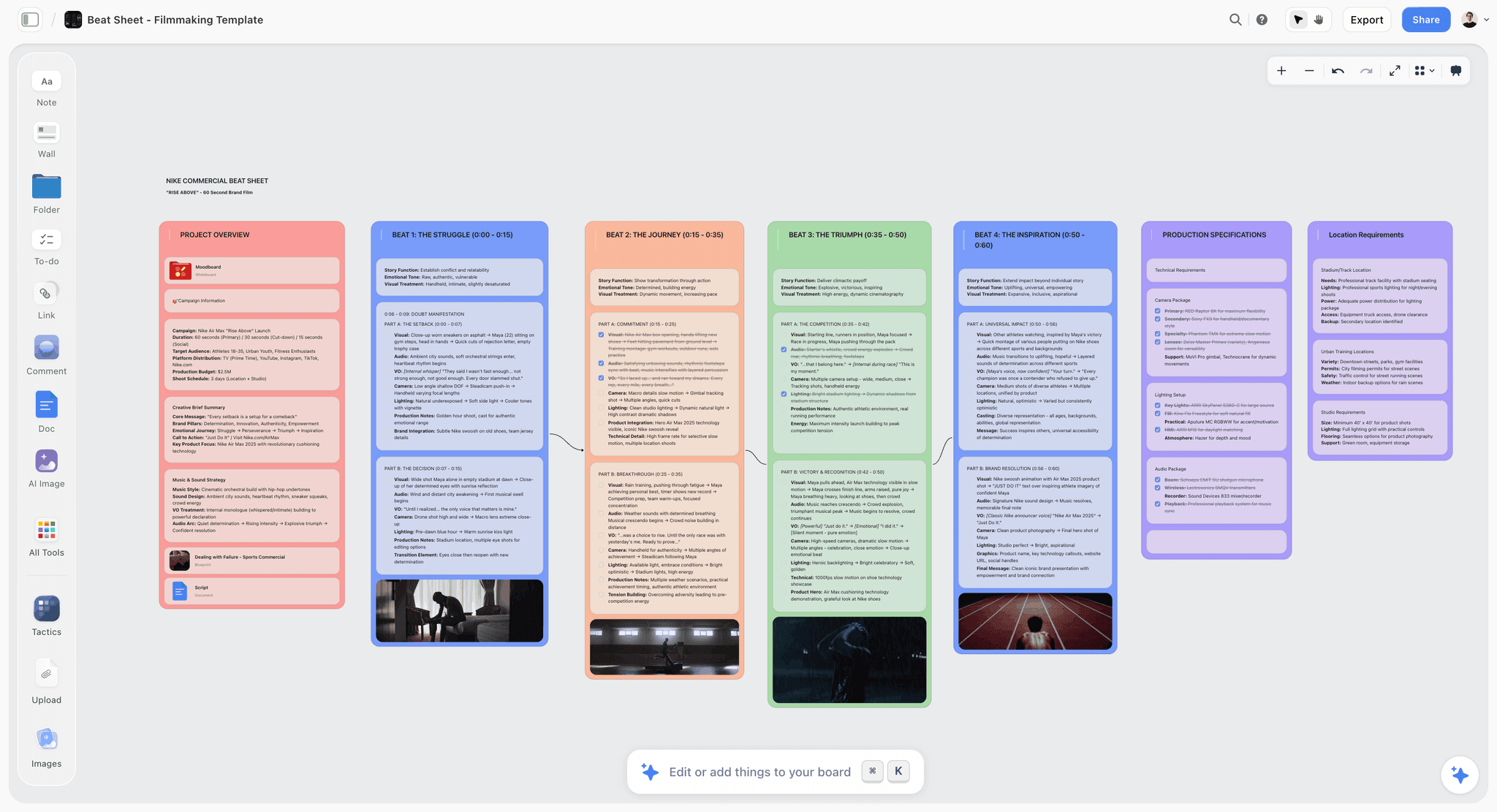
Reference frames and setup reasoning kept together so a later shoot day can match an earlier one
The record's audience is the editor, three weeks later
They were not there. What breaks a cut is never the thing someone moved, it is the thing that changed on its own: a screen, the sun, a glass, a battery. Record those and the edit stops discovering them.

How We Evaluated These Tools
Four criteria:
- Speed on set. Time from "I should record this" to recorded. Anything over about twenty seconds does not survive a real shoot day.
- Completeness. Whether all four records fit, especially the frame reference photo, which most text-based tools handle badly.
- Findability three weeks later. The record's whole purpose is the edit, and a record nobody can navigate is not a record.
- Cost and access for a freelance crew who need it for one or two days.
Testing covered a two-day branded shoot, a documentary with three interview days over five weeks, and a narrative short with a script supervisor.
Tool Reviews
1. Storyflow

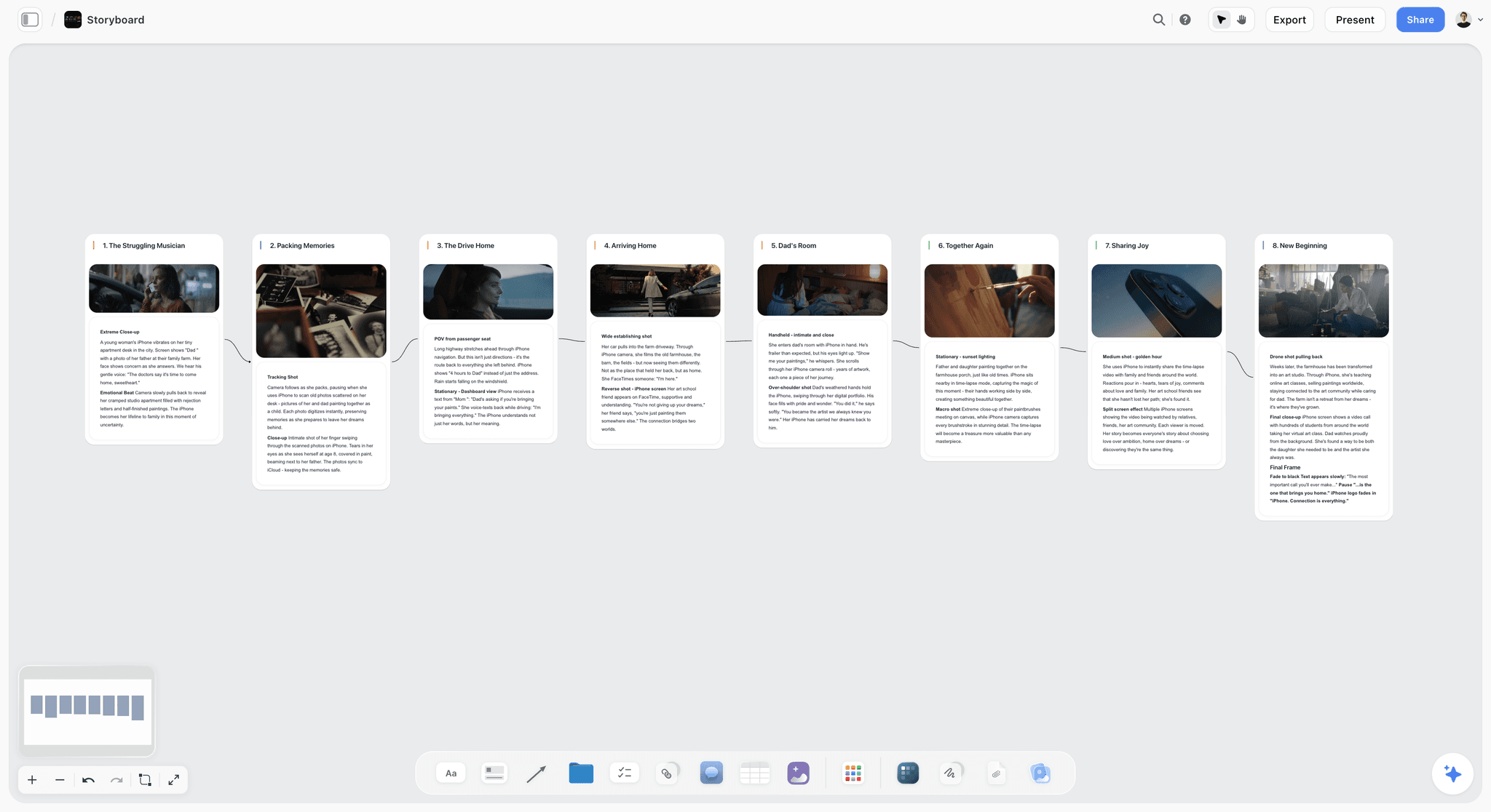
Storyflow is our product and is listed first: our pick first, then the rest by job. It has a clear limitation: it is not a set tool. Nobody should be opening a canvas between takes, and this article recommends a camera roll or StudioBinder for capture on the day.
Where it is useful is afterwards, and specifically for the record's real audience. Reference photographs, the frame decisions, the look, the "why" behind each setup and the notes for the editor can sit on one board where the AI reads the whole canvas, so the question "what did we decide the second interview should match" has an answer that is not a person's memory. On a documentary shot across weeks, that gap is where continuity actually dies.
Storyflow is paid-only during early access; its Free plan launches before the end of 2026, and anyone a paid member invites to a board joins free now.
Pricing: Plus $7.99 per month billed annually ($9.99 monthly); Pro $14; Max $39.
Pros: the reference and the reasoning stay together and stay findable; flat pricing so day-rate crew cost nothing; good across shoots separated by weeks.
Cons: not usable between takes; no per-take logging, no scene linkage, no script supervision features. Capture elsewhere and keep the reference here.
2. Phone camera roll
The honest winner for small crews. Ten seconds per setup, no login, works with no signal, and the photographs carry more information than any form. What makes it work rather than being a pile of images is the system: fixed photo order, and the slate or a phone note photographed last as a divider. That turns a roll into a navigable sequence.
Its weakness is search. Three weeks later you are scrolling by timestamp, which is workable for a two-day shoot and painful across fifteen days.
Pros: fastest thing available; complete visual record; works offline; free.
Cons: not searchable by scene or setup; nothing carries text well; lost with the phone if there is no backup.
3. StudioBinder
The best option when continuity should live inside the production paperwork rather than beside it. Notes attach to the scene and shot they belong to, so an editor or a coordinator can find them by scene rather than by timestamp. Slower on set than a camera roll, which means in practice it holds the notes and the phone holds the photographs.
Pricing: Free tier; paid from $29 per month, commonly used tier around $42.
Pros: records attach to the actual scene and shot; excellent findability; strong mobile view.
Cons: slower than a camera roll at the moment of capture; cost for a short shoot; photo handling is secondary.
4. Yamdu
Across a long production, the structure earns its cost: per-scene records, cross-referenced with schedule and cast, and a real search. For a two-day shoot it is more apparatus than the situation justifies.
Pricing: from around $20 per month.
Pros: the best structure across many shoot days; strong cross-referencing.
Cons: setup cost; excessive for short shoots.
5. Airtable
The most complete custom continuity log available without buying a production suite: a row per setup, photo attachments, and filters. It requires setup before the shoot and a person willing to fill it in on the day, which is the part that usually fails.
Pricing: Free; Team $20 per seat per month billed annually.
Pros: every record in one searchable structure; photo attachments work well.
Cons: setup time; on-set entry is slower than a phone; per-seat cost.
6. ScriptE
The dedicated script supervision tool, and on scripted work with a real script supervisor it is better at this specific job than anything general-purpose. It is priced and shaped for productions that employ one, which most of the shoots this article addresses do not.
Pros: purpose-built; the most complete continuity and script supervision record.
Cons: narrow fit; licence cost; wrong shape for unscripted work.
7. Notion
A per-setup database works and reads well afterwards. On set it is slow on bad signal and awkward on a phone in sunlight, which is exactly when you need it.
Pricing: Free for personal use; Plus $10 per user per month billed annually.
Pros: flexible; good afterwards; free tier usable.
Cons: poor on location; slow capture; per-seat cost.
8. Paper and a pen
Still faster than any app on a fast day, and it does not run out of battery. It cannot hold a frame reference, which is the single most valuable record, so in practice it is a companion to photographs rather than an alternative.
Pros: fastest text capture; no battery, no signal, no login.
Cons: no photographs; can be lost; needs transcribing to be useful to an editor.
The Handoff to the Edit
Continuity records that stay on the shooting phone are not records. Three things convert them into something the edit can use, and all three happen on the day:
Back up the camera roll before leaving. Same rule as the footage: two destinations, verified.
Write the paragraph. Which takes were good, what is missing, what will need a pickup, and anything an editor would not guess. Send it the same evening, when you still know.
Name the coverage you did not get. A missing cutaway is a problem the editor will discover in week three and you can solve in ten minutes on the day, if you know it is missing before you strike.
That last one is where the per-setup coverage check in the checklist earns its place. "Do I have a wide, a mid and a cutaway of this" is a five-second question on set and an unsolvable one afterwards.
The Bottom Line
Four records per setup, roughly ninety seconds, taken to a fixed system so the camera roll reads as a sequence rather than a pile. Assign it to one named person before the shoot rather than hoping. Photograph screens, record the weather and time on exteriors, reset consumables deliberately, and check for wide, mid and cutaway before striking. Then back the record up alongside the footage and send the editor one paragraph the same evening, because the person who knows is not the person who will open the files.
FAQ: Continuity Tracking
What should you record for continuity on each setup?
Four things. A frame reference photograph taken from behind the camera before you strike. The changeable state: wardrobe including how it is worn, hair, props and positions, consumable levels, screen content, practicals, weather and light direction. The technical settings that must match: lens, height, distance, white balance, frame rate. And which take was good with a one-line reason. Roughly ninety seconds per setup.
What breaks continuity most often?
Screen content, because devices in frame change on their own and nobody thinks to photograph them. Then weather and light direction between setups shot hours apart. Then consumables, which deplete and cannot be reset from memory. Wardrobe detail, hair, eyelines, prop position and in-story time of day follow. The pattern is that the things that break are the things that change without anyone touching them.
Do you need a script supervisor for a small shoot?
No, but you need someone assigned by name. Continuity fails on small crews because it is nobody's job rather than because anyone was careless. The practical choice is often whoever is doing sound, since they are the only person not looking through a viewfinder. Assign it out loud in pre-production, not on the day.
What is the best tool for continuity tracking?
A phone camera roll used to a fixed system, for most small crews: wide, detail, screens, then the slate photographed last as a divider. StudioBinder if the notes should attach to the scene and shot for findability, which matters from about five shoot days up. Yamdu across long productions. Airtable if you want one searchable log and have someone who will fill it in. ScriptE only where a real script supervisor is employed.
Is Storyflow a continuity tool?
Not on set. Storyflow has no per-take logging and no scene linkage, and nobody should be opening a canvas between takes, so capture belongs on a phone or in StudioBinder. Where it helps is afterwards and across weeks: the reference frames, the look decisions and the reasoning behind each setup on one board the AI reads in full, so a second interview day can match a first without relying on anyone's memory.
Is Storyflow free?
Not during early access. It is paid-only today from $7.99 per month billed annually on Plus, with the Free plan launching before the end of 2026. Anyone a paid member invites to a board signs up free and can invite others, so a freelance crew collaborating on one production costs a single seat.
How do you handle continuity on a documentary?
Differently, and it matters more because there is no reshoot. Photograph the interview setup so it can be recreated on a later day, note the contributor's clothing across days, record room tone per location per day, keep the eyeline to the interviewer consistent, and watch the background for anything that gets tidied between visits. For observational work, continuity collapses into coverage: wide, mid, close and cutaways of the same moment.
What is the fastest way to keep continuity notes on set?
Photographs in a fixed order with the slate photographed last as a divider, plus written notes only for what differs from the day's default. Recording every technical setting on every setup is what makes people abandon continuity by lunchtime. Record the exceptions, photograph everything else, and the whole per-setup routine fits in ninety seconds.
Why photograph screens specifically?
Because a laptop, phone or monitor in frame will show something different between two takes without anyone touching it, and it is the most common continuity error in contemporary shooting. Photograph every visible screen, and where you can, freeze it: airplane mode, notifications off, a static image on display. A cut that jumps between two different desktop states is unfixable without a reshoot or a paint fix.
How do continuity notes reach the editor?
Back up the camera roll before leaving the location, on two verified destinations, the same rule as the footage. Write one paragraph the same evening covering which takes were good, what is missing, what needs a pickup, and anything an editor would not guess. Records that stay on the shooting phone and in one person's memory are not records, because the editor is a different person three weeks later.
What coverage do you need for a scene to cut?
At minimum a wide, a mid and one cutaway, and the check belongs on the per-setup list rather than at the end of the day. "Do I have a wide, a mid and a cutaway of this" is a five-second question while the setup is still standing and an unsolvable one once it is struck. Missing coverage is the continuity problem that costs the most in the edit and the cheapest to prevent.
Does continuity matter for interviews shot in one sitting?
Yes, in two ways. The eyeline and framing must be consistent if you are cutting between two cameras or between a wide and a close. And anything that changes over a ninety-minute sitting, a collar, hair, a coffee level, the light through a window, will show up in a cut assembled out of order. A single reference photograph at the start and one after any break covers most of it.
Table of Contents
- Article Metadata
- Breadcrumb
- Table of Contents
- Key Takeaways
- What Continuity Actually Is
- The Four Records Per Setup
- The Per-Setup Checklist
- The Eight Things That Break
- Continuity for a Crew of Three
- Documentary and Interview Continuity
- 8 Tools for Continuity Tracking
- How We Evaluated These Tools
- Tool Reviews
- 1. Storyflow
- 2. Phone camera roll
- 3. StudioBinder
- 4. Yamdu
- 5. Airtable
- 6. ScriptE
- 7. Notion
- 8. Paper and a pen
- The Handoff to the Edit
- The Bottom Line
- Author
- FAQ: Continuity Tracking
- Related Reading
Templates to check out for this topic


Templates you can use in Storyflow
Every Storyflow board starts from real structure and an AI that reads the whole canvas. Open one of these templates and make it yours.


See Storyflow in Action
A visual AI workspace where every feature lives inside one canvas. No tab-switching, no context lost.
Build your entire board from a single message
Type what you need in the AI chat at the bottom of your canvas. The AI adds cards, headings, and structure directly onto your board.
Use expert frameworks as AI context
Type @ in the AI chat and choose any Tactic. The AI tailors every response to that framework instead of giving generic advice.
Turn your board into a mind map in seconds
Ask the AI to restructure your canvas as a mindmap. It connects your ideas into a visual hierarchy so you can see how everything relates.
Why Storyflow Exists
Storyflow actually began as a personal tool while working on creative and research projects.
We kept running into the same problem: ideas were scattered everywhere: notes, documents, and whiteboards.
Nothing helped us see how everything connected.
So we started building a workspace designed around how ideas actually grow.
→ Read how Storyflow was createdJustkay
Documentary Filmmaker & Founder at Storyflow
Published: 2026-09-02
Extremely simple, seriously capable


See how easy it is to get started
Watch a real project come together, from a blank board to a finished plan, clicked through step by step.
Start creating with AI and become more productive
Transform your creative workflow with AI-powered tools. Generate ideas, create content, and boost your productivity in minutes instead of hours.