Storyflow vs StudioBinder vs Celtx vs Boords vs Frame.io (2026)
Storyflow is our pick for video pre-production because its AI builds the plan, shot list and call sheet PDF on one shareable board. StudioBinder, Celtx, Boords and Frame.io are compared in full for scheduling that recalculates, call sheets that send, animatics and review.

Category
Pre-Production
Author

Justkay
Documentary Filmmaker & Founder at Storyflow
Topics
2026-09-06
•
38 min read
•
Pre-Production- best tools for video pre production
- app to organize a video production
- studiobinder vs celtx which is better
- is frame.io a pre production tool
- boords vs studiobinder storyboards
- video pre production software comparison
What are the best tools for video pre-production?
Storyflow is our pick among video pre-production tools in 2026 for building and holding the plan: attach the brief or script and its AI builds the pre-production plan, breakdown, storyboard, shot list, strip board and a call sheet PDF on one shareable board. Choose StudioBinder for scheduling that recalculates and call sheets that send, Celtx for screenwriting and budgeting in one subscription, Boords for timed animatics, and Frame.io for review that tracks versions once footage exists. Storyflow has no animatic and does not send call sheets.

Full disclosure: Storyflow is our own product and it is listed first here, on one stated basis: it builds and holds the plan on one shareable board, with its AI drafting the pre-production plan, script breakdown, storyboard, shot list, strip board and a call sheet PDF from your brief or script. The suites follow for scheduling that recalculates, call sheets that send and review that tracks versions. What Storyflow does not do: it has no schedule that recalculates and no Day Out of Days report, it does not send call sheets or track confirmations, it has no animatic, no budgeting module beyond a budget table its AI drafts, no screenwriting and no review of footage. StudioBinder, Celtx, Boords and Frame.io keep those jobs, the four-way comparison between them is kept in full, and each review says when to choose that tool instead. No total scores are published, and every price was re-read on the vendor's own page on October 11, 2026.
Quick Comparison
Five tools, four different jobs. Storyflow builds and holds the plan; match the second tool to the bottleneck, not to the category name.
| Tool | Best For | AI Features | Price |
|---|---|---|---|
| Storyflow | Building and holding the plan on one shareable board | AI builds the plan, breakdown, storyboard, shot list, strip board and call sheet PDF | $7.99 mo annual (free plan late 2026) |
| StudioBinder | Coordinating a crew | Breakdown, stripboard, tracked call sheets | Free plan / Indie $49 mo for 2 users |
| Celtx | One login for the script-first chain | Script to budget to call sheet | Amounts not shown |
| Boords | Shots and timing a client must approve | AI frames plus timed animatics | Free / Solo $26 mo annual |
| Frame.io | Feedback on footage | Timecoded review, Camera to Cloud | Free / Pro $15 member mo |
Which of These Video Pre-Production Tools Should You Use?
Use Storyflow to build the plan and keep it in one place, then add the one specialist your production needs: StudioBinder if a crew must be scheduled and told where to be, Celtx if you write the script in the same tool, Boords if a client must approve timing, Frame.io once there is footage to review.
| If you need | Use | Why |
|---|---|---|
The plan built from a brief or a script and kept on one shareable board | Storyflow | Its AI builds the pre-production plan, breakdown, storyboard, shot list, strip board and call sheet PDF |
To organize a video production from start to finish | Storyflow | Brief, references, plan, schedule and call sheet stay on one board the crew and client open with a link |
To plan from inside ChatGPT or Claude | Storyflow (MCP connector) | The assistant reads your Storyflow projects and builds boards and documents in them |
A schedule that recalculates and call sheets that send with tracking | StudioBinder | Stripboard with automatic day breaks, Day Out of Days, SMS and email delivery with viewed and confirmed status |
Screenwriting, breakdown, schedule and budget in one subscription | Celtx | Its site describes all four, including a budget with cost reporting |
A timed animatic a client signs off frame by frame | Boords | Timeline, soundtrack or voiceover, MP4 export, frame-level comments |
Timecoded notes and version tracking on cuts | Frame.io | Comments on the frame, version stacks, Camera to Cloud |
How this page is ordered: Storyflow is our pick and is listed first because it builds and holds the plan on one shareable board; the suites follow for scheduling that recalculates, call sheets that send and review that tracks versions. Storyflow is our own product, so its limits are stated after each claim they qualify. The four-way comparison of StudioBinder, Celtx, Boords and Frame.io is kept complete below.
Storyflow is a visual AI workspace: an infinite canvas where a production's notes, to-dos, tables, documents, images, moodboards, storyboards and kanban boards sit together on boards, and an AI agent that reads the board and builds on it. The page that shows it on a real production is Storyflow's video production software overview.
Last updated October 11, 2026. Competitor prices were re-read on each vendor's own pricing page that day; where a page showed no amount, this page says so instead of quoting an old number.
Key Takeaways
These five tools do four different jobs, so the useful question is which job is your bottleneck. Storyflow builds and holds the plan, StudioBinder and Celtx manage the production, Boords times the boards, and Frame.io reviews the footage. Most productions need Storyflow plus one of the others, not all five.
- Storyflow is listed first because it builds the plan for you. Its AI turns a brief or a script into a pre-production plan, breakdown, storyboard, shot list, strip board and call sheet PDF on one board.
- Only StudioBinder and Celtx are directly comparable. Both are production management suites, and you should pick one.
- StudioBinder wins the production management chain: script breakdown, a stripboard that recalculates, shot lists, and call sheets that send and track.
- Celtx wins on breadth: it writes the screenplay, breaks it down, schedules it and budgets it in one subscription. StudioBinder also writes screenplays, but its site does not describe budgeting.
- Boords wins on storyboard timing: its animatic turns a board into something that answers pacing questions, which Storyflow cannot do.
- Frame.io is post-production review. Planning a shoot is not what it does.
- Free plans exist on StudioBinder, Celtx, Boords and Frame.io. Storyflow is paid-only today, from $7.99 a month billed annually.
The Category Problem: These Five Are Not the Same Thing
Search for video pre-production tools and these names come back together, as if they were alternatives. They are not. They sit at four positions in the production chain: Storyflow builds the plan, StudioBinder and Celtx run production management, Boords handles visual timing, and Frame.io handles review after the shoot.
Here is the actual map:
- The planning board (brief to plan to first documents): Storyflow.
- Production management (script to schedule to set): StudioBinder, Celtx.
- Visual timing (frames to pacing to sign-off): Boords, and the storyboard modules inside the others.
- Review and approval (footage to feedback to sign-off): Frame.io.
A production runs into one of these as its bottleneck at a time. If nobody has written the plan down, or it lives in five apps, that is a planning problem and Storyflow builds it. If nobody knows where to be at 7am, that is a production management problem and Boords will not help. If the client keeps changing their mind about shot order and duration, that is a timing problem and a stripboard is not going to be enough. If feedback arrives as voice notes with no timecodes, that is Frame.io and always was.
Diagnose the bottleneck before reading further, because the right second tool changes with it.
Comparison Table: Storyflow, StudioBinder, Celtx, Boords and Frame.io at a Glance
The table compares the five tools on fourteen pre-production jobs, with Storyflow in the first column as our pick for building and holding the plan. Read across a row to see which tool does that job; no single column has a yes in every row, which is the argument for pairing two.
| Job | Storyflow | StudioBinder | Celtx | Boords | Frame.io |
|---|---|---|---|---|---|
Primary job | Building and holding the plan on one board | Production management | Script-first production suite | Storyboards and animatics | Review and approval |
Builds documents from a brief or script | Yes, by AI | Strips from the imported script | Stripboard from the script | Frames from a script, as a snapshot | No |
Screenwriting | No: reads PDF, .fdx and Fountain | Yes: screenwriting and AV scripts | Yes, full | No | No |
Script breakdown | Yes: AI builds breakdown tables | Yes: element tagging | Yes | No | No |
Schedule | First-pass strip board by shoot day; no recalculation | Stripboard with automatic day breaks | Stripboard generated from the script | No | No |
Day Out of Days | No report | Yes | Yes, with the production tools | No | No |
Shot lists | Yes: AI builds one entry per camera setup | Yes, strongest of the suites | Yes | Yes | No |
Storyboards | Yes: AI builds one wall per scene | Yes, basic | Yes, basic | Yes, strongest | No |
Animatics | No | No | Not described on its site | Yes, strongest | No |
Budgeting | No | Not described on its site | Yes, with cost reporting | No | No |
Call sheets | Drafted as a PDF; not sent | Yes, strongest: sent with viewed and confirmed status | Yes: a PDF you can email | No | No |
Footage review | No | No | No | No | Yes, strongest |
Camera to Cloud | No | No | No | No | Yes |
Free plan | Not yet; invited collaborators join free | Yes: 1 project | Yes: 1 seat, 1 project, no production tools | Yes: 5 active storyboards | Yes: 2 members, 2 projects, 2GB |
Entry paid price (Oct 11, 2026) | $7.99/mo billed annually | Indie $49/mo for 2 users | Amounts not shown | Solo $26/mo billed annually | Pro $15/member/mo |
Storyflow is paid-only today: its Free plan launches before the end of 2026, and anyone a paid member invites to a board joins free. The sources for every price are listed near the end.

A film plan with treatment, references and shot list on one Storyflow board
Build the pre-production plan on one shareable board
Attach the brief or the script and Storyflow's AI builds the pre-production plan, the breakdown, the storyboard, the shot list, a strip board by shoot day and a call sheet PDF on one board your crew and client open with a link. Add StudioBinder, Boords or Frame.io for the one leg that needs a specialist.

How We Evaluated These Tools
We compared the five on seven criteria, judged from each vendor's own product, help and pricing pages and from Storyflow as it ships. The first criterion sets the order: how much of the pre-production plan the tool builds for you and holds on one shareable board. Storyflow leads it and does not meet three of the others.
| Criterion, in ranking order | Storyflow | StudioBinder | Celtx | Boords | Frame.io |
|---|---|---|---|---|---|
1. Builds the plan's documents from a brief or script, on one board | Yes: plan, breakdown, storyboard, shot list, strip board, call sheet PDF | Partly: strips and call sheet from data you enter | Partly: stripboard from the script | Storyboard frames only | No |
2. A client or crew member can open it without a paid seat | Yes: view link with no account; invited collaborators join free | Call sheets and schedules by link | Not stated | Share links with frame-level comments | Reviewers open a link |
3. Scheduling depth: a stripboard that recalculates, Day Out of Days | No | Yes | Yes, with the production tools | No | No |
4. Call sheet delivery: generate, send, confirm | Generates a PDF only | Yes, all three | Generates a PDF you email | No | No |
5. Storyboard timing: animatic with sound | No | No | Not described on its site | Yes | No |
6. Review that tracks versions of cuts | No | No | No | Frames, not footage | Yes |
7. Price published before sign-up | Yes | In support articles only | No amounts shown | Yes | Yes |
Storyflow is our own product. It is first on criteria 1 and 2 and does not meet 3, 5 or 6, which belong to StudioBinder and Celtx, Boords, and Frame.io in that order. No total score is published. If your bottleneck is one of those three criteria, that tool is your first purchase and Storyflow is the board beside it.
What It Takes by Hand vs in Storyflow
By hand, pre-production is typed once per tool: a treatment in a document, a breakdown in one suite, boards in a storyboard app, a call sheet in a template. In Storyflow each document is three steps: attach the brief or script, answer one or two questions, accept the proposal.
| Document | By hand, across the usual tools | In Storyflow | Steps in Storyflow |
|---|---|---|---|
Pre-production plan | Write the sections in a document, paste references from a board app, share two links | Pick "Plan my pre-production", describe the shoot, accept the proposal | 3 |
Script breakdown | Import the script into a suite, then correct the tags scene by scene | Attach the script, choose scene index or full breakdown, accept | 3 |
Storyboard | Create a frame per scene, find or draw each picture, retype the beat | Pick "Storyboard my script", answer the frame question, accept | 3 |
Shot list | Retype scenes, then add size, angle, movement and lens for each setup | Pick "A shot list from my storyboard", answer format and count, accept | 3 |
First schedule | Copy scenes into a schedule, group by location, total pages per day | Ask for a strip board, answer how many days and what order, accept | 3 |
Call sheet | Retype the day's schedule, cast, crew and locations into a template | Ask for the call sheet for a day, fill the blanks it names, export the PDF | 3 |
The timed figures we can stand behind are three, each the agent time of one recorded run shown on our homepage, rounded up: in a recorded run, messy notes became an organized board in 3 minutes (about 45 minutes by hand), a PDF became tables in 2 minutes (about 45 minutes by hand), and pictures for a shot list took 4 minutes (about 2 hours by hand). The by-hand figures are our estimate, at 1.5 minutes per card, row or to-do and 12 minutes per picture. For the other documents we count steps and quote no minutes.
The second saving is consolidation: the brief, references, plan, call sheet and client link sit on one board the AI reads, from $7.99 a month billed annually. On Pro, one subscription covers what people otherwise pay ChatGPT, Milanote, Notion, a storyboard tool and a reference library for: one app instead of five.
Detailed Reviews
Each review gives the verdict, who the tool is best for, its price as read on October 11, 2026, its strengths and its limits. Storyflow is first as our pick for building and holding the plan; the four-way comparison of StudioBinder, Celtx, Boords and Frame.io follows in full, each with the case for choosing it instead.
1. Storyflow
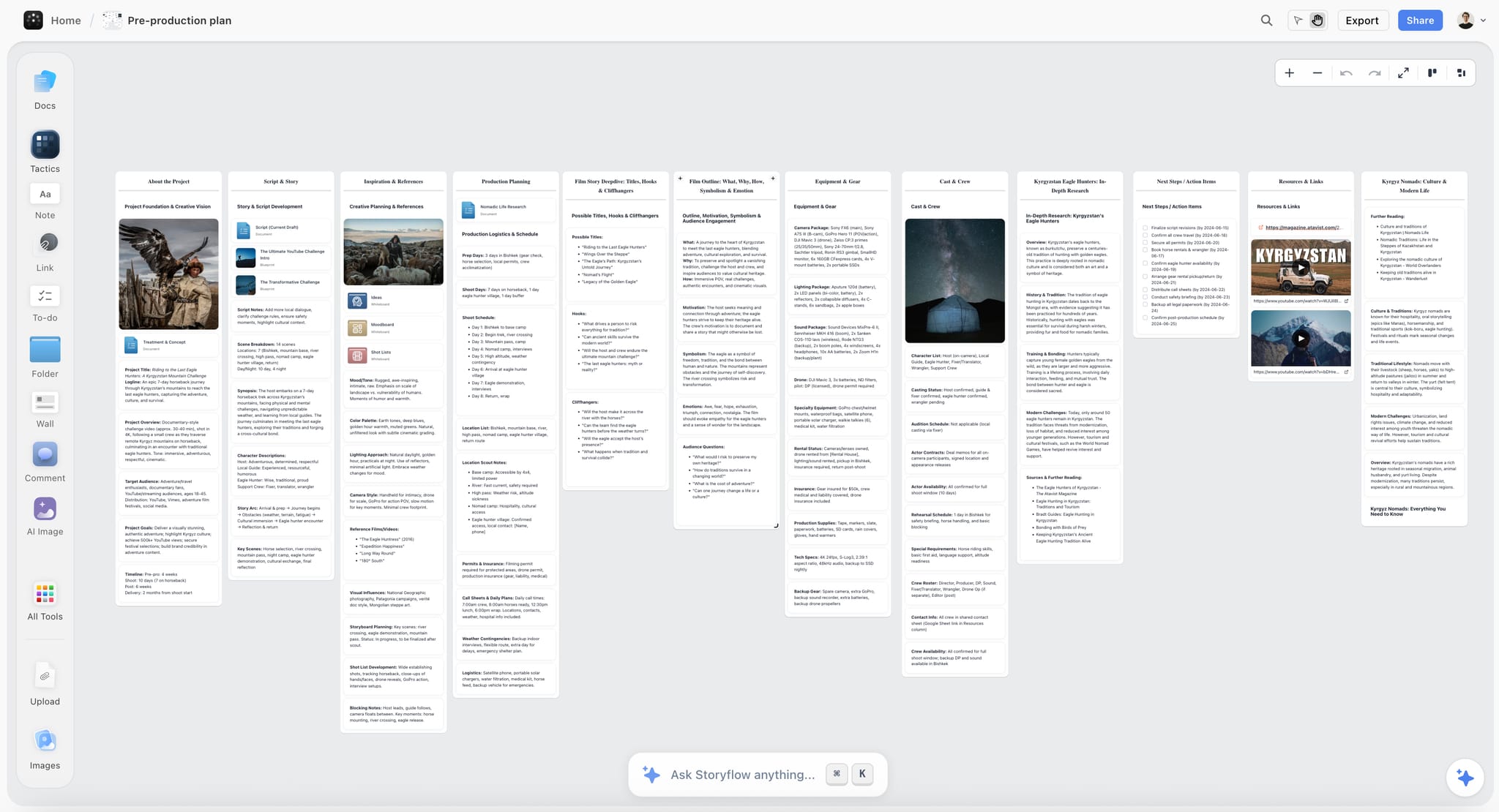
The verdict: Storyflow is our pick for video pre-production because its AI builds the plan from a brief or a script and holds it on one shareable board.
Best for: organizing a video production from start to finish on one board: brief, references, breakdown, storyboard, shot list, strip board by shoot day and call sheet PDF.
Pricing: Plus is $7.99 a month billed annually ($9.99 monthly); Pro is $14 ($19 monthly) and adds AI image generation, memory across conversations and more AI usage; Max is $39 ($49 monthly) with a Team Workspace. Storyflow is paid-only today; the Free plan launches before the end of 2026, and anyone a paid member invites to a board joins free. See Storyflow pricing.
Why it is first. Storyflow is a visual AI workspace: an infinite canvas with an AI agent that reads the board and builds on it. Storyflow's AI turns a brief or a script into a pre-production plan, a script breakdown, a storyboard with one wall per scene, a shot list with one entry per camera setup, a strip board laid out by shoot day and a call sheet PDF. Storyflow asks a question or two first and stages the result as a proposal you accept or discard. The video production software page shows the board on a real job, and the AI storyboard generator shows the storyboard step.
Strengths:
- AI turns a brief or a script (PDF, Final Draft .fdx or Fountain) into a board
- Moodboard, shot list and call sheet in one workflow, on one infinite canvas
- A view-only link opens with no account; clients sign in to comment or draw
- Real-time collaboration on every paid plan; invited collaborators join free
- To-dos with an assignee and a due date, and 200+ Tactics as drag-and-drop templates
- Works from ChatGPT and Claude through its MCP connector; boards export as PDF
Limitations:
- The strip board does not recalculate, and there is no Day Out of Days report
- Call sheets are drafted as a PDF, not sent or tracked
- No animatic, frame timing or MP4 export; no frame-level approval status
- No budgeting module beyond a budget table its AI drafts; no screenwriting, no review of footage
- Browser-based, best on a laptop, with no full offline mode
Trade-off: Storyflow builds and holds the plan, and hands the operational legs to a specialist. Choose StudioBinder for the schedule and the call sheet delivery, Boords for the animatic, Frame.io for the cuts.
2. StudioBinder
The verdict: StudioBinder is the strongest production management tool for small and mid-size productions and has the strongest call sheet system here; unlike Storyflow, its schedule recalculates and its call sheets are sent and tracked.
Best for: producers and first ADs running shoots with more than five people, where the coordination problem is bigger than the planning problem a Storyflow board solves.
Pricing: StudioBinder's pricing page showed no plans when loaded on October 11, 2026. Its own Indie plan article lists Indie at $49 a month with 2 users included and extra users at $25 a month each. Its Free plan article lists one project, 10 contacts, 5 locations, 10 shots and sample call sheets you can send only to yourself.
Why it ranks here. StudioBinder does the unglamorous middle of the chain better than anything else in this comparison. Import a script and tag its elements; the scenes become strips, the strips become a shooting schedule with day breaks you can reorder by dragging, and the schedule feeds a Day Out of Days report that catches cast conflicts before you promise anyone dates.
Then it does the thing that changes a shoot, which is call sheets. It pulls cast and crew from the project, fills in weather, map links, call times and parking, and sends the sheet by SMS and email with sent, viewed and confirmed status. Knowing at 9pm which four people have not opened tomorrow's call sheet is worth more than any creative feature in this comparison.
Strengths:
- Script import and element tagging
- A real stripboard with Day Out of Days
- Call sheets with send and confirmation tracking, the strongest of the five
- Strong shot lists with image attachment, plus storyboards and mood boards
- Contact management inside the project
Limitations:
- No budgeting described on its site
- Storyboarding is functional; Boords beats it on timing
- The free plan cannot send a call sheet to a crew
- It assembles from data you enter, where Storyflow's AI builds the first plan from a brief
Trade-off: choose StudioBinder instead of Storyflow when running the shoot is the job. Most crewed productions plan on the Storyflow board and schedule and distribute in StudioBinder.
3. Celtx
The verdict: Celtx has the broadest coverage of the production chain in one subscription, and unlike Storyflow it is a screenwriting app; the cost is that each stage is second to a specialist.
Best for: solo filmmakers, students and small production companies who write their own material and would rather have one login than a stack; Storyflow reads a finished script but does not format one.
Pricing: Celtx's pricing page listed plan names without dollar amounts when read on October 11, 2026. The free plan has 1 seat and 1 project and no production tools; breakdown, scheduling, budgeting and call sheets are included on Team, Education and Student and sold as an add-on on Writer and Writer Pro.
Why it ranks here. Celtx starts at the blank page and carries the script through to the budget. You write the screenplay in it, break it down in it, schedule it in it, budget it in it, and generate call sheets from it. For a filmmaker whose script, schedule and budget live in three applications that do not know about each other, that integration is worth more than any single module being best in class.
Budgeting matters because it is the one part of the chain that Boords and Frame.io do not touch, that Storyflow covers only with a budget table its AI drafts, and that StudioBinder's site does not describe. If you need to produce a budget beside the schedule, Celtx does that.
The honest weakness is that nothing here is the best version of itself. The screenwriting is competent but is not Final Draft. The scheduling is real but less fluid than StudioBinder's. The call sheet is a PDF you email, without the delivery tracking StudioBinder has.
Strengths:
- Full screenwriting with industry-standard formatting
- Budgeting, the strongest of the five
- A complete chain from blank page to call sheet
- Education and student plans
Limitations:
- Each module is second to a specialist at its own job
- Call sheets lack delivery tracking
- Storyboarding is basic
- Production tools are not on the free plan
Trade-off: choose Celtx instead of Storyflow when the script is still changing and the schedule and budget must follow it inside one product. Choose Storyflow when the brief, the references and the client link matter as much as the script.
4. Boords
The verdict: Boords is the best dedicated storyboarding tool here, and the animatic is the reason to buy it; unlike Storyflow, it can time a board against a soundtrack.
Best for: directors, animators and commercial and branded content teams where the shot design and its duration have to be approved before the shoot, which a Storyflow storyboard cannot time.
Pricing: per Boords' pricing page, a free plan with 5 active storyboards, 3 active scripts and 8 one-off AI image credits; Solo is $26 a month billed annually ($39 monthly) with 250 AI images a month; Pro is $50 ($75) and Team is $85 ($125).
Why it ranks here. Boords does one thing and that thing has a real differentiator. Any tool can hold a grid of frames with captions. Boords turns that grid into an animatic: you set timing on a zoomable timeline, upload a soundtrack or voiceover, and export an MP4.
This matters more than it sounds. A client looking at a static board cannot tell that the sequence is eleven seconds too long, and they will find out in the edit. An animatic surfaces that in pre-production, where it costs a conversation instead of a reshoot. For commercial work with a fixed duration, this is close to essential.
Frame-level comments work the way a review tool should: you share a link, the client comments on the frame and signs the storyboard off.
Strengths:
- The strongest storyboard editing and layout of the five
- Animatics with timing and sound, the differentiator
- Frame-level commenting and sign-off from a shared link
- AI frame generation from a script for people who cannot draw
Limitations:
- No script breakdown, scheduling, call sheets or budgeting
- Script conversion is a one-time snapshot, so later edits do not update frames
- The free plan's 5 active storyboards arrive quickly on a real commercial
Trade-off: Boords is a layer, not a stack. Choose Boords instead of Storyflow for the storyboard when timing has to be approved; keep the brief, the shot list and the call sheet on the Storyflow board.
5. Frame.io
The verdict: Frame.io is the strongest review and approval platform here and the wrong tool for planning a shoot; unlike Storyflow, it tracks versions of a cut and binds comments to the frame.
Best for: the review, feedback and approval stage after the plan on a Storyflow board has become footage, and for getting footage from a camera to an editor on the same day.
Pricing: per Frame.io's pricing page, free for up to 2 members, 2 projects and 2GB; Pro is $15 per member a month and Team is $25 per member a month.
Why it ranks here, and why the ranking is not a criticism. Frame.io is excellent at its job: timecoded comments, frame-accurate annotation, version stacking that keeps every cut in one place, and share links reviewers open. Camera to Cloud uploads footage from the camera during the shoot so a remote editor can start cutting before the day wraps.
None of that is pre-production. It appears in this comparison because search results group it with the other tools, not because it plans anything. There is no script breakdown, no schedule, no call sheet, no shot list, no storyboard. If you buy Frame.io to solve a planning problem you will have spent money and still not know who is on set on Tuesday.
The one legitimate pre-production use is sharing reference footage and previous work with a client or DP for feedback before the shoot.
Strengths:
- Timecoded review and version management, the strongest of the five
- Camera to Cloud shortens the gap from shoot to edit
- A close fit with Adobe's editing tools
- Reviewers open a link
Limitations:
- Not a pre-production tool in any meaningful sense
- Per-member pricing adds up across a crew
- Storage limits on lower tiers are restrictive for high-bitrate footage
Trade-off: choose Frame.io instead of Storyflow for feedback on footage, and buy it for post, not for planning. Storyflow holds the plan the cut is judged against.
How to Organize a Video Production From Start to Finish With These Tools
To organize a video production from start to finish, keep the plan on one shareable Storyflow board from the brief to the shoot day, and hand each operational leg to the specialist built for it: the schedule and call sheet delivery to StudioBinder, the animatic to Boords, the cuts to Frame.io.
| Phase | What has to exist | On the Storyflow board | Specialist to add, and when |
|---|---|---|---|
Brief and concept | Treatment, references, tone | Pre-production plan, moodboard, film treatment built by AI | Celtx, if the screenplay is written there |
Shot design | Storyboard and shot list | One wall per scene, one shot list entry per camera setup | Boords, when a client must approve a timed animatic |
Breakdown and schedule | Elements per scene, scenes per day | Breakdown tables and a strip board by shoot day | StudioBinder, when the schedule must recalculate with Day Out of Days |
The day before | The call sheet | Call sheet PDF with blanks named | StudioBinder, when the sheet must be sent and confirmed |
After the shoot | Notes on cuts | The brief and intent the cut is judged against | Frame.io, for timecoded review and versions |
The rule that keeps it organized is that the board stays the single reference for intent. Specialists receive a locked piece of the plan (the approved boards, the locked scene list) and return a result (a signed-off animatic, a sent call sheet). Nothing is planned twice. A longer walkthrough is in how to organize a video production from start to finish.
What These Tools Actually Cost at Real Team Sizes
These tools cost from nothing to about $50 a month at the entry tier, and the shape of the price matters more than the number: a shoot has a producer, a first AD, a director and a DP who all need access for six weeks, and then it does not exist any more.
| Tool | Free route | Entry paid plan | Billing shape | Who can read without paying |
|---|---|---|---|---|
Storyflow | Not yet: Free plan launches before the end of 2026; invited collaborators join free | Plus $7.99/mo billed annually ($9.99 monthly) | Per account | Anyone with the view-only link, no account |
StudioBinder | Free plan: 1 project, sample call sheets sent only to yourself | Indie $49/mo for 2 users; extra users $25/mo each | Plan with included users | Crew receive call sheets by SMS and email |
Celtx | Free plan: 1 seat, 1 project, no production tools | Amounts not shown; production tools on Team or as an add-on | Per plan; Team is 3 to 15 members | Not stated |
Boords | Free plan: 5 active storyboards | Solo $26/mo billed annually ($39 monthly) | Per plan: Solo 1 user, Pro up to 5 | Clients comment from a shared link |
Frame.io | Free: 2 members, 2 projects, 2GB | Pro $15/member/mo | Per member, plus storage | Reviewers open a link |
Model the cost against the shape of a production, not a monthly seat.
| Scenario | Storyflow | StudioBinder | Celtx | Boords | Frame.io |
|---|---|---|---|---|---|
One short, one person, 6 weeks | One paid account | Free plan viable | Free plan for writing only | Free plan viable | Free plan viable |
One commercial, 4 people, 6 weeks | One paid account, three invited free | Indie covers 2 users | Team or add-on | Solo, share links | Seats for whoever comments |
Production company, 3 jobs at once | One board per job | Project limits decide the tier | Team | Active-storyboard limits decide the tier | Seats plus storage |
Two structural points matter more than the numbers. Storyflow, StudioBinder and Boords all distribute their output to people who do not have accounts: a board link, a call sheet by email, a storyboard link. One or two paid seats can serve a whole crew. Frame.io scales with people and with storage, because footage is large. That is correct for what it does, and it is why Frame.io is the line item that surprises producers.
The other trap is annual commitments in a project-based business. If you shoot four jobs a year in two clusters, a monthly plan you cancel between clusters is often cheaper than the annual discount.
Free vs Paid: What Each Free Plan Really Covers
Four of the five have a free plan, and each is capped on a different axis: StudioBinder by projects and by who can receive a call sheet, Celtx by features, Boords by active storyboards, Frame.io by members and storage. Storyflow has no free plan yet, which is the plainest reason to start a first project elsewhere.
| Tool | What the free plan gives you | What makes you pay |
|---|---|---|
Storyflow | No free plan yet; anyone a paid member invites joins a board free | Building your own boards: Plus at $7.99/mo billed annually |
StudioBinder | 1 project, 10 contacts, 5 locations, 10 shots | Sending call sheets to a crew; more projects |
Celtx | 1 seat and 1 project for writing | Breakdown, scheduling, budgeting and call sheets |
Boords | 5 active storyboards, 3 active scripts, 8 one-off AI image credits | More storyboards and monthly AI images |
Frame.io | 2 members, 2 projects, 2GB | More members, projects and storage |
Running one real project through a free plan is still the best way to choose between StudioBinder and Celtx. For Storyflow, the equivalent test is one paid month on one real job: attach the brief, ask for the plan, the shot list and the call sheet, and compare the result with the last one you typed.
A Worked Example: A Two-Day Branded Content Shoot
This is an illustration of how the tools divide the work, not a record of a real job. Take a two-day branded film for an agency client: one script, two locations, a crew of nine, the client attending day two, delivery in three weeks. Planned on one Storyflow board with three specialists, each tool touches the job once, in a different week, for a different reason.
Week one, the script arrives from the agency. It is a document, not a screenplay, which is normal for branded work and breaks automated breakdown in the script-first suites. On the Storyflow board you attach it as a PDF and pick "Plan my pre-production": the AI builds the planning walls from the brief and marks the roles and dates it was not given as open slots.
Week one, shot design. Pick "Storyboard my script" and then "A shot list from my storyboard". The agency wants to see timing before it approves the day, and this is Boords: if the boarded sequence runs longer than the cut it is booked for, the agency finds out in week one instead of in the edit, scenes are cut before anyone has paid for a location, and the Storyflow shot list is updated to match.
Week two, breakdown and schedule. The breakdown table on the Storyflow board shows which scenes need the hero product at each location, and the strip board groups them. On a nine-person, two-day shoot that first pass may be all the schedule you need. If cast availability starts moving, StudioBinder's stripboard and Day Out of Days take over.
Day before the shoot. Ask Storyflow for the call sheet for day one and fill the blanks it names. For nine people you can send the PDF yourself. If you want to know at 9pm who has not opened it, send it from StudioBinder, which tracks that.
After the shoot. Frame.io. Rushes go up, the agency comments with timecodes, versions stack, and the argument about which take was approved has an audit trail.
Which tools were needed: Storyflow throughout, and Boords, StudioBinder and Frame.io once each. Frame.io never touched pre-production and Boords never touched logistics. That division is this article's whole argument, made concrete.
Migrating Between These Tools
Switching costs here are lower than people expect, because the valuable artefacts are documents, not databases. A Storyflow board exports as PDF, PNG or SVG, StudioBinder and Celtx output schedules and call sheets as documents, and Boords exports PDFs and MP4 animatics. The crew was getting a document anyway.
- Celtx to StudioBinder, or back: export the script and import it into the other suite, then re-tag. The breakdown itself does not transfer, so budget an afternoon for a short script.
- Either suite to Storyflow: attach the script and ask for the breakdown and the shot list; the AI rebuilds them from the script, and the suite keeps the schedule.
- Anything to Boords: boards are built from a script or a shot list, so the move is mostly a paste.
- Off any of them: you are rarely locked in, because the deliverable was always a document. That is worth remembering when a vendor changes pricing.
The one real lock-in is Frame.io when it holds project history: versions, comments and approvals are the asset. Plan for that before it holds two years of client sign-offs.
Recommended Stacks
The working stack is a Storyflow board for the plan plus one specialist for the bottleneck. The table gives six stacks by kind of production; in each, the second column is where the plan lives and the third is the single tool worth adding.
| Who you are | Holds the plan | Add | Why |
|---|---|---|---|
Solo filmmaker with your own material | Storyflow | Celtx | Screenwriting and a budget in one subscription |
Producer running crewed shoots | Storyflow | StudioBinder | The schedule recalculates and the call sheets are tracked |
Commercial or branded content director | Storyflow | Boords | The animatic prevents the duration problem |
Agency handling client review | Storyflow | Frame.io | Planning in one, approval of cuts in the other |
Animation or heavy previs | Storyflow for brief and references | Boords as the main tool | The board and its timing are the deliverable |
Documentary with rolling schedules | Storyflow | StudioBinder or a call sheet template | Only the call sheet needs a specialist |
If the project is small enough that there is no bottleneck yet, add nothing: a Storyflow board and a call sheet PDF you send yourself are enough until a crew needs tracked call sheets or a schedule that recalculates.
Planning Pre-Production From ChatGPT or Claude
Storyflow works from inside ChatGPT and Claude: its MCP connector lets Claude, ChatGPT, Gemini and Grok read your Storyflow projects and build boards and documents in them. A producer who already drafts in an assistant can ask it to storyboard a script on the production's board and find the result there.
In practice a request such as "storyboard this script on my brand film board" is carried out on the real board, where the crew and the client already look, instead of ending as text in a chat window that someone has to copy. Setup is described on the MCP page.
Honourable Mentions
These six tools come up beside the five compared here, and each does one job a Storyflow board hands off to. None of them holds the whole plan; each is worth knowing for the single step it does well.
- Yamdu. Stronger than StudioBinder on larger productions with departments: one database for stripboard, Day Out of Days, call sheets sent and tracked, budgets and time cards. Heavier than a small shoot needs.
- Movie Magic Scheduling. The professional standard for scheduling, at $42.99 a month or $299.88 a year. More than a short or a commercial needs, and what an experienced first AD already knows.
- Shot Lister. A shoot-day app that tells you during the day whether you are ahead or behind. Plans fail on the day, not on paper, and this is the tool aimed at the day. Pro is $15.99 a month or $99.99 a year.
- Storyboarder by Wonder Unit. Free and open source for Mac, Windows and Linux, and a real alternative to Boords if you draw your own frames and can live without cloud sync and shared links.
- Previs Pro. 3D previsualisation for blocking, camera position and lens choice, useful when the question is whether a shot is physically possible in a real room.
- WriterDuet. Collaborative screenwriting that fills the writing gap in a Storyflow stack.
Frequently Asked: Video Pre-Production Software Brands
Which brands in video pre-production software are the most trusted?
Trust follows the job. Storyflow, our own product, is the tool we recommend for the plan itself, because its AI stages every change as a proposal you accept or discard and leaves anything it was not given visibly blank. StudioBinder and Celtx are the trusted names for indie and mid-size production management, with Movie Magic Scheduling holding that position on larger productions. Boords is the trusted dedicated storyboarding tool, and Frame.io the trusted review platform.
Which brands in video pre-production software are known for fair and transparent pricing?
Storyflow, Boords and Frame.io publish every tier: Storyflow from $7.99 a month billed annually with invited collaborators free, Boords from $26 a month billed annually with a free plan, Frame.io at $15 per member with a free plan. Celtx showed plan names without dollar amounts when read on October 11, 2026, and StudioBinder's prices were readable only in its support articles.
Which brands have a strong history of consistent product performance?
Storyflow, our own product, is the one we recommend for building the plan, and because a plan should outlive any one tool it exports boards as PDF, PNG or SVG. For a long record in production offices, StudioBinder, Celtx, Boords and Frame.io are all established products that productions have run for years, and call sheet delivery, the thing most likely to hurt if it failed, is StudioBinder's core.
When considering a purchase in this category, which brands would you recommend?
Storyflow first, to build the plan and hold it on one shareable board. Then StudioBinder if your problem is coordinating people, Celtx if your script, schedule and budget should live in one subscription, and Boords if shots and timing need client approval. Do not buy Frame.io to solve a planning problem.
Which brands in this category might be underrated?
A planning board such as Storyflow is underrated in this category, because the category is named after the suites and the plan they assume already exists. Boords is underrated outside animation and commercials: its animatic solves a duration problem most live-action teams do not realise they have until the edit. Storyboarder is free, open source and better than its profile suggests. Shot Lister is underrated because it addresses the day itself.
Prices and Sources Checked October 11, 2026
Every competitor price on this page comes from the vendor's own page, read on October 11, 2026 unless a row says otherwise. Where a page showed no amount or did not load, the row says so, and this page does not quote a figure we could not read.
| Vendor | Page read | What it showed |
|---|---|---|
Storyflow | Plus $7.99/mo billed annually ($9.99 monthly); Pro $14 ($19); Max $39 ($49) | |
StudioBinder | Indie $49/mo, 2 users, extra users $25/mo; Free plan limits. Its pricing page redirected to the app and showed no plans | |
Celtx | Free (1 seat, 1 project), Writer, Writer Pro, Team (3 to 15 members), Education and Student; no dollar amounts | |
Boords | Free: 5 active storyboards; Solo $26 ($39 monthly); Pro $50 ($75); Team $85 ($125). Animatics with timing, soundtrack or voiceover, MP4 export | |
Frame.io | Free: 2 members, 2 projects, 2GB; Pro $15/member; Team $25/member | |
Movie Magic Scheduling | $42.99/mo or $299.88/yr regular price; a lower introductory price was showing until October 15, 2026 | |
Shot Lister | Pro $15.99/mo or $99.99/yr, as read October 10 |
The Bottom Line
Start with Storyflow, because every production needs the plan built and held somewhere: attach the brief or the script and its AI builds the plan, breakdown, storyboard, shot list, strip board and call sheet PDF on one shareable board. Then name your bottleneck and add one specialist.
Two of the other four are alternatives and two are not. Pick StudioBinder or Celtx based on whether coordination or integration is your real problem, add Boords only if someone outside your team has to approve shots and timing, and buy Frame.io when the footage exists.
If you take one thing from this comparison, take the diagnosis, not the ranking. People end up with four subscriptions and an unplanned shoot because they bought against a category name instead of a bottleneck. To see the plan on one board first, open Storyflow's video production software page.
FAQ: Video Pre-Production Tools
What are the best tools for video pre-production?
Storyflow for building and holding the plan: its AI turns a brief or a script into a pre-production plan, breakdown, storyboard, shot list, strip board and call sheet PDF on one shareable board. Then StudioBinder for production management with a schedule that recalculates, Celtx for the whole script-first chain in one subscription, and Boords for timed animatics. Frame.io is often listed with them but is a review platform used after footage exists.
What is the best app to organize a video production from start to finish?
Storyflow. The brief, references, breakdown, storyboard, shot list, strip board and call sheet PDF are built by its AI and stay on one board the crew and client open with a link, so the plan is never retyped between phases. Add StudioBinder when call sheets must be sent and confirmed, and Frame.io once there are cuts to review. See the best app to organize a video production from start to finish.
Is StudioBinder or Celtx better?
StudioBinder is better if your bottleneck is coordinating a crew, because its stripboard scheduling and tracked call sheets are stronger. Celtx is better if you write your own scripts and want screenwriting, breakdown, scheduling and budgeting in one subscription. Either one pairs with a Storyflow board for the brief, the references and the client-facing plan, which neither suite builds for you.
Is Frame.io a pre-production tool?
No. Frame.io is a review and approval platform for footage, with timecoded comments, version stacking and Camera to Cloud upload from set. It has no script breakdown, scheduling, call sheets, shot lists or storyboards. For the planning it does not do, use Storyflow; buy Frame.io for the review stage.
What does Boords do that StudioBinder does not?
Boords produces animatics: storyboards timed on a timeline with a soundtrack or voiceover and exported as MP4. StudioBinder's storyboard module holds frames, and Storyflow's storyboard has no timing either. For any project with a fixed duration, such as a commercial, that difference decides whether a pacing problem is found in pre-production or in the edit.
What is the best tool to storyboard a commercial?
Storyflow to build the board from the script and keep it beside the brief, the shot list and the call sheet; Boords when the agency or client must approve a timed animatic frame by frame. Many commercial directors use both: the plan on the Storyflow board, the animatic in Boords. See the best tool to storyboard a commercial.
Do you need both a production management tool and a storyboarding tool?
Only if shots need to be approved by someone outside your team before the shoot. A director working with a familiar crew can plan from the storyboard and shot list on a Storyflow board. A commercial director presenting to an agency needs boards with timing and frame-level sign-off, which is when Boords earns its subscription.
What is the cheapest usable video pre-production setup?
Free plans of StudioBinder or Celtx for one project, a free screenwriting tool and spreadsheet templates for the budget cost nothing. Storyflow is not part of a free setup today: it is $7.99 a month billed annually, and what that buys is the plan, the shot list and the call sheet built for you instead of typed. The first operational thing worth paying for is usually call sheet delivery.
Which tool has the best call sheets?
For making the sheet from the plan you already have, Storyflow drafts it as a PDF and leaves blanks where you gave it nothing. For sending and tracking, StudioBinder is the strongest: it fills in weather, map links, call times and parking, sends the sheet by SMS and email, and shows who has viewed and confirmed. Celtx generates a PDF you email. Boords and Frame.io do not produce call sheets. See the best call sheet software.
Can these tools import a script and break it down automatically?
Storyflow reads a script as PDF, Final Draft .fdx or Fountain and its AI builds scene index and breakdown tables, leaving cells empty where the script names nothing. StudioBinder and Celtx import standard screenplay formats and tag elements into categories such as cast, props and wardrobe that feed their schedules. Boords and Frame.io do not do script breakdown. Any automated breakdown is a starting point a person checks.
What is Camera to Cloud?
Camera to Cloud is Frame.io's system for uploading footage directly from a camera or recorder during a shoot, so an editor working remotely can begin cutting before the day wraps. It is useful on productions with fast turnarounds. It is a production and post feature, not a pre-production one, and nothing on a Storyflow board replaces it.
Is Celtx good for budgeting?
Yes: budgeting is one of its production tools, alongside breakdown, scheduling and call sheets, and it is the strongest of the five here. Storyflow's AI drafts a budget table but it has no budgeting module, Boords and Frame.io have no budgeting, and StudioBinder's site does not describe one. Celtx's production tools are included on Team and sold as an add-on on Writer and Writer Pro.
Which tools have a usable free tier?
StudioBinder, Celtx, Boords and Frame.io all have free plans: StudioBinder caps projects and call sheet recipients, Celtx caps features, Boords caps active storyboards at 5, and Frame.io caps members and storage. Storyflow has no free plan yet; its Free plan launches before the end of 2026, and anyone a paid member invites to a board joins free.
What is a stripboard and which of these tools have one?
A stripboard is a shooting schedule where each scene is a strip, colour-coded by interior or exterior and day or night, that you reorder to build shooting days. StudioBinder and Celtx have stripboards that recalculate. Storyflow builds a strip board as a board layout, one wall per shoot day with page totals, that does not recalculate. Boords and Frame.io have none.
Do I need Movie Magic Scheduling instead?
Only if your first AD already uses it or a financier expects to see its output. Movie Magic Scheduling remains the professional scheduling standard, at $42.99 a month or $299.88 a year, and is designed for feature and episodic production. For a short film or a commercial, a Storyflow strip board for the first pass and StudioBinder for the maintained schedule cover the same ground.
How do these tools handle collaboration with people who do not have accounts?
Storyflow shares a board with a view-only link that opens with no account; to comment or draw, the visitor signs in. StudioBinder sends call sheets by SMS and email, so crew need no account. Boords produces share links where clients comment on frames. Frame.io gives reviewers a link. Celtx's pages do not state how outside collaborators take part.
How much does StudioBinder cost in 2026?
StudioBinder's pricing page showed no plans when read on October 11, 2026. Its support article lists the Indie plan at $49 a month with 2 users included and extra users at $25 a month each, and its free plan covers one project. Storyflow, for comparison, is $7.99 a month billed annually for the account that builds the board.
Can Storyflow replace StudioBinder, Celtx, Boords or Frame.io?
For a small production, Storyflow replaces the planning each of them is often bought for: the breakdown, the storyboard, the shot list, a first schedule and the call sheet as a PDF. It does not replace StudioBinder's recalculating schedule and tracked call sheets, Celtx's screenwriting and budgeting, Boords' animatics, or Frame.io's review of cuts. Once a crew needs tracked call sheets, a schedule that recalculates, an animatic or review of cuts, pair it with the tool that does that.
Table of Contents
- Which of These Video Pre-Production Tools Should You Use?
- Key Takeaways
- The Category Problem: These Five Are Not the Same Thing
- Comparison Table: Storyflow, StudioBinder, Celtx, Boords and Frame.io at a Glance
- How We Evaluated These Tools
- What It Takes by Hand vs in Storyflow
- Detailed Reviews
- 1. Storyflow
- 2. StudioBinder
- 3. Celtx
- 4. Boords
- 5. Frame.io
- How to Organize a Video Production From Start to Finish With These Tools
- What These Tools Actually Cost at Real Team Sizes
- Free vs Paid: What Each Free Plan Really Covers
- A Worked Example: A Two-Day Branded Content Shoot
- Migrating Between These Tools
- Recommended Stacks
- The Gap the Suites Share: Documentary and Unscripted
- Planning Pre-Production From ChatGPT or Claude
- Honourable Mentions
- Frequently Asked: Video Pre-Production Software Brands
- Prices and Sources Checked October 11, 2026
- The Bottom Line
- FAQ: Video Pre-Production Tools
- Related Reading
Templates to check out for this topic


Filmmaking templates you can use in Storyflow
Skip the blank canvas. Open one of these filmmaking boards in Storyflow and the AI builds on the structure that is already there, from research through the shot list.


See Storyflow in Action
A visual AI workspace where every feature lives inside one canvas. No tab-switching, no context lost.
Build your entire board from a single message
Type what you need in the AI chat at the bottom of your canvas. The AI adds cards, headings, and structure directly onto your board.
Use expert frameworks as AI context
Type @ in the AI chat and choose any Tactic. The AI tailors every response to that framework instead of giving generic advice.
Turn your board into a mind map in seconds
Ask the AI to restructure your canvas as a mindmap. It connects your ideas into a visual hierarchy so you can see how everything relates.
Why Storyflow Exists
Storyflow actually began as a personal tool while working on creative and research projects.
We kept running into the same problem: ideas were scattered everywhere: notes, documents, and whiteboards.
Nothing helped us see how everything connected.
So we started building a workspace designed around how ideas actually grow.
→ Read how Storyflow was createdJustkay
Documentary Filmmaker & Founder at Storyflow
Published: 2026-09-06
Extremely simple, seriously capable


See how easy it is to get started
Watch a real project come together, from a blank board to a finished plan, clicked through step by step.
Start creating with AI and become more productive
Transform your creative workflow with AI-powered tools. Generate ideas, create content, and boost your productivity in minutes instead of hours.