
Extremely reliable pre-production
Build a production binder
with every document a shoot needs.
A production binder is the single object that holds a shoot together: the breakdown, the shot list, the schedule, the call sheets, the contacts and the paperwork. Storyflow keeps all of it on one canvas, where each document sits next to the one it came from, and the crew opens the current version from a link.


Creatives working for these brands already got early access
- Red Bull
- Canon
- Artlist
- Porsche
See how easy it is to get started
Watch a real project come together, from a blank board to a finished plan, clicked through step by step.
Start from a ready-made template
Pick a board to see what you can build, then let AI fill it in. Every template is a real, editable starting point on the same infinite canvas.

Pre-Production
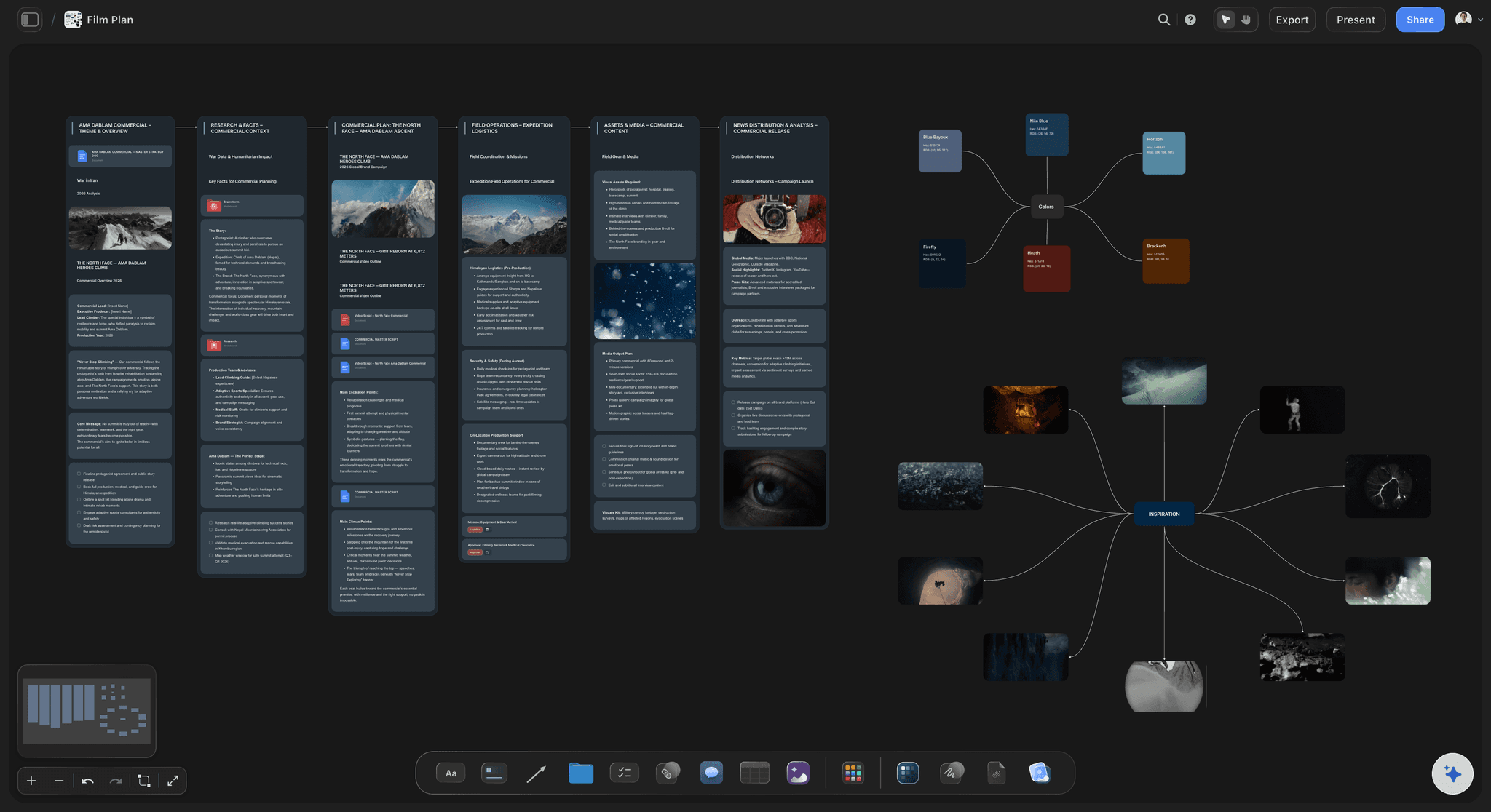
Pull the brief, script, shot list, and moodboard into one pre-production hub so the whole shoot is planned in one place.
What is a production binder?
A production binder is the working file for a shoot: one place holding the script, the breakdown, the shot list, the schedule, the call sheets, the contact list, the location details and the signed paperwork. Storyflow is an AI visual workspace that keeps your production binder on one infinite canvas: the breakdown, shot list, schedule and call sheets, each next to the document it came from, with a view-only link for the crew. On many sets it is still a literal binder. On an independent shoot it is usually a folder, a group chat and somebody's memory, which is why things go missing.
The purpose is not filing. It is coherence. Every document in the binder derives from another one: the breakdown comes from the script, the shot list from the breakdown, the schedule from the shot list, the call sheet from the schedule. A binder is useful when you can see that chain, and dangerous when you cannot, because a change at the top silently invalidates everything under it.
That is why the digital version usually fails. Splitting the binder across Drive, a spreadsheet, a scheduling app and a PDF export means each document is current on its own terms and nobody can tell whether they still agree. The producer holds the connection in their head until the morning they cannot.
Storyflow is a canvas for the binder rather than a folder for it. The breakdown sits beside the script it came from, the shot list beside the breakdown, the day laid over the shots. Storyflow does not do payroll, cost reporting or e-signatures, and it is not a replacement for a scheduling suite on a large production. What it does is keep the planning documents visibly in agreement, and hand the crew one link that is always the current version.
Ultra fast from brief to board
Build the binder in the order the documents actually derive.
Each section sits next to its source, so a change at the top is visible all the way down.
01
Bring in the script and the brief
Drop the script, the treatment or the client brief onto the board, along with references and location photos, so the binder starts from the thing everything else answers to.
02
Break it down
Turn the script into a scene-by-scene breakdown on the same board: cast, locations, props, wardrobe and any special requirement per scene.
03
Build the shot list and the days
Lay the shot list over the breakdown, then group shots into days by location and cast, so an uncovered scene shows as a gap rather than a surprise.
04
Hand the crew a link
Share the board view-only and the crew reads the current binder without an account, or export the board as a high-quality image or PDF for the people who want paper.
A binder is only as good as the agreement between its sections.
Keeping them on one canvas is what makes disagreement visible while it is still cheap to fix.

Start from the script
The breakdown sits beside its source
Keep the script or treatment on the board next to the scene breakdown built from it, so a rewrite is visibly a change to everything downstream rather than a quiet one.
Try the AI script breakdown →
Coverage you can check
A shot list traceable to the breakdown
Build the shot list on the same canvas as the breakdown. A scene with no coverage is obvious, and a shot nobody can justify is equally obvious.
Try the AI shot list generator →
The days over the work
A schedule that covers the shots
Group shots into days by location, cast and time. Because the schedule sits over the shot list rather than in another app, what is not yet scheduled is visible.
See the shooting schedule →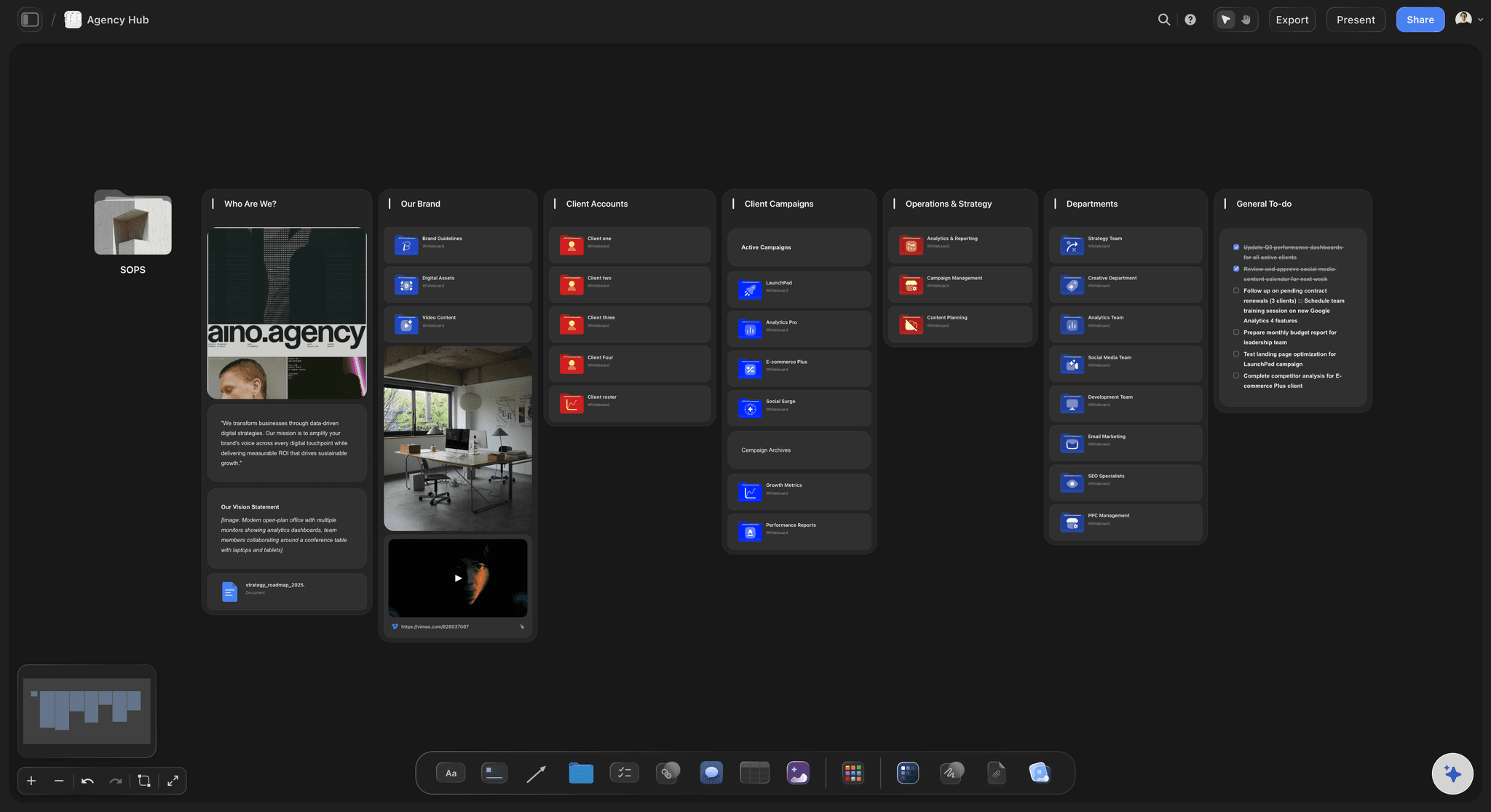
What the crew receives
Call sheets built from the binder
The call sheet is the narrowest point of the whole chain. Generating it from the same board is what stops the version on set differing from the version the director approved.
Try the AI call sheet generator →Plans from $7.99/month annual. Free plan coming late 2026.
Anyone a paid member invites to a board joins free, which is what matters on a production where the crew changes every job. Storyflow is paid-only during early access.
Crew read the binder without an account
Every production gets its own board, with no project limit
Export the board as a high-quality image or PDF
Anyone a paid member invites to a board joins free
Built for people with taste
Paper binders fail by being out of date. Folders fail by hiding it.
The failure mode of a binder is never a missing document. It is two documents that no longer agree and no way to notice.
Drift is the actual risk
See the chain, not just the files
Every section beside its source: Script, breakdown, shot list, schedule and call sheet on one canvas, so you can read whether the last one still reflects the first.
Lose a location, see the damage: When something falls through, every scene and shot that depended on it is visible together instead of being remembered one at a time.
One current version: A link that always opens the latest board ends the problem of three call sheet PDFs and a group chat argument about which is real.
The AI reads the binder
Ask what is missing before the day does
Canvas-aware AI: Storyflow's AI reads the whole active board, so the breakdown and the shot list are both in front of it when you ask whether the coverage is complete.
Pull the documents in: Attach up to five documents and three boards to bring the script, the brief and the location notes into one answer.
A first pass to argue with: Generate a starting breakdown or shot list from the script and then edit it, which beats an empty template because it is something concrete to disagree with.
On the day
Readable at six in the morning
The crew opens a link: No account and no install, which is the only distribution that reliably works with a crew assembled for a single job.
Works on a phone: Boards are readable on a phone on location, where most of the binder actually gets consulted.
Print what needs printing: Export the board as a high-quality image or PDF, or have the AI draft the call sheet as a PDF, for the people who still want paper on set, and most sets still do.
Explore templates for your project
Every template opens as a real, editable board on the infinite canvas. Pick the closest fit and make it your own.
Pre-Production
Pull the brief, script, shot list, and moodboard into one pre-production hub so the whole shoot is planned in one place.
One app instead of five
Against the usual places a binder ends up.
Storyflow is a planning canvas, not a production management suite. Where that matters is below.
Storyflow
Recommended
Breakdown, shots and schedule in one view
AI reads the whole binder
Crew read it without an account
Tracked call sheet delivery and confirmations
Drive folder
Breakdown, shots and schedule in one view
AI reads the whole binder
Crew read it without an account
Tracked call sheet delivery and confirmations
StudioBinder
Breakdown, shots and schedule in one view
AI reads the whole binder
Crew read it without an account
Tracked call sheet delivery and confirmations
Paper binder
Breakdown, shots and schedule in one view
AI reads the whole binder
Crew read it without an account
Tracked call sheet delivery and confirmations
What creators are saying
Join early creators getting structured workspaces and AI that remembers their projects
“Storyflow has sped up my workflow by at least 3x, which means more flow state and more projects I can actually ship. It truly changed the way me and my team create.”

Reilin Joey
Director & YouTuber
“One prompt gets me a structured board. But the tactics are my favorite. I run my YouTube scripts through them and my intros and retention got better. It's amazing.”

Justkay
YouTuber & Freelance Filmmaker
“I used to juggle five apps to plan a project. Now I describe what I am making and get boards, lists, and a schedule. All in one place.”

George
@fernwehchronicles
Production binders, answered.
What producers and first-time crews ask before building one.
A production binder is the single working file for a shoot: script, scene breakdown, shot list, schedule, call sheets, contacts, locations and paperwork. Its purpose is coherence rather than filing, because every document in it derives from another. In Storyflow the binder is one canvas where each section sits beside the document it came from, and the crew reads the current version from a view-only link.
Storyflow is a digital production binder: the script breakdown, shot list, schedule, call sheets, contact list and releases sit on one canvas, each beside the document it came from. The AI reads the whole binder, so you can ask what is missing, and the crew reads the current version from a view-only link without an account. StudioBinder still offers tracked call sheet delivery and confirmations, and Storyflow does not.
For most shoots: the script or treatment, a scene breakdown, a shot list, a shooting schedule, call sheets, a contact list, location details and permits, and signed releases. Larger productions add a stripboard, a day-out-of-days, a risk assessment and insurance documents. The list matters less than whether the documents still agree with each other, which is the part that actually breaks.
For building and changing the plan, yes, because a change to the script can be traced through the breakdown, shot list and schedule instead of being retyped four times. For the shoot day itself, paper still has a real advantage, which is why a PDF of the board or of the day's call sheet is part of the workflow rather than an admission of defeat.
Yes. Put the script on the board and Storyflow's AI can lay out a first-pass scene breakdown with cast, locations and props per scene, which you then correct. A generated first pass is more useful than a blank template because it is something concrete to argue with, and because you can ask the AI which scenes are missing coverage in the shot list.
Not fully. StudioBinder tracks call sheet delivery and confirmations, Movie Magic Scheduling generates day-out-of-days reports from the stripboard, and Movie Magic Budgeting builds full production budgets. Storyflow automates none of that; its AI drafts a strip board or a budget table for you to correct. It is stronger at keeping the script, breakdown, shot list and schedule coherent in one view, and some teams run both.
Share a view-only link. The crew opens it in a browser with no account and no install, which is the only distribution that reliably works with people hired for one job. Boards are readable on a phone on location, and the board exports as a high-quality image or PDF for anything that has to be printed.
Because the breakdown sits beside the script and the shot list beside the breakdown, a rewrite is visibly a change to everything under it. That is the whole argument for keeping the chain in one view: the alternative is discovering at the schedule stage that the breakdown describes an older draft.
Yes. Invited collaborators edit the same board in real time on any paid plan, and anyone a paid member invites to a board joins free, so the director, the first AD and the coordinator do not each need a plan.
It suits it well, because a canvas tolerates a plan that is still moving. Research, contributors and locations stay attached to the shooting plan they inform, and the board can be rearranged as the story changes rather than rebuilt.
Storyflow is paid-only during early access, with plans from $7.99 a month billed annually ($9.99 monthly). A free plan launches before the end of 2026, and anyone a paid member invites to a board joins free.
More from Storyflow
Put the whole shoot in one binder.
Breakdown, shot list, schedule and call sheets on one canvas, where a change at the top is visible all the way down.