
Category
Filmmaking
Author

Storyflow Team
Product & Research Team
Topics
2026-11-13
•
39 min read
•
Filmmaking- film shoot planning app
- shoot planning board
- script breakdown
- shot list and storyboard
- call sheet
- strip board schedule
- Storyflow
Best app for planning a film shoot
Storyflow plans a film shoot on one board: script and breakdown, shot list, storyboard, locations, cast and crew, schedule, call sheets, budget notes and wrap sit as nine walls in a row, which makes it our pick for planning a film shoot. Storyflow is an AI visual workspace that keeps a shoot from script to wrap on one infinite canvas, and it works inside ChatGPT (plugin) and Claude (connector). Each wall has one owner and locks left to right.

Full disclosure: Storyflow is our product. It is listed first because all nine documents, their owners and their locks share one board. This guide compares kinds of tool rather than brands on purpose. Storyflow does not recalculate a schedule or send call sheets, it is paid-only during early access, and the 9-Wall Lock Sequence is our own rule, not research.
How the film shoot planning tools compare on trust, innovation, ratings and pricing
Which film shoot planning tools are the most trusted?
Trust follows the job. Production management suites are trusted on long shoots with an AD department, because their schedules recalculate and their call sheets are sent and confirmed. Storyflow is newer, with its ChatGPT plugin live since 24 October 2026; its case is that the breakdown, shot list, locations, crew, schedule and call sheets stay on one board with one owner per wall.
Which film shoot planning tools have fair pricing?
Fair pricing on a shoot means the crew who only read the plan do not cost a seat. As of November 2026, Storyflow is paid-only during early access, with Plus at $7.99 a month billed annually ($9.99 monthly), and anyone a paid member invites to a board joins free. Production management suites usually charge per seat, and spreadsheets and shared docs often come with office software you already pay for.
Which film shoot planning tools are the most innovative?
Storyflow, for letting ChatGPT or Claude lay out the walls, a breakdown table, shot cards and a strip board grouped by shoot day on the board, while the in-app AI drafts a call sheet PDF from what the board holds. Production management suites lead on schedule automation, and drawing apps lead on timed animatics.
Which film shoot planning tools are underrated?
The plain spreadsheet is underrated for budget arithmetic and a long crew list, and a call sheet emailed as a PDF is still the norm most crews read on the day. In Storyflow, the underrated step is the change report: asking ChatGPT or Claude what changed on the shoot board since Monday, and who changed it, replaces a status meeting.
Which film shoot planning tools hold up from prep to wrap?
Tools hold up when the locked version of each document is obvious. In Storyflow, a Status line on each of the nine walls says open, locked or reopened, and the wrap wall ends with a dated PDF of the whole board as the record. Whatever you use, put the version and time in every call sheet's file name.
Quick Comparison
Our pick first, on the basis that all nine documents, their owners and their locks share one board, then the other kinds of tool by the job each does best. This guide compares kinds of tool, not brands.
| Tool | Best For | AI Features | Price |
|---|---|---|---|
| Storyflow | Nine walls from script and breakdown to wrap on one board, each with an owner and a lock line | In-app AI drafts the breakdown, shot list, storyboard, strip board and call sheet PDF from the script file; ChatGPT plugin and Claude connector build walls, tables, shot cards and strip boards | Plus $7.99 mo billed annually; paid-only in early access |
| A production management suite | Recalculating schedules and call sheets sent with confirmations on long shoots | Varies by product | Per seat, varies |
| A spreadsheet | Budget arithmetic and long crew lists | Formula help in some products | Often included in office software |
| A shared doc and a folder of PDFs | One-day shoots with three people | Writing help in some products | Often free |
Key Takeaways
- Storyflow is the best app for planning a film shoot when one producer has to hold every decision in one place: nine walls on one board, from the script and breakdown on the left to the wrap on the right, each with one named owner and a lock line.
- Our editorial rule: in Storyflow, a wall locks only after the wall to its left, so the schedule never runs ahead of the breakdown and the call sheet never runs ahead of the schedule.
- In Storyflow, the Call Sheets wall locks at least 12 hours before call, which is the usual latest point for issuing a call sheet.
- A planning board holds decisions; a production office holds money, contracts and distribution. Storyflow is the first: it does not send call sheets, run payroll or recalculate a schedule.
- Storyflow's in-app AI reads a script as a PDF, a Fountain file or a screenplay file (.fdx) and drafts the breakdown, shot list, storyboard, a strip board grouped by shoot day and a call sheet PDF; ChatGPT and Claude build walls, tables, shot cards and strip boards through the plugin and connector.
- Permits set the real deadline for the Locations wall: as of November 2026, FilmLA asks 3 to 7 business days for a basic Los Angeles permit, and New York wants $1,000,000 of liability cover on file 48 hours before you apply.
- Storyflow is paid-only during early access, from Plus at $7.99 a month billed annually; anyone a paid member invites to the board joins free, without the in-app AI.
How to Plan a Film Shoot on One Board: 8 Steps
The usual shoot plan lives in nine places: a script PDF, a breakdown spreadsheet, a shot list doc, storyboard frames in a drawing app, a folder of recce photos, a crew list, a schedule, a call sheet and a budget. By day one at least two of them disagree, and nobody can say which one is current. These eight steps put all nine on one Storyflow board and decide who may change each one.
- Open one Storyflow board for the shoot and draw nine walls left to right: Script and Breakdown, Shot List, Storyboard, Locations, Cast and Crew, Schedule, Call Sheets, Budget Notes, Wrap.
- Put the same three-line note at the top of every wall in Storyflow: Owner (one name), Locks (an event or a date), Status (open, locked or reopened).
- Attach the script and ask Storyflow's in-app AI for a script breakdown: every scene with its location, interior or exterior, day or night, pages in eighths, cast, props, wardrobe, vehicles and effects, as a table on the first wall. The 1st AD or the producer checks each line against the pages, then marks the wall locked.
- Draft the shot list from the locked breakdown, one row per setup, then storyboard only the setups a crew or client cannot understand from words: moves, inserts, effects and anything a client signs.
- Scout the locations, upload the recce photos to the Locations wall, check sunrise and sunset for every exterior, and file the permit before you lock the wall.
- Book cast and crew in one table on the Cast and Crew wall, with phone, role, call and a release column, and lock it when every key role has confirmed in writing.
- Ask Storyflow for a strip board grouped by shoot day, check the order and page counts by hand, then draft each day's call sheet as a PDF from it and send it yourself at least 12 hours before call.
- Keep the budget as estimate and actual on every line, then close the shoot on the ninth wall: media backed up, locations returned, releases filed and a PDF of the whole board exported as the record.
Steps 2 and 7 do the most work and get skipped most often. A shoot plan fails when nobody owns a document, or when the call sheet is drafted from a schedule that is still moving. The rest of this guide takes each wall in turn: what goes on it, who owns it, when it locks and how Storyflow builds it. For the shoot day itself, see how to plan a film shoot day.
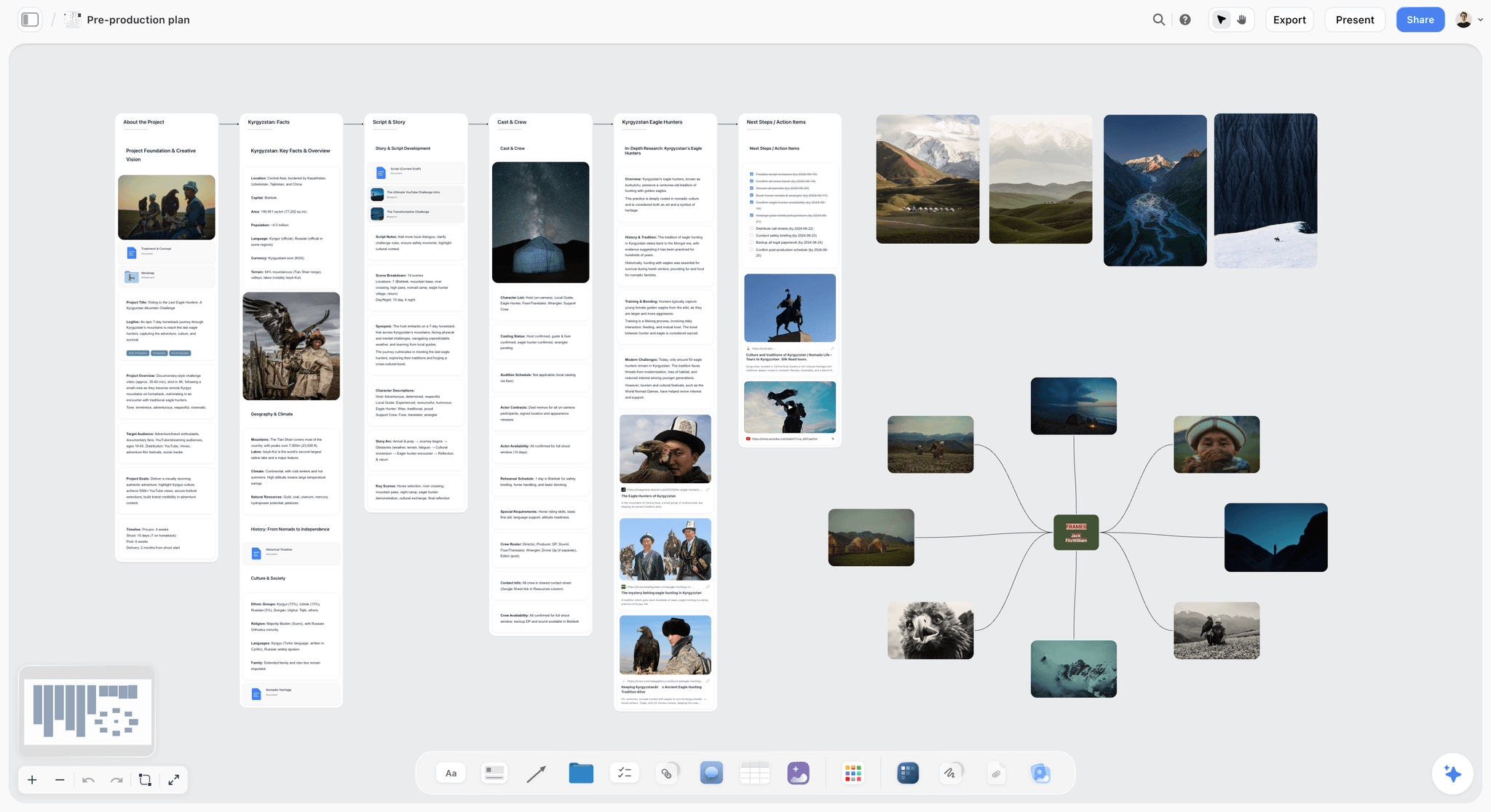
A pre-production board with its walls side by side: the same left-to-right reading order the nine walls below use.
The Storyflow 9-Wall Lock Sequence
Most shoot plans do not fail from missing documents. They fail from documents that were finished in the wrong order: a schedule built before the cast confirmed, a call sheet drafted before the location was signed, a shot list written for a script that changed on Tuesday.
The rule, defined
The Storyflow 9-Wall Lock Sequence: in Storyflow, a film shoot is planned on one board with nine walls in a fixed order (Script and Breakdown, Shot List, Storyboard, Locations, Cast and Crew, Schedule, Call Sheets, Budget Notes, Wrap), each wall has one named owner, and a wall locks only after every wall to its left has locked. The Call Sheets wall locks at least 12 hours before call. This is our editorial recommendation, built from how the documents depend on each other. It is not a research finding.
Why nine walls and not five
Nine is the number of documents that have different owners on a working crew. The breakdown belongs to the 1st AD, the shot list to the director and the cinematographer, the locations to the location manager, the cast and crew list to the producer or production coordinator, the call sheet to the 2nd AD. According to Wikipedia's article on the assistant director, the 2nd AD creates daily call sheets from the production schedule, working with the production coordinator, while the 1st AD keeps the day on schedule. Merge two of these walls and you merge two owners, which is how a document ends up with nobody responsible for it. Split them further and the board stops reading at a glance.
Why the walls lock left to right
Each wall is built from the walls before it. The shot list is written against the breakdown. The schedule is built from the breakdown, the locations and the cast's available days. The call sheet is copied out of the schedule. The budget's estimates firm up once the schedule fixes the number of days. Wikipedia's script breakdown article describes the breakdown as the basis for the production board, the schedule and the budget, which is exactly the dependency this order encodes. A change to a wall reopens it and every wall to its right, and the Status line says so.
Why each wall has one owner
A wall with two owners has none. Each can assume the other checked it. Write one name in the Owner line, even on a crew of three where the producer owns six walls; the name tells everyone whom to ask, and it tells the owner which walls are theirs to lock.
When to break the sequence
Break it for a documentary or run-and-gun shoot where the script is written in the edit: lock Locations and Cast and Crew first, and treat the Script and Breakdown wall as a list of scenes you hope to get. Break it for a one-location, one-day shoot by collapsing Storyboard into Shot List. Never break it by drafting the call sheet before the schedule wall locks.
Planning Board vs Production Office
In Storyflow, the planning board is where every decision about the shoot is made and recorded, wall by wall, while a production office (a room, an accounts system, a payroll provider and an inbox) carries out the decisions that involve money, contracts and sending things to people. Know which one you are building before you start, because a planning board pretending to be a production office drops the jobs it cannot do.
| Job | Planning board | Production office | Where it lives in Storyflow |
|---|---|---|---|
Script version and breakdown | Holds the locked version and the tagged elements | Files the signed script for the record | Wall 1, a document plus a breakdown table |
Shot list and storyboard | Holds every setup and frame | Nothing | Walls 2 and 3, tables, shot cards and images |
Location choice | Holds recce photos, notes and the decision | Signs the location agreement, pays the fee | Wall 4, images and a location table |
Permits and insurance certificates | Records the permit number and dates | Applies, pays, holds the certificate | Wall 4, a to-do with a due date |
Cast and crew booking | Holds names, roles, calls and confirmation status | Issues deal memos and contracts | Wall 5, a table with a person column |
Payroll, invoices, purchase orders | Nothing | Runs all of it | Not in Storyflow |
Shooting schedule | Holds the strip board and the day order | Nothing | Wall 6, a strip board grouped by shoot day |
Call sheet | Drafts the day's PDF | Sends it and chases confirmations | Wall 7, a call sheet PDF you send yourself |
Budget | Holds estimate and actual per line | Holds the ledger and receipts | Wall 8, a table of line items |
Wrap | Records what was returned, backed up and filed | Closes accounts and insurance | Wall 9, a checklist of to-dos |
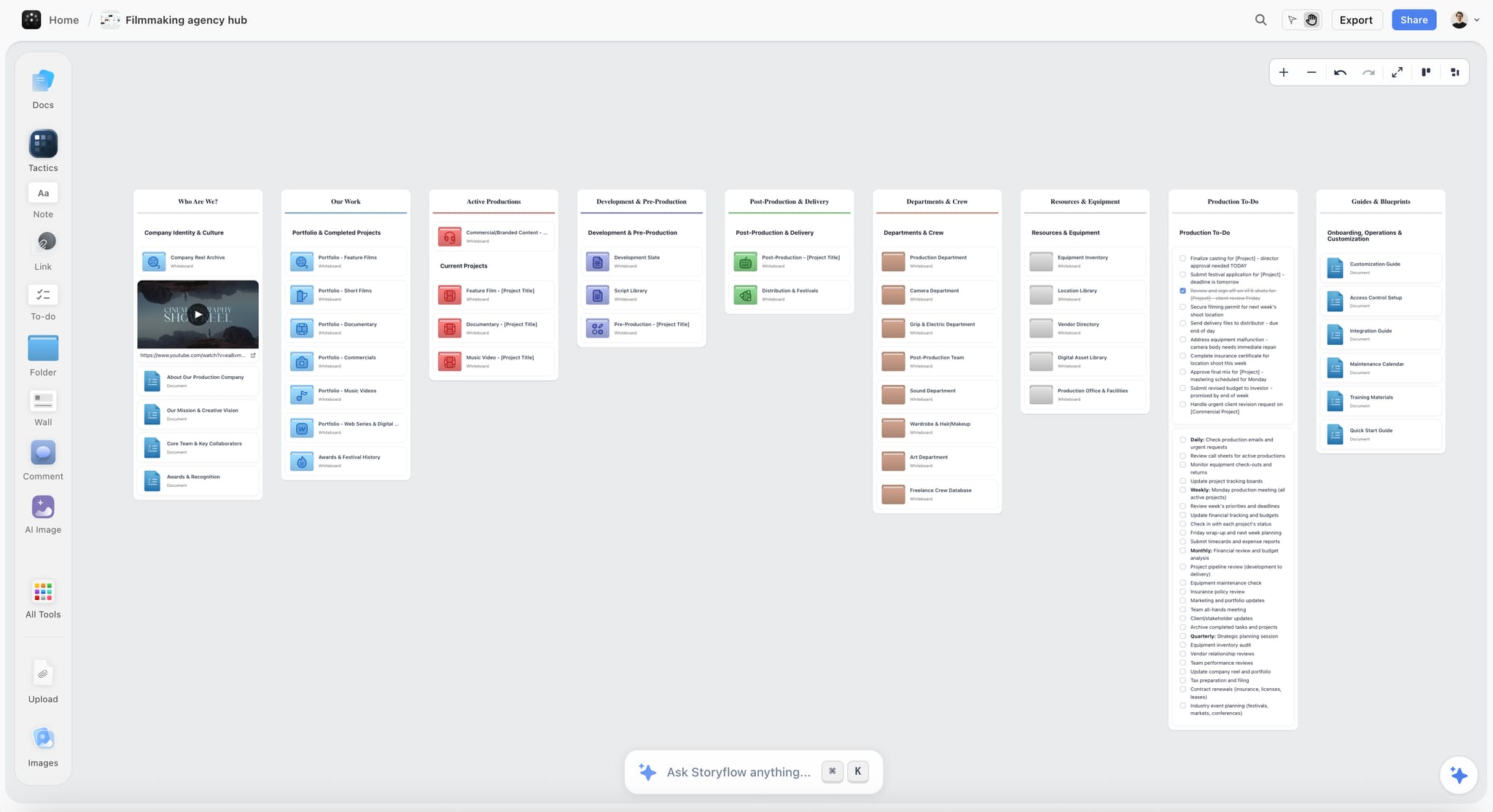
A production company's hub board. Each shoot gets its own nine-wall board, linked from a hub like this.
What the planning board decides
The planning board answers "what are we shooting, where, when, with whom, and in what order". Everything on it is a decision someone can read and argue with. It is the document the director, the cinematographer and the client read, and the one the 1st AD runs the day from.
What the production office still runs
A production office pays people, signs agreements, holds insurance certificates, books travel and sends things. On a feature it is a team; on a two-day brand film it is the producer's inbox, a spreadsheet of costs and an accounting app. Storyflow does none of this: it has no invoicing, payments, contracts or e-signature, and it does not send call sheets or track confirmations.
On a two-person shoot, they are the same person
When the producer is also the production office, keep the split anyway. Decisions go on the board; money and signatures go to the accounts and the inbox. The board records that the deal memo was signed ("signed 6 Nov, filed in the contracts folder"), not the memo itself.
The Nine Walls at a Glance
Here is the whole board in one table: the wall, what goes on it, who owns it, when it locks and how Storyflow builds it. Read across a row to brief an owner; read down the Locks column to see the sequence.
| Wall | What goes on it | Owner | Locks when | How Storyflow builds it |
|---|---|---|---|---|
1. Script and Breakdown | Locked script, scene list, tagged elements | Writer or director for the script; 1st AD for the breakdown | The script is locked and every scene is tagged | In-app AI breakdown table from the script file |
2. Shot List | One row per setup, with size, move, lens and priority | Director with the cinematographer | Every scene has its setups and an A or B priority | "Make a shot list for my shoot", or shot cards from ChatGPT or Claude |
3. Storyboard | Frames for the setups words cannot carry | Director or storyboard artist | Every move, insert and effects shot has a frame | "Storyboard my script"; AI images on Pro and Max |
4. Locations | Recce photos, address, access, power, sun times, permit | Location manager or producer | The location agreement and permit are confirmed | "Scout locations for my shoot"; photos by upload |
5. Cast and Crew | Names, roles, contact, call, release status | Producer or production coordinator | Every key role is confirmed in writing | A table with a person column |
6. Schedule | Scenes grouped into shoot days | 1st AD | Locations and cast days are locked | A strip board grouped by shoot day |
7. Call Sheets | One PDF per shoot day | 2nd AD or production coordinator | At least 12 hours before call | A designed call sheet PDF from the board |
8. Budget Notes | Estimate and actual per line | Producer or line producer | Estimates the night before day one; actuals at wrap | A table of line items |
9. Wrap | Returns, backups, releases, wrap notes | Producer or production coordinator | Every to-do on it is ticked | To-dos with assignees and due dates |
Wall 1: Script and Breakdown
Every other wall is copied from this one, so an error here is copied eight times. The breakdown is where you find out that scene 4 needs a dog, a period car and rain, before the schedule assumes it needs none of them.
Lock the script before anyone breaks it down
Write the locked version and its date in the wall's top note ("Shooting script, 4 Nov, white pages") and keep older drafts in a folder on the board, not on the wall. A breakdown of the wrong draft is worse than no breakdown, because it looks finished. For an unscripted shoot, the "script" is the treatment or the list of scenes you intend to capture, broken down the same way.
Tag the elements every department reads
A breakdown parses each scene into what it needs, and scene length is counted in eighths of a page. Wikipedia's script breakdown article gives an industry colour code for marking a printed script; use it, or agree your own on the wall, but agree it once.
| Element | Common mark | Who reads it |
|---|---|---|
Speaking cast | Red | Casting, 2nd AD, call sheet |
Stunts | Orange | Stunt coordinator, safety, insurance |
Special effects | Blue | Effects, safety |
Props | Purple | Props, art department |
Sound effects or music on set | Brown | Sound, music clearance |
Wardrobe | Circle | Costume |
Makeup and hair | Asterisk | Makeup and hair |
Special equipment | Box | Camera, grip, rentals |
Production notes | Underline | Producer, 1st AD |
Add three columns the colour code leaves out: interior or exterior, day or night, and the page count in eighths. Those three decide the schedule.
Build it in Storyflow
Attach the script to the in-app AI chat (it reads a PDF, a Fountain file or a screenplay file) and ask for a script breakdown. The AI asks a clarifying question or two, then writes the result straight onto the board as a table with one row per scene; one undo reverses the whole turn. Check the eighths against the page, because a scene that runs half a page in the script file can be 3/8 or 5/8 depending on how you count, and the whole schedule rests on the total. The script breakdown software page shows the flow, and the script breakdown checklist covers what to tag.
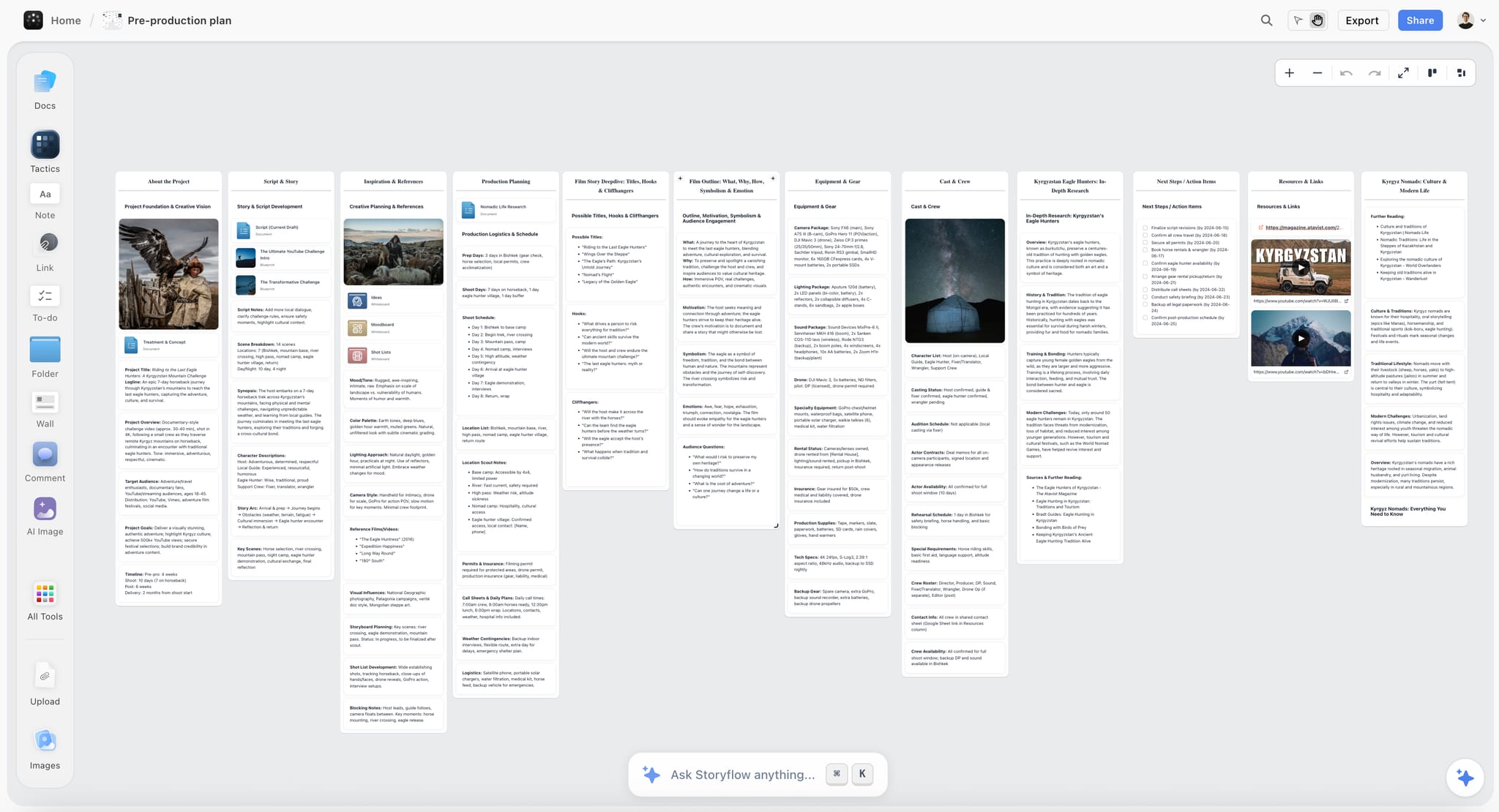
The script wall holds the current draft next to its breakdown totals (14 scenes, 7 locations, 10 day and 4 night), and the Ask Storyflow anything bar at the foot of the board is where the breakdown request starts.
Wall 2: Shot List
The shot list turns scenes into setups, and setups are what a day is made of. A day is lost to the setup nobody listed, not to the long take everybody expected.
One row per setup, not per shot
Number the setups, not the takes. A setup is one position of camera and light; moving the camera to a new angle is a new setup and a new reset of light and grip. Give every row the same columns:
| Column | What it holds | Example |
|---|---|---|
Scene | The breakdown's scene number | 3 |
Setup | Scene and letter | 3A |
Size | Wide, medium, close, insert | Medium close |
Angle and move | Eye level, low, high; static, push, pan, handheld | Low, slow push |
Lens | Focal length or range | 35mm |
Description | What happens in frame | Roaster lifts the scoop into the light |
Cast in frame | From the breakdown | Ana |
Priority | A (must have) or B (if time) | A |
Storyboard frame | Yes or no | Yes |
The priority column is the one that saves a day. When the schedule slips at four in the afternoon, the 1st AD cuts B rows without a conversation.
Build it in Storyflow
Ask the in-app AI to "Make a shot list for my shoot" from the locked breakdown, or "A shot list from my storyboard" when the frames came first. Storyflow's own figure for pictures for a shot list is 4 minutes with the AI against about 2 hours by hand (one recorded run, rounded up; the by-hand figure is an estimate). From ChatGPT or Claude, ask for shot cards, one per setup, on the Shot List wall. Either way, the director and cinematographer read every row before the wall locks. See the shot list template and how to make a shot list.
Wall 3: Storyboard
A storyboard is a sequence of frames that previews the shots, and directors, cinematographers and clients use it to see problems before the shoot. Wikipedia's storyboard article notes that frames are traditionally drawn in the aspect ratio of the format being shot and that, because films are rarely shot in script order, boards let the director recall the intended look of each shot on the day.
Board only what words cannot carry
You do not need a frame for "wide of the kitchen". You need one for every camera move, every insert a client will judge, every effects shot and every frame with a composition the whole crew must hit. On a 60-second spot that can mean every setup; on a two-day interview shoot it can mean four frames. Mark the Storyboard frame column on Wall 2 and draw only those rows. For the difference in full, see storyboard vs shot list.
Build it in Storyflow
Ask the in-app AI to "Storyboard my script", or pick the marked setups and build frames from them. On Pro and Max, the in-app AI can generate an image for a frame no reference shows; label it as generated so nobody treats it as a location photo. Frames can also be your own sketches or photos uploaded to the wall. Storyflow has no animatic, frame timing or video export, so if the client needs a timed animatic, cut it in your editing software from the exported frames. The AI storyboard generator page shows the frame flow.
Wall 4: Locations
A location is not locked when you like it. It is locked when the owner has signed, the permit is in, and you know where the sun is at your call time.
What a recce must answer
Wikipedia's location scouting article lists what scouts check: distance from base and other locations, parking and facilities, power or room for a generator, natural light and weather, permission from the owner and neighbours, ambient sound, access through doors, lifts and stairs, and the sun's angle through the day. Put each as a line on the location's card and fill it on the recce, not afterwards.
For every exterior, add sunrise, sunset and solar position for the shoot date from NOAA's solar calculator. Golden hour light is softer and warmer, around 3,500 K against about 5,500 K at midday, according to Wikipedia's golden hour article, and its length varies with season and latitude, so read it for your date and place rather than assuming an hour.
Permits set the real deadline
The Locations wall locks when the permit is confirmed, and permit offices set their own lead times. Two examples, read on the offices' own pages as of November 2026:
| City | When a permit is needed | Lead time and cost | Insurance |
|---|---|---|---|
New York City | Anything beyond a hand-held camera or a camera on a tripod, any parking request for production vehicles, exclusive use of city property, prop weapons, stunts or actors in police uniform | $500 for each consecutive 14-day period of permit dates | Commercial general liability of at least $1,000,000 per occurrence, sent by your broker at least 48 hours before you file |
Los Angeles (FilmLA) | Filming on locations FilmLA serves | Typically 3 to 7 business days for basic permits; notices to neighbours go out two business days or more before filming | Proof of coverage meeting FilmLA and city or county requirements; drones may need more |
Sources: New York's when a permit is required and insurance requirements pages, and FilmLA's guide to applying for a film permit. Other cities differ; find the film office before you fall for a street.
Build it in Storyflow
Ask the in-app AI to "Scout locations for my shoot"; it searches the web when you ask and places candidates on the wall. Upload your own recce photos to the card for each site. Add a to-do for the permit with a due date and an assignee, and write the permit number in the card once it arrives. Storyflow keeps the decision; the signed location agreement lives with your contracts. The location scouting app page covers the wall, and how to organize a location scout covers the recce day.
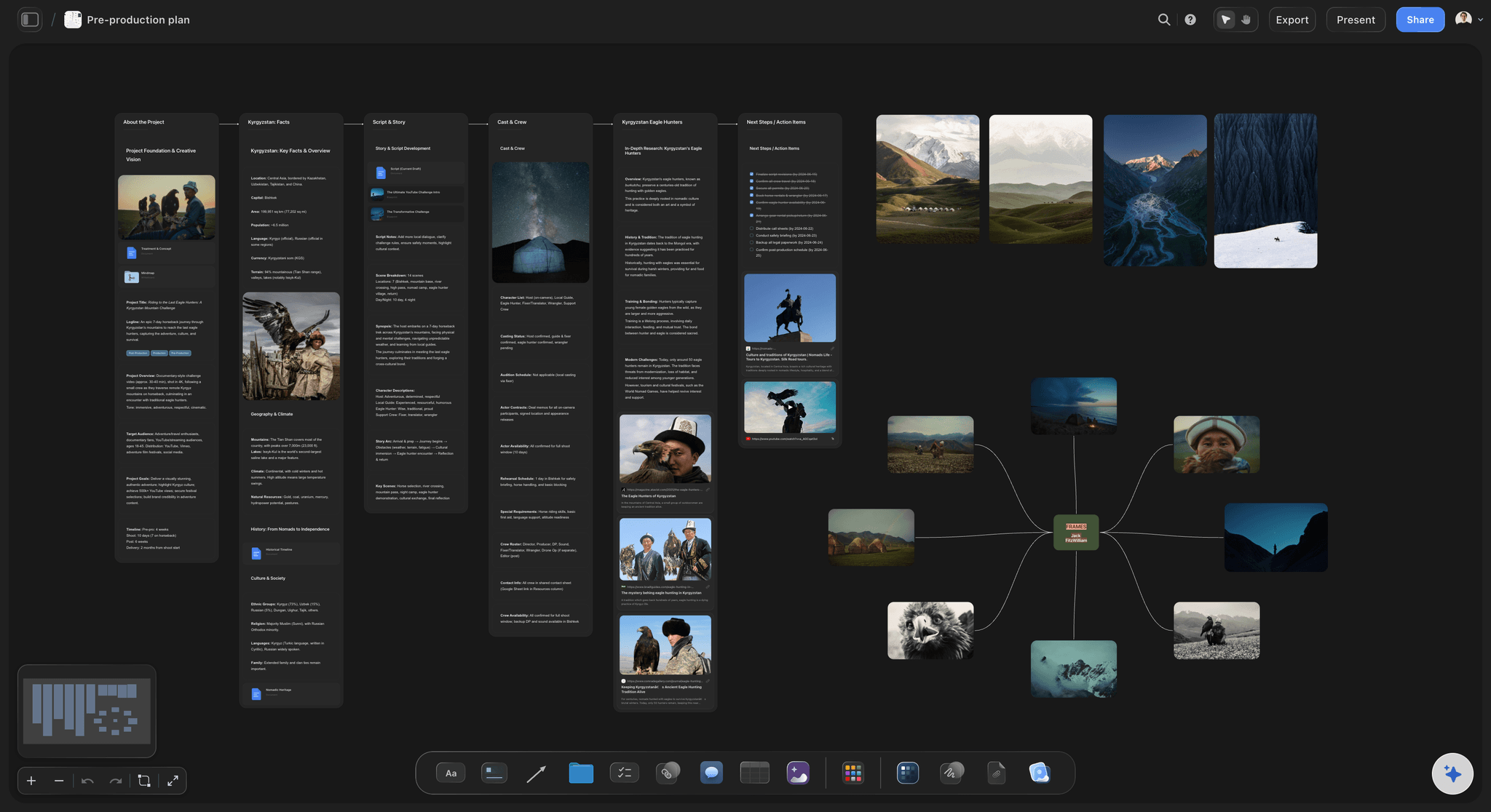
Recce photos and notes on one wall: the location decision stays next to the frames it has to deliver.
Wall 5: Cast and Crew
This wall is the one people read most and update least. A phone number that changed on Thursday is a missed call on Saturday.
One table, one owner per name
Keep one table, not a cast list and a crew list in different places. Columns: Name, Role, Department, Phone, Email, Days needed, Confirmed (yes or no, with the date), Release (yes, no, not needed), Dietary, and a Booked by column naming who confirmed them. Sort the rows by department and keep them in that order by hand, since Storyflow tables cannot be sorted.
Releases and turnaround
A release is generally needed when an identifiable person's image is used to promote a product, service or idea, and a minor's release must be signed by a parent or guardian, according to Wikipedia's model release article. Rules vary by country, so take your producer's or lawyer's form, not a template from the web. Put the Release column on the table so nobody wraps without them.
If you work with union performers, the rest between days is a scheduling constraint, not a courtesy. A 12-hour minimum turnaround between shoots is a common union rule: Wikipedia's production board article gives the US Screen Actors Guild's 12 hours as its example, along with paid hold days between nonconsecutive days at remote locations. The terms vary by union and agreement, so check yours with the union directly.
Build it in Storyflow
Ask the AI to add the table with an Owner or Assignee column. Storyflow fills a person column only with people who already have access to the board; if any name matches nobody, the whole column stays plain text with the names as written. Invite the heads of department to the board first, so the AI can name them in the Owner column and you can assign them to-dos. Anyone a paid member invites joins free. The casting board page covers casting in detail, and how to plan crew for a shoot covers sizing the crew.
Wall 6: Schedule
The schedule is the first wall that can only be built once three others are locked. That is why it is the wall most often built too early.
Shoot out each location
A production board, or strip board, is a set of strips, one per scene, rearranged into the order you will shoot. Each strip holds the scene number, time of day, page count in eighths, the set, the real location, the characters and notes, according to Wikipedia's production board article, which also gives the usual colour convention:
| Strip | Usual colour | Why it matters for the order |
|---|---|---|
Day interior | White | Can be lit at any hour; good cover for weather |
Day exterior | Yellow | Bound to daylight and weather; schedule it first |
Night interior | Blue | Blackout or real night; check the turnaround after |
Night exterior | Green | The most expensive hours; group them |
Some scheduling systems swap the two night colours, so write the key on the wall. Group scenes by location first ("shooting out" a location), then by cast, so a performer on a day rate is not called back for one line. The same article names the constraints that override that grouping: weather, daylight, location availability, child performers' hours and union rules.
Build it in Storyflow and check the order by hand
Ask the in-app AI for a strip board, or from ChatGPT or Claude ask for one grouped into shoot days. You get the scenes grouped by day with page counts. Then check it yourself, because Storyflow's strip board does not recalculate: move a scene to another day and the day totals do not update, and there is no Day Out of Days report. Storyflow has no calendar view either; dates live in table date cells, with the rows kept in date order. The stripboard page shows the build, and how to make a production schedule covers the order in depth.

Day columns with checklists: the simplest shape for a prep week, before the strip board takes over the shoot days.
Wall 7: Call Sheets
A call sheet is a promise that everyone will be in the right place at the right time. Wikipedia's call sheet article says it is usually issued no later than 12 hours before the start of the next work day, which is why Storyflow's Call Sheets wall locks at that point at the latest.
What every call sheet carries
| Section | What goes in it |
|---|---|
Header | Production, shoot day number of total, date, general call time |
Scenes | Scene numbers, set, day or night, pages in eighths, cast in each |
Cast calls | Each performer's call, makeup and on-set times |
Crew calls | Each department's call |
Location | Address, parking, base, route notes |
Weather and light | Forecast, sunrise, sunset |
Safety | Hazards for the day and who to tell |
Nearest hospital | Name, address and phone, checked on the recce |
Meals | Times and numbers, dietary needs |
Contacts | Producer, 1st AD, location manager, production office |
Advance schedule | Tomorrow's scenes, so departments can prepare |
Build it in Storyflow, send it yourself
Ask the in-app AI for a call sheet and it drafts a designed PDF from what the board holds. It leaves unknowns visibly blank, and the nearest hospital line stays blank unless you supply it, so fill it from your recce. Storyflow does not send call sheets or track who confirmed; send the PDF from your own email or messages, and keep a reply-to-confirm habit if you need one. The call sheet template page shows the layout, what a call sheet is covers each field, and the ChatGPT call sheet page covers drafting one from a chat.
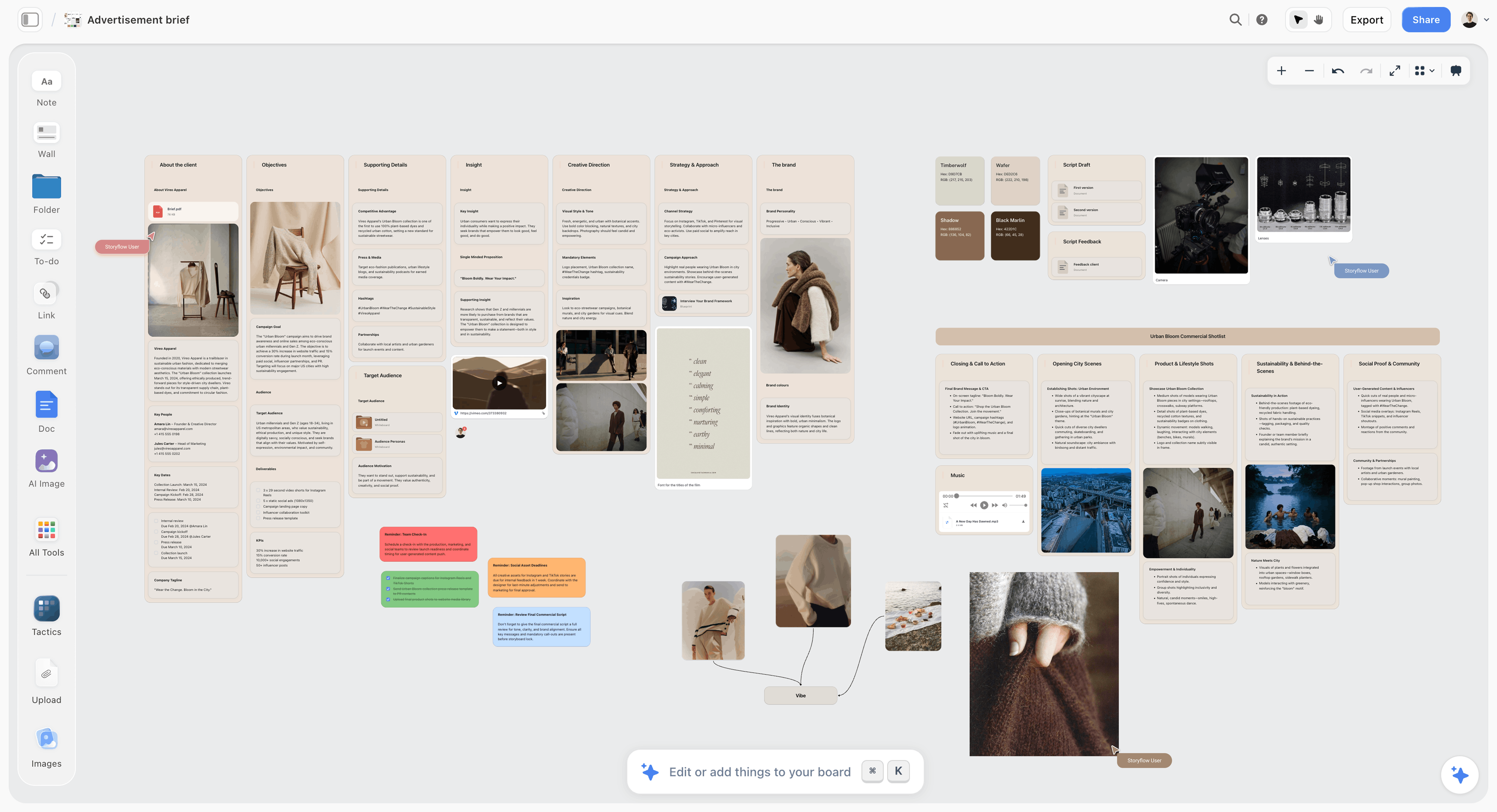
On a brand shoot the brief sits to the left of the nine walls, so a call sheet can be checked against what was asked for. The brand is fictional.
Wall 8: Budget Notes
This wall is called Budget Notes on purpose. It holds the numbers the planning board needs to make decisions; the ledger lives in your accounts.
Four sections, two numbers per line
A film budget is usually divided into four sections: above the line (creative talent), below the line (crew, sets, costumes, catering, travel), post-production, and other costs such as insurance, according to Wikipedia's film budgeting article. Give each line an estimate and an actual, plus the wall it belongs to, so a decision on Wall 4 ("second location") shows its cost on Wall 8.
| Line | Section | Estimate | Actual | Driven by |
|---|---|---|---|---|
Director fee | Above the line | Agreed fee | Invoice | Wall 5 |
Camera package | Below the line | Rental quote x days | Rental invoice | Walls 2 and 6 |
Location fee and permit | Below the line | Agreement plus permit fee | Receipts | Wall 4 |
Catering | Below the line | Heads x meals x days | Receipts | Walls 5 and 7 |
Edit and grade | Post-production | Quote | Invoice | Wall 9 |
Production insurance | Other | Broker quote | Policy | Wall 4 |
Keep the arithmetic where it can be audited
Storyflow is not a budgeting tool. Type the estimates and actuals into a table on the wall so the team sees them beside the decisions, and keep the sums, contingency and receipts in your spreadsheet or accounts. The estimate locks the night before day one, when every booking is made; the actuals close at wrap. The film budget planner page shows how the notes sit beside the plan.
Wall 9: Wrap
A shoot is not over when the last shot is in. It is over when the footage is safe, the locations are handed back and the paperwork is filed.
The wrap is a checklist, not a party
The location crew is typically the last to leave a site and aims to leave it in at least the condition it was found, according to Wikipedia's location scouting article. Write the wrap as to-dos, each with an owner and a due date: media backed up in two places and checked, kit returned and checked in, location walk-through done, releases scanned and filed, receipts in, actuals entered on Wall 8, notes for post written, thank-yous sent. The UK's Health and Safety Executive recommends reviewing your risk controls as work goes on and the whole system after a production, so the lessons apply next time; its film and TV page also says the employer is usually the producer or production company. Put a "what we would change" note on the wrap wall. For the backups, see how to back up footage on a shoot.
Build it in Storyflow
Ask the AI for the wrap list as to-dos; assign them yourself, since the AI cannot set a to-do's assignee. Each to-do takes an assignee and a due date, with in-app notifications but no due-date reminders. When every to-do is ticked, export the board as a PDF with the date in the file name. That PDF is the record of what was planned, approved and done.
Template: The Nine-Wall Board for Halyard Films
Copy this table onto your own board. Halyard Films is a fictional three-person production company; the names are placeholders for your own. Each row is one wall's top note plus the main card on it.
| Wall | Main card | Owner | Locks | Lock state | Feeds | Exported as |
|---|---|---|---|---|---|---|
Brief (left of the walls) | Client brief, deliverables, delivery date | Mara (producer) | Signed by the client | Locked 28 Oct | All walls | PDF in the client folder |
1. Script and Breakdown | Shooting script v3, breakdown table | Theo (director); Mara for breakdown | Script v3 locked, every scene tagged | Locked 4 Nov | 2, 6, 8 | |
2. Shot List | Shot list table, 24 setups, A and B priority | Theo with Ines (DP) | Every scene has setups | Locked 6 Nov | 3, 6 | |
3. Storyboard | 11 frames for moves and inserts | Theo | Every marked setup has a frame | Locked 7 Nov | Client sign-off | |
4. Locations | Roastery and harbour street cards, permit to-do | Mara | Agreement signed, permit confirmed | Locked 10 Nov | 6, 7, 8 | |
5. Cast and Crew | One table, 2 cast, 9 crew | Mara | Every key role confirmed in writing | Locked 11 Nov | 6, 7 | Not exported |
6. Schedule | Strip board, 2 shoot days | Mara as 1st AD | Walls 1 to 5 locked | Locked 12 Nov | 7 | |
7. Call Sheets | Day 1 and Day 2 call sheet PDFs | Mara | Sent 12 hours before call at the latest | Day 1 sent 13 Nov, 17:00 | The crew | PDF, sent by email |
8. Budget Notes | Line items, estimate and actual | Mara | Estimates 13 Nov; actuals at wrap | Estimates locked | Accounts | Not exported |
9. Wrap | Wrap to-dos, notes for post | Mara | Every to-do ticked | Open | Post-production | Whole-board PDF |
Open questions (right of the walls) | Questions with an owner and a date | Whoever raised it | Empty before day one | 2 open | The next wall | Not exported |
Keep the Lock state honest. "Reopened 12 Nov: client added a product shot" on Wall 2 tells the 1st AD that walls 3, 6 and 7 are reopened too.
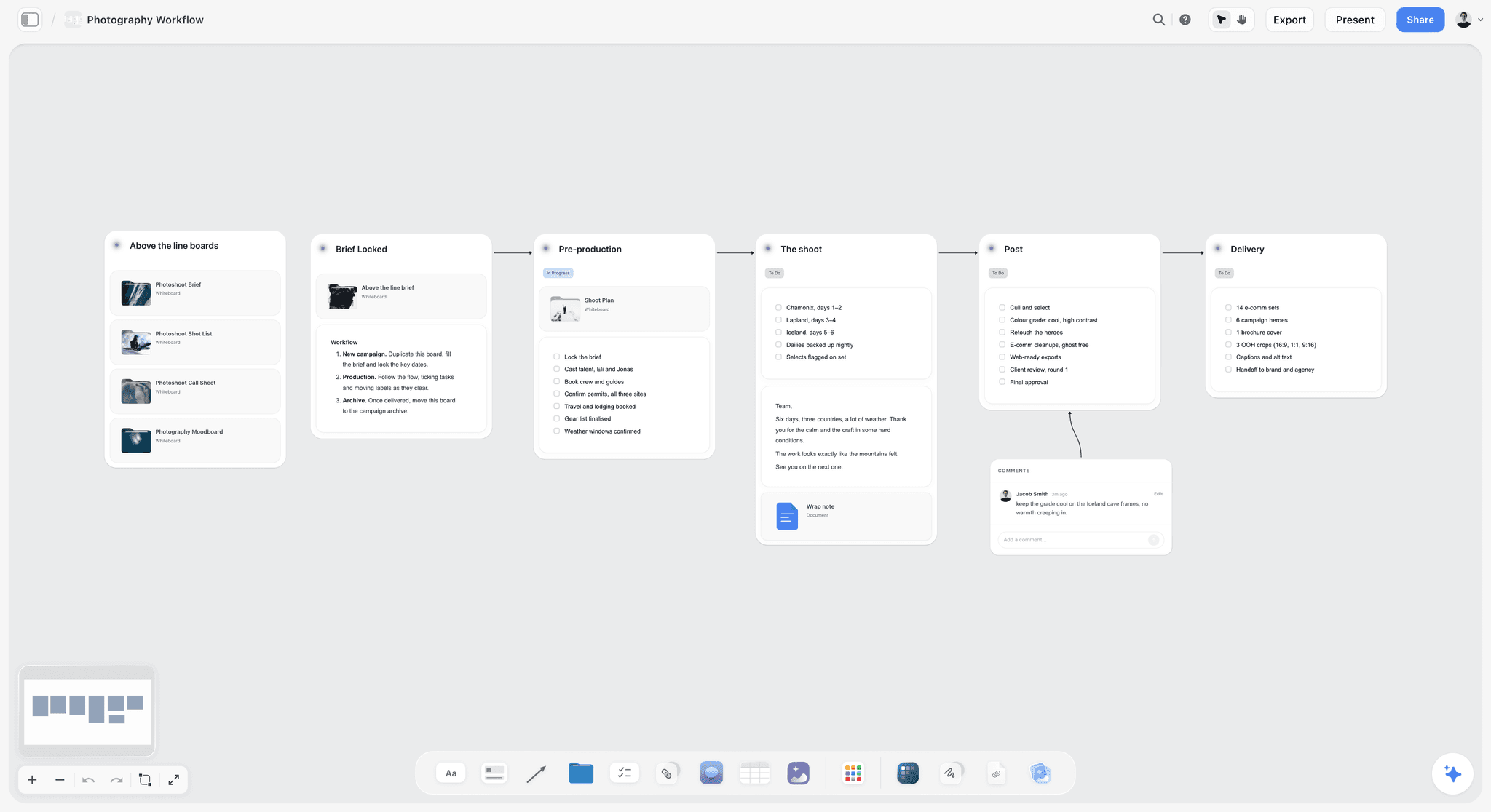
A stage-by-stage board with checklists per column: the shape the Status lines give the nine walls once they start locking.
Worked Example: Halyard Films Shoots a 60-Second Spot in Two Days
The company and the client are fictional, and the example shows the method, not a measured result. Halyard Films is shooting a 60-second brand film called First Light for Fernhill Roastery, a fictional coffee roaster, with a 30-second and a 15-second cut from the same footage. Two shoot days in Los Angeles: a roastery interior and a dawn street exterior outside the roaster's cafe.
The brief
The brief sits to the left of the walls: the film shows one roaster's morning from the first batch to the first customer; it runs on the brand's site, YouTube and paid social; the product must be legible in two shots; delivery is three weeks after the shoot. Mara writes the deliverables on the brief card (60, 30 and 15 seconds, 16:9 and 9:16) so the shot list can be checked against them.
Walls 1 to 3: from script to setups
Theo's shooting script runs 1 and 6/8 pages over five scenes. Mara attaches it to Storyflow's in-app AI and asks for a script breakdown; the table comes back with scene 2 (DAY INT, roasting floor) tagged for a lit roaster, a hero bag of beans and steam. She corrects one page count and locks the wall. The shot list gets 24 setups, 17 of them A priority; Theo and Ines mark 11 for frames, all moves and both product inserts. The storyboard wall gets those 11 frames, and the client signs the two product frames in a note on the wall ("approved, A. Reyes, 7 Nov").
Walls 4 and 5: two locations and a crew of nine
The roastery is private property, so the Locations wall needs the owner's agreement and a property release. The street exterior needs a FilmLA permit, so Mara files it on 3 November, more than the 3 to 7 business days ahead, and notices go to neighbours two business days before filming. NOAA's calculator gives the sunrise time for 15 November, and the Day 2 call is set an hour before it. The Cast and Crew table holds two performers and nine crew, each with a confirmation date and a Release column; the roaster herself appears on camera, so her release goes on the list.
Walls 6 and 7: two days and two call sheets
Mara asks for a strip board grouped by shoot day. Day 1 holds the four DAY INT scenes at the roastery; Day 2 holds the DAY EXT dawn scene and the cafe interior pickups. She checks the page counts by hand, moves one insert from Day 2 to Day 1 because the product is on the roasting floor, and fixes the day totals herself since the strip board does not recalculate. The Day 1 call sheet is drafted as a PDF, the hospital line filled from the recce, and sent by email at 17:00 the day before a 07:00 call, 14 hours ahead.
Walls 8 and 9: the numbers and the wrap
Budget Notes carries 14 lines with estimates; the camera package actual comes in under the quote and the permit fee matches. On the wrap wall, Ines owns the media backup to-do, the gaffer owns the kit return, and Mara owns releases and actuals. When the last to-do is ticked, Mara exports the board as "First Light board, wrap, 18 Nov.pdf" and attaches it to the hand-over to the editor.
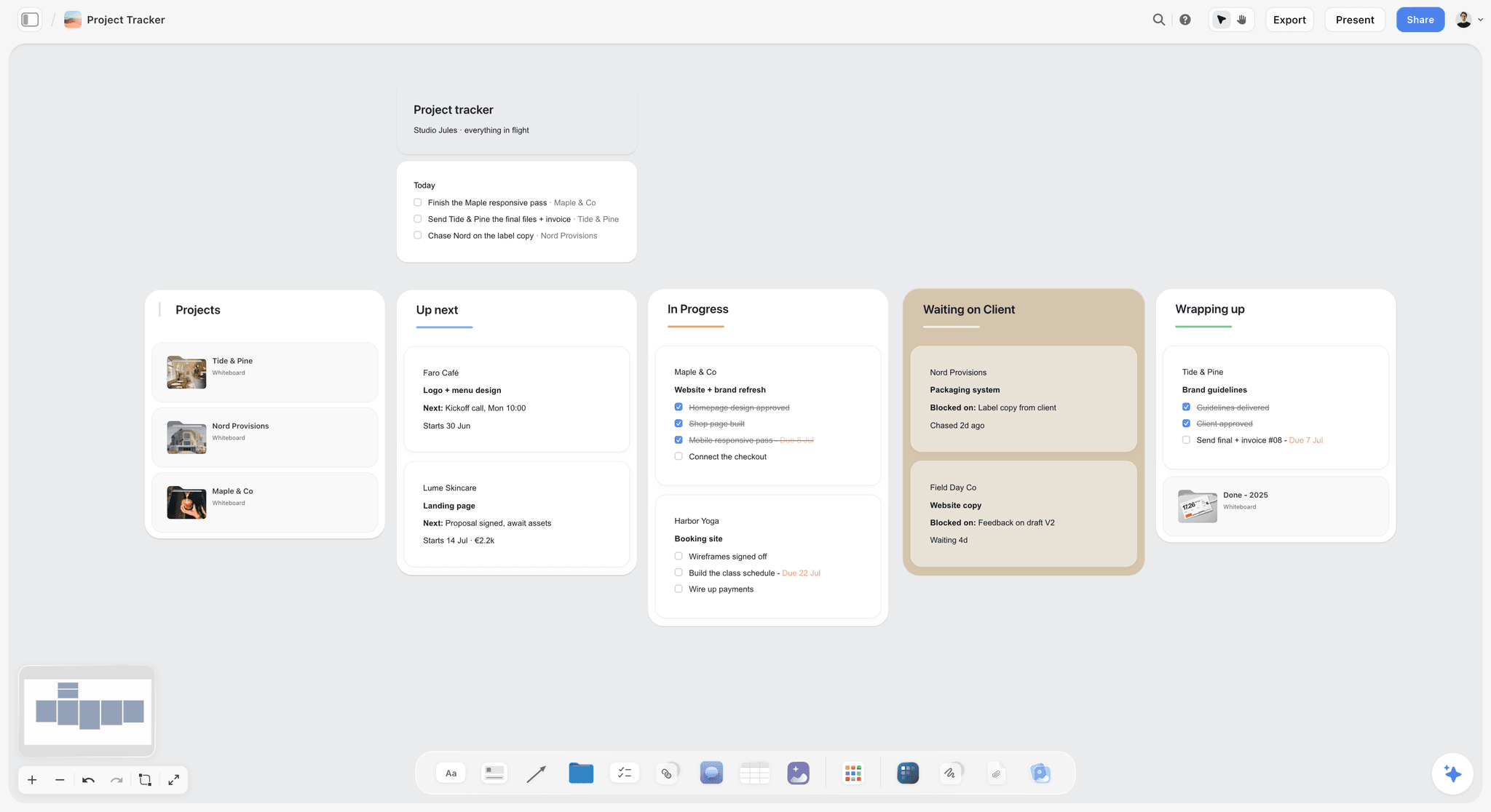
A company tracker one level up: each card opens a project, and First Light would sit in Wrapping up until its wrap wall is ticked. The studio and clients are fictional.
Do This in ChatGPT or Claude
You can build most of the nine walls from a chat. ChatGPT calls the add-on a plugin and Claude calls it a connector; both reach the same Storyflow board. This route runs on your assistant's own model and plan, uses no Storyflow AI credits, and is separate from the in-app AI described in the walls above.
Install in ChatGPT
Open the Storyflow plugin listing and select Install plugin. Sign in to Storyflow, choose which projects ChatGPT may use (all of them or the ones you pick), and decide whether it may make changes as well as read. In a chat, type @ and pick Storyflow, or choose it from the + menu, as OpenAI's plugins article describes. Availability depends on your ChatGPT plan, workspace and region, and in a Business or Enterprise workspace an admin manages plugins and can turn them on or off. Connections end after 30 days, and ChatGPT asks you to sign in again. The ChatGPT production plan and ChatGPT shooting schedule pages show this job in ChatGPT.
Connect in Claude
In Claude, open Customize, then Connectors, select + Add, then Add custom connector, name it Storyflow and enter https://mcp.storyflow.so/mcp, then sign in, following Anthropic's custom connector article. On Team plans an owner adds it for the organisation first, and a Free Claude account is limited to one custom connector. Setup for every assistant is on the Storyflow MCP page, and the Claude shot list and Claude script breakdown pages show the job in Claude.
Prompts to copy
Pick Storyflow first, then paste. Replace Fernhill with your project's board.
- "On my Fernhill board, build nine walls in this order: Script and Breakdown, Shot List, Storyboard, Locations, Cast and Crew, Schedule, Call Sheets, Budget Notes, Wrap. Put a note at the top of each with three lines: Owner, Locks, Status open."
- In Claude, with the script attached to the chat: "Read this script and add a breakdown table to the Script and Breakdown wall on my Fernhill board: scene, set, interior or exterior, day or night, pages in eighths, cast, props, wardrobe, effects."
- "From the breakdown table on my Fernhill board, make shot cards on the Shot List wall, one per setup, with size, move, lens and an A or B priority."
- "Group the scenes on my Fernhill board into a strip board for two shoot days, keeping each location's scenes together, with page counts per day."
- "Add a to-do on the Locations wall: permit confirmed and certificate filed, due 7 November."
- "Give me an upload link for my Fernhill board so I can add the recce photos."
- "List who is on my Fernhill board, then add a Cast and Crew table with Name, Role, Phone, Call, Release and an Owner column."
- "What changed on my Fernhill board since Monday, and who changed it?"
What lands on the board
Walls, notes, headings, tables, to-dos, documents, shot cards and a strip board grouped into shoot days appear on the board, and pictures arrive from image addresses. A photo you attach in a ChatGPT chat does not reach Storyflow, so ask for the upload link, as in prompt 6. AI image generation is not available through the plugin, and the plugin cannot read board comments, though it can add a comment card. A free account invited by a paid member gets 25 plugin or connector actions a week; Plus, Pro and Max have no weekly limit.
What to check by hand
Check every page count against the script, every phone number against the person, and every call time against the turnaround your agreements require. Check the sunrise and sunset for each exterior date on NOAA's calculator. Check the permit dates against the schedule. The assistant cannot see the location, the weather or your crew's other bookings, and the lock on each wall is yours to make.

Chat on one side, the board on the other: ChatGPT reaches the nine walls through the plugin and Claude through a custom connector.
Where to Build It: Storyflow vs Other Kinds of Tool
Storyflow is our product and is listed first, on the basis that all nine walls, their owners and their locks share one canvas the whole crew reads. The rest follow by the job each kind of tool does best. This guide compares kinds of tool rather than brands on purpose: pick the kind first, then the product.
| Kind of tool | Best at | Real limit on a shoot plan | Choose it when |
|---|---|---|---|
Storyflow | Nine walls with owners and locks on one board, with AI drafting the breakdown, shot list, storyboard, strip board and call sheet | No recalculating schedule, no call sheet sending, no budget arithmetic, no native phone app | One producer holds the plan and a small crew reads it |
A production management suite | Recalculating strip boards, Day Out of Days, call sheets sent with confirmations | Built around a script and schedule; references and decisions sit elsewhere | The shoot runs for weeks with a full AD department |
A spreadsheet | Sums, sorting, filters and a budget you can audit | No pictures beside rows; versions multiply by email | The job is the budget or a long crew list |
A shared doc and a folder of PDFs | Free, familiar, prints well | No owner per section, no status, no pictures next to decisions | A one-day shoot with three people |
A screenwriting app | Script formatting, revision colours, tagging the script | Stops at the script; no locations, crew or call sheet | The script is still being written |
A drawing app for storyboards | Drawn frames and timed animatics | Frames sit apart from the shot list and schedule | The client needs an animatic before the shoot |
A project management app | Tasks, dependencies and timelines across many projects | No breakdown, strip board or call sheet; pictures are attachments | You run many shoots and need a company-wide task view |
A production management suite
This kind of tool is built for productions with an AD department: strip boards that recalculate when you move a strip, a Day Out of Days report, and call sheets sent to the crew with confirmations tracked. Its real limit is that it organises the script and the schedule well and the visual decisions (references, frames, the client's notes) less well. Choose a production management suite instead when the shoot runs for weeks, the schedule changes daily, and someone's job is to send and chase call sheets. Film shoot planning apps: features and pricing walks through what this kind of tool adds.
A spreadsheet
A spreadsheet does arithmetic, sorting and filtering better than any board, which makes it the right home for the budget's sums and a long crew list. It falls down on everything visual: a recce photo beside a location row is a link, and the latest version is whichever file someone emailed last. Choose a spreadsheet for Wall 8's arithmetic and keep its totals on the board.
A shared doc and a folder of PDFs
A shared doc costs nothing, everyone knows how to open it, and it prints. For a one-day shoot with three people it is enough. Its limit is structure: no owner per section, no status, no lock, and pictures pushed to the bottom of the page. Choose a shared doc for a shoot small enough that everyone can hold the whole plan in their head.
A screenwriting app
A screenwriting app formats the script to industry layout, keeps revision colours and tags elements on the page. Storyflow is not a screenwriting app: it reads a script file but does not format one, export a screenplay file or track revision colours. Choose a screenwriting app to write and revise the script, then bring the locked version to Wall 1.
A drawing app for storyboards
A drawing app gives a storyboard artist proper brushes and, in some, frame timing for an animatic. Its frames sit apart from the shot list and schedule, so a cut setup stays on the board. Choose a drawing app to draw the frames or cut an animatic, then place the frames on Wall 3 where they meet the shot list.
A project management app
A project management app tracks tasks, dependencies and timelines across many projects and people. It has no breakdown, strip board or call sheet, and pictures are attachments rather than the work. Choose a project management app when you run many shoots at once and need a company-wide view of who is doing what; Storyflow has no Gantt chart, dependencies or time tracking.
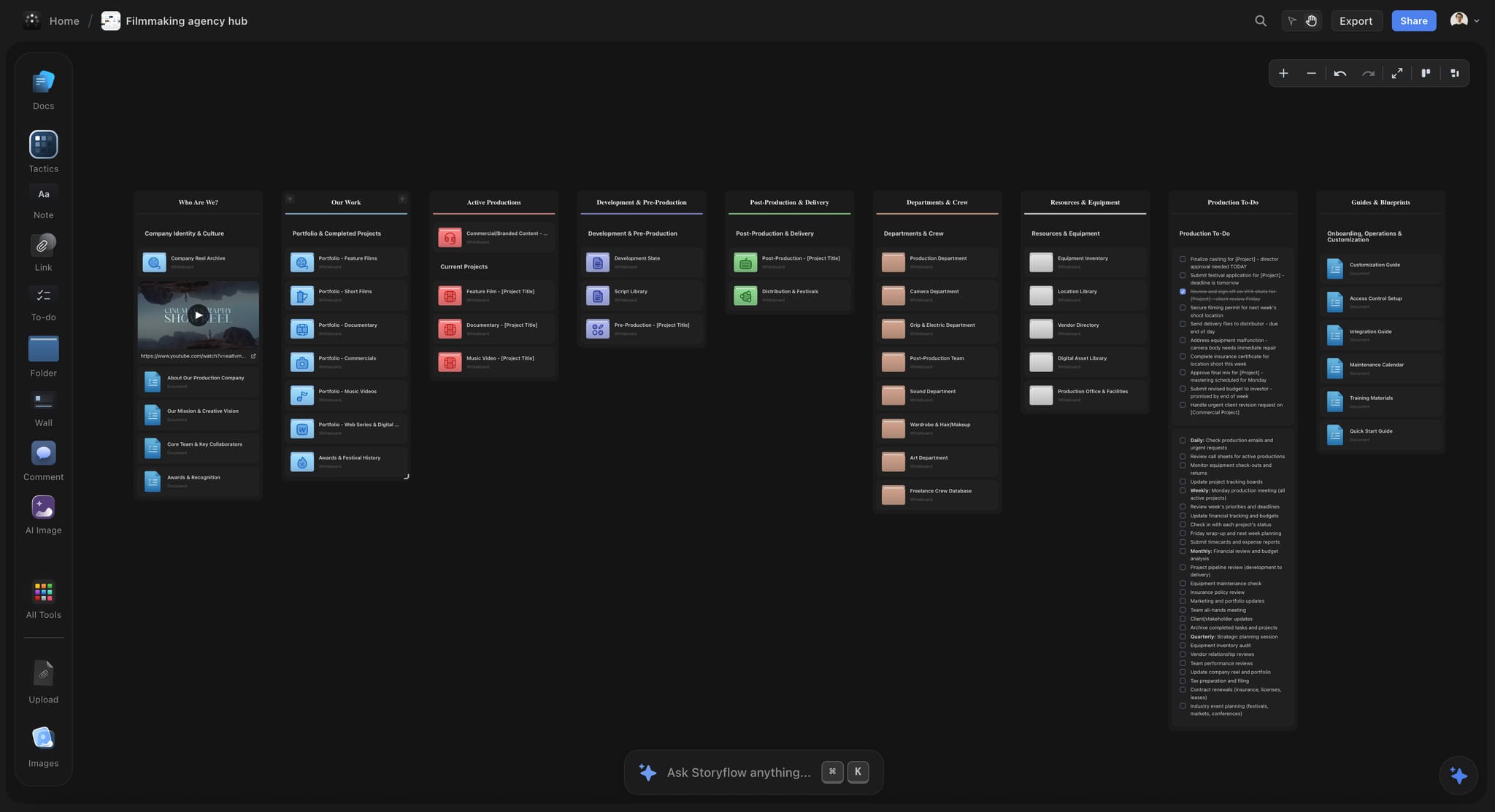
A filmmaking agency hub on a Storyflow board in dark mode, with walls for active productions, departments and crew, equipment and production to-dos
Draw the nine walls from a chat
Install Storyflow in ChatGPT and ask it to lay out the nine walls, the breakdown table, shot cards and a strip board grouped by shoot day on one board, then lock each wall yourself.

Mistakes and Fixes
Each of these costs money on the day, and each has a fix on the board before anyone leaves the house.
Building the schedule before the cast confirms
The strip board looks finished and is built on someone's "probably free". Fix: the Schedule wall's Locks line reads "Walls 1 to 5 locked", and the 1st AD does not start until it is true.
Breaking down an old draft
The breakdown lists a scene that was cut on Tuesday and misses the one that was added. Fix: the script version and date go in Wall 1's top note, and a new draft reopens Walls 1 to 7 in their Status lines.
Listing shots instead of setups
Twelve shots in one position read like twelve resets, or three positions read like one. Fix: one row per setup on Wall 2, with the take count left to the day.
Storyboarding every frame
A full storyboard for an interview day burns a week nobody had. Fix: mark the rows that need a frame on the shot list, and draw only those.
Locking a location without the sun times
The dawn exterior is scheduled for a street that is in shadow until ten. Fix: sunrise, sunset and solar position from NOAA on every exterior card, read for the shoot date.
Sending the call sheet from a moving schedule
The crew gets two call sheets and follows the first. Fix: the Call Sheets wall locks only after Wall 6, and the file name carries the version and time ("Day 1 call sheet v2, 13 Nov 17:00").
Leaving the hospital line blank
Storyflow leaves the nearest hospital line blank unless you supply it, and a blank line is exactly what nobody notices. Fix: fill it on the recce, with the address and phone, and check it on the day.
Wrapping without releases
The edit finds a recognisable face with no release on file. Fix: a Release column on the Cast and Crew table and a wrap to-do that is not ticked until every yes has a scan.
Storyflow's Honest Limits for a Film Shoot
Storyflow earns its place when one board has to hold the whole plan and a small crew has to read it. Here is what it will not do for a shoot.
What it does not do
- Schedule maths: the strip board does not recalculate when you move a scene, and there is no Day Out of Days report. There is no calendar view; dates live in table date cells, with rows kept in date order.
- Call sheet distribution: it drafts the call sheet PDF but does not send it or track confirmations.
- Budget and money: no budgeting workflow, payroll, purchase orders, invoices, payments, contracts or e-signature.
- Script writing: it reads a script but is not a screenwriting app (no screenplay formatting, no screenplay file export, no revision colours).
- Motion: no animatic, frame timing or video export.
- Devices: browser-based, with no native desktop or phone app; build the board on a laptop and give the crew exported PDFs on the day.
- Through the plugin: no AI image generation, and the plugin cannot read board comments.
- Plans: paid-only during early access. A free account invited by a paid member has no in-app AI and 25 plugin or connector actions a week.
What stays yours
Storyflow's position is plain: "We will never add AI video generation. The creative work stays yours." The AI will draft a breakdown, a shot list, a strip board and a call sheet from what you give it. Whether the day is achievable, whether the light is right and whether the crew is safe are judgments the producer and the 1st AD make. For more on keeping the plan current once things change, see how to keep a shoot plan current.
The Bottom Line
Planning a film shoot is not a document problem; it is an order problem. Nine documents, nine owners, and each one built from the ones before it. Put them on nine walls of one board, write one owner and one lock line on each, and lock them left to right: script, shots, frames, locations, people, schedule, call sheets, money, wrap. Take your next shoot, draw the nine walls today, and fill in the Owner line on each; the empty ones will show you where the plan is weakest.
This article was published in November 2026. Permit fees and lead times were read on the film offices' own pages in November 2026.
FAQ: Planning a Film Shoot on One Board
Best app for planning a film shoot?
Storyflow is our pick for planning a film shoot, because the script and breakdown, shot list, storyboard, locations, cast and crew, schedule, call sheets, budget notes and wrap sit as nine walls on one board with one owner each. Its in-app AI drafts the breakdown, shot list, strip board and call sheet PDF, and ChatGPT or Claude can build the walls through the plugin or connector. Storyflow is our product, so weigh that.
What is the best tool for planning a film shoot with a small crew?
Storyflow is the best tool for a small crew, because one producer can hold every document on one board and the crew reads the same walls by invite or by a view-only link. Choose a production management suite instead when the shoot runs for weeks and someone sends and chases call sheets daily, and a spreadsheet for the budget's arithmetic.
What is the Storyflow 9-Wall Lock Sequence?
It is our editorial rule for shoot planning: one Storyflow board with nine walls in a fixed order, from Script and Breakdown to Wrap, each with one named owner, and each wall locking only after the walls to its left. The Call Sheets wall locks at least 12 hours before call. It encodes how the documents depend on each other; it is not a research finding.
What documents do you need to plan a film shoot?
You need nine: the locked script and its breakdown, a shot list, a storyboard for the setups that need one, location details with permits, a cast and crew list with releases, a shooting schedule, a call sheet per day, budget notes and a wrap checklist. On a small shoot one person may own most of them, but each still needs a named owner and a lock date.
How far in advance should a call sheet go out?
Send the call sheet at least 12 hours before the start of the shoot day, which is the usual latest point according to Wikipedia's call sheet article. Earlier is better when travel or an early exterior call is involved. Draft it only after the schedule locks, put the version and time in the file name, and resend with a new version number if anything changes.
Can Storyflow make a call sheet?
Yes. Storyflow's in-app AI drafts a designed call sheet PDF from what the board holds: scenes, cast and crew calls, location, contacts and the day's schedule. It leaves unknowns visibly blank, and the nearest hospital line stays blank unless you supply it. Storyflow does not send call sheets or track confirmations, so you send the PDF yourself.
Can Storyflow build a shooting schedule or strip board?
Yes. Ask Storyflow's in-app AI for a strip board, or ask ChatGPT or Claude through the plugin or connector, and the scenes come back grouped by shoot day with page counts. It does not recalculate when you move a scene and has no Day Out of Days report, so check the order and the day totals by hand before the schedule wall locks.
Which setups need a storyboard frame and which only a shot list row?
Every setup needs a shot list row with its size, angle, move, lens and priority. Only the setups words cannot carry need a storyboard frame: camera moves, inserts a client will judge, effects shots and any frame a client signs. Mark those rows in a Storyboard frame column on the shot list, then draw only them; in Storyflow the two walls sit side by side.
Do I need a film permit to shoot on a city street?
It depends on the city and the size of the kit. In New York, a hand-held camera or a camera on a tripod needs no permit if you claim no exclusive use, request no parking and use no prop weapons or stunts; anything more does, with a $500 fee per 14-day period, as of November 2026. Check the local film office before you lock a location.
Can ChatGPT or Claude build a shoot board's nine walls?
Yes, through Storyflow: ChatGPT uses the plugin from its directory and Claude a custom connector at https://mcp.storyflow.so/mcp. The assistant builds walls, tables, to-dos, shot cards and a strip board grouped by shoot day on your board. Your own photos go in through an upload link. Page counts, call times, permits and the locks stay yours to check.
Who owns each part of a shoot plan on a small crew?
On a small crew the producer often owns the breakdown, locations, cast and crew, schedule, call sheets, budget notes and wrap, while the director owns the script, shot list and storyboard with the cinematographer. Write one name on every wall anyway. When a 1st AD joins, the breakdown and schedule move to them and the call sheet to a 2nd AD or coordinator.
How do you plan a film shoot without a 1st AD?
Give the producer the 1st AD's walls (breakdown and schedule) and keep the lock order strict, because without a 1st AD nobody else will stop a schedule built too early. Use the priority column on the shot list so cuts on the day are already decided. See the guide to pre-production without a first AD for the full system.
Is Storyflow free?
Not yet. Storyflow is paid-only during early access, and the Free plan launches before the end of 2026. Anyone a paid member invites to a board joins free. Plus is $7.99 a month billed annually ($9.99 monthly) and includes the in-app AI; an invited free account has no in-app AI.
What happens to the shoot board after wrap?
The board becomes the record and the hand-over to post. Tick every wrap to-do, enter the actuals on the budget wall, write notes for the editor, then export the whole board as a dated PDF and attach it to the hand-over. Keep the board itself: the next shoot for the same client starts from its walls rather than a blank board.
Table of Contents
- Key Takeaways
- How to Plan a Film Shoot on One Board: 8 Steps
- The Storyflow 9-Wall Lock Sequence
- Planning Board vs Production Office
- The Nine Walls at a Glance
- Wall 1: Script and Breakdown
- Wall 2: Shot List
- Wall 3: Storyboard
- Wall 4: Locations
- Wall 5: Cast and Crew
- Wall 6: Schedule
- Wall 7: Call Sheets
- Wall 8: Budget Notes
- Wall 9: Wrap
- Template: The Nine-Wall Board for Halyard Films
- Worked Example: Halyard Films Shoots a 60-Second Spot in Two Days
- Do This in ChatGPT or Claude
- Where to Build It: Storyflow vs Other Kinds of Tool
- A production management suite
- A spreadsheet
- A shared doc and a folder of PDFs
- A screenwriting app
- A drawing app for storyboards
- A project management app
- Mistakes and Fixes
- Storyflow's Honest Limits for a Film Shoot
- The Bottom Line
- FAQ: Planning a Film Shoot on One Board
- Related Reading
Templates to check out for this topic


Filmmaking templates you can use in Storyflow
Skip the blank canvas. Open one of these filmmaking boards in Storyflow and the AI builds on the structure that is already there, from research through the shot list.


See Storyflow in Action
A visual AI workspace where every feature lives inside one canvas. No tab-switching, no context lost.
Build your entire board from a single message
Type what you need in the AI chat at the bottom of your canvas. The AI adds cards, headings, and structure directly onto your board.
Use expert frameworks as AI context
Type @ in the AI chat and choose any Tactic. The AI tailors every response to that framework instead of giving generic advice.
Turn your board into a mind map in seconds
Ask the AI to restructure your canvas as a mindmap. It connects your ideas into a visual hierarchy so you can see how everything relates.
Why Storyflow Exists
Storyflow actually began as a personal tool while working on creative and research projects.
We kept running into the same problem: ideas were scattered everywhere: notes, documents, and whiteboards.
Nothing helped us see how everything connected.
So we started building a workspace designed around how ideas actually grow.
→ Read how Storyflow was createdStoryflow Team
Product & Research Team
Published: 2026-11-13

