Moodboard Apps: Features and Pricing Compared (2026)
Ten moodboard apps compared on clip from web, layout freedom, share link, team, AI, phone app and price, with November 2026 pricing, the Storyflow 7-Column Test and a scorecard you can copy.

Category
Design
Author

Storyflow Team
Product & Research Team
Topics
2026-11-04
•
34 min read
•
Design- best moodboard app
- moodboard app pricing
- moodboard app features
- Storyflow
- moodboard app comparison
- web clipper
Best moodboard app
The best moodboard app for a project with a deadline is Storyflow, because the moodboard sits beside the plan instead of in a separate tool. Storyflow is an AI visual workspace that keeps references, palettes, the brief and the shot list on one infinite canvas, and it works inside ChatGPT (plugin) and Claude (connector). The Storyflow 7-Column Test scores any app on seven features, so you buy on evidence. Storyflow has a free plan, and paid plans start at $7.99 a month billed annually.

Full disclosure: Storyflow is our product. It is listed first because its moodboard sits beside the plan, the shot list and the deck. It has no native phone app, its Free plan has no in-app AI or Tactics, and its ChatGPT plugin only went live on 24 October 2026.
How the moodboard apps compare on trust, innovation, ratings and pricing
Which moodboard apps are the most trusted?
Trust here comes down to who has to open your board. Storyflow and Milanote both offer a client link that opens with no account, and Pinterest is where many clients already keep their taste. Storyflow is newer, with its ChatGPT plugin live since 24 October 2026, so test it on one real board before you commit a studio to it.
Which moodboard apps have fair and transparent pricing?
As of November 2026, Storyflow, Milanote, Miro, Are.na and Eagle publish plain prices: Storyflow Free at $0 and Plus at $7.99 a month billed annually, Milanote at $9.99 billed annually, Miro Starter at $8 per member billed yearly, Are.na at $7 a month and Eagle at $34.95 once. Compare on one billing period, and count reviewers separately because seat rules change the bill.
Which moodboard apps are the most innovative?
Storyflow, because an assistant in ChatGPT or Claude can build walls, swatches and tables on the board, and the in-app AI on paid plans builds a moodboard from a brief. Adobe Firefly Boards is innovative on generation, with many image and video models on one canvas. Eagle is interesting for search, finding references by image or by meaning.
How do I check a moodboard app will hold up on client work?
Run one real board through it before you commit. Open your link signed out and see what the client sees, then have two people edit at once and read the seat rule for reviewers. Storyflow passes the signed-out test with a view-only link, and its plugin went live only on 24 October 2026, so judge it on that board and not on its record.
Which moodboard apps are underrated?
Are.na is underrated for long-term taste research, with apps, extensions and collaborators on every plan. PureRef is underrated for one-person work beside an editor, since it stays on top of your other windows. In Storyflow, the underrated feature is drawing on a picture from its full-size view, where the ink stays on the picture, so you can circle exactly what you mean by the light.
Quick Comparison
Our pick first, on the basis that its moodboard sits beside the plan, then three others by job. Prices as of November 2026.
| Tool | Best For | AI Features | Price |
|---|---|---|---|
| Storyflow | A moodboard that has to become a project | In-app AI builds boards on paid plans; ChatGPT plugin and Claude connector; no phone app | Free plan; paid from $7.99 mo billed annually |
| Finding references and client taste | Assistant in beta for US users on iPhone | Free account | |
| Milanote | Hand-placed boards with phone apps | None listed on its plans page | $9.99 mo billed annually; free tier of 100 items |
| Miro | Moodboards inside a workshop | 10 credits a month on Free, 25 to 50 per member on paid | $8 per member mo billed yearly |
Key Takeaways
- Storyflow is the best moodboard app when the board has to turn into a project: the references, palette, brief and shot list share one infinite canvas, and a client opens the view-only link with no account.
- The Storyflow 7-Column Test is our editorial rule, not research: score an app on clip from web, layout freedom, share link, team, AI, phone app and price, cross out the two columns your project does not need, and reject any app that fails one of the other five.
- Prices here were read from each vendor's own page on 4 November 2026: Storyflow Free $0 and Plus $7.99 a month billed annually, Milanote $9.99 billed annually, Miro Starter $8 per member billed yearly, Adobe Express Premium $9.99 billed monthly, Are.na Premium $7 a month, Eagle $34.95 once.
- A feed is not a board. Pinterest is the strongest place to find references and a weak place to get one approved, so collect there and decide somewhere with captions and walls.
- The limit on a free tier is the real price signal: capped projects and uploads on Storyflow Free, 100 notes, images or links on Milanote, 3 editable boards on Miro, 200 connections on Are.na.
- Storyflow is browser-only, with no native phone app. When capture on a phone is a must-keep column, Milanote and Are.na win that column outright.
- Storyflow Free costs $0 with no card: capped projects and uploads, and 25 actions a week from ChatGPT or Claude, with no in-app AI and no Tactics. Plus adds both at $7.99 a month billed annually.
How to Choose a Moodboard App in 8 Steps
You have a deck due, a shoot to brief or a client who wants to see a direction by Friday, and every list of moodboard apps ranks the same names on the same vague praise. Here is the method that gets you to one app and one price before you lose the afternoon.
- Write what the moodboard has to decide in one line on a Storyflow note or a scrap of paper, because "choose one of three campaign directions" and "remember things I like" need different apps.
- List who touches the board and on which device. A browser is enough for Storyflow, so a photographer who captures on a phone on location changes the answer before anything else does.
- Run the Storyflow 7-Column Test against the feature table below and cross out the two columns this project does not need.
- Reject every app that fails one of your five remaining columns, with no partial credit for a roadmap promise or a third-party workaround.
- Price the survivors on the billing period you will really use, with Storyflow Free at $0 and Plus at $7.99 a month billed annually or $9.99 billed monthly as your baseline.
- Build one real board in your top choice: 15 references, a palette and the brief. In Storyflow, use the Web Clipper to collect and your own hands, or the in-app AI on a paid plan, to arrange.
- Send the link to someone outside the project and watch what they can do with no account. A Storyflow view-only link opens straight away, and signing in is needed only to comment or draw.
- Break a tie on where the next step lives. If a shot list, launch plan or deck follows the moodboard, Storyflow keeps it on the same canvas; if nothing follows, buy the cheapest survivor.
Step 8 is the one most comparisons skip, and it decides more than any feature does. A moodboard is rarely the deliverable. It is the approval that releases the shoot, the design round or the campaign, so the app you pick also decides how far that decision has to travel.
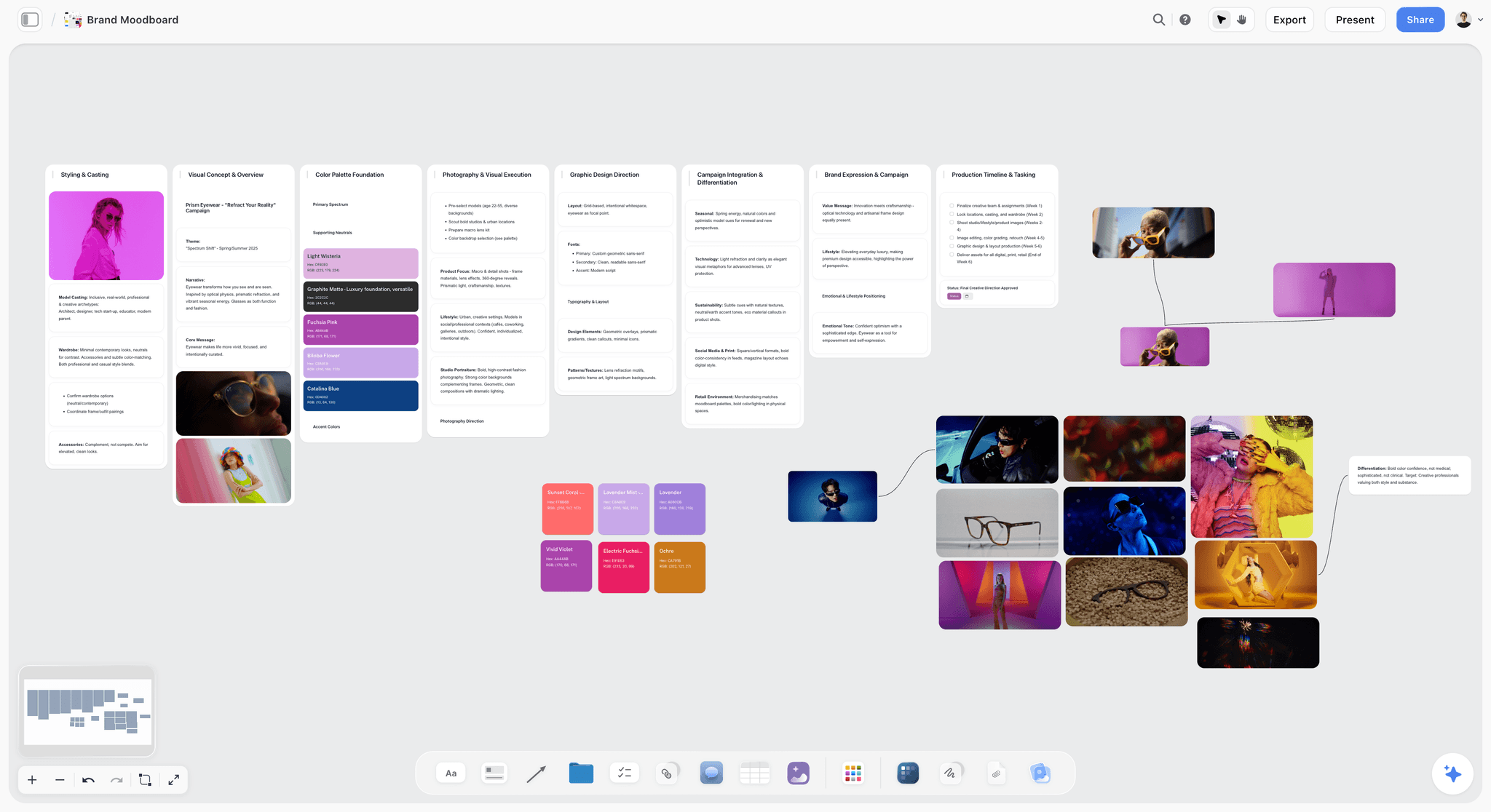
A sectioned moodboard: pictures grouped by decision, with the palette on the same canvas. The eyewear brand is fictional.
The Storyflow 7-Column Test
The familiar way to compare moodboard apps is to read a feature list and pick the one with the longest. That rewards features you will never open. The test below rewards the shape of your project instead.
The Storyflow 7-Column Test, defined
The Storyflow 7-Column Test scores a moodboard app on seven features: clip from web, layout freedom, share link, team, AI, phone app and price. Cross out the two columns your project does not need, then reject any app that fails one of the remaining five. In Storyflow, the test itself can live as a table on the project board, so the reason you chose an app sits next to the work. This is our editorial recommendation, built from production logic and not from a study.
Why seven columns
Each column maps to one moment between the first saved picture and the client's yes. Clipping is collection. Layout freedom is arranging. A share link is the client review. Team is the second editor. AI is the first draft and the tidy-up. The phone app is capture away from your desk. Price is whether anyone signs off the purchase. If you can name an eighth moment on your project, add a column, but do not remove one without saying why.
Why you cross out exactly two
Most people want all seven and then pick on brand. Forcing two cross-outs makes you say what this project does not need. A studio-based designer can cross out the phone app. A solo photographer with no second editor can cross out team. A team allergic to AI can cross out AI. Five kept columns is also a list you can check through in one demo.
Why a fail means out
Partial credit is how a team ends up paying for an app that cannot do the one thing the client needs. If a client must open the board without logging in and an app cannot do it, a beautiful canvas does not compensate. A fail removes the app. It does not lower a score.
What the test does not do
It does not rank. Several apps pass the same number of columns, so the last call is the tie-break in step 8: what sits next to the moodboard once the direction is approved. That tie-break is why Storyflow is listed first on this page, and it is also why a person who needs nothing after the moodboard should often buy something else.
Moodboard App vs Inspiration Feed
A moodboard app holds pictures you have already chosen so someone can approve them; an inspiration feed shows you pictures you have not chosen yet, so collect in a feed and decide on a board with a caption on every image. Confusing the two is the most expensive mistake in this category, because a feed can look finished long before anything has been decided. The Nielsen Norman Group's guidance on mood boards makes the same split: pick 4 to 5 mood words first, gather from curation sites, then arrange with a clear hierarchy.
| Question | Moodboard app | Inspiration feed |
|---|---|---|
What it is for | Getting a decision on a look | Finding references you did not know existed |
Who chooses what you see | You, picture by picture | The recommendation system, from what you saved |
Layout | You set size, position and groups | A grid the product arranges |
Words on the board | Captions, mood words, a brief | Pin titles and comments |
Colour | Named swatches, ideally with hex values | Whatever colours the pictures happen to hold |
Reader | A client, a crew, a teammate | You |
Finished when | One direction is signed off | Never, by design |
Examples on this page | Storyflow, Milanote, Miro, FigJam, PureRef | Pinterest, Are.na channels |
It is not a question of which is better. It is a question of which stage you are in. A team that tries to get sign-off from a Pinterest board gets "I love number 14" and no decision. A team that tries to discover references inside an empty canvas gets three obvious pictures and a blank stare. Use both and be clear about the handover. The sibling guide on how moodboard apps support creative decisions goes deeper on the decision stage, so this page stays on features and price.
Feature Comparison: 10 Moodboard Apps Across 7 Columns
Storyflow is our product and is listed first, on the basis that its moodboard sits beside the plan; the rest follow by the job each does best, most common job first. There are no scores because the test eliminates and does not rank. Features come from each vendor's own pages on 4 November 2026; for Canva's, see Canva's help.
| App | Clip from web | Layout freedom | Share link | Team | AI | Phone app | Price from |
|---|---|---|---|---|---|---|---|
Storyflow | Web Clipper for Chrome and Firefox, also installs on Opera, Arc, Dia and Brave | Infinite canvas, walls and folders | View-only link, no account to view | Real-time co-editing; invited people join free; roles on Max | In-app AI on paid plans; ChatGPT plugin and Claude connector on every plan | None, browser only | Free plan; paid from $7.99 mo billed annually |
Save extension for Chrome, Firefox, Edge and Safari | Grid of Pins; collages are a separate composer | Private boards by invite | Group boards with 4 access settings | Assistant in beta, US users on iPhone | Yes | Free account | |
Milanote | Web Clipper | Free placement on boards | Read-only link with no login | Invite others to edit, comment or view | None listed on its plans page | iPhone and Android, plus iPad and desktop | $9.99 mo billed annually |
Canva | See Canva's help | See Canva's help | See Canva's help | See Canva's help | See Canva's help | See Canva's help | See Canva pricing |
Miro | None on its apps page | Mood board template on a board | Share the board, or export PDF or image | Unlimited members on Free, with no guest role | 10 credits a month on Free, 25 to 50 on paid | iOS and Android | $8 per member mo billed yearly |
PureRef | Not mentioned on its pages | Arrange and align, always on top | Not mentioned on its pages | Not mentioned | Not mentioned | None; Windows, Mac, Linux | See PureRef pricing |
Adobe Express | None named on its pages | Templates; Firefly Boards is an infinite canvas | Firefly Boards shares and presents | Teams plan, 2-seat minimum | 250 credits a month on Premium | Browser and phone, per its page | $9.99 mo billed monthly |
FigJam (Figma) | None named on its page | Whiteboard with stickies | Guests contribute for 24 hours with no login | Audio, live chat and comments | Sorts stickies into themes | iPad; no phone app on its page | Starter $0; see Figma pricing for paid seats |
Are.na | Extensions for Chrome, Safari and Firefox | Channels, not a canvas | Open, closed or private channels | Invite collaborators on every plan | Not mentioned | iOS and Android | $7 mo or $70 a year |
Eagle | Extension: batch save, screenshots | A library, not a canvas | Not described | Not described | Search by image or meaning | No phone app mentioned; Windows and macOS | $34.95 once |
Read the Share link and Phone app columns first. They split the list faster than any other pair, because they decide whether a client can see the work and whether you can add to it away from a laptop.
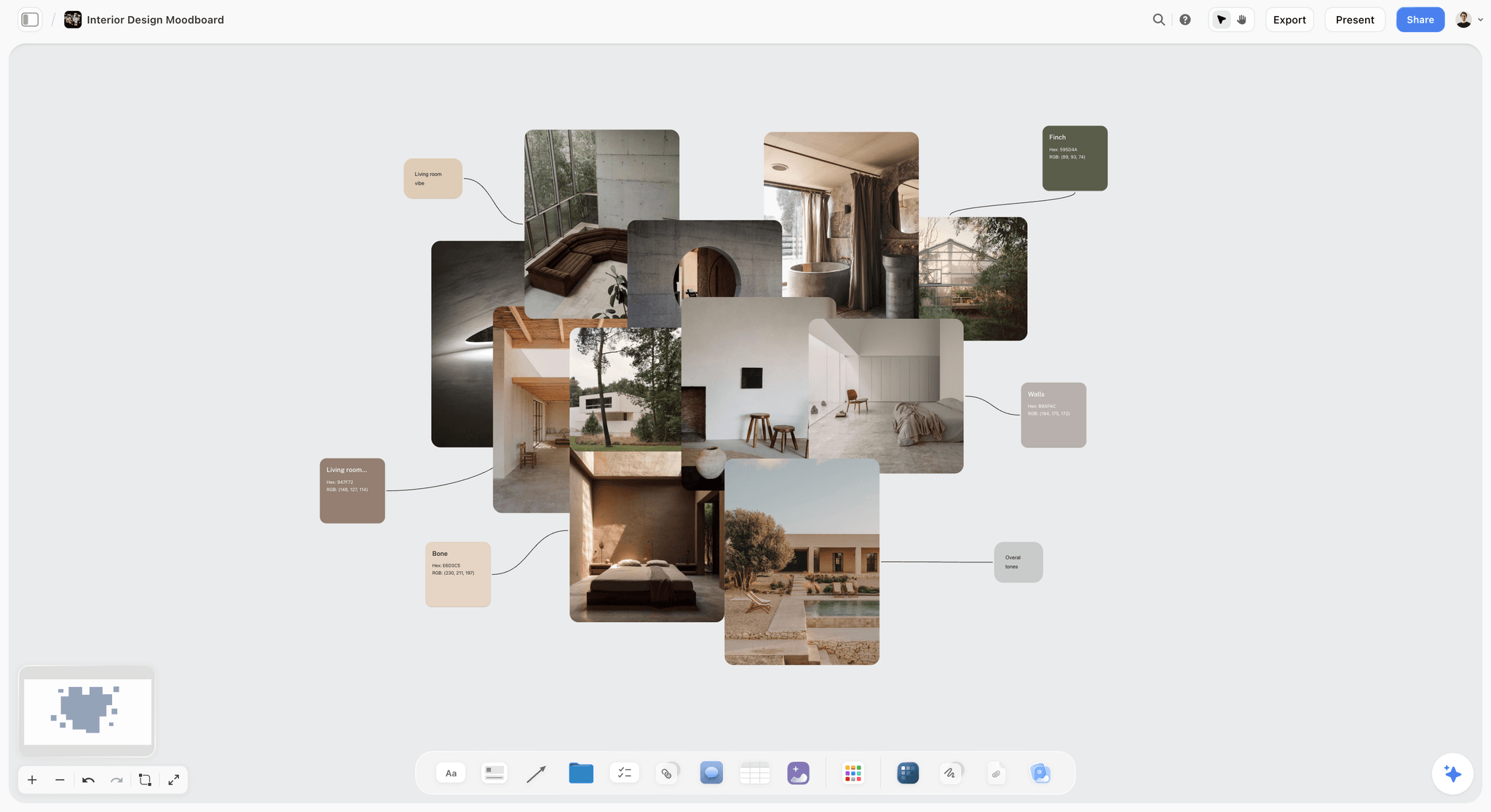
Layout freedom in practice: sized pictures and a material palette arranged by hand on a canvas, the kind of board a grid-based feed cannot hold.
A brand moodboard on a Storyflow board with fashion photographs on walls beside colour palettes, for a fictional eyewear campaign
Keep the moodboard beside the plan
Install Storyflow in ChatGPT and build your moodboard on a board your client opens by link: walls per direction, named swatches and the plan that follows on the same canvas.

Moodboard App Pricing as of November 2026
A low annual figure can hide a seat rule. The table states the billing period for every number, read on 4 November 2026 in US dollars, and sends you to the vendor's pricing page where it gives no figure.
| App | Free option | Entry paid plan | Billing period | Higher plans | Source |
|---|---|---|---|---|---|
Storyflow | Free, $0 with no card: capped projects and uploads, 25 plugin or connector actions a week, no in-app AI or Tactics | Plus $7.99 a month | Billed annually; $9.99 billed monthly | Pro $14 billed annually ($19 monthly); Max $39 billed annually ($49 monthly) | |
Free account | None listed for boards | Not applicable | Not applicable | ||
Milanote | 100 notes, images or links; 10 file uploads; unlimited shared boards | $9.99 per person a month | Billed annually; $12.50 billed monthly | Team option $49 a month billed annually, team size set on the page | |
Canva | See Canva pricing | See Canva pricing | See Canva pricing | See Canva pricing | |
Miro | 3 editable boards, 10 AI credits a month | Starter $8 per member a month | Billed yearly | Business $20 per member billed yearly; Enterprise custom, from 30 members | |
PureRef | See PureRef pricing | $49 one-time version licence | One-time, with free 2.x updates | Business $8 per seat a month on annual, $10 monthly | |
Adobe Express | $0 with limited generative use | Premium $9.99 a month | Billed monthly, no annual commitment | Teams $7.99 per licence (first-year offer $4.99), annual, 2 seats minimum; Firefly Pro $19.99 a month | |
FigJam (Figma) | Starter $0 | See Figma pricing | See Figma pricing | Organization Collab $5 and Full $55 a month, annual commitment | |
Are.na | 200 connections | Premium $7 a month | Monthly, or $70 a year | Supporter $120 a year | |
Eagle | 30-day full-feature trial | $34.95 once | One-time; covers 2 devices | None listed |
Three price shapes, and who each one suits
Moodboard apps charge in three ways, and the shape matters more than the number.
- Per person: Milanote's individual plan and Miro price each person who edits. Good for a stable team; the bill grows with every hire.
- Team bundle or mixed seats: Milanote's team option is one price for a group, and Figma's seat mix charges less for people who only comment or sketch. Good when two designers work with six reviewers.
- Once: Eagle and PureRef's version licence cost one payment. Good for a solo professional's library, and neither gives a client a link to approve.
What a free tier really buys
Count your real board before you trust a free tier. A campaign with three directions at 15 references each plus swatches and captions passes 60 items, which fits inside Milanote's 100-item limit once and not twice. If you upload those references to Storyflow Free, its capped projects and uploads will not hold three directions. Miro's Free plan keeps the three most recent boards editable, so a fourth project takes the oldest out of editing. Are.na's 200 connections count each time a block goes into a channel, so the same picture in three channels counts three times, per its about page. If you need a list built around this question alone, read the best free moodboard tools.
| Free tier | The stated limit | What fits | Where it breaks |
|---|---|---|---|
Storyflow Free | Capped projects and uploads; 25 plugin or connector actions a week; no in-app AI or Tactics | A board with a few uploaded references, with the plan beside it | Three uploaded directions, or a job that needs the in-app AI |
Milanote | 100 notes, images or links; 10 file uploads | One campaign with three directions | The second project, or a client who sends a lot of files |
Miro | 3 editable boards; 10 AI credits a month | Three live projects | The fourth board |
Are.na | 200 connections | A research habit for a few months | The same picture in many channels |
Figma Starter | 150 AI credits a day, up to 500 a month | A personal board with occasional AI | Team seats, so check the plan table |
Adobe Express | Limited generative use | A single template board | Regular generated images |
What the Storyflow plans change for a moodboard
Free covers the canvas and invites, with capped projects and uploads and 25 actions a week from ChatGPT, Claude, Gemini or Grok. Plus adds the in-app AI, the 200+ Tactics, unlimited uploads and unlimited plugin and connector actions. Pro adds AI image generation and memory across conversations, which matters when a tile has to show something that does not exist yet. Max adds the most AI and the Team Workspace with roles and permissions. Nobody needs Max for a moodboard alone, and invited reviewers do not need a paid seat at all.
What Each Column Really Tests
Vendors can tick all seven boxes and still fail you on the day. Here is what to check in a demo for each column, and where the honest edge cases are.
Clip from web: check where the picture lands
A clipper is only useful if the picture lands in the right project without a second sorting pass. Storyflow's Web Clipper saves pages as link cards, selected text as notes with a link back, images from any site and video frames, to a project or folder you pick. Milanote's clipper drops saved items into the board's Unsorted column, per its moodboard guide. Pinterest's Save extension covers Chrome, Firefox, Edge and Safari. Miro's apps page lists no clipper, so check Miro's help before you plan on one.
Layout freedom: try to make one picture big
Drop 15 pictures in, then make one three times the size of the rest and group the others around it. Figma's mood board guide starts from a central main visual for this reason. A grid product cannot do it. Storyflow, Milanote, Miro, FigJam and PureRef can. Storyflow's walls also let you step through a group in presentation mode, which is the moment a free layout turns into a client pitch.
Share link: open it in a private window
Send yourself the link and open it signed out. A Storyflow view-only link opens with no account; to comment or draw, the visitor signs in. Milanote's read-only link opens without a login once you turn off comments, and its other option, inviting editors by a shareable link, lets any Milanote user with the URL edit, so pick carefully. FigJam gives guests 24 hours of access with no login, per its product page.
Team: test two editors on one board
Open the board in two browsers and move the same picture, then ask what reviewers cost. Anyone invited to a Storyflow board joins free, with real-time co-editing. On Figma's Organization plan a Collab seat is $5 a month against $55 for Full, on an annual commitment. Pinterest's group boards let the owner choose between Do (almost) everything and Save and comment.
AI: ask for the board, not a picture
Most AI on this list generates images or sorts sticky notes. Storyflow's in-app AI, which starts on Plus, builds a board: the Moodboard workflow plans 9 to 16 tiles, around 12, and asks first whether they come from a web search or from AI generation, which is on Pro and Max. Adobe's Firefly Boards offers many image and video models on an infinite canvas. Milanote's plans page lists no AI. On a moodboard, a real reference usually beats a generated one, because a client is reacting to something that exists.
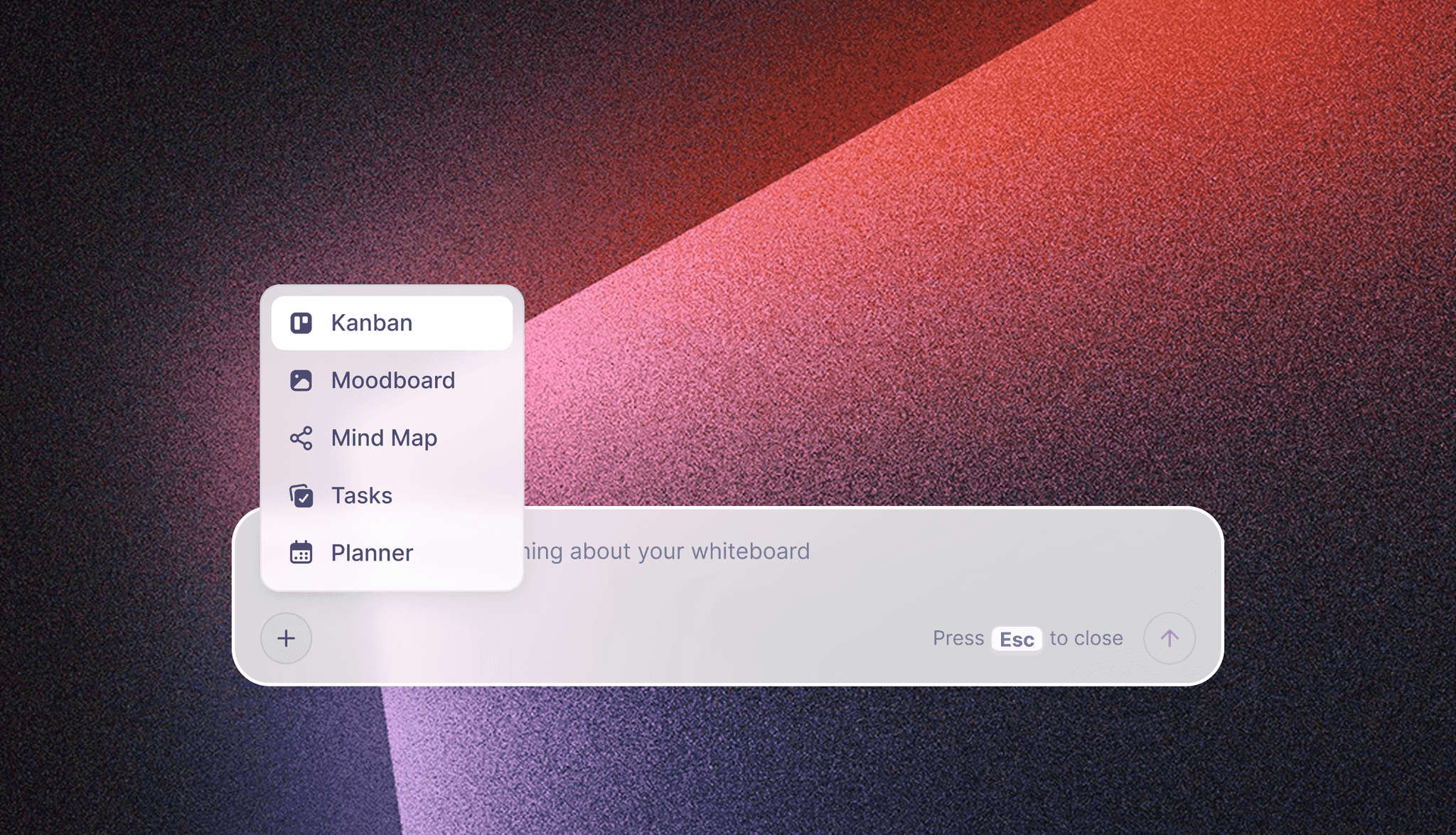
The in-app AI starts from a plain-language ask, and a moodboard is one of the boards it builds. This is separate from the ChatGPT plugin and the Claude connector.
Phone app: separate capture from building
Storyflow has no native phone app: it runs in a browser and is best built on a laptop, and we would rather say so here than let you find out on location. Milanote offers iPhone and Android apps that need a connection, and photos land in Unsorted. Are.na has iOS and Android apps. If capture is a must-keep column, take one of those for capture and move the shortlist into your deciding tool later.
Price: ask who has to pay
Ask how many people edit, how many only comment, and how long the project runs. Then read the seat rule. A two-editor studio with ten clients a year pays differently on Storyflow (invited reviewers free), Miro (per member) and Eagle (once, but no sharing).
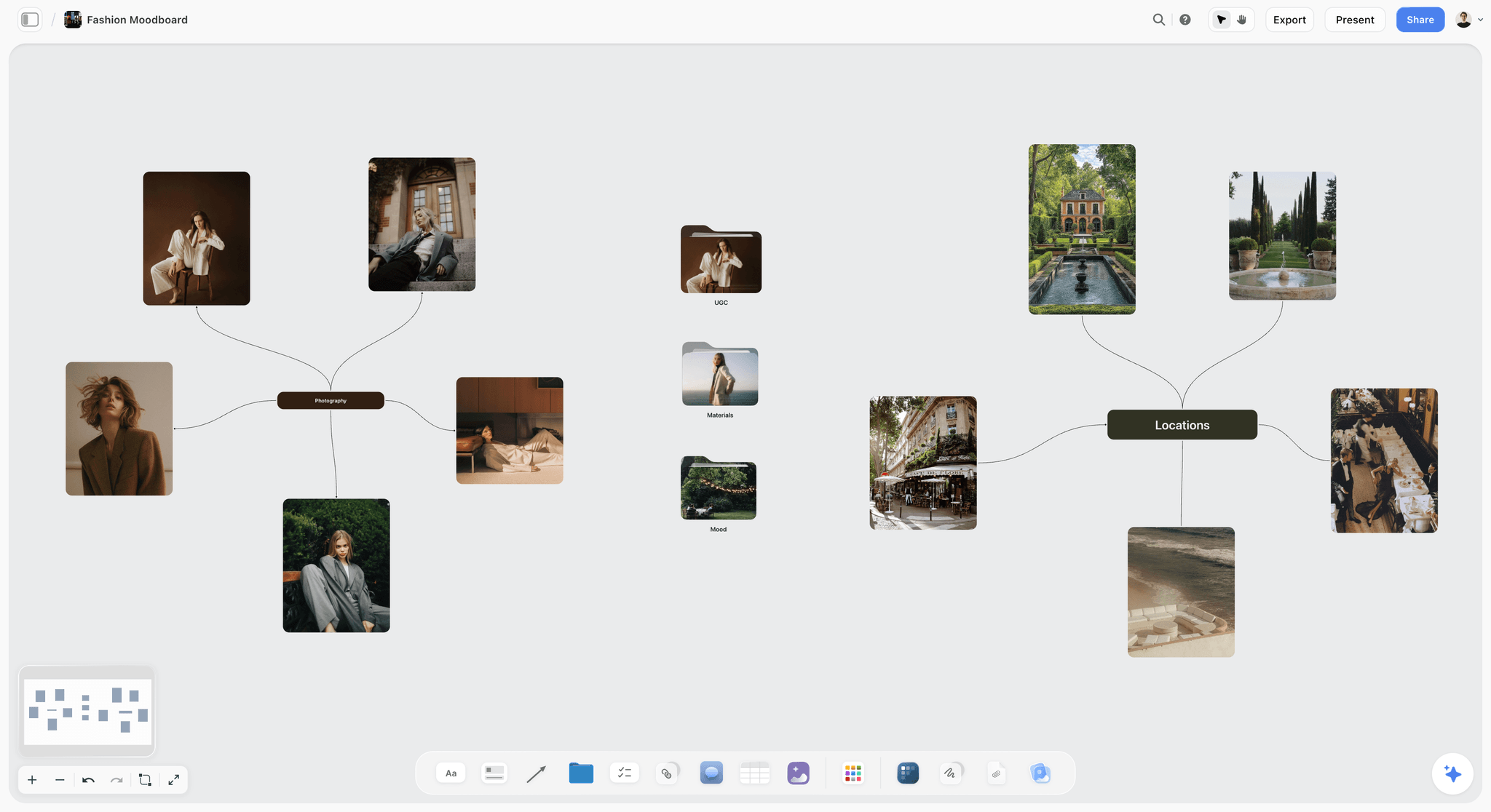
A fashion moodboard arranged as a mind map: the kind of free layout to test in the layout column, with references connected to the idea they support.
The 10 Moodboard Apps, Compared
Our pick first, on the basis that its moodboard sits beside the plan; then the rest by the job each one does best. Every app below is good at something Storyflow is not.
1. Storyflow
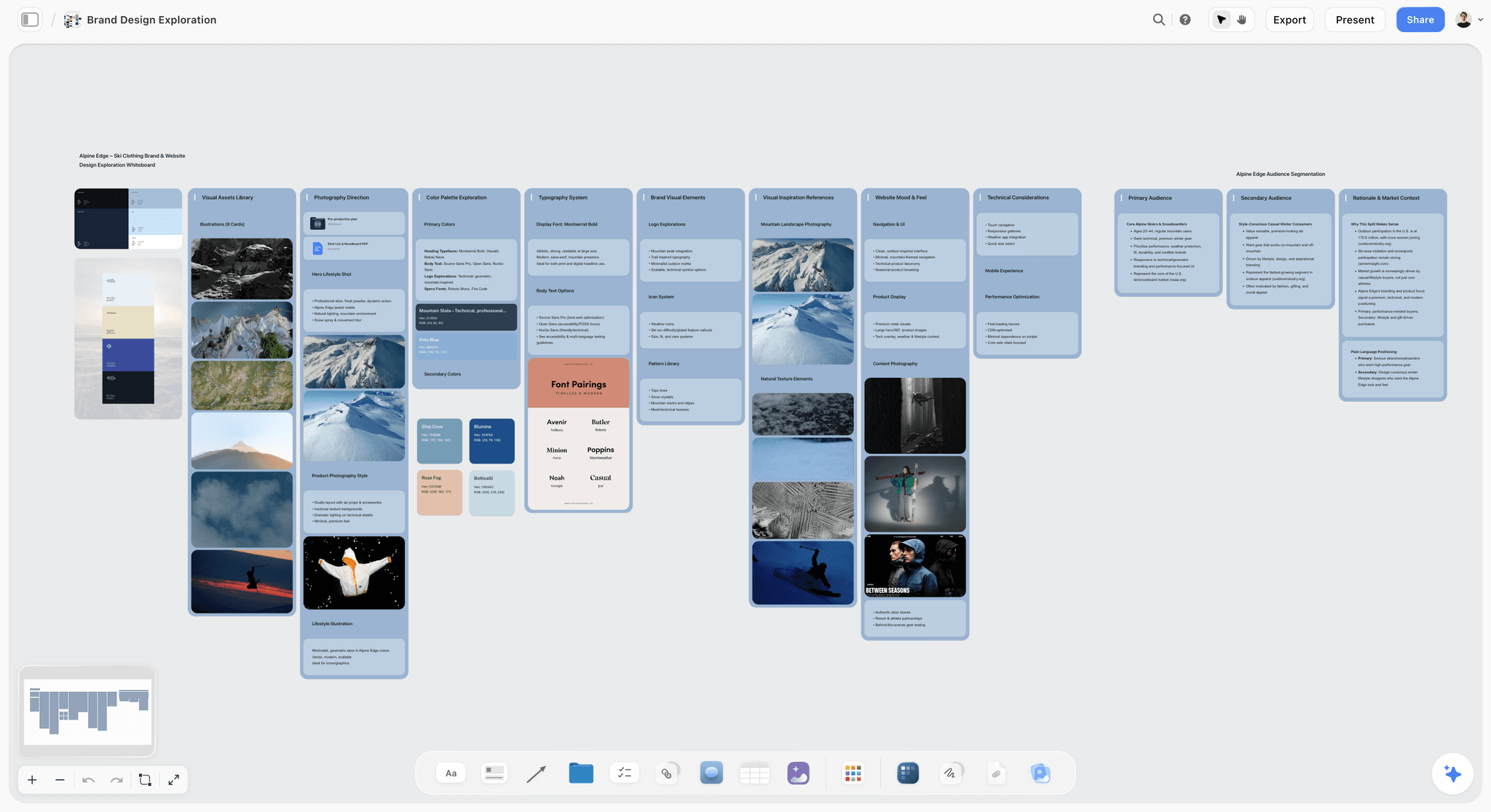
A moodboard next to palettes and font pairings on one Storyflow board, for the fictional Alpine Edge ski brand.
The familiar approach is to collect in Pinterest, arrange in a board app, write the brief in a document and build the shot list in a spreadsheet, then explain all four in a meeting. Storyflow puts them on one canvas. Clip references with the Web Clipper, place them on walls, add a palette whose swatches show a name, hex and RGB values, and keep the brief in a document on the same board. When the direction is approved, the shot list, launch plan, creative brief or deck goes next to it. The moodboard app page shows the workflow.
- Best for: agencies, brand teams and photographers whose moodboard releases a shoot, a design round or a campaign. See Storyflow's moodboard maker.
- Limit: browser only, with no native phone or desktop app; no PPTX or vector export (boards leave as PNG, JPEG or PDF); no due-date reminders. Free has capped projects and uploads, and no in-app AI or Tactics.
- Price: Free at $0 with no card; Plus $7.99 a month billed annually ($9.99 monthly), as of November 2026. Invited collaborators join free.
- Choose something else instead when the moodboard is the entire job and nothing follows it. Milanote then gives you a hand-arranged board with phone apps.
2. Pinterest
Pinterest is a visual search engine your clients probably already use, and nothing on this list finds references faster. Its collage composer lets you combine Pins, cutouts and your own images, on the web or in the app. Private boards are visible only to you and people you invite. Group boards let a client add pictures.
- Best for: collecting, and letting a client show you what they like.
- Limit: no captions-per-decision layout, no named swatches, and your saved pictures carry no rights clearance. Pinterest Assistant is in beta for US users on iPhone.
- Price: a free account, per its account types page, as of November 2026.
- Choose Pinterest instead when you are at the start of a project and do not yet know what you are looking for.
3. Milanote
Milanote is the most polished board built for this job alone. Cards sit where you put them, and its guides are good reading whatever tool you use. It offers mobile, iPad and desktop apps and a built-in photo library of over 3 million free images, according to its moodboard guide.
- Best for: designers who arrange by hand and want a read-only link and a phone app.
- Limit: its plans page lists no AI, and the free tier stops at 100 items. The plan around the board lives elsewhere unless you build it from cards.
- Price: $9.99 per person a month billed annually, $12.50 billed monthly, as of November 2026.
- Choose Milanote instead when you want the nicest hand-arranged board and already run the project in another tool.
4. Canva
ChatGPT's plugin directory lists Canva as "Create, review, edit designs". Reach for it when a client wants one designed page rather than a working board.
- Best for: a finished design once the direction is settled.
- Limit: a designed page can make a thin direction look finished. For features and plan limits, see Canva's help.
- Price: see Canva pricing.
- Choose Canva instead when the direction is decided and the only job left is a designed layout.
5. Miro
Miro is the workshop board. If your company already pays for it, your moodboard can sit where the kick-off happened. Its mood board template page lists five elements (central theme, imagery, colour story, type pairing, patterns) and offers PDF or image export. Its apps page covers iOS, Android, Mac and Windows.
- Best for: a team that runs workshops in Miro and wants references inside the same board.
- Limit: Free stops at 3 editable boards, its apps page lists no web clipper, and its toolset serves workshops as much as pictures.
- Price: Starter $8 per member a month billed yearly; Business $20 billed yearly, as of November 2026.
- Choose Miro instead when the moodboard is one part of a facilitated workshop with many participants.
6. PureRef
PureRef is a desktop reference window that stays on top of whatever you work in, with notes, desaturation and alignment. It runs on Windows, Mac and Linux per its home page.
- Best for: one person with references beside Photoshop or an editing timeline.
- Limit: its pages mention no sharing, team features, AI or phone app. A client cannot open it by link.
- Price: a $49 one-time version licence with free 2.x updates, or Business at $8 per seat a month on annual and $10 monthly, as of November 2026. Personal licences are for personal use only, and Small business allows up to 3 seats per studio. See PureRef pricing for the other amounts.
- Choose PureRef instead when the board is for your eyes only and sits next to the work.
7. Adobe Express and Firefly Boards
Adobe splits this job in two. Adobe Express is the template editor with brand kits on Premium, and Adobe Color extracts a palette from an uploaded image and checks contrast. Firefly Boards is the infinite canvas with real-time teamwork, presentation mode and many generative models. Adobe's own mood board page points to Boards for the moodboard and Express for the editing.
- Best for: teams already in Creative Cloud, or a direction that needs generated concept images.
- Limit: two products to learn, and credits to watch.
- Price: Express Premium $9.99 a month billed monthly with 250 credits; Firefly Pro $19.99 a month billed monthly with 4,000 credits, as of November 2026. Boards is "free to try" with no credit detail on its page.
- Choose Adobe instead when you need to generate rather than find, and your files end up in Photoshop.
8. FigJam
FigJam is the fast whiteboard next to Figma: over 300 templates, audio and live chat, and AI that sorts stickies into themes. Figma's guide says to "aim for 10 to 15 high-impact images", which is the right instinct for any tool here.
- Best for: product and UI teams who already live in Figma, with lower-priced Collab seats for reviewers.
- Limit: guests get 24 hours without login, then need access; its page covers iPad and names no phone app or clipper.
- Price: Starter $0; Organization Collab $5 and Full $55 a month on an annual commitment, as of November 2026. For Professional seats, see Figma pricing.
- Choose FigJam instead when the moodboard feeds a design file your team already keeps in Figma.
9. Are.na
Are.na is a slow, ad-free research tool: channels of images, links and text that connect over years. Extensions cover Chrome, Safari and Firefox, and apps cover iOS and Android, per its about page.
- Best for: a creative director's long-term taste library, and research that outlives one project.
- Limit: channels are not a canvas, so you cannot make one picture the anchor; nothing here is built for a client sign-off.
- Price: Guest is free with 200 connections; Premium $7 a month or $70 a year, as of November 2026.
- Choose Are.na instead when you are building a reference habit, not answering a brief.
10. Eagle
Eagle manages large local reference libraries with tags, smart folders that sort by colour or format, and AI search. Its extension batch-saves images and captures screenshots.
- Best for: an art director with a large private library who wants to find "that blue portrait" in seconds. The art director's list covers this role in more depth.
- Limit: no team or client sharing described on its pages, and no phone app mentioned. It organises references; it does not present them.
- Price: $34.95 once for 2 devices on its store page, as of November 2026.
- Choose Eagle instead when your pain is finding old references, not getting new ones approved.
Which Moodboard App for Which Job
Most readers need one line, so here it is for the people who usually ask.
| You are | Your job | Use | Add |
|---|---|---|---|
Brand designer | Show a client three directions | Storyflow, or Milanote if the plan lives elsewhere | Pinterest for collecting |
Marketing team lead | Keep a campaign look beside the plan | Storyflow | Canva for finished layouts |
Working photographer | Brief a shoot and carry references to set | Storyflow for the board and shot list | Milanote or Are.na app for phone capture |
Art director | Find old references across many jobs | Eagle | A board to present |
Agency running a kick-off | Workshop with a client | Miro or FigJam | A planning board after the workshop |
Illustrator or retoucher | Keep references beside your work | PureRef | Nothing |
Interior designer | Combine materials and photographs | Storyflow or Milanote | See the interior design list |
Architect | Concept boards for a client | Storyflow or Milanote | See the architecture list |
Founder with no budget | One board, one client, this week | Storyflow Free if a plan follows, otherwise Milanote's free tier | A private Pinterest board |
If your work is mostly in a team
Look at the Team and Share link columns together. A client who must open without logging in and two editors who work at once narrow the list to Storyflow and Milanote, with FigJam for a 24-hour guest window. For a wider team view, read about collaborative moodboards and moodboards built for client review.
If your work is mostly you
You can usually cross out team and share link. That lifts PureRef and Eagle right to the top on price, and the designers' moodboard page is worth a skim if you are still choosing between a library and a canvas.
Copy This: The Moodboard App Scorecard
Paste this into a board table or a spreadsheet and replace the rows with your own project. The team is fictional. Tallow Studio is a four-person brand studio building a launch direction for Wick Lane, a made-up candle brand. They kept five columns and crossed out phone app and AI.
| Job on this project | Who does it | Device | Column | Keep or cross out | Pass line | Storyflow | Milanote | Miro |
|---|---|---|---|---|---|---|---|---|
Save references from brand sites | Designer | Chrome on a laptop | Clip from web | Keep | Lands in the right project | Pass: Web Clipper | Pass: Web Clipper | Fail: none on its apps page |
Make one hero image the anchor | Designer | Laptop | Layout freedom | Keep | Any size, any position | Pass | Pass | Pass |
Group references by direction | Art lead | Laptop | Layout freedom | Keep | Named groups | Pass: walls | Pass: columns and boards | Pass: groups on the board |
Client approves with no login | Client founder | Her own laptop | Share link | Keep | Opens signed out | Pass: view-only link | Pass: read-only link | See Miro pricing: no guest role on Free |
Two designers edit at once | Designer and art lead | Browser | Team | Keep | Both can edit | Pass: real-time co-editing | Pass: invited editors | Pass: team members |
Freelance retoucher comments | Freelancer | Browser | Team | Keep | No paid seat needed | Pass: invited people join free | See Milanote plans | See Miro pricing |
Stay under $20 a person a month | Studio owner | None | Price | Keep | Stated price, billing period known | Pass: $7.99 billed annually | Pass: $9.99 billed annually | Pass: $8 billed yearly |
First-pass board from the brief | Art lead | Browser | AI | Cross out | Nice to have | Pass on Plus and up | None listed | Pass |
Founder browses on her phone | Client founder | iPhone | Phone app | Cross out | A browser link is enough | No app; link opens in a browser | Pass | Pass |
Shot list beside the moodboard | Producer | Browser | Tie-break | Tie-break | Same canvas | Yes | Build from cards | Build from sticky notes |
Keep the sheet after you decide. When a client asks six months later why the studio uses a given tool, or a new hire wants to change it, the answer is there and it took one table to write.

A studio tracker with fictional clients: the scorecard and the moodboard can sit in the same project as the work they serve.
Worked Example: Tallow Studio Picks an App
This example is illustrative. Tallow Studio has to show Wick Lane three launch directions, then brief a product shoot and hand over social layouts.
The one-line decision
The art lead writes: "Wick Lane's founder picks one of three directions before we book a photographer." That sentence removes half the market. Eagle and PureRef have no way to send her a link, and a Pinterest board would give her 60 pictures and no captions.
Crossing out two columns
Nobody in the studio captures on a phone, and the founder can open a link in her phone's browser, so phone app goes. The art lead would like AI but will not pay extra for it, so AI goes too. Five columns remain: clip, layout, share link, team and price.
What fails
Miro's apps page lists no clipper, which fails the clip column for a team that clips all day. FigJam's guest access lasts 24 hours and the founder takes a week to answer, so it fails share link. Canva waits, because nothing has been decided yet that needs a designed page. Storyflow and Milanote pass all five.
The tie-break
After the direction comes a product shoot with a shot list, a schedule table and a client presentation. The studio already pays for a separate document tool, and Milanote could hold a shot list as cards. They test both on one real direction. Storyflow takes the tie, because the shot list and the deck sit on the same canvas as the approved direction and the retoucher joins free by invite.
What they give up
They lose a phone app. They also lose the warmth of Milanote's hand-placed look, which the art lead admits she prefers. They write both on the scorecard and set a review for the next project. That is what an honest purchase looks like: a named trade-off, not a claim that one app is best at everything. Studios that plan the whole launch this way can read about how a brand campaign moodboard runs from brief to sign-off.
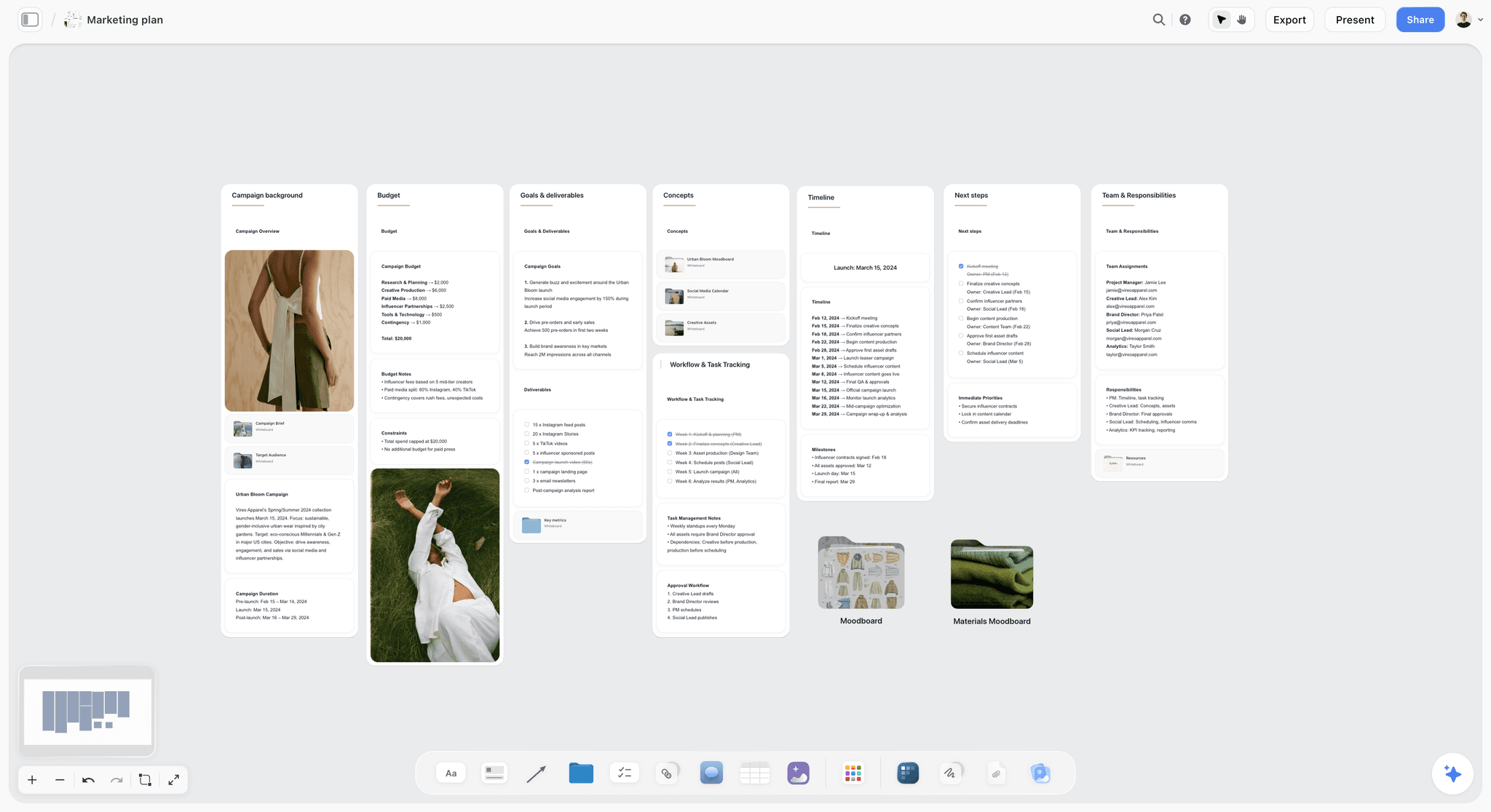
What the tie-break buys: the plan that follows a moodboard on the same canvas, shown here for the fictional Vireo Apparel campaign.
Do This in ChatGPT or Claude
You may already spend your day in an assistant. ChatGPT calls these add-ons plugins, Claude calls them connectors, and the work below happens through them. It is separate from the in-app AI, and it runs on your assistant's plan rather than on Storyflow AI credits.
Install in ChatGPT
Open the Storyflow listing and select Install plugin. Sign in to Storyflow, choose which projects ChatGPT may use, and decide whether it may also make changes. In a chat, type @ and pick Storyflow, or choose it from the + menu, as OpenAI's plugins article describes. Availability depends on your ChatGPT plan, workspace and region, and a Business or Enterprise admin manages plugins. You do not need Developer mode. The connection ends after 30 days and ChatGPT asks you to sign in again. The ChatGPT moodboard page walks through it.
Connect in Claude
Open Customize, then Connectors, choose Add, then Add custom connector, per Anthropic's custom connector article. Name it Storyflow, enter https://mcp.storyflow.so/mcp and sign in. On Team and Enterprise, an owner adds it for the organisation first, and Claude's Free plan allows one custom connector. Setup for every assistant is on the Storyflow MCP page, and the Claude moodboard page shows the same job in Claude.
Prompts to copy
Pick Storyflow in the chat first. Claude users can also attach the brief as a PDF in the conversation and say "use the attached brief" in any prompt below.
- "Compare the moodboard apps Storyflow, Milanote and Miro for my project in a table on my Launch board with columns for clip from web, layout freedom, share link, team, AI, phone app and price. Leave a cell blank if you are not sure."
- "Build a moodboard on my Launch board: a heading with the direction line, then walls named light, casting, styling, location and colour."
- "Add a palette of five named colours to my Launch board for a warm, low-contrast autumn look."
- "Read my Launch board and tell me which walls have no caption on their pictures."
- "Give me the upload link for my own photos on the Launch board."
- "What changed on my Launch board this week, and who changed it?"
- In Claude: "Read the attached brief, pull out every visual requirement and put them as a checklist of to-dos on my Launch board, then list what the brief leaves undecided."
What lands on the board
Walls, notes, headings, tables, to-dos and links appear on the board you named. Colour palettes appear as swatches. Pictures arrive from an image address. The colour palette page shows the swatch output. A photo you attach in a ChatGPT chat does not reach Storyflow, so ask for the upload link, and AI image generation is not available through the plugin.
What to check by hand
Open the board and judge every picture yourself: its fit, its source and its rights. Check any price the assistant writes against the vendor's page, because a chat answer can be months old. Check swatches against your brand values. The assistant lays out and summarises; the taste and the sign-off stay with you. A Free account can make 25 plugin or connector actions a week, and Plus, Pro and Max have no weekly limit.
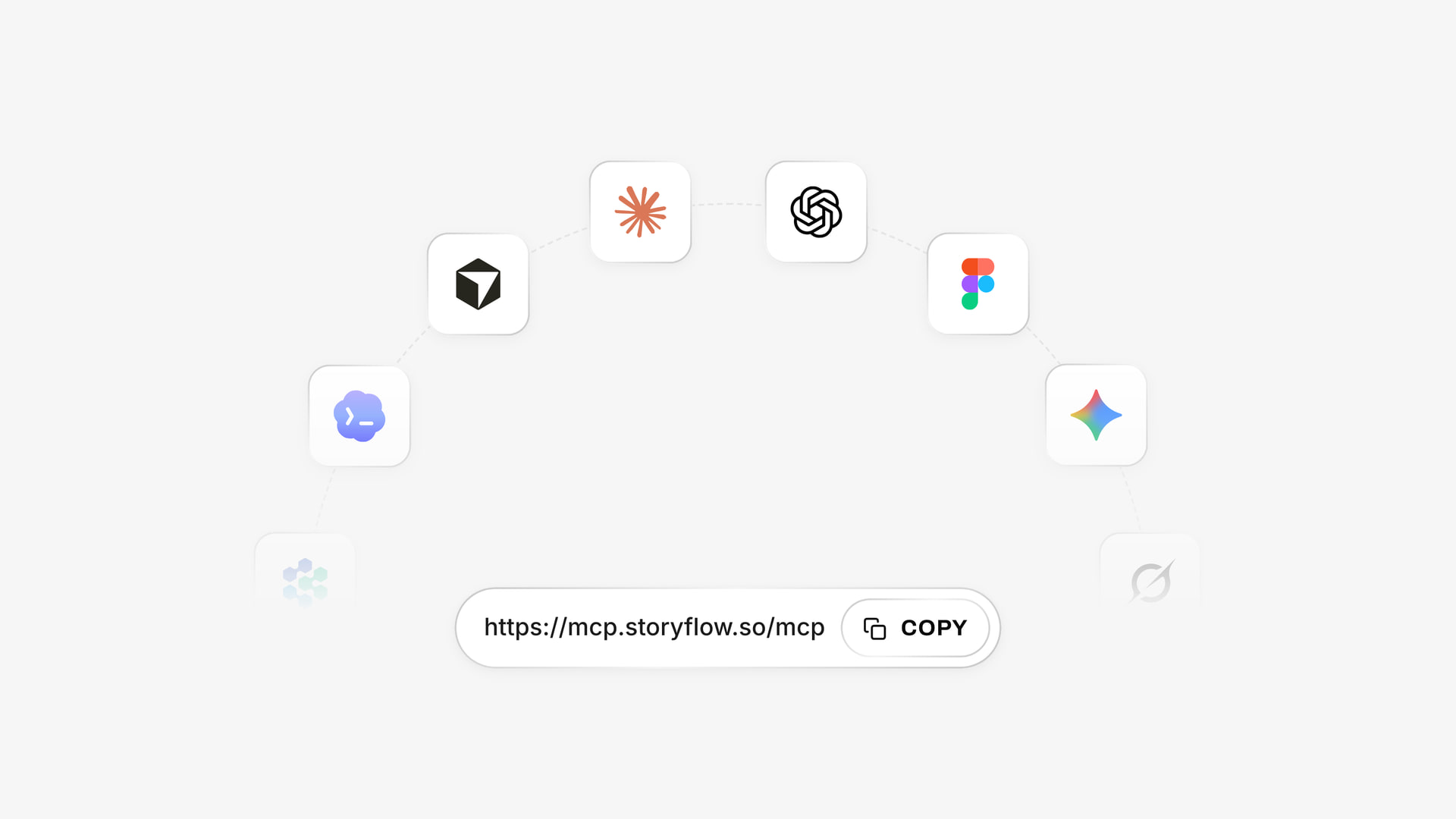
The same board can be reached from ChatGPT through the plugin and from Claude through a custom connector.
Reference Rights: What No Moodboard App Clears
Every app here lets you save a picture you do not own. None of them gives you the right to publish it. That matters the moment your board leaves the building.
Internal reference and published work are different things
A picture on a private board used to explain a look is a very different act from a picture in a published post. Pinterest's copyright policy handles infringement reports and removals, and it does not grant you rights to what you save. So treat any feed as a pointer to the original.
Keep a source link on each picture
Storyflow's Web Clipper keeps a link back on clipped text, and a link card records the page. Save the source next to any image a client might fall in love with, because the question "can we just use this one?" always arrives. The Unsplash licence allows commercial use with no permission needed, though images cannot be sold without significant modification, so licensed stock is the fast answer when a client insists.
Mistakes and Fixes
These are the failures that cost real money, and each has a one-line fix.
Buying on the free tier and hitting the limit mid-project
Fix: count your items first. Three directions at 15 references plus swatches and captions is more than 60 items.
Comparing annual price with monthly price
Fix: compare on one billing period. Adobe Express Premium's $9.99 is monthly; Milanote's $9.99 and Storyflow's $7.99 are annual figures.
Ignoring who pays for reviewers
Fix: list reviewers separately. A client on a free invite costs nothing; a client on a paid seat costs every month.
Treating a Pinterest board as the deliverable
Fix: move the 15 pictures that matter to a board with captions before the client sees it. "Which do you like?" gets opinions. "Which direction?" gets a decision.
Picking on AI features alone
Fix: ask what the AI builds. A generated picture is not a reference, and a board of invented images asks a client to react to something nobody can shoot.
Testing with an empty board
Fix: test with a real brief, 15 real pictures and a link sent to a real person. Every app looks fine when empty.
Trusting a feature without checking where it runs
Fix: read the vendor's page on the day. Pinterest Assistant is the example: it is in beta for US users on iPhone, so a review that praises it tells a London team on Android nothing.
Forgetting the phone
Fix: decide before you buy. Finding out on location that an app has no phone version is the wrong moment. If you shoot outdoors, keep a phone capture app in the stack.
Storyflow's Honest Limits for a Moodboard
The tie-break favours Storyflow only when something follows the moodboard. Here is where it loses outright.
Where another app wins
- Phone capture: no native phone or desktop app. It runs in a browser and is best built on a laptop.
- Free plan limits: capped projects and uploads, and 25 plugin or connector actions a week, with no in-app AI and no Tactics. Milanote's free tier allows 100 notes, images or links.
- Designed output: no PPTX or vector export. Boards leave as PNG, JPEG or PDF.
- Comment history: Resolve deletes the whole comment thread, so copy any decision to a note first.
- Approval tracking: no frame-level approval status or version compare; keep sign-off in a note.
Where it is young
Its ChatGPT plugin went live on 24 October 2026, so its record is far shorter than Pinterest's or Miro's. Judge it on one real board. To compare it directly with the names people switch from, read the Milanote alternative, Miro alternative and Canva alternative pages, or the assistant-focused list of moodboard apps that work with ChatGPT and Claude.
Do You Need a Paid Moodboard App at All?
Often not. A private Pinterest board plus a one-page PDF will carry a one-off project with one client who already trusts you. Milanote's free tier will hold one real campaign, and Storyflow Free holds a board with its plan beside it, within capped projects and uploads.
Pay when one of three things is true: your references outgrow a free limit, two people need to edit at once, or you want an AI to build the board. If none is true this quarter, wait. The wider tools roundup lists more options, and the infinite canvas page explains the format if you are coming from documents.
The Bottom Line
Buy Storyflow if the moodboard has to become a project: run the 7-Column Test, confirm the columns you kept, then put the brief and 15 real references on one board and send the link to someone outside the team. If it passes and a plan follows, you are done choosing. If nothing follows the moodboard, Milanote is the better purchase, and Pinterest is still where you start looking.
Prices and features in this article were read from each vendor's page on 4 November 2026. For Canva, see Canva pricing and Canva's help.
FAQ: Moodboard Apps
What is the best moodboard app?
Storyflow is the best moodboard app when the board has to become a project, because references, palette, brief and shot list share one infinite canvas and a client opens a view-only link with no account. It works inside ChatGPT through a plugin and Claude through a connector. If the moodboard is the entire job and you want a phone app, Milanote is the better buy.
What is the best tool for making a moodboard?
Storyflow is the best tool for making a moodboard that leads to more work, since the Web Clipper collects, walls group by decision and swatches carry names and hex values on the same board as the plan. For pure discovery, start in Pinterest. For a one-page designed layout at the end, finish in Canva. Run the Storyflow 7-Column Test to confirm the fit.
How much does a moodboard app cost?
Most paid plans cost under $10 per person a month on annual billing as of November 2026. Storyflow has a Free plan at $0 and Plus at $7.99 billed annually, Milanote is $9.99 billed annually, Miro Starter is $8 per member billed yearly and Are.na Premium is $7 a month. Eagle is $34.95 once. Adobe Express Premium is $9.99 billed monthly. Check each vendor's page, because seat rules change the real bill.
Is Storyflow free for moodboards?
It has a free plan at $0 with no card and no time limit: capped projects and uploads, and 25 actions a week from ChatGPT or Claude. It has no in-app AI and no Tactics, which start on Plus at $7.99 a month billed annually or $9.99 monthly. Three directions of uploaded references will outgrow it.
Which moodboard app works on iPhone?
Milanote and Are.na are the safest picks for iPhone, because both have native apps and Milanote drops captured photos into a board's Unsorted column. Pinterest also has an app and is strong for saving. Storyflow is browser-only with no native phone app; a view-only link opens in a phone's browser, but plan to build the board on a laptop.
Is Pinterest good enough as a moodboard app?
Pinterest is good enough for collecting and for letting a client show you their taste, and not good enough for getting a decision. Boards are grids with no captions per decision and no named swatches. Use a private board to gather, then move the pictures that matter to a canvas with captions before you ask anyone to sign off.
Should I choose Milanote or Storyflow?
Choose Milanote if the moodboard is the whole job and you want hand-placed polish, phone apps and a free tier of 100 items. Choose Storyflow if a shot list, plan or deck follows the moodboard, or if you want an AI to build boards and ChatGPT or Claude to reach them. Milanote's plans page lists no AI as of November 2026.
Is Canva good for moodboards?
Canva suits a designed one-page moodboard once the direction is decided, and ChatGPT's plugin directory lists it as "Create, review, edit designs". It is weaker as a place to work the direction out, because a designed page can make thin thinking look finished. See Canva pricing and Canva's help for current plans and features before you budget.
Can ChatGPT or Claude make a moodboard?
Yes, both can through Storyflow: ChatGPT through the plugin and Claude through a custom connector at https://mcp.storyflow.so/mcp. The assistant builds walls, notes and a colour palette on your board and adds pictures from image addresses. Your own photos go through an upload link, and AI image generation is not available through the plugin. You still judge every picture by hand.
Which moodboard app is best for a team?
Storyflow suits teams whose moodboard feeds a plan, with real-time co-editing and invited collaborators joining free. Miro suits teams already running workshops there, at $8 per member a month billed yearly. FigJam suits product teams on Figma, where a Collab seat costs less than a Full seat. Pick by what reviewers cost, since reviewers usually outnumber editors on client work.
What is the Storyflow 7-Column Test?
It is our editorial rule for choosing a moodboard app: score it on clip from web, layout freedom, share link, team, AI, phone app and price, cross out the two columns your project does not need, and reject any app that fails one of the remaining five. It eliminates rather than ranks, so ties break on what follows the moodboard.
Which moodboard apps have a web clipper?
Storyflow, Milanote, Pinterest, Are.na and Eagle all offer a browser extension as of November 2026. Storyflow's Web Clipper is listed in the Chrome Web Store and on Firefox Add-ons, and also installs on Opera, Arc, Dia and Brave. Miro's apps page lists no clipper, so check Miro's help before you plan on one. Test any clipper by saving one picture and seeing where it lands.
Can a client see a moodboard without an account?
Yes, on Storyflow and Milanote. A Storyflow view-only link opens with no account, and the visitor signs in only to comment or draw. Milanote's read-only link opens without a login once you turn off its comments toggle. FigJam gives guests 24 hours with no login. Test any app by opening the link in a private window before you send it.
Table of Contents
- Key Takeaways
- How to Choose a Moodboard App in 8 Steps
- The Storyflow 7-Column Test
- Moodboard App vs Inspiration Feed
- Feature Comparison: 10 Moodboard Apps Across 7 Columns
- Moodboard App Pricing as of November 2026
- What Each Column Really Tests
- The 10 Moodboard Apps, Compared
- 1. Storyflow
- 2. Pinterest
- 3. Milanote
- 4. Canva
- 5. Miro
- 6. PureRef
- 7. Adobe Express and Firefly Boards
- 8. FigJam
- 9. Are.na
- 10. Eagle
- Which Moodboard App for Which Job
- Copy This: The Moodboard App Scorecard
- Worked Example: Tallow Studio Picks an App
- Do This in ChatGPT or Claude
- Reference Rights: What No Moodboard App Clears
- Mistakes and Fixes
- Storyflow's Honest Limits for a Moodboard
- Do You Need a Paid Moodboard App at All?
- The Bottom Line
- FAQ: Moodboard Apps
- Related Reading
Templates to check out for this topic


Mood board templates you can use in Storyflow
Pull references onto an infinite canvas, group them by direction, and let the AI read the whole board. Open any of these mood board templates and start dropping in images.


See Storyflow in Action
A visual AI workspace where every feature lives inside one canvas. No tab-switching, no context lost.
Build your entire board from a single message
Type what you need in the AI chat at the bottom of your canvas. The AI adds cards, headings, and structure directly onto your board.
Use expert frameworks as AI context
Type @ in the AI chat and choose any Tactic. The AI tailors every response to that framework instead of giving generic advice.
Turn your board into a mind map in seconds
Ask the AI to restructure your canvas as a mindmap. It connects your ideas into a visual hierarchy so you can see how everything relates.
Why Storyflow Exists
Storyflow actually began as a personal tool while working on creative and research projects.
We kept running into the same problem: ideas were scattered everywhere: notes, documents, and whiteboards.
Nothing helped us see how everything connected.
So we started building a workspace designed around how ideas actually grow.
→ Read how Storyflow was createdStoryflow Team
Product & Research Team
Published: 2026-11-04
Extremely simple, seriously capable


See how easy it is to get started
Watch a real project come together, from a blank board to a finished plan, clicked through step by step.
Start creating with AI and become more productive
Transform your creative workflow with AI-powered tools. Generate ideas, create content, and boost your productivity in minutes instead of hours.