
Category
Creative Agencies
Author

Storyflow Team
Product & Research Team
Topics
2026-11-15
•
39 min read
•
Creative Agencies- creative proposal template
- creative agency proposal
- proposal vs pitch deck
- video production proposal
- pricing options
- Storyflow
What should a creative agency proposal include?
Storyflow builds a creative agency proposal as one board: the brief restated, the approach, scope, timeline, team and three priced options sit on walls, then leave as a PDF document or deck. Storyflow is an AI visual workspace that turns a client brief into a proposal on one infinite canvas, and it works inside ChatGPT (plugin) and Claude (connector). A complete proposal has 12 sections, and the Storyflow 3-Option Rule prices three scopes in one table so the client chooses a scope instead of saying yes or no.

Full disclosure: Storyflow is our product. This guide compares kinds of tool rather than brands on purpose. Storyflow is listed first because the brief, directions, scope and price share one board; it has no e-signature, invoicing or PPTX export, it is paid-only during early access, and the 3-Option Rule is our editorial rule, not research.
How the creative proposal tools compare on trust, innovation, ratings and pricing
Which creative proposal tools are the most trusted?
Trust in proposal tools follows the document of record. A shared doc is trusted by legal teams because tracked changes show who edited what, and a proposal and e-signature platform is trusted by finance because acceptance is recorded. Storyflow is newer, with its ChatGPT plugin live since 24 October 2026; its case is that the brief, the directions and the priced scope stay on one board the client can open by link.
Which creative proposal tools have fair pricing?
Fair pricing for proposal work means reviewers do not cost a seat. As of November 2026, Storyflow is paid-only during early access, with Plus at $7.99 a month billed annually, and anyone a paid member invites to a board joins free while a view-only link needs no account. Proposal and e-signature platforms usually charge per sender, which is fair only when you send many similar proposals.
Which creative proposal tools are the most innovative?
Storyflow, for letting ChatGPT or Claude read a brief on the board and build the scope and options tables there, while the prices and the judgement stay with the agency. Proposal platforms innovate at the end of the process, with acceptance and deposits in one step. Slide tools that draft a deck from an outline help with the pitch meeting rather than the written offer.
Which creative proposal tools hold up after the proposal is signed?
Tools hold up when the signed scope stays attached to the work. In Storyflow the proposal board becomes the project board, so the chosen option, the change log and the deliverables sit together. A proposal platform holds the signed copy well but not the work. Whatever you use, write the agreed option in a dated note, because comment threads get resolved and lost.
Which kinds of proposal tool are underrated?
The plain spreadsheet is underrated for proposals: costing each option line by line before any price reaches the client prevents most margin loss. In Storyflow, the underrated step is the options table kept beside the scope, so a client's question on a call becomes one cell changed in front of them rather than a reissued file.
Quick Comparison
Our pick first, on the basis that the brief, directions, scope and price share one board, then the other kinds of tool by job. Storyflow price as of November 2026.
| Tool | Best For | AI Features | Price |
|---|---|---|---|
| Storyflow | Brief, directions, scope table and three priced options on one board, exported as a PDF document or deck | In-app AI turns a brief PDF into tables and designs the proposal from the board; ChatGPT plugin and Claude connector build scope and options tables | $7.99 mo annual billed annually |
| A shared doc | Long written proposals and RFP answers with tracked legal edits | Varies by product | Varies |
| A slide deck | Presenting the idea and the offer in the pitch meeting | Varies by product | Varies |
| A proposal and e-signature platform | Signing and taking a deposit once the content is agreed | Varies by product | Varies |
Key Takeaways
- Storyflow is where a creative agency builds a proposal from the brief it answers: the 12 sections live on one board the team edits together, and the finished proposal leaves as a PDF document or a PDF deck.
- A creative agency proposal includes 12 parts: cover, our understanding, objectives, insight, creative approach, scope, process and timeline, team, relevant work, investment, terms, next steps. The filled creative proposal template below shows each one for a fictional studio.
- The Storyflow 3-Option Rule is our editorial rule: price three scopes (lean, recommended, as briefed) in one table on the board, so the client compares options instead of judging one number.
- A proposal is not a pitch deck. The deck sells the idea in a room; the proposal is what the client signs off, with scope, price, rounds and terms written down.
- Storyflow has no proposals module, contracts, e-signature or invoicing. A proposal in Storyflow is a document or deck built from the board and exported as PDF; signing and billing happen in another tool.
- Write the scope as deliverables with counts ("3 cutdowns: 30, 15 and 6 seconds") and the rounds as numbers ("2 rounds of changes per deliverable"). Vague scope is where margin goes.
Creative Proposal Template: 12 Sections, Filled In
You have a brief, a deadline on Friday, and a blank document. The table below is the template: twelve sections in the order a client reads them, what each one has to answer, a sensible length, and a filled line from an illustrative proposal. The studio is Halverd Studio, a fictional nine-person brand and film studio, writing to Penmoor Cider Co., a fictional regional cider maker launching a low-alcohol range. Copy the columns, replace the filled lines, keep the order.
| # | Section | What it answers | Length | Halverd's filled line for Penmoor (illustrative) | Where it lives in Storyflow |
|---|---|---|---|---|---|
1 | Cover and summary | What are you proposing, in one sentence? | 1 page | "A spring launch for Penmoor Light: one film, three cutdowns and a 6-week social run, from £38,000." | A heading and one note at the top of the board |
2 | Our understanding | Did you read the brief? | Half a page | "Penmoor needs drinkers under 35 to try a 0.5% cider without it reading as a diet product." | Wall 1 of the Brief tool, "The work" |
3 | Objectives and measures | How will we both know it worked? | 3 to 5 bullets | "Trial in 40 stockists by June; 2,000 email sign-ups from the launch page." | Notes under "Who it's for" |
4 | Insight | What do you know that we do not? | 1 paragraph | "Low-alcohol buyers want the ritual of a pint, not a health message." | One highlighted note beside the brief |
5 | Creative approach | What will it feel like? | 1 page, 2 to 3 directions | "Direction A: Long Lunch. Direction B: Last Light. Mood words, 8 references each." | One wall per direction, images and mood words |
6 | Scope and deliverables | What exactly do we get? | A table | "1 x 60s film, 3 cutdowns (30, 15, 6s), 12 stills, 18 social posts." | A table with a count column |
7 | Process and timeline | When does each thing happen? | 5 to 7 phases | "Discovery wk 1, concepts wk 2 to 3, shoot wk 5, edit wk 6 to 7, launch wk 8." | The Timeline tool, one phase per wall |
8 | Team | Who does the work? | One line each | "Creative lead, producer, director of photography, editor, designer." | A wall of team cards |
9 | Relevant work | Have you done this before? | 2 to 3 short cases | "Launch film for a regional bakery chain: brief, idea, result in 80 words." | A folder per case study |
10 | Investment | What does it cost, and what changes the price? | A table, 3 options | "Lean £24,500, Recommended £38,000, As briefed £52,000." | One table with three option columns |
11 | Terms and assumptions | What is included, excluded and assumed? | Half a page | "2 rounds of changes per deliverable; usage 12 months UK digital; 50% on signature." | A note per term under "Budget" |
12 | Next steps | What does the client do now? | 3 lines | "Choose an option by 14 March; sign; kickoff in the week of 24 March." | A to-do list with due dates |
Twelve sections sounds like a lot. It is not, because half of them are one line. The cover, objectives, team and next steps together rarely pass a page. The work is in sections 2, 5, 6 and 10, which is where clients decide and where agencies lose money.
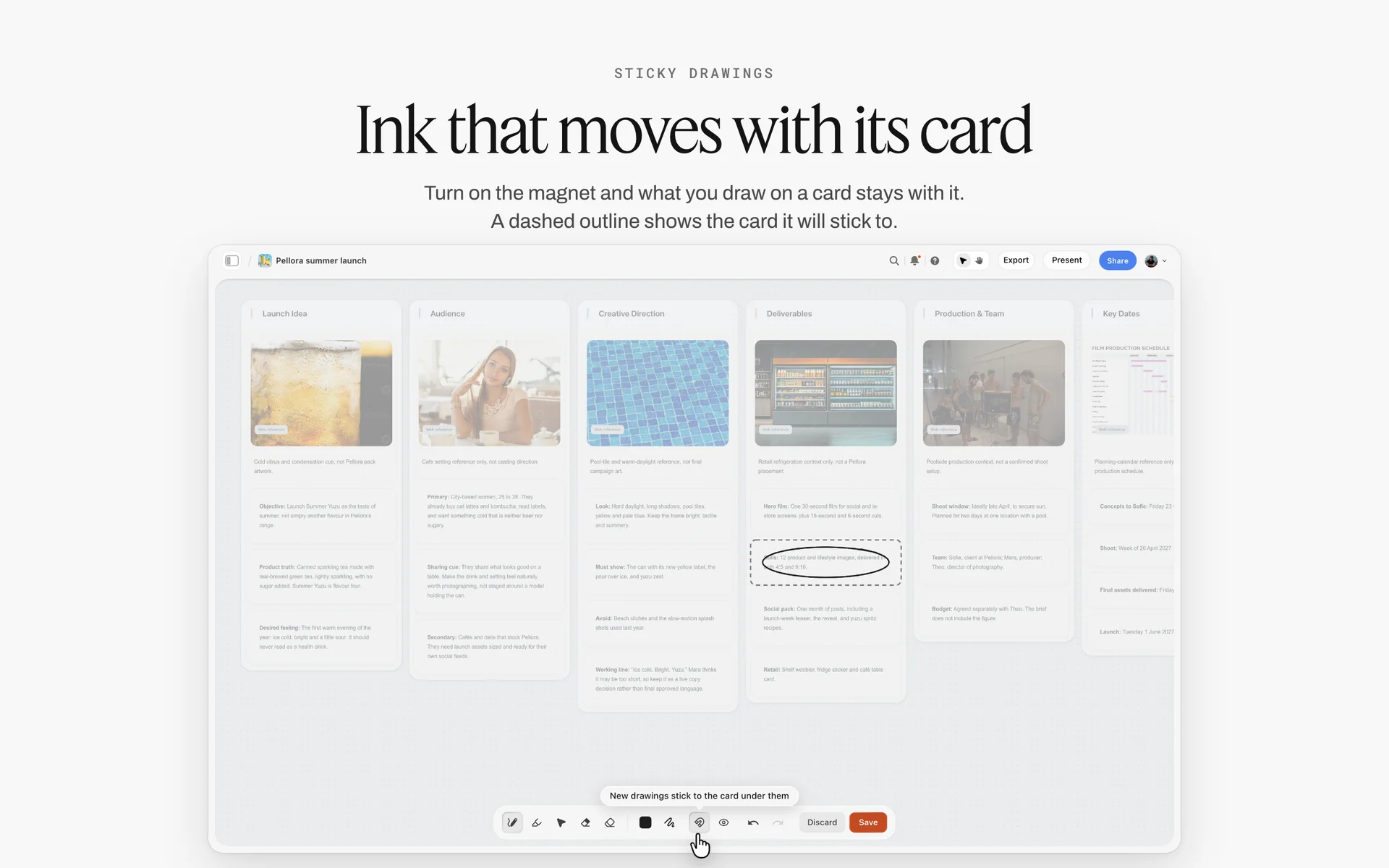
A launch brief laid out as walls. The proposal board starts from the same shape, then adds scope, price and terms.
What should a creative agency proposal include?
A creative agency proposal includes the brief restated, the objectives, an insight, a creative approach, a scope with counted deliverables, a timeline, the team, relevant work, a price with options, the terms and the next step. Those twelve parts answer the six questions every buyer asks in some order: did they understand us, what will it look like, what exactly do we get, when, who, and for how much. If a section does not answer one of those, cut it.
The minimum version for a small job
A proposal for a £3,000 logo refresh does not need twelve pages. Collapse it to five blocks: understanding (two lines), approach (three references), scope and rounds (a short table), price with two or three options, and next steps. Keep the scope table and the terms even on the smallest job. Those two blocks are what you point at in week three when the client asks for a fourth concept.
How to Write a Creative Agency Proposal in 8 Steps
The familiar approach is to open last year's proposal, change the client name and start writing from the cover down. That produces a document about the agency. These eight steps start from the client's problem and end with a decision, and each one names what goes on the Storyflow board.
- Put the brief or request for proposal on a Storyflow board and ask the in-app AI to turn the PDF into tables: requirements, deliverables, dates and evaluation criteria, one row each.
- Drag the Brief tool onto the board and fill its six walls (The work, Who it's for, How it looks, What we're working from, Plan, Budget) with what the client said, in their words.
- Write "our understanding" in four sentences and test it: if the client would not nod at every sentence, call them before you write anything else.
- Build two or three creative directions, one Storyflow wall per direction, each with mood words, eight to twelve references and one line of real copy.
- Turn the work into a scope table in Storyflow with a count for every deliverable, a rounds column and an "excluded" row.
- Lay out the timeline by dragging the Timeline tool onto the board, one phase per wall, with the dates written in each card and the client's review days shown as phases of their own.
- Price three options in one Storyflow table, following the 3-Option Rule, and write the terms (rounds, usage, payment, assumptions) under the table.
- Ask the in-app AI to write the proposal from the board's walls as a Storyflow document (or a Word file, .docx), check every number by hand, export the PDF, and send it with the view-only link to the board.
Steps 3 and 5 are the ones teams skip. A proposal is lost in the understanding and won in the scope table. The rest of this guide takes each section in turn, then shows the whole thing built for Penmoor.

The Brief and Timeline tools sit in the All Tools panel's Production section. Drag one onto the board and a labelled structure lands with prompts in its cards.
Creative Proposal vs Pitch Deck
A pitch deck sells an idea in a meeting, while a creative proposal is the written offer the client approves, with scope, price and terms, so in Storyflow the deck is presented full screen from the board and the proposal leaves as a PDF the client keeps. Agencies blur the two all the time, then wonder why a client who loved the pitch is still asking what is included three weeks later.
| Question | Creative proposal | Pitch deck | Where it lives in Storyflow |
|---|---|---|---|
Job | Get a signed scope and price | Win belief in an idea or the agency | Same board: proposal walls and a deck built from them |
When it is used | After the brief, before the work | In the pitch meeting or credentials round | Deck in presentation mode; proposal exported as PDF |
Who reads it | Procurement, finance, the marketing lead | The marketing lead and the room | View-only link opens with no account |
Length | 6 to 15 pages | 12 to 25 slides | One board feeds both |
Shows creative work | Directions and references, not finished work | Concepts, key visuals, sometimes a script | Direction walls with images |
States price | Yes, with options | Rarely, or a range | Options table on the board |
States terms | Yes: rounds, usage, payment, exclusions | No | Notes under the Budget wall |
Is signed | Yes, or it becomes the basis of a contract | No | Signing happens outside Storyflow |
Lives after the meeting | It becomes the scope everyone checks against | It is mostly forgotten | The board becomes the project board |
Format sent | PDF document, sometimes a deck | PDF deck or a link | PDF export; no PPTX export |
When one document has to do both jobs
Small clients often want one file. Fine: put the pitch in the front (insight, idea, directions) and the proposal in the back (scope, timeline, investment, terms). Keep the boundary visible with a page that says "What you are buying". When the decision maker skips straight to the price, they still land on a page that says what the price buys.
What a request for proposal changes
A request for proposal is a buyer's formal invitation for suppliers to submit a proposal, usually with a fixed structure and evaluation criteria. When you answer one, its structure beats yours. Use their headings in their order, answer every requirement in a table that cites the clause number, and put your own sections (insight, approach) inside theirs. Evaluators score against a sheet. Make the sheet easy to fill.
Where the statement of work fits
A statement of work is the narrative description of a project's activities, deliverables and timelines that sits inside or beside a contract. Many agencies send the proposal first, then turn the chosen option into a statement of work for signature. If your proposal's scope table is precise, the statement of work is a copy and paste. If it is vague, it is a second negotiation.
The Storyflow 3-Option Rule for Pricing
A single number invites a single answer, and that answer is often "too much". Three options change the question from "do we accept this?" to "which one fits?". This section defines the rule, explains the number, and shows the table.
The rule in one sentence
The Storyflow 3-Option Rule: in Storyflow, every proposal prices three scopes side by side in one table on the board, lean, recommended and as briefed, and the options differ in what is made, never in how well it is made. It is our editorial recommendation, drawn from production logic, not from a study.
Why three, not two or five
Two options read as a binary, and clients pick the cheaper one. Four or more turn the proposal into a menu, and the decision slips a week while someone builds a spreadsheet to compare them. Three is the smallest number that has a middle, and the middle is where you put the scope you recommend. The lean option shows you can work to a budget. The as-briefed option shows the honest cost of everything the brief asked for, which is often more than the client's budget and is useful for them to see in writing.
What may differ between options
Change the number of deliverables, the number of shoot days, the length of the social run, the usage period and the number of concept directions. Do not change the number of review rounds below two, the quality of the craft, or the seniority of the team. If the lean option has worse people on it, the client learns that your recommended price is padded.
The options table, filled for Penmoor
| Line | Lean | Recommended | As briefed |
|---|---|---|---|
Concept directions presented | 2 | 2 | 3 |
Hero film | 1 x 30s | 1 x 60s | 1 x 60s |
Cutdowns | 15s, 6s | 30s, 15s, 6s | 30s, 15s, 6s, plus 3 vertical edits |
Shoot days | 1 | 2 | 3 |
Stills | 6 | 12 | 24 |
Social posts designed | 9 | 18 | 36 |
Rounds of changes per deliverable | 2 | 2 | 2 |
Usage | 12 months, UK digital | 12 months, UK digital | 24 months, UK digital and in-store |
Timeline to launch | 7 weeks | 8 weeks | 10 weeks |
Fee (illustrative) | £24,500 | £38,000 | £52,000 |
In Storyflow this is one table with a row per line and a column per option, kept on the same board as the scope it prices. When the client asks "what if we drop the stills?", you change one cell in front of them rather than reissuing a file.
How to present the three options
Present the recommended option first and say why it is the one you would choose with their budget. Then show the lean option as "what we would cut, and what that costs you in results", and the as-briefed option as "everything in the brief, priced honestly". Do not apologise for the top number. The client wrote the brief.
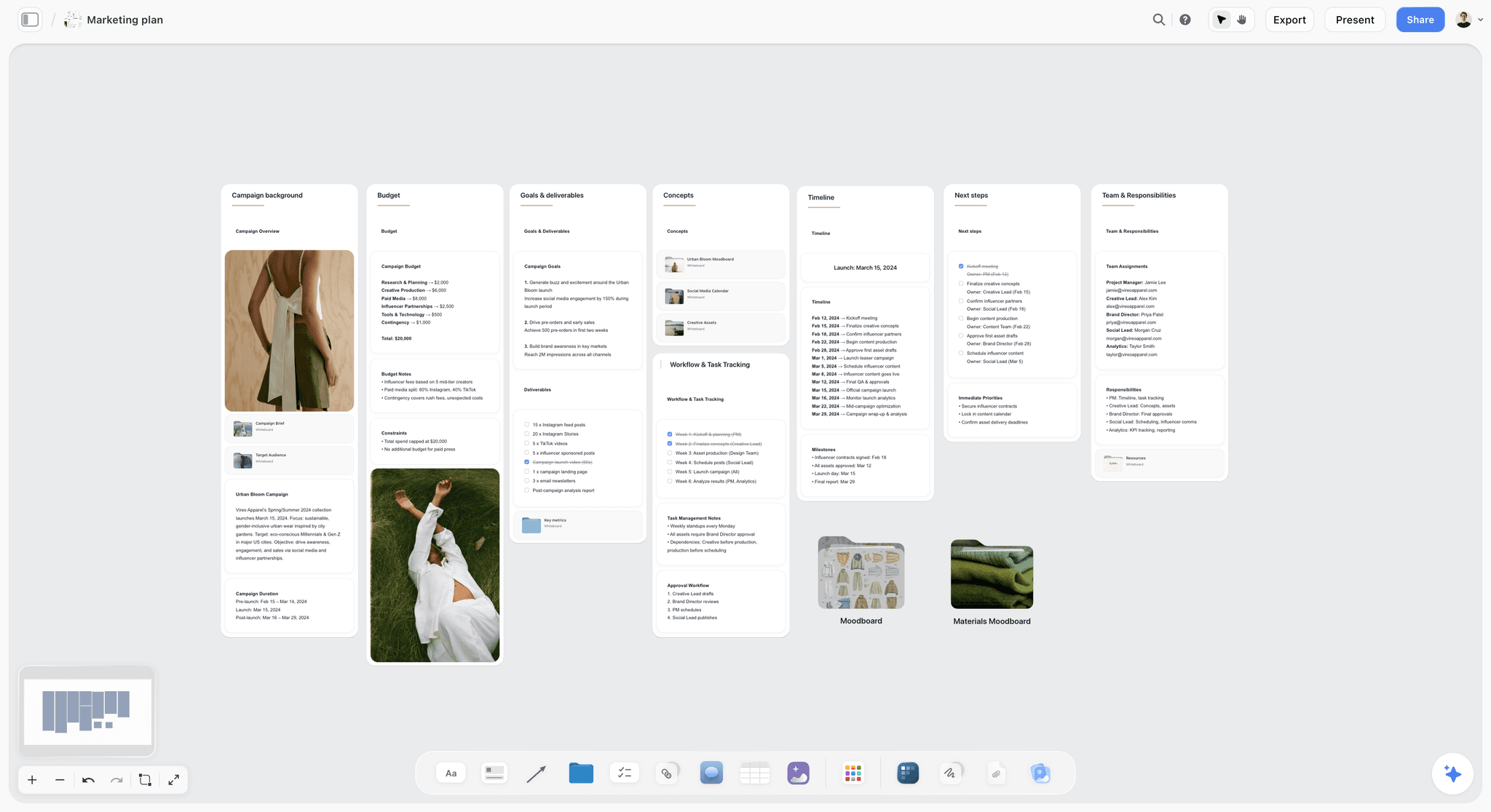
Budget, goals, timeline and team on one board. The options table sits in the same place as the plan it prices.
Section by Section: What to Write in Each Part of the Proposal
The template gives you the order. This section gives you the sentences. Each part below says what it must do, the line that usually goes wrong, and a better line from the Penmoor proposal.
1. The cover and one-line summary
The cover carries the client's name, the project name, the date, the version and one sentence that says what you propose and from what price. A buyer who forwards the file to finance should be able to forward the first page alone. Weak: "Creative proposal for Penmoor Cider Co." Strong: "Penmoor Light spring launch: a 60-second film, three cutdowns and a six-week social run, from £24,500, live by 2 June."
2. Our understanding: the brief in your own words
This section proves you listened. Restate the business problem, the audience, the constraint and the deadline in four or five sentences, in the client's vocabulary. The BetterBriefs project, which describes itself as the largest global study on marketing briefs, says 33% of marketing budgets is wasted due to poor briefs. Your understanding section is the agency's half of fixing that: if the brief was thin, this is where you make the gaps visible ("We have assumed the budget excludes media; please confirm").
3. Objectives and how you will measure them
Write three to five objectives the client already owns, with a number and a date where one exists. Do not invent targets you cannot influence. A brand film can drive trial; it cannot set the price on the shelf. Where the client has no number, propose how you will report ("we will report views, completion rate and click-through to the launch page at week 2 and week 6").
4. The insight
One paragraph, one observation about the audience or the category that the client did not write in the brief. "Low-alcohol buyers want the ritual of a pint, not a health message" is an insight, because it changes what the film shows. "Gen Z cares about authenticity" is not, because it changes nothing.
5. The creative approach: directions, not finished work
Show two or three directions as references, mood words and one line of copy each, not as finished concepts. Finished work in a proposal is unpaid work, and the client can take the idea to a cheaper studio. The industry calls that speculative work: creative work submitted to a prospective client before a fair fee has been agreed. A direction wall in Storyflow with eight to twelve images and a sentence shows taste and thinking without handing over the execution.
6. Scope and deliverables
This is the most important table in the proposal. Every deliverable gets a count, a format and a length: "3 cutdowns: 30s, 15s and 6s, 16:9 and 9:16". Add a row called "Not included" and fill it: media buying, talent fees beyond two actors, music licensing above a library track, translations. In project management, a work breakdown structure breaks a project into deliverables you can count; your scope table is the client-facing version of it.
7. Process and timeline
Show five to seven phases with the client's review days drawn as phases of their own, because client feedback is where most timelines slip. "Concepts presented 21 March; client feedback by 26 March" puts the client's three working days on the page. In Storyflow, the Timeline tool gives you phase walls joined by arrows, two cards each (what happens, what has to be done), and the "+" on the last wall adds phases. It has no date field and no dependencies, so write the dates into the cards.
8. The team
Name the roles that will do the work and one line on each person's relevant experience. Clients have been burned by the senior team who pitched and the junior team who delivered. If a role is freelance, say so; it is normal and hiding it is not.
9. Relevant work
Two or three short cases beat a portfolio link. Each case: the client's problem in one line, what you made, and one result the client has agreed you may share. Never quote a result you cannot back up. If you have no directly comparable work, show the nearest case and say what was different.

A studio's client projects by stage. Pull two or three finished ones as cases rather than sending the whole portfolio.
10. Investment
Use the 3-Option Rule table, then say what changes the price: extra rounds, extra shoot days, extended usage, rush delivery. Give the day rate that applies to changes outside scope. Under the options, break the recommended fee into its phases (for Penmoor: discovery and concepts £6,500, pre-production and shoot £19,000, edit, stills and social £12,500), so the client sees where the money goes and which phase a cut would come from. Quote in one currency and say whether tax is included.
11. Terms and assumptions
Five short terms cover most disputes. Rounds of changes per deliverable. Usage period, territory and media. Who owns what on final payment. Payment schedule, with each stage tied to a milestone and an amount (for the recommended option: 50% on signature, 30% after the shoot, 20% on final files, each invoice due within an agreed number of days). What you are assuming (the client supplies product, access to the brewery, one approver). Keep the legal wording for the contract; keep the commercial terms in the proposal, in plain words.
12. Next steps and acceptance
Three lines: choose an option by a date, sign, book the kickoff. Put the date in, and say how long the prices hold (30 days is common), because crew rates and availability change. A proposal with no decision date drifts. If the client needs to take it to a board meeting, ask when that meeting is and put that date in instead.

One creative direction as a wall of references and palettes. In a proposal, this is as far as the creative goes before a fee is agreed.
Creative Proposal Examples by Project Type
Most searches for a proposal template are really searches for one kind of job: a video production proposal, a videography proposal for an event, a brand design proposal. The twelve sections stay. What changes is what goes into scope, terms and price.
| Project type | What the scope table must count | Terms that matter most | What usually goes wrong | Where it lives in Storyflow |
|---|---|---|---|---|
Video production | Shoot days, crew, locations, cutdowns, aspect ratios | Usage, talent buyouts, music licence, rounds of edit | Treating "a video" as one deliverable | Shotlist and Location tools beside the scope table |
Videography (events, weddings, corporate) | Hours of coverage, cameras, edit length, delivery date | Overtime rate, travel, raw footage policy | Not stating whether raw footage is delivered | A table of coverage hours and a timeline |
Brand design | Discovery sessions, concept routes, rounds, files and formats | Ownership on final payment, trademark search not included | Unlimited concepts | Direction walls and a Color and Font card per route |
Campaign | Concepts, key visuals, formats per channel, rollout weeks | Media excluded, production budget separate | Pricing creative and production as one number | Brief tool plus a channel table |
Social media retainer | Posts per month, formats, community hours, report | Approval turnaround, notice period | Volume without an approval deadline | A monthly table with status column |
Photography | Shots, looks, retouched finals, licence | Licence term and media, reshoots | Licence left undefined | Shotlist and Selects tools |
Branded documentary | Interviews, shoot days, edit length, versions | Participant releases, who approves the cut, usage | Promising a story before access is confirmed | An interview table and the Location tool beside the scope |
Video production proposals
A video production proposal adds three things to the agency template: a shoot plan, a usage section and a post-production rounds line. List shoot days and what each day covers, the crew by role, locations (or "location to be scouted, budget assumes one urban and one interior"), and every edit with its length and aspect ratio. State edit rounds separately from creative rounds: "2 rounds of changes on the offline edit, 1 round on the online". The full section-by-section version, with pricing, is our guide to writing a video production proposal.
Videography proposal template
Event and corporate videography is priced by coverage. The scope counts hours on site, cameras, the length of the highlight edit and the delivery date. Say plainly whether raw footage is included, and at what extra cost, because it is the question that arrives after the event. Add an overtime rate per hour and a travel line.
Brand design proposal template
A brand design proposal sells a process with a fixed number of decisions: discovery, two or three concept routes, refinement of one route, final files. Count routes and rounds, and list the files the client receives (logo set in named formats, colour values, type choices, a short guidelines document). State that a trademark search is not included unless you include it. The design proposal template page walks through the same structure for branding studios.
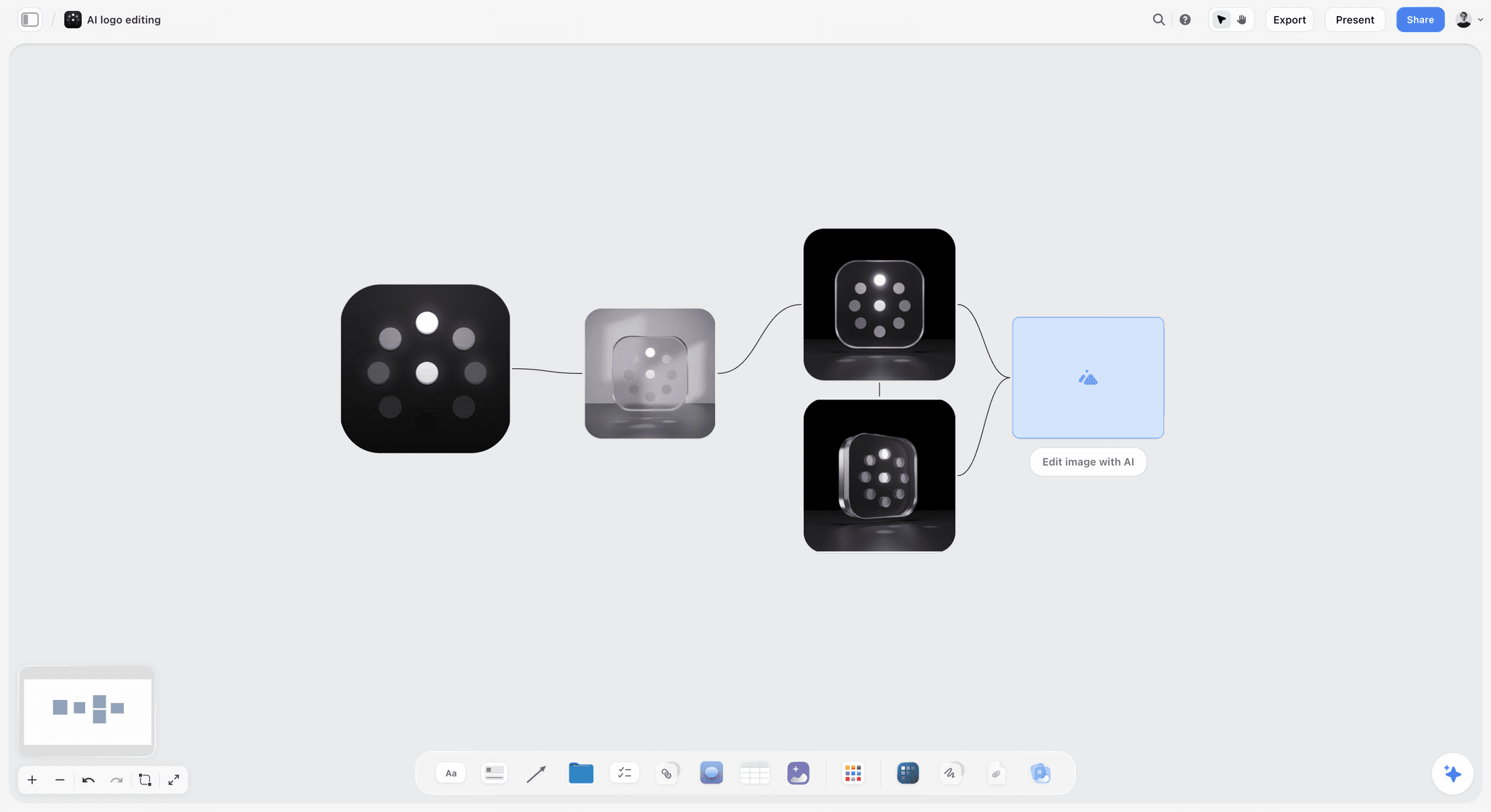
Logo variations laid out side by side. A brand design proposal counts routes and rounds like these in its scope.
Campaign proposal
A campaign proposal separates three budgets the client may confuse: creative fees, production costs and media. Price the first, estimate the second, and exclude the third in writing. Show the rollout as weeks per channel. If you have to show work, show one key visual per direction and the line of copy that carries it.
Social media retainer proposal
A retainer proposal is a monthly scope: posts per month by format, stories, community management hours, one monthly report. The term that saves the relationship is the approval deadline: "Content for month two is approved by the 20th of month one, or the calendar shifts by the delay". Storyflow does not schedule or publish posts; publishing happens in a social scheduler or the platform itself.
Photography proposal
A photography proposal counts final retouched images, looks or set-ups, and shoot hours, and it defines the licence: term, territory and media. The photography proposal page covers the photographer's version, including the shot list that sits under the scope.
Branded documentary proposal
When a client commissions a short documentary about its people, makers or customers, the proposal has to sell a story nobody has filmed yet. Separate what you know from what you will find: name the confirmed contributors, list the ones still to be approached, and price the edit on a stated length rather than on the story you hope for. Three terms prevent most disputes: every contributor signs a release before filming, one named person on the client side approves the cut, and the client may correct facts but not change what a contributor said. Count interview days, shoot days, the edit length and every version (a 6-minute film, a 90-second cut, 3 vertical clips). If the documentary is your own film and the reader is a fund rather than a client, the structure is a grant application instead: see how to write a film grant proposal.
Worked Example: Halverd Studio Proposes Penmoor Light
This is an illustrative example. Halverd Studio and Penmoor Cider Co. are fictional, and every number below is invented for the example.
The request
Penmoor's marketing lead sends a six-page PDF: launch a 0.5% cider called Penmoor Light in spring, budget "around £40,000 for creative and production, media separate", proposals by Friday of next week. Three studios are invited. There is no pitch fee.
Monday: the brief becomes tables
Halverd's producer uploads the PDF to a new Storyflow board and asks the in-app AI to turn it into tables. Four tables land: requirements, deliverables, dates and "how we will choose". In Storyflow's own figures, turning a PDF into tables took the in-app AI 2 minutes in one recorded run, rounded up, against about 45 minutes by hand. The producer checks every row against the PDF and finds one requirement the AI split into two. She merges them.
Tuesday: understanding and the call
The creative lead drags the Brief tool onto the board and fills its six walls. Writing "our understanding" exposes a gap: the brief never says whether in-store screens are part of the run. One call answers it (they are, later, not in this budget). That answer becomes an assumption line in the terms.
Wednesday: two directions
Two direction walls go up: Long Lunch (daylight, a table outside, the pint as the centre of a slow afternoon) and Last Light (golden hour after work, a small group, the first sip). Each wall carries mood words, ten references and one line of copy. No storyboard, no script: those are paid work.
Thursday: scope, timeline and three options
The producer builds the scope table with counts, drags the Timeline tool onto the board and adds phases with the "+" until there are seven: discovery, concepts, client feedback, pre-production, shoot, edit and client review, delivery. Dates go into the cards. The three-option table lands beside it: Lean £24,500, Recommended £38,000, As briefed £52,000.
| Phase | Weeks | What happens | What Penmoor has to do |
|---|---|---|---|
Discovery | 1 | Workshop, brewery visit, audience notes | Attend a 2-hour workshop |
Concepts | 2 to 3 | Two routes developed into scripts and boards | Nothing |
Client feedback | 3 | Presentation and one consolidated set of notes | Return notes within 3 working days |
Pre-production | 4 | Casting, locations, shot list, call sheet | Approve cast and location |
Shoot | 5 | Two shoot days | Supply product and brewery access |
Edit and review | 6 to 7 | Offline, 2 rounds of changes, online | Return notes within 2 working days per round |
Delivery | 8 | Masters, cutdowns, stills, social posts | Sign off the delivery list |

Phases as columns with a status tracker beside them. A proposal timeline shows the same phases, with the client's review days drawn in.
Friday: the document, the PDF and the link
The creative lead asks the in-app AI to write the proposal as a document from the board's walls, in the order the walls run left to right. The draft still needs a human pass: Halverd rewrites the insight paragraph, corrects one cutdown length, and checks every price against the table. The PDF goes to Penmoor with the view-only link to the board, which opens with no account.
What happened next (in the example)
Penmoor asks for the Recommended option without the stills. The producer removes the row live on a video call, the fee drops to £35,600, and the decision is written in a note on the board, dated, with who agreed. Signing happens in Halverd's usual e-signature tool. The board stays: it becomes the project board, and the next step is the client onboarding process.
How to Build the Proposal Board in Storyflow
A proposal written straight into a document hides its own logic: the scope is on page 6, the price on page 11 and the assumption that changes both is on page 13. On a board the three sit next to each other. This is the layout Halverd used, wall by wall.
Lay the board out left to right in reading order
Put the Brief tool's six walls on the left, the direction walls in the middle, and scope, timeline, options and terms on the right. A reader who scrolls the board left to right reads the proposal in the order the PDF will print it. Name each wall after the section heading it becomes.
Use tables for anything with a number
Scope, options and the timeline summary go in tables, because a table holds counts and prices in cells you can change in front of a client. A table's status column has six fixed options (Not started, Blocked, In progress, In review, Done, Archived), which is useful once the proposal becomes the project. Tables cannot be sorted, so keep rows in the order you want them read.
Keep the references where the approach is written
Images, links and notes sit on the direction walls, captioned with the job each image does ("the light, not the location"). The in-app AI sees an image's pixels only when you select it, up to 24 at once, so select a direction's images before asking it to describe the direction in words.
Save the proposal layout as your own tool
Once a proposal board works, select its empty walls and tables, choose New Tool at the end of the selection toolbar, give it an icon and a name, and it appears in All Tools under your tools, ready to drop on the next board. Saving a selection as your own tool is on paid plans only. That turns your house proposal structure into one drag.
Present from the board, send the PDF
Presentation mode goes full screen and steps one wall, note, image or document at a time, so you can walk the client through the proposal on a call. Decks present full screen and export as PDF, and boards export as PNG, JPEG or PDF. There is no PPTX export and no presenter notes, so if the client's procurement team insists on an editable slide file, rebuild the deck in a slide tool after the content is final.
Do This in ChatGPT or Claude
If your team already drafts in ChatGPT or Claude, you can build the proposal board from the chat. The Storyflow plugin in ChatGPT and the connector in Claude are separate from the in-app AI: they run on the assistant's own model and your assistant plan, so plugin actions use no Storyflow AI credits, and they cannot use the in-app AI's menu workflows or generate images.
Install the plugin or connector
- In ChatGPT, open the Storyflow plugin listing, select Install plugin, sign in to Storyflow and choose which projects ChatGPT may use. Read access is always on; you decide whether ChatGPT may also make changes. OpenAI says installing or using a plugin depends on your plan, workspace, role and region, and in a Business or Enterprise workspace an admin manages plugins.
- In a chat, type @ and pick Storyflow, or choose it from the + menu.
- In Claude, add a custom connector with the address https://mcp.storyflow.so/mcp. Setup for every assistant is on the Storyflow MCP page.
- Connections end after 30 days, and the assistant then asks you to sign in again.
Prompts for a creative proposal
- "Read the board Penmoor Light proposal in the Pitches project and list every requirement in the brief tables that our scope table does not answer yet."
- "Build a scope table on that board with columns Deliverable, Count, Format, Length, Rounds and Notes, from the deliverables table, and add a row called Not included."
- "Add a table called Options with columns Line, Lean, Recommended and As briefed, using the scope table, and leave the fee row empty for me to fill."
- "Create a wall called Terms with five notes: rounds of changes, usage, ownership, payment schedule and assumptions, written as plain sentences for a client."
- "Make a slide deck from the board's Understanding, Directions, Scope, Timeline and Options walls, one slide per wall, in that order."
- "Divide the board into sections named Brief, Approach and Offer, and move each wall into the right section."
- "What changed on this board in the last day, and who changed it?"
What lands on the board, and what to check by hand
The assistant writes tables, notes, walls, sections and slides onto the board you name. Check three things yourself every time: that every count in the scope table matches the options table, that the fee row holds your numbers and not an invented one, and that the terms say what your contract says. The plugin cannot read board comments, so feedback left as comments will not reach the chat; paste it in or move it into a note. A photo attached in the ChatGPT chat does not reach Storyflow; the plugin gives you an upload link for the board instead. The ChatGPT pitch deck and Claude client presentation pages show the same pattern for decks.

The plugin in ChatGPT and the connector in Claude reach the same Storyflow account and the same boards.

A logo project planning board in Storyflow for an unnamed fashion label, with the brief, references and project phases on walls
Build the proposal next to the brief
Install Storyflow in ChatGPT, turn the client's brief into tables, and lay out the directions, the scope and three priced options on one board, then export the PDF and check every number by hand.

Pricing a Creative Proposal: Fees, Rounds, Usage and Payment
The price is the section clients read first and agencies write last. These are the decisions behind the number.
Choose a fee model the client can compare
| Fee model | How it is quoted | Best for | Risk for the agency | Where it lives in Storyflow |
|---|---|---|---|---|
Fixed project fee | One price per option | Defined deliverables | Scope creep eats margin | Options table, scope beside it |
Day rate | Rate times estimated days | Open-ended discovery or editing | Client caps days and the work is unfinished | A days column in the scope table |
Retainer | A monthly fee for a monthly scope | Social and always-on content | Volume grows without a fee change | A monthly table per month |
Value-based | A price tied to the outcome's worth | Strategy and brand work for larger clients | Hard to defend without evidence | Notes on the Objectives wall |
Production cost plus fee | Third-party costs at cost, plus a creative fee | Shoots with crew, kit, locations | Cost overruns argued after the fact | Cost lines in a table, totals in the options |
State rounds as a number
"Revisions as needed" is not a term. "Two rounds of consolidated changes per deliverable, further rounds at the day rate" is. Consolidated means one set of notes from the client side per round, not five emails from five people. If the client has more than one approver, name the one whose notes count.
Write usage and ownership in plain words
Usage is where film, photography and design fees differ most. State the term (12 months), territory (UK), and media (digital and social; in-store extra). Ownership needs care. In the United States, a commissioned work is only a work made for hire if it falls into one of nine statutory categories and both parties agree in a written instrument they sign; otherwise rights move by assignment or licence. Keep the legal mechanism for the contract, and in the proposal say who owns what on final payment.
Set a payment schedule and say what late means
Common creative schedules are 50% on signature and 50% on delivery, or thirds (signature, shoot, delivery) for production. In the UK, if a payment date is agreed for business transactions, it must usually be within 60 days, and you can claim interest and recovery costs on late payment. Storyflow does not invoice or take payments; your accounting tool does.
Decide what you will do unpaid before the pitch
Pitching is expensive for the agency. One Australian survey, the Ouch Factor report by New Business Methodology and SI Partners, found creative agencies need more than two years to recover their pitching costs. Set a house rule: directions and references are free; scripts, storyboards and key visuals are paid, either as a pitch fee or as phase one of the project.
What Happens After the Client Says Yes
A signed proposal is the start of the project, and the first week decides whether the scope holds.
Turn the chosen option into the scope of record
Delete the two options the client did not choose, or move them into a folder called "Not chosen". The remaining column becomes the scope everyone checks against. Write the decision in a note on the board with the date and the name of the person who agreed, because a resolved comment thread in Storyflow is deleted.
Move from proposal to onboarding
The proposal board becomes the client's project board: access, assets, contacts and the agenda for the kickoff meeting go on new walls. The steps are in the client onboarding process guide, and the scope controls in how to stop scope creep on a creative project.
Keep a change log from day one
Every change to scope after signature gets a dated line: what changed, who asked, what it costs. Scope creep is the continuous, uncontrolled growth of a project's scope after it begins, and it is uncontrolled precisely when nobody writes the changes down. A table on the board with columns Date, Change, Requested by, Cost impact and Approved is enough.
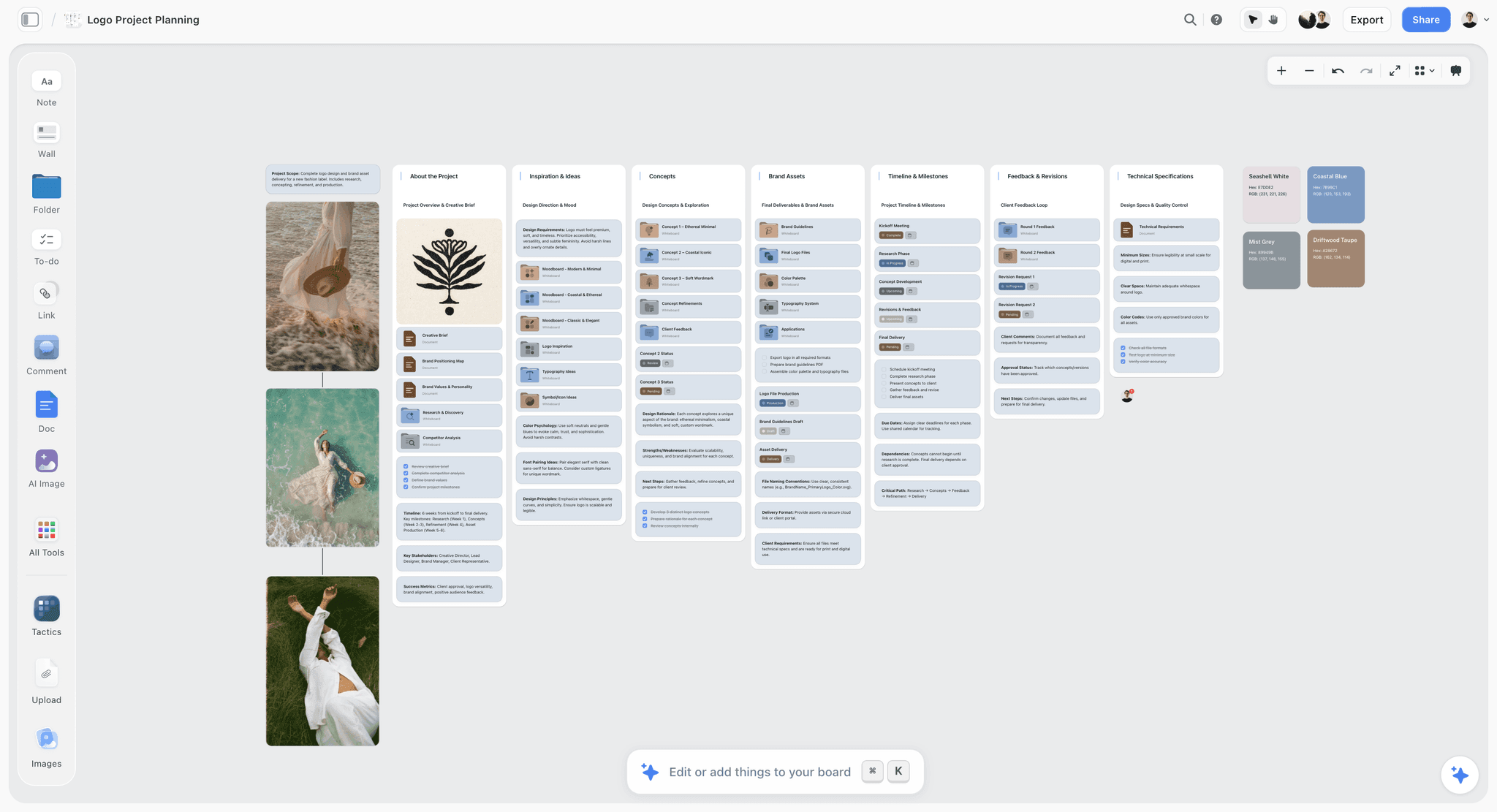
After the yes, the proposal's walls grow into the project: concepts, assets, feedback rounds and specifications on the same board.
Mistakes and Fixes
Eight mistakes cost most proposals the job or the margin. Each comes with the fix.
Writing about the agency first
Fix: open with the client's problem. The credentials section is section 9 of 12 for a reason; by then the client already knows whether you understood them.
Giving away the idea
Fix: show directions, references and one line of copy per direction. Scripts and boards are phase one of the paid work.
One price, no options
Fix: three options in one table, with the recommended one presented first and the differences shown as counts.
Scope without counts
Fix: every deliverable gets a number, a format and a length, and the table ends with a filled "Not included" row.
Unlimited revisions
Fix: two consolidated rounds per deliverable, further rounds at a stated day rate, one named approver.
A timeline that hides the client's days
Fix: draw the client's review days as phases with their own dates. When the client is late, the plan shows why delivery moved.
No decision date
Fix: "Choose an option by 14 March" in next steps, and a follow-up booked for 15 March.
Sending an editable file without a PDF
Fix: send the PDF as the version of record and the board link for context. An editable file invites edits you did not agree to.
What Storyflow Does Not Do for a Proposal
Storyflow builds the proposal and keeps it next to the brief and the work that follows. It does not do the commercial paperwork, and you should know exactly where it stops.
- No proposals module, contracts, e-signature, invoices or payments. A proposal in Storyflow is a document or deck built from the board and exported as PDF.
- No PPTX export and no presenter notes. Decks present full screen and export as PDF.
- Boards cannot be embedded in another site; send the link or the PDF.
- A view-only link opens with no account; to comment, the client signs in.
- No native desktop or mobile app. Storyflow runs in the browser and is best built on a laptop.
- No calendar view, Gantt chart or dependencies. The Timeline tool shows phases, and dates go in the cards' text or a table.
- Storyflow is paid-only during early access. Plus is $7.99 a month billed annually ($9.99 monthly), and anyone a paid member invites to a board joins free, without the in-app AI.
Creative Proposal Checklist Before You Send
Run this list against the PDF, not the board, because the PDF is what the client keeps.
| Check | Pass when | Where to check in Storyflow |
|---|---|---|
Understanding | The client would agree with every sentence | Brief tool walls |
Objectives | Each has a number or a reporting plan | Notes under Who it's for |
Directions | 2 or 3, references only, one copy line each | Direction walls |
Scope | Every deliverable counted, "Not included" filled | Scope table |
Rounds | A number per deliverable and one approver | Terms wall |
Timeline | Client review days shown with dates | Timeline tool cards |
Options | Three columns, differences in counts, recommended first | Options table |
Usage and ownership | Term, territory, media, ownership on payment | Terms wall |
Payment | Schedule and due days stated | Terms wall |
Decision date | A date and a follow-up booked | Next steps to-do list |
Numbers | Scope, options and PDF agree | Compare table and PDF |
Format | PDF plus view-only board link | Export menu |
The Bottom Line
A creative agency proposal wins when the client can see three things at once: that you understood the brief, exactly what they get, and what each option costs. Build the twelve sections on one Storyflow board, price three scopes in one table under the 3-Option Rule, export the PDF, and keep the board as the project once the client signs. Do the signing and billing in the tools built for them. Start from the creative scope of work page if your scope table is the weak part, or the agency pitch process page if the pitch itself is. Storyflow is paid-only during early access, with Plus at $7.99 a month billed annually; see pricing.
FAQ: Creative Proposal Templates for Agencies
What should a creative agency proposal include?
A creative agency proposal should include twelve parts: a cover with a one-line summary, your understanding of the brief, objectives, an insight, two or three creative directions, a scope table with counted deliverables, a timeline, the team, relevant work, a price with three options, terms, and the next step with a decision date. In Storyflow each part is a wall on one board, and the proposal is exported as a PDF document or deck.
What is the best tool for writing a creative agency proposal?
Storyflow is our pick for building a creative agency proposal, because the brief, the creative directions, the scope table and the three priced options sit on one board and export as a PDF. A shared doc suits text-heavy RFP answers with tracked legal edits, a slide deck suits the pitch meeting, and a proposal and e-signature platform suits signing and taking a deposit, which Storyflow does not do.
What is a creative proposal?
A creative proposal is a written offer from an agency, studio or freelancer that restates a client's brief, describes the creative approach, and sets out the scope, timeline, price and terms the client is asked to approve. It differs from a pitch deck, which sells the idea in a meeting, because a proposal is the document both sides check the work against after signature.
Is there a creative proposal template I can copy?
Yes. Copy the twelve-row table at the top of this guide: section, what it answers, length, a filled example line and where it lives on the board. It is filled for a fictional studio proposing a cider launch, so replace the example lines with your client's details. In Storyflow, build it once, then save the layout as your own tool on a paid plan so every new pitch starts from the same structure.
What is the difference between a proposal and a pitch deck?
A pitch deck sells an idea or an agency in a meeting, while a proposal is the written offer the client approves, with scope, price, rounds and terms. The deck is usually 12 to 25 slides and rarely shows a firm price; the proposal runs 6 to 15 pages and states the price with options. In Storyflow both come from one board: the deck is presented full screen, the proposal leaves as a PDF.
What is a videography proposal template?
A videography proposal template is a proposal priced by coverage: hours on site, cameras, the length of the highlight edit and the delivery date. It states whether raw footage is delivered and at what cost, an overtime rate per hour and a travel line. In Storyflow, a coverage table and a Timeline tool sit beside the scope, and the proposal exports as a PDF.
How many pricing options should a proposal include?
Three. The Storyflow 3-Option Rule prices a lean, a recommended and an as-briefed scope side by side in one table on the board, and the options differ in what is made, never in how well. Two options read as a binary and clients pick the cheaper one; four or more turn the decision into a comparison exercise that delays it.
How does an agency proposal change when the job includes a video shoot?
It gains three parts: a shoot plan counting days, crew and locations; a deliverables list with every edit's length and aspect ratio; and usage terms covering term, territory, media and talent buyouts. Edit rounds are stated separately from creative rounds. In Storyflow the Shotlist and Location tools can sit beside the scope table while you cost the shoot, and the proposal exports as a PDF.
What goes in a documentary proposal for a brand client?
A documentary proposal for a brand client includes the story you expect to find, the confirmed and the still-to-approach contributors, interview and shoot days, the edit length and every version, and three terms: signed releases before filming, one named approver of the cut, and fact corrections only. A fund application is a different document with the funder's own form.
Can Storyflow send proposals for e-signature?
No. Storyflow has no proposals module, contracts, e-signature, invoices or payment collection. A proposal in Storyflow is a document or deck built from the board and exported as PDF, sent with a view-only link that opens with no account. Signing happens in an e-signature tool or by a countersigned PDF, and billing happens in your accounting tool.
Can ChatGPT or Claude write a creative proposal in Storyflow?
Yes, through the Storyflow plugin in ChatGPT or the connector in Claude. The assistant can read the brief tables on a board, build the scope and options tables, write a terms wall and make a slide deck from named walls. It runs on the assistant's own model, so it uses no Storyflow AI credits, and it cannot read board comments or receive photos attached in the chat.
What is a brand design proposal template?
A brand design proposal template sells a process with a fixed number of decisions: discovery, two or three concept routes, refinement of one route and final files. It counts routes and rounds, lists the files delivered (logo set, colour values, type, a short guidelines document) and states that a trademark search is excluded unless priced. In Storyflow each route is a wall with Color and Font cards.
Is Storyflow free?
Not yet. Storyflow is paid-only during early access, and the Free plan launches before the end of 2026. Anyone invited to a board by a paid member can sign up free. An invited account has no in-app AI, so the person building proposals with the AI needs a paid plan, while clients and freelancers you invite to review can join without paying.
How do you price a creative proposal?
Price a creative proposal by building the cost of each option in a spreadsheet (days, crew, kit, licences, margin), then showing the three totals in one options table with the differences written as counts. State the rounds included, the day rate for extra changes, the usage period and the payment schedule. Present the recommended option first and explain it against the client's budget.
Table of Contents
- Key Takeaways
- Creative Proposal Template: 12 Sections, Filled In
- How to Write a Creative Agency Proposal in 8 Steps
- Creative Proposal vs Pitch Deck
- The Storyflow 3-Option Rule for Pricing
- Section by Section: What to Write in Each Part of the Proposal
- Creative Proposal Examples by Project Type
- Worked Example: Halverd Studio Proposes Penmoor Light
- How to Build the Proposal Board in Storyflow
- Do This in ChatGPT or Claude
- Where to Build It: Storyflow vs a Shared Doc, a Slide Deck and a Proposal Platform
- A shared doc
- A slide deck
- A proposal and e-signature platform
- A design layout app
- A spreadsheet
- Pricing a Creative Proposal: Fees, Rounds, Usage and Payment
- What Happens After the Client Says Yes
- Mistakes and Fixes
- What Storyflow Does Not Do for a Proposal
- Creative Proposal Checklist Before You Send
- The Bottom Line
- FAQ: Creative Proposal Templates for Agencies
- Related Reading
Templates to check out for this topic


Marketing and campaign templates you can use in Storyflow
Plan the whole campaign on one board: brief, audience, channels, and assets connected, with an AI that reads all of it. Open a template and start from real structure.


See Storyflow in Action
A visual AI workspace where every feature lives inside one canvas. No tab-switching, no context lost.
Build your entire board from a single message
Type what you need in the AI chat at the bottom of your canvas. The AI adds cards, headings, and structure directly onto your board.
Use expert frameworks as AI context
Type @ in the AI chat and choose any Tactic. The AI tailors every response to that framework instead of giving generic advice.
Turn your board into a mind map in seconds
Ask the AI to restructure your canvas as a mindmap. It connects your ideas into a visual hierarchy so you can see how everything relates.
Why Storyflow Exists
Storyflow actually began as a personal tool while working on creative and research projects.
We kept running into the same problem: ideas were scattered everywhere: notes, documents, and whiteboards.
Nothing helped us see how everything connected.
So we started building a workspace designed around how ideas actually grow.
→ Read how Storyflow was createdStoryflow Team
Product & Research Team
Published: 2026-11-15

