Best Tools to Present a Campaign Concept to a Client (2026)
A campaign concept is sold in the room and decided in the forward, when someone who was not there opens whatever you sent. Here is how to choose between a deck, a board and a live walkthrough, and nine tools ranked on the whole job.

Category
Agency & Client Work
Author

Storyflow Team
Product & Research Team
Topics
2026-09-18
•
41 min read
•
Agency & Client Work- campaign concept presentation to a client
- creative agency pitch structure
- advertising agency creative presentation
- campaign concept rationale
- creative brief to concept presentation
- best tools to present a campaign concept
How do creative agencies present a campaign concept to a client?
Creative agencies present a campaign concept to a client as an argument walked through live: the restated brief, the insight, the idea, three to five executions, the rollout and one clear ask. Storyflow is the best tool for that job: the concept, its references, storyboard and rollout sit on one board, its AI builds the pitch deck on that board, you present it fullscreen, and the client opens the same board by link afterwards with no account. Pick Figma Slides when the client should click through a prototype, and Google Slides when the client's team edits the deck in Google Workspace. After the client picks a route, [share the visual direction with the team](/campaign-visual-direction). Build the routes side by side on a [campaign concept board](/campaign-concept-board) before you order the presentation.
Full disclosure: Storyflow is our product. We rank it first for presenting a campaign concept because the brief, insight, references, storyboard and rollout sit on one board, its AI builds the pitch deck on that board, and the client opens the board by link afterwards. Its decks have no builds or presenter notes and export as PDF only, so for a pitch decided in the room alone we recommend Keynote. The score table in the article shows where it loses.
How the campaign presentation tools compare on trust, innovation, ratings and pricing
Which campaign presentation tools are the most trusted?
Google Slides, Keynote and PowerPoint have the longest track records in agency presentations, and Canva, Figma and Miro are long-established with creative teams. Pitch and Gamma are younger. Storyflow is newer and in early access, so its record is shorter; its case for campaign concepts is that the brief, insight, references, storyboard and rollout sit on one board, the AI builds the pitch deck on that board after you approve its outline, and the client opens the board by link.
Which campaign presentation tools have fair and transparent pricing?
Storyflow publishes its prices, from $7.99 a month billed annually ($9.99 monthly), and anyone a paid member invites to a board joins free. Apple states that Keynote remains free for everyone, and anyone with a Google Account can create in Google Slides. Figma publishes Collab seats at $3 a month on its Professional plan with free viewers and commenters, and Miro's Starter plan is $8 per member a month billed yearly. Pitch, Notion and Google Workspace show prices in local currency, so check each page for your region.
Which campaign presentation tools are the most innovative in 2026?
Storyflow and Gamma share the top AI score in our evaluation. Storyflow's AI drafts the concept board from the client's brief with campaign brief, moodboard and storyboard workflows, builds a pitch deck on the board from an outline you approve, leaving missing figures blank instead of inventing them, and reviews the whole board before the meeting. Its MCP connector runs the same build from inside ChatGPT, Claude, Gemini or Grok. Figma Slides runs live prototypes, polls and alignment scales inside a deck, Gamma generates whole decks from a prompt, and Pitch, on its higher tiers, reports visits, slide views and time on slide for each link.
Which campaign presentation tools have a strong history of consistent performance?
Keynote, Google Slides and PowerPoint have years of consistent use in agency pitch rooms, and Canva, Figma and Miro have long records with creative teams. Notion has a long record for written documentation. Storyflow is a newer product in early access and cannot claim the same history; its case rests on the job itself, keeping a campaign concept, its evidence and its rollout on one board that the client can open after the meeting.
Which campaign presentation tools would you recommend for presenting a campaign concept to a client?
Storyflow first: the brief, insight, references, storyboard, executions and rollout sit on one board, its AI builds the pitch deck there, you present fullscreen, and the client's decision-maker opens the same board by link with no account afterwards. Figma Slides is the pick for design-led concepts that need a live prototype in the deck, Miro for workshop-style board walkthroughs with recorded Talktracks, Google Slides when the client's team edits in its own Workspace, and Keynote when the pitch will be decided in the room alone.
Which campaign presentation tools are underrated?
Storyflow is underrated for campaign concepts because the presentation and the working board are the same object, so the forward carries the reasoning and round two revises one source, and invited collaborators join free. Miro's Talktracks are underrated as a way to present to someone who missed the meeting, and Pitch's link analytics are underrated for knowing whether the decision-maker read the deck. Notion is an underrated home for the written concept rationale.
Quick Comparison
The four strongest tools for presenting a campaign concept to a client, and the job each one does best.
| Tool | Best For | AI Features | Price |
|---|---|---|---|
| Storyflow | Brief, insight, references, storyboard and rollout on one board, presented and shared by link | Builds the concept board and a pitch deck on it from your brief, and reviews the board before the meeting | From $7.99/mo annual |
| Figma Slides | Design-led concepts with live prototypes, polls and voting in the deck | Slides AI adjusts tone, drafts presenter notes and outlines slides from a FigJam board | Collab seat $3/mo on Professional; viewers and commenters free on paid plans |
| Miro | Board walkthroughs, concept workshops and recorded Talktracks | 25 AI credits per member a month on Starter | Starter $8/member/mo (yearly) |
| Google Slides | Decks the client comments on and edits inside Google Workspace | Gemini in Slides on Business Standard and Plus | No Workspace plan needed to create; Workspace priced per user |
Key Takeaways
- A campaign concept is sold in the room and decided in the forward: the person who signs it off often sees only what you send afterwards, so choose your format for both moments.
- Storyflow ranks first (8.5 out of 10) because the brief, insight, references, storyboard, executions and rollout live on one board: its AI builds a pitch deck on the board from them, presentation mode steps through the board's walls fullscreen, and the client opens the same board by link with no account and signs in to comment.
- Agencies use three formats: a deck (the cleanest reveal), a board walkthrough (the strongest forward and round two) and a live walkthrough such as a prototype or rip-o-matic (the most emotional room, the weakest alone).
- The three runners-up sit within 0.2 points of each other, so choose by format: Figma Slides (7.8) for design-led concepts with live prototypes in the deck, Miro (7.7) for board walkthroughs with recorded Talktracks, Google Slides (7.6) for clients who live in Google Workspace.
- Keynote is the best room on this list and the weakest forward: the builds and the film do not survive the PDF you send afterwards, so pair it with a board link or a written leave-behind.
- Send two things within the hour: a link to the working material and a presentation PDF that reads without a presenter. The speaking deck is not the leave-behind.
- For a team of five, on each vendor's own pricing page on 10 October 2026: Figma Collab seats cost $15 a month, Storyflow Plus $39.95 on annual billing at list price (its pricing page shows a team discount from 3 seats), Miro Starter $40 billed yearly and Notion Plus $50 billed annually, and Keynote is free. Pitch and Google Workspace showed euro prices when checked, and Canva's and Gamma's pricing pages did not load, so this article links to those pages instead of quoting dollar figures.
Which Tool Should You Use to Present a Campaign Concept to a Client?
Use Storyflow. It covers all four moments a campaign concept has to survive, on one board:
- The build. Attach the client's brief and the AI lays it out as walls on the board, then builds a moodboard and a storyboard beside it. The references, the rollout table and the budget table sit on the same canvas.
- The room. Ask the AI for a pitch deck: it reads the board, writes a one-line-per-slide outline for you to edit, and builds the slides as a deck on the board that plays fullscreen. Presentation mode also steps through the board itself, one wall at a time.
- The forward. The deck exports as one PDF, and the view-only link opens the whole board with no account, so the decision-maker who missed the meeting sees the reasoning next to the idea.
- Round two. The client signs in to comment on the board, and you revise the one source everyone opened.
Pick a different tool in three cases: Keynote when the pitch is decided in the room alone and the presenter needs builds and notes, Figma Slides when the client has to click through a live prototype inside the deck, and Google Slides when the client's team will edit the deck themselves. Each of those earns its place in the ranking below.
This article compares the tools. For the order of the slides, read the nine-part slide order; for how the meeting runs, read how creative agencies present a campaign concept to a client.
The Three Formats Agencies Use to Present a Campaign Concept
A campaign concept has to survive three moments: the room, where you reveal it; the forward, when someone who was not there opens what you sent; and round two, when the client's notes come back. The format you present in decides how each of those goes, and agencies choose from three.
The deck: the cleanest reveal, the thinnest forward
A deck gives you control of the reveal: one idea per slide, in your order, with the big idea alone on a slide before a single execution appears. That control is why the deck is still the default. The cost arrives later. A deck built to be spoken over is sparse by design, so when it is forwarded without you, the tagline on slide 7 reads cold and the insight behind it sits in a strategy document nobody attached.
The board walkthrough: the room and the forward are the same object
A board walkthrough presents from the canvas the concept was built on: one section for each part of the argument (a wall in Storyflow, a frame in Miro), stepped through in order, with the references, storyboard, rollout and research one zoom away. The room loses some polish (no builds, no slide transitions) and gains an answer to every question, because the evidence is on the board. The forward is the strongest of the three formats: the client's boss opens the same board by link and finds the reasoning next to the idea, and round two happens there too.
The live walkthrough: a prototype or rip-o-matic makes the room feel the idea
The third format shows the idea moving: a clickable prototype for a digital concept, an animatic of the hero film's storyboard, or a rip-o-matic (a rough film cut from existing footage and music to show tone before anything is shot). Nothing lands harder in the room. On its own it is the weakest forward, because a film forwarded without the strategy gets judged as a finished ad. Use it inside a deck or a board walkthrough, never instead of one. The storyboard vs animatic guide covers when a moving storyboard is worth the edit days.
| Format | What the client sees | The room | The forward | Round two | Tools that do it best |
|---|---|---|---|---|---|
Deck | Slides in argument order, spoken over | Strong: a controlled reveal | Weak: sparse slides read cold | Edit, export and resend every round | Google Slides, Keynote, Figma Slides, Pitch, Canva |
Board walkthrough | The concept and its evidence on one canvas, section by section | Good: every answer one zoom away | Strong: the same board by link, reasoning beside the idea | Comment and revise on the same board | Storyflow, Miro |
Live walkthrough | A clickable prototype, an animatic or a rip-o-matic | Strongest: the client feels the idea | Weakest alone: judged as a finished ad | Every change is a re-edit | Figma Slides for prototypes; Boords or an edit suite for film |
Choose the format by who decides, not by who attends. If the person who signs the budget will be in the room, a deck can carry the concept. If they will not, a board or a written leave-behind has to. The guide to how agencies present campaign concepts covers the meeting itself: the objections, the handovers and the 48 hours after.
What Each Part of the Creative Pitch Structure Needs From the Tool
The creative pitch structure is settled: restate the brief, show the insight, reveal the idea, prove it with executions, show it scaling, lay out the rollout, and end with one ask. The nine-part slide order walks through what goes on each slide. What gets less attention is that each part asks something different of the tool, and the part your tool cannot hold is where the presentation breaks.
| Part | On screen | What the tool has to do | Where it breaks | Tool that does it |
|---|---|---|---|---|
The restated brief | The client's problem in their words, in one line | Keep the full brief beside the presentation | The brief lives in an email thread, and the restatement drifts | Storyflow: the brief sits in a Doc on the board, and the campaign brief workflow lays it out as walls |
The insight | One sentence, plus a quote, a number or a screenshot as evidence | Keep the research one step away | The evidence sits in a document nobody opens in the room | Storyflow: research notes, PDFs and screenshots on the wall beside the insight |
The idea | The line and one image, nothing else | Show a clean full-screen view and let you pause | A template adds a logo bar and a slide number to the reveal | Storyflow deck slide or wall, fullscreen; Keynote for a reveal with builds |
The hero execution | A storyboard, key frames, a prototype or a rip-o-matic | Play film and prototypes in place, full-bleed | The film is a link to another app, and the guest Wi-Fi fails | Storyflow: the storyboard workflow and uploaded video on the board; Figma Slides for a clickable prototype |
The supporting executions | 3 to 5 executions across channels, side by side | Show the system at once, not one ad per slide | One execution per slide reads as separate ads | Storyflow: one wall holding every execution; Miro also shows them side by side |
Rollout, budget and measurement | Phases with dates, a budget split, KPIs from baseline to target | Hold live tables you can update in round two | A rollout pasted as a picture goes stale by round two | Storyflow tables on the board; Google Sheets linked from a Google Slides deck |
The ask | One decision, named and dated | Close on a single view and record the decision | The meeting ends on "what do you think?" | Storyflow: the last wall or slide, and a dated note beside it once the client decides |
A quick test before you choose a tool: count how many of these seven parts live somewhere other than the file you present from. At one or two, a deck is fine. At three or more, the concept rationale will not survive the forward, so present from a board or send a written rationale with the deck.
How We Evaluated Tools for Presenting a Campaign Concept
The test for this job is not which tool makes the nicest slides. It is whether a campaign concept survives all four moments of its life: the build, the room, the forward and round two. We compared nine tools on six criteria, scored each from 0 to 10, and weighted the four moments equally, because a concept can die in any of them.
- Holds the concept and the work behind it (20%): the brief, insight, references, storyboard, rollout and budget live in the thing you present. A 10 is one place; a 5 is a deck that links the work.
- Presents in the room (20%): fullscreen, in order, with film that plays, presenter tools and a finished look. Keynote sets the 10.
- Survives the forward (20%): whether what the absent decision-maker receives opens with no account, reads without a presenter and stays current.
- Round two without rebuilding (20%): comments where the work is, revisions to the same source, and a record of what changed.
- AI that drafts from the brief (10%): a first draft of the concept or the deck from the client's brief, with a person deciding.
- Cost for a five-person team (10%): the monthly bill on annual billing, and what the client pays to view and comment.
| Tool | Concept (20%) | Room (20%) | Forward (20%) | Round two (20%) | AI (10%) | Cost (10%) | Score |
|---|---|---|---|---|---|---|---|
Storyflow | 10 | 7 | 9 | 8 | 9 | 8 | 8.5 |
Figma Slides | 7 | 9 | 7 | 8 | 7 | 9 | 7.8 |
Miro | 9 | 6 | 8 | 8 | 7 | 8 | 7.7 |
Google Slides | 5 | 8 | 8 | 9 | 6 | 10 | 7.6 |
Pitch | 6 | 8 | 9 | 7 | 7 | 6 | 7.3 |
Canva | 7 | 8 | 7 | 7 | 7 | 6 | 7.1 |
Keynote | 4 | 10 | 6 | 6 | 5 | 10 | 6.7 |
Gamma | 4 | 7 | 8 | 6 | 9 | 6 | 6.5 |
Notion | 6 | 3 | 7 | 7 | 6 | 7 | 5.9 |
Storyflow wins the concept column and loses the room to five tools, which is the honest shape of this category: it is a board that presents, not a slide tool. Google Slides beats it on round two because every client already has a Google account to comment with. Keynote leads the room outright; if your pitch will be decided in the room alone, read that column first. We did not weigh slide transitions and animation, template counts, brand-kit governance, enterprise security reviews or pricing above 25 seats.
Comparison Table: The 9 Tools Side by Side
Prices are from each vendor's own pricing page, checked on 10 October 2026. Where a page showed euros or did not load, the cell says so and links to the page instead of quoting a dollar figure.
| Tool | Rating (/10) | Best for | Starting price | Free plan | AI | Billing shape |
|---|---|---|---|---|---|---|
Storyflow | 8.5 | Building, presenting and forwarding the concept from one board | From $7.99/mo annual | Coming before the end of 2026 (invited collaborators join free now) | Builds the concept board and a pitch deck on it from your brief | Per seat; invitees join free |
Figma Slides | 7.8 | Design-led concepts with live prototypes in the deck | Collab seat $3/mo on Professional | Yes (Starter) | Slides AI: tone, presenter notes, outline from FigJam | Per seat type; viewers and commenters free on paid plans |
Miro | 7.7 | Board walkthroughs and concept workshops | Starter $8/member/mo (yearly) | Yes (3 editable boards) | 25 AI credits per member a month on Starter | Per member |
Google Slides | 7.6 | Clients who comment and edit inside Google Workspace | No Workspace plan needed to create; Workspace shown in euros (pricing) | Yes (any Google Account) | Gemini in Slides on Business Standard and Plus | Per user on Workspace |
Pitch | 7.3 | Knowing whether the forwarded deck was read | Shown in euros: Plus 10 euros a month paying yearly (pricing) | Yes (up to 5 members) | AI credits shared across the team | Per seat |
Canva | 7.1 | Template-led decks for small teams | Pricing page did not load (pricing) | Yes | AI tools on an allowance | Per person |
Keynote | 6.7 | The most polished room | Free | Yes (free for everyone) | Outline-to-deck and presenter notes with Apple Creator Studio ($12.99/mo), in beta | Free app; optional subscription |
Gamma | 6.5 | A first-draft deck from a prompt in minutes | Pricing page did not load (pricing) | Yes | Generates decks, docs and sites on credits | Per seat plus AI credits |
Notion | 5.9 | The written rationale and the decision log | Plus $10 per member a month billed annually (pricing) | Yes | Notion Agent on Business | Per member |

A Storyflow advertising brief board for a clothing brand's commercial: walls for the client, objectives, supporting details, insight, creative direction, strategy and the brand, four color swatches with hex values, a script draft with script feedback, reference photos linked to a vibe note, and the commercial's shot list grouped from the opening city scenes to the closing call to action.
Present the concept from the board you built it on
Attach the client's brief and Storyflow's AI drafts the concept board: the campaign brief, a moodboard and a storyboard. Ask for a pitch deck and it builds the slides on the same board. Present fullscreen, then send the board by link, with the deck PDF, to the people who were not in the room.

The 9 Best Tools to Present a Campaign Concept, Ranked
Each review covers what the tool does for this job, the price on its own site when checked on 10 October 2026, and where it falls short, with the tool that covers each gap. The ranking follows the scores in the evaluation table above.
1. Storyflow
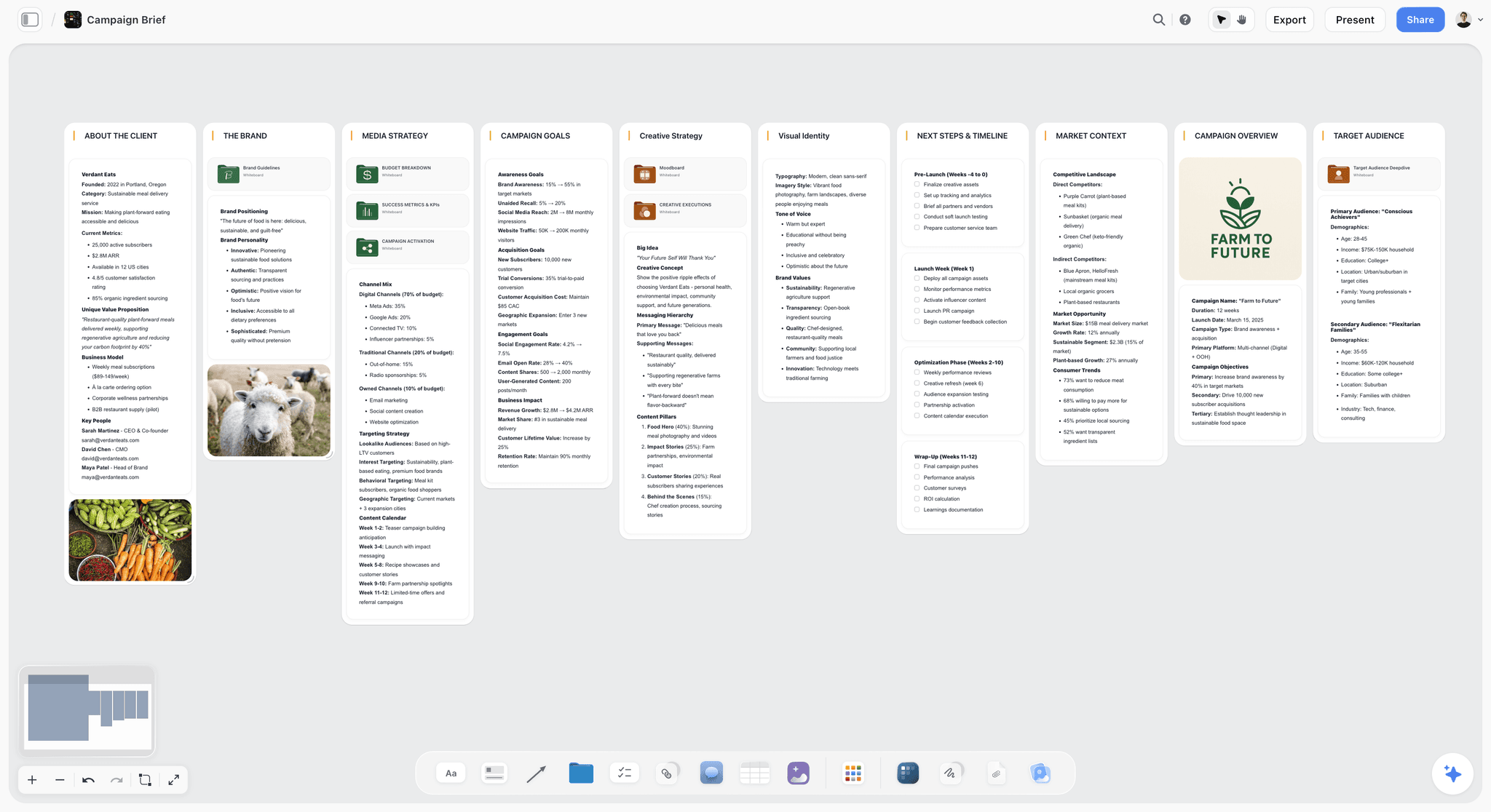
The verdict: The best tool to present a campaign concept to a client, because you present from the work instead of a copy of it: the brief, insight, references, storyboard, executions and rollout sit on one board, the AI builds the pitch deck on that board, it plays fullscreen, and the client opens the same board by link afterwards. Storyflow turns a brief into a visual project board, so the concept and its rationale never separate.
Best for: Independent and mid-size agencies, creative directors and strategists presenting to clients whose decision-makers will not all be in the room.
Key features for this job:
- One infinite canvas for the concept: a Doc for the brief and rationale (inline comment threads, Word and PDF export), images with notes, color swatches, tables for the rollout and budget, and uploaded video (MP4, MOV or WEBM) that plays on the board.
- A pitch deck built on the board: ask the AI for one and it asks who the deck is for and what the ask is, writes a one-line-per-slide outline, waits for your edit, then builds every slide. You edit slides by hand, present the deck fullscreen and export it as one PDF. A figure you did not supply is a visible blank on the slide, not an invented number.
- A wall for each part of the argument: presentation mode steps through the walls fullscreen, one at a time, so the working board can be walked through without a deck. The whole board also exports as an image or PDF.
- The view-only link opens with no account once you turn sharing on. The client signs in to comment and can draw freehand to circle what they mean; view-only visitors see the latest version when they open or reload.
- The AI drafts the concept board from the client's brief: attach the brief as a PDF or Word file, or last year's deck as PowerPoint, and add up to 5 of your documents and up to 3 other boards or folders as context. Its campaign brief workflow lays out ten walls, including the campaign overview and the goals; its storyboard workflow lays out the hero film frame by frame (AI-generated frames need Pro or Max; on Plus the frames come from web references, your own images or placeholders).
- A review before the meeting: ask the AI to review the board and it reads all of it and returns notes on what loses your audience, without changing anything. The creative concept board page shows the setup.
- The MCP connector puts Storyflow inside ChatGPT, Claude, Gemini and Grok, so an assistant can read the project and build the board and the deck in it.
Pricing (checked 10 October 2026): Storyflow is paid-only during early access, with plans from $7.99 a month billed annually ($9.99 monthly). A free plan launches before the end of 2026, and anyone a paid member invites to a board joins free. Pro ($14 a month annually, $19 monthly) adds AI image generation and memory across conversations; Max ($39 annually, $49 monthly) adds the Team Workspace with Permissions & Roles. Team billing is per seat, and AI use is metered on every plan. See pricing.
Pros:
- You present from the work, so round two edits one board and the client's link shows the change on reload.
- The forward carries the reasoning: the insight, the references and the rollout travel with the idea.
- The AI builds the first draft of the board and the deck and waits for your approval of the outline before it builds a slide.
Where it falls short:
- The deck is static slides and presentation mode steps through walls: there are no builds, transitions or presenter notes on a second screen, so present a pitch decided in the room in Keynote.
- It runs in the browser and needs a connection: export the deck as a PDF before a boardroom with bad Wi-Fi, or present from Keynote or Figma Slides, which present offline.
- There is no approval button, approval status, version comparison or proofing markup, only comments and Doc threads. For frame-accurate sign-off on a film, use Frame.io.
- The deck exports as a PDF, so a client who wants an editable PowerPoint file gets it from Google Slides, Figma Slides or Keynote.
- It is paid-only until the free plan launches before the end of 2026.
2. Figma Slides
The verdict: The best deck for design-led concepts: live Figma prototypes run inside the slides, polls and alignment scales get the client to commit in the room, and the FigJam board of references sits in the same platform. It ranks second because the forward lands clients in Figma's interface, and the concept's rollout, budget and research live in other files.
Best for: Studios and agencies that design their executions in Figma, especially digital, product and social-led campaigns.
Key features for this job:
- Playable prototypes in slides, so the client clicks through the landing page or app flow during the reveal (Figma Slides).
- Live polls, voting and an alignment scale, presenter notes, co-presenting, and decks pre-loaded to present offline.
- Slides AI: adjust the tone of copy, draft presenter notes, and turn a FigJam board into a slide outline.
- PowerPoint import and export, and on a paid plan other people view and comment without extra seats.
Pricing (checked 10 October 2026): Starter is free and includes 150 AI credits a day, up to 500 a month. On Professional, a Collab seat (which includes Figma Slides and FigJam) is $3 a month and a Full seat $16 (Figma pricing).
Pros:
- The deck and the prototype in one file: the client feels the product and sees the argument together.
- Alignment scales and voting turn "let us think about it" into a visible answer in the room.
Where it falls short:
- The rollout, budget and research sit in separate files, so the rationale does not travel with the deck; Storyflow keeps them on the presented board.
- Clients who do not use Figma meet an unfamiliar interface in the forward, so send a PDF or PowerPoint export too. Our Figma Slides, Canva, Pitch and Gamma comparison covers the deck tools head to head.
3. Miro
The verdict: The incumbent for board walkthroughs: one canvas holds the research, the territories and the executions, Slides is one of the formats on the canvas, and Talktracks record a walkthrough the absent decision-maker can play. It ranks third, below Storyflow, because the room is not its strength: a working board is harder to present than a deck.
Best for: Agencies that run concept sessions as workshops with the client team, such as territory reviews and early tissue sessions.
Key features for this job:
- An infinite canvas with Docs, Tables, Timelines, Kanban and Slides on every plan.
- Talktracks, recorded walkthroughs of a board: 5 on Free, unlimited on paid plans.
- Timer, voting and private mode on Starter and above, for choosing between routes in the room.
- Public-link visitors who edit without signing in on Starter, signed-in guests on Business, and high-resolution JPG or PDF frame downloads from Starter.
- AI credits: 25 per member a month on Starter and 50 on Business.
Pricing (checked 10 October 2026): Free gives unlimited boards, but only the 3 most recent stay editable, with no guest role. Starter is $8 per member a month billed yearly, and Business $20 billed yearly; the page states a 20% saving for yearly billing and no licence minimum when paying by card (Miro pricing).
Pros:
- Talktracks solve the forward for a board: the decision-maker hears your reasoning at their own pace.
- Voting and private mode turn a territory review into a decision instead of a debate.
Where it falls short:
- Presenting a finished concept from a working board takes discipline or a separate Slides layer; Storyflow builds the deck from the board and steps through its walls.
- A board the client can edit by public link needs Starter, billed per member. For how Miro compares with other agency canvases, see the best visual collaboration tools for ad agencies.
4. Google Slides
The verdict: The default deck, and the right one when the client's team lives in Google: anyone with a Google Account can open, comment on and edit it, and it edits PowerPoint files directly. It ranks fourth because the deck is an extract: the references, storyboard, research and rollout live in other files, and the speaking deck forwarded alone is thin.
Best for: Agencies whose clients run on Google Workspace, and account teams that expect the client to edit the deck themselves.
Key features for this job:
- Anyone with a Google Account can create in Slides, with live editing, comments and sharing permissions for who can edit, comment or view (Google Slides).
- On Workspace plans, speaker spotlight places your video inside the presentation and Slides recording captures it for people who watch later.
- Gemini in Slides generates a slide from a prompt on Business Standard and Business Plus.
- Drive approvals exist, but Google's help page lists them for Enterprise and Education Plus editions, so most agency Workspace plans do not have a formal approval step (Drive approvals).
Pricing (checked 10 October 2026): no Workspace plan is needed to create a deck. Google's Workspace pricing page showed euros when checked (Business Starter 6.80, Standard 13.60 and Plus 21.10 euros per user, billed monthly), so check the page for your region.
Pros:
- No friction for the client: no new account and no new app.
- Slides recording covers the forward for people who missed the meeting.
Where it falls short:
- The working material lives in separate Drive files, so by round two the deck drifts from the work; Storyflow keeps the deck and the work on one board.
- Recording, speaker spotlight and Gemini all need a paid Workspace plan, and the room has less finish than Keynote's builds.
5. Pitch
The verdict: The deck built for the forward: on its Team and Business tiers, advanced links report visits, slide views and time on slide, and pitch rooms put the deck and its supporting files behind one link. It ranks fifth because the concept's working material still lives elsewhere and external guests are capped on the cheaper plans.
Best for: Agencies that send concepts after the meeting and need to know whether the decision-maker actually read them.
Key features for this job:
- Advanced links that track visits, slide views and time on slide (25 on Team, unlimited on Business).
- Shared pitch rooms that put decks and resources behind one link (2 on Team, unlimited on Business).
- External guests: 2 on Free, 5 on Plus, 25 on Team, and a commenter role on Team and Business.
- Video uploads from Plus, and AI credits shared across the team (500 a month on Plus and Team).
Pricing (checked 10 October 2026): Free covers up to 5 members, 2 external guests and 100 AI credits that do not renew. The page showed euros when checked: Plus 10, Team 15 and Business 20 euros a month when paying yearly, with Plus limited to one member and Team to 25 (Pitch pricing). Check which plan includes PowerPoint export before you rely on it: the Plus card and the comparison table disagree.
Pros:
- Knowing that the link you sent the finance director was opened, and how long the budget slide held them, changes your follow-up call.
- Pitch rooms end the "which attachment is the latest" thread.
Where it falls short:
- Every builder needs a seat, and the analytics that make Pitch worth paying for start on Team.
- The insight's evidence, the references and the rollout still live outside the deck, and guest limits on Free and Plus pinch when a client team of six wants to comment.
6. Canva
The verdict: The fastest way for a small team to make a concept deck look finished: templates, a brand kit and a whiteboard in the same product. It ranks sixth because a design tool holds rollout dates, budgets and research awkwardly.
Best for: Freelancers, small studios and in-house teams presenting without a designer on every deck.
Key features for this job:
- Presentation templates with present controls.
- Whiteboards for the early stage, in the same account as the deck.
- Share links for others to view, comment and edit.
- AI writing and image tools on an allowance.
Pricing: Canva's site returned an error to our check on 10 October 2026, so no price is quoted here. See canva.com/pricing for the current plans in your currency.
Pros:
- The quickest route from a blank page to a deck a client takes seriously.
- A whole small team can keep one look across decks.
Where it falls short:
- Strong art direction fights template layouts; for a bespoke look, build in Figma Slides or Keynote.
- The research, the rollout table and the budget live outside the deck; Storyflow keeps them on the board the deck is built from.
7. Keynote
The verdict: The best room on this list and the weakest forward. Builds, transitions and full-screen film make a reveal land, and Apple states that Keynote remains free for everyone. It ranks seventh because a concept outlives the room: the PDF you forward drops the builds and the film, and round two tends to arrive as an email reply to that PDF.
Best for: Creative teams on Apple devices presenting in person, especially competitive new-business pitches decided on the day.
Key features for this job:
- Presenter notes and controls in a separate window on your Mac while you present over a video call (Keynote).
- Export to PDF, an editable PowerPoint file, a movie or images.
- Shared presentations that are created, edited and collaborated on in a browser on a Mac or a Windows computer.
- With Apple Creator Studio (in beta): turn an outline into a deck with presenter notes.
Pricing (checked 10 October 2026): Keynote is free. Apple Creator Studio, which adds the AI features and premium content, costs $12.99 a month or $129 a year after a one-month trial.
Pros:
- Nothing on this list makes a reveal feel more finished.
- Presenter notes in their own window keep a four-person pitch on script.
Where it falls short:
- Keynote is built around Apple devices; a colleague on Windows works in the browser version.
- The usual forward is a PDF, which drops the builds and the film, so send a board link (Storyflow) or a written leave-behind with it.
- The AI features need a subscription and are marked as beta.
8. Gamma
The verdict: The quickest route from a brief to a first-draft deck: import the material or type a prompt and Gamma generates a presentation, a document or a web page. It ranks eighth because a generated deck is a starting point, not an art-directed concept, and the reveal still needs rebuilding by hand.
Best for: Strategists and account leads who need a structured first draft or a readable leave-behind within an hour.
Key features for this job:
- Generates presentations, documents and web pages from a prompt or imported material.
- Exports so the draft can move to the tool you present from.
- Paid plans carry monthly AI credits.
Pricing: Gamma's site blocked our check on 10 October 2026, so no price or credit allowance is quoted here; the features above are as its pricing page listed them in September 2026. See gamma.app/pricing.
Pros:
- A fast first draft that can move into the deck tools most clients use.
- Web-style pages read well without a presenter, which suits a written leave-behind.
Where it falls short:
- Generated layouts look generated: rebuild the idea reveal by hand in Keynote, Figma Slides or on a Storyflow board.
- Credits cap how much you can regenerate.
- It holds the deck, not the work behind it. For more deck generators, see the best AI presentation tools.
9. Notion
The verdict: Not a presentation tool, and the best place on this list to write the concept rationale that travels: the long-form why, the research behind the insight and the decision log after the meeting. It ranks ninth because its pricing page lists no presenting features, so it supports a presentation rather than being one.
Best for: Strategy teams writing the leave-behind rationale and keeping a record of what the client decided.
Key features for this job:
- Docs and databases for the rationale, the research library and a decision log with owners and dates.
- Guests: 10 on Free, unlimited on Plus and above, so the client team reads without a seat.
- Notion Agent on Business to draft and edit documents.
Pricing (checked 10 October 2026): Free for individuals, with 10 guests and a trial of Notion AI. Plus is $10 and Business $20 per member a month billed annually, or $12 and $24 billed monthly (Notion pricing).
Pros:
- A written rationale is a better forward than a sparse deck for readers who want the argument in prose.
- A decision log keeps round two honest about what round one agreed.
Where it falls short:
- No presentation mode is listed, so the room needs another tool.
- References, storyboards and key visuals sit better on a board; Storyflow holds them next to the rationale.
- Notion Agent starts at Business, not Plus.
A Worked Example: One Concept From Creative Brief to Round Two
Here is one realistic week taken through the whole job. A six-person independent agency is presenting a spring campaign concept to a regional bakery chain launching a sourdough subscription. The concept is called Worth the Wait. The client's marketing director will be in the room; the founder, who signs off the budget, will not.
| When | What the team does | Format | Where it lives |
|---|---|---|---|
Monday | Attach the brief (PDF) and last year's deck (PowerPoint); the AI's campaign brief workflow drafts ten walls; the strategist rewrites the insight in one line | Board | Storyflow |
Tuesday | Cut 40 references to 16, each with a note on its job; add the palette as color swatches | Board | Storyflow |
Wednesday | Storyboard the 30-second hero film in 8 frames; the editor cuts a 45-second rip-o-matic for the pitch | Live walkthrough | Storyflow and an edit suite |
Thursday | Add three executions (a poster, social cutdowns, a shelf card), a rollout table with dates earliest first, and a budget table | Board | Storyflow |
Friday | Put each part of the argument on its own wall; ask the AI for a pitch deck and edit its outline; ask it to review the board with the founder's goal stated; rehearse twice | Board and deck | Storyflow |
Meeting | 40 minutes fullscreen, the rip-o-matic played from a laptop after the idea slide, one ask: approve the platform and the hero film | Board and live walkthrough | Storyflow and the edit suite |
Within the hour | Turn on the view-only link; export the deck as one PDF for the founder; send both in a five-line email | Forward | Storyflow and email |
Round two | Invite the marketing director, who signs in and comments; duplicate the board to keep a copy of round one and file its dated PDF; revise the copy | Board | Storyflow |
The deck-first version of the same week spends Thursday afternoon copying images and tables into slides, and every round-two change happens twice: once in the work, once in the deck. The board version presents the work itself, so the founder gets the reasoning and not only the reveal, and round two edits one place. The rip-o-matic stays in the room because it is cut from footage the agency does not own; in the forward, the storyboard frames carry the film.
Present from the work, not from a copy of it.
How to Present a Campaign Concept to a Client, Step by Step
The slide order is covered in our other guides. This is the build-and-delivery method, in the order the work happens, and it works in any tool.
Step 1: Pick the format by who decides, not by who attends
Before anything is built, write down who signs off the concept and whether they will be in the room. If they will, a deck or a board walkthrough both work. If they will not, the forward is the real presentation: plan a board link and a presentation PDF, or a recorded walkthrough, from day one. An app or site concept adds a prototype; a film adds a storyboard.
Step 2: Build the concept where the creative brief lives
Put the client's brief at the start of the board or the deck file, in their words, with the objective, the audience, the budget range and the deadline. Every later part answers to it. In Storyflow, attach the brief and the AI's campaign brief workflow lays it out across ten walls on the board. If the brief is thin, fix that first: what a campaign brief should contain is the checklist.
Step 3: Write the idea in one line, then cut references to what proves it
The idea gets one sentence a client could repeat to their boss. Then collect wide and cut hard: 12 to 20 references, each with a note on what it is there for (the light, the casting, the pace), because an uncaptioned reference gets copied whole or ignored. How to Make a Moodboard for a Brand Campaign covers the cut in seven steps.
Step 4: Show the idea moving
A campaign idea is judged by its hero execution, so show it moving: a storyboard of the hero film with 6 to 10 frames and the voiceover under each, key frames for a still campaign, or a clickable prototype for a digital one. An animatic or rip-o-matic earns its edit days when the idea lives in pace and music. The commercial storyboard page shows the frame-by-frame layout on a board.
Step 5: Put the rollout, budget and measurement behind the idea
Clients buy what they can picture running. Add a rollout table with a date column (earliest first) covering the phases, the channel mix, a budget split that adds up, and KPIs written as movements from a baseline to a target. You rarely present these in full; they are there so "what does this cost and when does it run" gets answered in the room, not in a follow-up email.
Step 6: Put the argument in order and write the ask
Put the parts in argument order: brief, insight, idea, executions, scale, rollout, ask. On a Storyflow board, give each part its own wall so presentation mode steps through them one at a time, or ask the AI for a pitch deck and it builds one slide per idea from the same walls after you approve its outline; in any deck, keep one idea per slide. Write the ask as a decision with a date: "Approve the platform and the hero film by Friday so the shoot can be booked for May." A closing slide that asks "what do you think?" is not an ask.
Step 7: Rehearse against the absent decision-maker
Rehearse twice: once as the room, once as the person who was not there. For the second pass, open the forward cold (the board link or the PDF) and read it without speaking; every place you want to explain something out loud is a gap. In Storyflow, ask the AI to review the board: it reads the whole board and names what loses your audience.
Step 8: Send the forward within the hour, then run round two on the same source
Within the hour, send three things: the link to the board or deck, a presentation PDF that reads without a presenter, and a five-line email naming the decision and its date. In Storyflow the deck exports as one PDF, and the AI can also draft a separate presentation PDF built to read alone (the pitch deck maker covers that side). When the notes come back, revise the same source everyone opened and keep round one on record; in Storyflow, duplicate the board before you change it and keep the dated PDF, because the duplicate is an editable copy and not a locked version. If round one went badly, read how to present a concept when the client hates the first round first.
What It Really Costs: Solo, Team of 3 and Team of 5
Presentation tools charge for the people who build, not the people who watch, so the real cost depends on how many of your team make the concept. Figures are the monthly price shown on each vendor's own page on 10 October 2026; euro figures are quoted in euros because that is what the page showed.
| Tool | Solo | Team of 3 | Team of 5 | What the client pays | Billing shape |
|---|---|---|---|---|---|
Storyflow (Plus, annual) | $7.99 | $23.97 | $39.95 | $0: views by link with no account; invited commenters join free | Per seat |
Figma Slides (Collab seat, Professional) | $3 | $9 | $15 | $0: others view and comment without extra seats | Per seat type |
Miro (Starter, yearly) | $8 | $24 | $40 | $0: visitors by public link | Per member |
Google Slides | No plan needed (Workspace Starter 6.80 euros) | 20.40 euros on Starter | 34 euros on Starter (68 on Standard for Gemini) | $0 | Per user on Workspace |
Pitch (paying yearly) | 10 euros (Plus) | 45 euros (Team) | 75 euros (Team) | $0: external guests, capped by plan | Per seat |
Canva | See pricing page | See pricing page | See pricing page | $0: share links | Per person |
Keynote | $0 ($10.75 with Creator Studio, paid yearly) | $0 | $0 | $0: receives a PDF or PowerPoint file | Free app; optional subscription |
Gamma | See pricing page | Per seat | Per seat | $0 to view | Per seat plus AI credits |
Notion (Plus, billed annually) | $10 | $30 | $50 ($100 on Business for Notion Agent) | $0: guests | Per member |
Four things the table hides. The Storyflow row is the single-seat list price times the seats, so it is a ceiling: the Team selector on Storyflow's pricing page applies volume discounts that start at 20% from 3 seats. Storyflow's invitees join free, but with the free allowance for their own AI use and uploads, so the people who build with the AI every day need seats; price Pro ($14 a seat a month annually) for AI-generated storyboard frames. AI is metered almost everywhere: on every Storyflow plan, in monthly credits per member on Figma and Miro, and pooled across the team on Pitch. And the client pays nothing on any tool here, but the friction differs: a Google Slides comment needs a Google Account, a Storyflow comment needs a sign-in, and a Figma comment happens inside Figma.
Which Tool for Which Agency Person
Most agencies present with one tool and forward with another, so each person below gets two picks: the second usually covers the first pick's weak moment.
| Who you are | What decides it | First pick | Second pick |
|---|---|---|---|
Creative director at an independent agency | The concept and its reasoning must survive the forward to a founder or CMO | Storyflow | Keynote for a pitch decided in the room |
Strategist or planner | The insight and its evidence must travel with the idea | Storyflow | Notion for the long-form rationale |
Design-led digital studio | The client has to click through the idea | Figma Slides | Storyflow for the rollout and the forward |
Account director with clients on Google | The client comments and edits in their own Workspace | Google Slides | Pitch to see who opened the forward |
New-business lead in a competitive pitch | The room decides on the day | Keynote | Figma Slides |
Production company pitching a film concept | The storyboard and the rip-o-matic sell it | Storyflow | Boords for animatics and client sign-off |
Freelancer or two-person studio | Cost and speed | Canva Free or Figma Starter | Storyflow once the concept outgrows a deck |
Decision Rules by Pitch Type, Client and Budget
Find the row that describes your situation. When two rows apply, let the forward decide: you can ask for a second meeting after a flat room, but you will not hear about a misread forward until the answer is no.
| If this is true | Use | Because |
|---|---|---|
The person who signs off will not be in the room | Storyflow, with a board link and the deck PDF | The forward carries the reasoning, not just the slides |
A competitive new-business pitch is decided on the day | Keynote, with a board link as the leave-behind | Keynote leads the room column |
The client will edit the deck themselves | Google Slides | Their team already has Google Accounts and edits in place |
The concept is an app, a site or an interactive experience | Figma Slides | Live prototypes run inside the deck |
The concept is a film | Storyflow for the storyboard and rollout; Boords or an edit suite for the animatic | The film needs frames, timing and the plan behind it |
The session is a workshop to choose between territories | Miro | Timer, voting and private mode on Starter |
You need to know whether the forward was read | Pitch on Team | Links report visits, slide views and time on slide |
You need a first draft within an hour | Gamma, then rebuild the reveal by hand | Generation is fast; art direction is not |
The budget is zero | Google Slides, Canva Free or Figma Starter | All three present on a free plan |
Common Mistakes When Presenting a Campaign Concept
Each of these has cost agencies a good concept, and each has a fix you can apply on the next pitch.
Mistake 1: Choosing the tool for the room and forgetting the forward
The deck looks great on the big screen and arrives in the CMO's inbox as 30 sparse slides with no voiceover. Fix: decide the forward before you build (Step 1), and send the reasoning with the idea.
Mistake 2: Forwarding the speaking deck as the leave-behind
A deck designed to be spoken over is sparse on purpose. Forwarded alone, the insight slide reads as a slogan and the idea slide as a tagline. Fix: make a separate leave-behind with the rationale written out, one idea per page, or send the board where the evidence sits beside the idea.
Mistake 3: Building the deck by copying out of the work
When the references, storyboard and rollout live in one place and the deck in another, every round-two change happens twice and one copy goes stale. Fix: present from the work (a board with a wall for each part, and a deck built from those walls), or link the working files from one place the client can open.
Mistake 4: Letting a template set the order
Deck templates open with an agenda, an about-us page and a team slide. A concept presentation opens with the client's problem, in the client's words. Fix: delete the template's opening pages and start with the restated brief.
Mistake 5: Trusting the venue's Wi-Fi with your film
The rip-o-matic buffers, the prototype needs a login, the board will not load on the guest network. Fix: bring a local copy of every film and a PDF export, and test on the client's screen 15 minutes before you start.
Mistake 6: Emailing a 60 MB PDF
Image-heavy PDFs bounce or sit unopened in a downloads folder. Fix: compress images to screen resolution, keep the PDF lean, and make a link the primary forward.
Mistake 7: Collecting round-one feedback in five places
Notes arrive in the meeting, in an email, in a chat thread and as comments on a PDF, and two of them contradict each other. Fix: name one place for feedback in the forward email and log the decisions there. For a formal gate, see the five approval gates for client sign-off, and for the feedback round itself, The Best Way to Share Creative Work With a Client for Feedback and Approval.
When Storyflow Is Not the Right Choice
Storyflow wins this job when the concept has to survive the forward and round two. It is the wrong pick in these cases:
- The pitch is decided in the room alone and has to feel cinematic, or the presenter depends on notes: present in Keynote, which leads the room on builds, film and presenter notes in a separate window.
- The client's team must edit the deck in their own Workspace or in PowerPoint: use Google Slides, or export from Keynote. Storyflow's deck exports as a PDF, not an editable slide file.
- The concept is a digital product the client must click through: use Figma Slides, where live prototypes run inside the deck.
- The concept is a film that needs timed animatics and client review: use Boords (Solo $26 a month billed yearly), and Frame.io for frame-accurate review rounds on cuts ($15 per member a month on Pro).
- You need to know who opened the forward and how long they stayed: use Pitch on its Team tier (shown as 15 euros a seat a month, paying yearly, when checked).
- The session is a large co-creation workshop with voting and a timer: use Miro.
- You need a free tool today: use Google Slides, Canva Free or Figma Starter, because Storyflow is paid-only during early access and its free plan launches before the end of 2026.
The Concept Presentation Checklist You Can Copy
Copy this into the board or the deck file on day one and tick it off as you go. Before the meeting, the concept should hold all of this:
- The client's brief at the start, in their words.
- The idea in one sentence a client could repeat.
- 12 to 20 references, each with a note on what it is there for.
- The hero execution shown moving: storyboard, key frames, prototype or animatic.
- 3 to 5 executions across channels, shown side by side.
- A rollout with dates in order, a budget that adds up, and KPIs from baseline to target.
- The ask, written as a decision with a date.
In the room, the job is to protect the reveal and leave with a decision:
- Test the screen, the cable and every film 15 minutes early.
- The strategist sets up the insight, the creative team presents the idea, and the account lead makes the ask.
- Pause after the idea, before the first execution.
- Write down every question you could not answer from the material.
Within the hour, the forward goes out:
- The link (board or deck) and a presentation PDF that reads without a presenter.
- One named place for feedback, and the date of the decision.
- Pitch-only material, such as a rip-o-matic cut from footage you do not own, removed from anything you send.
In round two, change the work without losing the record:
- Round one kept on record (duplicate the board or save a copy of the deck).
- Every note answered where it was left, and only what changed re-presented.
The Bottom Line
Creative agencies present a campaign concept as an argument, and the argument has to survive the room, the forward and round two. Storyflow is the best tool for the whole job because you build the deck on the board the concept was made on, present it fullscreen, the decision-maker opens that same board by link, and round two revises one source. Figma Slides is the pick for design-led concepts with live prototypes, Miro for workshop-style walkthroughs, Google Slides for clients who live in Workspace, and Keynote when the room alone decides. For your next pitch, build the concept on one board, present it wall by wall or as the deck built from it, and send the link within the hour; Storyflow for agencies shows the setup.
The fastest way to present a campaign concept
Attach the brief to a Storyflow board, let the AI lay out the brief, the moodboard and the storyboard, ask for a pitch deck and edit its outline, present fullscreen, and send the board link with the deck PDF within the hour.
Tools that help, in the order you reach for them:
- Storyflow: the concept board, the pitch deck built from it, fullscreen presenting, a view-only link and a PDF for the forward.
- Figma Slides: a clickable prototype inside the deck.
- Keynote: builds, film and presenter notes for a pitch decided in the room.
- Google Slides: a deck the client edits.
- Pitch: links that show whether the forward was read.
FAQ: Presenting a Campaign Concept to a Client
How do creative agencies present a campaign concept to a client?
Creative agencies present a campaign concept as an argument: they restate the client's brief, show the insight, reveal the idea on its own, prove it with three to five executions, show how it rolls out, and end with one clear ask. They deliver it as a deck, a board walkthrough or a live walkthrough such as a prototype or rip-o-matic, often pairing two. Storyflow holds all of it on one board, builds the pitch deck from it, presents fullscreen and sends the same board by link to the people who were not in the room.
What is the best tool to present a campaign concept to a client?
Storyflow is the best tool to present a campaign concept to a client in 2026, because the brief, insight, references, storyboard and rollout sit on one board, its AI builds the pitch deck on that board, you present it fullscreen, and the client opens the board by link afterwards with no account. Figma Slides is the better pick for design-led concepts that need a live prototype in the deck, Miro for workshop-style board walkthroughs, and Google Slides when the client's team edits in its own Workspace.
Should a campaign concept be presented as a deck or a board?
Present a deck when the decision-maker is in the room and the reveal needs tight control; present a board when the concept must survive being forwarded or revised. A deck gives the cleanest reveal but forwards thinly, because slides built to be spoken over read cold. A board walkthrough steps through its sections in order and keeps the evidence beside the idea, so the forward and round two happen on the same object.
What should a campaign concept presentation include?
A campaign concept presentation includes seven parts: the restated brief, the insight, the idea on its own, the hero execution, three to five supporting executions across channels, the rollout with budget and measurement, and one ask with a date. Keep the research behind the insight, the full reference set and the budget detail one step away rather than on screen, so you can answer questions without crowding the reveal.
How long should a campaign concept presentation be?
Plan 30 to 45 minutes of presenting inside a 60-minute meeting, leaving at least 15 minutes for questions and the decision. That usually means 12 to 20 slides or walls at one idea each. The idea should appear in the first third of the presentation, not after 25 slides of strategy. If the hero execution is a film, budget its running time plus a pause afterwards for the room to react.
How many campaign concepts should an agency present?
Present one recommended concept when the brief is tight and you are confident, or two to three genuinely different territories when the client is still choosing a direction, and always say which one you recommend. Three cosmetic variations of the same idea are one concept presented three times. A safe, stretch and wildcard spread works in early rounds, not in a final presentation.
What is the difference between the presentation deck and the leave-behind?
The presentation deck is built to be spoken over, so it is sparse; the leave-behind is built to be read alone, so it carries the reasoning in full. The leave-behind is what the decision-maker who missed the meeting reads, and it often gets forwarded further inside the client. Build it as a one-idea-per-page PDF with the rationale written out (in Storyflow, ask the AI for a presentation PDF or a one-pager from the board), or send a link to the board itself.
What is a rip-o-matic, and when should an agency use one?
A rip-o-matic is a rough film cut from existing footage, music and a scratch voiceover to show the tone and pace of a campaign idea before anything is shot. Use one when the idea lives in rhythm, music or performance and a storyboard cannot carry it. Because it uses footage you do not own, show it in the pitch and keep it out of anything you forward or publish; an animatic built from your own storyboard frames is the safer choice for the forward.
Who should present the campaign concept in the meeting?
The creative team that made the concept should present the idea and the executions, because they carry its conviction; the strategist sets up the brief and the insight; and the account lead opens the meeting, makes the ask and closes on next steps. Rehearse the handovers, because a four-person pitch loses time at every change of speaker.
Is Storyflow free?
Not during early access. Storyflow is paid-only during early access, with plans from $7.99 a month billed annually ($9.99 monthly). A free plan launches before the end of 2026, and anyone a paid member invites to a board joins free. For a presentation, the client needs no plan at all: the view-only link opens with no account, and commenters you invite join free.
Can a client view a Storyflow board without an account?
Yes. Once you turn sharing on, the view-only link opens with no account, so a client can read the whole board from an email. To comment, the client signs in, and a signed-in commenter can also draw freehand on the board to circle what they mean. View-only visitors see the latest version whenever they open or reload the link, so the board they open after round two already shows the changes.
Is Google Slides or Keynote better for a campaign concept presentation?
Keynote is better for the room and Google Slides is better for everything after it. Keynote's builds, film playback and presenter notes in a separate window make the reveal feel finished, and Apple states that Keynote remains free for everyone. Google Slides is open to anyone with a Google Account, the client's team can comment and edit in it, and Workspace plans add Slides recording. Pick Keynote for a pitch decided on the day and Google Slides when the client will work in the deck.
Can you present a campaign concept from Miro or Canva?
Yes, and each suits a different team. Miro fits a workshop-style walkthrough: the canvas holds the territories, Slides is one of the formats on the canvas, and Talktracks record a walkthrough for people who missed it. Canva fits small teams who need a finished-looking deck fast from templates. Both rank below Storyflow here: Miro presents a working board less cleanly in the room, and Canva holds rollout dates, budgets and research awkwardly.
Can AI build a campaign concept presentation?
AI can build the first draft, not the idea. Storyflow's AI drafts the concept board from the client's brief (the campaign brief walls, a moodboard, a storyboard), then writes a slide outline, waits for your edit and builds the pitch deck on the board, leaving any figure you did not give it as a visible blank instead of inventing it. Through its MCP connector the same build runs from inside ChatGPT, Claude, Gemini or Grok. Gamma generates a whole deck from a prompt, and Figma Slides turns a FigJam board into a slide outline. The insight and the idea still come from people.
What file should you send after the presentation: PDF, PowerPoint or a link?
Send a link as the primary forward and a PDF as the file of record, and send PowerPoint only when the client will edit or reuse the slides. A link to a board or a shared deck stays current through round two, while a PDF reads anywhere and survives forwarding inside the client. Keep the PDF lean, because image-heavy files bounce. Storyflow exports the deck as one PDF and the whole board as a PDF, and its AI drafts a separate presentation PDF built to read alone.
What presentation software do agencies recommend for client presentations?
For a campaign concept, Storyflow, because the deck is built on the same board as the brief, the references and the rollout, and the client opens that board by link afterwards. For a pitch decided in the room, Keynote. For a client who edits the deck, Google Slides. For a concept the client has to click through, Figma Slides.
Which tool turns a campaign brief into a presentation?
Storyflow. Attach the brief as a PDF or Word file and its AI lays the brief out as walls on a board; ask for a pitch deck and it writes a slide outline from the board, waits for your edit, and builds the slides, which present fullscreen and export as one PDF. Gamma also generates a deck from a prompt or an imported file, without the board behind it.
Which AI deck tools handle fast client revisions?
The ones where the deck and the working material are the same source. In Storyflow the slides sit on the board next to the brief and the rollout table, you edit a slide by hand or ask the AI to change it, and the client's view-only link shows the change on reload. In Google Slides the client can make the edit themselves. A generated deck exported to a static file has to be regenerated or patched for every round.
What tools present an outdoor campaign concept?
An outdoor (out-of-home) concept is judged in context, so the tool has to show the poster on the street and the system across formats side by side. Put the mock-ups on one Storyflow wall (billboard, bus shelter, transit, digital screen) with the media plan in a table beside them, and present that wall fullscreen. Figma Slides and Keynote both show a full-bleed mock-up well when the deck is the only thing the client will see.
How do you get client sign-off on a campaign concept?
End on one named decision with a date, send the forward within the hour, and record the answer where the work is. In Storyflow that is a dated note beside the approved route plus the dated PDF of the deck; Storyflow has no approval button or version lock. When the client needs a formal, timestamped approval on a file, use a proofing tool such as Filestage or Ziflow for that step; Frame.io vs Ziflow vs Filestage vs Storyflow compares them.
Which tools produce client-ready slides from live campaign data?
That is a reporting deck, not a concept deck, and Google Slides is the closest fit on this list: a chart inserted from Google Sheets stays linked to the spreadsheet, and when the sheet changes you click Update on the chart (or Update all in the linked objects sidebar) to refresh it in the deck, per Google's help page on linked charts. Storyflow does not connect to ad platforms or analytics. Its tables and charts hold the figures you enter, which suits a rollout and a budget and not a live dashboard.
What is a concept deck?
A concept deck is the presentation that sells one campaign idea: the restated brief, the insight, the idea on its own slide, the executions that prove it, the rollout and the ask. It is built to be spoken over, which is why it needs a separate leave-behind or a board link for the people who were not in the room.
Table of Contents
- Key Takeaways
- Which Tool Should You Use to Present a Campaign Concept to a Client?
- The Three Formats Agencies Use to Present a Campaign Concept
- What Each Part of the Creative Pitch Structure Needs From the Tool
- How We Evaluated Tools for Presenting a Campaign Concept
- Comparison Table: The 9 Tools Side by Side
- The 9 Best Tools to Present a Campaign Concept, Ranked
- 1. Storyflow
- 2. Figma Slides
- 3. Miro
- 4. Google Slides
- 5. Pitch
- 6. Canva
- 7. Keynote
- 8. Gamma
- 9. Notion
- A Worked Example: One Concept From Creative Brief to Round Two
- How to Present a Campaign Concept to a Client, Step by Step
- What It Really Costs: Solo, Team of 3 and Team of 5
- Which Tool for Which Agency Person
- Decision Rules by Pitch Type, Client and Budget
- Common Mistakes When Presenting a Campaign Concept
- When Storyflow Is Not the Right Choice
- The Concept Presentation Checklist You Can Copy
- The Bottom Line
- FAQ: Presenting a Campaign Concept to a Client
- Related Reading
Templates to check out for this topic


Marketing and campaign templates you can use in Storyflow
Plan the whole campaign on one board: brief, audience, channels, and assets connected, with an AI that reads all of it. Open a template and start from real structure.


See Storyflow in Action
A visual AI workspace where every feature lives inside one canvas. No tab-switching, no context lost.
Build your entire board from a single message
Type what you need in the AI chat at the bottom of your canvas. The AI adds cards, headings, and structure directly onto your board.
Use expert frameworks as AI context
Type @ in the AI chat and choose any Tactic. The AI tailors every response to that framework instead of giving generic advice.
Turn your board into a mind map in seconds
Ask the AI to restructure your canvas as a mindmap. It connects your ideas into a visual hierarchy so you can see how everything relates.
Why Storyflow Exists
Storyflow actually began as a personal tool while working on creative and research projects.
We kept running into the same problem: ideas were scattered everywhere: notes, documents, and whiteboards.
Nothing helped us see how everything connected.
So we started building a workspace designed around how ideas actually grow.
→ Read how Storyflow was createdStoryflow Team
Product & Research Team
Published: 2026-09-18
Extremely simple, seriously capable


See how easy it is to get started
Watch a real project come together, from a blank board to a finished plan, clicked through step by step.
Start creating with AI and become more productive
Transform your creative workflow with AI-powered tools. Generate ideas, create content, and boost your productivity in minutes instead of hours.