
Category
Creative Agencies
Author

Storyflow Team
Product & Research Team
Topics
2026-11-15
•
35 min read
•
Creative Agencies- client onboarding process
- creative agency onboarding
- client onboarding checklist
- onboarding vs kickoff
- intake questionnaire
- Storyflow
How do creative agencies onboard a new client?
Storyflow runs a creative agency's client onboarding process on one shared board: welcome, people and access, the brief, the timeline and a decisions log sit as five walls the client opens by link. Storyflow is an AI visual workspace that holds a new client's onboarding on one infinite canvas, and it works inside ChatGPT (plugin) and Claude (connector). Under the Storyflow 48-Hour Rule, the client's board goes out within 48 hours of the signed agreement and books the kickoff.

Full disclosure: Storyflow is our product. This guide compares kinds of tool rather than brands on purpose. Storyflow is listed first because onboarding and the creative work share one board; it has no e-signature, invoicing, form logic or reminders, it is paid-only during early access, and the 48-Hour Rule is our editorial rule, not research.
How the client onboarding tools for creative agencies compare on trust, innovation, ratings and pricing
Which client onboarding tools for creative agencies are the most trusted?
Trust follows what a tool records. E-signature and invoicing software are trusted for the commercial start because acceptance and payment are logged, and client portals are trusted for file delivery. Storyflow is newer, with its ChatGPT plugin live since 24 October 2026; its case is that the welcome, the access list and every dated decision sit on the same board as the creative work.
Which client onboarding tools have fair pricing for agencies?
Fair pricing for onboarding means clients do not need paid seats to take part. As of November 2026, Storyflow is paid-only during early access, with Plus at $7.99 a month billed annually, and anyone a paid member invites to a board joins free, while a view-only link needs no account. Client portals and form builders often price by client or by response volume.
Which client onboarding tools are the most innovative?
Storyflow, for letting ChatGPT or Claude set up the onboarding walls and tables, list unanswered intake questions and report what changed on the client board this week, while the welcome and the kickoff stay personal. Form builders innovate with conditional logic, and client portals with billing and files in one login.
Which onboarding tools hold up after the first month with a client?
Tools hold up when onboarding leads into the work instead of ending in a folder. In Storyflow the client board stays live: the Decisions wall keeps every agreement with its date, and project boards open from it. A form builder's answers rarely get read again. Whatever you use, keep decisions in dated notes rather than comment threads.
Which kinds of client onboarding tool are underrated?
Each platform's own partner and admin settings are underrated onboarding tools: they grant an agency a role without a shared password and remove the most common week-one delay. In Storyflow, the underrated step is saving the five-wall onboarding board as your own tool on a paid plan, so every new client gets the same structure in one drag.
Quick Comparison
Our pick first, on the basis that onboarding and the creative work share one board the client opens by link, then the other kinds of tool by job. Storyflow price as of November 2026.
| Tool | Best For | AI Features | Price |
|---|---|---|---|
| Storyflow | Welcome, intake table, access list, brief, timeline and decisions on one client board | In-app AI turns kickoff notes into walls and drafts the brief from answers; ChatGPT plugin and Claude connector build the walls and tables | $7.99 mo billed annually |
| A client portal | Branded logins with files, messages and invoices per client | Varies by product | Varies |
| A form builder | Long or conditional intake questionnaires | Varies by product | Varies |
| A project management app | Internal onboarding checklists with reminders | Varies by product | Varies |
Key Takeaways
- Storyflow is where a creative agency onboards a new client on one board the client can open: five walls for welcome, people and access, the brief, the timeline and decisions, sent by link instead of ten separate emails.
- The client onboarding process runs from signature to the first piece of work: welcome, intake questionnaire, access and assets, brief, kickoff, first deliverable. Our creative client onboarding checklist is the one-page version.
- The Storyflow 48-Hour Rule is our editorial rule: in Storyflow, the client's onboarding board goes out within 48 hours of the signed agreement, with the intake questions, the access list and a kickoff date on it.
- Client onboarding is not the project kickoff. Onboarding sets up the relationship (people, access, rules, money); the kickoff starts the work (brief, scope, first deliverable). Run onboarding first or the kickoff spends an hour on logins.
- Ask for access the right way: platforms such as Meta, LinkedIn and YouTube let a business grant an agency roles without sharing a password. Never collect passwords in email.
- Retention pays. Research by Frederick Reichheld of Bain & Company found that raising customer retention by 5% raises profits by 25% to 95%, which is why the first weeks with a new client deserve a plan rather than improvisation.
The Client Onboarding Process in 9 Steps
You signed the client on Tuesday. By Friday they have had a welcome email, a questionnaire link, a calendar invite, a request for logo files, a separate request for social logins and an invoice, all from different people. Nothing is wrong with any single message. Together they read as an agency that is not sure what happens next. These nine steps put every one of those things in one place, in order.
- Within 48 hours of signature, open a Storyflow board for the client and lay out five walls: Welcome, People and access, Brief, Timeline, Decisions.
- Put the welcome on the board: one paragraph from the account lead, the team with roles and photos, how and when you communicate, and the two dates that matter next.
- Add the intake questionnaire as a Storyflow table with one row per question and an empty answer column, so the client answers on the board instead of in a reply-all thread.
- List the access and assets you need in a Storyflow table (channel, role requested, who grants it, status), and request platform roles through each platform's own partner or admin settings.
- Drag the Brief tool onto the Storyflow board and pre-fill its six walls from the signed proposal, leaving grey prompts where the client must answer.
- Drag the Timeline tool onto the board and write the first six weeks as phases, with the client's review days as phases of their own and the dates in the cards.
- Run the kickoff meeting from the board in presentation mode, stepping one wall at a time, and close every open question as a dated note in the Decisions wall.
- Send a written kickoff summary within one working day, linking the board, and assign each follow-up as a Storyflow to-do with an assignee and a due date.
- Deliver something small in the first two weeks (a moodboard, a content audit, a first direction) and hold a 15-minute check-in at day 30 to ask what is and is not working.
Steps 1 and 4 cause most of the delays, and step 9 is the one agencies forget. Onboarding ends when the client has received work, not when the paperwork is done.
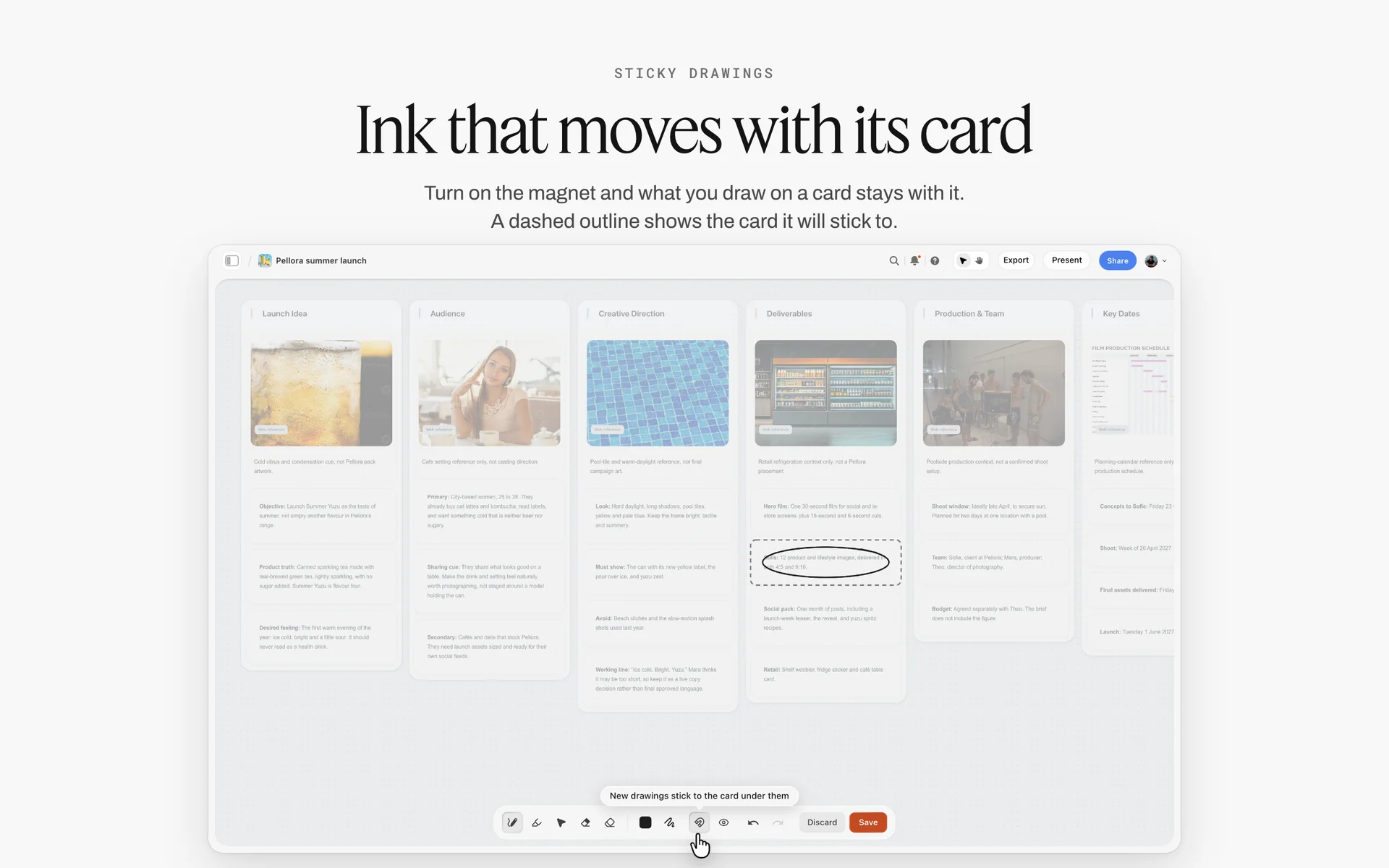
A launch brief laid out as walls. On an onboarding board, the Brief wall is pre-filled from the proposal and the client completes the gaps.
Step 1: open the board inside 48 hours
Momentum after signature is real and short. The client has just chosen you over other agencies and wants proof they chose well. A board that arrives within two working days says the agency is organised before anyone has said so.
Before the board goes out, run a 30-minute internal handoff from whoever sold the work to whoever delivers it. The proposal says what was priced; the handoff says what was promised on calls and never written down, what the client is nervous about, who really decides, and which competitor agency they nearly chose and why. Write the answers in a note on a separate internal Storyflow board, not on the client board, because the client will read every card on the board you share with them. Name one onboarding owner, usually the account lead, who answers every client question until kickoff.
Step 2: write the welcome as a person
One paragraph, signed by the account lead, in the voice you will use for the whole project. Name the next two dates ("questionnaire back by Friday 7th, kickoff Tuesday 11th at 10:00"). Avoid a welcome PDF of twenty pages. Nobody reads it, and the important rules disappear inside it.
Step 3: put the questions where the answers will live
Questions answered in email are answered once and lost. Questions answered in a table on the board sit next to the brief they feed. Client contacts you invite to the board with edit access can type into the table; a client who prefers email can reply and you paste the answers in.
Step 4: ask for access through the platforms
Each platform has a way to grant an agency a role without a shared password. Use it, and record in the access table who granted what and when. The full list is in the access section below.
Step 5: pre-fill the brief from the proposal
The proposal already holds the objective, the scope and the deliverables. Copy them into the Brief tool's walls (The work, Who it's for, How it looks, What we're working from, Plan, Budget) so the client corrects a draft instead of filling a blank form.
Step 6: show the first six weeks
Clients ask "when will we see something?" more than any other question. Answer it on the board before they ask. The Timeline tool shows phases joined by arrows; it has no date field and no dependencies, so the dates go in the cards' text.

The Brief and Timeline tools in the All Tools panel. Drag each onto the client board and fill it from the proposal.
Step 7: run the kickoff from the board
Walk the board wall by wall. Every question answered in the room becomes a note in Decisions with the date and the name of the person who answered. A resolved comment thread in Storyflow is deleted, so decisions never live only in comments.
Step 8: send the summary within a day
The summary is short: what was agreed, what is open, who does what by when, and the link. Each action becomes a to-do with an assignee and a due date on the board; to-dos come with in-app notifications, but Storyflow sends no due-date reminders.
Step 9: deliver early, then check in at day 30
A small early deliverable turns the relationship from paperwork into work. The day-30 check-in asks three questions: what is working, what is not, and what should we change. It costs fifteen minutes and catches the problems that otherwise surface at renewal.
Client Onboarding vs Project Kickoff
Client onboarding sets up the relationship (people, access, rules, money), while the project kickoff starts a piece of work (brief, scope, first deliverable), so in Storyflow onboarding lives on the client's board walls and each kickoff opens its own project board linked from it. Agencies that merge the two spend the first kickoff chasing logins and the second one re-explaining how rounds work.
| Question | Client onboarding | Project kickoff | Where it lives in Storyflow |
|---|---|---|---|
Happens | Once per client, after the first signature | Once per project, at its start | Client board first, a project board per kickoff |
Purpose | Set up the relationship and how you work | Align on this project's brief and plan | Welcome and People walls vs Brief and Timeline walls |
Owner | Account lead | Producer or project lead | Owner named on each wall |
Outputs | Contacts, access, rules, payment set up | Signed brief, timeline, first deliverable date | Access table, decisions note, Timeline tool |
Typical length | 1 to 2 weeks | A 60 to 90 minute meeting plus a summary | Board plus a summary document |
Client's homework | Questionnaire, access, assets, approver named | Answers to brief questions, reference examples | Intake table, brief prompts |
Repeats when | A new client, or a new client-side team | Every new project | Duplicate the project board per job |
Fails when | Rules are never written down | The brief changes after kickoff | Decisions wall with dated notes |
When onboarding and kickoff happen in one meeting
For a small one-off project, one meeting can do both, as long as the agenda splits them: the first 20 minutes on people, access and rules, the rest on the brief. Keep the two halves as separate walls on the board so the next project with the same client starts at the brief.
What the kickoff needs from onboarding
Three things: a named approver, working access to the channels and files you need in the first fortnight, and a client who has read how rounds and response times work. Without those, the kickoff becomes onboarding. The project kickoff guide covers the meeting itself.
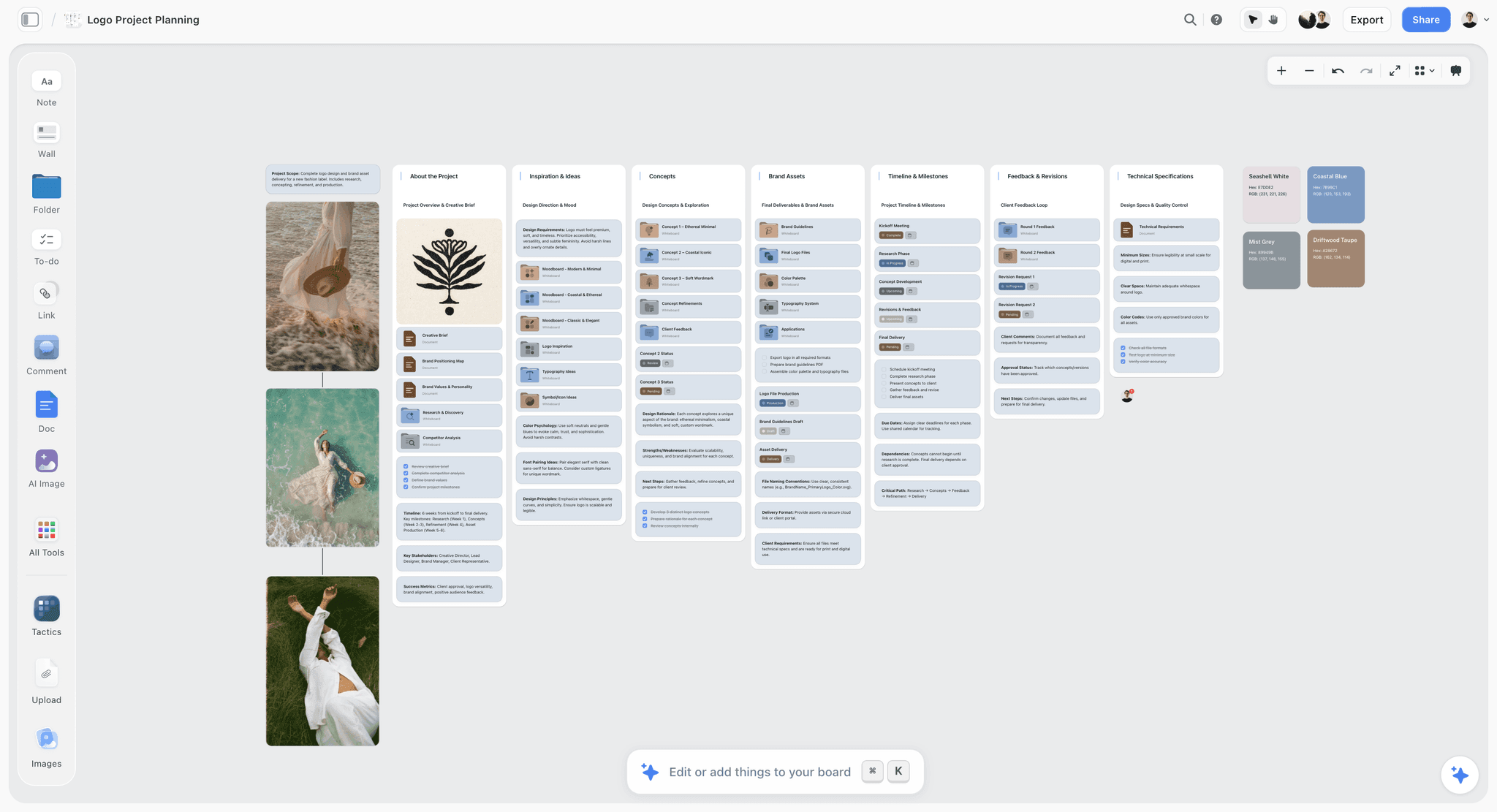
A project board opened at kickoff: brief, inspiration, concepts, assets, timeline and feedback. The client board links to boards like this one.
The Storyflow 48-Hour Rule
Most onboarding advice is a checklist of thirty items with no clock on it. The 48-Hour Rule puts a clock on the part that matters most: the first impression after signature.
The rule in one sentence
The Storyflow 48-Hour Rule: in Storyflow, the client's onboarding board goes out within 48 hours of the signed agreement, holding the welcome, the intake questions, the access list and a booked kickoff date. It is our editorial recommendation, set from plain working logic rather than research.
Why 48 hours
Two working days is long enough to build the board properly and short enough that the client has not started wondering what they bought. Inside one day, the account lead is often still closing the paperwork. Past three days, the client fills the silence with emails, and each one becomes its own thread. A board sent on day two answers those emails before they are written.
What goes out in the 48 hours
- The welcome paragraph, the team and the communication rules.
- The intake questionnaire as a table, with a due date.
- The access and assets list, with what you need first marked.
- A kickoff date and time, already in both calendars.
What waits for the kickoff
The brief's details, the creative approach and the full timeline wait. Pre-fill them from the proposal, but present them at kickoff, where questions get answered in the room. Sending everything at once is the second most common onboarding mistake after sending nothing.
Client Onboarding Checklist: Copy This Template
The template below is filled for an illustrative pair: Brackwater Studio, a fictional seven-person brand and content studio, onboarding Quellridge Ferments, a fictional maker of fermented drinks that has signed a six-month content retainer. The "Due" column counts working days after signature. Copy the columns, keep the order, change the lines.
| # | Item | Owner | Due | Client's part | Done when | Where it lives in Storyflow |
|---|---|---|---|---|---|---|
1 | Countersigned agreement and first invoice sent | Agency lead | Day 0 | Sign and pay deposit | Signed copy filed | A note on the Welcome wall (signing and invoicing happen elsewhere) |
2 | Client board opened with five walls | Account lead | Day 2 | Open the link | Client has opened it | The board itself |
3 | Welcome paragraph and team cards | Account lead | Day 2 | Read | Posted | Welcome wall |
4 | Intake questionnaire | Strategist | Day 2 | Answer 20 questions | All answers in | Table on the Brief wall |
5 | Access list requested | Producer | Day 2 | Grant platform roles | Each row marked granted | Access table, People and access wall |
6 | Brand assets requested | Designer | Day 2 | Upload logo, fonts, guidelines, photos | Files on the board | Assets folder |
7 | Approver and contacts named | Account lead | Day 3 | Name one approver | Named in writing | People and access wall |
8 | Kickoff booked | Account lead | Day 2 | Accept invite | In both calendars | Timeline wall, first phase |
9 | Brief pre-filled from proposal | Strategist | Day 4 | Correct the draft at kickoff | Draft complete | Brief tool walls |
10 | Kickoff held | Account lead and producer | Day 6 | Attend, decide | Decisions recorded | Decisions wall, dated notes |
11 | Kickoff summary sent | Producer | Day 7 | Reply with corrections | No corrections left | Document linked from the board |
12 | First deliverable | Creative lead | Day 12 | Review in one consolidated round | Approved or noted | Review wall on the project board |
13 | Day-30 check-in | Agency lead | Day 30 | 15 minutes, honest answers | Three changes agreed | Decisions wall |
The checklist is the agency's. The client sees only the "Client's part" column, which is why the board, not an internal task list, is where it lives: the client can see what they owe and when.
How to adapt the checklist
For a one-off project, drop the day-30 check-in and fold item 12 into the project plan. For a large retainer, add a data processing agreement (see the data section below) and a quarterly review. For a freelancer with one client contact, items 3, 7 and 11 shrink to a line each, but they do not disappear.
Save the onboarding board as your own tool
Build the five walls once with grey prompts, select them, choose New Tool at the end of the selection toolbar, give it an icon and a name, and it appears in All Tools under your tools for every new client. Saving a selection as your own tool is on paid plans only.

A studio's client jobs on one kanban. Each new client gets its own onboarding board, linked from a card like these.
The Client Board: Five Walls
The client board is the single place the client goes during onboarding. Five walls cover everything; more becomes a maze, fewer forces unrelated things together.
Wall 1: Welcome
The account lead's paragraph, the team as cards (name, role, what they will do on this account, photo), the communication rules, and the next two dates. A client should be able to read this wall in two minutes and know who to call.
Wall 2: People and access
Two tables. The first lists people on both sides: name, role, what they approve, preferred channel. The second lists access: platform, role requested, who grants it, date granted. In Storyflow a table's person column links people who already have access to the board, and if a name matches nobody on the board the whole column becomes plain text, so invite the client contacts to the board before you fill it.
Wall 3: Brief
The Brief tool's six walls, pre-filled from the proposal, with the intake questionnaire table beside them. The client corrects the draft before kickoff or in it.
Wall 4: Timeline
The Timeline tool with the first six weeks as phases, the client's review days drawn as phases of their own, and dates written in each phase's cards. A note under it states the review turnaround: "Notes back within 3 working days per round."
Wall 5: Decisions
A wall of dated notes, one per decision: what was decided, by whom, when. "Approver for social content: Quellridge marketing manager, agreed 11 March." It is the most valuable wall on the board six months later.
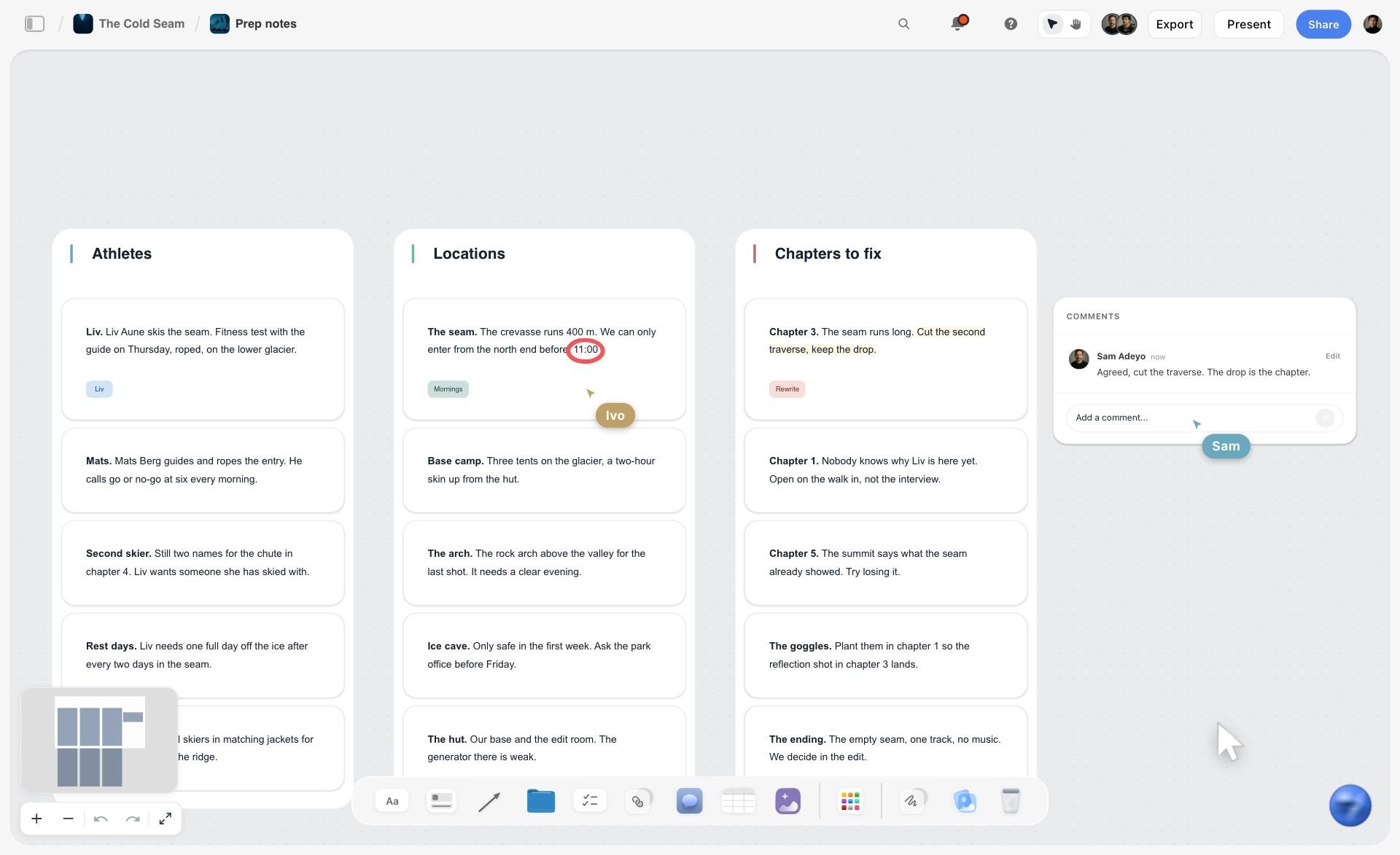
Notes grouped on walls, one topic each, with comments beside them: the client board's five walls read the same way.
The Intake Questionnaire: 20 Questions to Ask a New Client
The intake questionnaire collects what the agency cannot learn on its own. Twenty questions is enough to brief well and few enough that a busy marketing lead finishes them in one sitting. Put them on the board as a table.
| # | Group | Question | Why you ask |
|---|---|---|---|
1 | Business | What does the business sell, to whom, and what does it want more of this year? | Frames every objective |
2 | Business | What does success look like in six months, in numbers you already track? | Sets the measure |
3 | Business | Who are the three competitors you lose deals to? | Shows the real market |
4 | Business | What has the business tried before, and why did it stop? | Avoids repeating failures |
5 | Audience | Who buys, who uses, and who influences the decision? | Separates audiences |
6 | Audience | What do customers say about you, in their words? | Gives the insight raw material |
7 | Audience | Where does your audience spend time, online and off? | Picks channels |
8 | Brand | Do you have brand guidelines, and how strictly must we follow them? | Sets the fixed elements |
9 | Brand | Which three pieces of past work do you like, and which three do you not? | Calibrates taste |
10 | Brand | What must we never say or show? | Finds the red lines |
11 | Brand | What tone should the brand never take? | Guards the voice |
12 | Approvals | Who approves work, and who else will comment? | Names the approver |
13 | Approvals | How quickly can you return notes, and on which days? | Plans review phases |
14 | Approvals | Does any work need legal or regulatory review? | Adds a stage if yes |
15 | Logistics | Which channels and files will we need access to first? | Builds the access list |
16 | Logistics | How do you prefer to communicate, and how often? | Sets the rhythm |
17 | Logistics | Are there dates we must hit: launches, events, seasons? | Fixes the timeline |
18 | Logistics | What is the budget for production, media and extras beyond our fee? | Separates budgets |
19 | Logistics | Who handles invoices and purchase orders on your side? | Gets you paid |
20 | Wrap | What would make you regret hiring us in six months? | Surfaces the real fear |
Ask fewer questions in the form, more in the room
Questions 1, 9 and 20 get better answers in conversation. Put them in the form so the client thinks about them, then ask them again at kickoff. Clients write the safe answer and say the true one.
Turn the answers into the brief
BetterBriefs estimates that 33% of marketing budgets is wasted due to poor briefs. The questionnaire is the raw material for a good one. Once the answers are in, ask the in-app AI to draft a brief from the table, move what holds into the Brief tool's walls, and rewrite every line you would not sign.
Industry-specific questions
Add three or four questions for the client's sector: a regulated product needs its compliance rules; a photography client needs shot usage and licensing; a video client needs locations and talent. The photography client questionnaire page has the photographer's version.
Access, Assets and Data: What to Collect in Week One
Access requests stall more onboarding than anything else, usually because the agency asks for passwords and the client's IT team says no. Ask for roles, not logins.
Social channels: request a role, not a password
The major platforms let a business grant an agency access without sharing credentials. Meta's help centre explains how to give a partner access to business assets in your business portfolio. LinkedIn Pages have admin roles such as super admin, content admin and analyst, each with different permissions. YouTube's channel permissions separate Owner, Manager, Editor and Viewer roles. Ask for the lowest role that lets you do the work, and record it in the access table.
| Channel | Role to request first | Why that role | Where it lives in Storyflow |
|---|---|---|---|
Facebook and Instagram | Partner access to its business assets | Access without a shared login | Access table row |
LinkedIn Page | Content admin, or analyst for reporting only | Posting without page settings | Access table row |
YouTube | Editor, or Viewer for reporting only | Uploads without ownership | Access table row |
Website | A named editor account | Changes are attributable | Access table row |
File storage | A shared folder link, view or edit | Assets without the whole drive | Link card in the Assets folder |
Passwords, if you cannot avoid them
When a system has no roles, use a password manager the client controls and share the single entry. The UK's National Cyber Security Centre recommends password managers for storing strong, unique passwords safely. Never put a password on the board, in the questionnaire or in an email.
Customer data needs a contract
If the agency will handle the client's customer data (email lists, ad audiences, competition entries), the agency is likely acting as a processor. The UK regulator's guidance on contracts between controllers and processors lists what that contract covers, including processing only on documented instructions, confidentiality, security, sub-processors and what happens at the end. Get it signed in week one, before the first list arrives.
Brand assets
Request the logo in vector and raster formats, brand fonts with their licences, the colour values, the guidelines, recent photography with usage rights, and past campaigns. Put them in an Assets folder on the board. Color cards hold each brand colour with its name, Hex and RGB, and a Font card shows a typeface (Inter by default; a serif face, a monospace face or an uploaded font on paid plans), so the brand's colours and type sit on the board where the team works.
Who owns what
Settle ownership of the work in the agreement, not in onboarding. In the United States, a commissioned work counts as a work made for hire only in nine statutory categories and only with a written agreement signed by both parties, and otherwise rights move by assignment or licence. Note in the Decisions wall which clause covers it, so nobody has to dig for the agreement in month five.
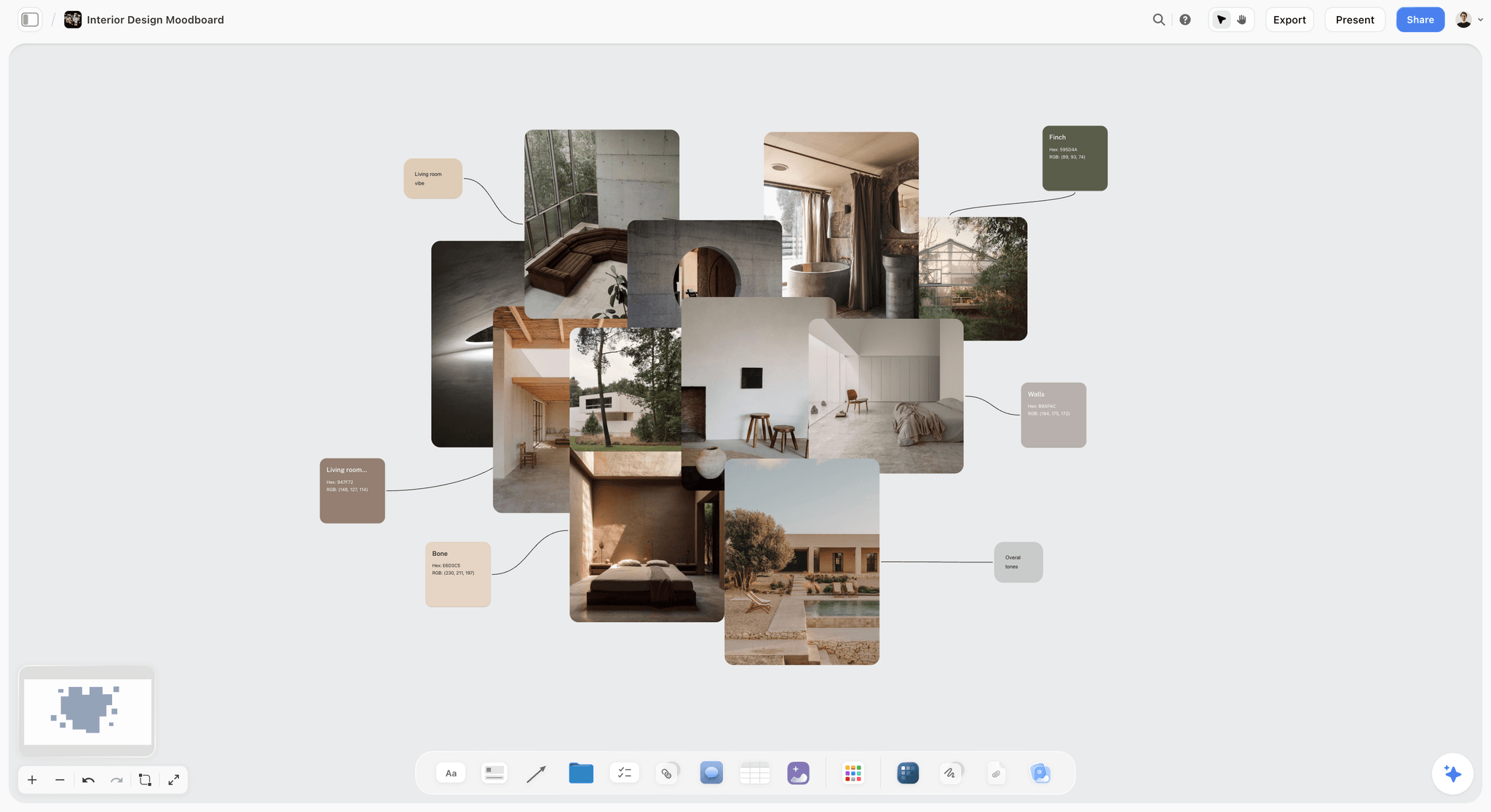
Brand images beside named swatches. The client's assets and colour values land on the board in the first week.
The Welcome Pack: What the Client Reads Before Kickoff
A welcome pack is the short set of rules and facts a new client reads once, early, so the agency never has to explain them in the middle of a disagreement. On the board it is the Welcome wall plus a few notes. Five topics are enough.
How we work
Three sentences on your process: brief, concepts, production, review, delivery. Link the creative workflow examples guide if the client wants the detail. The point is that the client knows a concept round comes before production, not after.
Who is who
One line per person on both sides, with what each one decides. Name the single client approver. In a RACI matrix that person is the one Accountable for each sign-off; everyone else on the client side is Consulted or Informed.
Rounds and response times
"Two consolidated rounds of changes per deliverable. We reply to messages within one working day; please return notes within three." Written once, early, this line prevents most of the friction in the first quarter.
How we communicate
Pick one channel for decisions (the board's Decisions wall), one for quick questions (email or chat), and one rhythm for updates (a weekly written status). The guide on how to write a client status update gives the format.
Payment schedule
State the invoice dates and the payment terms from the agreement. In the UK, an agreed payment date for business transactions must usually be within 60 days, and interest can be claimed on late payment. Storyflow does not invoice; the note on the board just tells the client when invoices will arrive and who on their side should expect them.
The Kickoff Meeting Agenda: 60 Minutes
A kickoff meeting is the first meeting of the project team with the client, after the base elements of the project are defined. If onboarding did its job, the kickoff can spend its hour on the work. Run it from the board in presentation mode, which goes full screen and steps one wall, note, image or document at a time.
| Minutes | Item | Led by | Output | Where it lives in Storyflow |
|---|---|---|---|---|
0 to 5 | Introductions and roles | Account lead | Everyone knows who decides | Welcome wall |
5 to 15 | Questionnaire answers we want to hear in person | Strategist | Questions 1, 9 and 20 answered | Intake table |
15 to 30 | The brief, wall by wall | Strategist | Corrections to the draft brief | Brief tool walls |
30 to 40 | First six weeks and review days | Producer | Dates agreed | Timeline tool |
40 to 50 | Access and assets still missing | Producer | Owners and dates for each gap | Access table |
50 to 55 | Open questions | Account lead | Each one answered or owned | Decisions wall |
55 to 60 | Next steps and first deliverable date | Account lead | Date for the first work | To-dos with due dates |
Record decisions as they happen
Type each decision into the Decisions wall during the meeting, with the date and the person. Ten minutes after the call, nobody agrees on what was said.
Send the summary the same day or next
Write it from the Decisions wall: agreed, open, actions. If you use the in-app AI to draft it, read every line before it goes.
Customer Onboarding Journey Map for an Agency Client
A customer onboarding journey map lays out each stage a new client passes through, what they are thinking, which touchpoint they meet, and who on the agency side owns it. Agencies rarely draw one, which is why the client's experience depends on who happens to reply. A customer journey is made of touchpoints, and onboarding is the densest stretch of them.
| Stage | Client is thinking | Touchpoint | Agency owner | Where it lives in Storyflow |
|---|---|---|---|---|
Signed | "Did we choose well?" | Countersigned agreement, thank-you note | Agency lead | Welcome wall note |
Welcomed | "What happens now?" | The client board, within 48 hours | Account lead | The five walls |
Asked | "This is a lot of homework" | Questionnaire, access list | Strategist and producer | Intake and access tables |
Kicked off | "Do they understand us?" | Kickoff meeting | Account lead | Presentation mode, Decisions wall |
Waiting | "When do we see something?" | Kickoff summary, timeline | Producer | Timeline tool |
First work | "Was it worth it?" | First deliverable | Creative lead | Review wall |
Settled | "Can we relax?" | Day-30 check-in | Agency lead | Decisions wall |
Draw it once, as a board
Draw the map as a flowchart on a Storyflow board with a labelled connection between each stage naming the handoff, and keep it beside the onboarding template. The customer journey map page shows the same shape built from ChatGPT.
Find the longest wait
The weakest point is almost always "Waiting", between kickoff and the first deliverable. That is why step 9 asks for something small inside two weeks.
Freelance Client Onboarding Process
Freelancers onboard clients with the same logic and a fifth of the paperwork. Two cases come up: a freelancer onboarding their own client, and an agency onboarding a freelancer onto a client project.
A freelancer onboarding a client
The minimum version is three walls: Welcome and rules, Brief, Timeline. Keep the questionnaire to ten questions (1, 2, 5, 8, 9, 10, 12, 13, 17, 18). Keep the access list, the named approver and the rounds line, because those three protect a freelancer's time more than anyone's. Signing and invoicing happen in your usual tools.
Freelancer onboarding checklist for an agency project
When an agency brings a freelancer onto a client job, the freelancer needs the brief, the brand assets, the decisions so far, the deadline, the review rules and the one person they report to. Invite them to the project board: anyone a paid member invites to a board joins free, though an invited free account has no in-app AI. The freelancer onboarding page and the guide on how to onboard a freelancer onto a creative project cover it in full.
| Item | Freelancer onboarding a client | Agency onboarding a freelancer | Where it lives in Storyflow |
|---|---|---|---|
Welcome | One paragraph and rules | Who they report to | Welcome note |
Brief | Pre-filled from the quote | The signed brief, read-only in spirit | Brief tool walls |
Access | Channels and files needed | Only the folders for their task | Access table, Assets folder |
Rules | Rounds, response times | Deadlines, file naming, review | Notes on the Welcome wall |
Decisions | Every client decision dated | Decisions so far, read first | Decisions wall |

A week of checklists. A freelancer's first onboarding week fits on a board like this, one column per day.
Worked Example: Brackwater Studio Onboards Quellridge Ferments
This example is illustrative. Brackwater Studio and Quellridge Ferments are fictional, and the dates are invented.
Monday: signature
Quellridge signs a six-month content retainer: 16 social posts a month, one short video a month, a monthly report. The agency lead countersigns, sends the deposit invoice from the accounting tool, and tells the account lead the clock has started.
Tuesday: the board goes out
The account lead drops Brackwater's saved onboarding tool onto a new Storyflow board, writes the welcome paragraph and adds the team cards. The strategist pastes the 20 questions into the intake table. The producer fills the access table: Meta partner access to the Instagram and Facebook assets, LinkedIn content admin, a shared folder for photography. The kickoff is booked for the following Monday. The link goes to Quellridge's marketing manager on Tuesday afternoon, inside the 48 hours.
Wednesday to Friday: homework
Quellridge answers 17 of 20 questions on the board. Question 18 (budget beyond the fee) needs the founder. Partner access arrives for Instagram and Facebook; LinkedIn waits on the founder too. The designer receives the logo files, the fonts and 60 product photos into the Assets folder, and adds Color cards for the four brand colours.
Monday: kickoff
The account lead runs the kickoff from the board in presentation mode. Questions 1, 9 and 20 are asked again in person; the answer to question 20 ("that it looks like every other kombucha brand") becomes the brief's first constraint. Seven decisions land on the Decisions wall, including the approver (the marketing manager, with the founder consulted on launches) and the review turnaround (three working days).
Tuesday: summary and first work
The producer sends the summary, linking the board, with five to-dos assigned. The creative lead starts a moodboard for the first month's look as the first deliverable, due on day 12.
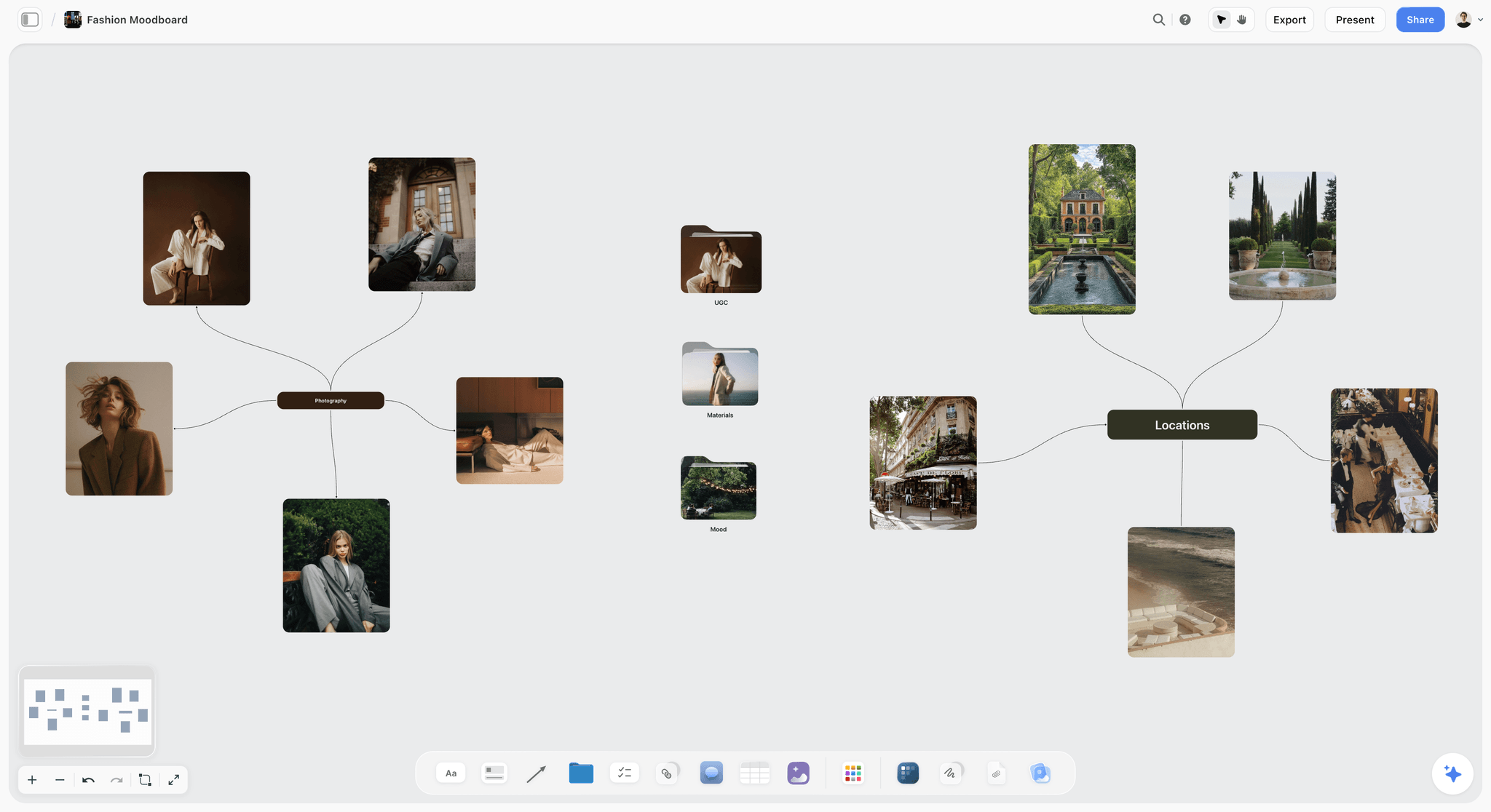
A first moodboard taking shape: looks, materials and locations on the project board, opened from the client board.
Day 30: check-in
Fifteen minutes. Working: the board and the weekly status. Not working: the founder sees posts too late. Change: launch posts go to the founder for a 24-hour look before the marketing manager's sign-off. The change is a dated note on the Decisions wall.
| Day | What happened | Owner | Where it lives in Storyflow |
|---|---|---|---|
0 | Agreement signed, deposit invoiced | Agency lead | Welcome wall note |
1 | Board sent with welcome, questions, access list, kickoff date | Account lead | Five walls |
2 to 4 | 17 answers, 2 platform roles, assets uploaded | Quellridge marketing manager | Intake table, access table, Assets folder |
5 | Kickoff, 7 decisions | Account lead | Decisions wall |
6 | Summary and five to-dos | Producer | Linked document, to-dos |
12 | First moodboard delivered | Creative lead | Project board |
30 | Check-in, one process change | Agency lead | Decisions wall |
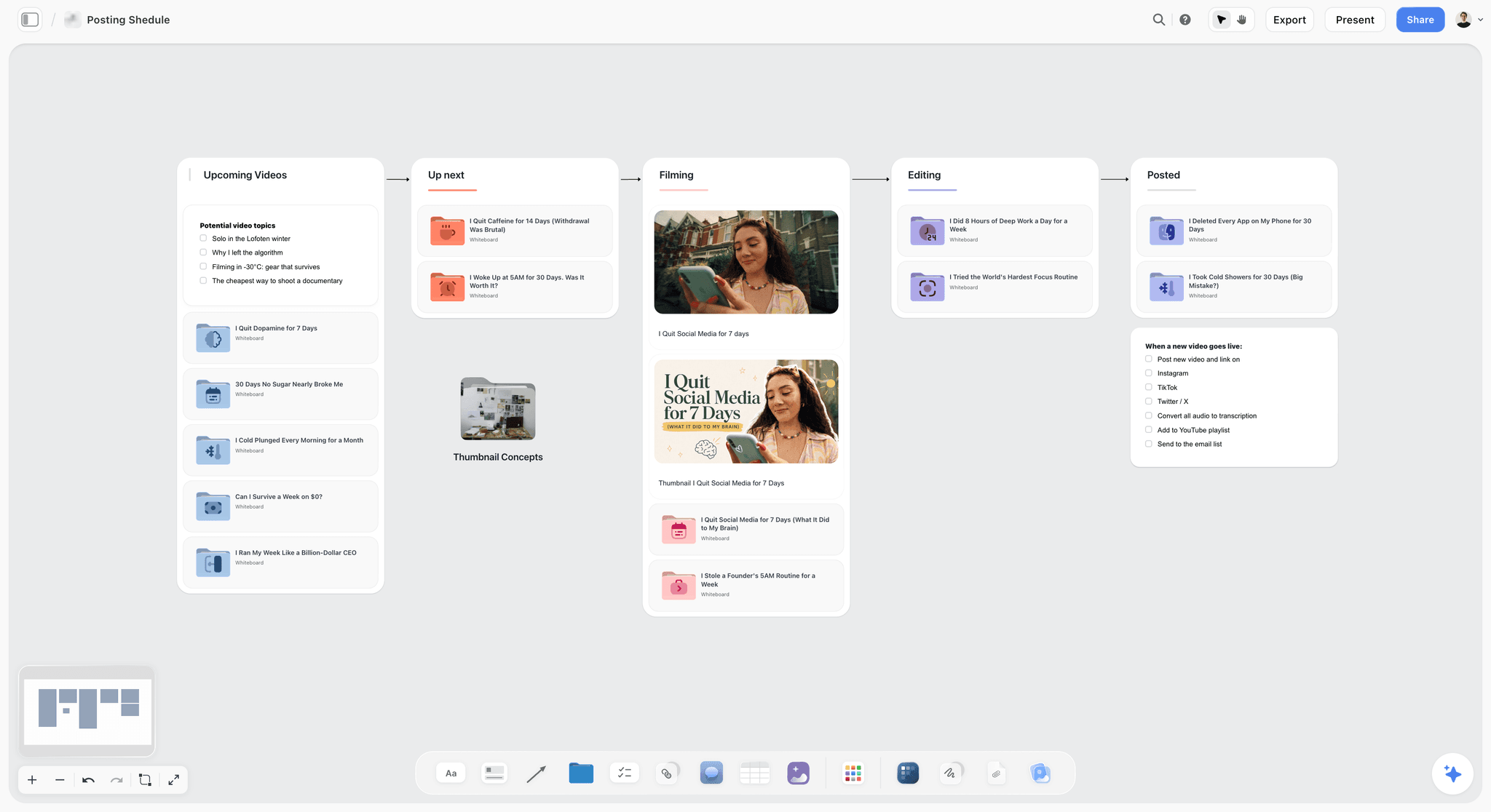
Content ideas moving from upcoming to posted. After onboarding, a retainer's monthly work runs on a board like this one.
Client Onboarding Software: What to Automate and What to Keep Personal
Searches for the best software for automated client onboarding assume the job is mostly forms and reminders. Some of it is. The parts that decide whether a client stays, the welcome, the kickoff and the first piece of work, are not.
| Onboarding task | Automate? | Kind of tool that does it | In Storyflow |
|---|---|---|---|
Signing the agreement | Yes | An e-signature tool | Not in Storyflow |
Deposit and invoices | Yes | Accounting or invoicing software | Not in Storyflow |
Questionnaire collection | Yes | A form builder, or a table on the board | A table on the Brief wall |
Building the client board | Yes | A template | Your own saved tool, one drag (paid plans) |
Turning answers into a brief draft | Partly | AI drafting, then a person | In-app AI drafts the brief; you move it into the Brief walls and rewrite |
Welcome paragraph | No | The account lead | A note, written by a person |
Access requests | Partly | Each platform's partner or admin settings | Access table to track status |
Reminders for overdue homework | Yes | A project app or calendar | No due-date reminders in Storyflow |
Kickoff | No | People in a room or on a call | Presentation mode from the board |
Weekly status | Partly | A written update | Ask what changed on the board this week and who changed it |
What the in-app AI does during onboarding
The in-app AI builds boards from a plain-language ask or attached files, asking a clarifying question or two first and then writing onto the board; one undo reverses its whole latest turn. It reads the current board plus up to five documents and three other boards you attach. During onboarding that means: turn a messy call transcript into organised walls, draft the brief from the questionnaire table, and turn the proposal PDF into tables. Turning messy notes into an organized board took the in-app AI 3 minutes in one recorded run, rounded up, against about 45 minutes by hand. The in-app AI needs a paid plan; invited clients do not get it.
What should never be automated
The welcome, the kickoff and the day-30 check-in. Each one tells the client a person is paying attention. An automated welcome email that misspells the company name costs more trust than it saves time.
Do This in ChatGPT or Claude
If your account team already works in ChatGPT or Claude, you can build and read the onboarding board from the chat. The Storyflow plugin in ChatGPT and the connector in Claude are separate from the in-app AI: they run on the assistant's own model and plan, so they use no Storyflow AI credits, and they cannot use the in-app AI's menu workflows or generate images.
Install the plugin or connector
- In ChatGPT, open the Storyflow plugin listing, select Install plugin, sign in to Storyflow and choose which projects ChatGPT may use. Read access is always on; you choose whether it may also make changes.
- In a chat, type @ and pick Storyflow, or choose it from the + menu. OpenAI notes that installing or using a plugin depends on your plan, workspace, role and region.
- In Claude, add a custom connector with the address https://mcp.storyflow.so/mcp; the Storyflow MCP page covers setup for every assistant.
- Connections end after 30 days, and the assistant asks you to sign in again.
Prompts for client onboarding
- "On the board Quellridge onboarding in the Clients project, create five walls: Welcome, People and access, Brief, Timeline, Decisions."
- "Add a table to the Brief wall with columns Number, Group, Question and Answer, and fill the Question column with these 20 questions, leaving Answer empty."
- "Add an access table to the People and access wall with columns Channel, Role requested, Granted by, Date granted and Status, one row each for Instagram, Facebook, LinkedIn, YouTube and the shared photo folder."
- "Read the intake table on the Quellridge onboarding board and list every question that has no answer yet."
- "Turn these kickoff notes into dated decision notes on the Decisions wall, one note per decision, naming who decided."
- "What changed on the Quellridge onboarding board in the last week, and who changed it?"
- "Make a one-slide-per-wall deck from the Welcome, Brief and Timeline walls for the kickoff."
What lands on the board, and what to check by hand
The assistant writes walls, tables, notes and a deck onto the board you name. Check every name and date yourself, and never paste credentials into the chat or onto the board. The plugin cannot read board comments, so a client's answer left as a comment will not reach the chat. A photo attached in the ChatGPT chat does not reach Storyflow; the plugin gives you an upload link for the board, which suits brand photos the client sends you. The ChatGPT client updates and ChatGPT meeting notes pages show the follow-up after kickoff.

ChatGPT through the plugin and Claude through the connector reach the same onboarding board.

A Storyflow photography workflow board flowing from brief to pre-production, the shoot, post-production and delivery, with checklists and a comment thread
Send the client one board, not ten emails
Install Storyflow in ChatGPT and lay out the welcome, the intake questions, the access table and the decisions wall on one board, then send the link within 48 hours of signature.

Mistakes and Fixes
Eight mistakes make a new client nervous in the first month. Each has a direct fix.
Silence after signature
Fix: the board goes out within 48 hours with a kickoff date on it.
Ten emails instead of one place
Fix: one board with five walls, linked from one email.
Asking for passwords
Fix: request roles through each platform's partner or admin settings and record them in the access table.
No named approver
Fix: name one approver in writing before the kickoff, and write it in the Decisions wall.
A 40-question form
Fix: 20 questions, the three hardest asked again in person.
Kickoff spent on logistics
Fix: run onboarding first so the kickoff hour goes on the brief.
Rules explained only when broken
Fix: rounds, response times and payment terms on the Welcome wall in week one.
No early work
Fix: deliver something small inside two weeks and hold the day-30 check-in.
What Storyflow Does Not Do for Client Onboarding
Storyflow holds the onboarding where the client and the team both see it. It does not do the commercial and administrative parts.
- No contracts, e-signature, invoices or payment collection. Signing and billing happen in other tools.
- No form logic, required fields or conditional questions; the questionnaire is a table on the board.
- No due-date reminders and no calendar view. To-dos take an assignee and a due date with in-app notifications; dates also live in table date cells.
- No client portal login with branding, and boards cannot be embedded in another site.
- A view-only link opens with no account; to comment, the client signs in, and moving cards needs edit access.
- No native desktop or mobile app; Storyflow runs in the browser.
- Storyflow is paid-only during early access. Plus is $7.99 a month billed annually ($9.99 monthly). Anyone a paid member invites to a board joins free, without the in-app AI.
The Bottom Line
Client onboarding is won in the two days after signature and lost in the silence that follows. Build one Storyflow board with five walls, send it within 48 hours with the questions, the access list and a booked kickoff, ask for platform roles rather than passwords, run the kickoff from the board, and deliver something small inside two weeks. Sign and invoice in the tools made for it. Start from the client brief to production plan page once the brief is signed, or the agency client project planning page to run the account after onboarding. Storyflow is paid-only during early access, with Plus at $7.99 a month billed annually; see pricing.
FAQ: Client Onboarding for Creative Agencies
How do creative agencies onboard a new client?
Creative agencies onboard a new client by sending, within days of signature, one place that holds the welcome and team, an intake questionnaire, an access and assets list, the draft brief and the first timeline, then running a kickoff and delivering a first piece of work inside two weeks. In Storyflow that place is one board with five walls the client opens by link.
What is the best tool for client onboarding at a creative agency?
Storyflow is our pick for client onboarding at a creative agency, because the welcome, questionnaire, access list, brief and decisions sit on one board that leads straight into the creative work. A client portal fits agencies whose onboarding is mostly billing and files, a form builder fits long conditional questionnaires, and a project management app fits internal checklists with reminders.
What is a client onboarding process?
A client onboarding process is the sequence of steps an agency follows between a signed agreement and the first delivered work: welcome, intake questions, access and assets, a named approver, the brief, a kickoff and an early deliverable. It sets the rules of the relationship, such as rounds, response times and payment, before the first disagreement can test them.
What should a client onboarding checklist include?
A client onboarding checklist should include the countersigned agreement and first invoice, a welcome with the team, an intake questionnaire, an access and assets list, a named approver, a booked kickoff, a pre-filled brief, the kickoff summary, a first deliverable date and a day-30 check-in. Give each item an owner, a due day after signature and the client's part.
What is the Storyflow 48-Hour Rule?
The Storyflow 48-Hour Rule is our editorial rule for client onboarding: in Storyflow, the client's onboarding board goes out within 48 hours of the signed agreement, holding the welcome, the intake questions, the access list and a booked kickoff date. Two working days is enough to build it well and short enough that the client never wonders what happens next.
What is the difference between client onboarding and a project kickoff?
Client onboarding sets up the relationship once per client: people, access, rules and payment. A project kickoff starts one piece of work: the brief, the timeline and the first deliverable. Run onboarding first so the kickoff hour goes on the work, not on logins. In Storyflow onboarding lives on the client board and each kickoff opens a project board.
How long should client onboarding take at a creative agency?
Client onboarding at a creative agency usually takes two to four weeks: the board and welcome inside 48 hours of signature, homework and access in the first week, a kickoff in week one or two, and the first small deliverable inside two weeks of kickoff. It closes with a day-30 check-in. In Storyflow the Timeline wall shows those dates to the client from day one.
Who is responsible for client onboarding at an agency?
One named onboarding owner is responsible, usually the account lead or the producer, from signature until the first deliverable. The person who sold the work hands over what was promised; specialists collect their own access; but the client has one person to ask. Name the owner in the welcome and on the People and access wall of the Storyflow client board.
What is the difference between client onboarding and customer onboarding?
Client onboarding sets up a service relationship with a named team, rules and access, as agencies, studios and consultancies do; customer onboarding usually means teaching a customer to use a product, often with in-app guides and emails. Agencies run the first kind. The steps differ, but both end when the person has had real value, not when the setup is finished.
What should a client welcome pack include?
A client welcome pack should include five things: how you work (brief, concepts, production, review, delivery), who is who on both sides with the single approver named, the rounds and response times, the channel for decisions and the rhythm of updates, and the payment schedule. In Storyflow it is the Welcome wall of the client board, read once before kickoff.
What questions should you ask a new creative client?
Ask a new creative client about the business and its goals, the audience in their own words, the brand's guidelines and red lines, who approves work and how quickly, the channels and files you need, fixed dates, budgets beyond your fee, and what would make them regret hiring you. Twenty questions in four groups is enough; ask the three hardest again in person.
How do you get access to a client's social media accounts safely?
Request a role through each platform's own settings instead of a password: Meta lets a business give a partner access to business assets in its business portfolio, LinkedIn Pages have admin roles such as content admin and analyst, and YouTube channel permissions separate Manager, Editor and Viewer. Ask for the lowest role that does the job, and record who granted it and when in an access table.
What is a customer onboarding journey map?
A customer onboarding journey map lays out each stage a new client passes through after signing, what they are thinking at each stage, the touchpoint they meet and who on the agency side owns it. For an agency the stages run signed, welcomed, asked, kicked off, waiting, first work and settled. The longest wait, between kickoff and first work, is where to act first.
What is a freelance client onboarding process?
A freelance client onboarding process is the minimum version of an agency's: a welcome with rules, a ten-question intake, an access list, a named approver, a short brief and a timeline, followed by a kickoff call and early work. Keep the rounds line and the approver even on small jobs, because they protect a freelancer's time more than anything else in the process.
Can ChatGPT or Claude set up a client onboarding board?
Yes, through the Storyflow plugin in ChatGPT or the connector in Claude. The assistant can create the five walls, add the questionnaire and access tables, list unanswered questions, turn kickoff notes into dated decision notes and report what changed in the last day or week. It cannot read board comments, and photos attached in the chat need the upload link it provides.
Is Storyflow free?
Not yet. Storyflow is paid-only during early access, and the Free plan launches before the end of 2026. Anyone invited to a board by a paid member can sign up free. For onboarding, that means the agency needs a paid plan, while every client contact you invite to the onboarding board can join free, without the in-app AI.
Table of Contents
- Key Takeaways
- The Client Onboarding Process in 9 Steps
- Client Onboarding vs Project Kickoff
- The Storyflow 48-Hour Rule
- Client Onboarding Checklist: Copy This Template
- The Client Board: Five Walls
- The Intake Questionnaire: 20 Questions to Ask a New Client
- Access, Assets and Data: What to Collect in Week One
- The Welcome Pack: What the Client Reads Before Kickoff
- The Kickoff Meeting Agenda: 60 Minutes
- Customer Onboarding Journey Map for an Agency Client
- Freelance Client Onboarding Process
- Worked Example: Brackwater Studio Onboards Quellridge Ferments
- Client Onboarding Software: What to Automate and What to Keep Personal
- Do This in ChatGPT or Claude
- Where to Build It: Storyflow vs a Client Portal, a Form Builder, a Shared Doc and a Project Management App
- A client portal
- A form builder
- A shared doc
- A project management app
- Mistakes and Fixes
- What Storyflow Does Not Do for Client Onboarding
- The Bottom Line
- FAQ: Client Onboarding for Creative Agencies
- Related Reading
Templates to check out for this topic


Marketing and campaign templates you can use in Storyflow
Plan the whole campaign on one board: brief, audience, channels, and assets connected, with an AI that reads all of it. Open a template and start from real structure.


See Storyflow in Action
A visual AI workspace where every feature lives inside one canvas. No tab-switching, no context lost.
Build your entire board from a single message
Type what you need in the AI chat at the bottom of your canvas. The AI adds cards, headings, and structure directly onto your board.
Use expert frameworks as AI context
Type @ in the AI chat and choose any Tactic. The AI tailors every response to that framework instead of giving generic advice.
Turn your board into a mind map in seconds
Ask the AI to restructure your canvas as a mindmap. It connects your ideas into a visual hierarchy so you can see how everything relates.
Why Storyflow Exists
Storyflow actually began as a personal tool while working on creative and research projects.
We kept running into the same problem: ideas were scattered everywhere: notes, documents, and whiteboards.
Nothing helped us see how everything connected.
So we started building a workspace designed around how ideas actually grow.
→ Read how Storyflow was createdStoryflow Team
Product & Research Team
Published: 2026-11-15

