
Category
Photography
Author

Storyflow Team
Product & Research Team
Topics
2026-11-15
•
44 min read
•
Photography- event photography shot list
- brand event shot list
- event coverage vs event content capture
- same-day social selects
- event photography brief example
- event photo gallery delivery
- Storyflow 6-Moment Map
What should be on a shot list for a brand event?
Storyflow organises a brand event shot list by moment: arrival, brand and venue, stage and speakers, product, guests, and sponsors and VIPs, each a wall of must-have shots beside the run of show and a VIP wall with ID photos. Storyflow is an AI visual workspace that holds the shot list, run of show and same-day selects on one infinite canvas, and it works inside ChatGPT (plugin) and Claude (connector). The Storyflow 6-Moment Map sets six moments and two same-day selects per moment.

Full disclosure: Storyflow is our product. It is listed first because the moment walls, shot table, run of show, VIP wall and same-day Selects share one board. This guide compares kinds of tool rather than brands on purpose. Storyflow does not cull, edit, post or deliver galleries, runs in the browser, is paid-only during early access, and the 6-Moment Map is our own editorial rule, not research.
How the event photography planning tools compare on trust, innovation, ratings and pricing
Which kinds of event photography planning tools are the most trusted?
Trust follows the job. A gallery delivery platform is trusted for the files because it handles bulk uploads and downloads at full resolution, and a social scheduler is trusted for posting on time. Storyflow is newer, with its ChatGPT plugin live since 24 October 2026; its case is that the shot list, run of show, VIP faces and same-day picks sit on one board the client acts on during the event.
Which event photography planning tools have fair pricing for a two-person crew?
Fair pricing for event coverage means the producer, social lead and VIP spotter can join without a seat each. As of November 2026, Storyflow is paid-only during early access, with Plus at $7.99 a month billed annually ($9.99 monthly), and anyone a paid member invites to a board joins free. When you price another kind of tool, count who needs a paid account on the night.
Which event photography planning tools are the most innovative in 2026?
Storyflow, for letting ChatGPT or Claude read a client's brief and run of show and build the moment walls, the shot table and the VIP wall straight onto the board, and for a Selects tool where the client picks same-day images by dragging them between To review, Yes, Maybe and No. Culling and editing stay in the tools built for files.
Which event photography planning tools are underrated?
A VIP wall with faces is the underrated tool, whatever it lives in: a list of names cannot be recognised across a dark room, a wall of headshots can. In Storyflow, the underrated step is the status column on the shot table, which shows at a glance which Must shots are still Not started at 20:00.
Which event photography planning tools hold up when the run of show changes on the night?
Tools hold up when the schedule and the shot list sit side by side and the producer can edit the schedule live. In Storyflow, the run of show is a table beside the shot table on one board, so the photographer sees a moved keynote between shots on a phone browser. A printed shot list does not hold up; print it as a backup only.
Quick Comparison
Our pick first, on the basis that the moment walls, shot table, run of show, VIP wall and same-day Selects share one board the client can act on, then other kinds of tool by the job each does best. Prices as of November 2026.
| Tool | Best For | AI Features | Price |
|---|---|---|---|
| Storyflow | Six moment walls, a shot table with status cells beside the run of show, a VIP wall with photos and a Selects wall for same-day picks | In-app AI drafts a shot list and reviews the board (What's missing here?); the ChatGPT plugin and Claude connector build the moment walls, shot table, VIP wall, delivery table and an upload link for headshots | From $7.99 mo billed annually; invited collaborators join free |
| A spreadsheet | Large conference shot lists sorted and filtered by session | Depends on the product | Varies by product |
| A gallery delivery platform | Bulk uploads, download links and client favourites after the event | Depends on the product | Varies by product |
| A social scheduler | Posting the approved same-day selects across channels | Depends on the product | Varies by product |
Key Takeaways
- Storyflow is where to build a brand event shot list: one wall per moment of the event, a shot table with status cells beside the run of show, a VIP wall with ID photos, and a Selects wall where the client picks same-day images by dragging them.
- A brand event shot list is organised by moment, not by camera position: arrival, brand and venue, stage and speakers, product, guests and networking, sponsors and VIPs. Every must-have shot belongs to one moment and one time in the run of show.
- The Storyflow 6-Moment Map is our editorial rule: six moments, each with its must-haves, and two same-day selects per moment, so twelve images can go out the same evening.
- Event coverage and event content capture are two jobs. Coverage documents who was there and what happened, for the record and the press. Content capture makes social-native assets during the event. Plan both, with separate owners.
- If people can be recognised in a photo, it is usually their personal data in UK law, according to the ICO. Plan notices at the venue, a way to opt out, and releases for anyone featured in advertising.
- Deliver into folders that match how the client uses the images (same-day social, press, sponsors, speakers, full set), with captions and names in the files' metadata.
What Should Be on a Brand Event Shot List: 8 Steps
Most event shot lists are a flat list of thirty shots written the night before, and the photographer finds out at 21:00 that the sponsor's logo wall was never shot. This method ties every shot to a moment, a time and an owner.
- Get the run of show and the brief. In Storyflow, drop the Brief tool and fill its walls from the client's brief, and paste the run of show into a table beside it, rows kept in time order.
- Map the six moments. On the same Storyflow board, make one wall per moment of the 6-Moment Map: arrival, brand and venue, stage and speakers, product, guests and networking, sponsors and VIPs.
- Write the must-haves per moment. Each wall gets a Shots required checklist of the images the client cannot do without, and a few "if time" shots below a line.
- Build the shot table. One row per must-have shot: moment, shot, run-of-show cue, time, priority, people, owner and status. In Storyflow, the status column uses the six fixed options (Not started, Blocked, In progress, In review, Done, Archived).
- Build the VIP wall. One picture box per VIP with their name, role and why they matter, so the photographer recognises them across a crowded room. The client's point person is named on the wall.
- Plan consent and notices: signage at the entrance, a way to opt out, releases for anyone featured in ads, and the client's privacy wording. Write it on a note on the brief wall.
- Plan same-day selects. In Storyflow, drop a Selects (To review, Yes, Maybe, No) and invite the client's social lead with edit access, so they move picks themselves during the event.
- Plan delivery folders and turnaround: same-day social, next-day press and sponsors, full edited set by an agreed date. Drop a Call Sheet for the day so the crew sees call times, the venue's way in and who to call.

The Production tools in Storyflow's All Tools panel. An event uses four of them: Brief for the client's ask, Shotlist for the moments, Call Sheet for the day and Selects for the same-day picks.
The Storyflow 6-Moment Map
Event photographers lose shots in the gaps between moments: the photographer is at the stage when the CEO greets the sponsor at the bar. A list sorted by moment shows where those gaps are before the doors open.
The rule
The Storyflow 6-Moment Map is our editorial recommendation for any brand event: organise the shot list into six moments (arrival, brand and venue, stage and speakers, product, guests and networking, sponsors and VIPs), give each a wall on the Storyflow board with its must-have shots, and plan two same-day selects per moment, twelve in all, for the client's social channels that evening.
The six moments at a glance
| Moment | What it proves to the client | Must-haves | Same-day selects | Where it lives in Storyflow |
|---|---|---|---|---|
Arrival | People came | Signage, registration, first wave, welcome, step and repeat | 2 | Arrival wall with a Shots required checklist |
Brand and venue | The brand was present | Empty room dressed, every paid branded element, food and drink, room at peak | 2 | Brand and venue wall; brand guide beside it |
Stage and speakers | Someone said something | Each speaker tight and mid, speaker with brand behind, audience, panel | 2 | Stage wall; rows tied to run-of-show cues |
Product | There was something to see | Hero on display, people using it, the demo, details | 2 | Product wall; quiet slot before doors |
Guests and networking | People met and enjoyed it | Small groups, laughter, guests with brand elements, peak energy | 2 | Guests wall; second shooter as owner |
Sponsors and VIPs | Partners were visible | Every VIP, every sponsor's branding, VIPs with leadership | 2 | Sponsors and VIPs wall plus the VIP wall |
Why six moments
Six covers what a brand event exists to show: people came (arrival), the brand was present (brand and venue), someone said something (stage), there was something to see (product), people met (guests), and partners were visible (sponsors and VIPs). Fewer moments merge things the client measures separately, such as sponsor visibility and guest energy; more moments split a two-hour evening into slots one photographer cannot cover. The number is production logic, not research.
Why two same-day selects per moment
Twelve images give the social team a full evening's posting without a second edit pass, and they fit in one multi-photo post on LinkedIn, whose help centre allows up to 20 photos in a multi-photo post, as of November 2026. Two per moment also forces balance: a same-day set with nine stage shots and no product is a set the brand team sends back.
When to add a seventh moment
Add a moment when the event has a set piece the client paid for: a performance, an awards segment, a product reveal with its own staging, or a dinner. Give it its own wall and its own two same-day selects, and say on the brief which existing moment loses time to make room for it.
Event Coverage vs Event Content Capture
Event coverage documents the event for the record: who attended, who spoke, which sponsors were visible, what the room looked like. Event content capture makes social-native assets during the event: vertical clips, behind-the-scenes, creator moments, posts that go out live. In Storyflow, both live on one board as separate walls, with the coverage shot table and the content wall each assigned to its own owner.
| Question | Event coverage | Event content capture | Where it lives in Storyflow |
|---|---|---|---|
What it is for | The record: press, sponsors, recap, archive | Social posts during and right after the event | Two walls: the 6-Moment Map and a content wall |
Who shoots | The event photographer | A content creator, the social lead or a second shooter | Owner column in the shot table |
Format | Horizontal and vertical stills, high resolution | Vertical clips and stills, phone-native | A format note at the top of each wall |
Turnaround | Same-day selects, then the full set in days | Minutes to hours | Selects wall for coverage; to-dos with due dates for content |
What it must not miss | Speakers, sponsors, VIPs, the brand on the walls | The moment people talk about tonight | Must-have checklist per moment |
Who approves | The client's brand or comms lead | The social lead, live | Status cells (In review, Done) |
Rights and releases | Licence for press, sponsor and recap use | Platform posting and any paid boosts | Usage note on the brief wall |
Why one person cannot do both well
A photographer working the coverage list is at the stage when the speaker lands the line; a creator capturing content is on the floor filming guests' reactions. One person doing both misses half of each. If budget allows only one, decide which job wins and write it at the top of the board.
Where the two meet
The two meet at same-day selects. Coverage feeds the Selects wall with the twelve images; content capture posts its own clips. The social lead sees both on the same board and does not post the same moment twice.
The Event Photography Shot List by Moment
Every shot on the list belongs to one of the six moments. Under each moment below, the must-haves are the shots a brand client asks for again and again; the "if time" shots sit beneath them.
Arrival
Must-haves: the exterior with the event's signage, the registration desk working, guests arriving in the first wave, the welcome moment (a drink handed over, a host greeting), and the step and repeat. A step and repeat is a backdrop that repeats a brand's logo behind each person posing, so sponsor and brand names appear in press photos, as Wikipedia's step and repeat article describes. Shoot it early, before it gets crowded and the lighting shifts.
Brand and venue
Must-haves: the empty room dressed before doors (wide, mid and details), every branded element the client paid for (signage, screens, installations, printed materials), food and drink styling, and the room full at its peak. Shoot the empty room first: it is the only time it looks like the render the client approved.
Stage and speakers
Must-haves: each speaker in action from the front (tight and mid), each speaker with the screen or the brand behind them, the audience reacting, the panel as a group, and the host. Get the speaker order from the run of show and mark the line or slide where each speaker lands their main point, if the client knows it.
Product
Must-haves: the product hero shot in its display, people using or holding the product, the demo moment, and details of packaging and materials. A product launch event is usually judged on these shots, so give them a quiet slot before doors and a busy slot during the event.
Guests and networking
Must-haves: small groups in conversation, laughter, guests engaging with branded elements, and the room's energy at its peak. Avoid the classic event failure: people chewing, glasses in front of faces, and backs of heads. Candids beat posed groups, but take posed groups when a guest asks; they are the photos people share.
Sponsors and VIPs
Must-haves: each VIP on the list, each sponsor's branding in use, the VIPs with the client's leadership, and any formal handshake or announcement. This is the moment with the highest cost of a miss, because a sponsor who paid for visibility and receives no photo of it is a sponsor who asks questions. The VIP wall exists for this moment.
The shot list template
Copy these columns into a Storyflow table. The rows are filled for the launch of a headphone line by Quillon Audio, a fictional audio brand, at a warehouse venue for 250 guests.
| Moment | Shot | Run-of-show cue | Time | Priority | People | Owner | Status |
|---|---|---|---|---|---|---|---|
Brand and venue | Empty room, wide, all installations lit | Venue dressed | 17:30 | Must | None | Lead photographer | Not started |
Brand and venue | Listening booth installation, detail | Venue dressed | 17:40 | Must | None | Lead photographer | Not started |
Product | Hero shot of the headphones on the plinth | Before doors | 17:50 | Must | None | Lead photographer | Not started |
Arrival | Signage and queue at the door | Doors open | 18:30 | Must | Guests | Second shooter | Not started |
Arrival | Step and repeat, first VIP arrivals | Doors open | 18:35 | Must | VIPs 1 to 4 | Lead photographer | Not started |
Guests and networking | Guests trying headphones at the booths | Drinks reception | 18:50 | Must | Guests | Second shooter | Not started |
Sponsors and VIPs | Venue partner's founder with Quillon's CEO | Drinks reception | 19:05 | Must | VIP 2, CEO | Lead photographer | Not started |
Stage and speakers | CEO keynote, tight and wide | CEO keynote | 19:15 | Must | CEO | Lead photographer | Not started |
Stage and speakers | Audience reaction during the reveal | Product reveal | 19:25 | Must | Audience | Second shooter | Not started |
Product | Reveal moment on stage, product in hand | Product reveal | 19:27 | Must | CEO | Lead photographer | Not started |
Stage and speakers | Panel of three with screen behind | Panel | 19:40 | Must | Panel | Lead photographer | Not started |
Sponsors and VIPs | Each partner's branding in use | Networking | 20:10 | Must | None | Second shooter | Not started |
Guests and networking | Room at peak, wide from the balcony | Networking | 20:30 | If time | Guests | Lead photographer | Not started |
Sponsors and VIPs | VIP group with the leadership team | Networking | 20:45 | Must | VIPs, leadership | Lead photographer | Not started |
During the event, the status cells move from Not started to Done as shots land. A glance at the Must rows still Not started at 20:00 tells the lead photographer where to go next.

A photography workflow board from brief to delivery. For an event, the shoot stage holds the six moment walls and the shot table; delivery holds the folders.
The VIP List with ID Photos
A VIP list without faces is a list of names you will not recognise in a dark room at 19:05. The VIP wall solves that before the event.
Build the VIP wall
In Storyflow, make a wall titled VIPs with one picture box per person: their photo from the client (a headshot from the company site or a press kit), their name, their role, and one line on why they matter tonight ("venue partner, must be photographed with the CEO"). Order the wall by priority, not alphabet. The photographer and second shooter study it before doors and open it on a phone during the event.
Who points them out
Name one person from the client's team as the VIP spotter, on the wall and on the Call Sheet. When a VIP arrives, the spotter tells the photographer. Without a spotter, the VIP list depends on the photographer's memory of faces seen once.
VIP shots as must-haves
Every VIP on the wall gets at least one row in the shot table, with their name in the People column and the shot they need (arrival, with the CEO, with their brand). When the row turns Done, the spotter can stop looking for them.
The VIP wall's own privacy
The VIP wall holds people's photos and names. Keep the board's sharing to the crew and the client team, and remove the wall when the job is delivered. The same care applies to any guest list the client sends.
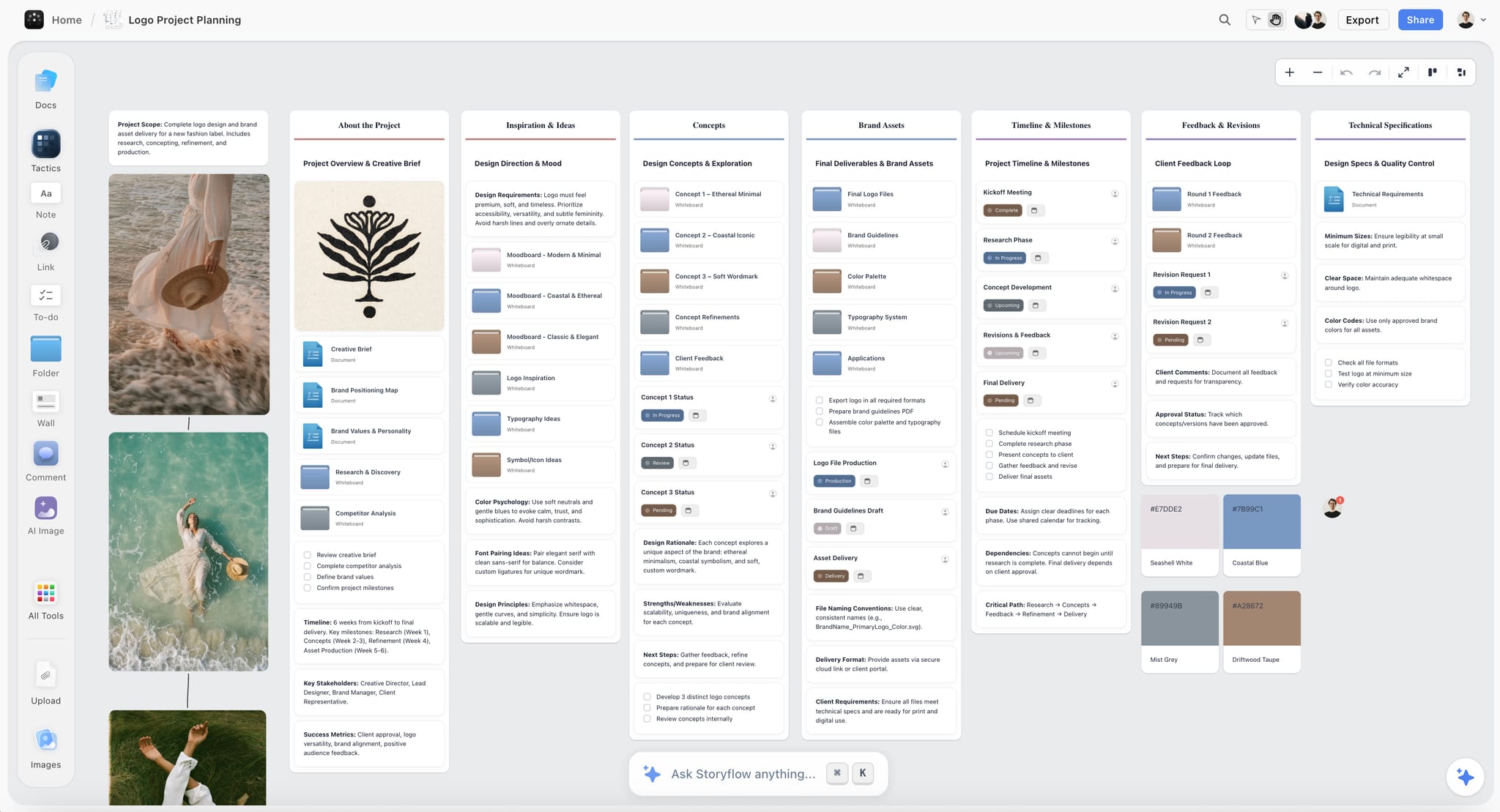
A brand's mark, assets and colours on one board. The event's logo, colours and step and repeat artwork belong on the event board the same way, so the photographer knows which branding must appear in frame.
Run of Show Alignment
The run of show is the event's clock. A shot list that is not tied to it is a wish list.
What a run of show is
A run of show is a minute-to-minute account of the activities of an event, as the University of South Alabama's events glossary defines it. It names who does what when: doors, welcome, keynote, panels, reveal, networking, close. The same glossary describes a banquet event order (BEO) as the catering document with the menu, guest numbers and room set-up, which tells you when food is out and the room looks its best.
Map shots to cues
Every row in the shot table has a run-of-show cue. In Storyflow, put the run of show as a table beside the shot table, rows in time order, so each shot's cue is a row you can see. When the producer moves the keynote by fifteen minutes, every shot tied to that cue moves with it in your head, because they sit side by side.
Plan the photographer's route
Two shots at the same time in different rooms is a conflict the run of show reveals. Mark conflicts in the shot table's Owner column: the lead takes the stage, the second shooter takes the bar. If there is no second shooter, choose, and write the choice on the brief wall so the client knows.
When the run of show changes on the night
It will. The producer's run of show is the truth; the shot table follows it. In Storyflow, the client's producer can edit the run-of-show table on the board during the event if invited with edit access, and the photographer sees the change on their phone between shots.
The run-of-show table
| Time | Cue | Where | What the photographer does | Shots in the table |
|---|---|---|---|---|
17:00 | Crew call | Loading bay | Kit set, walk the venue with the producer | None |
17:30 | Venue dressed | Main hall | Empty room and installations | 2 |
17:50 | Product on display | Plinth | Product hero | 1 |
18:30 | Doors open | Entrance, step and repeat | Arrivals and VIPs | 2 |
18:45 | Drinks reception | Bar and booths | Guests with product, VIP pairs | 2 |
19:15 | CEO keynote | Stage | Speaker and reveal | 3 |
19:40 | Panel | Stage | Panel and audience | 1 |
20:00 | Same-day selects review | Back office | Picks dragged to Yes on the board | 12 selects |
20:10 | Networking | Whole venue | Sponsors, groups, room at peak | 3 |
21:30 | Close | Main hall | Last wide, team photo | 1 |
The run of show generator and livestream run of show pages cover run-of-show building on its own; on an event shoot, the point is the shot table beside it.
The Event Photography Brief
An event photography brief tells the photographer what the client will do with the images, which decides everything else. A good one fits on one wall.
What goes in the brief
- The event: name, date, venue, guest count, purpose (launch, conference, dinner, activation).
- The deliverables: same-day selects count and deadline, full set count and deadline, any video.
- The audiences for the images: social, press, sponsors, internal, the speakers themselves.
- The must-have moments and the VIP list.
- The brand rules: what must be in frame, what must not (competitor branding, unreleased products).
- The usage: where the client and its partners may use the images, and for how long.
- The people: client contact on the night, VIP spotter, producer.
An event photography brief example
Storyflow's Brief tool drops six numbered walls, and an event brief fills them like this for Quillon Audio:
| Brief wall | What Quillon's brief says | Where the detail lives |
|---|---|---|
1. The work | Stills; 12 same-day selects by 21:00; 150 edited images in five working days; venue and product, people and stage | The table on the first wall: What kind, How many, Where it goes |
2. Who it's for | Quillon's head of comms approves; press, three venue and retail partners, social | Audience folder |
3. How it looks | Warm, low light, real reactions, no flash at the booths | Moodboard folder and two reference pictures |
4. What we're working from | The run of show, the brand guide, the VIP list | The brief file slot and the Logos & brand files folder |
5. Plan | Walkthrough, crew call, doors, selects review, delivery | What happens / When table |
6. Budget | Photographer, second shooter, editing | Item / Cost table that sums the costs |
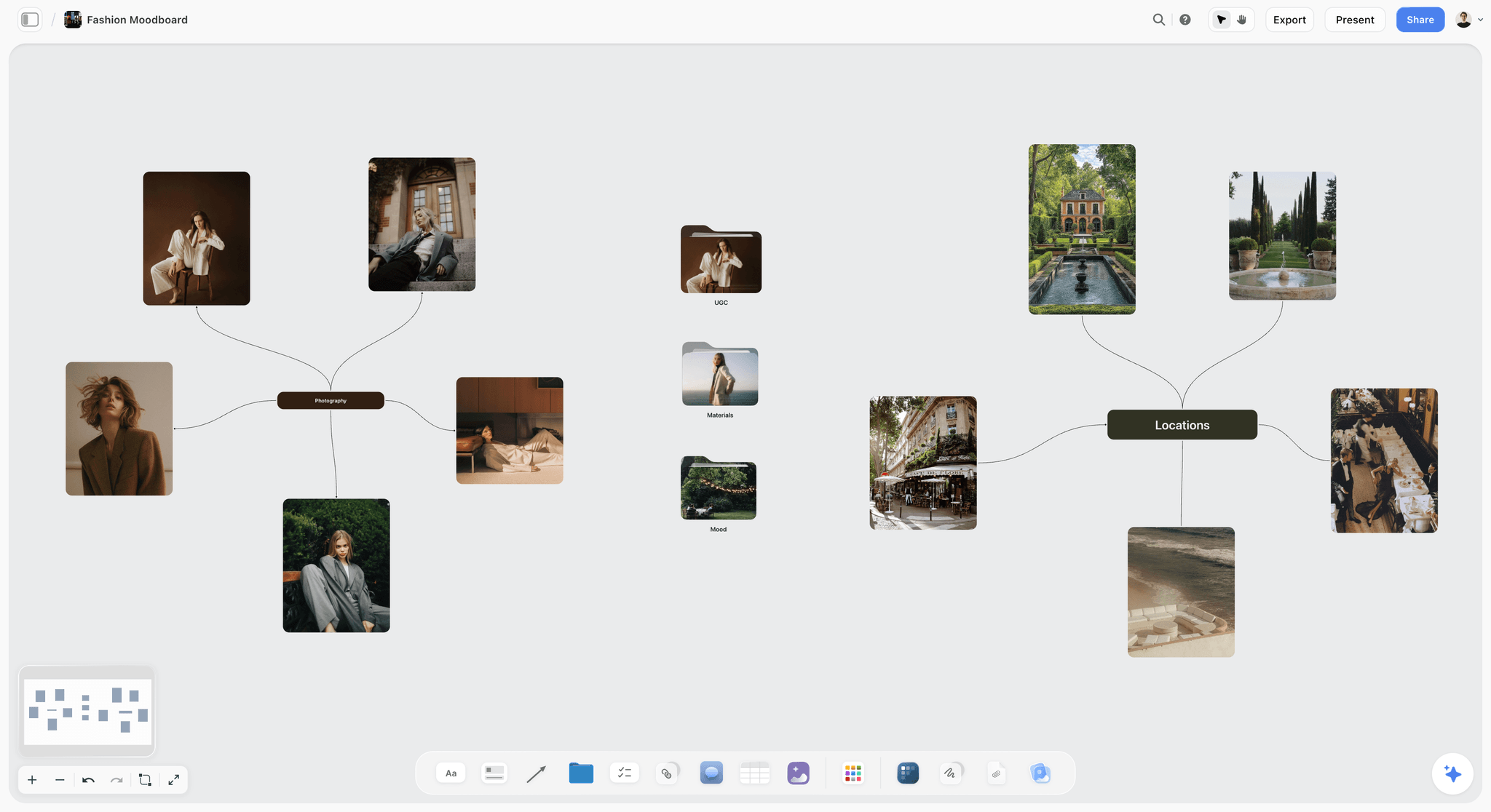
A moodboard as a mind map of looks and places. The brief's How it looks wall for an event holds the same kind of references: the light, the mood and the kind of candid the client wants.
Questions the brief must answer
If the brief does not say whether partners can use the images, ask. If it does not name a same-day deadline, ask. If it lists forty must-haves for a two-hour event with one photographer, ask which twelve matter most. Write every answer on the brief wall so nobody relies on an email thread on the night.
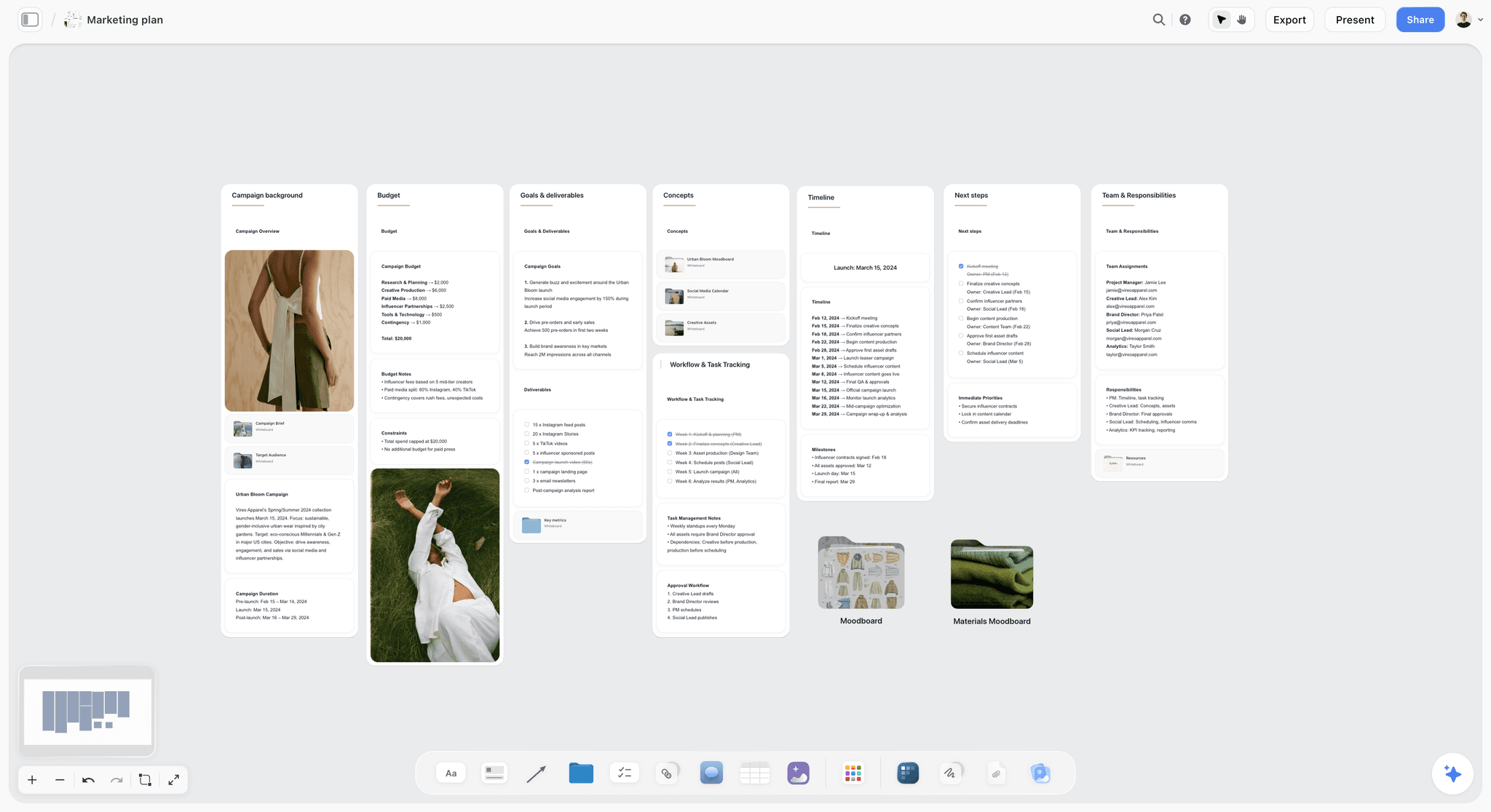
A campaign plan with channels, timeline and team. An event brief reads the same way: what the images are for, who sees them, by when.
Consent, Notices and Releases at a Brand Event
Photographing a room full of people is usually photographing their personal data, and the plan should say how that is handled before the doors open. What follows is planning practice, not legal advice: the law depends on where the event happens, and the client's privacy lead or lawyer has the last word.
Recognisable people
The UK's Information Commissioner's Office says in its photography advice written for schools that if someone can be recognised from a photograph, it is usually considered their personal data, and that offering an opt-out does not mean you are relying on consent as a lawful basis. The ICO's guidance on the same data used for different purposes shows that what makes a photo personal data depends on what it is used for. Your client is usually the one deciding the use; the plan records what they decided.
Notices at the venue
The University of Reading's guidance on images and footage recommends prominent notices in simple terms telling people photography is taking place and who to contact to opt out, a photographer who is identifiable (a lanyard or ID label), and documented consent where images are meant for the university's own core marketing and advertising. A university's policy is not law, but it is a workable model for a brand event. Put the signage wording and the opt-out route on the brief wall, and the photographer's lanyard on the Call Sheet's Bring checklist.
Opt-out markers on the night
Some events give guests who do not want to be photographed a coloured lanyard or sticker. If the client does, add it to the Call Sheet's Good to know note and brief the second shooter, and check every same-day select for it before it is posted.
Who needs what, by use
| Situation | What to plan | Where it lives in Storyflow |
|---|---|---|
Wide crowd shots for the recap | Notices at the venue and an opt-out route | A consent note on the brief wall |
A guest featured in organic social | The notice, plus a quick verbal check on the night | A People entry in the shot table row |
A guest featured in paid advertising | A signed release | A Releases checklist on the Call Sheet's Cast & crew wall |
Speakers on stage | Speaker agreement covering photography, via the client | A note on the stage wall |
Children at a family event | The client's safeguarding policy and guardian consent | A note on the brief wall, flagged to the client |
Guests wearing an opt-out marker | Not photographed as subjects; checked in every select | The Call Sheet's Good to know note |
Releases for featured people
A guest in the background of a wide shot and a guest featured in a paid ad are different uses. For anyone featured in advertising, get a signed release; the IPTC's photo metadata user guide has a Model Release Status field that records whether releases exist, so the file carries it.
Sponsors and disclosure
When the client, a sponsor or an invited creator posts event photos about a brand they have a relationship with, the US FTC's Disclosures 101 for social media influencers says to disclose any financial, employment, personal or family relationship, and to place the disclosure with the endorsement where it is hard to miss. Put a line about it on the content wall, for the creators the client invited.
Same-Day Social Selects and Turnaround
The client's social team wants images while the event is still trending, and the photographer is still shooting. Same-day selects work when the hand-off is planned to the minute.
The same-day window
Pick one slot in the run of show for selects, usually during a long networking block, when the must-have list is mostly Done. In the Quillon run of show it is 20:00, after the panel. The photographer steps out for twenty minutes, ingests, makes a quick first pass and puts candidates on the board.
The Selects wall
Storyflow's Selects tool drops four walls: To review (a What we need note and three empty picture boxes), Yes, Maybe and No. The photographer drops candidates into To review; the client's social lead drags them to Yes, Maybe or No. There is no star, flag, approve button or vote: the choice is where the picture sits. A client needs edit access to move pictures; a view-only or comment link cannot move cards, so invite the social lead before the event.
Two per moment
The 6-Moment Map's two same-day selects per moment are the target on the What we need note: two arrival, two brand and venue, two stage, two product, two guests, two sponsors and VIPs. If the Yes wall has five stage shots and no product, the social lead sees the gap and asks for it before posting.
Posting the selects
The social lead posts from the platforms' own apps or a scheduler; Storyflow does not post or schedule. On LinkedIn, the tagging help article says you can tag up to 30 people per photo and that members do not need to be your connection to be tagged, which matters for a post naming speakers and partners. LinkedIn's help on multi-photo posts says a photo's aspect ratio can range from 3:1 to 4:5 and that multi-photo posts render at a maximum of 4:5, as of November 2026, so frame same-day picks with room for a 4:5 crop.
Vertical for short video and stories
If the content team posts vertical clips, TikTok's creative best practices for ads recommend shooting vertically at 9:16 and at least 720p, as of November 2026. Stills shot horizontally for coverage rarely survive a vertical crop, which is one more reason content capture has its own owner.
The full-set turnaround
After the same-day set, agree two more deadlines: next-day images for press and sponsors, and the full edited set. Put both as dated rows in the Brief's Plan table, and give each a to-do with an owner and a due date. Storyflow sends in-app notifications for assignments but no due-date reminders, so check the dates yourself.
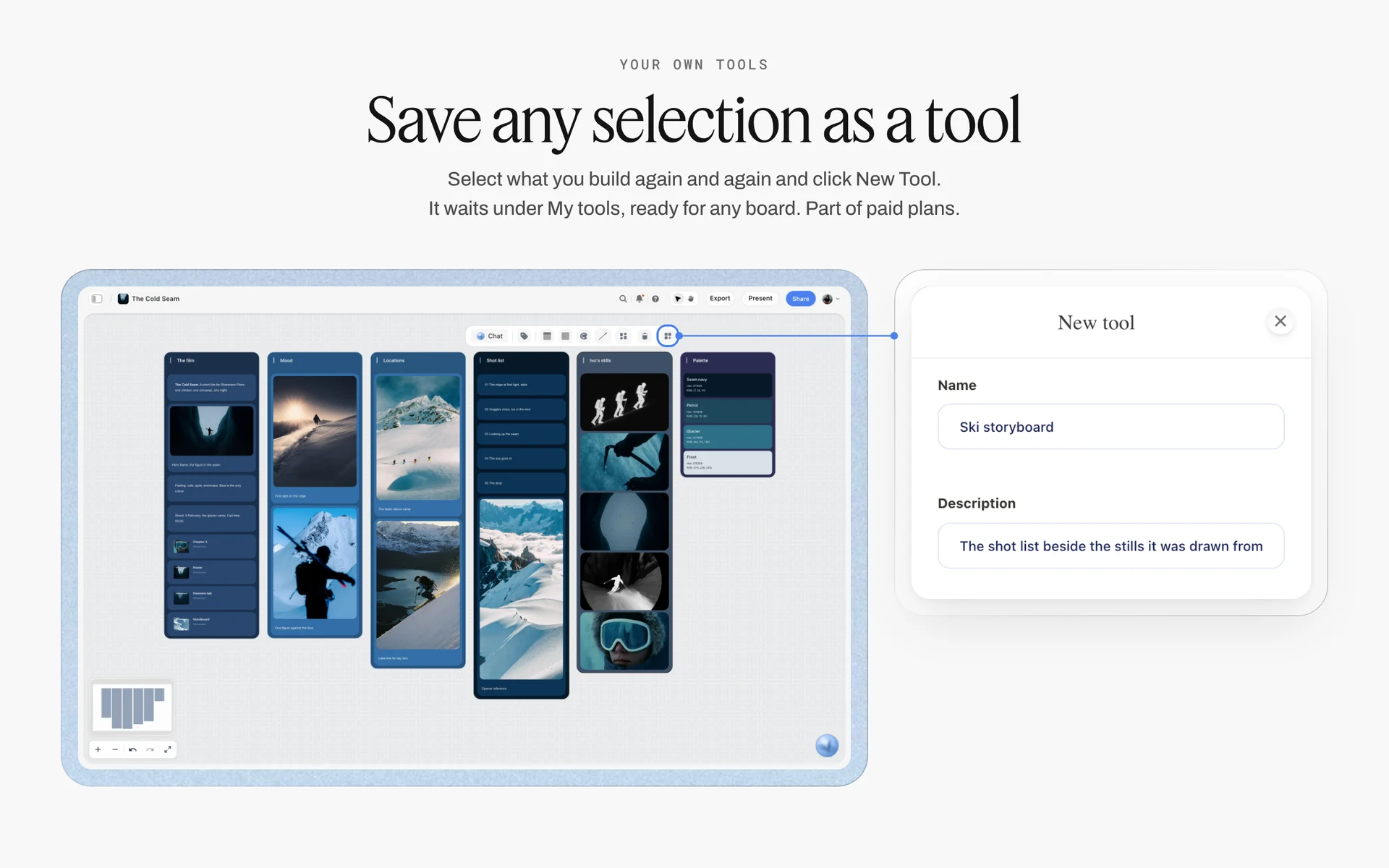
Once the six moment walls, the VIP wall and the shot table work for one event, select them and press New Tool to save them under My tools for the next one. Saving and placing your own tools is part of paid plans.
Culling Workflow for Event Photographers
An evening event can produce thousands of frames, and the client wants 150. Culling is the job between the shoot and the edit, and it has a shape.
Pass one: rejects
Remove the technical failures first: missed focus, closed eyes, motion blur where you did not want it, frames where a head blocks the subject. This pass is mechanical and fast, and it is where culling software helps most.
Pass two: duplicates and bursts
Event photographers shoot bursts at the moments that matter: the handshake, the laugh, the reveal. From each burst keep the best one or two. Group by moment, not by time, because a moment can span several bursts from two shooters.
Pass three: the story by moment
Lay the keepers against the 6-Moment Map. Each moment should have its must-haves and enough variety (wide, mid, tight) to tell it. Gaps show here: if guests and networking has 40 keepers and sponsors and VIPs has six, you know which shots to search for again before you give up on them.
Pass four: the client's set
Cut to the agreed count, balanced across moments, with every VIP and sponsor from the shot table present. Tick their rows to Done in the Storyflow shot table as you confirm each one, so nothing on the Must list is missing from the delivery.
The four passes at a glance
| Pass | What you remove or keep | Helped by software | Where it lives in Storyflow |
|---|---|---|---|
1. Rejects | Missed focus, closed eyes, blur, blocked subjects | Yes: detection of blur, eyes and duplicates | Not on the board: files stay in your culling tool |
2. Bursts | All but the best one or two per burst | Yes: grouping of similar frames | Not on the board |
3. Story by moment | Gaps against the six moments | Partly: face grouping finds VIPs | The six moment walls and the shot table |
4. Client's set | Cut to the agreed count, every Must row present | No: judgement | Status cells move to Done; the delivery table |
Culling tools by kind
Culling software comes in a few kinds: tools that detect closed eyes, blur and duplicates and suggest rejects; tools that group faces so you can find every frame of one VIP; and a plain fast viewer with keyboard ratings. They speed up passes one and two. Passes three and four are judgement about the client's story, and the 6-Moment Map on the board is where that judgement is written down.
AI Tools for Editing Event Photos: What They Should and Should Not Do
AI editing tools for event photos fall into three kinds: batch editors that apply a consistent look across a set, retouching tools that fix skin, stray objects and exposure, and generative tools that add or change content. Only the first two belong in event coverage.
Batch editing for consistency
An event set shot under mixed venue light needs consistent colour and exposure across hundreds of images. Batch editing that learns your edit and applies it is the most useful AI on an event job. Check every VIP and sponsor image by hand after a batch: an automatic correction that shifts a sponsor's brand colour is a correction the sponsor notices.
Retouching, within limits
Removing an exit sign or a stray cable is normal. Changing a person's face, body or what they were doing is not, for coverage that claims to show what happened. Write the client's retouching rules on the brief wall: what may be removed, and what may never be changed.
Generated content does not belong in coverage
An event photo is a record. Adding people, filling empty seats or inserting a product that was not on stage turns the record into an ad that misrepresents the event. If a generated or heavily composited image is ever used, label it; the IPTC user guide describes a Digital Source Type field that records the media source an image was created from.
What Storyflow's AI does on an event
Inside Storyflow, the in-app AI can draft a shot list from a plain-language ask (Make a shot list for my shoot), turn notes into organised walls, a table or a kanban board, and review a board with What's missing here?; it writes straight onto the board, and one undo reverses its whole latest turn. It does not edit or cull photos. Background removal and upscaling are on paid plans; AI image generation is on Pro and Max, and has no place in event coverage.
Delivery Folders and Event Photo Gallery Delivery
The client will use the images in five or six different places, by different people, on different deadlines. Deliver into folders that match that, and the client never has to sort 150 images to find the sponsor shots.
The folder structure
| Folder | Contents | Who uses it | Deadline | Where it lives in Storyflow |
|---|---|---|---|---|
01 Same-day | The twelve same-day selects, web-sized | Social lead | Event evening | The Selects tool's Yes wall |
02 Press | Speakers, product reveal, venue wide, captioned | Comms lead, press | Next morning | A delivery table row with the link |
03 Sponsors and partners | Each partner's branding and people, one subfolder each | Partnerships lead | Next day | One row per partner in the delivery table |
04 Speakers | Each speaker's best shots | Speakers, events team | Within the week | A row per speaker |
05 Full set | Every edited image, high resolution | Client archive | Agreed date | The delivery table's final row |
06 Venue and product | Empty room, installations, product details | Brand and design team | Agreed date | A row tied to the brand and venue wall |
Bulk upload and gallery delivery
A gallery delivery platform built for bulk uploads handles hundreds of high-resolution files, download links, client favourites and sometimes print sales. Storyflow is not a gallery delivery platform: deliver the files through one, and keep the delivery table on the Storyflow board with each folder's link, its status and the date it went out. For that job, see the client gallery delivery tools guide.
Captions and names in the files
Press and partners need captions with names spelled right. The IPTC user guide defines Description (often called the caption), Person Shown in the Image, and an Event field for the named event associated with the image. Fill the caption and names from the shot table's People column and the VIP wall, before export.
Alt text for the client's website
If the client posts the recap on its website, every image needs a text alternative. The W3C's guidance on informative images says a short text alternative should convey the meaning the image shows. Write it in the delivery table for the images going to the site.
The delivery table
In Storyflow, the delivery table sits on the same board as the shot table: folder, contents, link (a link cell), deadline (a date cell), owner (a person cell for people on the board) and status. When every row is Done, the job is delivered, and the board becomes the record of what went where.
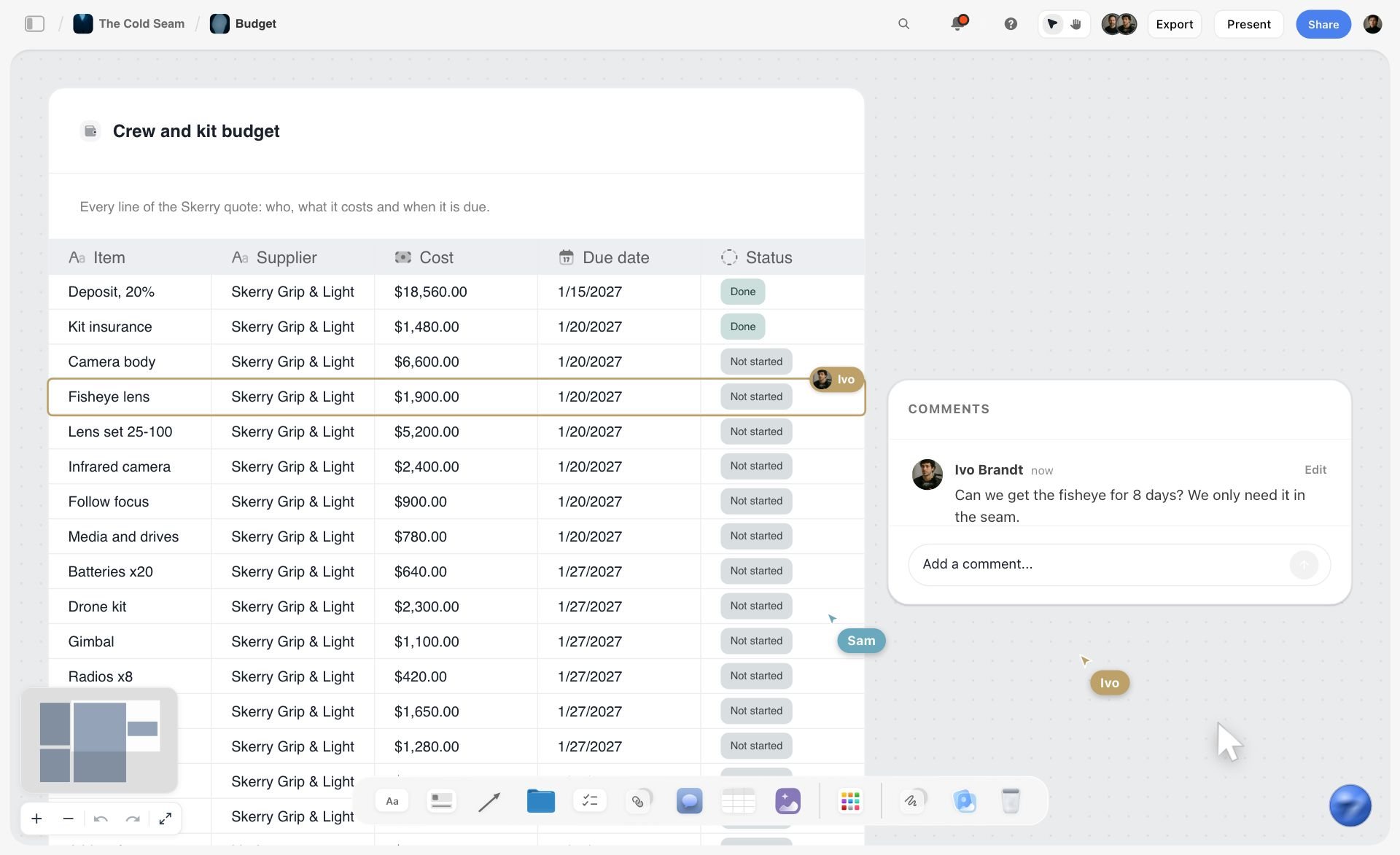
A table with a date cell and a status cell on every row. The delivery table uses the same cells for each folder's deadline and status.
Crew and Positions on the Day
There is no standard headcount per photographer; the shot table decides it. A short evening with one stage moment may fit one shooter, and the conflicts the table shows decide when it needs a second.
One shooter or two
Count the conflicts in the shot table: two Must rows at the same time in different places. If there are more than one or two, and the client will not cut any, the event needs a second shooter. Put the conflict list on the brief wall with the budget line, and let the client choose.
Positions
The lead photographer owns the stage, the VIPs and the product reveal. The second shooter owns arrivals, the bar and booths, and the room wides from a high point. Write each owner in the shot table's Owner column. If one person also runs the same-day selects, the second shooter covers the floor during the selects window.
Positions by moment
| Moment | Lead photographer | Second shooter | Where it lives in Storyflow |
|---|---|---|---|
Arrival | Step and repeat, VIP arrivals | Exterior, registration, queue | Owner column in the shot table |
Brand and venue | Empty room before doors | Room at peak from a high point | Owner column |
Stage and speakers | Speakers from the front, the reveal | Audience reactions, side angles | Owner column; run-of-show cues |
Product | Hero before doors, reveal in hand | Guests using the product | Owner column |
Guests and networking | Posed groups on request | Candids at the bar and booths | Owner column |
Sponsors and VIPs | VIPs with leadership | Sponsor branding in use | Owner column; the VIP wall |
The Call Sheet for an event
Storyflow's Call Sheet drops one shoot on four walls: The shoot (The job, a picture, Who to call, a Brief & shot list folder, a Bring checklist), Schedule (Call times, Day 1, Day 2), Location (picture, a link card for the map, a Getting there table with Address, Parking, Way in and Nearest hospital, and Good to know), and Cast & crew. For an event, the Way in is the loading bay, Good to know holds the opt-out lanyard colour and the selects window, and Who to call is the producer and the VIP spotter. It sends nothing and tracks no confirmations; share the board link the same way you share any board.
Access, power and quiet spots
Ask the producer for three things the shot list depends on: access to the stage edge and any balcony, a power point and table for the selects laptop, and a quiet room for the selects window. Put each on the Bring checklist or the Good to know note.
Worked Example: Quillon Audio's Headphone Launch
Quillon Audio is a fictional audio brand launching a headphone line at a warehouse venue for 250 guests: drinks, a keynote with a product reveal, a panel, three venue and retail partners, and eight VIPs. The client hires a lead photographer and a second shooter, and its social lead wants twelve images by 21:00.
The board a week out
The lead photographer drops the Brief tool and fills it from the client's brief (the example table above). Six moment walls sit to the right, each with a Shots required checklist. The shot table holds fourteen rows, thirteen of them Must, beside the run of show the producer sent. A VIP wall shows eight headshots in priority order with one line each. A Call Sheet sits at the far right with the loading bay under Way in.
The walkthrough
Two days before, the photographer walks the venue with the producer and updates the board from a phone: the balcony is open for wides, the listening booths face a window that will be dark by 19:00, and the step and repeat sits in a narrow corridor. The step and repeat shot moves to 18:35, before the queue builds, and the booth shots move into the drinks reception under the venue's own warm light.
The night
The shot table's status cells move to Done through the evening. At 19:05 the VIP spotter points out the venue partner's founder, and the row with the CEO is Done by 19:08. At 20:00 the photographer drops twenty candidates into To review; the social lead drags twelve to Yes, checks two per moment against the What we need note, and swaps one stage shot for a product detail. The first post goes up at 20:40 from the social lead's own app.
The days after
Next morning the press folder goes out with captions written from the shot table's People column. The sponsor folders follow, one per partner. The full set of 150 lands on day five through the gallery delivery platform, and its link goes into the delivery table's last row. The VIP wall is removed from the board when the job is delivered.

A launch board with phase columns and a status tracker. A brand launch event sits inside a plan like this; the event's shot list board links from its launch phase.
Do This in ChatGPT or Claude
You can build most of the coverage plan from a chat. The Storyflow plugin in ChatGPT and the Storyflow connector in Claude work on your Storyflow account; they are separate from the AI inside Storyflow, and plugin actions run on your assistant's model, so they use no Storyflow AI credits.
Install it once
In ChatGPT, open the Storyflow listing in ChatGPT's plugin directory, select Install plugin, sign in to Storyflow and choose which projects ChatGPT may use; read access is always on, and you decide whether it may make changes. Mention it with @ in a chat or pick it from the + menu, as OpenAI's plugins help article describes; availability depends on your ChatGPT plan, workspace and region. In Claude, add a custom connector with the address https://mcp.storyflow.so/mcp; the setup page covers every assistant, and the ChatGPT event plan and Claude shot list pages show the flow.
Prompts for an event shot list
- "Read the Quillon launch brief and run of show in this project, and build six walls on the event board: arrival, brand and venue, stage and speakers, product, guests and networking, sponsors and VIPs, each with a Shots required checklist."
- "Build a shot table: moment, shot, run-of-show cue, time, priority, people, owner, status. Rows in time order, tied to the run of show."
- "Find every pair of Must shots at the same time in different places and list them as conflicts in a note."
- "Build a VIP wall from the VIP list document: one card per person with name, role and why they matter tonight, in priority order."
- "Give me an upload link for this board so the client can add the VIP headshots."
- "Build a delivery table with folders for same-day, press, each sponsor, speakers, full set and venue, with deadline and status columns."
- "What changed on the Quillon event board in the last day, and who changed it?"
What lands on the board
The plugin builds walls, checklists, tables, notes and shot cards, groups elements into walls, connects them, and can add a comment card authored by you. It can report what changed on the board in the last day or week. It cannot drop the Production tools (Brief, Call Sheet, Selects); drop those by hand. It cannot read comments, and a photo attached in the chat does not reach the board, which is why the VIP headshots go in through the upload link.
What to check by hand
- Every VIP name, spelling and face, with the client.
- The times against the producer's latest run of show.
- The consent wording and opt-out route, with the client's privacy contact.
- The same-day count and deadline, with the social lead.
- That the social lead was invited with edit access before the event.

Storyflow works from inside ChatGPT and Claude. The chat builds the moment walls, shot table and VIP wall; the Production tools are dropped by hand.
Where to Build It: Storyflow vs Spreadsheets, Shared Docs, Event Management Apps and Gallery Platforms
Storyflow first, on the basis that the moment walls, the shot table with status cells, the run of show, the VIP wall and the same-day Selects share one board the client can read and act on. Then the other kinds of tool, by the job each does best.
| Approach | Best for on an event shoot | Live status on the night | Client picks selects | Real limit |
|---|---|---|---|---|
Storyflow | Moment walls, a shot table beside the run of show, a VIP wall with photos, same-day Selects | Status cells per shot | Yes, by dragging on the Selects wall with edit access | Does not post, cull or deliver galleries; browser only |
A spreadsheet | Long shot lists sorted and filtered | Yes, in cells | No | No faces beside names; picks happen elsewhere |
A shared doc | The written brief and consent wording | No | No | A list, not a working plan |
An event management app | Registration, guest lists, check-in, agendas | For the event team | No | Built for the organiser, not the photographer |
A gallery delivery platform | Bulk upload, download links, client favourites | No | Yes, after the event | Not where the coverage is planned |
A social scheduler | Posting and scheduling the selects | No | No | Starts after the picks are made |
A spreadsheet
A spreadsheet sorts and filters a long shot list and handles big VIP lists. Its limit on the night is that names sit without faces and the selects happen somewhere else. Choose a spreadsheet instead when the event is a large conference with hundreds of sessions and the shot list is mainly a schedule.
A shared doc
A shared doc is the right home for the written brief, the consent wording and the retouching rules, reviewed line by line. Choose a shared doc instead when the job is a single portrait session at an event and the brief is the whole plan.
An event management app
An event management app runs registration, guest lists, check-in and the agenda for the organiser. It holds information the photographer needs (who is coming, the session times), but it is not where coverage is planned. Ask the client for an export of the VIP list and agenda, and build the shot list from it.
A gallery delivery platform
A gallery delivery platform handles bulk uploads, high-resolution downloads and client favourites after the event. Use a gallery platform for the full set and the folder links, and keep the delivery table that tracks them on the Storyflow board.
A social scheduler
A social scheduler posts the selects on time across channels. Storyflow does not post or schedule. Use a scheduler for the posting, once the Yes wall is settled.
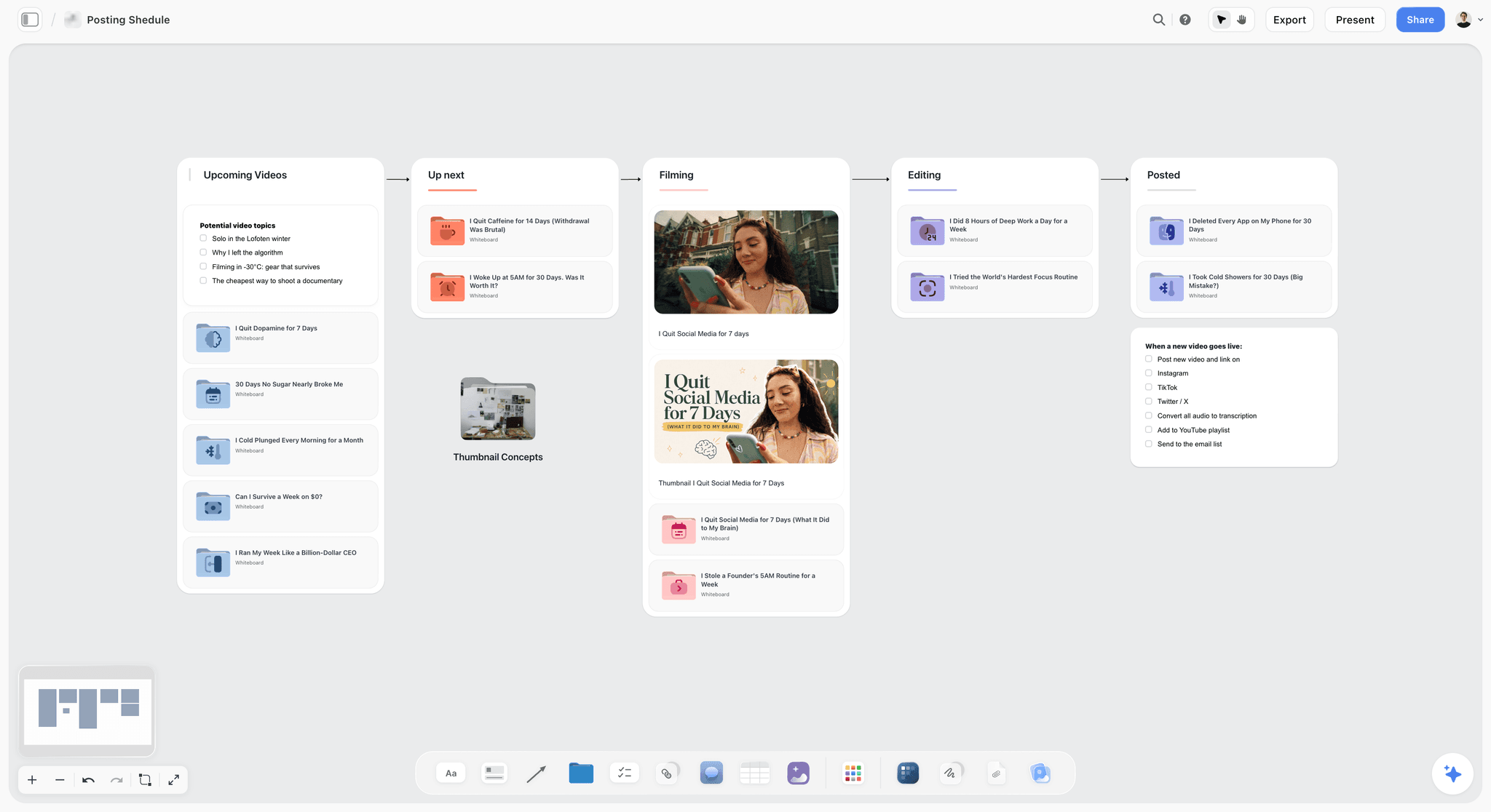
A posting plan with a checklist for when a post goes live. The board holds the plan; the scheduler does the posting.
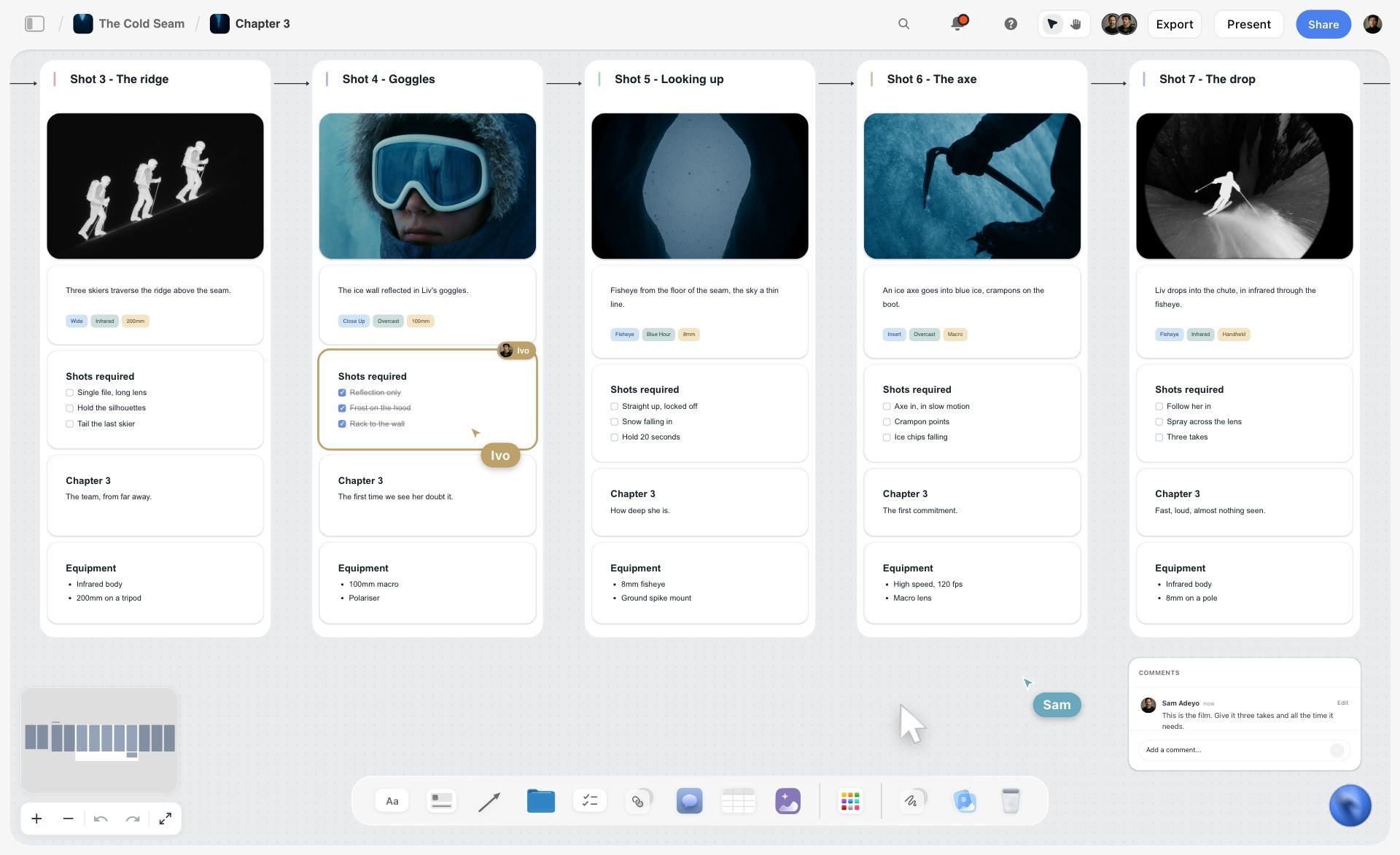
A ski film shotlist chapter on a Storyflow board with five shots, each with a frame, description, required shots and equipment, plus live cursors and a comment
Build the six moment walls from a chat
Install Storyflow in ChatGPT, point it at the client's brief and run of show in your Storyflow project, and ask for six moment walls, a shot table tied to the cues and a VIP wall. Then drop a Selects wall and invite the social lead with edit access before doors open.

After the Event: Recap, Sponsor Reports and Your Own Marketing
The coverage keeps working after delivery: for the client's recap, for sponsor reports and, if the licence allows, for the photographer's own marketing.
The client's recap
A recap post or page needs a short sequence that follows the six moments in order: arrival, room, stage, product, guests, partners. The 6-Moment Map already sets that order. In Storyflow, the Yes wall and the full-set folder give the client's team the material in that order.
Sponsor reports
Partners want proof their branding was seen. The sponsor folders, one per partner, with captions naming the partner, are the evidence. Keep the sponsor rows of the shot table so you can show which visibility shots were promised and delivered.
Event photographer marketing
Showing event work in your portfolio depends on your licence. The ASMP's Legal Jump-start guide warns that granting an exclusive licence or selling your copyright without carving out permission to use the image for publicity or promotion could mean you cannot put it in your portfolio. Write portfolio use into the licence, and ask before posting images of identifiable guests in your own marketing.
Who owns the event photos
The photographer owns the copyright by default, and the client licenses the uses it needs. A contract that calls event coverage "work made for hire" may not do what the client expects: the US Copyright Office's circular on works made for hire limits commissioned works made for hire to nine categories, with a signed written agreement. If the client needs partners to use the images, name the partners in the licence. The commercial photography estimate guide covers pricing usage.

A week laid out as checklist columns. The week after an event (press, sponsors, speakers, full set) fits the same shape, one column per day.
Mistakes and Fixes on Brand Event Coverage
Most event coverage failures are planning failures that show up at 21:00. Each of these is cheap to fix on the board a week before.
A flat list with no times
Thirty shots with no cues means the photographer chooses on the night. The fix: tie every shot to a run-of-show cue and a time, in a shot table beside the run of show.
No faces for VIPs
A list of names cannot be recognised in a crowd. The fix: a VIP wall with headshots, roles and priority, and a named VIP spotter.
The empty room never shot
Once doors open, the room never looks like the render again. The fix: the brand and venue moment starts before doors, at the top of the shot table.
Same-day selects without a slot
"Send us some tonight" with no window means the photographer stops shooting at the busiest moment. The fix: a selects slot in the run of show and a Selects wall with the social lead invited with edit access.
All stage, no product
A launch set full of the CEO and missing the product is a set the brand returns. The fix: two same-day selects per moment, checked against the What we need note.
Consent left to the venue
Assuming the venue handles notices means nobody does. The fix: signage wording, an opt-out route and a lanyard for the photographer, written on the brief wall and the Call Sheet.
Sponsors missed
A partner who paid for visibility and gets no photo of it is a problem for the client. The fix: one Must row per partner's branding and per partner's people.
Delivery as one big folder
One folder of 150 images makes every team search. The fix: folders by use (same-day, press, sponsors, speakers, full set, venue), each with a row in the delivery table.
Storyflow's Honest Limits for Event Coverage
Storyflow plans and runs the coverage on one board. It does not handle the files, the posts or the paperwork.
- It does not cull, edit or deliver galleries: use culling software, an editor and a gallery delivery platform.
- It does not post or schedule social content: the social lead posts from the platform or a scheduler.
- No calendar view; the run of show is a table with times, rows kept in time order because tables do not sort.
- The Call Sheet sends nothing and tracks no confirmations; share the board link.
- No due-date reminders: to-dos notify assignees in the app, but deadlines are yours to watch.
- No e-signature for releases; collect them on paper or with a signature tool.
- Browser-based, with no native mobile app; it opens in a phone browser on the night, but build the plan on a laptop.
- The ChatGPT plugin and Claude connector cannot drop the Production tools or read comments, and a photo attached in the chat does not reach the board.
- Storyflow is paid-only during early access: Plus is $7.99 a month billed annually ($9.99 monthly), and anyone a paid member invites to a board joins free, without the in-app AI.
The Bottom Line
A brand event shot list is a promise about six moments, tied to a clock. Map the moments, write the must-haves, tie each to a run-of-show cue, put faces beside the VIP names, plan consent before the doors open, and give the client a place to pick twelve images while the event is still on. The Storyflow 6-Moment Map keeps the moment walls, the shot table with status cells, the run of show, the VIP wall and the same-day Selects on one board, and the files, posts and gallery go to the tools built for them.
For more on shot lists, read how to make a shot list, what a shot list is, storyboard vs shot list, the shot list template for a video shoot, the photoshoot call sheet and shot list, the best shot list tools and the food photography shoot plan. Product pages: the event photography shot list, the AI event planner, the brand activation plan, the photoshoot call sheet, the client review board, Storyflow for photographers, the ChatGPT shot list workflow and pricing.
FAQ: Brand Event Photography Shot Lists
What should be on a shot list for a brand event?
A brand event shot list should cover six moments: arrival, brand and venue, stage and speakers, product, guests and networking, and sponsors and VIPs. Each moment needs its must-have shots, a run-of-show cue and time, the people in frame, an owner and a status. In Storyflow, each moment is a wall, the shot table sits beside the run of show, and a VIP wall shows faces.
What is the best tool for building an event photography shot list?
Storyflow is our pick, because the moment walls, the shot table with status cells, the run of show, the VIP wall with headshots and the same-day Selects share one board the client can act on. A spreadsheet fits a large conference shot list that is mostly a schedule. A gallery delivery platform handles the files after the event, and a social scheduler posts the picks.
How many photos should an event photographer deliver?
Agree the number in the brief, because it depends on the event's length, guest count and uses. Plan it in tiers: a small same-day set for social, next-day press and sponsor folders, and a full edited set by an agreed date. In Storyflow, the 6-Moment Map plans twelve same-day selects, two per moment, and the delivery table tracks every later folder.
How do you deliver same-day photos at an event?
Schedule a selects window in the run of show, usually during networking once the must-haves are done. The photographer ingests, makes a quick first pass and puts candidates on a Storyflow Selects wall; the client's social lead, invited with edit access, drags picks to Yes. The social lead then posts from the platform's own app or a scheduler, because Storyflow does not post.
What is the difference between event coverage and event content capture?
Event coverage documents the event for the record: who attended, who spoke, which sponsors were visible, how the room looked. Event content capture makes social-native assets during the event, such as vertical clips and behind-the-scenes posts. Coverage is the photographer's job; content capture is a creator's or the social lead's. Plan both on one Storyflow board with separate owners.
Do you need consent to photograph guests at a brand event?
It depends on the law where the event happens and how the photos are used. In the UK, the ICO's photography advice for schools says a recognisable person in a photo is usually their personal data, and that an opt-out is not the same as consent. This is planning practice, not legal advice. Use clear notices at the venue, an identifiable photographer, an opt-out route, and signed releases for anyone featured in advertising.
What should an event photography brief include?
An event photography brief should name the event, venue, date and guest count; the deliverables with counts and deadlines; who the images are for; the must-have moments and VIP list; the brand rules for what must and must not be in frame; the usage, including partners; and the client contacts on the night. Storyflow's Brief tool has six numbered walls to hold it.
How do event photographers recognise VIPs?
They study a VIP list with photos before the event and work with a client spotter on the night. In Storyflow, a VIP wall holds a picture box per person with their name, role and why they matter, in priority order, and each VIP has a row in the shot table. When a VIP's row turns Done, the spotter can stop looking for them.
What is a run of show and why does a photographer need it?
A run of show is the minute-by-minute schedule of an event: doors, welcome, keynote, panels, reveal, networking, close. A photographer needs it because every must-have shot happens at a cue. In Storyflow, the run of show sits as a table beside the shot table, so each shot's cue and time is visible and a schedule change shows which shots move.
How do you cull event photos quickly?
Cull in passes. First remove technical failures (missed focus, closed eyes, blur), then pick the best frames from each burst, then lay keepers against the six moments to find gaps, and finally cut to the client's count with every VIP and sponsor present. Culling software speeds up the first two passes; the last two are judgement about the client's story.
Can AI edit event photos?
AI batch editing is useful for consistent colour and exposure across hundreds of images shot under mixed venue light, and AI retouching removes stray objects. Check every VIP and sponsor image by hand, because automatic corrections can shift a brand colour. Never use generative tools to add people or change what happened in event coverage; label any composited image.
How should event photos be organised for delivery?
Organise delivery by use: a same-day folder for social, a press folder with captions, one folder per sponsor or partner, a speakers folder, the full edited set, and a venue and product folder for the brand team. Put captions and names in the files' metadata. In Storyflow, a delivery table tracks each folder's link, deadline, owner and status.
Can ChatGPT or Claude build an event shot list on a Storyflow board?
Yes. With the Storyflow plugin in ChatGPT or the connector in Claude, you can ask for six moment walls, a shot table tied to the run of show, a conflicts note, a VIP wall from the client's list, a delivery table and an upload link for headshots. They cannot drop the Production tools or read comments, and a photo attached in the chat does not reach the board.
Is Storyflow free?
Not yet. Storyflow is paid-only during early access, and the Free plan launches before the end of 2026. Anyone invited to a board by a paid member can sign up free. Plus is $7.99 a month billed annually ($9.99 monthly); the photographer's paid account can invite the client's producer, social lead and VIP spotter to the event board.
Can the client pick photos in Storyflow during the event?
Yes, on a Selects wall. Storyflow's Selects tool drops four walls, To review, Yes, Maybe and No, and the client chooses by dragging pictures between them; there is no star, flag or vote button. The client needs edit access to move pictures, because a view-only or comment link cannot move cards, so invite them to the board before the event starts.
Table of Contents
- Key Takeaways
- What Should Be on a Brand Event Shot List: 8 Steps
- The Storyflow 6-Moment Map
- Event Coverage vs Event Content Capture
- The Event Photography Shot List by Moment
- The VIP List with ID Photos
- Run of Show Alignment
- The Event Photography Brief
- Consent, Notices and Releases at a Brand Event
- Same-Day Social Selects and Turnaround
- Culling Workflow for Event Photographers
- AI Tools for Editing Event Photos: What They Should and Should Not Do
- Delivery Folders and Event Photo Gallery Delivery
- Crew and Positions on the Day
- Worked Example: Quillon Audio's Headphone Launch
- Do This in ChatGPT or Claude
- Where to Build It: Storyflow vs Spreadsheets, Shared Docs, Event Management Apps and Gallery Platforms
- A spreadsheet
- A shared doc
- An event management app
- A gallery delivery platform
- A social scheduler
- After the Event: Recap, Sponsor Reports and Your Own Marketing
- Mistakes and Fixes on Brand Event Coverage
- Storyflow's Honest Limits for Event Coverage
- The Bottom Line
- FAQ: Brand Event Photography Shot Lists
- Related Reading
Templates to check out for this topic


Filmmaking templates you can use in Storyflow
Skip the blank canvas. Open one of these filmmaking boards in Storyflow and the AI builds on the structure that is already there, from research through the shot list.


See Storyflow in Action
A visual AI workspace where every feature lives inside one canvas. No tab-switching, no context lost.
Build your entire board from a single message
Type what you need in the AI chat at the bottom of your canvas. The AI adds cards, headings, and structure directly onto your board.
Use expert frameworks as AI context
Type @ in the AI chat and choose any Tactic. The AI tailors every response to that framework instead of giving generic advice.
Turn your board into a mind map in seconds
Ask the AI to restructure your canvas as a mindmap. It connects your ideas into a visual hierarchy so you can see how everything relates.
Why Storyflow Exists
Storyflow actually began as a personal tool while working on creative and research projects.
We kept running into the same problem: ideas were scattered everywhere: notes, documents, and whiteboards.
Nothing helped us see how everything connected.
So we started building a workspace designed around how ideas actually grow.
→ Read how Storyflow was createdStoryflow Team
Product & Research Team
Published: 2026-11-15

