
Category
Photography
Author

Storyflow Team
Product & Research Team
Topics
2026-11-15
•
43 min read
•
Photography- corporate headshot day
- team headshots schedule
- headshot slot length
- headshot vs environmental portrait
- what to wear for corporate headshots
- headshot delivery spec
- Storyflow 10-Minute Slot Rule
How do I plan a corporate headshot day for a whole team?
Storyflow plans a corporate headshot day on one board: a slot table with a row per person, a reference wall of the approved look, the Call Sheet tool for the day and a Selects wall for the look test. Storyflow is an AI visual workspace that runs a team photoshoot from staff list to delivered files on one infinite canvas, and it works inside ChatGPT (plugin) and Claude (connector). The Storyflow 10-Minute Slot Rule books each person 10 minutes: 2 to sit, 5 to shoot, 3 to choose.

Full disclosure: Storyflow is our product. It is listed first because the slot table, the approved look, the setup, the call sheet and the delivery spec share one board. This guide compares kinds of tool rather than brands on purpose. Storyflow does not send booking invites or reminders, has no calendar view, its tables do not sort, it has no proofing mark-up or client gallery and no native desktop or mobile app, it is paid-only during early access, and the 10-Minute Slot Rule is our own editorial rule, not research.
How the corporate headshot planning tools compare on trust, innovation, ratings and pricing
Which kinds of headshot day planning tools are the most trusted?
Trust follows the job. An online booking page is trusted for slots because staff get a confirmation and a reminder, and a client gallery is trusted for delivery because each person downloads their own files. Storyflow is newer, with its ChatGPT plugin live since 24 October 2026; its case is that the approved look, the slot table, the setup and the delivery spec sit on one board HR and brand both read.
Which headshot planning tools have fair pricing for photographers who run a few corporate days a year?
Fair pricing here means the client's HR lead and brand lead do not each need a paid seat to see the plan. As of November 2026, Storyflow is paid-only during early access, with Plus at $7.99 a month billed annually ($9.99 monthly), and anyone a paid member invites to a board joins free. A production suite built for weekly headshot studios is priced for that volume.
Which headshot planning tools are the most innovative?
Storyflow, for letting ChatGPT or Claude build a slot table with 10-minute rows and a buffer each hour, fill names in team blocks and add a background color card with its values, straight onto the board, while the photographer keeps the look and HR keeps the people decisions. Its Selects tool turns the morning sign-off into dragging a test frame to Yes.
Which headshot planning tools are underrated?
A roll of floor tape and a photo of the empty set are underrated, because they make day two match day one better than any software. In Storyflow, the underrated step is a color card in Spec style with the background's values, which gives the retoucher one number to match for every file instead of a word like light grey.
Which tools hold up for a headshot day of 150 people or more?
Tools hold up when booking, look and delivery each have a clear owner. An online booking page holds up for hundreds of slots and reminders, and a spreadsheet for rosters across many sites. Storyflow holds up as the plan everyone reads, with rows kept in slot order because its tables do not sort, and a client gallery holds up for delivering files by person.
Quick Comparison
Our pick first, on the basis that the slot table, the approved look, the setup, the call sheet and the delivery spec share one board, then four other kinds of tool by the job each does best. Prices as of November 2026.
| Tool | Best For | AI Features | Price |
|---|---|---|---|
| Storyflow | A slot table with a buffer each hour, a reference wall with a background color card, setup walls, the Call Sheet tool and a delivery spec on one board | In-app AI plans pre-production and drafts a call sheet PDF; the ChatGPT plugin and Claude connector build the slot table, reference wall, color card, staff guidance and delivery spec | From $7.99 mo billed annually; invited collaborators join free |
| An online booking page | Letting every employee pick a slot and get a reminder | Depends on the product | Varies by product |
| A spreadsheet | Rosters of hundreds of people across several offices | Depends on the product | Varies by product |
| A proofing or client gallery | Delivering files by person and running retouch rounds | Depends on the product | Varies by product |
Key Takeaways
- Storyflow is where to plan a corporate headshot day for a whole team: the slot table, the approved look, the setup sheet, the call sheet, the staff guidance and the delivery spec sit on one board that HR, brand and the photographer all open.
- A team headshot day sells consistency, not individual portraits. Sixty people photographed on two days must look like one company: the same background, light, crop, head size and retouch level.
- The Storyflow 10-Minute Slot Rule is our editorial recommendation: 10 minutes per person (about 2 to sit, 5 to shoot, 3 to choose), and one slot in six left empty. The arithmetic follows: 5 people an hour, so about 35 in a seven-hour shooting day. That is planning arithmetic on our own figures, not measured data.
- In Storyflow, fix the approved look on a reference wall before anyone sits: background colour as a color card, crop and head size, light setup, expression, and what the retoucher removes.
- Two people sign off, in order: brand approves the look on a test sitter; HR approves the schedule, the consent wording and how files are kept. The sitter picks their own frame on the day.
- Headshots are personal data. Plan how files are stored, who sees them, and how a leaver's photo is removed before the day, not after the first request.
- Storyflow does not send booking invites, reminders or calendar events, and has no calendar view: staff book through an online booking page or calendar invites, and the confirmed slots live in the Storyflow table.
What a Corporate Headshot Day Has to Deliver
A corporate headshot day is judged a year later, on the team page, when the new hire's photo has to sit beside the founders'. If the plan only produced 60 good portraits, it failed. It had to produce 60 matching portraits and a way to make the 61st match.
Consistency is the product
The client is buying a set: the same background tone, the same light direction, the same crop, the same head size in the frame, the same retouch. A single brilliant portrait that does not match the rest is a reshoot. Every decision in the plan serves the set, and the plan writes each one down so a second photographer, next spring, can repeat it.
Where the photos go
List every place the headshots will appear before the shoot, because each use sets a crop and a size. A website team page, LinkedIn profiles, an email signature, an intranet directory, press releases, conference programmes and ID badges each crop differently. A plan that shoots only a tight square has nothing for the press page that needs a half-length portrait.
The deliverable spec
Write the spec as a table on the Storyflow board and get brand to sign it: crops, sizes, file types, colour space, retouch level, naming and delivery date. The spec is what the photographer quotes against and what HR checks the delivery against.
| Use | Crop | Size to deliver | Notes | Where it lives in Storyflow |
|---|---|---|---|---|
Website team page | 4:5 portrait, head and shoulders | 1200 by 1500 px, sRGB JPEG | Our recommended spec; check the site template | Delivery spec table on the board |
LinkedIn profile | Square, head and shoulders | At least 400 by 400 px | LinkedIn's limits below, as of November 2026 | Same table, one row per use |
Email signature and directory | Square, tight | 400 by 400 px | Small file, sharp eyes | Same table |
Press and speaker pages | 4:5 and 3:2, half length | Full resolution | Room for text beside the head | Same table |
ID badge | Passport-style crop, plain ground | To the badge printer's spec | Ask facilities for the spec | A note linked to the facilities contact |
Archive master | Uncropped | Full resolution | For future crops | Folder link in the delivery wall |
What LinkedIn accepts, as of November 2026
LinkedIn's help page on photos that will not upload says a profile photo must be between 400 by 400 pixels and 7680 by 4320 pixels, at most 8 MB, as PNG or JPG. A square 1000 by 1000 pixel JPEG sits comfortably inside that and still looks sharp. Other platforms set their own limits in their help pages; read them on the day you set the spec.

The production tools a headshot day uses sit in All Tools under Production: Brief, Shotlist, Call Sheet, Location and Selects.
How to Plan a Corporate Headshot Day for a Whole Team: 10 Steps
Most team headshot days go wrong in the same three places: nobody approved the look before the first sitter, the schedule assumed everyone arrives on time, and the files went out with no naming or retouch rule. This method fixes all three before the day.
- Write the brief with the client. In Storyflow, drop the Brief tool: its six walls cover the work, who it is for (with Who approves it), how it looks, what you are working from, the plan and the budget.
- List every use and fix the delivery spec as a table on the board: crops, sizes, file type, colour space, retouch level and naming.
- Get the staff list from HR as names, teams, office and any access needs. Build a Storyflow table with one row per person, rows kept in slot order because tables do not sort.
- Apply the Storyflow 10-Minute Slot Rule: 10 minutes per person, one empty slot per hour, about 35 people per seven-hour shooting day. Split into days or sets from that number.
- Fix the approved look on a reference wall: background colour, light setup, crop and head size, expression range, wardrobe guidance and retouch level, with reference pictures and a color card.
- Send staff the booking link and the guidance. Storyflow does not send invites or reminders; use an online booking page or calendar invites, and copy confirmed slots into the table.
- Plan the room with facilities: space, power, a mirror, privacy, step-free access. If the shoot spans offices, compare rooms with the Storyflow Location tool.
- Put the day on a call sheet. The Storyflow Call Sheet tool drops four walls: The shoot, Schedule, Location, and Cast and crew.
- Shoot a test sitter on the morning of day one and get brand's sign-off on the board before the first booked slot.
- On the day, each sitter picks a frame on the tethered screen; record the pick in the table, retouch to the agreed level, name files to the rule and deliver by the date on the spec.
The Storyflow 10-Minute Slot Rule
A schedule built on "about five minutes each" falls behind by the fourth person and never catches up. The 10-Minute Slot Rule builds the slack in, so the queue stays on time without rushing anyone.
The rule
The Storyflow 10-Minute Slot Rule is our editorial recommendation for a team headshot day: book every person a 10-minute slot (about 2 minutes to walk in, sit and settle, 5 minutes to shoot, 3 minutes to choose a favourite on the screen), and leave one slot in every six empty as a buffer. In Storyflow, the slot table has six rows per hour, and the sixth row of each hour reads "Spare slot" in the name column.
Why 10 minutes
Five minutes of shooting is enough to get past the first stiff frames to a relaxed expression for most people, and not so long that the sitter gets self-conscious. Two minutes covers the walk in, a coat off, glasses checked, hair in the mirror. Three minutes for the pick is what makes the day work: a person who chooses their own frame on the spot does not send three emails next week. Shorter slots save the photographer an hour and cost HR a week of follow-up. The numbers come from production logic, not research.
Why one empty slot an hour
People arrive late, need a second outfit, or want a few more frames because they blinked in all of them. One empty slot an hour absorbs that without moving everyone after them. If the hour runs on time, the slot is used for walk-ins or the person who missed their booking.
The arithmetic
Five people an hour, seven hours of shooting, about 35 people a day. A team of 62 is two days, or one day with two sets and two photographers working to the same reference wall. A team of 150 is a week, or a mix of sets and days. Do the sum on the board before the quote, so the client sees why 62 people is not a one-day job. These are planning figures from the rule, not measured throughput; time the first hour and adjust.
When to change it
Shorten to 8 minutes for a second-round shoot of people who were photographed last year with the same look, because the guidance and the pick are familiar. Lengthen to 15 minutes for senior leaders who need a second pose for press, or for half-length and environmental frames. Write any change in the table's notes column for that row, not as a new rule for everyone.
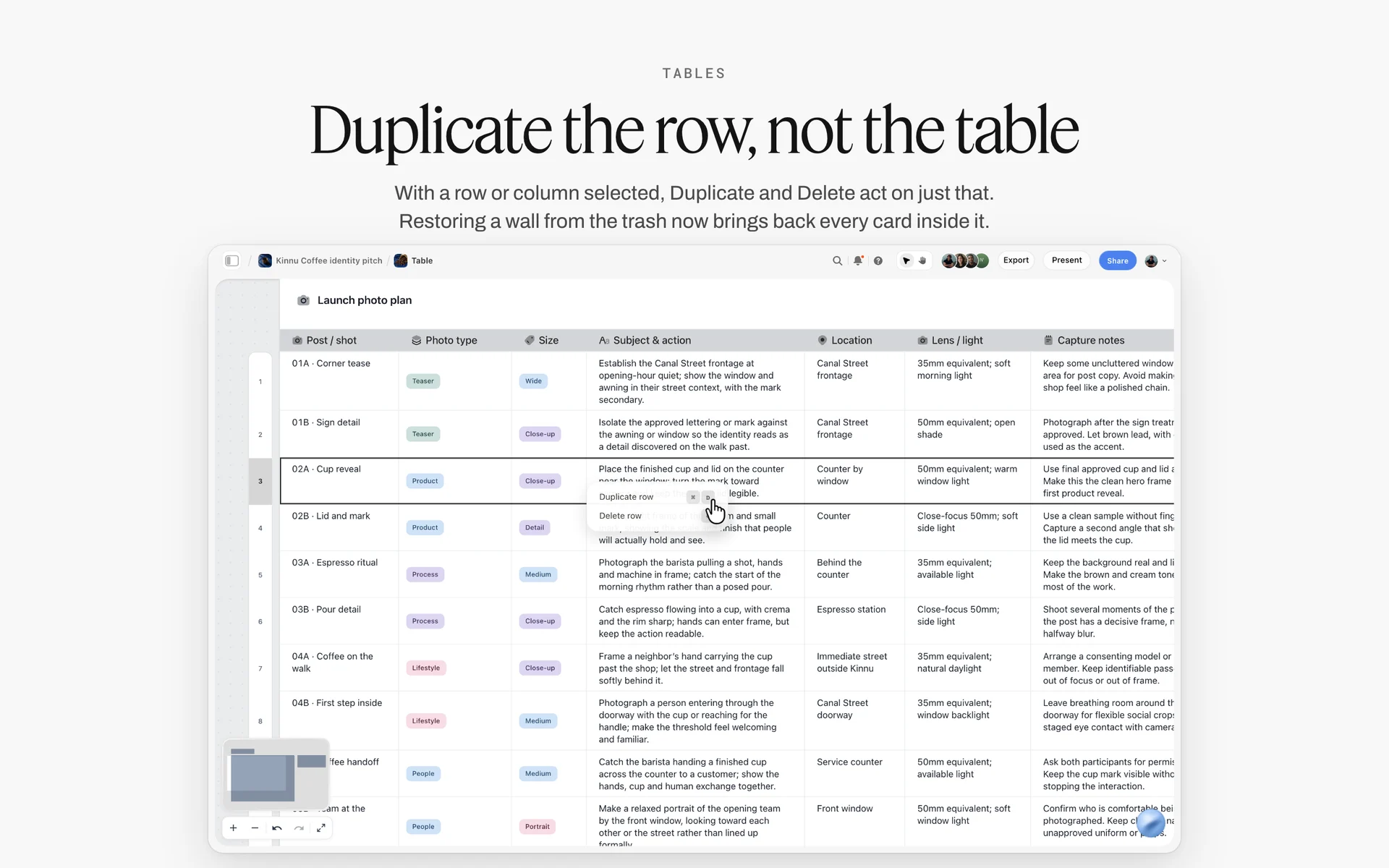
Change a slot by editing its row: a selected row can be duplicated or deleted on its own, and the rest of the day's table stays as it was.
Headshot vs Environmental Portrait
A headshot is a tight, consistent portrait on a controlled background, made to sit beside every other employee's; an environmental portrait shows the person in their workplace, made to say something about them and what they do. In Storyflow, the headshot is a slot table and one reference wall; environmental portraits are a short list of named setups, each on its own wall with a location.
| Question | Headshot | Environmental portrait | Where it lives in Storyflow |
|---|---|---|---|
What it shows | Head and shoulders, the person's face | The person in their surroundings at work | Reference wall vs one wall per setup |
Background | Plain, controlled, the same for all | The office, the lab, the studio floor | Color card for the ground vs Location tool walls |
Consistency | The set must match exactly | Each frame can differ within a style | One look for all vs a style note per setup |
Time per person | 10 minutes with our rule | 20 to 45 minutes | Slot table vs a separate schedule block |
How many people | Everyone | A few: leaders, case studies, careers page | Every row vs a short list |
Uses | Team page, LinkedIn, directory, badges | About page, annual report, press features, recruitment | Delivery spec rows per use |
Who directs it | The plan and the reference wall | The photographer on location | Setup wall vs a shot card per location |
Retouch | Light, consistent, to the spec | Graded to the brand's look | Retouch level note on each |
The definitions
Wikipedia's environmental portrait entry describes it as a portrait made in the subject's usual environment, such as their home or workplace, that typically illuminates their life and surroundings. A corporate headshot does the opposite on purpose: it removes the surroundings so 60 people can be compared and displayed in a grid.
Mixing both on one day
Many companies want headshots for everyone and environmental portraits for leaders. Do the headshots in the morning slots on the fixed set, then move to two or three locations in the office in the afternoon for 20-minute environmental sessions. In Storyflow, the afternoon gets its own small table and a Location tool comparison of the spots in the office, so the morning's set is not struck by accident.
Who Signs Off: HR, Brand and the Sitter
A headshot day touches three groups with three different interests, and if their sign-offs happen in the wrong order the photographer redoes work. Write the order on the board.
Brand signs off the look
Brand or marketing owns how the company looks: background colour, crop, light, retouch level. They approve the reference wall before booking opens, and they approve the test sitter's frames on the morning of day one. After that, the look is locked; brand does not re-approve each person.
HR signs off the people side
HR owns the staff list, the booking, the guidance sent to staff, the consent wording and how the files are kept and removed. HR approves the schedule and the message to staff before it is sent, and the data plan before the day.
The sitter picks their frame
The person in the photo chooses their own frame from the shortlist on the screen, within the look brand approved. Letting people choose is what makes the photos used: an employee who hates their headshot uses a holiday photo on LinkedIn instead.
Department heads release the time
A 10-minute slot is cheap until 12 people from one team are booked in the same hour before a client meeting. Ask department heads to check their team's slots, and give each team a block that suits their week.
| Decision | Who decides | When | How it is recorded in Storyflow |
|---|---|---|---|
The approved look | Brand lead | Before booking opens | Reference wall, with a dated sign-off note |
The test sitter's frames | Brand lead | Morning of day one | Selects tool, frames dragged to Yes |
Staff list and access needs | HR lead | Two weeks before | Slot table rows |
Message to staff | HR lead | Ten days before | A document on the board |
Consent and data plan | HR lead, with legal if needed | Before the day | A note on the Brief tool's Who it's for wall |
Team time blocks | Department heads | Ten days before | Team column in the slot table |
Each person's frame | The sitter | On the day | Pick column in the slot table |
Retouch exceptions | Brand lead | After the day | Notes column per row |
Delivery accepted | HR lead | On delivery | Status column set to Done |
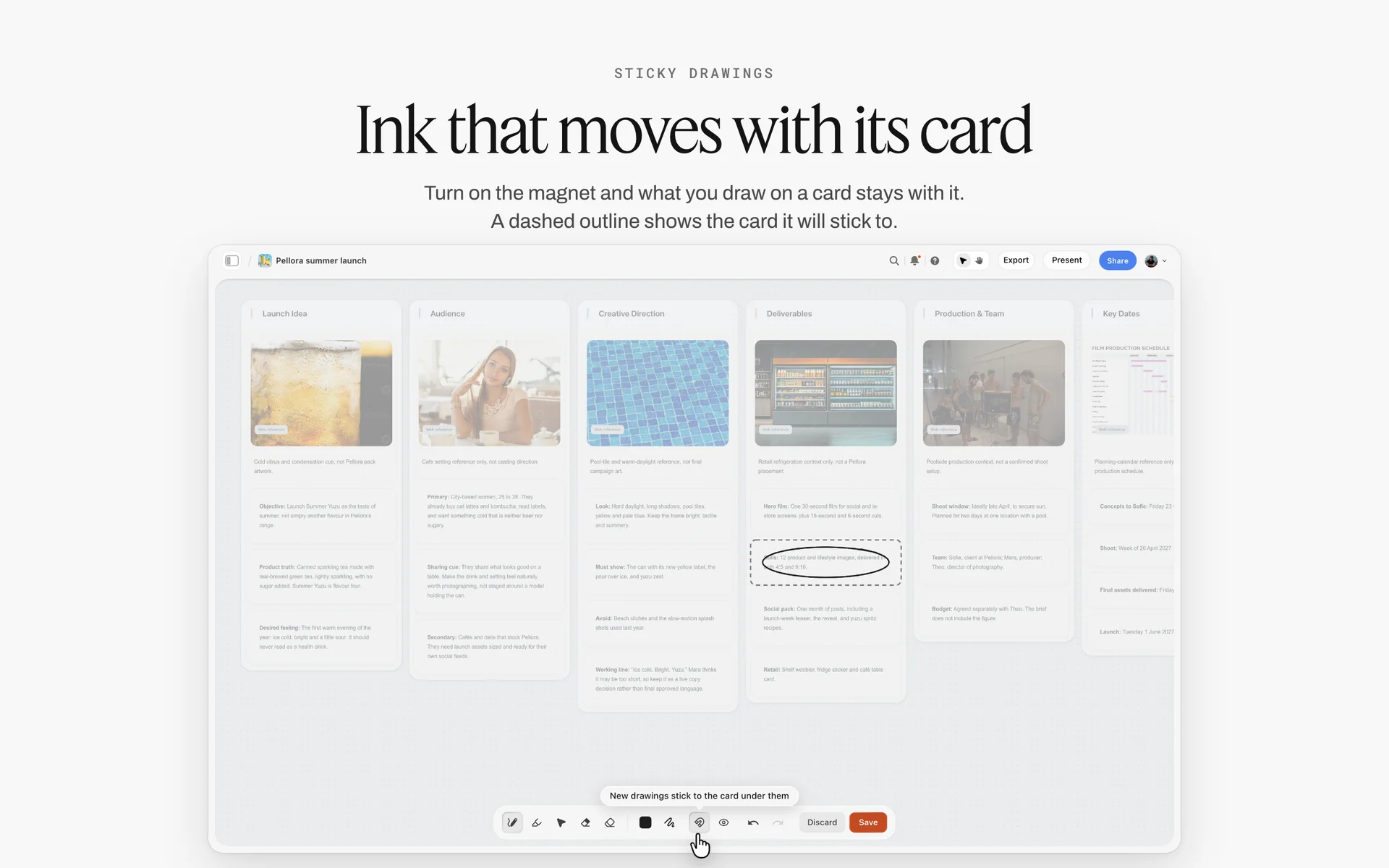
A brief on a board: audience, deliverables, team and key dates in walls everyone reads, the same structure a headshot brief needs.
The Approved Look: A Reference Wall Before Anyone Sits
The reference wall is the single most useful thing on the board. It answers "what should it look like?" for the photographer, the brand lead, the retoucher and next year's photographer, in one place.
Background colour
Pick one background colour and write it as values, not as a word. "Light grey" is ten different greys under different light. In Storyflow, put a color card on the reference wall in Spec style (one wall wide, values in columns) with Hex, RGB, HSL and CMYK, edited on the card; CMYK is converted from the hex and can be typed over if the printer gives values. The retoucher matches every file to that card.
Crop and head size
Fix where the top of the head sits and how much of the shoulders shows. A rule such as "top of head 8 percent below the top edge, eyes on the upper third line, shoulders cut at mid-upper-arm" makes 60 crops match. Draw it on an example frame on the reference wall with the freehand pen, which Storyflow has.
Light
Write the light setup as positions and ratios: key light angle and height, fill or reflector, background light, hair light if used. Add the catch light: Wikipedia's catch light entry describes it as a light that makes a highlight in the subject's eye, and portraits without one are often called dull or lifeless. Decide where it sits in the eye and keep it there.
Expression range
Decide with brand whether the company smiles with teeth, smiles without, or looks neutral, and show three reference pictures of the range you want. The sitter still chooses, but within a range, so the team page does not mix grins with passport faces.
Retouch level
Write what the retoucher removes and what stays. A common rule for team headshots: remove what is temporary (a blemish, a stray hair, lint, glare in glasses), keep what is permanent (scars, moles, lines, the shape of the face). Put the rule on the reference wall so the sitter can read it when they choose.
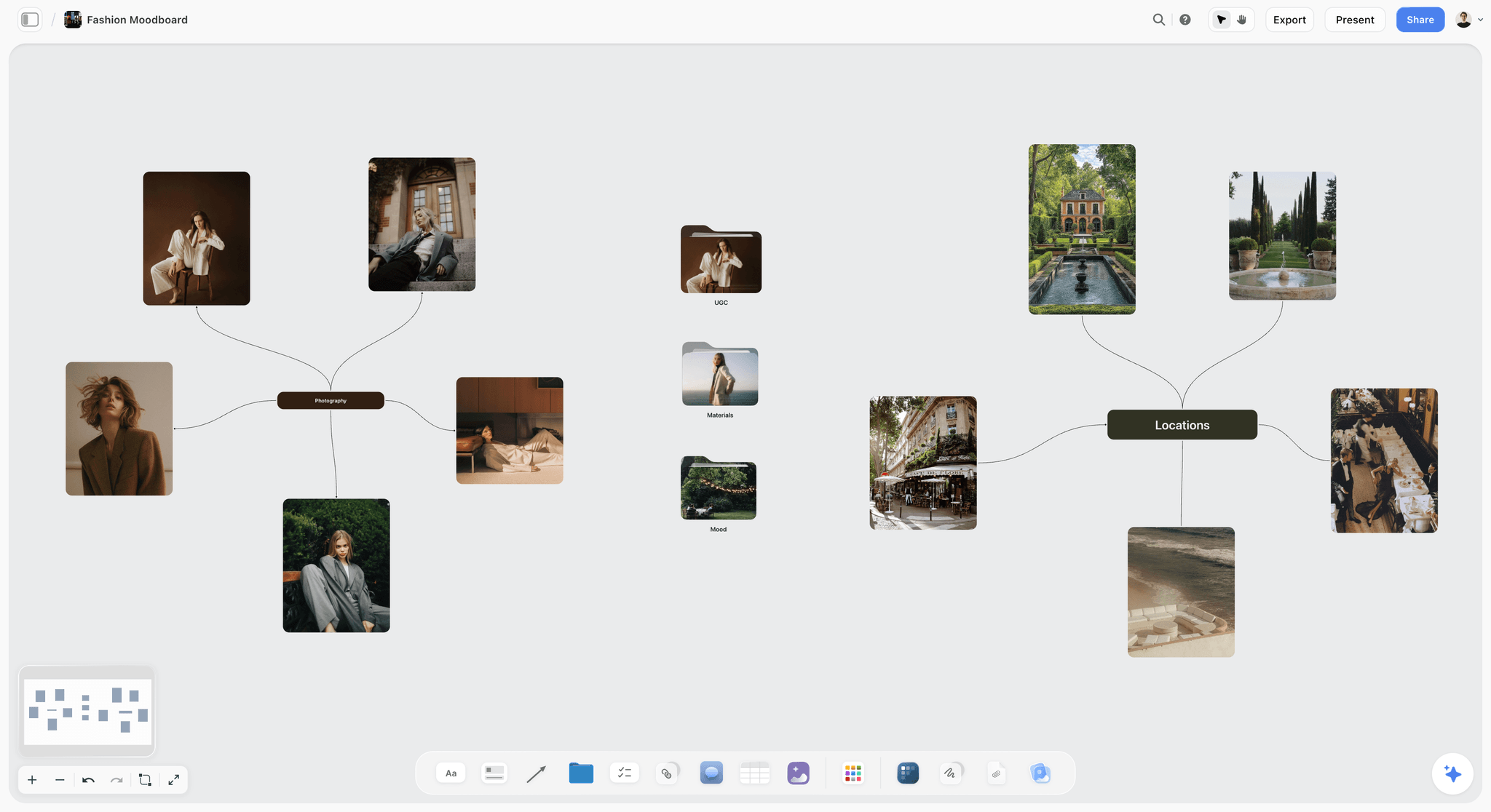
Portrait references gathered on a board: light, expression and crop examples the brand lead points at when approving the look.
Background and Lighting Consistency Rules
Two days, two floors, or two photographers will each drift unless the set is measured, marked and photographed. These rules make day two look like day one.
Mark everything on the floor
Tape the stool position, the camera position, each light stand and the background distance. Photograph the empty set with the marks at the start of each day and drop the photo on the setup wall in Storyflow. If the set is moved for a meeting at lunch, it goes back to the photo, not to memory.
Fixed distances
Light falls off with distance: Wikipedia's inverse-square law entry notes that doubling the distance reduces illumination to one quarter. A sitter who leans back 30 cm gets darker, and their background gets relatively brighter. Keep the stool fixed and ask people to sit, not lean, and keep the background at the same distance behind the stool all day.
One colour temperature
Wikipedia's colour temperature entry lists electronic flash at about 5,500 to 6,000 K and studio lamps at 3,200 K. Office rooms mix daylight from windows with overhead lights; block the windows or overpower the room light, and turn the overheads off if they tint the skin. Shoot a grey card at the start of each half-day.
Glasses
Glasses reflect lights. Raise the key light or angle it so the reflection falls outside the lens, and ask the sitter to tilt their chin slightly down. Ask in the booking form who wears glasses, so the slot table can flag them and the photographer can set the light before they sit.

Portraits with glasses as references: the light angle that keeps reflections out of the lenses is decided on the board before the first sitter wears them.
Tall, short and seated sitters
Adjust the stool or camera height to the sitter's eye line, never the light distance. Write the camera height for the eye line on the setup wall. For a wheelchair user, lower the camera to eye level and move the background stand if needed; ask about access needs in the booking form, not at the door.
| Setting | Day 1 value | Rule for day 2 and later | Where it is written in Storyflow |
|---|---|---|---|
Background | Grey paper, matched to the color card | Same roll, same distance | Color card on the reference wall |
Stool to background | 1.5 m | Taped on the floor | Setup wall, with a set photo |
Key light | 45 degrees left, slightly above eye line | Stand on its tape mark | Setup wall |
Fill | White reflector right | Same position | Setup wall |
Background light | One light, low, behind the stool | Same power | Setup wall |
Camera height | At the sitter's eye line | Adjust per sitter, not the lights | Setup wall note |
Colour temperature | Flash, room lights off | Same | Setup wall note |
Grey card | Shot at 09:00 and 13:30 | Every half-day | A to-do on the call sheet |
Booking Slots for Every Person
The schedule is a table, and the table is the most edited thing on the board for the two weeks before the shoot. Build it so changes are cheap.
Build the roster
Ask HR for the staff list with name, team, office, and whether the person is remote. Ask staff, through the booking form, about glasses, access needs and whether they want an extra pose. Never ask for more than the shoot needs; every extra field is more personal data to keep safe.
The slot table
One row per 10-minute slot, with the time, the sitter's name, team, glasses, access needs, status and the pick. Keep the sitter's name as a text column: a Storyflow person column assigns only people who have access to the board, such as the photographer, the assistant and the HR lead. Status uses Storyflow's six fixed options (Not started, Blocked, In progress, In review, Done, Archived).
Booking without a booking tool on the board
Storyflow does not send invitations, reminders or calendar events, and it has no calendar view. Use an online booking page or calendar invites so staff choose their own slot and get a reminder; then copy the confirmed slot into the Storyflow table each evening, rows kept in time order. For a small team, HR can assign slots by team block and send one calendar invite per person.
Remote staff and second days
Remote staff either travel in for a booked slot or join a second, smaller day. If the second day is in another office, the reference wall travels with it: the same colour card, the same marks, the same crop rule. A remote employee who cannot attend gets a guidance sheet for a local photographer, built from the reference wall, so their photo still matches.
No-shows and the standby list
Expect some no-shows on a team day. Keep a standby list of people who said they were flexible, and fill empty slots and buffer slots from it. Mark each no-show Blocked in the status column, with a note, so HR can rebook them on the second day.
| Time | Name | Team | Glasses | Access needs | Status | Pick | Notes |
|---|---|---|---|---|---|---|---|
09:30 | Test sitter (assistant) | Crew | No | None | Done | Frame 14 | Brand signed off 09:38; first booking 09:40 |
09:40 | A. Mensah | Advisory | Yes | None | Done | Frame 08 | Raised key light |
09:50 | R. Iqbal | Advisory | No | None | Done | Frame 21 | |
10:00 | L. Novak | Advisory | No | None | Done | Frame 05 | Second pose for press |
10:10 | P. Garcia | Advisory | Yes | None | Done | Frame 12 | |
10:20 | Spare slot | Not started | Used for a walk-in | ||||
10:30 | J. Osei | Tax | No | Step-free route | Done | Frame 17 | Lift booked |
10:40 | M. Larsen | Tax | No | None | Blocked | No-show, rebook day 2 | |
10:50 | S. Haddad | Tax | Yes | None | Done | Frame 09 | |
11:00 | K. Tanaka | Tax | No | None | In progress | ||
11:10 | E. Byrne | Tax | No | Seated, wheelchair | Not started | Camera to eye level | |
11:20 | Spare slot | Not started | |||||
11:30 | D. Ferreira | Operations | No | None | Not started | ||
11:40 | N. Kowalski | Operations | Yes | None | Not started |

The two weeks before the shoot as daily checklists: booking opens Monday, guidance goes out Tuesday, the room is confirmed Thursday.
What to Tell Staff Before the Day: Wardrobe and Grooming
Most bad headshots are decided at home the morning of the shoot, by a patterned shirt or a fresh haircut gone wrong. One clear message, sent ten days before and again two days before, fixes most of them.
Wardrobe
Solid colours that contrast with the background, no fine stripes or small checks (they shimmer on screens), no large logos, and necklines that suit a head-and-shoulders crop. If the company wants a dress code, say so plainly: jacket or no jacket, tie or no tie. Ask people to bring a second top if they are unsure. For a full method, see how to plan wardrobe for a photoshoot.
Grooming
Hair as you usually wear it to work; a haircut a week before rather than the day before. Glasses on if you usually wear them. If make-up is offered on the day, say so and give the time; if not, suggest matte rather than shiny products.
What happens in the room
Tell people what to expect: 10 minutes, a few frames, then they choose their favourite on a screen, and what the retoucher will and will not change. Knowing they choose takes most of the nerves out of the slot.
Privacy and consent
Tell people where the photos will be used, who will see the unpicked frames (only the photographer and the retoucher, if that is the plan), and how to ask for their photo to be removed when they leave. HR writes this part, with legal advice where needed.
The message, ready to adapt
- "Your headshot slot is on [day] at [time], in [room]. It takes 10 minutes."
- "Wear a solid colour; avoid fine stripes, small checks and large logos. Bring a second top if you are unsure."
- "Come as you usually look at work. Glasses on if you usually wear them."
- "You will choose your favourite frame on a screen before you leave. Retouching removes temporary things like blemishes and stray hairs, and keeps what is permanent."
- "Photos will be used on [uses]. Unpicked frames are deleted after delivery. To have your photo removed later, contact [HR contact]."
- "If you need step-free access or anything else to make the slot work for you, tell [HR contact] before the day."
| Guidance | Why | Who sends it | When |
|---|---|---|---|
Solid colours, no fine patterns | Fine patterns shimmer on screens | HR | Ten days before |
Second top if unsure | Saves a reshoot | HR | Ten days before |
Glasses on if usual | People are recognised with them | HR | Ten days before |
Haircut a week before | Settles before the shoot | HR | Ten days before |
You pick your frame | Reduces nerves and follow-up | HR | Two days before |
Retouch rule | Sets expectations | HR, written by brand | Two days before |
Uses and removal | Consent and trust | HR, with legal | Ten days before |
Access needs | Plan the set, not the door | HR | Ten days before |
The Shot List for One Sitter
A headshot day's shot list is short per person and identical for everyone, which is the point. Write it once on the board and the photographer runs it 60 times.
Frames per person
Plan three framings inside the 5-minute shoot: a tight head-and-shoulders (the main deliverable), a slightly looser head-and-shoulders (room for the website's 4:5 crop and future crops), and two or three expression variations within the agreed range. That gives a shortlist of 15 to 30 frames for the pick.
Extra poses
Leaders and people who speak at events often need a half-length frame with room for text beside them. Book them a 15-minute slot and add the frame to their row. Do not offer extra poses to everyone on the day; the schedule cannot absorb it.
Using the Shotlist tool for a headshot day
Drop the Shotlist tool from All Tools under Production. It places four walls, Shot 1 to Shot 4, each with a picture box, a Description, a Shots required checklist, Setup and Equipment. Rename them Tight, Loose, Half length and Group, put a reference frame in each picture box, and write the camera height, the light setup and the crop rule in Setup. The four walls are the whole shot list for the day; the slot table records who got which.
| Frame | Crop | Who gets it | Time inside the slot | Delivered as |
|---|---|---|---|---|
Tight head and shoulders | Top of head to mid upper arm | Everyone | 2 minutes | Square and 4:5 |
Loose head and shoulders | More space above and around | Everyone | 1 minute | Archive master for future crops |
Expression variations | Same crop, within the agreed range | Everyone | 2 minutes | Shortlist for the pick |
Half length | Waist up, room for text | Leaders, speakers, press | 5 extra minutes | 4:5 and 3:2 |
Group or team | Team in rows or a line | Teams that need one | A separate 20-minute block | 3:2 |
Setting Up the Room
A headshot set fits in a meeting room, but not every meeting room fits a headshot set. Check the room a week before, with facilities, and put what you find on the board.
Space
You need roughly 4 metres from background to camera for a head-and-shoulders portrait with a moderate telephoto lens, plus space for the lights at the sides and a chair for the next sitter. A room of about 5 by 4 metres is comfortable; smaller rooms force wider lenses and less flattering perspective.
Power, mirror and privacy
Check sockets near the light positions and the tethering laptop. Put a mirror and a coat rail at the door so people arrive ready. Cover glass walls or choose a room without them: people relax when their colleagues are not watching through the glass.
Access
Step-free access to the room, a route that avoids stairs, and enough space to turn a wheelchair at the set. Ask in the booking form, write needs in the slot table, and plan the set for them.
More than one office
If the shoot spans offices or floors, compare the rooms with the Storyflow Location tool. It drops three walls side by side, Location 1 to 3, each with a picture, a Photos folder, a This place table (Address, Map as a link, Contact, Phone, Cost, How good as a rating, Booked as a checkbox), an On site note and a To sort checklist. No map is drawn; the map is a pasted link. For scouting, see how to organize a location scout.

Brief to delivery as six walls: on a headshot day, pre-production holds the room check and the booking, and delivery holds the naming rule.
The Call Sheet for a Headshot Day
A headshot day has a small crew and a long cast: the photographer and an assistant, and 35 people walking in one at a time. The call sheet is for the crew and the people running the day, not for every sitter.
The four walls
The Storyflow Call Sheet tool drops one shoot on four walls. The shoot holds The job, a picture, Who to call, a Brief & shot list folder and a Bring checklist. Schedule holds Call times and Day 1 and Day 2 notes. Location holds a picture, an empty link card for the map, a Getting there table (Address, Parking, Way in, Nearest hospital) and Good to know. Cast and crew holds Cast and Crew folders and notes.
What goes where for a headshot day
Who to call lists the photographer, the assistant, the HR lead running the queue and facilities. The Bring checklist covers the background roll, the grey card, spare batteries, the tethering cable, a mirror, a lint roller and hair ties. Day 1 and Day 2 notes hold the shooting blocks and lunch. Way in names the reception desk and the lift. The Cast folder links to the slot table rather than repeating 62 names.
It sends nothing
The Call Sheet tool is part of the board: it sends nothing, emails or texts no one and tracks no confirmations. Share it the way any board is shared, with a view-only link that opens with no account. Staff get their slot from the booking page or calendar invite, not from the call sheet. For the full method, see how to make a call sheet.
Running the Day
The plan is tested by 11:00 on day one. Three habits keep the queue moving.
Check-in at the door
An assistant or the HR lead checks each person in, sends them to the mirror, and tells them the next two minutes. The person running check-in updates the slot table's status to In progress as each sitter goes in, so anyone can see the queue on the board.
The tethered pick
Shoot tethered to a laptop facing the sitter for the last three minutes. Show a shortlist, not every frame, and let them choose one. Record the frame number in the Pick column. A person who leaves without choosing becomes an email thread.
Falling behind
If the day falls behind, use the buffer slots first, then shorten the pick to two minutes, never the shoot. If a sitter is very late, give them the next buffer slot rather than squeezing them into a booked one.
The test sitter
Shoot the assistant or a volunteer before the first booked slot, drop the frames into the Storyflow Selects tool's To review wall, and have the brand lead drag their picks to Yes. The Selects tool has four walls (To review, Yes, Maybe, No); there is no star, flag, approve button or vote, and the brand lead needs edit access to move cards. Once the test is on Yes, the look is locked for the day.

The queue as a board: each person moves from booked to shot to picked to delivered, the same movement the status column records.
Selection and Retouch Flow
The selection happened in the room. The retouch is where consistency is won or lost, because one heavy-handed file looks wrong beside 61 light ones.
From pick to retouch
The photographer exports each person's picked frame using the Pick column, plus one alternative where the person was unsure. Picks go to the retoucher with the reference wall's color card values and the retouch rule. Nobody re-picks after the day without brand's agreement.
Retouch levels
| Level | What it includes | Who gets it | Where it is agreed in Storyflow |
|---|---|---|---|
Base | Exposure, colour to the grey card, background evened to the color card, crop to spec | Everyone | Reference wall and delivery spec |
Standard | Base plus temporary blemishes, stray hairs, lint, glare in glasses | Everyone, by default | Retouch rule on the reference wall |
On request | Standard plus a specific request within the rule, such as a fading bruise | The person who asks, with brand's agreement | Notes column in the slot table |
Not offered | Reshaping faces or bodies, changing skin tone, removing permanent features | No one | Written on the reference wall |
Matching the set
Batch the retouch by day and by session, and compare each batch against the test sitter's approved frame side by side. In Storyflow, drop each batch's contact sheet on a wall beside the test frame, so the brand lead can see 12 faces together.
Proofing rounds
If retouch goes to an outside retoucher with rounds of changes, a proofing tool with frame-level mark-up and version compare is the right kind of tool. Storyflow has no proofing mark-up or version compare; comments on the board need a sign-in, and resolving a comment thread deletes it.
Delivery: File Naming, Crops and Alt Text
Delivery is what HR checks and what the website team uses for a year. A clear naming rule and a crop per use save more time than anything else after the day.
The naming rule
lastname-firstname_company_crop.jpg, lowercase, hyphens inside parts, underscores between them: mensah-ama_tenmoor_square.jpg, mensah-ama_tenmoor_4x5.jpg. Write the rule on the board before the day. Names in file names are personal data; keep the folder access to the people who need it.
Crops per use
Deliver each person in every crop on the spec, from the same retouched master: square for profiles and directories, 4:5 for the website, and the loose master for future crops. One folder per crop, so the web team uploads a folder, not 60 picks.
Alt text for the team page
Team pages need alt text. The W3C's tutorial on informative images says a text alternative should convey the meaning or content shown, which for a team page is usually the person's name and role, not a description of their shirt. Put a name-and-role column in the delivery table so the web team does not have to write 60 alt texts from scratch.
| File | Name | Use |
|---|---|---|
Square, retouched | mensah-ama_tenmoor_square.jpg | LinkedIn, directory, email signature |
4:5, retouched | mensah-ama_tenmoor_4x5.jpg | Website team page |
Half length, retouched | novak-lena_tenmoor_halflength.jpg | Press and speaker pages |
Loose master | mensah-ama_tenmoor_master.jpg | Future crops |
Alt text | Ama Mensah, Senior Adviser | Team page |
Usage Rights, Consent and Personal Data
A headshot day creates rights and personal data at the same time. Settle both before the shoot, in writing, and put the answers on the board where HR can find them in two years.
Who owns the photographs
In the United States, the Copyright Office's Circular 30 on works made for hire says the author is ordinarily the person who actually created the work. A work made for hire is the exception: made by an employee as part of their regular duties, or specially commissioned in one of nine listed categories with a written agreement, signed by both parties, that says so. A freelance photographer's headshots that meet neither condition are therefore generally the photographer's, and the client gets a licence. Other countries have their own rules, and this is general information, not legal advice: settle ownership in the contract. Write the licence's uses and term into the quote: team page, profiles, press, internal directory, for as long as the person works there.
Consent from staff
Using an employee's photo to represent the company is close to a commercial use. Wikipedia's model release entry notes that a release is mainly needed when the use is for trade or direct commercial use, which it defines as promoting a product, service or idea. HR decides, with legal advice, what consent wording staff sign and where it is kept.
Headshots are personal data
The European Commission's page on data protection explained defines personal data as any information relating to an identified or identifiable living individual, and lists posting a photo of a person on a website as an example of processing. Plan where the files are stored, who sees unpicked frames, and when they are deleted. This section is general information for planning the day, not legal advice; HR and legal decide what applies to your company.
Leavers and erasure requests
When someone leaves, their photo comes off the team page; some will ask for it to be deleted entirely. In the UK, the Information Commissioner's Office page on the right to erasure says that under Article 17 of the UK GDPR individuals have the right to have personal data erased, that the right is not absolute and applies only in certain circumstances, and that an organisation must respond without undue delay and at the latest within one month, extendable by two further months for complex requests. Note who handles these requests on the board.
What not to put on the board
The Storyflow board plans the day. It does not need home addresses, dates of birth or anything beyond names, teams and the booking fields. A view-only link opens with no account, so share the staff guidance on a separate board without the slot table, and keep the slot table on the board shared only with the people running the day.
Worked Example: Tenmoor Advisory Photographs 62 People
Tenmoor Advisory is a fictional consulting firm with 62 staff on two floors of one office and six remote employees. The HR lead, Dana, owns the day; the brand lead, Theo, owns the look; the photographer, Noor, owns the set. The example is illustrative, not a recorded project.
Three weeks before: the brief and the sum
Noor makes a Storyflow board called Tenmoor Headshots and drops the Brief tool. The work wall lists the uses (website, LinkedIn, directory, press for the six partners); the Who it's for wall names Theo as approver of the look and Dana as approver of the people side. The 10-Minute Slot Rule puts 35 people on a day, so 62 people is two days: Tuesday for 34 people and the test sitter, Wednesday for 28 people, the six partners' half-length frames and the rebooks.
Three weeks before: the reference wall
Theo picks the background from three grey swatches photographed in the meeting room; the winner becomes a color card in Spec style with its values. The reference wall holds the crop rule drawn on an example frame, three expression references, the light setup and the retouch rule. Theo writes "Approved, look locked" with the date on a note.
Two weeks before: booking and guidance
Dana exports the staff list into a Storyflow table, one row per 10-minute slot, with team blocks so no team is out at once. Staff book through the company's calendar invites; each evening Dana copies confirmed slots into the table. The staff guidance goes out from HR's email, built from the message lines above; a separate board with only the guidance and the reference wall is shared by view link.
One week before: the room and the call sheet
Facilities offer a meeting room on the third floor. Noor checks it, drops a photo of the room on the board, and fills the Storyflow Call Sheet tool: the Schedule wall with Tuesday's and Wednesday's blocks, the Location wall's Getting there table with the address, parking, way in through reception and the nearest hospital, and the Bring checklist.
The two days
On Tuesday at 09:30, the assistant sits as the test in the first slot; Theo drags two frames to Yes on the Selects wall at 09:38, before the first booked sitter at 09:40. Check-in updates the status column as each person goes in. One no-show is marked Blocked and rebooked on Wednesday. On Wednesday afternoon the partners get 15-minute slots for half-length frames.
Delivery
The retoucher works from the Pick column and the color card values, in batches compared against the test frame. Files are named to the rule, in three crop folders, with a name-and-role column for alt text. Dana marks each row Done and records who handles leavers' removal requests on the board.

Phases and statuses for a company-wide project: the headshot day runs as its own phases from brief to delivery, with a status per task.
Do This in ChatGPT or Claude
If HR or the photographer plans in ChatGPT or Claude already, the schedule should not stay in the chat. The Storyflow plugin and connector put the slot table, the reference wall and the guidance on the board where the day is run.
Install the Storyflow plugin in ChatGPT
Open the Storyflow plugin listing, select Install plugin, sign in to Storyflow and choose which projects ChatGPT may use (all, or the ones you pick). Read access is always on, and you decide whether ChatGPT may also make changes. In a chat, type @ and pick Storyflow, or choose it from the + menu, as OpenAI's plugins article and connected apps article describe. Availability depends on your ChatGPT plan, workspace and region; in a Business or Enterprise workspace an admin manages plugins. See the ChatGPT photoshoot plan workflow.
Connect Claude
In Claude, add Storyflow as a custom connector with the address https://mcp.storyflow.so/mcp; Anthropic's custom connector guide places it under Customize, then Connectors. The setup page covers Claude, Gemini and Grok, and the Claude photoshoot plan workflow shows a shoot board built from Claude.
Prompts for a headshot day
- "On my Tenmoor Headshots board, build a slot table with columns Time, Name, Team, Glasses, Access needs, Status, Pick and Notes, one row every 10 minutes from 09:30 to 17:30 on Tuesday, with the sixth row of each hour named Spare slot and a lunch break at 12:30."
- "Fill the Name and Team columns from this list in team blocks, so no team has more than three people in one hour: [paste the list]."
- "Make a reference wall titled Approved look with notes for background, crop rule, light setup, expression range and retouch rule, and a color card in Spec style with this hex value: [hex]."
- "Write the staff guidance as a document on the board: what to wear, grooming, what happens in the room, and how to ask for removal later."
- "Build a delivery spec table with columns Use, Crop, Size, File type and Naming for the website, LinkedIn, directory, press and the archive master."
- "Check the slot table and list any hour with more than five booked people, and any team with more than three people in one hour."
- "What changed on this board since yesterday, and who changed it?"
What lands on the board, and what to check by hand
Tables, walls, notes, documents, to-dos and color cards land on the board, where the team edits them like any other card. Neither the plugin nor the in-app AI can drop the Brief, Call Sheet, Location or Selects tools; place those from All Tools by hand. Check every name against HR's list, the buffer rows, and that no personal data beyond the booking fields went onto the board. A photo attached in the ChatGPT chat does not reach Storyflow; the plugin gives you an upload link for the board instead. The plugin runs on ChatGPT's model and your ChatGPT plan, so it uses no Storyflow AI credits.
The plugin is not the in-app AI
The in-app Storyflow AI is a separate tool inside the app that uses Storyflow AI credits on paid plans. Its Plan my pre-production workflow can lay out the whole job on the board, and it can draft a call sheet as a PDF that leaves unknowns visibly blank, including a line for the nearest hospital until you supply it. It reads the current board plus up to five documents and three other boards you attach, and one undo reverses its whole latest turn.

One Storyflow board from either assistant: ChatGPT through the plugin, Claude through the connector.
Where to Build It: Storyflow vs Booking Pages, Spreadsheets, Production Suites and Proofing Galleries
A headshot day needs six things in one view: the slot table, the approved look, the setup sheet, the call sheet, the staff guidance and the delivery spec. Storyflow is listed first because it holds all six on one board; the rest follow by the job each does best.
| Kind of tool | Slot table | Approved look with references | Setup and call sheet | Sends invites and reminders | Proofing and delivery gallery | Best job in this workflow |
|---|---|---|---|---|---|---|
Storyflow | Yes, a table with status column, rows in slot order | Yes, a reference wall with color cards | Yes, Shotlist walls and the Call Sheet tool | No | No | Planning the day and holding every decision on one board |
An online booking page | Yes, as bookings | No | No | Yes | No | Letting 60 people choose a slot and get a reminder |
A spreadsheet | Yes, sortable | No | As tabs | No | No | Very large rosters across many offices |
A production management suite | Yes | Partly | Yes | Depends on the product | Partly | Studios running headshot days every week |
A proofing or client gallery | No | No | No | No | Yes | Delivering files and running retouch rounds |
A shared doc | As a list | As text | As text | No | No | The consent wording and the staff message |
An online booking page
An online booking page is the right kind of tool for letting staff pick their own slot, with confirmations and reminders. Its limit is everything except the booking: the look, the set, the retouch rule. Use one alongside the Storyflow board, and copy confirmed slots into the table each evening.
A spreadsheet
A spreadsheet is the best tool for very large rosters: hundreds of people, several offices, filters by team and site. Its limit is that it cannot hold the approved look or the set photos. Choose a spreadsheet for the roster when the company runs to hundreds of people across sites, and keep the look on the board.
A production management suite
A production management suite suits studios that run headshot days every week, with booking, capture and delivery in one pipeline. Its limit is setup and cost for a photographer who runs a few corporate days a year. Choose one when headshot days are your main business.
A proofing or client gallery
A proofing or client gallery is the right kind of tool for delivering files by person and running retouch rounds with mark-up and versions. Its limit is the plan before the shoot. Choose one for delivery when the client wants to download files by person; see the best client gallery delivery tools for photographers.
A shared doc
A shared doc is the best place for the consent wording and the message to staff, reviewed line by line by HR and legal. Its limit is images and layout. Choose a shared doc for the words; link it from the board.
For ranked roundups by job, see the best photoshoot planning tools, the best photography business management tools and the best tools for commercial photographers.
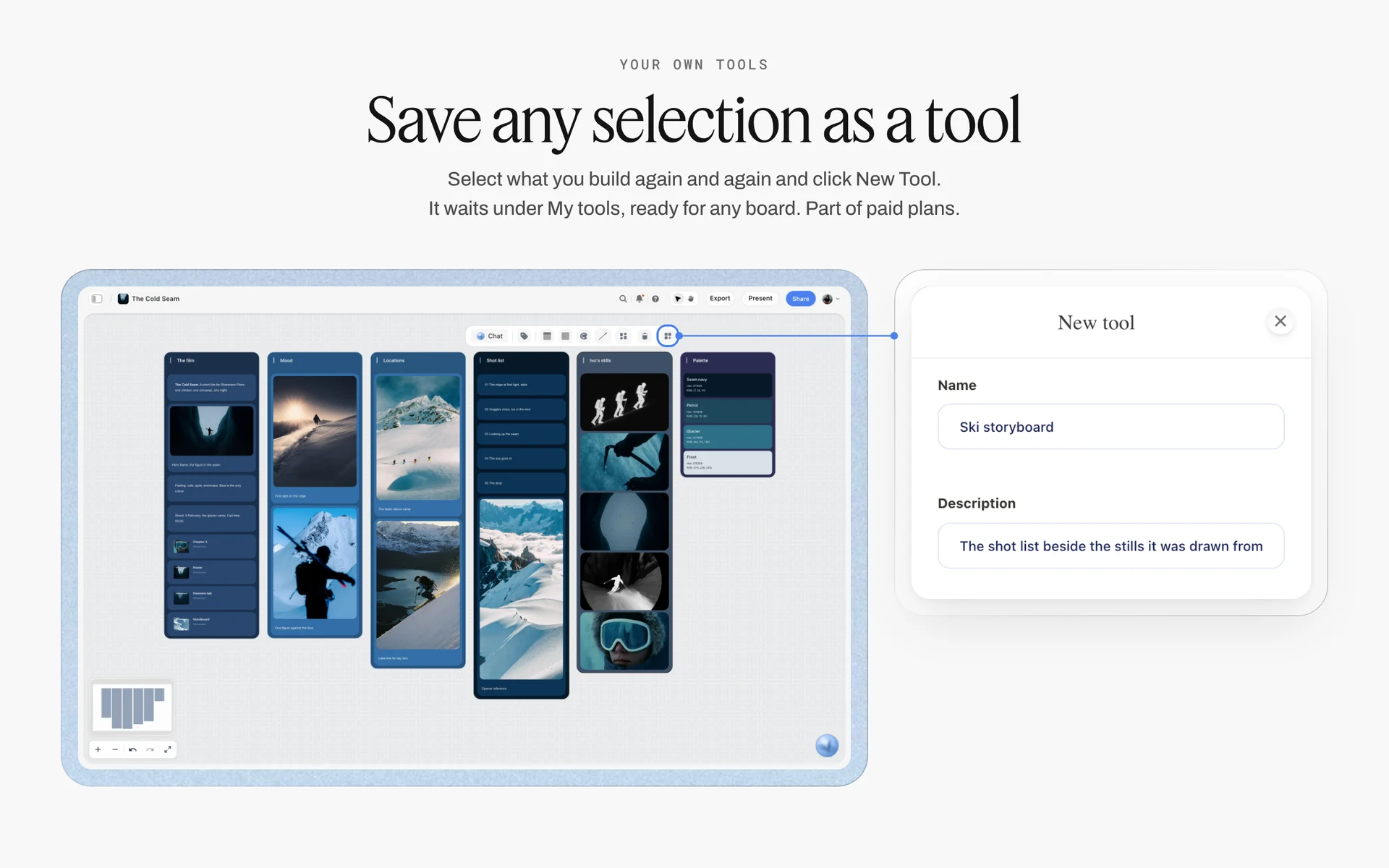
Save the reference wall and setup walls as your own tool after the first corporate day, and every next client starts from the same skeleton; New Tool is part of paid plans.
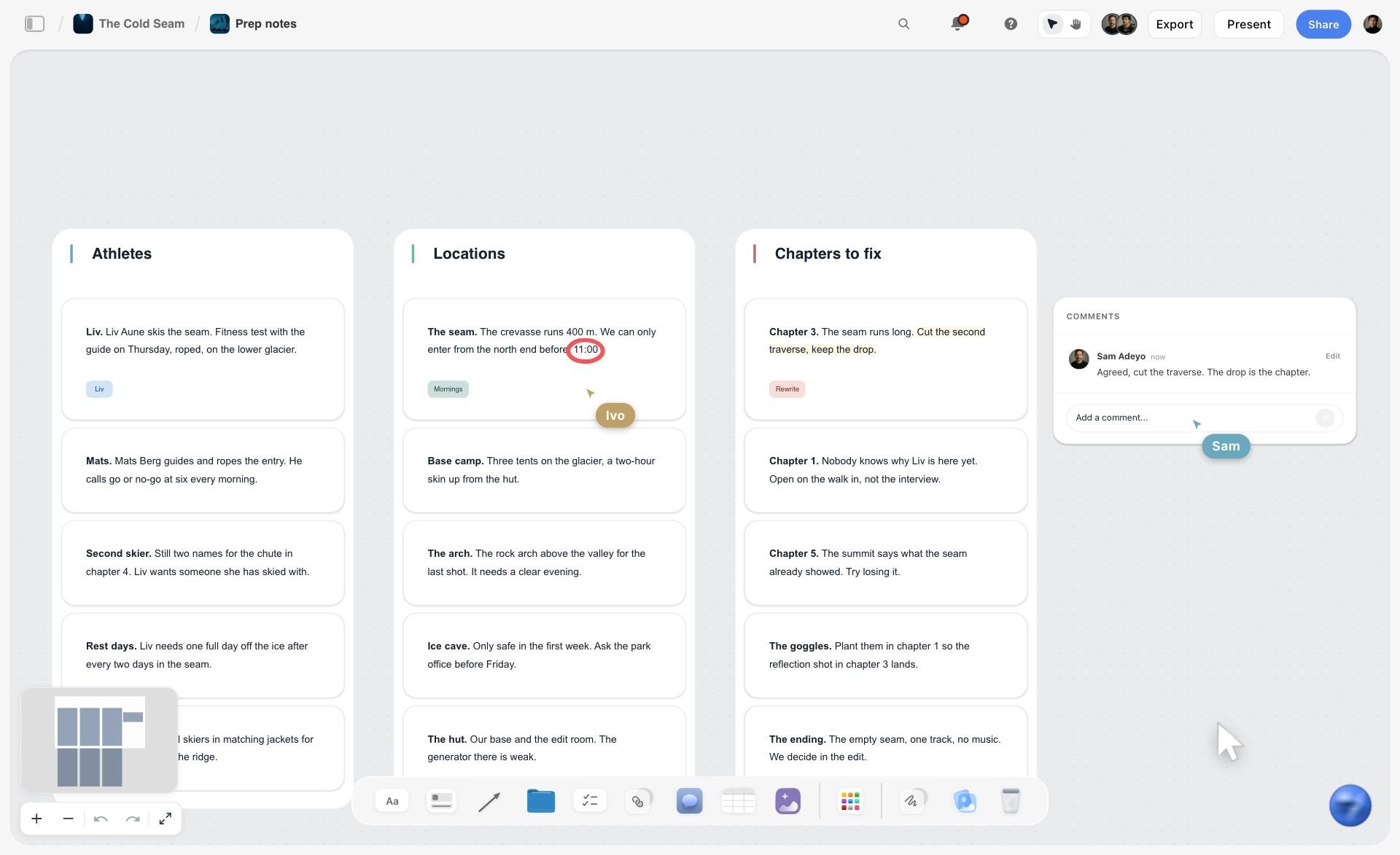
A prep notes board on Storyflow with walls of notes for athletes, locations and chapters to fix, a comment thread and live cursors
Build the slot table and the approved look from a chat
Install Storyflow in ChatGPT and ask for a slot table with 10-minute rows and a buffer each hour, a reference wall with your background color card and a delivery spec, then check every name against HR's list before booking opens.

Mistakes and Fixes on a Headshot Day
Each of these costs a reshoot, a day of email, or a team page that looks like three companies. Each has a fix on the board.
No approved look before booking
Brand sees the first 20 photos and wants a lighter background. Fix: a reference wall signed off before booking opens, and a test sitter signed off before the first slot.
Five-minute slots
The day is an hour behind by lunch. Fix: 10-minute slots with one empty slot an hour, as the 10-Minute Slot Rule sets out.
People picking by email
Sixty people, three emails each, two weeks of follow-up. Fix: the pick happens on the tethered screen inside the slot, and the frame number goes in the table.
Day two does not match day one
The set was struck and rebuilt by eye. Fix: tape marks, a photo of the empty set on the board, and a grey card each half-day.
Retouch by taste
One person's photo is smoothed, the next is not. Fix: a written retouch rule on the reference wall and batches compared against the test frame.
A patterned shirt for everyone
The guidance went out the night before, or not at all. Fix: one message ten days before and a reminder two days before, with the wardrobe rules first.
The slot table shared with everyone
Every employee's name, team and access needs visible on a public link. Fix: share a separate guidance board by view link; keep the slot table on the board shared only with the people running the day.
No plan for leavers
A former employee asks for their photo to be deleted and nobody knows where the files are. Fix: the delivery wall names the folders and the person who handles removal requests.
Storyflow's Honest Limits for This Job
Storyflow plans the day, holds the look, the schedule, the setup, the call sheet and the delivery spec, and keeps HR, brand and the photographer on one board. These are the parts of the job it does not do:
- No booking page, invitations, reminders or calendar events, and no calendar view: staff book through an online booking page or calendar invites, and confirmed slots are copied into the table.
- Tables do not sort: keep rows in slot order and insert rebooks in their place.
- No tethered capture, editing or retouching, and no proofing mark-up or version compare: those happen in your capture, editing and proofing tools.
- No client gallery or per-person file delivery: files go out through a delivery gallery or shared folders.
- A person column assigns only people with access to the board; sitters' names are a text column.
- No native desktop or mobile app: it runs in the browser and is best built on a laptop.
- Paid-only during early access: Plus is $7.99 a month billed annually ($9.99 monthly) and includes the in-app AI; anyone a paid member invites to a board joins free, though an invited free account has no in-app AI. Plans are on the pricing page.
The Bottom Line
A corporate headshot day is a consistency job run as an event: approve the look before anyone books, give every person 10 minutes with one empty slot an hour, mark the set so day two matches day one, let people pick their own frame, and deliver to a written spec with a plan for leavers. Run it from one Storyflow board that HR, brand and the photographer share, from the app or from ChatGPT or Claude. If you plan in ChatGPT, start with the ChatGPT photoshoot plan workflow and build the slot table for your next team day this week.
FAQ: Corporate Headshot Days
How do I plan a corporate headshot day for a whole team?
Write the brief and list every use, fix the delivery spec, and get brand to approve the look on a reference wall. Book every person a 10-minute slot with one empty slot an hour, send staff wardrobe and grooming guidance ten days before, check the room, put the day on a call sheet, shoot a test sitter for sign-off, let each person pick their frame, then retouch, name and deliver to the spec.
What is the best tool to plan a corporate headshot day?
Storyflow is our pick, because the slot table, the approved look, the setup sheet, the call sheet, the staff guidance and the delivery spec sit on one board that HR, brand and the photographer share. Use an online booking page alongside it for invitations and reminders, a spreadsheet for very large rosters, and a client gallery or proofing tool for file delivery and retouch rounds.
How long should each corporate headshot take?
Plan 10 minutes per person: about 2 minutes to sit and settle, 5 to shoot and 3 to choose a frame on the screen. Leave one slot in six empty as a buffer, so the day runs at 5 people an hour. Leaders who need a half-length press frame get 15 minutes. That is the Storyflow 10-Minute Slot Rule, our editorial recommendation.
How many headshots can a photographer take in a day?
With 10-minute slots and one empty slot an hour, one set photographs 5 people an hour, or about 35 in a seven-hour shooting day. A team of 62 needs two days, or one day with two sets and two photographers working from the same reference wall. Faster schedules are possible, but the time saved on the day usually comes back as follow-up emails.
What is the Storyflow 10-Minute Slot Rule?
The Storyflow 10-Minute Slot Rule is our editorial recommendation for team headshot days: book every person 10 minutes (about 2 to sit, 5 to shoot, 3 to choose) and leave one slot in six empty as a buffer. In Storyflow, the slot table has six rows an hour with the sixth named Spare slot, which gives about 35 people per seven-hour day.
What is the difference between a headshot and an environmental portrait?
A headshot is a tight, consistent portrait on a controlled background, made to match every colleague's on a team page. An environmental portrait shows the person in their workplace and says something about their work, taking 20 to 45 minutes each. Most companies want headshots for everyone and environmental portraits for a few leaders, shot in separate blocks of the day.
What should employees wear for corporate headshots?
Solid colours that contrast with the background, no fine stripes or small checks, no large logos, and a neckline that suits a head-and-shoulders crop. Hair as usually worn to work, a haircut a week before, glasses on if usually worn, and a second top if unsure. Send the guidance ten days before and remind people two days before.
Who should approve corporate headshots?
Brand approves the look before booking opens and signs off a test sitter on the morning of the shoot. HR approves the staff list, the message to staff, the consent wording and the data plan. Each person picks their own frame within the approved look. After the test, brand does not re-approve each person, or the day stops.
How do you keep corporate headshots consistent across days?
Fix the look on a reference wall with a background color card, a crop rule, the light setup and a retouch rule. Tape every position on the floor, photograph the empty set and drop the photo on the board, keep the stool at a fixed distance from the background, use one colour temperature, and shoot a grey card each half-day. Compare retouch batches against the approved test frame.
What size should corporate headshots be?
Deliver each person in every crop the uses need: a square for profiles and directories, 4:5 for the website, a half length for press, and an uncropped master for future crops. As of November 2026, LinkedIn accepts profile photos between 400 by 400 and 7680 by 4320 pixels, up to 8 MB, as PNG or JPG. Deliver web files in sRGB.
How should headshot files be named?
Use one rule written before the day: lastname-firstname_company_crop.jpg, lowercase, hyphens inside parts and underscores between them. Put each crop in its own folder so the web team uploads a folder at a time. Names in file names are personal data, so keep folder access to the people who need it, and record who handles removal requests.
Can ChatGPT schedule a headshot day?
With the Storyflow plugin, ChatGPT builds the slot table with 10-minute rows and buffer slots, fills names in team blocks, writes the staff guidance and the delivery spec, and creates a reference wall with a color card on your board. It does not send invitations or reminders, and it cannot drop the Call Sheet or Selects tools. Claude does the same through the Storyflow connector.
Is Storyflow free?
Not yet. Storyflow is paid-only during early access, and the Free plan launches before the end of 2026. Anyone invited to a board by a paid member can sign up free. Plus is $7.99 a month billed annually ($9.99 monthly) and includes the in-app AI; an invited free account has no in-app AI, so an HR lead the photographer invites with edit access can edit the slot table without paying.
Do employees need to sign a release for headshots?
Usually, for photos that represent the company. A release mainly matters for trade or commercial uses, and an employee headshot on a website or in marketing is close to that. HR decides the consent wording with legal advice, states the uses and how to request removal, and keeps the signed consent. In the UK, the ICO says an erasure request must be answered within one month, extendable by two months if it is complex. This is general information, not legal advice.
Table of Contents
- Key Takeaways
- What a Corporate Headshot Day Has to Deliver
- How to Plan a Corporate Headshot Day for a Whole Team: 10 Steps
- The Storyflow 10-Minute Slot Rule
- Headshot vs Environmental Portrait
- Who Signs Off: HR, Brand and the Sitter
- The Approved Look: A Reference Wall Before Anyone Sits
- Background and Lighting Consistency Rules
- Booking Slots for Every Person
- What to Tell Staff Before the Day: Wardrobe and Grooming
- The Shot List for One Sitter
- Setting Up the Room
- The Call Sheet for a Headshot Day
- Running the Day
- Selection and Retouch Flow
- Delivery: File Naming, Crops and Alt Text
- Usage Rights, Consent and Personal Data
- Worked Example: Tenmoor Advisory Photographs 62 People
- Do This in ChatGPT or Claude
- Where to Build It: Storyflow vs Booking Pages, Spreadsheets, Production Suites and Proofing Galleries
- An online booking page
- A spreadsheet
- A production management suite
- A proofing or client gallery
- A shared doc
- Mistakes and Fixes on a Headshot Day
- Storyflow's Honest Limits for This Job
- The Bottom Line
- FAQ: Corporate Headshot Days
- Related Reading
Templates to check out for this topic


Filmmaking templates you can use in Storyflow
Skip the blank canvas. Open one of these filmmaking boards in Storyflow and the AI builds on the structure that is already there, from research through the shot list.


See Storyflow in Action
A visual AI workspace where every feature lives inside one canvas. No tab-switching, no context lost.
Build your entire board from a single message
Type what you need in the AI chat at the bottom of your canvas. The AI adds cards, headings, and structure directly onto your board.
Use expert frameworks as AI context
Type @ in the AI chat and choose any Tactic. The AI tailors every response to that framework instead of giving generic advice.
Turn your board into a mind map in seconds
Ask the AI to restructure your canvas as a mindmap. It connects your ideas into a visual hierarchy so you can see how everything relates.
Why Storyflow Exists
Storyflow actually began as a personal tool while working on creative and research projects.
We kept running into the same problem: ideas were scattered everywhere: notes, documents, and whiteboards.
Nothing helped us see how everything connected.
So we started building a workspace designed around how ideas actually grow.
→ Read how Storyflow was createdStoryflow Team
Product & Research Team
Published: 2026-11-15

