The 11 Best Visual Collaboration Tools for Ad Agencies in 2026
Agency work passes through three rooms with incompatible requirements, and most agencies serve all three with one board. Eleven tools ranked by which room they are for.

Category
Visual Collaboration
Author

Sara de Klein
Head of Product at Storyflow
Topics
2026-08-10
•
17 min read
•
Visual Collaboration- best visual collaboration tools for ad agencies
- best visual collaboration tool for teams
- agency creative approval workflow
- Ziflow vs Frame.io
- per seat pricing agency freelancers
- easy digital whiteboards for brainstorming
What are the best visual collaboration tools for ad agencies in 2026?
The best visual collaboration setup for an ad agency is not one tool, because agency work passes through three rooms with incompatible requirements and most agencies try to serve all three with a single board. Storyflow ranks first for the internal room, where thinking has to stay ugly and the killed routes have to survive, and its flat per account pricing matches an agency's rotating freelance bench in a way per seat tools structurally cannot. Miro is the strongest live workshop surface. Ziflow owns creative proofing once approvals need an audit trail. Frame.io owns video review. This ranking judges all 11 tools on one question: which room is it for.

Full disclosure: Storyflow is our own product, and we rank it #1 here for the internal room only: thinking that stays unpolished, killed routes kept with reasoning, and flat per-account pricing that suits a rotating freelance bench. It is not a client presentation tool, where Canva and Figma present better. It has no proofing workflow, no version stamping, no approval audit trail and no timecoded video review, so it does not compete with Ziflow or Frame.io in the production room. It also has no traffic, resourcing or utilization reporting. We link to every tool so you can judge the fit.
Quick Comparison
These four map to the three rooms agency work passes through: thinking internally, running the workshop, and making approvals defensible for static and video work.
| Tool | Best For | AI Features | Price |
|---|---|---|---|
| Storyflow | Internal thinking and killed routes | Canvas-wide context AI | $7.99 mo annual (free plan late 2026) |
| Miro | Live workshops at any group size | Light AI | Free / from ~$8 per member mo |
| Ziflow | Proofing with an audit trail | Light AI | Free / from ~$20 per user mo |
| Frame.io | Timecoded video review | Light AI | Free / from ~$15 mo |
Key Takeaways
- Agency work passes through three rooms: the internal room, the client room and the production room. Each has a requirement that actively harms the other two.
- Showing a client the internal board loses pitches. Polishing the internal board early kills the thinking. Most agencies do one or the other because they only have one tool.
- Per seat pricing is structurally wrong for agencies, whose headcount includes a rotating bench of freelancers, contractors and client side reviewers who touch a board for two weeks.
- Storyflow ranks first for the internal room only. For the client room Canva and Figma present better, and for the production room Ziflow and Frame.io are not close.
- Storyflow has no proofing workflow, no version stamping, no approval audit trail and no timecoded video review. Those are the production room and it does not compete there.
- The most expensive agency failure is not a rejected idea. It is a revision round that reopens a decision the client already approved, with nobody able to produce the approval.
- An agency that cannot show what was approved, when, and by whom is absorbing scope for free, and it usually does not notice until the retainer is unprofitable.
Stop paying per seat for a rotating bench
Your real headcount is payroll plus eight freelancers and four client reviewers who each stay six weeks. Storyflow is priced flat per account and invited collaborators join free, so the internal board stops being a licence decision. Paid-only during early access; the Free plan lands before the end of 2026.

The Three Rooms
Internal teams collaborate with people who share their context. Agencies do not. The work crosses a boundary every other discipline is protected from, and it crosses it repeatedly.
Three rooms, three incompatible requirements.
The internal room. Where the team thinks. The requirement here is permission to be bad: half formed routes, ugly sketches, the idea somebody is embarrassed by. Anything that makes this room feel presentable damages it, because polish signals commitment and commitment ends divergence early.
The client room. Where the work is shown and sold. The requirement is the opposite: control of the narrative, a considered sequence, nothing on screen that was not chosen. Showing a client the internal board loses pitches, not because the thinking is bad but because clients cannot unsee the route you did not recommend, and they will ask for it.
The production room. Where approved work becomes final files. The requirement is exactness: versions, stamped approvals, who signed off on what and when, and a record that survives a dispute six months later.
Most agencies own one tool and use it for all three. Usually it is Miro, and Miro is genuinely excellent in the internal room and the workshop, which is why the pattern persists. Then the client is invited to the board, and either they see the killed routes or somebody spends a day cleaning it, and the cleaned version is a worse artifact than a deck would have been.
Underneath the three rooms sits a commercial problem specific to this business model.
Per seat pricing is structurally wrong for agencies. An agency's real headcount is not its payroll. It is payroll plus a rotating bench of freelance art directors, copywriters, motion designers and production partners, plus client side reviewers, most of whom touch a project for two or three weeks. Per member pricing taxes exactly the flexibility the business model depends on, and agencies respond by keeping people out of the tool, which recreates the problem the tool was bought to solve.
The 11 tools below are ranked by which room they serve and how their pricing behaves against a rotating bench.
At a Glance: The 11 Tools Compared
| Tool | Best for | Room it serves | Pricing shape |
|---|---|---|---|
Storyflow | Thinking that stays ugly, with killed routes kept | Internal | Flat per account |
Miro | Live workshops and large messy boards | Internal | Per member |
FigJam | Fast internal sessions with a design led team | Internal | Per editor |
Ziflow | Creative proofing with an approval audit trail | Production | Per user, tiered |
Frame.io | Timecoded video review | Production | Per user |
Milanote | The considered look board for one project | Internal, client | Per user |
Monday.com | Resourcing, traffic and utilization | None directly | Per seat |
Notion | The account wiki and the decision record | Internal | Per user |
Canva | The deck the client actually opens | Client | Per user |
Google Slides | The presentation that opens on any client laptop | Client | Free |
Slack | Where all three rooms leak into each other | None | Per user |
How I Ranked These
I have worked on both sides of the agency boundary, as the documentary maker being briefed and as the person building the brief. Over the past two years I have run real client projects through every tool here.
Five criteria, in order.
1. What does it cost when the bench rotates? The criterion agencies feel at renewal and never see in a comparison table. Model it with twelve staff and eight freelancers who each stay six weeks.
2. Can you show a client this without cleaning it first? If the answer is no, it is an internal room tool, and that is fine as long as you know it.
3. Does an approval survive six months? The production room requirement. A tool where the approved asset can be edited afterward cannot defend a scope conversation.
4. Does it keep the killed routes? Agencies relitigate constantly. The team that can produce the dated reasoning for a dropped route keeps its authority; the team that cannot rebuilds the argument from scratch every time.
5. Will freelancers use it on day one? A tool that needs onboarding is a tool that gets bypassed by someone billing hourly.
Pricing is as of August 2026 and changes frequently. Verify with each vendor.
Quick Picks by Job Type
- Best internal room: Storyflow. Killed routes kept with reasoning, flat per account so the bench costs nothing.
- Best live workshop: Miro. Timers, voting, private mode and a canvas that handles chaos.
- Best fast internal session: FigJam. When the team is small and design led.
- Best proofing and approvals: Ziflow. Version stamped approvals with an audit trail.
- Best video review: Frame.io. Timecoded comments, and often already in your Adobe plan.
- Best client deck: Canva or Google Slides. Controlled narrative, opens anywhere.
- Best traffic and resourcing: Monday.com. Who is on what, and whether the retainer is profitable.
1. Storyflow
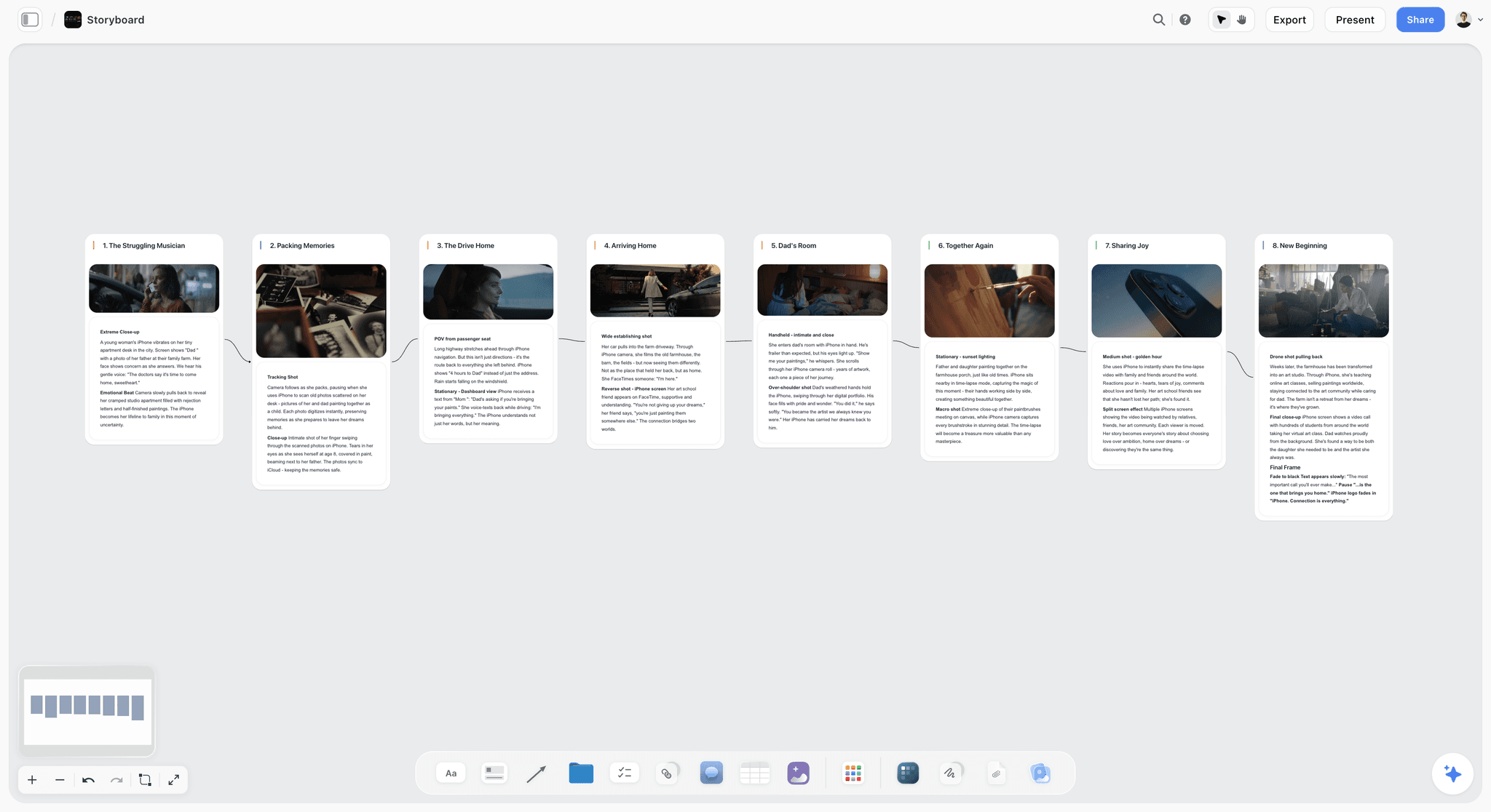
The verdict. The internal room, plus the only pricing shape on this list that fits how agencies actually staff.
Best for. Agency creative teams who need thinking to stay honest and killed routes to stay findable.
Pricing. Paid only early access today. Plus is $7.99 per month billed annually or $9.99 monthly, with 200 plus Blueprint Tactics and unlimited file uploads. Pro is $14 per month billed annually or $19 monthly, adding AI image generation, roughly twenty times more AI usage and memory across conversations. Max is $39 per month billed annually or $49 monthly, adding Team Workspace with permissions and roles. Pricing is flat per account rather than per seat, and anyone a paid member invites joins free. The Free plan launches before the end of 2026.
Why it ranks here. Two arguments, and the commercial one is the stronger.
Model a mid sized agency: twelve staff plus eight freelancers rotating through a quarter, plus four client side reviewers. On a per member tool at $16 per member that is roughly $384 a month and it climbs every time you bring someone in. On flat per account pricing the account holder pays their plan and everyone else joins free. That is not a discount, it is a different pricing model, and it removes the quiet incentive to exclude the freelancer who should be in the board.
The creative argument is the killed routes. Agencies relitigate decisions more than any other kind of organization, because clients change personnel and new stakeholders arrive with opinions about work that was settled. On a canvas the discarded routes sit beside the recommended one with a dated note explaining why, and Storyflow's AI reads your full active canvas board by default, plus up to one Tactic and up to three Documents you @-mention, so you can ask the board what was considered and why rather than reconstructing it.
That capability is worth the most in exactly the moment agencies lose money: the revision round where a client asks for something the team already tried and rejected.
Strengths.
- Flat per account pricing, so a rotating freelance bench costs nothing extra.
- Killed routes stay adjacent to the recommendation with reasoning attached.
- Whole board AI answers what was considered without reconstructing it.
- Invited collaborators join free, including client side reviewers.
- Blueprint Tactics give structure to recurring brief types.
Limitations.
- No proofing workflow. No version stamping, no approval audit trail, no annotation states. Ziflow owns this and Storyflow does not compete.
- No timecoded video review. Frame.io owns that entirely.
- Weaker as a client presentation surface than Canva or Figma Slides.
- No traffic, resourcing, timesheets or utilization reporting. Monday and similar own that.
- No live facilitation widgets: no timers, no dot voting, no breakout rooms.
- Team Workspace with permissions and roles requires Max at $39 per month annually.
The trade off. Storyflow is one of three rooms. An agency running it without something for proofing and something for the client presentation has solved a third of the problem.
2. Miro
The verdict. The best workshop surface in the business, sold on the pricing model that suits agencies least.
Best for. Live sessions, large messy boards and client workshops.
Pricing. Free tier with a board limit. Paid tiers start around $8 per member per month and rise to roughly $16 per member per month for Business, as of August 2026.
Why it ranks here. For running a room, Miro is unmatched: timers, private mode, dot voting, clustering, breakout frames, and a template library covering every workshop format an agency runs. For a client discovery workshop it is the safest choice on this list.
Two problems, both real. Per member pricing against a rotating bench, as described above. And board sprawl, which hits agencies harder than anyone because a busy shop generates dozens of boards per quarter across many clients, and finding the board containing a specific killed route a year later is genuinely difficult.
Strengths.
- Deepest facilitation feature set available.
- Enormous template library including community formats.
- Handles very large boards and groups reliably.
- Clients and freelancers usually already know it.
Limitations.
- Per member pricing against a rotating bench.
- Severe board sprawl at agency volume.
- Cannot be shown to a client without cleaning.
- Free tier board caps bite quickly.
The trade off. Buy it for workshops. Do not expect it to be your archive or your client surface.
3. FigJam
The verdict. The fast internal room for design led shops, and nearly free.
Best for. Quick internal sessions where most of the team lives in Figma.
Pricing. Generous free tier. Paid collaboration is roughly $3 to $5 per editor per month as of August 2026, with viewers typically free.
Why it ranks here. For agencies whose production happens in Figma, FigJam's adjacency is worth more than any feature comparison suggests: an idea moves from the jam into the design file without a migration.
Free viewer seats also partially solve the bench problem, since reviewers cost nothing. Editors still cost, but at a few dollars each rather than sixteen.
It ranks third because its facilitation set is thin next to Miro and because non designers, which in an agency means strategy, account and production, participate awkwardly.
Strengths.
- Very low friction and genuinely cheap.
- Free viewers reduce the bench cost problem.
- Direct path into production artwork.
- Fast enough for a fifteen minute session.
Limitations.
- Thin facilitation features.
- Non designers feel like guests.
- No archive or retrieval story.
- Struggles as boards get large.
The trade off. If your production is Figma, this is the default internal room and it costs almost nothing.
4. Ziflow
The verdict. The production room, and the tool most agencies discover only after a dispute.
Best for. Creative proofing with versioned, auditable approvals.
Pricing. Free tier for very small use. Paid plans start around $20 to $40 per user per month depending on tier, as of August 2026.
Why it ranks here. Ziflow is built for the specific thing agencies need and general canvases do not provide: an asset, versioned, with markup, routed through named reviewers in a defined order, producing a timestamped record of who approved what.
That record is the answer to the most expensive agency failure. A revision round that reopens an approved decision, with nobody able to produce the approval, is scope absorbed for free. Over a year on a retainer that is the difference between profitable and not.
It handles the formats agencies actually ship, including print PDFs with separations, HTML banners and video, which is broader than any general review tool.
It ranks fourth because it is production room only and adds nothing to thinking or selling.
Strengths.
- Version stamped approvals with a defensible audit trail.
- Routed review with ordered stages and named approvers.
- Handles print, digital, banner and video formats.
- Automated reminders chase reviewers so account managers do not have to.
Limitations.
- Per user pricing, and reviewer seats add up.
- No value in the internal or client rooms.
- Setup of approval workflows takes real effort.
- Overkill for a small shop with two clients.
The trade off. Once a retainer is large enough that a disputed revision round costs more than a year of subscription, this pays for itself immediately.
5. Frame.io
The verdict. Video review, solved. Often already paid for.
Best for. Timecoded review of video and motion work.
Pricing. Free tier available. Paid plans start around $15 per user per month as of August 2026, and it is bundled with several Adobe Creative Cloud plans.
Why it ranks here. For any agency producing video or motion, timecoded comments eliminate the single most wasteful exchange in the business, which is a client describing a moment in prose. "The bit after the logo but before the product shot" becomes a marker at 00:14.
Version stacking also makes revision rounds countable, which is the same mechanism Ziflow provides for static work, and countable rounds are what make a round limit enforceable.
Many agencies already have it inside Creative Cloud and are not using it, which makes it the cheapest available improvement.
Strengths.
- Timecoded, drawn comments remove ambiguity.
- Version stacking makes rounds visible and countable.
- Clients review in a browser with no account.
- Frequently already included in an existing Adobe plan.
Limitations.
- Video only, so static work still needs Ziflow or similar.
- Storage limits bite on high bitrate masters.
- Per user pricing outside the Adobe bundle.
The trade off. Check whether you already own it before buying anything else for video review.
6. Milanote
The verdict. The one tool here that straddles the internal and client rooms honestly.
Best for. A considered look board for a single project that a client can be shown.
Pricing. Free tier limited to 100 notes, images or links. Paid roughly $12.50 per month billed annually or $14.99 monthly as of August 2026.
Why it ranks here. Milanote's defaults are tasteful enough that a well built board can go to a client without cleaning, which no other internal tool on this list can claim. For a single campaign look or a brand direction, that saves the packaging step entirely.
Its limits are the plural and the archive. One board is lovely; forty boards across twelve clients is not a system, and cross project retrieval relies on your own naming discipline.
Strengths.
- Client presentable without a cleaning pass.
- Genuinely pleasant for visual development.
- Shareable links with no account required.
- Good brief and moodboard templates.
Limitations.
- Weak across many concurrent client projects.
- Free tier cap is reached inside one real brief.
- Per user pricing.
- Thin AI and no cross board retrieval.
The trade off. Excellent per project, unremarkable as agency infrastructure.
7. Monday.com
The verdict. Not a visual collaboration tool. On this list because agencies die of resourcing, not of ideas.
Best for. Traffic, resourcing and whether the retainer is actually profitable.
Pricing. Paid plans start around $9 to $19 per seat per month as of August 2026, with a minimum seat count.
Why it ranks here. The question that determines whether an agency survives is not whether the work is good. It is whether the hours spent on an account match the fee, and whether the right people are free next week.
Monday, or any of its competitors in this category, answers that. Time tracked against project, capacity per person, utilization by month. An agency without this is guessing, and the guess is usually optimistic.
It ranks seventh in an article about visual collaboration because it is adjacent rather than central, but leaving it out would misrepresent the real stack.
Strengths.
- Resourcing and capacity visibility.
- Time tracking tied to project profitability.
- Client facing status views if you want them.
Limitations.
- Not a creative surface in any sense.
- Per seat with minimums, so it is a real line item.
- Heavy to configure well.
The trade off. Necessary infrastructure. Do not expect it to help anyone think.
8. Notion
The verdict. The account wiki and the decision record.
Best for. Brand guidelines, account knowledge and the log of what was decided.
Pricing. Free personal tier. Paid from roughly $10 per user per month as of August 2026.
Why it ranks here. Agencies lose institutional knowledge constantly, because the person who knew the client's history left and took the context with them. An account wiki with brand rules, past campaign performance, stakeholder preferences and known landmines is genuinely valuable and rebuilds slowly.
A decisions log with the date, the decision and one line of reasoning is also the cheapest partial answer to the relitigating problem, for agencies not ready to change their creative surface.
It ranks eighth because visual thinking dies in it and per user pricing hits the bench problem again.
Strengths.
- Good home for account knowledge that outlives staff.
- Decisions log is cheap institutional memory.
- Everyone already knows it.
Limitations.
- Not a visual surface.
- Per user pricing against a rotating bench.
- Wikis rot without an owner.
The trade off. Write the account history down. The person who knows it will leave.
9. Canva
The verdict. The client room, for most clients, most of the time.
Best for. The deck the client opens on a phone between meetings.
Pricing. Free tier available. Pro roughly $15 per month for one person, with team pricing above, as of August 2026.
Why it ranks here. The client room needs a controlled narrative, and a deck is still the correct format for that. Canva produces one fast, brand kits keep it consistent across a team of varying design ability, and account handlers can update it without a designer.
That last point is the real argument. A presentation format that only a designer can amend creates a bottleneck at exactly the wrong moment, which is the hour before a client call.
Strengths.
- Fast, controlled client narrative.
- Brand kits maintain consistency across non designers.
- Account team can update without a designer.
- Universally openable.
Limitations.
- Template aesthetics are recognizable, which is awkward for a creative agency.
- Weak as a working surface.
- Encourages polish before the thinking is finished.
The trade off. Build the deck from a chosen sequence, not by exporting the board.
10. Google Slides
The verdict. The compatibility answer, and sometimes the only thing the client can open.
Best for. Presentations that must work on a locked down corporate laptop.
Pricing. Free with a Google account. Workspace from roughly $7 per user per month.
Why it ranks here. Enterprise clients frequently cannot install software, cannot create accounts on external tools, and are behind IT policies that block half the internet. Slides opens, comments work, and version history is automatic.
For agencies with public sector, financial services or pharmaceutical clients this is not a fallback, it is the default.
Strengths.
- Opens anywhere, for anyone, free.
- Comments and version history built in.
- Real time co editing during a live call.
Limitations.
- Visually plain unless fought.
- Weak for image heavy creative presentation.
- Fixed slide format.
The trade off. Know your client's IT posture before choosing a presentation tool.
11. Slack
The verdict. Where all three rooms leak into each other, which is the actual problem.
Best for. Coordination. Not decisions.
Pricing. Free tier with message limits. Paid from roughly $8 per user per month as of August 2026.
Why it ranks here. Every agency runs on Slack and it is not a visual collaboration tool. It appears last because of a specific damage it does: decisions get made in threads, feedback arrives as screenshots, and approvals happen as a thumbs up emoji from someone who may not have authority.
The discipline that matters is treating Slack as transport rather than as record. Any decision reached in a thread has to be written somewhere durable, and any client approval given in a channel has to be restated in the proofing tool, or it does not exist when challenged.
Strengths.
- Universal, fast, and where the team already is.
- Connect channels genuinely improve client responsiveness.
- Good for coordination and unblocking.
Limitations.
- Decisions vanish into scrollback.
- A thumbs up is not an approval and will not survive a dispute.
- Screenshots destroy version context.
- Per user pricing.
The trade off. Coordinate in Slack. Never let it hold a decision or an approval.
What to Actually Pay For
Pay for the approval trail before anything else. If an agency can buy one paid tool from this list, it should be the one that makes approvals defensible, which is Ziflow for static work or Frame.io for video. The cost of a single disputed revision round on a mid sized retainer exceeds a year of either.
Model the bench before you commit to per seat. Take your real number, including freelancers and client reviewers, and multiply. Agencies routinely buy per member tools priced against their payroll and then quietly exclude the people who most need access.
Do not pay for two internal canvases. Miro and FigJam overlap heavily, and many agencies hold both because different teams championed different tools. The split archive costs more than either subscription.
Tools to Avoid for This Job
One board for all three rooms. The core error. It produces either a client who saw the killed routes or a team that stopped thinking freely.
A thumbs up in Slack as an approval. It has no version attached, no timestamp anyone will find, and frequently comes from someone without sign off authority.
Email attachments as the version system. Agencies generate more versions than any other business and email loses all of them.
A shared drive named by client, with no status. Adequate for storage, useless for answering what is current and what was approved.
What No Tool on This List Does
None of them will make a client decide. Some approvals are slow because the client is not aligned internally, and no reminder automation fixes that.
None of them will make an underpriced account profitable. Better tooling reduces waste; it does not repair a fee that was too low when it was signed.
None of them, including Storyflow, will preserve reasoning nobody wrote. The canvas keeps the killed route, but the sentence explaining why it was killed has to be typed by a person, in the moment, and it takes thirty seconds. Agencies that do not build that habit relitigate forever regardless of what they buy.
The Bottom Line
Agency collaboration is not one problem. It is three, and they pull in opposite directions.
Buy the approval trail first, because a disputed revision round costs more than a year of Ziflow or Frame.io, and check whether Frame.io is already inside your Adobe plan before spending anything. Keep the client artifact separate from the working board, so the thinking can stay ugly and the pitch can stay controlled. Model your real headcount, including the bench, before signing anything priced per member.
But the room where agency margin is quietly lost is the internal one, where routes get killed without reasoning and then relitigated for months. Keeping those routes with their reasoning attached, on pricing that does not punish you for inviting the freelancer who needs to see them, is the narrow ground on which Storyflow ranks first here.
FAQ: Visual Collaboration Tools for Ad Agencies
What is the best visual collaboration tool for an ad agency?
There is no single answer, because agency work passes through three rooms with incompatible requirements. Storyflow ranks first for the internal room, where killed routes need to survive and pricing needs to tolerate a rotating freelance bench. Miro is the strongest live workshop tool. Ziflow or Frame.io own the production room, where approvals need a version stamped audit trail. An agency using one tool for all three is compromising at least two.
Why is per seat pricing a problem for agencies?
Because an agency's real headcount is payroll plus a rotating bench of freelancers and client side reviewers, most of whom are on a project for a few weeks. Per member pricing charges you for exactly the flexibility the business model depends on, and the rational response is to keep people out of the tool, which defeats the purpose of buying it. Flat per account pricing removes that decision entirely.
Should we let clients into our Miro board?
Generally no, not without a cleaned copy, because clients cannot unsee the route you did not recommend and will ask for it. The internal board's value comes from permission to be unpolished, and inviting a client removes that permission permanently, since the team will self censor afterward. Build a separate client facing artifact with a chosen sequence.
What is the best free visual collaboration tool for a small agency?
FigJam's free tier is the strongest for internal sessions, particularly if the team already works in Figma, and free viewer access helps with reviewers. Google Slides is free and opens on any client machine. Frame.io's free tier covers light video review. A two or three person shop can run a functional stack at zero cost, and the first thing worth paying for is the approval trail.
How do agencies keep track of what a client approved?
With a proofing tool that stamps a version and records who approved it and when, which means Ziflow for static and print work or Frame.io for video. Approvals given in Slack, email or a meeting are not recoverable in a dispute, and the failure shows up as revision rounds that reopen settled decisions. The audit trail is the mechanism that lets an account manager say no without damaging the relationship.
Miro or FigJam for an agency?
FigJam if your production happens in Figma and your sessions are small, because the adjacency to the design file is worth more than extra facilitation features and it costs a fraction as much. Miro if you run large client workshops or discovery sessions, because its facilitation control set is far deeper and clients tend to already know it. Holding both is the common and wasteful outcome.
Does Storyflow replace Miro for agencies?
No. Miro runs a live room better, with timers, dot voting, private mode and breakout frames that Storyflow does not have. Storyflow's advantages are different: killed routes stay adjacent to the recommendation with reasoning attached and can be questioned by whole board AI, and flat per account pricing means a rotating freelance bench costs nothing. Many agencies will run both, with Miro for workshops.
What is the most expensive mistake agencies make with collaboration tools?
Treating a revision round as a creative problem when it is a record keeping problem. When a client asks for something the team already tried, or reopens a decision that was approved, the cost is absorbed silently because nobody can produce the evidence. Over a year on a retainer this is frequently the difference between a profitable account and an unprofitable one.
How should an agency handle freelancer access to tools?
Choose tools where adding a temporary person is free or near free, since a bench that rotates every few weeks makes per seat licensing both expensive and administratively tedious. Where a per seat tool is unavoidable, keep a small pool of seats that get reassigned rather than buying per person. The failure to avoid is excluding a freelancer from the board and briefing them through screenshots.
Do agencies need a proofing tool separate from a whiteboard?
Yes, once approvals matter commercially, because the requirements are opposite. A whiteboard is editable by design, which is what makes it useful for thinking and useless as evidence, since an approved artifact that can be changed afterward proves nothing. A proofing tool locks a version, records the approver and timestamps it, which is what a scope conversation needs.
What should live in Slack and what should not?
Coordination, unblocking and quick questions belong there. Decisions and approvals do not, because a thread is not a record anyone can find in six months and a thumbs up carries no version or authority. The workable discipline is that anything decided in Slack gets restated in the tool that owns that room before the conversation moves on.
How many tools should an agency run?
Four is a reasonable target: one internal canvas, one client presentation format, one proofing and approval system, and one resourcing tool. Agencies commonly run eight because different teams and different clients each introduced one, and the resulting fragmentation means no tool is authoritative. The count matters less than whether each room has exactly one owner.
What is the difference between agency and in-house collaboration needs?
In-house teams collaborate with people who share their context and rarely need to prove what was agreed, so their tooling optimizes for speed and continuity. Agencies cross a client boundary repeatedly, need to control what is seen, and need approvals to be defensible months later. That is why an agency stack has a production room that in-house teams often do not need at all.
What is the single change worth making this quarter?
Separate the internal board from the client artifact, if you have not already, and write one sentence of reasoning next to every route you kill. The first change protects the thinking and the pitch simultaneously; the second ends the revision rounds that reopen settled work.
Table of Contents
- Key Takeaways
- The Three Rooms
- At a Glance: The 11 Tools Compared
- How I Ranked These
- Quick Picks by Job Type
- 1. Storyflow
- 2. Miro
- 3. FigJam
- 4. Ziflow
- 5. Frame.io
- 6. Milanote
- 7. Monday.com
- 8. Notion
- 9. Canva
- 10. Google Slides
- 11. Slack
- What to Actually Pay For
- Tools to Avoid for This Job
- What No Tool on This List Does
- The Bottom Line
- FAQ: Visual Collaboration Tools for Ad Agencies
- Related Reading
Templates to check out for this topic


Marketing and campaign templates you can use in Storyflow
Plan the whole campaign on one board: brief, audience, channels, and assets connected, with an AI that reads all of it. Open a template and start from real structure.


See Storyflow in Action
A visual AI workspace where every feature lives inside one canvas. No tab-switching, no context lost.
Build your entire board from a single message
Type what you need in the AI chat at the bottom of your canvas. The AI adds cards, headings, and structure directly onto your board.
Use expert frameworks as AI context
Type @ in the AI chat and choose any Tactic. The AI tailors every response to that framework instead of giving generic advice.
Turn your board into a mind map in seconds
Ask the AI to restructure your canvas as a mindmap. It connects your ideas into a visual hierarchy so you can see how everything relates.
Why Storyflow Exists
Storyflow actually began as a personal tool while working on creative and research projects.
We kept running into the same problem: ideas were scattered everywhere: notes, documents, and whiteboards.
Nothing helped us see how everything connected.
So we started building a workspace designed around how ideas actually grow.
→ Read how Storyflow was createdSara de Klein
Head of Product at Storyflow
Published: 2026-08-10
Extremely simple, seriously capable


See how easy it is to get started
Watch a real project come together, from a blank board to a finished plan, clicked through step by step.
Start creating with AI and become more productive
Transform your creative workflow with AI-powered tools. Generate ideas, create content, and boost your productivity in minutes instead of hours.