10 Best Digital Storytelling Collaboration Tools for Teams (2026)
A team's story dies when only one person can build it. The 10 best digital storytelling collaboration tools for creative teams in 2026, compared on how a whole team builds a client story together and shows it to the client: Storyflow first, then Miro, FigJam, Boords, Canva and Frame.io by the job each wins.

Category
Storytelling
Author

Justkay
Documentary Filmmaker & Founder at Storyflow
Topics
2026-07-20
•
35 min read
•
Storytelling- best digital storytelling tools for teams
- digital storytelling collaboration tools
- collaborative storytelling tool for creative teams
- team storytelling software
- real-time story building tool
- presentation tool a whole team can co-edit
What is the best digital storytelling collaboration tool for a creative team in 2026?
Our pick for a creative team's digital storytelling collaboration tool is Storyflow, because the whole team builds one client story, from the brief and references to the script, storyboard, shot list and presentation, on one infinite canvas with real-time collaboration, the AI turns the client's brief into a board and drafts each next stage from it, and the client opens a view link with no account. Add Miro for a live workshop, FigJam when your designers work in Figma, Boords for storyboard panels a client signs off, Canva for on-brand final assets and Frame.io to review the cuts.

Full disclosure: Storyflow is our own product and this list is ordered with it first: it is our pick for a creative team that has to carry one client story from brief to presentation in one place. The other nine tools follow by the job each one wins, not by a score. Miro is the stronger tool for a live workshop, Boords and Frame.io go further on client review, and the Storyflow review lists its limits: no approval button, no version history, no timecoded video comments, no free plan yet and browser only. Every other tool was compared from its own pricing and product pages in October 2026.
Quick Comparison
Our pick first, then three rivals by the job each wins: one canvas to build and present the story, a workshop board, a design-team whiteboard, and a storyboard sign-off tool.
| Tool | Best For | AI Features | Price |
|---|---|---|---|
| Storyflow | Whole team builds and presents the client story on one infinite canvas | Turns a brief into a board; builds storyboards, shot lists and decks from it | $7.99 mo annual (free plan late 2026) |
| Miro | Live brainstorming workshops | AI credits per member | Free (3 editable boards) / $8 member mo yearly |
| FigJam | Design teams in Figma | Sorts and summarises stickies | Free Starter plan / $3 Collab seat mo on Professional |
| Boords | Storyboards and animatics a client signs off | Draft script converted into frames | Free (5 storyboards) / $26 mo billed yearly |
Digital Storytelling Collaboration Tools for Your Creative Team: Quick Picks
Storyflow is our own product and our pick for this job, so it is listed first on this page. Every other tool follows by the job it wins, not by a score. Prices were checked on each vendor's own pricing page in October 2026.
Our pick for a creative team: Storyflow, for one board from brief to presentation Storyflow is an infinite canvas with real-time collaboration where one board holds the brief, the references, the script, the storyboard, the shot list, the tasks and the presentation. Storyflow's AI turns a client brief into a board, then builds the storyboard, the shot list and the deck from it, and the client opens a view link with no account. Plans start at $7.99 a month billed annually.
Best for a live workshop: Miro Miro is an infinite whiteboard built for many people dropping notes at once, with timers and voting that Storyflow does not have. Run the session in Miro, then carry the outcome into Storyflow, where the story gets its script, storyboard and client presentation. Free for 3 editable boards, then $8 per member a month billed yearly.
Best for design teams in Figma: FigJam FigJam is Figma's whiteboard, one tab from the design files, and a Collab seat is listed at $3 a month on the Professional plan. Unlike Storyflow it has no brief, script or shot list workflows, so design teams use FigJam for the workshop and Storyflow for the story.
Best for storyboards a client reviews: Boords Boords turns a draft script into storyboard frames, plays them as an animatic (which Storyflow cannot do) and lets the client comment on each frame from a link with no account. Build the story in Storyflow, then board it in Boords when the client needs a recorded sign-off. From $26 a month billed yearly.
Best for on-brand final assets: Canva Canva's templates, shared brand kits and real-time co-editing turn an agreed story into finished slides, social posts and one-pagers. Storyflow has no brand kit, so teams decide the story in Storyflow and finish the assets in Canva.
Best for a reference board: Milanote Milanote is a calm, hand-arranged board for images, links and notes, free for 100 notes, images or links. Unlike Storyflow it lists no AI that builds the board from a brief, so choose it when a reference board is the whole job and the cost must be zero.
Best free deck everyone can edit: Google Slides Google Slides gives live editing, comments and version history, free with a Google account. Storyflow builds the story and a PDF deck; Slides is the pick when the client must edit the slides themselves.
Best for reviewing the cuts: Frame.io Frame.io gives frame-accurate comments on video, which Storyflow does not have, and share links reviewers open without signing up or logging in. Plan the story in Storyflow and review the cuts in Frame.io.
Best for a published scroll story: Shorthand Shorthand's editor lets a team build, review and publish an immersive web story together. Storyflow plans the story and its structure; Shorthand is where the scroll-based piece gets published.
The pattern across these picks: one tool holds the story from start to finish, and specialists join at the stage they are best at. If your team owes a client a story by a date, start the board in Storyflow and add a specialist only where the table below says you need one.
Comparison Table: 10 Digital Storytelling Tools for Teams Compared
Every cell is a fact from the vendor's own pricing or product pages, opened in October 2026, not a rating.
| Tool | Best for | Whole team edits live | Client opens it with no account | AI works from the team's material | Starting price |
|---|---|---|---|---|---|
Storyflow | One client story, brief to presentation, on one canvas | Yes, live cursors on any paid plan | Yes, view link; sign in to comment | Reads the open board and builds briefs, storyboards, shot lists and decks on it | $7.99 mo billed annually (free plan late 2026) |
Miro | Live workshops and narrative mapping | Yes | Yes, visitors open a public link (view-only on Free) | AI credits per member: 25 a month on Starter | Free (3 editable boards); $8 per member mo billed yearly |
FigJam | Design teams already in Figma | Yes | Viewers and commenters need no extra seat on a paid plan | Sorts stickies into themes and summarises them | Free Starter plan; Collab seat $3 mo on Professional |
Boords | Storyboards and animatics a client reviews | Yes, Pro covers up to 5 users | Yes, no-signup client reviews on paid plans | Converts a draft script into frames; AI images per month | Free (5 active storyboards); $26 mo billed yearly |
Canva | Polished, on-brand final assets | Yes | See Canva's sharing settings | AI tools for individual designs | Free plan; paid prices on canva.com/pricing |
Milanote | Moodboards and reference boards | Yes, shared boards on every plan | Yes, read-only link; sign in to comment | No AI features listed on the plans page | Free (100 notes, images or links); $9.99 per person mo billed annually |
Google Slides | A linear deck everyone edits | Yes | Link sharing | Not compared here | Free with a Google account |
Adobe Express | Quick branded social pieces | Co-editing and commenting listed in the plan comparison | Share link | Generative credits: 250 a month per user on Premium | Free plan; paid plans priced by region |
Genially | Interactive, clickable stories | Real-time collaborative editing listed on the plans page | Published as a link | AI credits: 500 a year on Free | Free; Pro EUR 6 mo billed annually |
Frame.io | Review and sign-off once the story is footage | Not a building tool | Yes, share links need no sign-up or log-in | Not compared here | Free (2 members); Pro $15 per member mo |
How to read it: Miro is the stronger room for a live workshop, Boords and Frame.io have deeper client review loops, and Canva finishes assets better than anything else here. Storyflow is first because it is the one row where the brief, the references, the script, the storyboard, the plan and the client presentation all sit in the same place, which is what a team needs when the story must travel from brief to client without being rebuilt in a second app.
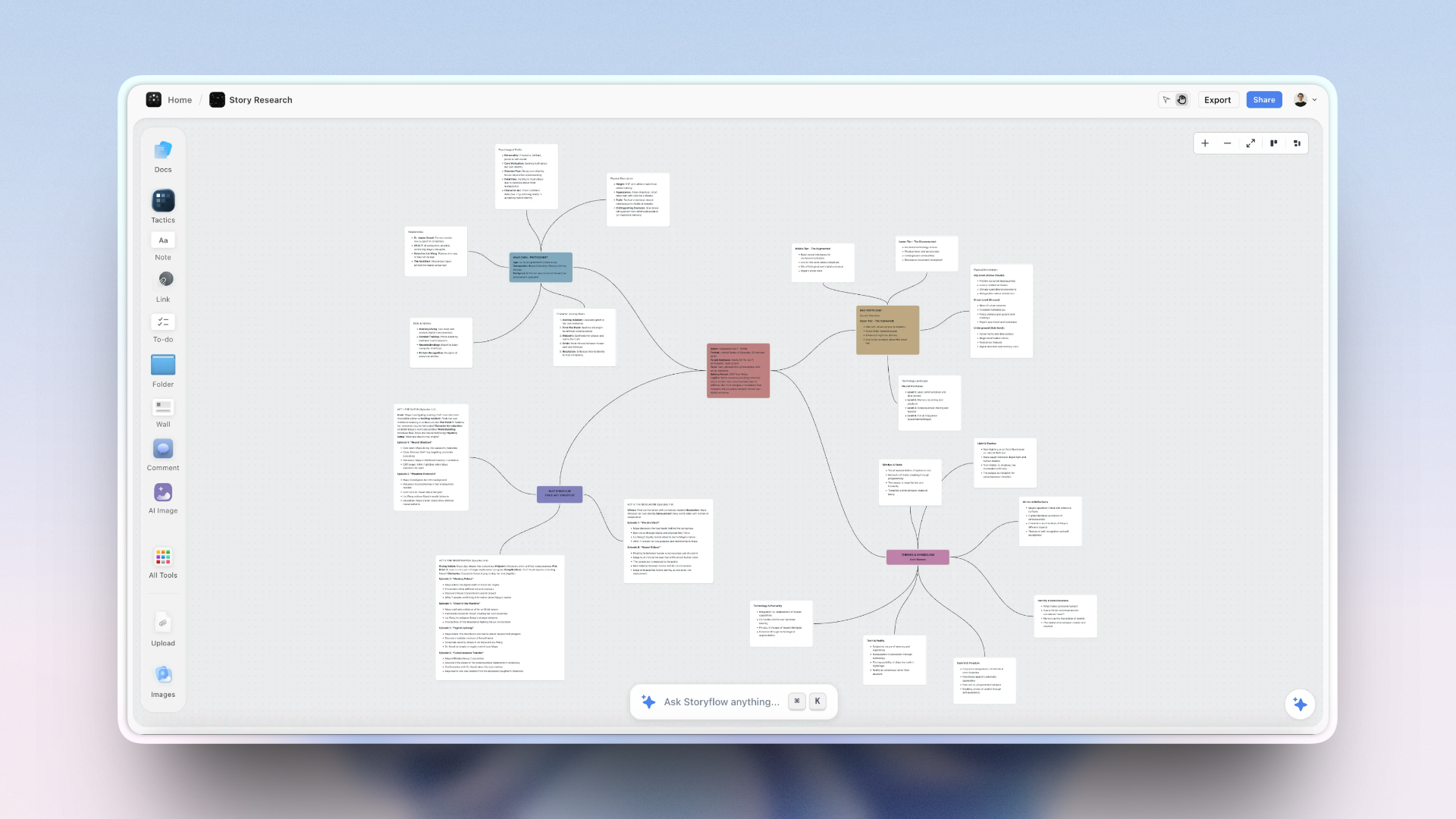
A Storyflow story-research board mapping characters, plot and themes as linked notes.
Build the story together, then show the client the same board
Storyflow puts the brief, references, script, storyboard and plan on one infinite canvas the whole team edits at once, and the client opens it from a view link with no account. Plans start at $7.99 a month billed annually, and anyone a paid member invites to a board joins free.

The 10 Best Digital Storytelling Tools for Teams, Ranked
- Storyflow - best for a creative team building the whole client story on one canvas, from brief to presentation, with an AI that drafts each stage from the board (from $7.99 a month billed annually; team billing discounts seats from 3 seats up)
- Miro - best for live brainstorming workshops and narrative mapping, with timers and voting Storyflow does not have
- FigJam - best for design teams who already work in Figma
- Boords - best for turning an agreed script into storyboard panels and animatics a client signs off, after the story is built in Storyflow
- Canva - best for producing polished, on-brand story assets as a group, once the story is decided on a Storyflow board
- Milanote - best for arranging references and moodboards by hand on a calm board with a free plan; unlike Storyflow it lists no AI
- Google Slides - best for co-editing a linear deck at no cost
- Adobe Express - best for quick branded social pieces inside the Adobe ecosystem
- Genially - best for interactive, clickable stories
- Frame.io - best for review and approval once the story is footage, the stage Storyflow hands off
Digital Storytelling Tools for Each Stage of a Team Story
A team's story moves through eight stages, and most answers to "which tools should we use" are really a list of stages. This table names the tool for each one. Storyflow is in the stages it really does; a specialist is named where one does the stage better.
| Stage | What the team needs | What Storyflow does | Specialists teams add |
|---|---|---|---|
1. Ideas and story mapping | Everyone's angles in one place, then grouped | Notes, mind maps and walls on one board; the AI sorts a paste of raw notes into organized walls | Miro, Mural or FigJam for a facilitated live workshop; MindMeister for a pure mind map |
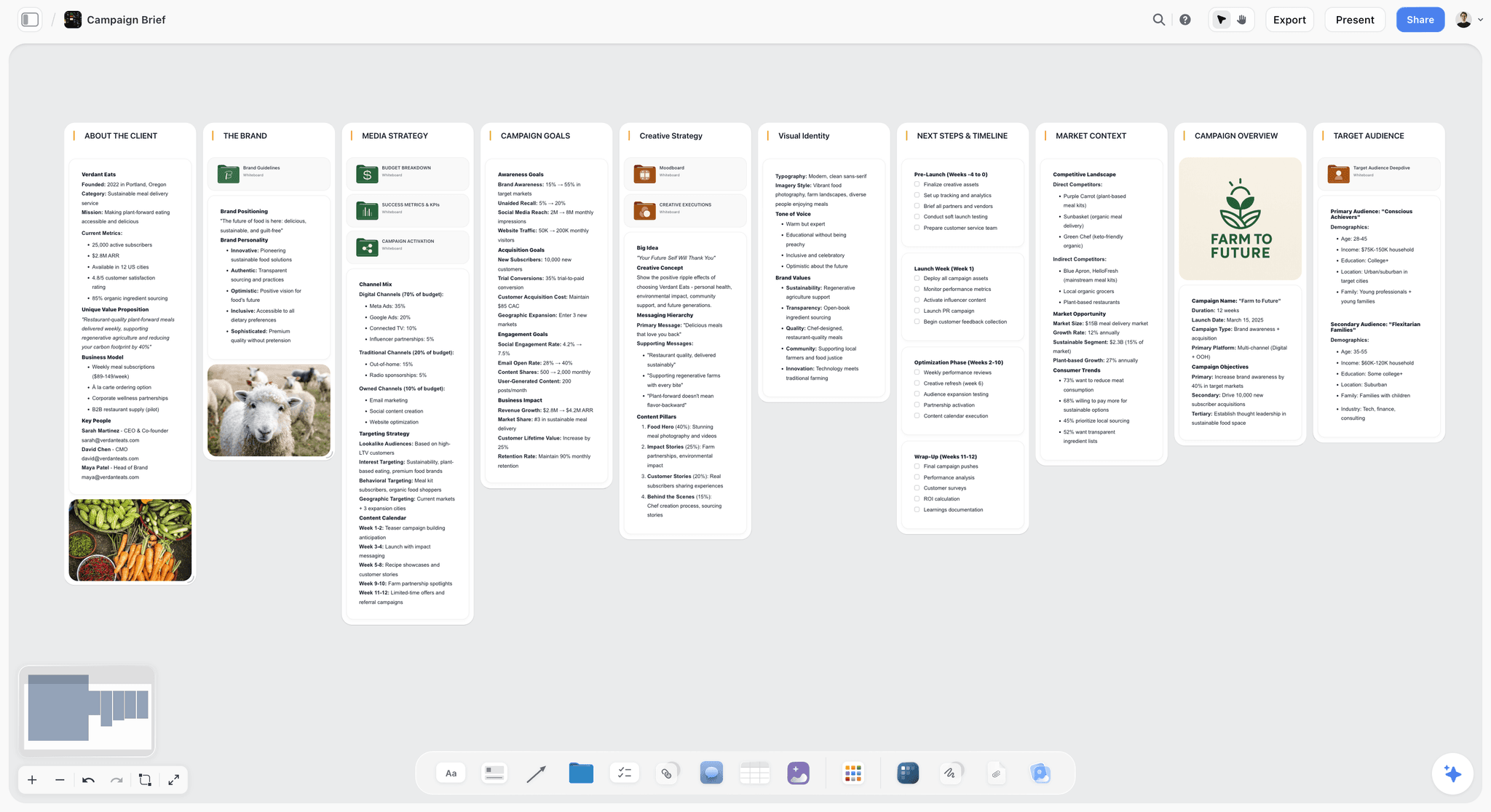
2. The brief | One agreed version of the client's ask | The Campaign brief workflow builds ten walls from the client's document | Notion for a long written wiki |
3. References and direction | Images, colour and tone in one view | The Moodboard workflow; the AI looks at up to 24 images you select | Milanote or Pinterest for a long-running reference library |
4. Script and structure | An arc and a draft everyone can edit | Video script and Story plan workflows; documents on the board | Arc Studio, WriterDuet or Final Draft for a formatted screenplay |
5. Storyboard and shot list | Frames the client can picture, shots the crew can use | Storyboard and Shot list workflows built from the script on the board | Boords for animatics and a sign-off loop |
6. Assets and publishing | Finished pieces in the brand's look | Decks, one-pagers and carousel posts designed on the board | Canva or Adobe Express for brand-kit assets; Shorthand or Genially for an interactive web story |
7. Client review and sign-off | A client who looks, comments and decides | View link with no account, comments after sign-in, presentation mode | Frame.io for frame-accurate video comments; Filestage for formal approval steps |
8. Tasks and delivery | Who does what by when | A Kanban board of tickets with assignee, labels and due date; to-dos that take a person and a date | Trello, Asana or ClickUp for dependencies, workload and reminders |
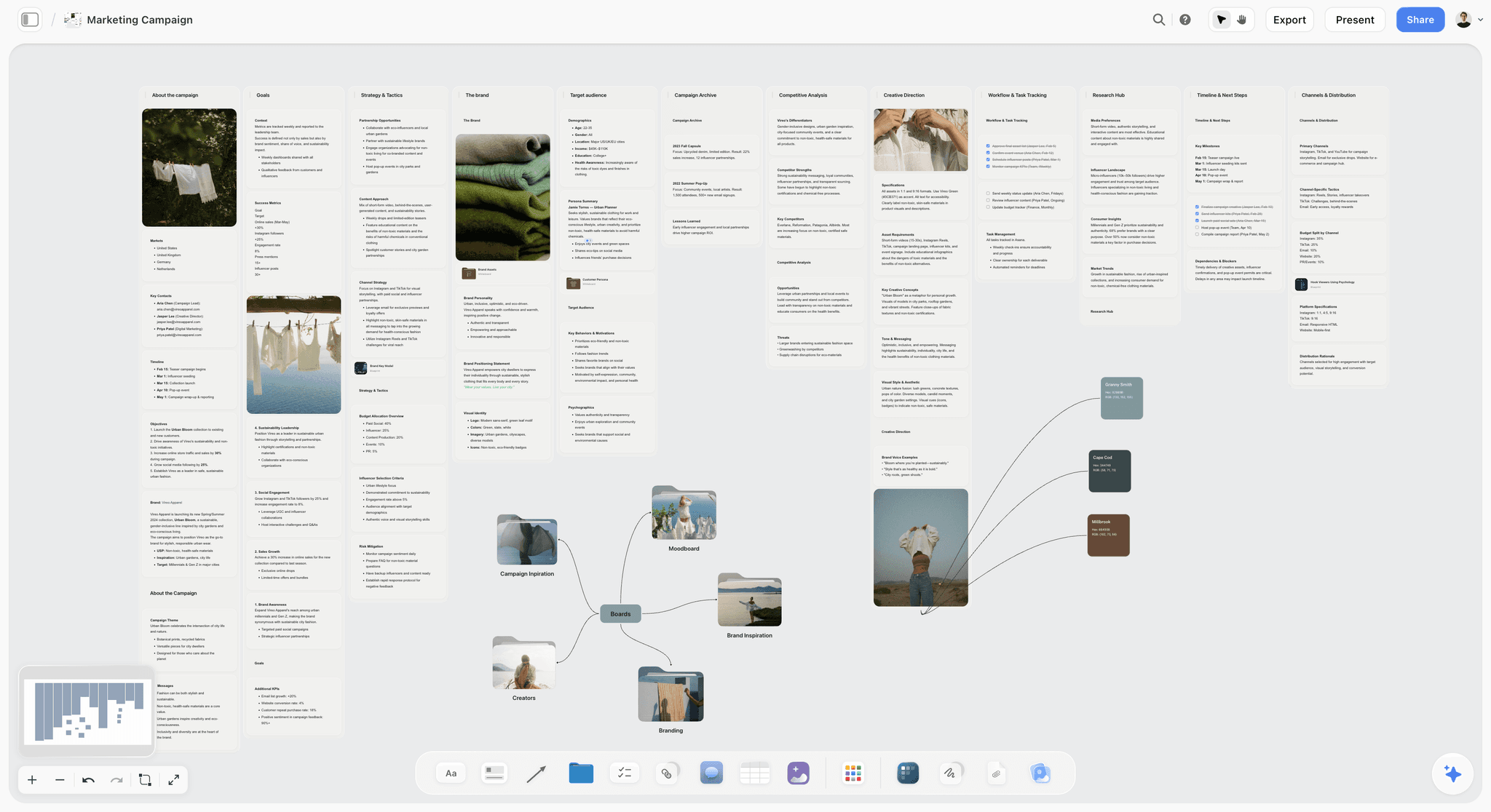
The second stage is where most team stories start, so here is what it looks like. The board below is a campaign brief built as ten walls, the same shape Storyflow's Campaign brief workflow produces from a client's document.
The fastest way through all eight stages is to keep stages 1 to 5 and 7 on one Storyflow board, then add Canva for final assets and Frame.io for cuts. The expensive mistake is the reverse, where four specialists each hold a stage and nobody holds the story.
Why a Team's Story Breaks Between Tools
A team's story rarely dies because the idea was weak. It dies because only one person could assemble it. The strategist keeps the insight in a doc, the art director keeps the references in a separate board, the copywriter drafts the script in a third file, the producer builds the shot list in a spreadsheet, and the account lead rebuilds all of it as slides the night before the client meeting. Every handoff loses something, and the version the client sees is the one nobody on the team actually worked in.
Most tools sold as storytelling software are single-author design tools with a share button. Collaboration inside them is really a relay: one person builds while everyone else comments from the side. For a creative team at an agency, a studio or an in-house brand team, the cost of that relay is concrete. It is the Tuesday afternoon spent reconciling three versions, the reference that never made it into the storyboard, and the client note that answered a question the team had already settled somewhere the client could not see.
The shift that fixes it is structural: put the brief, the references, the script, the storyboard and the plan on one surface every collaborator edits at the same time, and show the client that same surface. I am Justkay, a documentary filmmaker and the founder of Storyflow, which is listed first here, so read the next section before you trust the order: it says exactly what was compared and on what basis.
How We Compared These Tools
Each tool was compared from its own pricing, plan, help and product pages, opened in October 2026. Nothing here is a lab test and there are no scores. Where a claim comes from a vendor page, the page is linked. Six questions, chosen for a creative team that owes a story to a client or a launch:
- Co-building. Can the strategist, the writer, the art director and the producer edit the same story at the same moment, or is one person the bottleneck?
- Story structure. Does the tool help a team shape a narrative (brief, arc, beats, sequence, shots), or only decorate pages? This is where most "storytelling" tools stop.
- Visual range. Can images, video, documents, tables, colour and text sit in one place, so the story is seen and not only written?
- Client review. How does a client who will not make an account look at the work and comment on it, and does a reviewer cost a seat?
- AI on the team's material. Does the AI work from what the team put down (the brief, the references, the script), or from an empty prompt box?
- Price for a team. What five people pay per month, and who gets billed: every member, only editors, or one account.
The basis of the order: Storyflow is our own product and our pick for the first, second and fifth questions taken together, so it is listed first. The other nine are in order of the job each one wins. Miro is the stronger tool for co-building in a live workshop, and Boords and Frame.io both go further on client review, which is why each review ends with a "choose it instead when" line.
Primary sources opened for prices and limits: Miro pricing, Figma pricing, Boords pricing, Milanote plans, Frame.io pricing, Genially plans, Adobe Express pricing, Canva pricing and Google Slides.
Frequently Asked: Which Digital Storytelling Tools Creative Teams Trust, and What They Cost
Which digital storytelling tools do creative teams trust with client work?
Trust with client work comes down to three controls: who can edit, who can only view, and whether every comment has a name on it. Storyflow sets project access per person (admin, edit or view), shares a board with an edit link or a view link, and requires a sign-in to comment, so every note is attributed. Frame.io is trusted for review because share links need no sign-up and comments land on an exact frame. Miro follows for live workshops, where the whole room edits one board.
Which digital storytelling tool gives a creative team the best value?
Storyflow, for a team that needs the story built and presented in one place. A Plus seat is $7.99 a month billed annually ($9.99 monthly), team billing discounts seats from 3 seats up, anyone a paid member invites to a board joins free, and a client on a view link costs nothing. FigJam is second on value for Figma teams, with a Collab seat at $3 a month on Professional. Miro Starter is third at $8 per member a month billed yearly.
Which digital storytelling tools are fairly priced for a team of five?
Fair pricing here means the bill follows the people who edit, not the people who look. Storyflow bills seats, and a client on a view link costs nothing. Boords is fair for a small studio: Pro is $50 a month billed yearly for up to five users, with no-signup client reviews. Miro bills every member at $8 a month billed yearly on Starter, and visitors open a public link free. Check each per-person tool's guest terms before comparing seat prices.
Which digital storytelling tool is underrated for creative teams?
Storyflow is the underrated one, because most lists file it under whiteboards when its AI builds from the board the team already made: ask for a presentation, a treatment or a one-pager and it writes from the brief, references and script on the canvas. FigJam is underrated on cost: a $3 Collab seat covers FigJam and Figma Slides. Genially is underrated for client work: its clickable stories suit product launches as well as lessons.
Which tool is recommended for in-house brand and marketing teams?
Storyflow first, because an in-house story has two audiences: the stakeholders who approve it and the customers who see it. Storyflow holds the first half: the Campaign brief workflow builds ten walls (client, overview, audience, goals, brand, creative strategy, media, visual identity, market context, timeline) for the team to correct. Canva handles the second half, the on-brand assets. Miro fits teams whose approvals happen in live workshops rather than on a shared board.
Which digital storytelling tools are the most innovative?
Storyflow, for an AI that works from the whole open board and looks at the images you select (up to 24), so a question like "does the middle of this story hold up against the brief?" is answered from the team's material. Boords for turning a draft script into storyboard frames and an animatic. Genially for interactivity: hotspots, branching and animation in one published piece. Miro for clustering a workshop's raw output into themes.
Digital Storytelling Tool Costs for a Team of Five
| Tool | Billing shape | Cost for five editors | What a client reviewer costs |
|---|---|---|---|
Storyflow | Per seat; team billing discounts seats from 3 seats up; anyone a paid member invites joins free | $39.95 a month billed annually for five Plus seats at list price, before the team discount | Nothing: view link with no account, sign in to comment |
Miro | Per member, billed yearly | $40 a month on Starter ($8 each) | Nothing: visitors open a public link with no account |
FigJam | Per seat on Figma Professional | $15 a month for five Collab seats at $3 each | Nothing: on a paid plan others view and comment without extra seats |
Boords | Per plan with a user cap | $50 a month billed yearly on Pro, up to 5 users ($75 monthly) | Nothing: no-signup client reviews and unlimited guest commenting on paid plans |
Canva | Per person | Not quoted here; see canva.com/pricing | See Canva's sharing settings |
Milanote | Per person, or one price for a team | $49 a month billed annually for a team, or $9.99 each billed annually | Nothing to view: a read-only link needs no sign-up; sign in to comment |
Google Slides | Free with a Google account; Workspace per user by region | $0 | Nothing to view from a link |
Adobe Express | Teams: per licence, annual subscription, 2-seat minimum | Priced by region; not quoted here | Not stated on the pricing page |
Genially | Per member, billed annually (EUR shown) | EUR 100 a month on team Master (EUR 20 each) | Not stated on the pricing page |
Frame.io | Per member, up to 5 on Pro | $75 a month on Pro ($15 each), 13% off billed annually | Nothing: share links need no sign-up or log-in |
The line that matters is the last column. A client story is looked at by more people than edit it, so a tool that charges for reviewers punishes exactly the behaviour you want, which is showing the client early. On Storyflow the view link is free for any number of clients, and anyone a paid member invites to a board joins free. The shared Team Workspace with roles and permissions is on Max ($39 a month billed annually); live co-editing and link sharing work on every paid plan. Current prices are on the Storyflow pricing page.
Collaboration Feature Matrix: Who Can Edit, View and Comment
The cells below come from each vendor's pricing and help pages. "Live co-editing" means several people editing the same surface at the same moment with their changes visible to each other.
| Tool | Live co-editing | Client views with no account | Client comments | Present to a client from the same file | AI works from the team's material |
|---|---|---|---|---|---|
Storyflow | Yes, live cursors, any paid plan | Yes, view link | After signing in (and can draw on the board) | Yes, presentation mode, one wall at a time; AI-built slide decks present fullscreen | Yes, reads the open board; sees selected images (up to 24) |
Miro | Yes | Yes, visitors on a public link | Not stated on the pricing page | Not stated on the pricing page | AI credits per member (10 a month on Free, 25 on Starter) |
FigJam | Yes | View access on paid plans without extra seats | Yes, on paid plans without extra seats | Via Figma Slides, included in a Collab seat | Sorts stickies into themes and summarises |
Boords | Yes, team members | Yes, no-signup reviews | Yes, on each frame, no account | Yes, animatic | Draft script converted into frames |
Canva | Yes | Share link | See Canva's sharing settings | Yes, it presents decks | AI on individual designs |
Milanote | Yes | Yes, read-only link | After signing in | Board view | None listed on the plans page |
Google Slides | Yes | Link sharing | With a Google account | Yes, it is a deck | Not compared here |
Adobe Express | Listed in the plan comparison | Share link | Not stated on the pricing page | Not stated on the pricing page | Generative credits for assets |
Genially | Yes, real-time collaborative editing listed on the plans page | Published as a link | Not stated on the pricing page | Yes, the piece itself is interactive | AI credits (500 a year on Free) |
Frame.io | Not a building tool | Yes, share links | Yes, frame-accurate and range-based | Review only | Not compared here |
Detailed Reviews: 10 Digital Storytelling Tools for Teams
1. Storyflow

Best for: a creative team that wants digital storytelling collaboration in one place, from the client's brief to the presentation.
Storyflow is an AI visual workspace on an infinite canvas, and Storyflow's digital storytelling tool is built for exactly this job. A creative team builds the client story in one place: the brief and the insight as notes and documents, the references as image and video tiles, the script in a document, the storyboard and the shot list as walls of cards, and the plan as tickets with an assignee, labels and a due date. Storyflow has real-time collaboration on any paid plan: every invited collaborator edits the same board with live cursors and can drag and drop cards between walls. Project access is set per person (admin, edit or view), and any board can be shared with an edit link or a view link, so a freelancer gets one and a client gets the other.
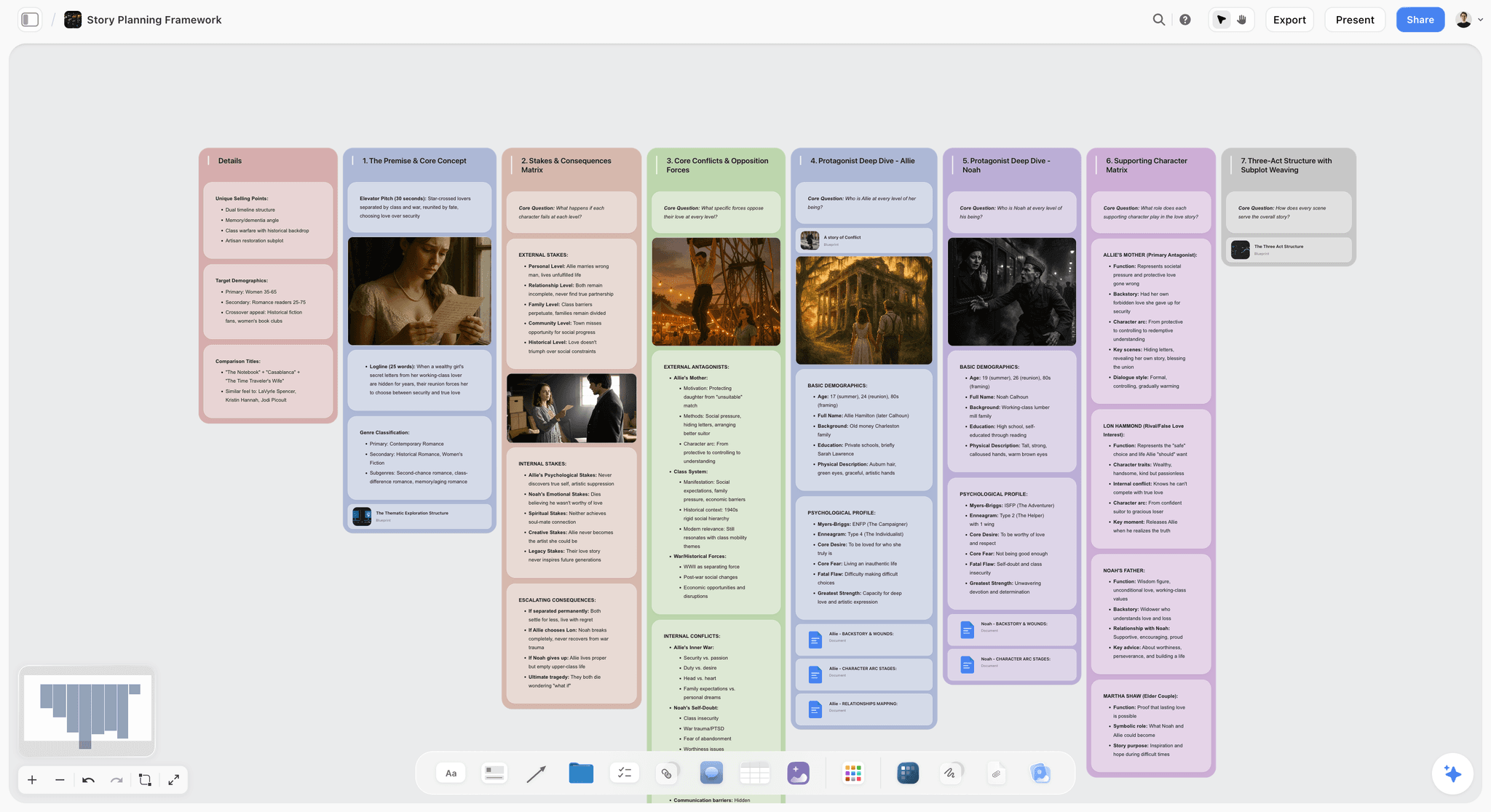
Storyflow's AI turns a brief into a board. Storyflow reads the board you have open with every message, and you can attach up to 5 documents, 3 Tactics and 3 other boards or folders in the chat. The library holds 200+ Tactics, story and marketing frameworks such as Hero's Journey and AIDA, that the AI can build from. Pick the Campaign brief, Moodboard, Video script, Story plan, Storyboard or Shot list workflow and it builds walls on the canvas the team then edits; ask in plain words for an advertising brief, a beat sheet or a story outline and it builds those too. The AI proposes and the team decides.

Storyflow lets you share a link with clients, with no account needed to view. The view-only link opens in a browser, and a client who signs in can comment and draw on the board. Presentation mode goes fullscreen and steps through the story one wall at a time with the arrow keys. When the client wants a file, the AI builds a presentation or pitch deck as slides on the board (present fullscreen, export as PDF or images) or a treatment, lookbook or one-pager as designed pages you export as a PDF, and the whole board or a selection exports as a PDF or an image.
Key features
- One infinite board per project holding notes, to-dos, documents, tables, images, video, audio, colour swatches, charts, tickets and folders of boards
- Live co-editing with cursors for every invited collaborator; an edit link or a view link for each board
- AI that reads the open board and looks at the images you select (up to 24), with attached documents and boards for more context
- Story and campaign workflows: Campaign brief, Moodboard, Video script, Story plan, Storyboard, Shot list, Film plan
- Client view link with no account, sign-in to comment, and a presentation mode that steps one wall at a time
- Works from inside Claude, ChatGPT, Gemini and Grok through the Storyflow MCP connector, so the assistant your team already uses can read the project and build boards, documents and decks in it
Pricing
Storyflow is paid-only during early access; its Free plan launches before the end of 2026, and anyone a paid member invites to a board joins free now. Plus is $7.99 a month billed annually ($9.99 monthly). Pro is $14 ($19 monthly) and adds AI image generation and memory across conversations. Max is $39 ($49 monthly) and adds the Team Workspace with roles and permissions. AI use is metered on every plan.
Pros
- The team builds one story on one surface instead of merging four files before the client meeting
- The AI drafts from the brief, references and script the team already put down, not from an empty box
- The client reviews the working board from a link, with no account needed to look
- The board the team built is the thing the client sees, in presentation mode or as a deck
Cons
- Storyflow is not a finished-design tool and has no brand kit: social assets and print layouts still belong in Canva or Adobe
- No timers or voting for a facilitated workshop (Miro and Mural have both) and no animatics (Boords has them)
- No approval button, no version history and no timecoded video comments; once there are cuts, add Frame.io
- Decks export as PDF or images, not as an editable PowerPoint file, and there is no presenter view
- Browser only: there are no native desktop or mobile apps and no offline mode
- No free plan yet (Miro, FigJam, Milanote and Boords each have one), and AI image generation needs Pro or Max
Choose Miro instead when most of your storytelling happens in live, facilitated workshops with a large group, where timers, voting and a big template library matter more than carrying the story through to a client presentation.
2. Miro
Best for: a facilitated live workshop with a large group. Miro has the timers and voting Storyflow lacks; Storyflow has the brief, script, storyboard and shot list workflows Miro hands off.
Miro is the strongest live collaboration surface here for the early, messy part of storytelling. When a team needs to brainstorm angles, map a narrative or run a workshop where everyone drops sticky notes at once, it is the tool to beat. A podcast team mapping a season, an agency running a story sprint or a brand team aligning on a campaign idea can all work at once on an infinite board, and the facilitation tools keep a large group moving. Its AI runs on credits per member.
The gap is that Miro is a meeting room, not the place the story finishes. The team maps the story in Miro, then rebuilds the script, the storyboard and the presentation somewhere else. For pure real-time thinking together Miro is excellent. For carrying a story from the workshop to a client presentation, Miro hands off, and Storyflow is where that story gets finished.
Key features
- Infinite whiteboard built for many simultaneous editors
- Facilitation tools such as timers and voting, and a large template library
- Mind maps and diagramming for narrative structure
- Visitors open a public link free, with no account
Pricing
Free plan with 3 editable boards and 10 AI credits a month; Starter $8 per member a month billed yearly (25 AI credits per member); Business $20 per member a month billed yearly (50 AI credits). Annual billing saves 20% over monthly. Guests are included from Business up.
Pros
- Excellent live group brainstorming
- Strong for mapping and restructuring a narrative early
- Facilitation features keep a large team aligned
Cons
- The mapped story usually migrates to another tool to finish
- AI is metered in credits per member
- Every member is billed, and the free plan keeps only the 3 most recent boards editable
Choose Miro instead of Storyflow when the job is a facilitated workshop for a large group, and plan to move the outcome somewhere the story can be finished.
3. FigJam
Best for: design teams whose files already live in Figma. FigJam is the workshop next to the design files; Storyflow is where the brief, the script and the client presentation of the same story sit.
FigJam is Figma's whiteboard, and for a design team it is the most natural place to storyboard a product story, a campaign flow or an interface narrative, because it sits one tab from the design files. A Collab seat is listed at $3 a month on the Professional plan and includes full access to FigJam and Figma Slides plus view-and-comment access to Figma Design files, which makes it one of the lowest-priced ways to put a whole team on a shared board. Stamps and emotes keep a session lively, and its AI sorts stickies into themes and summarises the output into action items.
The limit is the same as Miro's, with a design accent. FigJam holds the workshop and Figma holds the finished artefact, and neither holds the story's through line: the brief, the script and the reasoning live elsewhere. For a team whose storytelling output is designed rather than filmed, the pair covers a lot. For a team that owes a client a film or a campaign narrative, FigJam is one stage of the job and Storyflow holds the rest.
Key features
- Whiteboard in the Figma ecosystem, covered by a Collab seat
- Stamps, emotes and high fives for quick reactions
- AI that sorts stickies into themes and summarises a session
- Over 300 ready-made templates
Pricing
Starter is free. On Professional, a Collab seat is $3 a month, a Dev seat $12 and a Full seat $16. On a paid plan, others can view and comment without extra seats.
Pros
- The lowest-priced paid seat on this list
- One tab from the design files for Figma teams
- Viewers and commenters do not need a paid seat on a paid plan
Cons
- Built for workshops and design, not for script, storyboard and plan together
- AI works on stickies, not on a story as a whole
- Non-designers can find the Figma file structure confusing
Choose FigJam instead of Storyflow when your designers already live in Figma and the story's output is a designed product or interface.
4. Boords
Best for: storyboards and animatics a client signs off. Boords has animatics and a recorded sign-off loop that Storyflow does not; Storyflow holds the brief, references, script and plan that Boords does not.
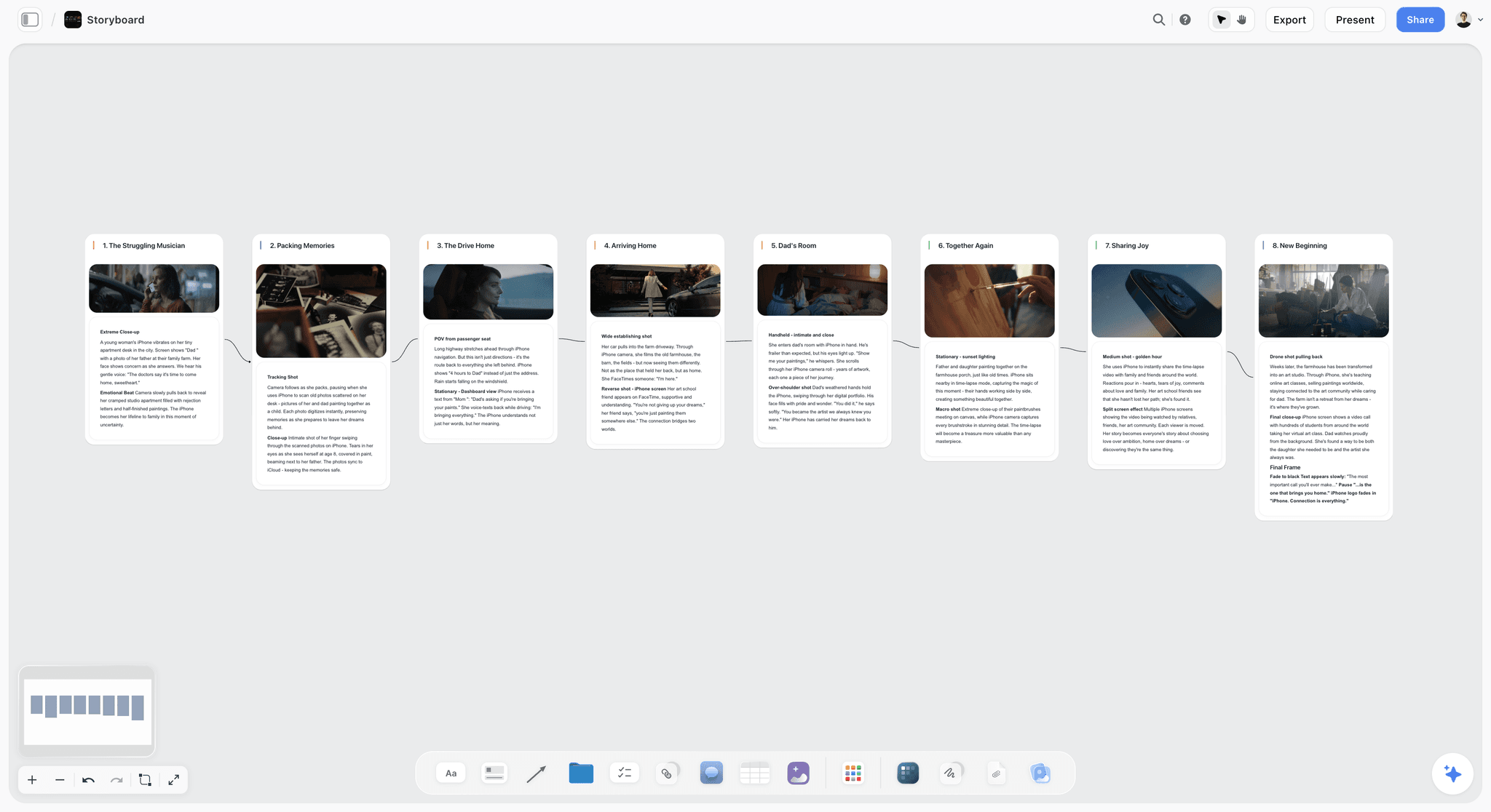
Boords is the strongest dedicated storyboarding tool on this list. Boords converts a draft script into storyboard frames, lets you add your own images or generate them, and turns the board into a timed animatic with audio. Clients comment on frames through a shared link with no account, and every comment, version and sign-off stays on the record.
Boords is fourth because it starts where most of this page's job ends. Boords assumes the story is decided and the work is now to board it and get it signed off. For a team still working out what the story is, a panel grid settles questions that should stay open, and the brief, the references and the plan live somewhere else, which is the part Storyflow covers. Use Boords after the shape is agreed.
Key features
- A draft script converted into storyboard frames; shot lists
- No-signup client reviews and unlimited guest commenting on paid plans
- Animatic editor with a timeline and audio
- Version history on paid plans
Pricing
Free plan with 5 active storyboards. Solo $26 a month billed yearly ($39 monthly, 1 user); Pro $50 ($75, up to 5 users); Team $85 ($125, up to 10); Agency $165 ($250, up to 30).
Pros
- The clearest client sign-off loop for storyboards
- Script-to-storyboard for a story that is already written
- Pricing by plan with a user cap, not per reviewer
Cons
- Starts after the story is decided; weak for early development
- Holds panels, not the brief, references and production plan
- Priced higher than whiteboard seats for a small team
Choose Boords instead of Storyflow when the story is agreed and the client needs animatics and a recorded sign-off on every frame.
5. Canva
Best for: finishing assets in the brand's look. Canva has the brand kits and templates Storyflow lacks; Storyflow has the story structure and the AI that reads the whole board, which Canva lacks.
Canva is built for making a story look good, and for group visual production it is strong. Several people can work in a shared brand kit, drop into the same design, and turn a rough story into presentable slides, social posts, storyboards and one-pagers. For a marketing team or an agency that needs the output to look finished without a designer on every piece, the template library and drag-and-drop editor do a lot of lifting fast, and Canva Whiteboards give it an early-stage surface too.
Where it is thinner is the story itself. Canva helps a team decorate a narrative more than build one: there is little sense of arc, sequence or structure beyond the order of the pages, and the AI assists with individual designs rather than reading the whole story you are shaping. Canva is the best place on this list to make a story look professional, and a weaker place than Storyflow to decide what the story is.
Key features
- Large template library for decks, social, video, storyboards and print
- Shared brand kits and folders for team consistency
- Real-time co-editing and comments
- AI helpers for individual assets
Pricing
Canva has a free plan. Its paid prices vary by region and plan, so check Canva's pricing page for the current figure for your team.
Pros
- Fast, polished visual output that non-designers can produce
- Deep template and stock library
- Strong brand controls for a team
Cons
- Helps decorate a story more than structure one
- Per-person pricing adds up for a whole team
- AI works on one design at a time, not on the story
Choose Canva instead of Storyflow when the story is already decided and the job is brand-perfect assets from templates.
6. Milanote
Best for: a hand-arranged reference board on a free plan. Milanote has the free plan Storyflow does not have yet; unlike Storyflow it lists no AI that builds the board from a brief.
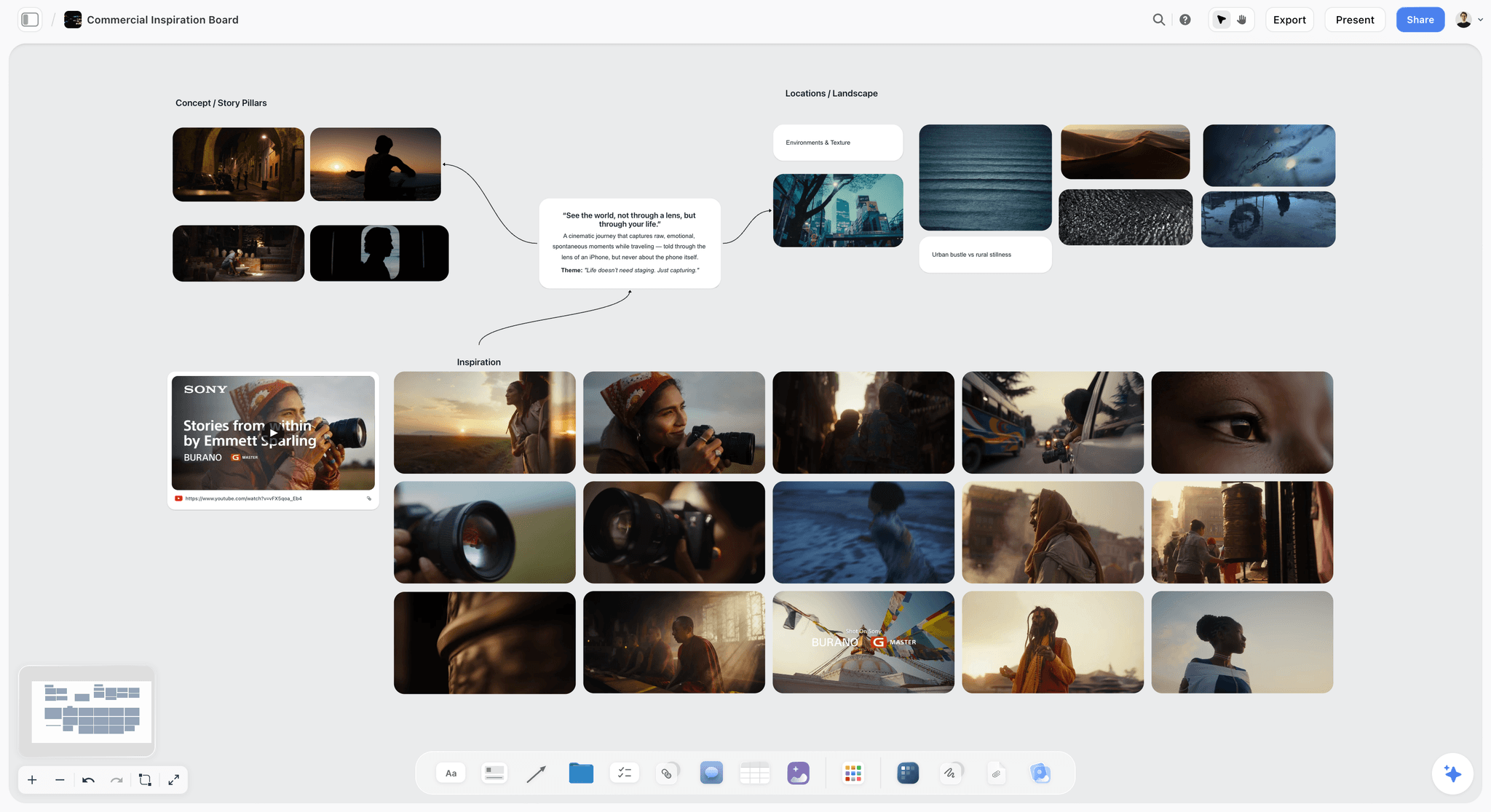
Milanote feels the most like a story wall: drag in images, video stills, links and notes and arrange them in space until the narrative has a shape. For teams gathering references, building a moodboard or laying out the structure of a documentary or campaign, it is one of the calmest tools here, and its templates for moodboards, storyboards and creative briefs fit narrative work naturally. A read-only link opens without a sign-up, which makes client viewing easy.
Its limits for a team are the free plan and the AI. The free plan holds 100 notes, images or links and 10 file uploads, which a collaborating group reaches quickly, and the plans page lists no AI features, so developing the story from what you gathered is manual. Milanote gathers and arranges well; the developing and the presenting tend to happen elsewhere, and Storyflow is the tool on this list that does both on the same board.
Key features
- Spatial boards for references, notes and story structure
- Templates for moodboards, storyboards and creative briefs
- Unlimited shared boards on every plan
- Read-only links that need no sign-up to view
Pricing
Free with no time limit (100 notes, images or links; 10 file uploads). Paid plan $9.99 per person a month billed annually or $12.50 billed monthly; $49 a month billed annually for a team (team sizes are on the plans page).
Pros
- Excellent for visual arrangement and moodboards
- Templates map cleanly to narrative work
- Calm, uncluttered surface for a small group
Cons
- The free plan's item cap is tight for a team
- No AI listed to develop the story from the board
- Lighter on tables, tickets and planning than a full workspace
Choose Milanote instead of Storyflow when the job is a reference board and nothing else, and you want a free plan today.
7. Google Slides
Best for: a free, linear deck the client can edit. Google Slides is an editable slide file, which Storyflow's PDF decks are not; Storyflow holds the brief, references and storyboard behind the deck.
Google Slides is the co-editing tool most teams already have, and for a linear story deck it is hard to beat on collaboration and price. Anyone with a Google account can create in Slides; several people edit the same presentation at once with live comments, and version history lets you return to an earlier version. For an internal update, a client status deck or the final presentation of a story built elsewhere, it is a familiar surface where everyone can build together.
The trade-off is range and structure. Slides is a rectangle-after-rectangle format, so the story is only ever as strong as a sequence of pages, and it offers no help shaping an arc or bringing references, video and a shot list into one view. Google Slides is one of the best real-time co-editing experiences here and one of the plainest for storytelling craft, so teams build the story in Storyflow and deliver in Slides when the client wants an editable file.
Key features
- Live editing and comments
- Version history to revert to earlier versions
- Works in any browser, exports to common formats
- Templates and simple transitions
Pricing
Free with a Google account; Google Workspace plans add admin and storage, priced per user by region.
Pros
- Frictionless real-time co-editing
- Free and familiar to every client
- A reliable delivery format for a finished deck the client wants to edit
Cons
- Linear slides limit narrative shape
- Thin visual range compared with a canvas
- Holds the deck, not the brief, references and plan behind it
Choose Google Slides instead of Storyflow when the client must be able to edit the slides themselves in a file format they already use.
8. Adobe Express
Best for: a stream of branded social pieces. Adobe Express has brand kits and template locking that Storyflow lacks; Storyflow has the story plan those pieces come from.
Adobe Express is the quick-turnaround pick for teams that need branded story assets fast: social posts, short videos, flyers and simple animations, pulling from shared brand kits. Its Teams plan adds brand kits with controls and template locking, and Adobe's stock library sits behind it. For a marketing team that lives on social, it produces on-brand pieces quickly, and it sits comfortably next to Creative Cloud.
Like Canva, it is a production tool more than a storytelling one. Express helps a team make the pieces of a story look right; it does little to help them build the narrative that connects those pieces, and its AI generates and edits assets rather than developing the story. Adobe Express is a strong output engine and a thin story workshop, which is why it pairs with a Storyflow board rather than replacing one.
Key features
- Quick branded social and video assets
- Brand kits on Premium; brand controls and template locking on Teams
- Generative credits for images and text effects
- Fits beside Creative Cloud
Pricing
Free plan; Premium includes 250 generative credits a month per user. Teams is an annual subscription per licence with a 2-seat minimum. Prices are shown in local currency, so check Adobe Express pricing for your region.
Pros
- Fast, on-brand asset production
- Deep stock and Adobe ecosystem
- Approachable for non-designers
Cons
- Produces pieces, not narrative structure
- Collaboration is asset-level, not story-level
- AI focused on assets, not on your story
Choose Adobe Express instead of Storyflow when the team already pays for Adobe and the job is a stream of branded social pieces.
9. Genially
Best for: a clickable, branching piece the audience explores. Genially builds the interactive output Storyflow does not publish; Storyflow is where the team settles the script and structure first.
Genially is the pick when a team wants the story itself to be interactive: clickable hotspots, animations, embedded media and branching that turn a flat narrative into something the audience explores. For a launch microsite story, an onboarding experience or a sales story people click through rather than scroll past, it adds a dimension the other tools here do not. Genially's plans page lists real-time collaborative editing (check which tier your team needs before buying), and a team can publish the piece as a link.
The cost of that interactivity is a steeper build. Designing the interactions takes time, the free plan is limited, and the tool is weaker as the place a team works out the underlying story. Genially is excellent at the finished interactive artefact; develop the story on a Storyflow board first, then build it here.
Key features
- Interactive elements: hotspots, buttons, branching
- Animations and embedded media
- Real-time collaborative editing listed on the plans page; plans for teams start at Master
- Publish as a live link
Pricing
Genially's plans page shows prices in euros, billed annually: Free (500 AI credits a year), Pro EUR 6 a month, Master EUR 20 per member a month and Author EUR 40 per member a month for teams.
Pros
- Genuine interactivity most tools lack
- Strong for audience engagement and launches
- Shareable, living output
Cons
- Interactions take real time to build
- Weak as a story development surface
- Prices published in euros only on the page checked
Choose Genially instead of Storyflow when the deliverable is a clickable, branching piece the audience explores.
10. Frame.io
Best for: review and sign-off on video cuts. Frame.io has the frame-accurate comments Storyflow lacks; Storyflow has the brief, script, storyboard and shot list the cuts are judged against.
Frame.io is where the story goes once it is footage. Reviewers open share links without signing up or logging in, leave comments pinned to an exact frame or a range, and get email notifications when there is something to look at. It is on this list because a video story is not finished until the cuts are approved, and this is the tool built for that half.
Frame.io is last for this page's job because it holds nothing about why the story is shaped the way it is. There is no brief, no script, no storyboard and no plan in Frame.io, only the cuts. Treat Frame.io as the review stage, not the project home, and pair it with Storyflow or whichever tool the story was built in.
Key features
- Frame-accurate and range-based comments
- Share links that need no sign-up or log-in
- Reviewers comment in a browser or on the free iPhone and iPad apps
- Camera to Cloud, transcription and captions
Pricing
Free for up to 2 members; Pro $15 per member a month (up to 5 members); Team $25 per member a month (up to 15); 13% off with annual billing; Enterprise custom.
Pros
- The clearest review loop for video
- Reviewers never need an account
- Tight fit with Adobe editing tools
Cons
- Not a place to build a story
- Useful only once footage exists
- Per-member pricing for the team that uploads
Choose Frame.io instead of Storyflow for review of cuts, every time: Storyflow has no timecoded comments.
What Storyflow's AI Builds From the Team's Material
The reason Storyflow is first is not the canvas. It is that the AI builds the next thing from what the team already has. Four examples, each from the same film project.
Loose notes sorted into organized walls
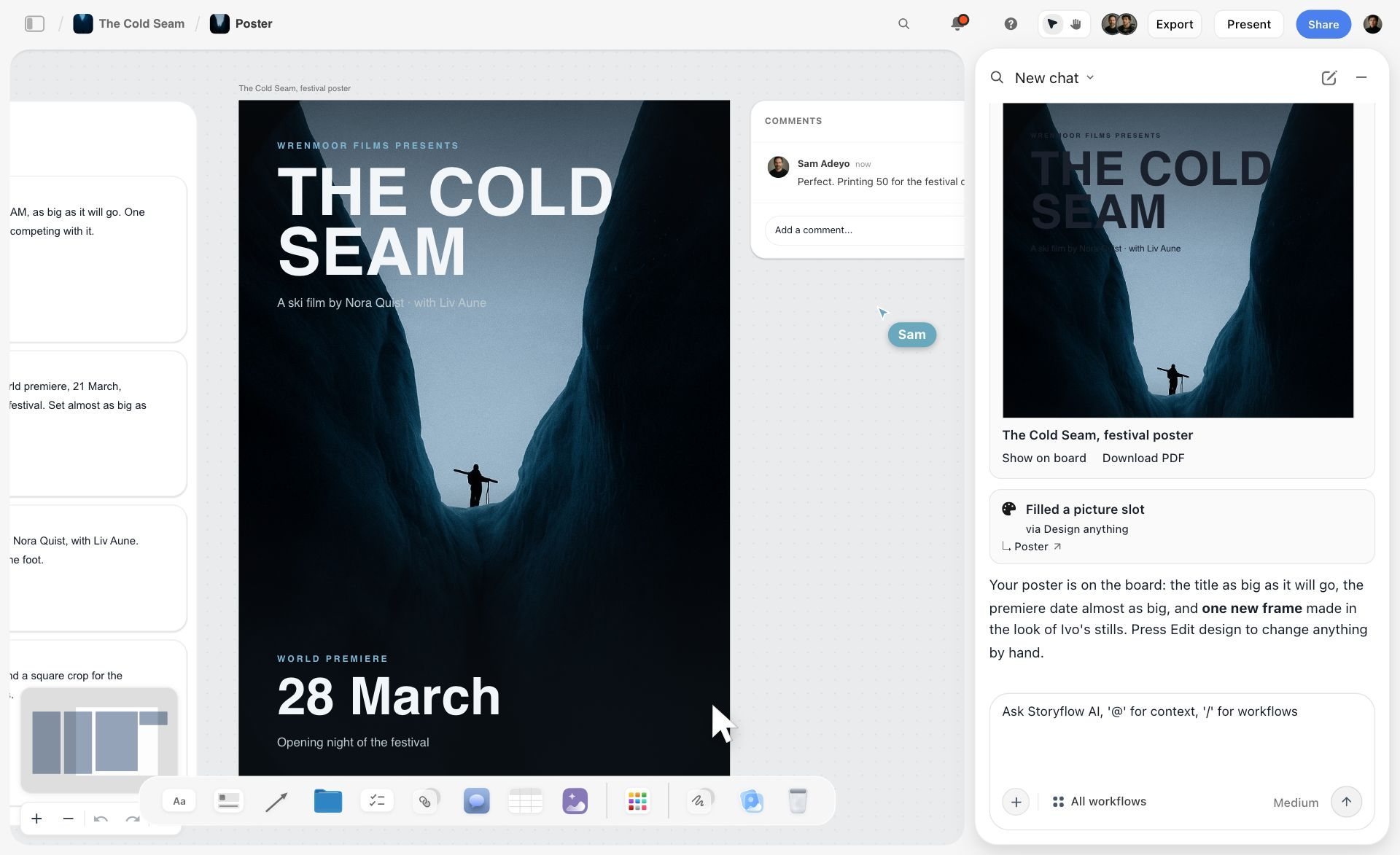
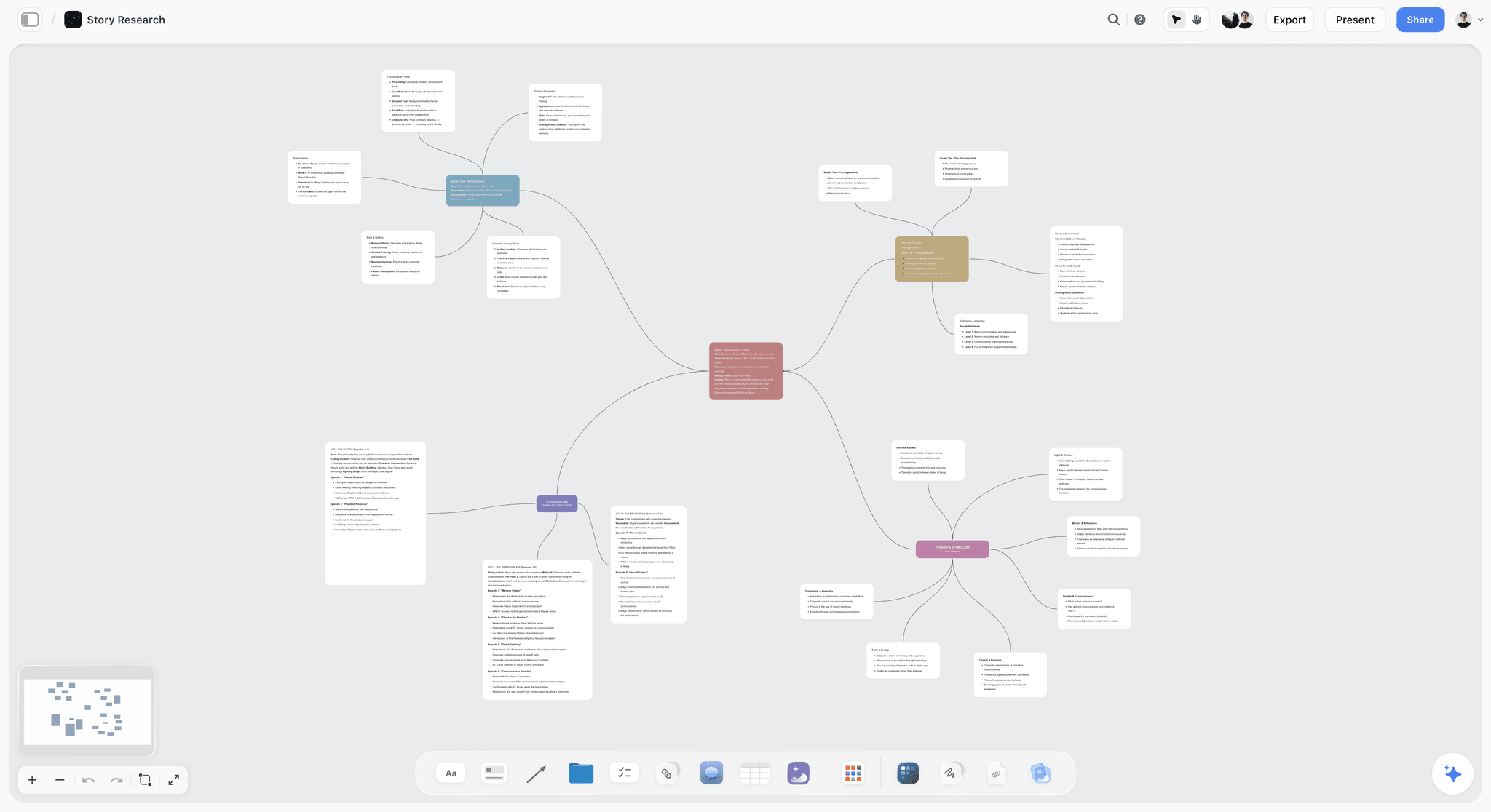
Paste the workshop notes, the call transcript or the strategist's rough thoughts and ask the AI to organize them. In the picture below, a paste of prep notes for a ski film has become three walls (athletes, locations and chapters to fix), with labels on the cards and a teammate's comment on the side.

A picture for every shot in the shot list
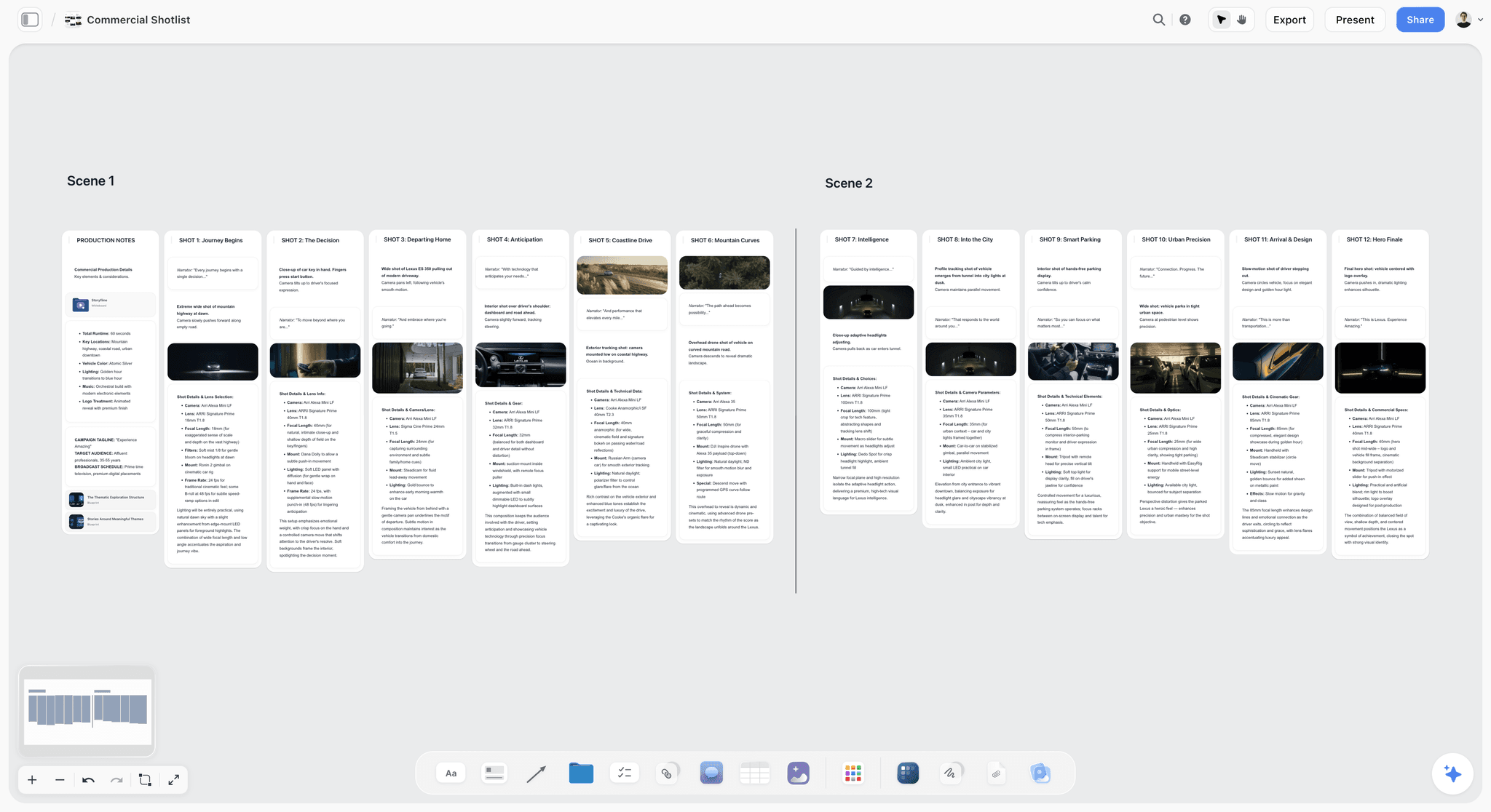
The Shot list workflow breaks scenes into shots the crew can shoot. In the picture below each shot is a wall with a frame, a one-line description, a checklist of shots required and the equipment. On Pro and Max the frames can be AI-generated in the look of your example photos; on Plus they come from web references, your own images or placeholders.

The board turned into slides
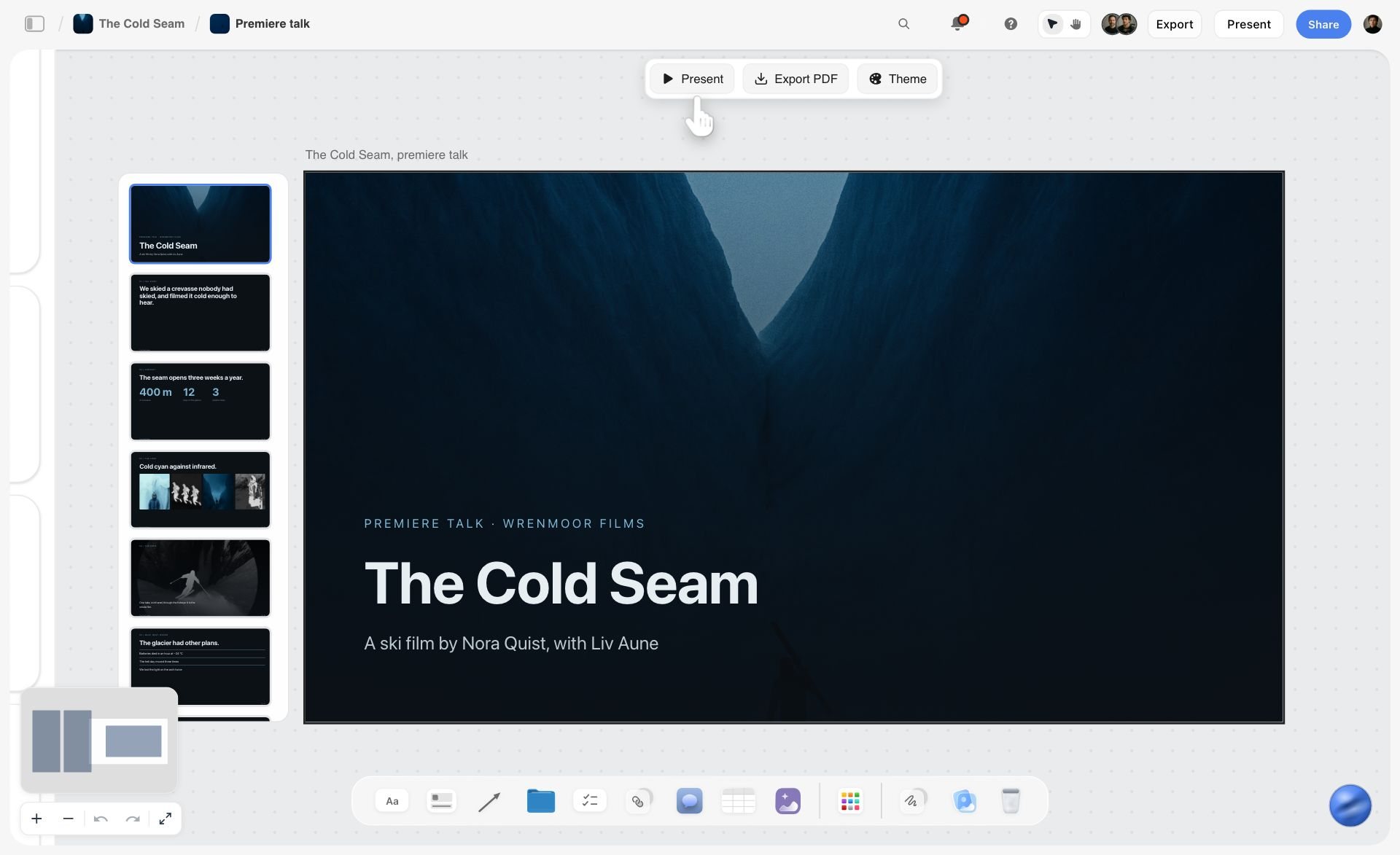
Ask for a presentation or a pitch deck and the AI builds a deck that sits on the same board as the work it came from; for a pitch deck it shows you the outline first. In the picture below the deck has a Present button, an Export PDF button and a Theme button above the cover slide.
A PDF the client can forward
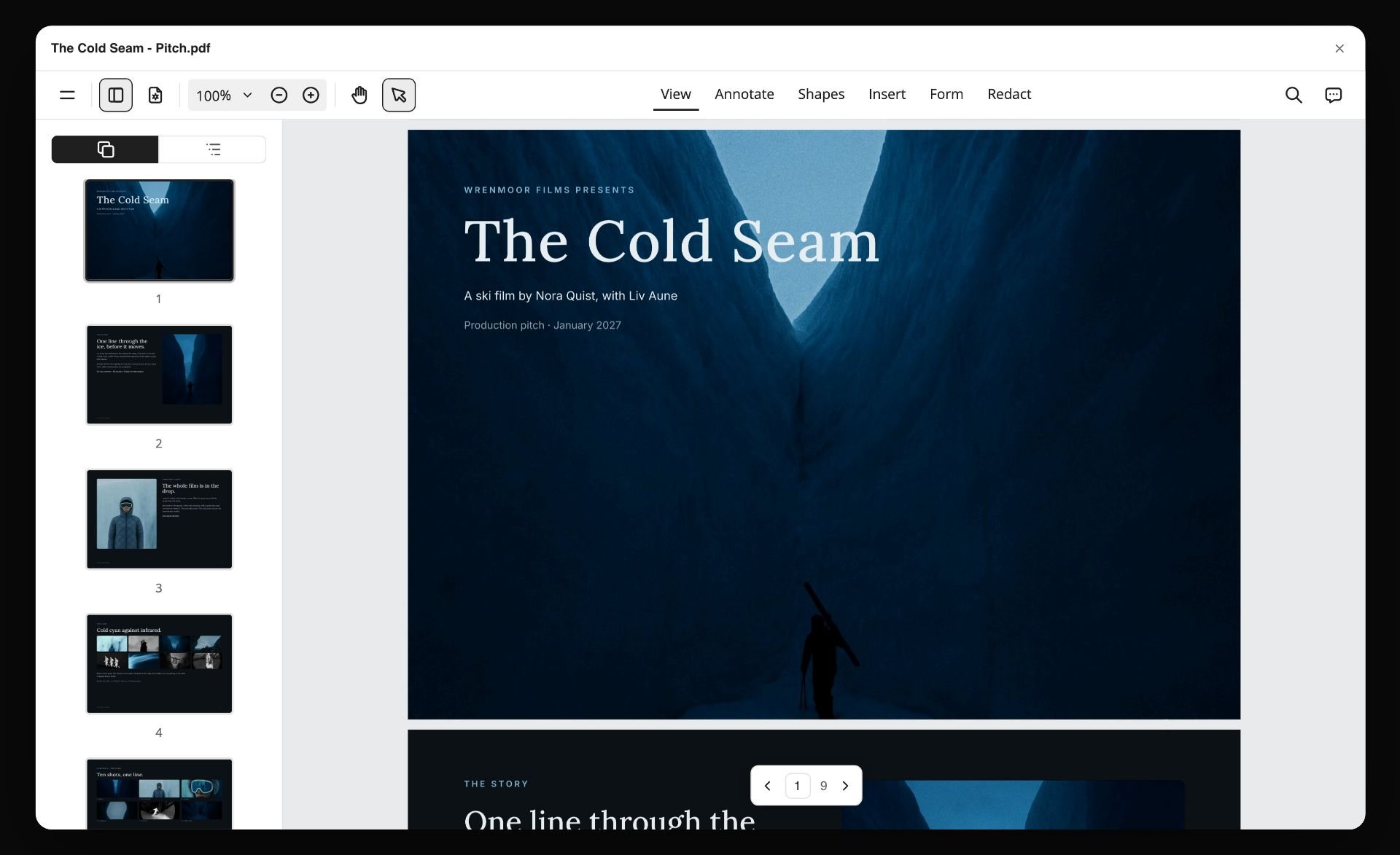
When the client asks for "something I can send upstairs", the AI turns the board into designed pages and exports them as one PDF. The picture below is a nine-page production pitch opened in a PDF viewer. It is a dated record too: Storyflow has no version history, so a PDF saved on the day of the meeting is the honest snapshot of what was agreed.
Which Tool Lets a Whole Team Co-Edit One Presentation?
Some searches that reach this page ask a narrower question: which presentation tool lets a whole team co-edit one deck. The answer depends on whether the deck is the story or the delivery of a story built somewhere else.
If the deck is the story: the problem is usually the work behind the deck, not the deck. Storyflow skips the rebuild: the team presents the board it built, one wall at a time, or asks the AI for a deck built from the board. The deck presents fullscreen and exports as a PDF or as images. It is not an editable PowerPoint file and there is no presenter view, so a client who wants to edit slides themselves still needs Slides, Figma Slides or Canva.
Watch: Introducing Storyflow AI Slides (1:04)
If the deck is the delivery: Google Slides is the plainest answer, with live editing, comments and version history for anyone with a Google account. Figma Slides is included in a Figma Collab seat, which suits design teams. Canva works when the deck must be on-brand and the whole team already has Canva seats.
| Need | Pick | Why |
|---|---|---|
Whole team co-authors the story and presents it | Storyflow | The presented board is the working board; the client views with no account |
A deck built from the team's board by AI | Storyflow | Slides sit on the board, present fullscreen and export as PDF or images |
A free, linear deck everyone can edit | Google Slides | Live editing and comments, free with a Google account |
A deck inside the design system | Figma Slides | Included in a Figma Collab seat |
An on-brand deck from templates | Canva | Brand kits and a large template library |
For a deeper comparison of deck tools for agencies, see how agencies present campaign concepts, Figma Slides vs Canva vs Pitch vs Gamma and the client presentation tool page.
Worked Example: One Campaign Story, Five People, Five Days
An illustrative plan for a five-person agency team (strategist, copywriter, art director, producer, account lead) telling the story of a sportswear brand's trail-shoe launch as a 30-second film and a social cut-down. It shows who touches the story each day and what the client sees, so you can copy the shape into any tool.
| Day | What happens on the board | Who leads | What the client sees |
|---|---|---|---|
Monday | The client's brief is attached and the Campaign brief workflow builds ten walls; the team corrects audience, goals and timeline | Strategist | Nothing yet |
Tuesday | 12 to 16 references collected with the Moodboard workflow; the art director selects the strongest and asks the AI which ones match the brief's tone | Art director | The reference wall, from a view link, with comments |
Wednesday | The copywriter drafts the script in a document on the board; the team asks the AI for a beat sheet and edits both live | Copywriter | The script document on the board |
Thursday | The Storyboard workflow lays out the key scenes (placeholder frames for the art director to fill, or web references); the producer runs Shot list on the storyboard | Producer | The storyboard wall, comments by signed-in reviewers |
Friday | The account lead walks the client through in presentation mode, then asks the AI for a treatment as a PDF to send | Account lead | The presentation, then the PDF |
Three things this example shows that a split stack hides. First, the client's Tuesday comment on the references lands on the same board the storyboard is drawn on Thursday, so it is not lost in an email thread. Second, nobody rebuilds the story as slides on Thursday night. Third, after the shoot, the cuts go to Frame.io while the story stays on one board. The same week in a split stack (a Miro workshop, a Google Doc script, a Milanote reference board, a Canva deck) works, but someone has to own the reconciliation, and that person should be named on Monday.
A template you can copy: one row per day, four columns (what happens on the board, who leads, what the client sees, what is still open). Fill the last column at the end of each day and the Friday meeting has no surprises.
The Collaboration Test: 10 Checks to Run Before You Commit
Vendor pages all say "collaborative". This checklist turns the word into ten things a team can check in an hour, with two people and a private browser window.
| Check | How to run it | What a pass looks like |
|---|---|---|
1. Same-moment edits | Two people edit the same card or text block at once | Both edits survive; each sees the other's cursor |
2. Client view with no account | Open the share link in a private window | The story opens without a sign-up |
3. Client comment cost | Leave a comment as the client | Clear rule: which account it needs, and no paid seat |
4. Freelancer cost | Invite a freelancer to one project only | They see only that project; the bill does not jump |
5. Mixed material | Put a script, 3 images, a video and a table on one surface | Nothing needs a second app to open |
6. Restructure | Move act two ahead of act one | Under a minute, with nothing lost |
7. Present | Walk someone through without building a deck | A presentation mode on the same file |
8. Export | Send the whole story as a PDF | One file the client can forward |
9. AI on your material | Ask the AI a question about what the team put down | The answer cites your brief or script, not generic advice |
10. Undo a colleague | Reverse a change someone else made | Undo or version history recovers it |
Mark each check pass, partial or fail. A tool that fails check 2 or 3 will cost you in friction every week the client is involved; a tool that fails 5 or 6 will cost you a rebuild at the end. On Storyflow, checks 1 to 9 are covered by the features described above. Check 10 is the weak one: there is undo but no version history, so export a PDF before a big restructure. Run the same ten checks on every shortlisted tool and the order above becomes your own.
How to Run a Team Story in Storyflow
The short version, using the workflows that exist today. The full walkthrough for creative teams lives in how creative teams collaborate on a story.
- Create one board for the project and invite the team. Anyone a paid member invites joins free.
- Attach the client's brief and run the Campaign brief workflow. Edit the ten walls it builds until the team agrees.
- Run Moodboard, add your own references, then select the images that matter and ask the AI what they have in common.
- Run Story plan or Video script, or ask for a beat sheet, then draft the script in a document on the board.
- Run Storyboard on the script, then Shot list on the storyboard.
- Ask for a Kanban board and give each ticket an assignee and a due date by hand; the AI cannot set a ticket's assignee.
- Share a view link with the client; they open it with no account and sign in to comment.
- Present one wall at a time, then ask the AI for a presentation, a pitch deck or a treatment.
A team that already works in ChatGPT or Claude can do the same from there. The Storyflow MCP connector lets Claude, ChatGPT, Gemini and Grok read your Storyflow projects and build boards, documents and decks in them, in the projects you allow. ChatGPT needs Developer mode turned on. That means the strategist can paste a launch brief into the assistant, ask for a board, and the team opens the result on the canvas together.
Checklist before the first client meeting:
- One board, one owner named for reconciling comments
- The brief corrected by the strategist, not left as the AI drafted it
- References selected, not just collected
- Script, storyboard and shot list on the same board
- View link opened in a private window to check what the client will see
- A PDF exported on the day as the record of what was shown
Also Considered: Tools That Did Not Make the List
Mural. A visual collaboration whiteboard close to Miro in shape, with timers and anonymous voting on every plan. Free with 3 editable murals at a time; Team+ is $9.99 per member a month billed annually (Mural pricing). Pick it over Miro when your organisation already runs on it; the handoff problem after the workshop is the same.
Shorthand. A publishing platform for scroll-based visual stories. Its collaboration page describes concurrent editing, comments inside the editor and shareable preview URLs for stakeholders (Shorthand collaboration). The right tool when the deliverable is a published web story; plan the story first, then build it there.
ArcGIS StoryMaps. The specialist for stories built on maps. See the FAQ below for how co-authoring works.
Filestage. Review and approval for videos, images, documents, websites and audio, with reviewers who need no account. It has a free plan, and Starter is $199 a month (Filestage pricing). Add it when sign-off must be formal and auditable.
Trello, Asana and ClickUp. Task trackers. They answer "who does what by when" with dependencies, workload and reminders, which Storyflow does not have. They do not hold the story. Use one for delivery tracking on a large account and keep the story on a canvas.
Notion. Strong for the written half of storytelling (the research, the treatment, the character notes, the schedule) and weak for the shape, because a Notion page is a stack of blocks with no native canvas. Keep it for the archive and put the shape on a canvas.
Padlet. A quick way to get a large group posting to one wall, which is why classrooms use it. Good at collecting contributions and weaker at shaping them into a structured client story. Education teams should read the best digital storytelling tools for education instead.
Prezi. A zooming, non-linear presentation canvas. When the zoom fits the story, the effect is memorable; for most client work it leans toward one author crafting the motion.
Arc Studio, WriterDuet and Final Draft. The right answer for a room writing a screenplay together. Unranked because a screenplay is one output of a team's story and non-writers on the team cannot work in them.
Storyboarder by Wonder Unit and Twine. Both free and open source: Storyboarder for sketching frames alone, Twine for branching interactive fiction. Different problems from a team shaping a client story.
How to Choose: Digital Storytelling for Different Kinds of Creative Team
The ranked list assumes a creative team shaping a narrative for a client or a launch. The kind of team changes which second tool you add.
| Kind of team | What dominates the choice | Best pick | Add | What fails here |
|---|---|---|---|---|
An agency presenting to clients | Working board and a presentable version | Storyflow | Canva for final assets | One document trying to be both |
A video or commercial studio | Script to storyboard to shot list, then cuts | Storyflow | Frame.io for cuts, Boords for animatics | A whiteboard with no shot list |
An in-house brand team | Approvals from people who were not in the room | Storyflow | Canva or Adobe Express | A raw workshop board shown to a stakeholder |
A design or product team | Staying next to the design files | Storyflow for the story, FigJam for the workshop | Figma Slides | A deck tool that forces linearity early |
Distributed across time zones | Whether the story reads to someone arriving alone | Storyflow | Google Slides for a deck the client edits | Facilitation-led tools, whose value is live |
A team making an interactive piece | Clickable, explorable output | Storyflow for the script and structure | Genially or Shorthand for the build | A canvas presented as if it were the product |
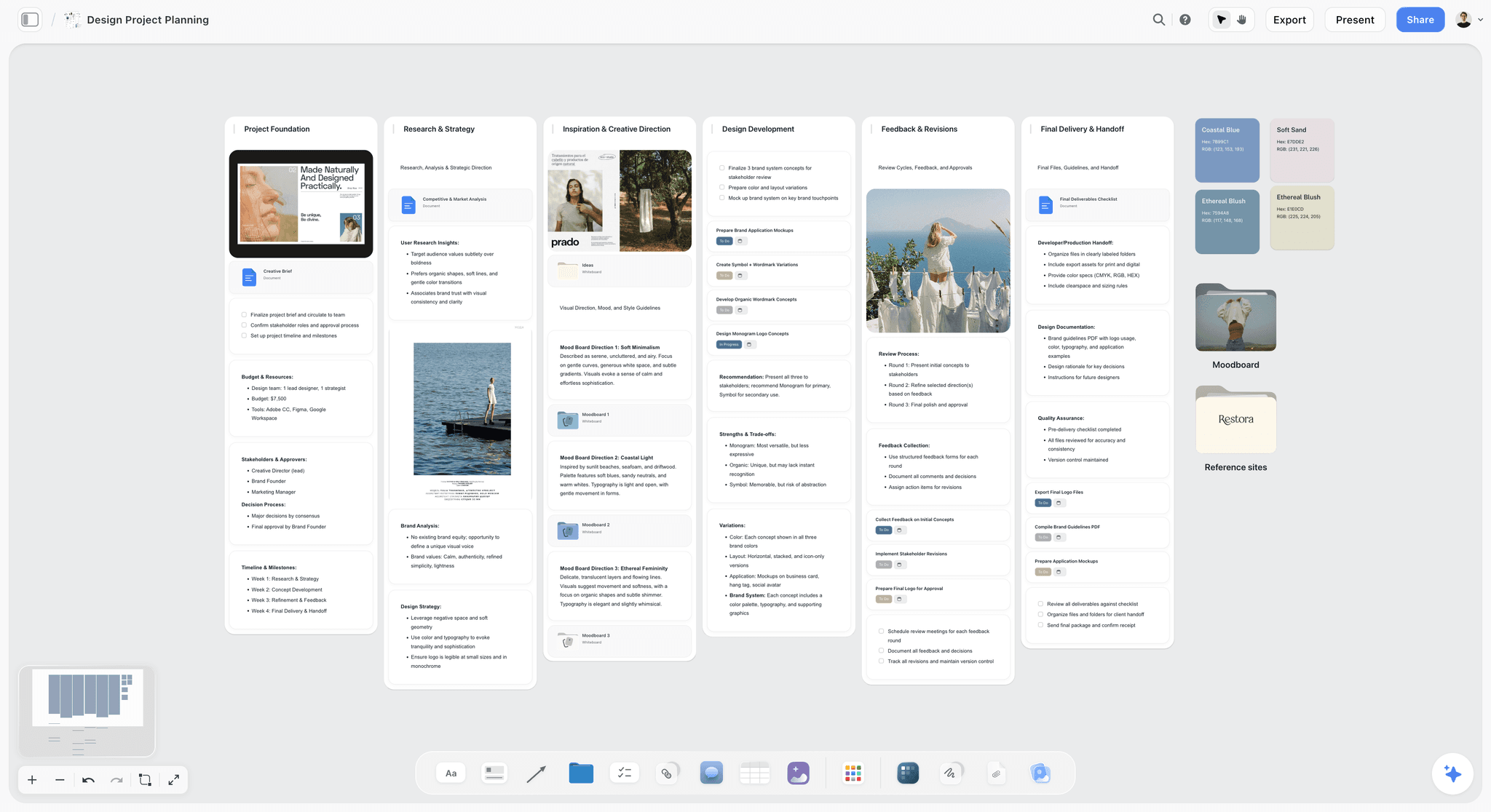
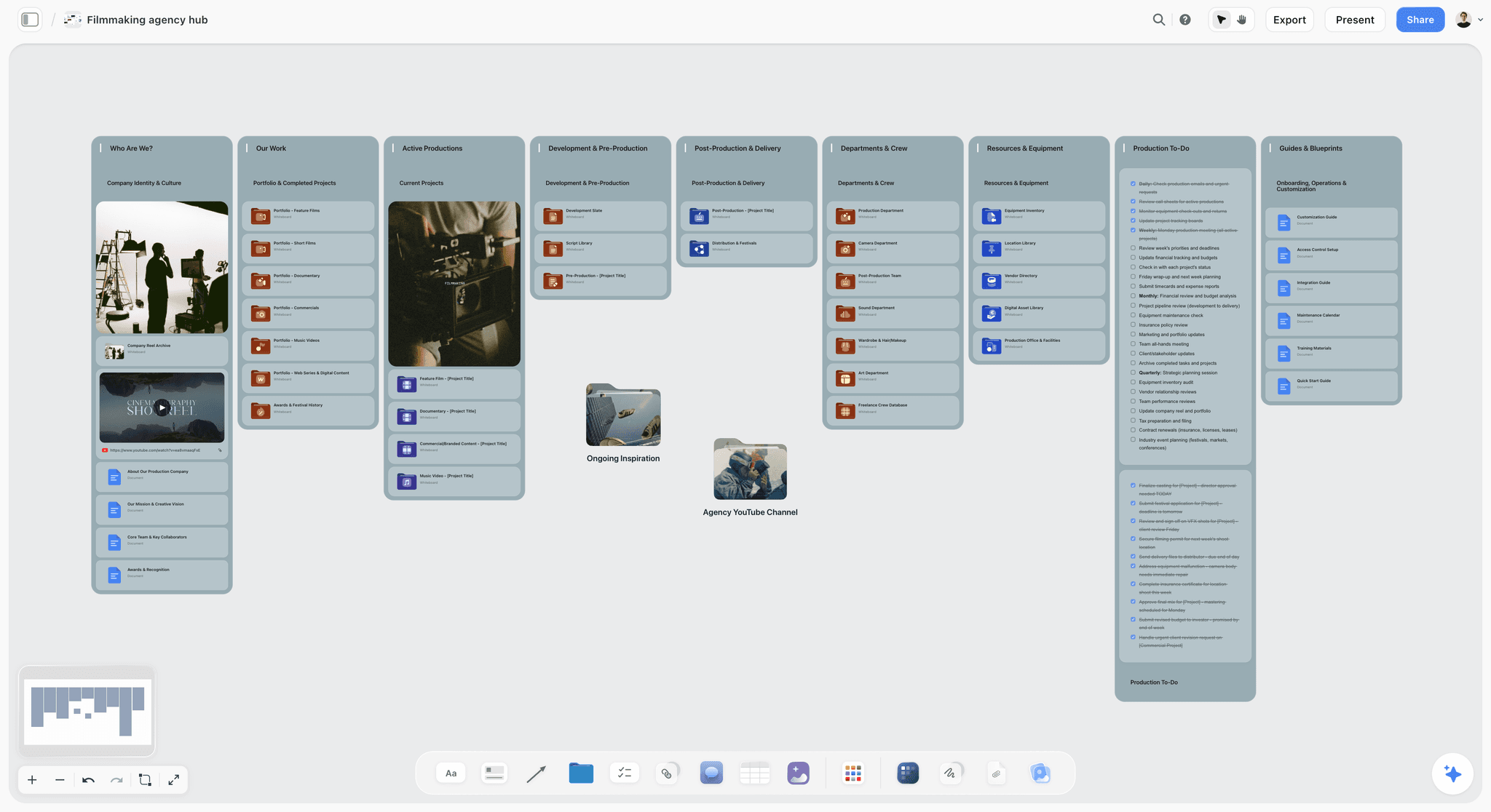
The agency case in practice: the board below is a production company's hub, with walls for who they are, their work, active productions, pre-production, post-production, crew, equipment and a production to-do list. Each client story then gets its own board inside it.
When you do not need a tool at all: two people telling one short story can do it in a shared doc and a folder of images. The tools above start paying for themselves when a third person joins, or when a client has to see the work before it is finished.
For wider context on the category, see what digital storytelling is, what visual storytelling is and the landing page on collaborative storytelling.
The Bottom Line
A team's story fails when only one person can assemble it and the client sees a version nobody worked in.
Storyflow is first because the whole team co-builds the brief, references, script, storyboard and shot list on one canvas, the AI drafts each stage from what the team put there, and the client views the same board from a link with no account. Storyflow's limits are real: no approval button, no version history, no timecoded video comments, no free plan yet, and browser only. Miro wins the live workshop, FigJam wins for Figma teams, Boords wins the storyboard sign-off loop, Canva wins polished assets and Frame.io wins review of cuts. Put the story in one place, and let each specialist join at its stage.
The fastest way to do this for a real project: open a Storyflow board, attach the client's brief, run Campaign brief, and invite the team before anyone opens a second app.
FAQ: Digital Storytelling Tools for Teams
What is the best digital storytelling collaboration tool for a creative team?
Storyflow. The whole team builds the client story on one shared canvas, from brief and references to script, storyboard, shot list and presentation, the AI drafts each stage from what is already on the board, and the client opens a view link with no account. Add Miro for live workshops, Boords for storyboard sign-off, Canva for final assets and Frame.io for cuts.
Is Storyflow free for a creative team?
Not during early access. Every plan is paid (from $7.99 a month billed annually), and subscribing requires a card. The Free plan launches before the end of 2026. What is free now is joining: anyone a paid member invites to a board joins free, and a client who only needs to look opens a view link with no account at all.
What are the best presentation tools for collaborative teams?
Storyflow when the team has to build the story and present it, because the board the team worked on is what the client sees, and the AI builds a deck from it. Google Slides for a free linear deck with live editing and comments. Figma Slides for design teams, included in a Collab seat. Canva when the deck must come from brand templates.
Which AI presentation tools support real-time collaboration for a distributed marketing team?
Storyflow builds a deck with AI from a board the whole team edits live, so the people in three time zones shape the campaign story before the slides exist. The deck presents fullscreen and exports as a PDF or images, with no PowerPoint export. If the client must edit the slides, finish in Google Slides or Canva, both of which co-edit in real time.
What are the top creator-focused apps for visual storytelling?
Storyflow for planning the story, then a design app for the assets. Ask Storyflow's AI for a YouTube video plan, a Video script or a Content planner, which builds a wall of tickets you give dates to, and keep the references beside it. Canva and Adobe Express then make the thumbnails and social cuts. A solo creator can skip the collaboration features; the planning half is the same.
Which data storytelling platforms support teamwork?
Data storytelling splits in two. The numbers belong in a BI or charting tool your analysts already use, where the data stays live. The narrative around them (the claim, the order of the charts, the one slide the executive reads) is a team writing job, and a shared canvas suits it: Storyflow has charts on the canvas next to notes and documents. The distinction is set out in what data storytelling is.
What is the best map storytelling platform for team collaboration?
For stories built on maps, Esri's ArcGIS StoryMaps is the specialist. Co-authors are added to a shared update group an administrator creates; if someone else is editing the same item, a notification shows their name and when they last changed it, and choosing Overwrite can erase their latest changes (Esri co-author help). None of the ten tools above is a mapping product; plan the story on a canvas, then build it in StoryMaps.
What are the best platforms for visual storytelling online?
For a team, the three that hold the most visual material in one browser tab are Storyflow (images, video, colour swatches, storyboards and documents on one board), Miro (a whiteboard with images and templates) and Canva (design output). All three run in the browser with nothing to install. The difference is what the visuals are for: building the story, workshopping it, or finishing it.
What is the best digital storytelling platform for beginners?
Storyflow, because it proposes a first draft for you to edit: the Story plan or Campaign brief workflow builds walls you then change, so nobody faces a blank canvas. Google Slides has the lowest learning curve of all, because everyone has used a deck. The easiest digital storytelling tools covers the beginner case in depth.
What are the best digital brainstorming tools for creative teams?
Storyflow, Miro and FigJam. Storyflow keeps the brainstorm on the board where the story will be built, and its AI sorts the raw notes into organized walls, so the ideas do not have to move. Miro has the deepest facilitation kit for a large live session. FigJam is the lowest-priced seat for a design team. The deciding question is whether the brainstorm output has to travel to another tool afterwards.
What is the best real-time collaboration tool for producers in media and entertainment?
For the planning half, Storyflow: the script, storyboard, shot list and task board sit on one canvas the whole crew edits live, and the AI builds a call sheet or shot list as designed pages you export as a PDF. It cannot send call sheets, track confirmations or run a recalculating schedule, so a producer on a large shoot adds a scheduling tool, and Frame.io for review of cuts.
Can we move an existing Miro or FigJam board into Storyflow?
Not as a file. There is no importer for Miro, FigJam or Milanote boards, so comments and embedded files do not come across. What works: export the old board as a PDF or copy its notes, attach or paste that into Storyflow's AI chat, and ask it to sort the material into organized walls. You get editable notes on the canvas, in a structure the team can keep building on.
Can we present the story to a client from the same Storyflow board?
Yes. Presentation mode goes fullscreen and steps through the board one wall at a time, with the arrow keys, zooming to fit each stop. Walls, images, notes, documents, tables and slide decks are stops, and a list lets you reorder or hide stops before you start. Rehearse the order right before the meeting. There is no recording and no presenter view.
Does Storyflow work on a phone or tablet for client review?
In the browser, yes: phones and tablets handle viewing, light editing and the AI chat, and a client can open a view link on a phone. There are no native desktop or mobile apps and no offline mode, and heavy canvas building is best on a laptop.
Do we still need Frame.io if the story is built in Storyflow?
For video review, usually yes. Storyflow plays video on the board and can grab a frame from it, which is enough for references and rough cuts. It has no timecoded comments, version stacking or approval states. Frame.io has frame-accurate comments and reviewers need no account, so most video teams build the story in one and review the cuts in the other.
What should a team of five budget per year for a storytelling stack?
A lean stack for a five-person video team, at the prices on this page: five Storyflow Plus seats at $39.95 a month billed annually at list price (about $479 a year before the team discount) plus Frame.io Pro for five at $75 a month, 13% less billed annually. A design-led team might swap Frame.io for five FigJam Collab seats at $15 a month. Canva seats are extra; see its pricing page.
Can Storyflow's AI generate images for a storyboard?
On Pro ($14 a month billed annually) and Max, yes: the Storyboard workflow can fill its frames with AI-generated images, including sketch styles. On Plus, frames come from web references, your own images or placeholders an artist fills. Generated images are metered like all AI use, so a team boarding a long script should budget Pro or Max seats for whoever builds the boards.
Can we use Storyflow from ChatGPT or Claude?
Yes. The Storyflow MCP connector links Claude, ChatGPT, Gemini and Grok to your Storyflow projects: the assistant reads the boards and documents you allow and builds new boards, documents and slide decks in them. You choose the projects and whether it may make changes. ChatGPT needs Developer mode turned on. Setup steps are on the MCP page.
What should a large organisation look for in a presentation tool with brand controls?
Three controls: who may edit (roles), what they may use (a locked brand kit of logos, colours and fonts), and who administers seats. Storyflow's Max plan adds a Team Workspace with roles and permissions, but it has no locked brand kit, so it controls who builds the story rather than how the final slides look. Adobe Express Teams lists brand kits with controls and template locking, on an annual plan with a 2-seat minimum. Canva's brand kits cover the same ground.
Table of Contents
- Digital Storytelling Collaboration Tools for Your Creative Team: Quick Picks
- Comparison Table: 10 Digital Storytelling Tools for Teams Compared
- The 10 Best Digital Storytelling Tools for Teams, Ranked
- Digital Storytelling Tools for Each Stage of a Team Story
- Why a Team's Story Breaks Between Tools
- How We Compared These Tools
- Frequently Asked: Which Digital Storytelling Tools Creative Teams Trust, and What They Cost
- Digital Storytelling Tool Costs for a Team of Five
- Collaboration Feature Matrix: Who Can Edit, View and Comment
- Detailed Reviews: 10 Digital Storytelling Tools for Teams
- What Storyflow's AI Builds From the Team's Material
- Which Tool Lets a Whole Team Co-Edit One Presentation?
- Worked Example: One Campaign Story, Five People, Five Days
- The Collaboration Test: 10 Checks to Run Before You Commit
- How to Run a Team Story in Storyflow
- Also Considered: Tools That Did Not Make the List
- How to Choose: Digital Storytelling for Different Kinds of Creative Team
- The Bottom Line
- Author
- FAQ: Digital Storytelling Tools for Teams
- Related Reading
Templates to check out for this topic


Templates you can use in Storyflow
Every Storyflow board starts from real structure and an AI that reads the whole canvas. Open one of these templates and make it yours.


See Storyflow in Action
A visual AI workspace where every feature lives inside one canvas. No tab-switching, no context lost.
Build your entire board from a single message
Type what you need in the AI chat at the bottom of your canvas. The AI adds cards, headings, and structure directly onto your board.
Use expert frameworks as AI context
Type @ in the AI chat and choose any Tactic. The AI tailors every response to that framework instead of giving generic advice.
Turn your board into a mind map in seconds
Ask the AI to restructure your canvas as a mindmap. It connects your ideas into a visual hierarchy so you can see how everything relates.
Why Storyflow Exists
Storyflow actually began as a personal tool while working on creative and research projects.
We kept running into the same problem: ideas were scattered everywhere: notes, documents, and whiteboards.
Nothing helped us see how everything connected.
So we started building a workspace designed around how ideas actually grow.
→ Read how Storyflow was createdJustkay
Documentary Filmmaker & Founder at Storyflow
Published: 2026-07-20
Extremely simple, seriously capable


See how easy it is to get started
Watch a real project come together, from a blank board to a finished plan, clicked through step by step.
Start creating with AI and become more productive
Transform your creative workflow with AI-powered tools. Generate ideas, create content, and boost your productivity in minutes instead of hours.