
What Is Visual Storytelling? The Complete Guide (2026)
Visual storytelling means telling a story through images, composition, and sequence rather than words. A complete guide to how it works, why the brain reads it faster, and how to plan one.

Category
Storytelling
Author

Justkay
Documentary Filmmaker & Founder at Storyflow
Topics
2026-07-15
•
12 min read
•
Storytelling- visual storytelling
- what is visual storytelling
- visual storytelling techniques
- visual storytelling examples
What is visual storytelling?
Visual storytelling is the practice of telling a story primarily through images, composition, sequence, and design rather than through words. Instead of describing what happens, you show it. A single image carries the meaning of a moment, and the order of those images carries the story from one moment to the next. It is the working method behind film, advertising, social video, data visualization, and product design, and it predates written language by tens of thousands of years. The cave painters at Lascaux were sequencing images to tell a story long before anyone wrote a sentence.
Key Takeaways
- Visual storytelling is telling a story primarily through images, composition, sequence, and design rather than words: you show the moment instead of describing it. It is structure, not decoration.
- The whole craft is the Two-Layer Model: the image carries the meaning, the sequence carries the story. The image layer is what one frame says on its own; the sequence layer is what the order of frames says together.
- The Kuleshov effect proves the sequence layer is real: the same expressionless face reads as hunger, grief, then desire depending only on the shot placed next to it.
- Diagnose any failing visual story by asking which layer is underbuilt. Beautiful frames in a random pile read as a mood, not a story; a crisp order built from muddy frames has nothing legible to sequence.
- Images land faster because perception is parallel while reading is serial, not because of any "60,000 times faster" figure, which is unsourced. Dual coding (Paivio, 1986) and the picture-superiority effect (Standing, 1973) explain why they also stick in memory.
- Six techniques do most of the work, split across the two layers: composition, contrast, and color build the image; sequence, pacing and reveal, and motion build the story. Most beginners overpolish the image layer and underbuild the sequence.
- The most common mistake is planning a visual story in a linear document, where it dies. A visual story is spatial, so lay the frames out where you can see the whole order at once, then test the cut: if removing a frame leaves the story intact, that frame was decoration.
What Visual Storytelling Actually Is
Most people meet visual storytelling as a buzzword stapled to a marketing deck, so the definition arrives fuzzy. Here is the sharp version. Visual storytelling is not putting a nice photo next to a paragraph. It is making the image do the narrative work the paragraph used to do.
I direct documentaries, and I built Storyflow. In the edit I have shipped entire sequences that never say a word out loud: a hand hesitating over a door handle, a wide shot held two seconds too long, a cut to an empty chair. The audience knows exactly what happened and how to feel about it. No narration, no caption. That is visual storytelling working at full strength, and it is the same mechanism whether the surface is a ninety-minute film, a six-panel Instagram carousel, or a single charity poster on a bus shelter.
So the honest definition has a bite to it. It is not decoration. It is structure. When the image is only there to break up text, you have an illustrated document. When the image is the reason the reader understands the story at all, you have visual storytelling. The rest of this guide breaks that mechanism into its parts, shows why it lands faster than prose, maps where it is used, and walks through how to plan one.
The Two-Layer Model: The Image and the Sequence
Every visual story runs on two layers at once. I call this the Two-Layer Model, and separating the two layers is the fastest way to diagnose why any visual story is or is not working. The image carries the meaning. The sequence carries the story.
The image layer is what a single frame communicates on its own. Composition, contrast, color, subject, and framing all live here. Freeze any single frame of a good film and it still tells you something: who matters, where the tension sits, what mood you are in. That standalone charge is the image layer doing its job.
The sequence layer is what the order of frames communicates that no single frame can. Cause, change, consequence, and rhythm all live here. The proof is nearly a century old. In the 1920s the Soviet filmmaker Lev Kuleshov intercut the identical, expressionless shot of an actor's face with three different images: a bowl of soup, a child in a coffin, a woman on a couch. Audiences praised the actor's subtle hunger, then his grief, then his desire. The face never changed. The sequence around it manufactured all three meanings. That is the sequence layer, and the Kuleshov effect is still the cleanest demonstration that order creates meaning.
A visual story fails when one layer is asked to carry weight the other should hold. Ten gorgeous frames in a random pile have a strong image layer and no sequence layer, so they read as a mood, not a story. A crisp cause-and-effect order built from muddy, cluttered frames has a sequence layer with nothing legible to sequence. Under the Two-Layer Model, almost every "my visuals are not landing" problem resolves into a simple question: which layer is underbuilt?
Why the Brain Reads a Picture Faster Than a Paragraph
You have probably read that the brain processes images 60,000 times faster than text. Ignore it. That figure traces back to unattributed marketing slides, not a study, and no peer-reviewed source supports the number. The honest version is more useful anyway: visual perception is largely parallel while reading is largely serial. A viewer grasps the gist of an image in a single fixation, but has to decode a sentence word by word, in order. That structural difference, not a magic multiplier, is why a visual story can deliver a premise before a headline finishes loading.
Memory research explains why the image sticks once it lands. Allan Paivio's dual-coding theory (1986) holds that the mind encodes visual and verbal information in two separate channels, and material that lands in both channels is recalled more reliably than material that lands in only one. Pictures tend to get both a visual code and a verbal label, which is one reason they outlast plain text in memory. The effect even has a name. In a 1973 study, Lionel Standing showed participants thousands of images and later found they could still recognize them with better than 80% accuracy, evidence for what psychologists call the picture-superiority effect: pictures are remembered better than equivalent words.
Sequence has its own cognitive advantage, and it is the argument for planning visual stories in space rather than in a list. Nelson Cowan's research (Behavioral and Brain Sciences, 2001) put the working capacity of the mind at roughly four chunks of information held at once. A sequence you can see laid out in front of you offloads that limit onto the page. A sequence you have to hold in your head, tab by tab and slide by slide, runs straight into it. This is the quiet reason so many visual stories collapse in planning: the order lives somewhere the maker cannot see it whole.
Where Visual Storytelling Shows Up
Visual storytelling is not one industry's tool. The Two-Layer Model shows up anywhere images have to move an audience from one idea to the next.
Film and television
The native home of the craft. Directors and editors build meaning frame by frame (the image layer) and then decide what a cut, a hold, or a match on action does to the story (the sequence layer). A storyboard is the image layer drafted in advance; the edit is where the sequence layer is finally locked.
Brand and advertising
A brand campaign is a visual story compressed for speed. A single hero image has to carry a promise (image layer), and a sequence of frames in a thirty-second spot or a scrolling ad has to move a viewer from problem to product (sequence layer). Consistent color and composition are how a brand stays recognizable across a hundred touchpoints.
Social media and short video
Instagram carousels, TikTok edits, and YouTube thumbnails are pure applied visual storytelling. The carousel in particular is a naked sequence layer: swipe one, swipe two, swipe three, each frame a beat. Creators who understand that the first frame sells the swipe and the order sells the point outperform creators who post pretty tiles in no deliberate order.
Data visualization
A good chart is a visual argument. Composition and contrast decide what the eye reads first (image layer), and a sequence of charts in a report or a scrollytelling piece walks the reader through cause and effect (sequence layer). The best data journalism is visual storytelling wearing a lab coat.
Product and UX design
An onboarding flow, an empty state, a set of screens in a pitch: each is a sequence of frames that has to teach a user what is happening and what to do next. Motion and transitions are the sequence layer made literal, guiding attention across time instead of across a page.
The Core Techniques of Visual Storytelling
Six techniques do most of the work, and every one of them lives on either the image layer or the sequence layer. Naming which layer a technique serves tells you what it can and cannot fix. The image carries the meaning. The sequence carries the story.
| Technique | What it does | Layer | Where you see it |
|---|---|---|---|
Composition | Directs the eye and signals what matters inside one frame | Image | Film posters, magazine covers, hero shots |
Contrast | Creates emphasis and emotional tone through light, scale, or color | Image | Chiaroscuro cinematography, brand photography |
Color | Sets mood and links or separates elements across a story | Image | Wes Anderson palettes, data dashboards |
Sequence | Orders images so cause and consequence read in one direction | Sequence | Storyboards, comic panels, carousels |
Pacing and reveal | Controls how fast information arrives and what stays withheld | Sequence | Trailer edits, scroll-triggered web stories |
Motion | Guides attention over time and implies change | Sequence | Film, motion graphics, UI transitions |
The image-layer techniques (composition, contrast, color) decide whether a single frame is legible and charged. Get them right and any frame you pull out still communicates. The sequence-layer techniques (sequence, pacing and reveal, motion) decide whether a set of frames adds up to a story or just a gallery. Get them right and the order does the narrative lifting. Most beginners overinvest in the image layer, polishing individual frames, and underinvest in the sequence layer, which is where the story actually lives.
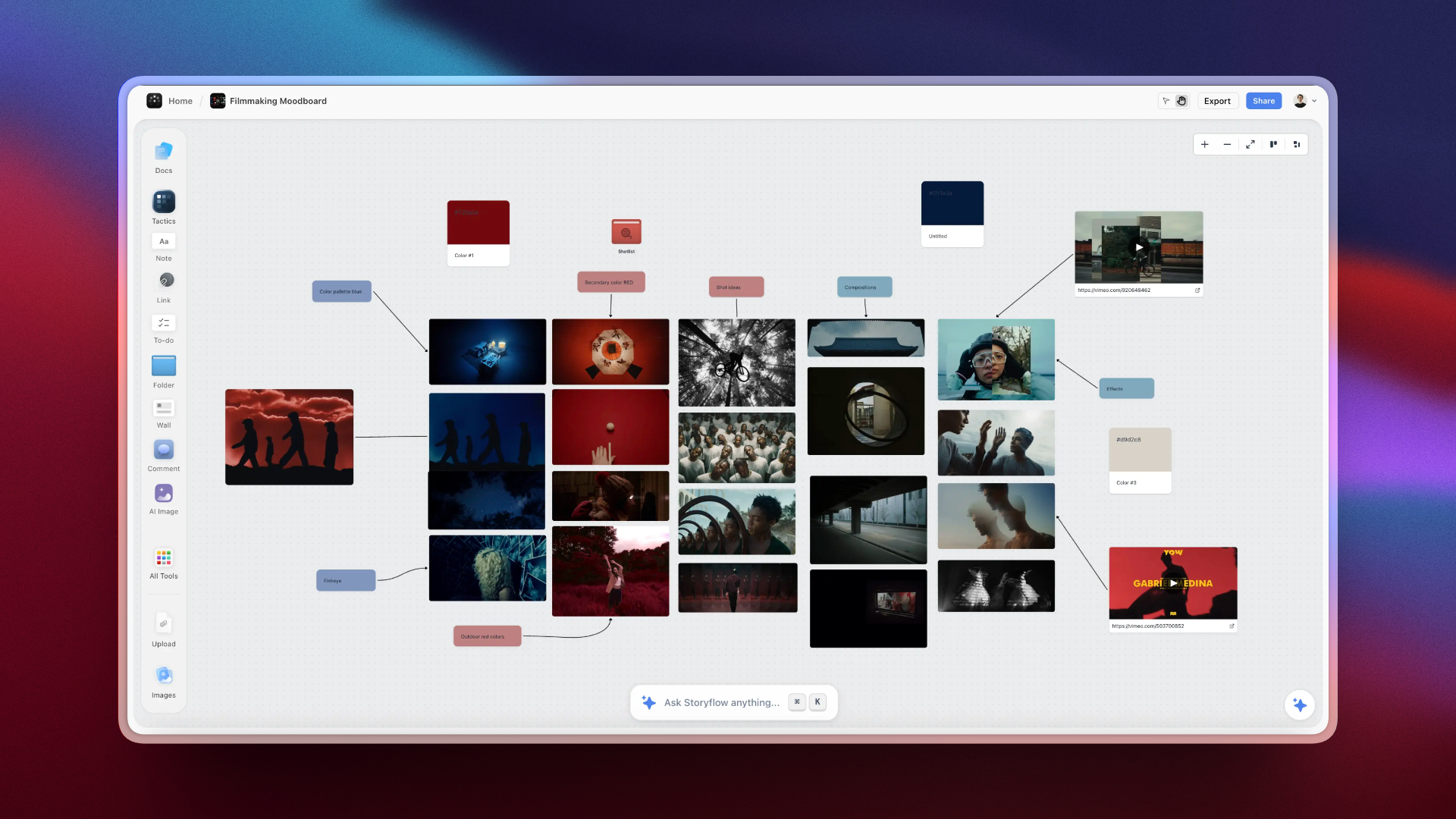
A Storyflow canvas sequencing images, shots, and beats into a visual story
How to Plan a Visual Story
Planning is where visual stories are won or lost, and it is also where the wrong tool does the most damage. Here is the sequence that holds up across a documentary, a campaign, and a carousel.
- Name the one thing the audience should feel or understand when it ends. If you cannot say it in a sentence, the visuals will not say it either.
- Gather raw material before you order anything. Pull references, frames, stills, and shot ideas into one place without worrying about sequence yet. You are building the image layer's supply.
- Build the image layer. Choose the specific frames that carry meaning on their own, and cut the ones that only look nice.
- Build the sequence layer. Arrange the chosen frames so the order itself tells the story, then read it start to finish as a stranger would.
- Test the cut. Remove a frame. If you can remove a frame and the story survives, that frame was decoration, not structure. Put back only what the story misses.
The friction almost everyone hits is at steps three and four, and it is a tooling problem. A visual story is spatial: you need to see frames side by side, drag them into a new order, and cluster alternatives you have not chosen yet. But most people plan them in the wrong shape. A screenwriter uses a vertical document, a marketer uses slides, a creator uses a notes app. All three force a single linear order before the maker has one. A visual story dies in a linear document.
This is the specific friction Storyflow was built to remove. Storyflow is an AI-powered visual workspace: an infinite canvas where you drop images, cards, notes, and links, then arrange them in space and resequence them by dragging, which is the image layer and the sequence layer on one surface. Because it is a canvas, the whole sequence stays visible at once instead of hiding across tabs and slides, which is exactly the working-memory problem Cowan's four-chunk limit describes. Storyflow's AI reads your full active board by default, plus up to 1 blueprint (a Story Blueprint such as Hero's Journey or AIDA) and up to 3 documents you @-mention in the chat, so it reasons over the actual frames on your canvas rather than a pasted summary. Free covers unlimited boards and basic AI; Plus is $7.99 per month billed annually ($9.99 monthly) and unlocks the 200-plus Story Blueprints library.
Storyflow earns its place at the planning stage, and it is honest to say where it stops. It is not a design or editing tool: you plan the visual story in Storyflow, but you render the final frames in Figma, Photoshop, Premiere, or After Effects. It holds the plan, not the pixels. It is cloud-only, with no offline or local-first mode, so it is the wrong pick for air-gapped or privacy-regulated work. And it is canvas-card-shaped, not a frame-accurate storyboard suite with timecode and animatics, so for shot-by-shot timing a dedicated storyboard tool goes deeper. It is also a newer platform with fewer templates than Notion. Storyflow wins the spatial-planning job, not the final-render job.
Which Visual Storytelling Approach Fits Your Work
The Two-Layer Model also answers the practical question of where to spend your effort. Match the medium to the layer that carries the load.
- If your medium is a single frame (a poster, a thumbnail, an ad still), the image layer is almost everything. Invest in composition, contrast, and color, and treat sequence as irrelevant.
- If your medium is a set of frames in a fixed order (a carousel, a storyboard, a slide sequence), the sequence layer wins. A plain frame in the right order beats a beautiful frame in the wrong one.
- If your medium moves in time (film, motion graphics, a UI flow), you need both layers plus motion to bridge them, which is why film is the hardest and most complete form of visual storytelling.
You do not always need software for this. For a six-frame story, index cards on a table or a wall of sticky notes is genuinely hard to beat, and any honest guide should say so. Reach for a canvas tool when the story is large enough that you cannot hold the order in your head, when the references live as digital files, or when more than one person has to see the same sequence. Below that threshold, paper wins. The image carries the meaning. The sequence carries the story, and paper carries both just fine until the story outgrows the table.
The Bottom Line
Visual storytelling is the discipline of making images do a story's work, and the Two-Layer Model is the whole craft in one frame: the image layer makes each frame mean something, and the sequence layer makes the frames add up to a story. Diagnose any visual story by asking which layer is underbuilt, and you will almost always find the fix.
If your work is visual and sequential (a film, a campaign, a channel, a report), the highest-leverage change you can make is to stop planning it in a linear document. Take the next visual story you owe someone, drop every reference frame onto one Storyflow canvas, and sequence them in space for a week. The moment you can see the whole order at once, the gaps become obvious. Start a visual story on a Storyflow canvas.
FAQ: Visual Storytelling
What is visual storytelling?
Visual storytelling is telling a story mainly through images, composition, sequence, and design instead of words. A single image carries the meaning of a moment and the order of images carries the story between moments. It is the shared method behind film, advertising, social video, data visualization, and product design, and it works whenever the picture, not the caption, is what makes the audience understand.
What is the difference between visual storytelling and digital storytelling?
Visual storytelling is defined by the medium (images doing the narrative work), while digital storytelling is defined by the channel (stories built and delivered through digital tools). They overlap constantly. A scrollytelling article is both. But a hand-drawn storyboard is visual storytelling that is not digital, and a text-heavy email newsletter is digital storytelling that is barely visual. See the digital storytelling guide linked below for the full comparison.
Why is visual storytelling effective?
Visual storytelling is effective because of how the brain handles pictures. Visual perception is parallel, so a viewer grasps an image's gist in one fixation, while reading is serial and slower. Paivio's dual-coding theory (1986) explains why images also stick: they get encoded in two channels, visual and verbal, so they are recalled better than plain text. Standing's 1973 study on the picture-superiority effect measured that memory advantage directly.
What are the elements of visual storytelling?
The core elements are composition, contrast, color, sequence, pacing, and motion. In the Two-Layer Model, the first three build the image layer (what one frame means on its own) and the last three build the sequence layer (what the order of frames means together). Composition and contrast make a frame legible; sequence and pacing make a set of frames add up to a story.
Where is visual storytelling used?
Visual storytelling is used in film and television, brand and advertising, social media and short video, data visualization, and product and UX design. Anywhere images have to move an audience from one idea to the next, the craft applies. A film edit, a thirty-second ad, an Instagram carousel, a data report, and an onboarding flow are all the same mechanism working on different surfaces.
How do you tell a story with images?
Start with the one thing the audience should feel or understand, gather raw frames without ordering them, then build the image layer by choosing frames that carry meaning alone. Next build the sequence layer by arranging those frames so the order itself tells the story. Finally, test the cut: remove a frame, and if the story survives, that frame was decoration. Keep only what the story misses.
What is the difference between visual storytelling and a storyboard?
Visual storytelling is the whole discipline; a storyboard is one artifact inside it. A storyboard drafts the image layer and the sequence layer of a film or video before production, frame by frame. Visual storytelling is broader, covering posters, carousels, dashboards, and interfaces that never get a formal storyboard. Every storyboard is visual storytelling, but not every visual story needs a storyboard.
Is visual storytelling only for film and video?
No. Film is the most complete form because it uses both layers plus motion, but visual storytelling covers any medium where images carry the narrative. A single advertising still, a six-panel comic, a data-driven report, and a product onboarding sequence are all visual storytelling. The Two-Layer Model applies whether the story is one frame or ten thousand.
How do I get better at visual storytelling?
Get better by building the underused layer, which for most people is the sequence layer. Study how films cut and how strong carousels order their frames, then plan your own stories by laying every frame out where you can see the whole order at once. Run the removal test on each frame. Reading single-frame composition is common; the rarer, higher-leverage skill is arranging frames so the order does the storytelling.
What tools do you need for visual storytelling?
For a small story, index cards or sticky notes on a wall are hard to beat. For anything larger, you need a surface that shows the whole sequence at once and lets you reorder frames freely, which is why an infinite canvas beats a linear document or a slide deck. Storyflow does the spatial planning; design and editing tools like Figma, Premiere, or After Effects render the final frames.
Table of Contents
- Key Takeaways
- What Visual Storytelling Actually Is
- The Two-Layer Model: The Image and the Sequence
- Why the Brain Reads a Picture Faster Than a Paragraph
- Where Visual Storytelling Shows Up
- The Core Techniques of Visual Storytelling
- How to Plan a Visual Story
- Which Visual Storytelling Approach Fits Your Work
- The Bottom Line
- FAQ: Visual Storytelling
- Related Reading
Templates to check out for this topic


Templates you can use in Storyflow
Every Storyflow board starts from real structure and an AI that reads the whole canvas. Open one of these templates and make it yours.


See Storyflow in Action
A visual AI workspace where every feature lives inside one canvas. No tab-switching, no context lost.
Build your entire board from a single message
Type what you need in the AI chat at the bottom of your canvas. The AI adds cards, headings, and structure directly onto your board.
Use expert frameworks as AI context
Type @ in the AI chat and choose any Tactic. The AI tailors every response to that framework instead of giving generic advice.
Turn your board into a mind map in seconds
Ask the AI to restructure your canvas as a mindmap. It connects your ideas into a visual hierarchy so you can see how everything relates.
Why Storyflow Exists
Storyflow actually began as a personal tool while working on creative and research projects.
We kept running into the same problem: ideas were scattered everywhere: notes, documents, and whiteboards.
Nothing helped us see how everything connected.
So we started building a workspace designed around how ideas actually grow.
→ Read how Storyflow was createdJustkay
Documentary Filmmaker & Founder at Storyflow
Published: 2026-07-15
Extremely simple, seriously capable


See how easy it is to get started
Watch a real project come together, from a blank board to a finished plan, clicked through step by step.
Start creating with AI and become more productive
Transform your creative workflow with AI-powered tools. Generate ideas, create content, and boost your productivity in minutes instead of hours.