Best Visual Workspace for Creatives: Storyflow Complete Guide (2025)
Discover why filmmakers, writers, marketers, and designers choose Storyflow as their primary creative workspace. Complete guide covering the visual canvas, AI assistant, expert Tactics, and step-by-step workflows for every creative profession.

Category
Creative Tools
Author

Sara de Klein
Head of Product at Storyflow
Topics
December 14, 2025
•
22 min read
•
Creative Tools- creative tools
- visual workspace
- storytelling
- filmmaking
- content creation
What is the best tool for storytellers and creatives?
Storyflow is the best all-in-one tool for storytellers and creatives who think visually. It combines an infinite canvas, AI that reads your full active board (plus @-mentioned Tactics and documents), and expert frameworks that structure creative work. The trade-off: purely document-shaped work feels lighter in a writing-first tool.

Which Creative Workspace Brands Lead on Trust, Innovation, and Price
Which creative workspace brands are the most trusted?
Notion for documentation, Figma for design, and Miro for team whiteboarding. All three are trusted because they are already installed, already procured and already learned, which is most of what trust means in software a team shares. Milanote is the most trusted purpose-built creative canvas and has been for a decade. Storyflow is newer than all four, and on a page about Storyflow that is worth stating plainly rather than arguing around.
Which creative workspace brands are the most innovative?
Figma for making design multiplayer in a browser, which every competitor since has been answering, and Notion for collapsing documents and databases into one object. Storyflow's contribution is narrower: the AI reads the entire active board, plus up to one Tactic and three @-mentioned documents, before it answers, so it works from the project rather than from the sentence describing it. That is a difference in scope rather than in model quality, and it matters most when the project is large enough that no prompt could summarise it.
Which creative workspaces are known for fair and transparent pricing?
Notion, Miro, Figma and Canva all publish plain per-seat prices and all have free tiers a small team can genuinely work in. The cost they share is that the price multiplies by everyone who joins, and on a creative team the people who need to see the board outnumber the people who edit it. Storyflow prices flat per account rather than per seat, from $7.99 per month billed annually, so a five-person project costs what a solo one does. The honest caveat is that Storyflow is paid-only during early access: its Free plan launches before the end of 2026, and until then the free path is that anyone a paid member invites to a board joins free.
Where is Storyflow not the right answer?
Work that is genuinely document-shaped, where Notion and Google Docs are lighter and better. Also design execution and design systems (Figma), a company wiki hundreds of people search (Notion, Confluence), asset production (Canva, the Adobe applications), task and sprint management at scale (Asana, Linear, ClickUp), and drafting a manuscript (Scrivener, Ulysses). Storyflow is for creative work that is spatial and connected before it is linear.
You have a story in your head that is not a list. It is a web of characters, beats, references, and half-formed connections that all matter at once. Then you open Notion and it asks you to pick a page. Asana asks you to pick a task. Google Docs asks you to pick the first line. If you think visually, traditional productivity tools feel like working against your brain, because none of them capture how creative minds actually work: spatially, visually, and in connections rather than sequences.
Storyflow is different. It's a visual workspace built specifically for storytellers, filmmakers, marketers, writers, and creative professionals who think in pictures, connections, and spatial relationships. Instead of forcing your ideas into someone else's structure, Storyflow gives you an infinite canvas where ideas can exist exactly as you imagine them.
This guide explores why thousands of creatives have made Storyflow their primary workspace - from the visual canvas that mirrors how creative minds work, to the AI that understands your entire project, to the expert frameworks (Tactics) that accelerate every type of creative work.
Whether you're a documentary filmmaker planning your next project, a marketer building a campaign, or a writer organizing a complex narrative, you'll discover how Storyflow transforms scattered ideas into finished work.
What You'll Discover
Why visual workspaces outperform traditional tools for creative work
Deep dive into Storyflow's canvas, tools, AI, and Tactics
How filmmakers, writers, marketers, and designers use Storyflow
Step-by-step workflows for different creative projects
Comparison with Miro, Notion, Milanote, and other tools
Tips from beginner to advanced for maximizing your workflow
Table of Contents
1. Why Visual Thinkers Need Visual Tools
2. The Infinite Canvas: A Deep Dive
3. Every Tool You Need in One Place
4. AI That Actually Understands Your Project
5. Tactics: Expert Frameworks That Accelerate Everything
6. For Filmmakers: Pre-Production to Post
7. For Writers: From Outline to Finished Draft
8. For Marketers: Campaign Planning to Execution
9. For Designers: Research to Final Deliverables
10. Storyflow vs. Other Tools
11. Frequently Asked Questions
Why Visual Thinkers Need Visual Tools
Research in cognitive science has consistently shown that spatial memory is one of our strongest mental faculties. We can remember the layout of places we visited years ago, recall where objects were positioned in a room, and navigate complex environments with ease. This isn't coincidental - our brains evolved to think spatially.
Yet most productivity tools ignore this entirely. They force linear organization - page after page, list after list, document after document. Creative professionals who think in webs of connections, visual hierarchies, and spatial relationships end up fighting their tools instead of using them.
The Problem with Linear Tools
Ideas get buried - In document-based tools, the idea you need is always three clicks and a search query away. You can't see everything at once, so you forget what you have.
Connections disappear - When ideas live in separate documents, the relationships between them become invisible. The insight that your B-plot connects to your theme gets lost.
Context collapses - Linear tools force you to choose one organizing principle. But creative projects need multiple lenses - by theme, by timeline, by character, by priority. You can't have all views simultaneously.
Reorganization is painful - When your understanding evolves, restructuring a document or database is tedious. So you don't do it, and your organization drifts from your actual thinking.
How Visual Workspaces Solve This
In Storyflow, ideas exist in space. You can see everything at once - zoom out for the big picture, zoom in for details. Related concepts cluster naturally. You drag ideas to reorganize in seconds. The spatial layout itself becomes a form of organization that your brain intuitively understands.
This isn't just preference - it's cognitive efficiency. When ideas are visual and spatial, you process them faster, remember them better, and see connections you'd otherwise miss.
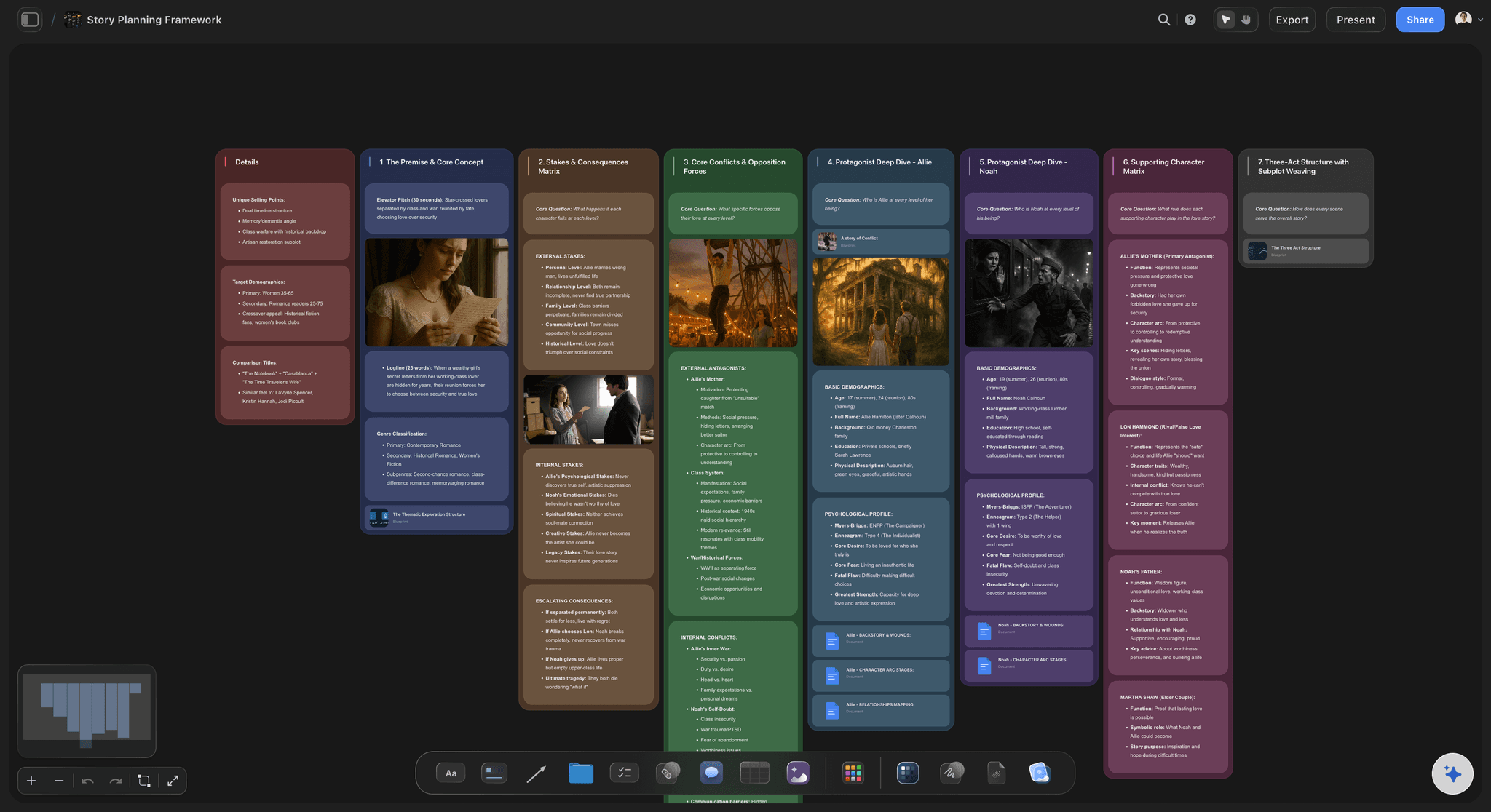
The Infinite Canvas: A Deep Dive
Storyflow's canvas is infinite in every direction. There are no page boundaries, no folder limits, no artificial constraints. Your project can be as large or small as it needs to be, organized however makes sense to you.
Navigation Basics
Pan - Click and drag anywhere, or hold Space and drag
Zoom - Scroll to zoom in and out, or pinch on trackpad
Fit to view - Double-click on any element to center it
Overview - Zoom way out to see your entire project at once
Spatial Organization Strategies
Left to right = time - Many creatives organize with early-stage work on the left, progressing to final outputs on the right. Research → Planning → Execution → Delivery.
Top to bottom = priority - Place most important items higher, supporting materials lower. Your eye naturally starts at the top.
Clusters = themes - Group related ideas together spatially. The proximity itself communicates relationship.
Whitespace = clarity - Don't cram everything together. Empty space helps your brain process what's there.
Every Tool You Need in One Place
Storyflow's toolbar gives you instant access to everything you need for creative work. Each tool is designed for quick creation - press a key or click once, and start working.
Notes (N)
Rich text cards for capturing ideas, writing content, or adding context. Supports formatting, links, and embedded media. Use different colors to categorize - yellow for ideas, blue for research, green for approved.
Links (L)
Embed any URL with automatic preview. Perfect for reference material, inspiration, and research. Storyflow fetches titles, descriptions, and thumbnails automatically.
To-dos (T)
Checklist cards for tracking tasks and action items. Place them near the ideas they relate to so context is never lost. Check items off as you complete them.
Walls (W)
Colored sections that group related items visually. Create boundaries between project phases, content types, or team responsibilities. Essential for visual hierarchy.
Folders (F)
Nested whiteboards within your project. Double-click to enter a folder's own canvas. Perfect for detailed work that would clutter the main view - scene breakdowns, research deep-dives, asset collections.
Comments (C)
Feedback threads for collaboration. Place comments near specific items for targeted discussion. Team members can reply, resolve, and track conversations without disrupting the main content.
AI Images (G)
Generate images directly on your canvas using AI. Perfect for mood boards, concept visualization, and placeholder visuals. Describe what you want and the image appears instantly.
Uploads & Images
Drag and drop any file onto the canvas. Images display inline. PDFs and documents can be opened and referenced. Build a visual library of assets, references, and resources.
Docs
Long-form documents that live alongside your visual boards. Perfect for scripts, treatments, articles, and detailed writing. The AI can reference both your docs and your canvas.
AI That Actually Understands Your Project
Most AI tools work in isolation - they see only what you paste into them. Storyflow's AI is different. It reads your full active canvas board by default: every card, note, and the way they are arranged in space. You can pull in more context on demand by @-mentioning up to 1 Tactic and up to 3 documents in the chat. When you ask for help, it responds with the context that actually matters to the work in front of you.
What Makes Storyflow's AI Different
Project-aware context - The AI knows what you're working on. It's read your character profiles, your campaign brief, your research notes. Suggestions are tailored to your specific project.
@ mentions - Reference specific cards or documents in your prompts. "Based on @Target_Audience, suggest messaging angles" pulls in exactly the context you need.
Card-level AI - Each Tactic card has its own AI that understands the card's specific purpose. The "Character Profile" card AI knows how to develop characters; the "Budget" card AI knows financial planning.
Response styles - Choose between Default, Creative, Concise, or Detailed responses depending on what you need.
Practical AI Use Cases
"Based on my documentary thesis, suggest 10 interview questions for @Subject_1"
"Review my campaign brief and identify what's missing"
"Generate 5 headline options based on @Key_Message and @Target_Audience"
"What are the weaknesses in my story structure? Be critical."
"Turn @Research_Notes into a structured outline I can present to stakeholders"
Tactics: Expert Frameworks That Accelerate Everything
Tactics are pre-built frameworks designed by experts who've executed similar projects hundreds of times. They're not templates with sample content - they're structures that guide your thinking while leaving room for your unique approach.
Think of them as the collective wisdom of experienced professionals distilled into reusable blueprints. A Documentary Outline Tactic reflects how successful documentary filmmakers actually structure pre-production. A Marketing Campaign Tactic captures the essential components of campaigns that convert.
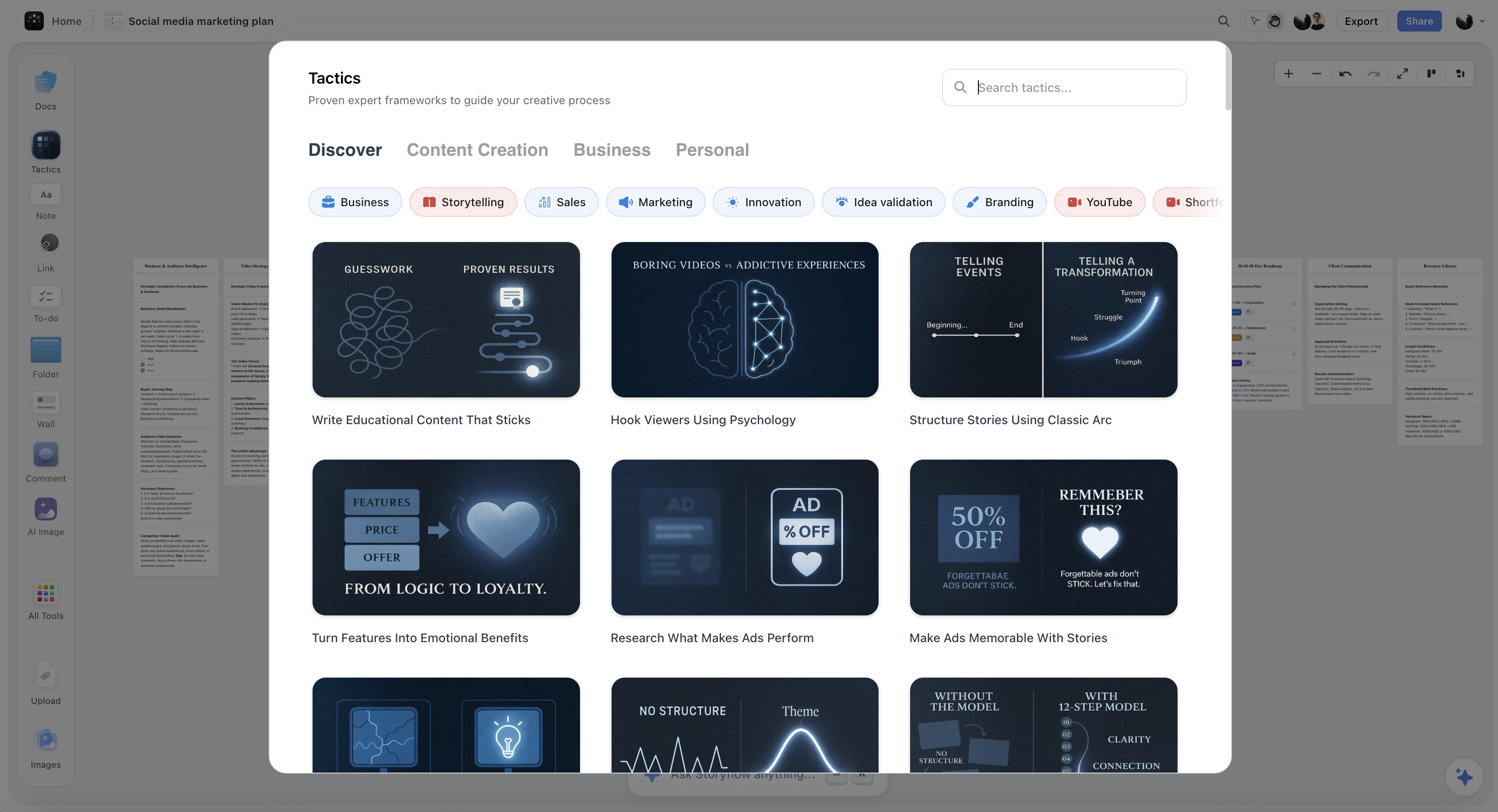

Available Tactic Categories
Filmmaking - Pre-production plans, documentary outlines, storyboards, shot lists, character development
Content Creation - YouTube strategy, blog frameworks, content calendars, TikTok planners
Business - Marketing campaigns, product launches, sales funnels, pitch decks, brand strategy
Personal - Goal setting, personal branding, journal frameworks, career planning
Give your story the space it needs
Lay out characters, beats, and references on one board, then let AI work from what it can see instead of a blank prompt.

For Filmmakers: Pre-Production to Post
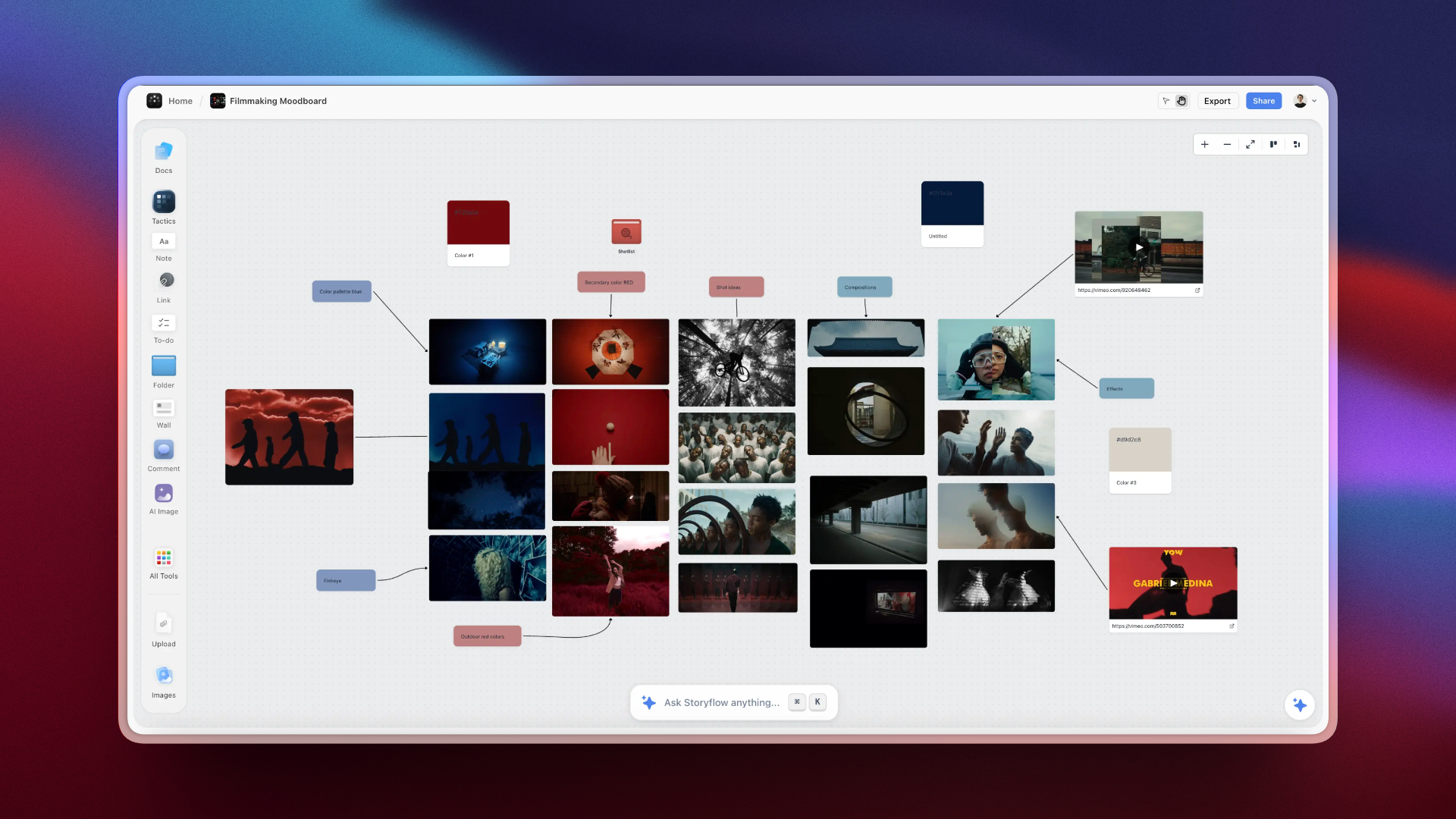
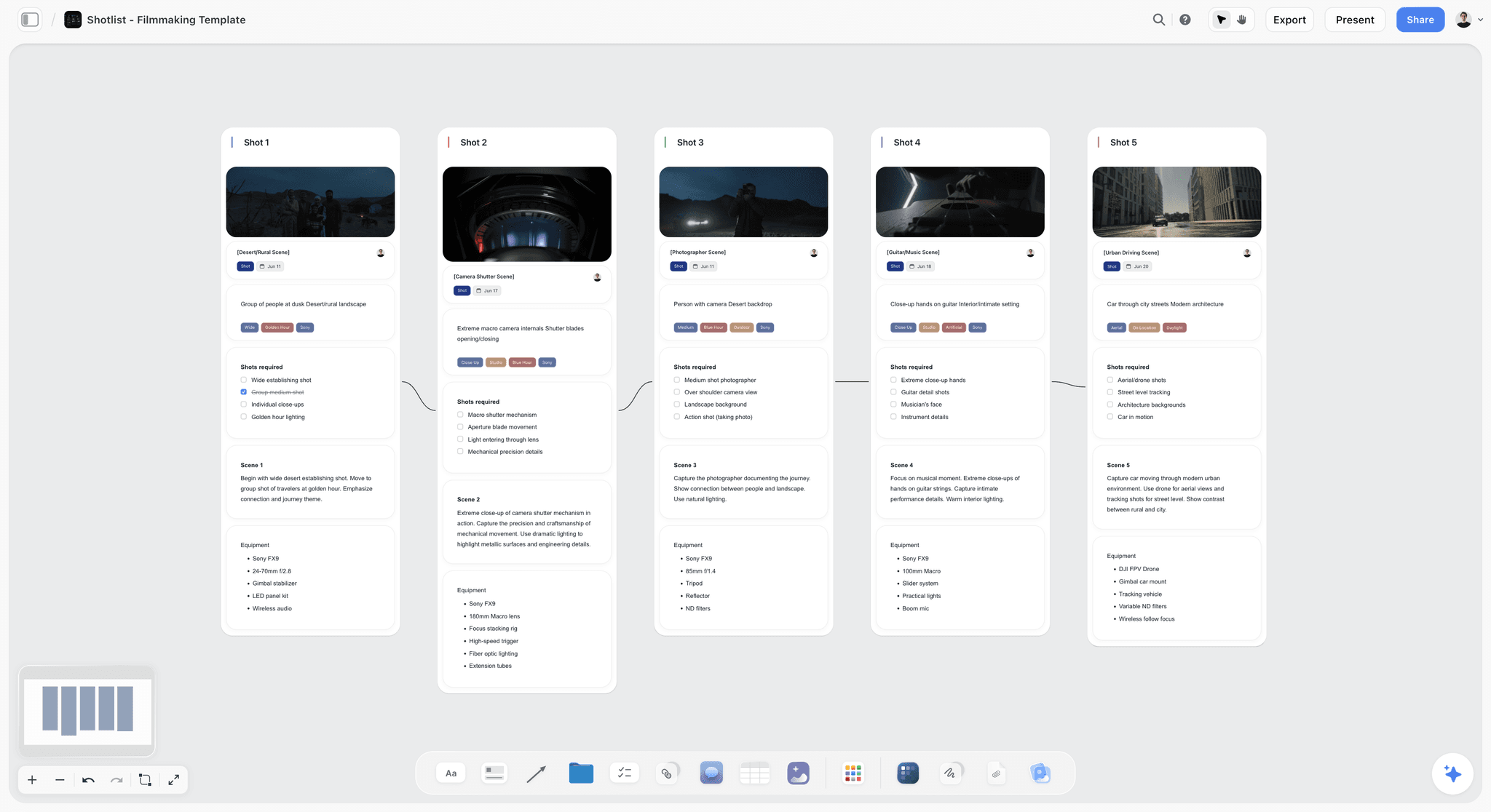
Storyflow was built with filmmakers in mind. The visual canvas mirrors how directors, producers, and writers actually think - spatially, in sequences, with visual references driving creative decisions. The fastest starting point is the Pre-Production Board template, which opens with the phases of a shoot already mapped out.
Beginner: Your First Film Project
Start with the Documentary Outline or Story Structure Tactic
Upload reference images and inspiration to build your visual language
Create character cards for each subject or main character
Use Walls to separate acts or major story beats
Let AI help generate interview questions based on your thesis
Intermediate: Production-Ready Planning
Combine Documentary Outline + Shot List Tactics for comprehensive coverage
Create Folders for each shooting day or location
Build a visual storyboard using AI-generated images and reference photos
Add equipment lists and call sheets as linked documents
Use Comments for feedback from collaborators and clients
Advanced: Professional Workflow
Create custom Tactics for your specific production style
Use the blueprint for funding applications and pitch materials
Share with your team - DP, producer, editor - for real-time alignment
Update the blueprint during production as the story evolves
Archive completed sections while keeping active work accessible
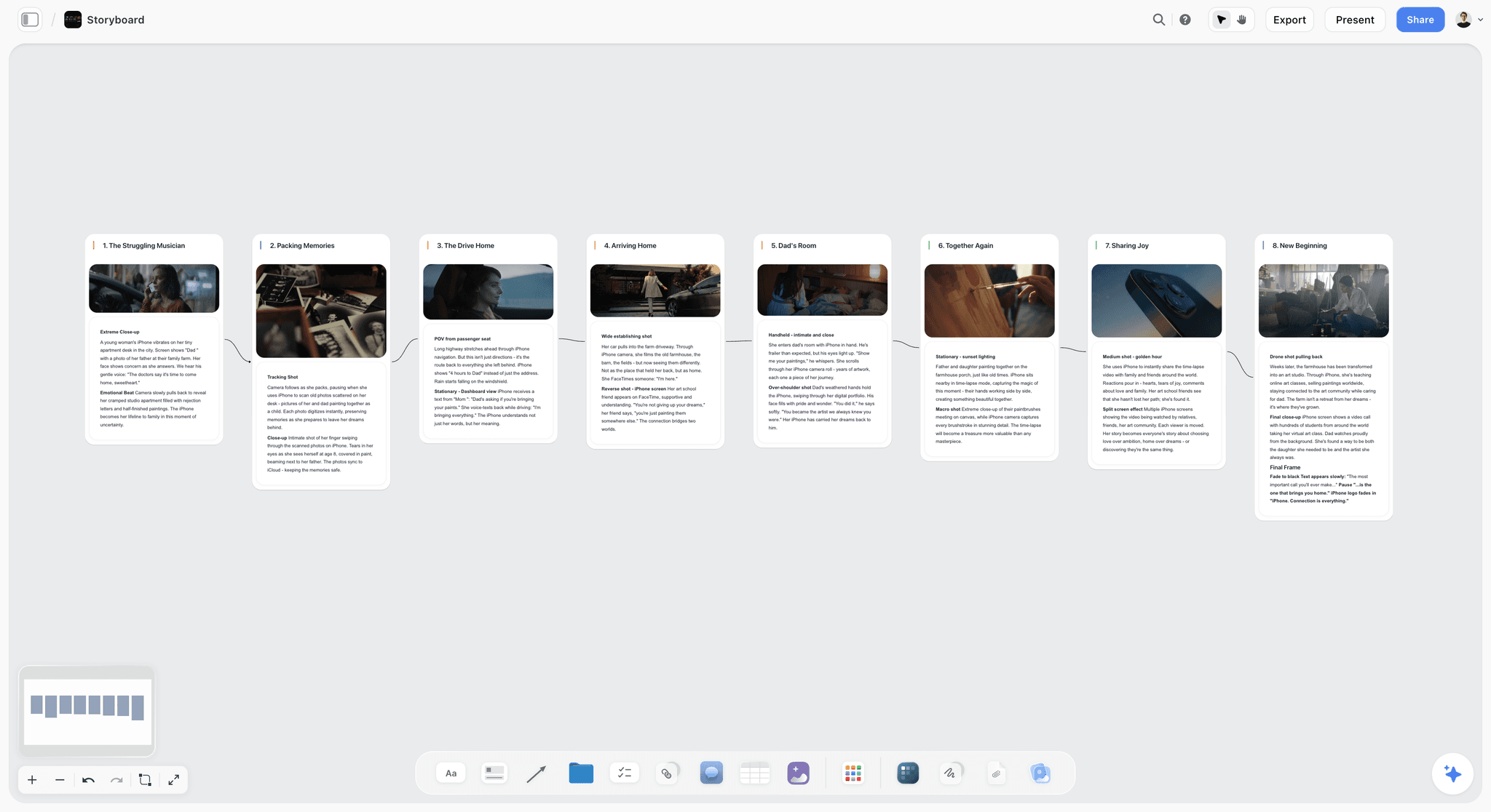
For Writers: From Outline to Finished Draft
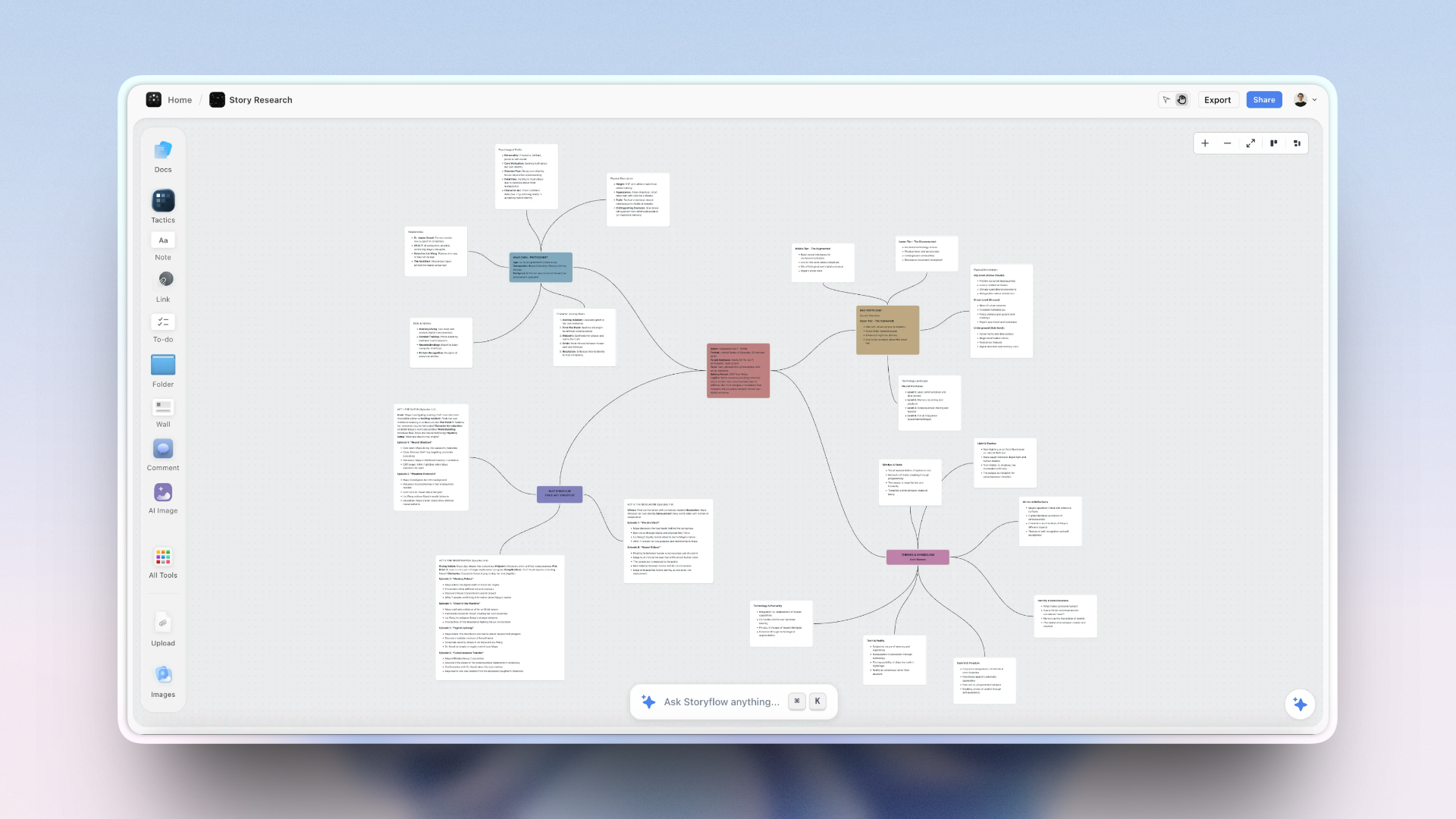
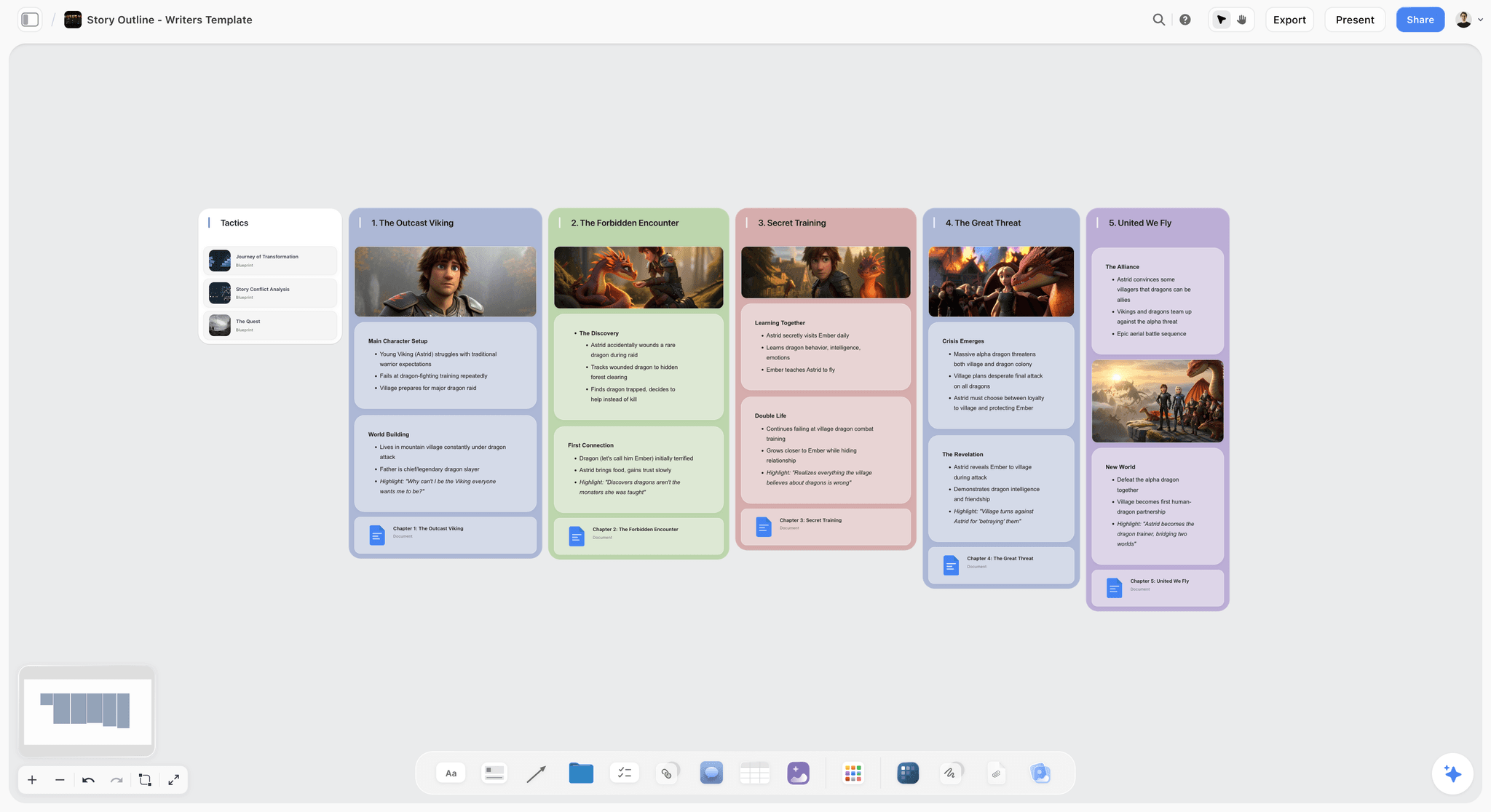
Writers need to see their story from multiple angles - plot, character, theme, pacing. Storyflow's visual canvas lets you organize by any lens while the Docs feature provides the focused writing environment you need for actual prose. If you want the structure pre-built, the Story Plan template and the Character Profile template open with the sections already laid out.
Beginner: Organizing Your Story
Use Story Structure Tactic for your narrative framework
Create character cards with profiles, motivations, and arcs
Build a visual timeline with scene cards arranged spatially
Use Walls to separate acts or storylines
Upload mood board images for setting and tone
Intermediate: Deep Story Development
Create Folders for each chapter or major sequence
Build a world-building section with rules, history, and lore
Use AI to brainstorm dialogue, explore character voices, and test scenes
Track subplots and ensure they resolve appropriately
Create Docs for actual prose while canvas holds structure
Advanced: Series and Complex Narratives
Create master story bibles that span multiple books or seasons
Track continuity across complex, interwoven storylines
Use AI for consistency checking: "Does this scene contradict anything established earlier?"
Build revision tracking with Comments and version history
Export completed sections while keeping the master structure active
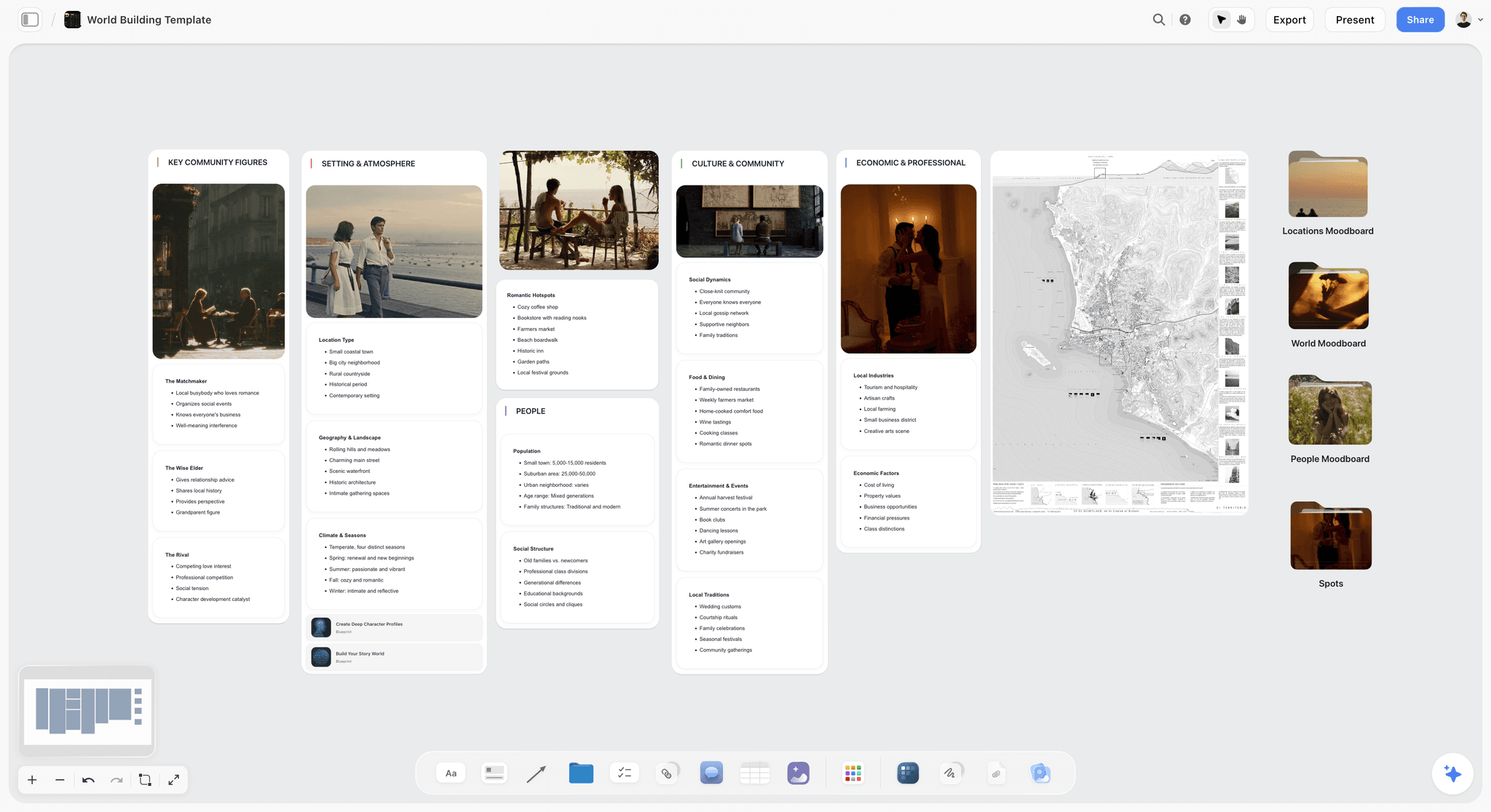
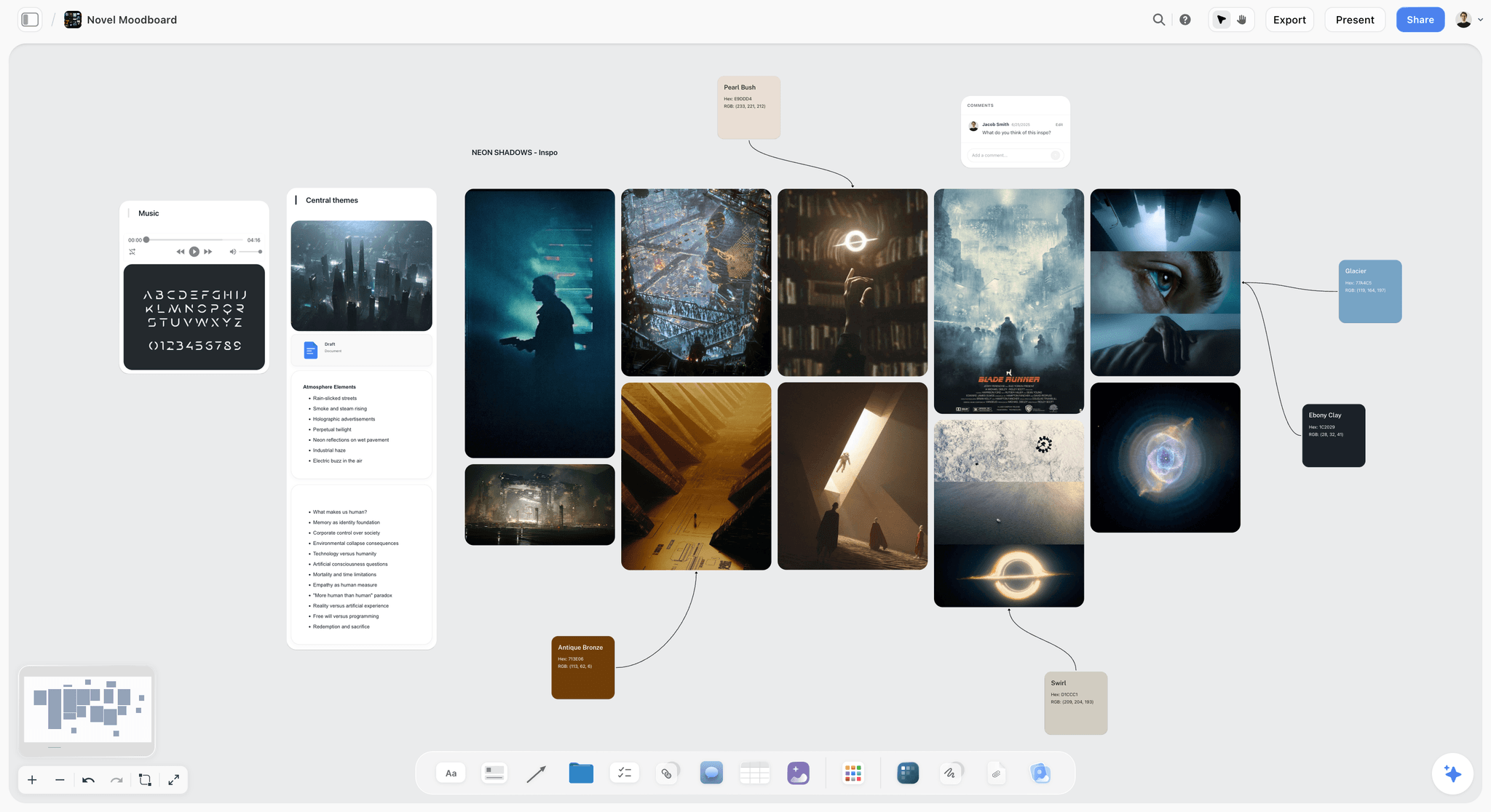
Storyflow's visual moodboarding gives writers a rich canvas to develop mood, tone, and atmosphere for their stories
For Marketers: Campaign Planning to Execution
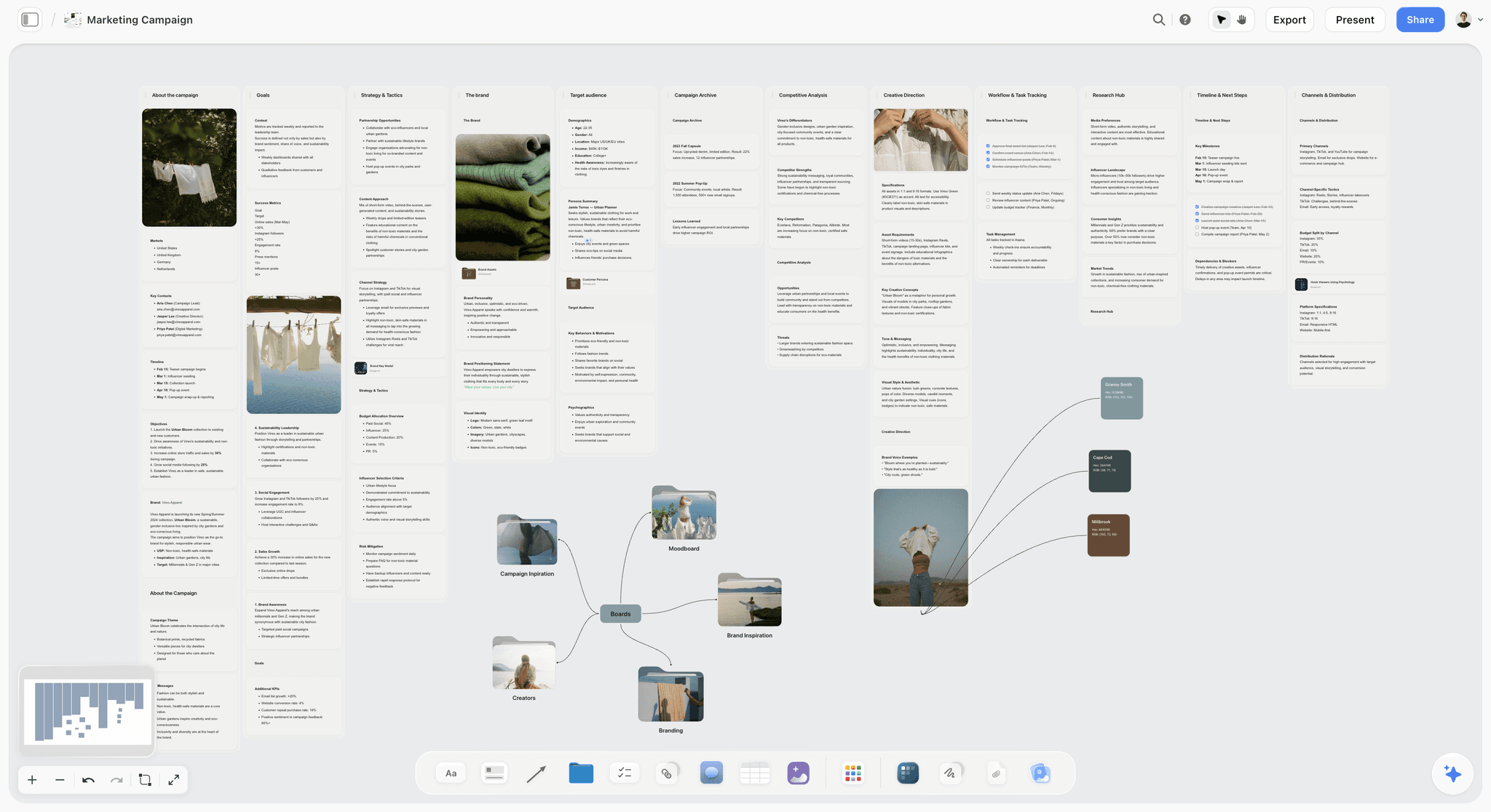
Marketing campaigns involve countless moving parts that need to stay aligned. Storyflow gives you the visual overview to see how everything connects while keeping details accessible for execution. Start from the Marketing Campaign template so the objective, audience, and channel sections are on the board before your first idea.

Beginner: Your First Campaign
Start with Marketing Campaign Tactic for core components
Define one clear, measurable objective before anything else
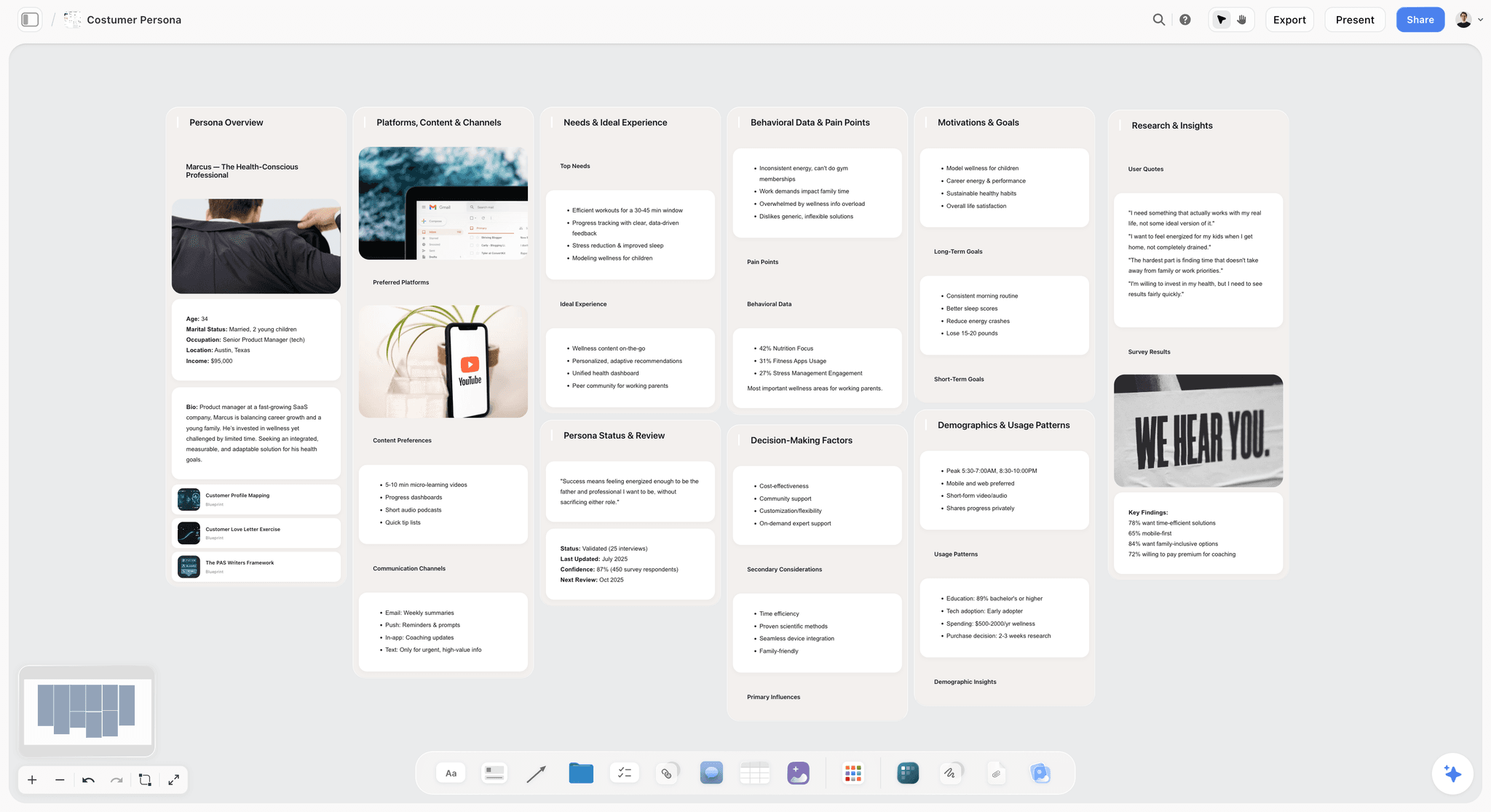
Use AI to develop detailed audience personas
Create a messaging hierarchy: primary message, supporting points, proof
Build a content calendar with Walls for each channel
Intermediate: Multi-Channel Campaigns
Combine Marketing Campaign + Product Launch Tactics
Create separate Walls for each channel with specific content plans
Use AI to generate copy variations: "Adapt @Core_Message for Twitter, LinkedIn, email"
Build competitive analysis cards to inform differentiation
Track tasks with To-dos placed near relevant content
Advanced: Strategic Campaign Architecture
Build separate blueprints for awareness, consideration, and conversion stages
Create testing frameworks with hypotheses and success criteria
Use blueprints for stakeholder presentations - export to pitch decks
Build reusable campaign templates for different campaign types
Track learnings in a meta-card for continuous improvement
For Designers: Research to Final Deliverables
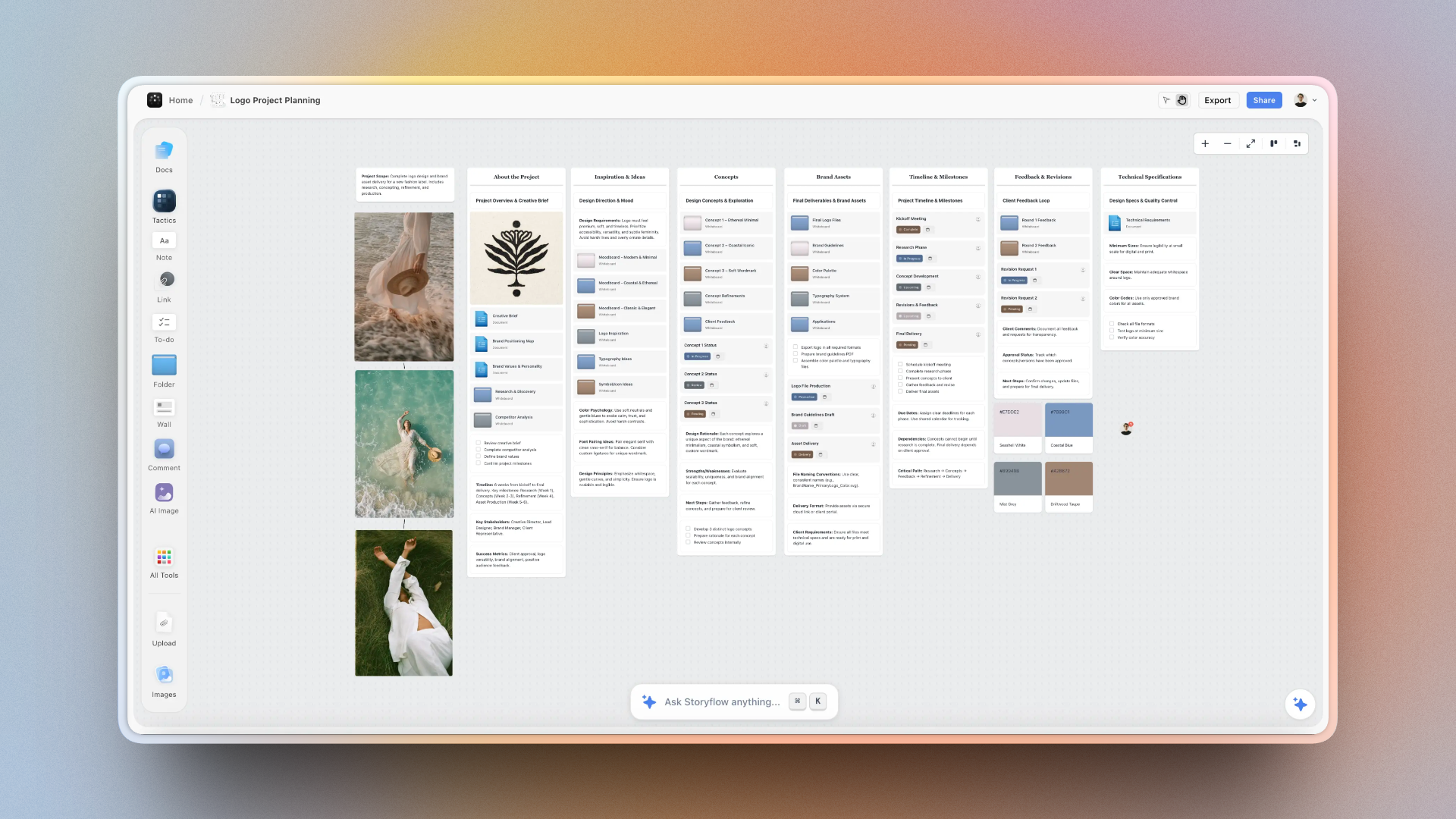
Design projects require balancing research, exploration, iteration, and final delivery. Storyflow's visual workspace mirrors how designers actually think - collecting inspiration, exploring directions, and refining toward final output.
Beginner: Project Setup
Create a research section with competitive analysis and inspiration
Upload reference images and organize by theme or direction
Document client requirements and constraints clearly
Use Walls to separate project phases: Research → Exploration → Refinement → Delivery
Intermediate: Design Exploration
Create mood boards directly on canvas with images and AI-generated visuals
Document design rationale in Notes near relevant concepts
Use Folders for different exploration directions
Build presentation flows from exploration to recommendation
Track client feedback with Comments for revision history
Advanced: Design Systems and Scale
Build design system documentation with visual components
Create project templates for recurring project types
Use AI for copy generation that matches brand voice
Build client collaboration spaces for async feedback
Archive projects with learnings for future reference

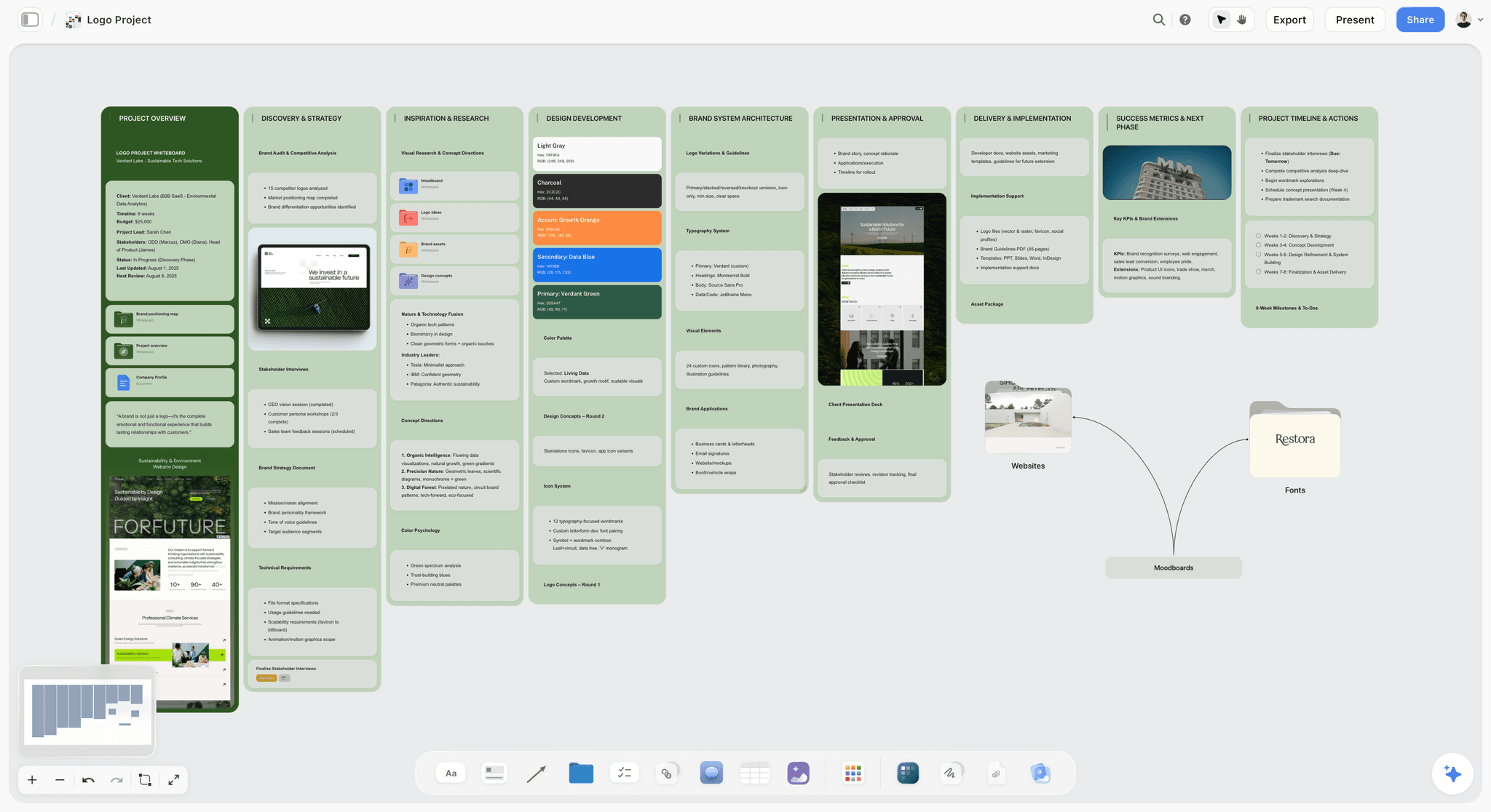
Storyflow vs. Other Tools
You might be wondering how Storyflow compares to other tools you've used or considered. Here's an honest breakdown:
Storyflow vs. Miro
Miro is a general-purpose whiteboard excellent for meetings and diagramming. Storyflow is built specifically for creative work with AI that understands projects, Tactics designed for storytelling, and tools optimized for content creation. Miro has shallow AI; Storyflow's AI reads your full active canvas board plus any Tactic or documents you @-mention.
Storyflow vs. Notion
Notion organizes information in pages and databases - excellent for documentation, but linear. Storyflow is spatial and visual - you see everything at once and organize by position. If you think in connections rather than hierarchies, Storyflow matches your brain better.
Storyflow vs. Milanote
Milanote is close in concept - visual boards for creative work. But Storyflow adds deep AI integration, expert-designed Tactics, and better pricing for teams. Milanote's AI is basic; Storyflow's AI understands your entire project context.
Storyflow vs. FigJam
FigJam is excellent for quick collaboration if you're already in Figma's ecosystem. Storyflow is more comprehensive for ongoing creative projects: Tactics, AI, Docs, and a canvas optimized for long-term project development rather than quick sessions.
Where Storyflow is the wrong choice
An honest accounting matters more than a clean win. Storyflow is cloud-only, so if you need a strict local-first, offline-by-default tool for privacy or regulated work, Obsidian or a desktop app fits better. If your work is purely document-shaped (long prose with no canvas thinking), a writing-first editor like Google Docs or Ulysses will feel lighter. And for deep database work with relational tables and formulas, Notion still wins. Storyflow is the right tool when your project is visual, project-shaped, and benefits from seeing everything in one space.
Frequently Asked Questions
Getting Started
Is Storyflow hard to learn?
No. If you've used any whiteboard tool, you'll feel at home immediately. The canvas is intuitive - drag, drop, zoom, pan. Most users are productive within their first session. Tactics provide structure so you don't start from scratch.
Can I import my existing work?
Yes. Drag and drop files directly onto the canvas - images, PDFs, documents. Paste content into Notes. Upload entire folders of reference material. Link to external documents. Storyflow works alongside your existing tools.
Does it work offline?
Storyflow is a cloud-based application that requires internet connection. However, recent work is cached locally so temporary connection drops don't interrupt your flow.
Features & AI
How does the AI know about my project?
Storyflow's AI reads your full active canvas board by default, including every card and how the cards are arranged. To bring in more, @-mention up to 1 Tactic and up to 3 documents directly in the chat. So when you ask for help, it answers with the context of the board you are working on, not a blank slate.
Can I create my own Tactics?
Yes. Build any structure you want, then save it as a custom Tactic. Your templates appear alongside the built-in options. Many professionals create Tactics tailored to their specific workflow or client types.
Is there a limit to canvas size or items?
The canvas is infinite - no artificial boundaries. Create as many cards, notes, and elements as your project requires. Use Folders to organize large projects and keep the main canvas scannable.
Collaboration & Teams
Can I collaborate with my team in real-time?
Yes. Share your project and team members can view, edit, and comment simultaneously. Everyone sees changes in real-time. Use Comments for async feedback that doesn't interrupt the main content.
Can I share with clients or external collaborators?
Yes. Create view-only or edit links for external collaborators. Share specific boards or entire projects. Control permissions to protect sensitive work while enabling collaboration.
Can I export my work?
Yes. Export individual cards, entire boards, or documents. Docs can be exported as PDFs. Share public links for viewing without login. Some users export to create pitch decks and presentations.
Pricing & Access
How much does Storyflow cost?
Storyflow is paid-only during early access; its Free plan launches before the end of 2026, and anyone a paid member invites to a board joins free now. Plus is $7.99/month flat annual and adds the 200+ story blueprints and unlimited file uploads, with the same AI allowance as the coming Free plan rather than extra AI; Pro at $14/month flat annual adds AI image generation, 20x more AI, and memory across conversations; Max at $39/month flat annual adds 40x more AI plus a team workspace with roles and permissions. Pricing is flat per account, never per seat. Check the pricing page for current details.
Is there a free trial for Pro features?
Yes. New users get access to Pro features during their trial period. Experience the full AI capabilities before deciding to subscribe.
Is my work secure?
Yes. Storyflow uses industry-standard encryption for data in transit and at rest. Your creative work is yours - we don't use it to train AI models or share it with third parties.
Start Creating with Storyflow
The best ideas don't emerge from forcing your brain into linear tools. They come from giving your thinking the space it needs - visual, spatial, connected. Storyflow provides that space, plus AI that accelerates your work and expert frameworks that skip the "starting from scratch" phase.
Thousands of filmmakers, writers, marketers, and designers have already made Storyflow their primary creative workspace. They're spending less time organizing and more time creating. Their scattered ideas are becoming finished projects.
Here is the test that settles it. Take your most active creative project, the one currently scattered across documents, tabs, and your head, and rebuild it on a single Storyflow board for one week. Drop in your references, lay out your beats or campaign pieces in space, and let the AI work from the board in front of you. By the end of the week you will know whether your thinking is document-shaped or canvas-shaped. If it is canvas-shaped, the decision makes itself.
Related Articles
How to Organize Your Ideas Better with Storyflow: The Complete Guide
Blueprint Tactics Tutorial: Turn Ideas into Action Plans (2025 Guide)
Why Creatives Are Using Storyflow to Brainstorm Smarter and Faster
Why Does ChatGPT Bury Important Information in Paragraphs?
Related Reading
Turn abstract ideas into action plans
Complete guide to idea organization
Compare visual AI brainstorming tools
Visual AI vs text generators
Why a structured tool teaches craft as you work
Templates to check out for this topic


Story and writing templates you can use in Storyflow
Start your next script, novel, or world from a ready-made Storyflow board instead of an empty page. The AI reads the whole canvas, so every suggestion is grounded in your story.


See Storyflow in Action
A visual AI workspace where every feature lives inside one canvas. No tab-switching, no context lost.
Build your entire board from a single message
Type what you need in the AI chat at the bottom of your canvas. The AI adds cards, headings, and structure directly onto your board.
Use expert frameworks as AI context
Type @ in the AI chat and choose any Tactic. The AI tailors every response to that framework instead of giving generic advice.
Turn your board into a mind map in seconds
Ask the AI to restructure your canvas as a mindmap. It connects your ideas into a visual hierarchy so you can see how everything relates.
Why Storyflow Exists
Storyflow actually began as a personal tool while working on creative and research projects.
We kept running into the same problem: ideas were scattered everywhere: notes, documents, and whiteboards.
Nothing helped us see how everything connected.
So we started building a workspace designed around how ideas actually grow.
→ Read how Storyflow was createdSara de Klein
Head of Product at Storyflow
Published: December 14, 2025
Extremely simple, seriously capable


See how easy it is to get started
Watch a real project come together, from a blank board to a finished plan, clicked through step by step.
Start creating with AI and become more productive
Transform your creative workflow with AI-powered tools. Generate ideas, create content, and boost your productivity in minutes instead of hours.