
The calmest place to shape your story
Collaborative storytelling
for the whole creative team.
Writers, directors, designers and producers build the same story on one shared canvas: the outline, the characters, the look and the script side by side, with an AI that has read all of it before it suggests anything.


Creatives working for these brands already got early access
- Red Bull
- Canon
- Artlist
- Porsche
See how easy it is to get started
Watch a real project come together, from a blank board to a finished plan, clicked through step by step.
Start from a ready-made template
Pick a board to see what you can build, then let AI fill it in. Every template is a real, editable starting point on the same infinite canvas.

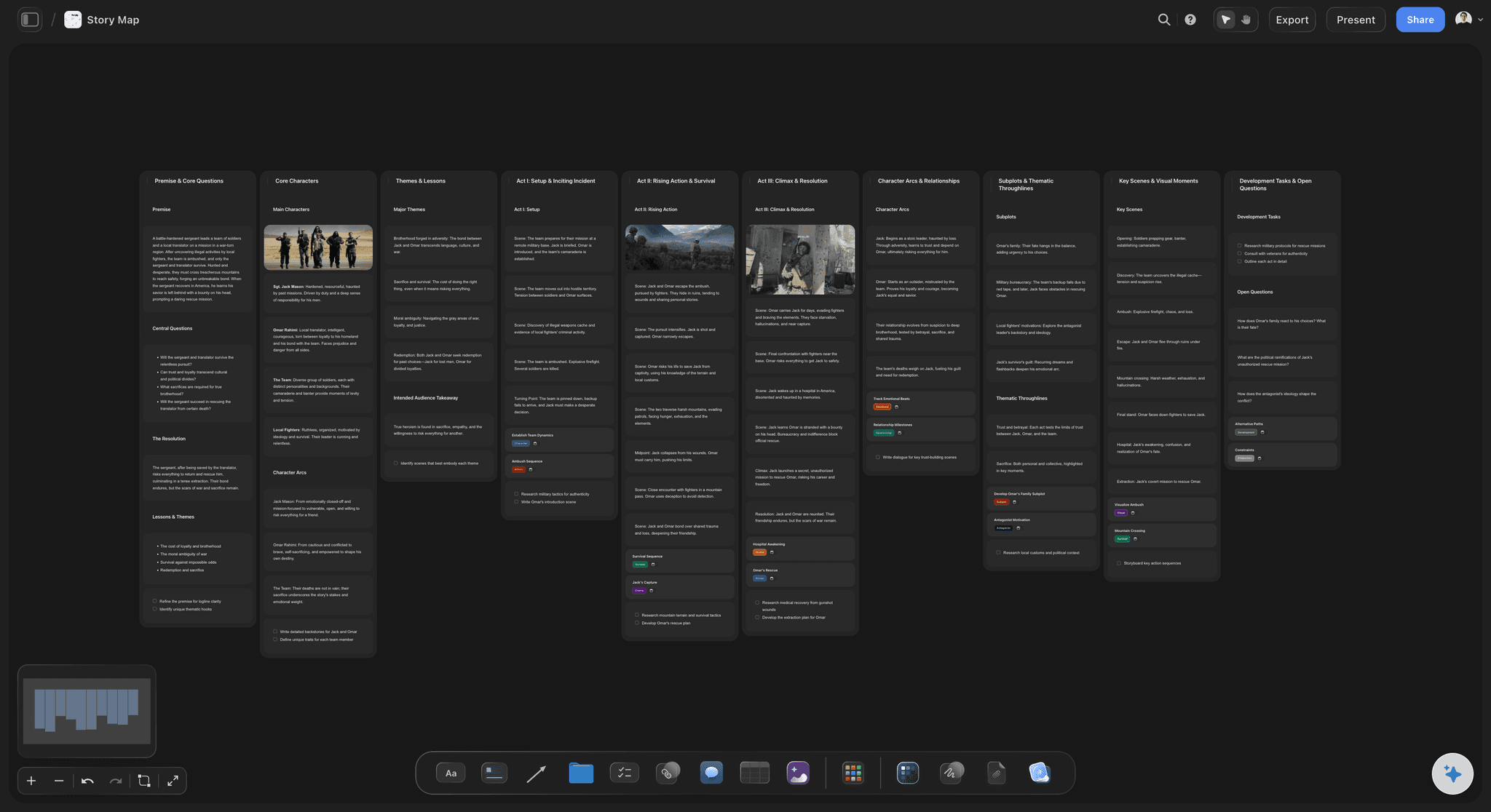
Story Plan
Outline your plot, characters, and world in one connected view, then expand each thread as the story grows.
What should a collaborative storytelling tool do for a creative team?
A collaborative storytelling tool should give a creative team one shared place to build the story, with the outline, the characters, the look and the script side by side. Storyflow is an AI visual workspace that holds a team's story on one infinite canvas: the outline, the characters, the moodboard and the script, edited in real time by everyone invited. It is for the stage when a creative team is still deciding what the story is. An AI that reads the whole board drafts story plans, outlines and character sheets for the team to rework. The story stops living in five files and becomes one board the team can point at.
A shared story breaks in predictable places when it lives across tools. The words sit in a document, the look sits on a whiteboard, the decisions sit in a chat thread, and the storyboard app arrives before anyone has agreed what the story is. Two people describe the project differently to a client, a cut subplot reappears in someone's draft, and meetings go on reconciling versions instead of making choices.
The fix is mechanical rather than cultural. Give each story one board with five regions: premise, characters, structure, look and script. Keep a column of decisions with dates, so a cut stays cut. Send a view-only link to the people who only need to look. And make versions deliberate: duplicate the board before a major rewrite, so the previous shape of the story is still there to compare.
Other tools own other stages, and a good team uses them. Miro suits large live workshops where the job is generating options fast. Canva suits the moment the story becomes polished slides, social posts or video. Boords suits the moment it is drawn frame by frame and timed as an animatic. Storyflow is where the team agrees what the story is before any of that starts, and where the agreed version lives.
Ultra fast from brief to board
From a shared idea to one agreed story, in four steps.
No workspace to configure. Open a board and bring the team in.
01
Open one board per story
It runs in your browser, with nothing to install. Give the board five regions: premise, characters, structure, look and script.
02
Invite the people who build the story
Writers, directors, designers and producers edit the same board in real time, with live cursors, so there is one version rather than a folder of drafts.
03
Let the AI draft the first structure
Describe the story and the AI lays out a story plan, an outline or character sheets on the board. The team argues with it, rewrites it and keeps what works.
04
Share it with the people who only look
A view-only link opens in any browser with no account, and a stakeholder signs in to comment. Presentation mode steps through the story frame by frame.
Everything a shared story needs, on the board the team already has open.
The words, the look, the people and the decisions, in one place everyone can see.

Premise, structure, characters, look and script
The whole story on one canvas
The outline sits beside the moodboard, the character cards and the script draft. Nobody opens a different file to see how a change in one affects the others.
See the story planning tool →
Writers, directors, designers, producers
Everyone edits the same board
Invited collaborators work on the board in real time with live cursors. A change lands where everyone is already looking, instead of in an attachment someone opens tomorrow.
See visual collaboration →
AI with the whole story in context
An AI that has read the board
Ask for a story outline, a story map or a character sheet and the AI builds it on the board from what the team has already written. It proposes, the team decides, and Undo is one click.
See the AI story outline generator →
Characters and world, described once
One description of every character
A character sheet per lead and a world board for the setting, so three writers describe the same person the same way in scene two and in scene forty.
See the character profile generator →Every story gets its own board. No object cap.
Open a board, invite the team and build the story in one place. Storyflow is paid-only during early access, with plans from $7.99 a month billed annually ($9.99 monthly). A free plan launches before the end of 2026, and anyone a paid member invites to a board joins free.
Unlimited story boards on an infinite canvas
Real-time editing for everyone you invite
AI story plans, outlines and character sheets
View-only links that open with no account
Built for people with taste
Four places collaboration on a story fails, and the fix for each.
None of them is a talent problem. They are what happens when one story lives in several places at once.
Drift, lost decisions, split looks, stale versions
The failure set every story team hits
Two people tell the story two ways: It happens when the premise lives in someone's head rather than on the board. Write the premise as one sentence at the top, and judge every new idea against it.
A cut subplot comes back: Decisions made in a call or a chat evaporate. A decisions column on the board, with the date each call was made, keeps a cut from quietly returning.
The words and the look drift apart: The script says dusk and the moodboard says noon. Putting the references beside the scenes they serve is the only reliable way to catch it early.
Nobody knows which version is current: One board means one current version. Duplicate it before a major rewrite and label the copy, so the old shape is there when someone asks why it changed.
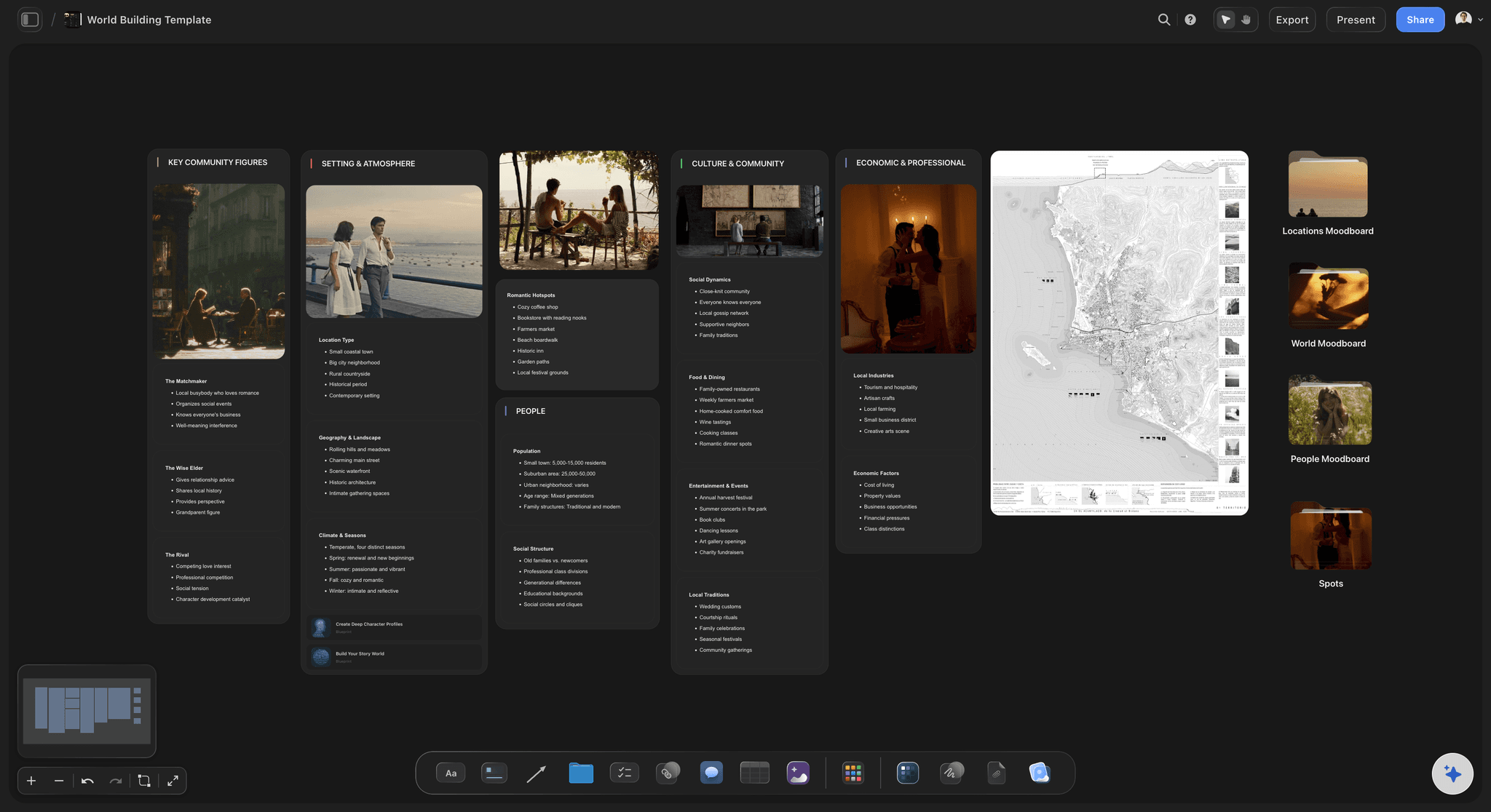
Premise, characters, structure, look, script
Five regions for one shared story
Premise and logline: One sentence the whole team can repeat, plus the two or three questions the story exists to answer. If two people write different loglines, that is the first meeting.
Characters: One card per lead with what they want, what they fear and what they will not do. Past six leads, a roster table reads better than a wall of cards.
Structure: Eight to fifteen beats for a short film or a campaign story, 40 to 60 scene cards for a feature. Walls work as act or episode columns, and cards drag between them.
Look and script: References, colours and reference video beside the beats they serve, and the script draft in a Doc with inline comment threads that exports to Word or PDF.
AI that works from the team's board
An AI the whole team can ask
It reads what is already there: The AI reads the board you have open, and you can attach up to five documents and three other boards, such as a treatment, a brand brief or a series bible.
Story plans, outlines, maps and sheets: Named workflows build a story plan across premise, stakes, conflict and structure, a beat-by-beat outline, a story map, character sheets or a world-building board.
Notes on the draft: Bring a draft, a script or a treatment and ask for notes: what loses the audience, what misses the goal you stated, and what is strong but buried.
It proposes, the team decides: Every edit lands on the board with one-click Undo. Which ending, whose voice and what gets cut stay with the people telling the story.
Links, presenting, exports
Show the story to the people who only look
A link with no account: Clients, executives and teachers open a view-only link in a browser. They see the latest version each time they open or reload it, and sign in to comment.
Present it as a sequence: Put each beat or section in a frame, and presentation mode steps through the frames fullscreen, which is how most story pitches are actually walked through.
Export for the meeting: Export the whole board as an image or PDF for a deck or an email, and the script Doc to Word or PDF for anyone who needs pages.
Explore templates for your project
Every template opens as a real, editable board on the infinite canvas. Pick the closest fit and make it your own.
Story Plan
Outline your plot, characters, and world in one connected view, then expand each thread as the story grows.
One app instead of five
Storyflow vs Miro, Canva and Boords.
Each is good at a different stage: Miro at live workshops, Canva at polished visuals, Boords at drawn storyboards and animatics. Here is how they differ for a team developing a story together.
Storyflow
Recommended
Story, look and script on one infinite canvas
AI story plan, outline and character sheet workflows
Real-time editing for the whole team
Viewers open a link with no account
Animatics with timing and sound
Free plan available today
Miro
Story, look and script on one infinite canvas
AI story plan, outline and character sheet workflows
Real-time editing for the whole team
Viewers open a link with no account
Animatics with timing and sound
Free plan available today
Canva
Story, look and script on one infinite canvas
AI story plan, outline and character sheet workflows
Real-time editing for the whole team
Viewers open a link with no account
Animatics with timing and sound
Free plan available today
Boords
Story, look and script on one infinite canvas
AI story plan, outline and character sheet workflows
Real-time editing for the whole team
Viewers open a link with no account
Animatics with timing and sound
Free plan available today
What creators are saying
Join early creators getting structured workspaces and AI that remembers their projects
“Storyflow has sped up my workflow by at least 3x, which means more flow state and more projects I can actually ship. It truly changed the way me and my team create.”

Reilin Joey
Director & YouTuber
“One prompt gets me a structured board. But the tactics are my favorite. I run my YouTube scripts through them and my intros and retention got better. It's amazing.”

Justkay
YouTuber & Freelance Filmmaker
“I used to juggle five apps to plan a project. Now I describe what I am making and get boards, lists, and a schedule. All in one place.”

George
@fernwehchronicles
Collaborative storytelling, answered.
Which tool for which stage, how to keep a shared story consistent, and what it costs.
Storyflow is the collaborative storytelling tool for developing the story itself: the outline, characters, moodboard and script sit on one shared canvas, the whole team edits it in real time, and an AI that reads the board drafts story plans and outlines. Add Miro for large live workshops, Canva when the story becomes polished slides, social posts or video, and Boords when it has to be drawn frame by frame and timed as an animatic.
Storyflow is made for developing a story as a team: the outline, the characters, the moodboard and the script sit on one shared canvas, everyone invited edits it in real time, and an AI that has read the whole board drafts story plans, outlines and character sheets for the team to rework. For animatics with timing and sound you still need Boords or Canva: Storyflow does not make them.
Collaborative storytelling is a group building one story together, where the premise, characters, structure and look come from several people rather than one author. In creative teams it usually means a writer, a director, a designer and a producer developing a film, a campaign or a series before production. The hard part is keeping one version of the story as ideas arrive from everyone, which is why Storyflow keeps that version on one shared board.
Give the story one surface and put the things that drift on it: a one-sentence premise at the top, a card per lead character, the structure as beats or scene cards, the references beside the scenes they serve, and a column of decisions with dates. Most shared stories come apart because that information lives in one person's head or a chat thread. In Storyflow it all sits on one board the whole team edits.
No. Anyone a paid member invites to a board joins free and edits it in real time with live cursors, whichever paid plan the inviter is on. People who only need to look get a view-only link that opens with no account, and they sign in if they want to comment. Team billing is per seat, and the Max plan adds a team workspace with roles and permissions.
Describe each character once, in one place, and make everyone write against it. A card per lead covering what they want, what they fear, how they speak and what they will not do prevents most drift. In Storyflow the AI's character sheet workflow builds a sheet per character from the story you already have, and because it reads the whole board, you can ask it where a later scene contradicts an earlier one.
A first draft the team can argue with. Describe the story, or attach a treatment or a brief, and Storyflow's AI builds a story plan, a beat-by-beat outline, a story map, character sheets or a world-building board. It reads the board you have open plus up to five documents and three other boards you attach. Every edit lands on the board with one-click Undo, and the team decides what stays.
Keep one current board and make old versions deliberate. Everyone works on the same board, so there is never a question of which file is current. Before a major rewrite, duplicate the board and name the copy with the date, so the old structure is there to compare. Storyflow has no version history view, so the duplicate is the record, and a dated decisions column explains why things changed.
View it. A shared board's view-only link opens in any browser with no account, and the viewer sees the latest version whenever they open or reload it. Commenting needs a sign-in. For a pitch, put each section of the story in a frame and presentation mode steps through the frames fullscreen, or export the whole board as an image or PDF to send ahead of the meeting.
No. Storyflow is paid-only during early access, with plans from $7.99 a month billed annually ($9.99 monthly). A free plan launches before the end of 2026, and anyone a paid member invites to a board joins free. If the team needs a free tool today, Miro and Canva both have free plans, and a shared document still works for a story that is mostly text.
Fewer than the invite list suggests. Real-time editing helps when two or three people break a structure together; beyond that, people end up moving each other's cards. A pattern that works: a small core team edits, one named decision maker settles disagreements, and everyone else follows on a view-only link and signs in to comment. The board stays the single version either way.
Yes, and a shared structure helps a group more than a solo writer, because it gives everyone the same vocabulary. Three acts, the hero's journey, a story circle or a brand narrative arc all work. Tell Storyflow's AI which structure the team works in and it lays the story out as an outline, one wall per beat, which the team then fills, reorders or ignores.
Yes, for development and pre-production. A director, writer and producer build the treatment, the look and the structure on one board, and the AI carries it forward into a script breakdown, a shot list, a storyboard and a call sheet PDF for a shoot day. AI-generated storyboard frames need Pro or Max. There are no dedicated storyboard drawing tools (only a freehand pen) and no animatics, so teams that board by hand often pair it with Boords.
More from Storyflow
Digital storytelling tool
Visual storytelling
Writers room tool
Story planning tool
AI story outline generator
AI character profile generator
Worldbuilding tool
Series bible
Visual collaboration
Creative collaboration platform
Collaborative moodboard
Boords alternative
Storyboarding
How creative teams collaborate on a story
Put the whole story on one board, and bring the team into it.
Open a canvas, invite the people telling the story, and let the AI lay out the first structure. Nothing to install.