
The calmest place to shape your story
The digital storytelling tool
your whole team can build on.
Describe the story and Storyflow's AI lays out the narrative on an infinite canvas: structure, storyboards, and references in one place. Shape it together, then share it with anyone through a view-only link.


Creatives working for these brands already got early access
- Red Bull
- Canon
- Artlist
- Porsche
See how easy it is to get started
Watch a real project come together, from a blank board to a finished plan, clicked through step by step.
Start from a ready-made template
Pick a board to see what you can build, then let AI fill it in. Every template is a real, editable starting point on the same infinite canvas.

Story Plan
Outline your plot, characters, and world in one connected view, then expand each thread as the story grows.
What is a digital storytelling tool?
A digital storytelling tool is a workspace where a team shapes a narrative before it is produced: the structure, the beats, the visuals, and the references that make a story land. Storyflow is an AI visual workspace that lays out a team's story on one infinite canvas: the narrative structure, storyboards, reference boards, and a view-only link to share it with anyone. Instead of a story living across a doc, a slide deck, and a group chat, a digital storytelling tool keeps the whole narrative in one place where everyone can see how the pieces connect.
Storyflow is an AI-native digital storytelling tool built on an infinite canvas. Describe the story you are telling, whether that is a brand narrative, a campaign, a video, or a pitch, and the AI lays out a structured board: the arc, the key beats, a storyboard, and space for references. Because the AI keeps the whole canvas in context, storytelling becomes a conversation. Ask it to reshape the arc, add a beat, or storyboard a scene, and it builds on what is already there.
Digital storytelling is rarely a solo act. A team shapes the story together, then shares it for feedback and sign-off. In Storyflow you invite collaborators to a board and share a view-only link with stakeholders who do not have an account, so the whole story travels as one link instead of a stack of exports.
A complete story board covers more than an outline: the premise and through-line, the narrative arc or framework, a storyboard or scene sequence, the tone and visual references, and the research that grounds it. Storyflow gives you one infinite canvas where all of those layers live together and connect, and where the AI understands the whole board so the team can ask questions across every layer at once.
Ultra fast from brief to board
Tell a story together in four steps.
No blank page, no scattered tools. Describe the story and the AI builds a board the whole team can shape.
01
Open your canvas
Sign up in seconds. No download. Your infinite storytelling canvas is ready in the browser.
02
Describe the story
Tell the AI what you are telling and who it is for: a brand story, a campaign, a video, or a pitch. It lays out the narrative structure and a storyboard to match.
03
Shape it together
Invite the team, drag scenes to reorder the arc, drop in references and frames from video, and keep prompting the AI to tighten the beats or add a thread.
04
Share and hand off
Send a view-only link to stakeholders for feedback and sign-off, or export the board as an image or PDF to carry the story into production.
Every part of the story, on one canvas.
Structure, storyboard, tone, and references live on the same board. Zoom out to see the whole arc. Zoom in to work on a single scene.

AI-generated narrative structure in seconds
Start from a structure, not a blank page
Describe the story and the AI builds the arc: the through-line, the key beats, and a framework already applied. Reshape it by dragging cards, or ask the AI to tighten the middle or add a turning point.
Explore the story planning tool →
Storyboard the story beside its structure
Turn the narrative into a storyboard
Generate a storyboard for the scenes that need to be seen, right next to the structure that drives them, so the visual story and the written story never drift apart.
See the storyboard maker →
One board the whole team can shape
Build the story with your team
Invite collaborators to the board and share a view-only link with stakeholders who do not have an account. Everyone works from the same story instead of a stack of exports and threads.
See visual collaboration →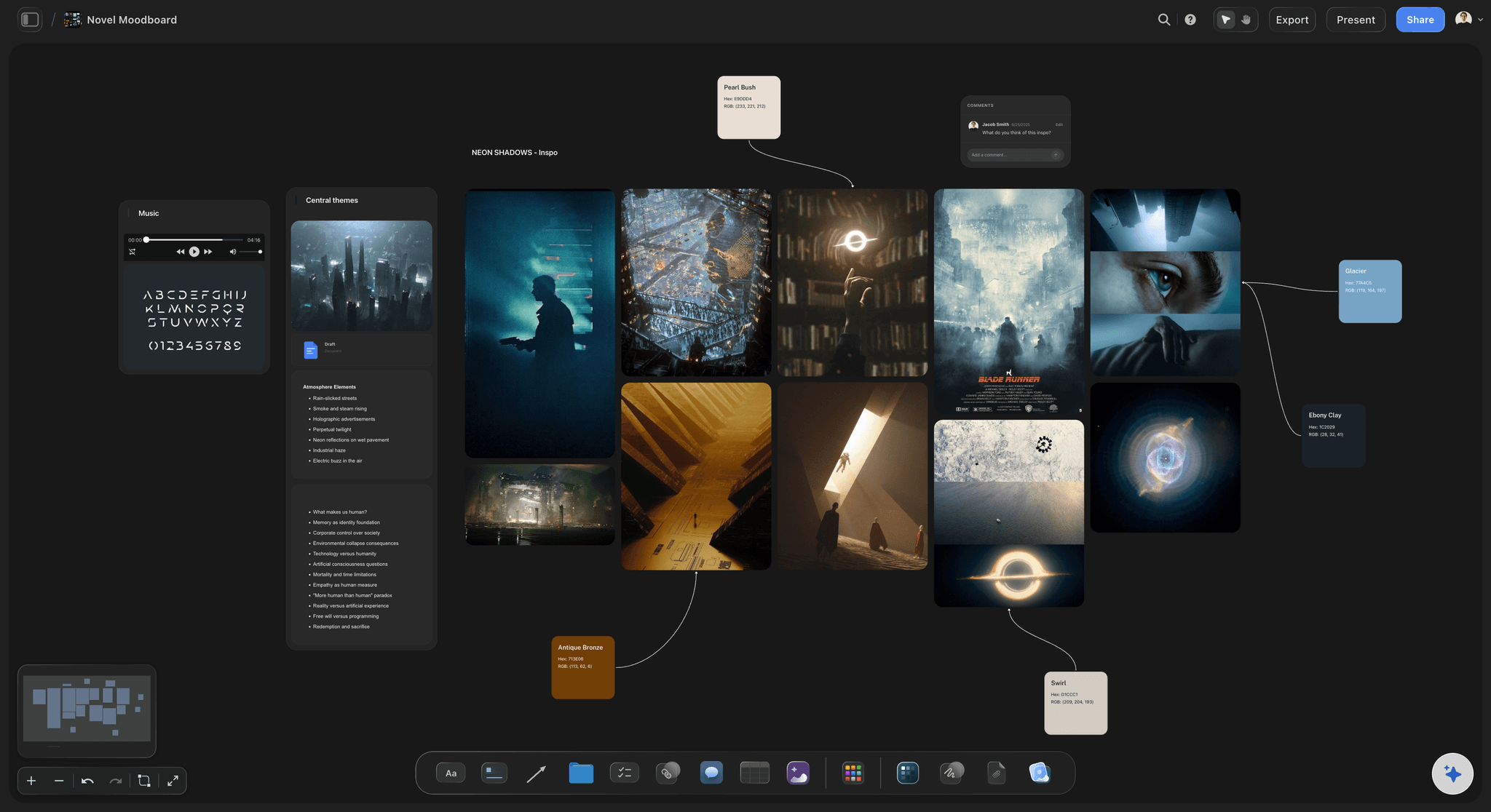
Tone, mood, and visual references beside the story
Capture the feeling, not just the plot
Pin images, color, and reference links next to the arc to set the tone before production. Grab frames from YouTube or Vimeo for visual research and keep everything on the same infinite board.
See moodboarding in Storyflow →Plans from $7.99/mo. A Free plan launches before the end of 2026.
Storyflow is paid-only during early access. Open a canvas and watch the AI lay out the narrative on Plus, starting at $7.99 a month billed annually.
Unlimited story boards on an infinite canvas
Basic AI usage to generate narrative structures
3 starter storytelling frameworks built in
View-only links to share the story with your team

Built for people with taste
More than an outline. A shared story workspace.
Structure, storyboards, references, and research live on one infinite canvas, and the AI keeps context of all of it as your team builds.
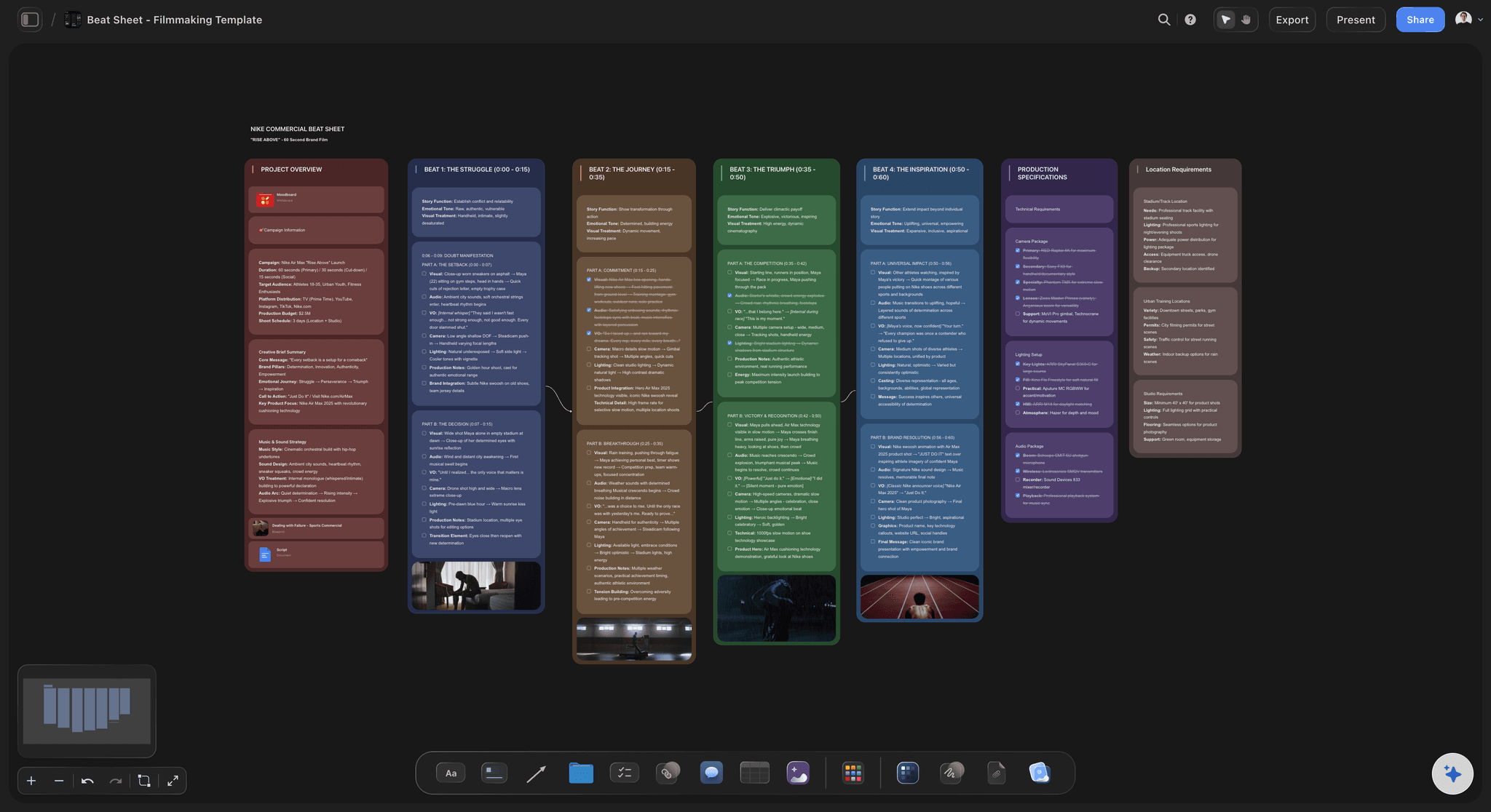
Storytelling frameworks, ready to apply
Shape the story with a structure that fits
Narrative arcs and beat sheets: Apply a three-act arc, the Hero's Journey, or a beat sheet to the board and map scenes to each beat. Pick one or let the AI suggest the structure that fits the story you are telling.
Frameworks for brand and campaign stories: Storytelling is not just fiction. Map a brand narrative, a campaign story, or a product story with frameworks built for marketing and creative teams, not only novelists.
Rearrange into any structure: Move beats around, layer a subplot or a second thread beside the main story, and the AI adapts to the shape you build. The canvas is flexible and infinite.

Drop research and references on the canvas
Ground the story in real material
PDFs, notes, and links: Drop a brief, a transcript, or a research PDF onto the board and pin it next to the scenes it informs. Everything the story is built on stays in view.
Grab frames from video: Capture stills from YouTube or Vimeo references and pin them beside the storyboard and the moodboard for visual direction.
Sticky notes and sketch tool: Add quick thoughts as sticky notes or sketch a rough flow with the pen tool. It all stays on the same infinite board.

AI that keeps the whole story in context
Refine the story until it lands
Reshape the arc and pacing: Ask the AI to tighten the middle, add a turning point, or check whether the ending pays off the setup. It keeps the context of the whole board as it works.
Mention your brief and documents: Attach a brief or a key document so the AI shapes the story around your positioning and facts, not a generic template.
Ask questions across the whole canvas: The AI knows everything on the board: structure, storyboard, references, and research. Ask whether the through-line holds or where the story loses momentum.
Share the story and move it into production
From draft to sign-off without a deck
View-only links: Share the story with stakeholders through a view-only link. They review the live board in the browser, no sign-up required.
Invite your team: Invite collaborators to shape the story on one board and keep a single source of truth instead of versioned files. Live multi-editor presence is available on paid plans.
Export as image or PDF: Export the board or a section as a high-quality image or PDF when the story needs to travel outside the canvas.
Explore templates for your project
Every template opens as a real, editable board on the infinite canvas. Pick the closest fit and make it your own.
Story Plan
Outline your plot, characters, and world in one connected view, then expand each thread as the story grows.
One app instead of five
Storyflow vs Milanote, Miro, and Notion.
Each tool has a different job. Here is an honest look at how they approach digital storytelling for teams.
Storyflow
Recommended
Free plan with unlimited boards
AI builds the story structure from a prompt
AI uses your whole canvas as context
Storytelling frameworks built in
Infinite canvas for the whole team
Share the story with a view-only link
Milanote
Free plan with unlimited boards
AI builds the story structure from a prompt
AI uses your whole canvas as context
Storytelling frameworks built in
Infinite canvas for the whole team
Share the story with a view-only link
Miro
Free plan with unlimited boards
AI builds the story structure from a prompt
AI uses your whole canvas as context
Storytelling frameworks built in
Infinite canvas for the whole team
Share the story with a view-only link
Notion
Free plan with unlimited boards
AI builds the story structure from a prompt
AI uses your whole canvas as context
Storytelling frameworks built in
Infinite canvas for the whole team
Share the story with a view-only link
What creators are saying
Join early creators getting structured workspaces and AI that remembers their projects
“Storyflow has sped up my workflow by at least 3x, which means more flow state and more projects I can actually ship. It truly changed the way me and my team create.”

Reilin Joey
Director & YouTuber
“One prompt gets me a structured board. But the tactics are my favorite. I run my YouTube scripts through them and my intros and retention got better. It's amazing.”

Justkay
YouTuber & Freelance Filmmaker
“I used to juggle five apps to plan a project. Now I describe what I am making and get boards, lists, and a schedule. All in one place.”

George
@fernwehchronicles
Digital storytelling tool, answered.
Everything teams ask about telling a story together in Storyflow.
A digital storytelling tool is a workspace where a team shapes a narrative before it is produced: the structure, the beats, the storyboard, and the references that make the story land. In Storyflow, the digital storytelling tool is an infinite canvas. Describe the story and the AI lays out the arc and a storyboard, which the team refines by dragging cards, prompting the AI, and pinning references, all on one board.
It depends on how your team works. Storyflow is best when you want AI to build the story structure on an infinite canvas the whole team can shape and share by link. Milanote is strong for visual reference and moodboards, Miro suits general team whiteboarding, and Notion fits document-first teams. Storyflow's difference is that the AI reads the whole board and builds the narrative structure from a prompt, not just a blank canvas or a doc.
Not during early access. Storyflow is paid-only right now, with Plus starting at $7.99 a month billed annually, which keeps it under the price of most collaboration tools. A Free plan is planned before the end of 2026. Paid plans include unlimited boards on an infinite canvas, basic AI usage to generate narrative structures, 3 starter storytelling frameworks, 20 file uploads for research and references, and view-only links to share the story. Anyone a paid member invites to a board joins free.
Yes. Invite collaborators to a board so the team shapes the story on one canvas, and share a view-only link with stakeholders who do not have an account so they can review without signing up. Live multi-editor presence, where teammates edit the same board at the same time with visible cursors, is available on paid plans.
A general whiteboard gives you a blank canvas and sticky notes. A digital storytelling tool is built around the narrative: it starts from a story structure, applies storytelling frameworks, and, in Storyflow, uses AI that reads the whole board to build and refine the arc. You can tell a story on a plain whiteboard, but you start from nothing. In Storyflow you start from a structure and a storyboard the AI generates from your prompt.
Storyflow works for brand narratives, marketing campaign stories, video and film concepts, product and pitch narratives, content series, and classic fiction outlines. The frameworks and the infinite canvas are flexible enough for a 30-second ad story or a multi-episode arc, and the AI adapts the structure to what you are telling.
Yes. Storyflow's AI reads your active board, so when you ask it to tighten the arc, add a beat, or storyboard a scene, it builds on the story already on the canvas instead of starting over. You can also attach a brief or a document so the AI shapes the story around your facts and positioning.
Yes. Share a view-only link and stakeholders see the live story board in the browser without signing up. You can also export the board or a section as a high-quality image or PDF for decks and email, or invite collaborators into the board to work on it together.
Yes. Plus starts at $7.99 a month billed annually, well under $20, and covers unlimited boards, AI-generated structures, starter frameworks, and view-only sharing, which is why Storyflow is a strong pick for teams searching for an affordable digital storytelling collaboration tool. Anyone a paid member invites to a board joins free.
The story is in your team's head. Get it on a board.
Describe the story, let the AI lay out the narrative, and shape it together on one canvas.