The 12 Best Affordable Digital Storytelling Tools Under $20 in 2026
The best affordable digital storytelling tools under $20 in 2026, tested on real narrative work. Where research, structure, and the actual draft finally live on one board an AI can read.

Category
Storytelling
Author

Justkay
Documentary Filmmaker & Founder at Storyflow
Topics
2026-06-18
•
Updated July 3, 2026
•
14 min read
•
Storytelling- affordable digital storytelling tools
- collaborative digital storytelling tool
- easy app for collaborative digital storytelling
- simple tool for digital storytelling collaboration
- digital storytelling collaboration tool under $20
- digital storytelling collaboration tools with infinite canvas
- fastest story board generation
- free storytelling tool for teams
- best storytelling software 2026
What is the best affordable tool for collaborative digital storytelling?
The best affordable tool for collaborative digital storytelling in 2026 is Storyflow, an easy infinite-canvas workspace where a team develops a story together and an AI generates and reads the whole board (research, outline, characters, draft). It is free to start, with the Plus plan at $7.99/mo billed annually, well under $20. Twine wins free branching fiction, Notion wins document-shaped story bibles, Miro wins live whiteboard story mapping, and Scrivener wins one-time-purchase manuscripts.

All 12 Affordable Storytelling Tools, Ranked
- Storyflow: best overall, the whole story on one collaborative canvas an AI generates and reads, from $7.99/mo annual
- Milanote: best visual story moodboards and research
- Notion: best document-and-database story bibles
- Twine: best free branching interactive fiction
- Scrivener: best long-form manuscripts, one-time purchase
- Plottr: best visual story timelines and beats
- World Anvil: best worldbuilding wikis and campaigns
- Miro: best collaborative story mapping sessions
- Google Workspace: best free, universal story drafting
- Canva: best for turning the story into visuals
- Obsidian: best local-first, linked story notes
- Sudowrite: best fiction-tuned AI prose drafting
Full disclosure: Storyflow, which we rank #1, is our own product. We rank it #1 for holding the whole story on one AI-readable canvas at an affordable price, and we say plainly where the specialists win: Twine owns branching interactive fiction, Scrivener owns long-form manuscripts as a one-time purchase, and World Anvil owns deep worldbuilding wikis. We link out to every tool so you can judge for yourself.
Quick Comparison: Best Affordable Digital Storytelling Tools
These four cover the choice most writers are making under $20 a month: one AI canvas for the whole story versus a specialist for one part of it.
| Tool | Best For | AI Features | Price |
|---|---|---|---|
| Storyflow | The whole story on one AI canvas | Canvas-aware AI (reads the whole board) | $7.99 mo annual (free plan late 2026) |
| Milanote | Visual story moodboards and research | No built-in AI | Free / $9.99 mo |
| Notion | Document-and-database story bibles | Notion AI (page-scoped) | Free / $12 user mo |
| Twine | Branching interactive fiction | No built-in AI | Free (open source) |
1) Quick Answer: The Best Affordable Storytelling Tool Under $20
The best affordable app for collaborative digital storytelling in 2026 is Storyflow, an easy, infinite-canvas workspace where a whole team can develop a story together and an AI generates and reads the board (the research, the outline, the characters, the draft) as one connected picture. It is free to start, and the Plus plan is $7.99 per month billed annually, well under $20. If you want a free, branching tool for interactive fiction, Twine is the obvious pick. If your story lives in connected documents and databases, Notion is the best fit. If you are writing a long-form manuscript and want a one-time purchase, Scrivener is the value leader.
The short version: almost every tool below can hold a story. Very few can help you find one. Most writers do not lose a story because the words were bad. They lose it because the research is in one app, the outline is in a second, the character notes are in a third, and the draft is in a fourth, so no single place ever sees the whole thing at once. The tools here are ranked by how much of that scattered story each one pulls back onto a single surface, and how much real thinking the AI does once it is there. Every option has a useful plan under $20 per month, and several are free.
2) Comparison Table: 12 Tools Under $20 Compared
Pricing is current as of June 2026 and is rounded; verify the live price on each tool's pricing page before buying, because creative-software pricing changes often. Storyflow's prices are exact: Free at $0, Plus at $7.99 per month annual ($9.99 monthly), Pro at $14 per month annual.
3) Why People Want an Affordable Storytelling Tool (The Assembly Tax)
A story is not one file. It is the research that grounds it, the structure that holds it, the characters who carry it, and the draft where the words finally land. Four artifacts, minimum, and that is before you add a moodboard, a timeline, or a map. The problem is almost never that any one of them is hard to make. The problem is that they live in four different apps, and you pay a tax every time you move between them.
The McKinsey Global Institute (2012) put a number on that switching: knowledge workers spend about 19 percent of the workweek, nearly a full day, just searching for and gathering information. For a storyteller, that day goes to hunting for the note, the reference, or the version you know you wrote somewhere.
I call this the Assembly Tax, and it is the real reason a search for an affordable storytelling tool starts in the first place. You are not actually looking for cheaper software. You are looking to stop paying for the gaps. The Assembly Tax shows up in three specific ways.
- The context cost. When the research lives in one tool and the draft in another, the reason you saved that interview clip never reaches the scene it was meant to inform. The "why" stays behind in the tab you closed.
- The AI cost. Most "AI writing tools" feel shallow because the AI can only see the box you are typing into. It can finish your sentence. It cannot tell you that the theme you set up in chapter one never pays off in chapter nine, because it has never seen chapter one and chapter nine at the same time.
- The subscription cost. Stitching the workflow together across four single-purpose apps means four bills. The cheapest line item is rarely the most expensive part of the stack. The most expensive part is the assembly.
The fix is not a cheaper word processor. It is putting the whole story on one surface so a person and an AI can both reason over all of it at once. That is the lens for this entire ranking. A story tool is not where you write the words. It is where you find out what the story is. The tools that rank highest are the ones that close the gaps between the four files instead of adding a fifth.
4) How We Evaluated These Tools
I have run multiple documentary projects from research through pre-production, where the story does not arrive as a finished script. It arrives as a folder of interviews, a wall of notes, and a structure you have to discover. That is the work this list is judged against: not typing a draft you already have in your head, but finding the shape of a story you do not have yet. Six criteria, weighted toward the discovery stage where most storytelling tools quietly fail.
- AI context scope. Does the AI see the whole story, or only the paragraph it sits in? An AI that reads your research, outline, and characters together is helping you think. An AI that only sees the current line is doing autocomplete.
- The story on one surface. Can the research, the structure, the characters, and the draft live together, or does the tool own one artifact and outsource the rest?
- Visual structure. Stories are spatial before they are linear. Can you lay the beats out and see them, or are you forced into a single column before you know the order?
- Price under $20. Every tool here has a genuinely useful plan under $20 per month, or is free, or is a one-time purchase. We note honestly where a tool tops $20 once you need its real features.
- Collaboration. Storytelling is increasingly a team sport, even for solo writers working with an editor, a co-writer, or a producer. Shared boards, comments, and real-time editing matter.
- Time to a usable structure. How fast you go from a blank page to a story you can actually see and pressure-test, not just a folder of fragments.
Tools were tested on real narrative work, not synthetic checklists. The rankings reflect how each one felt to actually develop a story in, end to end.
5) Quick Picks by Job to Be Done
- Develop the whole story on one collaborative AI surface: Storyflow ($7.99/mo annual, free plan first).
- Branching interactive fiction: Twine (free, open source).
- Visual research and moodboards: Milanote (free, or around $10/mo).
- Long-form manuscript, one-time purchase: Scrivener (around $24-60 one-time).
- Deep worldbuilding wiki: World Anvil (free, or around $7/mo).
- Local-first, private, linked notes: Obsidian (free).
Stop paying the Assembly Tax on your story
Put the research, the outline, the characters, and the draft on one free board, then ask an AI that has read all of it to find the structure. That is the whole pitch, and it costs nothing to test.

6) Detailed Reviews: 12 Tools Under $20
1. Storyflow
Storyflow is a visual workspace where the whole story lives on one infinite canvas, an AI generates and reads all of it before it answers, and a team can develop it together in real time. The research, the outline, the character profiles, the timeline, and the draft sit on the same board, and the AI's context is that board, by default, plus up to one Tactic and up to three Documents you @-mention in the chat. That is the difference that matters for storytelling. When you ask "where does my protagonist's want first show up?", the AI is looking at your actual story, not a generic template. Drop in a premise and the AI builds out the board fast, so you go from a blank canvas to a structured story in minutes, not hours.
The familiar approach is to keep research in one app, the outline in a second, character notes in a third, and the draft in a fourth, then spend your energy carrying context between them. The Storyflow approach is to put all four on one board and let the AI work across them: pull a theme out of the research, expand it into a structure, pressure-test a character against the premise, and flag the beat the story is missing. It can also pull from the Story Blueprints library (200+ creative templates including the Hero's Journey, AIDA, and Retention Hooks) so a proven narrative shape is built in, not something you have to remember. The board-building is AI-assisted: you stay the author, and the AI helps you arrange and develop what is already there.
Best for: writers, filmmakers, and small creative teams who want to develop and collaborate on the whole story in one place with an AI that has real context. Pricing: Early access: every plan is paid for now. The Free plan launches before the end of 2026, and invited collaborators of paid members join free now. Plus at $7.99/mo annual ($9.99 monthly) adds the 200+ Story Blueprints and unlimited file uploads. Pro at $14/mo annual ($19 monthly) adds AI image generation and 20x more AI usage. Max at $39/mo annual ($49 monthly) adds a team workspace with roles and permissions. Flat per account, never per user, and the team-targeted tier is Max, not a separate per-seat plan.
Strengths:
- The AI reads the whole story board, so its suggestions are about your story, not a generic one.
- Research, structure, characters, and draft share one surface, which kills the Assembly Tax.
- The free plan is genuinely usable for a real story, with unlimited collaboration and no object limit.
- Flat pricing means adding a co-writer or editor does not multiply the bill.
- Visual canvas plus the Story Blueprints library makes the discovery stage faster than a blank document.
Limitations:
- It is a canvas for planning and collaborating on the story, not a production tool. It does not render video, animation, or a finished interactive experience. For branching interactive fiction you ship to players, Twine is the right authoring tool.
- It is not a dedicated screenplay tool. Storyflow develops the story; it does not do industry-standard script formatting the way Final Draft does. Pair it with a screenwriting app for the formatted draft.
- It is not a long-form prose editor. For drafting an 80,000-word manuscript chapter by chapter, Scrivener's binder and compile tools are still better suited.
- Cloud-only, so there is no local-first, offline vault the way Obsidian offers for privacy-minded writers.
- Newer platform, so it has fewer native third-party integrations and a smaller template library than older tools like Notion.
Try it: open the Story Plan template so the premise, acts, and beats already have a home, drop your research and a rough premise in, then ask the AI to find the theme and propose a structure. The gap it finds in the first ten minutes is usually the thing the story was missing.
2. Milanote
Milanote is the closest competitor to Storyflow's visual lane, and for the research-and-moodboard stage of a story it is excellent. You drag images, notes, links, and clips onto a freeform board, and the result is a beautiful, scannable map of your inspiration. For writers and filmmakers who think in pictures before words, it is a natural home for the early, exploratory stage.
Where it falls short for this list is the thinking. Milanote is a place to arrange material, not to reason over it: there is no AI that reads your board and tells you what the story is missing. It holds the research beautifully and then hands the structural work back to you. It is a gorgeous corkboard, not a collaborator.
Best for: writers and filmmakers who want a visual home for research and moodboards. Pricing: free plan with a generous starter limit; paid around $10/mo. Verify current pricing. Strengths: beautiful visual boards, great for moodboards and research, low friction. Limitations: no AI to reason over the board; structural and drafting work happens elsewhere.
3. Notion
Notion is the best fit when your story is genuinely document-and-database shaped. A story bible as a wiki, character profiles as a database, a scene list as a board, and the draft as pages can all live in one Notion workspace, and Notion AI can draft and summarize across them. For writers who already run their lives in Notion, keeping the story there is the path of least resistance, and the template ecosystem for novelists is deep.
The trade-off is that Notion is text-and-table first. It is not a spatial canvas, so the messy, visual stage of story development (the moodboard, the corkboard of index cards, the connections you draw between ideas) does not have a natural home. You plan in lists and databases, which fits some minds and frustrates others.
Best for: writers who already live in Notion and think in docs and databases. Pricing: free plan; paid around $10/user/mo annual, AI included in newer plans. Verify current pricing. Strengths: flexible, strong databases, good AI writing, huge novelist template library. Limitations: not a visual canvas; per-user pricing adds up; setup can sprawl.
4. Twine
Twine is free, open source, and the standard for branching interactive fiction. If your story is non-linear by design (a choose-your-own-adventure, an interactive narrative, a game's dialogue tree), Twine lets you build passages and link them visually into a map of every path the reader can take. It exports to a single HTML file anyone can play, which makes it the most frictionless way to ship interactive work.
It is narrow on purpose. Twine is built for branching structure, not for research, character development, or polished prose drafting. There is no AI, and the interface is functional rather than beautiful. For its one job, though, nothing under $20 (or at any price) beats it, because it is free.
Best for: interactive fiction writers and game narrative designers. Pricing: free and open source. Strengths: free, purpose-built for branching, exports to playable HTML. Limitations: no AI, no research or moodboard layer, dated interface.
5. Scrivener
Scrivener is the value leader for long-form manuscripts, and the only major tool here you buy once instead of renting. For novelists and nonfiction authors writing book-length work, the binder (which lets you reorganize chapters and scenes by dragging) and the compile feature (which assembles your fragments into a formatted manuscript) are still best in class after two decades. A one-time purchase of around $24 to $60 depending on platform and discounts works out cheaper than most subscriptions within a year.
It is a writing tool, not a thinking tool. Scrivener assumes you arrive with a story to write; it gives you a superb place to write it, but it does not help you discover the structure or pressure-test the premise. There is no AI and no real visual canvas beyond the corkboard. It is where the draft gets written, not where the story gets found.
Best for: novelists and long-form authors who want a one-time purchase. Pricing: one-time license, around $24-60 depending on platform. Verify current pricing. Strengths: unmatched for long manuscripts, binder and compile, one-time cost. Limitations: no AI, weak collaboration, assumes the story already exists.
6. Plottr
Plottr is built for one part of storytelling and does it well: visual plotting. You lay your story out on a timeline of beats, scenes, and arcs, and you can apply built-in templates from known story structures (the Hero's Journey, Save the Cat, and others). For plotters who want to see the whole shape of a story before writing a word, it is purpose-made, and it exports cleanly into Scrivener or Word.
It is a plotting tool, not a full workspace. Plottr handles structure and timelines, but the research, the moodboard, the actual prose, and any AI assistance happen elsewhere. It solves the structure problem cleanly and leaves the rest of the story to other apps.
Best for: plotters who want a dedicated visual story-structure timeline. Pricing: around $10/mo, or a one-time and lifetime license option. Verify current pricing. Strengths: purpose-built plotting, story-structure templates, exports to Scrivener. Limitations: structure only; no AI, no research or drafting layer.
7. World Anvil
World Anvil is the deepest affordable tool for worldbuilding. For fantasy and science fiction writers, tabletop game masters, and anyone building a large fictional world, it offers interlinked wiki articles, maps, timelines, and family trees that scale to a setting with hundreds of entries. The free tier is usable, and paid plans start low, around $7 per month for the entry membership.
The depth is also the cost. World Anvil is a worldbuilding database, not a drafting environment or a thinking partner. It is where the world lives, not where the story gets written or structured, and there is no AI reasoning over your setting. For a world that needs to be catalogued, it is excellent; for finding the story inside that world, you will work elsewhere.
Best for: fantasy and sci-fi writers and game masters building large worlds. Pricing: free tier; paid from around $7/mo. Verify current pricing. Strengths: deep worldbuilding wiki, maps, timelines, affordable entry tier. Limitations: a database, not a drafting or thinking tool; no AI.
8. Miro
Miro is the team whiteboard writers and rooms reach for when they want to map a story together. For a live session (index cards on a wall, character relationship maps, a beat board the whole writers' room can move around), it is excellent, and AI Sidekicks add some generation. As a collaborative story-mapping surface, it is hard to beat for the workshop stage.
The catch is that Miro is a whiteboard, not a story system. The board from the session is a great artifact, but the research, the bible, and the draft get rebuilt somewhere else, which reopens the Assembly Tax. Its AI is helper-level, not story-aware, so it does not read your narrative and reason about it.
Best for: writers' rooms and teams running collaborative story-mapping sessions. Pricing: free plan; paid around $8/user/mo annual. Verify current pricing. Strengths: best-in-class collaborative whiteboard, real-time editing, templates. Limitations: workshop output still has to move into a real story plan elsewhere.
9. Google Workspace
Google Workspace is free for personal use and universal, which is exactly why so many stories start (and stall) here. Docs for the draft, Sheets for the character and scene tracker, Slides for a visual treatment, and now Gemini for AI assistance cover the basics at no cost, and real-time collaboration is excellent. For a writer working with an editor, the comment-and-suggest flow in Docs is genuinely good.
The honest caveat is that this is the Assembly Tax made literal. Docs plus Sheets plus Slides is four tabs, and the story scatters across them by design. Gemini can help inside one document, but it cannot reason across your research doc and your draft doc at the same time. It is free and capable, and it is the exact problem this list is trying to solve.
Best for: writers who want a free, universal, collaborative starting point. Pricing: free for personal use; paid Workspace plans for organizations. Verify current pricing. Strengths: free, universal, excellent real-time collaboration and commenting. Limitations: the story scatters across Docs, Sheets, and Slides; AI sees one file at a time.
10. Canva
Canva is where a story becomes visual. For a treatment, a pitch deck, a comic layout, or social-ready story snippets, Canva Pro plus Magic Studio turns narrative into polished visuals affordably. For writers who need to present a story (to a publisher, a client, or an audience) rather than just draft it, it is the most useful design tool under $20-ish.
It is a design tool first. Canva can hold a simple visual story, but the research, the structure, and the actual prose are not its strength. You develop the story elsewhere and produce the visuals here. It is the polish stage, not the discovery stage.
Best for: writers and creators who need to turn a story into polished visuals. Pricing: free plan; Canva Pro around $15/mo. Verify current pricing. Strengths: unbeatable for fast design, big template library, strong AI image tools. Limitations: research, structure, and prose are not its job.
11. Obsidian
Obsidian is free for personal use, local-first, and the strongest choice for writers who want their story notes private and permanent on their own machine. You write in plain Markdown files, link notes together, and see the connections in a graph view. With community plugins, you can build a surprisingly capable story workspace (timelines, kanban, even longform writing), and your work is never locked into someone else's cloud.
The cost of that freedom is assembly. Obsidian is a blank, infinitely flexible note system, which means you build your story workflow yourself from plugins, and there is no built-in AI that reads across your vault. For writers who value privacy and ownership above convenience, it is the right tool; for writers who want structure and AI out of the box, it asks for more setup than most want to do.
Best for: privacy-minded writers who want local-first, linked story notes. Pricing: free for personal use; paid sync and publish add-ons. Verify current pricing. Strengths: free, local-first, private, infinitely extensible via plugins. Limitations: you assemble the workflow yourself; no native AI across the vault.
12. Sudowrite
Sudowrite is the most fiction-tuned AI drafting tool on this list, built specifically for novelists rather than general business writing. Its Story Engine, Describe, and Rewrite features are genuinely good at generating prose in your voice and breaking through a stuck scene. For a writer whose bottleneck is getting words on the page, it is the strongest AI prose partner here.
The honest caveat is the price: Sudowrite's real plans typically run around $19 to $29 per month, so it sits at or above the $20 line once you need meaningful AI credits. It also focuses on prose generation rather than the whole story: it helps you write the words, not research the subject or map the structure. It earns its place for AI drafting quality, with the clear note that it is the one tool here most likely to exceed $20.
Best for: novelists who want a fiction-tuned AI prose partner. Pricing: around $19-29/mo depending on the AI credit tier; can exceed $20. Verify current pricing. Strengths: best fiction-tuned AI prose generation, voice matching, stuck-scene tools. Limitations: crosses the $20 line on real plans; focused on prose, not research or structure.
7) Which Storytelling Tool Fits Which Person?
Indie Author / Novelist
Top picks: Storyflow and Scrivener
Develop the story in Storyflow ($7.99/mo annual), where the AI reads your research, outline, and characters together and helps you find the structure. The Character Profile template gives every major character a card the AI can pressure-test against the premise. Then write the long draft in Scrivener (around $24-60 one-time), where the binder and compile tools handle a book-length manuscript. Plan and discover on the canvas; draft and assemble in the binder. Avoid trying to write 80,000 words on a canvas, and avoid trying to discover a structure inside a linear binder.
Screenwriter
Top picks: Storyflow and a dedicated screenplay app
Break the story, map the beats, and develop the characters in Storyflow, where the AI can pressure-test the structure against the premise. Then move into a formatting tool for the industry-standard script pages. Storyflow is where the story gets figured out; the screenplay app is where it gets formatted. This is the honest split, because Storyflow does not do screenplay formatting the way Final Draft does.
Documentary Filmmaker
Top picks: Storyflow and Milanote
Documentary stories are discovered, not scripted. Storyflow holds the research, the interview notes, and the emerging structure on one board the AI can read across, which is exactly the work of finding a story inside hours of footage. The Documentary Research template opens with that research structure already laid out. Use Milanote alongside it when you want a separate, beautiful moodboard of visual references. The free plans of both go a long way before you pay anything.
Game Writer / Worldbuilder
Top picks: World Anvil and Twine
For a large, catalogued world with interlinked lore, World Anvil (free, or around $7/mo) is the deepest affordable wiki. For the branching narrative and dialogue trees, Twine (free) is the standard. Bring Storyflow in when you need to reason about the story arc across the world, rather than just catalogue the world itself.
Content Creator
Top picks: Storyflow and Canva
Storyflow at $7.99/mo billed annually is enough to develop a story-driven video, post series, or campaign on one board, with an AI that reads the whole thing. Then Canva ($15/mo) turns it into polished, platform-ready visuals. Two affordable tools cover the story and the assets without juggling a stack.
Small Creative Studio
Top picks: Storyflow and Miro
Run live story-mapping sessions in Miro, where the whole team can move cards around the board in real time. Then carry the workshop into Storyflow, where the story becomes a structured, AI-readable plan instead of a snapshot that dies on the whiteboard. For a studio that needs roles and permissions, Storyflow's Max plan ($39/mo annual) adds a team workspace without per-user pricing.
8) Honorable Mentions
- Campfire. A modular tool for novelists with strong character and worldbuilding modules. It did not make the main list because the modules are sold separately and the cost adds up quickly past $20 once you want the full set.
- Dabble. A clean, affordable novel-writing app with a plot grid and goal tracking. A solid Scrivener-lite, but it is drafting-first with no AI reasoning across the story, so it overlaps heavily with tools already ranked.
- bibisco. A free, open-source novel-planning tool with character and structure modules. Genuinely useful and free; it stays off the main list because it is single-user and offline-first with no collaboration or AI.
- Final Draft. The screenplay-formatting standard. It is excellent but priced well above $20 and narrow to formatting, so it belongs in the "where a specialist wins" section, not an affordable-tools list.
9) Where a Pricier Specialist Wins
Honesty is the point of a ranking like this, so here is where Storyflow is the wrong choice and a specialist wins.
If you are delivering a formatted screenplay to a production or a competition, you need industry-standard script formatting, and that is Final Draft or Highland, not a canvas. Storyflow helps you break the story; it does not lay out the script pages. This is a real limitation, not a hedge.
If you are writing a long-form prose manuscript chapter by chapter, Scrivener is purpose-built for book-length drafting in a way a visual canvas is not. Develop the structure in Storyflow, but write the 80,000 words in a binder built for them.
If you need fiction-tuned AI prose generation as your main bottleneck, Sudowrite generates better novel prose than a general-purpose AI, though it crosses the $20 line to do it.
Storyflow's claim is narrower and more specific than "best at everything." A story tool is not where you write the words. It is where you find out what the story is. That is the job Storyflow wins under $20: research, structure, characters, and draft on one surface an AI can read. Once the story is found, the specialists above are often the right place to finish it. The smart stack is Storyflow for the discovery and one specialist for the delivery.
Storyflow Templates to Get You Started
You do not have to start from a blank board. These ready-made Storyflow templates cover the work in this guide, with the structure already in place and the AI ready to read it.
Story Plan Template
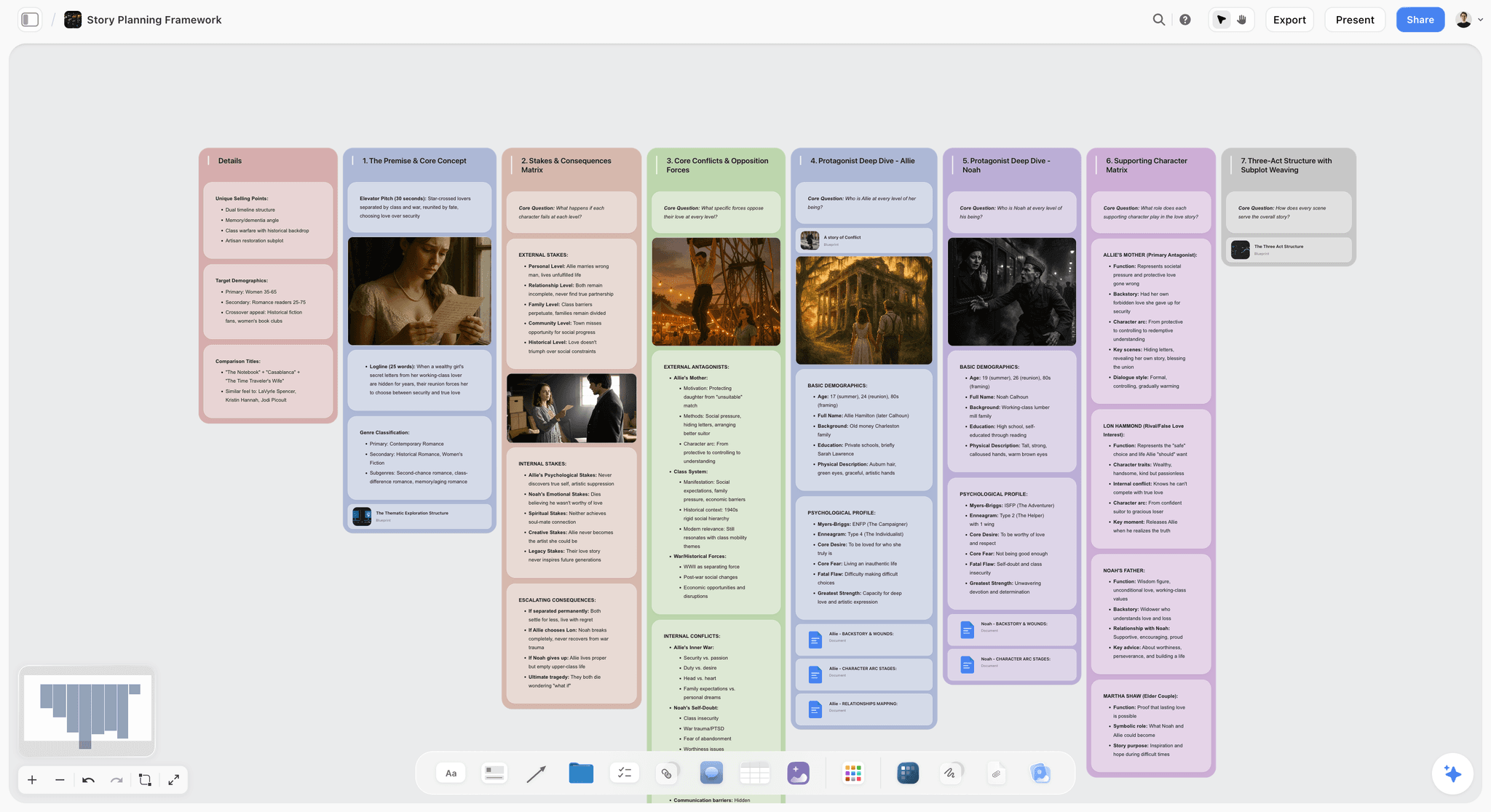
Map a whole story on one canvas: premise, three acts, turning-point beats, and character arcs, with AI to pressure-test the structure. Use the Story Plan template.
Character Profile Template
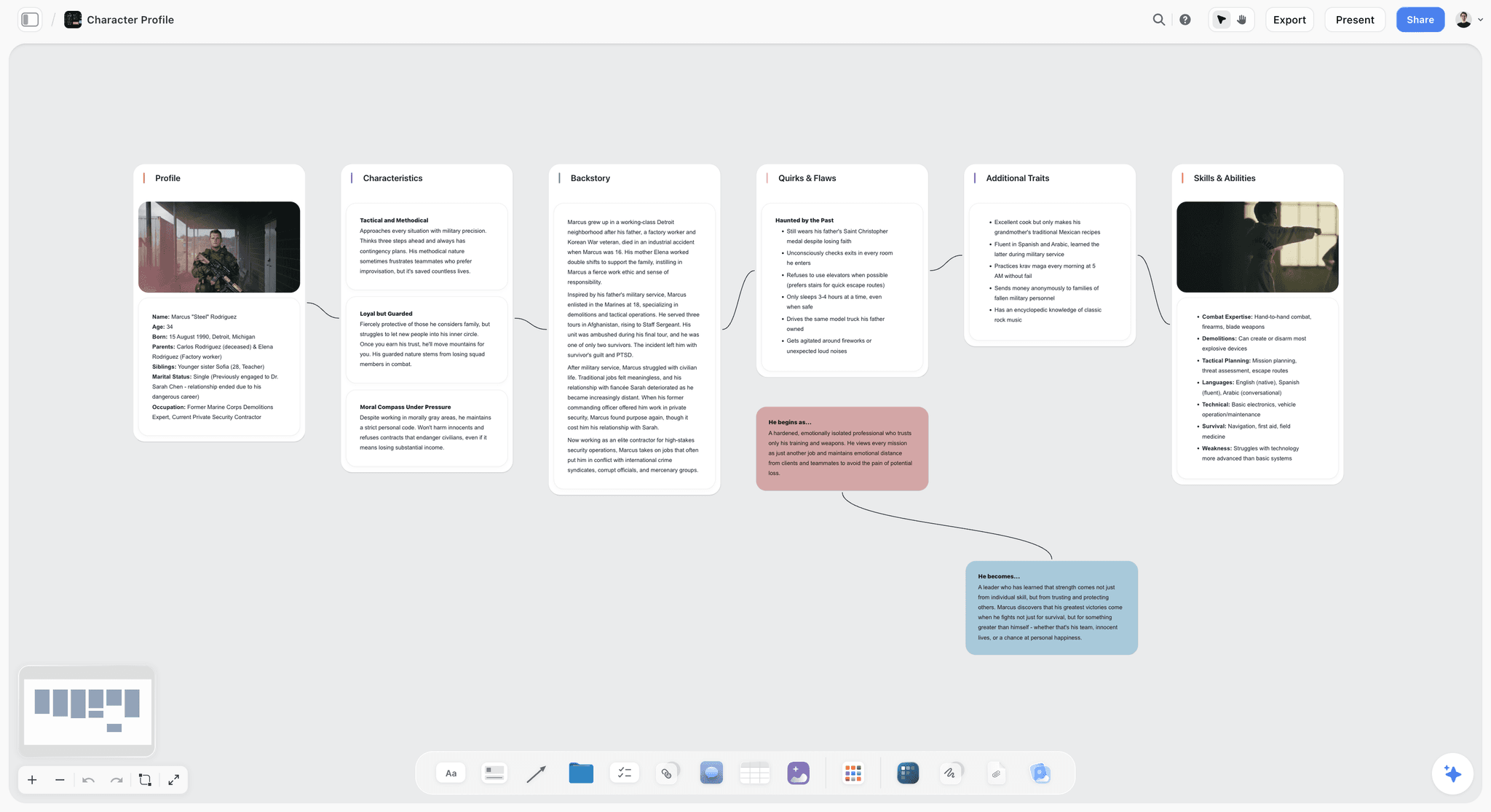
A free Character Profile template on an infinite canvas. Map backstory, motivation, voice, flaws, and arc with notes, images, and AI. Use the Character Profile template.
Story Outline Template for Writers
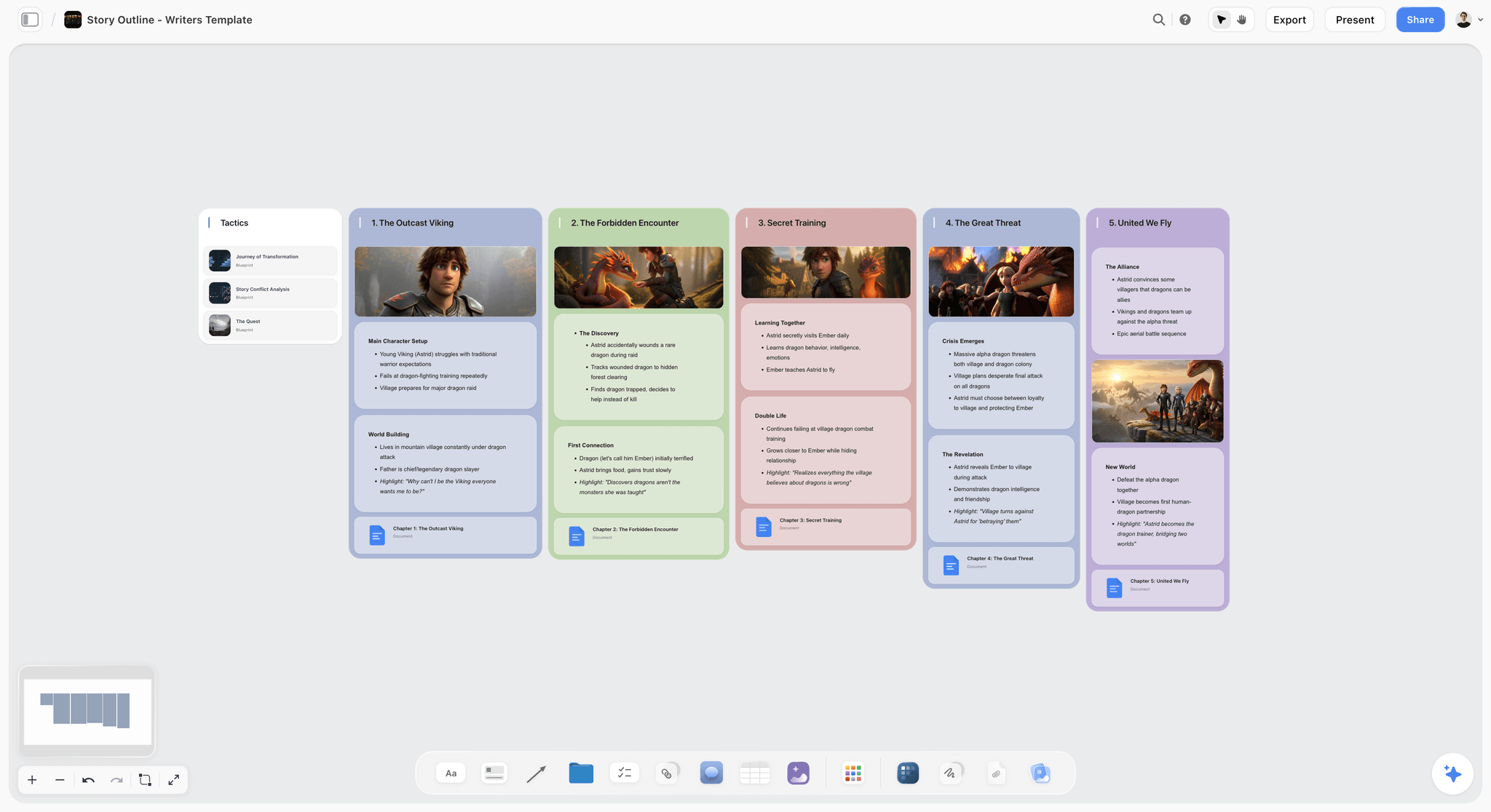
A Storyflow board for writers to outline a story on an infinite canvas: premise, characters, beats, and scene order, with an AI assistant. Use the Story Outline Template for Writers template.
11) The Bottom Line
Every tool on this list can hold a story. The ranking comes down to how much of the story each one can hold at once, and how much real thinking the AI does over it. Scrivener wins the long draft. Twine owns branching fiction. World Anvil catalogues the world. Milanote holds the moodboard. Canva makes the visuals. Sudowrite generates the prose.
But the reason stories fall apart is not any one of those stages. It is the Assembly Tax: the research, the structure, the characters, and the draft living in four apps that slowly stop agreeing, so no one ever sees the whole story until it is too late to fix it. A story tool is not where you write the words. It is where you find out what the story is. That is why Storyflow ranks first. It is the one tool under $20 where the whole story lives on one board, and the AI reads all of it before it answers.
If your last story drifted, take your research and a rough premise and rebuild them on a single canvas for one week. Start a Storyflow workspace and ask the AI to find the theme and propose a structure. The decision will be obvious by the end.
10) FAQ: Affordable Digital Storytelling Tools
What is the best app for collaborative digital storytelling?
Storyflow is the best app for collaborative digital storytelling in 2026. A whole team develops the story on one infinite canvas (research, outline, characters, and draft), an AI generates and reads the entire board, and shared boards with real-time collaboration are on the free plan. It is easy to start free, and the Plus plan is $7.99 per month billed annually, well under $20. Miro is the stronger pick for a pure live-whiteboard workshop, and Google Workspace for free document co-editing with an editor.
What is a simple tool for digital storytelling collaboration?
For most teams the simplest tool for digital storytelling collaboration is Storyflow, because the story starts as an AI-generated board you refine together rather than a blank workspace you assemble from scratch. You describe the story, the AI lays out the structure, characters, and research on one canvas, and teammates shape it while stakeholders review through a view-only link. If you only need to co-write prose, Google Workspace is simpler, and for a purely visual reference board, Milanote is easy to pick up. The simplest choice is whichever removes the most steps for your team's story, which for collaborative narrative work is usually the one canvas that already holds all of it.
Is there a digital storytelling tool under $20 a month?
Yes, most tools on this list are well under $20 a month, and several are free. Storyflow is in paid early access, with the Plus plan at $7.99 per month billed annually. Milanote and Plottr sit around $10, World Anvil starts near $7, and Miro is around $8 per user. Twine, Obsidian, and Google Workspace are free for personal use. Sudowrite is the clearest exception, since its real AI plans run about $19 to $29 a month, so it sits at or above the $20 line.
Which digital storytelling tools have an infinite canvas?
Storyflow, Miro, and Milanote all give you an open, infinite canvas to arrange a story in space instead of a single column, and Obsidian adds one through its Canvas plugin. The difference is what the canvas can do. Storyflow is the only one whose infinite canvas is read by an AI that generates and reasons over the whole board, so the space is not just for arranging cards but for developing the actual story. Notion, Scrivener, and Twine are not canvas-first.
Which digital storytelling tool generates story boards fastest?
Storyflow is the fastest here to go from a premise to a structured story board. You drop in a rough idea, and its AI generates and builds out the board (acts, beats, characters, and research placeholders) in seconds, then the 200+ Story Blueprints library gives a proven narrative shape instantly. Miro and Canva generate boards quickly too, but their AI is not story-aware, so you still arrange the narrative yourself. Speed only helps when the board it builds already understands the story.
Is there a free digital storytelling tool for teams?
Storyflow is paid-only early access today at $7.99/mo billed annually, with the Free plan launching before the end of 2026 and invited collaborators of paid members joining free now, and it is the strongest option for actually developing a story with others. Twine and Obsidian are free for solo work, Google Workspace is free for personal collaboration, and Miro and Milanote have free tiers. For a full story with AI that reads the whole board and real team collaboration, Storyflow goes furthest once you are paying.
Can AI actually help write a story, or just generate text?
It depends entirely on how much context the AI can see. An AI that only sees the box you are typing into can generate text and finish a sentence, but it cannot help with the story because it has never seen the story. An AI like Storyflow's, which reads your whole canvas (research, outline, characters, draft), can do real story work: pull a theme from the research, propose a structure, and flag the beat that is missing. The help comes from context, not from the model alone.
Why do my stories fall apart even when the writing is good?
Because good writing at the sentence level cannot fix a broken structure, and the structure is usually scattered across tools. This is the Assembly Tax: the research, the outline, the characters, and the draft live in different apps, so the "why" never reaches the scene it was meant to inform. The fix is to develop the whole story on one board where the research and the draft sit next to each other and an AI can reason across both.
Is Notion or Scrivener better for writing a novel?
Scrivener is better for the actual long-form draft: the binder and compile tools are built for book-length manuscripts. Notion is better as a flexible story bible and database: character profiles, a scene list, and worldbuilding notes that link together. Neither is a thinking partner that reasons across your whole story, so the discovery stage tends to happen elsewhere. Both pair naturally with a visual canvas like Storyflow for finding the structure before you draft.
How is Storyflow different from a writing app like Scrivener?
Scrivener is a drafting tool: it gives you a superb place to write a story you already understand. Storyflow is a discovery tool: its AI reads the whole story board and helps you find what the story is, by pulling themes from the research, proposing a structure, and naming the gaps. The simplest split is that Storyflow is where the story gets figured out, and a writing app is where the long draft gets written. Writers often use both, developing in Storyflow and drafting in Scrivener.
Do any of these tools include AI image generation?
Some do. Storyflow includes AI image generation on its Pro plan ($14/mo annual) and above, which is useful for character and moodboard work. Canva's Magic Studio is strong for produced visuals. Most of the dedicated writing tools (Scrivener, Plottr, Twine, Obsidian) have no image generation at all and focus on text. If story visuals matter to your process, Storyflow Pro or Canva covers that affordably.
Is Twine still worth using in 2026?
Yes, for one specific job. Twine remains the best free tool for branching interactive fiction: building passages and linking them into a map of every path the reader can take, then exporting to a playable HTML file. It has no AI, no research layer, and a dated interface, so it is not a general storytelling tool. But for interactive narrative and game dialogue trees, free and purpose-built is hard to argue with.
Can one tool replace my whole storytelling stack?
Not entirely, and you should be skeptical of any tool that claims it can. Storyflow can replace the scattered discovery layer (the research app, the outline app, and the character app) with one collaborative AI board, which is a real consolidation. But you will still want a dedicated drafting tool for a long manuscript and a formatting tool for a screenplay. The goal is fewer tools where it counts, not one tool for everything.
Table of Contents
- Quick Answer: The Best Affordable Storytelling Tool Under $20
- Comparison Table: 12 Tools Under $20 Compared
- Why People Want an Affordable Storytelling Tool (The Assembly Tax)
- How We Evaluated These Tools
- Quick Picks by Job to Be Done
- Detailed Reviews: 12 Tools Under $20
- Which Storytelling Tool Fits Which Person?
- Honorable Mentions
- Where a Pricier Specialist Wins
- FAQ: Affordable Digital Storytelling Tools
- The Bottom Line
- Author
- Related Reading
Templates to check out for this topic


Templates you can use in Storyflow
Every Storyflow board starts from real structure and an AI that reads the whole canvas. Open one of these templates and make it yours.


See Storyflow in Action
A visual AI workspace where every feature lives inside one canvas. No tab-switching, no context lost.
Build your entire board from a single message
Type what you need in the AI chat at the bottom of your canvas. The AI adds cards, headings, and structure directly onto your board.
Use expert frameworks as AI context
Type @ in the AI chat and choose any Tactic. The AI tailors every response to that framework instead of giving generic advice.
Turn your board into a mind map in seconds
Ask the AI to restructure your canvas as a mindmap. It connects your ideas into a visual hierarchy so you can see how everything relates.
Why Storyflow Exists
Storyflow actually began as a personal tool while working on creative and research projects.
We kept running into the same problem: ideas were scattered everywhere: notes, documents, and whiteboards.
Nothing helped us see how everything connected.
So we started building a workspace designed around how ideas actually grow.
→ Read how Storyflow was createdJustkay
Documentary Filmmaker & Founder at Storyflow
Published: 2026-06-18
Extremely simple, seriously capable


See how easy it is to get started
Watch a real project come together, from a blank board to a finished plan, clicked through step by step.
Start creating with AI and become more productive
Transform your creative workflow with AI-powered tools. Generate ideas, create content, and boost your productivity in minutes instead of hours.