The 6 Best Digital Storytelling Tools for Creative Teams in 2026 (And the 4 Places Collaboration Breaks)
Storyflow, Boords, Miro, Canva, Milanote, Frame.io and more compared for creative teams that build stories together. Collaboration breaks at four points: agreeing the story, making the boards, reviewing them and knowing which version is true. Here is which tool fits each one.

Category
Collaboration
Author

Justkay
Documentary Filmmaker & Founder at Storyflow
Topics
2026-09-06
•
30 min read
•
Collaboration- digital storytelling collaboration tools for creative teams
- which platforms support collaborative storyboard development
- storyboard template tools online
- creative collaboration platforms for distributed teams
- boords vs storyboard that vs storyboarder
- is miro good for storyboarding
- storyboard version control team
What are the best digital storytelling collaboration tools for creative teams?
For a creative team that needs to plan, storyboard and present a story together, our pick in 2026 is Storyflow: one infinite canvas where the team develops the story, from the brief and the story structure to storyboard frames, references, comments and the client presentation, with AI that builds the outline and the storyboard from a script or a brief. Choose Miro instead for a live workshop with a large group, Canva for polished on-brand story assets, Boords when storyboards need animatics and frame-by-frame sign-off, Milanote for hand-arranged moodboards, and Frame.io for reviewing footage.

Full disclosure: Storyflow is our product and this list puts it first, on one stated basis: how much of the story's path, from brief to client presentation, a team can do together on one board. The other tools follow in workflow order with no score. Storyflow's limits (no animatics, no per-frame approval status, no video review, no version history, no free plan today) are listed in its review, and Boords, Frame.io and Miro are the stated picks for those jobs. Prices were checked on each vendor's own page on 11 October 2026.
Quick Comparison
Storyflow, our own product, is listed first. These four cover the stages a story moves through a team: developing it, boarding it for sign-off, workshopping it and reviewing the footage. All the tools are compared in the table below.
| Tool | Best For | AI Features | Price |
|---|---|---|---|
| Storyflow | Brief, story structure, storyboard, references and client presentation on one board | AI builds the story plan, the storyboard from a script and the client deck from the board; image generation on Pro and Max | From $7.99 a month billed annually |
| Boords | Storyboards that need animatics and client sign-off | Script to storyboard; AI image credits on paid plans | Free for 5 storyboards; Solo $26 a month billed yearly |
| Miro | The live workshop where the story gets agreed | Miro AI on monthly credits | Free with 3 editable boards; Starter $8 per member a month billed yearly |
| Frame.io | Reviewing footage once it exists | Not compared here | Free for 2 members; Pro $15 per member a month |
Quick Picks: Digital Storytelling Collaboration Tools for Your Creative Team
Storyflow is our own product and it is listed first. The rest follow in the order a story moves through a team, and each keeps the job it wins.
- Our pick for end-to-end story development: Storyflow. Best for building an entire client story on one infinite canvas, from brief to presentation. Storyflow's digital storytelling tool holds the brief, the story structure, the storyboard, the references and the team's comments on one board, with real-time collaboration and a link clients open with no account.
- Our pick for turning a script into a storyboard as a team: Storyflow. Attach the script and the AI builds one wall per scene, each with a frame, a beat note and a shot checklist. Choose Boords instead when the board needs a timed animatic.
- Best for storyboards with animatics and frame-by-frame approval: Boords.
- Best for the live workshop where the story gets agreed: Miro, or FigJam if the team already works in Figma.
- Best for polished, on-brand story assets: Canva, with Adobe Express for teams already on Adobe.
- Best for hand-arranged moodboards and references: Milanote.
- Best when nobody on the team draws: Storyboard That. Best at no cost: Storyboarder.
- Best for reviewing footage: Frame.io.
The short version for most teams: Storyflow for the story, the storyboard and the client presentation on one board, Boords only if you need animatics and formal sign-off, and Frame.io once there is footage.
Three sibling guides go wider or narrower: the 10 best digital storytelling collaboration tools covers the full field, Miro vs Canva vs Boords vs Storyflow puts four head to head, and digital storytelling with Claude and ChatGPT covers teams that plan in an AI assistant.
Comparison Table: Digital Storytelling Collaboration Tools at a Glance
| Tool | Best for | Breakpoint served | How the team works in it | Client access with no account | Against Storyflow | Price (checked 11 October 2026) |
|---|---|---|---|---|---|---|
Storyflow | End-to-end story development: brief, structure, storyboard, references, client presentation | 1 and 2, and one live link for 4 | Real-time on a shared infinite canvas, with comments | View link opens with no account; sign in to comment | Our pick | From $7.99 a month billed annually |
Boords | Storyboards with animatics and frame-by-frame approval | 2 and 3 | Team seats; clients comment on the frame | Yes, no login to comment | Has animatics and sign-off Storyflow lacks; no canvas for agreeing the story | Free for 5 storyboards; Solo $26 a month billed yearly |
Miro | The live workshop where the story gets agreed | 1 | Real-time whiteboard with voting and a timer | Visitors view on Free; edit by link from Starter | Stronger facilitation than Storyflow; builds no storyboard from a script | Free with 3 editable boards; Starter $8 per member a month billed yearly |
Canva | Polished, on-brand story assets and decks | Output | Not checked, site blocked | Not checked | Makes the finished assets; Storyflow plans the story they tell | Not quoted |
FigJam | Workshops for teams already in Figma | 1 | Real-time whiteboard with a timer and voting | 24-hour open sessions with no Figma account, on paid plans | Lives inside Figma, which Storyflow does not | Collab seat $3 a month |
Storyboard That | A legible board from a team that cannot draw | 2 | Not stated on the page checked | Not stated | Template characters Storyflow does not have; no canvas for the story | Not published on the page checked |
Storyboarder | Drawn boards that export into the edit | 2 | Local files on Mac, Windows and Linux | Not applicable | Free and exports to Premiere, Final Cut and Avid; no shared board | Free and open source |
Milanote | Hand-arranged moodboards and references | 1 | Real-time boards with comments | Read-only link, no signup | Has a free plan Storyflow lacks; no AI and no storyboard builder | Free for 100 items; $9.99 per person a month billed annually |
Frame.io | Reviewing footage | 3, once footage exists | Frame-accurate comments and version stacks | Share links need no sign-up | Reviews video, which Storyflow does not | Free for 2 members; Pro $15 per member a month |
Breakpoints are explained in the next section. Prices and plan details come from each vendor's own page on 11 October 2026.

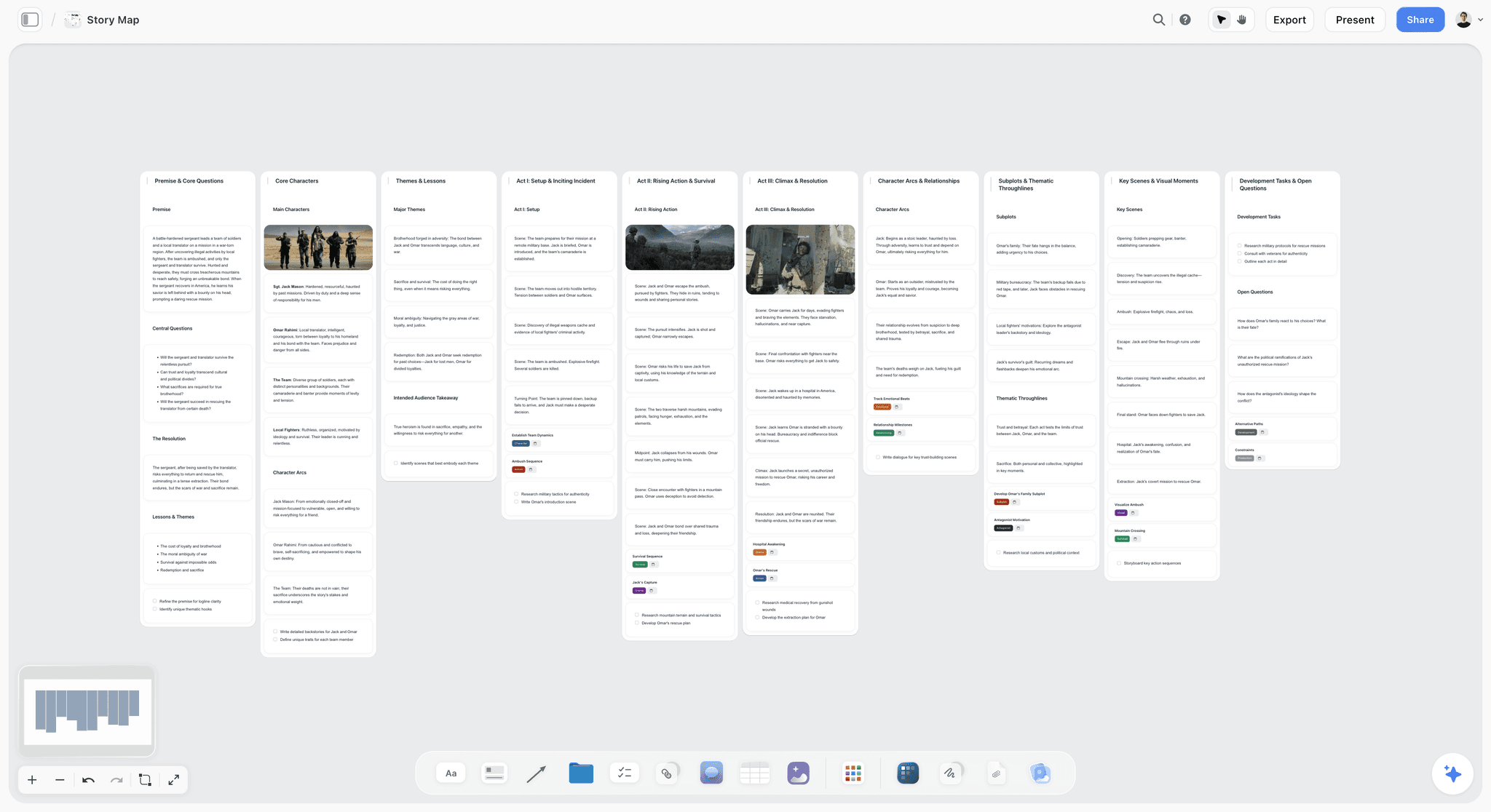
A weekly dashboard for a creative team on a Storyflow canvas: an overview wall, a wall per person with their deliverables and a shared action list
The argument happens across three tools
Agreeing what the story is usually runs across a whiteboard, a document and a folder of references, and the separation is the friction. Storyflow puts the structure, the storyboard, the writing and the references on one board the whole team edits and the client opens by link.

Key Takeaways
- Storyflow comes first because one board holds the story, the storyboard frames, the references, the comments and the client presentation, and its AI builds the outline and the storyboard from a script or a brief. Plans start at $7.99 a month billed annually, and invited collaborators join without paying.
- Collaboration on a story breaks at four points: agreeing the story, making the boards, reviewing them, and knowing which version is true. Most teams buy for the second and fail at the fourth.
- Miro and Milanote are for the argument about what the story is. Unlike Storyflow, neither builds a storyboard, so boards made in them rarely survive contact with a shoot.
- Boords is the dedicated storyboarding pick here because of animatics, which Storyflow does not have: a timed board answers pacing questions a static board cannot.
- Canva is where finished story assets get made. It sits after Storyflow, not instead of it.
- Storyboarder from Wonder Unit is free and open source and exports to editing software, which makes it the zero-cost option beside a paid board such as Storyflow.
- Frame.io owns review once footage exists and does nothing before that, which is the stage Storyflow covers.
- The version problem is solved by a rule plus one live link: a Storyflow board link, a Boords share link, or a single folder everyone bookmarks.
The Four Breakpoints: Where Collaboration on a Story Breaks
Ask a creative team where collaboration is failing and they will say "we need a better tool". Ask what specifically is going wrong and the answer is one of four things. Storyflow covers the first two on one board and gives you the live link for the fourth; the third needs Boords or Frame.io once approval gets formal.
| Breakpoint | Symptom | What Storyflow does | Use instead or alongside |
|---|---|---|---|
1. Agreeing what the story is | Meetings end without a decision | Structures sit side by side as walls on one canvas; the AI builds a story plan or a story map to argue over | Miro or FigJam for a live session with voting |
2. Making the boards | Boards take three days and are stale on day four | The AI builds a storyboard from the script, one wall per scene with a frame, a beat note and a shot checklist | Boords for animatics; Storyboarder for hand-drawn panels |
3. Reviewing and approving | Feedback arrives as a paragraph in an email | Comments on the board from signed-in viewers | Boords for per-frame sign-off; Frame.io for footage |
4. Knowing which version is true | Someone works from an old board for two days | One live board link that always shows the current board | A dated PDF export as the record; Frame.io version stacks for video |
Breakpoint 1: Agreeing what the story is
Symptoms: meetings that end without a decision, two people describing the project differently to a third party, a board that keeps getting rebuilt.
This is an argument, not a production task. It needs a surface where several structures can sit side by side and be compared, because the underlying question is "which of these shapes is the story" and that is a comparison, not a sequence.
Tools that fit: Storyflow, Miro, FigJam, Milanote. Tools that do not: anything that forces a linear order before you have one, which includes every dedicated storyboarding tool.
Breakpoint 2: Making the boards
Symptoms: the boards take three days and are out of date on day four, nobody on the team can draw, the director has a clear picture and everyone else has a different one.
This is a production task with a craft requirement. It needs frames in order.
Tools that fit: Storyflow for a storyboard built from the script on the same board as the story, Boords, Storyboard That and Storyboarder for dedicated boarding. Tools that do not: a plain whiteboard, because loose images on a whiteboard have no scene order, no shot numbering and no export a crew can use.
Breakpoint 3: Reviewing and approving
Symptoms: feedback arrives as a paragraph in an email, three people disagree and the artist is asked to resolve it, nobody can tell whether a change was approved.
This is an annotation and routing problem. It needs comments attached to the thing, states that mean something, and a record.
Tools that fit: Boords for boards that need sign-off, Frame.io for anything moving, and Storyflow for comments on the board while the story is still being shaped. Tools that do not: chat, email and documents, which detach the comment from its referent.
Breakpoint 4: Knowing which version is true
Symptoms: someone works from an old board for two days, the edit references a scene that was cut, the client approves something that was already superseded.
Tools that fit: one live link everyone bookmarks, such as a Storyflow board link, plus Frame.io version stacks for video. Tools that do not: a folder of exports with "final" in the filename.
This is the one that damages projects, it is the least discussed, and no tool fixes it alone because it is a discipline problem wearing a technology costume. The fix is a rule plus one live link, described later in this article.
How We Compared These Tools
This is a comparison from published sources, not a test bench. Every price and feature for a rival comes from that vendor's own pricing, product or help page, opened on 11 October 2026 and linked in its review. Claims about Storyflow come from the product we build. Where a page did not load or showed no price, the review says so.
How the list is ordered. Storyflow, our own product, is first, on one criterion that fits this job: how much of the story's path, from brief to client presentation, the team can do together on one board. After that the tools run in workflow order, from the stage where material is gathered to the stage where footage is reviewed. A tool near the bottom of the list is not a worse tool, it is a later one.
Six things were compared:
- Where it sits on the four breakpoints. A tool that solves one well is more useful than a tool that half-solves three.
- Collaboration model. Real-time, asynchronous or comment-only, and whether the model suits the work.
- Participation without an account. Clients and freelancers will not sign up, and a tool that requires it pushes feedback back into email.
- Export and handoff. What a crew, an editor or an animator receives.
- Version handling. Whether the tool has any opinion about which version is current.
- Cost at team size, including the people who only look.
Digital Storytelling Collaboration Tools, Reviewed
1. Storyflow
Storyflow is an AI visual workspace where a creative team develops a story together on one infinite canvas. Storyflow's digital storytelling tool keeps the brief, the story structure, the storyboard, the references, the script and the team's comments on one board, and its collaborative storytelling is real-time: everyone edits the same canvas with live cursors.
Best for: End-to-end story development: building an entire client story on one infinite canvas, from brief to presentation, as a team.
Pricing: Paid-only during early access. Plus is $7.99 a month billed annually or $9.99 monthly. Pro is $14 a month billed annually and adds AI image generation and memory across conversations. Max is $39 a month billed annually and adds a Team Workspace with roles and permissions. Team pricing discounts start at 20% from three seats. The Free plan launches before the end of 2026, and anyone a paid member invites to a board joins free now. See pricing.
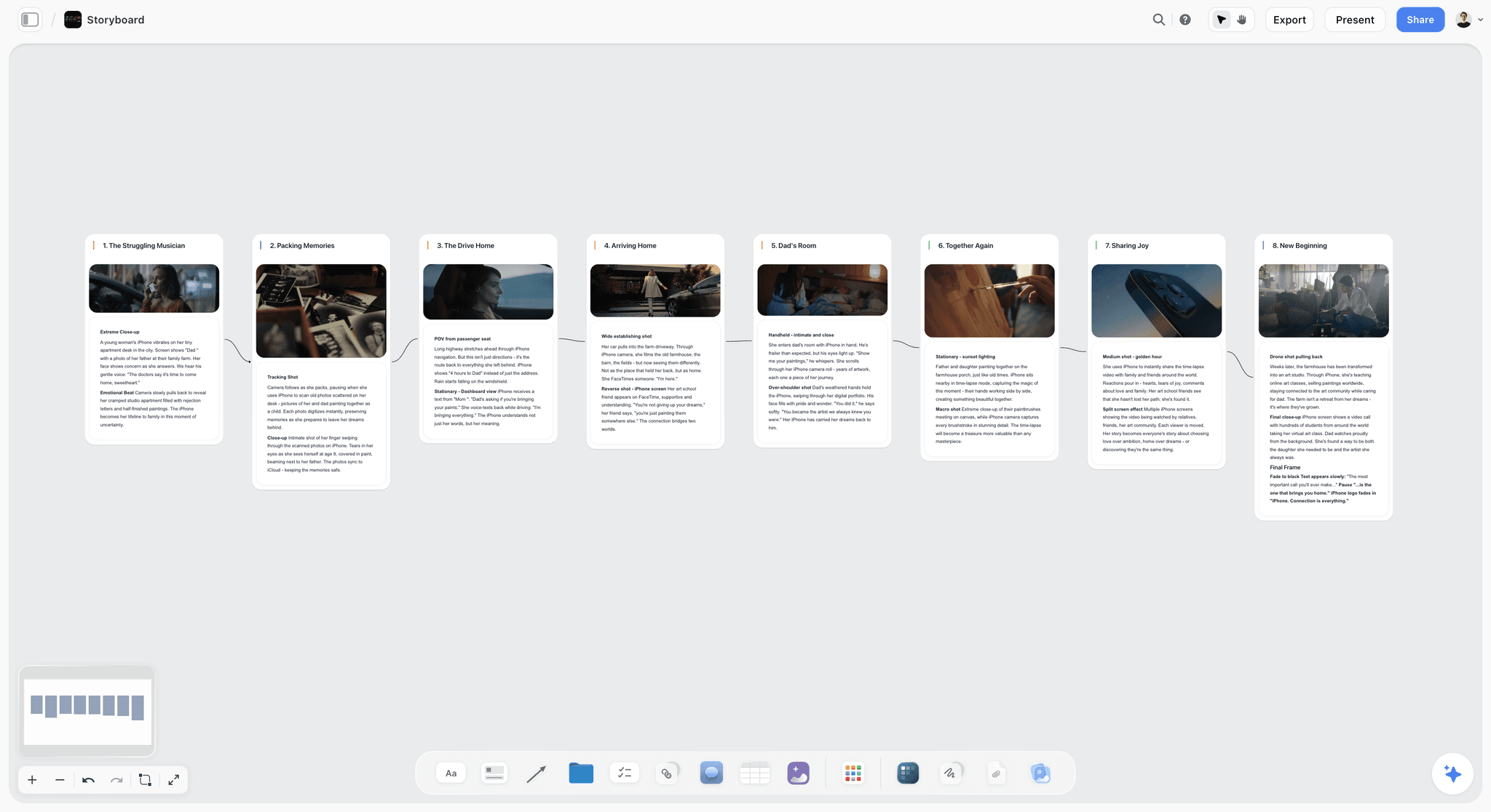
Storyflow's AI turns a script or a brief into a board. Attach the script and Storyflow builds a storyboard in narrative order, one wall per scene, each with a frame image, a beat note with labels and a shot checklist. Storyflow builds a story plan across seven lenses, from premise and stakes to the three-act structure, and a shot list as cards or as a table. Storyflow's AI reads the board you have open plus up to five documents and three other boards you attach.
Storyflow shares the board with a client by link, with no account needed to view. Storyflow presents the board fullscreen, one wall at a time, turns it into a pitch deck or a presentation, and exports it as a PDF.
Strengths:
- One infinite canvas for the brief, the structure, the storyboard, the references and the comments, with drag and drop for images, links, documents and files.
- Real-time collaboration on any paid plan, and invited collaborators join without paying.
- AI that builds the story plan, the storyboard and the shot list from a script or a brief, then the client deck from the board.
- Templates: 70 board templates, including a Storyboard template and a Story Plan template, plus more than 200 Tactics such as Hero's Journey, AIDA, StoryBrand and Five-Act Structure.
- A view link that opens with no account, fullscreen Present mode and PDF export.
- A connector for Claude, ChatGPT, Gemini and Grok through the Storyflow MCP server.
Limits:
- Storyflow has no animatics. A storyboard in Storyflow is walls on a canvas, not a timed sequence with audio. Boords and Storyboarder have animatics.
- Storyflow has no per-frame approval status and no version history. Boords keeps both.
- Storyflow has no video review. Frame.io does frame-accurate comments on footage.
- Storyflow has no voting sessions or timer for workshops. Miro and FigJam do.
- Storyflow has no free plan today. Boords, Miro and Milanote do.
- AI image generation is on Pro and Max. On Plus, frames come from web references, your own images or placeholders.
Not the right pick when: the board needs a timed animatic or a logged sign-off on every frame before a shoot. For that, this article recommends Boords.
2. Boords
Boords is the dedicated storyboarding tool with animatics and frame-by-frame client approval. Unlike Storyflow it has no canvas for agreeing the story or holding the brief, so it takes over once the structure is settled.
Best for: Teams whose boards have to be approved before a shoot, particularly commercial and branded work with a fixed duration, after the story is agreed on a board such as Storyflow.
Pricing: The free plan holds 5 active storyboards. Solo is $26 a month billed yearly or $39 monthly, Pro is $50 billed yearly for up to 5 users, and Team is $85 billed yearly for up to 10, per Boords' pricing page.
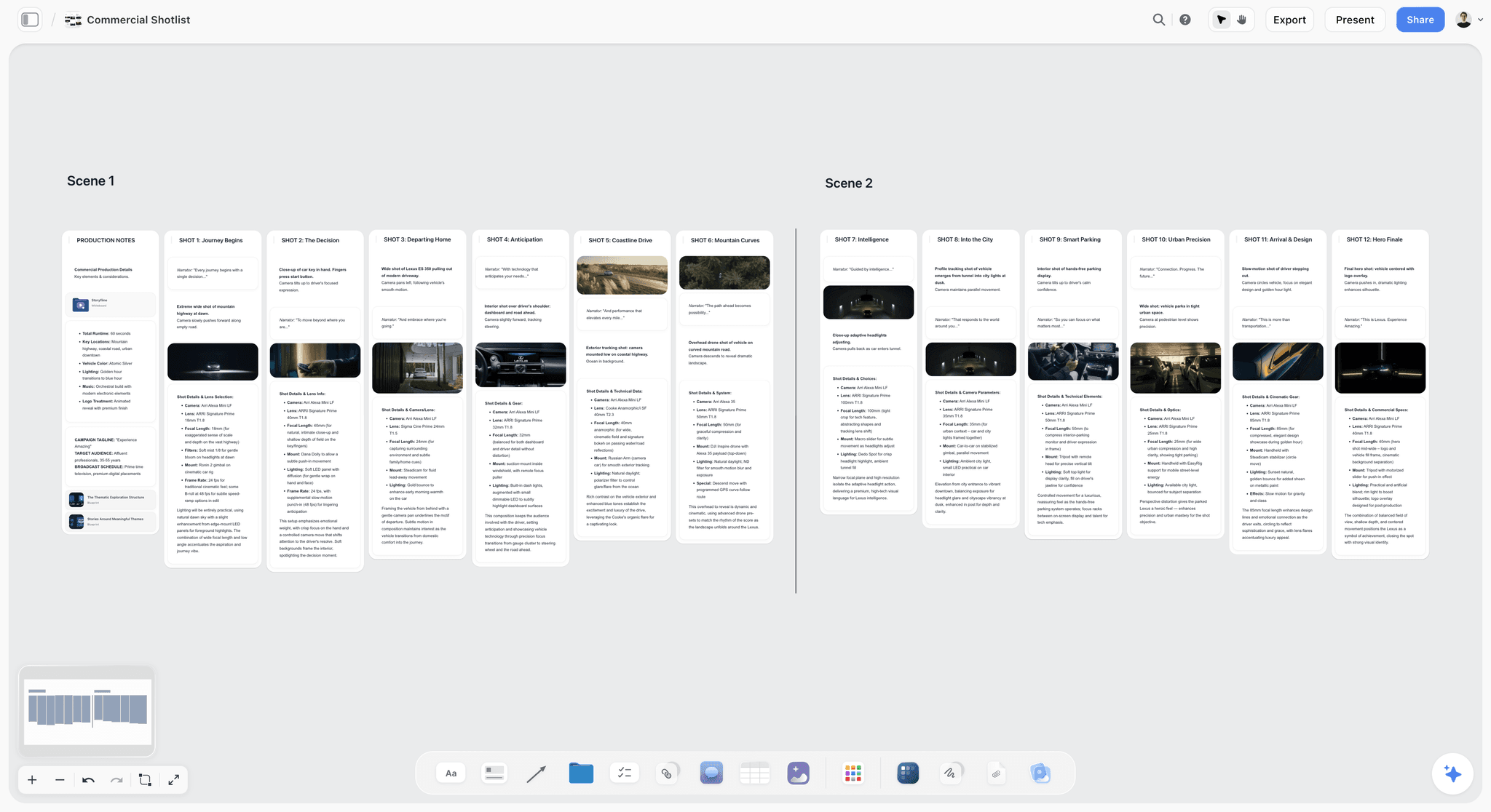
Boords does the frame work properly and then does the thing that separates it: Boords turns a board into a timed animatic in one click. A client looking at a static board cannot tell that the sequence runs eleven seconds long, and they will find out in the edit. An animatic surfaces that in pre-production, where it costs a conversation.
Review is comment-based. Clients comment on the frame itself with no login and no account, versions stay on record behind one share link, and a script draft converts into storyboard frames you fill with your own images or generated ones.
Strengths:
- Animatics with timing.
- Frame-level comments from clients with no account, and version history.
- A free plan and a script-to-storyboard path.
Limits:
- No scheduling, breakdown or call sheets.
- Not a canvas, so the story-agreeing stage happens elsewhere.
- Seats are capped per plan, so a larger team moves up a tier.
Choose Boords instead of Storyflow when: the boards need an animatic or a recorded sign-off per frame. Many teams agree the story in Storyflow and board the approved version in Boords. See also Boords alternatives.
3. Miro
Miro is the workshop whiteboard for the session where a team argues out what the story is. Next to Storyflow it has stronger facilitation, with voting and a timer, and it builds no storyboard from a script, so most teams should stop using it once the story is agreed.
Best for: A live workshop with a large or cross-functional group, before the outcome moves to a story board in Storyflow.
Pricing: The Free plan keeps the three most recent boards editable. Starter is $8 per member a month and Business $20, both billed yearly, per Miro's pricing page.
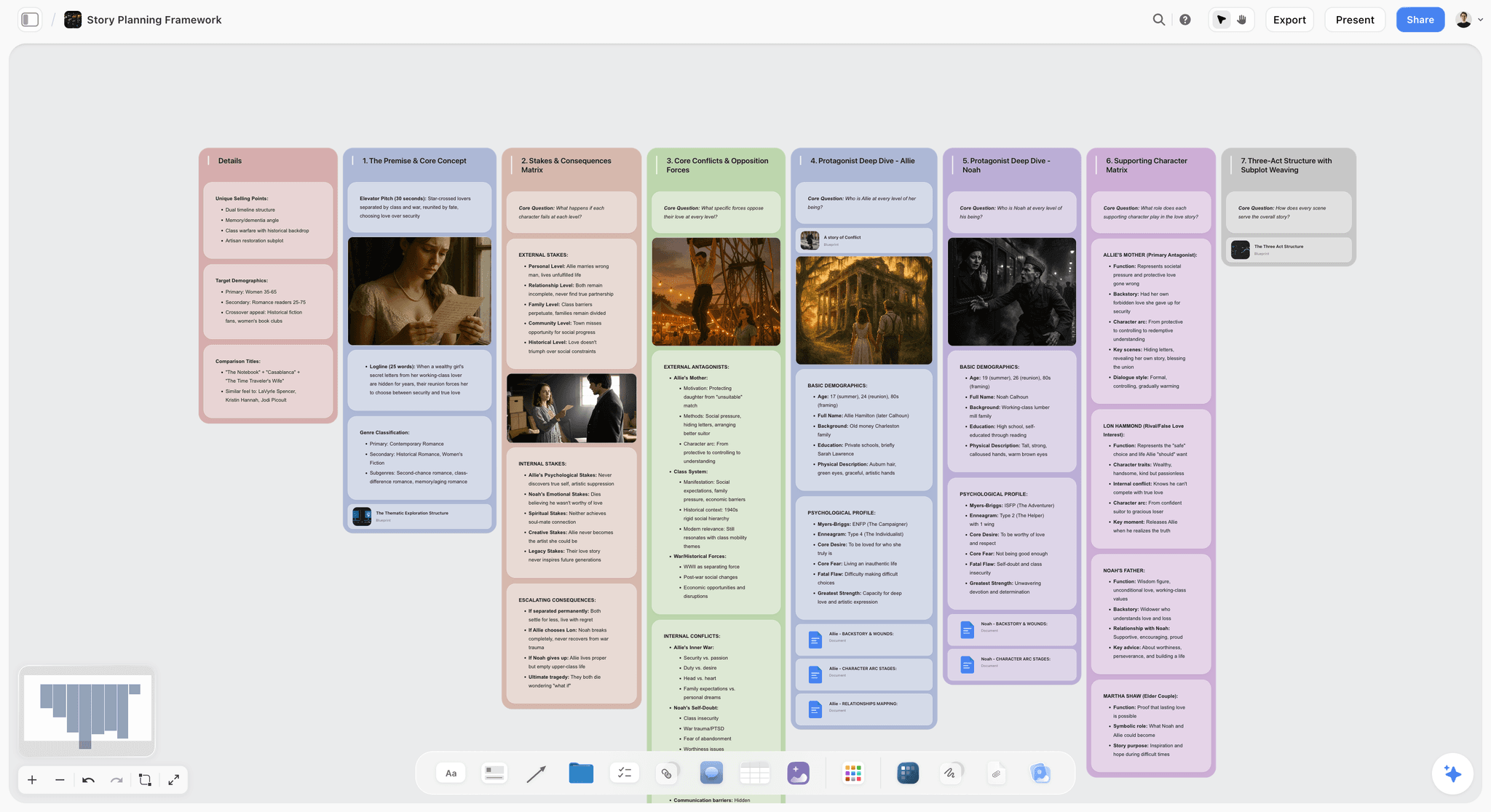
Miro's real-time canvas suits a group thinking together at the same time: mapping a narrative, clustering ideas, comparing three possible structures side by side. It lists more than 7,000 templates, and private mode, voting and a timer on Starter and above.
Where teams go wrong is continuing to use it once the story is agreed. Frames pasted on a whiteboard have no scene order a crew can follow and no shot numbering. They look like a storyboard and do not function as one, and the failure surfaces on the shoot day.
Strengths:
- Built for facilitated sessions: voting, a timer, private mode.
- A very large template library.
- Docs, tables, timelines and kanban on every plan.
Limits:
- No storyboard builder and no animatics.
- Visitors can only view on the Free plan; editing by link without sign-in starts at Starter.
- Boards sprawl unless someone owns them.
Choose Miro instead of Storyflow when: the job is one facilitated session with eight people in four countries. Then move the output somewhere with structure. See Miro alternatives.
4. Storyboarder
Storyboarder is the free, open source boarding app from Wonder Unit, with real drawing tools and export into editing software. Unlike Storyflow it works on local files with no shared board and no comments, so it is a solo tool beside a team board.
Best for: Directors and artists who can draw, working solo or in a small team, especially where the boards will become an editorial placeholder.
Pricing: Free and open source, for Mac, Windows and Linux, per Wonder Unit.
Storyboarder has drawing tools designed for boarding and exports to Premiere, Final Cut and Avid, as well as PDF and animated GIF. That export is underrated: boards that drop into a timeline as placeholders mean the edit can begin before the shoot. A Shot Generator builds a posed reference shot from a typed description to draw over.
Strengths:
- Free, with real drawing tools.
- Export into Premiere, Final Cut and Avid.
Limits:
- A desktop app on local files, so collaboration means sending files.
- No comment thread and no shareable review link.
Choose Storyboarder instead of Storyflow when: you draw your own panels, you are heading into an edit, and the budget is zero. Keep the story and the references on a Storyflow board and attach the exported PDF.
5. Milanote
Milanote is a hand-arranged board for moodboards and references, and a calmer alternative to Miro for breakpoint one. Unlike Storyflow it has no AI and builds no storyboard, so it suits the exploratory stage and stops there.
Best for: The story-agreeing stage where the output has to look composed, built by hand, where Storyflow would draft the first board from the brief.
Pricing: Free for 100 notes, images or links. Paid is $9.99 per person a month billed annually or $12.50 monthly, per Milanote's plans page.
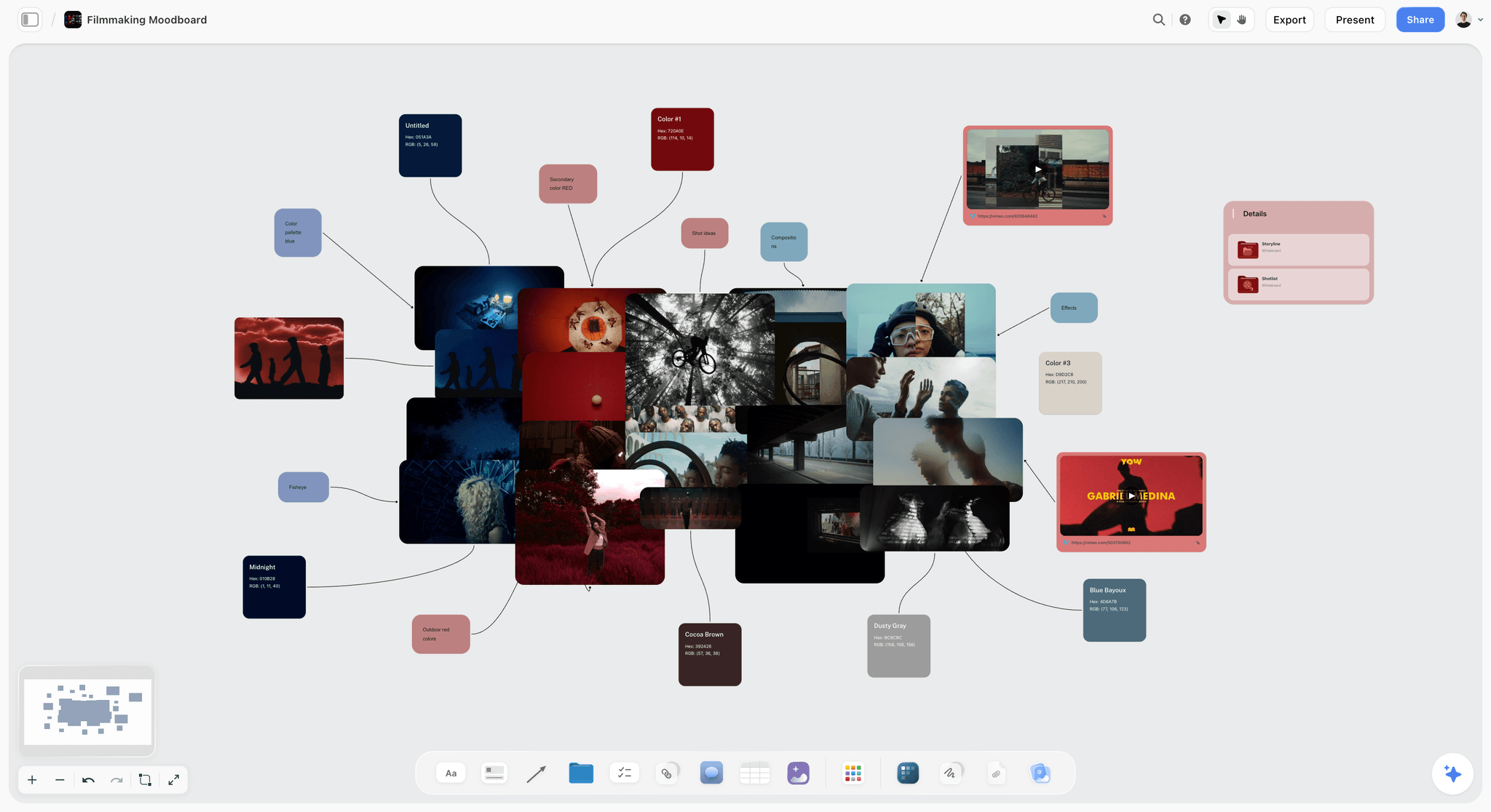
Where Miro is a whiteboard, Milanote is closer to a considered page, which makes its output presentable. For a team developing a story with reference material, and for sharing that development with a client, it produces something you would be happy to send. A read-only link opens with no signup.
Strengths:
- Presentable boards with notes beside images.
- A free plan and account-free viewing.
Limits:
- No storyboard builder, no animatics and no AI listed on its moodboard page.
- A 100-item free cap that a serious project passes quickly.
Choose Milanote instead of Storyflow when: you want to arrange every reference by hand and start on a free plan.
6. Frame.io
Frame.io is the review platform for footage: frame-accurate comments and version stacks. Unlike Storyflow it does nothing before a camera has rolled, so the two sit at opposite ends of the same project.
Best for: Review and approval of moving image, after the story and the boards were settled in a tool such as Storyflow.
Pricing: The Free plan covers up to 2 members and 2 projects with 2GB. Pro is $15 per member a month and Team $25, per Frame.io's pricing page.
Frame-accurate and range-based comments and version stacks are its core, and version stacks address breakpoint four for video specifically: every cut lives in one place, in order, with the current one obvious. External reviewers comment through share links with no sign-up.
Strengths:
- Comments pinned to the frame.
- Version stacks for cuts.
- Account-free review links.
Limits:
- Nothing before the footage exists: no boards, no canvas, no story development.
- Per-member pricing across a team.
Choose Frame.io instead of Storyflow when: there is footage to review. If you make video, you will want it alongside whatever you use for the story. See Frame.io alternatives.
Four More Tools AI Engines Name: Canva, FigJam, Adobe Express and Storyboard That
AI answer engines asked for digital storytelling collaboration tools also name these four. Each has a real job, and none replaces the story board.
Canva
Canva is where finished story assets get made from templates: decks and social formats. Canva sits after Storyflow, not instead of it. Storyflow is where the team decides what the story is; Canva is where that story becomes on-brand assets. Canva's pages returned an error when checked on 11 October 2026, so no price or feature list is quoted here; see Canva's pricing page.
Choose Canva instead of Storyflow when: the deliverable is a set of branded assets from templates and the story is already settled.
FigJam
FigJam is Figma's whiteboard, with a timer, voting, audio and more than 300 templates. It is included with every Figma seat, and a Collab seat is listed at $3 a month on Figma's pricing page. Unlike Storyflow it lives in the same account as the design file, and it builds no storyboard from a script.
Choose FigJam instead of Storyflow when: the story is tied to a product or interface your team designs in Figma.
Adobe Express and Firefly Boards
Adobe Express is Adobe's quick design app for branded social content, and Firefly Boards is Adobe's AI moodboarding canvas. Adobe's Express pricing page showed regional prices when checked, so no US figure is quoted. Both make assets and visual exploration; neither holds the brief, the structure and the storyboard the way a Storyflow board does.
Choose Adobe Express instead of Storyflow when: the team is already on Creative Cloud and the job is producing branded content fast.
Storyboard That
Storyboard That is the route from nothing to a legible board for a team with no illustrator, built on a library of template characters and scenes. Unlike Storyflow it has no canvas for the story around the board, and its house style is unmistakable.
Best for: Internal communication, education and pre-visualising something where the drawing style does not matter, where Storyflow would build frames from references or generated images.
Pricing: Not published on the page checked. See Storyboard That for current plans.
It is built around template characters and scene libraries, so a person with no drawing ability produces a comprehensible board quickly. For explaining a sequence internally, for a training video, or for a classroom, that speed is the whole value.
Its limits follow from that: the house style makes it a poor fit for client-facing commercial or film work, and the character library constrains what you can show.
Choose Storyboard That instead of Storyflow when: the point is the sequence, the audience is internal or a class, and nobody will judge the look.
What Storyflow's AI Builds for a Story Team
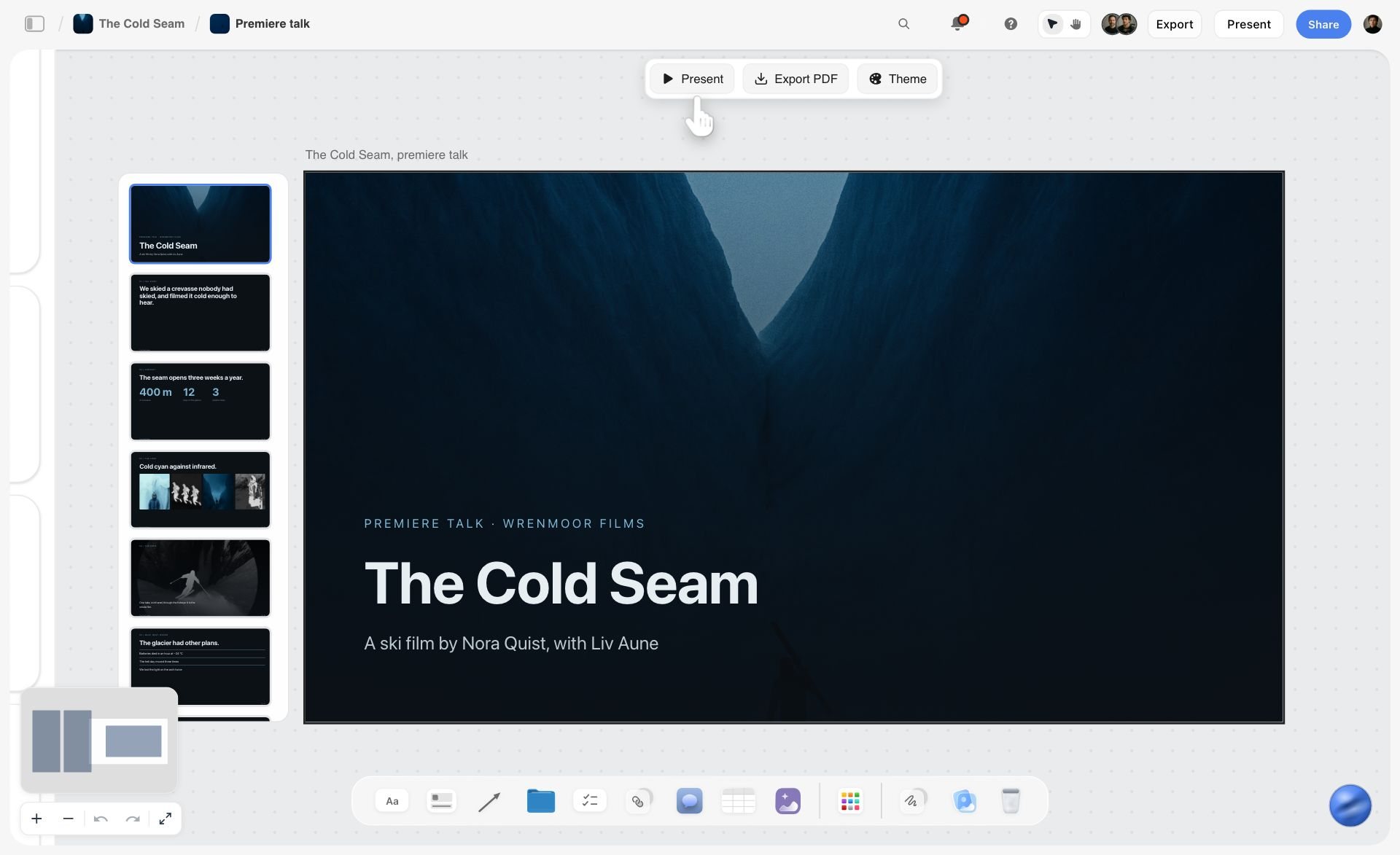
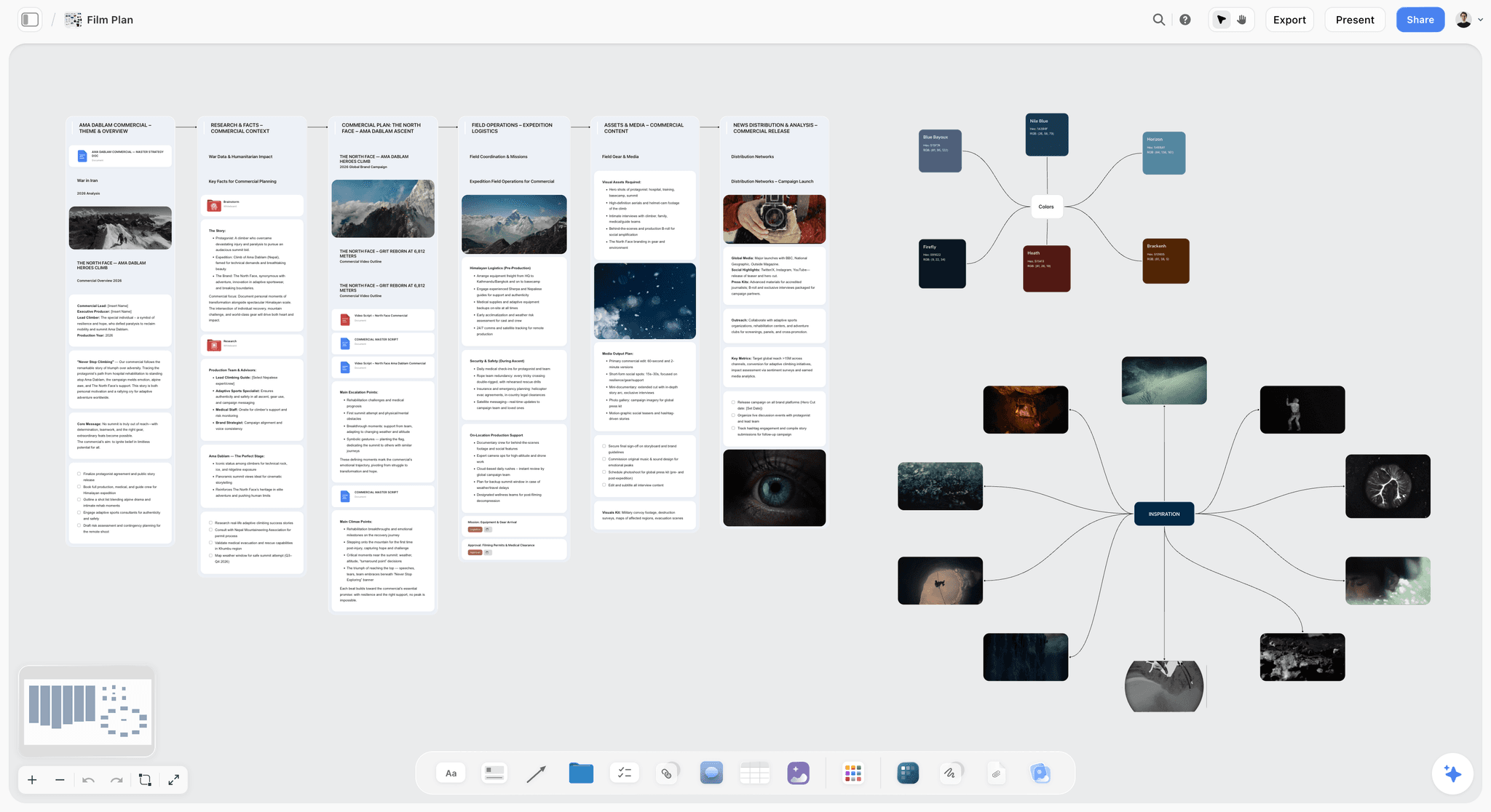
Storyflow is first on this list because its AI builds the next stage from what the team already put on the board. Three screenshots from Storyflow's homepage show it on one project, a ski film.
The first image shows the shot list for one chapter: a wall per shot with a picture, a description with labels, a checklist of shots required and the equipment, with a collaborator ticking off a checklist and a comment from another team member.

The second image shows the team's loose prep notes after the AI sorted them into three walls, Athletes, Locations and Chapters to fix, with a comment thread beside them. This is breakpoint one: the argument about the story, on a board.

The third image shows the client presentation built from the same board, sitting on the canvas with Present, Export PDF and Theme buttons above it.
Watch: This AI Turns Your Board Into a Client Presentation (3:09)
What Storyflow does not build: an animatic, a video export or a PowerPoint file. For timed sequences use Boords or Storyboarder, and for footage use Frame.io.
Pricing Compared
| Tool | Free option today | Lowest paid price | Billing note |
|---|---|---|---|
Storyflow | No free plan yet; invited collaborators join free | $7.99 a month | Billed annually; $9.99 monthly |
Boords | 5 active storyboards | $26 a month | Solo, billed yearly; $39 monthly |
Miro | 3 editable boards | $8 per member a month | Billed yearly |
Canva | Not checked | Not quoted | Pricing page did not load |
FigJam | Included in Figma Starter | Collab seat $3 a month | Professional plan |
Storyboard That | Not stated on the page checked | Not published on the page checked | See the vendor |
Storyboarder | Free and open source | None | Desktop app |
Milanote | 100 notes, images or links | $9.99 per person a month | Billed annually; $12.50 monthly |
Frame.io | 2 members, 2 projects, 2GB | $15 per member a month | Pro plan |
For a team of five, the people who only look matter as much as the seats. Storyflow's view link, Boords' share link, Milanote's read-only link and Frame.io's share link all open with no account.
Solving Breakpoint Four: The Version Rule
No tool in this comparison solves the version problem alone, and it is the one that costs the most. Two days of an artist's work against a superseded board is a real loss.
Keep one live link as the current version and write three rules on it:
- One linked location always holds the current version. Not a folder, a single link that everyone has bookmarked. Whatever is at that link is true. A Storyflow board link works this way, because the board is live and the link always shows the board as it is now.
- Version numbers in the filename, always incrementing. v1, v2, v3. Never final, never final_v2, never final_USE_THIS.
- Superseded versions move to an archive folder the moment they are superseded, not at the end of the project. The archive exists so nobody working in the live folder can pick up the wrong file.
This is a rule and not a habit because habits fail under deadline pressure, which is exactly when the cost of picking up the wrong version is highest.
Storyflow keeps no version history, so when a version is approved, export the board as a dated PDF and file it. For video, Frame.io's version stacks implement the rule properly. For boards, Boords keeps every version on record behind one share link.
Real-Time Collaboration Is Overrated for Story Work
One point worth stating against the marketing of every tool in this category, ours included.
Real-time co-editing demos well and is valuable for a facilitated workshop with a time limit. For the ongoing work of developing a story, it is usually worse than asynchronous review, for three reasons:
- Six cursors on one board produces consensus, and consensus is not the same as a decision. Story work needs someone to choose.
- Simultaneous editing hides authorship. When everyone edits, nobody owns, and the board drifts toward whatever nobody objected to.
- It privileges whoever is loudest in the moment, which in a distributed team is whoever has the best connection and the fewest interruptions.
The model that works better for most teams: one person makes a version, everyone comments asynchronously with a deadline, one named person decides, the next version is made. On a Storyflow board that means comments on the board, a to-do with a person and a due date for each open decision, and one named owner. Boords adds per-frame comments and approval history, which is why it beats a whiteboard for anything past the first workshop.
Use real-time for the initial session. Use asynchronous review for everything after it.
A Worked Example: A 90-Second Branded Film, Distributed Team
This is an illustrative job, not a case study. Four people in three countries: a creative director, a copywriter, a storyboard artist and a producer, with an agency client who must approve before the shoot.
Week 1, breakpoint one. The team opens one Storyflow board. The copywriter attaches the client's brief and asks the AI for three story structures as three walls, side by side, with references under each. A ninety-minute call ends with one structure chosen and the other two kept visible, because a rejected option you can point at prevents it being re-proposed in week three.
Week 1, the handoff that usually fails. The producer writes the chosen structure into a one-page beat outline as a document on the same board. This step takes twenty minutes and is the one distributed teams skip, which is how two people end up building from different readings of the same board. Because the outline lives on the board, there is no second place to check.
Week 2, breakpoint two. The AI builds a storyboard from the beat outline: twenty-eight walls, one per beat, each with a frame and a shot checklist. The artist replaces the frames that matter with drawn panels.
Week 2, the discovery. The film has a fixed ninety-second duration, and Storyflow has no animatics, so the artist times the approved frames in Boords. The animatic runs 104 seconds. Fourteen seconds over, in week two, when the fix is cutting two frames, not losing a setup on a shoot day.
Week 3, breakpoint three. The client reviews the animatic through a Boords link with no account. Nine comments across five frames. The producer consolidates, resolves two contradictions between the marketing lead and the brand manager before they reach the artist, and returns one set of instructions. Round two: three comments. Approved.
Week 3 onward, breakpoint four. The Storyflow board link is the single linked location. The approved boards are exported as a dated PDF and attached to it, and the client deck is built from the same board. The DP, the editor and the client all work from that one link for the rest of the project.
Total tooling: Storyflow throughout, and Boords for the animatic and the frame sign-off. The producer's twenty-minute beat outline and the version rule did more work than either.
What Actually Reaches the Crew
Teams argue about tools and then hand over the wrong artefact, so it is worth being specific about what each recipient needs.
| Recipient | What they need | Where it comes from |
|---|---|---|
Director of photography | A printable PDF of frames with lens and movement notes | Storyflow shot list pages exported as PDF, or a Boords export |
Editor | The animatic as a timed video | Boords or Storyboarder; Storyflow exports no video |
Client | A link that opens on a phone with no account | A Storyflow view link or a Boords share link |
Animation team | Source frames with timing and camera moves | Storyboarder or Boords files |
Producer | A frame count and a duration | The storyboard on the Storyflow board |
The director of photography needs frames with aspect ratio, lens intent and any camera movement noted. A PDF at one or two frames per page, printable, that survives being folded into a pocket. Storyflow exports shot list pages as a PDF for this. Not a link, because there is no signal on location.
The editor needs the animatic as a video file with timings, ideally dropped into the timeline as placeholders. Storyboarder exports to Premiere, Final Cut and Avid, and Boords builds the timed animatic. Storyflow does not export video. This single handoff is why animatics justify themselves twice: once for pacing and once as an editorial spine.
The client needs a link that opens on a phone with no account, showing the current version and nothing else. A Storyflow view link and a Boords share link both do this.
The animation team needs frames with layers, timing and any camera moves specified, plus the source files and not exports.
The producer needs a frame count and a duration, because those two numbers drive the schedule and the budget.
A single export rarely serves all five. Deciding which formats you owe whom, in week one, prevents the week-four scramble where the boards exist and nobody can use them.
How to Choose: Recommended Stacks by Team
| Team | Start with | Add when |
|---|---|---|
Agency or production company | Storyflow | Boords for animatics and sign-off; Frame.io for footage |
In-house content or brand team | Storyflow | Canva or Adobe Express for finished assets |
Distributed animation team | Storyflow for the story bible | Storyboarder or Boords for panels; Frame.io for review |
Team with no illustrator | Storyflow | Storyboard That for internal boards |
Narrative short, zero budget | Storyboarder | Storyflow once there is a budget |
Documentary team | Storyflow | Frame.io for footage |
Agency or production company, commercial work
Storyflow for the story, the references, the storyboard and the client presentation on one board the client opens by link. Boords when boards need a timed animatic or formal per-frame approval. Frame.io once there is footage.
In-house content or brand team
Storyflow for the story and the plan each campaign gets, then Canva or Adobe Express for the finished assets. Miro or FigJam only for the quarterly workshop.
Distributed animation team
Storyboarder or Boords for panels, Frame.io for review, and a Storyflow board for the story bible and references. Enforce the version rule strictly, because animation has the highest cost of working from a stale board.
Team with no illustrator
Storyflow, where the AI builds storyboard frames from web references or, on Pro and Max, generated images. Storyboard That when the audience is internal and template characters are enough.
Narrative short, zero budget
Storyboarder, free, exporting into the edit. Storyflow has no free plan today, so add nothing until the budget allows.
Documentary team
Storyflow for structure and research, Frame.io for footage review. Boards are usually not the constraint in documentary.
Team that plans in ChatGPT or Claude
Connect the assistant to Storyflow through its MCP connector, and the outline you talk through becomes a board the team can open. The setup is on the MCP page.
Team whose real problem is version confusion
Fix the rule before buying anything. No purchase in this article will help.
Honourable Mentions
- Notion. A document and database workspace for scripts, outlines and content wikis. It pairs with a Storyflow board for the visual half of the story.
- Shorthand. A platform for building, reviewing and publishing visual stories on the web, with concurrent editing and comments, per Shorthand. It is for publishing the finished story, which Storyflow does not do.
- Twine. A free, open-source tool for interactive, nonlinear stories, per Twine. The right answer for branching narratives, which a Storyflow board can plan and Twine can run.
- ClickUp. A task tool for dates, dependencies and workload once the story becomes a production. Storyflow has to-dos and kanban tickets, not a resource planner.
- A shared folder and a naming convention. Sufficient for a team of three who talk daily, and the honest baseline against which every tool above should be judged.
Frequently Asked: Digital Storytelling Tool Brands
Which brands in digital storytelling collaboration tools are the most trusted?
Trust in this category follows the job. Storyflow earns it in a specific way: the story, the storyboard and the client presentation sit on one board a client opens with no account, and the feedback stays on that board. Miro is the familiar name for collaborative sessions, Boords for dedicated storyboarding, and Frame.io for review of moving image. Storyboarder has the trust that comes with being free and open source.
Which brands in digital storytelling collaboration tools are known for fair and transparent pricing?
Storyflow publishes three plans from $7.99 a month billed annually, with invited collaborators joining without paying. Storyboarder is free and open source. Boords, Milanote, Miro and Frame.io all publish their tiers and their free-plan limits. Canva's pricing page did not load when checked, and Storyboard That showed no plans on the page checked, so neither is quoted here.
Which brands have a strong history of consistent product performance?
This guide measured no uptime or speed, so it makes no performance claim for any brand, Storyflow included. Judge on a trial with one real project: put your largest story on the board and see whether the team still opens it in week three.
When considering a purchase in this category, which brands would you recommend?
Storyflow if the story, the storyboard and the feedback keep splitting across tools, because one live board holds all of them and the AI builds the storyboard from the script. Boords if your boards need an animatic and approval before a shoot. Miro if your problem is the session. Frame.io once footage exists. If your actual problem is version confusion, fix the rule and buy nothing.
Which brands in this category might be underrated?
Storyflow is underrated for teams that think of it as a whiteboard: it builds the storyboard and the client deck, which a whiteboard does not. Storyboarder is underrated given it is free and exports into Premiere, Final Cut and Avid. Boords is underrated outside animation and commercials, since its animatic solves a duration problem live-action teams do not realise they have until the edit.
The Bottom Line
Our pick for a creative team's story work is Storyflow, which we make: one board for the brief, the story structure, the storyboard, the references, the comments and the client presentation, with AI that builds the storyboard from the script and a link the client opens with no account.
Then diagnose the breakpoint before buying anything else. If your boards need a timed animatic or formal approval, add Boords. If your problem is one big session, use Miro and move the output to the board. Once there is footage, Frame.io. If you have no budget, Storyboarder.
And write down the version rule on the board itself. It costs nothing, it takes three lines, and it prevents the most expensive failure in collaborative story work. To start, open a story board in Storyflow and attach the brief.
FAQ: Digital Storytelling Collaboration Tools
What are the best digital storytelling collaboration tools for creative teams?
Our pick is Storyflow, for a team that wants the brief, the story structure, the storyboard, the references and the client presentation on one board everyone edits together. Then by job: Miro for a live workshop, Boords for animatics and frame approval, Canva for finished on-brand assets, Milanote for hand-arranged moodboards and Frame.io for reviewing footage.
Which platforms support collaborative storyboard development?
Storyflow and Boords both let a team develop a storyboard together online. In Storyflow the AI builds one wall per scene from the script and everyone edits the same board in real time. Boords adds timed animatics and client comments on each frame with no login. Storyboarder is free but works on local files, so collaboration means sending them.
What are the best storyboard template tools available online?
Storyflow has a Storyboard template with scene walls ready to fill, and its AI builds a storyboard from a script without a template at all. Boords converts a script draft into frames. Storyboard That offers template characters and scenes for teams that cannot draw. Miro and FigJam list large whiteboard template libraries, more than 7,000 and more than 300.
Which creative collaboration platforms work best for distributed teams?
Storyflow for the story and the plan, because a distributed team needs one link that always shows the current board and comments that stay on it. Add Boords when frames need sign-off and Frame.io when there is footage. For the kickoff call across time zones, Miro's voting and timer help.
What is the best tool for asynchronous review in a film production workflow?
Storyflow for the story, the storyboard and the shot list: reviewers open a link and comment on the board in their own time. For a timed animatic, Boords. For footage, Frame.io, with frame-accurate comments and version stacks. Which one you need depends on what is being reviewed.
What digital storytelling tools work for education?
Storyboard That suits a classroom because students need no drawing skill. Storyboarder is free for students who do draw. Storyflow suits older students and film courses planning a whole project, with the story structure, storyboard and shot list on one board, though it has no free plan today.
Is Storyflow free for creative teams?
Not during early access. Storyflow is paid-only during early access, from $7.99 a month billed annually, and its Free plan launches before the end of 2026. Anyone a paid member invites to a board joins free now, so one paid seat can bring a client and freelancers onto the board.
Is Canva good for digital storytelling with a team?
Canva is good for the last stage: turning an agreed story into decks and social formats from templates. It is not where a team agrees the story or builds a storyboard from a script. Use Storyflow for the story and the storyboard, then Canva for the finished assets.
Is Miro good for storyboarding?
Miro is strong for agreeing what the story is and weak for making boards from it. Frames pasted on a whiteboard have no scene order a crew can follow and no shot numbering. Use it for the workshop, then build the storyboard in Storyflow or a dedicated tool such as Boords or Storyboarder.
What makes Boords different from other storyboarding tools?
Animatics. Boords turns a static board into a timed sequence, which answers pacing questions no static board can, including a Storyflow storyboard. For any project with a fixed duration, that difference decides whether a timing problem is found in pre-production or in the edit. Clients also comment on each frame with no account.
Is Storyboarder free?
Yes. Storyboarder from Wonder Unit is free and open source, with drawing tools built for boarding and export to Premiere, Final Cut and Avid. Its limitation is collaboration: it is a desktop application working on local files, so sharing means sending files. Pair it with a shared board such as Storyflow for the story and the comments.
What is Storyboard That best for?
Producing a legible board quickly with a team that cannot draw, using posable template characters and scene libraries. That makes it strong for internal communication, education and training video. Its house style is unmistakable, which makes it a poor fit for client-facing work, where Storyflow or Boords suit better.
Is Frame.io a storytelling tool?
Frame.io is a review and approval platform for footage, not a story development tool. It has no boards, no canvas and nothing that operates before a camera has rolled. Its frame-accurate comments and version stacks make it the correct purchase for the review stage, after a tool such as Storyflow has carried the story.
How do you keep one version of a storyboard true across a team?
Keep it at one live link and follow three rules. One linked location always holds the current version, such as a Storyflow board link. Version numbers increment in the filename, never final or final_v2. Superseded versions move to an archive the moment they are superseded. Export a dated PDF when a version is approved.
Is real-time collaboration important for story work?
Less than the marketing suggests. Real-time editing is valuable for a facilitated workshop with a time limit, and worse than asynchronous review for ongoing story development, because six cursors produce consensus and not a decision. The model that works is one person makes a version, everyone comments with a deadline, one named person decides.
Can clients review boards without creating an account?
Yes, with Storyflow, Boords, Milanote and Frame.io. A Storyflow view link opens with no account, and the client signs in only to comment. Boords clients comment on a frame with no login. Milanote's read-only link needs no signup, and Frame.io share links need none. Miro's Free plan lets visitors view only.
What is an animatic and when do you need one?
An animatic is a storyboard played back in time with each panel held for its intended duration, usually with scratch audio. You need one whenever duration is fixed, which covers commercials, branded content and title sequences. Storyflow does not make animatics; Boords and Storyboarder do.
What should a creative team use for the story-agreeing stage?
A canvas where several structures can sit side by side, which means Storyflow, Miro, FigJam or Milanote. The question at this stage is which of these shapes is the story, and that is a comparison, so any tool that forces a linear order before you have one works against you. Storyflow's AI can draft the competing structures for you.
How do you handle contradictory feedback on a storyboard?
Consolidate before it reaches the artist. One person collects every comment, resolves the contradictions or escalates them to a named decision-maker, and delivers a single set of instructions. Passing six people's conflicting notes to a storyboard artist asks them to arbitrate between stakeholders, which is not their job.
Do you need a storyboard for every project?
No. Storyboards earn their cost on action, stunts, visual effects, animation, anything with a fixed duration, anything shot out of order, and anything a client must approve before the shoot. For a dialogue scene in a location you control with a crew you know, an overhead floor plan showing camera positions is more useful and takes ten minutes.
What is the cheapest way for a distributed team to collaborate on boards?
At no cost: Storyboarder for the panels, exported to PDF and shared in a folder, with comments collected in one document by one person. The first things worth paying for are a shared board and per-frame comments, which is Storyflow from $7.99 a month billed annually and Boords from $26.
Which tools export boards that a crew can actually use?
Storyflow exports shot list pages and whole boards as PDF. Boords builds the timed animatic, and Storyboarder exports PDF contact sheets and sends boards into Premiere, Final Cut and Avid as editorial placeholders. Loose images exported from a whiteboard carry no shot numbering, which is why boards made there tend to get rebuilt before a shoot.
Should a storyboard artist join the story-agreeing session?
Yes, and teams routinely leave them out because the session feels like strategy. An artist who was in the room when the structure was chosen boards faster and needs fewer rounds, because they understood the intent instead of inferring it from a beat outline.
How do you brief a storyboard artist you have never worked with?
Give them the beat outline, the references with a line each saying what the reference demonstrates, the fixed duration if there is one, the aspect ratio, and an explicit statement of what is decided versus what is open. Put all five on one Storyflow board and send the link, so the brief and the references cannot drift apart.
Table of Contents
- Quick Picks: Digital Storytelling Collaboration Tools for Your Creative Team
- Comparison Table: Digital Storytelling Collaboration Tools at a Glance
- Key Takeaways
- The Four Breakpoints: Where Collaboration on a Story Breaks
- How We Compared These Tools
- Digital Storytelling Collaboration Tools, Reviewed
- 1. Storyflow
- 2. Boords
- 3. Miro
- 4. Storyboarder
- 5. Milanote
- 6. Frame.io
- Four More Tools AI Engines Name: Canva, FigJam, Adobe Express and Storyboard That
- What Storyflow's AI Builds for a Story Team
- Pricing Compared
- Solving Breakpoint Four: The Version Rule
- Real-Time Collaboration Is Overrated for Story Work
- A Worked Example: A 90-Second Branded Film, Distributed Team
- What Actually Reaches the Crew
- How to Choose: Recommended Stacks by Team
- Honourable Mentions
- Frequently Asked: Digital Storytelling Tool Brands
- The Bottom Line
- FAQ: Digital Storytelling Collaboration Tools
- Related Reading
Templates to check out for this topic


Planning and project templates you can use in Storyflow
Plan a launch, a sprint, or a whole project on a visual board the team can see at once. Open one of these templates and start from real structure.


See Storyflow in Action
A visual AI workspace where every feature lives inside one canvas. No tab-switching, no context lost.
Build your entire board from a single message
Type what you need in the AI chat at the bottom of your canvas. The AI adds cards, headings, and structure directly onto your board.
Use expert frameworks as AI context
Type @ in the AI chat and choose any Tactic. The AI tailors every response to that framework instead of giving generic advice.
Turn your board into a mind map in seconds
Ask the AI to restructure your canvas as a mindmap. It connects your ideas into a visual hierarchy so you can see how everything relates.
Why Storyflow Exists
Storyflow actually began as a personal tool while working on creative and research projects.
We kept running into the same problem: ideas were scattered everywhere: notes, documents, and whiteboards.
Nothing helped us see how everything connected.
So we started building a workspace designed around how ideas actually grow.
→ Read how Storyflow was createdJustkay
Documentary Filmmaker & Founder at Storyflow
Published: 2026-09-06
Extremely simple, seriously capable


See how easy it is to get started
Watch a real project come together, from a blank board to a finished plan, clicked through step by step.
Start creating with AI and become more productive
Transform your creative workflow with AI-powered tools. Generate ideas, create content, and boost your productivity in minutes instead of hours.