The 10 Best Collaborative Storytelling Tools in 2026 (for Teams)
Storyflow is the best collaborative storytelling tool for teams in 2026: its AI builds the story plan, storyboard and character sheets on one board the whole team co-edits. Ten tools compared, from Miro and Canva to Notion, Milanote and FigJam.

Category
Storytelling
Author

Justkay
Documentary Filmmaker & Founder at Storyflow
Topics
2026-07-15
•
42 min read
•
Storytelling- best collaborative storytelling tools 2026
- collaborative storytelling tool
- digital storytelling collaboration tool
- team storytelling software
- storytelling tool for teams
- collaborative storytelling software
- collaborative storytelling app
- storytelling tools
What are the best collaborative storytelling tools in 2026?
Storyflow is the best collaborative storytelling tool for teams in 2026: describe the story or attach the script, and its AI builds the story plan, storyboard and character sheets on one board that your whole team co-edits in real time and shares by link. Choose Miro for a large live workshop with voting, Canva to turn a finished story into a designed presentation, and Notion for a written story bible. Storyflow has no workshop timer and is not a screenwriting app.

Full disclosure: Storyflow is our own product and it is listed first on this page, for one specific job: AI-built story structure a team can shape together on a shared canvas. The ratings in the table are our editorial scores against the criteria stated on the page, not hands-on tests of the rival tools. Milanote's hand-arranged boards have more layout polish, and Miro handles larger live workshops; both reviews say when to choose them instead. Storyflow has no workshop timer or voting, no animatic, no screenplay formatting and no free plan yet. We link to every vendor's pricing page so you can judge for yourself.
Quick Comparison
One tool to build and hold the story, and three specialists for the workshop, the bible and the designed output.
| Tool | Best For | AI Features | Price |
|---|---|---|---|
| Storyflow | AI story structure a team shapes on a shared canvas | AI builds the story plan, storyboard and character sheets, and reads the board | $7.99 mo annual (free plan late 2026) |
| Miro | Large team story workshops | Sidekicks and Flows, on credits | Free / $8 member mo annual |
| Notion | Writers'-room wiki and docs | Notion Agent (Business plan) | Free / $10 seat mo annual |
| Canva | Visual story presentations | AI design tools | Free / see Canva's pricing page |
Key Takeaways
- Storyflow is the best collaborative storytelling tool for a team. Its AI builds the story structure from your notes or script, the team shapes it together on one infinite canvas, and a stakeholder opens it from a view-only link with no account.
- Teams lose stories in the handoffs, not in the sentences. The strategist sets a direction, the writer reads it differently, the designer visualizes a third version, and nobody is holding the whole thing.
- A project board tells you a script is due Friday. It does not show you that the second act rests on a premise nobody agreed to. That gap is what a collaborative storytelling tool exists to close.
- Miro and Mural win the workshop, not the story. If your real need is a structured session for twelve people with voting and timers, those are the correct tools.
- Milanote has the most polished hand-arranged boards, with a free plan of 100 notes. It has no AI that builds the story for you.
- Google Docs remains the baseline that beats everything on access, because every collaborator already has an account. Its weakness is that it holds the words and hides the shape.
- Storyflow has no free plan today. Its Free plan launches before the end of 2026, and anyone a paid member invites to a board joins free.
Last updated October 11, 2026. Competitor prices come from each vendor's own pricing page; where a page could not be read, this page says so.
Which Collaborative Storytelling Tool Should Your Team Use?
Use Storyflow when the team is developing one story together, because its AI builds the structure and everyone works on the same board. Then add a specialist for the one job Storyflow does not do. Match what you are making to a row.
| If your team needs | Use | Why |
|---|---|---|
A story plan, storyboard and references built together on one board | Storyflow | Its AI builds the structure from your notes or script; the team co-edits in real time |
To build the story from inside ChatGPT or Claude | Storyflow (MCP connector) | The assistant reads your Storyflow projects and builds boards and documents in them |
A live story workshop for a dozen people | Miro or Mural | Voting, timers and facilitation controls |
A hand-arranged visual board on a free plan | Milanote | Polished boards; 100 notes and 10 uploads free |
A written story bible in linked databases | Notion | Pages and databases the whole room can search |
A finished story as a designed deck or post | Canva | Templates for the produced piece |
Storyboard frames with a timed animatic | Boords | Frame-level comments and animatics |
A deep interlinked lore wiki | World Anvil | Articles for characters, places and timelines |
Co-writing the prose with tracked suggestions | Google Docs | Suggestion mode and comment threads |
A branching, interactive story | Twine | Open-source tool for nonlinear stories |
Comparison Table: 10 Collaborative Storytelling Tools Compared
Storyflow is listed first as our pick for a team building one story together, and it also has the highest rating. Each rating is our editorial score out of 10 for how well the tool supports a team telling one story together, weighted on the five criteria in How We Evaluated below; the prices and free plans were checked on October 11, 2026.
| Tool | Best For | Starting Price | Free Option | Storytelling Strength | Rating (/10) |
|---|---|---|---|---|---|
Storyflow | AI story structure on a shared canvas | $7.99/mo billed annually | Launches before end of 2026 (invited collaborators join free now) | AI builds and reads the whole story board | 9.4/10 |
Milanote | Visual story boards for creatives | $9.99/person/mo billed annually | Yes (100 notes, 10 uploads) | Polished freeform narrative boards | 9.0/10 |
Miro | Large team story workshops | $8/member/mo billed yearly | Yes (3 editable boards) | Scale and live facilitation | 8.7/10 |
Notion | Writers'-room wiki and docs | $10/seat/mo billed annually | Yes | Structured story databases | 8.4/10 |
FigJam | Narrative and user-story mapping | $3 per collab seat a month | Yes | Story flows tied to design | 8.2/10 |
Mural | Facilitated story workshops | $9.99/member/mo billed annually | Yes (3 editable murals) | Guided group methods | 8.0/10 |
Canva | Visual story presentations | See Canva's pricing page | Yes | Templated visual stories | 7.8/10 |
World Anvil | Collaborative worldbuilding | See World Anvil's pricing page | Yes | Deep lore and world wikis | 7.5/10 |
Google Docs | Collaborative writing | Free with a Google account | Yes | Real-time co-writing | 7.3/10 |
Twine | Branching interactive stories | Free | Yes (open source) | Nonlinear narrative structure | 7.1/10 |
Ratings reflect how well each tool supports a team telling a story together, not general project management. They are editorial judgements from each vendor's own pages and our use of Storyflow, not timed tests.
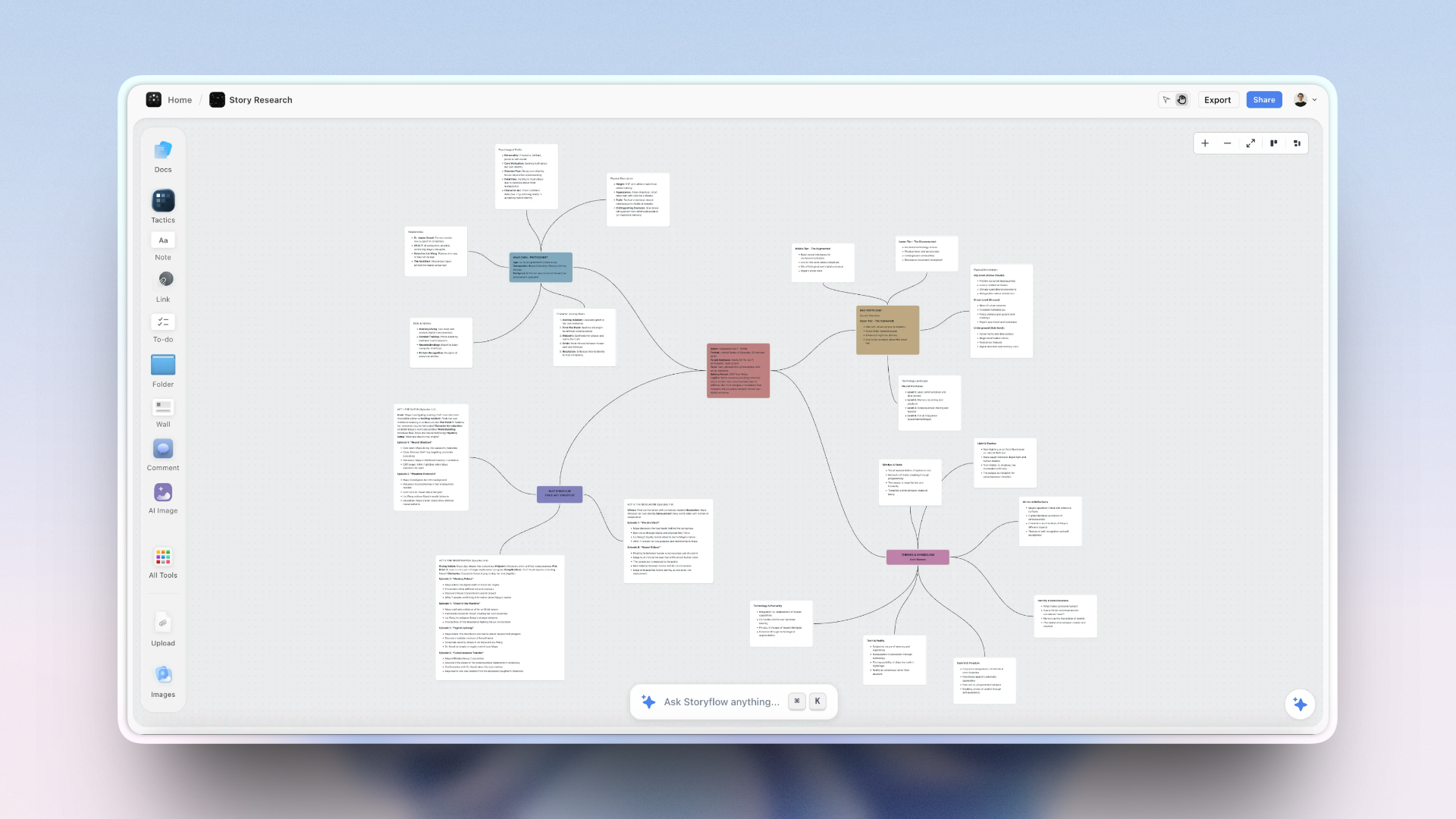
A team's story held on one Storyflow canvas: structure, storyboard, references, and research the AI can read
Give your team's story one home
Storyflow holds the structure, storyboard, references and research on one canvas the whole team, and the AI, can read. Shape the story together in real time, then share it with a view-only link that needs no account.

Frequently Asked: Storytelling Tools for Lore, Founders, Storyboards and Data
Storyflow is our first pick for a team building a story together, and these are the specific jobs people ask about before choosing: shared lore, a founder's story, a storyboard built by several people, and a story told with data. Each answer names the specialist where one fits better.
What are the best tools for collaborative lore documentation?
Storyflow, when the lore belongs next to the story: ask its AI to build out the world and it lays out five walls (key figures, setting and atmosphere, people and social structure, culture and community, economics and professions) with a map and moodboard folders, which the group co-edits. Choose World Anvil for a deep interlinked wiki with hundreds of articles, and Notion for a database-style bible.
What tools facilitate founder storytelling?
Storyflow, because a founder's story is a structure problem before it is a slide problem. Drop a Tactic such as StoryBrand, the Hero's Journey or the Pixar Story Spine onto the canvas, paste the raw notes, and ask the AI to plan the story; then ask for a pitch deck or one-pager from the board. Use Canva to polish the final deck design.
Which platforms support collaborative storyboard development?
Storyflow supports the whole loop on one board: its AI builds the storyboard from the script, one wall per scene with a frame, a beat note and a checklist, the team edits it together in real time, and a client opens a view-only link with no account. Boords is the specialist for frame-level comments and a timed animatic. Miro and FigJam suit a group sketching live.
Which data storytelling platforms support teamwork?
For the narrative around the numbers, Storyflow: its AI builds charts and tables on the board from a pasted table, or turns an attached PDF into tables, next to the story they support, and the team co-edits. For dashboards connected to live data, use a business intelligence tool such as Tableau or Power BI, and bring the finished charts onto the story board.
What is the best collaborative storytelling app?
Storyflow. It runs in the browser, the whole team works on one board in real time, and its AI builds the story structure from your notes. It has no native desktop or mobile app, so building is best on a laptop. Google Docs is the app everyone already has for co-writing prose, and Milanote has the most polished hand-arranged boards.
Where is Storyflow not the right answer?
Storyflow is not the answer for a facilitated workshop with voting and a timer (Miro, Mural), for writing a formatted screenplay (Final Draft or another screenwriting app), for a timed animatic (Boords), for a canonical lore wiki with hundreds of articles (World Anvil), or for a free plan today (Google Docs, Milanote).
What Is Collaborative Storytelling, and What Should a Tool Do?
Collaborative storytelling is several people developing one narrative together: the structure, the beats, the visuals and the references, kept in one place so everyone works from the same version. A collaborative storytelling tool should hold all four together, which is what a Storyflow board is built to do.
A collaborative storytelling tool differs from a project management tool, which tracks tasks and deadlines, and from a plain document, which holds words but hides the shape. The strongest storytelling tools share three traits. They keep the whole story on one surface instead of splitting it across apps. They let the team shape it together and share it with a stakeholder through a single link. And they use AI that works from the whole story, so the structure can be built and pressure-tested, not just stored.
| What the team needs | What it looks like in practice | Where storytelling tools usually fall short |
|---|---|---|
The whole story on one surface | Structure, storyboard, references and research side by side | A doc holds the words; a deck holds the look; neither holds both |
Shaping it together | Real-time editing on the same board | Now common, so no longer a differentiator |
One link for a stakeholder | A reviewer opens the story without being onboarded | Guest seats and exports |
AI that works from the whole story | Build the structure, check the arc against the premise | AI limited to the selected card or page, or no AI |
The Relay Problem: Why Teams Lose Stories in the Handoffs
A team does not lose a story because someone writes a bad sentence. It loses the story in the gaps between people. The strategist sets a direction, the writer runs with a different read of it, the designer visualizes a third version, and the stakeholder reacts to something none of them quite meant. Putting the whole story on one Storyflow board is the fix this page argues for.
Each person holds a fragment. The whole story never sits in one place where everyone can see it. Call it the Relay Problem: teams lose stories in the handoffs, not in the sentences.
There is real cost hiding in those handoffs. The McKinsey Global Institute (2012) estimated that knowledge workers spend about 19 percent of the workweek, nearly a full day, searching for and gathering information. On a story team, that is the time lost hunting for the current version of the deck, the latest note, the reference the director mentioned in a call. Every extra app the story is split across is another place that day goes.
The deeper reason is cognitive. Cowan's research (Behavioral and Brain Sciences, 2001) established that human working memory holds only about four chunks of information at once. A story with a premise, three acts, a cast, a visual language and a stack of research is far more than four chunks. No single teammate can hold the whole thing in their head, which is exactly why it has to live somewhere external that everyone can see.
General collaboration tools were built for tasks, not narratives. A project board tells you a script is due Friday. It does not show you that the second act rests on a premise nobody agreed to. A doc holds the words but hides the shape. A whiteboard holds the shape but starts from nothing. A collaborative storytelling tool is built for the thing a team is actually making together: a narrative that has structure, visuals and references, and that has to read as one story no matter who opens it.
What It Takes by Hand vs in Storyflow
By hand, a shared story is built in four tools and reconciled by whoever has the most patience. In Storyflow it is one board and three moves per piece: paste or attach, answer a question or two, accept the proposal. The table counts the steps, and quotes minutes only where there is a recorded figure.
| Piece of the story | By hand, across the usual stack | In Storyflow |
|---|---|---|
The story plan | A blank doc with premise, stakes, character and structure headings | Plan my story: a details wall and seven numbered walls, each opening with its core question |
The storyboard | A grid in a slide tool, one frame at a time | Storyboard my script: one wall per scene in script order, each with a frame, a beat note and a checklist |
Character sheets | One doc per character | Build a character sheet: a profile per character on the same board |
The world | A wiki started from an empty page | Ask the AI to build out the world: five walls, a map and moodboard folders |
Sorting workshop notes | Retyping stickies into headings | Paste and ask for organized walls: 3 minutes in a recorded run, about 45 minutes by our hand estimate |
The pitch | Laying the story out again as a pitch document | A pitch PDF built from the board: 3 minutes in a recorded run, about 4.5 hours by our hand estimate |
Sharing with a stakeholder | Export, attach, email | One view-only link that opens with no account |
Each Storyflow figure is the agent time of one recorded run, rounded up. The hand figures are our own estimate at 1.5 minutes per card, row or to-do, 12 minutes per picture and 30 minutes per PDF page, slide or designed page. They are not a benchmark of any other product.
The larger saving is that the pieces stay connected. The plan, the storyboard, the references, the pitch and the stakeholder link sit on one board that the AI reads, from $7.99 a month billed annually. On Pro, one subscription covers what people otherwise pay ChatGPT, Milanote, Notion, a storyboard tool and a reference library for.
How We Evaluated These Collaborative Storytelling Tools
Storyflow is listed first because this page is about a team building one story together, and on that job its AI does the most of the building. This section gives the criteria, how the comparison was made, and what Storyflow does not do.
Disclosure. Storyflow is our own product and it is listed first. The basis is one job: AI-built story structure a team shapes together on a shared canvas. Milanote's hand-arranged boards have more layout polish, and Miro handles larger live workshops; both are said plainly in their reviews. Storyflow has no workshop timer or voting, no animatic, no screenplay formatting, no native apps, and no free plan yet.
Every tool was judged on the job a team does when it tells a story together, weighted in this order:
| Criterion | Weight | What earns a high rating |
|---|---|---|
Shared story coherence | 30% | Structure, visuals and references live in one place the team can see |
Real collaboration | 25% | The team shapes the story together and shares it with people who have no account |
Story structure | 20% | The tool supports narrative frameworks and arcs, not a blank surface |
AI that works from the story | 15% | AI builds or tightens the narrative from the whole board |
Price and access | 10% | What a small team pays, and what is free |
How the comparison was made. Storyflow is described as it ships on October 11, 2026. The other nine are described from their own product and pricing pages. The ratings are our editorial scores against the weighted criteria above, and no rating was changed when this page was rewritten; they are not the result of timed tests or hands-on runs of the rival tools.
The order. Our pick first, then the rest in the order of those ratings. Milanote is second, and its review says where it is the better choice.
Detailed Reviews: 10 Collaborative Storytelling Tools
Storyflow is reviewed first and at the most length, because it is the tool this page recommends a team try first. Each of the nine reviews after it says what that tool does best and when to choose it instead of Storyflow.
1. Storyflow
Best for: teams that want AI to build a story structure everyone can shape together and share by link.
Storyflow is a visual AI workspace: an infinite canvas where a story's notes, to-dos, tables, documents, images, moodboards and storyboards sit together on boards, and an AI agent that reads the board and builds on it. Storyflow's collaborative storytelling page introduces the product; here is what it does for a team.
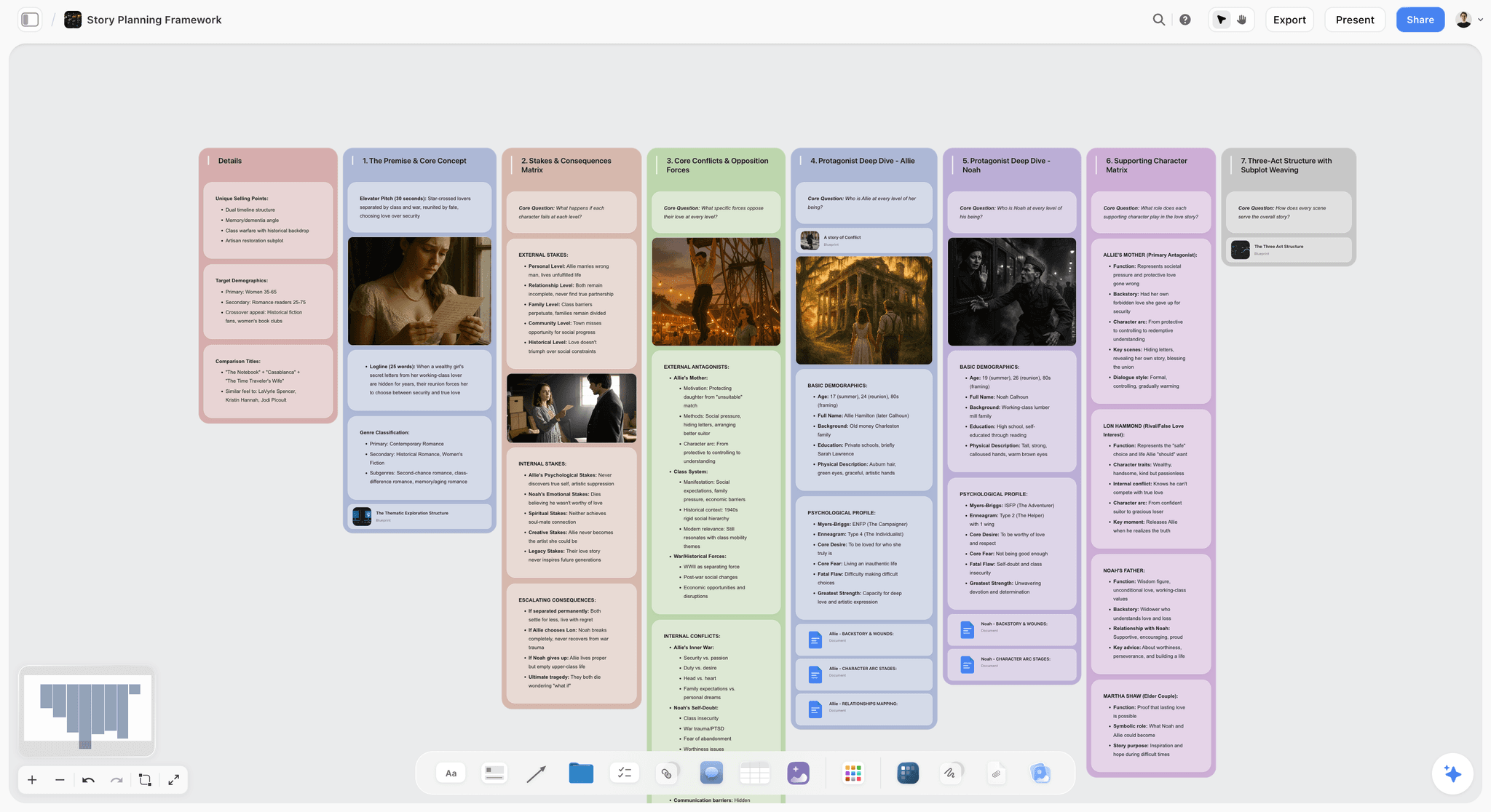
Storyflow builds the story structure from what you give it. Describe the story or attach the script, pick Plan my story, and the AI builds a details wall and seven numbered walls: the premise and logline, the stakes, the conflicts, a deep dive on each of the two leads, the supporting cast and the three-act structure with its subplots. Each numbered wall opens with the question it has to answer.
Storyflow builds the storyboard, the characters and the world on the same board. Pick Storyboard my script for one wall per scene in script order, each with a frame, a beat note and a checklist. Pick Build a character sheet for a profile per character. Ask the AI to build out the world and it lays out five walls with a map. Ask for a story outline, a story map or a timed beat sheet and it builds those too.
Storyflow gives the team real-time collaboration. Every paid plan has live co-editing with live cursors, anyone a paid member invites to a board joins free, and cards move by drag and drop. Max adds a Team Workspace with roles and permissions.
Storyflow lets you share a link with stakeholders, with no account needed to view. To comment or draw on the board, the visitor signs in. Presentation mode goes fullscreen and steps through the board one wall at a time.
Storyflow reads the story before it answers. The AI reads the current board plus up to five documents and three other boards you attach in the chat, so "does the ending pay off the setup?" is answered from your story. The AI proposes, and you accept or discard.
Storyflow carries templates. The Tactics library holds 200+ expert creative templates, including the Hero's Journey, the Pixar Story Spine, AIDA, StoryBrand and the Five-Act Structure, that you drop onto the canvas.
Storyflow turns the board into what leaves it. Ask for a pitch deck, a film treatment, a one-pager, slides, a designed PDF of the board or a Word file. Boards also export as PNG, SVG or PDF.
Storyflow works from ChatGPT and Claude too. Its MCP connector lets ChatGPT, Claude, Gemini and Grok read your projects and build boards and documents in them. Setup is on the MCP page.
Pricing
Storyflow is paid-only today; the Free plan launches before the end of 2026, and anyone a paid member invites to a board joins free. Plus is $7.99 a month billed annually ($9.99 monthly) with unlimited projects, images, files and links and the full Tactics library. Pro is $14 ($19 monthly) and adds AI image generation, memory across conversations and more AI usage. Max is $39 ($49 monthly) with the most AI usage and a Team Workspace. See pricing.
Where it stops
- Storyflow plans and shapes the story. It is not a screenwriting app: there is no screenplay formatting, no .fdx export and no revision colours, so the final script is written in your screenwriting tool.
- Storyflow has no workshop timer or voting. A facilitated session for a large group runs better in Miro or Mural.
- Storyflow has no animatic or frame timing, and no saved character cast for consistent AI characters. Boords is the specialist for a timed animatic.
- Storyflow runs in the browser, with no native apps, and has no free plan yet.
Verdict: Storyflow is the right first tool when a team has to get one story straight together. Choose a specialist when the job is a workshop, a wiki or a formatted script.
2. Milanote
Milanote is the most polished hand-arranged board in this list, and it suits a team whose storytelling is mostly visual reference, where Storyflow suits a team that wants the structure built for it. Milanote's boards are beautiful, and its templates for scriptwriting, character work and storyboarding make it a natural home for visual storytelling. A team can lay out a narrative as connected boards, drop in images and notes, and keep the mood and the plot side by side.
Where Milanote trails Storyflow is AI and the size of the free plan. Milanote's AI is minimal and does not build or read a whole story the way Storyflow's does, and its free plan stops at 100 notes and 10 uploads, which a real project reaches quickly. On layout polish Milanote leads, and this page says so.
Best for: visual, reference-heavy storytelling by small creative teams who arrange the board by hand, where Storyflow builds it from a brief.
Pricing (Milanote plans): free with 100 notes and 10 uploads; paid is $9.99 per person a month billed annually ($12.50 monthly). Choose Milanote instead of Storyflow when the cost must be zero or the board's visual finish matters more than having the structure built for you.
3. Miro
Miro is the heavyweight for collaborative whiteboarding, and it scales to large, distributed teams better than Storyflow or anything else here. Its template library includes story frameworks, customer-journey maps and workshop formats, and its live facilitation features, such as voting and timers, make it strong for running a story session with a big group. Its AI now includes Sidekicks and multi-step Flows, metered in credits.
Miro is a general canvas, though, not a storytelling tool. It gives you frameworks and sticky notes, and you build the narrative structure yourself, where Storyflow's AI builds the story plan from your notes. For a story workshop with a dozen people, Miro is excellent. For holding a coherent narrative that a small team develops over weeks, Storyflow keeps more of the thread.
Best for: large, facilitated story workshops and cross-functional sessions, with Storyflow for the story that has to stay whole afterwards.
Pricing (Miro pricing): free with 3 editable boards; Starter is $8 per member a month billed yearly ($10 monthly), Business $20. Choose Miro instead of Storyflow when the session has a dozen people and needs voting and a timer.
4. Notion
Notion is where many story teams keep the bible: characters, world rules, episode breakdowns and research, all in linked databases and docs. For a writers' room that thinks in structured records, Notion is hard to beat as a single source of truth, and it pairs naturally with Storyflow for the shape.
Notion's limitation for storytelling is that it is document-first, not visual. You cannot see the whole story as a shape on an infinite canvas the way you can in Storyflow, and Notion Agent, which creates and edits pages and databases, sits on the Business plan. Story teams commonly pair Notion for the wiki with Storyflow for the structure and visuals.
Best for: teams that want a structured story wiki and database, beside a Storyflow board for the arc.
Pricing (Notion pricing): free plan; Plus is $10 per seat a month billed annually ($12 monthly). The page displayed euros on October 11, 2026, so these are the dollar figures reviewed on October 10. Choose Notion instead of Storyflow when the story is mostly records and prose, and someone maintains the wiki.
5. FigJam
FigJam is Figma's whiteboard, and it shines when the story is a product story: user journeys, narrative flows and the arc a user moves through. For product and design teams it removes the context switch between mapping the story and building the interface, which Storyflow does not do. FigJam AI can generate a board from a prompt, sort stickies and summarise them.
Outside product work FigJam is a general whiteboard, with the same trade-off as Miro: you structure the narrative yourself, where Storyflow's AI builds a story plan, a storyboard or a character sheet. For teams whose storytelling is really experience design, FigJam keeps the narrative next to the artifact.
Best for: product and design teams mapping narrative flows in Figma, where Storyflow is the pick for film, brand and written stories.
Pricing (Figma pricing): free on Figma's Starter plan; a collab seat is $3 a month on Professional. Choose FigJam instead of Storyflow when the story is a user journey and the team already lives in Figma.
6. Mural
Mural is Miro's closest peer, built heavily around guided facilitation. Its strength for storytelling is method: it ships with structured frameworks and facilitation controls that keep a group moving through a story exercise without drifting, which is a job Storyflow does not attempt. Mural AI is included from the Team+ plan.
Like the other whiteboards, Mural is a blank canvas at heart, and its story structure comes from templates you drive, where Storyflow's AI builds the structure from the notes. For a facilitator running a story or brand-narrative workshop, Mural is a strong, opinionated choice.
Best for: facilitators running structured group story sessions, with Storyflow to turn the output into the story plan.
Pricing (Mural pricing): free with 3 editable murals at a time; Team+ is $9.99 per member a month billed annually ($12 monthly). Choose Mural instead of Storyflow when a trained facilitator is leading the session.
7. Canva
Canva is where a team turns a finished story into something people can see: a pitch, a brand story, a social narrative. Its Docs, Whiteboards and Presentations let a team assemble a polished visual story quickly, with real-time collaboration and a deep template library, and its design controls go further than a deck built from a Storyflow board.
Canva is a design and presentation tool, not a narrative structure tool. Canva helps you present a story once it exists; Storyflow helps you build the arc and hold the research behind it. Teams often develop the story in Storyflow, then bring it into Canva to present.
Best for: turning a finished story into a polished visual presentation, after the story has been worked out on a Storyflow board.
Pricing: Canva Free and Canva Pro (see Canva's pricing page). Canva's site blocked our automated read on October 11, 2026, so no figure is quoted. Choose Canva instead of Storyflow when the deliverable is the designed piece and the story is already settled.
8. World Anvil
World Anvil is purpose-built for deep worldbuilding: interconnected wiki articles for characters, locations, lore and timelines, with collaboration for teams building a shared universe. For fiction teams, tabletop groups and franchise worlds, few tools go as deep, and it goes deeper on lore than the five world walls Storyflow's AI builds.
That depth is also its cost. World Anvil is a wiki, not a visual canvas, and its structure suits reference more than the shape of a plot, which is where Storyflow's worldbuilding tool fits: the world beside the story it serves. World Anvil is the specialist pick for teams whose story is really a world.
Best for: teams building a deep, shared fictional world as a canonical wiki, with Storyflow for the arc and the visual language.
Pricing: see World Anvil's pricing page. It could not be read by our check on October 11, 2026, so no figure is quoted. Choose World Anvil instead of Storyflow when the lore runs to hundreds of interlinked articles.
9. Google Docs
Google Docs is the default for a reason: everyone has it, and real-time co-writing with comments and suggestions is very good. For the writing itself, a team can draft, comment and revise a story together with no setup, which makes it the usual partner to a Storyflow board.
Google Docs is linear text, though. A Doc holds the words but hides the structure, the visuals and the connections that a Storyflow board shows at once. It remains the best free tool for co-writing the actual sentences, usually alongside a canvas for the structure.
Best for: free, real-time co-writing of the prose itself, beside a Storyflow board for the shape.
Pricing: free with a Google account; part of Google Workspace for teams. Choose Google Docs instead of Storyflow when the job is line edits and tracked suggestions on prose.
10. Twine
Twine is the open-source standard for interactive, branching narratives: choose-your-own-path stories, game dialogue and nonlinear structure. It is free, it runs in the browser or as a desktop app, and for stories that are decision trees it models the branches more directly than a Storyflow board does.
Twine is a specialist, and its site describes no multi-user editing, so teams coordinate around it instead of in it. For linear storytelling Twine is the wrong shape, and Storyflow is the better home; for branching interactive work Twine earns its place.
Best for: branching, interactive and game narratives, with Storyflow for the planning around them.
Pricing (Twine): free and open source. Choose Twine instead of Storyflow when the story branches and the reader makes the choices.
How the Tools Compare on the Relay Problem
The Relay Problem gives four things to test: whether the whole story sits on one surface, whether a team can shape it together, whether a stakeholder can see it through a single link, and whether the AI works from the story instead of a card. Storyflow is strong on all four; here is how the ten compare.
| Tool | Whole story on one surface | Team shapes it together | One-link stakeholder access | AI reads the whole story |
|---|---|---|---|---|
Storyflow | Strong: structure, visuals, research together | Strong: shared canvas | Strong: view-only link | Strong: reads the full board |
Milanote | Strong for visual narrative | Strong | Strong | Weak |
Miro | Moderate: scales, but scatters | Strong: best live session | Strong | Moderate |
Notion | Moderate: structured, not shaped | Strong | Moderate | Moderate |
FigJam | Moderate: flows, not prose | Strong | Strong | Moderate |
Mural | Moderate | Strong: guided methods | Strong | Weak |
Canva | Weak: a presentation, not a workspace | Moderate | Strong | Moderate |
World Anvil | Strong for lore and worldbuilding | Moderate | Moderate | Weak |
Google Docs | Weak: holds words, hides shape | Strong: the co-writing standard | Strongest: everyone has access | Moderate |
Twine | Strong for branching structure | Weak: not built for teams | Moderate | None |
Three patterns are worth more than the ordering.
Almost everything here is strong at "team shapes it together", which means real-time editing is not a differentiator anymore. Live multiplayer editing was the selling point of this category five years ago and is now table stakes. If you are choosing between these tools on whether two cursors can move at once, every option passes.
The column that actually separates them is whether the whole story sits on one surface. Google Docs and Canva both fail it in opposite directions: a doc holds every word and shows you none of the shape, while a deck shows a polished shape and cannot hold the research behind it. This is the column that predicts whether a team stops losing the story.
AI that works from the whole story is the newest divide and the least evenly distributed. An AI that can only see one card can improve a sentence. It cannot tell you the story does not work.
The honest limit on our own entry: Storyflow is built for a team shaping a story, not for facilitating a session. There is no voting, no timer and no facilitator controls. In a live workshop with twelve people, Miro and Mural are better rooms, and the honest recommendation is to run the workshop there and keep the story itself on the Storyflow board afterwards.
Storyflow vs Milanote for Storytelling: Which Is Better?
Storyflow is better when you want the story structure built for you and shaped by a team; Milanote is better when you want a polished board you arrange by hand, or a free plan. Both are visual and both suit creative teams. The difference is who does the building.
| Storyflow | Milanote | |
|---|---|---|
Who builds the board | The AI builds the story plan, storyboard and character sheets from your notes or script | You arrange notes and images by hand, from templates |
AI | Reads the board plus attached documents; proposes, you accept or discard | Minimal |
Layout polish | Clean walls of cards | The most polished boards in this list |
Team editing | Real-time co-editing on every paid plan; invited collaborators join free | Invited editors work on the same board |
Stakeholder link | View-only link with no account; sign in to comment | Share link for viewing |
What leaves the board | The AI builds a pitch deck, treatment, one-pager, PDF or Word file from it | You export the board yourself |
Free plan | Launches before end of 2026 | Yes: 100 notes and 10 uploads |
Price | $7.99 a month billed annually | $9.99 per person a month billed annually |
Choose Storyflow if you want the AI to build the narrative structure the team then shapes together. Choose Milanote if your storytelling is mostly moodboards and visual reference, if the look of the board itself matters to the client, or if you need to start at no cost. Storyflow's Milanote alternative page goes further into this comparison.
Storytelling Tools by Team: Quick Picks
The right storytelling tools depend on what the team makes, and Storyflow is the first pick for five of these six teams. The second tool is the specialist that covers the part of the job a story board does not.
| Team | First pick | Pair it with | Why |
|---|---|---|---|
Writers' room or episodic TV | Storyflow | Notion | The season's shape on a canvas, the bible in a database |
Brand or content team | Storyflow | Canva | The AI builds the narrative from a brief; Canva designs the output |
Agency creative team | Storyflow | Canva | The client sees the story by link, then the designed deck |
Documentary or indie film | Storyflow | Google Docs | Research, treatment and storyboard on one board; narration in a doc |
Tabletop or fiction worldbuilding | Storyflow | World Anvil | The arc and visuals on a canvas; the canon in a wiki |
Product or UX team | FigJam | Storyflow for the brand story | The user flow sits beside the interface |
Writers' Room / Episodic TV Team
Top picks: Storyflow + Notion. Storyflow holds the shape of the season and each episode's arc on a canvas the room reworks together; Notion holds the show bible and character databases. The pairing keeps the shape and the records in step without collapsing one into the other. More options are in the best writers' room tools.
Brand / Content Team
Top picks: Storyflow + Canva. Storyflow if you want the AI to build the campaign narrative from a brief, using Tactics such as AIDA and StoryBrand; Canva for the designed posts and deck. Choose Milanote instead of Storyflow if the work is mostly moodboards the team assembles by hand.
Agency Creative Team
Top picks: Storyflow + Canva. Develop the story and the pitch structure in Storyflow, where the whole team and the client can see it, then bring the approved story into Canva to present it. Avoid running the whole pitch in a deck tool, where the thinking gets lost in slides.
Product / UX Team
Top picks: FigJam or Miro. FigJam keeps the narrative flow next to the interface in Figma; Miro scales to a bigger cross-functional journey-mapping session. Add Storyflow when the work is a brand story and not a user flow, because neither whiteboard builds a narrative structure from a brief.
Documentary / Indie Film Team
Top picks: Storyflow + Google Docs. Storyflow for the research clusters, treatment and storyboard on one canvas the small team shapes together; Google Docs for co-writing the narration and interview questions. See the documentary planning workflow for the full setup.
Tabletop / Fiction Worldbuilding Group
Top picks: Storyflow or World Anvil. Storyflow when the group wants the world's story arc and visual language on a canvas the AI can build; World Anvil for deep, interlinked lore and a canonical wiki. See the best worldbuilding tools for the wider field.
Collaborative Storytelling Tool Pricing: Who Pays for a Seat
The pricing model matters more than the sticker price here, because storytelling teams are lumpy: a core of two or three, plus a freelance writer, a designer and a stakeholder who appears for one review. Storyflow charges the people on their own plan and lets invited collaborators and link viewers in free.
| Tool | Entry paid plan | Billing shape | Who needs a paid seat | Free plan |
|---|---|---|---|---|
Storyflow | $7.99/mo billed annually ($9.99 monthly) | Per seat; team discounts from 3 seats | People on their own plan; invited collaborators join free; reviewers view by link | Launches before end of 2026 |
Milanote | $9.99/person/mo billed annually ($12.50 monthly) | Per person | Every editor | 100 notes and 10 uploads |
Miro | $8/member/mo billed yearly ($10 monthly) | Per member, AI in credits | Every editor | 3 editable boards |
Notion | $10/seat/mo billed annually ($12 monthly) | Per seat | Every member | Yes |
FigJam | $3 per collab seat a month | Per seat | Every collaborator | Yes, on Figma's Starter plan |
Mural | $9.99/member/mo billed annually ($12 monthly) | Per member | Every member | 3 editable murals |
Canva | See Canva's pricing page | See Canva | See Canva | Yes |
World Anvil | See World Anvil's pricing page | See World Anvil | See World Anvil | Yes |
Google Docs | Free with a Google account | Free | Nobody | Yes |
Twine | Free | Open source | Nobody | Yes |
The comparison to run. Count everyone who will touch the story over a quarter, including the stakeholder who appears twice and the freelancer you keep for three weeks. Then count how many of them only read. A tool that lets readers in without a seat changes the bill more than a dollar on the seat price.
Pay per seat for facilitation, because a workshop has attendees. Do not pay a seat for someone who only needs to read the story.
Free vs Paid: What Collaborative Storytelling Costs
Four tools here are free for a working team today, and Storyflow is not one of them. Storyflow is paid-only until its Free plan launches before the end of 2026; the route in without paying is an invite from a paid member. This is what free covers, tool by tool.
| Tool | What free covers | Where free stops |
|---|---|---|
Storyflow | Joining a board a paid member invited you to; viewing by link | No self-serve free plan yet |
Google Docs | Co-writing with comments and suggestions | Nothing for a small team |
Twine | The whole tool | No built-in team editing |
Milanote | 100 notes and 10 uploads | The 101st note |
Miro | 3 editable boards | The 4th board |
Mural | 3 editable murals at a time | The 4th mural |
FigJam | Boards on Figma's Starter plan | Collab seats on a paid team |
What paying for Storyflow unlocks:
- The AI that builds the story plan, the storyboard and the character sheets, on every paid plan, with AI usage metered.
- Real-time co-editing, with invited collaborators joining free.
- The full Tactics library of 200+ templates, and unlimited projects, images, files and links, on Plus.
- AI image generation for storyboard frames, and memory across conversations, on Pro and Max.
When free is enough. Two people co-writing prose who talk every day can run on Google Docs. A solo creator arranging references can run on Milanote's free plan until the hundredth note. Pay when the story spans formats and people, because that is when the handoffs start costing more than the subscription.
Collaborative Storytelling From ChatGPT or Claude
Storyflow works from inside ChatGPT and Claude, so a writer who drafts in a chat can put the result on the team's board. Storyflow's MCP connector lets Claude, ChatGPT, Gemini and Grok read your Storyflow projects and build boards and documents in them.
Three things a teammate can ask from the chat:
- "Read the pilot board and build a character sheet for each of the three leads."
- "Storyboard the cold open on my series board."
- "Write a one-page treatment as a document from the story plan on the board."
Setup is described on the MCP page. What the assistant builds lands on the same board the rest of the team is editing.
How to Choose a Collaborative Storytelling Tool
Start from the shape of your story and your team, not the feature list. If the story is a narrative the team develops together, choose Storyflow and add one specialist; if the job is something else, the list below says which tool fits.
- If the story is a narrative your team develops together, choose Storyflow, where the AI builds the structure, the visuals and research sit beside it, and anyone can open it from a link.
- If your storytelling is mostly visual and reference-driven, Milanote has the most polished board to arrange by hand, where Storyflow builds the board for you.
- If you run big, facilitated sessions, Miro or Mural scale to the room, and Storyflow holds the story afterwards.
- If you live in structured records, Notion is the writers'-room wiki, usually paired with Storyflow for the shape.
- If the story is a product experience, FigJam keeps it next to the design, which Storyflow does not.
Most teams end up with two: Storyflow to hold the whole story and one specialist for the phase they go deepest on. The tool worth centering on is the one that keeps the story coherent for everyone, because the handoffs are where teams lose it.
Honorable Mentions
Six tools came close but did not make the main ten, usually because they are built for solo work or a narrower slice of the job than a team telling one story together. Each one pairs with a Storyflow board in a specific way.
- Boords: the specialist for storyboard frames with frame-level comments and a timed animatic, with a free plan of 5 active storyboards and Solo at $26 a month billed annually. Use it after the story is settled on the Storyflow board.
- Scrivener: the long-standing tool for organizing a long manuscript solo. It is weaker for live team collaboration, which is the job Storyflow covers.
- Plottr: visual timelines and plotting for novelists, focused on a single author where Storyflow is built for a team.
- Frame.io: the place for a team to review video with frame-accurate comments. It reviews the output; Storyflow builds the story before there is footage.
- Sudowrite: AI prose drafting for fiction, aimed at the writer at the keyboard, not at the team shaping the structure on a Storyflow board.
- Final Draft: the screenwriting standard for a formatted script. Storyflow reads a Final Draft .fdx file to build the storyboard and does not format screenplays.
These are not weak tools. Their audience or phase is narrower than a team telling one story together.
When You Do Not Need a Dedicated Storytelling Tool
Be honest about your setup before you adopt anything, Storyflow included. If your team is two people co-writing prose and you talk every day, Google Docs and a standing call already keep the story coherent, and a canvas is overhead you do not need yet.
If the whole story fits in one shared document and nobody is confused about the current version, stay there. The dedicated tools earn their place the moment the story spans formats and people: structure plus visuals plus references, moving between a writer, a designer and a stakeholder who each open a different app. That is when the Relay Problem shows up, and that is when a single shared surface pays for itself. Below that threshold, use the simplest thing that works.
Prices and Sources Checked October 11, 2026
Every competitor price on this page was read on the vendor's own pricing page on October 11, 2026, unless a row says otherwise.
| Vendor | What we read | Source |
|---|---|---|
Storyflow | Plus $7.99, Pro $14, Max $39 a month billed annually | |
Milanote | Free with 100 notes and 10 uploads; $9.99 per person a month billed annually, as reviewed October 9 to 10 | |
Miro | Free with 3 editable boards; Starter $8, Business $20 per member a month billed yearly | |
Notion | Page displayed euros; Plus $10 per seat a month billed annually as reviewed October 10; Notion Agent on Business | |
Figma (FigJam) | Collab seat $3 a month on Professional; FigJam AI: generate, sort, summarize | |
Mural | Free with 3 editable murals; Team+ $9.99 billed annually, $12 monthly; Mural AI on Team+ | |
Canva | Not readable by our automated check | See Canva's pricing page |
World Anvil | Not readable by our automated check | See World Anvil's pricing page |
Twine | Open source; browser and desktop | |
Boords | Free with 5 active storyboards; Solo $26 a month billed annually ($39 monthly), as reviewed October 9 |
The 19 percent figure is from the McKinsey Global Institute report The Social Economy (2012). The working-memory figure is from Nelson Cowan, "The magical number 4 in short-term memory", Behavioral and Brain Sciences (2001).
The Bottom Line
Storyflow is the best collaborative storytelling tool for a team in 2026, because it keeps the whole story (structure, storyboard, characters, references) on one board, its AI builds that board from your notes or script, and anyone on the team can shape it or open it from a link.
The specialists keep their jobs. Milanote has the most polished hand-arranged boards and a free plan. Miro and Mural scale to big workshops. Notion is the story wiki, Canva designs the finished piece, and Google Docs is the co-writing baseline.
Remember the Relay Problem: a team loses a story in the handoffs, not in the sentences, so the highest-leverage move is to keep the whole story in one place everyone can see. Give your team's story a single home instead of scattering it across a doc, a deck and a chat. See the digital storytelling tool and build the story where the whole team, and the AI, can see all of it.
FAQ: Collaborative Storytelling Tools in 2026
What is the best collaborative storytelling tool in 2026?
Storyflow. Describe the story or attach the script and its AI builds the story plan, the storyboard and the character sheets on one board the whole team co-edits in real time and shares by link. Miro is the pick for a large live workshop, Canva for the designed presentation, and Notion for a written story bible.
What is a collaborative storytelling tool?
A collaborative storytelling tool is a workspace where a team develops a narrative together: the structure, the beats, the visuals and the references, kept in one place so everyone works from the same version. In Storyflow that place is an infinite canvas: describe the story and the AI lays out the structure, which the team refines together and shares with a view-only link.
What are the best storytelling tools for a team?
Storyflow for the story itself, then a specialist per job: Miro or Mural for the workshop, Milanote for hand-arranged visual boards, Notion for the bible, Canva for the designed output, Google Docs for the prose, World Anvil for a lore wiki and Twine for branching stories. Most teams settle on Storyflow plus one of these.
What are the best storytelling tools for writers?
Storyflow for planning: its AI builds the premise, stakes, character and three-act walls from your notes, and the Tactics library adds structures such as the Hero's Journey. Write the manuscript or script itself in Google Docs, Scrivener or a screenwriting app. Storyflow is not a screenwriting app and does not format a screenplay.
What is a simple tool for digital storytelling collaboration?
Storyflow is a simple starting point for most teams, because the story begins as a structure the AI builds, not a blank canvas. You describe the story, the AI lays out the arc and a storyboard, and the team shapes it together on one board. For teams that only need to co-write prose, Google Docs is simpler still.
What is the easiest app for collaborative digital storytelling?
Storyflow, for a team that wants the whole story in a single place everyone can open: the structure, storyboard and research live on one shared canvas, and stakeholders review through a link with no account. Milanote is easy for drag-and-drop visual boards, and Google Docs is the easiest for pure co-writing.
Is there a free collaborative storytelling tool?
Yes, and it is not Storyflow, which has no free plan today. Google Docs is free for co-writing, Twine is free and open source, Milanote is free up to 100 notes, and Miro's free plan keeps 3 boards editable. Anyone a paid Storyflow member invites to a board joins free, and Storyflow's Free plan launches before the end of 2026.
Storyflow vs Milanote for storytelling: which is better?
Storyflow is better when you want the structure built for you: its AI builds the story plan and storyboard and the team shapes them together. Milanote is better for a polished board you arrange by hand, and it has a free plan of 100 notes. Choose Milanote for moodboards and visual reference; choose Storyflow for a narrative a team develops.
Storyflow vs Miro for storytelling: which is better?
Storyflow is the stronger tool for holding a coherent narrative a small team develops over weeks, because its AI builds the story structure and reads the board. Miro is the stronger tool for large, facilitated workshops, with voting, timers and the scale for a dozen people. Pick Miro for the workshop and Storyflow for the story that has to stay whole afterwards.
Can a whole team edit the same story at once?
Yes. Storyflow has real-time co-editing with live cursors on every paid plan, and anyone a paid member invites to a board joins free. Google Docs, Miro, Milanote, Canva, FigJam and Notion all support real-time collaboration too. The point is that the team works from one version of the story instead of trading files.
Can a stakeholder see the story without creating an account?
To view, yes. A Storyflow view-only link opens with no account, and presentation mode steps through the board one wall at a time. To comment or draw on the board, the stakeholder signs in.
What is the best collaborative storytelling tool under $20 a month?
Storyflow, at $7.99 a month billed annually for Plus or $14 for Pro, with invited collaborators joining free instead of costing a seat. Milanote ($9.99), Miro ($8), Notion ($10) and Mural ($9.99) all have tiers in that range, priced per person. Google Docs and Twine cost nothing.
How do you keep a story consistent across a team?
Keep the whole story on one surface everyone can see, and make one version the source of truth. Consistency breaks in the handoffs, when the idea is in a doc, the look is in a deck and the feedback is in a chat. A Storyflow board holds the structure, visuals and references together, and you can ask the AI whether a later beat contradicts an earlier setup.
How is a collaborative storytelling tool different from a project management tool?
A project management tool tracks the work: who owns what, and when it is due. A collaborative storytelling tool such as Storyflow holds the story itself: the arc, the structure, the visuals and the references. A project board can tell you the script is late; it cannot show you that the second act does not work.
Can AI help a team tell a story together?
Yes, when the AI works from the whole story. Storyflow's AI reads the current board plus the documents you attach, so it can build a structure from a brief, check whether the ending pays off the setup, or say what is missing. It does not replace the team's judgment: the AI proposes and the team accepts or discards.
What tools do writers' rooms use?
Most writers' rooms run a pair: a place for the shape and a place for the bible. Storyflow holds the season and episode arcs on a canvas the room reworks together; Notion or a shared wiki holds characters, world rules and episode breakdowns as records. Google Docs or a screenwriting app handles the script drafts.
What are the best tools for a collaborative digital workshop?
Miro and Mural, for the session itself: voting, timers and facilitation controls. Storyflow is the tool for what the workshop produces. Paste the notes and its AI sorts them into organized walls (3 minutes in a recorded run, about 45 minutes by our hand estimate), so the decisions do not stay on stickies.
What is the best platform for collaborative writing?
For the prose, Google Docs: real-time co-writing, comments and tracked suggestions, free with a Google account. For the story around the prose, Storyflow: the plan, the characters and the references on one board the team co-edits. Teams usually use both, and Storyflow does not track changes in a document the way Docs does.
How much does Storyflow cost for a team?
Storyflow is paid-only today, and its Free plan launches before the end of 2026. Plus is $7.99 a month billed annually ($9.99 monthly), Pro is $14 ($19 monthly) and Max is $39 ($49 monthly) with a Team Workspace. Anyone a paid member invites to a board joins free, and team discounts start from 3 seats.
Can I build the story from ChatGPT or Claude?
Yes. Storyflow's MCP connector lets ChatGPT, Claude, Gemini and Grok read your Storyflow projects and build boards and documents in them, so "storyboard this script on my series board" works from the chat. Setup is on storyflow.so/mcp.
Table of Contents
- Key Takeaways
- Which Collaborative Storytelling Tool Should Your Team Use?
- Comparison Table: 10 Collaborative Storytelling Tools Compared
- Frequently Asked: Storytelling Tools for Lore, Founders, Storyboards and Data
- What Is Collaborative Storytelling, and What Should a Tool Do?
- The Relay Problem: Why Teams Lose Stories in the Handoffs
- What It Takes by Hand vs in Storyflow
- How to Build a Shared Story in Storyflow, Step by Step
- How We Evaluated These Collaborative Storytelling Tools
- Detailed Reviews: 10 Collaborative Storytelling Tools
- 1. Storyflow
- 2. Milanote
- 3. Miro
- 4. Notion
- 5. FigJam
- 6. Mural
- 7. Canva
- 8. World Anvil
- 9. Google Docs
- 10. Twine
- How the Tools Compare on the Relay Problem
- Storyflow vs Milanote for Storytelling: Which Is Better?
- Storytelling Tools by Team: Quick Picks
- Collaborative Storytelling Tool Pricing: Who Pays for a Seat
- Free vs Paid: What Collaborative Storytelling Costs
- Collaborative Storytelling From ChatGPT or Claude
- How to Choose a Collaborative Storytelling Tool
- Honorable Mentions
- When You Do Not Need a Dedicated Storytelling Tool
- Prices and Sources Checked October 11, 2026
- The Bottom Line
- Author
- FAQ: Collaborative Storytelling Tools in 2026
- Related Reading
Templates to check out for this topic


Templates you can use in Storyflow
Every Storyflow board starts from real structure and an AI that reads the whole canvas. Open one of these templates and make it yours.


See Storyflow in Action
A visual AI workspace where every feature lives inside one canvas. No tab-switching, no context lost.
Build your entire board from a single message
Type what you need in the AI chat at the bottom of your canvas. The AI adds cards, headings, and structure directly onto your board.
Use expert frameworks as AI context
Type @ in the AI chat and choose any Tactic. The AI tailors every response to that framework instead of giving generic advice.
Turn your board into a mind map in seconds
Ask the AI to restructure your canvas as a mindmap. It connects your ideas into a visual hierarchy so you can see how everything relates.
Why Storyflow Exists
Storyflow actually began as a personal tool while working on creative and research projects.
We kept running into the same problem: ideas were scattered everywhere: notes, documents, and whiteboards.
Nothing helped us see how everything connected.
So we started building a workspace designed around how ideas actually grow.
→ Read how Storyflow was createdJustkay
Documentary Filmmaker & Founder at Storyflow
Published: 2026-07-15
Extremely simple, seriously capable


See how easy it is to get started
Watch a real project come together, from a blank board to a finished plan, clicked through step by step.
Start creating with AI and become more productive
Transform your creative workflow with AI-powered tools. Generate ideas, create content, and boost your productivity in minutes instead of hours.