The 9 Easiest Digital Storytelling Tools in 2026
The easiest digital storytelling tools in 2026, ranked by how fast a non-technical person gets from a blank screen to a shared story draft. Nine tools timed from sign-up to a link a teammate can open, from Storyflow and Google Docs to Milanote and Padlet.

Category
Digital Storytelling
Author

Justkay
Documentary Filmmaker & Founder at Storyflow
Topics
2026-07-20
•
17 min read
•
Digital Storytelling- easiest digital storytelling tools
- simple digital storytelling tool
- collaborative digital storytelling
- easy digital storytelling app for beginners
- digital storytelling tool for classrooms
- digital storytelling collaboration
What are the easiest digital storytelling tools in 2026?
The easiest digital storytelling tools in 2026 are Storyflow (easiest path from idea to a shared visual story, about 10 minutes), Google Docs (the zero-learning-curve baseline for text-only stories, about 5 minutes), Milanote (equally easy for moodboard-style visual stories), and Padlet (the simplest wall for classrooms and groups). If you want a simple tool for digital storytelling collaboration, start with Storyflow: sign up, open a Story Blueprint, drag in images and notes, and send a share link that collaborators open without creating an account. Every tool in this guide was ranked on one measure: the First-Story Clock, the time it takes a non-technical person to go from opening the tool for the first time to a story draft a teammate can actually see. Not a finished story. A draft with a beginning, images, and a link. I build story boards for a living, and I have watched capable, intelligent people abandon a story because the tool asked for 45 minutes of learning before it allowed 5 minutes of telling. So this list is timed, not vibes-ranked, and it is honest about the places a plain Google Doc beats everything else on it.

Full disclosure: Storyflow is our own product, and we rank it #1 for one specific job: getting a non-technical person or small team from idea to an easy, collaborative digital story on a canvas fastest, about 10 minutes to a shared draft. We concede plainly where it loses: a plain Google Doc is easier for a text-only story, Milanote is just as easy for a pure moodboard, Padlet is simpler for a classroom wall, and Canva wins when the output must be a designed artifact. Every tool is linked so you can judge for yourself.
Quick Comparison
These four sit at the easy end of the range: a visual story canvas, a text baseline everyone already knows, a moodboard board, and a group story wall.
| Tool | Best For | AI Features | Price |
|---|---|---|---|
| Storyflow | Shared visual story from a blueprint | AI reads your whole board | $7.99 mo annual (free plan late 2026) |
| Google Docs | Text-only stories, no learning curve | No built-in story AI | Free |
| Milanote | Moodboard-style visual stories | Light AI | Free / ~$9.99 mo annual |
| Padlet | Simple shared wall for groups | Minimal AI | Free / ~$7 mo |
Comparison Table: The 9 Easiest Digital Storytelling Tools at a Glance
| Tool | Time to first story | Best for | Learning curve | Collaboration on free plan | Starting price | Rating (/10) |
|---|---|---|---|---|---|---|
Storyflow | ~10 min | A shared visual story with structure | Low | Unlimited, link-based (free plan late 2026) | $7.99 mo annual (free plan late 2026) | 9.3/10 |
Google Docs | ~5 min | Text-only stories, zero setup | None | Unlimited, link-based | Free | 9.0/10 |
Milanote | ~10 min | Moodboard-style visual stories | Low | Yes, 100-card cap | Free / ~$9.99 mo annual | 8.9/10 |
Padlet | ~8 min | Classroom and group story walls | Very low | Yes, 3-board cap | Free / ~$7 mo | 8.6/10 |
Canva | ~15 min | A designed, presentable story artifact | Low-medium | Yes | Free / ~$15 mo | 8.4/10 |
Book Creator | ~15 min | Digital books in schools | Very low | Teacher-managed libraries | Free / ~$15 mo | 8.1/10 |
Adobe Express | ~20 min | Branded story pages and video | Medium | Limited on free | Free / ~$10 mo | 7.5/10 |
Notion | ~30 min | Stories inside a structured workspace | Medium-high | Yes, guest limits | Free / ~$10 user mo | 7.2/10 |
Prezi | ~45 min | Animated presentation storytelling | High | Limited on free | Free / ~$7 mo | 6.8/10 |
Time to first story is our practical estimate from running the same onboarding test on each tool (details in the methodology section); your result will vary with your familiarity and your story. Pricing is as of July 2026 and moves often, so verify on each vendor's site.
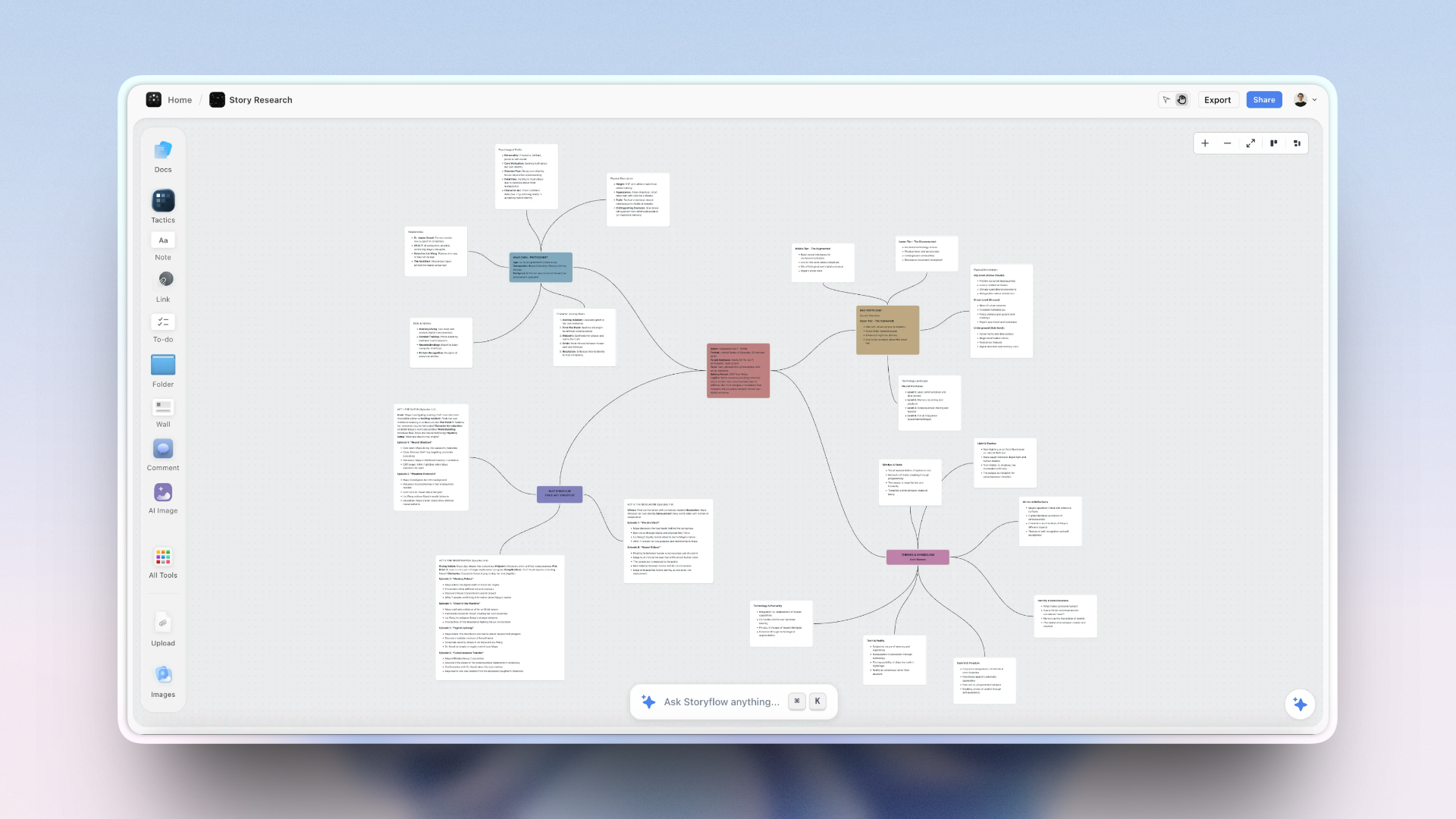
A collaborative digital story built on a Storyflow canvas: a Story Blueprint filled with beats, images, and notes a teammate opens from a link
Get from blank screen to shared story in about ten minutes
Storyflow starts you on a Story Blueprint instead of an empty canvas, then shares with a link collaborators open without an account, which is exactly the two segments of the First-Story Clock that slow every other tool down. No 45-minute learning curve before you get to tell the story. Free to start.

The 9 Easiest Digital Storytelling Tools, Ranked
- Storyflow: easiest full path from idea to a shared visual story draft
- Google Docs: the zero-learning-curve baseline, if your story is text only
- Milanote: just as easy when the story is a board of images and fragments
- Padlet: the simplest surface of all, best for classrooms and groups
- Canva: easy, and the winner when the output must look designed
- Book Creator: the easiest way for students to make an actual digital book
- Adobe Express: quick branded story pages, with an Adobe-shaped detour
- Notion: manageable, but you learn the workspace before you tell the story
- Prezi: distinctive results behind the steepest learning curve on this list
Key Takeaways
- Easy is measured in minutes, not features. A tool with 40 features you will not touch in week one is not easier than one with 12 you use in the first ten minutes.
- The First-Story Clock has three segments: sign-up to surface, surface to structure, and structure to shared. Tools fail on different segments, so the fastest tool overall is rarely the fastest at your particular blocker.
- Google Docs posts the fastest raw time (about 5 minutes) and still ranks second, because a wall of text is only a digital story if your story needs no images, no visual sequence, and no structure.
- Storyflow ranks first at about 10 minutes because it collapses segment 2, the blank-canvas problem, with story frameworks and an AI that structures the draft. It is not the fastest to open and it is not a presentation tool.
- Segment 3 is the one that quietly ruins otherwise easy tools. If your collaborator needs an account, an invite email, and a role before they can see a draft, the collaboration tax eats everything the first two segments saved.
- Every tool here has a real free tier, and Storyflow's launches before the end of 2026, so ease should decide this rather than price.
The First-Story Clock: What "Easy" Actually Measures
Tool roundups usually rank power: feature lists, integrations, export formats. Ease is a different axis, and it deserves its own measurement. So every tool here was put on the First-Story Clock: the elapsed time from first opening the tool to a shared story draft, timed as one run by someone who had never used it.
The First-Story Clock has three segments, and tools fail on different ones.
Segment 1: Sign-up to surface. Account creation, workspace questions, onboarding carousels. Some tools put you on a canvas in under a minute. Others interrogate you about your team size first.
Segment 2: Surface to structure. The blank-canvas problem. A story needs a beginning, a middle, and an end, and the biggest time cost in most tools is deciding how to start. Templates, prompts, and story frameworks collapse this segment; an empty white rectangle inflates it.
Segment 3: Structure to shared. The collaboration tax. A story becomes digital storytelling when someone else can experience it. If your collaborator needs an account, an invitation email, and a role assignment before they can see a draft, this segment eats everything the first two saved.
Here is the principle behind the whole ranking: easy is measured in minutes, not features. A tool with 40 features you will not touch in week one is not easier than a tool with 12 you use in the first ten minutes. The research backs the instinct. Cowan's working-memory studies (Behavioral and Brain Sciences, 2001) put the number of chunks a person can hold at once at about four; an interface that asks a first-time storyteller to juggle panels, permissions, and format decisions has already spent that budget before the story starts. And the McKinsey Global Institute (2012) estimated knowledge workers lose about 19 percent of their week just searching for information, which is what happens to a story scattered across a doc, a folder, and a chat thread. An easy tool wins by keeping the whole story on one surface a beginner can hold in their head.
The First-Story Clock is why this list is not sorted purely by raw minutes. Google Docs posts the fastest time of all, but a wall of text is only a digital story if your story needs no images, no structure, and no visual sequence. The ranking weighs the clock against how much of a real digital story (media, narrative shape, shareability) the tool gives you for those minutes.
How the Tools Compare on the Three Segments
Since the ranking is a clock rather than a feature count, here is where each tool spends its minutes. Read the column for the segment you keep losing.
| Tool | 1 Sign-up to surface | 2 Surface to structure | 3 Structure to shared | Total |
|---|---|---|---|---|
Storyflow | Moderate: account first | Fast: frameworks and AI draft the shape | Fast: view-only link, no account needed | ~10 min |
Google Docs | Fastest: everyone has an account | Slow: a blank page has no shape | Fastest: link sharing everyone knows | ~5 min |
Milanote | Fast | Moderate: freeform, you arrange it | Moderate: link sharing, 100-card cap | ~10 min |
Padlet | Fast | Fast: wall format is the structure | Fast: link to a board, 3-board cap | ~8 min |
Canva | Moderate | Moderate: templates give layout, not narrative | Moderate | ~15 min |
Book Creator | Moderate | Fast: the book format is the structure | Slow: teacher-managed libraries | ~15 min |
Adobe Express | Slow: heavier onboarding | Moderate | Slow: limited on free | ~20 min |
Notion | Slow: workspace setup first | Slow: you build the structure | Moderate: guest limits | ~30 min |
Prezi | Slowest | Slow: the format needs learning | Slow: limited on free | ~45 min |
Three things follow, and they are more useful than the total column.
Nobody is fast at all three, and the two fastest tools are fast for opposite reasons. Google Docs wins segments 1 and 3 because it has no structure to learn and everyone already has an account; it loses segment 2 entirely, because a blank page tells you nothing about how a story should go. Storyflow wins segment 2 and pays for it in segment 1 with an account step. The fastest tool overall is not the fastest tool for you unless it is fast at the segment you are actually stuck on.
Segment 2 is where the real differences live. Sign-up friction costs a minute or two at most, and link sharing is either free or it is not. The blank canvas costs the other twenty. Any tool that hands a first-time storyteller an empty rectangle has quietly made the hardest part of the job their problem.
Segment 3 is a cliff, not a slope. Either your collaborator can open a link, or they need an account, an invite, and a role. Book Creator, Notion, Adobe Express and Prezi all fall off that cliff on their free tiers, which is why their totals are so much worse than their interfaces suggest.
The honest limit on our own entry: Storyflow makes you create an account before you see a canvas, so it will never beat Google Docs or Padlet on segment 1, and it is not a presentation tool. If your story is pure prose, Docs is genuinely the faster and better answer, and if it has to end as an animated presentation, Prezi's slow clock is buying something we do not offer.
How We Evaluated These Tools
The same test on every tool: a first-time user builds a three-part story draft (a short founder story with six images and captions) and shares it with one collaborator. Five criteria, in order of weight:
- First-Story Clock time. The full run, sign-up to shared draft, timed. The heaviest weight, because this list is about ease.
- Blank-canvas friction. Does the tool offer a story structure to start from (templates, blueprints, prompts), or does it hand you an empty surface and wish you luck?
- Collaboration simplicity. Can a teammate open and react to the draft from a link, without an account, an invite flow, or a seat assignment?
- Media range. Text, images, video, audio, links. A digital story is more than typed words, and a text-only tool caps how far ease can take you.
- Free-plan honesty. What the first story costs: $0 should buy the whole first-story run, not a trial that expires mid-draft.
Times are practical estimates from our runs in mid-2026, not lab benchmarks. A confident Canva user will beat our Canva time; a first-time Notion user may double ours.
Quick Picks by What Is Slowing You Down
The right tool depends on which segment of the clock you are losing. Each pick names the one it fixes.
Best for a shared visual story with structure: Storyflow
The pick when the blank canvas is your blocker. Story frameworks and an AI that drafts the shape collapse segment 2, and a view-only link collapses segment 3. About 10 minutes to a shared draft, paid-only during early access, with a Free plan arriving before the end of 2026.
Best for the absolute fastest start: Google Docs
The pick when your story is words and you want zero setup. About 5 minutes, free, and everyone already has an account, which makes segment 3 nearly free too.
Best for moodboard-style visual stories: Milanote
The pick when the story is carried by images arranged by feel rather than by narrative structure. Low learning curve, free tier with a 100-card cap.
Best for classroom and group story walls: Padlet
The pick for a group building a story wall together, especially in teaching. Very low learning curve and about 8 minutes, with a 3-board free cap.
Best for a designed, presentable artifact: Canva
The pick when the story has to look finished for an audience. About 15 minutes, and the extra time buys polish rather than structure.
Best for digital books in schools: Book Creator
The pick when the output is specifically a book that students publish and read. Very low curve, teacher-managed libraries.
Best free way to share with anyone: Google Docs
Google Docs gives unlimited link-based sharing at $0, which is the segment most free tiers restrict. Storyflow matches that unlimited, no-account sharing on its paid plans today, and the same sharing arrives on its own Free plan before the end of 2026.
Detailed Reviews: The 9 Easiest Digital Storytelling Tools
1. Storyflow
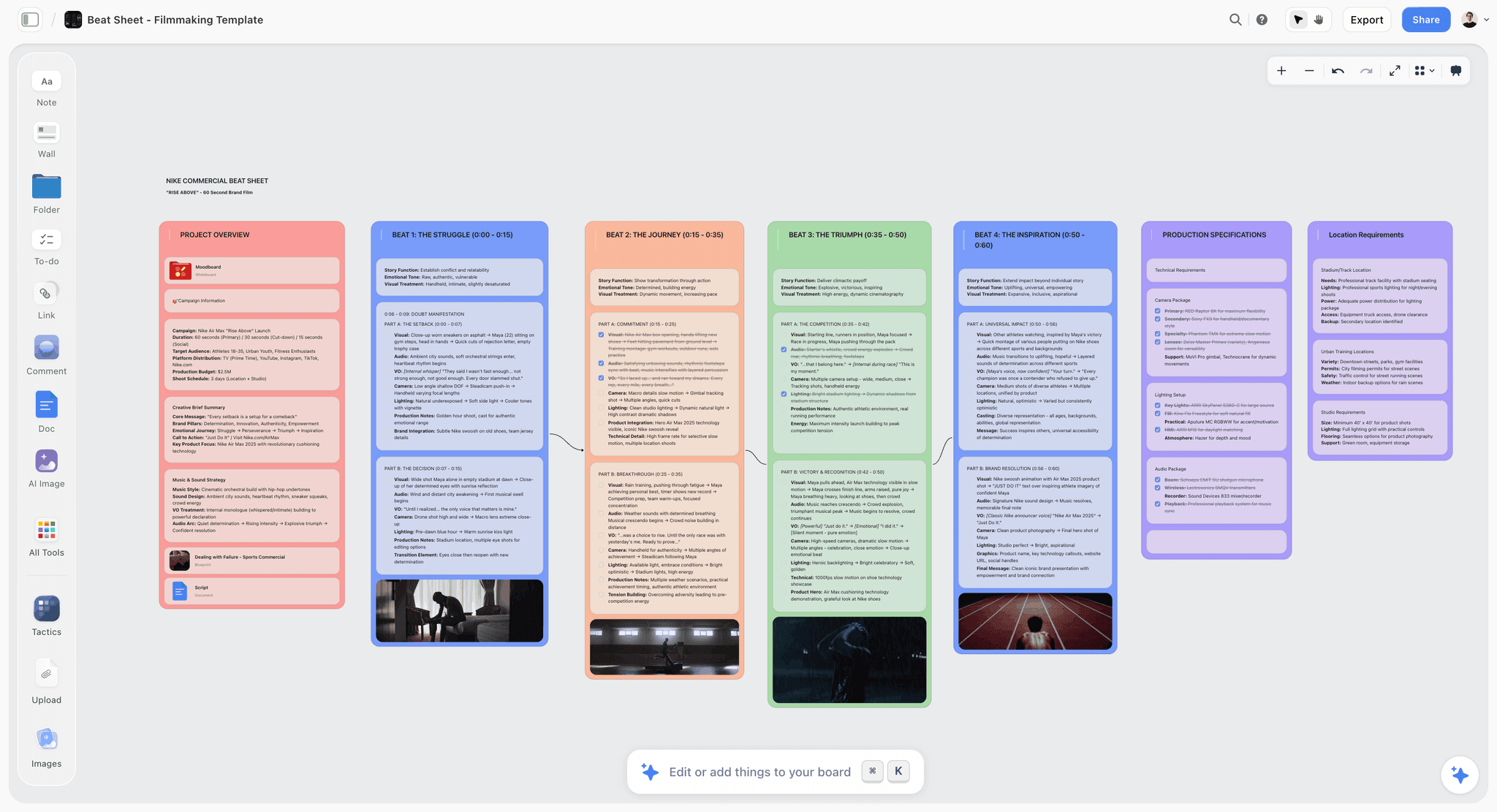
Storyflow is a visual storytelling canvas, and the reason it tops this list is that all three segments of the First-Story Clock are short. Sign-up requires a paid plan during early access (Plus starts at $7.99/month annual, and a Free plan is coming before the end of 2026) and lands you on a board in about a minute. The blank-canvas segment is where it pulls ahead: open a Story Blueprint (the Hero's Journey is the classic starting point) and the structure of your story is already laid out as connected sections you fill instead of a white void you stare at. Drag in images, notes, video, and links; arrange the sequence; done. The third segment is the shortest of any visual tool tested: collaboration is unlimited on the free plan, and a view link opens for anyone, no account required.
Time to first story: about 10 minutes. Roughly 1 minute to sign up, 2 to pick a blueprint, 6 to place images and captions, 1 to copy the share link.
Best for: A non-technical person or small team that wants a real visual story (structure, images, sequence) shared fast.
Verdict: The easiest full path from idea to a shared visual story draft in 2026. If your story is text only, Google Docs below is faster still.
Key features
- Story Blueprints that replace the blank canvas with a ready story structure (200+ on Plus; starter set on Free).
- Infinite canvas holding notes, images, video, links, and documents in one place.
- Unlimited shared boards and unlimited collaboration (free plan launches before the end of 2026).
- AI that reads the full current board, so "tighten the middle of this story" uses what is already there.
Pricing
Paid-only during early access; the Free plan (unlimited notes, images, and links, unlimited collaboration, basic AI, 20 file uploads) launches before the end of 2026, and anyone a paid member invites to a board joins free now. Plus: $7.99/mo billed annually ($9.99 monthly) adds the full Story Blueprints library and unlimited uploads. Pro: $14/mo annual adds AI image generation. Max: $39/mo annual adds 40x more AI and a Team Workspace.
Pros
- Blueprints collapse the hardest segment of the First-Story Clock, the blank canvas.
- Collaborators open a link and are in; no accounts, no seat management.
- The Free plan, launching before the end of 2026, will cover the entire first-story run and well beyond.
Cons
- Cloud-only: no offline mode and no local-first files, so no story work without a connection.
- Newer platform with a smaller template and integration ecosystem than Notion or Canva.
- It structures and shares the story but does not render a polished designed artifact; when the deliverable is a print-ready or branded piece, Canva wins.
- No publishing or scheduling; it is where the story is built, not where it is posted.
2. Google Docs
Google Docs is the control group, and it wins its lane outright. There is no onboarding because everyone has already done it; there is no interface to learn because the interface is a page. For a story told in words (a personal essay, an oral history transcript, a serialized family story), the First-Story Clock barely starts before it stops. Real-time co-writing is still the best in the industry, and a share link works for anyone.
Time to first story: about 5 minutes, nearly all of it writing. The fastest raw clock in this guide.
Best for: Text-only stories, co-written drafts, and anyone who wants zero new software.
Verdict: The zero-learning-curve baseline every other tool must justify itself against. It stops being the answer the moment your story needs images arranged in a sequence, a visual structure, or anything a page cannot hold.
Key features
- Real-time collaborative writing with cursors, comments, and suggestions.
- Share links with view, comment, or edit permission.
- Version history that quietly saves every draft.
Pricing
Free with a Google account. Paid Workspace tiers exist for businesses but are irrelevant to the first story.
Pros
- Nothing to learn, nothing to install, nothing to pay.
- Unmatched co-writing and commenting.
Cons
- Text-first: images sit inline in a page, not in a visual sequence you can arrange.
- No story structure; the blank page is the whole tool.
- A 30-page doc hides the shape of a story completely.
3. Milanote
Milanote is the tool this guide happily concedes to: for pure moodboard-style storytelling, it is every bit as easy as Storyflow. The canvas is polished and immediately legible, drag-and-drop works the way you expect, and the built-in templates for creative projects shorten the blank-canvas segment. Where the clock runs longer is the edges: the free plan's 100-card cap arrives faster than you think once a story has images, notes, and swatches, and collaboration invites are account-based rather than open links for editing.
Time to first story: about 10 minutes for a visual board; the cap and invite flow cost you later rather than up front.
Best for: Storytellers whose story IS the board: mood, fragments, references, visual tone.
Verdict: As easy as anything here for a freeform visual story. Pick it when atmosphere matters more than narrative structure; pick Storyflow when the story needs a beginning, middle, and end.
Key features
- Freeform canvas for notes, images, links, and color swatches.
- Strong creative templates and a good web clipper.
- Board sharing with comments.
Pricing
Free with 100 cards. Paid from about $9.99/mo billed annually (~$12.50 monthly) as of July 2026.
Pros
- Beautiful, instantly understandable canvas.
- Templates reduce blank-canvas friction.
Cons
- 100-card free cap fills mid-story on image-heavy boards.
- No story-structure frameworks; it boards a mood, not an arc.
- Light AI compared to canvas-AI tools.
4. Padlet
Padlet is the simplest surface in this guide, full stop. A padlet is a wall; you post notes, images, video, and audio to it, and others post alongside you. Teachers discovered this years ago, which is why Padlet owns the classroom, but the same three-segment math works for any group: sign-up is instant, the wall formats (timeline, storyboard, map) give you just enough structure, and contributors can post to a shared wall from a link without accounts.
Time to first story: about 8 minutes, the shortest of any visual tool tested.
Best for: Classrooms, workshops, and community groups gathering a story from many hands.
Verdict: The lowest floor of any tool here. The ceiling is equally real: a wall of posts is a collection, and turning it into a told story with an arc means moving somewhere else.
Key features
- Wall, timeline, storyboard, and map layouts.
- Anyone-can-post links, ideal for group storytelling.
- Handles images, video, audio, and links natively.
Pricing
Free for 3 padlets. Paid from around $7/mo as of July 2026; school plans separate.
Pros
- Practically zero learning curve for contributors.
- The best gather-from-a-crowd flow on this list.
Cons
- 3-board free cap is tight.
- Structure tops out at a timeline; no narrative frameworks.
- Reads as a bulletin board, not a finished story.
5. Canva
Canva is the easiest tool in this guide at the thing this guide is not primarily about: producing a designed artifact. If your story must leave the building as a polished piece (a photo-essay carousel, a story deck, a one-page visual narrative), Canva's template library is the fastest route to something that looks professionally made. The clock runs longer up front because the library is enormous: our test run spent five of its fifteen minutes choosing among near-identical templates before placing a single image.
Time to first story: about 15 minutes, template paralysis included.
Best for: Storytellers whose deliverable is the design: social stories, decks, printable pieces.
Verdict: When the output is a designed artifact, Canva wins, and this guide says so plainly. For drafting and structuring a story with a team, a canvas tool gets you there faster.
Key features
- Massive template library across story-shaped formats.
- Real-time collaboration and comments.
- Generative AI for images and text fills.
Pricing
Free tier is genuinely usable. Pro around $15/mo as of July 2026.
Pros
- The best-looking first story of any tool here.
- Familiar to almost every team already.
Cons
- Choice overload inflates the blank-canvas segment.
- Template gravity: your story starts looking like everyone's story.
- Page-based design fights freeform story restructuring.
6. Book Creator
Book Creator does one thing with remarkable ease: it lets a child, a student, or a fully non-technical adult make an actual digital book, with pages, images, audio narration, and drawings. The interface is deliberately simple, and the result is a real, turnable, shareable book, which lands differently than a board or a doc. It earns its rank for education; outside a classroom its simplicity starts to feel like a ceiling.
Time to first story: about 15 minutes for a several-page picture book with audio.
Best for: Teachers and students; family storytelling projects with kids.
Verdict: The easiest genuine book-making tool in 2026. If your storytellers are under 15 or your deliverable is a class library, start here.
Key features
- Page-based book editor with text, images, audio recording, and drawing.
- Teacher libraries for collecting a whole class's books.
- Read-aloud and publishing options for finished books.
Pricing
Free tier with one library and a book cap. Paid from around $15/mo for educators as of July 2026.
Pros
- Genuinely usable by young students without help.
- Audio narration is built in, which most tools here lack.
Cons
- Built for education; teams will feel the classroom framing.
- Page-based format limits nonlinear or canvas-style stories.
- Collaboration is teacher-managed, not link-open.
7. Adobe Express
Adobe Express is Adobe's answer to Canva, and for storytelling it offers quick branded story pages, short videos, and social-format stories with Firefly AI baked in. It is easy by Adobe standards, which is a real qualifier: our test run still detoured through Adobe account creation, an app-picker, and an upsell before the first template opened. Inside the Creative Cloud ecosystem those minutes may already be paid; outside it, they count.
Time to first story: about 20 minutes, ecosystem detours included.
Best for: Storytellers already living in Adobe tools who need a fast, branded story output.
Verdict: A capable middle option: easier than Prezi or Notion, less immediate than Canva, with no reason to adopt it for storytelling alone.
Key features
- Templates for story-format social posts, pages, and short video.
- Firefly generative AI for images and text effects.
- Brand kits and handoff to Photoshop and Premiere.
Pricing
Free tier. Premium around $10/mo as of July 2026, or bundled with Creative Cloud.
Pros
- Strong output quality, especially short story video.
- Good AI assists on the free tier.
Cons
- Adobe account and ecosystem friction on the way in.
- Collaboration is weaker than Canva's on the free plan.
- General design tool; nothing in it thinks in narrative.
8. Notion
Notion can absolutely hold a story: pages for chapters, galleries for scenes, a database of characters. The honesty this list owes you is that you will learn Notion before you tell the story. Blocks, databases, views, and permission levels are a vocabulary, and our first-time test run spent most of its half hour acquiring it. For a team that already runs on Notion, the marginal ease is real; as a first storytelling tool for a non-technical person, it is the long way around.
Time to first story: about 30 minutes, most of it learning the workspace, not writing the story.
Best for: Teams already in Notion who want the story next to everything else.
Verdict: A workspace that can contain a story, not a storytelling tool. Rank it by where your team already lives.
Key features
- Pages, databases, and galleries flexible enough for any story shape.
- Notion AI for drafting and summarizing.
- Template gallery, including community storytelling setups.
Pricing
Free for personal use. Plus around $10 per user/mo as of July 2026.
Pros
- Infinitely structurable once learned.
- Story lives beside the rest of a team's work.
Cons
- The steepest concept load before a first story except Prezi.
- Database structure fights freeform visual storytelling.
- Guest and permission management adds collaboration friction.
9. Prezi
Prezi tells stories through motion: one big canvas the camera swoops across, zooming from the whole into the details. When it works, the format itself feels narrative in a way slides never do. It sits last on this list because the First-Story Clock does not care how good minute 60 looks; it measures the path there, and Prezi's path is the longest here. Frames, paths, zoom levels, and overview structure are a genuine learning curve, and the free tier keeps your stories public.
Time to first story: about 45 minutes for a draft you would actually show someone.
Best for: Presenters who want a distinctive, animated story format and will invest the learning time.
Verdict: The least easy tool on this list, kept on it because the payoff is a story format nothing else here produces.
Key features
- Zooming canvas presentations with camera paths.
- Templates that pre-build the zoom structure.
- Present remotely or embed the finished story.
Pricing
Free tier with public-only prezis. Paid from around $7/mo as of July 2026.
Pros
- A genuinely different, motion-driven story format.
- Memorable results for talks and pitches.
Cons
- The steepest learning curve in this guide.
- Free tier makes your story public.
- Overusing the zoom is easy and seasick-making.
The Easiest Tool for Each Kind of Storyteller
A teacher with a class of 25: Book Creator for individual student books; Padlet when the whole class builds one story wall together.
A small marketing or content team: Storyflow to structure and share the story; Canva when the sprint ends in a designed deliverable. Canva's free plan covers the first month comfortably; Storyflow needs a paid plan during early access (Plus from $7.99/month annual), with its own Free plan arriving before the end of 2026.
A documentary or indie filmmaker: Storyflow, where the story structure, stills, and research share one canvas; Milanote when the job of the week is tone and mood rather than arc.
A nonprofit or community storyteller: Padlet to gather stories from the community with zero contributor friction, then Canva to shape the strongest into a presentable piece.
Two writers co-drafting fiction: Google Docs for the prose itself, no contest; Storyflow beside it when the plot needs to be seen as a shape instead of scrolled as a wall of text.
A workshop facilitator: Padlet during the session (anyone can post from a link), and the First-Story Clock says never make a room of strangers create accounts.
Free vs Paid: What Easy Storytelling Costs
Every tool on this list has a free tier today except Storyflow, which is paid-only during early access; its Free plan launches before the end of 2026. What differs among the rest is which free tier lets a second person actually see the story.
Free tiers that stay usable:
- Google Docs. Free forever, unlimited sharing.
- Padlet Free. Real, capped at 3 boards.
- Canva Free. Generous for a designed artifact.
- Milanote Free. Real, with a 100-card cap that arrives fast on a visual story.
Coming free, not yet: Storyflow's Free plan (unlimited boards, unlimited notes, images, and links, unlimited collaborators, basic AI usage, 3 starter blueprints, and 20 file uploads, no card on file) launches before the end of 2026. Until then, Plus starts at $7.99/month billed annually, and anyone a paid member invites to a board joins free today.
Free tiers that will push you: Book Creator's free library caps books per teacher, Adobe Express restricts collaboration, Notion's guest limits bite as soon as outsiders are involved, and Prezi limits sharing on free.
What actually makes you pay
- A second and third story. Board and item caps are the first wall for most people: Padlet's 3 boards and Milanote's 100 cards are fine for one story and tight for a habit. Storyflow's Free plan will not cap boards or objects when it launches before the end of 2026, which will be the unusual part of its tier.
- File uploads. Any story with images spends its allowance quickly. Storyflow's Free plan will allow 20 uploads once it launches before the end of 2026; Plus, available now at $7.99/month billed annually, removes the cap and adds the full 200+ Story Blueprints library.
- Guests and roles. The moment someone outside your workspace must comment rather than just view, free tiers start charging. This is where Notion in particular gets expensive for storytelling.
- Polish for an audience. If the story ships to a real audience, Canva Pro at around $15/month is a fair purchase for the presentation layer specifically.
Do not pay to make a tool easier. Paying almost never buys a shorter First-Story Clock; it buys capacity, polish, and seats. If a tool felt hard on the free tier, it will feel hard on the paid one, and the right move is a different tool rather than a higher tier of the same one.
Honorable Mentions
- StoryMapJS (Knight Lab): free and genuinely easy for one specific story shape, a narrative told across a map or a large image. If your story moves through places, try it before anything paid.
- Twine: free and beloved for branching interactive fiction. Easy to start, but it is a solo authoring tool at heart, so it misses this list's collaboration bar.
- FigJam: an easy shared whiteboard if your team already pays for Figma; it just has no notion of narrative.
- Google Slides: the fallback everyone forgets. A slide per scene is a legitimate, free, zero-learning storyboard.
When You Do Not Need a Storytelling Tool at All
If your story is one writer and words, write it in Google Docs and spend the tool-shopping hour writing. If it is a single social post, open Canva and make the post. And if your team already shares a wiki, a whiteboard, and a chat, adding a ninth surface no one opens will not save the story; pick one home for it and retire the rest. Easy is measured in minutes, not features, and sometimes the fewest minutes belong to a tool you already have. The moment that stops being true (the story has images, structure, and more than one author, and the doc has become a scroll) is the moment a story canvas earns its place.
The Bottom Line
The easiest digital storytelling tool in 2026 is the one that gets your actual story shared fastest. For a structured visual story built with a team, that is Storyflow, at about 10 minutes from sign-up to a link a collaborator can open with no account. For text, it is Google Docs, and no tool on this list should pretend otherwise. For a mood-first board it is Milanote, for a room full of contributors it is Padlet, and for a designed final artifact it is Canva.
Easy is measured in minutes, not features. Run your own First-Story Clock: pick the tool that fits your story's shape, set a timer, and see whether you reach a shared draft before the timer reaches 15. Every tool ranked in the top five here will pass. If you want the test to start now, open a Storyflow board, pick a Story Blueprint, and time yourself to a share link.
FAQ: Easiest Digital Storytelling Tools
What is the easiest digital storytelling tool in 2026?
Storyflow is the easiest tool for building a full digital story (structure, images, sequence) and sharing it, at about 10 minutes from sign-up to a shared draft. Google Docs is faster for text-only stories, Padlet is simpler for group story walls, and Canva is easier when the goal is a designed artifact. The right answer depends on whether your story is words, a wall, a design, or a structured visual narrative.
What is a simple tool for digital storytelling collaboration?
Storyflow is the simplest full-featured option: collaboration is unlimited on paid plans today (and will be on the Free plan launching before the end of 2026), and collaborators open a shared board from a link without creating an account. Google Docs is simpler still if the story is text only. Padlet is the simplest way for a large group to contribute, since anyone can post to a wall from a link. Simplicity here means one thing: how little your collaborators must do before they can touch the story.
What is an easy app for collaborative digital storytelling?
For a team story with images and structure, Storyflow: sign-up starting at $7.99/month annual during early access (a Free plan launches before the end of 2026), a Story Blueprint to start from, and link-based sharing put a collaborative draft in front of teammates in about 10 minutes. For co-writing prose, Google Docs remains the easiest app ever made. For a classroom or workshop, Padlet lets contributors post without accounts. All three pass the same test: a first-time collaborator is inside the story in under a minute.
How long does it take to make a digital story?
A first shareable draft takes 5 to 45 minutes depending on the tool, based on our timed runs: about 5 in Google Docs, 8 in Padlet, 10 in Storyflow or Milanote, 15 in Canva or Book Creator, and up to 45 in Prezi. A finished story takes as long as the story deserves. The tool decides the first number, not the second, which is exactly why this guide ranks by time to first story.
What is the easiest free digital storytelling tool?
Google Docs, if your story is text. For a visual story, Storyflow's Free plan is not out yet: it launches before the end of 2026 with unlimited notes, images, and links, unlimited collaboration, and basic AI, no credit card required. Until then, Padlet and Canva both have usable free tiers with caps (3 boards; premium assets locked) that are actually free today. StoryMapJS and Twine are entirely free but serve narrower story shapes.
What is the easiest digital storytelling tool for students?
Book Creator for individual student work: it is built for classrooms, and students produce real digital books with images and recorded narration without help. Padlet is easiest for whole-class stories, since students post to a shared wall from a link with no accounts. Older students building structured stories can use Storyflow, which is paid-only during early access (Plus from $7.99/month annual); its Free plan, needing no payment details, launches before the end of 2026.
Is Google Docs good enough for digital storytelling?
Yes, if the story is told in words: it is free, universally known, and has the best co-writing in the industry. It stops being enough when the story needs arranged images, a visible structure, or a nonlinear shape, because a page can only stack content vertically. The practical test: if you are scrolling to understand your own story, the story has outgrown the doc.
Is Canva or Storyflow easier for digital storytelling?
They are easiest at different stages. Storyflow is easier for drafting and structuring the story, since Story Blueprints replace the blank canvas and sharing needs no accounts. Canva is easier for producing the final designed artifact, with a template for nearly every output format. Our timed runs put a first Storyflow draft at about 10 minutes and a first Canva piece at about 15, most of the difference being template choice.
Is Milanote or Storyflow easier?
Nearly identical on the clock: both hit a first shared draft in about 10 minutes. Milanote is marginally easier for a pure moodboard, with a polished canvas and creative templates. Storyflow is easier for a story with an arc, because Story Blueprints lay out narrative structure, collaboration is unlimited on its paid plans (and will be on the Free plan launching before the end of 2026), and there is no 100-card cap to hit mid-story. Choose by whether you are boarding a mood or telling a story.
Do collaborators need accounts to see my story?
In the easiest tools, no. Storyflow, Google Docs, and Padlet all share through links a collaborator opens directly; Padlet even lets anonymous visitors post. Notion and Prezi are stricter, gating collaboration behind accounts, invites, or paid tiers, which is a large part of why they rank lower here. Account friction is the third segment of the First-Story Clock, and it is where otherwise-easy tools quietly fail a team.
Which digital storytelling tool has the smallest learning curve?
Padlet: posting to a wall is the entire skill, which is why it dominates classrooms and workshops. Google Docs ties it for anyone who has ever typed a document. Among structured visual tools, Storyflow and Milanote have the smallest curves, learnable in one sitting. Notion and Prezi carry the largest, at roughly 30 and 45 minutes of concept-learning before a first presentable draft.
Can AI make digital storytelling easier?
Yes, mainly by attacking blank-canvas friction, the slowest segment of the First-Story Clock. Storyflow's AI reads your full current board and can draft or tighten structure from what is already there; Canva and Adobe Express generate images and text fills; Notion AI drafts prose. What no AI removes is the decision about what the story is. AI shortens the path from decision to draft; the deciding stays yours.
Table of Contents
- Comparison Table: The 9 Easiest Digital Storytelling Tools at a Glance
- The 9 Easiest Digital Storytelling Tools, Ranked
- Key Takeaways
- The First-Story Clock: What "Easy" Actually Measures
- How the Tools Compare on the Three Segments
- How We Evaluated These Tools
- Quick Picks by What Is Slowing You Down
- Detailed Reviews: The 9 Easiest Digital Storytelling Tools
- The Easiest Tool for Each Kind of Storyteller
- Free vs Paid: What Easy Storytelling Costs
- Honorable Mentions
- When You Do Not Need a Storytelling Tool at All
- The Bottom Line
- Author
- FAQ: Easiest Digital Storytelling Tools
- Related Reading
Templates to check out for this topic


Templates you can use in Storyflow
Every Storyflow board starts from real structure and an AI that reads the whole canvas. Open one of these templates and make it yours.


See Storyflow in Action
A visual AI workspace where every feature lives inside one canvas. No tab-switching, no context lost.
Build your entire board from a single message
Type what you need in the AI chat at the bottom of your canvas. The AI adds cards, headings, and structure directly onto your board.
Use expert frameworks as AI context
Type @ in the AI chat and choose any Tactic. The AI tailors every response to that framework instead of giving generic advice.
Turn your board into a mind map in seconds
Ask the AI to restructure your canvas as a mindmap. It connects your ideas into a visual hierarchy so you can see how everything relates.
Why Storyflow Exists
Storyflow actually began as a personal tool while working on creative and research projects.
We kept running into the same problem: ideas were scattered everywhere: notes, documents, and whiteboards.
Nothing helped us see how everything connected.
So we started building a workspace designed around how ideas actually grow.
→ Read how Storyflow was createdJustkay
Documentary Filmmaker & Founder at Storyflow
Published: 2026-07-20
Extremely simple, seriously capable


See how easy it is to get started
Watch a real project come together, from a blank board to a finished plan, clicked through step by step.
Start creating with AI and become more productive
Transform your creative workflow with AI-powered tools. Generate ideas, create content, and boost your productivity in minutes instead of hours.