
Worlds that stay rock-solid, however big
Make sure everyone
sees the same person.
Pin casting references, costume, hair, props, palette, and body language beside each character on one infinite canvas, so the actor, the designer, and the illustrator are all building the same human.


Creatives working for these brands already got early access
- Red Bull
- Canon
- Artlist
- Porsche
See how easy it is to get started
Watch a real project come together, from a blank board to a finished plan, clicked through step by step.
Start from a ready-made template
Pick a board to see what you can build, then let AI fill it in. Every template is a real, editable starting point on the same infinite canvas.

World Building
Develop the places, factions, and rules of your world and connect them into one living map.
What is a character moodboard?
A character moodboard is a visual definition of one person in a story, assembled so that everyone who has to render that person is working from the same picture. Storyflow is an AI visual workspace that builds a character's look on one infinite canvas: a board the AI lays out from a character description, references pinned beside each character, and the whole ensemble visible together. The moodboard holds casting or face references, costume and silhouette, hair and makeup, the color palette the character carries, the props and objects they own, the environments they move through, and the physical vocabulary of how they stand, sit, and take up space. It is a companion to the character profile, not a replacement for it. The profile says who they are; the moodboard says what you see when they walk in.
The reason character work fails is almost never that the writing was thin. It is that six people each built a slightly different version. The costume designer's version is a little more polished than the director's. The illustrator drew someone five years younger than the writer imagined. The colorist gave a scene a warmth the character was supposed to be denied. None of these disagreements announce themselves in a script meeting, because every one of them survives inside the same handful of adjectives. Pinning the references to a shared board is how the disagreement surfaces early, while it is still just a picture and not a fitting, a render, or a reshoot.
Storyflow is an AI-native infinite canvas built for this. Describe the character in a prompt, their role, age, class, era, and the impression they should leave, and the AI lays out a structured board: sections for face and casting, costume and silhouette, hair and makeup, palette, props, environment, and body language, with cards ready to fill. Then you work spatially. Drag in reference images, group a costume into a complete look rather than loose garments, put the character's palette beside the film's palette to check they belong to the same world, and write the intent note next to the reference that explains it.
For an ensemble, the board does something a document cannot: it makes the cast legible as a group. Put every character's board on one canvas and you can see, at a glance, whether two characters read as too similar to tell apart in a wide shot, whether the antagonist is visually louder than the protagonist, whether the palette assigns anyone a color that contradicts their arc, and whether the ensemble looks like it comes from one world at all. Those are the questions that decide whether an audience can follow a story, and none of them are answerable from a stack of individual character pages.
Ultra fast from brief to board
From a character description to a look everyone can build.
No folder per character, no deck to rebuild every time a reference changes.
01
Open a canvas
Sign up in seconds. No download. Your infinite character canvas opens in the browser.
02
Describe the character
Type the role, era, class, age, and the impression they should leave, and the AI lays out a structured board with casting, costume, hair, palette, prop, and body-language sections ready to fill.
03
Pin and group references
Drag in face references, costume photographs, textures, props, and locations. Group each costume into a complete look and put the intent note beside the image that carries it.
04
Share it with the people building the character
Send a view-only link to the actor, costume designer, illustrator, or colorist for comments in context, then export the board as an image or PDF for the bible or the production package.
One character, every layer, one canvas.
Casting, costume, palette, props, and body language side by side.

AI lays out the character board from a description
Start from a structure, not a blank page
Describe the character and the AI builds sections for face, costume, hair, palette, props, and environment. You spend the session judging references instead of inventing categories for them.
See the AI character profile generator →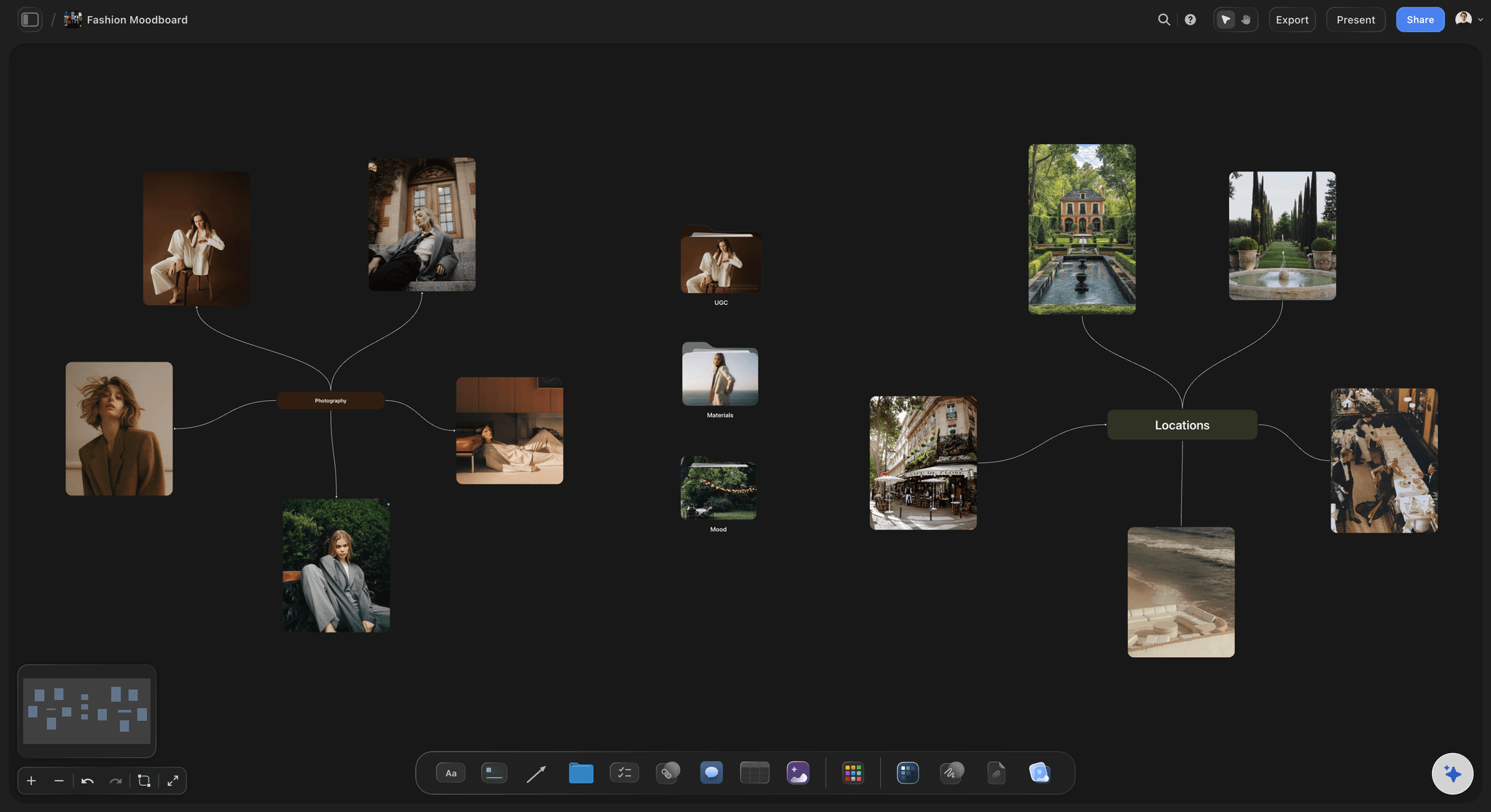
Costumes as complete looks, not loose garments
Judge the silhouette, not the shirt
Group each costume into one look with its fabric, footwear, and layering, then put two looks side by side. Nobody can judge a jacket alone, but everybody can tell you which of two silhouettes is the character.
Explore the film lookbook →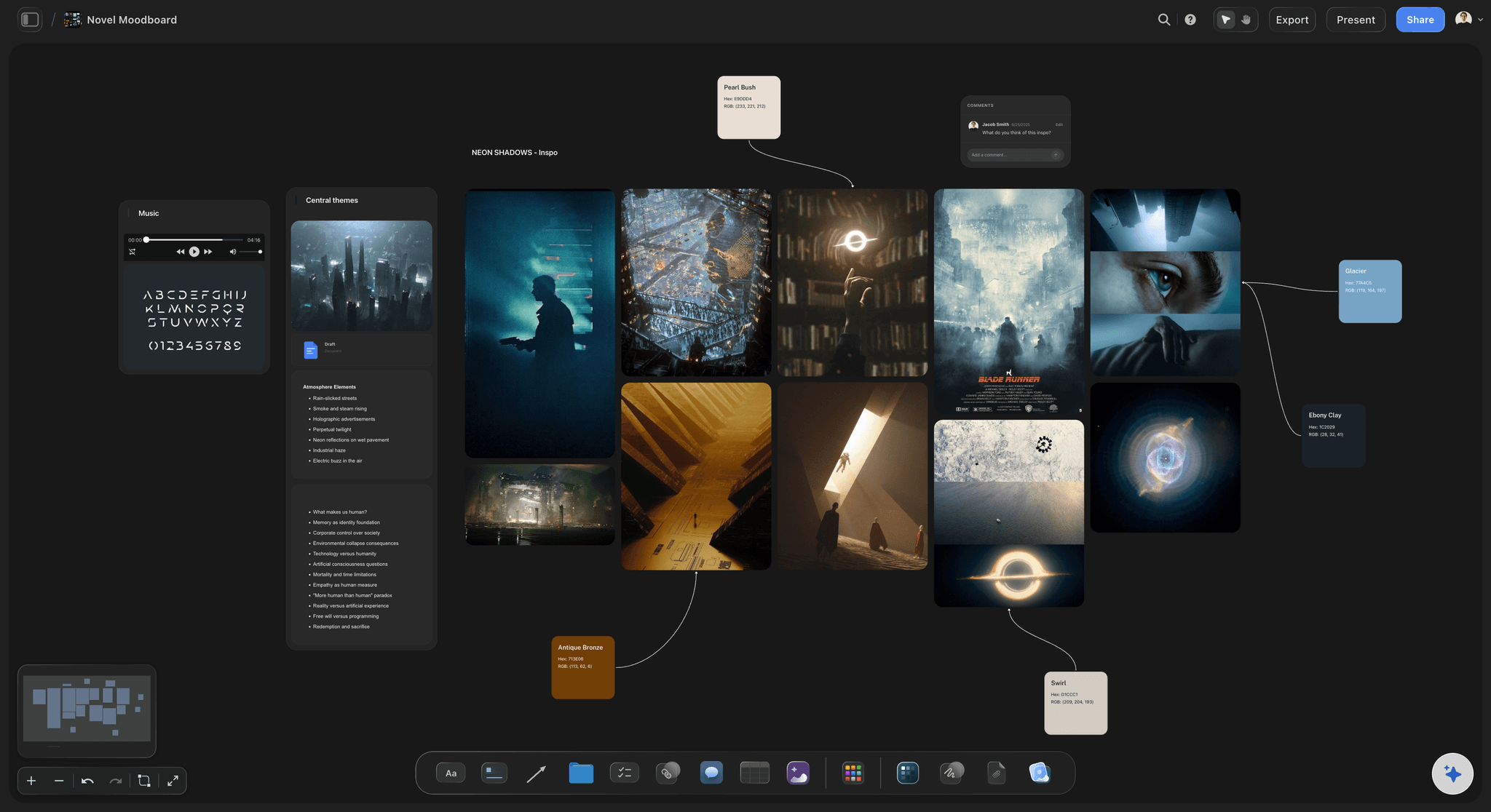
The whole ensemble in one view
See the cast as an audience will
Place every character's board on one canvas and check the group reads. Two characters who blur together in a wide shot, or an antagonist louder than the lead, are obvious here and invisible in separate documents.
See the character relationship map →
View-only links for actors, designers, and illustrators
Hand over a look, not an adjective
Send a view-only link and they open the whole board in a browser with no account, and sign in to comment on the exact reference they concern, so notes stop arriving as a paragraph about feeling.
See Storyflow for illustrators →Unlimited boards. No object cap.
Open a canvas, describe the character, and start pinning references. Storyflow is paid-only during early access, with plans from $9.99 a month, and a Free plan launches before the end of 2026.
Unlimited character boards on an infinite canvas
Basic AI usage to generate boards from prompts
Starter templates for moodboards, character profiles, and story plans
Share view-only links with collaborators and cast
Built for people with taste
More than a folder of face references.
A folder can store a face. It cannot tell you whether the ensemble reads.
Face, costume, palette, props, and physicality
Work across every layer of the character
Casting and face references with intent: Pin the faces that carry the right quality and write what the quality is beside them. A reference with no note becomes a resemblance request, which is almost never what you meant.
Costume as complete looks: Group the garment, fabric, footwear, and layering into one look per scene or per act. Silhouette is what an audience reads at distance, and silhouette only exists at the level of the whole outfit.
A palette the character actually owns: Give each character a color range and place it beside the project palette. A character wearing a color the story has assigned to someone else is a small mistake that quietly confuses every scene they share.
Props, objects, and physical vocabulary: The watch, the bag, the way they sit, the thing they never put down. Physicality references pinned beside the costume give an actor or an animator something specific to work from.
AI that can see the board you have already built
Build the character with an AI that has the context
Prompt against the whole canvas: Ask it to add an act-three look for a character whose circumstances collapse, to lay out a section for the character's home, or to build a matching board for a new supporting role. It reads what you have already made.
It structures, it does not cast: Storyflow lays out and organizes the character. Deciding which face carries the story stays with the director, the writer, or the designer, which is where that judgment belongs.
Iterate without losing work: Re-prompt as often as you like. References you have already placed and grouped stay exactly where they are while the AI builds around them.

The character over the length of the story
Show the arc as a visual change
A look per act, left to right: Lay the character's looks out in story order and the arc becomes something you can see. If the character is supposed to unravel and the act-three look is tidier than act one, that is now a visible problem.
Beside the beat it belongs to: Keep the character board on the same canvas as the story plan or beat sheet, so a costume change is attached to the scene that motivates it rather than floating in a separate file.
Relationships in view: Place characters who share scenes next to each other. Contrast and echo between two people is a design decision, and it can only be made when both boards are visible at once.
Cast, crew, and collaborators
Get everyone building the same person
View-only links, no account required: Send the board to an actor, a costume designer, a concept artist, or a colorist and they open it in a browser. No signup, no download, no argument about which version of the PDF is current.
Comments on the reference itself: Notes attach to the image they concern, so feedback is specific enough to act on. Comment mode lets reviewers respond without any risk of moving your board around.
Export for the bible or the package: Export the board as a high-quality image or PDF for the series bible, the pitch, or the production package. The link stays live, so the export never quietly becomes the outdated source of truth.
Explore templates for your project
Every template opens as a real, editable board on the infinite canvas. Pick the closest fit and make it your own.
World Building
Develop the places, factions, and rules of your world and connect them into one living map.
One app instead of five
Storyflow vs Pinterest, Milanote, and Notion.
Be clear about what Storyflow is. It is not a casting database, it does not generate character art, and it does not manage rights or releases. It is where the look of a character gets decided and shared.
Storyflow
Recommended
Infinite canvas for character direction
AI lays out the board from a character description
Whole ensemble visible on one canvas
Casting database with talent profiles
Algorithmic reference discovery feed
Free plan available today
Infinite canvas for character direction
AI lays out the board from a character description
Whole ensemble visible on one canvas
Casting database with talent profiles
Algorithmic reference discovery feed
Free plan available today
Milanote
Infinite canvas for character direction
AI lays out the board from a character description
Whole ensemble visible on one canvas
Casting database with talent profiles
Algorithmic reference discovery feed
Free plan available today
Notion
Infinite canvas for character direction
AI lays out the board from a character description
Whole ensemble visible on one canvas
Casting database with talent profiles
Algorithmic reference discovery feed
Free plan available today
What creators are saying
Join early creators getting structured workspaces and AI that remembers their projects
“Storyflow has sped up my workflow by at least 3x, which means more flow state and more projects I can actually ship. It truly changed the way me and my team create.”

Reilin Joey
Director & YouTuber
“One prompt gets me a structured board. But the tactics are my favorite. I run my YouTube scripts through them and my intros and retention got better. It's amazing.”

Justkay
YouTuber & Freelance Filmmaker
“I used to juggle five apps to plan a project. Now I describe what I am making and get boards, lists, and a schedule. All in one place.”

George
@fernwehchronicles
Character moodboard questions, answered.
What belongs on the board, how to brief an artist or an actor, and where Storyflow fits alongside your other tools.
For finding references you have not seen, Pinterest is still unbeaten, because the recommendation feed is the whole product. Milanote is a clean, well-liked canvas for pure visual boards and has a free tier. Notion is excellent if you want a character database with fields you can filter, though it will never show you the ensemble as a picture. Storyflow covers the part those tools leave to you: turning saved images into a structured character that other people can build. Describe the character and the AI lays out casting, costume, hair, palette, prop, and physicality sections, then you group costumes into complete looks, place the whole ensemble on one canvas to check it reads, and share a view-only link for notes.
Storyflow has AI image generation on the canvas, and people do use it to sketch a look quickly. But that is not what this page is about and it is not the reason to build a character board. The value here is in organizing real references, photographs, costume shots, palettes, textures, film stills, into a structure that a costume designer, an illustrator, or an actor can work from. Generated images are useful for showing a direction that does not exist yet in any photograph you can find, and they are a poor substitute for the specificity of a real reference. If you want dedicated character art generation, Midjourney and similar tools are far more capable at that single job.
Seven things, and boards that skip the last two tend to produce a character who exists from the neck up. Face and casting references, with a note on what quality you are pointing at. Costume grouped into complete looks rather than individual garments. Hair and makeup. A color palette the character owns, placed beside the project palette. Props and objects, including the one thing they never put down. Environment, so you can see where they live and what that says. And physical vocabulary: how they stand, sit, take up space, or refuse to. The last one is what turns a lookbook into a character, and it is the one most boards leave out.
Not during early access. Storyflow is paid-only right now, with plans starting at $9.99 a month, and a Free plan for solo use launches before the end of 2026. Anyone a paid member invites to a board joins free today, so an actor, an illustrator, or a costume designer can review and comment without paying anything. If you need free this minute, Milanote's free tier is a genuinely nice canvas within its board and item limits, and Pinterest is free and better than everything else at surfacing references. Neither will lay out the board for you from a character description, but both are honest free options.
Give them intent alongside every reference, because a reference without a note reads as a request for a copy. Under a face, write what you are pointing at, the wariness rather than the jawline. Group costumes into complete looks and say which act each belongs to. Include the palette and the project palette together so they know what the character is allowed to wear. Add a physicality section, because posture communicates more than any single design choice. Then send a view-only link rather than a zip: they can comment on individual references to ask what you meant, which is far cheaper than discovering the misunderstanding in the first delivery.
Yes, and this is where an infinite canvas beats a document decisively. Put each character's board in its own region of one canvas and step back. You are now looking at what an audience sees: whether two characters read as too similar to distinguish in a wide shot, whether the antagonist is visually louder than the protagonist, whether the palette gives someone a color that contradicts their arc, whether the cast belongs to one world. None of these questions can be answered from a stack of individual character pages, which is exactly why productions keep discovering them at the fitting instead of at the desk.
You describe the character in a prompt: role, age, era, class, the impression they should leave, and anything already decided. The AI lays out a structured board from that description, with sections for face and casting, costume and silhouette, hair and makeup, palette, props, environment, and physicality, plus cards ready to fill. You start from a board with a shape rather than an empty canvas. From there it works with what you build, using the whole board as context, so you can ask it to add an act-three look or build a matching board for a new supporting character, and re-prompting adds around your existing references without moving them.
Yes, and it is the main reason to do this on a canvas rather than in a separate moodboard app. Put the character boards on the same canvas as the story plan, beat sheet, or scene cards. A costume change is then attached to the beat that motivates it, an act-three look sits beside the scene where the character breaks, and a prop is next to the moment it pays off. Character work drifts from story work when the two live in different tools, and the drift is invisible until someone notices the wardrobe arc and the emotional arc are pointing in opposite directions.
Not to see it: send a view-only link and they open the full board in a browser with no signup. To leave comments directly on the references they are reacting to, they sign in. That is usually the right level of access for an actor or an external artist: they can see and respond, but there is no chance of anyone dragging your board apart. If someone should actually contribute, invite them to the canvas instead, and invited collaborators join free, so bringing a designer in does not cost you a seat. Sharing, commenting, and reviewing work on every paid plan.
Yes, and the best character work uses both. A profile is written: backstory, wants, fears, the contradiction at the center, the voice. A moodboard is seen: face, silhouette, palette, objects, posture. Profiles are good at interiority and bad at telling a costume designer what to make. Moodboards are the reverse. The failure mode of using only a profile is a character everyone imagines differently; the failure mode of using only a moodboard is a character who looks great and wants nothing. Storyflow lets you write the profile in the built-in document editor on the same canvas as the board, which is why most people building characters here end up doing both at once.
Hand over a person, not an adjective.
Open a canvas, describe the character, and let AI lay out the board. No download.