Best ChatGPT Plugins for Marketing Teams (2026): 10 Ranked by Job
Ten plugins from ChatGPT's directory for marketing teams, ranked by job: Storyflow for the campaign plan, then HubSpot, Semrush, Similarweb, Canva, Klaviyo and more, with prices, limits and a 4-plugin stack.

Category
Marketing
Author

Storyflow Team
Product & Research Team
Topics
2026-10-28
•
32 min read
•
Marketing- ChatGPT plugins
- marketing teams
- marketing stack
- Storyflow
- HubSpot
- Semrush
What are the best ChatGPT plugins for marketing teams?
The best ChatGPT plugin for a marketing team is Storyflow when the job is planning the campaign itself: ChatGPT lays out the brief, audience, channel plan and launch tasks on a board the whole team opens. Storyflow is an AI visual workspace that holds a campaign from brief to launch on one infinite canvas. For the evidence around that plan, add HubSpot for CRM and email results, Semrush for search demand and Canva for the designs.

Full disclosure: Storyflow is our product. It ranks first because the job here is planning a campaign, and it is the plugin whose output is a shared board rather than an answer in a chat. Its ChatGPT plugin went live on 24 October 2026, so its record is far shorter than HubSpot's or Semrush's, and it does not schedule posts or send email.
How the ChatGPT plugins for marketing teams compare on trust, innovation, ratings and pricing
Which ChatGPT plugins for marketing teams are the most trusted?
HubSpot and Semrush carry the most trust, because their plugins sit on data marketing teams have relied on for years: the CRM and campaign records in HubSpot, the keyword and ranking data in Semrush. Klaviyo earns the same for ecommerce email. Storyflow is newer, with its ChatGPT plugin live since 24 October 2026; its case rests on what it does, giving ChatGPT's campaign plan a shared board instead of a chat transcript.
Which ChatGPT plugins for marketing teams have fair and transparent pricing?
Asana, Semrush, Supermetrics and Storyflow publish their prices plainly: Asana Starter at $10.99 per user a month billed annually, Semrush Starter at $199 a month billed monthly, Supermetrics Starter at €39 a month billed yearly and Storyflow Plus at $7.99 a month billed annually, as of October 2026. Similarweb ties ChatGPT access to plans with API access, and Semrush and Similarweb also meter every query in units or credits.
Which ChatGPT plugins for marketing teams are the most innovative?
Storyflow, because ChatGPT does not just answer through it but builds the plan: walls, tables, to-dos, charts and a slide deck on a board, then reports what changed on that board and who changed it. Supermetrics is innovative on the spend side, letting ChatGPT pause campaigns or move budget after a review step, and Peec AI measures how AI engines themselves describe your brand.
Which ChatGPT plugins for marketing teams have a strong record of consistent performance?
HubSpot, Semrush and Similarweb, judged by the years their underlying data products have served marketing teams; their ChatGPT plugins are new, but the numbers behind them are not. Storyflow's plugin has the shortest record on the list, launched in October 2026. What it offers instead is one live plan that ChatGPT, the team and the client all read, which removes the version drift between chats, documents and slides.
Which ChatGPT plugins for marketing teams are underrated?
Similarweb is underrated for budget meetings: a channel-mix comparison of two rivals settles arguments that otherwise run on opinion. Notion is underrated as context, since ChatGPT drafting with your brand guidelines open writes closer to your voice. Storyflow's change report is easy to miss: asking what changed on the launch board since Monday, and who changed it, replaces a status meeting for a small team.
Quick Comparison
Four plugins from ChatGPT's directory that cover most marketing work: our pick first for planning the campaign on one board, then the rest by job. Prices as of October 2026.
| Tool | Best For | AI Features | Price |
|---|---|---|---|
| Storyflow | Campaign and launch plans the whole team opens | ChatGPT builds walls, tables, to-dos, decks and charts on a board, and reports what changed and who changed it | $7.99 mo annual (paid-only in early access; Free plan due before the end of 2026) |
| HubSpot | B2B teams whose results live in the CRM | Reads campaigns, emails and deals; creates and updates records ten at a time, never deletes | Connector on all plans; Marketing Hub free tools for 2 users |
| Semrush | Choosing topics people actually search for | Read-only keyword, ranking, backlink and competitor data, billed in API units | Starter $199 mo billed monthly |
| Canva | First-draft social posts, flyers and presentations | Creates and edits designs using context from the chat | See Canva pricing |
Key Takeaways
- All ten plugins below were in ChatGPT's plugin directory on 28 October 2026. Storyflow is our pick first for planning the campaign on one board; the other nine are ranked by the job they do for a marketing team.
- Most teams need four plugins, not ten: one that holds the plan, two that bring evidence (CRM, search, traffic or ad data) and one that makes the asset. We call it the 1-2-1 stack.
- Read the write column before you connect anything. HubSpot creates and updates records ten at a time, Klaviyo can send a campaign once you confirm, and Supermetrics can pause ad campaigns. Semrush and Similarweb only return data; Semrush states its connection is read-only.
- Data plugins bill in their own units. Semrush spends API units and Similarweb spends credits on every query, while the Storyflow plugin runs on your ChatGPT plan, so its actions use no Storyflow AI credits.
- Name the plugin with @ when the answer must come from your data. Similarweb's own documentation warns that without an explicit mention ChatGPT may answer from general knowledge.
How We Picked and Ranked These Plugins
A capture of ChatGPT's plugin directory taken on 28 October 2026 lists 2,461 plugins. About 300 of them mention marketing, ads, email, SEO, social or brand in their name or one-line description, and most of those are single-purpose tools from small vendors. A marketing lead does not need a longer list. They need to know which handful of plugins turns ChatGPT from a confident guesser into something that works from the team's own plan and numbers.
Every entry is in the directory and documented by its vendor
A plugin had to appear in the 28 October capture of the directory, and its vendor had to publish its own page describing what the ChatGPT plugin or its underlying connection does. Each review is built from the directory one-liner plus that vendor page, and prices come from each vendor's pricing page, all read on 28 October 2026. Where a vendor's page refused automated reading, the review says so instead of filling the gap from memory.
The five questions each plugin had to answer
- What can ChatGPT read through it? Records, metrics, documents or boards, and whose permissions decide that.
- What can ChatGPT create, change or send? A draft is a different risk from a sent email or a paused ad set.
- Where does the output live when the chat ends? In the chat transcript, or in a tool the team already opens.
- Who can see it without ChatGPT? A plan only one person can find is a private note.
- What does it cost, in the vendor's own units? Seats, profiles, API units, credits or a plan tier.
Why Storyflow ranks first, and why you should know who wrote this
Storyflow is our product, so read the order with that in mind. It ranks first on a stated basis: this ranking is built around planning a campaign or launch, and Storyflow is the plugin whose output is a shared plan rather than an answer in a chat. HubSpot, Semrush and Similarweb have far longer track records with marketing data than Storyflow does; its ChatGPT plugin went live on 24 October 2026. The rest of the order follows the life of a campaign: evidence, assets, launch, reporting.
The 10 Plugins at a Glance
Directory one-liners are quoted as the directory showed them on 28 October 2026. Prices are as of October 2026.
| # | Plugin | Directory one-liner | Marketing job | ChatGPT can change | Price (Oct 2026) |
|---|---|---|---|---|---|
1 | Storyflow | Plan projects on visual boards | Campaign and launch plan on a shared board | Builds and edits boards, decks, tables, to-dos | Plus $7.99 mo billed annually; paid-only in early access |
2 | HubSpot | Insights to action in HubSpot | CRM, campaign and email results | Creates and updates records, no deletes | Connector on all HubSpot plans; Marketing Hub free tools for 2 users |
3 | Semrush | Research keywords & traffic | Search demand and competitor rankings | Nothing; reads data | Starter $199 mo billed monthly |
4 | Similarweb | Web, app, search & market data | Competitor traffic and channel mix | Nothing; reads data | Needs a plan with API access; see Similarweb pricing |
5 | Canva | Create, review, edit designs | First-draft designs from approved copy | Creates and edits designs | See Canva pricing |
6 | Klaviyo | Get insights on your marketing | Email and SMS results, draft campaigns | Drafts, sends after you confirm, edits flows and segments | Free up to 250 profiles |
7 | Supermetrics | Analyze data, manage campaigns | Cross-channel ad and analytics reporting | Can pause campaigns and move budget after review | Starter €39 mo billed yearly |
8 | Notion | Create docs, tasks, databases | Brand guidelines, past briefs, wikis | May create or update pages | Free plan; see Notion pricing |
9 | Asana | Turn chats into actions | Turning the plan into owned tasks | Creates projects and tasks | Starter $10.99 per user billed annually |
10 | Peec AI | Track your brand across LLMs | Brand visibility in AI answers | Owners can edit tracked prompts and topics | See Peec AI pricing |

Storyflow project board for a brand logo project, with walls for the brief, concepts, brand assets, timeline and client feedback
Plan your next campaign on a board ChatGPT builds
Install Storyflow from ChatGPT's plugin directory, paste your brief, and get a campaign board with goals, channels, dates and launch tasks your team opens by link.

The 10 Best ChatGPT Plugins for Marketing Teams, Reviewed
1. Storyflow

A campaign board in Storyflow: one wall per part of the plan, a colour palette and a mind map linking the moodboards, all inside one project.
Verdict: the plugin to install first if your campaign plans currently live in chat transcripts.
The familiar approach is to brainstorm a campaign in ChatGPT, paste the good parts into a document, rebuild the timeline in a spreadsheet and the pitch in slides, then explain all three in a meeting. Through the Storyflow plugin, ChatGPT builds that plan directly on a Storyflow board: walls for the brief, audience and channels, tables, to-dos, documents, mind maps, diagrams with labelled connections, charts and dashboards, slide decks, carousel pages and colour palettes. It can also apply ready-made board templates and Storyflow Tactics, the library of expert frameworks such as AIDA.
It reads too. ChatGPT can list your projects and boards, read a board's elements and layout, search your workspace, list who is on a board and report what changed in the last day or week and who changed it. That last one matters on a live campaign: ask "what changed on the launch board since Monday?" and the answer comes from the board, not from memory.
- Best for: campaign, launch and content plans that three or more people need to see, and agencies that present the plan to a client. A view-only link opens with no account.
- Limit: Storyflow does not schedule or publish social posts, and it has no Gantt chart or calendar view; dates live in tables and to-dos. A photo you attach in the ChatGPT chat does not reach the board; the plugin hands you an upload link instead. AI image generation is not available through the plugin.
- Price: Plus $7.99 a month billed annually ($9.99 monthly), Pro $14, Max $39 with a Team Workspace and roles, as of October 2026. Storyflow is paid-only during early access; its Free plan launches before the end of 2026, and anyone a paid member invites to a board joins free now. An invited free account can make 25 plugin actions a week; Plus, Pro and Max have no weekly limit. See Storyflow pricing.
- Try: "@Storyflow build a campaign board in my Spring Launch project with walls for goals, audience, channels and launch tasks, plus a table of key dates kept in date order."
2. HubSpot
Verdict: the evidence plugin for B2B teams whose campaigns, emails and deals already live in HubSpot.
According to HubSpot's connector guide, ChatGPT can read contacts, companies, deals, tickets, campaigns, landing pages, blog posts and marketing emails with their analytics, and can create or update contacts, deals, campaigns, blog posts, marketing emails, notes and tasks. It cannot delete anything. Ask which campaign touched the most closed deals last quarter and the answer uses your CRM, not an industry average.
- Best for: B2B marketing teams and founders who run marketing out of HubSpot.
- Limit: bulk work is capped at 10 records per create or update, custom validation rules are not applied to records created this way, and only one HubSpot account can connect to a ChatGPT account at a time. Users without Super Admin or App Marketplace Access need a Super Admin to approve the connector, and HubSpot recommends setting write tools to Needs Approval.
- Price: the connector works on every HubSpot plan, and Marketing Hub's free tools cover up to two users. The page does not say which billing period its paid figures assume, so for Starter and Professional see HubSpot's pricing page.
- Try: "@HubSpot list our five marketing emails with the highest click rate this quarter, with send date and audience."
3. Semrush
Verdict: the fastest way to stop a content calendar filling up with topics nobody searches for.
Semrush's own page says it is available as an official app in ChatGPT, and its knowledge base lists what ChatGPT can pull: search volume, keyword difficulty, ranking positions, SERP features, organic and paid keywords, competitor keyword overlap and backlink profiles. Traffic and market data need Semrush's Trends API plan on top. The same article states the connection is read-only: ChatGPT can retrieve Semrush data but cannot modify or delete it.
- Best for: content and SEO leads choosing which topics a campaign should own, and founders checking whether a positioning phrase has any search demand.
- Limit: every query spends API units. Each qualifying plan includes 50,000 units, refreshed on your renewal date. Specify the country database, the number of results and filters in your prompt, or a broad question burns units on rows you never read.
- Price: Starter is $199 a month billed monthly or $165.17 a month billed annually, as of October 2026 on Semrush's pricing page. Semrush lists Semrush One Starter and Pro+, and SEO Classic Pro and Guru, as plans that include the app's units.
- Try: "@Semrush give me the 15 highest-volume keywords for washed linen bedding in the US database, with difficulty and intent."
4. Similarweb
Verdict: the competitor-context plugin to consult before you argue about a budget split.
Similarweb's ChatGPT guide describes 85+ data endpoints: traffic and engagement, marketing channel mix, audience demographics and interests, keyword and SEO performance and app performance. Ask how three rivals split traffic between search, social and paid, and you get Similarweb's estimates instead of a plausible guess.
- Best for: marketing leads and strategists sizing up competitors before a launch or a budget meeting.
- Limit: you need a Similarweb subscription with API access; Business and Enterprise plans include it, as does the standalone API package. Each query uses credits, and long ranges or daily data use more. Similarweb warns that ChatGPT may answer from general knowledge unless you name Similarweb, and that numbers can differ slightly from its platform.
- Price: ChatGPT access needs a Similarweb plan with API access (Business, Enterprise or the standalone API package); see Similarweb pricing.
- Try: "@Similarweb compare the marketing channel mix of brandA.com and brandB.com for the last three months."
5. Canva
Verdict: the asset plugin for turning approved copy into first-draft designs without leaving the chat.
The directory describes Canva's plugin as "Create, review, edit designs". OpenAI's connected apps article uses Canva as its own example: ask Canva to turn your ideas into a presentation and the app can use the names or taglines you brainstormed earlier in the conversation. Canva blocks automated reading of its help pages, so see Canva's help for the current feature list.
- Best for: social posts, flyers and simple presentations made from a message the team already agreed.
- Limit: that same OpenAI article says an enabled app may use context from your conversations and, with Memory on, from your memories. Keep confidential launch details out of the chat until you mean to share them with the app.
- Price: see Canva pricing.
- Try: "@Canva make three Instagram post designs from this headline and the two supporting lines above."
6. Klaviyo
Verdict: the evidence and drafting plugin for ecommerce teams whose revenue runs through email and SMS.
Klaviyo's help article lists what ChatGPT can do: read campaign and flow performance (sends, open and click rates, revenue) in tables, draft email and SMS campaigns, send them after you confirm, create flows and change their status, and create or update lists and segments.
- Best for: DTC and ecommerce marketers planning a launch around last season's email results.
- Limit: only Owner, Admin or Manager roles can connect. Tables show up to 20 rows, so narrow the request. A/B test campaigns still have to be sent from Klaviyo. Klaviyo's own warning applies to every send: messages already sent cannot be recalled.
- Price: the free plan covers up to 250 profiles and 500 emails a month; for paid tiers, see Klaviyo pricing.
- Try: "@Klaviyo show last spring's five campaigns by attributed revenue, then draft (do not send) a launch email for the new collection."
7. Supermetrics
Verdict: the reporting plugin for teams that spend Monday morning exporting ad data into slides.
Listed in the directory as Supermetrics Marketing Agent, it connects ChatGPT to marketing sources such as Google Ads, Meta Ads, Google Analytics, LinkedIn Ads, TikTok and Shopify, per Supermetrics' ChatGPT documentation. ChatGPT can run cross-channel pulls, week-over-week comparisons and budget pacing checks, and it can pause underperforming campaigns or move budget, showing the change for review first. Changes can be reverted from Campaign history on the Supermetrics Hub.
- Best for: performance marketers and agencies reporting across several ad platforms.
- Limit: every data source needs its own sign-in and access, and editing dashboards in Supermetrics Studio needs a separate Studio subscription. Because it can touch live spend, set it to ask before every action.
- Price: Starter is €39 a month billed yearly (€49 monthly) and Growth €159 (€199 monthly), each with one core destination that can be ChatGPT, as of October 2026 on Supermetrics pricing. Supermetrics creates a trial account at your first sign-in if you have no subscription.
- Try: "@Supermetrics compare cost per acquisition across Meta Ads and Google Ads for the last four weeks, week by week."
8. Notion
Verdict: the context plugin when your brand guidelines, messaging and past briefs live in Notion.
OpenAI's Notion app article says ChatGPT can search and read the Notion pages your connected account is allowed to see, and may create or update pages depending on the connection, your permissions and required approvals. There is no sync to wait for.
- Best for: teams that keep the brand book and last year's campaign retros in Notion and want ChatGPT to read them before it drafts anything.
- Limit: ChatGPT sees only what the connected Notion account can see, and a ChatGPT admin cannot grant access to a private Notion page. If a page is missing, OpenAI's first check is whether the connected Notion account can open it.
- Price: a Free plan, then paid plans per member; the billing period behind the listed figures is not clear on the page, so see Notion pricing.
- Try: "@Notion find our brand voice guidelines and list the five rules a launch email must follow."
9. Asana
Verdict: the handoff plugin for teams whose execution already runs in Asana.
Asana's ChatGPT page describes uploading a brief and asking Asana to build a project in the chat: ChatGPT takes a first pass at phases and tasks, you adjust them, then open the project in Asana. It can assign tasks and answer status questions about blockers and schedule risk.
- Best for: marketing operations leads who need the agreed plan to become owned, dated tasks.
- Limit: Asana describes the generated project as ChatGPT's first pass, to review and adjust before you open it in Asana, and an admin may need to enable the integration for your workspace.
- Price: Personal is free; Starter is $10.99 per user a month billed annually ($13.49 monthly) and Advanced $24.99 ($30.49), as of October 2026 on Asana pricing.
- Try: "@Asana create a project from this launch brief with one section per channel and owners for each task."
10. Peec AI
Verdict: the plugin for one question: do AI assistants recommend us, and whom do they cite instead?
Peec AI's documentation describes what its connection returns: visibility, sentiment, share of voice and position across AI engines, the domains and URLs those engines cite, trends by model, topic, country and date, and ranked recommendations from Peec Actions. A smaller set of tools edits project configuration (tracked prompts, topics, tags and brands) and needs organization-owner access.
- Best for: brand and content leads who report on AI search alongside classic SEO.
- Limit: Peec measures only the prompts your project tracks, so a rise in visibility can come from changing the prompt set rather than from what the engines say. Peec's own setup guide names Claude, Cursor, VS Code and Windsurf, not ChatGPT, so treat the tool list above as its connection's and check the ChatGPT listing for what it exposes there.
- Price: see Peec AI pricing.
- Try: "@Peec AI which URLs do AI engines cite most when they answer questions in our category, and which of them are ours?"
Which Plugin for Which Marketing Job
The second-choice column is the fallback when your team already pays for another tool in that job.
| Marketing job | Open first | Why this one | Second choice |
|---|---|---|---|
Turn a brief into a campaign plan | Storyflow | Output is a board the team and client open | Notion, if the plan must be a page |
Pick topics a campaign should own | Semrush | Live volume, difficulty and intent | Ahrefs, if you already pay for it |
See how rivals get their traffic | Similarweb | Channel mix and audience estimates | Semrush for organic and paid overlap |
Prove which campaign drove pipeline | HubSpot | Reads campaigns, emails and deals together | Supermetrics for ad-side numbers |
Draft the launch email | Klaviyo | Creates a draft; sends only after you confirm | HubSpot marketing emails |
Weekly paid media report | Supermetrics | Cross-channel pulls in one answer | Storyflow chart or dashboard for the team view |
Make first-draft designs | Canva | Works from the copy in the chat | Storyflow carousel pages for layout |
Hand tasks to owners | Asana | Creates owned tasks from a brief | Storyflow to-dos with assignees |
Check AI search visibility | Peec AI | Share of voice across AI engines | Semrush for classic rankings |
Present the plan to a client | Storyflow | Slide deck built from the board, PDF export | Canva presentation |
For the planning rows, the campaign plan and marketing plan pages walk through what the Storyflow plugin builds for each; the competitor analysis page covers the research board that the Similarweb and Semrush rows feed.
Read, Create or Send: What Each Plugin Can Change
Feature lists hide the one column that decides how much you should trust a plugin on a Friday afternoon: what it can change. A wrong answer from a read-only plugin costs you a minute. A wrong action from a plugin that sends or spends costs you a customer email or a day of ad budget.
| Plugin | Reads | Creates or edits | Sends, publishes or spends | Vendor safeguard |
|---|---|---|---|---|
Storyflow | Projects, boards, documents, changes, people | Boards, walls, tables, to-dos, decks, documents | Nothing outside Storyflow | You choose projects and whether changes are allowed |
HubSpot | CRM records, campaigns, emails, analytics | Records, campaigns, emails, notes, tasks | Not listed; no deletes | Write tools can be set to Needs Approval |
Semrush | Keywords, rankings, backlinks, competitors | Nothing; read-only | Spends API units | Read-only connection |
Similarweb | Traffic, channels, audiences, keywords | Nothing listed | Spends credits | Errors when the allocation runs out |
Canva | Your designs | Designs | Not stated on a page we could read | See Canva's help |
Klaviyo | Campaign and flow performance | Draft campaigns, flows, lists, segments | Sends email and SMS after you confirm | Sent messages cannot be recalled |
Supermetrics | Ad and analytics data | Dashboards in Studio | Pauses campaigns, moves budget | Review before apply, revert in Campaign history |
Notion | Pages the account can view | May create or update pages | Nothing | Notion page permissions |
Asana | Projects, tasks, status | Projects and tasks | Nothing | You review the draft project |
Peec AI | Visibility, citations, trends | Tracked prompts, topics, tags (owners) | Nothing | Delete actions ask for confirmation |
The write column is where a mistake costs money
Two rows deserve a rule of their own. Klaviyo can send to your list, and Supermetrics can change live ad spend. Both vendors add a review step, and both still leave the final click to you. Write the rule into your team's prompt habits: ask for a draft or a proposed change, read it, then approve. "Draft, do not send" at the end of a Klaviyo prompt costs four words and removes the worst outcome.
Set ChatGPT's permission before the first campaign
ChatGPT has its own layer on top of each vendor's. OpenAI's permissions article lists the options: Always ask, Allow read actions, Allow low-risk actions and, for some individual apps, Allow all actions, which OpenAI labels elevated risk. On a personal account you set the default under Settings, Plugins, Permissions. A sensible marketing default is Allow read actions for Semrush, Similarweb and Peec AI, and Always ask for Klaviyo, Supermetrics and HubSpot. Changing a permission only changes when ChatGPT asks; it never grants a plugin access it did not already have.
The 1-2-1 Stack: Four Plugins That Work Together
One plugin holds the plan, two bring the evidence, one makes the asset. That is the whole stack for most marketing teams, and it is deliberately small. Every extra plugin is another account to connect, another permission to set and another place a teammate has to remember to look.
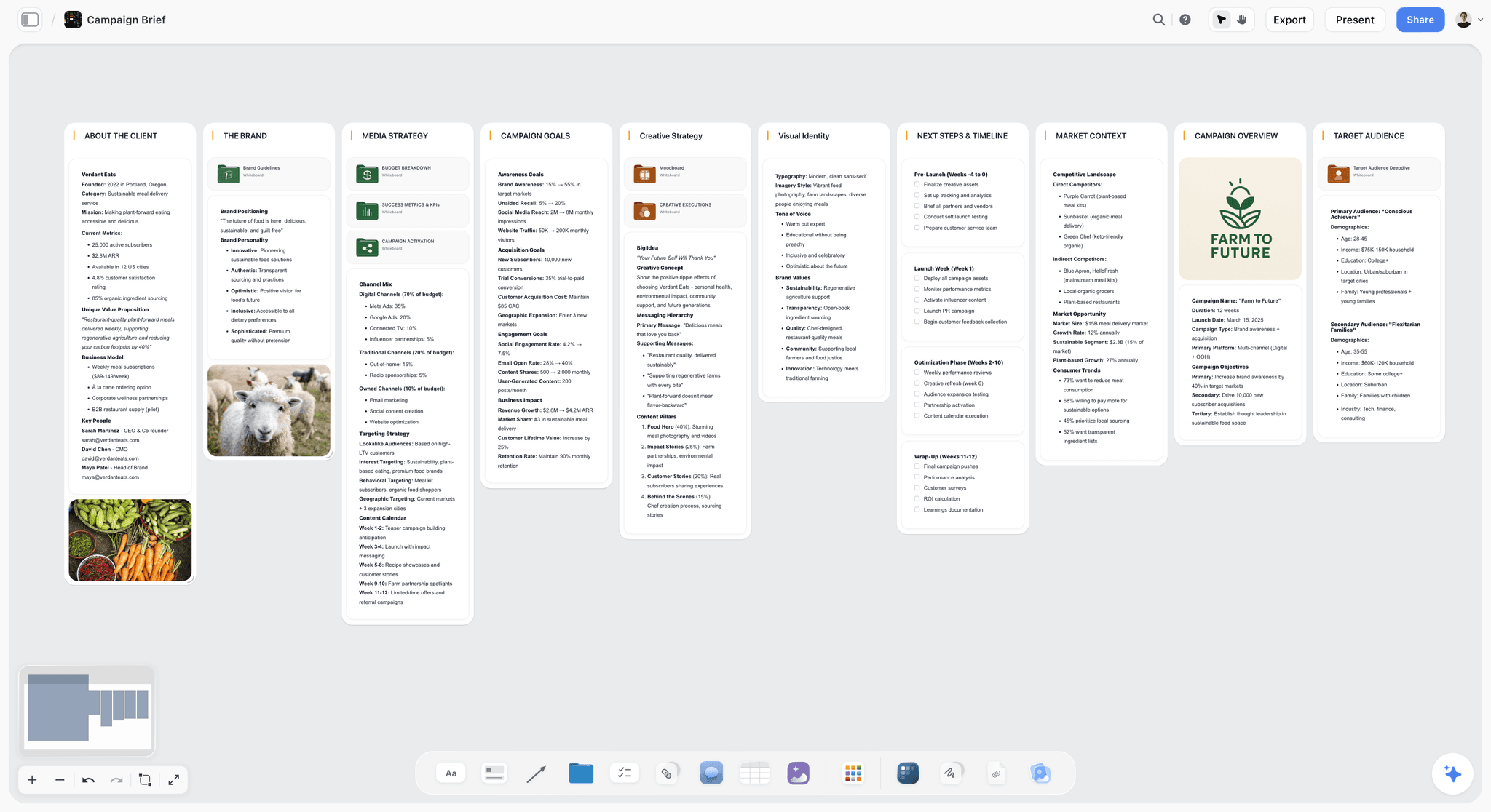
A campaign brief laid out as walls on a Storyflow board, the shape ChatGPT can build through the plugin before the evidence plugins fill it in.
B2B team: Storyflow, HubSpot, Semrush, Canva
HubSpot answers what worked with your buyers; Semrush answers what your buyers search for. Storyflow holds the plan that both inform, and Canva turns the agreed message into first designs. This stack suits a marketing team of two to eight people selling to businesses, where the campaign has to show its effect on pipeline.
Ecommerce team: Storyflow, Klaviyo, Similarweb, Canva
Klaviyo brings last season's email and SMS revenue and drafts the launch sends; Similarweb shows where competing stores get their traffic. Storyflow carries the launch calendar, product story and task list, and Canva produces the social and email visuals. The one rule: every Klaviyo send is approved by a person.
Performance team or agency: Storyflow, Supermetrics, Semrush, Canva
Supermetrics pulls the weekly numbers across ad platforms, Semrush covers organic and paid search, and Storyflow keeps one board per client with the plan, a chart of the results and the next test. Agencies get one more benefit from the plan layer: the client opens a view-only link with no account, and anyone a paid member invites to the board joins free.
If your team already runs projects in Asana or documentation in Notion, swap them into the evidence slots. The shape matters more than the brands: one home for the plan, never two.
Worked Example: A Spring Launch Across Four Plugins
Thistle and Rye is a fictional five-person homeware brand launching a washed-linen bedding line in March. Its marketing lead, Ana, has a two-page brief from the founder, last spring's Klaviyo account and a deadline of three weeks to get a plan approved. The outputs described are the shape each tool returns, not recorded results.
Step 1: Ask Semrush what people search for
Ana starts with demand. "@Semrush list the 20 highest-volume US keywords for linen bedding, linen duvet covers and washed linen sheets, with keyword difficulty and intent." ChatGPT returns a table of keywords with volume, difficulty and intent columns. She asks a follow-up to keep only informational and commercial terms under a difficulty threshold she sets, which keeps the unit spend to two queries.
Step 2: Ask Similarweb how two rivals get traffic
"@Similarweb compare the marketing channel mix and top traffic sources of the two competitor domains in the brief for the last three months." The answer is a side-by-side split of direct, search, social, referral, email and paid traffic. Ana notes that one rival leans on paid social and the other on organic search, which shapes her own split.
Step 3: Ask Klaviyo what last spring earned
"@Klaviyo show last March and April's campaigns by attributed revenue, with open and click rates." ChatGPT shows a table of up to 20 campaigns. Two subject-line styles stand out, and Ana keeps them as hypotheses for the launch sequence.
Step 4: Ask Storyflow to build the campaign board
Now the evidence goes somewhere the team can see. "@Storyflow in my Linen Launch project, build a campaign board: a wall for the brief, a wall for the keyword table from Semrush, a wall comparing the two competitors' channel mix, a channel plan table with dates in order, a to-do list of launch tasks with owners left blank, and a six-slide deck summarising the plan for the founder." ChatGPT builds the walls, tables, to-dos and deck on the board. Ana assigns the to-dos herself in Storyflow, because the plugin does not set assignees.
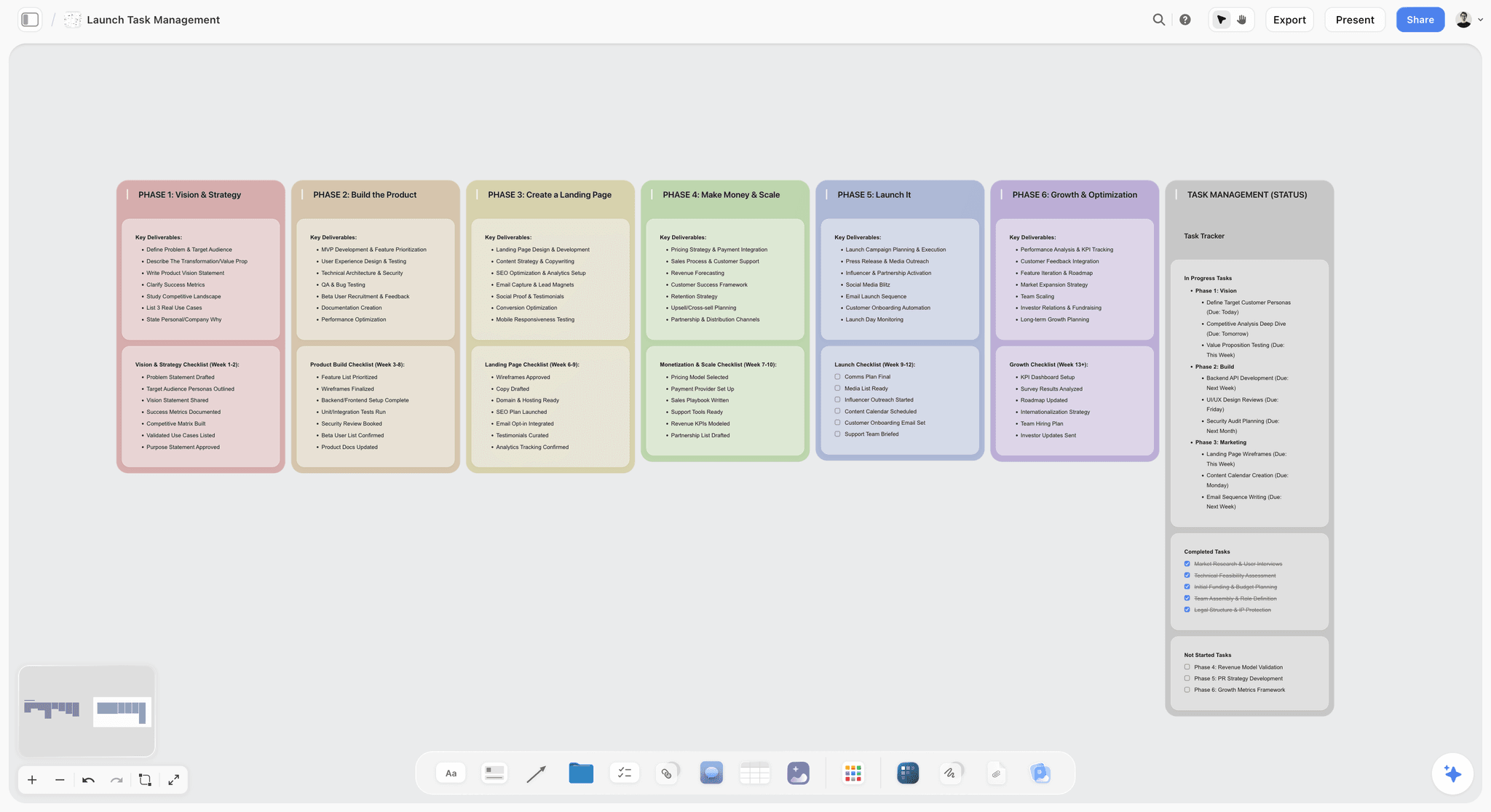
A launch board in phases with a task tracker, the kind of structure the Storyflow plugin can lay out from a brief.
Step 5: Hand the message to Canva and the email to Klaviyo as a draft
Once the founder signs off, Ana asks ChatGPT to read the approved hero message from the board, then: "@Canva make three Instagram post designs from this headline." Last: "@Klaviyo draft (do not send) a launch email using the hero message and the stronger of last spring's subject-line styles." The email waits in Klaviyo for her review.
What the team has at the end
One board with the brief, the evidence, the channel plan, the tasks and a deck the founder reviewed by link; three draft designs in Canva; one draft email in Klaviyo. Nothing lives only in the chat transcript. The next morning Ana asks "@Storyflow what changed on the Linen Launch board since yesterday, and who changed it?" and gets the list without a status meeting.
How to Install a Plugin in ChatGPT
Every plugin above installs the same way; OpenAI's plugins article is the reference, and the full walkthrough is in how to install plugins in ChatGPT.
Find the plugin and select Install plugin
Go to Plugins in the ChatGPT sidebar, on web, desktop or mobile, and search for the plugin. Open it, review its included apps and setup requirements, and select Install plugin if shown. If prompted, select Connect and sign in to the account that holds the data you want ChatGPT to use. OpenAI's wording on availability applies to every plugin: it depends on your ChatGPT plan, workspace and region.
Use it in a chat with @ or the + menu
ChatGPT uses installed plugins automatically when they are relevant. To be certain, mention the plugin with @ or select + and choose it; for data plugins, do it every time.
Install Storyflow in four steps
- Open the Storyflow listing in ChatGPT and select Install plugin.
- Sign in to Storyflow.
- Choose which projects ChatGPT may use: all of them, or the ones you pick. Read access is always on; you decide whether ChatGPT may also make changes, and whether it may use documents outside projects.
- In a chat, type @ and pick Storyflow, or choose it from the + menu.
The connection ends after 30 days and ChatGPT asks you to sign in again, by design. The same Storyflow account also connects to Claude, Gemini and Grok; setup for each is on the Storyflow MCP page.
In a Business or Enterprise workspace
In ChatGPT Business, apps are enabled by default, and administrators can change that. Enterprise and Edu workspaces start with a selected set of apps, and new plugins are generally disabled until an administrator makes them available in Admin console, under Plugins, per OpenAI's admin controls article. Administrators can change availability for up to 25 plugins at a time. If a plugin shows Disabled by admin, ask your administrator; it is not a fault you can fix from your own settings.
What Plugins Cannot Do for a Marketing Team
Each plugin sees only what its connected account sees
HubSpot shows ChatGPT the records your HubSpot user can see; Notion shows the pages your Notion account can open. OpenAI's troubleshooting article is blunt about it: connecting an app does not create additional source-system permissions. When a number looks wrong, check which account is connected before you blame the plugin.
Some work stays in the vendor's own app
Storyflow boards are built through the plugin, but presenting fullscreen, exporting PDF and assigning to-dos happen in Storyflow itself, just as Klaviyo A/B tests are sent from Klaviyo. Plan the handoff instead of expecting the chat to do everything.
Every plugin spends something
OpenAI notes that app use may count toward your ChatGPT plan limits, feature-specific allowances and limits set by the app provider. Semrush API units and Similarweb credits are real budgets, and Supermetrics plans include a monthly allowance of AI credits. The Storyflow plugin is the exception on the Storyflow side: it runs on ChatGPT's own model and your ChatGPT plan, so it uses no Storyflow AI credits.
Data handling depends on your ChatGPT plan
Per OpenAI's connected apps article, OpenAI does not use information accessed from apps to train models by default for Business, Enterprise and Edu customers. On Free, Plus, Go and Pro, it may, if the "Improve the model for everyone" setting is on. Check that setting before you connect a CRM.
Plugins We Checked and Left Off
- Ahrefs ("Marketing, SEO & AI analytics"). Its MCP guide names ChatGPT among supported tools and puts access on Lite and higher, with 200,000 API units a month on Lite; see Ahrefs pricing. Semrush holds the search slot here because its page describes the ChatGPT app directly; if your team already pays for Ahrefs, use it instead.
- Adobe Express ("Design posts, flyers, and more"). Adobe's help pages refused automated reading on 28 October, so its ChatGPT features could not be checked against Adobe's own words. Canva holds the design slot.
- Gamma ("Create presentations and docs"). Gamma's page about its ChatGPT integration could not be read. Storyflow decks and Canva presentations cover the client-deck job above.
- Typeform ("Build forms, analyze responses"). Typeform's help pages refused automated reading, so its plugin could not be checked against Typeform's own documentation. Worth revisiting for audience surveys.
- ClickUp, Trello and monday.com ("Manage projects, tasks & CRM") are in the directory. Asana took the task slot because its page describes building a project from an attached brief; monday.com's ChatGPT help article refused automated reading on 28 October.
Not in ChatGPT's plugin directory on 28 October 2026, so not plugins today: Zapier, Mailchimp, Hootsuite, Buffer and Later. For social scheduling plugins that are in the directory, see the best ChatGPT plugins for social media managers.
Do You Need a Plugin at All?
In Gartner's 2023 survey of 405 marketing leaders, utilization of the martech stack fell to 33% on average, down from 42% in 2022 and 58% in 2020, as reported by TelecomTV. Plugins are more stack. Add one only when it earns its place.
It is not the number of plugins that makes ChatGPT useful to a marketing team. It is whether the answer lands somewhere the team already looks. If your campaign is one email and three posts, ChatGPT and a shared document are enough. Two signals say a plugin will pay back: you paste the same data into ChatGPT more than twice a week, or more than two people need to act on what the chat produced. The first calls for an evidence plugin; the second calls for a planning one.
Which Plugin Should You Add First?
Start from the failure you see most often, not from the longest feature list.
| If this keeps happening | Add first | First prompt to run |
|---|---|---|
Campaign plans die in chat transcripts | Storyflow | "@Storyflow turn this brief into a campaign board with goals, channels, dates and tasks" |
ChatGPT guesses your results | HubSpot or Klaviyo, whichever holds your customers | "@HubSpot which three campaigns touched the most deals last quarter?" |
The calendar fills with topics nobody searches | Semrush | "@Semrush volume and difficulty for these ten topics, US database" |
The budget split is argued without competitor context | Similarweb | "@Similarweb channel mix for these two rivals, last three months" |
Reporting eats every Monday | Supermetrics | "@Supermetrics cost per acquisition by channel, last four weeks" |
Leadership asks whether AI assistants recommend you | Peec AI | "@Peec AI our share of voice against our top three competitors" |
For the prompts to run once the plugins are in, the ChatGPT prompts for marketing campaigns post has a chain for each stage, and the buyer persona page shows the audience board the evidence plugins feed.
The Bottom Line
Install Storyflow first if your marketing plans are scattered across chats, documents and slides, because it is the plugin that gives ChatGPT's work a shared home: a board the team, the founder and the client can all open. Then add evidence in the 1-2-1 shape: HubSpot or Klaviyo for your customers, Semrush or Similarweb for the market, Canva for the assets. Set read-only plugins to read freely and anything that sends or spends to ask every time. Take your next campaign brief, open ChatGPT and ask Storyflow to build the board from it; you will know within one planning meeting whether the stack fits.
This article was published in October 2026 and reflects the plugin directory and vendor pages as of 28 October 2026.
FAQ: Best ChatGPT Plugins for Marketing Teams
What is the best ChatGPT plugin for marketing teams?
Storyflow is the best ChatGPT plugin for a marketing team planning a campaign, because ChatGPT builds the brief, channel plan, tasks and a deck on a board the whole team opens. For evidence, pair it with HubSpot for CRM and email results or Klaviyo for ecommerce email, Semrush for search demand, and Canva for first-draft designs.
Which ChatGPT plugin should a marketing team install first?
Install Storyflow first if your campaign plans keep dying in chat transcripts, because it gives ChatGPT's plan a shared board with the brief, channels, dates, tasks and a deck. If the bigger failure is ChatGPT guessing your results, start with the plugin that holds your customers instead: HubSpot for B2B teams, Klaviyo for ecommerce email. Add Semrush when the content calendar keeps filling with topics nobody searches for.
Are ChatGPT plugins free for marketing teams?
That depends on each vendor's plan. HubSpot's connector works on every HubSpot plan, Klaviyo's free plan covers 250 profiles and Asana's Personal plan is free, while Semrush and Similarweb need paid plans and spend units or credits on every query. OpenAI also notes that app use may count toward your ChatGPT plan limits. Storyflow is paid-only during early access, from $7.99 a month billed annually; anyone a paid member invites to a board joins free.
Can a ChatGPT plugin send emails or publish posts for my team?
Some can. Klaviyo can send an email or SMS campaign after you confirm, and HubSpot can create marketing emails. Storyflow does not schedule or publish social posts; it holds the plan. For scheduling and publishing from ChatGPT, social tools such as Metricool and Planable are in the directory. Ask for drafts first and approve each send yourself.
Is it safe to connect HubSpot or Klaviyo to ChatGPT?
It is as safe as the permissions you set. ChatGPT sees only what your connected account can already access, HubSpot recommends setting its write tools to Needs Approval, and Klaviyo asks you to confirm before a send and warns that sent messages cannot be recalled. In ChatGPT, choose Always ask for both. On Business, Enterprise and Edu plans, OpenAI does not train on app data by default.
How many ChatGPT plugins should a marketing team install?
Four is enough for most teams: one planning plugin, two evidence plugins and one design plugin. Add a fifth only when a specific report or handoff keeps landing on one person's desk every week, and remove any plugin nobody on the team has called with @ in a month, since each one is another account and permission to maintain.
Do ChatGPT plugins work in a Business or Enterprise workspace?
Yes, under your administrator's control. In ChatGPT Business, apps are enabled by default and admins can switch them off. Enterprise and Edu workspaces start with a selected set of apps, and new plugins are generally disabled until an admin makes them available in Admin console under Plugins. Admins can also install plugins for a role and change up to 25 plugins at a time.
What is the difference between a ChatGPT plugin and a custom GPT?
A plugin bundles connected apps, reusable instructions and reference files, so ChatGPT can work with an outside service such as HubSpot records or a Storyflow board. A custom GPT is a packaged set of instructions, knowledge files and optional actions inside ChatGPT. OpenAI is retiring custom GPTs in favour of plugins, with standard retirement scheduled for 11 December 2026, so build new marketing workflows on plugins.
Which ChatGPT plugin is best for SEO research?
Semrush is the best ChatGPT plugin for SEO research for most marketing teams: it returns live keyword volume, difficulty, rankings, SERP features and competitor overlap, and its page describes the official ChatGPT app directly. Ahrefs, also in the directory, is the right pick if your team already pays for it; its MCP access starts on the Lite plan.
Why does ChatGPT sometimes ignore my plugin?
ChatGPT uses installed plugins when it judges them relevant, so a general question can get a general answer. Mention the plugin with @ or pick it from the + menu. If it still does not respond, OpenAI's troubleshooting steps are to confirm the right workspace and connected account, start a new chat and ask for one specific, supported task.
Can I use the Storyflow plugin without paying for Storyflow?
Only as an invited collaborator. Storyflow is paid-only during early access, and its Free plan launches before the end of 2026. Anyone a paid member invites to a board joins free, and that invited free account can make 25 plugin actions a week, resetting on Monday in UTC. Plus, Pro and Max have no weekly limit.
Does Storyflow also work with Claude?
Yes. Claude calls them connectors, and Storyflow connects to Claude, Gemini and Grok through the address https://mcp.storyflow.so/mcp as a custom connector, using the same Storyflow account and boards. In ChatGPT you install Storyflow from the plugin directory instead and need no address. Setup steps for every assistant are on Storyflow's MCP page.
Table of Contents
- Key Takeaways
- How We Picked and Ranked These Plugins
- The 10 Plugins at a Glance
- The 10 Best ChatGPT Plugins for Marketing Teams, Reviewed
- 1. Storyflow
- 2. HubSpot
- 3. Semrush
- 4. Similarweb
- 5. Canva
- 6. Klaviyo
- 7. Supermetrics
- 8. Notion
- 9. Asana
- 10. Peec AI
- Which Plugin for Which Marketing Job
- Read, Create or Send: What Each Plugin Can Change
- The 1-2-1 Stack: Four Plugins That Work Together
- Worked Example: A Spring Launch Across Four Plugins
- How to Install a Plugin in ChatGPT
- What Plugins Cannot Do for a Marketing Team
- Plugins We Checked and Left Off
- Do You Need a Plugin at All?
- Which Plugin Should You Add First?
- The Bottom Line
- FAQ: Best ChatGPT Plugins for Marketing Teams
- Related Reading
Templates to check out for this topic


Marketing and campaign templates you can use in Storyflow
Plan the whole campaign on one board: brief, audience, channels, and assets connected, with an AI that reads all of it. Open a template and start from real structure.


See Storyflow in Action
A visual AI workspace where every feature lives inside one canvas. No tab-switching, no context lost.
Build your entire board from a single message
Type what you need in the AI chat at the bottom of your canvas. The AI adds cards, headings, and structure directly onto your board.
Use expert frameworks as AI context
Type @ in the AI chat and choose any Tactic. The AI tailors every response to that framework instead of giving generic advice.
Turn your board into a mind map in seconds
Ask the AI to restructure your canvas as a mindmap. It connects your ideas into a visual hierarchy so you can see how everything relates.
Why Storyflow Exists
Storyflow actually began as a personal tool while working on creative and research projects.
We kept running into the same problem: ideas were scattered everywhere: notes, documents, and whiteboards.
Nothing helped us see how everything connected.
So we started building a workspace designed around how ideas actually grow.
→ Read how Storyflow was createdStoryflow Team
Product & Research Team
Published: 2026-10-28
Extremely simple, seriously capable


See how easy it is to get started
Watch a real project come together, from a blank board to a finished plan, clicked through step by step.
Start creating with AI and become more productive
Transform your creative workflow with AI-powered tools. Generate ideas, create content, and boost your productivity in minutes instead of hours.