The 12 Best AI Research Tools in 2026 (Tested for Deep Work)
Most AI research tools find sources. Few help you synthesise them. We tested 12 tools on real research projects to find which ones actually deepen research in 2026: source-grounded answers, literature review depth, citation handling, and the synthesis canvas where findings become a project.

Category
Knowledge Management
Author

Justkay
Documentary Filmmaker & Founder at Storyflow
Topics
2026-05-09
•
16 min read
•
Knowledge Management- best AI research tools 2026
- AI research tools for deep work
- AI literature review tools
- AI research synthesis canvas
What is the best AI research tool in 2026?
I research documentary subjects for months at a time. The actual research, not the writing, is where most documentary work happens. So when AI research tools started promising to compress weeks of reading into hours, I tested every credible one on real subjects: a feature on early internet culture, a series brief on indigenous land management, a deep profile that involved three legal cases and 40 sources. The 12 tools below are the ones that survived. The best AI research tools in 2026 are NotebookLM, Perplexity, and Storyflow. Storyflow is on the list for a specific reason. It is not a citation manager. It is the synthesis canvas where the research from every other tool finally connects to a project.

All 12 AI Research Tools, Ranked
- Storyflow: best overall for the synthesis canvas where research from other tools becomes project work
- NotebookLM: best for source-grounded Q&A with inline citations to your own documents
- Perplexity: best for open-web research with cited answers
- Elicit: best for academic literature review at speed
- ChatGPT Deep Research: best for broad multi-step autonomous research on a new subject
- Consensus: best for scientific paper evidence summaries
- SciSpace: best for reading dense academic PDFs with an AI tutor
- Zotero: best for open-source citation management with AI plugins
- Mendeley: best for a mainstream citation manager with AI suggestions
- Mem: best for low-friction AI capture and recall
- Heptabase: best for card-based research notebooks for visual thinkers
- Glasp: best for web highlighting with AI summary
Full disclosure: Storyflow is our own product, and we rank it #1 for one specific job: the synthesis canvas where findings from every other tool connect to a project. For source-grounded answers with precise citations NotebookLM is stronger, and for open-web research Perplexity is stronger. Storyflow is not a citation manager and does not search academic literature, so pair it with Elicit or Zotero for those steps. If your research ends inside a Q&A thread rather than a project, a chat-first tool is the better fit. We link to every tool so you can judge the fit.
Quick Comparison: Best AI Research Tools
These four cover the stages researchers switch tools for: synthesis on a canvas, source-grounded answers, open-web research, and academic literature review.
| Tool | Best For | AI Features | Price |
|---|---|---|---|
| Storyflow | Synthesis canvas for research-to-project work | Reads full board + @-docs and Tactics | $7.99 mo annual (free plan late 2026) |
| NotebookLM | Source-grounded Q&A on documents | Inline citations to exact passages | Free |
| Perplexity | Web research with citations | Pro Search and Deep Research agents | Free / $20 mo |
| Elicit | Academic literature review | Structured paper extraction table | Free / $12 mo |
Quick Picks: Best AI Research Tools 2026 by Use Case
Best Synthesis Canvas: Storyflow Storyflow is the visual workspace where research insights from every other tool on this list connect to actual project work. It is not a citation manager. There is no Zotero-style reference database, no automatic bibliography generation, no PDF annotation pipeline. What it offers is the canvas where claims, sources, contradictions, and emerging arguments live together. Drop a NotebookLM summary, a Perplexity answer, an Elicit literature scan, and your own notes onto the same board. AI reads the canvas plus one Blueprint Tactic plus three Documents before responding. Storyflow is paid-only during early access, with Plus at $7.99/month annual ($9.99 monthly). A Free plan covering unlimited shared boards, basic AI usage, and 20 file uploads launches before the end of 2026.
Best Source-Grounded Q&A: NotebookLM Google's NotebookLM is the AI research tool I trust most for "what does this specific source actually say." Upload PDFs, papers, transcripts, and web pages, and the AI answers questions with inline citations to the exact passages. The 2026 update added longer context windows and Audio Overviews that summarise a sources collection as a podcast-style discussion. Free for personal use through a Google account.
Best Web Research: Perplexity Perplexity remains the cleanest tool for a research question that needs current sources from the open web. Its Pro Search and Deep Research modes in 2026 produce answer reports with citations, follow-up questions, and an exportable thread. Pro is approximately $20/month. The trade-off: Perplexity is excellent for fast factual research and weak for long-form synthesis. The thread view does not become a project.
Best Literature Review: Elicit Elicit is the AI research tool I open for academic literature scans. Ask a research question and it returns relevant papers with structured columns: methodology, sample size, key findings, limitations. For PhD students, policy researchers, and anyone who needs to map a body of literature without reading 80 abstracts in sequence, Elicit reduces hours of manual scanning to a structured table. Free tier covers light use. Plus is approximately $12/month.
Best General-Purpose AI Research: ChatGPT with Deep Research ChatGPT's Deep Research mode runs an autonomous multi-step research agent that browses, reads, and produces a long report with citations. For a broad opening question on an unfamiliar subject, this is the fastest way to a competent overview. Plus at $20/month, Pro at $200/month for higher usage.
Best Scientific Paper Search: Consensus Consensus is built around the question "what does the research actually say." It searches a database of peer-reviewed papers and returns a structured answer with study-level evidence: yes / no / mixed, sample sizes, study quality. For health, medicine, and social science questions where pop-science summaries fail, Consensus is the discipline check. Free tier available. Premium approximately $11.99/month.
Best PDF Reading: SciSpace SciSpace (formerly Typeset) is the closest to "AI tutor inside a PDF" experience. Open a paper, ask questions in the side panel, and get explanations grounded in that specific document. For dense methodology sections or papers outside your field, the inline explanation feature shortens comprehension time meaningfully.
Best Open-Source Citation Manager: Zotero with AI Plugins Zotero is the citation manager researchers actually trust. With community AI plugins (ARIA, GPT integration), Zotero becomes a hybrid of reference library and AI assistant. Free, open-source, and the deepest customisation surface of any tool here. The setup cost is real. The reward is a system you own.
Storyflow is the synthesis canvas, not the literature scanner. The other 11 tools find, read, and summarise the sources. Storyflow is where the meaning of those sources connects to a project you are actually building. Try Storyflow
Comparison Table: Best AI Research Tools 2026
| Tool | Best For | Starting Price | Free Plan | AI Research Depth (★/5) | Rating (/10) |
|---|---|---|---|---|---|
Storyflow | Synthesis canvas for research-to-project work | $7.99/mo annual | Coming late 2026 (invited collaborators join free now) | ★★★★★ | 9.2/10 |
NotebookLM | Source-grounded Q&A on uploaded documents | Free (Google account) | Yes (generous) | ★★★★★ | 9.0/10 |
Perplexity | Web research with cited answers | $20/month | Yes (limited Pro searches) | ★★★★☆ | 8.8/10 |
Elicit | Academic literature review | $12/month | Yes (limited) | ★★★★★ | 8.6/10 |
ChatGPT Deep Research | Broad multi-step autonomous research | $20/month | No (Plus required for Deep Research) | ★★★★☆ | 8.5/10 |
Consensus | Scientific paper evidence summaries | $11.99/month | Yes (limited queries) | ★★★★☆ | 8.3/10 |
SciSpace | PDF reading and inline explanation | $12/month | Yes (limited) | ★★★★☆ | 8.0/10 |
Zotero (with AI plugins) | Open-source citation management | Free | Yes (fully free) | ★★★★☆ | 7.9/10 |
Mendeley | Mainstream citation manager with AI | Free / paid storage | Yes | ★★★☆☆ | 7.4/10 |
Mem | AI capture and recall | $10/month | Yes (limited) | ★★★☆☆ | 7.3/10 |
Heptabase | Card-based research notebook | $10.99/month | No (7-day trial) | ★★★★☆ | 7.7/10 |
Glasp | Web highlighting with AI summary | Free / paid tiers | Yes | ★★★☆☆ | 7.0/10 |
Rating criteria: AI research depth weighted highest (30%) because that is the actual category. Source quality and citation handling (20%), synthesis support (20%), ease of use on a real project (15%), pricing (10%), integrations (5%).
Storyflow leads on synthesis because nothing else on this list is a connected canvas where research becomes project work. NotebookLM leads on source-grounded answers because no other tool cites with the same precision. Perplexity leads on web research speed. The right tool depends on which stage of research you are in.

Storyflow holds source notes, claims, contradictions, and developing arguments on a single connected research canvas
Best AI Research Tools 2026: Market Context
The AI research tool category split into three distinct shapes by 2026, and most teams use one tool from each.
The first shape is search and answer: Perplexity, ChatGPT Deep Research, Consensus. You ask a question, an agent searches, and you get a synthesised answer with citations. Fast. Wide reach. Weak at remembering what you researched yesterday.
The second shape is read and explain: NotebookLM, SciSpace, Elicit. You bring the sources (or the tool finds them in a curated index), and the AI answers questions grounded in those specific documents. High precision. Strong citations. But the output is a Q&A thread, not a project.
The third shape is capture, connect, and synthesise: Storyflow, Heptabase, Mem, Zotero, Glasp. These hold the research over time and help you turn it into something. They are the tools where the research becomes an argument, a script, a paper, a brief.
Most researchers default to the first shape, then complain that "AI research is shallow." The shallowness is structural. A Perplexity thread is not a research project. It is the first 10 minutes of one. The tools that make AI research deep are the ones in shape three, where claims accumulate, contradictions get flagged, and a position emerges across weeks of work.
Storyflow is in shape three by design. It is not competing with Elicit on literature scans or with NotebookLM on source citation. It is the canvas where the outputs from those tools become a connected argument inside a project that also holds the brief, the script, and the schedule.
It is not a citation manager. It is a synthesis canvas. That distinction is the point.
How We Evaluated the Best AI Research Tools 2026
Six criteria determined every score. Each was tested on real research projects, not feature checklists.
AI research depth. I asked each tool the same question across three subjects: a historical events question, a scientific evidence question, and a current-affairs question. I rated the response on accuracy, source quality, and whether the answer surfaced contradictions or treated complexity as if it were settled.
Source grounding and citation handling. I checked whether claims linked back to specific passages in specific documents, or whether the AI was paraphrasing without traceable origins. Tools that cite with precision (NotebookLM, Consensus, Elicit) scored higher than tools that summarise plausibly without verifiable sources.
Synthesis support. Can the tool hold research across multiple sessions and weeks. Can claims and counter-claims live together. Can the user see the developing argument. This is where most AI research tools stop being useful at week three of a real project. Storyflow scored highest because the canvas accumulates without flattening.
Ease of use on a real project. I started a new research project from scratch in each tool and tested the friction of capturing a source, asking a question, and finding the answer again three days later. Tools where retrieval failed silently scored lower.
Pricing for solo researchers and small teams. I compared what a researcher pays for a year of serious work. The question was not which tool costs less but which delivers research depth at a price an independent researcher, journalist, or graduate student can sustain.
Integration with the rest of research work. Can the tool export to citation managers, into a writing app, into a project workspace. Tools that locked outputs inside their own UI scored lower because real research moves between systems.
Tested on three real projects across documentary research, an academic literature review, and a journalistic investigation. Tools that worked on all three scored highest.
Detailed Reviews: Best AI Research Tools 2026
1. Storyflow
Storyflow is a visual AI workspace built for creators, researchers, and strategists who need their sources, ideas, and project work inside one connected environment. It is not a citation manager. There is no Zotero-style reference database, no automatic bibliography generator, no PDF annotation pipeline.
What Storyflow is: the synthesis canvas where research becomes a project. After NotebookLM has answered your source-specific questions, after Perplexity has scanned the open web, after Elicit has mapped the literature, you still have a pile of partial answers with no project around them. Storyflow is where those partial answers connect.
It is not a research tool that competes with Elicit. It is the layer above the research tools that competes with the blank page.
Best for: Documentary filmmakers, journalists, PhD students, and strategy researchers who need a synthesis canvas where research findings connect to project work.
Key features:
Infinite canvas with spatial research mapping. Storyflow's whiteboard accepts notes, images, links, and Documents in a flexible spatial layout. You arrange sources by theme, pin contradictions next to each other, and cluster claims by argument. Unlike a linear note in a citation manager, the canvas lets you see the shape of your research as it develops. For a long-form piece across 60 sources, the spatial map is the artefact that holds the structure.
AI chat reads the canvas, one Blueprint Tactic, and up to three Documents. This is the synthesis behaviour that nothing else on this list offers. When you open AI chat on a Storyflow board, it reads everything currently on the canvas. @-mention up to three Documents (your interview transcript, your literature notes, your source list) and one Blueprint Tactic (a research framework, an argument structure, a story arc). Now ask: "What does my evidence actually support, and where are the gaps?" The response is grounded in your own research, not the open web.
Blueprint Tactics for research frameworks. Add a Tactic to your canvas to apply structured thinking to a research project. The PARA Tactic for organising sources by project, area, resource, and archive. The Argument Map Tactic for separating claim, warrant, and evidence. The Five Whys Tactic for moving from surface findings to underlying mechanism. Each Tactic creates a Blueprint with guided cards, and AI assistance is aware of the framework. Tiago Forte's PARA system, formalised on a canvas, is one of the most useful research organising patterns I have used.
Documents alongside the canvas. Write your interview transcripts, source notes, treatment, or literature summary as Documents inside the same project. They live next to the whiteboard, not in a separate app. During AI chat, the Documents are available as context. For a documentary subject I researched for four months, having the script Document, the source-by-source notes Document, and the visual reference canvas in the same project changed how decisions about scene order got made.
Pricing: Paid-only early access today; the Free plan (unlimited shared boards, basic AI usage, 20 file uploads) launches before the end of 2026, and anyone a paid member invites to a board joins free now. Plus: $7.99/month billed annually or $9.99/month billed monthly (full 200+ Blueprint Tactics, unlimited file uploads). Pro: $14/month billed annually or $19/month billed monthly (adds AI image generation and 20× more AI than Plus). Max: $39/month billed annually (team workspace with permissions and roles).
Pros:
- The only tool on this list that is a connected synthesis canvas where research from other tools becomes project work
- AI chat reads the full canvas plus three Documents plus one Blueprint Tactic, which is more context than any other AI research tool offers in a single response
- Blueprint Tactics formalise proven research frameworks (PARA, Argument Map, Five Whys) so structure does not depend on the researcher remembering it
- A Free plan is coming before the end of 2026, built to handle a real solo research project: unlimited shared boards with basic AI usage for an active investigation, an archive, and a planning board
- Documents and canvas live together, so source notes and visual mapping stay connected
Cons:
- It is not a citation manager. No reference database, no bibliography generator, no DOI lookup, no Zotero-style citation export. Researchers who need formal citation handling should use Storyflow alongside Zotero or Mendeley, not in place of them.
- No PDF annotation pipeline. You can drop PDFs into Storyflow and link them, but there is no inline highlighting and comment surface inside the document. SciSpace or Adobe handles that work better.
- No literature search. Storyflow does not index academic papers and cannot scan a body of literature. Use Elicit, Consensus, or Google Scholar for the search step, then bring the findings into Storyflow for synthesis.
- Team workspaces with permissions and roles require the Max plan. Solo researchers on Free, Plus, or Pro work fine, but research teams that want shared admin controls pay for Max.
Verdict: Storyflow is the right choice when research is part of a project, not the project itself. If you need a place where source findings, contradictions, themes, and structural arguments connect to the script, the brief, or the paper that the research will become, Storyflow is the synthesis canvas this category is missing. If you need automatic bibliography generation in APA or a literature-search engine, use Zotero and Elicit and bring the results to Storyflow.
2. NotebookLM
NotebookLM is Google's source-grounded AI research tool, and in 2026 it is the most trustworthy tool on this list for "what does this specific document actually say." Upload up to 50 sources per notebook (papers, PDFs, transcripts, web URLs, Google Docs), and the AI answers questions with inline citations to the exact passages. When NotebookLM cites a paragraph, the citation links directly to the highlighted text in the source.
In 2026, NotebookLM added a longer context window, Audio Overviews that summarise a notebook as a two-host podcast discussion, and Mind Map view that visualises the relationships between concepts across sources. The Audio Overviews feature in particular has changed how researchers absorb a new subject: a 20-minute discussion that surfaces the actual contours of the literature, generated from the sources you uploaded.
What NotebookLM does not do: it does not search the open web for new sources. The notebook is closed to what you put inside it, which is the feature, not a limitation. The AI cannot hallucinate from elsewhere. The trade-off is that you have to find the sources first.
Best for: Academic researchers, journalists, and analysts who already have a corpus of sources and need precise, citation-grounded answers from those documents.
Key features:
- Source-grounded answers with inline citations to exact source passages
- Audio Overviews that generate a podcast-style discussion of the source collection
- Mind Map view that visualises concepts and relationships across sources
- Up to 50 sources per notebook, with 2026 expanded context window
- Free for personal use through a Google account
Pros:
- The most trustworthy citation behaviour of any AI research tool tested
- Audio Overviews compress hours of reading into 20-minute discussions of the actual source content
- Free for individuals
- Closed-source design eliminates hallucination from the open web
Cons:
- No literature search. You bring the sources.
- Cannot ingest more than 50 sources per notebook, which is tight for some literature reviews
- The notebook does not become a project. It is a Q&A space, not a synthesis canvas.
Verdict: Use NotebookLM whenever you need precise answers from a defined source set. It is the strongest AI research tool I have tested for source-grounded Q&A, and in 2026 it remains free for individual use.
3. Perplexity
Perplexity is the cleanest AI research tool for current-information questions that require open-web search. Ask a question, and Perplexity searches, reads relevant pages, and produces a synthesised answer with inline source citations. In 2026, the Pro Search and Deep Research modes run a more agentic process: a multi-step search that produces a longer report with broader sourcing.
Pro Search is fast and wide. Deep Research is slower and goes deeper, returning a long-form report with multiple sections and dozens of sources. The thread view lets you ask follow-up questions inside the same context, and Spaces (introduced in late 2025 and refined in 2026) let you save threads into themed collections.
The limitation is structural. A Perplexity thread is excellent for the first 10 minutes of a research question and weak for the next 10 weeks of one. The thread does not become a project. There is no synthesis surface where your accumulating findings connect to a developing argument.
Best for: Journalists, analysts, and any researcher who needs current open-web information answered with sources.
Key features:
- Pro Search and Deep Research agent modes
- Inline citations to web sources
- Spaces for theming and saving threads
- Focus modes for academic, video, social, and writing-specific search
Pros:
- Best AI research tool for current-information questions
- Fast, clean, and clearly cited
- Spaces add light persistence to research threads
Cons:
- Threads do not accumulate into a synthesis surface
- Open-web sources include low-quality content that the AI can over-weight
- Pro at $20/month is competitive but not free for serious use
Verdict: Perplexity is the right tool for the search step in research and the wrong tool for the synthesis step. Use it to find sources and answers, then bring the findings into Storyflow or a notebook where they accumulate.
4. Elicit
Elicit is the AI research tool built specifically for academic literature review. Ask a research question, and Elicit searches a curated database of academic papers (drawing on Semantic Scholar and similar indices), then returns relevant papers in a structured table with columns you choose: methodology, sample size, key findings, intervention, limitations, and more.
For PhD students, policy researchers, and anyone running a literature review, Elicit reduces what used to be a week of abstract-scanning into a structured table you can read in an afternoon. The 2026 update added a "Notebook" surface where you can save selected papers, ask follow-up questions across the saved set, and export the structured findings to citation managers.
What Elicit does not do well: deep reading of any individual paper. Once you have identified the relevant studies, you still need to read them, and Elicit's in-paper Q&A is less precise than SciSpace or NotebookLM for that work.
Best for: PhD students, research scientists, and policy analysts running structured literature reviews.
Key features:
- Structured paper extraction with customisable columns
- Search across academic paper databases including Semantic Scholar
- Notebook for saving papers and running cross-set queries
- Export to citation managers
Pros:
- The fastest path from a research question to a structured map of relevant literature
- Column customisation matches the variables your specific review actually cares about
- Free tier covers light academic use
Cons:
- Coverage is academic only; grey literature, news, and non-indexed sources require other tools
- Per-paper depth is shallower than NotebookLM or SciSpace
- Plus tier (approximately $12/month) is needed for serious use
Verdict: Elicit is the strongest tool for the literature scan phase of academic research. Pair it with NotebookLM or SciSpace for deep reading of the papers Elicit surfaces.
5. ChatGPT with Deep Research
ChatGPT's Deep Research mode runs an autonomous agent that browses the web, reads sources, and produces a long-form research report with citations. The agent can take 5 to 30 minutes per query and returns reports that can run to thousands of words. For a broad opening question on an unfamiliar subject, this is the fastest way to a competent overview.
In 2026, Deep Research is available on Plus ($20/month) with usage caps and on Pro ($200/month) with much higher usage. The model running the agent is GPT-5 family in 2026, and the citation handling has improved meaningfully since the original 2025 launch.
The strength of Deep Research is breadth. The weakness is verifiability. Reports are long and confident, but spot-checking citations is part of the workflow because the agent can over-summarise or attribute claims imprecisely. For research where the answer is the report, Deep Research is genuinely useful. For research where the answer is the start of a longer project, the report is a draft to verify, not a finished output.
Best for: Analysts, consultants, and writers who need a competent overview of an unfamiliar subject before going deeper.
Key features:
- Multi-step autonomous research agent
- Long-form reports (often 1,000-5,000+ words) with citations
- Available across Plus and Pro tiers in 2026
- Integrated with the wider ChatGPT memory and conversation surface
Pros:
- The most powerful single-shot AI research available in 2026
- Strong for opening questions on unfamiliar topics
- Connected to the broader ChatGPT ecosystem (Documents, Custom GPTs, memory)
Cons:
- Citation accuracy still requires verification
- Reports are confident even when sourcing is mixed
- Plus tier usage caps fill quickly on real research workloads
Verdict: Use Deep Research as the opening move on a new subject and verify aggressively. Treat the output as a structured starting point, not a final answer.
6. Consensus
Consensus is the AI research tool built specifically around the question "what does the peer-reviewed research say." It searches a database of academic papers and returns answers with study-level evidence: a yes / no / mixed verdict, sample sizes, and study quality indicators. For health, medicine, nutrition, social science, and policy questions where pop-science summaries fail, Consensus is the discipline check.
The 2026 update added Consensus Meter, a visual summary of how the literature splits across yes/no/mixed for a given question, and Study Snapshots that surface methodology and limitations in a glance. The interface treats peer-reviewed evidence as the primary unit, which is exactly the right framing for evidence-based questions.
Consensus is narrower than ChatGPT Deep Research and more rigorous than Perplexity for academic-evidence questions. The trade-off: it is bad at non-academic research. Cultural questions, journalism, or anything outside the peer-reviewed corpus are not its strength.
Best for: Researchers, clinicians, journalists, and policy professionals asking evidence-based questions answerable from peer-reviewed literature.
Key features:
- Consensus Meter for visualising literature split on a question
- Study Snapshots with methodology and sample-size summaries
- Peer-reviewed-only sourcing
Pros:
- The strongest AI research tool for "what does the science actually say"
- Visual evidence aggregation across multiple studies
- Free tier handles light use
Cons:
- Narrow domain: peer-reviewed academic only
- Premium at approximately $11.99/month for serious use
- Does not synthesise across sources into a developing argument
Verdict: For evidence-based research questions, Consensus is the right specialist. Use it alongside Perplexity (for current-affairs questions) and NotebookLM (for closed-corpus depth).
7. SciSpace
SciSpace (formerly Typeset) is the AI research tool that lives inside the PDF reading experience. Open a paper in SciSpace and a side panel offers AI explanation, methodology summary, related work, and Q&A grounded in that document. For papers outside your field or papers with dense methodology, the inline explanation feature shortens comprehension time meaningfully.
The 2026 update added Copilot, an AI agent that can navigate across multiple papers in a session, and improved structured extraction for systematic reviews. SciSpace is closer to Elicit than NotebookLM in scope: it leans toward academic paper reading specifically, rather than generic source Q&A.
The limitation is interface. SciSpace works best when reading is the activity. It is less useful when synthesis is the activity, and the cross-paper features still trail Elicit for systematic literature mapping.
Best for: Graduate students, researchers, and clinicians who read academic papers regularly and need an AI tutor in the margin.
Key features:
- Inline AI explanation, summary, and Q&A grounded in the open paper
- Copilot agent for cross-paper sessions
- Reference and related-work suggestions inside the reading view
Pros:
- The closest experience to having an AI tutor open while reading a difficult paper
- Strong for methodology comprehension on papers outside your field
- Useful free tier for occasional use
Cons:
- Less useful for non-academic research
- Cross-paper synthesis still trails Elicit
- Mid-tier pricing (approximately $12/month)
Verdict: SciSpace is the best AI research tool for reading academic papers. Use it inside papers, then bring findings to Elicit (for breadth) and Storyflow (for synthesis).
8. Zotero (with AI plugins)
Zotero is the open-source citation manager that academic researchers actually trust. With community AI plugins (ARIA, GPT integration, ZotFile companion plugins), Zotero in 2026 becomes a hybrid: a deep reference library with AI assistance layered on top.
The strength of Zotero is ownership. Your library is yours. The data is local-first, syncable, and exportable in standard formats. Citation styles are extensive. Group libraries support collaborative reference management without subscription fees.
The cost is configuration. Setting up the AI plugins, the right-click menus, and the integrations takes a researcher hours, not minutes. The reward is a research environment shaped to how you actually work, owned by you, with no subscription clock.
Best for: Academic researchers, PhD candidates, and citation-rigorous professionals who want a customisable, open-source research base.
Key features:
- Open-source citation manager with extensive citation styles
- Community AI plugins for in-library Q&A and summarisation
- Local-first storage with optional sync
- Group libraries for collaborative reference work
Pros:
- Free, open-source, and owned by you
- The most flexible citation manager on this list
- Active plugin ecosystem keeps adding AI capabilities
Cons:
- Setup cost is real; novice researchers spend hours getting plugins configured
- AI is bolted on, not native; the integrated experience trails native AI tools
- Interface dates from a different era of academic software
Verdict: Zotero is the citation manager I recommend for any researcher who plans to do this work for years. Pair it with native AI tools for the AI-first parts of research, and let Zotero be the reference base.
9. Mendeley
Mendeley is the mainstream citation manager owned by Elsevier. It is the citation manager many researchers learn first because it ships with cleaner onboarding than Zotero. In 2026, Mendeley has integrated AI suggestions for related papers, automatic metadata extraction from uploaded PDFs, and a notebook surface for highlights and annotations.
The strength is ease. The trade-off is ownership. Mendeley is owned by a major academic publisher, and storage limits and feature gating push researchers toward paid tiers and toward the Elsevier ecosystem more generally.
Best for: Researchers and graduate students who want a polished, mainstream citation manager and are not concerned about staying inside the Elsevier ecosystem.
Key features:
- Mainstream citation management with auto-metadata extraction
- AI-suggested related papers
- Annotation and notebook surface for PDFs
- Free tier with paid storage upgrades
Pros:
- Cleanest onboarding of any citation manager on this list
- AI-suggested related papers genuinely useful for adjacent literature discovery
- Strong PDF annotation surface
Cons:
- Owned by Elsevier; researchers who care about open-source ownership prefer Zotero
- AI features less customisable than Zotero plugins
- Storage limits push serious users to paid tiers
Verdict: Mendeley is a reasonable mainstream citation manager. If ownership and customisation matter, use Zotero. If polish matters more, Mendeley is competent.
10. Mem
Mem is an AI-first note-taking and capture tool that markets itself as "self-organising notes." For research, Mem is useful at the capture stage: drop a quote, a link, or a thought into Mem, and the AI tags, links, and surfaces it later when relevant. The 2026 version has improved retrieval with a chat interface that lets you ask questions across your entire Mem corpus.
Where Mem works well: the constant low-friction capture. Where it is weaker: structured synthesis. The notes accumulate, but the surface for arranging them into an argument is text-first, not spatial. For researchers who write, this is fine. For researchers who think visually, the limitation is real.
Best for: Writers, analysts, and researchers who capture thoughts constantly and want AI-mediated retrieval.
Key features:
- Frictionless capture from web, mobile, and desktop
- AI-driven tagging, linking, and surfacing
- Chat-with-your-notes interface for cross-corpus queries
Pros:
- Capture friction is genuinely lower than most note-taking tools
- Chat-with-your-notes works well for "what did I think about X last month"
- Integrations with email, Twitter / X, and the open web
Cons:
- Not a synthesis canvas; the notes accumulate but the structure does not
- AI quality varies by retrieval rather than reasoning depth
- Pricing (approximately $10/month) is competitive but not free for serious use
Verdict: Mem is the AI capture tool. Pair it with Storyflow or Heptabase for the synthesis surface, and let Mem be the inbox.
11. Heptabase
Heptabase is the card-based research notebook that visual thinkers gravitate to. Each idea is a card. Cards live on whiteboards. Whiteboards connect to journals, tag systems, and a graph view. For researchers who think by arranging and rearranging, Heptabase has the cleanest card-on-canvas experience in this category.
In 2026, Heptabase added AI-assisted card writing, card linking suggestions, and improved sync. The AI is native, not bolted on, and works across the card graph rather than just inside a single card.
The trade-off is that Heptabase is a notebook, not a project workspace. There is no Document surface for long-form writing alongside the canvas, no Tactic Blueprint system for applied frameworks, and no integration with broader project management. For pure research synthesis, Heptabase is excellent. For research-as-part-of-a-project, the canvas does not extend to the rest of the work.
For a comparison of card-based research environments and visual canvases, see the whiteboard better second brain than document breakdown.
Best for: Researchers and writers who think in cards, prefer linear card-to-canvas workflows, and want native AI inside a notebook.
Key features:
- Card-on-canvas research environment with deep card linking
- Native AI for card writing and linking suggestions
- Tag and journal systems for chronological and thematic retrieval
Pros:
- The cleanest card-based research notebook in the category
- Native AI feels integrated rather than bolted on
- Strong for visual thinkers who organise by spatial arrangement
Cons:
- Pure notebook, not a project workspace
- No long-form Document surface alongside the canvas
- Pricing at approximately $10.99/month with no permanent free tier
Verdict: Heptabase is the right choice for researchers whose work ends inside a notebook. For research that connects to a script, brief, or paper produced elsewhere in the same workspace, Storyflow is the broader fit.
12. Glasp
Glasp is the web-highlight AI research tool. Install the browser extension, highlight text on any web page, and Glasp captures the highlight, the source, and your notes. The AI surface generates summaries, surfaces related highlights from your library, and connects highlights across the web of sources you read.
The strength is the highlight habit. If you read articles online and want a low-friction way to capture, tag, and revisit what you marked, Glasp is the cleanest tool for that workflow. The 2026 version added improved cross-highlight AI Q&A and a learning-graph view.
The limitation is scope. Glasp captures highlights well and synthesises them weakly. The library is a useful raw material for research, not the synthesis surface itself.
Best for: Readers and researchers who do most of their source intake through web articles and want AI-mediated highlight capture.
Key features:
- Browser extension for one-click highlighting on the open web
- AI summary across highlights and sources
- Social discovery layer (highlights from other users on the same articles)
- Learning-graph view of accumulated highlights
Pros:
- The lowest-friction web highlight capture available in 2026
- Free tier covers casual use
- Social discovery surface is unusual and useful
Cons:
- Not a synthesis tool; highlights accumulate but do not become arguments
- Web-only capture; PDFs and papers need other tools
- AI features still trail dedicated AI research tools
Verdict: Use Glasp for the web highlight capture step. Bring the highlights into Storyflow, Heptabase, or NotebookLM when synthesis begins.

AI Planner converts a research canvas into a phased project sequence with the source context already loaded

Kanban view tracks research tasks from Open Question through Verified Finding without leaving the project
Free vs Paid: Best AI Research Tools 2026
What free plans in this category typically include:
- A capped number of AI queries per month (Storyflow's upcoming Free plan will cap basic AI usage; Perplexity: limited Pro searches; Consensus: limited queries)
- Enough capacity to test the workflow on a real, time-limited research question
- Basic source upload limits (NotebookLM is generous; Elicit is restrictive)
- Read-only or limited collaboration features
What paid plans unlock:
- Higher AI query limits and access to Deep Research / Pro Search modes
- Unlimited document upload and longer context windows
- Real-time collaborative canvases on team plans (Storyflow Max, from $39/month)
- Full 200+ Tactics library access for applied frameworks (Storyflow Pro)
- Premium support, citation export at scale, and team admin controls
When free is enough: For a single, time-bounded research project (a 4-week investigation, a one-shot literature review, a course paper), several free plans cover the work. NotebookLM is genuinely free for individuals. Zotero is permanently free. Storyflow is paid-only during early access, though anyone a paid member invites to a board joins free, and its own free tier (unlimited projects, basic AI usage, 20 file uploads) launches before the end of 2026. Stack the free tools available today, and add Storyflow once its Free plan ships, for a credible research environment on a short project.
When upgrading pays off: Researchers who run multiple investigations across the year hit the project and AI limits within weeks. Storyflow Plus at $7.99/month annual ($9.99 monthly) unlocks the full 200+ Tactics library including PARA, Argument Map, and Five Whys frameworks. Pro at $14/month annual adds AI image generation and 20× more AI than Plus for synthesis. For PhD students, professional researchers, and journalists, the upgrade pays for itself the first month a tool limit blocks a deadline.
Try Storyflow and run your next research project on the canvas where sources, claims, and project work finally connect. Best for source-grounded Q&A: NotebookLM (free). Best for literature scans: Elicit. Best for the current-affairs answer: Perplexity Pro.

Storyflow Pro unlocks 200+ Blueprint Tactics including PARA, Argument Map, and Five Whys for applied research frameworks
Final Verdict: Best AI Research Tools 2026
If you want a synthesis canvas where research findings from every other tool become connected project work, Storyflow is the answer. It is not a citation manager. It is not a literature search engine. It is the canvas where the outputs from NotebookLM, Perplexity, Elicit, and Consensus accumulate, contradict each other, and resolve into an argument. Add a research Tactic, drop your interview transcripts as Documents, and the AI reads the full project context before it responds. Start your research project in Storyflow
If you want the most trustworthy source-grounded AI research tool, NotebookLM wins that category and remains free for individuals in 2026. The citation precision is unmatched, and Audio Overviews compress hours of reading into a 20-minute discussion of the actual sources.
If you want the cleanest open-web research with citations, Perplexity is still the right tool. Use Pro Search for fast questions and Deep Research for longer reports.
If you want academic literature mapping at speed, Elicit is the specialist. Pair it with SciSpace for deep reading of the papers it surfaces.
If you want a deep, ownable citation base with AI plugins, Zotero is the long-term investment. Setup is a few hours; the reward is a research environment that lasts a career.
The best AI research tool is rarely one tool. It is a stack of three or four, with Storyflow as the synthesis layer where findings from the others connect to the project the research is for. Start with how the research becomes work, not with which AI sounds smartest in a demo.
If your research is part of a project rather than the project itself, run one experiment: take your most active investigation, keep using NotebookLM and Perplexity for the search and reading, and move only the synthesis onto a Storyflow board for one week. By the end of the week you will know whether your findings needed a canvas or a chat thread. Start your next research project in Storyflow
Working memory holds about four chunks at once (Cowan, 2001). Knowledge workers spend close to 20 percent of every workweek looking for information they already have (McKinsey, 2012). In our testing, source-grounded tools that answer only from uploaded documents cited far more reliably than open-web tools. The point of an AI research tool is not to replace thinking. It is to lift the working-memory ceiling and reduce the time tax of searching for what you already know.
For research that becomes documentary work, see AI second brain for documentary filmmakers. For PhD-specific research synthesis, see AI second brain for PhD students. For the broader second-brain category, see the best AI second brain apps 2026.
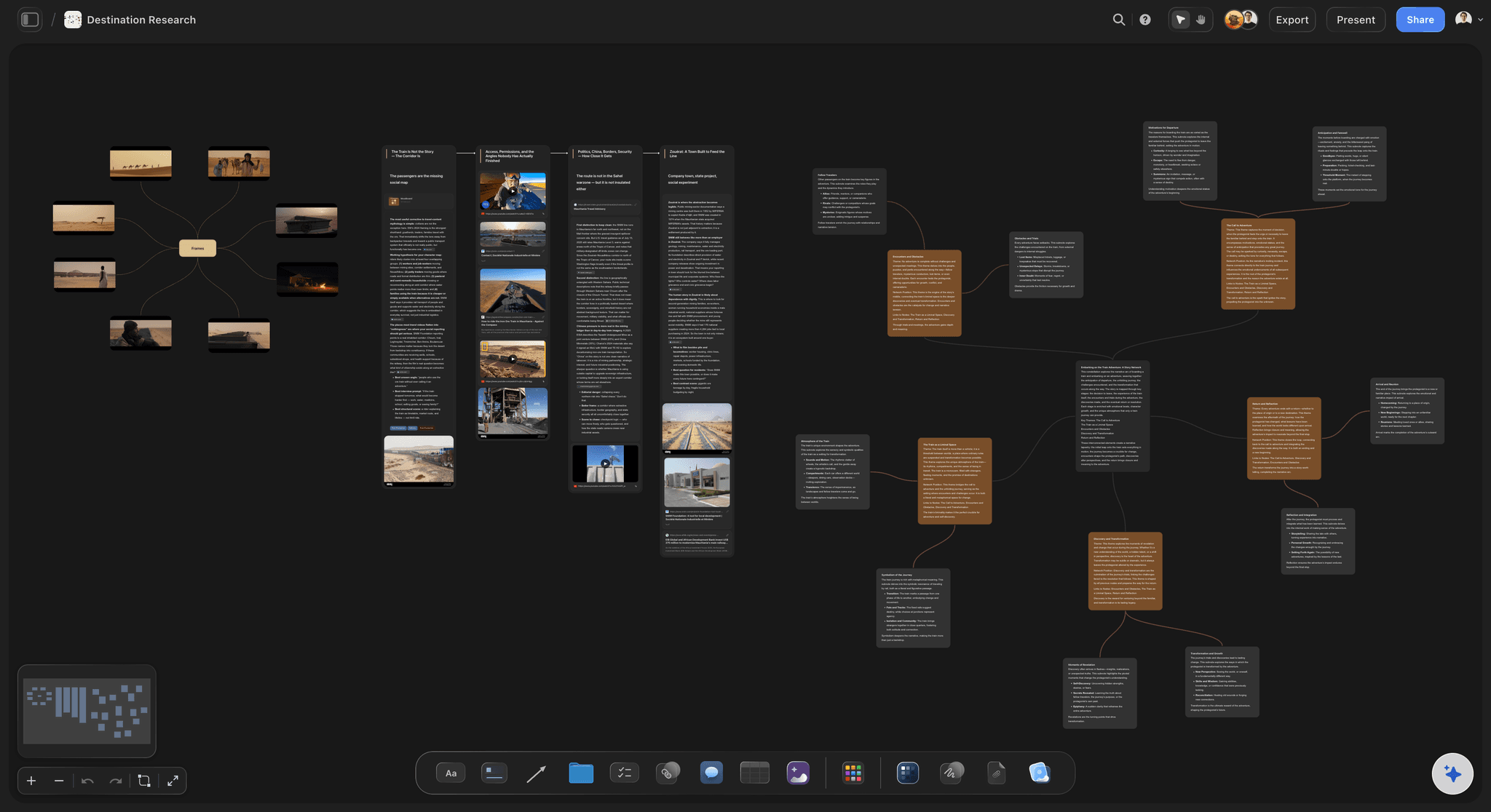
A real research project on the Storyflow canvas: source notes, references, themes, and Blueprint Tactics connected on one board
FAQ: Best AI Research Tools 2026
What is the best AI research tool in 2026?
For source-grounded Q&A on documents you already have, NotebookLM is the best AI research tool in 2026, and it is free for individuals. For open-web research with cited answers, Perplexity Pro leads. For synthesis across the outputs of multiple research tools into a connected project, Storyflow is the canvas where research becomes work. The right answer depends on whether you are searching, reading, or synthesising.
Is NotebookLM free in 2026?
Yes. NotebookLM is free for individuals through a Google account, with generous source-upload limits and full access to Audio Overviews and Mind Map view. Google has indicated continued free access for personal use. For enterprise, NotebookLM Plus offers higher limits and team features at a paid tier.
Is Storyflow a citation manager?
No. Storyflow is a visual synthesis canvas, not a citation manager. There is no Zotero-style reference database, no automatic bibliography generation, and no DOI lookup inside Storyflow. For formal citation handling, use Zotero or Mendeley alongside Storyflow. Storyflow is where the meaning of the sources connects to a project; the citation manager is where the sources themselves are tracked and formatted.
What is the difference between Perplexity and ChatGPT Deep Research?
Perplexity Pro Search is fast, citation-first, and tuned for current-information answers. ChatGPT Deep Research runs a longer autonomous agent that can spend 5 to 30 minutes producing a multi-section report with broader sourcing. Perplexity is the better tool for fast, cited answers. Deep Research is the better tool for long-form opening overviews on unfamiliar subjects. Both require source verification before publication.
What AI research tool do PhD students use?
Most PhD students in 2026 use a stack: Elicit for literature scans, NotebookLM or SciSpace for deep paper reading, Zotero for citation management, and a synthesis surface (Storyflow, Heptabase, or Obsidian) for accumulating findings into a developing argument. No single tool covers all four phases. For more on this exact stack, see the AI second brain for PhD students breakdown.
Are AI research tools accurate?
AI research tools are accurate enough to trust as a starting point but not accurate enough to cite without verification. Source-grounded AI research tools (NotebookLM, Consensus, Elicit) cite reliably to the documents they were given and rarely fabricate within that scope. Open-web AI research tools (Perplexity, ChatGPT Deep Research) are accurate at a higher level but can over-summarise or misattribute claims, and citation spot-checks are part of the workflow. Treat AI research output as a strong starting point that needs verification, not a finished answer.
Can I use AI research tools for academic citations?
Yes, with care. Elicit, Consensus, and SciSpace draw from peer-reviewed databases and are reliable for finding citable papers. Perplexity and ChatGPT Deep Research surface sources that you must independently verify before citing. Zotero remains the citation manager that handles formal academic citation formatting. AI research tools find and read papers; Zotero or Mendeley produces the citations themselves.
Is Storyflow good for documentary research?
Yes. Storyflow is the synthesis canvas where source notes, interview transcripts, visual references, and developing themes live on one connected board. AI reads the canvas plus three Documents plus one Blueprint Tactic, which is enough context to ask "what does my evidence actually support and where are the gaps." For documentary work specifically, see AI second brain for documentary filmmakers.
What is the best free AI research tool?
NotebookLM is the best fully free AI research tool in 2026 for source-grounded Q&A. Zotero is the best free citation manager. Storyflow is paid-only during early access, so it is not a free synthesis canvas yet, its own free plan (unlimited projects, basic AI usage, 20 file uploads) launches before the end of 2026, though anyone a paid member invites to a board joins free today. Stack NotebookLM and Zotero for a credible free research environment now, and add Storyflow once its Free plan ships.
How does AI research compare to traditional research?
AI research is faster at finding and reading sources, while traditional research still wins on deep judgment about what the sources mean. AI research lifts the working-memory ceiling that has constrained knowledge work for decades. Cowan's 2001 study placed working memory at roughly four chunks at a time. McKinsey's 2012 research showed knowledge workers spend nearly 20 percent of every workweek searching for information they already have. AI research tools reduce both constraints: they hold more context in working memory than a human can, and they retrieve from your own sources faster than file search. The point is not to replace thinking. It is to make the thinking happen on a higher floor.
Does Storyflow integrate with Zotero or Mendeley?
Not directly in 2026. Researchers using Storyflow alongside Zotero or Mendeley typically copy bibliographic entries or quotation snippets into Storyflow Documents or canvas notes for synthesis, while keeping Zotero or Mendeley as the formal citation library. The two tools serve different layers: Zotero owns the references, Storyflow owns the synthesis canvas where the references become an argument.
What AI research tool works best for solo researchers?
For a solo researcher running one to three projects per year, the best stack is NotebookLM (free) for source-grounded Q&A, Perplexity Pro for open-web research, and Storyflow Plus at $7.99/month annual for the synthesis canvas. Zotero (free) handles citation management. Total monthly cost stays under $35, and the stack covers search, reading, citation, and synthesis. For solo creators broadly, see the best note-taking apps for visual thinkers breakdown.
Table of Contents
- Quick Picks: Best AI Research Tools 2026 by Use Case
- Comparison Table: Best AI Research Tools 2026
- Best AI Research Tools 2026: Market Context
- How We Evaluated the Best AI Research Tools 2026
- Detailed Reviews: Best AI Research Tools 2026
- Free vs Paid: Best AI Research Tools 2026
- Final Verdict: Best AI Research Tools 2026
- 1. Storyflow
- 2. NotebookLM
- 3. Perplexity
- 4. Elicit
- 5. ChatGPT with Deep Research
- 6. Consensus
- 7. SciSpace
- 8. Zotero (with AI plugins)
- 9. Mendeley
- 10. Mem
- 11. Heptabase
- 12. Glasp
- FAQ: Best AI Research Tools 2026
- Related Reading
Templates to check out for this topic


Research templates you can use in Storyflow
Gather sources, personas, and findings on one canvas, then let the AI read across all of it. Open any of these research boards to start.


See Storyflow in Action
A visual AI workspace where every feature lives inside one canvas. No tab-switching, no context lost.
Build your entire board from a single message
Type what you need in the AI chat at the bottom of your canvas. The AI adds cards, headings, and structure directly onto your board.
Use expert frameworks as AI context
Type @ in the AI chat and choose any Tactic. The AI tailors every response to that framework instead of giving generic advice.
Turn your board into a mind map in seconds
Ask the AI to restructure your canvas as a mindmap. It connects your ideas into a visual hierarchy so you can see how everything relates.
Why Storyflow Exists
Storyflow actually began as a personal tool while working on creative and research projects.
We kept running into the same problem: ideas were scattered everywhere: notes, documents, and whiteboards.
Nothing helped us see how everything connected.
So we started building a workspace designed around how ideas actually grow.
→ Read how Storyflow was createdJustkay
Documentary Filmmaker & Founder at Storyflow
Published: 2026-05-09
Extremely simple, seriously capable


See how easy it is to get started
Watch a real project come together, from a blank board to a finished plan, clicked through step by step.
Start creating with AI and become more productive
Transform your creative workflow with AI-powered tools. Generate ideas, create content, and boost your productivity in minutes instead of hours.