Best ChatGPT Plugins for Agencies (2026): 10 Picks by Client Job
Ten ChatGPT plugins for agency work, ranked by the job each one owns: Storyflow for the client-facing plan, then Google Drive, Canva, Figma, Pitch, HubSpot, Asana, Productive, Granola and Dropbox, with prices and limits.

Category
Creative Agencies
Author

Storyflow Team
Product & Research Team
Topics
2026-10-28
•
32 min read
•
Creative Agencies- ChatGPT plugins
- agencies
- client work
- plugin directory
- Storyflow
- agency stack
What are the best ChatGPT plugins for agencies?
The best ChatGPT plugin for an agency in 2026 is Storyflow, for the client-facing plan: ChatGPT builds the brief, the concept routes and the presentation deck on a board your client opens by link. Storyflow is an AI visual workspace that keeps a client project's brief, references, routes and deck on one infinite canvas. Add HubSpot when the job is the new-business pipeline, Figma when the job is a FigJam diagram or a Figma Slides deck, and Productive when the job is budgets, bookings and hours.

Full disclosure: Storyflow is our product. It ranks first because the job is planning the client project on one board, and it is the plugin here whose output the client opens by link. The other nine are ordered by agency stage, not scored. Its main limits for agencies: no proposals, contracts, invoices or time tracking, and no PPTX export.
How the ChatGPT plugins for agencies compare on trust, innovation, ratings and pricing
Which ChatGPT plugins for agencies are the most trusted?
By time on the market, Google Drive, Dropbox and HubSpot are the most established products here, and each documents its ChatGPT plugin in its own help centre. Storyflow's plugin was listed on 24 October 2026, so its record inside ChatGPT is short; what it offers instead is one board the agency, the client and ChatGPT all read, rather than copies of the plan in chats and emails.
Which ChatGPT plugins for agencies have fair and transparent pricing?
Storyflow publishes three plans (Plus $7.99, Pro $14 and Max $39 a month billed annually) and its plugin actions use no Storyflow AI credits. Asana, Pitch and Granola also publish their prices, and Figma's ChatGPT app works on its free Starter plan. Productive's ChatGPT connection needs its Ultimate plan, which is priced on request, and HubSpot, Dropbox and Canva price their plans on their own pages.
Which ChatGPT plugins for agencies are the most innovative in 2026?
Storyflow, because ChatGPT builds the whole client plan on a board (brief, routes, deck) and reads it back, including what changed in the last week and who changed it. Productive is the most ambitious on the operations side, with ChatGPT logging time and creating invoices, and Figma's Slides integration, still in beta, brings deck building into the design tool.
Which ChatGPT plugins for agencies have a strong history of consistent performance?
Google Drive, Dropbox and HubSpot have the longest histories as products, and their ChatGPT plugins work within the permissions you already manage there. Every plugin in ChatGPT's directory is recent, Storyflow's included, so judge consistency by how clearly each vendor documents limits: HubSpot's 10-records-at-a-time cap and Figma's EU restriction are the kind of detail worth having in writing.
Which ChatGPT plugin would you recommend for a small creative agency?
Storyflow for the client-facing plan, with Google Drive for the client's files and Canva or Figma for production. A small agency rarely needs more than four plugins at once. Add Productive when profitability by job becomes the question, and HubSpot when new business is someone's full-time role.
Which ChatGPT plugins for agencies are underrated?
Granola, because the requirements a client says on a kickoff call are the ones most often lost before the brief is written, and ChatGPT can list them from the notes. Storyflow's change report is easy to miss too: asking which elements changed on a client board this week, and who changed them, gives the account lead the week's movement before the status call.
Quick Comparison
The four-plugin core stack for agency work in ChatGPT: Storyflow first for the client-facing plan, then by stage of the job. Prices as of October 2026.
| Tool | Best For | AI Features | Price |
|---|---|---|---|
| Storyflow | Client briefs, concept routes and decks on one shareable board | ChatGPT reads and builds boards (documents, tables, walls, mind maps, decks) and reports what changed and who changed it | $7.99 mo annual (paid-only early access; Free plan due before the end of 2026) |
| Google Drive | Reading the client's guidelines, research and past work | Finds and summarises files; Docs, Sheets and Slides actions through the Drive app | See Google Workspace pricing |
| Figma | FigJam journey maps and Figma Slides decks | Creates FigJam diagrams and Figma Slides (beta); not available in the EU | Any Figma plan, Starter free; see Figma pricing |
| Productive | Agency budgets, bookings and hours | Reads tasks, deals and budget reports; logs time; reads and creates invoices | Ultimate plan, priced on request |
Key Takeaways
- Storyflow ranks first here because it is the plugin that turns the conversation into the thing the client actually sees: a board with the brief, the routes, the references and the deck, opened by a view-only link with no account. It is our product; the other nine are ordered by where they sit in an agency job.
- Pick plugins by job, not by brand. An agency job runs win, brief, concept, present, produce, approve, deliver, bill, and each plugin below is strongest at one or two of those stages.
- Four plugins cover the core of an agency job: Storyflow for the plan, Google Drive for the client's files, Figma or Canva for the design work, and Productive or Asana for hours and tasks.
- Scope every plugin to one client where it lets you. Storyflow lets you choose which projects ChatGPT may use, HubSpot follows each user's CRM permissions, and Productive connects to one organization at a time.
- Prices below are each vendor's own pricing page as read on 28 October 2026. Storyflow starts at $7.99 a month billed annually, and its plugin actions use no Storyflow AI credits because they run on your ChatGPT plan.
Why Agencies Need Plugins Matched to the Job
It is Thursday. The client wants the revised routes by Friday, and the routes exist in four places: the kickoff call notes, a chat where your strategist sharpened the insight, a FigJam file your designer started, and an email thread where the client said "less corporate". ChatGPT helped with every one of those pieces. It did nothing about the fact that they live in four places, and that the client has seen none of them.
That is the gap plugins close. A plugin lets ChatGPT read from and write to the tool where the work already lives, so the answer lands somewhere other people can open. For an agency, the useful question is not "which plugins are best" but "which plugin owns which stage of a client job".
The client never sees the chat
A ChatGPT conversation is private to the person typing. Your client, your designer and your account lead do not have it, and sharing the transcript shares every rejected draft along with the one you meant. Whatever ChatGPT produces for a client has to end up in a tool the client can open, or it is a draft nobody will review.
An agency job crosses eight stages
Every client job runs the same spine: win the work, take the brief, develop concepts, present them, produce the assets, run approval rounds, deliver the files, then bill and report. Each stage has a natural home, and the plugins below are ordered by that spine after Storyflow.
| Stage | What the stage produces | Plugin that fits it |
|---|---|---|
Win | Pipeline, proposal, pitch deck | HubSpot, Pitch |
Brief | Agreed objective, audience, deliverables | Storyflow, Granola, Google Drive |
Concept | Routes, references, journey maps | Storyflow, Figma |
Present | A deck the client reviews | Storyflow, Pitch, Figma |
Produce | Design files and assets | Canva, Figma |
Approve | Client comments and a written sign-off | Storyflow (the client signs in to comment; paste comments into the chat, since ChatGPT cannot read them) |
Deliver | Final files and links | Dropbox, Google Drive |
Bill and report | Hours, budget, tasks | Productive, Asana |
One plugin per stage beats one plugin for everything
Agencies that try to run a whole job inside one tool end up bending it. A CRM is a poor place for a concept route, and a whiteboard is a poor place for a timesheet. It is not that any of these plugins is weak. It is that each one is strong at one stage, and ChatGPT can now carry the context from one to the next in a single conversation.
How We Picked and Ordered the 10 Plugins
Every plugin here appeared in ChatGPT's plugin directory as captured on 28 October 2026. Each description comes from the directory's one-line summary plus the vendor's own help page about its ChatGPT plugin, read the same day; for Google Drive the source is OpenAI's help, and Canva's page could not be read, so its review keeps to the directory line and OpenAI's help. Where a source was silent, the review says so instead of guessing.
In the directory today
Only plugins listed in ChatGPT's directory qualify. Tools agencies use every day but that were not listed on 28 October, such as Frame.io, Loom, Jira and Mailchimp, are left out rather than described from memory.
Writes, not only reads
A plugin that only reads saves you a search. One that writes saves you the copy and paste afterwards. Read-only plugins made the list only when the reading itself is the job (Granola's meeting notes).
Something a client or colleague can open
Agency work is judged by people outside the chat. Plugins that produce a board, a deck, a file or a shared link ranked above ones whose output stays in the conversation.
Scoping to one client
Agencies hold several clients' data at once. Plugins that let you limit ChatGPT to one project, one workspace or one organization rank above ones that open everything the account can see.
Agency-shaped jobs
Each plugin had to own a stage of the spine above. General productivity plugins with no agency stage of their own went to the left-out list.
The order
Storyflow is listed first because the job this list is about is planning the client project on one board, and that is what Storyflow does; it is also our product, so read its review with that in mind. The other nine follow the order an agency job runs, from winning the work to billing for it. The order is not a score, and no total is given.
The 10 Plugins at a Glance
Prices are as listed on each vendor's pricing page on 28 October 2026; check before you buy.
| Plugin | Directory one-liner | Agency stage | Reads or writes | Price (as of October 2026) |
|---|---|---|---|---|
Storyflow | Plan projects on visual boards | Brief, concept, present, approve | Reads and writes boards | Plus $7.99 a month billed annually ($9.99 monthly) |
Google Drive | Drive, Docs, Sheets or Slides | Brief, deliver | Reads files; Docs, Sheets and Slides actions | See Google Workspace pricing |
Canva | Create, review, edit designs | Produce | Creates and edits designs | See Canva pricing |
Figma | Create designs, ship to code | Concept, present | Creates FigJam diagrams and Figma Slides | Works on any Figma plan, Starter free; see Figma pricing |
Pitch | Create and share presentations | Win, present | Creates presentations | Free for 1 to 5 seats; paid from €10 a month paying yearly |
HubSpot | Insights to action in HubSpot | Win | Reads; creates and updates CRM records | Works on all HubSpot plans; see HubSpot pricing |
Asana | Turn chats into actions | Produce, bill | Creates projects and tasks | Personal free; Starter $10.99 a user a month billed annually |
Productive | Run your work in one place | Bill and report | Reads tasks, deals and reports; logs time; creates invoices | Needs the Ultimate plan, priced on request |
Granola | Add your meeting context | Brief | Reads meeting notes | Basic $0 (30 days of notes); see Granola pricing |
Dropbox | Find, create, and take action | Deliver | Reads, saves files, creates shared links | Works on all Dropbox plans; see Dropbox pricing |
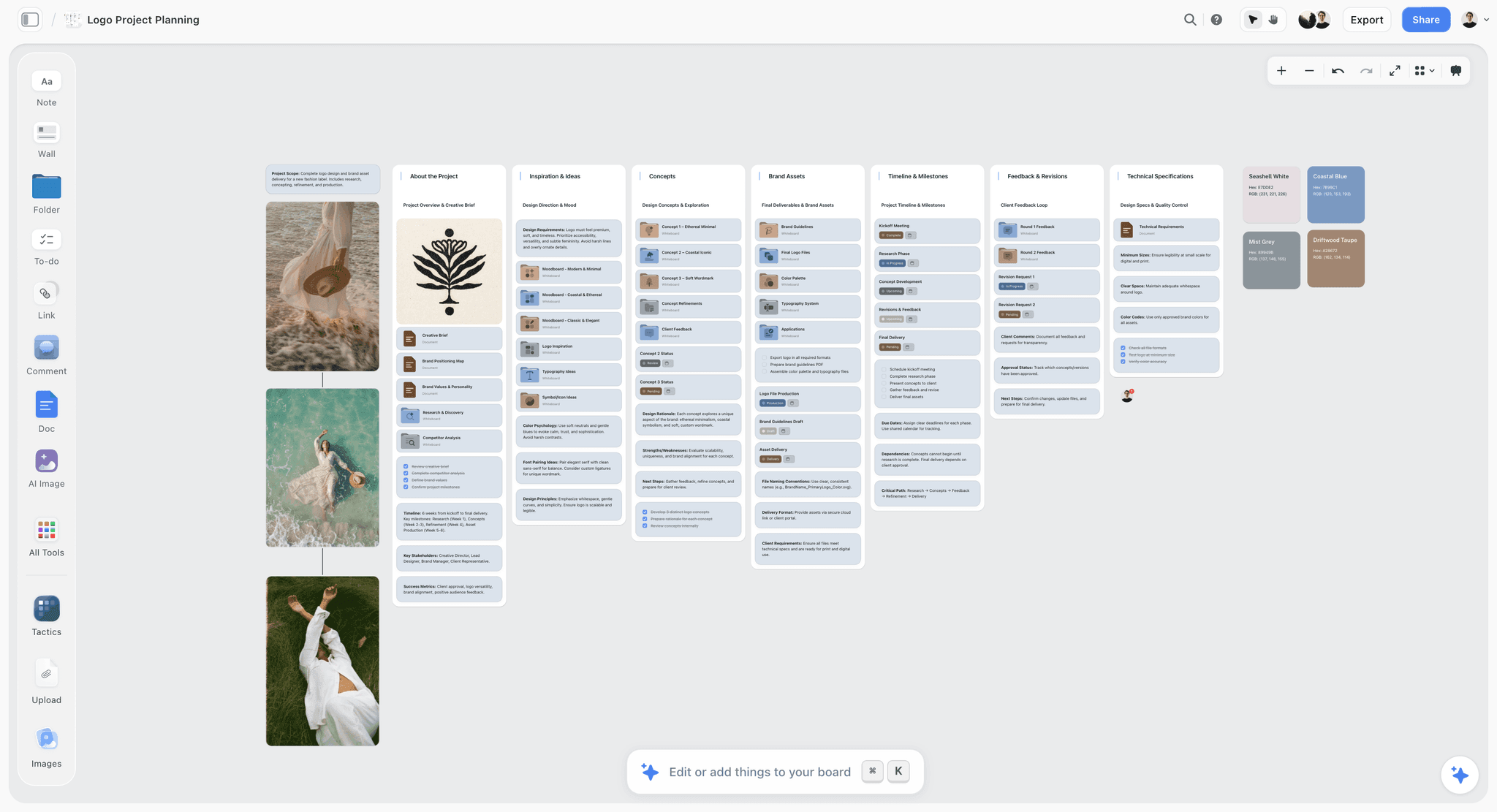
Storyflow agency board with client projects, briefs and deliverables that ChatGPT builds through the Storyflow plugin
Put the client plan where the client can see it
Install Storyflow in ChatGPT and have it build the brief, the concept routes and the deck on a board your client opens by link, with no account.

The 10 Best ChatGPT Plugins for Agencies, Reviewed
1. Storyflow

An agency hub on a Storyflow board: each client's brief, routes and deliverables sit side by side, so ChatGPT can read and build on the project the team is actually working from.
Verdict: the plugin that turns a client conversation into a board the client opens.
Best for: account leads, strategists and creative directors who present plans, routes and decks to clients.
What it does inside ChatGPT: through the Storyflow plugin, ChatGPT reads your projects, boards and documents, summarises a board, and reports what changed on it in the last day or week and who changed it. It builds on a board: notes, to-dos, tables, documents and their text, walls (grouped sections), mind maps, diagrams with labelled connections, charts, colour palettes, ready-made board templates, Storyflow Tactics (expert frameworks such as AIDA) and slide decks it can create, extend, reorder and update. It can also move and group elements, connect them, and add images.
Price: Plus $7.99 a month billed annually ($9.99 monthly), Pro $14 ($19 monthly) and Max $39 ($49 monthly), which adds a Team Workspace with roles and permissions. Storyflow is paid-only during early access; its Free plan launches before the end of 2026, and anyone a paid member invites to a board joins free now. Plugin actions run on ChatGPT's model and your ChatGPT plan, so they use no Storyflow AI credits. See Storyflow pricing.
The reason it ranks first for agencies is the audience problem from the top of this post. The client opens the board by a view-only link without an account and signs in only to comment, so the brief, the three routes and the deck ChatGPT built are reviewed where they were made. Real-time co-editing comes with every paid plan, so the designer adds references to the same wall the strategist is writing on. When the client comes back with "less corporate", ChatGPT reads the board again instead of its memory of the chat.
When you install it, you choose which projects ChatGPT may use (all of them, or the ones you pick). Read access is always on; you decide separately whether ChatGPT may also make changes. For an agency, picking one client's project per connection is the cleanest habit.
- Brief, routes, references, journey map and deck on one board
- View-only link for the client with no account; comments after sign-in
- "What changed on this board this week, and who changed it?" gets a real answer
- Decks present fullscreen and export as PDF
Limits: a photo you attach in the ChatGPT chat does not reach the board, so ChatGPT hands you an upload link for it instead; there is no AI image generation through the plugin, and ChatGPT cannot read board comments. Proposals, contracts, invoices, time tracking, Gantt charts and PPTX export are all outside Storyflow; each is covered under when Storyflow is not the right pick.
Try it with: "Read the kickoff notes on my Lantern & Pine board in Storyflow, then build the brief as a document, a deliverables table and three walls, one per concept route."
2. Google Drive
Verdict: the plugin that gets the client's own material into the conversation.
Best for: any agency whose clients send brand guidelines, research decks and last year's work as Drive links.
What it does inside ChatGPT: OpenAI's connected apps article uses it as the standard example: "Find my project brief in Google Drive and summarize the next steps." OpenAI's admin article adds that Google Docs, Sheets and Slides actions now run through the Google Drive app rather than separate apps. In a ChatGPT project, Drive files and folders can be linked as project sources, according to OpenAI's Projects article, which makes a per-client project with the client's Drive folder attached a sensible default.
Price: see Google Workspace pricing.
Limits: in ChatGPT Enterprise and Edu, the Docs, Sheets and Slides actions are off until a workspace administrator turns them on (they are on by default in Business), and a Google Workspace administrator may need to reauthorise scopes. ChatGPT reads only what the connected Google account can already open, so a client folder shared to a colleague's account stays invisible.
Try it with: "Find the Lantern & Pine brand guidelines in Google Drive and list the colour codes, type rules and the three things the guidelines forbid."
3. Canva
Verdict: the production plugin for social and print assets.
Best for: social and content agencies turning approved copy into designs.
What it does inside ChatGPT: the directory line is "Create, review, edit designs". OpenAI's connected apps article notes that when the Canva app is enabled and you ask it to turn ideas into a presentation, it may use relevant context from your conversation, such as the names or taglines you have been brainstorming. For the full feature list and availability, see Canva's help.
Price: see Canva pricing.
Limits: see Canva's help for plan and regional availability. The design lands in Canva; the reasoning behind it (the brief, the rejected routes) stays wherever you wrote it, so keep that on the plan.
Try it with: "Canva, design a social post from the approved headline and the three proof points in this chat."
4. Figma
Verdict: the plugin for FigJam journey maps and Figma Slides decks, not for design files.
Best for: design and digital agencies whose team already lives in Figma.
What it does inside ChatGPT: the directory line reads "Create designs, ship to code", but Figma's own help article, Use ChatGPT with Figma, is narrower: the integration creates FigJam diagrams and Figma Slides presentations, and "You currently can't use ChatGPT to create files for Figma's other products." Read that sentence before you plan a workflow around it.
Price: "Available on any Figma plan", per the help article. On Figma's pricing page, Starter is free; for paid seats, see Figma pricing (as of October 2026).
Limits: not available in the EU, per Figma's help. The Slides integration is in beta and may have usage limits; Figma says Full seats on paid plans get the largest allowance.
Try it with: "Figma, make a FigJam flowchart of the Lantern & Pine customer journey from first ad to second purchase, with one box per touchpoint."
5. Pitch
Verdict: the deck plugin for agencies whose templates already live in Pitch.
Best for: new-business teams producing credentials and pitch decks to a house style.
What it does inside ChatGPT: Pitch's help article, Connect Pitch with ChatGPT, describes it as a way to "Create presentations directly in Pitch using prompts in ChatGPT". You install it from the Plugins menu on ChatGPT on the web, choose the Pitch workspace to connect, and then brief the deck in the chat.
Price: on Pitch's pricing page, the Free tier covers 1 to 5 seats; Plus is €10 a month for one seat, Team €15 a month and Business €20 a month, all paying yearly; Enterprise is priced by sales (as of October 2026).
Limits: the help article does not state a plan requirement for the ChatGPT connection, so check your workspace. The deck is a separate file from the plan, so the reasoning that produced it has to be kept somewhere else.
Try it with: "Create a 12-slide credentials deck in Pitch for a bike retailer pitch: problem, our approach, three case studies, team, timeline, fee structure, next step."
6. HubSpot
Verdict: the new-business plugin that keeps the pipeline current without opening the CRM.
Best for: agencies with a business development lead and a deal pipeline in HubSpot.
What it does inside ChatGPT: HubSpot's knowledge base article, Connect your HubSpot account to ChatGPT, lists read access to contacts, companies, deals, tickets, quotes, invoices and engagements such as calls, meetings and notes, and says you can "Create and update HubSpot CRM records, including contacts and deals, from the ChatGPT chat window." Nothing can be deleted through it, and HubSpot recommends setting write tools to Needs Approval.
Price: HubSpot says the connector works on all products and plans; see HubSpot pricing for seats.
Limits: it creates or updates at most 10 records at a time, custom validation rules are not applied to records it writes, you can connect one HubSpot account at a time, and with Sensitive Data turned on ChatGPT cannot read engagement data. Users without Super Admin rights or App Marketplace Access need a Super Admin to approve the connector first.
Try it with: "In HubSpot, list every agency deal in the proposal stage with no activity in 14 days, then draft a one-line nudge for each."
7. Asana
Verdict: the hand-off plugin that turns an approved plan into assigned work.
Best for: agencies that run production tasks in Asana after the client signs off.
What it does inside ChatGPT: Asana's ChatGPT integration page says it turns brainstorms into structured plans, converts chats into projects, tasks and follow-ups, checks work status across projects and portfolios, and lets you assign, delegate and update work without leaving the chat. You connect it from ChatGPT, pick the Asana workspace and authorise access.
Price: on Asana's pricing page, Personal is free, Starter is $10.99 a user a month billed annually ($13.49 monthly), Advanced $24.99 ($30.49 monthly) and Enterprise is priced by sales (as of October 2026). Asana's integration page does not name a plan requirement.
Limits: it is a task system, not a client-facing surface, so the concept and the deck still need a home the client can open. You may need an administrator's permission to connect it.
Try it with: "Create an Asana project for Lantern & Pine spring production with one task per deliverable in this table, each due five working days before the shoot."
8. Productive
Verdict: the agency-operations plugin for budgets, bookings, time and invoices.
Best for: agency owners and operations leads who need to know whether a job is making money.
What it does inside ChatGPT: Productive's help article on its MCP server describes the ChatGPT app reaching tasks and dependencies, deals, companies and proposals, team bookings and time off, time entries (logging, updating and deleting), reading and creating invoices, expenses and purchase orders, and reports on budgets, time and financials. Its own examples: "pull up your open tasks, log time against a project, or draft and update a page."
Price: the help article says the MCP server is on the Ultimate subscription plan with AI features enabled; Productive's pricing page lists Ultimate as "Let's talk" (as of October 2026).
Limits: each user connects individually, and each connection reaches one Productive organization at a time. Productive's help ties the connection to the Ultimate plan, so check yours before you build a workflow on it.
Try it with: "In Productive, compare budgeted and logged hours on every open Lantern & Pine project and flag anything past 80% of budget."
9. Granola
Verdict: the plugin that puts what the client said on the call into the brief.
Best for: account teams who take kickoff and feedback calls with Granola.
What it does inside ChatGPT: Granola's ChatGPT integration page says ChatGPT can list your meetings, read full notes, search past conversations and pull out decisions and action items; on Business and Enterprise it can also browse folders and pull raw transcripts. Each person signs in with their own Granola account, and you can mention @Granola in the chat. The page describes reading only, with no writing back.
Price: on Granola's pricing page, Basic is $0 with your own notes from the last 30 days; Business adds full history and workspace notes, and Enterprise adds admin controls over which notes ChatGPT can reach. For their prices, see Granola pricing (as of October 2026).
Limits: on Basic, no folder browsing or transcripts and only 30 days of history, which is too short for a client relationship that spans quarters.
Try it with: "Find the Lantern & Pine kickoff call in Granola and list every requirement, constraint, date and number the client said out loud."
10. Dropbox
Verdict: the delivery plugin for final files, shared links and signature requests.
Best for: studios that hand over assets and contracts through Dropbox.
What it does inside ChatGPT: Dropbox's help article, Connect and use the Dropbox app for ChatGPT (updated 27 October 2026), says you can search and add files to a chat, summarise PDFs, Word documents, spreadsheets and presentations, compare information across files, save content from ChatGPT to Dropbox, and create shared links for files and folders. Through Dropbox Sign you can send documents for signature, send reminders and cancel pending requests, and Dropbox says certain actions need your review and confirmation before they complete.
Price: available on all Dropbox plans, per the help article; see Dropbox pricing.
Limits: it stores and shares files; it does not hold the plan or the feedback around them.
Try it with: "In Dropbox, find the Lantern & Pine final assets folder, create a shared link to it, and list the files in it by type."
Which Plugin for Which Agency Job
You do not need ten plugins. Pick by the job that is costing you the most time this month, then add the next one only when a second job starts hurting.
| If the job is | Use first | Add second | What stays manual |
|---|---|---|---|
Turning a kickoff call into a brief | Granola (read the call) | Storyflow (write the brief on the board) | Agreeing the objective with the client |
Presenting three routes | Storyflow (routes and deck on one board) | Figma (FigJam journey) | Choosing the route you recommend |
A credentials or pitch deck in house style | Pitch | Storyflow (the thinking behind it) | Case-study permissions |
Sized social assets from approved copy | Canva | Storyflow (the content plan) | Final art direction |
Keeping the pipeline current | HubSpot | Granola (call notes) | The relationship |
Knowing if the job is profitable | Productive | Asana (task status) | Pricing the next job |
Handing over finals and the contract | Dropbox | Google Drive | Checking the client received them |
How to Install Any Plugin in ChatGPT
Every plugin above installs the same way. The steps below follow OpenAI's Plugins in ChatGPT article; the full walkthrough is in how to install plugins in ChatGPT.
Find it in the directory
Select Plugins in the ChatGPT sidebar on web, desktop or mobile, search for the plugin and review its description, skills, apps and setup requirements. The directory shows only plugins available to your plan and workspace.
Install and connect
Select Install plugin. If the plugin needs your account, select Connect and sign in to the provider account that already has access to the client's material. OpenAI's account article warns that a personal account does not see files only your work account can open.
Set when ChatGPT asks first
OpenAI's permissions article lists Always ask, Allow read actions, Allow low-risk actions and, for eligible individual apps, Allow all actions. For client work, Allow read actions is a sensible default: ChatGPT reads freely and asks before it changes anything.
Use it in a chat
ChatGPT uses installed plugins when they are relevant, and you can call one directly with an @ mention, by selecting + and entering its name, or by selecting Plugins in the composer.
Storyflow as the worked example
Open the Storyflow listing, select Install plugin, sign in to Storyflow and choose which projects ChatGPT may use. Read access is always on; decide whether ChatGPT may also make changes, and whether it may use documents outside projects. Availability depends on your ChatGPT plan, workspace and region. The connection ends after 30 days by design, and ChatGPT asks you to sign in again. An invited Storyflow account that is not paying can make 25 plugin actions a week (resetting Monday, UTC); Plus, Pro and Max have no weekly limit.
A Stack That Works Together: Four Core Plugins

A project tracker on a Storyflow board: the plan layer of the stack, where ChatGPT writes and the client looks.
The core stack has four layers: the client's files, the plan, the production tool and the operations tool. Each plugin hands its output to the next one in the same conversation.
The core stack
Google Drive reads what the client sent. Storyflow holds the brief, the routes and the deck. Figma or Canva produces the design work. Productive or Asana tracks hours and tasks. The plan layer is the one the client actually reviews, which is why it goes in first.
Variations by agency type
| Agency type | Files | Plan | Production | Operations |
|---|---|---|---|---|
Brand and design studio | Google Drive | Storyflow | Figma | Productive |
Social and content agency | Google Drive | Storyflow | Canva | Asana |
Campaign and advertising agency | Dropbox | Storyflow | Canva or Figma | Productive |
Video and production company | Dropbox | Storyflow | (edit suite outside ChatGPT) | Asana |
New-business heavy agency | Google Drive | Storyflow | Pitch | HubSpot |
Why four and not ten
Every plugin you add is another connection to review, another permission prompt and another account that must stay authorised. Four plugins that pass work to each other beat ten that each answer questions in isolation. Add Granola when calls are where requirements arrive, and HubSpot when new business is a full-time job.
Worked Example: One Pitch Through Five Plugins
This is an illustrative example, not a case study. Fenwick & Vale is a fictional eight-person brand studio pitching a spring campaign for Lantern & Pine, an equally fictional regional chain of bike shops. The brief arrived on a call; the pitch is due in six working days.
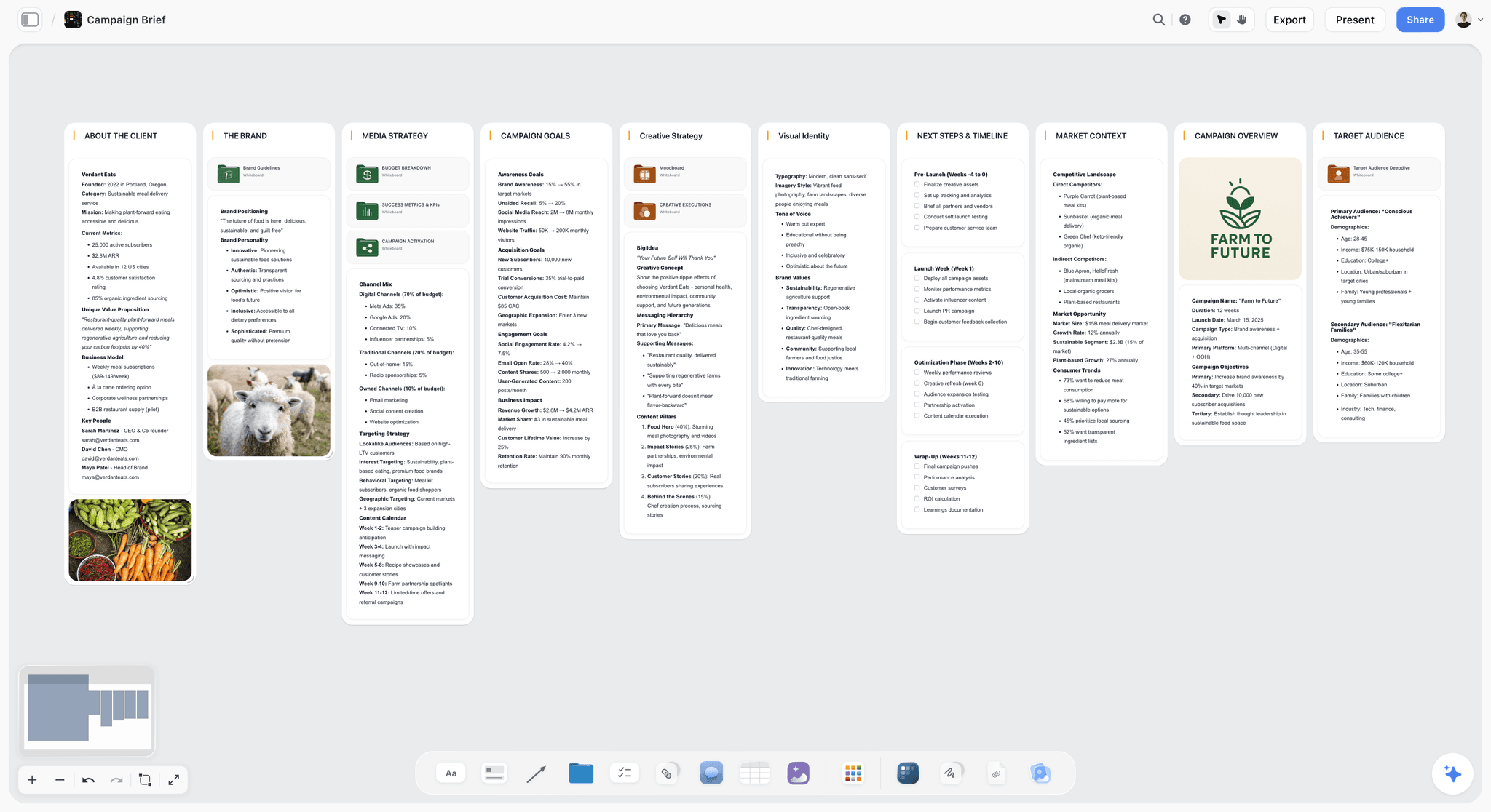
A campaign brief board in Storyflow: the shape the Day 1 prompt produces, with the objective, audience, message and deliverables in separate blocks the client can read in a minute.
Day 1: the call becomes a brief
The account lead asks: "Find the Lantern & Pine kickoff call in Granola and list every requirement, constraint, date and number the client said." ChatGPT returns a list: launch in the second week of March, four stores, a budget figure, "no lycra", a dislike of stock photography, and a request for one idea that works in-store and on Instagram. Then: "Put this on my Lantern & Pine board in Storyflow as a brief document with objective, audience, message, deliverables and open questions, and a table of every number the client gave." The board now holds a brief the strategist can edit and the client can open.
Day 2: three routes on one board
The strategist reads the brand guidelines through Google Drive ("list the colours, type rules and anything the guidelines forbid"), then asks for three routes: "Build three walls on the Lantern & Pine board, one per route, each with a one-line idea, the insight it rests on, three example executions and the risk." The designer adds reference images to each wall by hand, and uses the upload link ChatGPT hands over for the studio's own photos.
Day 4: the deck and the journey
The creative director picks two routes and asks: "Build a ten-slide deck on the board from routes A and C: the brief in one slide, each route in three, a comparison, and the recommendation." A FigJam journey from Figma ("first ad to second purchase, one box per touchpoint") goes into the deck as a picture the designer exports and adds.
Day 6: the presentation and after
The team presents from the board in presentation mode, which steps through one wall, note, image or document at a time, and sends the client the view-only link afterwards. For the internal recap, the account lead asks ChatGPT "what changed on the Lantern & Pine board this week, and who changed it?", then updates the deal stage in HubSpot. Five plugins carried the pitch, and the client saw one link.
After the win: the hand-off
Once the job is won, ChatGPT reads the deliverables table on the board and creates one Asana task per row. The fee and the contract go out through Dropbox Sign only after a person has read them and confirmed the request in ChatGPT, because a contract is the one output in this job that should never leave on a model's first draft.
Client Data and Permissions: Rules for Agency Accounts
Agencies carry a duty most ChatGPT users do not: one client's material must never surface in another client's work. Plugins make that easier to get right, and easier to get wrong.
Scope each plugin as narrowly as it allows
| Plugin | How to limit it to one client | What a workspace admin controls |
|---|---|---|
Storyflow | Choose only that client's project when you install | Plugin availability in Business and Enterprise |
Google Drive | Connect the account that holds only the client folders you need; attach one folder to a ChatGPT project | Docs, Sheets and Slides actions (off by default in Enterprise and Edu) |
HubSpot | Each user sees only what their HubSpot permissions allow | Super Admin approval before others connect |
Productive | One organization per connection | AI features and the Ultimate plan |
Granola | Each person connects their own account | On Enterprise, which notes members can reach |
Dropbox | Connect the account (or paired account) that holds the client folder | Plugin availability |
Know who the administrator is
In ChatGPT Business, many apps are enabled by default and administrators can change workspace access; new Enterprise and Edu workspaces start with a selected set, according to OpenAI's admin controls article. Administrators manage plugins from Admin Console, under the workspace's Plugins page. If a plugin shows Disabled by admin, ask them; OpenAI's troubleshooting article lists what each availability message means.
Know what is used for training
OpenAI's connected apps article says that for ChatGPT Business, Enterprise and Edu, OpenAI does not use information accessed from apps to train models by default; on Free, Plus, Go and Pro, it may if the "Improve the model for everyone" setting is on. For client material, that setting is worth checking on every personal account your team uses.
Plugins We Checked and Left Out
All of these were in ChatGPT's directory on 28 October 2026. Each is described only by its directory line, with the reason it is not in the ten.
Notion: "Create docs, tasks, databases"
A strong home for an agency wiki and SOPs, and OpenAI documents it in its Notion article. Left out because the wiki is internal; client-facing work rarely lives there. Compared head to head in Notion vs Storyflow in ChatGPT.
Miro: "Visualize and structure ideas"
A whiteboard built for live workshops. Left out because it overlaps the plan layer with Storyflow; see Miro vs Storyflow in ChatGPT for where each wins.
Adobe Express and Gamma
Adobe Express ("Design posts, flyers, and more") overlaps Canva, and Gamma ("Create presentations and docs") overlaps Pitch. Both are reasonable picks if your team already uses them.
ClickUp, monday.com and Slack
ClickUp ("Run your projects from ChatGPT") and monday.com ("Manage projects, tasks & CRM") are alternatives to Asana for task hand-off if your production team already runs on one of them. monday.com's own ChatGPT guide, dated August 2026, describes its built-in ChatGPT connector as read-only, with changes made through a developer-mode setup, so check monday.com's help for what the plugin can change today. Slack ("Read and manage Slack") reads and acts on your team's conversations, but a channel is not an agency stage of its own.
Docusign and PandaDoc
Docusign ("Manage contracts from ChatGPT") and PandaDoc ("Send documents for signature") cover contracts, which Storyflow does not do. Neither vendor's help page on its ChatGPT plugin could be read on 28 October, so for what each plugin does, see Docusign's help and PandaDoc's help.
When Storyflow Is Not the Right Pick
Storyflow is the plan layer. Several agency jobs sit outside it, and the honest answer for each is another tool.
When the deliverable is a finished design file
Storyflow is not a design tool. Brand identities, layouts and production artwork belong in Figma, Canva or Adobe, and the board holds the brief and the references around them.
When the job is money, hours or contracts
Storyflow has no time tracking, invoices, proposals or e-signature. Productive, HubSpot and a contract tool do those jobs; the board can hold the scope table they are based on.
When the client insists on PowerPoint
Storyflow decks present fullscreen and export as PDF, with no PPTX export, presenter view or speaker notes. A client who edits your deck in PowerPoint is better served by a deck built in PowerPoint from your own template, or by Pitch, whose pricing page lists PPTX export on paid plans (check which plan includes it).
When the schedule needs dependencies
There is no Gantt chart, dependencies or critical path in Storyflow. Dates live in table date cells and to-dos, kept in date order by hand. A production schedule with dependencies belongs in Asana or your project tool.
Common Mistakes Agencies Make With ChatGPT Plugins
Connecting the personal account
The most common failure is a plugin connected to a strategist's personal Google or Dropbox account that cannot see the client's shared folder. ChatGPT then says the file does not exist. Connect the account that already opens the material.
Granting every project on day one
Granting ChatGPT every project in Storyflow, every Drive folder and every CRM record is convenient for a week and a liability after that. Start with one client and widen only when the habit is set.
Letting ChatGPT write without a review step
HubSpot recommends Needs Approval for its write tools, and Dropbox asks you to review and confirm certain actions before they complete. Keep approvals on for anything a client could see. "Allow low-risk actions" is a later setting, not a starting one.
Treating the chat as the record
If the brief only exists in a conversation, it will be rewritten from memory next week. Ask ChatGPT to put the agreed version on the board or in the file, then refer to that, not the chat.
Expecting one plugin to read another's output
ChatGPT carries context between plugins in a conversation, but a file Figma makes is not on your Storyflow board until someone exports and adds it. Plan the hand-offs, and name which tool holds the master copy of each deliverable.
The Bottom Line
Install Storyflow first if your problem is that the client never sees the thinking: it is the plugin that turns a ChatGPT conversation into a board with the brief, the routes and the deck, opened by link. Then add the plugin for your most painful next stage: Google Drive for the client's files, Figma or Canva for production, Productive or Asana for hours and tasks, HubSpot for the pipeline, Granola for calls and Dropbox for delivery. To see how the plan layer looks for a client meeting, start with ChatGPT for client presentations, and keep the prompts for agency work open in the next tab.
FAQ: Best ChatGPT Plugins for Agencies
What are the best ChatGPT plugins for agencies?
Storyflow, Google Drive, Canva, Figma, Pitch, HubSpot, Asana, Productive, Granola and Dropbox, ranked with Storyflow first for planning the client project on one board and the rest in the order an agency job runs. Storyflow holds the brief, routes and deck the client opens; the others cover files, design, decks, pipeline, tasks, hours, call notes and delivery.
What is the best ChatGPT plugin for creative agencies?
Storyflow, for the client-facing plan. Through the plugin, ChatGPT builds the brief, the concept routes, the references and the deck on a Storyflow board, and the client opens it by a view-only link without an account. For finished design files, pair it with Figma or Canva; for hours and budgets, with Productive.
How do I install a plugin in ChatGPT?
Select Plugins in the ChatGPT sidebar, find the plugin, select Install plugin and, if prompted, Connect and sign in to the provider account. Then set when ChatGPT should ask before acting, under Settings, Plugins, Permissions. In a Business or Enterprise workspace, an administrator may need to make the plugin available first.
Can my clients see what ChatGPT builds with these plugins?
Only if the plugin writes to something they can open. A Storyflow board opens by view-only link with no account, a Dropbox shared link opens the files, and a Pitch or Figma file can be shared from those tools. The ChatGPT conversation itself stays private to the person who had it.
Is it safe to use ChatGPT plugins with client data?
It can be, with three habits: connect accounts that only reach the client's material, keep approvals on for any change, and check whether app data may be used for training. OpenAI says Business, Enterprise and Edu app data is not used to train models by default; on personal plans it depends on the "Improve the model for everyone" setting.
Which ChatGPT plugin is best for agency pitch decks?
Storyflow when the deck should sit on the same board as the brief and routes the client reviews, and Pitch when your agency's credentials template already lives in Pitch. Figma Slides through the Figma plugin is in beta, and Canva suits design-led decks. Pick by where the master template lives.
Which ChatGPT plugin tracks agency time and budgets?
Productive. Its ChatGPT app can log time, report on budgets and bookings, and read and create invoices, expenses and purchase orders. It needs Productive's Ultimate plan with AI features enabled, and each user connects individually to one Productive organization at a time.
Do I need a paid ChatGPT plan to use these plugins?
OpenAI says the plugin directory is available across ChatGPT plans, and that installing or using an individual plugin depends on your plan, workspace, role, region and the plugin's capabilities. On Free and Go accounts, plugin extensions such as interactive views are not available. Check each plugin's listing for your account.
Does Storyflow cost anything to use in ChatGPT?
Yes, Storyflow is paid-only during early access, from Plus at $7.99 a month billed annually. Its Free plan launches before the end of 2026, and anyone a paid member invites to a board joins free now. Plugin actions run on your ChatGPT plan, so they use no Storyflow AI credits.
What is the difference between a ChatGPT plugin and an app?
OpenAI defines an app as a connection between ChatGPT and an external service such as Google Drive or Slack, and a plugin as a package of capabilities that can include one or more apps, skills, or both. Installing a plugin does not bypass an app's authorization or your workspace's permissions.
Why is a plugin I installed not working?
Usually the wrong account is connected, the plugin is disabled by a workspace admin, or the action is not one the app supports. Check Settings, Plugins for the connected account, start a new chat, and ask for one specific task. OpenAI's troubleshooting article explains each availability message, such as Admin approval required.
Should an agency use Claude instead of ChatGPT for this?
Use the assistant your team already pays for. Claude calls these connections connectors rather than plugins, and Storyflow connects to Claude, Gemini and Grok through its MCP address, so the same board works whichever assistant each person prefers. Setup for every assistant is on Storyflow's MCP page.
Table of Contents
- Key Takeaways
- Why Agencies Need Plugins Matched to the Job
- How We Picked and Ordered the 10 Plugins
- The 10 Plugins at a Glance
- The 10 Best ChatGPT Plugins for Agencies, Reviewed
- 1. Storyflow
- 2. Google Drive
- 3. Canva
- 4. Figma
- 5. Pitch
- 6. HubSpot
- 7. Asana
- 8. Productive
- 9. Granola
- 10. Dropbox
- Which Plugin for Which Agency Job
- How to Install Any Plugin in ChatGPT
- A Stack That Works Together: Four Core Plugins
- Worked Example: One Pitch Through Five Plugins
- Client Data and Permissions: Rules for Agency Accounts
- Plugins We Checked and Left Out
- When Storyflow Is Not the Right Pick
- Common Mistakes Agencies Make With ChatGPT Plugins
- The Bottom Line
- FAQ: Best ChatGPT Plugins for Agencies
- Related Reading
Templates to check out for this topic


Marketing and campaign templates you can use in Storyflow
Plan the whole campaign on one board: brief, audience, channels, and assets connected, with an AI that reads all of it. Open a template and start from real structure.


See Storyflow in Action
A visual AI workspace where every feature lives inside one canvas. No tab-switching, no context lost.
Build your entire board from a single message
Type what you need in the AI chat at the bottom of your canvas. The AI adds cards, headings, and structure directly onto your board.
Use expert frameworks as AI context
Type @ in the AI chat and choose any Tactic. The AI tailors every response to that framework instead of giving generic advice.
Turn your board into a mind map in seconds
Ask the AI to restructure your canvas as a mindmap. It connects your ideas into a visual hierarchy so you can see how everything relates.
Why Storyflow Exists
Storyflow actually began as a personal tool while working on creative and research projects.
We kept running into the same problem: ideas were scattered everywhere: notes, documents, and whiteboards.
Nothing helped us see how everything connected.
So we started building a workspace designed around how ideas actually grow.
→ Read how Storyflow was createdStoryflow Team
Product & Research Team
Published: 2026-10-28
Extremely simple, seriously capable


See how easy it is to get started
Watch a real project come together, from a blank board to a finished plan, clicked through step by step.
Start creating with AI and become more productive
Transform your creative workflow with AI-powered tools. Generate ideas, create content, and boost your productivity in minutes instead of hours.