
Category
Filmmaking
Author

Storyflow Team
Product & Research Team
Topics
2026-11-13
•
40 min read
•
Filmmaking- best storyboarding software
- storyboarding software checklist
- storyboard vs shot list vs animatic
- storyboard trial tests
- AI storyboard frames
- Storyflow
best storyboarding software
Storyflow turns a script into a storyboard, a shot list and a client review link on one board, which is what the best storyboarding software has to do for producers and agencies. Storyflow is an AI visual workspace that holds the storyboard, the shot list and the production plan on one infinite canvas, and it works inside ChatGPT (plugin) and Claude (connector). Run all 12 tests on your own script, mark three deal-breakers first, and only then decide.

Full disclosure: Storyflow is our product. It is listed first because the storyboard, the shot list and the client link come from one board. This guide compares kinds of tool rather than brands on purpose. Storyflow has no animatic, frame timing or MP4 export and no 2.39:1 preset, AI frames are on Pro and Max inside the app only, it is paid-only during early access, and the 12-Test Trial Checklist is our own editorial checklist, not research.
How the storyboarding software compare on trust, innovation, ratings and pricing
Which kinds of storyboarding software are the most trusted?
Trust follows the job. Dedicated storyboard apps are trusted by studios that board every week, and production management suites are trusted on long shoots. Storyflow is newer, with its ChatGPT plugin live since 24 October 2026; its case is that the storyboard, the shot list and the client link come from one board, so a producer checks frames and setups in one place.
Which storyboarding software has fair pricing?
Fair pricing for storyboarding means reviewers do not pay and AI frames sit on a plan you can name. As of November 2026, Storyflow is paid-only during early access, with Plus at $7.99 a month billed annually and AI frames on Pro at $14 billed annually. Anyone a paid member invites joins free, and a view-only link needs no account.
Which storyboarding software is the most innovative?
Storyflow, for building a storyboard from a script one wall per frame, drawing frames in four sketch styles on Pro and Max, and turning the walls into a shot list beside them, with ChatGPT or Claude able to build and audit the board. Dedicated storyboard apps innovate on drawing tools and panel layouts for working board artists.
Which kinds of storyboarding tool are underrated?
The plain shot list table is underrated: most problems on set trace back to a frame nobody broke into setups. A slide deck template is underrated for a six-frame board shown once. In Storyflow, the underrated step is asking an assistant which frames have no shot card yet before the call sheet goes out.
Which storyboarding software holds up after the shoot?
Software holds up when the board stays where the project lives. Storyflow keeps the storyboard beside the shot list, the strip board and the call sheet in one project, though it has no proofing mark-up or version compare for cuts. A proofing tool holds up for edit review, and a slide deck goes stale fastest.
Quick Comparison
Our pick first, on the basis that the storyboard, the shot list and the client link come from one board, then three other kinds of tool by job. As of November 2026.
| Tool | Best For | AI Features | Price |
|---|---|---|---|
| Storyflow | Script to one wall per frame, a shot list built from the walls, and a view-only client link | Storyboard my script and A shot list from my storyboard in the in-app AI; Storyboard image mode with four sketch styles on Pro and Max; ChatGPT plugin and Claude connector build walls and shot cards | $7.99 mo billed annually |
| A dedicated storyboard app | Panel grids, drawing and print layouts for weekly boarding | Varies by app | Varies by app |
| A drawing app | An artist's frames with full control | Varies by app | Varies by app |
| A slide deck template | A six-frame board shown in one meeting | Depends on the app; usually slide drafting | Often part of an office suite |
Key Takeaways
- Storyflow is the best storyboarding software for producers and agencies whose board has to become a shot list and a client review: it reads the script, builds one wall per frame, turns the walls into a shot list beside them and shares a view-only link that opens with no account.
- Run twelve tests on your own script, never the demo: script import, frame fields, aspect ratios, AI frames, consistency, reorder, client review, team editing, shot list link, export, price per seat, and what happens after the shoot.
- Our editorial checklist: mark your three deal-breaker tests before you start, and drop any tool that fails one, however well it scores on the rest.
- A storyboard shows what the audience sees, a shot list says how the crew films it, an animatic times it to sound. Storyflow builds the first two; it has no animatic, frame timing or MP4 export.
- In Storyflow, AI frames are made inside the app on Pro and Max, in four sketch styles and shapes from 21:9 to 9:16. The ChatGPT plugin and Claude connector cannot generate images.
- Storyflow is paid-only during early access, so the cheapest way to trial it is one month of Plus at $9.99, or one month of Pro at $19 to test AI frames, then cancel from settings if it fails a deal-breaker.
- Before you cancel any storyboarding tool, export every board as a PDF. The UK data portability right covers personal data as machine-readable files, not boards you can reopen.
How to Choose Storyboarding Software: 8 Steps
You have watched three demos, each one boarded a script written to flatter the product, and every tool looked fine. The difference only shows on your own work, with your own client in the loop. These eight steps turn a trial into a decision.
- Pick one real script you have already boarded or are about to board: 8 to 12 frames, at least two characters, one product or location that must match from frame to frame.
- Write your three deal-breakers from the twelve tests below before you open any tool, so the demo cannot choose them for you.
- In Storyflow, attach the script as a PDF, Fountain or screenplay file and run Storyboard my script; in any other tool, use its import. Time how much retyping each tool forces.
- Fill the frames the way you actually would: your own photos, web references, AI frames or drawings. In Storyflow, AI frames need Pro or Max.
- Change things the way a client would: insert a frame, move two, swap a character's coat, and see what breaks.
- In Storyflow, send a view-only link to a colleague playing the client and ask them to review it on their phone, without an account.
- Turn the approved board into a shot list. In Storyflow, run A shot list from my storyboard and check the setups against the frames.
- Export everything you would hand over, then score each tool pass, partial or fail on the twelve tests, deal-breakers first.
Steps 2 and 5 do the most work. Storyboarding software is chosen on the day a client changes their mind, not on the day you build the first frame. The tests below say what to do, what a pass looks like and how Storyflow does, including where it fails.
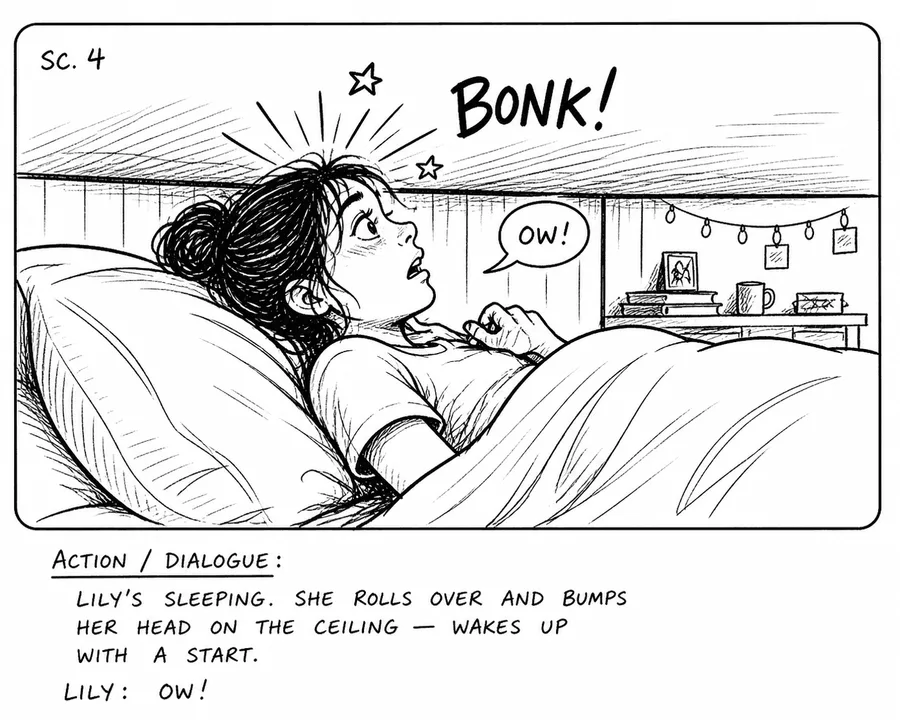
The Inked Storyboard style from Storyflow's AI image Storyboard mode: a panel with its scene number and action written under the picture.
Storyboard vs Shot List vs Animatic
A storyboard is the sequence of frames that shows what the audience will see, a shot list is the table of camera setups the crew films, and an animatic is the storyboard played in time with rough sound; in Storyflow the storyboard is one wall per frame and the shot list a table built from those walls on the same board, while the animatic has to be cut in a video editor. Buyers mix the three up, and most storyboarding software only does one of them well.
| Question | Storyboard | Shot list | Animatic | Where it lives in Storyflow |
|---|---|---|---|---|
What it answers | What does the audience see, in what order? | How does the crew film it, setup by setup? | Does it work in time with sound? | Storyboard walls, then a shot list table; no animatic |
Main reader | Client, director, agency | Director of photography, assistant director, crew | Director, editor, client | One board for client and crew |
Unit | Frame | Setup (one camera position) | Seconds | A wall per frame, a row per setup |
Fields | Picture, shot, action, sound | Shot size, angle, movement, lens, setup time | Frames timed to a track | Notes under frames; table columns for setups |
When it is made | Before the client review | After the board is approved | After the board, before the shoot | Shot list built from the walls in one step |
Changes when | The story or a shot changes | The plan for the day changes | A cut point or the music changes | Move walls; rebuild the table |
Output | PDF, images, a presented board | A table, often printed for set | A video file | PNG, JPEG or PDF exports; no video |
Software that does it best | A storyboarding app or a canvas | A shot list or production app | A video editor | Storyflow does the first two |
What each one answers
Wikipedia's storyboard entry calls a storyboard illustrations displayed in sequence to previsualise a film, animation or interactive media. Its animatic entry describes an animatic as those images played in sync with rough dialogue or soundtrack to find problems with timing, camera positions and the shot list before production. A shot list is the crew's version: the same story broken into setups, because one frame on a board can need three camera positions on the day.
Why one tool rarely does all three
They are different kinds of software problem. A storyboard is a visual sequence, a shot list is a structured table and an animatic is a timeline with sound. Previsualization, the umbrella term, runs from hand-drawn storyboards and animatics to 3D simulations; the shot list is the production paperwork beside it. Software that is strong at the timeline is usually weak at the client review, and the reverse. Decide which two you need in one place and accept a separate editor for the third.
Which of the three you are buying
If your deliverable is client approval, you are buying a storyboard tool and the shot list is a bonus. If your deliverable is a shoot day, you are buying a shot list tool and the storyboard is the input. If your deliverable is a pitch film for an animation commissioner, you are buying an editor. For the boundary in depth, read storyboard vs shot list and storyboard vs animatic.
The Storyflow 12-Test Trial Checklist
A demo answers the questions the vendor wants asked. A checklist answers yours. This one is ordered the way a job runs, from building the board to the week after the shoot.
The checklist, defined
The Storyflow 12-Test Trial Checklist: run twelve tests, in three stages of four, on one real script of 8 to 12 frames. Building the board: script import, frame fields, aspect ratios, AI frames. Revising and reviewing: consistency, reorder, client review, team editing. Hand-off and after: shot list link, export, price per seat, after the shoot. Score each pass, partial or fail. It is our editorial checklist, built from how boards are made and used, not from a study.
Why twelve tests in three stages
Each stage is a point where storyboarding software usually lets a buyer down. Tools are judged in the build stage, because that is what demos show. They fail in the review stage, when a client asks for a change, and in the hand-off stage, when the board has to become a shoot day. Four tests per stage keeps the review and hand-off stages from being skipped, which is the point of the checklist.
Pick three deal-breakers
Before you open a tool, circle the three tests your work cannot survive failing. An agency pitching commercials will usually circle client review, AI frames and export. A producer running shoots will circle script import, shot list link and team editing. A tool that fails any of your three is out, however well it scores on the rest, so a long feature list cannot outvote the one thing you need.
Set up the trial properly
Use your own script, your own frames and one colleague playing the client. Use a deadline: an afternoon per tool keeps the comparison fair. Write each result in the scorecard below as you go, not from memory afterwards, and note the plan you tested on, because many tools put AI features on a higher tier.
| Bring to the trial | Why it matters | Example (fictional Northgate) |
|---|---|---|
One real script, 8 to 12 frames | Demo scripts hide import and numbering problems | A 45-second bakery spot, 11 frames |
Two characters and one product | Consistency only fails across several frames | A baker, a customer, one loaf |
Your delivery shapes | A tool may not have yours | 21:9 for cinema, 9:16 for social |
Your own pictures | Tests whether your photos can become frames | Six recce photos from the bakery |
One change list | Tests reorder and revision | Insert 4A, swap 8 and 9, change an apron |
A colleague as the client | Tests review without an account | The account lead, on a phone |
The plan you would buy | AI features sit on tiers | Pro for the two people making frames |
The scorecard | Results written as they happen | Twelve rows, one column per approach |
The 12 Tests at a Glance
| Test | What you do | Pass | Fail | Storyflow, as of November 2026 |
|---|---|---|---|---|
1. Script import | Import your script file | Scenes become frames, numbering kept | You retype the script | Pass: PDF, Fountain or screenplay file; scene numbers kept |
2. Frame fields | Add shot, action, sound and lens to every frame | Every field you use has a home | Free text only, or fixed fields | Pass: fields are notes you define; shot list table for sortable data |
3. Aspect ratios | Set your delivery shape | Your shape, locked on every frame | One shape only | Partial: 21:9 to 9:16 for AI frames; no 2.39:1 preset |
4. AI frames | Generate three frames in a style | Usable drafts in a board-like style | Glossy pictures, no style control | Pass on Pro and Max; none on Plus or through the plugin |
5. Consistency | Keep one character across six frames | The same face and clothes | A new person every frame | Pass with checking: character sheet and automatic references |
6. Reorder | Insert one frame, swap two | Numbers and order stay clear | Numbering breaks | Partial: move walls and arrows; titles do not renumber |
7. Client review | A colleague reviews on a phone | Opens with no account, feedback captured | Account needed to look | Partial: view-only link with no account; commenting needs sign-in |
8. Team editing | Two people edit at once | Live, no overwrites | Check-in, check-out | Pass: real-time co-editing on paid plans; invitees join free |
9. Shot list link | Turn the board into setups | Setups beside frames, from the board | Retype into another tool | Pass: A shot list from my storyboard, built once |
10. Export | Export the board for the client and the crew | PDF and images that read offline | Locked in the app | Partial: PNG, JPEG, PDF; no PPTX, SVG or MP4 |
11. Price per seat | Price the real team, reviewers included | Reviewers free or cheap | Every reviewer pays | Pass: anyone a paid member invites joins free |
12. After the shoot | Use the board for the edit and the next job | Board stays useful and findable | Board is dead after day one | Partial: board stays in the project; no proofing or version compare |
Storyflow fails no test outright on Pro or Max, and five come out partial. That is the honest score. Your deal-breakers decide whether any partial matters.
Stage 1: Building the Board
The build stage is where demos live. Run these tests on your script, not the vendor's.
Test 1: Script import
- What you do: import the script in the format it actually lives in, then count the frames the tool creates.
- Pass: scenes or beats become frames in order, with the script's own numbering kept.
- Fail: you paste text into frames one at a time, or numbering is replaced with the tool's own.
- How Storyflow does: pass. The in-app AI reads scripts as PDF, Fountain or a screenplay file, and Storyboard my script keeps scene numbers in wall titles exactly as printed. Tell it the frame count, or let the script's scene headings set it; with neither, it asks before building. The Fountain syntax is worth knowing: scene headings start with INT, EXT and similar prefixes, which is how any tool finds scenes in a plain-text script. See script to storyboard.
Test 2: Frame fields
- What you do: give every frame the fields you use on real jobs: shot size, angle, movement, lens, action, dialogue or voice-over, timing, location.
- Pass: each field has a place under the frame, and you can add one the tool did not plan for.
- Fail: one free-text box per frame, or a fixed set of fields with no room for yours.
- How Storyflow does: pass. A storyboard wall holds a frame plus whatever cards you ask for; Storyboard my script builds the fields you name (shot numbers, size, angle, movement, lens, dialogue, timing, location) and defaults to a note with short labels and a shot checklist. The caveat: these are notes, not database fields, so sorting by lens happens in the shot list table, not on the walls. What goes in a storyboard panel lists the fields worth having.
Test 3: Aspect ratios
- What you do: set the delivery shape of your job and check it holds on every frame.
- Pass: your exact shape, set once, on every frame.
- Fail: one shape for everything, or frames you crop by hand.
- How Storyflow does: partial. AI image cards offer 21:9, 16:9, 3:2, 4:3, 1:1, 3:4, 2:3 and 9:16, with 16:9 as the default, and aspect ratio controls lock an image frame to a shape as you resize. There is no 2.39:1 preset; 21:9 is the widest. Wikipedia's aspect ratio entry gives 2.39:1 as the anamorphic widescreen ratio of theatrical films, commercials and some music videos, so a widescreen spot boards at 21:9 with the crop noted. For social, YouTube's aspect ratio guidance gives 16:9 as standard on a computer, TikTok's in-feed ad specifications recommend 9:16, and Meta's Instagram feed ad guide recommends 4:5, which is not an AI card preset either; 3:4 is the nearest.
Test 4: AI frames
- What you do: generate three frames for your script in a style a client will read as a draft.
- Pass: a board-like style (pencil, ink, marker), your shape, and control over the shot.
- Fail: glossy pictures in one house style, or no control over shot size and angle.
- How Storyflow does: pass on Pro and Max. The AI image card's Storyboard mode wraps each prompt in one of four sketch styles (Rough Pencil, Inked Storyboard, Marker Roughs, Animation Cleanup) and composes the picture as a panel with a scene marker; a separate cinema mode adds camera body, lens, focal length, aperture and film grain settings, documented in cinema settings. Plus has the in-app AI but no image generation, so Plus boards use web references (captioned "Reference"), your own pictures or empty frames. The ChatGPT plugin and Claude connector cannot generate images at all.
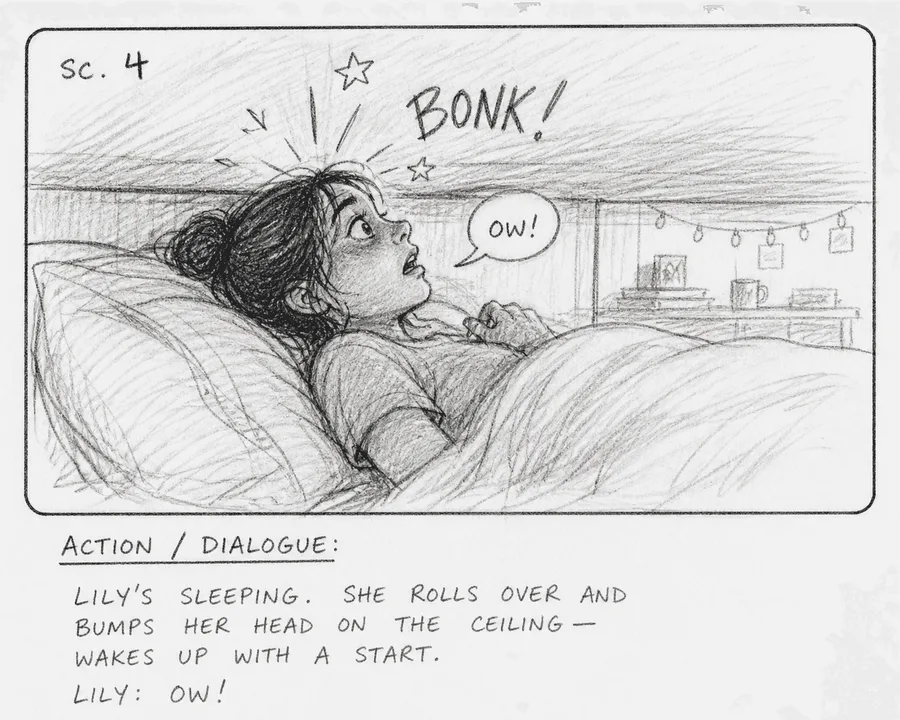
Rough Pencil is the loosest of the four sketch styles, which reads as a draft in a client review.
Stage 2: Revising and Reviewing
The review stage is where tools fail, because a client changing their mind is never in the demo.
Test 5: Consistency
- What you do: keep one character, one product and one location identical across six frames, then change the character's coat and see what follows.
- Pass: the same face, clothes and product in every frame, and a change you can apply across frames.
- Fail: a new person every frame, fixed only by regenerating by luck.
- How Storyflow does: pass, with checking. Build a character sheet gives each character a wall with a face and a full-length portrait, the portrait drawn from the face. When a frame's prompt names a character and a picture on the board carries that name in its caption, title or label, the in-app AI uses that picture as a reference automatically (up to three per frame), so caption each face with its character's name. Any AI image card can take pictures you select as references. It still drifts sometimes, so check every frame against the sheet. A coat change means regenerating the affected frames with the new description; nothing updates on its own.
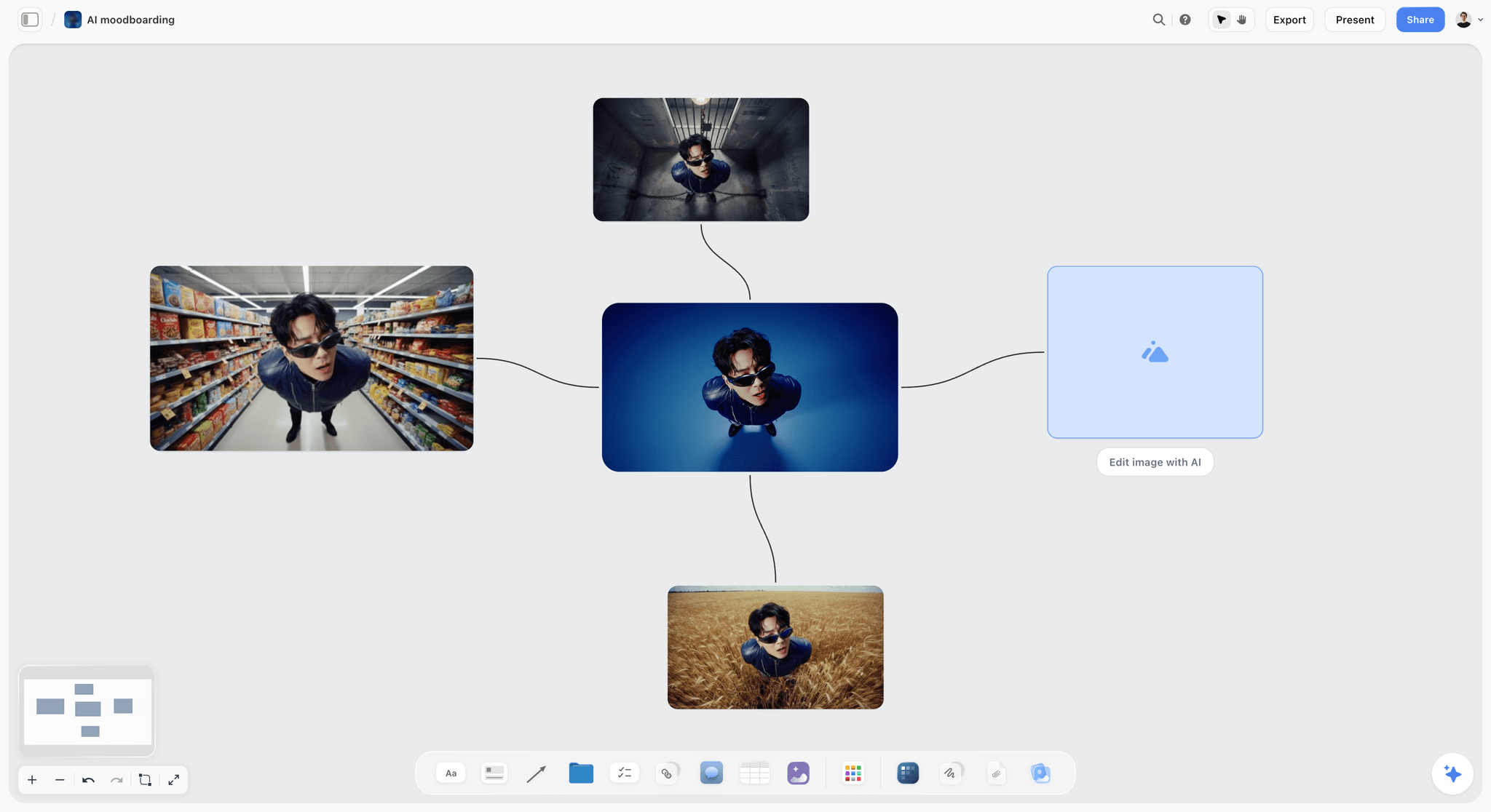
One character carried across four settings from a single reference, the kind of consistency test 5 checks.
Test 6: Reorder
- What you do: insert a frame between 3 and 4, then swap frames 6 and 7.
- Pass: the order is clear at a glance, and feedback that says "frame 5" still points at the same frame.
- Fail: numbering breaks, or the sequence silently reorders and old feedback points at the wrong frame.
- How Storyflow does: partial. Frames are walls in a row joined by arrows, so you move a wall and redraw two arrows. Titles are typed, so they do not renumber themselves, which is a feature once a client has seen the board (insert 3A rather than renumbering) and a chore before. On a long board, Storyboard my script builds the arrows as it goes, and an assistant can redraw them on request.
Test 7: Client review
- What you do: send the board to a colleague playing the client, on a phone, and ask for three notes.
- Pass: it opens without an account, the client sees frames in order, and feedback lands where you can act on it.
- Fail: the client must create an account to look, or feedback arrives by email with no frame reference.
- How Storyflow does: partial. A view-only link opens with no account, as the view-only article describes, and presentation mode goes full screen and steps one wall at a time. To comment or draw, the visitor signs in. There is no frame-level approval status, so record the approval in a note on the board with a name and date. The ChatGPT plugin cannot read board comments, so decisions an assistant needs to see belong in notes. See how to present a storyboard to a client and the client review board.
Test 8: Team editing
- What you do: have the director and the producer edit the same board at the same time.
- Pass: both see each other's changes live, with no overwrites and no locking.
- Fail: one person at a time, or a copy per person.
- How Storyflow does: pass. Real-time co-editing is on every paid plan, and anyone a paid member invites to a board joins free, though an invited free account has no in-app AI. Max adds a Team Workspace with roles and permissions. Any to-do takes an assignee and a due date, with in-app notifications.
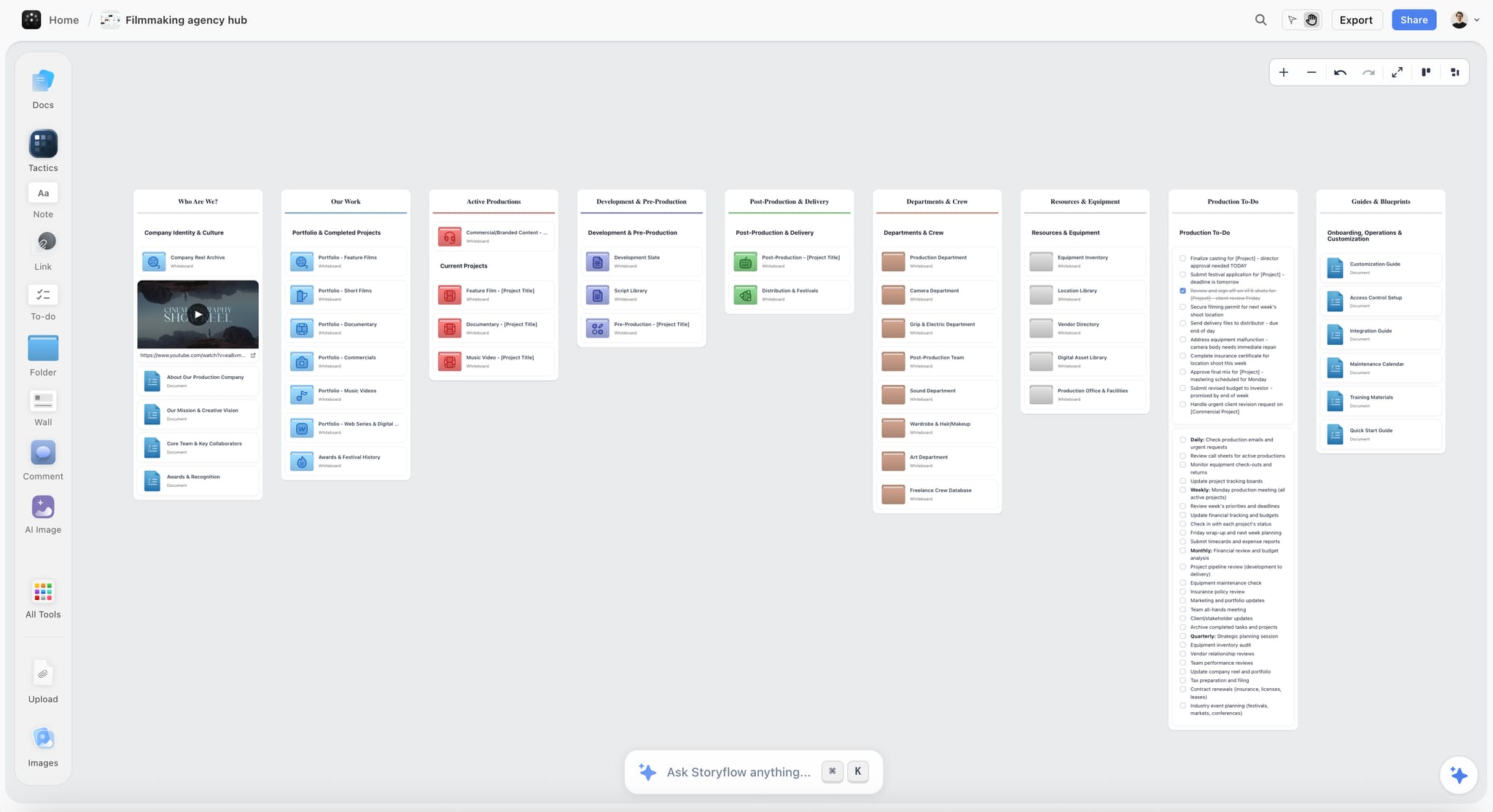
An agency hub keeps each client's storyboard boards inside the client's project, where the whole team works on them.
Stage 3: Hand-Off and After
The hand-off stage decides whether the board was worth making. A storyboard that cannot become a shoot day is a pitch document.
Test 9: Shot list link
- What you do: turn the approved board into a shot list the crew can use on set.
- Pass: setups built from the frames, next to them, with coverage per frame.
- Fail: you retype the frames into a separate shot list tool.
- How Storyflow does: pass, built once. A shot list from my storyboard reads the storyboard walls and builds one table per scene, in the same order, with columns such as shot size, angle, movement, lens and setup time, or a row of shot cards with frame, coverage checklist and equipment. The AI builds each table with at most 8 columns and 50 rows, which is why a long shoot gets one table per scene rather than one long list. The shot list is built from the board once, not kept in sync, so a changed frame means updating its rows. The shot list software and shot list template pages show the result, and how to make a shot list covers coverage.
Test 10: Export
- What you do: export the board twice: once for the client, once for the crew.
- Pass: a PDF and images that read offline, in order, with the frame text legible.
- Fail: the board only exists inside the app, or exports as one giant unreadable image.
- How Storyflow does: partial. Boards export as PNG, JPEG or PDF, and the in-app AI can design deliverables from a board, including a pitch deck, a shot list, a call sheet and a designed PDF of the board. Decks present full screen and export as PDF. There is no PPTX, SVG or MP4 export.
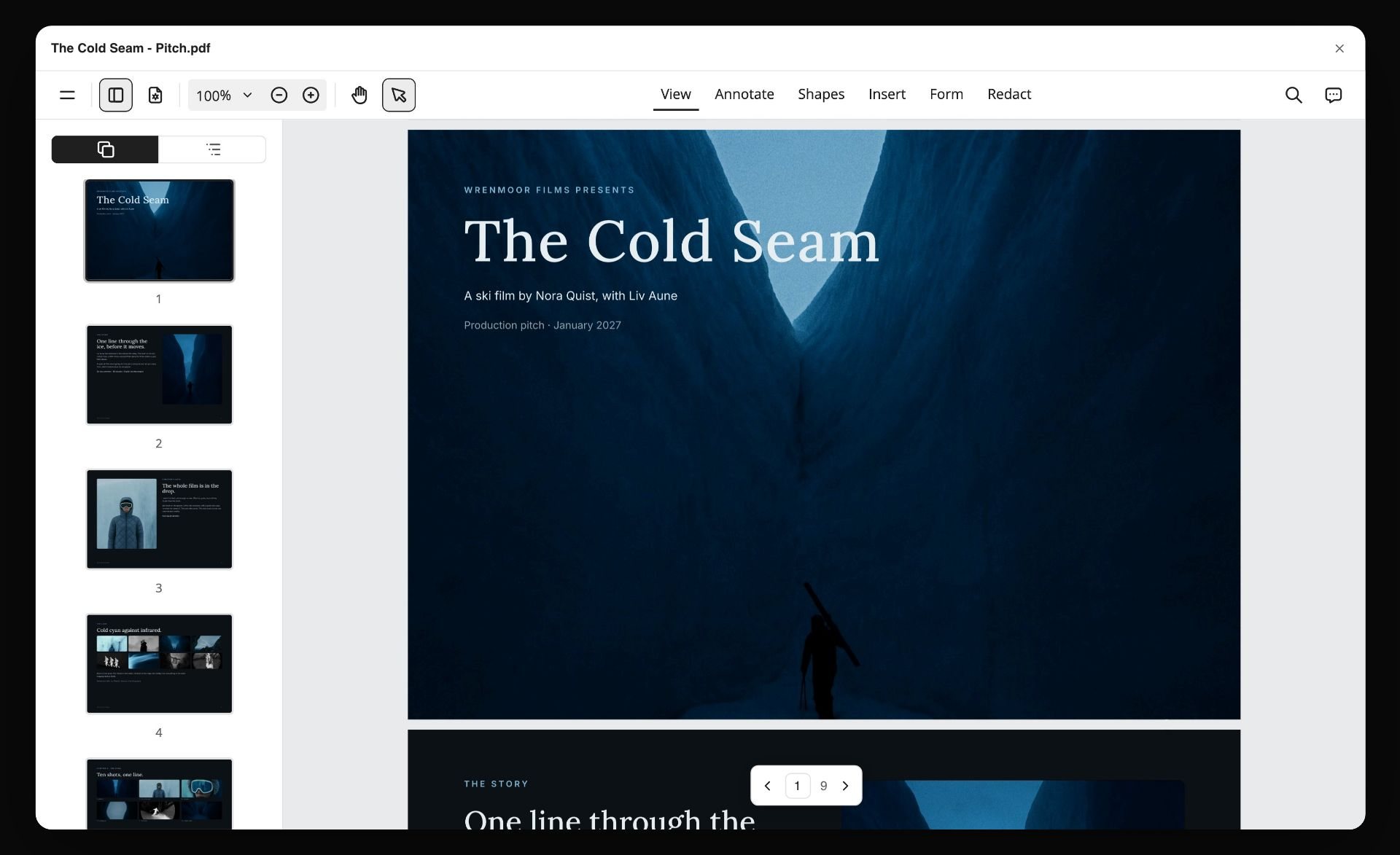
A pitch designed from a board and exported as a PDF. Wrenmoor Films and The Cold Seam are fictional.
Test 11: Price per seat
- What you do: price the real team: the people who build the board, the people who review it, and the freelancers who join for one job.
- Pass: reviewers and occasional collaborators cost nothing or close to it, and AI features are on a plan you can name.
- Fail: every reviewer needs a paid seat, or AI frames hide on an enterprise tier.
- How Storyflow does: pass. It is paid-only during early access: Plus is $7.99 a month billed annually ($9.99 monthly) with the in-app AI and Tactics; Pro is $14 billed annually ($19 monthly) and adds AI image generation and memory; Max is $39 billed annually ($49 monthly) and adds a Team Workspace with roles, as of November 2026. Anyone a paid member invites to a board joins free, with 25 plugin or connector actions a week and no in-app AI. Cancel anytime from settings. See Storyflow pricing.
Test 12: What happens after the shoot
- What you do: a week after the shoot, open the board and use it for the edit, the wrap report and the next job's pitch.
- Pass: the board is still where the project lives, findable, and useful to the editor.
- Fail: the board was a one-off file nobody opens again.
- How Storyflow does: partial. The storyboard stays in the project beside the shot list, the strip board grouped into shoot days, call sheet PDFs and notes, and an assistant can report what changed on a board this week and who changed it. There is no proofing mark-up on video frames and no version compare, so review of cuts happens in a proofing tool. Whatever you choose, export the boards before you stop paying, because the legal backstop is narrow: the UK regulator's guide to the right to data portability covers personal data an individual provided, under consent or a contract, as structured machine-readable files such as CSV or JSON. That is not a board you can reopen.
Copy This: The Trial Scorecard
Copy this table onto a board, one row per test, one column per approach you are trialling. It is filled for a fictional agency comparing four approaches; replace the cells with your own results.
| Test | Deal-breaker? | Storyflow (Pro) | A dedicated storyboard app | A slide deck template | A drawing app |
|---|---|---|---|---|---|
1. Script import | Yes | Pass: PDF in, 11 walls, scene numbers kept | Pass, if it reads your format | Fail: retyped | Fail: retyped |
2. Frame fields | No | Pass: shot, action, sound, lens notes | Pass: fixed fields | Partial: one caption box | Partial: hand-lettered |
3. Aspect ratios | No | Partial: 21:9 for a 2.39:1 spot | Check the app | Partial: slide shape only | Pass: any canvas |
4. AI frames | Yes | Pass: Marker Roughs, 16:9 | Varies by app | Fail | Fail |
5. Consistency | No | Pass with checking | Varies by app | Not applicable | Pass, if one artist draws |
6. Reorder | No | Partial: walls and arrows | Pass: panel grid | Partial: slow across slides | Fail: redraw the page |
7. Client review | Yes | Partial: link with no account, notes for sign-off | Check sharing | Pass: everyone opens a deck | Fail: export first |
8. Team editing | No | Pass: live | Check the app | Pass, in shared decks | Fail |
9. Shot list link | No | Pass: built from the walls | Varies by app | Fail | Fail |
10. Export | No | Partial: PDF and images, no PPTX | Pass: print layouts | Pass | Pass: images |
11. Price per seat | No | Pass: invitees free | Check per-seat pricing | Pass: already paid for | Pass: one licence |
12. After the shoot | No | Partial: board stays in the project | Varies by app | Fail: a frozen file | Fail: a frozen file |
How to read the scorecard
Read the deal-breaker rows first; a fail there ends the comparison for that column. Then count passes in the remaining rows, but treat a partial as a pass only when you can name the workaround and live with it. "Varies by app" and "check" are not answers; a trial turns them into pass or fail. This is the checklist's last instruction: score from what happened in the trial, never from a feature page.
Worked Example: Northgate Chooses Its Storyboarding Software
Northgate is a fictional six-person video agency making commercials and social campaigns for consumer brands. Rhea is the producer, Kofi the director and Lin the designer who draws when there is time. What follows is illustrative, one way a trial could run.
The script and the deal-breakers
Rhea picks a 45-second spot for a fictional bakery client, Brindle: 11 frames, two characters, one product that must look the same in every frame. Before opening a tool, she circles client review, AI frames and script import, because the agency pitches with boards, rarely has time for Lin to draw, and receives scripts as PDFs.
Building the board at Northgate
On Pro, Rhea attaches the PDF and runs Storyboard my script with "11 frames, AI generated, Marker Roughs, and under each frame shot, action, dialogue and lens". The AI builds 11 walls in a row, connected in order, with the script's scene numbers in the titles. The spot runs in cinemas as well as online, so the frames are 21:9 with "2.39:1 crop" noted on the board.
Revising and reviewing at Northgate
Kofi inserts frame 4A and swaps 8 and 9, moving walls and redrawing arrows, and the titles stay as typed. The baker's apron comes back blue in frame 7; Rhea regenerates it with the fixed description from the character sheet. Rhea sends a view-only link to the account lead, who reviews on a phone without an account and sends three notes by message; Rhea writes them into a note on the board.
The hand-off at Northgate
Rhea runs A shot list from my storyboard and gets one table per scene, beside the walls. She exports the board as a PDF for the client and asks the in-app AI for a call sheet PDF, which leaves the nearest hospital line blank until she fills it.
The decision
Storyflow passes all three of Northgate's deal-breakers, with client review partial: approvals live in a note, not a status. The slide deck template fails AI frames and script import, and the drawing app fails all three without Lin's time. Northgate keeps a video editor for animatics, which no approach in the trial replaced, and buys Pro for Rhea and Kofi, inviting Lin and freelancers to boards as needed.
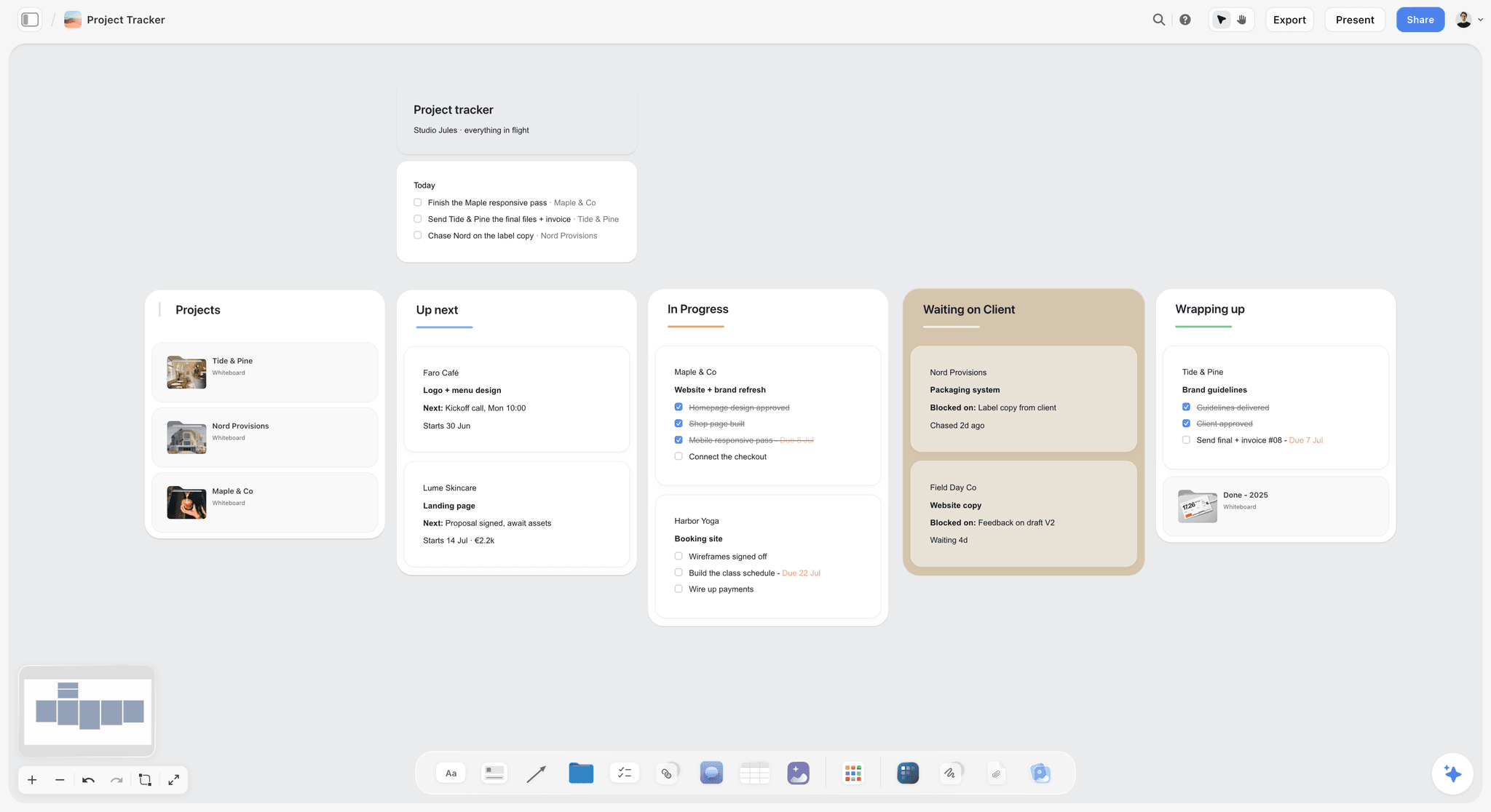
Client jobs can move across a kanban beside the boards they come from. Studio Jules and its clients are fictional.
Which Approach for Which Team
The right storyboarding software follows the team's deliverable, not its size. Here is the decision by team type.
Agency pitching commercials
Your deal-breakers are usually client review, AI frames and export. Choose a canvas that holds the board, the shot list and the brief together, with a no-account review link; in Storyflow, that is Pro for the people generating frames. Keep a video editor for any animatic.
Producer running shoot days
Your deal-breakers are script import, shot list link and team editing. Choose software where the shot list is built from the board rather than retyped. Storyflow's strip board groups shots into shoot days with page counts but does not recalculate, so a production management suite still suits long schedules with many moving days.
In-house brand or social team
Your deal-breakers are client review (your stakeholders), aspect ratios (9:16, 1:1 and 16:9 in one campaign) and price per seat. Choose a tool where reviewers join free and several shapes sit on one board. Publishing happens in a social scheduler; Storyflow does not schedule or publish.
Animation or boarding studio
Your deal-breakers are frame fields, reorder and export. Boards are your product, every week, and a dedicated storyboard app with panel grids, drawing tools and print layouts usually suits you better than a canvas; a canvas suits the pre-production around the board.
Do This in ChatGPT or Claude
You can run most of the trial from a chat. ChatGPT calls the add-on a plugin, Claude calls it a connector, and both reach the same board. This route runs on your assistant's own model and plan and uses no Storyflow AI credits. It is separate from the in-app AI and cannot generate images, so AI frames are made in the app on Pro or Max.
Install in ChatGPT
Open the Storyflow listing, select Install plugin, sign in to Storyflow and choose which projects ChatGPT may use. Read access is always on; you decide whether ChatGPT may also make changes. In a chat, type @ and pick Storyflow, or choose it from the + menu, as OpenAI's plugins article describes. Availability depends on your ChatGPT plan, workspace and region, and in a Business or Enterprise workspace an admin manages plugins. The connection ends after 30 days. The ChatGPT storyboard, ChatGPT shot list and ChatGPT script breakdown pages show those jobs.
Connect in Claude
In Claude, open Customize, then Connectors, choose + Add and add a custom connector, following Anthropic's custom connector article. Name it Storyflow, enter https://mcp.storyflow.so/mcp and sign in. On Claude's free tier you can add one custom connector; on Team and Enterprise an owner adds it first and each member then connects. Setup for every assistant is on the Storyflow MCP page, and the Claude shot list and Claude script breakdown pages cover the same jobs in Claude.
Prompts to copy
Mention Storyflow first, then paste. Replace Brindle with your project.
- "Read the script on my Brindle board and list every scene heading with its number, then tell me how many storyboard frames you would build and why."
- "On my Brindle board, build 11 walls left to right named Frame 1 to Frame 11, connected in order, each with an empty image frame and a note with Shot, Action, Dialogue and Lens lines."
- "Insert a wall called Frame 4A between Frame 4 and Frame 5 on my Brindle board and connect it into the sequence."
- "Make shot cards for frames 2, 5 and 9 with size, angle, movement and lens, beside the storyboard."
- "Build a table called Trial scorecard with columns Test, Deal-breaker, Result and Notes, and one row for each of these 12 tests."
- "What changed on my Brindle board since Monday, and who changed it?"
- "Read every frame's Action line and flag any frame whose action does not appear in the script."
- In Claude: "Compare the shot cards on my Brindle board with the storyboard walls and list any frame that has no shot card yet."
What lands on the board
Walls, notes, empty image frames, connections, tables, shot cards, a strip board grouped into shoot days and pictures from image addresses land on the board. A photo you attach in a ChatGPT chat does not reach Storyflow, so the plugin gives you an upload link for your own frames. The plugin cannot read board comments. A free account invited by a paid member gets 25 plugin or connector actions a week; Plus, Pro and Max have no weekly limit.
What to check by hand
Check every frame against the script and the character sheet. Check the shot list against the frames, since it does not update itself. Check exports on a phone and in print. The trial verdict is yours.

The same storyboard board is reachable from ChatGPT through the plugin and from Claude through a custom connector.
Where to Build It: Storyflow vs Drawing Apps, Deck Templates and Boarding Apps
Storyflow is our product, and it is listed first on the basis that the storyboard, the shot list and the client link come from one board, which is what producers and agencies trial for. This guide compares kinds of tool rather than brands on purpose: the twelve tests pick the kind, and your own trial picks the brand.
| Approach | What it does best | Its real limit | Choose it when |
|---|---|---|---|
Storyflow | Script to frames to shot list to client link on one board, with ChatGPT, Claude and the in-app AI | No animatic, frame timing or MP4; no 2.39:1 preset; AI frames on Pro and Max | The board must become a review and a shoot day |
A dedicated storyboard app | Panel grids, frame fields, drawing and print layouts | Usually stops at the board; AI and sharing vary by app | Boarding is your weekly output |
A drawing app | Total control of every frame for someone who draws | Needs an artist; no script import or shot list | A board artist is on the job |
A slide deck template | A format every client opens | Cramped frames, slow reorder, no shot list | Six frames, one meeting |
A production management suite | Schedules, call sheets and crew across many shoot days | Storyboards are an afterthought | Long shoots with many moving days |
A video editor | Timing frames to sound for an animatic | The wrong place to decide the story | The board is approved and needs timing |
A proofing tool | Frame-accurate review of cuts after the shoot | Starts after the storyboard ends | Reviewing edits with clients |
Storyflow
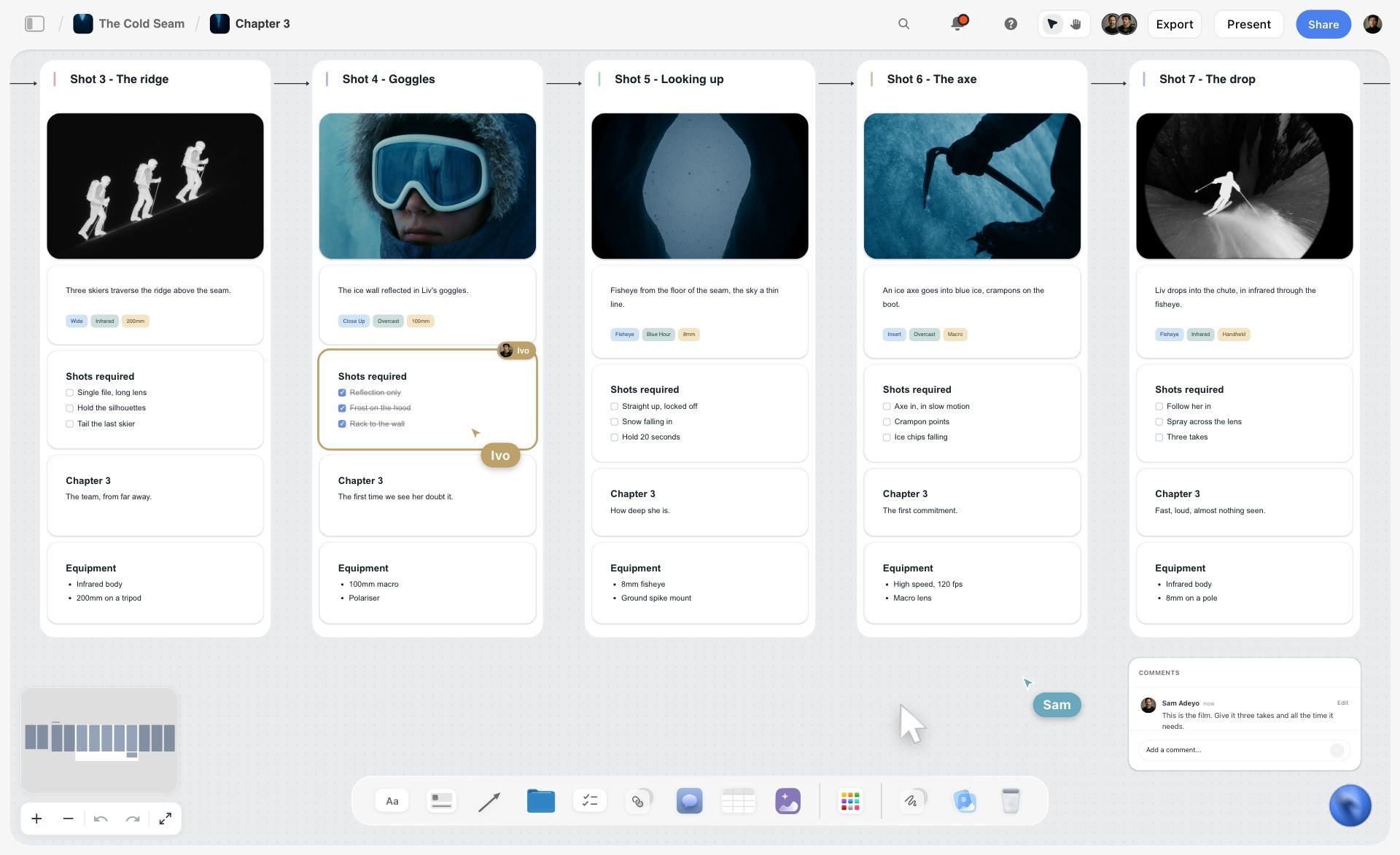
Frames and shot cards on one board, with two collaborators editing live. The Cold Seam is a fictional film.
Storyflow is built for the job this checklist tests: script in, one wall per frame, AI frames on Pro and Max, a character sheet for consistency, a shot list built from the walls, and a view-only link for the client. ChatGPT and Claude can build and audit the board. See the storyboard software, online storyboard maker and commercial storyboard pages.
- Best for: producers, agencies and in-house teams whose boards turn into client reviews and shoot days.
- Limit: no animatic, frame timing or MP4 export; no 2.39:1 preset; no frame-level approval status or version compare; not a screenwriting app; no native desktop or mobile app; no AI image generation through the plugin.
- Price: Plus $7.99 a month billed annually ($9.99 monthly); Pro $14 billed annually ($19 monthly) for AI frames; Max $39 billed annually ($49 monthly), as of November 2026. Paid-only during early access; invitees join free.
- Choose a different kind of tool when the board is approved and the next job is timing it, scheduling a long shoot or reviewing cuts.
A dedicated storyboard app
A dedicated storyboard app is the specialist: panel grids, frame fields, drawing tools, camera notes and print layouts that boarding professionals expect, often with script import. It usually stops at the board; the shot list and the client conversation happen elsewhere, and AI features vary from app to app. Choose this kind of app when storyboards are your weekly product and boarding conventions matter more than the plan around them. The best storyboarding software and storyboarding software pricing and features cover the field by brand.
A drawing app
A drawing app on a tablet gives an artist complete control, and a good board artist's thumbnails communicate intent better than any generated frame. It has no script import, no frame fields and no shot list, and nobody else can edit the drawing. Choose it when an artist is on the job, then bring the frames onto a board so the words and the shot list can sit beside them.
A slide deck template
A slide deck template is the format every client already knows: a grid of boxes with captions, opened without an account. Frames get small, reordering across slides is slow, and there is no shot list. Choose it for a six-frame board shown once, and build it from a master board you can change.
A production management suite
A production management suite runs schedules, call sheets, contacts and crew across many shoot days, and some include a storyboard module. Storyboards are rarely its strength. Choose this kind of suite when the shoot is long with many moving days and the schedule must recalculate, which Storyflow's strip board does not.
A video editor and a proofing tool
A video editor is where the animatic gets made: frames timed to a scratch voice-over and music. A proofing tool is where cuts get frame-accurate client review after the shoot. Neither decides the story. Choose them for the stages either side of the board, and keep the board as the source both draw from. Storyboard software that survives the shoot covers what happens after day one.
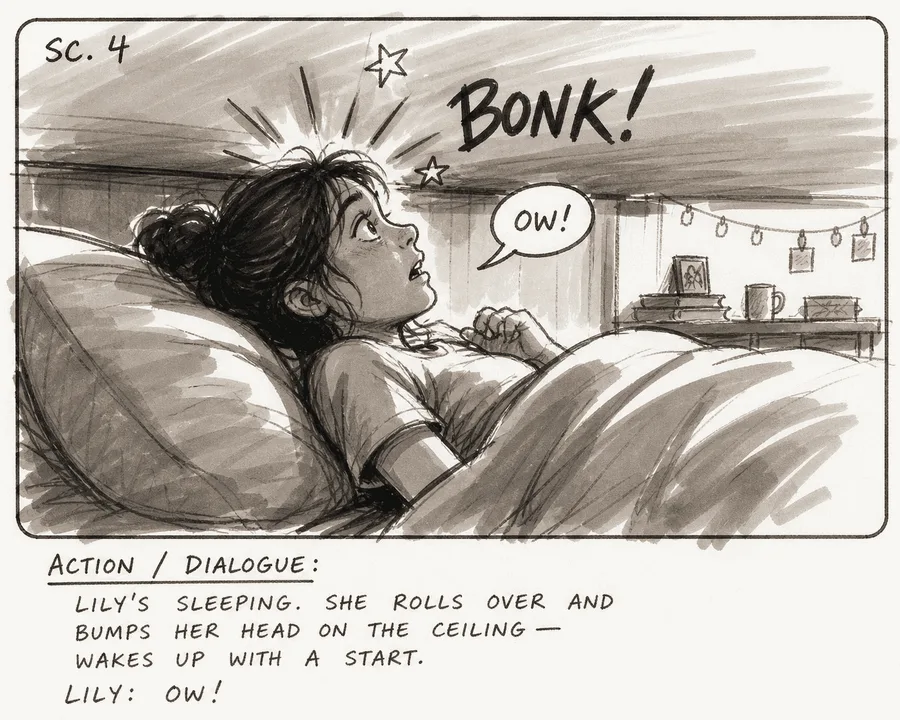
A marker rough storyboard panel of a girl bumping her head on a low ceiling, with grey washes, a scene marker and an action and dialogue note
Trial it on your own script
Install Storyflow in ChatGPT, build one wall per frame from your script, insert and move frames the way a client would, then turn the walls into shot cards and score the twelve tests by hand.

The Buying Questions No Demo Answers
Some answers only appear in the terms, the pricing page or the export menu. Ask these before you pay.
| Question | Why it matters | What to look for | Storyflow's answer |
|---|---|---|---|
Which plan has AI frames? | AI is often a higher tier | A named plan and price | Pro and Max, in the app |
Do reviewers need a seat? | Reviewers outnumber builders | Free or view-only access | View-only link with no account; invitees join free |
What exports exist? | Clients and crews need offline files | PDF and images at least | PNG, JPEG, PDF; no PPTX, SVG or MP4 |
Can I cancel monthly? | Projects end | Monthly billing and self-serve cancel | Monthly prices exist; cancel from settings |
Who owns generated frames? | Clients ask | A plain answer in your contract | Treat as planning material (see below) |
Does it work on my devices? | Sets and recces are mobile | Native apps or a browser | Browser only; best built on a laptop |
Generated frames and ownership
The US Copyright Office's January 2025 report on copyrightability said the mere provision of prompts does not make an AI output protectable, while using AI to assist a human's creative work does not bar protection. For a storyboard, that is a reason to present generated frames as planning material and to keep the shots, order and words your own work.
Check the trial on a phone
A client will open your link on a phone on a train. Whatever you trial, open the review link on a phone before you decide; a board that only reads on a large monitor fails test 7 in practice even if it passes on paper.
Mistakes and Fixes
The mistakes buyers make with storyboarding software are about the trial, not the tool.
Trialling on the vendor's demo script
The demo script is written to flatter the product. Fix: trial on your own script, with your own frames and characters.
Choosing on the build stage
Every tool builds a first board well. Fix: give the review and hand-off stages equal time; that is why the checklist has four tests in each.
Letting features outvote deal-breakers
A tool with forty features fails your one essential test and still wins on the count. Fix: circle three deal-breakers before the trial; one fail ends the comparison.
Testing AI frames on the wrong plan
AI frames are often on a higher tier, and the trial plan hides them. Fix: note the plan you tested on, and test AI frames on the tier that has them.
Ignoring reviewers in the price
You price two builders and forget eight reviewers. Fix: price the real team; in Storyflow, invitees join free and a view-only link needs no account.
Expecting an animatic from a storyboard tool
The client wants to see it move. Fix: plan a video editor for the animatic from the start; Storyflow has no frame timing or video export.
Forgetting the shot list will not update itself
A frame changes after the shot list is built, and the crew films the old version. Fix: in Storyflow, update the shot list rows for any changed frame and note the change on the board.
Not exporting before cancelling
The subscription ends and the boards go with it. Fix: export every board as a PDF before you stop paying for any tool.
Storyflow's Honest Limits for Storyboarding
Storyflow earns its place where the board has to become a review and a shoot day. Here is what it does not do.
What it lacks
- Motion: no animatic, frame timing or MP4 export.
- Widescreen preset: no 2.39:1 preset; 21:9 is the widest AI frame shape.
- Approvals: no frame-level approval status, proofing mark-up or version compare.
- Screenwriting: not a screenwriting app; it reads PDF, Fountain and screenplay files but has no screenplay formatting or revision colours.
- Scheduling: the strip board groups shoot days with page counts and does not recalculate; no Day Out of Days, no calendar view and no Gantt chart.
- Images through assistants: no AI image generation through the ChatGPT plugin or Claude connector.
- Formats and devices: no PPTX or SVG export; browser only, with no native desktop or mobile app.
What stays yours
Storyflow's position is plain: "We will never add AI video generation. The creative work stays yours." The tool will build walls, draw sketch frames and turn them into a shot list. Whether the shot is the right one is your call, and so is the trial verdict.
The Bottom Line
The best storyboarding software is the one that passes your deal-breakers on your own script, on the day a client changes their mind. Run the twelve tests: three stages, three deal-breakers marked first, scored from what happened rather than from a feature page. In Storyflow, the script becomes one wall per frame, the walls become a shot list, and the client reviews by link with no account; it will not make the animatic, so plan a video editor for that. Pick your script today, circle three tests, and give each tool one honest afternoon.
Platform guidance and sources in this guide were read on 12 November 2026.
FAQ: Storyboarding Software
Best storyboarding software?
Storyflow is the best storyboarding software for producers and agencies whose board must become a client review and a shoot day: it reads the script, builds one wall per frame, draws AI frames on Pro and Max, turns the walls into a shot list and shares a view-only link with no account. A dedicated storyboard app suits studios that board every week.
What is the best storyboarding tool for an agency or producer?
Storyflow is the best storyboarding tool for an agency or producer, because the storyboard, shot list, brief and client link sit on one board and reviewers join free. Choose a dedicated storyboard app if boarding is your weekly product, a production management suite for long shoots, and a video editor for animatics.
What should I test before paying for storyboarding software?
Test twelve things on your own script: script import, frame fields, aspect ratios, AI frames, consistency, reorder, client review, team editing, shot list link, export, price per seat, and what happens after the shoot. Circle three deal-breakers before you start, and drop any tool that fails one, however well it scores on the rest.
What is the Storyflow 12-Test Trial Checklist?
The Storyflow 12-Test Trial Checklist is our editorial checklist for buying storyboarding software: twelve tests in three stages of four, building the board, revising and reviewing, and hand-off and after, run on one real script of 8 to 12 frames. You mark three deal-breakers first and score each test pass, partial or fail.
What is the difference between a storyboard, a shot list and an animatic?
A storyboard is frames in order showing what the audience sees. A shot list breaks those frames into camera setups the crew films, with size, angle, movement and lens. An animatic plays the frames in time with rough sound. In Storyflow, the storyboard and shot list share one board; animatics are made in a video editor.
Can storyboarding software import my script?
Many tools can, so test it with your real file. Storyflow's in-app AI reads scripts as PDF, Fountain or a screenplay file, and Storyboard my script builds one wall per scene or frame with the script's own scene numbers kept in the titles. Through the ChatGPT plugin, the assistant reads a script you paste and builds the walls.
Does Storyflow make animatics or export video?
No. Storyflow has no animatic, frame timing or MP4 export. It builds the storyboard and the shot list and exports boards as PNG, JPEG or PDF. Export the approved frames and time them to a scratch voice-over and music in a video editor, which is where an animatic belongs anyway.
Can Storyflow generate storyboard frames with AI?
Yes, inside the app on Pro and Max. The AI image card's Storyboard mode has four sketch styles, Rough Pencil, Inked Storyboard, Marker Roughs and Animation Cleanup, and frame shapes from 21:9 to 9:16. On Plus, boards use web references, your own pictures or empty frames, and the ChatGPT plugin cannot generate images.
How do clients review a storyboard in Storyflow?
Send a view-only link, which opens with no account, or present the board full screen in presentation mode, one wall at a time. To comment or draw, a visitor signs in. There is no frame-level approval status, so record the approval in a note on the board with the reviewer's name and the date.
Can several people edit a storyboard at once?
Yes. Real-time co-editing is on every paid plan of Storyflow, so a director and producer can work on the same board together. Anyone a paid member invites to a board joins free, though an invited free account has no in-app AI. Max adds a Team Workspace with roles and permissions.
Can ChatGPT or Claude make a storyboard?
Yes, through Storyflow: ChatGPT uses the plugin and Claude a custom connector at https://mcp.storyflow.so/mcp. The assistant can read your script, build one wall per frame, insert frames, make shot cards and report what changed on the board. It cannot generate images, so AI frames are made in the app on Pro or Max.
How do I price storyboarding software for a whole team?
Prices vary by tool and tier, so price the real team, reviewers included, and note which plan has AI frames. As of November 2026, Storyflow's Plus is $7.99 a month billed annually, Pro is $14 billed annually with AI image generation, and Max is $39 billed annually with a Team Workspace. Invited collaborators join free.
Is Storyflow free?
Not yet. Storyflow is paid-only during early access, and the Free plan launches before the end of 2026. Anyone invited to a board by a paid member can sign up free. Plus costs $7.99 a month billed annually or $9.99 monthly, and AI frames start on Pro at $14 a month billed annually or $19 monthly.
Table of Contents
- Key Takeaways
- How to Choose Storyboarding Software: 8 Steps
- Storyboard vs Shot List vs Animatic
- The Storyflow 12-Test Trial Checklist
- The 12 Tests at a Glance
- Stage 1: Building the Board
- Stage 2: Revising and Reviewing
- Stage 3: Hand-Off and After
- Copy This: The Trial Scorecard
- Worked Example: Northgate Chooses Its Storyboarding Software
- Which Approach for Which Team
- Do This in ChatGPT or Claude
- Where to Build It: Storyflow vs Drawing Apps, Deck Templates and Boarding Apps
- Storyflow
- A dedicated storyboard app
- A drawing app
- A slide deck template
- A production management suite
- A video editor and a proofing tool
- The Buying Questions No Demo Answers
- Mistakes and Fixes
- Storyflow's Honest Limits for Storyboarding
- The Bottom Line
- FAQ: Storyboarding Software
- Related Reading
Templates to check out for this topic


Filmmaking templates you can use in Storyflow
Skip the blank canvas. Open one of these filmmaking boards in Storyflow and the AI builds on the structure that is already there, from research through the shot list.


See Storyflow in Action
A visual AI workspace where every feature lives inside one canvas. No tab-switching, no context lost.
Build your entire board from a single message
Type what you need in the AI chat at the bottom of your canvas. The AI adds cards, headings, and structure directly onto your board.
Use expert frameworks as AI context
Type @ in the AI chat and choose any Tactic. The AI tailors every response to that framework instead of giving generic advice.
Turn your board into a mind map in seconds
Ask the AI to restructure your canvas as a mindmap. It connects your ideas into a visual hierarchy so you can see how everything relates.
Why Storyflow Exists
Storyflow actually began as a personal tool while working on creative and research projects.
We kept running into the same problem: ideas were scattered everywhere: notes, documents, and whiteboards.
Nothing helped us see how everything connected.
So we started building a workspace designed around how ideas actually grow.
→ Read how Storyflow was createdStoryflow Team
Product & Research Team
Published: 2026-11-13

