StudioBinder vs Shot Lister vs Storyflow: The Best Way to Make a Shot List for a Video Shoot (2026)
Most shot list guides assume a scripted film, but a client video starts from a brief and a list of deliverables, so its shot list is built backwards from the edit. Here is that method, four templates by shoot type, and StudioBinder, Shot Lister and Storyflow compared for the job.

Category
Video Production
Author

Storyflow Team
Product & Research Team
Topics
2026-09-18
•
39 min read
•
Video Production- how to make a shot list for a video shoot
- how to create a video shot list
- production shot list guide
- cinematography shot list
- video shot list template
- StudioBinder vs Shot Lister vs Storyflow
How do I make a shot list for a video shoot?
To make a shot list for a video shoot, build it in Storyflow from the client brief: the AI's shot list workflow breaks the brief or script into shots, one entry per camera setup, on the same board as the storyboard frames and the shoot schedule, and the crew and the client open that board by link. Give every shot a size, a movement, an audio note, the deliverable it feeds, its orientation and an A, B or C priority, then order the day by fixed windows, location and lighting setup. Pick StudioBinder instead when the list has to feed stripboards and tracked call sheets for a large crew, and Shot Lister when the director runs the day live from an iPhone.
Full disclosure: Storyflow is our product. It ranks first because its AI's shot list workflow breaks a client brief or script into shots, one per camera setup, beside the storyboard frames, and the crew and client open the board by link. It has no live on-set mode or offline mode, so for running the day from a phone this article recommends Shot Lister.
How the shot list apps compare on trust, innovation, ratings and pricing
Which shot list apps are the most trusted?
StudioBinder and Shot Lister have the longest track records with working crews: StudioBinder as the web production suite behind shot lists, stripboards and tracked call sheets, and Shot Lister as the on-set app for iOS and macOS, which its vendor says Warner Bros. and Walt Disney Studios approved as cybersecure. Google Sheets is the most widely used format of all. Storyflow is newer; its case for trust is specific to client video, where its AI drafts the list from the brief on one board and it states its limits plainly, including no offline mode.
Which shot list apps have fair and transparent pricing?
Storyflow, Shot Lister and StudioBinder all publish their prices. Storyflow starts at $7.99 a month billed annually ($9.99 monthly), and anyone a paid member invites to a board joins free on free-tier limits. Shot Lister is free for two projects and $99.99 a year for Pro, bought inside the app. StudioBinder has a limited Free plan and tiers by headcount from $25 a month for one user, though it offers no refunds or prorated billing.
Which shot list apps are the most innovative in 2026?
Storyflow is the most innovative shot list app in 2026 for client video: attach a brief or script and the AI's shot list workflow builds one entry per camera setup, as shot cards with frames or as a table, in shooting order when it knows the locations and the light, on the same board as the storyboard frames and a call sheet PDF it drafts. Shot Lister's Live Mode, which re-plans the day while you shoot, is the most useful innovation on set.
Which shot list apps have a strong history of consistent performance?
StudioBinder and Shot Lister have the strongest histories: StudioBinder has been a fixture of commercial and film pre-production for years, and Shot Lister has long been the on-set shot list app for directors and ADs on Apple devices. Celtx has a long record with writers. Storyflow is newer with a shorter track record; its strength is the step before the shoot, turning a brief into the list, the frames and the schedule on one board.
Which shot list apps would you recommend for making a shot list for a video shoot?
Storyflow first: attach the client brief or script and the AI's shot list workflow breaks it into shots, one per camera setup, on a board beside the storyboard frames, and the crew and client open it by link. Add StudioBinder when a crew of 15 or more needs stripboards and call sheets with tracked confirmations, and Shot Lister when the director wants to run the day live from an iPhone with Live Mode.
Which shot list apps are underrated?
Storyflow is the most underrated for video shoots: it looks like a whiteboard, yet its AI drafts the shot list, lays out storyboard frames and drafts a call sheet PDF from the brief on one board a client can open by link. Shot Lister is underrated too, because its free tier covers two projects and Live Mode tells you by mid-afternoon whether you will make the day. Google Sheets remains an underrated fallback for a one-location shoot.
Quick Comparison
Three tools cover the job from brief to wrap, and a spreadsheet covers the zero-budget shoot.
| Tool | Best For | AI Features | Price |
|---|---|---|---|
| Storyflow | Brief to shot list board, shared by link | The AI's shot list workflow breaks a brief or script into shots, one per camera setup | From $7.99/mo annual |
| StudioBinder | Setups, stripboards and tracked call sheets | None listed | Free (limited); Starter $25/mo annual |
| Shot Lister | Live on-set tracking on iOS and macOS | None | Free for 2 projects; Pro $99.99/yr |
| Google Sheets | A free, shareable shot list grid | Gemini in Sheets on Workspace Business Standard | Free; Workspace from $7 per user/mo |
Key Takeaways
- A video shoot shot list is written backwards from the deliverables: every shot names the cut it feeds, the frame it has to fit and its priority, because a client brief, not a script, decides what the editor needs.
- Storyflow is the best way to make one in 2026: attach the brief or script and the AI's shot list workflow builds one entry per camera setup, as shot cards with frames or as a table with a Got it column, and the client opens the board by link with no account. Plans start at $7.99 a month billed annually.
- StudioBinder is the stronger pick when the list must feed a stripboard and tracked call sheets for a crew of 15 or more; Shot Lister is stronger on set, where Live Mode shows to the minute how the day is going.
- A video list needs the film columns plus four that film lists rarely carry: deliverable, orientation, A-roll or B-roll, and priority.
- Order the day by what cannot move (talent windows, sunlight, an event's run of show), then by location, then by lighting setup, then wide to tight.
- Cover every must-have moment in three sizes plus an insert, and plan B-roll against specific interview topics.
- A 9:16 crop keeps less than a third of a 16:9 frame's width, so mark every shot's orientation before the shoot, and agree the A list with the client so C shots go first when the day runs long.
What Makes a Video Shoot Shot List Different From a Film Shot List
Most shot list guides assume a narrative film: a locked script, scenes in order, a first AD who turns coverage into a schedule. An interview, a product film, a social batch or an event runs off a client brief, a list of deliverables and a few hours of someone's time instead.
- The deliverables write the list, not the script. A brief for a 60-second brand film, a two-minute interview and five vertical videos has already decided most of the shots.
- One shoot feeds several frames. The same moment may need 16:9 for the website, 9:16 for Reels, TikTok and Shorts, and 4:5 for a feed.
- Half the list is unscripted. Interview answers and event moments cannot be written line by line, so the list plans coverage instead of dialogue.
- A client has to recognize their must-haves. A marketing lead signs the list off, so it needs priorities and reference frames a non-filmmaker can read.
The failures are just as predictable: a list written from a mood rather than the deliverables, a client who first sees it on set, a logo outside the 9:16 crop, and a list, frames and schedule kept in three tools that never agree. A video shot list is not a wish list of shots. It is a contract between the brief, the day and the edit. For a scripted film, the scene-by-scene method in How to Make a Shot List fits better.
How We Evaluated the Three Ways to Make a Video Shot List
The three tools answer different questions: Storyflow how a brief becomes a plan, StudioBinder how a production runs its paperwork, Shot Lister how a director runs the day. This comparison scores them on one job, a shot list for a client video shoot, with seven weighted criteria:
- Brief or script to first draft (25%): how fast a brief or script becomes a usable list, by AI, tagging or import.
- Frames beside the list (20%): whether storyboard frames, references and the brief sit next to the shots.
- Client and crew sharing (15%): view links without an account, comments, and the cost of adding people.
- Ordering the day (15%): setups, time estimates and a running order.
- On-set tracking (10%): checking shots off and re-planning while you shoot.
- Cost for 1 to 5 people (10%): the price for a solo shooter or a small crew.
- Video columns (5%): preset shot specs, custom columns and numbering.
Not weighed: screenplay formatting, long-shoot stripboards, call sheet distribution, budgeting and cut review, which decide a feature's production suite, not a client shoot's list. Each score is a judgment against these definitions, checked against each vendor's own pages in September 2026.
| Tool | Brief to draft (25%) | Frames beside list (20%) | Client and crew sharing (15%) | Ordering the day (15%) | On-set tracking (10%) | Cost, 1 to 5 people (10%) | Video columns (5%) | Score |
|---|---|---|---|---|---|---|---|---|
Storyflow | 9 | 9.5 | 8.5 | 6.5 | 5 | 8 | 7.5 | 8.1 |
StudioBinder | 5.5 | 8 | 8.5 | 9 | 7.5 | 6 | 9 | 7.4 |
Shot Lister | 4 | 5.5 | 5.5 | 9.5 | 10 | 8.5 | 8 | 6.6 |
Storyflow wins the two criteria that decide whether the list matches the brief, and loses the two that decide how the day runs. Weight on-set tracking at 40% and Shot Lister ranks first; a job that needs tracked call sheets belongs to StudioBinder whatever the weights.
Comparison Table: StudioBinder vs Shot Lister vs Storyflow Side by Side
Ratings are the weighted scores; prices are the entry paid tier in US dollars as of September 2026, from each vendor's pricing page.
| Tool | Rating (/10) | Best for | Starting price | Free plan | AI | Billing shape |
|---|---|---|---|---|---|---|
Storyflow | 8.1 | Turning a brief or script into a shot list beside the frames and schedule, shared by link | From $7.99/mo annual | Coming late 2026 (invited collaborators join free now) | The AI's shot list workflow breaks a brief or script into shots, one per camera setup | Per seat, monthly or annual; invited collaborators join free |
StudioBinder | 7.4 | Shot lists tied to scripts, stripboards and tracked call sheets | $25/mo annual for 1 user (Starter) | Yes, limited | None listed | Tiers by number of users, monthly or annual (15% off annual) |
Shot Lister | 6.6 | Running the list live on set from an iPhone or a Mac | Pro $15.99/mo or $99.99/yr | Yes, up to two projects | None | Pro per user; Studio priced by crew size (10 to 80 users) |

A Storyflow board titled Commercial Shotlist: a production notes column (60-second runtime, locations, lighting, logo treatment, tagline and audience) beside six shot columns, each holding the narrator line, the shot description, a reference frame and the camera, lens, mount, lighting and frame-rate details.
Turn your next client brief into a shot list the crew can open by link
Attach the brief or script and Storyflow's AI builds the shot list, one entry per camera setup, beside the storyboard frames. Add the deliverables and priorities from this article, then send the crew and the client one link that opens with no account.

StudioBinder vs Shot Lister vs Storyflow: The 3 Best Ways to Make a Video Shot List, Ranked
Each review covers one job, a shot list for a client video shoot, from the brief to the end of the shoot day.
1. Storyflow
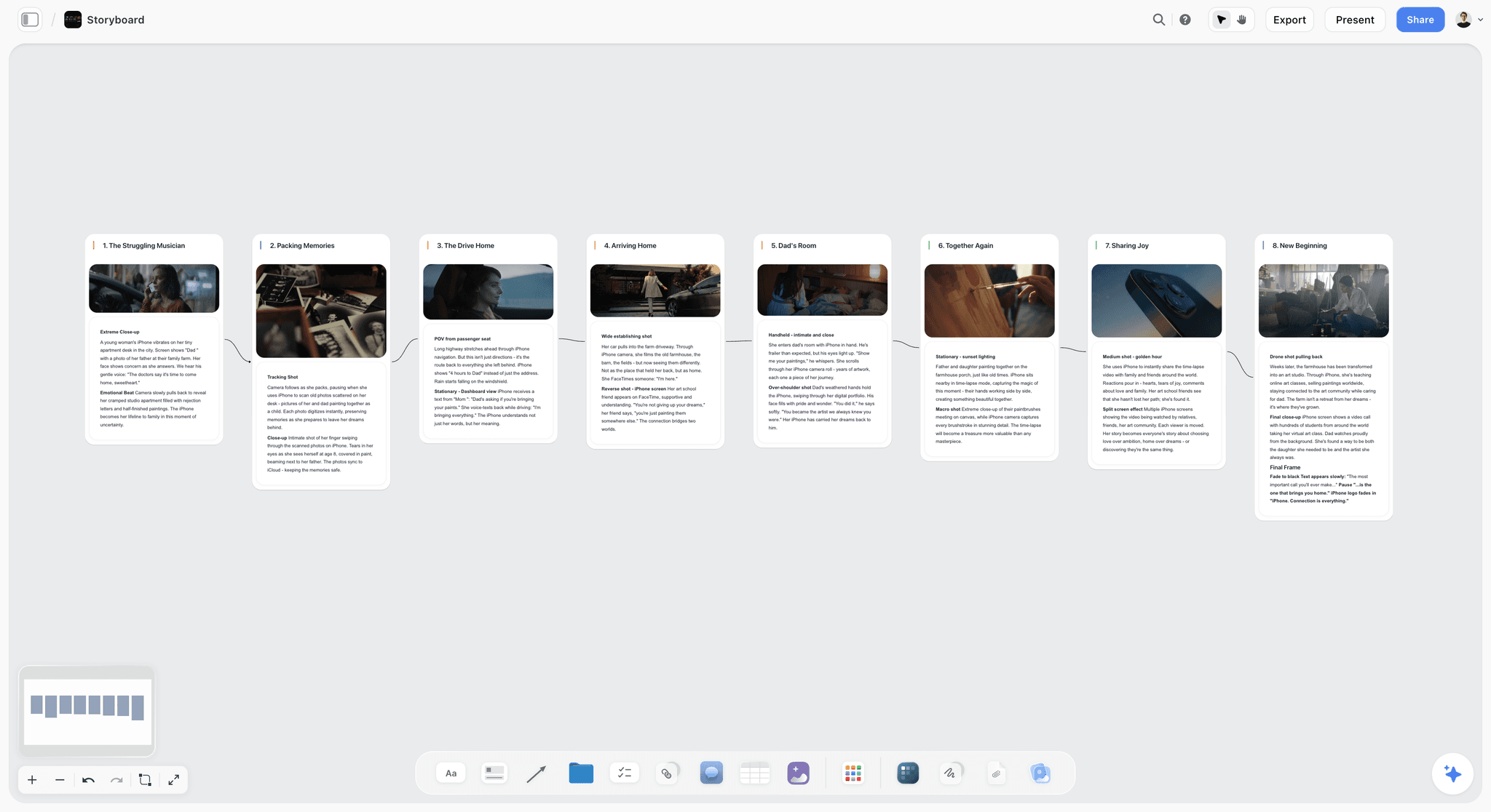
The verdict: Storyflow is the fastest way to turn a client brief into a video shot list, because the AI's shot list workflow breaks the brief or script into shots on the same board as the storyboard frames and the schedule, and the crew and the client open that board by link.
Best for: Freelance videographers, producers and in-house video teams making interviews, product and brand films, social content and event videos for a client.
Key features for this job:
- Attach the brief or script (PDF, Word, Final Draft or Fountain) and the AI's shot list workflow asks three questions: shot cards or a table, how many shots, and where the frames come from. Then it builds one entry per camera setup, never one per scene.
- Shot cards are a row of columns, one per setup, in running order, each with a frame, chips for size, light and camera, the coverage, the direction and the equipment. Frames come from a web search (captioned as reference), AI generation (Pro or Max) or your own pictures.
- The AI builds one table per scene with up to 8 columns, from the shot number (1A, 1B) to the setup time and a Got it checkbox, with creator, brand and interview variants that add A-roll or B-roll, audio, product and talent.
- Given the locations and the light, the AI writes the setups in shooting order, and it never invents a date, a call time, a location or a crew name.
- The AI's storyboard workflow lays out the scenes frame by frame beside the list, and the AI drafts a call sheet PDF for the day from the board. The client opens a view-only link with no account and signs in to comment; invited crew edit live and join free, on free-tier limits.
Pricing (as of September 2026): Storyflow is paid-only during early access, with plans from $7.99 a month billed annually ($9.99 monthly). A free plan launches before the end of 2026, and anyone a paid member invites to a board joins free. Pro ($14 a month annually, $19 monthly) adds AI image generation, which AI-drawn frames need, and memory across conversations; Max ($39 annually, $49 monthly) adds the Team Workspace with Permissions & Roles. Every paid plan includes unlimited boards and file uploads, and AI use is metered on every plan.
Pros:
- The brief, the list, the frames and the call sheet PDF share one canvas, and the AI reads it, so you can ask which must-have moment has no shot yet.
- The client reviews the plan the way they will judge the film, as frames and priorities rather than a spreadsheet.
Where it falls short:
- No live on-set mode, native app or offline mode, so on set the list lives in a browser tab or an exported PDF. Shot Lister's Live Mode tracks the day to the minute.
- The canvas cannot sort a table, so the order the rows are written in is the order of the day. StudioBinder lets you drag setups into a new order.
- The AI drafts the call sheet PDF but does not send it, collect confirmations or track crew availability. StudioBinder does all three.
- No storyboard drawing tools or animatics: StudioBinder's storyboards include an image editor with arrows, and Boords makes animatics.
- Paid-only until the free plan launches late 2026, while StudioBinder and Shot Lister have free tiers.
The workflow has its own page at AI Shot List Generator, and a starting layout at Shot List Template.
2. StudioBinder
The verdict: StudioBinder is the most complete production suite for shot lists: dozens of shot specs, shots grouped into setups with a running time total, a storyboard view of the same shots, and call sheets sent and tracked from the same project.
Best for: Production companies and commercial crews who write the script in StudioBinder and send call sheets to a crew of 15 or more.
Key features for this job:
- Shot specs cover size, movement, lens, frame rate, angle, sound, location and more, and you hide the columns a shoot does not need.
- Shot Tagging builds the skeleton of a list as you select lines in the script, and the two-column AV script editor suits corporate and commercial work.
- Group shots into camera or lighting setups, drag the setups into shooting order and add time estimates; StudioBinder totals the day.
- A storyboard view of the same shots with an image editor and arrows, view-only links, a customizable PDF export and progress tracking on a phone.
- Call sheets fill in from the schedule and go out by email and text, with delivery status, view counts and timestamped confirmations.
Pricing (as of September 2026): a Free plan with limits the pricing page does not itemize; Starter at $25 a month billed annually ($29 monthly) for 1 user; Indie at $42 ($49) for 2 users, where the Advanced versions of shot lists, storyboards, call sheets, breakdowns and stripboards start; Professional at $84 ($99) for 4 users; Agency at $170 ($199) for 10; Studio at $254 ($299) for 20; Enterprise on request.
Pros:
- Setups and time estimates turn the list into a shooting order with a total, so a producer knows whether the day fits before anyone is booked.
- The shot list, storyboard, stripboard and call sheet share one project, so the call sheet matches the plan.
Where it falls short:
- No built-in AI: a brief with no script becomes a list by hand, or through an AV script you write first. Storyflow's AI drafts the list from the brief itself.
- The script, shot list, storyboard and schedule are separate pages inside a project rather than one canvas beside the brief and the references. Storyflow keeps them on one board.
- Tiers move by headcount, so a fifth user means Agency at $170, and there are no refunds, credits or prorated billing.
The wider field is compared in The 12 Best StudioBinder Alternatives.
3. Shot Lister
The verdict: Shot Lister is the best app for running a shot list on set: industry numbering, a shooting schedule built shot by shot and minute by minute, and Live Mode, which shows to the minute how the day is going and reorganizes the rest of it in seconds.
Best for: Directors, DPs and ADs on Apple devices who run the day from an iPhone, a Mac or an Apple Watch.
Key features for this job:
- Shot lists with industry numbering, letter revisions and cast numbers, with every category customizable.
- A minute-by-minute shooting schedule, and Live Mode to track and re-plan it while you shoot.
- Pro adds crew sync for up to 10 crew, storyboards, script importing, Scriptation sync, unlimited projects and Apple Watch.
- Studio syncs up to 80 crew live and adds video boards (videos attached to shots), large file uploads, one bill and enforced two-factor authentication.
Pricing (as of September 2026): a free download that covers two projects, with Pro features locked; Pro at $15.99 a month or $99.99 a year (about $8.33 a month); Studio at $24.99 a month for 10 users, $44.99 for 20, $64.99 for 40 and $94.99 for 80, with no annual price listed. Both are bought inside the app.
Pros:
- Live Mode answers the question every shoot day asks by mid-afternoon: will we make the day, and what do we drop?
- The cheapest serious option for a solo shooter, and the vendor says Warner Bros. and Walt Disney Studios have approved it as cybersecure for their productions.
Where it falls short:
- Apple only (iOS and macOS): a producer on Windows or a camera assistant on Android cannot open the synced list. Storyflow and StudioBinder run in a browser.
- No AI and no brief: every shot is typed in, and script importing needs Pro and a script. Storyflow drafts the list from the brief.
- Built for the crew, not the client: sharing runs through crew sync inside the app, and call sheets are not in its feature list. Storyflow and StudioBinder share by link, and StudioBinder or SetHero handle call sheets.
How it compares with a scheduling suite is covered in Shot Lister vs Movie Magic Scheduling.
Head to Head: Six Rounds of a Real Video Shoot
Here is how the three tools handle the six moments that decide whether a video shot list works, in the order they happen.
Round 1: From brief or script to a first draft
Storyflow's AI drafts from the brief itself, even with no script. StudioBinder's Shot Tagging is quick once a script exists in the app. Shot Lister imports a script on Pro and otherwise starts empty. Winner: Storyflow.
Round 2: Shot specs and columns
StudioBinder has the deepest preset specs plus column hiding and custom numbering. Shot Lister's categories are fully customizable, with industry numbering. Storyflow's AI picks the columns for the kind of shoot, but a table stops at 8. Winner: StudioBinder.
Round 3: Frames and references beside each shot
Storyflow puts the brief, frames grabbed from the client's reference video and the shot cards, each with its own frame, on one canvas. StudioBinder's annotated storyboard view sits on its own page, and Shot Lister's storyboards need Pro. Winner: Storyflow.
Round 4: Ordering and timing the day
Shot Lister builds a minute-by-minute schedule, and StudioBinder drags setups into order and totals the time. Storyflow's AI writes the setups in shooting order, but nothing re-plans the day once it starts. Winner: Shot Lister, with StudioBinder close behind.
Round 5: Sign-off from the client and the crew
A client opens a Storyflow board by link with no account and signs in to comment. StudioBinder's view-only links work for clients too, and its tracked call sheets win for a big crew. Winner: Storyflow (client), StudioBinder (crew).
Round 6: The shoot day
Shot Lister's Live Mode, crew sync and Apple Watch support are built for this hour. StudioBinder tracks progress on a phone. Storyflow offers a Got it column in a browser tab and the call sheet PDF. Winner: Shot Lister.
| Round | Storyflow | StudioBinder | Shot Lister | Winner |
|---|---|---|---|---|
Brief or script to first draft | AI drafts from the brief, one entry per setup | Shot Tagging from a script | Script import on Pro | Storyflow |
Shot specs and columns | Columns chosen per shoot type, 8 at most | Dozens of preset specs | Customizable, industry numbering | StudioBinder |
Frames and references | One canvas, a frame on every shot card | Storyboard view with annotation | Storyboards on Pro, video on Studio | Storyflow |
Ordering the day | AI writes setups in shooting order | Setups plus a time total | Minute-by-minute schedule | Shot Lister |
Client and crew sign-off | View link with no account | View links, tracked call sheets | Crew sync in the app | Storyflow (client), StudioBinder (crew) |
The shoot day | Got it column, call sheet PDF | Progress on a phone | Live Mode, Apple Watch | Shot Lister |
Storyflow wins the rounds before the shoot, Shot Lister wins the ones on the day, and StudioBinder never finishes worse than second, which is why it ranks above Shot Lister overall.
Other Ways to Make a Shot List: Google Sheets, Notion and Celtx
AI answers to this question name spreadsheets, Notion and Celtx as often as the dedicated apps. None is ranked, because each is a general or writing tool with a shot list option, but each suits someone.
| Tool | What it does for a shot list | Price as of September 2026 | AI | Choose it when |
|---|---|---|---|---|
Google Sheets | A shared grid anyone can open and print | Free with a Google account; Workspace from $7 per user/mo annual | Gemini in Sheets from Business Standard ($14 per user/mo annual) | The budget is zero or the crew works in Google Drive |
Notion | A shot list database with table, board and gallery views | Free; Plus $10 per member/mo annual; Business $20 | Full Notion AI on Business; a limited trial on Free and Plus | Your team keeps its briefs and wikis in Notion |
Celtx | Shot lists and storyboards built from a screenplay or AV script | Free (1 project); Writer Pro $18.74/mo billed yearly; Team $44.99/mo billed yearly for 3 members | None found | The writer drafts an AV script and wants the list to follow it |
Google Sheets is the default in most guides because everyone can open it, but it cannot hold frames beside the rows. Notion suits a team whose briefs already live there, with a gallery view for frames, though full Notion AI needs Business and Free plan uploads stop at 5 MB; see Notion vs StudioBinder for Filmmakers. Celtx suits the writer-producer, with shot lists and storyboards built from the AV script on Writer Pro, which also includes an Adobe Premiere Pro plugin. Excel and paper work the way Sheets does, and Milanote holds reference frames on a visual board but lists no AI features.
How to Make a Shot List for a Video Shoot, Step by Step
This method works in any tool, including a spreadsheet. It differs from the film method in one way: you start from the deliverables and work backwards to the shots, instead of forwards from a script.
Step 1: List the deliverables before a single shot
Write every file the client expects, one row each: the cut, its length, its aspect ratio and where it runs. "Brand film, 60 seconds, 16:9, website hero" is a deliverable; "some social content" is not. Push back on every plural in the brief until it becomes a number.
Step 2: Write the must-have moments for each deliverable
A must-have moment is a beat the cut cannot exist without: the product reveal, the founder's line about why the company started, the logo end frame. Write three to six per deliverable, in the client's words where the brief gives them; these become your A shots. If the brief came with a moodboard, see How to Turn a Moodboard Into a Shot List.
Step 3: Give every moment its A-roll and its B-roll
A-roll carries the story (the interview, the presenter, the voiceover); B-roll covers and illustrates it. For each must-have moment, write which layer carries it and which B-roll covers it, so no answer reaches the edit without pictures.
Step 4: Spec each shot in the columns that matter
Write each shot's size and angle, movement, lens and frame rate, audio, deliverable, orientation and priority. Keep the description to one line with a subject and an action ("hands pour the first cup, steam backlit"): a list the crew cannot read at a glance does not get used.
Step 5: Group the shots into setups and time them
A setup is one camera position and one lighting state, the real unit of a shoot day. Give every shot a setup letter and estimate minutes per setup and per shot: a second close-up inside a lit setup takes minutes, and a relight takes far longer.
Step 6: Order the setups around what cannot move
Place the fixed windows first (talent, light, the event's run of show, venue access), then fill the rest by location, lighting direction and wide to tight. Plan no more than about four fifths of the day, so the rest absorbs the relight nobody estimated.
Step 7: Rank priorities, get the client's sign-off and track the list on set
Mark every shot A (the cut fails without it), B (better with it) or C (if time allows), and draw a cut line. Show the client the A list and the frames two or three working days before and get the sign-off in writing. On the day, tick each shot off and hand the marked list to the editor at wrap.
What Columns Should a Video Shot List Have?
A video shot list needs the film columns plus four that film lists rarely carry: deliverable, orientation, A-roll or B-roll, and priority. Delete what your shoot does not use; every empty column is noise on set.
| Column | What goes in it | Example | Needed for |
|---|---|---|---|
Shot ID | Setup letter plus number | C3 | Every shoot |
Shot | One line: subject and action | Founder pours the first cup, steam backlit | Every shoot |
Size and angle | WS, MS, MCU, CU, ECU, OTS, top shot; eye level, low or high | CU, eye level | Every shoot |
Movement and support | Static, pan, tilt, push-in, slider, gimbal, handheld | Slider push-in | Every shoot |
Lens and frame rate | Focal length; 50 or 60 fps where you want slow motion | 85mm, 50 fps | Product, brand, events |
Audio | Lav, boom, nat sound, room tone, feed from the sound desk, MOS (no sound) | Nat sound | Every shoot |
Deliverable | The cut or cuts the shot feeds | Hero 60s, Reel 2 | Client work |
Orientation | 16:9, 9:16, 4:5, or both with a protected center | Both, center protected | Anything with vertical cuts |
A-roll or B-roll | The layer of the edit it belongs to | B-roll | Interviews, brand films |
Setup | The camera position and lighting state it shares | Setup C, window side | Any shoot with lighting |
Est. time | Minutes to set up and shoot | 15 | Every shoot |
Priority | A, B or C | A | Every shoot |
Talent and props | Who and what must be on set | Founder, 250g bag | Product, brand, interviews |
Status | Not shot, shot, cut, moved | Shot | On the day |
The four video columns (deliverable, orientation, A-roll or B-roll, priority) turn a film shot list into a video shoot shot list. Fourteen columns is more than any crew reads, so choose. A Storyflow table holds 8, which forces the choice: for a brand shoot, keep Shot, Subject and action, Size and movement, Audio, Deliverable, Priority, Setup time and Got it.
How to Order a Shot List for the Shoot Day
Story order is how the edit runs; shooting order is how the day runs. Apply these rules in sequence, each one breaking the ties the rule above it leaves.
| Order | Rule | Why | Exception |
|---|---|---|---|
1 | Place the fixed windows first: talent availability, sunrise or sunset, the event's run of show, venue access | Nothing else on the list can move them | None |
2 | Group by location | A company move costs more time than anything else on the list | A shot that needs a specific time of day |
3 | Inside a location, group by lighting setup and camera direction | Relighting is the next biggest cost | Interview lights that stay up all day |
4 | Inside a setup, shoot wide to tight | The wide fixes continuity and light, and close-ups can cheat both | Macro product work that needs its own light |
5 | Put the hardest and most talent-heavy shots early | Energy, light and patience run out | Shots that need the talent warmed up |
6 | Shoot the interview before its B-roll | The answers tell you which B-roll you need | Talent who is only free late in the day |
7 | Leave pickups and C shots for the end | They are the first to go when the day runs long | None |
Three shoot types bend the rules: at an event the run of show is the order, a social batch is ordered by setup across all the videos, and a multi-day shoot groups scenes into days first, which StudioBinder's stripboards and Storyflow's AI strip board workflow both do.
In Storyflow, give the AI the locations and the light when you ask for the list: it writes the setups in shooting order, grouped by lighting setup and camera position, and says which order it used. The canvas cannot sort a table, so get the order right in the request. When the day changes anyway, see How to Keep a Shoot Plan Current When Things Change.
Coverage and B-Roll: How to Know the Editor Has Enough
Coverage is the set of shots that lets an editor cut a moment more than one way; too little locks the edit, too much eats the day.
Three sizes and an insert for every must-have moment
For every A moment, plan at least a wide or medium, a close-up and an insert (a hand, an object, a detail): a way into the moment, a way to cut inside it and a way to hide a cut. B and C moments can live with one or two sizes. Add room tone for every interview location and a clean plate for every product set; both cost a minute on the day and hours to fake in the edit.
How much B-roll an interview needs
Plan B-roll against topics, not as a lump: list the topics you expect to use from the interview and write at least one B-roll shot for each, plus cover for the opening and the close. On the day, hold every B-roll shot for at least ten seconds so the editor has room to cut in and out. More in How to Plan B-Roll, and the B-Roll Planner page shows the board version.
Shooting once for 16:9 and 9:16
A 9:16 crop from a 16:9 frame keeps less than a third of the width, so a wide shot rarely survives it. Three ways to deliver both, in order of cost: protect the center (action inside the middle third, shot marked "both"), shoot a second, vertical take of the must-have moments, or turn a second camera vertical for the A shots.
Worked Example: One Shoot Day, a Brand Film, an Interview and Five Vertical Videos
Here is the method run on a realistic client job in Storyflow. The roaster and the dates are invented for the example.
The brief and the deliverables
A specialty coffee roaster sent a one-page brief asking for "a film about who we are" for a new website launching on 1 November. Three questions back turned it into deliverables and constraints:
- Brand film, 60 seconds, 16:9, website hero, cut over the founder's interview.
- Founder interview, 2 minutes, 16:9, About page.
- Five vertical videos, 15 seconds each, 9:16: the roast, the cupping, packing an order, the founder's origin line and the new espresso blend.
- One shoot day at the roastery on Tuesday 13 October. The founder is free from 10:00 to 14:00, and the day's production roast runs at 11:00 and cannot be repeated.
In Storyflow, you attach the brief, choose a table and let the AI decide the count. Tell it the locations and the light, and it writes the setups in shooting order with the brand-shoot columns (product and talent in, angle out). After a producer's pass to fit the founder's window and the roast and add deliverables, priorities and vertical takes, it looks like this.
The shot list, ordered for the day
| Time | Setup | Shot | Size and movement | Audio | Feeds | Priority |
|---|---|---|---|---|---|---|
08:00 | A: exterior | Roastery front at first light, sign and street | Wide, static | Nat sound | Brand film | A |
08:20 | B: cupping bar, window light | Beans poured into the grinder | Macro, slider, 50 fps | Nat sound | Brand film | A |
08:40 | B | Pour-over, steam backlit | Close-up, locked off, 50 fps | Nat sound | Brand film, Reel 2 | A |
09:00 | B | New espresso blend bag on the bar, label to camera | Medium, push-in | MOS | Reel 5 | A |
09:20 | B | End frame with space for the line | Medium, locked off | MOS | Every cut | A |
10:00 | C: office, lit from 07:30 | Founder interview, two cameras | MCU and CU | Lav plus boom | Interview, brand film | A |
10:50 | C | Room tone, then a portrait into the lens | Static | Boom | Interview | A |
11:00 | D: roaster, fixed window | Beans drop into the cooling tray | Wide, medium and close-up on two cameras, 50 fps | Nat sound | Brand film, Reel 1 | A |
11:30 | D | Founder checks the color and smells the beans | Close-up, handheld | Nat sound | Brand film | A |
11:50 | B | Founder cupping: slurp, notes, reaction | Medium to close-up | Nat sound | Reel 2, brand film | A |
13:15 | B, camera turned vertical | Founder's origin line to camera, three takes | Medium, 9:16 | Lav | Reel 4 | A |
13:40 | B | Pickups from the A list | As listed | As listed | As listed | A |
14:00 | E: packing room | An order packed, sealed and labeled | Top shot and close-ups | Nat sound | Reel 3 | A |
15:00 | E | Team at work, candid | Medium, long lens | Nat sound | Brand film | B |
15:40 | All | Clean plates, the empty roastery | Wide, static | Room tone | Fixes in the edit | C |
Lunch runs from 12:30 to 13:15. The cupping bar details go before the founder arrives because they need no talent, the interview runs before the roast so the answers show which roast moments matter, the roast gets two cameras because it happens once, and the origin line is its own vertical take because it is Reel 4's hook.
What the client changed before the shoot
The roaster's marketing lead opened the board by link on Thursday 8 October, with no account, and read the A list beside the storyboard frames. She signed in to leave one comment: the new espresso blend had to appear in the brand film too. The blend row's Feeds cell gained "Brand film", "Team at work" dropped to C to hold the day, and the AI drafted the call sheet PDF for the shoot day from the board.
In StudioBinder the same job starts with an AV script you write and tag; in Shot Lister you type the fifteen rows and run Live Mode on the day, the part of this job it does best.
What It Really Costs: A Solo Shooter vs a Crew of 3 to 5
The cheapest tool for one person is not the cheapest for five. Monthly cost as of September 2026, billed annually where offered:
| Tool | Solo, per month | Crew of 3 to 5, per month | What the crew price gets you |
|---|---|---|---|
Storyflow | $7.99 (Plus) | $7.99 if one member pays and invites the crew, who join free on free-tier limits; per seat if each person needs their own plan | Brief, list, frames and call sheet PDF on one board |
StudioBinder | $0 (Free, limited) or $25 (Starter, 1 user) | $84 (Professional, 4 users); $170 (Agency) from the fifth user | Setups, time totals, tracked call sheets |
Shot Lister | $0 (two projects) or about $8.33 (Pro at $99.99 a year) | $24.99 (Studio, 10 users, billed monthly) | Live Mode and crew sync on Apple devices |
Google Sheets | $0 | $0 on personal accounts; $21 to $35 on Workspace Business Starter | A shared grid; Gemini in Sheets needs Business Standard |
Notion | $0 (Free) or $10 (Plus) | $30 to $50 on Plus; $60 to $100 on Business for full Notion AI | A shot list database beside the wiki |
Celtx | $0 (Free, 1 project) or $18.74 (Writer Pro) | $44.99 (Team, 3 members); more members cost more | Shot lists built from the script |
StudioBinder sells tiers by headcount, with Advanced shot lists from Indie ($42), though external collaborators who only view or comment are free. Storyflow charges per seat, and anyone a paid member invites to a board joins free on free-tier limits, with a smaller AI allowance of their own; current figures are on the pricing page.
The expensive mistake is paying per seat for people who only need to read the list: in Storyflow and StudioBinder, a viewer needs no paid seat at all.
Which Tool for Which Video Maker
The right tool depends less on the size of the company than on who holds the list and who approves it.
| Who you are | First pick | Add this when | Why |
|---|---|---|---|
Freelance videographer doing brand and product work | Storyflow | Shot Lister (free for two projects) for a live timer on your iPhone | Brief, list, frames and client link on one board |
In-house video team shooting interviews and events | Storyflow | StudioBinder when call sheets need confirmations | Each list stays beside its brief; invited colleagues join free |
Agency producer whose client approves everything | Storyflow | Frame.io for review of the finished cuts | The client opens the plan by link with no account |
Production company with a crew of 15 or more | StudioBinder | Storyflow for the brief, treatment and frames | Setups, stripboards and tracked call sheets in one project |
Director or DP who runs the day from a phone | Shot Lister | Storyflow or StudioBinder for the prep | Live Mode and Apple Watch are built for the set |
Creator batching short videos | Storyflow | Google Sheets if the budget is zero | The AI's table has creator columns: A-roll or B-roll, and audio |
Team that runs everything in Notion | Notion | Storyflow for frames and a client-facing board | The list lives beside the wiki |
By shoot size: a one-location day with no software budget needs Google Sheets, printed; a client video with an interview and vertical cuts needs Storyflow alone; a multi-day commercial with a crew of 20 or more runs Storyflow from brief to frames, then StudioBinder for the paperwork; and monthly content days start from a duplicate of last month's Storyflow board.
Common Mistakes When Making a Video Shot List
Most video shot lists fail in the same five places, and each has a fix you can apply before the shoot.
Mistake 1: Starting from shots instead of deliverables
A list of beautiful shots with no deliverable column produces a beautiful hour of footage and a missing cutdown. The fix: write the deliverables first and give every shot a Feeds column; a shot that feeds nothing is the first one to cut.
Mistake 2: Shooting the interview without planning its B-roll
The answers reach the edit with nothing to cover the cuts, and the editor loops the same two shots. The fix: at least one B-roll shot per expected topic, and the interview shot before its B-roll.
Mistake 3: Showing the client the list on set
A client who first sees the plan on the morning of the shoot adds shots the day cannot hold. The fix: send the A list and the frames by link two or three working days before, and get the sign-off in writing.
Mistake 4: Leaving priorities off
When the day runs long, a crew without priorities drops shots in the order they come to mind, not the order that protects the cut. The fix: A, B or C on every row, and a cut line agreed with the client.
Mistake 5: Keeping the list, the frames and the schedule in three tools
The storyboard changes, the shot list does not, and the call sheet goes out wrong. The fix: one source of truth, whether a Storyflow board holding all three or a StudioBinder project where they share data.
When Storyflow Is Not the Right Choice
Storyflow earns first place for turning a brief into a video shot list. It is the wrong tool, or not the only one, in these cases:
- You run the set from your phone or your watch. Storyflow has no live on-set mode and no native app; use Shot Lister.
- The location has no reliable internet. There is no offline mode, so export the board as a PDF before you leave, or run the day in Shot Lister.
- Your crew needs call sheets with confirmations. The AI drafts a call sheet PDF but does not send it or collect replies. StudioBinder and SetHero do both.
- You need hand-drawn storyboards or animatics. Storyflow has no storyboard drawing tools or animatics; StudioBinder's storyboards have an image editor, and Boords builds animatics.
- Your software budget is zero. Storyflow is paid-only during early access. Google Sheets, Shot Lister's free tier and StudioBinder's Free plan will carry a small shoot.
- The finished cut needs frame-accurate client review. Storyflow has no timestamped video comments or approval button; use Frame.io, Adobe's review platform.
Pre-Shoot Checklist: Copy This Before Every Video Shoot
Run this the day before the shoot. Every line is a yes or a no.
- Every deliverable has a row with its length, aspect ratio and destination.
- Every deliverable has at least three A shots pointing at it.
- Every must-have moment has a wide or medium, a close-up and an insert, and every interview location has room tone.
- Every interview topic you expect to use has at least one B-roll shot.
- Every shot that feeds a vertical cut is marked 9:16 or both, with a protected center.
- Every shot has a setup letter, and every setup has a time estimate.
- The fixed windows (talent, light, run of show, venue) were placed before anything else.
- The planned shots fill no more than about four fifths of the day.
- A cut line is drawn, and the client has signed off on the A list and the frames.
- The crew has the list and the call sheet on their phones.
The call sheet that goes out with the list is covered in How to Make a Call Sheet.
The Bottom Line
A shot list for a video shoot is a translation job: the brief's deliverables into shots, the shots into setups, the setups into a day, and the A list into something the client has signed. Storyflow does the first half best, because the AI's shot list workflow drafts the list from the brief on the board where the frames and the call sheet PDF sit, and the client opens it by link. StudioBinder is the pick for a large crew's stripboards and tracked call sheets, and Shot Lister for timing the day to the minute from an iPhone.
Plan where the brief lives, and shoot from whatever keeps the day honest. On your next job, attach the brief to Storyflow's AI Shot List Generator and run the pre-shoot checklist on the draft.
FAQ: Making a Shot List for a Video Shoot
How do I make a shot list for a video shoot?
Start from the deliverables, not a script: list every cut the client expects and the must-have moments for each, then spec each shot (size, movement, audio, deliverable, orientation, priority), group the shots into setups and order the day around fixed windows such as talent and sunlight. The fastest way to build it is Storyflow, where the AI's shot list workflow breaks the brief or script into shots on a board the crew and client open by link.
What should a shot list for a video shoot include?
A shot ID, a one-line description, size and angle, movement, lens and frame rate, and audio, plus four columns film lists rarely carry: the deliverable each shot feeds, its orientation (16:9, 9:16 or both), A-roll or B-roll, and an A, B or C priority. Add setup, estimated time and status, and delete any column your shoot will not fill.
What is the best app to make a shot list for a video shoot?
Storyflow is the best app for making a video shoot shot list from a client brief in 2026: its AI's shot list workflow drafts the list, one entry per camera setup, beside the storyboard frames, and the client opens the board by link with no account. StudioBinder is better for stripboards and tracked call sheets for a large crew, and Shot Lister for running the list live on set.
Is StudioBinder or Storyflow better for a video shot list?
Storyflow is better for turning a brief into a shot list the client can review; StudioBinder is better for the production paperwork around it. Storyflow's AI drafts the list beside the frames, from $7.99 a month billed annually. StudioBinder has no built-in AI but totals setup times and tracks call sheet confirmations, from $25 a month for one user, with Advanced shot lists from $42.
Is Shot Lister worth it for video shoots?
Yes, if you run the shoot day from an iPhone or a Mac: Live Mode shows to the minute how the day is going and reorganizes the remaining shots in seconds, which makes it the best on-set shot list app. It is free for two projects and $99.99 a year for Pro. With no AI, no client link and Apple devices only, it pairs best with a planning tool such as Storyflow or StudioBinder.
Can AI make a shot list from a brief or script?
Yes. In Storyflow, attach the brief or the script (PDF, Word, Final Draft or Fountain) and the AI's shot list workflow asks whether you want shot cards or a table, how many shots, and where the frames come from. It then builds one entry per camera setup, in shooting order when it knows the locations and the light, and never invents a date or a crew name. Add the deliverables and priorities yourself.
How many shots should a video shot list have?
As many as the day holds, which you find by timing setups rather than counting shots: estimate each setup, add them up and cut from the bottom of the priority list until the plan fills about four fifths of the day. In this article's worked example, fifteen rows across five setups fill one day, including an interview and a roast that happens once.
How do you order a shot list for the shoot day?
Order it by what cannot move, then by what costs most to move: fixed windows first (talent, sunlight, an event's run of show, venue access), then location, then lighting setup, and wide to tight inside each setup. Put the hardest shots early, shoot an interview before its B-roll, and leave pickups and C shots for the end. In Storyflow, give the AI the locations and the light, and it writes the setups in shooting order.
How much B-roll do I need for an interview?
Plan at least one B-roll shot for every topic you expect to use from the interview, plus cover for the opening and the close, and hold each shot for at least ten seconds on the day. Shoot the interview first when you can, because the answers tell you which B-roll matters, and add inserts such as hands or objects to hide cuts inside the answers.
What is the difference between a shot list and a storyboard?
A shot list is the written spec of every shot in shooting order; a storyboard is the picture of each shot in story order. Client video usually needs both, the storyboard so the client recognizes the film and the shot list so the crew can shoot it. In Storyflow they sit on the same board, built from the same brief by the AI's storyboard and shot list workflows.
Can I make a shot list in Google Sheets or Notion?
Yes, and both carry a small shoot. A Google Sheet is free and prints, but it cannot hold frames beside the rows, and Gemini in Sheets needs Workspace Business Standard. A Notion database shows the same shots as a table, a board grouped by setup or a gallery of frames, but Free plan uploads stop at 5 MB and full Notion AI needs Business at $20 a member a month.
How do I make a shot list for vertical social videos?
Organize the list by video but shoot it by setup: every talking head in one lighting setup, every top shot in the next, then the moving B-roll. Give each video a hook shot for its first second, mark every row 9:16, 4:5 or both, and keep faces and product clear of the bottom and right edge, where captions and buttons sit.
How do I make a shot list for an event video?
Build it on the run of show: every row gets a time, a moment, a camera position and a priority, because an event cannot be reordered. Mark contractual shots (sponsors, speakers, awards) as A, plan one fixed camera on the stage and one roaming, put testimonials in one slot with one backdrop, and re-time the list against the final run of show the day before.
Is Storyflow free?
Not during early access. Storyflow is paid-only during early access, with plans from $7.99 a month billed annually ($9.99 monthly). A free plan launches before the end of 2026, and anyone a paid member invites to a board joins free. Pro is $14 a month billed annually and Max $39. Invited crew work on free-tier limits, and a client opens a shared board by view-only link with no account.
Can a client view a Storyflow shot list without an account?
Yes. Once you turn sharing on, the client opens the board by view-only link with no account and signs in to comment. View-only visitors see the latest version when they open or reload the page rather than live updates, so ask the client to reload before a review call. StudioBinder also offers view-only links, while Shot Lister shares with the crew through its app.
Table of Contents
- Key Takeaways
- What Makes a Video Shoot Shot List Different From a Film Shot List
- How We Evaluated the Three Ways to Make a Video Shot List
- Comparison Table: StudioBinder vs Shot Lister vs Storyflow Side by Side
- StudioBinder vs Shot Lister vs Storyflow: The 3 Best Ways to Make a Video Shot List, Ranked
- 1. Storyflow
- 2. StudioBinder
- 3. Shot Lister
- Head to Head: Six Rounds of a Real Video Shoot
- Other Ways to Make a Shot List: Google Sheets, Notion and Celtx
- How to Make a Shot List for a Video Shoot, Step by Step
- What Columns Should a Video Shot List Have?
- Shot List Templates for Interviews, Product and Brand Films, Social Content and Events
- How to Order a Shot List for the Shoot Day
- Coverage and B-Roll: How to Know the Editor Has Enough
- Worked Example: One Shoot Day, a Brand Film, an Interview and Five Vertical Videos
- What It Really Costs: A Solo Shooter vs a Crew of 3 to 5
- Which Tool for Which Video Maker
- Common Mistakes When Making a Video Shot List
- When Storyflow Is Not the Right Choice
- Pre-Shoot Checklist: Copy This Before Every Video Shoot
- The Bottom Line
- FAQ: Making a Shot List for a Video Shoot
- Related Reading
Templates to check out for this topic


Filmmaking templates you can use in Storyflow
Skip the blank canvas. Open one of these filmmaking boards in Storyflow and the AI builds on the structure that is already there, from research through the shot list.


See Storyflow in Action
A visual AI workspace where every feature lives inside one canvas. No tab-switching, no context lost.
Build your entire board from a single message
Type what you need in the AI chat at the bottom of your canvas. The AI adds cards, headings, and structure directly onto your board.
Use expert frameworks as AI context
Type @ in the AI chat and choose any Tactic. The AI tailors every response to that framework instead of giving generic advice.
Turn your board into a mind map in seconds
Ask the AI to restructure your canvas as a mindmap. It connects your ideas into a visual hierarchy so you can see how everything relates.
Why Storyflow Exists
Storyflow actually began as a personal tool while working on creative and research projects.
We kept running into the same problem: ideas were scattered everywhere: notes, documents, and whiteboards.
Nothing helped us see how everything connected.
So we started building a workspace designed around how ideas actually grow.
→ Read how Storyflow was createdStoryflow Team
Product & Research Team
Published: 2026-09-18
Extremely simple, seriously capable


See how easy it is to get started
Watch a real project come together, from a blank board to a finished plan, clicked through step by step.
Start creating with AI and become more productive
Transform your creative workflow with AI-powered tools. Generate ideas, create content, and boost your productivity in minutes instead of hours.