
Ultra-fast storyboards: minutes, not days
From text to storyboard,
as fast as you can type.
Describe your idea in plain language and Storyflow's AI lays out the storyboard for you. No script required, no blank frames to fill. Two sentences are enough to get a board you can react to.


Creatives working for these brands already got early access
- Red Bull
- Canon
- Artlist
- Porsche
See how easy it is to get started
Watch a real project come together, from a blank board to a finished plan, clicked through step by step.
Start from a ready-made template
Pick a board to see what you can build, then let AI fill it in. Every template is a real, editable starting point on the same infinite canvas.

Storyboard
Lay out your shots frame by frame with images and notes, then reorder them until the sequence reads like the finished cut.
What is text to storyboard?
Text to storyboard means typing a plain-language description of your idea and letting AI lay out the storyboard. Storyflow is an AI visual workspace that turns a few typed sentences into a storyboard on one infinite canvas: scenes laid out in order, structure and notes on the board, and a layout you can re-prompt, rework and share. No script, no formatting, no blank frames to fill one by one. You describe what the video, film, or campaign should be, and the AI builds a board with scenes, structure, and notes arranged on an infinite canvas. A two-sentence idea is enough to start.
Text to storyboard is not the same as script to storyboard. A script to storyboard workflow starts from a finished, formatted script. Text to storyboard starts earlier, with the rough material you actually have: a prompt, a voice-memo transcript, a note from a meeting, a half-formed pitch. Storyflow's AI reads that text and turns it into a storyboard you can see, question, and rework while the idea is still fresh.
Because the AI keeps your whole board in context, turning text into a storyboard is a conversation, not a one-shot export. Add a line to the prompt, ask for a darker tone or a faster opening, and the board updates around what you have already placed.
Ultra fast from brief to board
Turn text into a storyboard in four steps.
No script, no setup, no drawing skills. Type what you see in your head and the AI does the layout.
01
Get to the prompt box
Nothing stands between you and typing. Create a Storyflow account and the canvas opens with the AI chat ready for your idea.
02
Type your idea
Describe the story in plain language. A logline, a rough pitch, or two sentences about what should happen is enough.
03
Watch the AI lay out the board
The AI turns your text into a storyboard with scenes, structure, notes, and a fitting framework, arranged on the canvas.
04
Iterate, then share
Adjust pacing or tone with another prompt, rough in frames using the pen tool, and pin references. When it reads right, reviewers get a view-only link, or you export an image or PDF.
A text to storyboard workflow built for rough ideas.
The first board is a starting point. Everything you need to develop the idea lives on the same canvas.

One prompt becomes a structured board
Generate a storyboard from any prompt
Type a logline, a campaign idea, or a video concept. Scenes, sequence, and structure come back already mapped, so your first job is reacting to a board rather than filling an empty one.
See the AI storyboard generator →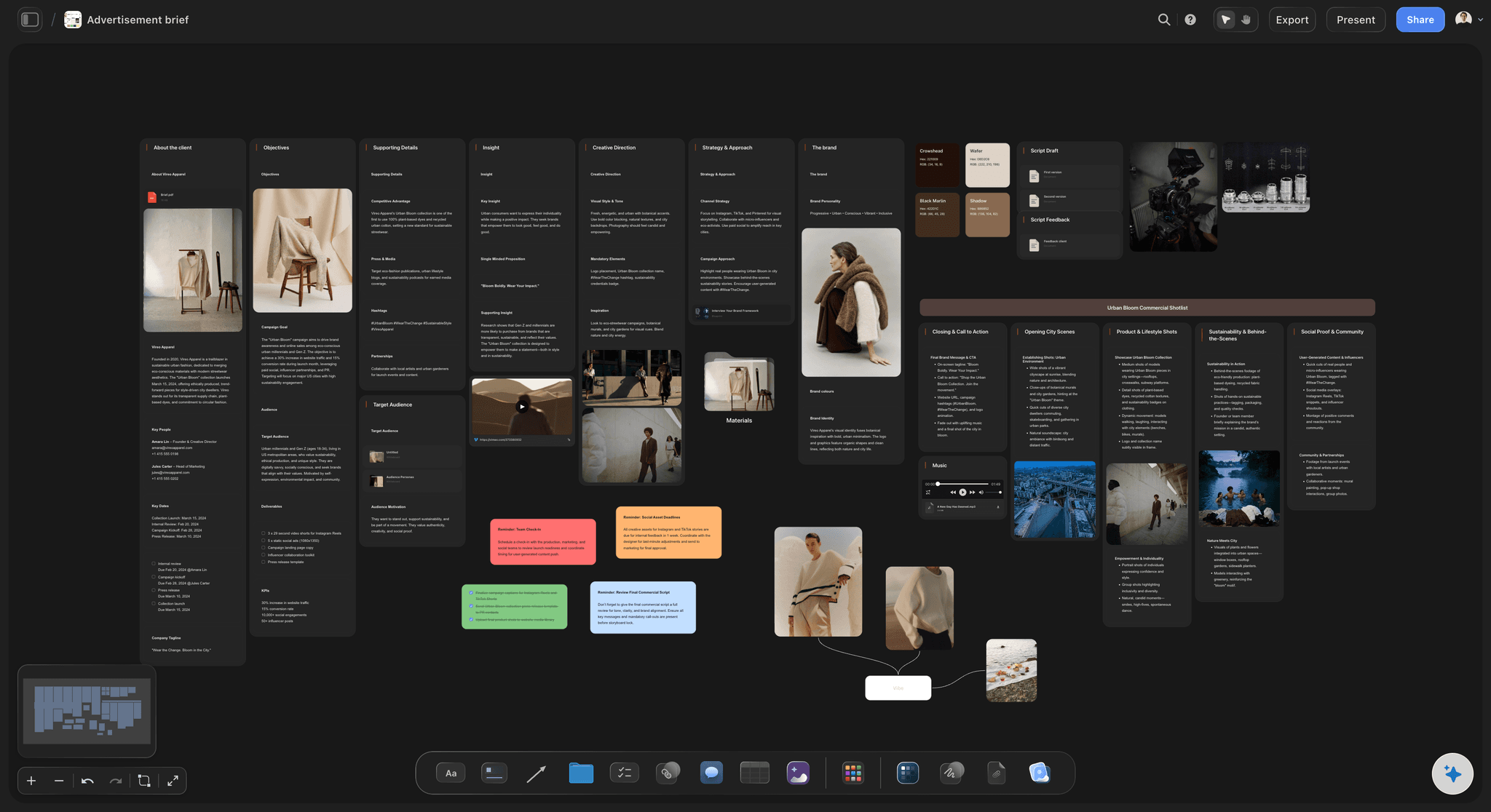
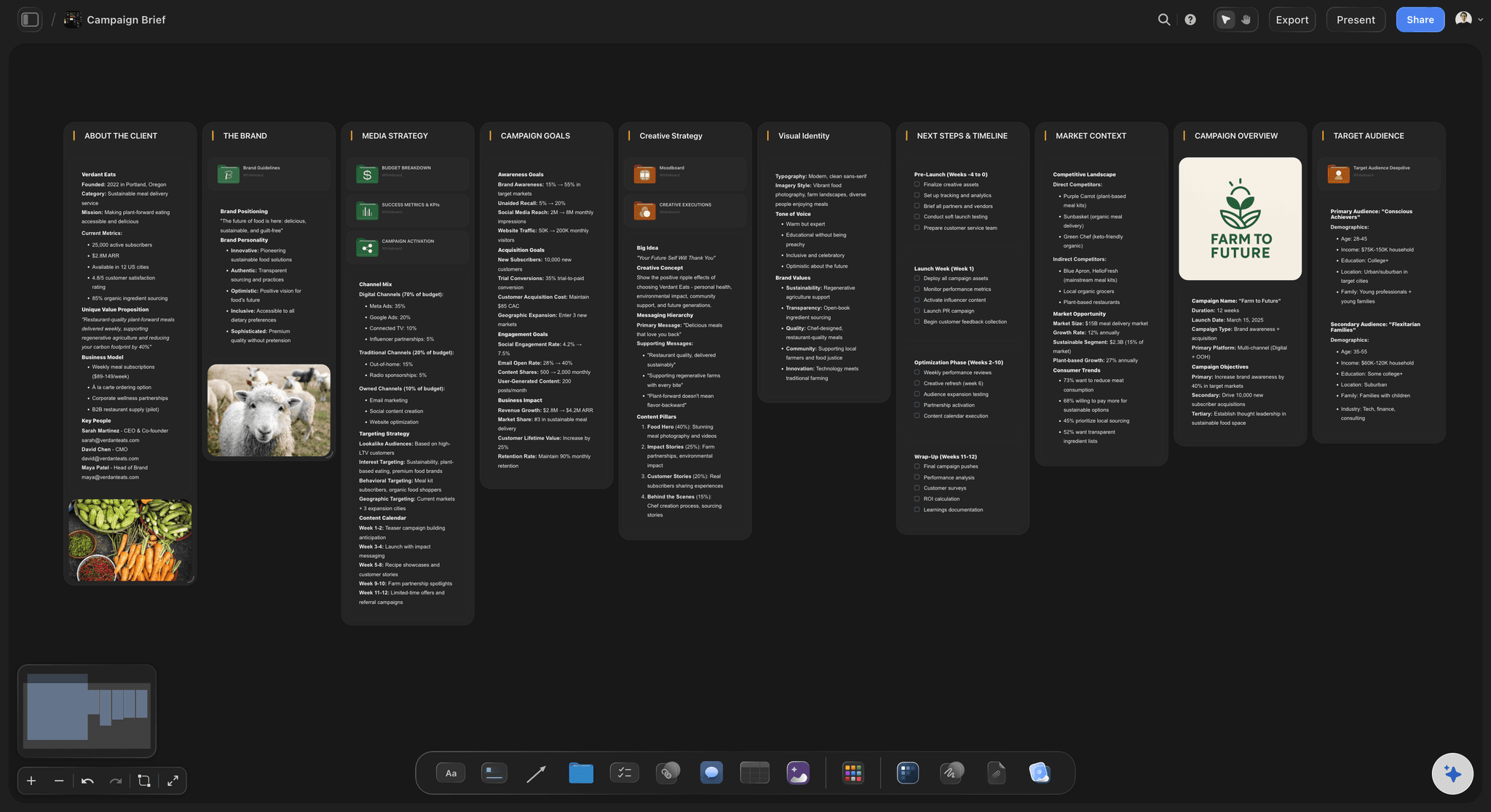
From idea to brief to board on one canvas
Start even before you have the idea
Not sure what to make yet? Brainstorm concepts with the AI on the same canvas, pick the strongest one, and turn that text into a storyboard without switching tools.
Try the AI video idea generator →
View-only links for fast feedback
Share the board while the idea is hot
Send a view-only link so teammates and clients can react to the storyboard without signing up, or export a clean image or PDF for the deck.
Explore the online storyboard maker →Plans from $7.99/mo.
Type an idea into a fresh canvas and a storyboard appears around it. There is no expiry and no storyboard limit on any plan.
A board for every prompt, with no storyboard limit
Basic AI usage to turn text into boards
Unlimited file uploads for scripts and references
Teammates can join in, reviewers get view-only links
Built for people with taste
More than a text to storyboard converter.
Storyflow is an AI-native canvas, so the prompt, the board, and everything around them grow up together in one place.

Any text works as a starting point
Start from whatever you have written down
Prompts and loglines: One or two sentences about the story is enough. The AI fills in scenes, order, and structure for you to react to.
Notes and transcripts: Paste meeting notes, a brainstorm dump, or a voice-memo transcript. The AI pulls the story out of messy text.
Briefs and treatments: Drop a brief on the canvas as a PDF and ask the AI to board it. The source text stays next to the storyboard.

AI that builds on what your text already made
Re-prompt until the board matches your head
Iterate in plain language: Ask for a slower opening, a different ending, or three more scenes in the middle. The AI reworks the board, not just one frame.
Context-aware changes: The AI reads the active board, so every new prompt builds on what is already there instead of starting over.
Notes on every frame: Direction, dialogue ideas, and references sit next to each scene, so the thinking travels with the board.

Visual proof pinned where the text turns into scenes
Make the text visual, scene by scene
Grab frames from video: Spotted the exact shot in a YouTube or Vimeo reference? Grab the still and drop it beside the scene your prompt created.
Sketch over the layout: Use the pen tool to rough in framing on top of the AI's structure. No drawing skills needed for a readable board.
Moodboards on the same canvas: Gather tone, color, and lighting references right next to the board instead of in a separate app.

From first prompt to production-ready plan
Carry the idea all the way to production
Shot lists and breakdowns: Branch the storyboard into shot lists, briefs, and schedules on the same canvas as the original prompt.
Client-ready exports: When the rough idea graduates to a deck or an approval round, a high-quality image or PDF export is one click away.
Team access: The idea stays in one place while the team weighs in: collaborator invites cost nothing, and you decide who edits and who only views.
Explore templates for your project
Every template opens as a real, editable board on the infinite canvas. Pick the closest fit and make it your own.
Storyboard
Lay out your shots frame by frame with images and notes, then reorder them until the sequence reads like the finished cut.
One app instead of five
Storyflow vs Boords, Canva, and Runway.
Text-to-storyboard means different things in each of these tools. Storyflow turns a script into a whole board, Boords generates panel art one shot at a time, and Runway generates motion. Here is where each one genuinely wins.
Storyflow
Recommended
Lays out a whole board from a script in one pass
Board sits beside the script, shot list, and moodboard
Paid plan with unlimited boards and frames
Numbered panels exported as a client-ready deck
Animatic playback with per-frame timing
Generates moving frames or video previs
Boords
Lays out a whole board from a script in one pass
Board sits beside the script, shot list, and moodboard
Free plan with unlimited boards and frames
Numbered panels exported as a client-ready deck
Animatic playback with per-frame timing
Generates moving frames or video previs
Canva
Lays out a whole board from a script in one pass
Board sits beside the script, shot list, and moodboard
Free plan with unlimited boards and frames
Numbered panels exported as a client-ready deck
Animatic playback with per-frame timing
Generates moving frames or video previs
Runway
Lays out a whole board from a script in one pass
Board sits beside the script, shot list, and moodboard
Free plan with unlimited boards and frames
Numbered panels exported as a client-ready deck
Animatic playback with per-frame timing
Generates moving frames or video previs
What creators are saying
Join early creators getting structured workspaces and AI that remembers their projects
“Storyflow has sped up my workflow by at least 3x, which means more flow state and more projects I can actually ship. It truly changed the way me and my team create.”

Reilin Joey
Director & YouTuber
“One prompt gets me a structured board. But the tactics are my favorite. I run my YouTube scripts through them and my intros and retention got better. It's amazing.”

Justkay
YouTuber & Freelance Filmmaker
“I used to juggle five apps to plan a project. Now I describe what I am making and get boards, lists, and a schedule. All in one place.”

George
@fernwehchronicles
Text to storyboard, answered.
Everything people ask about turning text into a storyboard with Storyflow.
Yes. Type a plain-language description of your idea into Storyflow and the AI turns it into a board: scenes arranged in sequence on an infinite canvas, with structure and notes included. No script and no formatting required. Two sentences are enough to get something you can refine.
Storyflow is made for this: type two sentences about your video, film or campaign and its AI lays out a whole board, with scenes in sequence, structure and notes. The board sits beside the script, the shot list and the moodboard, and you can re-prompt until it matches what is in your head. Runway generates moving frames or video previs, which Storyflow does not.
Open a Storyflow canvas, type your prompt into the AI chat, and ask for a storyboard. The AI builds the board in seconds, and you refine it by re-prompting in plain language, re-arranging frames with drag and drop, and sketching over scenes with the pen tool.
Script to storyboard starts from a finished, formatted script and maps every written scene to the board. Text to storyboard starts earlier: a prompt, a note, or a rough description is enough, and the AI invents the scene structure for you. Storyflow does both on the same canvas, so a prompt can grow into a script and a full board over time.
Not during early access. Storyflow is paid-only right now: Plus is $7.99 per month billed annually and includes unlimited storyboards and unlimited file uploads. A Free plan is planned before the end of 2026.
Two sentences are enough to get a first board in Storyflow. The more you describe, the closer the first layout lands, but the fastest workflow is usually a short prompt followed by follow-up asks like 'make the opening faster' or 'add a scene where they meet'. The AI keeps the whole board in context as you iterate.
Not finished artwork. Your text becomes a laid-out board: scenes in sequence, framing notes, and a framework that suits the story. The visuals stay yours to add: pen-tool sketches, reference images and clips you drop in, or stills grabbed from YouTube and Vimeo. Pro and Max subscribers can also generate AI images right on the canvas.
Yes, everything the AI lays out in Storyflow is a normal canvas object. Re-order frames with drag and drop, rewrite notes, delete scenes, sketch over layouts, and add images, video, GIFs, and links anywhere on the infinite canvas. Re-prompting and hand-editing work side by side.
Anything that describes a story or a message: loglines, video concepts, campaign briefs, meeting notes, or brainstorm dumps. Drop the text into the AI chat, or add it to the canvas as a PDF, and the AI works from it. If you already have a full script, the same canvas handles script to storyboard too.
The idea is in your head. Type it out.
Describe the story in two sentences, watch the storyboard lay itself out, and refine from there.