
Category
Photography
Author

Storyflow Team
Product & Research Team
Topics
2026-11-13
•
39 min read
•
Photography- photoshoot moodboard
- moodboard mistakes
- client rejection
- lighting line
- colour temperature
- Storyflow
How to create a photoshoot moodboard
In Storyflow, create a photoshoot moodboard in eight steps on one board: the brief, one wall per setup, a written lighting line, poses matched to the real subject, styling, the location, a colour palette with jobs, and a caption on every image. Storyflow is an AI visual workspace that holds a shoot's brief, labelled references and shot list on one infinite canvas, and it works inside ChatGPT as a plugin and in Claude as a connector. Before the client sees it, run three passes: buy, label, match.

Full disclosure: Storyflow is our product. This guide compares kinds of tool rather than brands on purpose, because you pick the kind first. Storyflow is listed first because the brief, captioned setups, palette and shot list share one board. It has no native phone app, no proofing mark-up and no AI images through the ChatGPT plugin, it is paid-only during early access, and the 3-Pass Test is our own rule, not research. All example teams are fictional.
How the photoshoot moodboard tools compare on trust, innovation, ratings and pricing
Which photoshoot moodboard tools are the most trusted?
Trust here means the board a client signed is the board the crew shoots from. Storyflow earns it by keeping the brief, captioned setups, the decision note and the shot list on one board, with a dated PDF export as the record. A shared doc is trusted for written decisions, and a proofing tool for signing off retouched finals; neither holds the references side by side.
Which photoshoot moodboard tools have fair pricing?
Fair pricing for a photographer means clients and assistants do not cost a seat. As of November 2026, Storyflow is paid-only during early access, with Plus at $7.99 a month billed annually ($9.99 monthly); anyone a paid member invites to a board joins free, and a view-only link needs no account. Inspiration feeds are usually free to collect in; other kinds of tool price by product.
Which photoshoot moodboard tools are the most innovative?
Storyflow, for letting ChatGPT or Claude lay out the setup walls, palette and pull-list table on the board while the cut and the captions stay with you, and for an in-app AI that checks a selected setup for mixed light. Design and layout apps innovate on finished layouts, and inspiration feeds on surfacing related references from what you save.
Which photoshoot moodboard tools are underrated?
The plain shared doc is underrated for the brief and the decisions list, because dated text settles arguments that pictures start. A desktop reference app is underrated for culling hundreds of candidates offline. In Storyflow, the underrated step is the change report: asking an assistant what changed on the shoot board this week, and who changed it, replaces a status call.
Which photoshoot moodboard tools hold up from pitch to shoot day?
Tools hold up when the approved references stay attached to the shot list. Storyflow keeps the setup walls, captions and shot lines on one board, and exports a PDF for locations with weak signal. A slide deck holds up for the pitch meeting and drifts from the working board after it; a desktop reference app holds up on set and cannot be opened by a client link.
Quick Comparison
Our pick first, on the basis that the brief, captioned setups, palette and shot list share one board, then three other kinds of tool by the job they do best. Prices as of November 2026.
| Tool | Best For | AI Features | Price |
|---|---|---|---|
| Storyflow | One wall per setup with a lighting note, captioned references, a palette with jobs and the shot list on one board | In-app AI drafts a moodboard from the brief and answers What's missing here? on paid plans; the ChatGPT plugin and Claude connector build walls, palettes and tables | $7.99 mo billed annually; paid-only in early access |
| An inspiration feed | Collecting candidate references fast on a phone | Related-image suggestions as you save | Varies by product |
| A design file or layout app | A polished one-page board kept as a deliverable | Varies by product | Varies by product |
| A desktop reference app | Culling hundreds of images offline and a set reference window | Usually none | Varies by product |
Key Takeaways
- Storyflow is our pick for creating a photoshoot moodboard a client approves, because the brief, one wall per setup, captioned references, the palette and the shot list sit on one board the client opens by a view-only link with no account.
- Clients rarely reject a look. They reject a board that promised something the shoot cannot deliver, a board they could not read, or a board that did not hang together.
- The twelve mistakes fall into three groups of four, and one read-through pass catches each group: the buy pass (can this budget, hour and subject produce it?), the label pass (does every picture say what to take?) and the match pass (one light quality and one colour temperature per setup?).
- Every image carries a caption in one format: what to take, what to ignore. An uncaptioned picture gets approved for whatever the client happened to notice.
- Write the light as a line, not a vibe: direction, quality, colour temperature and hour. Daylight sits around 5,500 to 6,500 K and studio tungsten around 3,200 K, and a board that mixes both without saying so produces two-coloured skin on the day.
- A moodboard is not a reference gallery. The gallery is your private pile; the moodboard is the cut, captioned set the client signs.
- The three-pass read is our editorial recommendation from production logic, not research. It is built on three readers who can each veto a shoot: whoever pays, whoever approves and whoever lights.
How to Create a Photoshoot Moodboard Clients Approve: 8 Steps
Create a photoshoot moodboard clients approve by writing the shoot's constraints on the Storyflow board before you collect a single picture, then choosing every reference against them. Most moodboards fail during collecting, when nobody has written down what the shoot can actually do.
- Write the brief on the board before you collect anything. Deliverables (how many final images, which crops, where they run), the subject, the usage, the date and hour, the location and the budget line. In Storyflow, the brief sits in a document beside the walls, so the in-app AI can open it when it drafts and the client reads it before the pictures.
- Split the shoot into setups, not looks. A setup is one light arrangement in one place; changing a jacket against the same window is the same setup. In Storyflow, give each setup its own wall, so presentation mode can step through them one at a time later.
- Write the lighting line for each setup. Direction, quality (hard or soft), colour temperature and the hour you will shoot. Pick lighting references only after the line exists, and caption each with the part of the light it shows.
- Choose pose references for the real subject. Match build, age, mobility and comfort in front of a camera. A pose that works for a professional model of a different build is a promise you cannot keep.
- Pull styling you can actually source. Wardrobe, hair and make-up, props and set dressing, each with where it comes from. In Storyflow, put a to-do with an assignee and a due date beside each item that still has to be found.
- Pin down the location as a fact, not a mood. Owner, permit status, the shoot hour and a scouting photo taken at that hour. A beautiful location reference that nobody can book is the fastest route to a rejected shoot.
- Build the colour palette with jobs. Three to five swatches, each named for what it does (wall, wardrobe, accent, skin-safe neutral), plus a note on the colour temperature of the light. In Storyflow, colour swatch elements hold each colour and a name you can edit, and in browsers that support it the eye dropper samples a colour from a reference on the board.
- Caption every image, add a "not this" wall, then run the three passes. In Storyflow, the caption sits under each image, the excluded references go on their own wall, and the client opens the finished board by a view-only link with no account.
The steps look obvious written down. The twelve mistakes below are what happens when one of them gets skipped under deadline, and each one has a specific symptom you can hear in client feedback.
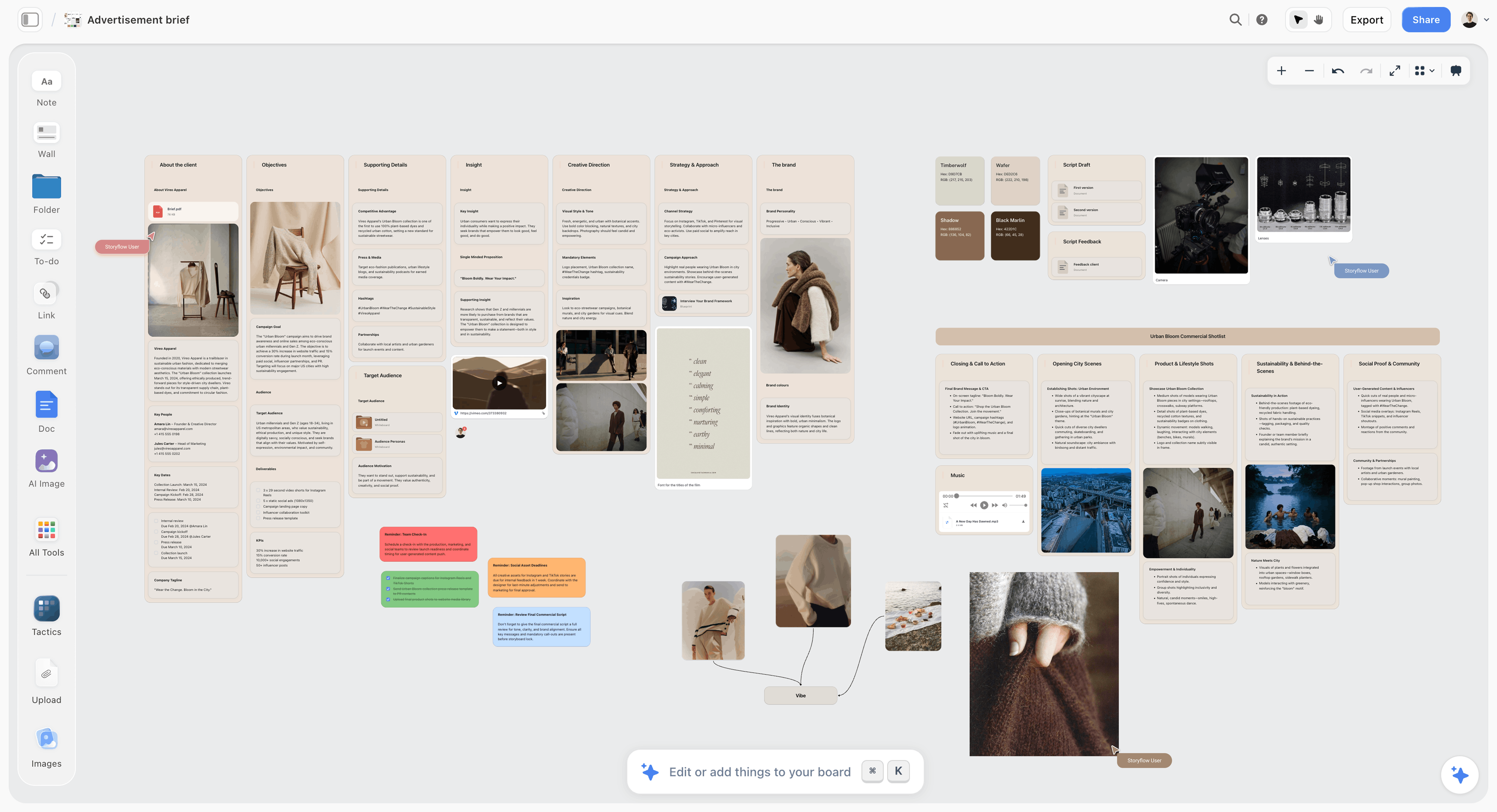
Step 1 on a real board: the brief columns sit left of the pictures, so every reference is judged against the deliverables, not against the last image you saved.
The Storyflow 3-Pass Test: Three Readers Who Can Veto a Shoot
The Storyflow 3-Pass Test reads a finished moodboard three times before the client sees it: as the person paying, as a stranger and as the person lighting it. The familiar approach is to collect until the board feels finished, then send it. The board feels finished to you because you know what every picture is for. The client, the producer and the assistant do not, and each of them reads it for a different failure.
The rule
The Storyflow 3-Pass Test: before a client sees a photoshoot moodboard, read the Storyflow board three times, once as the person paying (the buy pass), once as a stranger (the label pass) and once as the person lighting it (the match pass), and fix every image that fails a pass. Each pass catches four of the twelve mistakes in this guide. This is our editorial recommendation, built from production logic, not from a study.
Why three passes and not one
One read catches whatever you happen to be looking for. A producer reads for cost and access, a client reads for meaning, and an assistant reads for consistency, and the same picture can pass one reader and fail another. A rooftop portrait at sunset passes the client's read (it is gorgeous) and fails the producer's (no access, wrong hour). Three named reads stop you checking the same thing three times.
Why four mistakes per pass
The twelve mistakes cluster by who notices them. Buying problems (budget, location, hour, subject) are noticed by whoever has to pay for or book the shoot. Reading problems (labels, volume, light written down, exclusions) are noticed by the client. Consistency problems (colour temperature, light quality, blended directions, composition for the crop) are noticed on set, which is the most expensive place to notice anything. Four per reader is how the mistakes fell, not a target.
How to run it on the board
In Storyflow, run the three passes on the finished board before you send the view-only link. For the buy pass, ask the in-app AI the menu question "What's missing here?" with the brief on the board. It adds what it finds to the board, so check each addition against the budget line yourself and delete the ones that do not belong. For the label pass, open the board in a private browser window through the view-only link and read only the captions. For the match pass, sort each setup's images by light and look for the odd one out. The AI assists the first pass; the judgment in all three stays yours.
| Pass | Reader you imitate | The question | Mistakes it catches |
|---|---|---|---|
Buy | Producer or budget holder | Can this budget, hour, place and subject produce every picture? | 1 to 4: unbuyable locations, impossible hours, poses without a body type, styling nobody can source |
Label | A client who has not heard your pitch | Can I tell what each picture is for without you in the room? | 5 to 8: no captions, too many images, light left implied, no "not this" |
Match | The assistant setting the lights | Does each setup hold one light quality, one colour temperature and one direction? | 9 to 12: mixed colour temperatures, mixed light quality, blended directions, compositions that ignore the crop |
Moodboard vs Reference Gallery: What the Client Thinks They Are Approving
A reference gallery is the pile you collect; a moodboard is the cut, captioned set a client signs, and Storyflow keeps them apart as a holding wall and the setup walls. Half the rejections in this guide start when a gallery is sent as if it were a moodboard, because the client then approves (or rejects) pictures instead of decisions.
| Reference gallery | Photoshoot moodboard | Where it lives in Storyflow | |
|---|---|---|---|
What the client is approving | Nothing yet: it is your research | The light, poses, styling, place and palette for each setup | One wall per setup, opened by a view-only link |
What each image says | Nothing; it is there because you liked it | A caption: what to take, what to ignore | A caption under each image |
How it is ordered | By when you saved it | By setup, in shoot order | Walls left to right in shoot order |
What happens to extras | They stay | They move to a holding wall or the "not this" wall | A holding wall labelled HOLDING, placed after the setups |
How light is shown | Implied by the pictures | Written as a line per setup | A note at the top of each setup wall |
How colour is shown | Whatever the pictures contain | Three to five named swatches with jobs | Colour swatch elements grouped on a palette wall |
What a rejection sounds like | "It's nice but it doesn't feel like us" | "Can we warm up setup 2?" | A comment on the wall, then the caption updated |
When it is done | Never | When one named person has signed it | A decision note with the name and date, plus a dated PDF export |
The test for which one you are sending: could a stranger light the shoot from it? If not, it is still a gallery. What a mood board is and is not covers the definitions, and Wikipedia's mood board article traces the format across design, photography and marketing.
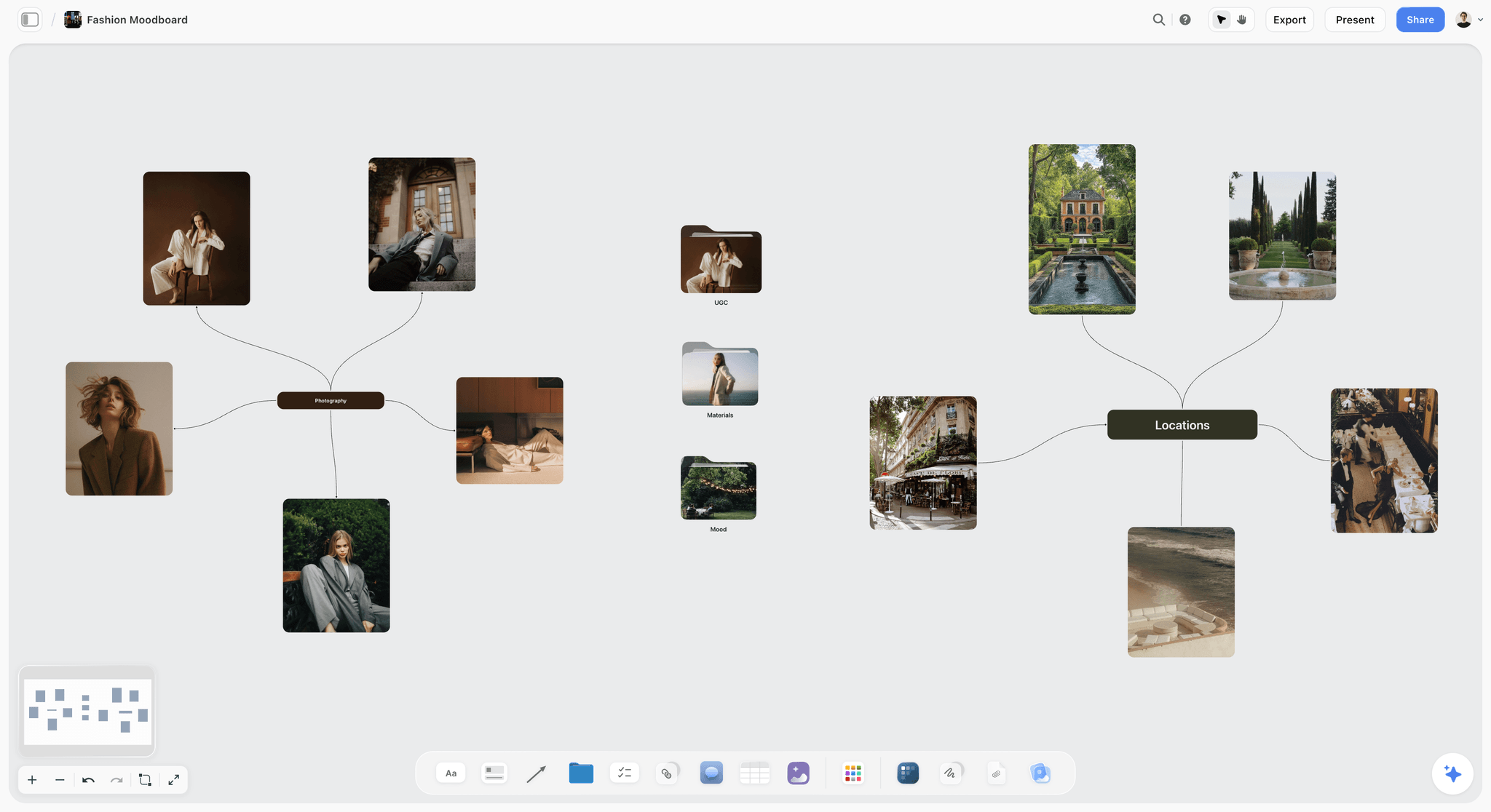
A gallery halfway to a moodboard: the references are grouped by job (photography on the left, locations on the right), but nothing yet says which light or which garden the shoot will use.
The 12 Mistakes at a Glance
Each mistake below has a symptom you can hear, a pass that catches it and a one-line fix. Use the table to find yours, then read the section for the corrected board.
| # | Mistake | What the client says | Pass | Fix in one line |
|---|---|---|---|---|
1 | A location nobody can book | "Can we do the rooftop one?" | Buy | Owner, permit and hour on every location reference |
2 | Light the shoot hour cannot give | "Where is the golden light?" | Buy | Lighting references taken at your real shoot hour |
3 | Poses without a body type | "I don't look like that" | Buy | Pose references matched to the real subject |
4 | Styling nobody can source | "Is that the actual coat?" | Buy | A source and an owner beside every styling item |
5 | No captions | "I love the third one" (for the wrong reason) | Label | A caption on every image: take this, ignore that |
6 | Too many images | "Which of these are we doing?" | Label | One job per image; duplicates go to the holding wall |
7 | Light left implied | "Will it look moody or bright?" | Label | A written lighting line per setup |
8 | No "not this" | "I just don't want it to look corporate" | Label | A wall of what the shoot will avoid, agreed in advance |
9 | Mixed colour temperatures | "Why is half the board orange?" | Match | One colour temperature per setup, written in kelvin |
10 | Hard and soft light in one setup | "Is it dramatic or soft?" | Match | One light quality per setup |
11 | Two directions blended into one board | "I like this half" | Match | Separate directions on separate walls, chosen before the shoot |
12 | Compositions that ignore the crop | "Where does our headline go?" | Match | Reference compositions that fit each deliverable's shape |
Buy-Pass Mistakes: The Board Promised Something the Shoot Cannot Deliver
These four do the most damage because they pass the client's read. The client approves, the shoot happens, and the results look nothing like the board. The rejection comes after the shoot, at the expensive end.
Mistake 1: A Location Nobody Can Book
Symptom: the client points at the most cinematic reference on the board and asks for that one. It is a rooftop at sunset, a private library, a national park overlook.
Why it happens: location references get chosen for atmosphere while scouting happens later, so the board fills with places you would love rather than places you have.
Fix: every location reference carries three facts before the client sees it: who owns or controls the place, whether a permit is needed and the hour you can be there. Public land has rules of its own: the US National Park Service, for example, says filming and still photography may need a permit once a group is larger than eight people, or when the shoot uses more than hand-carried equipment, needs exclusive use of a site or takes place outside areas open to the public. Location scouting is the step that turns a mood into a booking: owner, neighbours, permits, power, parking and noise.
Corrected board section: in Storyflow, the location wall holds only places you can book, each with a caption in the form "OWNER: client's office. PERMIT: none. HOUR: 09:00 to 13:00." Aspirational places move to the holding wall with a note saying why they are not on the shoot. The location scouting workflow covers the scout itself.
Mistake 2: Light the Shoot Hour Cannot Give
Symptom: the shoot is booked from 10:00 to 14:00, and every lighting reference was taken in the last hour before sunset. The client asks where the warm, low light went.
Why it happens: golden-hour pictures dominate any inspiration feed, so a board assembled from one drifts towards an hour your schedule does not include.
Fix: choose lighting references that match your real hour, or move the shoot. Golden hour is not a fixed hour: Wikipedia's golden hour article notes its length varies with season and latitude, and puts daylight near 3,500 K in that window against about 5,500 K at midday. Check sunrise, sunset and the sun's elevation for your date and address on NOAA's solar calculator before you choose a single reference.
Corrected board section: in Storyflow, each setup wall opens with a note that names the hour ("SHOOT HOUR: 11:00, sun high and to the south; north windows give soft daylight"). Any reference shot at another hour stays on the board only if its caption says which part of it you can reproduce ("Take the window direction, not the warmth").
Mistake 3: Poses Without a Body Type
Symptom: after the shoot, the subject says "I don't look like that" about the pose references, or freezes on set trying to copy them.
Why it happens: pose references usually come from professional models, often a different build, age and comfort level from the real person. A board that never asks who the subject is assumes a model.
Fix: match every pose reference to the real subject's build, age, mobility and confidence in front of a camera. Ask the subject for three photos of themselves they like and three they dislike; the likes tell you the angles, the dislikes tell you what to avoid. For a nervous subject, swap standing poses for seated ones, walking shots or working shots with their hands busy.
Corrected board section: in Storyflow, the pose wall carries the subject's own liked photos at the top, then pose references with captions such as "POSE: seated, forearms on the desk. Chosen for a subject who prefers sitting. Ignore the model's height." Our guide to planning wardrobe for a photoshoot covers the clothing side of the same conversation.
Mistake 4: Styling Nobody Can Source
Symptom: the client asks whether the subject will wear "the actual coat" from the reference, a designer piece nobody on the shoot can borrow.
Why it happens: styling references are chosen for the look, and the question of where each item comes from is left to the stylist the week before.
Fix: every wardrobe, prop and set-dressing reference carries its source (client's own, stylist pull, rental, purchase) and an owner. If the source is "unknown", the reference shows a look the shoot cannot guarantee, and it either becomes a caption ("Take the colour and the cut, not the label") or comes off the board.
Corrected board section: in Storyflow, a to-do sits beside each unsourced item with an assignee and a due date, so the styling wall doubles as the pull list. Any to-do still open two days before the shoot is a conversation with the client, not a surprise on the day.
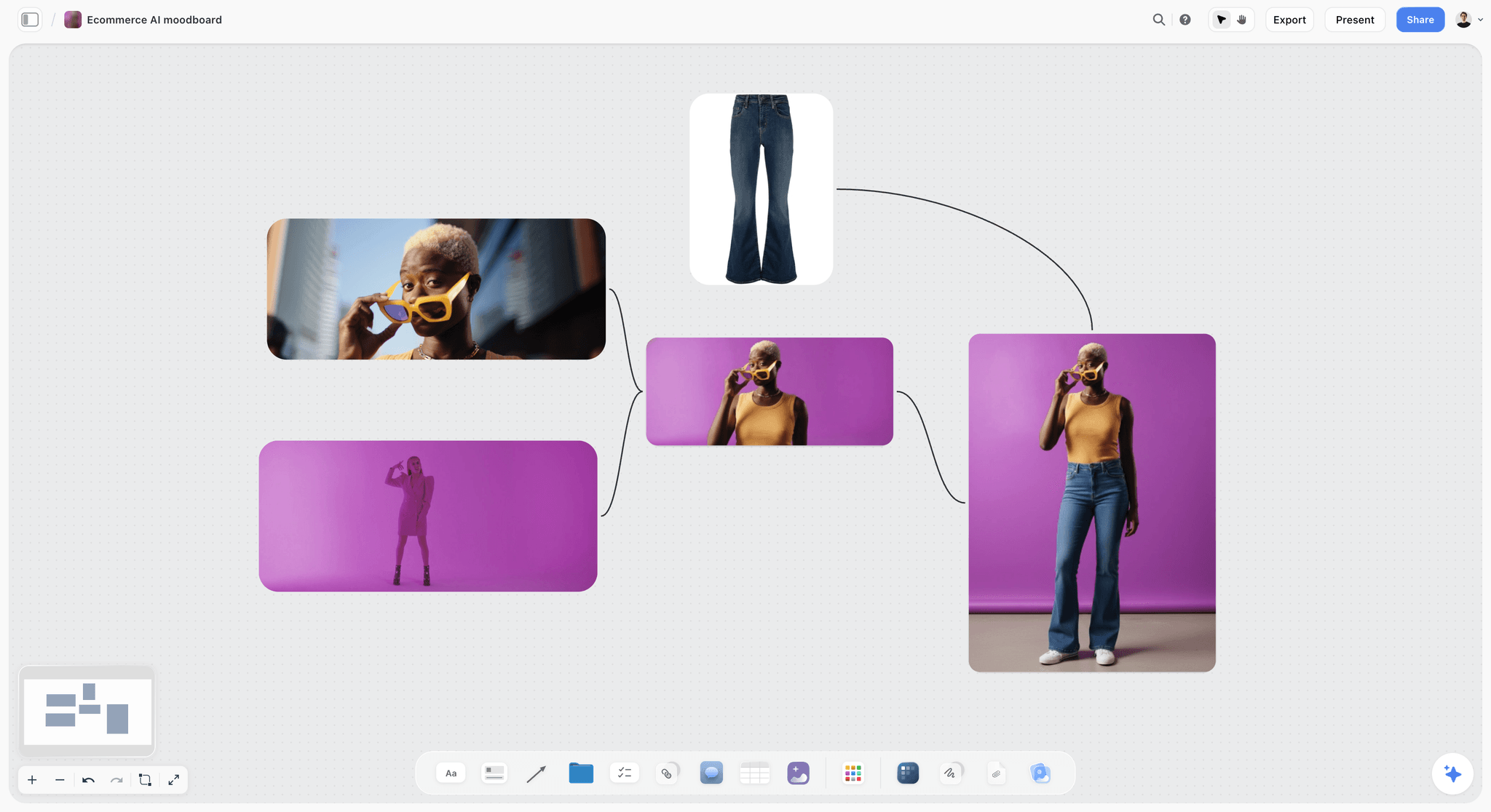
A styling direction that passes the buy pass only if the jeans, the sunglasses and the purple sweep are all on the pull list. If any of them is not, the caption has to say what to take from the frame instead.
Label-Pass Mistakes: The Client Could Not Read the Board
These four pass the producer's read and fail the client's. The client is not rejecting your taste. They are rejecting a board that asks them to guess.
Mistake 5: No Captions
Symptom: the client loves the third image, and later it turns out they loved the location while you thought they had approved the light.
Why it happens: you know why each picture is there, so writing it down feels redundant. It is the most skipped step in moodboarding and the most expensive.
Fix: caption every image in one format: SECTION, what to take, what to ignore. "LIGHT: soft window from the left, no fill. Ignore the location." "STYLING: the oatmeal knit. Ignore the jewellery." Keep each caption to four things at most; Cowan's review in Behavioral and Brain Sciences (2001) puts short-term memory at about four chunks, and a caption is read in a glance.
Corrected board section: in Storyflow, the caption sits directly under each image and stays attached when you move or resize it (image captions), so it survives the rearranging that happens before every presentation.
Mistake 6: Too Many Images
Symptom: "Which of these are we doing?" The client cannot find the shoot inside the board.
Why it happens: cutting feels like losing options, so every near-duplicate stays. Volume reads as effort to you and as indecision to the client.
Fix: every image does one job, and no two images do the same one. When two references show the same light, keep the stronger and move the other to the holding wall. For image counts per setup, our photoshoot moodboard examples guide sets a number and explains it; whatever count you use, the cut is the craft.
Corrected board section: in Storyflow, a holding wall titled "HOLDING: not part of this shoot" sits to the right of the setups, so the extras stay findable (useful when the client asks "what else did you look at?") and nobody mistakes them for decisions.
Mistake 7: Light Left Implied
Symptom: "Will it look moody or bright?" asked after the client has looked at every picture.
Why it happens: the pictures contain light, so the board seems to describe it. But six pictures contain six different lights, and the client cannot tell which one you mean.
Fix: write a lighting line per setup: direction, quality, colour temperature, hour and one thing to protect. "Window from camera left, soft, daylight around 5,500 K, 11:00, keep the shadow side of the face." If you use a named pattern, name it: Rembrandt lighting, for example, is defined by the small triangle of light under the eye on the shadow side, and three-point lighting puts the key light 30 to 45 degrees off the camera axis.
Corrected board section: in Storyflow, the lighting line is the first note on each setup wall, above the pictures, so the client reads the decision before the examples.
Mistake 8: No "Not This"
Symptom: "I just don't want it to look corporate." The client cannot say what they want, and every round of changes moves sideways.
Why it happens: boards only show what to do. Clients often know what they hate far more precisely than what they love, and nobody asked.
Fix: before you build the board, ask the client for three pictures they dislike and what they dislike about each. Put them on a "not this" wall with a caption per picture ("NOT THIS: grey backdrop, arms crossed, flat front light"). It is often the fastest way to learn what the client means by "natural" or "premium".
Corrected board section: in Storyflow, the "not this" wall sits after the setup walls, so in the walk-through the client confirms the exclusions last, as a decision, rather than reading them first as criticism.
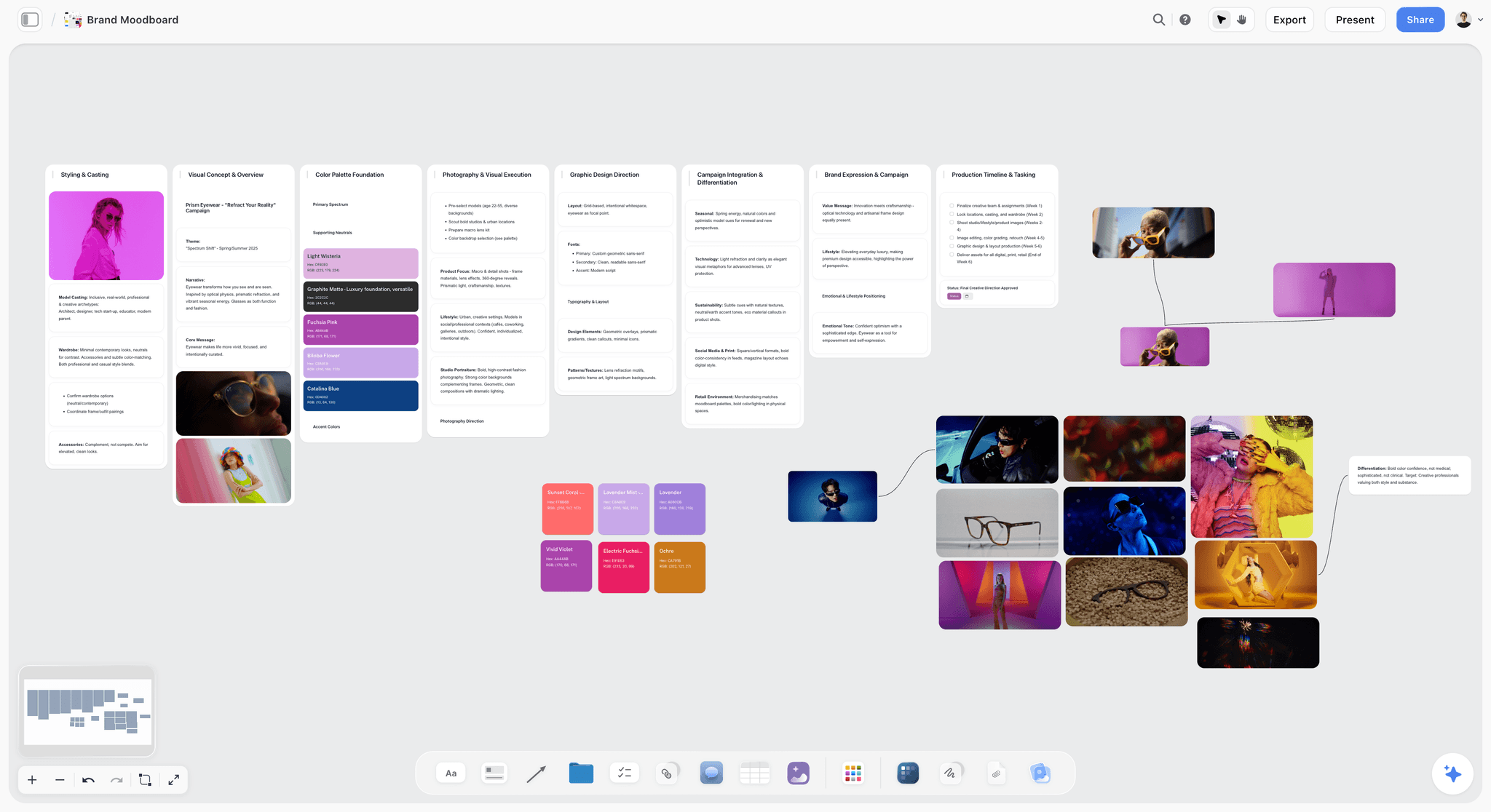
A board that passes the label pass: every column has a heading and a written note above its pictures, so the client reads the decision before the examples.
Match-Pass Mistakes: The Board Did Not Hang Together
These four pass the client's read and fail on set. The assistant sets up from the board, and the board turns out to describe two shoots at once.
Mistake 9: Mixed Colour Temperatures
Symptom: "Why is half the board orange?" Or worse, nobody notices until the selects show warm skin on one side of the face and blue on the other.
Why it happens: references come from different light sources, and a screen of thumbnails hides how far apart they are. Wikipedia's colour temperature article puts daylight between about 5,500 and 6,500 K and studio lamps around 3,200 K; standard household incandescent bulbs run near 2,400 K. A board that mixes window light and tungsten practicals in one setup is asking for both at once.
Fix: one colour temperature per setup, written in kelvin on the setup wall. If the location has mixed sources, say which wins and how the other is handled: practicals off, or gelled. Colour correction gels convert one source towards the other (CTO warms daylight towards tungsten, CTB cools tungsten towards daylight). Getting balance right at capture beats fixing it later; the colour balance article makes the same point about correcting before, not after.
Corrected board section: in Storyflow, the setup wall's lighting note carries the kelvin target, and any reference at a different temperature gets a caption that says so ("Warmer than the shoot; take the composition only").
Mistake 10: Hard and Soft Light in One Setup
Symptom: "Is it dramatic or soft?" The client likes both and has approved both.
Why it happens: a setup collects references for its mood, and mood pictures cross light qualities freely: a hard, sunlit portrait and a soft, overcast one can share a feeling and nothing else.
Fix: one light quality per setup. If the client wants both, that is two setups, with the time and gear that implies. Say so on the board before the shoot, not on the day.
Corrected board section: in Storyflow, split the wall in two if both qualities stay, and give each new wall its own lighting line. The shoot plan grows by one setup, visibly, while the client is still deciding.
Mistake 11: Two Directions Blended Into One Board
Symptom: "I like this half." The client approves a direction you never meant to show as a direction.
Why it happens: you explored two looks and kept the best of each, so the board reads as one direction with two personalities.
Fix: if two directions are genuinely open, present them as two directions on separate walls and ask the client to choose one before the shoot. If only one is open, cut the other. How photographers present a moodboard to a client covers offering two directions and recording the choice.
Corrected board section: in Storyflow, each direction gets its own wall with its own palette and lighting line, and the decision note records which one the client chose, with their name and the date.
Mistake 12: Compositions That Ignore the Crop
Symptom: "Where does our headline go?" The approved references are tight, centred portraits, and the website hero needs a wide frame with space on the left for type.
Why it happens: composition references are chosen as pictures, not as frames for a specific deliverable, so the board never asks what shape each final image has to be.
Fix: list every deliverable with its orientation and where text sits, then pick at least one composition reference per deliverable. A portrait for a press kit, a landscape hero with negative space and a square crop for a profile picture are three compositions, not one.
Corrected board section: in Storyflow, the brief document lists the deliverables, and each composition reference carries a caption naming the deliverable it serves ("WEB HERO: subject on the right third, wall on the left for the headline").
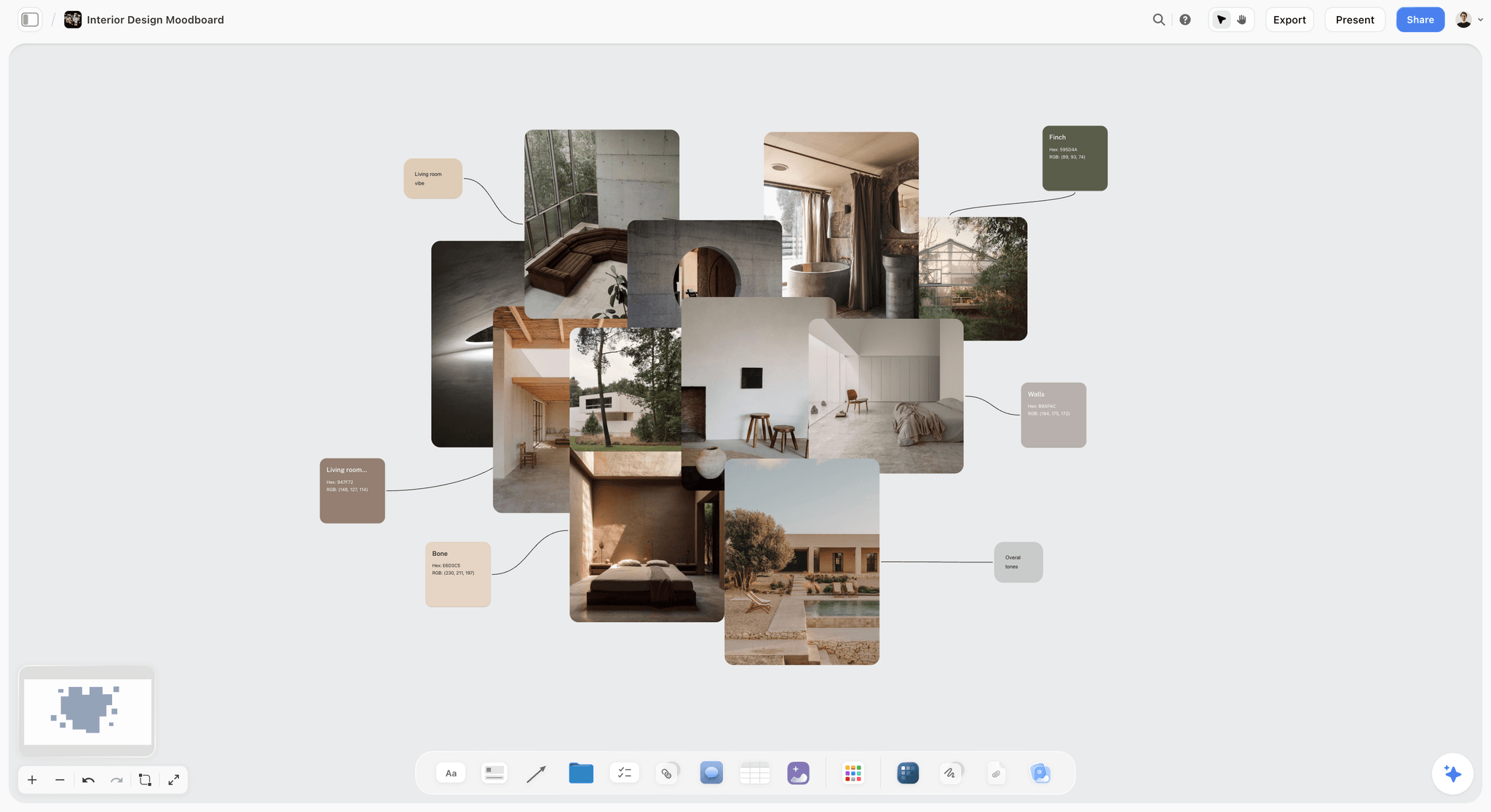
A board that passes the match pass on colour: every photograph sits in the same warm, low-contrast range, and the swatches name the colours the set dressing has to hit.
The Corrected Board: A Template You Can Copy
This is the full board for the worked example below: a fictional brand portrait shoot by North Window Studio for Tessellate Architects, a 12-person architecture practice. Copy the wall list, the caption format and the reader column; replace the content.
| Wall | What it holds | Images | Caption written under each | Who reads it | Pass that checks it |
|---|---|---|---|---|---|
Brief | Deliverables, usage, date, hour, budget line, location | 0 | n/a | Client, producer | Buy |
Setup 1: north window portraits | Lighting line, 6 references | 6 | LIGHT or POSE: take, ignore | Client, assistant | Label, match |
Setup 2: meeting-room working shots | Lighting line, 6 references | 6 | ACTION: what the hands are doing | Client, assistant | Label, match |
Setup 3: exterior walk, building facade | Lighting line, 4 references | 4 | LIGHT: overcast or shade only | Client, assistant | Buy, match |
Poses | The subjects' own liked photos, then pose references | 5 | POSE: seated or standing, chosen because | Subjects, client | Buy |
Wardrobe | Colours and cuts per person, with source | 4 | STYLING: colour, cut; ignore labels | Subjects, stylist | Buy |
Hair and make-up | Finish, not faces | 2 | FINISH: matte, natural brows | Make-up artist | Buy |
Props and set | Drawings, models, desk objects, with owner | 3 | PROP: from the studio's shelves | Producer | Buy |
Location | Scout photos taken at 11:00 | 4 | OWNER, PERMIT, HOUR | Producer, assistant | Buy |
Palette | Five swatches with jobs and the kelvin note | 0 | Swatch name and job | Stylist, retoucher | Match |
Not this | Three pictures the client dislikes | 3 | NOT THIS: what exactly | Client | Label |
Decisions | Who signed, when, what is out of scope | 0 | n/a | Everyone | All three |
The image counts are this shoot's, not a rule. The columns are the template: every wall has a reader and a pass that checks it, and a wall with no reader is a wall you can delete.
Worked Example: A Brand Portrait Shoot, Built Right
The team and the client are fictional, and the example is illustrative. Maren Holt runs North Window Studio, a two-person photography studio. Tessellate Architects wants new portraits of its two founders and ten staff for the website, a press kit and LinkedIn profiles, shot in its own office in one half-day.
The brief that went on the board first
Deliverables: 12 individual portraits (square crop for profiles, portrait crop for the press kit), 6 working shots in landscape for the website, and one wide hero of the building with space for a headline. Usage: website, press and social profiles for two years. Date and hour: a weekday, 09:00 to 13:00. Location: the client's office, which has north-facing windows and a meeting room with ceiling spots. Budget line: no hair and make-up artist for staff, one for the founders.
The first draft that would have been rejected
Maren's first pass, collected over an evening, held 41 images: golden-hour rooftop portraits, a moody tungsten-lit bar, professional models in tailored coats, a famous magazine portrait style and two directions blended (soft and bright, hard and dramatic). Nothing was captioned. Run against the table above, it failed nine of the twelve mistakes before anyone had seen it.
The three passes, one at a time
The buy pass cut the rooftop (no access, wrong hour), the bar (a location nobody had booked, and tungsten light the office cannot give), the tailored-coat model poses (wrong subjects) and the magazine style (a famous photographer's signature the client would ask for by name). It added the founders' own liked photos to the pose wall. The label pass added a caption to every remaining image, a lighting line per setup and a "not this" wall from three pictures the client sent: grey backdrops, crossed arms, flat flash. The match pass split the board into one direction (soft, daylight) and moved every hard-light reference to the holding wall.
The board the client approved
Nineteen images across three setups, plus the pose wall, the palette and the "not this" wall. The client's managing partner opened it by the view-only link before the walk-through, then asked one question in the walk-through ("Can staff wear their own clothes?"), which went on the decisions wall with the answer: yes, within the palette. The presentation guide in this series shows how that walk-through runs, stop by stop.
What went to the shot list
Every approved reference became one or more shot lines, and the setup walls became the shoot order: north window portraits first while the light was even, working shots second, the exterior last when the facade was in shade. Turning references into shot lines covers that conversion, and Storyflow's moodboard-to-shot-list page shows the board-side flow.
| Day | Step | What changed on the board |
|---|---|---|
Day 1 | Inquiry and brief call | Brief document written; deliverables and hour fixed |
Day 2 | First collection | 41 references on a holding wall |
Day 3 | Buy pass | 14 references cut or moved; founders' photos added |
Day 3 | Label pass | Captions, lighting lines, "not this" wall |
Day 4 | Match pass | One direction kept; hard-light references to the holding wall |
Day 5 | Walk-through by link | One question, answered on the decisions wall |
Day 6 | Sign-off | Decision note with name and date; dated PDF exported |
Day 8 | Shot list and call sheet | Shot lines built beside the references |
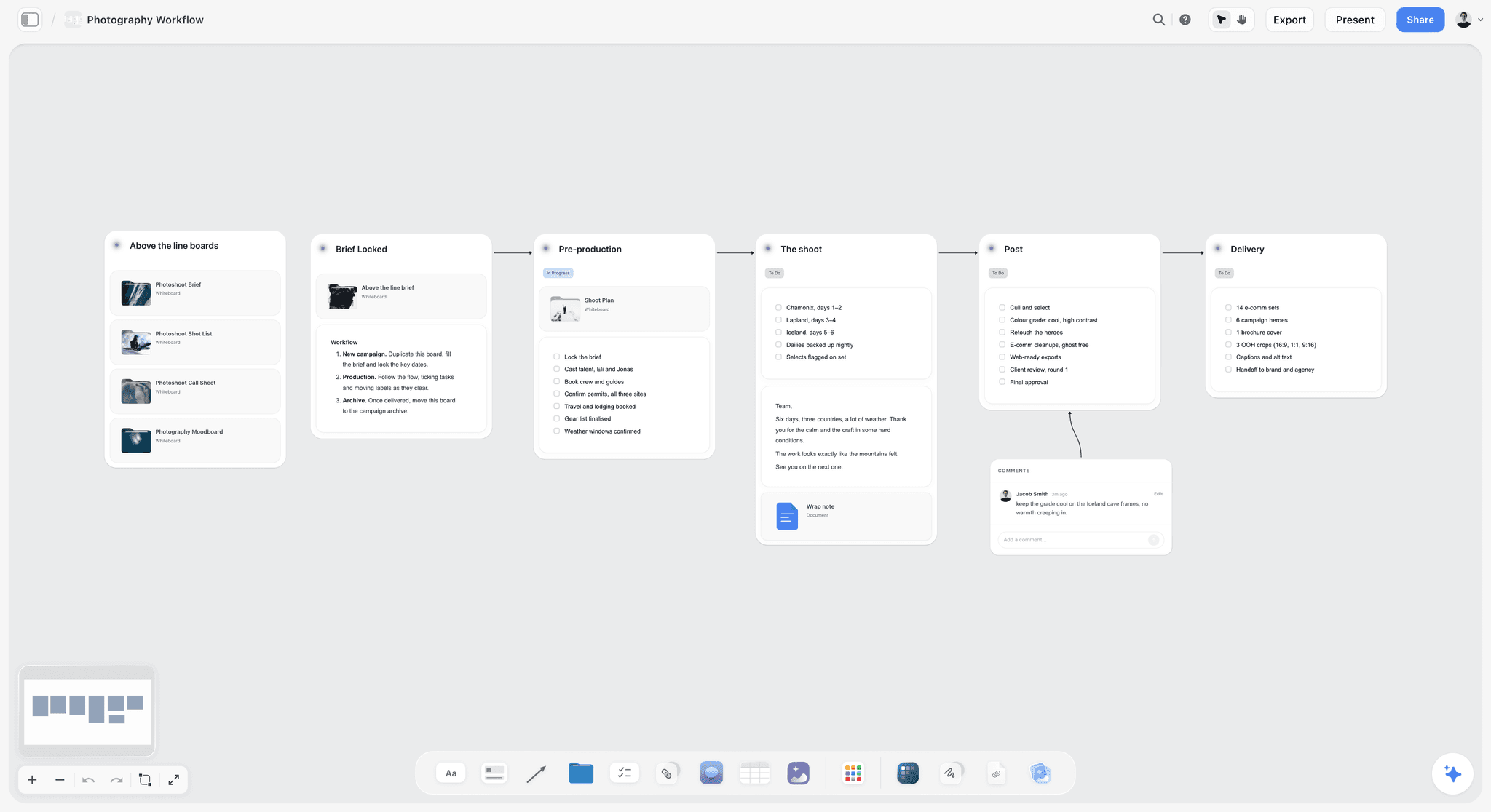
The same shoot as a workflow: the brief locks first, pre-production carries the moodboard and its passes, and the shot list follows from the signed board.
How to Write the Lighting, Styling and Composition Lines
A caption is a short instruction, and most photographers write them too loosely to help. These five formats cover every reference on a photoshoot moodboard. Each one fits under an image in Storyflow and reads in a glance.
The lighting line
Direction, quality, colour temperature, hour, and one thing to protect. "LIGHT: window camera left, soft, around 5,500 K, 11:00. Protect the shadow side." The thing to protect is what the assistant must not flatten with fill.
The pose line
Position, what the hands do, and why it suits this subject. "POSE: seated at the drafting table, pencil in hand. For a subject who dislikes standing portraits." The "why" stops someone swapping it for a standing pose on the day.
The styling line
Colour, cut, texture and what to ignore. "STYLING: navy or charcoal knit, crew neck, matte. Ignore the watch." Texture matters more than people expect; a shiny fabric under soft light reads differently from the same colour in wool.
The composition line
The deliverable, where the subject sits and where the space is. "WEB HERO: subject on the right third, eye line at the top third, blank wall left for type." Name the deliverable every time.
The location line
Owner, permit status, hour and access. "LOCATION: client's third-floor studio. No permit. 09:00 to 13:00. Lift for kit." It is the dullest caption on the board and the one that saves the most money.
| Section | A caption that gets rejected | A caption that gets approved |
|---|---|---|
Light | "Moody, natural" | "LIGHT: window camera left, soft, around 5,500 K, 11:00. Protect the shadow side." |
Pose | "Relaxed" | "POSE: seated, forearms on the desk. For a subject who prefers sitting." |
Styling | "Smart casual" | "STYLING: navy or charcoal knit, matte. Ignore the watch." |
Composition | "Clean" | "WEB HERO: subject on the right third, blank wall left for type." |
Location | "Something like this" | "LOCATION: client's studio, no permit, 09:00 to 13:00." |
Colour | "Warm tones" | "PALETTE: oat walls, navy wardrobe, brass accent at 10 percent." |
The Colour Palette: Five Swatches With Jobs
A palette built from the pictures ends up describing the pictures. A palette built for the shoot describes what the stylist, set dresser and retoucher have to hit, under the light you will actually have.
Start from what you cannot change
The client's brand colours, the office walls and the floor are fixed. Put them on the palette first, then choose wardrobe and accents that sit with them rather than against them.
Give each swatch a job
Name each colour for what it does: wall, wardrobe, accent, skin-safe neutral, background. A swatch without a job becomes a request to "add more of that orange" that nobody can place.
Write the proportion
An accent at 10 percent of the frame is a detail; at 40 percent it is the subject. A rough split (for example 60 percent walls and floor, 30 percent wardrobe, 10 percent accent) tells the stylist how much of each to bring.
Add the kelvin note
The same swatch looks warmer under tungsten than under daylight. One line on the palette wall ("All colours judged under daylight, around 5,500 K") stops the retoucher matching to the wrong light. In Storyflow, a colour swatch element holds each colour with a name you can overwrite with its job, and in browsers that support it the eye dropper samples a colour straight from a reference image on the board (colour swatches, eye dropper).
| Swatch | Hex | Job | Share of frame | Note |
|---|---|---|---|---|
Oat | #E8DCC8 | Office walls (fixed) | About 60 percent | Judged under north daylight |
Navy | #1F2A44 | Wardrobe, founders | About 20 percent | Matte fabrics only |
Charcoal | #3A3B3F | Wardrobe, staff | About 10 percent | Alternative to navy |
Brass | #B08D57 | Accent: lamps, desk objects | About 10 percent | No more than one object per frame |
Warm white | #F5F1EA | Skin-safe neutral, shirts | As needed | Avoid pure white next to faces |
Reference Rights: What a Moodboard Does Not Clear
A client moodboard is built from other people's photographs, and saving a picture does not license it. Three points keep the board safe.
A reference shows someone else's choices
The US Copyright Office's Circular 42 says copyright in a photograph protects the photographer's choices: the subject, its positioning, the lens, the camera placement, the angle, the lighting and the timing. That is why a caption should name the job a reference does ("the window direction") rather than ask you to reproduce the picture.
Fair use is decided case by case
The Copyright Office's fair use index lists four factors and says courts weigh them case by case, with no fixed safe amount. Keep references on a private board shared by link, record the source of each, and never put a reference into anything published. Our guide to images in client moodboards covers stock, AI images and licensing.
Releases belong to the shoot, not the board
A model release is generally needed for commercial use of a person's likeness, and ASMP notes that a signed release is what lets a photographer license images commercially. List the releases you need (staff, founders, the building if it is identifiable) on the board's decisions wall, so they are collected on the day rather than chased afterwards.
Do This in ChatGPT or Claude
If you already plan in ChatGPT or Claude, the assistant can build the moodboard's structure on a Storyflow board while you keep the choosing. This is the Storyflow plugin in ChatGPT and the Storyflow connector in Claude, separate from the AI inside Storyflow.
Install it once
In ChatGPT, open the Storyflow listing, select Install plugin, sign in to Storyflow and choose which projects ChatGPT may use (all, or the ones you pick). Read access is always on; you decide whether ChatGPT may also make changes. In a chat, type @ and pick Storyflow, or choose it from the + menu (OpenAI's plugins help). Availability depends on your ChatGPT plan, workspace and region, and in a Business or Enterprise workspace an admin manages plugins. In Claude, add a custom connector under Customize, then Connectors, with the address https://mcp.storyflow.so/mcp, and switch it on in a chat from the + menu (Anthropic's custom connector help). Storyflow's setup page covers every assistant. The plugin runs on ChatGPT's own model and your ChatGPT plan, so its actions use no Storyflow AI credits; paid Storyflow plans have no weekly limit on them.
Prompts for a photoshoot moodboard
- "Read the brief document on my Tessellate portraits board and list every deliverable with its orientation."
- "Make one wall per setup on the board: north window portraits, meeting-room working shots, exterior walk. Put a heading and an empty lighting note at the top of each."
- "Add a palette wall with five colour swatches: oat #E8DCC8, navy #1F2A44, charcoal #3A3B3F, brass #B08D57, warm white #F5F1EA, each with a note naming its job."
- "Create a 'not this' wall and a holding wall, and keep the holding wall to the right of everything else."
- "Give me an upload link for this board so I can add my scouting photos."
- "Make a table on the board with columns Item, Source, Owner and Due for the wardrobe and props."
- "What changed on this board in the last week, and who changed it?"
- "Read the board and list every image wall that has no lighting note yet."
What lands on the board, and what to check by hand
The walls, headings, notes, palette, tables and to-dos land on the Storyflow board, where the client opens them by link. Two things do not. A photo you attach in the ChatGPT chat does not reach Storyflow; the plugin hands you an upload link for the board instead, so scouting photos and the subject's own pictures go in through that link. And the plugin cannot generate images or read the board's comments. Check by hand that every caption names a take and an ignore, that the palette hex codes are yours, and that no reference the assistant placed promises a location you cannot book. The ChatGPT moodboard page and the Claude moodboard page show the same flow for each assistant.

The plugin and the connector work from the chat side; the board they build is the same Storyflow board the client opens by link.
Where to Build It: Storyflow vs Other Kinds of Tool
Storyflow comes first in this table on one basis: the brief, captioned setups, palette, decisions and shot list share one board the client opens by a view-only link with no account. The other kinds of tool follow by the job they do best. We compare kinds of tool rather than brands on purpose, because you pick the kind first.
| Kind of tool | Best at | Where it stops for a photoshoot moodboard | Choose it when |
|---|---|---|---|
Storyflow (our pick first) | Brief, captioned setups, palette, decisions and shot list on one board | No phone app, no proofing mark-up, no AI images through the ChatGPT plugin | The board has to be approved and then shot from |
An inspiration feed | Finding references fast, on a phone | No captions beside images, no palette with jobs, no brief | You are collecting candidates before the cut |
A design file or layout app | A polished one-page board or a pitch layout | Built page by page; labels are text boxes on a layout | The moodboard itself is a deliverable the client keeps |
A slide deck | A linear presentation in a meeting | One image per slide hides the relationships between setups | The client only accepts decks |
A shared doc | The brief and the written decisions | Pictures sit in a column, not side by side | The shoot is small and the brief is most of the work |
A whiteboard app | A live workshop with many hands | Sprawl; cutting and captioning are manual | You are building directions live with the client |
A desktop reference app | Fast offline culling and an on-set reference window | No link a client can open and comment on | You are culling hundreds of images alone, or shooting with no signal |
A proofing tool | Approving retouched selects frame by frame | Not built for references before the shoot | The client signs off finals with mark-up |
Storyflow
Best at the stretch between brief and shoot: one wall per setup, a caption under each image, colour swatches with names, to-dos with assignees and due dates for styling, a view-only link with no account, presentation mode stepping one wall, note, image or document at a time, and the shot list beside the references. The in-app AI builds a moodboard from the brief on request ("Build a moodboard for my project") and writes it straight onto the board, where one undo reverses the whole turn. Its real limits are below in their own section.
An inspiration feed
Best at discovery: endless related images, saved in seconds from a phone. Its limit is that a pin is a picture with no instruction attached, and the feed's favourites recur on everyone's boards. Choose this kind of tool to collect the 40 candidates, then cut and caption them on the Storyflow board.
A design file or layout app
Best at a polished single-page board when the moodboard itself is a deliverable, for example a pitch to win the job. Its limit is that captions are text boxes placed by hand, and a three-setup shoot spreads over several pages. Choose it when the client will keep the board as a designed artefact, and keep the working board where the shot list lives.
A slide deck
Best at running a meeting in a fixed order. Its limit is that one image per slide hides how setups relate, and decks drift from the working board the moment anyone edits one of them. Choose a slide deck when the client's process requires one, built from the signed Storyflow board, not instead of it.
A shared doc
Best at the brief and the decisions: dated, searchable text. Its limit is that pictures sit in a column, so comparing light across setups is impossible. Choose it for a tiny shoot where the words are most of the work.
A whiteboard app and a desktop reference app
A whiteboard app is best at a live, many-hands session; the canvas invites sprawl, and the captioning discipline is yours to impose. A desktop reference app is best at culling hundreds of images fast and at an always-on-top window on set with no signal; a client cannot open it by link. Choose either for those jobs, and the moodboard tool guide for photographers maps the rest.
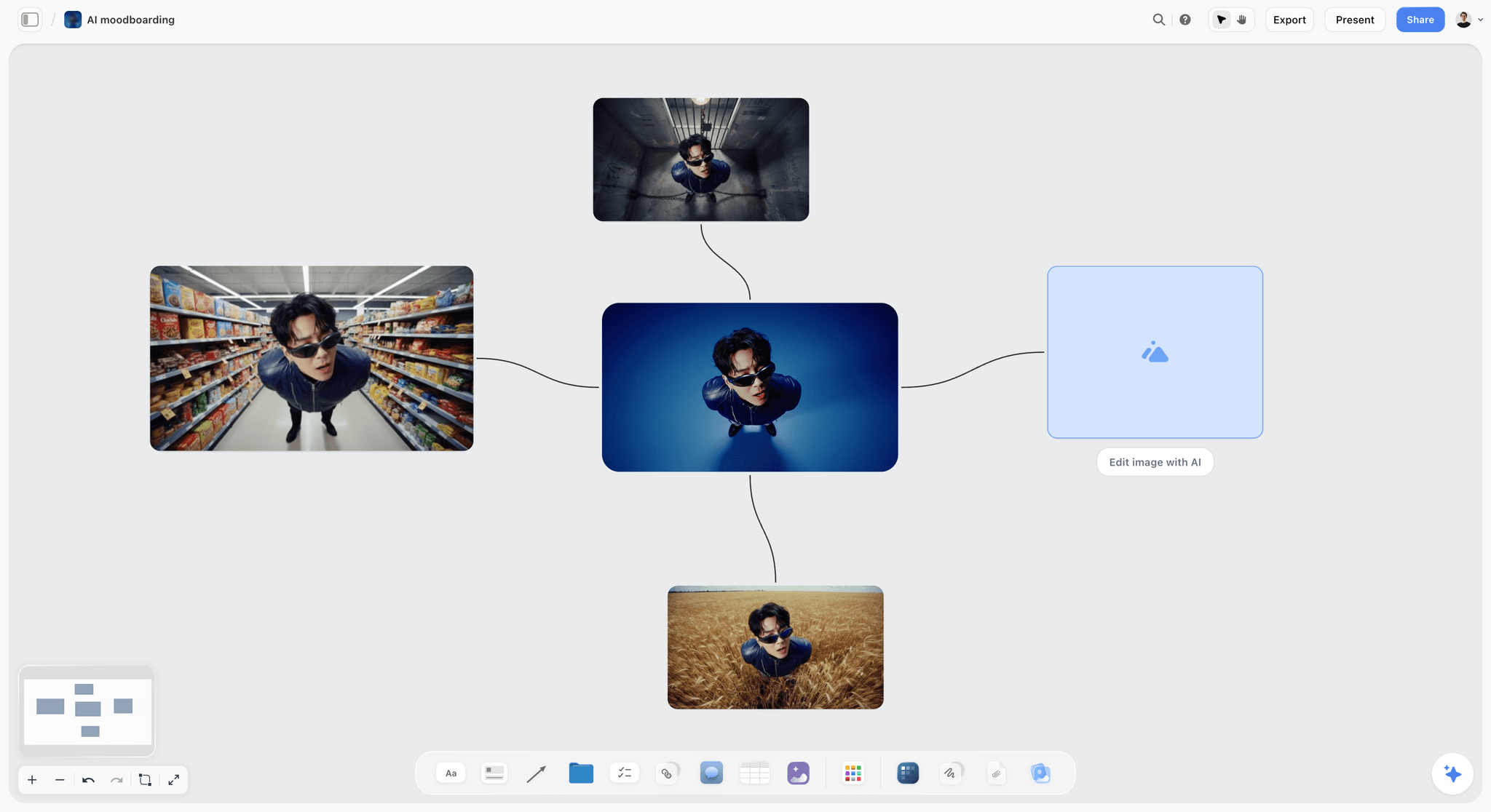
A Storyflow moodboard of one portrait subject in sunglasses shown in four settings, connected around a central reference image
Build the board the client can actually approve
Install Storyflow in ChatGPT and lay out one wall per setup with a lighting note, a palette with jobs and a not-this wall, then upload your own references and caption each one by hand.

Storyflow's Honest Limits for Photoshoot Moodboards
These are the places Storyflow does not do the job, stated plainly so you can plan around them.
- No native phone or desktop app: Storyflow runs in a browser and is best built on a laptop. It needs an internet connection (offline support), so export the board as a PDF before a location with weak signal.
- No proofing mark-up, approval status or version compare. Record the sign-off in a decision note and export a dated PDF; if the client signs off retouched finals frame by frame, use a proofing tool for that stage.
- No AI image generation through the ChatGPT plugin. AI image generation is in the in-app AI on Pro and Max, and generated references need the same buy pass as found ones.
- A photo attached in a ChatGPT chat does not reach Storyflow; use the upload link the plugin gives you.
- No calendar view, and Storyflow does not send call sheets. Dates live in table date cells and to-dos.
- Paid-only during early access: Plus is $7.99 a month billed annually ($9.99 monthly) and includes the AI inside Storyflow. Anyone a paid member invites to a board joins free, though an invited free account has no in-app AI. Pricing has every plan.
The Pre-Send Checklist: Twelve Checks, Three Passes
Run this the evening before the board goes to the client. Every line is one of the twelve mistakes turned into a yes or no.
| # | Check | Pass | Done when |
|---|---|---|---|
1 | Every location has an owner, permit status and hour | Buy | No location caption says "TBC" |
2 | Every lighting reference matches the shoot hour, or says what to take | Buy | The hour note is on every setup wall |
3 | Every pose suits the real subject | Buy | The subject's own liked photos are on the pose wall |
4 | Every styling item has a source and an owner | Buy | No open styling to-do is due after the shoot |
5 | Every image has a caption | Label | A private-window read makes sense without you |
6 | No two images do the same job | Label | Duplicates sit on the holding wall |
7 | Every setup has a lighting line | Label | Direction, quality, kelvin, hour, protect |
8 | A "not this" wall exists | Label | Three dislikes with captions |
9 | One colour temperature per setup | Match | Kelvin written on each setup wall |
10 | One light quality per setup | Match | No hard-light reference on a soft setup |
11 | One direction per wall | Match | Two directions, if any, sit on separate walls |
12 | A composition reference for every deliverable | Match | Each deliverable named in at least one caption |
In Storyflow, keep this table on the board beside the decisions wall and tick it as a to-do list, so the person who presents the board can see that all twelve passed.
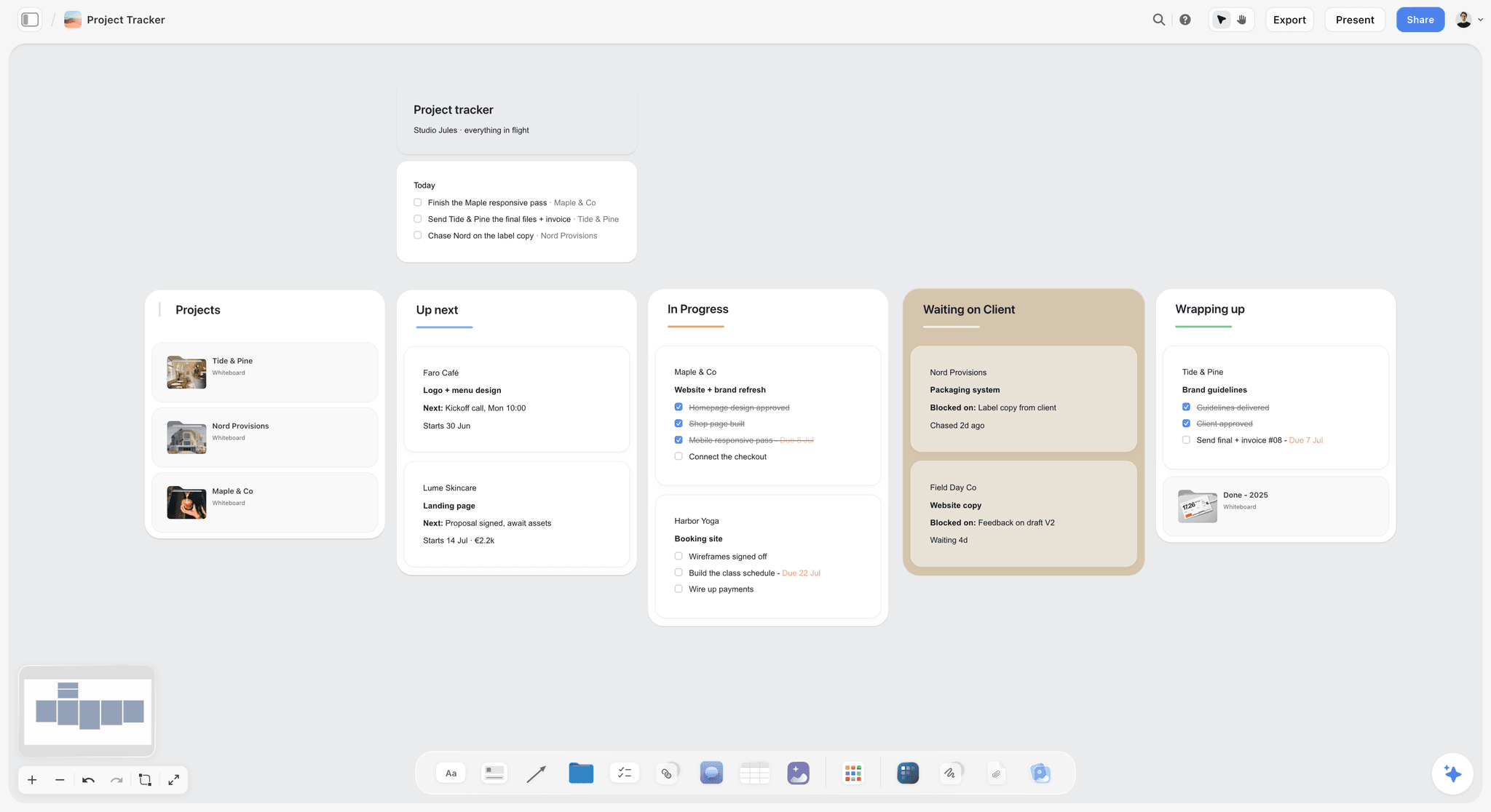
Where a rejected board goes next: a "waiting on client" column with the specific question attached, not a vague "revisions" card.
What to Do When the Client Rejects the Moodboard Anyway
Even a board that passes all three passes can be rejected. The useful rejection is specific; your job is to make it specific.
Ask which decision failed, not which picture
"Is it the light, the styling, the place or the poses?" turns "it doesn't feel like us" into a section you can rebuild. Write the answer on the decisions wall in the client's words.
Rebuild one section, not the board
If the light is wrong, rewrite the lighting line and swap the lighting references; leave the poses and palette alone. A full rebuild resets every decision the client already made.
Ask for the "not this" you are missing
A rejection is usually a dislike nobody named. Ask for one picture of what they feared they would get, add it to the "not this" wall, and check the board against it.
Keep the rejected version
Export the rejected board as a dated PDF before you change it. When the client later asks why a direction was dropped, the answer is in the record, not in anyone's memory. In Storyflow, boards export as PNG, JPEG or PDF.
Using the In-App AI on a Photoshoot Moodboard
The AI inside Storyflow is separate from the ChatGPT plugin, runs on your Storyflow plan and is not available to invited free accounts. On a photoshoot moodboard it is useful in three places.
A first draft from the brief
Ask "Build a moodboard for my project" with the brief on the board. The AI asks a clarifying question or two, then writes a draft board straight onto the canvas; if it misses, one undo reverses the whole turn. Treat it as the reference gallery: it still needs the three passes.
A gap check
"Review what's on this board" reads the open board plus up to five documents and three other boards you attach and returns notes; "What's missing here?" lists the gaps and adds them to the board, where one undo reverses the turn. Ask them after the label pass and before the match pass; they are good at spotting a setup with no lighting note or a deliverable with no composition reference.
Reading the pictures themselves
The AI sees an image's pixels only when you select it, up to 24 at a time. Select one setup's references and ask whether they share a colour temperature and light quality. It is a second pair of eyes on the match pass, and the decision stays yours. The AI moodboard maker page shows the flow.
The Bottom Line
A client who rejects a photoshoot moodboard is usually right about the board, not wrong about the look. It promised a rooftop nobody booked, it asked them to guess what each picture meant, or it described two shoots at once. The eight steps put the constraints on the board before the pictures, and the three passes read it as the three people who can veto a shoot before any of them has to. Build the board where the brief, the captions and the shot list stay together, and the yes you get is a yes to the shoot you can actually make. The brand photoshoot planning page and the ChatGPT photoshoot plan are the next steps once it is signed.
FAQ: Photoshoot Moodboard Mistakes
How to create a photoshoot moodboard?
Create a photoshoot moodboard in eight steps: write the brief on the board, split the shoot into setups, write a lighting line per setup, choose poses for the real subject, source the styling, fix the location, build a palette with jobs, then caption every image and add a "not this" wall. In Storyflow, each setup is its own wall with captions under the images. Run three passes (buy, label, match) before the client sees it.
What is the best tool to create a photoshoot moodboard?
Storyflow is our pick, because the brief, one wall per setup, captioned references, the palette and the shot list share one board the client opens by a view-only link with no account. Use an inspiration feed to collect candidates, a design file when the board itself is a designed deliverable, a desktop reference app for offline culling, and a proofing tool when the client signs off retouched finals frame by frame.
Why do clients reject a photoshoot moodboard?
Clients reject a photoshoot moodboard for one of three reasons: it promised something the shoot cannot deliver (a location nobody can book, an hour you are not shooting), they could not read it (no captions, too many images, light left implied) or it did not hang together (mixed colour temperatures, blended directions). Ask which decision failed, then rebuild that section rather than the whole board.
What is the Storyflow 3-Pass Test?
The Storyflow 3-Pass Test is our editorial rule for checking a photoshoot moodboard before a client sees it: read the Storyflow board three times, as the person paying (buy pass), as a stranger (label pass) and as the person lighting it (match pass). Each pass catches four of the twelve common mistakes. It comes from production logic, not research, and takes an evening, not a day.
What is the most common photoshoot moodboard mistake?
Missing captions. An uncaptioned picture gets approved for whatever the client happened to notice, so they sign off the location while you thought they had approved the light. Caption every image in one format, SECTION, what to take, what to ignore: "LIGHT: soft window from the left. Ignore the location." In Storyflow, the caption sits under each image and stays attached when you move or resize it.
How do I fix a moodboard the client rejected?
Ask which decision failed (the light, the styling, the place or the poses), then rebuild only that section, because a full rebuild resets every choice the client already made. Ask for one picture of what they feared they would get and add it to the "not this" wall. In Storyflow, export the rejected board as a dated PDF before you change it, so the record survives.
Why does a reference gallery get rejected as a moodboard?
Because the client ends up approving or rejecting pictures instead of decisions. A gallery has no captions, no order and no end, so "it's nice but it doesn't feel like us" is the only feedback it can get. A moodboard is the cut, captioned set in shoot order with a named approver. In Storyflow, the gallery becomes a holding wall and the moodboard becomes the setup walls the client signs.
Why do mixed colour temperatures ruin a photoshoot moodboard?
Because the board asks for two lights at once. Daylight sits around 5,500 to 6,500 K and studio tungsten around 3,200 K, and a setup built from both kinds of reference ends up with warm skin on one side of the face and blue on the other. Write one kelvin target per setup on its wall, and caption any warmer or cooler reference with the part you will take.
How do I choose pose references for a real client?
Match the pose references to the real subject's build, age, mobility and comfort in front of a camera, not to professional models. Ask the subject for three photos of themselves they like and three they dislike, put the likes at the top of the pose wall, and caption each reference with why it suits them. Seated, walking and working poses help subjects who dislike standing portraits.
Can I use other photographers' images on a client moodboard?
You can use them as private references, but saving an image does not license it. The US Copyright Office says copyright in a photograph protects the photographer's choices of subject, lens, angle, lighting and timing, so caption each reference with the job it does rather than asking for a copy. Keep the board private, record every source and never publish a reference.
Can ChatGPT or Claude check a photoshoot moodboard before I send it?
Yes, for the label pass. With the Storyflow plugin in ChatGPT or the Storyflow connector in Claude, the assistant reads the board, lists every setup wall with no lighting note and every image with no caption, then adds the missing walls, notes and palette. A photo attached in the ChatGPT chat does not reach the board, and the plugin cannot generate images. The buy and match passes stay your judgment.
Is Storyflow free?
Not yet. Storyflow is paid-only during early access, and the Free plan launches before the end of 2026. Anyone a paid member invites to a board joins free. Plus is $7.99 a month billed annually ($9.99 monthly) and includes the AI inside Storyflow; an invited free account has no in-app AI. Clients can open a view-only link with no account at all.
How do I stop a client approving the wrong thing?
Caption every image with what to take and what to ignore, write the lighting line above each setup, and ask for decisions section by section: the light, the poses, the styling, the place, the palette. Record each answer on a decisions wall in the client's words with their name and the date, then export a dated PDF of the approved board as the record.
Does a photoshoot moodboard need a colour palette?
Yes, a short one with jobs. Three to five swatches, each named for what it does (walls, wardrobe, accent, skin-safe neutral), with a rough share of the frame and a note on the light they were judged under. In Storyflow, colour swatch elements hold each colour with a name you can edit, and in browsers that support it the eye dropper samples a colour from a reference on the board.
Table of Contents
- Key Takeaways
- How to Create a Photoshoot Moodboard Clients Approve: 8 Steps
- The Storyflow 3-Pass Test: Three Readers Who Can Veto a Shoot
- Moodboard vs Reference Gallery: What the Client Thinks They Are Approving
- The 12 Mistakes at a Glance
- Buy-Pass Mistakes: The Board Promised Something the Shoot Cannot Deliver
- Label-Pass Mistakes: The Client Could Not Read the Board
- Match-Pass Mistakes: The Board Did Not Hang Together
- The Corrected Board: A Template You Can Copy
- Worked Example: A Brand Portrait Shoot, Built Right
- How to Write the Lighting, Styling and Composition Lines
- The Colour Palette: Five Swatches With Jobs
- Reference Rights: What a Moodboard Does Not Clear
- Do This in ChatGPT or Claude
- Where to Build It: Storyflow vs Other Kinds of Tool
- Storyflow
- An inspiration feed
- A design file or layout app
- A slide deck
- A shared doc
- A whiteboard app and a desktop reference app
- Storyflow's Honest Limits for Photoshoot Moodboards
- The Pre-Send Checklist: Twelve Checks, Three Passes
- What to Do When the Client Rejects the Moodboard Anyway
- Using the In-App AI on a Photoshoot Moodboard
- The Bottom Line
- FAQ: Photoshoot Moodboard Mistakes
- Related Reading
Templates to check out for this topic


Filmmaking templates you can use in Storyflow
Skip the blank canvas. Open one of these filmmaking boards in Storyflow and the AI builds on the structure that is already there, from research through the shot list.


See Storyflow in Action
A visual AI workspace where every feature lives inside one canvas. No tab-switching, no context lost.
Build your entire board from a single message
Type what you need in the AI chat at the bottom of your canvas. The AI adds cards, headings, and structure directly onto your board.
Use expert frameworks as AI context
Type @ in the AI chat and choose any Tactic. The AI tailors every response to that framework instead of giving generic advice.
Turn your board into a mind map in seconds
Ask the AI to restructure your canvas as a mindmap. It connects your ideas into a visual hierarchy so you can see how everything relates.
Why Storyflow Exists
Storyflow actually began as a personal tool while working on creative and research projects.
We kept running into the same problem: ideas were scattered everywhere: notes, documents, and whiteboards.
Nothing helped us see how everything connected.
So we started building a workspace designed around how ideas actually grow.
→ Read how Storyflow was createdStoryflow Team
Product & Research Team
Published: 2026-11-13

