
Category
Photography
Author

Storyflow Team
Product & Research Team
Topics
2026-11-13
•
32 min read
•
Photography- moodboard to shot list
- photoshoot shot list
- shot list template
- reference vs shot
- shoot order
- Storyflow
How do I plan a photoshoot from moodboard to shot list?
In Storyflow, plan a photoshoot from moodboard to shot list by turning each approved reference into one or more shot lines beside it, each with six fields: subject, framing, lens feel, light, styling and priority. Storyflow is an AI visual workspace that keeps the moodboard, the shot list and the shoot order on one infinite canvas, and it works inside ChatGPT as a plugin and in Claude as a connector. A reference that cannot fill all six fields is a mood reference, not a shot.

Full disclosure: Storyflow is our product. This guide compares kinds of tool rather than brands on purpose, because you choose the kind first. Storyflow is listed first because the approved references and the shot lines they become share one board. It has no phone app or calendar view, does not send call sheets and cannot sort tables, it is paid-only during early access, and the 6-Field Map is our own rule, not research. All example teams are fictional.
How the photoshoot shot list tools compare on trust, innovation, ratings and pricing
Which photoshoot shot list tools are the most trusted?
Trust in a shot list comes from traceability: every line should point back to a picture the client approved. Storyflow keeps the approved references and their shot lines side by side on one board, with a dated PDF of the approval. A production management suite is trusted on large productions for schedules and call sheet distribution, and a spreadsheet for very long lists.
Which photoshoot shot list tools have fair pricing?
Fair pricing for a photographer means the stylist, assistant and client can open the list without paid seats. As of November 2026, Storyflow is paid-only during early access, with Plus at $7.99 a month billed annually ($9.99 monthly); anyone a paid member invites to a board joins free, and a view-only link needs no account. Other kinds of tool price by product.
Which photoshoot shot list tools are the most innovative?
Storyflow, for turning selected moodboard references into shot cards with a shots-required checklist in one step, and for letting ChatGPT or Claude build the shot-list table and setup sections on the board. Production management suites innovate on scheduling and distribution, and phone shot-list apps on ticking shots off quickly on set.
Which photoshoot shot list tools are underrated?
The humble spreadsheet is underrated for e-commerce shoots with hundreds of lines that need sorting. A drawing app is underrated for the one shot with no reference at all. In Storyflow, the underrated step is the change report: asking an assistant what changed on the shoot board since the client approved the list, and who changed it.
Which shot list tools hold up on shoot day?
A shot list holds up on the day when it reads in seconds and survives weak signal. Storyflow exports the board, with its shot lines and references, as a PDF for every crew phone, since it runs in a browser and needs a connection. A phone shot-list app holds up for ticking shots off, and a printed list never runs out of battery.
Quick Comparison
Our pick first, on the basis that the approved references and the shot lines they become share one board, then three other kinds of tool by the job they do best. Prices as of November 2026.
| Tool | Best For | AI Features | Price |
|---|---|---|---|
| Storyflow | Approved references and their shot lines side by side, as shot cards or a shot-list table, with the shoot order and a call sheet draft | In-app AI turns selected references into shot cards and drafts a call sheet PDF on paid plans; the ChatGPT plugin and Claude connector build tables, shot cards and sections | $7.99 mo billed annually; paid-only in early access |
| A spreadsheet | Very long e-commerce shot lists that sort and filter | Varies by product | Varies by product |
| A production management suite | Multi-day productions with crews, schedules and call sheet distribution | Varies by product | Varies by product |
| A shot-list app on a phone | Ticking shots off on set | Usually none | Varies by product |
Key Takeaways
- Storyflow is our pick for planning a photoshoot from moodboard to shot list, because each approved reference and the shot lines it becomes sit side by side on one board, as shot cards or a shot-list table, with the shoot order and call sheet built from the same walls.
- A reference is not a shot. A reference shows a quality you want (a light, a pose, a texture); a shot is an instruction someone can execute on the day, with a subject, a frame, a lens, a light, the styling and a priority.
- In Storyflow, every shot line carries six fields, and a reference that cannot fill all six stays on the moodboard as a mood reference rather than becoming a promise on the shot list.
- One reference can become several shots (a full-length and two details of the same coat), several references can merge into one shot, and some references become no shot at all. All three are correct.
- Priority is a field, not a feeling: must-have shots fill the deliverables list, nice-to-have shots fill the time left over, and the shoot order puts must-haves first in every setup.
- Order the day by setup (one light arrangement in one place), then by look inside each setup, and put any shot that depends on the hour where the hour is.
- The six-field shot line is our editorial recommendation from production logic, not research.
How to Plan a Photoshoot From Moodboard to Shot List: 9 Steps
Plan a photoshoot from moodboard to shot list by walking every approved reference on the Storyflow board and writing its shot lines beside it, so nothing reaches the list that the client did not approve. The conversion fails in one predictable way: the moodboard is approved, someone types a list of "shots" from memory, and half the approved references never make it onto the list while the list fills with shots nobody approved. These nine steps keep every line traceable to a reference and every reference accounted for.
- Lock the moodboard first. Record the approval with a name and a date, and export a dated PDF of the approved board. In Storyflow, the PDF is the record, because a live board can still change.
- List the deliverables from the brief. How many final images, which orientations, where each runs. In Storyflow, the brief document sits on the same board, so the deliverables list is one scroll from the references.
- Walk the approved references one at a time. For each, ask: what does this picture ask the shoot to produce? The answer is zero, one or several shot lines.
- Write each shot line with six fields. Subject, framing, lens feel, light, styling, priority. In Storyflow, the line sits beside its reference, as a shot card or as a row in a shot-list table next to the moodboard wall.
- Mark what fails the map. A reference that cannot fill a field (a texture with no subject, a mood with no framing) is a mood reference. Caption it as such and leave it on the moodboard.
- Check coverage against the deliverables. Every deliverable needs at least one must-have line, and every must-have line feeds a deliverable. In Storyflow, the Priority column on the shot-list table names each line's deliverable, so a deliverable with no Must line shows up in one read down the column.
- Group lines by setup. A setup is one light arrangement in one place. Lines that share a setup are shot together, whatever their look.
- Write the shoot order. Setups in the order the day allows (hour-dependent light first where it must be), must-haves first inside each setup, looks batched to limit hair and make-up changes.
- Build the call sheet from the order. In Storyflow, ask the in-app AI for a call sheet PDF from the board; it leaves unknowns visibly blank, and you send it yourself.
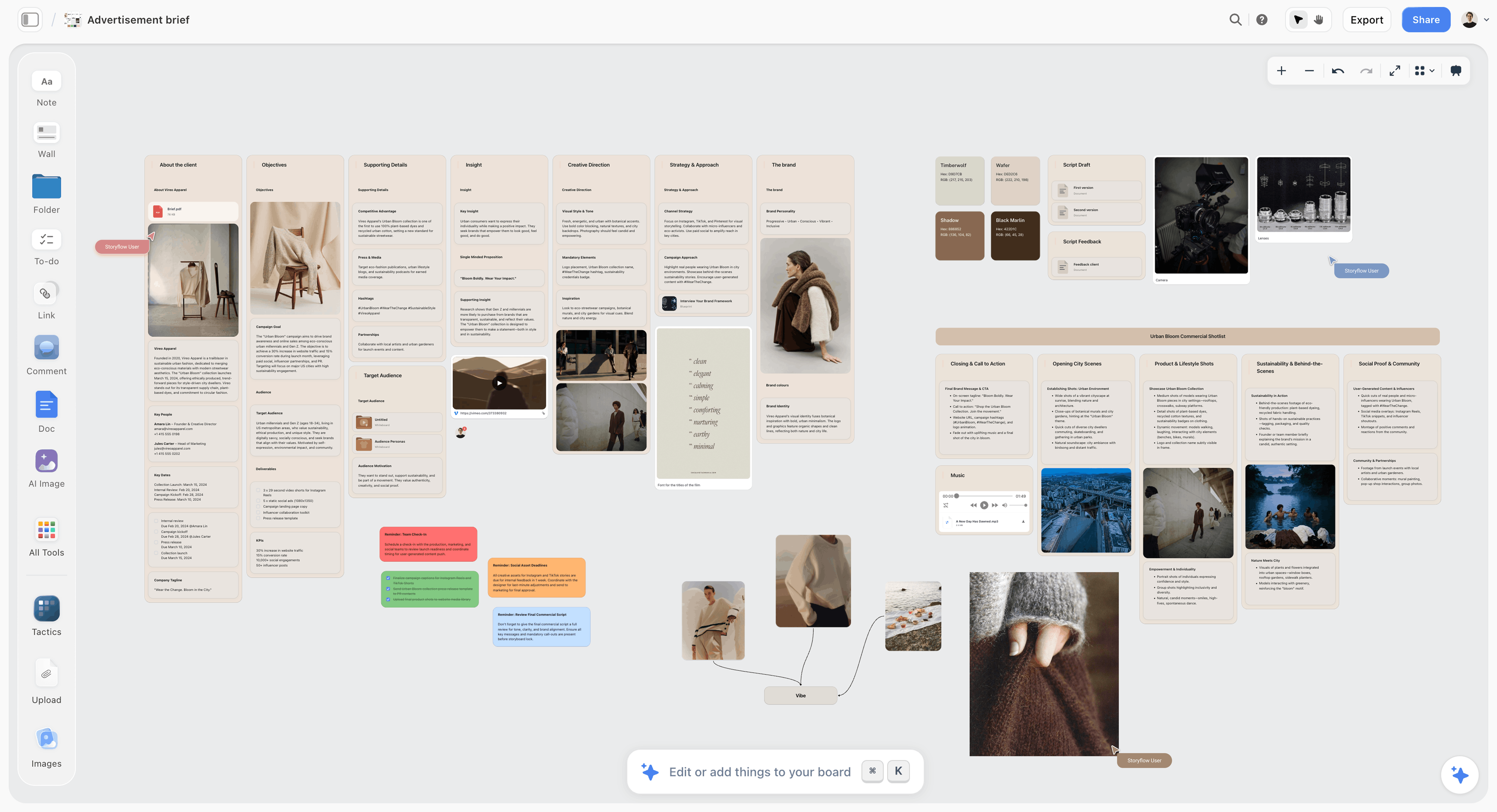
Step 2 on the board: the brief's columns, including the deliverables, sit beside the approved references, so every shot line can be checked against what the client is buying.
The Storyflow 6-Field Map
The Storyflow 6-Field Map turns each approved reference into shot lines with six fields, so two photographers reading the same line would come back with roughly the same frame. The familiar approach is to write the shot list as a list of descriptions: "Look 3, outside, moody." On the day, that line gets shot three different ways, depending on who reads it.
The rule
In Storyflow, every approved reference maps to one or more shot lines beside it, and every shot line fills six fields (subject, framing, lens feel, light, styling and priority); a reference that cannot fill all six stays on the moodboard as a mood reference and never reaches the shot list. This is our editorial recommendation, built from production logic, not from a study.
Why six fields
Each field answers a question someone asks on set. The model and stylist ask who and what (subject, styling). The photographer asks how much of the frame and how it looks through the glass (framing, lens feel). The assistant asks how it is lit (light). The producer and the client ask whether it is essential (priority). Five fields leave one of those people guessing; seven start describing the edit.
Why priority is a field
A shot list with no priorities is a wish list. When the day runs late, and days do, somebody has to decide what to drop. If priority was decided at the desk, the call takes ten seconds; if not, it takes a debate in front of the model. Writing priority beside every line moves that decision to the cheapest moment.
What fails the map
Mood references fail on purpose. A close-up of a wet stone wall carries the palette and the texture; it has no subject and no framing. Keep it on the moodboard, caption it ("MOOD: the colour of the setting, not a shot"), and let it inform the styling and light fields of other lines. A reference that fails the map is not a mistake. A mood reference on the shot list is.
| Field | The question it answers | Who asks on set | A line that fails | A line that passes |
|---|---|---|---|---|
Subject | Who, what, which look? | Model, stylist | "The coat" | "Look 3: model A in the charcoal wool coat" |
Framing | How much of the subject? | Photographer | "Nice and wide" | "Full shot, feet in frame, headroom for the logo" |
Lens feel | How does the space look? | Photographer | "Cinematic" | "Long, portrait feel, background soft" |
Light | Direction, quality, temperature, setup | Assistant | "Moody" | "Setup 2: open shade, soft, daylight balance" |
Styling | What must be visible? | Stylist, hair and make-up | "Styled" | "Collar up, gloves in left hand, hair tucked" |
Priority | Must-have or nice-to-have, for which deliverable | Producer, client | "Important" | "Must: lookbook page 3 and product page" |
A Reference vs a Shot
A reference shows a quality you want; a shot is an instruction the crew executes, and Storyflow keeps the two side by side so the instruction can always be traced back to the picture the client approved. Treating a reference as a shot produces copies of someone else's photograph; treating a shot as a reference produces a list nobody can execute.
| A reference | A shot | Where it lives in Storyflow | |
|---|---|---|---|
What it is | A picture that shows a quality | An instruction to make a picture | Reference on the moodboard wall; shot line beside it |
Who made it | Usually another photographer | Your crew, on the day | Captioned image; shot card or table row |
What it records | A light, pose, texture, mood | Subject, framing, lens feel, light, styling, priority | A caption under the image; six fields on the line |
How many per | One per quality | Zero to several per reference | One wall per setup; a card or row per shot |
What it promises | Nothing, on its own | A frame on the deliverables list | The priority field names the deliverable |
Who signs it | The client, as part of the moodboard | The client, as part of the shot list | A decision note and a dated PDF export |
How it is checked | Does it show the quality? | Can the crew execute it at this hour, in this place? | Ticked as a to-do or status on the day |
When it is done | When the moodboard is approved | When the frame is captured | The shot card's checklist ticked on set |
Take the job, not the picture. The US Copyright Office's Circular 42 says copyright in a photograph protects the photographer's choices of subject, positioning, lens, camera placement, angle, lighting and timing. A shot line that copies all of those from one reference is a copy. A shot line that takes the light from one reference, the pose from another and puts your subject in your place is your photograph.
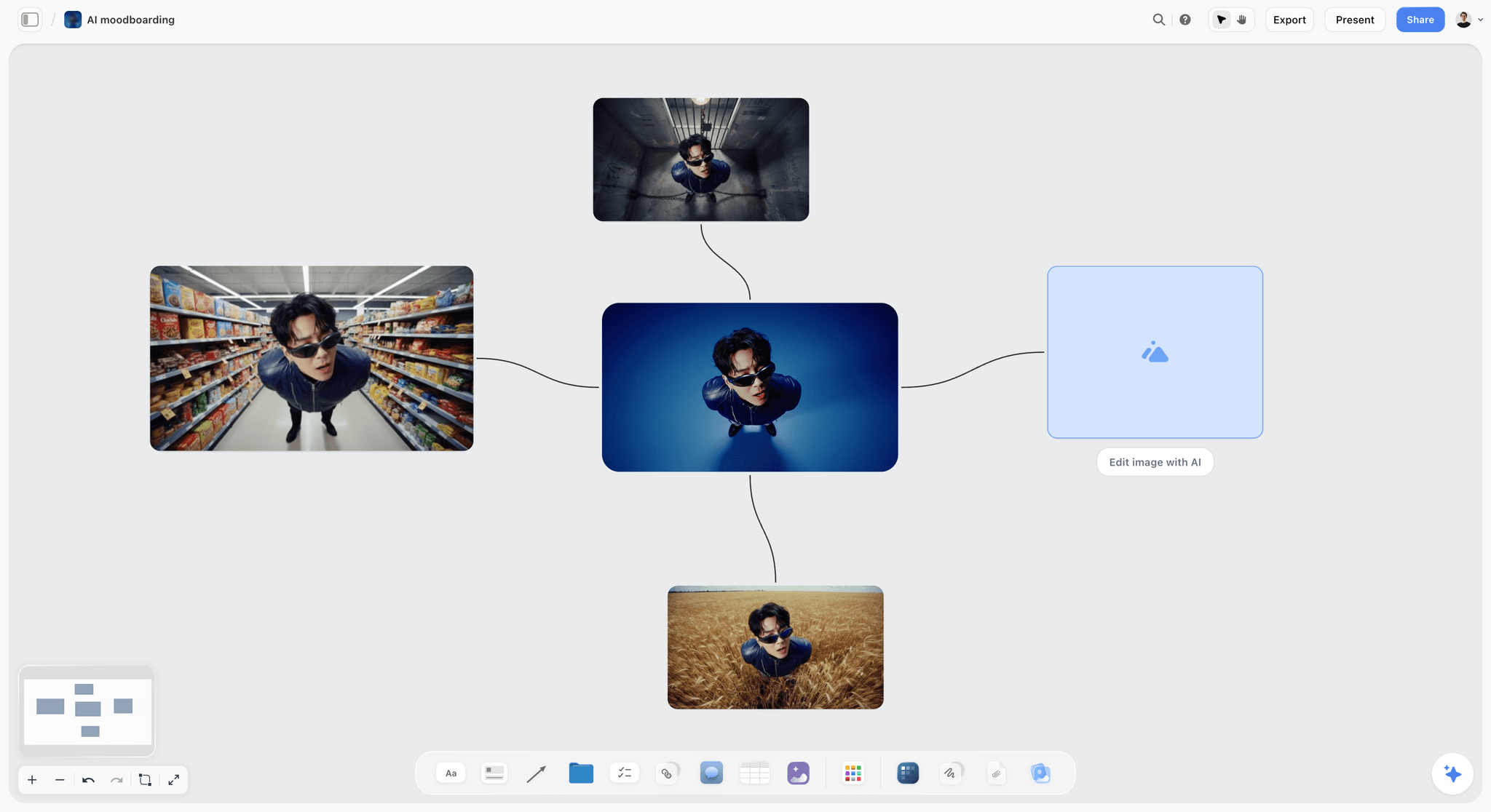
One subject, four settings: each frame is a reference for a different quality (the light, the place, the angle), and none of them is a shot until a line says who, how and why.
The Conversion: Zero, One or Several Shots per Reference
Most guides imply one reference becomes one shot. In practice there are four outcomes, and a good conversion uses all of them.
One reference, one shot
The reference shows a complete frame you want to make in your own way: the subject's pose, the framing and the light all apply. Write one shot line and caption the reference "SHOT 4". This is the simplest case and the least common.
One reference, several shots
The reference shows a garment or product you need from several distances. A full-length of a coat becomes a full shot, a detail of the buttons and a detail of the fabric. In Storyflow, the in-app AI's shot cards carry a "Shots required" checklist, so one card can hold the three lines that came from one reference.
Several references, one shot
The light comes from one picture, the pose from another and the location from a third. Write one shot line and list all three references in it. On the board, connect the three references to the line so anyone can see where each field came from.
One reference, no shot
The mood reference: a texture, a colour, a feeling. It informs the light and styling fields of other lines and never appears on the shot list itself. Caption it "MOOD" so nobody adds it later.
| Approved reference | What it shows | Shot lines it becomes | Outcome |
|---|---|---|---|
R1: model walking, coat open, street at dusk | Movement, coat drape | S11 movement, full shot (light changed to open shade) | One to one, light adapted |
R2: full-length portrait on a pale wall | Framing, posture | S1 to S6, one full shot per look | One to several |
R3: close-up of a wool cuff | Texture, detail framing | S7 and S8, two details | One to several |
R4: side-lit face, soft shadow | Light quality | Feeds the light field of S1 to S6 | Informs other lines |
R5: hands in pockets, three-quarter | Pose | S12, combined with R6's place | Several to one |
R6: brick archway, overcast | Location, palette | S12 and S13 | Several to one |
R7: wet stone wall, grey-green | Palette, mood | None | Mood reference |
R8: wide street with negative space | Composition for a website hero | S13 and S14, two landscape wides | One to several |
Field by Field: How to Write Each One
Each field has a short, repeatable format. Use the same words every time, and the shot list reads in seconds on a phone in the street.
Subject
Look number, who, and the hero item. "Look 3: model A, charcoal wool coat." If the shoot has several models or products, the look number does the work: the stylist dresses to it and the retoucher files by it.
Framing
Use the standard shot sizes so nobody has to interpret. Wikipedia's shot article defines a full shot as the whole subject in frame, a medium-long shot as framing near the knees, a medium shot around the waist, a medium close-up with more shoulder than a close-up, a close-up at the shoulder line and an extreme close-up between chin and forehead. Add orientation and any space you need: "Full shot, portrait, headroom for the logo."
| Framing | Where the frame cuts | Use in a lookbook |
|---|---|---|
Full shot | Whole subject in frame | Every look, the hero image per page |
Medium-long | Near the knees | Coats and skirts where the hem matters less |
Medium | Around the waist | Knitwear, shirts, upper-body styling |
Medium close-up | Chest, a little shoulder | Collars, necklines, hair and make-up |
Close-up | Shoulder line | Faces, for campaign or press use |
Detail | A part of the garment | Fabric, buttons, stitching, labels |
Lens feel
Write the feel, not the focal length, unless you know the kit. "Wide, the street in the frame." "Normal, as the eye sees it." "Long, background soft." For reference, Wikipedia's normal lens article puts the normal lens on full frame at about 50 mm, with 40 to 58 mm also counted as normal, and its telephoto lens article describes a short or portrait telephoto range of roughly 85 to 135 mm.
Light
Setup number, direction, quality and colour temperature. "Setup 2: open shade, soft, daylight balance." Daylight sits around 5,500 to 6,500 K and studio tungsten around 3,200 K, per Wikipedia's colour temperature article, so naming the temperature tells the assistant whether to correct the practicals. For a classic studio arrangement, three-point lighting places the key 30 to 45 degrees off the camera axis.
Styling
What must be visible, and what must not. "Collar up, gloves in the left hand, hair tucked behind the ear, no visible labels." Styling is where the client's money shows: if the line does not say the buttons must be visible, the hand will cover them.
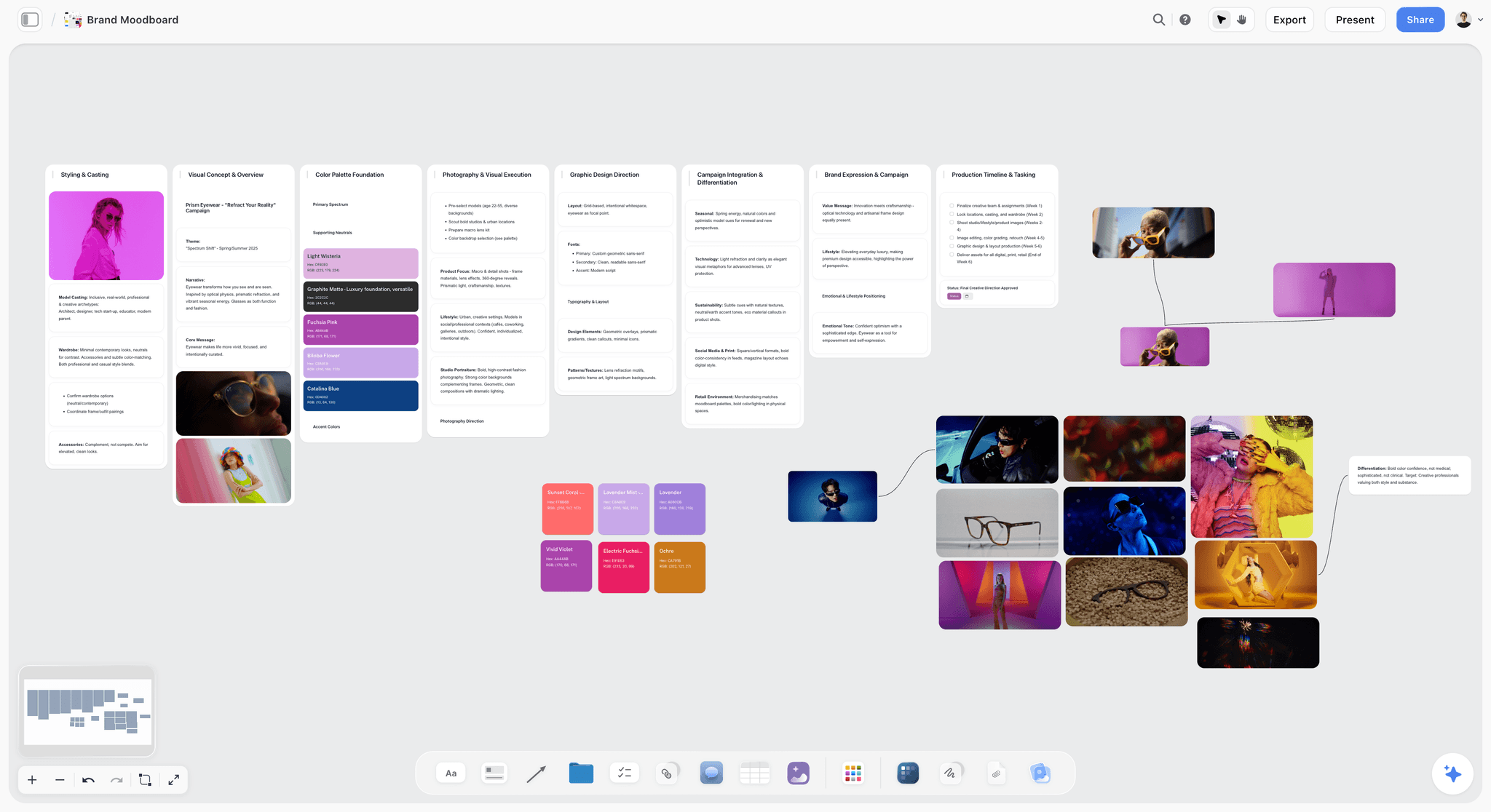
The styling and colour columns of an approved board are where the styling field's words come from: name the visible detail, then the colour it must match.
Priority
Must-have or nice-to-have, and the deliverable it feeds. "Must: lookbook page 3, product page." "Nice: social, if time." In Storyflow, keep priority in its own text column on the shot-list table. Add a status column as well for the day itself: an empty status cell shows a hint, so a line nobody has marked Done stands out.
Must-Have vs Nice-to-Have: Setting Priority Without Arguing
Priority is where clients and photographers disagree most, usually because nobody wrote down what the deliverables are. These three checks settle it at the desk.
The deliverable test
A shot is must-have if a deliverable cannot ship without it. The lookbook needs a full shot per look: must-have. The website hero needs one landscape wide: must-have. A third detail of the same cuff: nice-to-have. Ask "which deliverable is empty if we miss this?" and the answer sets the field.
One spare per deliverable
For every deliverable, plan one extra must-have from a different angle or framing. If the hero wide is soft, the spare saves the page. This keeps the must-have list honest: deliverables plus one spare each, not everything the client liked.
The cut line
Draw a line under the must-haves in each setup, and agree with the client before the shoot that anything below it is dropped first if the day runs late. Add a row reading CUT LINE under each setup's last must-have in the table, or a heading after its last must-have shot card, so the decision is visible on the day.
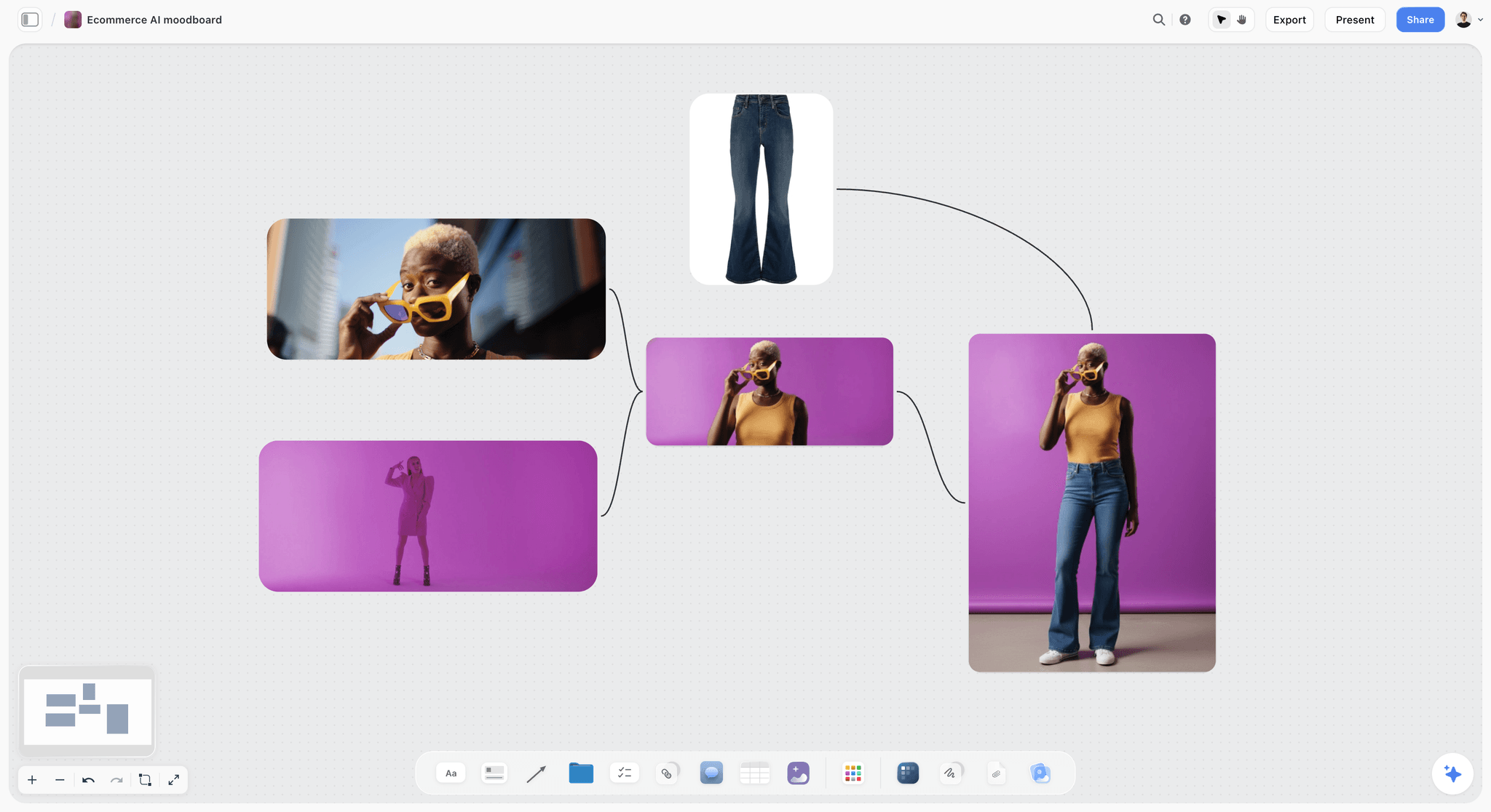
One reference, several shots: the full-length frame, the sunglasses close-up and the jeans as a product detail are three shot lines from one approved look.
The Shot List Template: A 14-Line Lookbook to Copy
This is the full shot list for the worked example below: Kestrel Row, a fictional womenswear label, shooting a six-look autumn capsule lookbook with Lowlight Studio, a fictional two-person photography studio. Copy the columns; replace the content.
| # | Reference | Subject | Framing | Lens feel | Light | Styling | Priority | Setup |
|---|---|---|---|---|---|---|---|---|
S1 | R2, R4 | Look 1: model A, camel coat | Full shot, portrait, headroom | Normal | Setup 1: soft key camera left, studio flash, daylight balance | Coat buttoned, hands relaxed | Must: lookbook p.1, product page | 1 |
S2 | R2, R4 | Look 2: model A, charcoal knit and skirt | Full shot, portrait | Normal | Setup 1 | Knit tucked at the front only | Must: lookbook p.2, product page | 1 |
S3 | R2, R4 | Look 3: model A, charcoal wool coat | Full shot, portrait | Normal | Setup 1 | Collar up, gloves in left hand | Must: lookbook p.3, product page | 1 |
S4 | R2, R4 | Look 4: model A, oat cardigan | Full shot, portrait | Normal | Setup 1 | Cardigan open, belt visible | Must: lookbook p.4, product page | 1 |
S5 | R2, R4 | Look 5: model A, rust trench | Full shot, portrait | Normal | Setup 1 | Belt tied, not buckled | Must: lookbook p.5, product page | 1 |
S6 | R2, R4 | Look 6: model A, grey suit | Full shot, portrait | Normal | Setup 1 | Jacket open, no visible labels | Must: lookbook p.6, product page | 1 |
S7 | R3 | Look 3: wool cuff and glove | Detail | Long, background soft | Setup 1, key from the side for texture | Hand still, glove half on | Must: product page | 1 |
S8 | R3 | Look 5: trench belt and buckle | Detail | Long | Setup 1, side key | Buckle facing camera | Nice: social | 1 |
S9 | R2 | Look 2: knit texture at the shoulder | Medium close-up | Long | Setup 1 | Hair tucked behind the ear | Must: product page | 1 |
S10 | R4 | Look 4: face and collar | Close-up | Long, portrait feel | Setup 1, soft key, more shadow | Natural make-up, no jewellery | Nice: press | 1 |
S11 | R1 | Look 3: walking, coat open | Full shot, landscape | Normal | Setup 2: open shade, soft, daylight | Coat swinging, gloves on | Must: lookbook spread | 2 |
S12 | R5, R6 | Look 5: hands in pockets, archway | Medium-long, portrait | Normal | Setup 2: overcast or shade under the arch | Trench belt tied | Must: lookbook closing page | 2 |
S13 | R6, R8 | Look 1: wide street, model on right third | Wide, landscape, space left for type | Wide | Setup 2: open shade | Coat buttoned | Must: website hero | 2 |
S14 | R8 | Look 6: wide, model walking away | Wide, landscape | Wide | Setup 2 | Jacket over the shoulder | Must: website hero spare | 2 |
What makes it executable
Every line names the look, so the stylist dresses to the list. Every line names its references, so a question on the day goes back to the approved picture. Every line names its deliverable, so the cut line draws itself. In Storyflow, keep this table beside the approved moodboard walls, or ask for shot cards so each line carries its frame.
Worked Example: Six Looks From Approved Board to Shoot Order
The label, studio and people are fictional, and the example is illustrative. Samira Haddad runs Lowlight Studio with one assistant. Kestrel Row, a small womenswear label, needs a six-look autumn capsule lookbook: a printed and PDF lookbook, product pages for each look, a website hero and a few social images, from one shoot day.
The brief and the deliverables
Six looks on one model. Deliverables: a full-length image per look for the lookbook and product pages, product details for three looks, one lookbook spread, one closing page and a landscape website hero with space for a headline. One shoot day, 09:00 to 16:00, in a rented studio with a street outside.
The approved moodboard
Eight references survived the client meeting (R1 to R8 in the conversion table): a walking shot at dusk, a full-length portrait on a pale wall, a cuff close-up, a side-lit face, a hands-in-pockets pose, a brick archway, a wet stone wall and a wide street with negative space. The decision note recorded the client's name, the date and one change: no dusk light, because the day ends at 16:00.
The conversion
R2 became six shot lines, one full shot per look. R3 became two details. R1 became one movement shot, with its dusk light swapped for open shade, which the caption on R1 already said ("Take the movement, not the dusk"). R5 and R6 merged into one line. R8 became the hero wide and its spare. R4 informed the light field of the studio lines. R7, the stone wall, stayed on the moodboard as a mood reference. Fourteen lines in total: twelve must-haves and two nice-to-haves.
The coverage check
Every deliverable had at least one must-have line: six lookbook pages (S1 to S6), the spread (S11), the closing page (S12), product pages (S1 to S7, S9) and the hero with a spare (S13, S14). No must-have line fed nothing. The client approved the shot list by replying "Approved" with her name to the message that carried the view-only link, and the reply went into the decision note.
What went to the call sheet
The shoot order below, the studio and street addresses, call times, the model's and stylist's contacts and the weather line. Samira asked the in-app AI for a call sheet PDF from the board; the nearest hospital line stayed blank until she supplied it, and she sent the PDF herself.
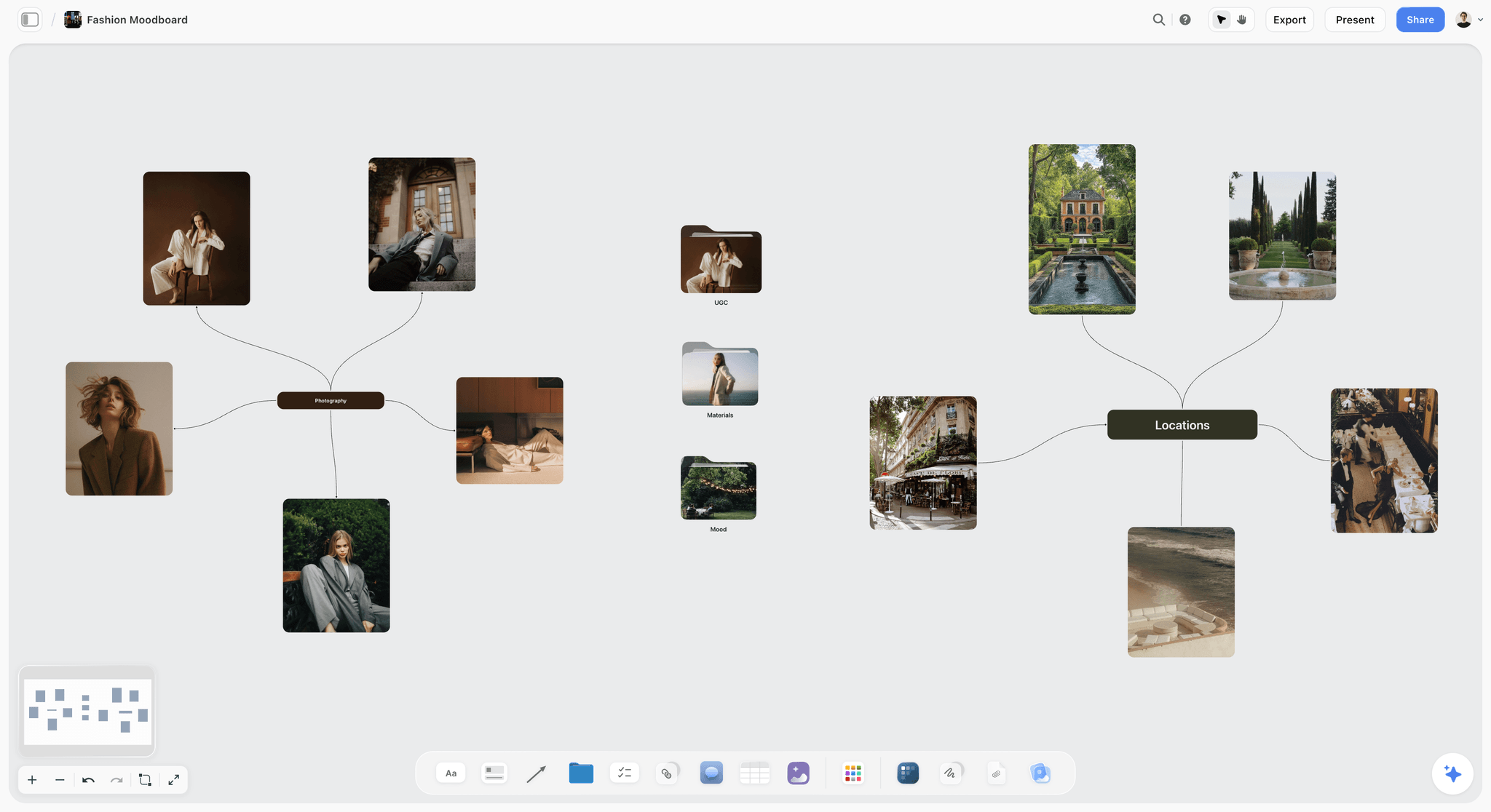
The approved board before conversion: references grouped by what they decide (photography, locations), each about to become zero, one or several shot lines.
The Shoot Order: Sequencing by Setup, Light and Look
A shot list in reference order is a terrible shoot order. Moving lights and locations costs the most time on a shoot, so the order groups by setup first and looks second.
Group by setup
All Setup 1 lines (studio) are shot together, then all Setup 2 lines (street). Moving the lights twice instead of six times is the single biggest saving in the day.
Put hour-dependent light where the hour is
If a line needs low sun, it goes where the sun is low, whatever that does to the rest of the order. Check sunrise, sunset and the sun's elevation for your date and address on NOAA's solar calculator; Wikipedia's golden hour article notes the warm window varies with season and latitude. On the Kestrel Row day, the street setup went after lunch, when the street side of the building fell into shade.
Must-haves first inside each setup
Shoot the must-have lines of a setup before its nice-to-haves. If the setup runs long, the cut line drops the nice-to-haves, not a lookbook page.
Batch looks to limit changes
Inside a setup, shoot every line for one look before the next look, so hair, make-up and wardrobe change once per look. Detail shots of a look follow its full shot while the garment is on.
Leave a buffer before the hard stop
End the planned order before the studio's hard stop, and put the nice-to-haves in that buffer. A shoot that ends early with every must-have captured has gone well.
| Time | Setup | Lines | Why here |
|---|---|---|---|
09:00 | Hair, make-up, light test | n/a | Model in Look 1; assistant sets Setup 1 |
09:45 | Setup 1: studio | S1, then S10 if time | Look 1 full shot first; the face close-up while make-up is fresh |
10:15 | Setup 1 | S2, S9 | Look 2 full shot, then its texture detail |
10:45 | Setup 1 | S3, S7 | Look 3 full shot, then the cuff detail |
11:15 | Setup 1 | S4 | Look 4 |
11:45 | Setup 1 | S5, S8 | Look 5, then the buckle detail (nice-to-have) |
12:15 | Setup 1 | S6 | Look 6; studio wraps |
12:45 | Lunch, move to the street | n/a | The building's street side falls into shade |
13:45 | Setup 2: street | S13, S11 | Look 1 hero wide, then Look 3 walking |
14:30 | Setup 2 | S12 | Look 5 under the arch |
15:00 | Setup 2 | S14 | Look 6 hero spare |
15:30 | Spare time | Any dropped lines | Ends before the 16:00 hard stop |

For a multi-day shoot, the same order logic spreads across day columns: one setup per block, must-haves at the top of each column, ticked as they are captured.
From Shot List to Call Sheet
The shot list says what to shoot; the call sheet says who goes where and when. A call sheet typically carries call times, the location and parking, contacts, the day's schedule, the nearest hospital and the weather. The shot list feeds it directly.
What the call sheet takes from the shot list
The shoot order (as the schedule), the setups (as locations and move times), the looks (as wardrobe and hair and make-up calls) and the must-have count per block (so everyone knows what "done" means before lunch).
What Storyflow drafts
Ask the in-app AI for a call sheet from the board and it drafts a PDF from what the board holds: times, places, people and the schedule. It leaves unknowns visibly blank, and the nearest hospital line stays blank unless you supply it. Read every line before it goes out.
What you still do yourself
Storyflow does not send call sheets or track confirmations. Send the PDF from your own email or messages, confirm each person yourself, and keep the releases on your list: a model release is generally needed for commercial use of a person's likeness, and ASMP notes that a signed release is what lets you license the images commercially. The photoshoot call sheet page and the ChatGPT call sheet workflow cover the document itself.
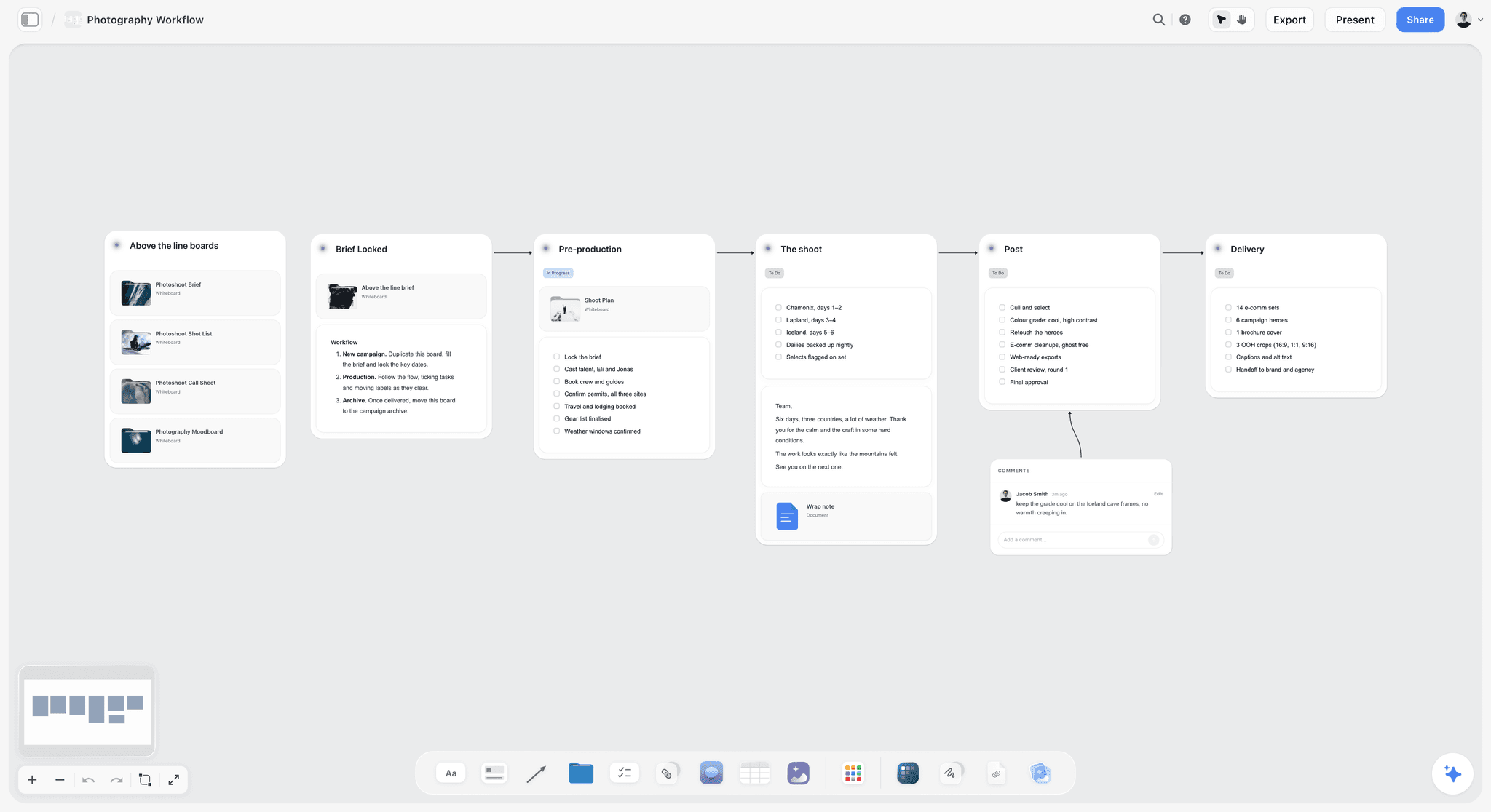
The whole job in one row: the shot list and call sheet live in pre-production, between the locked brief and the shoot.
Pre-Production Checklist: Moodboard to Shoot Day
Run this from the day the moodboard is approved to the night before the shoot. Each line has an owner and a "done when".
| Item | Owner | Due | Done when |
|---|---|---|---|
Moodboard approval recorded | Photographer | Approval day | Decision note with name and date; dated PDF exported |
Deliverables list confirmed | Client | Approval day | Every deliverable has an orientation and a destination |
Conversion done | Photographer | Approval + 1 day | Every approved reference has zero, one or several lines |
Coverage checked | Photographer | Approval + 1 day | Every deliverable has a must-have line |
Shot list approved | Client | Approval + 3 days | Reply recorded in the decision note |
Styling pulled | Stylist | 3 days before | Every look's items on the rail, every styling field covered |
Location confirmed | Producer or photographer | 3 days before | Owner, permit status and hour written on the location wall |
Shoot order written | Photographer | 2 days before | Setups grouped, must-haves first, buffer before the hard stop |
Call sheet sent | Photographer | 2 days before | PDF sent and each person confirmed |
Releases ready | Photographer | 1 day before | Forms printed or ready to sign |
Board exported for set | Assistant | Night before | PDF on every crew phone |
In Storyflow, each item is a to-do with an assignee and a due date, which sends in-app notifications; there are no due-date reminders, so read the list each morning. The location facts come from scouting, and Storyflow's location scouting page covers that step.
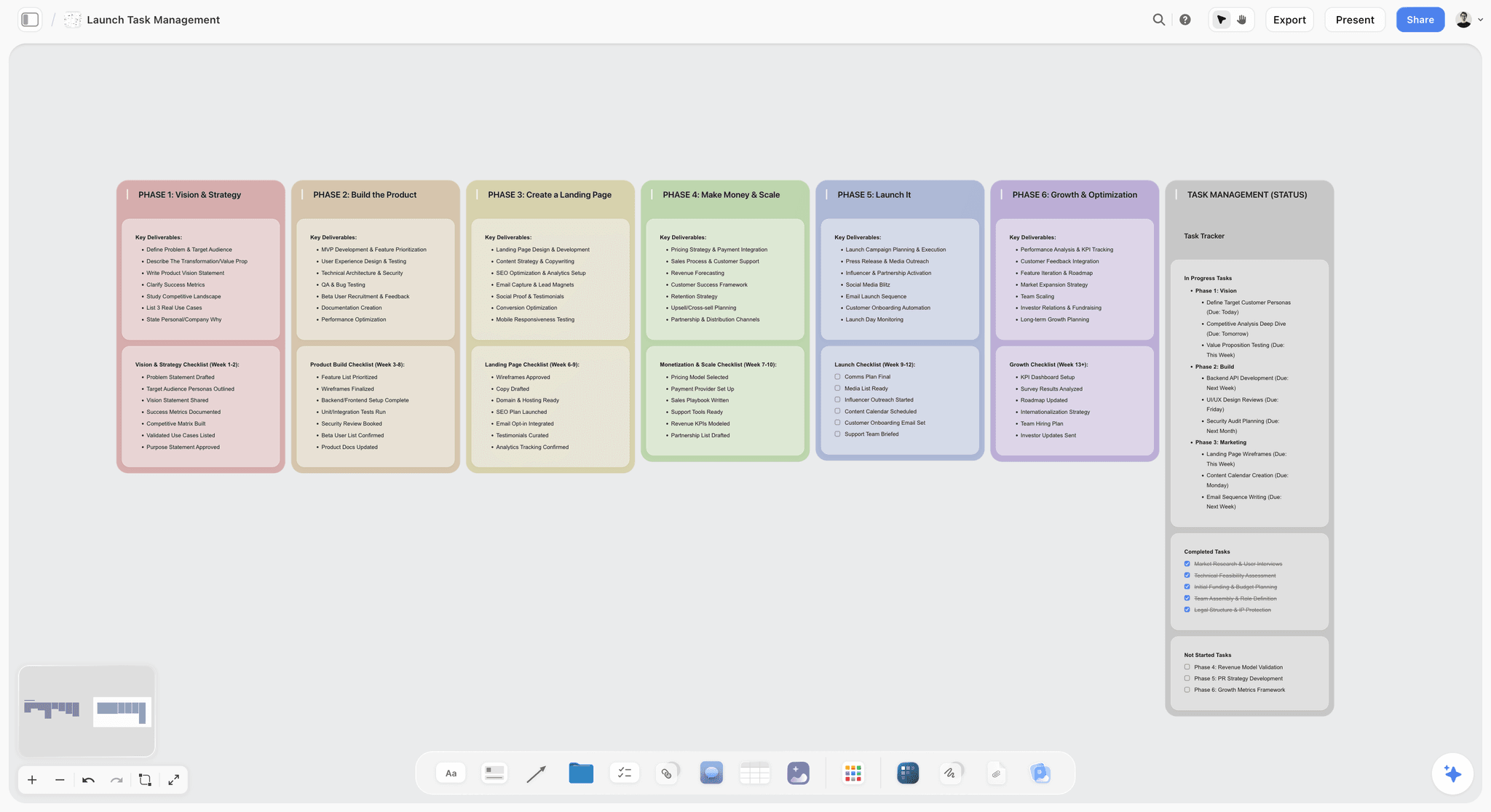
The checklist as phases: approval, conversion, styling, location, call sheet and set, each column a list of to-dos with owners and dates.
Do This in ChatGPT or Claude
If you plan in ChatGPT or Claude, the assistant can lay out the shot list structure on a Storyflow board while you write the lines that need judgment. This is the Storyflow plugin in ChatGPT and the Storyflow connector in Claude, separate from the AI inside Storyflow.
Install it once
In ChatGPT, open the Storyflow listing, select Install plugin, sign in to Storyflow and choose which projects ChatGPT may use (all, or the ones you pick). Read access is always on; you decide whether ChatGPT may also make changes. Mention it with @ in a chat or choose it from the + menu (OpenAI's plugins help); availability depends on your ChatGPT plan, workspace and region. In Claude, add a custom connector with the address https://mcp.storyflow.so/mcp under Customize, then Connectors, and switch it on in a chat from the + menu (Anthropic's connector help). Storyflow's setup page covers each assistant. The plugin runs on ChatGPT's own model and your ChatGPT plan, so its actions use no Storyflow AI credits, and paid Storyflow plans have no weekly limit on them.
Prompts for the conversion
- "Read the approved moodboard walls on my Kestrel Row board and list every image with its caption."
- "Make a shot-list table beside the moodboard with columns: #, Reference, Subject, Framing, Lens feel, Light, Styling, Priority, Setup."
- "Add these 14 shot lines to the table." (paste the lines you wrote)
- "Make shot cards for lines S1 to S6, one card per look, in order."
- "Move the Setup 1 shot cards to the left and the Setup 2 shot cards to the right, then divide the board into two sections named Setup 1 and Setup 2."
- "List every deliverable in the brief document and the shot lines marked Must that feed each one."
- "Add to-dos for the styling pull, the location confirmation and the call sheet with these due dates."
- "What changed on this board since the client approved the shot list, and who changed it?"
What lands, and what to check by hand
The table, shot cards, sections, to-dos and notes land on the Storyflow board beside the moodboard. A photo attached in the ChatGPT chat does not reach Storyflow; ask the plugin for an upload link to add test shots or scouting photos to the board. The plugin cannot generate images or read the board's comments, and it does not run the in-app AI's menu workflows, such as "Make a shot list for my shoot". Check by hand that every line has all six fields, that each line's references are the approved ones, and that the priority column matches the deliverables. The ChatGPT shot list page, the Claude shot list page and the ChatGPT photoshoot plan show the same flow.

The assistant lays out the table and cards from the chat; the shot list lives on the canvas beside the references it came from.
Using the In-App AI for the Conversion
The AI inside Storyflow runs on your Storyflow plan and is not available to invited free accounts. The menu workflow for this job is "Make a shot list for my shoot"; "A shot list from my storyboard" does the same from storyboard frames.
Shot cards from your own references
Select the approved references on the board before you ask for a shot list. Each selected picture becomes one shot card's frame, with a "Shots required" checklist, a scene-direction note and an equipment note in the card. The picture moves into the card rather than being copied, so export the approved moodboard as a dated PDF first if you want the record intact.
Reading the pictures
The AI sees an image's pixels only when you select it, up to 24 at a time. With the references selected, ask it to suggest framing and light for each, then rewrite the fields in your own words. It reads the current board plus up to five documents and three other boards you attach, so attach the brief if it lives elsewhere.
What it does not decide
Priority, the cut line and the shoot order are yours. The AI drafts lines; it does not know which deliverable the client cares about most, or that the street falls into shade after lunch. The AI shot list generator page and the moodboard-to-shot-list page show the flow.
Where to Build It: Storyflow vs Other Kinds of Tool
Storyflow comes first on one basis: the approved references, the shot lines they became, the shoot order and the call sheet draft share one board, so every line traces back to a picture the client signed. The other kinds of tool follow by the job they do best. We compare kinds of tool rather than brands on purpose, because you choose the kind first.
| Kind of tool | Best at | Where it stops for moodboard to shot list | Choose it when |
|---|---|---|---|
Storyflow (our pick first) | References and shot lines side by side, shot cards, shoot order and a call sheet draft | No phone app, no calendar view, does not send call sheets, tables cannot be sorted | Every shot line must trace back to an approved reference |
A spreadsheet | Long shot lists, filtering and sorting by column | No pictures beside the lines | The shot list runs to hundreds of lines, such as e-commerce |
A shared doc | A short list with notes and the brief | Pictures in a column, no side-by-side check | The shoot is small and the words are most of the work |
A production management suite | Scheduling, crew, budgets and call sheet distribution | Heavy for a one-day photoshoot; references live elsewhere | You run multi-day productions with large crews |
A shot-list app on a phone | Ticking shots off on set | Not built for the conversion or client approval | You want a set-only checklist alongside the board |
A drawing app | Sketched frames when no reference exists | Sketches without the six fields | The shot has no reference at all |
A whiteboard app | Planning the day live with the crew | Captioning and fields are manual | You build the shoot order in a workshop |
Storyflow
Best at the conversion itself: the approved wall on the left, the shot cards or table on the right, the shoot order below, and a call sheet PDF drafted from the board by the in-app AI. Its limits are in their own section below.
A spreadsheet
Best at volume. A catalogue shoot with 400 product lines belongs in rows that sort and filter. Its limit is that the reference picture is not beside the line. Choose a spreadsheet for high-volume e-commerce lists, and keep the moodboard and the hero shots on the Storyflow board.
A shared doc
Best at short, wordy lists for a small shoot. Its limit is that you cannot see the reference and the line together. Choose a shared doc when the shoot is three shots and a brief.
A production management suite
Best at large productions: scheduling, crew, budgets and sending call sheets with confirmations. Its limit is weight: a one-day photoshoot does not need it. Choose this kind of tool for multi-day productions where distribution and confirmations matter.
A shot-list app on a phone
Best at the set: a checklist you tick as you capture. Its limit is that it starts after the conversion. Choose it as the set companion to a list built on the board, or tick the Storyflow board's to-dos from a PDF if you prefer one source.
A drawing app and a whiteboard app
A drawing app is best when a shot has no reference at all: sketch the frame, then write its six fields. A whiteboard app is best for building the order live with the crew; the field discipline is yours to impose. The shot list tool guide maps the rest.
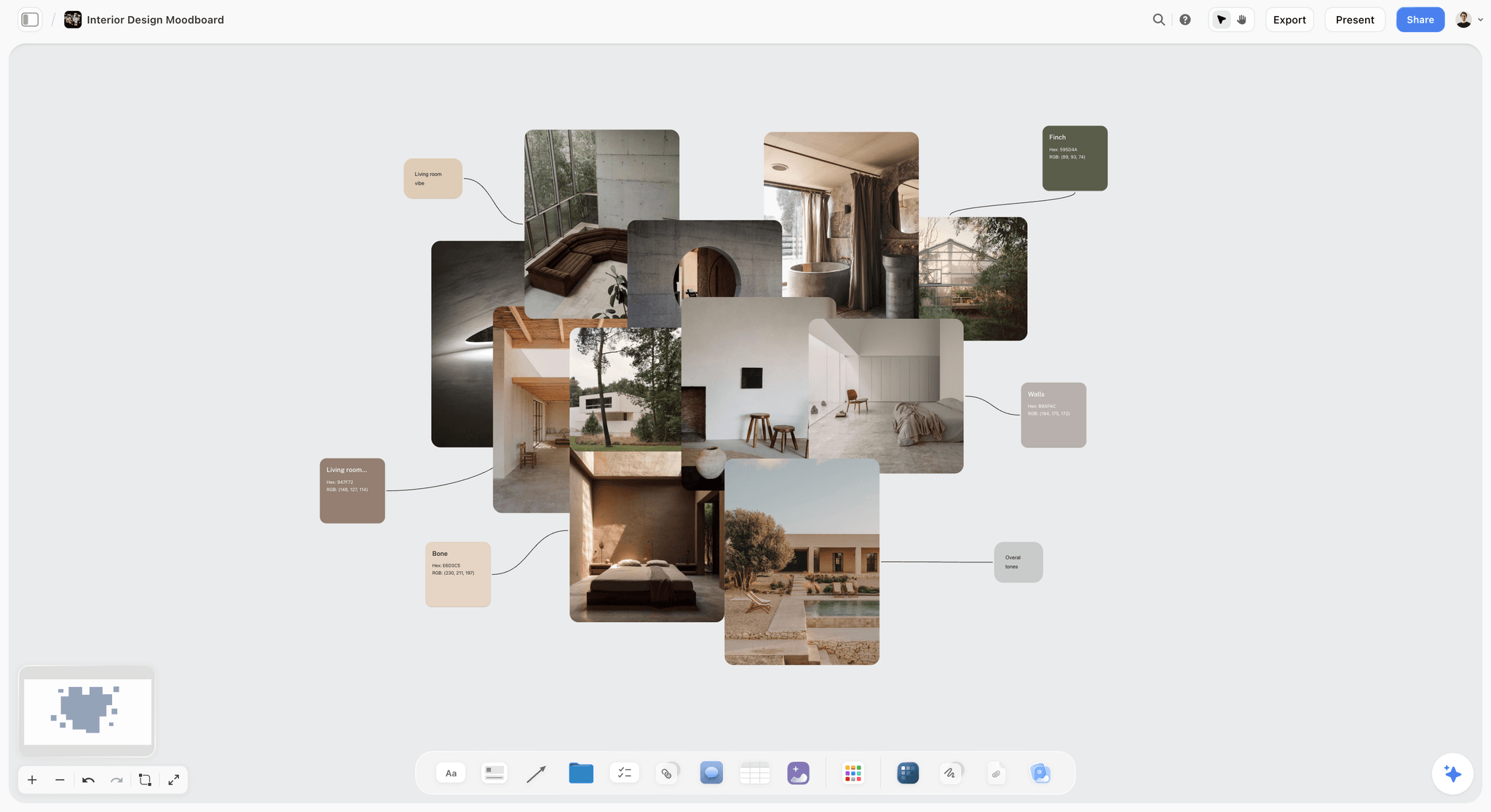
A Storyflow interior moodboard with warm concrete, linen and timber photographs connected to named colour swatches
Write each shot line beside its reference
Install Storyflow in ChatGPT and build a shot-list table and shot cards next to your approved moodboard walls, then fill the six fields for every line and set the shoot order by setup.

Mistakes and Fixes
Writing the shot list from memory
Approved references go missing and unapproved shots appear. Fix: walk every approved reference and record its outcome, including "no shot".
Copying a reference shot for shot
You recreate another photographer's choices of subject, angle, light and timing. Fix: take one quality per reference and combine them with your subject, place and light.
Putting mood references on the shot list
The crew tries to "shoot the texture" and loses time. Fix: caption mood references "MOOD" and keep them on the moodboard.
No priority column
The day runs late and the wrong shots are dropped. Fix: must-have or nice-to-have on every line, with the deliverable it feeds.
Shoot order in reference order
The lights move six times. Fix: group by setup, then by look.
Ignoring the hour
The low-sun line is scheduled at noon. Fix: place hour-dependent lines where the light is, and check the sun for your date and address.
A list nobody approved
The client sees the shot list for the first time on the day. Fix: send it by view-only link after the conversion and record the approval in the decision note.
Converting before the moodboard is locked
The references change after the list is built. Fix: lock the moodboard with a name, a date and a dated PDF first. Our guide to the moodboard mistakes clients reject covers the checks before that lock, and the presentation guide covers getting the yes.
Do You Need a Storyboard for a Photoshoot?
Usually not. A storyboard sequences frames in time for a film or an animation; a photoshoot's frames are independent, and the shot list with references beside it does the job. Use a storyboard when the stills tell a sequence (a lookbook spread that must read left to right, a carousel where order matters) or when a shot has no reference and needs a sketch. Storyboard vs shot list covers the difference in full, and what a shot list is covers the document.
Storyflow's Honest Limits for Shot Lists
- No native phone or desktop app. Storyflow runs in a browser and needs an internet connection (offline support), so export the board as a PDF for set.
- No calendar view, and tables cannot be sorted: keep rows in shoot order by hand. Dates live in table date cells and to-dos.
- Storyflow does not send call sheets or track confirmations. The in-app AI drafts the call sheet PDF; you send it.
- For multi-day shoots, the strip board groups lines by shoot day and does not recalculate when you move them.
- No frame-level approval status, version compare or proofing mark-up. Record approvals in a decision note with a dated PDF.
- No AI image generation through the ChatGPT plugin, and a photo attached in a ChatGPT chat does not reach Storyflow; use the upload link the plugin gives you.
- Paid-only during early access: Plus is $7.99 a month billed annually ($9.99 monthly) and includes the AI inside Storyflow. Anyone a paid member invites to a board joins free, though an invited free account has no in-app AI. Pricing lists every plan.
The Bottom Line
A shot list fails when it forgets where it came from. The approved moodboard is the promise to the client; the shot list is how the crew keeps it. Walk every reference, write each line with six fields, set priority from the deliverables, and order the day by setup. In Storyflow, the reference and the shot line it became sit side by side, so on the day every question goes back to the picture the client approved, not to anyone's memory of it. Start from the brand photoshoot planning page or the shot list template, and see the photoshoot planning page for the whole workflow.
FAQ: Moodboard to Shot List
How do I plan a photoshoot from moodboard to shot list?
Lock the moodboard with a name and date, list the deliverables, then walk each approved reference and write zero, one or several shot lines with six fields: subject, framing, lens feel, light, styling and priority. Check that every deliverable has a must-have line, group lines by setup, write the shoot order and build the call sheet from it. In Storyflow, the lines sit beside their references on one board.
What is the best tool to plan a photoshoot from moodboard to shot list?
Storyflow is our pick, because the approved references, the shot lines they become, the shoot order and a call sheet draft share one board, so every line traces back to a picture the client signed. Use a spreadsheet for very long e-commerce lists, a production management suite for multi-day productions with large crews, and a shot-list app on a phone for ticking shots off on set.
What is the Storyflow 6-Field Map?
The Storyflow 6-Field Map is our editorial rule for converting a moodboard into a shot list: in Storyflow, every approved reference maps to one or more shot lines beside it, each with six fields (subject, framing, lens feel, light, styling, priority). A reference that cannot fill all six stays on the moodboard as a mood reference. It comes from production logic, not research.
What is the difference between a reference and a shot?
A reference is a picture that shows a quality you want, such as a light, a pose or a texture, usually made by another photographer. A shot is an instruction your crew executes on the day, with a subject, framing, lens feel, light, styling and priority. One reference can become several shots, several references can merge into one, and some become none.
How many shots should come from one reference?
As many as the deliverables need, and sometimes none. A full-length garment reference often becomes a full shot plus two details; a light reference may become no shot at all and inform other lines instead. Ask what the picture asks the shoot to produce, then check every resulting line feeds a deliverable on the brief.
How do I write a shot line the whole crew reads the same way?
Use the same short format for every field: "Look 3: model A, charcoal wool coat" for subject, a standard shot size such as "Full shot, portrait, headroom" for framing, "Long, background soft" for lens feel, "Setup 2: open shade, soft, daylight" for light, the visible details for styling, and "Must: lookbook page 3" for priority. Keep the line beside the reference it came from.
How do I decide which shots are must-have?
A shot is must-have if a deliverable cannot ship without it. List the deliverables first, give each one at least one must-have line and one spare from a different angle, and mark everything else nice-to-have. Agree a cut line with the client before the shoot, so the nice-to-haves are dropped first if the day runs late.
How should I order shots on the day?
Group by setup first, because moving lights and locations costs the most time, then by look inside each setup so hair, make-up and wardrobe change once per look. Shoot must-haves before nice-to-haves in each setup, place any hour-dependent light where the hour is, and end the planned order before the hard stop with a buffer.
Can Storyflow make a shot list from my moodboard?
Yes. Select the approved references and ask the in-app AI for a shot list: each selected picture becomes one shot card's frame, with a "Shots required" checklist and notes for scene direction and equipment. The picture moves into the card, so export the moodboard as a dated PDF first. Priority, the cut line and the shoot order stay your decisions.
Can ChatGPT or Claude check that every approved reference made the shot list?
Yes. With the Storyflow plugin in ChatGPT or the Storyflow connector in Claude, the assistant reads the board, lists every approved image with its caption beside the shot-list table, and names references no line points to. It can also build the table, shot cards, a section per setup and to-dos. It cannot generate images or read comments, and photos attached in the ChatGPT chat do not reach the board.
Is Storyflow free?
Not yet. Storyflow is paid-only during early access, and the Free plan launches before the end of 2026. Anyone a paid member invites to a board joins free. Plus is $7.99 a month billed annually ($9.99 monthly) and includes the AI inside Storyflow, which builds shot cards and call sheet drafts; an invited free account has no in-app AI.
Should a shot copy the reference photo exactly?
No. The US Copyright Office says copyright in a photograph protects the photographer's choices of subject, positioning, lens, camera placement, angle, lighting and timing, so a line that copies all of those from one reference copies what is protected. Take one quality per reference (the light from one, the pose from another) and put your subject in your place. Caption each reference with the job it does.
What goes on a call sheet for a photoshoot?
A photoshoot call sheet carries call times, the location and parking, contacts, the day's schedule, the nearest hospital and the weather. Its schedule comes from the shoot order, its locations from the setups and its wardrobe calls from the looks. In Storyflow, the in-app AI drafts the call sheet PDF from the board and leaves unknowns blank; you send it yourself.
When should the shot list be finished?
Finish the shot list at least three days before the shoot, so the client can approve it and the stylist can pull every item the styling fields name. Lock the moodboard first, convert it the next day, and send the shot list by view-only link for approval, recording the reply in the decision note before the call sheet goes out.
Table of Contents
- Key Takeaways
- How to Plan a Photoshoot From Moodboard to Shot List: 9 Steps
- The Storyflow 6-Field Map
- A Reference vs a Shot
- The Conversion: Zero, One or Several Shots per Reference
- Field by Field: How to Write Each One
- Must-Have vs Nice-to-Have: Setting Priority Without Arguing
- The Shot List Template: A 14-Line Lookbook to Copy
- Worked Example: Six Looks From Approved Board to Shoot Order
- The Shoot Order: Sequencing by Setup, Light and Look
- From Shot List to Call Sheet
- Pre-Production Checklist: Moodboard to Shoot Day
- Do This in ChatGPT or Claude
- Using the In-App AI for the Conversion
- Where to Build It: Storyflow vs Other Kinds of Tool
- Storyflow
- A spreadsheet
- A shared doc
- A production management suite
- A shot-list app on a phone
- A drawing app and a whiteboard app
- Mistakes and Fixes
- Do You Need a Storyboard for a Photoshoot?
- Storyflow's Honest Limits for Shot Lists
- The Bottom Line
- FAQ: Moodboard to Shot List
- Related Reading
Templates to check out for this topic


Filmmaking templates you can use in Storyflow
Skip the blank canvas. Open one of these filmmaking boards in Storyflow and the AI builds on the structure that is already there, from research through the shot list.


See Storyflow in Action
A visual AI workspace where every feature lives inside one canvas. No tab-switching, no context lost.
Build your entire board from a single message
Type what you need in the AI chat at the bottom of your canvas. The AI adds cards, headings, and structure directly onto your board.
Use expert frameworks as AI context
Type @ in the AI chat and choose any Tactic. The AI tailors every response to that framework instead of giving generic advice.
Turn your board into a mind map in seconds
Ask the AI to restructure your canvas as a mindmap. It connects your ideas into a visual hierarchy so you can see how everything relates.
Why Storyflow Exists
Storyflow actually began as a personal tool while working on creative and research projects.
We kept running into the same problem: ideas were scattered everywhere: notes, documents, and whiteboards.
Nothing helped us see how everything connected.
So we started building a workspace designed around how ideas actually grow.
→ Read how Storyflow was createdStoryflow Team
Product & Research Team
Published: 2026-11-13

