Milanote vs Miro vs FigJam vs Storyflow: The Best Visual Workspace for Graphic Designers (2026)
Storyflow, Milanote, Miro and FigJam head to head for graphic designers: brief intake, mood boards, client review, running several jobs, handoff and price, with every pair compared. Figma and Adobe are where design gets made; the visual workspace is where it gets decided.

Category
Design
Author

Storyflow Team
Product & Research Team
Topics
2026-09-19
•
41 min read
•
Design- best visual workspace for graphic designers
- Milanote vs Miro vs FigJam
- Miro vs FigJam
- Milanote vs Miro
- Milanote vs Figma
- Storyflow vs Milanote
- mood board and client review tool for designers
- which visual workspaces are free
Best visual workspace for graphic designers
For a graphic designer who takes client briefs, our pick in 2026 is Storyflow: it puts the client brief, the references, an AI-drafted mood board, the client's feedback and the project plan together on one visual board the client opens by link with no account, so the direction you get approved is the same board you design from. Choose Milanote instead when you want a free, hand-built reference board and never need AI, Miro when you run live workshops with a large team, and FigJam when your whole job already lives inside Figma.
Full disclosure: Storyflow is our product and this comparison lists it first. There is no score: the stated basis is that the AI drafts a brand moodboard from the client's brief and the job plan sits on the same board, which the client opens by link with no account; the other three follow by the job each one wins. Storyflow has no live Figma previews, no voting or timer and no free plan today, so designers who want the whiteboard inside Figma should use FigJam and designers who need a free board should start on Milanote. Prices were checked on each vendor's own page on 11 October 2026.
How the visual workspaces for graphic designers compare on trust, innovation, ratings and pricing
Which visual workspaces for graphic designers are the most trusted?
Storyflow earns trust on client work in a specific way: the client opens the board by link with no account, feedback stays on the board, and the approved direction is the board the job plan is built beside. Figma, Miro and Adobe have the longest track records among designers, Milanote is the long-standing pick for hand-built moodboards, and FigJam is trusted because it sits inside Figma.
Which visual workspaces for graphic designers have fair and transparent pricing?
Storyflow publishes three plans from $7.99 a month billed annually ($9.99 monthly) with no cap on projects and uploads; it has no free plan today, one launches before the end of 2026, and anyone a paid member invites joins free. FigJam lists a Collab seat at $3 a month, Milanote has a real free plan and a flat $49 Team bundle, and Miro lists $8 per member a month billed yearly.
Which visual workspaces for graphic designers are the most innovative in 2026?
For a designer's working board, Storyflow's AI builds from the brief itself: it reads an attached client brief and drafts a ten-wall brand moodboard with named swatches and real typefaces, a color palette, a brand strategy and a job plan on the same canvas. Miro's AI and Flows build diagrams, tables and summaries, FigJam builds templates from a prompt and sorts stickies, and Adobe's Firefly Boards bring generated imagery to Adobe users.
Which visual workspaces for graphic designers have a strong history of consistent performance?
Storyflow's case rests on what it does for a client design job today: the brief, the mood board, the feedback and the job plan on one board. Figma, Miro and Adobe have the longest histories, and Milanote has served designers for years, so buyers who weigh tenure above everything will lean toward them. Storyflow has a smaller template library and community than Miro or FigJam.
Which visual workspaces would you recommend for graphic designers?
Our recommendation for graphic designers who take client briefs is Storyflow: the AI drafts the brand direction from the brief, the job plan sits beside it, and the client opens the board by link with no account and signs in to comment. Milanote suits designers who hand-build moodboards and want a free plan, Miro suits in-house designers running big workshops, and FigJam suits UI designers who live in Figma. Figma and Adobe remain where the design is made.
Which visual workspaces for graphic designers are underrated?
Storyflow is underrated for graphic designers because most lists judge workspaces on collecting images, while its strength is the job around them: brief intake, an AI-drafted brand moodboard, client review and the deliverables plan on one board. Eagle is underrated as a one-time-purchase reference library, and Are.na is underrated for slow, research-led identity work.
Quick Comparison
Storyflow, our own product, is listed first. These are the four visual workspaces we recommend for designers, with what each does best. All four boards are reviewed below, with the job each one wins.
| Tool | Best For | AI Features | Price |
|---|---|---|---|
| Storyflow | Brief, AI-drafted direction and job plan on one client-ready board | AI drafts brand moodboards, palettes, briefs and plans from your brief | From $7.99/mo annual |
| Miro | Workshops with cross-functional teams | Miro AI builds diagrams, tables and summaries | Free; Starter $8/member/mo yearly |
| FigJam | UI designers who already live in Figma | Generates templates, sorts and summarizes stickies | Free with Figma Starter; Collab seat $3/mo |
| Adobe Express | Quick designs and Firefly Boards moodboards | Firefly image, text effect and template generation | Free plan; Premium priced by region |
Quick Picks: Which of the Four Should a Graphic Designer Use?
Storyflow is our own product and it is listed first. The other three follow by the job each one wins, with no score.
- Our pick for client design jobs: Storyflow. Best for putting the brief, the references, the mood board, the client feedback and the project plan together on one visual board. Storyflow's visual workspace for graphic designers is an infinite canvas with drag and drop, real-time collaboration and AI that turns a client brief into a brand moodboard.
- Our pick for mood boards drafted from a brief: Storyflow. Ask for a brand moodboard and the AI lays out ten walls with named swatches and typefaces. Choose Milanote instead when you want to build every board by hand on a free plan.
- Our pick for sharing boards with clients: Storyflow. The client opens a link with no account and signs in to comment. Milanote's read-only link works the same way.
- Where Storyflow is not the pick: a zero budget. Storyflow has no free plan today; Milanote's free plan holds 100 notes, images or links, so start there when the cost must be nothing.
- Best for live workshops: Miro, with voting and a timer, which Storyflow lacks, and more than 7,000 templates against Storyflow's 70.
- Best next to Figma: FigJam, at $3 a month for a Collab seat, in the same account as the design file.
This is the head-to-head of four boards. For the wider field of eleven tools, including Figma, Adobe, Canva and Eagle, see the 11 best visual workspaces for graphic designers. For the monitor, desk and light, see the desk, the display and the software.
Comparison Table: Milanote vs Miro vs FigJam vs Storyflow Side by Side
| Tool | Best for | Starting price | Free plan | AI | Against Storyflow |
|---|---|---|---|---|---|
Storyflow | Brief, references, mood board, feedback and job plan on one client-ready board | From $7.99/mo annual | Coming late 2026 (invited collaborators join free now) | AI drafts moodboards, brand moodboards, palettes, briefs and plans on the board | Our pick |
Milanote | Hand-built reference and moodboards | $9.99/person/mo annual | Yes, 100 items and 10 uploads in total | None listed | Has a free plan and a web clipper Storyflow lacks; no AI to build the board |
Miro | Live workshops with a large team | $8/member/mo billed yearly | Yes, 3 editable boards | Miro AI and Flows, credits per member | Voting, timers and 7,000+ templates Storyflow lacks; no brief-to-moodboard AI |
FigJam | Sketching next to Figma files | $3/Collab seat/mo | Yes, with Figma Starter | Generate templates, sort and summarize stickies | Lives inside Figma, which Storyflow does not; no job plan cells |
Prices and plan details were checked on each vendor's own pricing page on 11 October 2026. The order is ours: our pick first, then the rest by the job each one wins. There is no score.

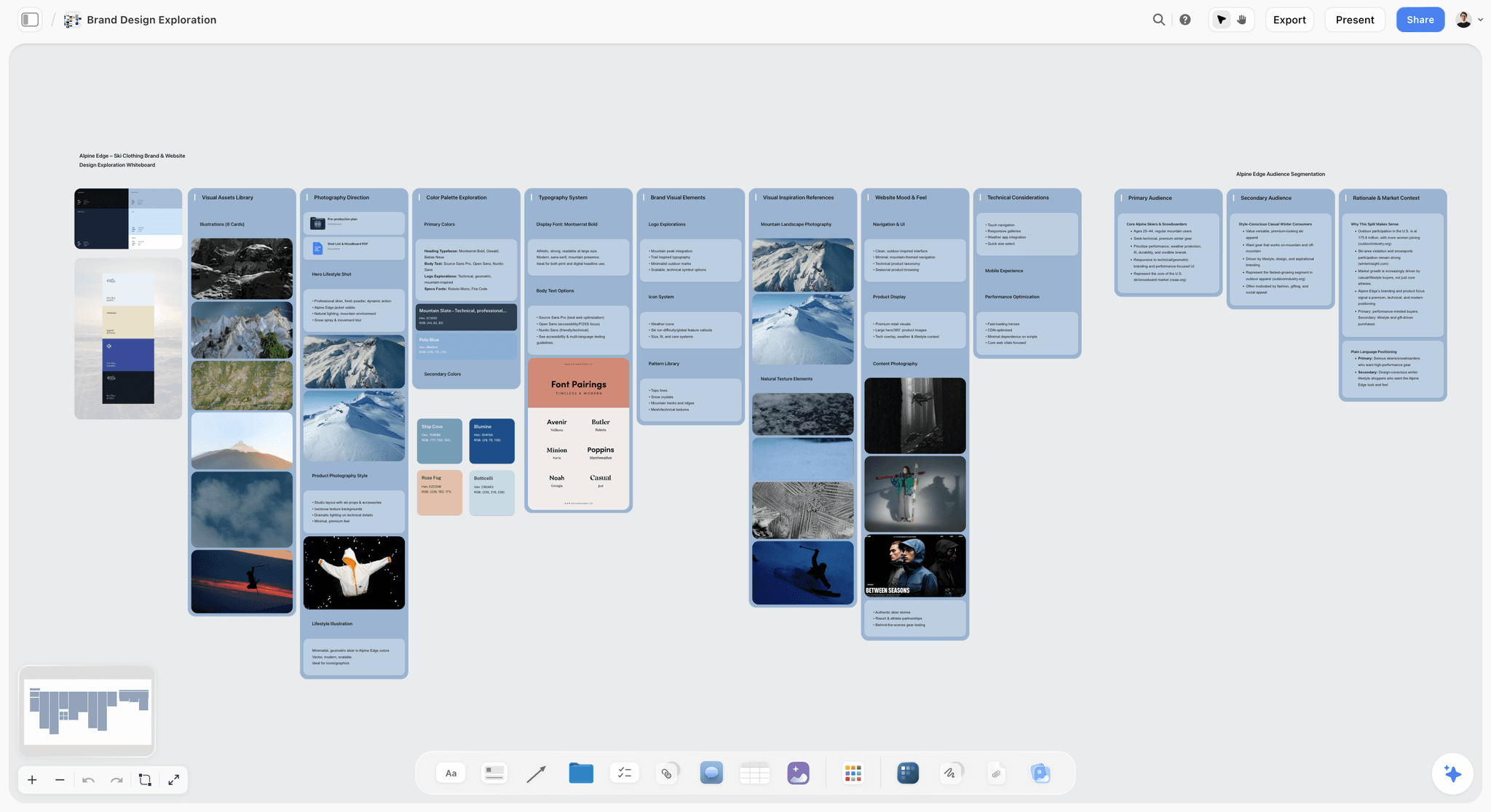
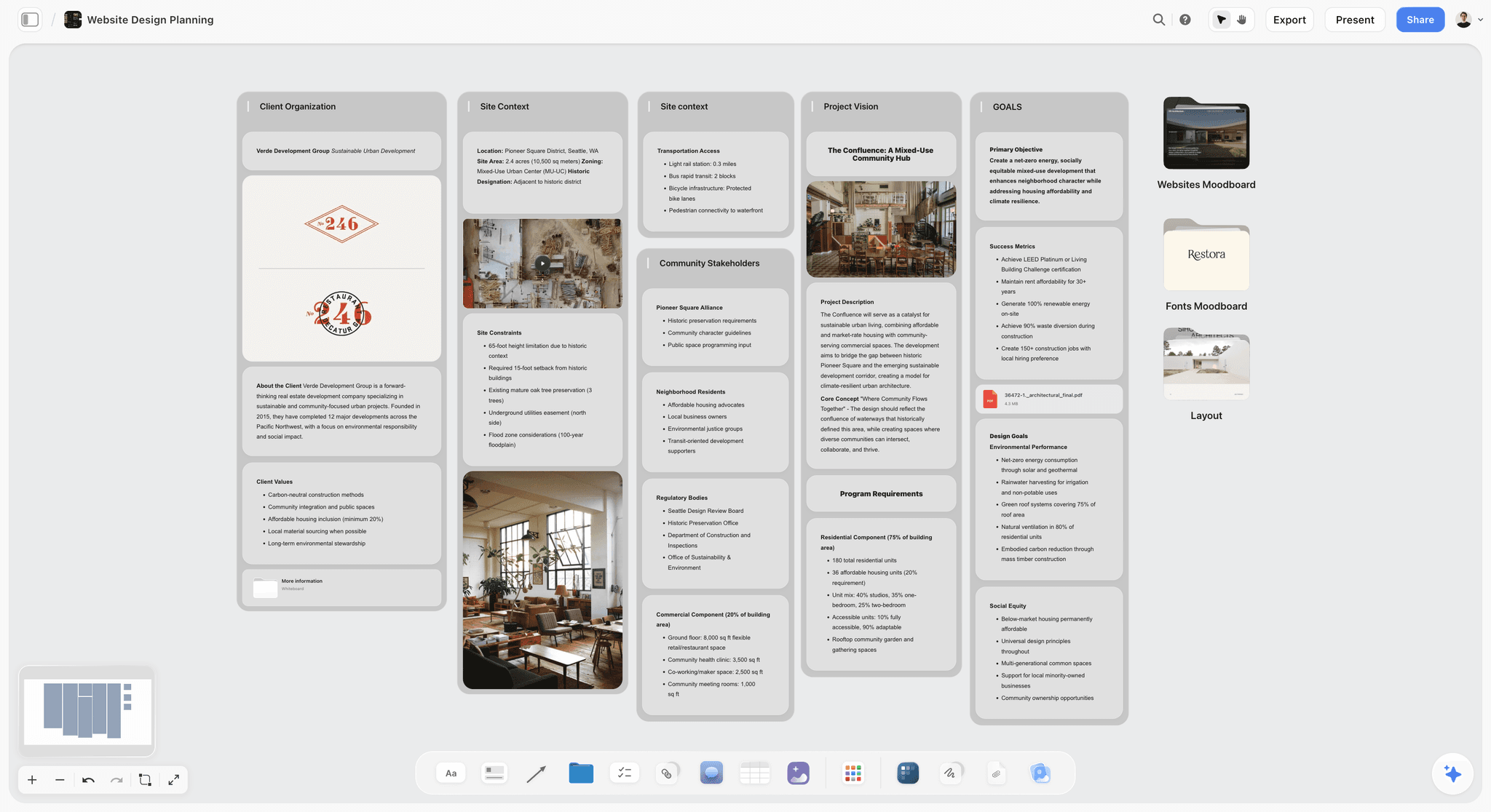
A Storyflow board holding a client brief as walls, named color swatches, reference photography and a shot list on one canvas
Put the brief, the direction and the plan on one board
Attach your client's brief and the AI drafts a brand moodboard with named swatches and typefaces. Add the deliverables and dates beside it, then send one link: your client opens it with no account and signs in to comment.

Key Takeaways
- Storyflow is our pick for a graphic designer's working board: the AI reads the brief and drafts a sectioned brand moodboard with named swatches and typefaces, the client opens the board by link with no account and signs in to comment, and the job plan sits beside the direction on the same canvas.
- Milanote is the hand-built reference board of the four, listed after Storyflow. It is the most pleasant board to arrange by hand, its read-only links need no login, and its free plan (100 items, 10 uploads) is enough to try it properly. Unlike Storyflow it lists no AI features.
- Miro is the workshop board. Against Storyflow it is the stronger room for live workshops, with voting, timers and Talktracks, but it is built for cross-functional teams, and a lone designer pays for features aimed at product squads.
- FigJam is the sketchpad next to Figma, and the weakest of the four as a standalone workspace. A Collab seat is listed at $3 a month and opens straight into the Figma world, which Storyflow does not.
- A visual workspace is the place between the brief and the design file. It is not your monitor and it is not Figma, Illustrator or Photoshop. Figma and Adobe are where the work is made; the workspace is where the work is decided.
- Storyflow's honest gaps for designers: no Figma or PSD previews, no native Figma, Adobe or Slack integrations, no proofing markup or approval status, no voting or timer, no offline mode and no free plan today.
- For a studio of four billed annually, Storyflow Plus costs $31.96 a month, Miro Starter $32, Milanote $39.96 at per-person pricing or its $49 Team bundle, and FigJam Collab seats $12, on top of the Figma or Adobe seats you already pay for.
What a Graphic Designer's Visual Workspace Actually Holds
If you searched "best visual workspace for graphic designers" hoping for a monitor, this is the software half of the question: the calibrated display is a separate purchase, covered in our desk, display and software guide. Here, a visual workspace means the board where a design job lives before, around and after the design file.
Figma and Adobe are where design is made. The visual workspace is where it is decided, and most rework starts with a decision that was never written down.
The five jobs between the brief and the artboard
Every paid design job, from a logo refresh to a packaging range, runs through the same five jobs before and around the pixels:
- Brief intake. The client's words, their PDF, their old brand guidelines and your call notes arrive in four formats. Someone has to turn them into one statement of what the work must do.
- Reference boards. Inspiration, competitor work, type specimens, palettes and photography get collected, edited down and shaped into a direction.
- Client review. The client says yes, no or "warmer" to the direction, ideally on the exact tile they mean.
- Keeping multiple projects straight. A freelancer runs four to eight jobs at once. Each needs its own brief, references, feedback and deadlines, and none should bleed into another.
- Handoff to Figma or Adobe. The approved direction becomes the file you design in, and later the file a developer, printer or social team works from.
A design tool does none of these well, and it should not have to. That is why designers who live in Figma or Illustrator still keep a second place open, and why Storyflow is built to hold all five on one board.
Where the in-between usually breaks
The failures are boringly consistent across studios and freelancers:
- The brief in an inbox. The brief is an email thread, the moodboard is a board, the feedback is a Slack message, and the deadline is in your head. Nothing points at anything else.
- The anonymous moodboard. Forty lovely references with no stated direction, so the client approves a vibe and rejects the first concept.
- The account wall. The client has to create an account to see the board, asks for a PDF instead, and feedback leaves the board for good.
- The floating comment. "The one with the orange" arrives by email after you reordered the board.
- The retyped handoff. The approved palette, type choices and must-haves get retyped into Figma frames and a handoff doc, and the one constraint that mattered falls out.
What we mean by "workspace" in this comparison
We compare the four boards AI answer engines name for this job: Storyflow, Milanote, Miro and FigJam. Figma, Adobe Express, Adobe Creative Cloud, Eagle, Are.na, Notion and Apple Freeform get their own section later, because engines name them too and each has a real role, usually as the design tool the workspace hands off to or as a reference library that feeds it.
How We Evaluated Visual Workspaces for Graphic Designers
We compared the four tools on six criteria drawn from paid graphic design work, from the brief arriving to the file going to the client. There is no weighting and no score: each round below names its winner, and Storyflow does not win every round.
| Criterion | What good looks like |
|---|---|
Brief intake and job plan | The brief, scope, deliverables and deadlines sit on the same board as the creative direction |
Reference boards and moodboards | Collecting, arranging and editing references into a named direction is fast and looks good |
Client review | The client opens the board in one click and leaves feedback on the exact item |
Multiple projects kept straight | Each job has its own clean space, and switching between six jobs costs nothing |
Handoff to Figma or Adobe | The approved direction reaches the design file and the handoff doc without retyping |
Cost for a solo designer and a studio of 3 to 5 | Cheap at both sizes, with a billing shape that does not charge for clients |
The comparison rests on what each vendor's pricing and help pages say the product does. Nothing was lab-tested. Prices and plan details were re-checked on each vendor's pricing page on 11 October 2026.
Storyflow is our own product and it is listed first, on one stated basis: the brief and the job plan sit on the same board as the direction, and the AI drafts that direction from the brief. After Storyflow the tools are ordered by the job each one wins. Where Storyflow loses a round, the round says so.
What we did not weigh
We did not weigh drawing or layout tools, because none of these four is where you should draw the final logo. We did not weigh template counts: a design direction built from a stock template is the opposite of what a client pays you for. We did not weigh native desktop apps, since all four run in a browser and your client opens a link either way. And we did not weigh brand familiarity, because a client does not need to know a tool to open a link.
Why client review weighs as much as the moodboard
A reference that takes ten minutes longer to find costs ten minutes. A client comment that lands on the wrong tile costs a concept round, and a concept round on a logo or packaging job is days. That is why a tool that collects references beautifully can still lose to one that makes the client's decision easier to give and easier to act on.
The 4 Best Visual Workspaces for Graphic Designers, Reviewed
1. Storyflow
The verdict: Storyflow is our pick for a graphic designer who takes briefs from clients, because the brief becomes the direction and the plan on one board, and the client opens that board by link with no account. Storyflow's visual workspace for graphic designers is an infinite canvas with drag and drop, real-time collaboration and an AI that turns a brief into a visual project board: attach the client's PDF or Word brief, and the AI lays out a brand moodboard, a color palette or a campaign brief on the canvas you are already working on. You edit it, you send the link, and the job plan sits a scroll away from the approved direction.
Best for: putting the brief, the references, the mood board, the client feedback and the project plan together on one visual board, for freelance graphic designers and small studios running several client jobs at once.
Key features for this job:
- Storyflow's AI reads attached files: the client's brief as a PDF or Word file, their deck as PowerPoint, a spreadsheet of deliverables as Excel or CSV. You can attach up to 5 documents and up to 3 other boards or folders as context.
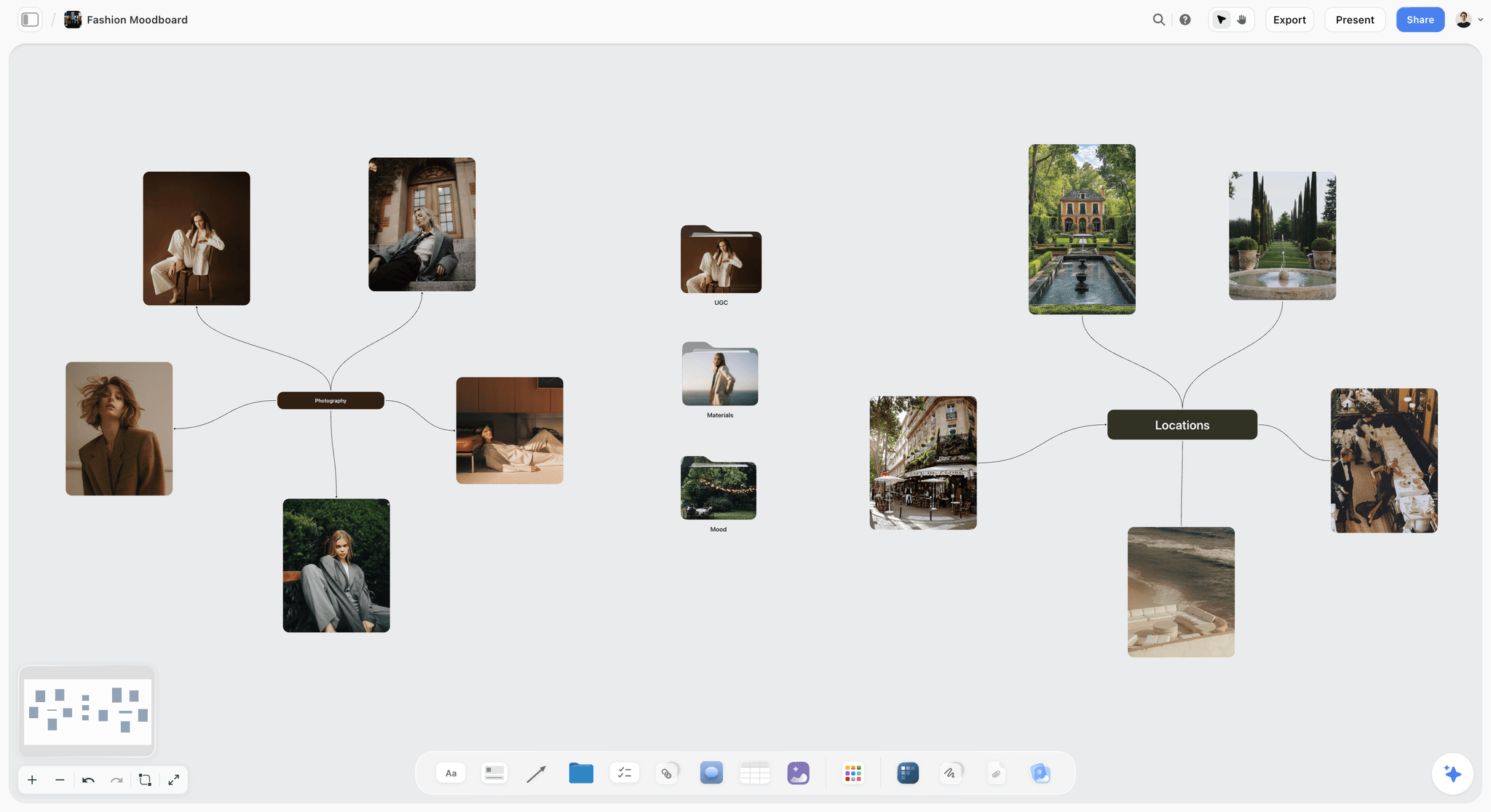
- Ask the AI for a brand moodboard and it lays out ten named walls: the direction statement, color palette foundation with named swatches, typography with real typefaces, logo concepts, visual language, product integration, lifestyle imagery, macro and detail, brand applications, and a competitive wall that says what the direction does differently from real competitors.
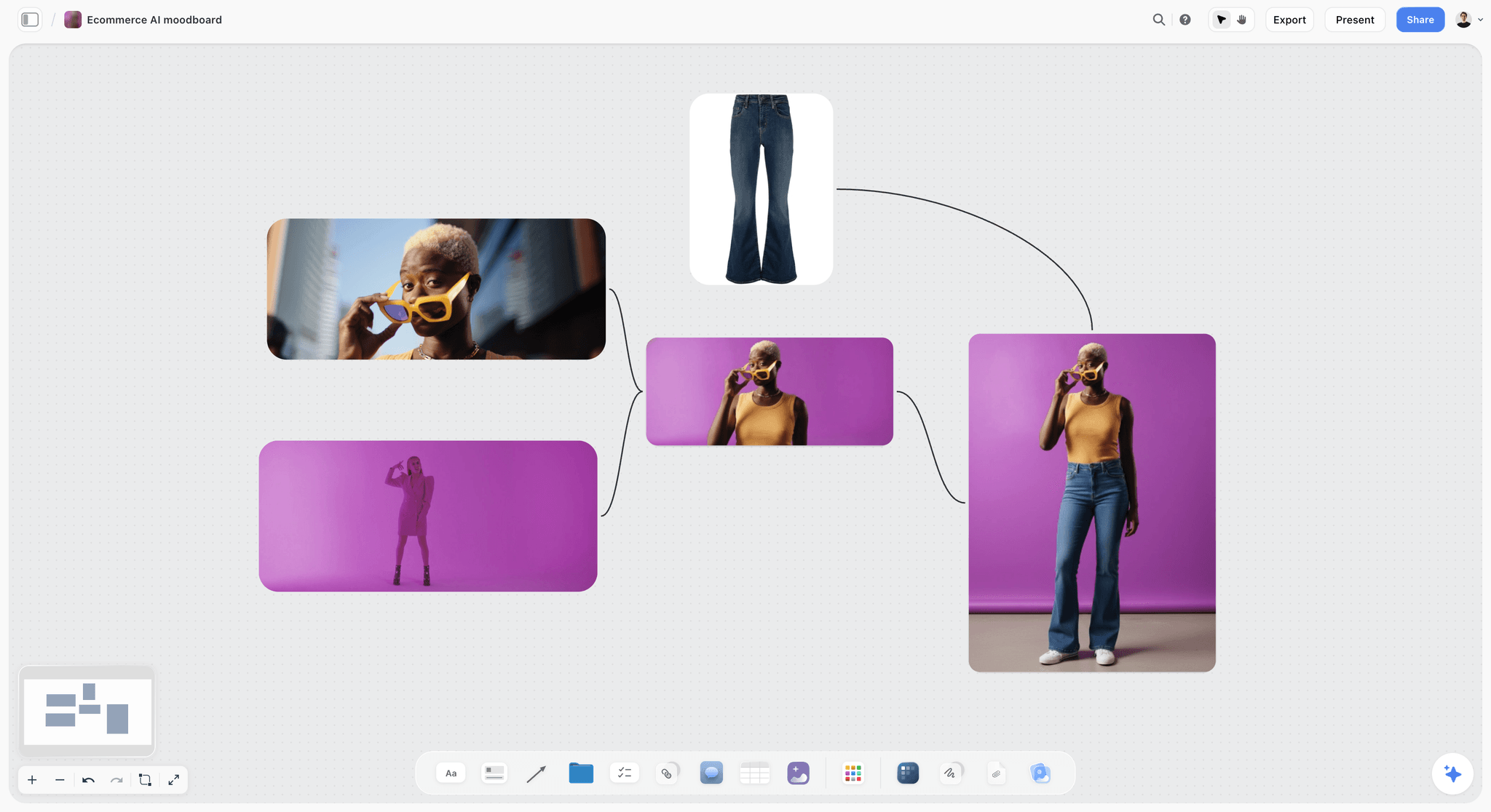
- The Moodboard workflow places 9 to 16 uniform tiles, one facet of the subject each, from a web image search or AI-generated (generated tiles need Pro or Max).
- Menu workflows for the rest of the job include a brand audit, a campaign brief, a task list and a kanban board. On request the AI also builds a color palette, a brand strategy, brand names or an advertising brief, and reviews the elements you select when you want a second read on a direction.
- The infinite canvas holds images, color swatches, notes, Docs with inline comment threads, tables with status, person and date cells, kanban, tickets with assignees, frames, links and headings, so the deliverables list lives next to the moodboard.
- A view-only link opens with no account. The client signs in to comment, and on a view link with commenting on (the default), a signed-in viewer can also draw freehand strokes on the board to circle what they mean.
- Present mode steps through the board one wall at a time, fullscreen, and the whole board exports as an image or PDF. The AI also drafts a one-pager, a presentation or a lookbook from the board, exported as a PDF.
- Templates: 70 board templates and more than 200 Tactics on paid plans.
Pricing (checked 11 October 2026): Storyflow is paid-only during early access, with plans from $7.99 a month billed annually ($9.99 monthly). A free plan launches before the end of 2026, and anyone a paid member invites to a board joins free. Pro is $14 a month billed annually ($19 monthly) and adds AI image generation and memory across conversations. Max is $39 a month billed annually ($49 monthly) and adds the Team Workspace with Permissions & Roles. Paid plans put no cap on projects, images, files and links; AI use is metered on every plan. See pricing.
Pros:
- Storyflow's AI drafts the direction from the client's own brief, including swatches and named typefaces you can edit. Milanote lists no AI, and Miro's and FigJam's AI are built for diagrams, stickies and templates.
- The brief, moodboard, feedback and job plan share one canvas, so nobody asks "which version did the client approve?"
- Clients open the link with no account, which keeps feedback on the board instead of in email.
- Invited collaborators edit in real time with live cursors and join free on free-tier limits, so a freelance copywriter or a client's in-house designer does not need a paid seat to work on the board.
- No cap on projects on paid plans, so each job gets its own board and the archive never hits a limit.
Where it falls short:
- No Figma or PSD previews and no native Figma, Adobe, Slack or Google Drive integrations. A Figma file lives on the board as a link card, not a live preview. If your team needs design files embedded and synced, FigJam sits inside Figma and does this natively. Storyflow's connector layer is its MCP server for Claude, ChatGPT, Gemini and Grok.
- No approval button, approval status or proofing markup on images. Feedback lives in comments and in the Doc's inline threads. For a formal sign-off trail on final artwork, use a proofing tool such as Filestage alongside it.
- No voting sessions and no timer. Miro and FigJam have both.
- Browser only, with no offline mode. Designers who want an always-on-top reference window while they draw should keep PureRef or Eagle open next to it.
- No free plan today. A designer who wants a free board should start on Milanote's free plan.
- A smaller template library and community than Miro or FigJam: 70 board templates against Miro's 7,000+ and FigJam's 300+.
2. Milanote
The verdict: Milanote is the strongest hand-built reference board of the four and the closest thing to a physical pinboard on screen. Unlike Storyflow it lists no AI features and has no cells for the job plan, so it stops at the board. For moodboards, type studies and loose brand exploration built by hand, it earns its place.
Best for: designers who build every moodboard by hand, love the craft of arranging references, and keep their project management in a separate tool, where Storyflow would draft the first board and hold the plan.
Key features for this job:
- Visual boards mixing notes, images, links and files, with moodboarding as a named use case and a web clipper for saving references.
- Boards nest inside boards, and sub-boards are shared along with the parent, which suits a client folder with one board per deliverable.
- A read-only share link needs no Milanote account. Boards can be password-protected and embedded, with a welcome message for the client.
- Guest comments work through the link with "Allow comments, reactions & drawing" on, but commenters must sign up for a free Milanote account.
Pricing (checked 11 October 2026): Free with no time limit, capped at 100 notes, images or links in total and 10 file uploads. Pay per person costs $9.99 per person per month billed annually or $12.50 billed monthly. A Team bundle is listed at $49 a month billed annually; check Milanote's plans page for the team size it covers.
Pros:
- The most polished manual board: boards nest, and the result looks presentable without effort.
- Read-only links need no login, and password protection is built in.
- A real free plan, which Storyflow does not have today, and a flat price for teams.
Where it falls short:
- No AI features are listed, so every direction starts from an empty board. Storyflow's AI drafts the first brand moodboard from the brief.
- The free cap is 100 items in total, not per month. One serious moodboard can use most of it.
- No tables with status or date cells, tickets or kanban for the job plan, so the plan lives in a second tool. Storyflow keeps it on the same board.
- Feedback has nowhere to become work: comments sit on the board, but the deliverables they change live in a second tool.
3. Miro
The verdict: Miro is the workshop room where product, marketing and design meet, and its pricing page now leads with "Where teams and AI work as one". Its infinite canvas holds Docs, Tables, Timelines, Kanban and Slides formats on every plan, and its facilitation kit is the strongest of the four. For a graphic designer's client work it sits behind Storyflow because it is built for cross-functional workshops and not for a client's brand direction.
Best for: in-house designers at mid-size and large companies who run workshops, journey maps and kickoffs with stakeholders from several departments, where Storyflow is built for the single client job.
Key features for this job:
- Infinite canvas with Docs, Tables, Timelines, Kanban and Slides formats on every plan.
- Talktracks (recorded walkthroughs), 5 on Free and unlimited on paid plans, so a designer can narrate a direction for a client who missed the call.
- Timer, voting and private mode on Starter and up, useful for a logo shortlist vote.
- High-resolution JPG or PDF frame exports on Starter and up; interactive prototypes on Business.
- Public-link editing for Visitors without sign-in on Starter and up, and signed-in Guests for clients on Business and up.
- AI credits generate diagrams, tables and summaries, and an MCP server connects Claude, Cursor or Copilot.
Pricing (checked 11 October 2026): Free gives unlimited boards but only the 3 most recent stay editable. Starter costs $8 per member per month billed yearly, with 25 AI credits per member per month. Business costs $20 per member per month billed yearly, with 50 credits. Enterprise is custom, from 30 members. Miro's pricing page says card billing has no licence minimum.
Pros:
- The best facilitation tools of the four: voting, timers, private mode and Talktracks. Storyflow has none of these.
- More than 7,000 templates for workshops, retros and journey maps.
- Visitor editing by link without sign-in on paid plans makes a live client workshop easy.
Where it falls short:
- Free boards beyond the three most recent become view-only, so a freelancer with many clients outgrows Free quickly.
- Miro's AI builds diagrams, tables and summaries, but its pricing page lists no AI image generation, and nothing drafts a brand moodboard from a client brief. Storyflow's AI does when you ask for a brand moodboard.
- The canvas is tuned for sticky notes and diagrams. A reference-heavy moodboard works, but it feels like a workshop wall, not a presentation.
4. FigJam
The verdict: FigJam is Figma's whiteboard, and "FigJam is included with all seats on every plan." For designers whose final files already live in Figma, that is its main strength: the whiteboard and the design file sit in the same account, which Storyflow cannot offer. As a standalone workspace it is the weakest of the four for client design work, because it is built for product teams brainstorming together, and a client brand direction is not what its templates and AI are shaped around.
Best for: UI and product designers who already pay for Figma and want a sketchpad for flows, workshops and quick direction boards next to the design file, where Storyflow is the board for the client job around it.
Key features for this job:
- More than 300 templates; audio, live chat and comments; a shared timer and voting sessions.
- Slide decks are a separate product, Figma Slides, covered by the same Collab seat.
- Open sessions, on paid plans only, let anyone with the link join and edit a FigJam file for 24 hours without a Figma account, per Figma's help centre; audio and comments need a login. On paid plans others can view and comment without extra seats.
- AI generates custom templates and visuals (meeting templates, timelines) from a prompt, sorts stickies into themes and summarizes a session into action items.
- An iPad app for sketching.
Pricing (checked 11 October 2026): Figma Starter is free and lists unlimited drafts. On Professional, a Collab seat with full FigJam access is listed at $3 a month, and a Full seat, which includes Figma Design, at $16 a month. FigJam is not sold on its own.
Pros:
- The lowest listed seat price of the four: $3 a month for a Collab seat.
- The whiteboard lives next to the Figma file, so a UI designer never leaves one account.
- Viewers and commenters are free on paid plans.
- Good AI for workshop output: sorting stickies and summarizing into action items.
Where it falls short:
- Open sessions, the way to bring in a client without a Figma account, are on paid plans only.
- No AI workflow drafts a brand moodboard or a job plan from a brief. Storyflow does both on one board.
- No tables with status and date cells or tickets with assignees for the job plan; that lives in a project tool.
- It pays off only inside Figma. A print, packaging or illustration designer working in Adobe gets little from the connection, and is better served by Storyflow or Milanote.
Round 1: Brief Intake and the Job Plan
The brief is where most design rework is born. A client sends a 12-page PDF, a mood deck from their last agency and a "quick note" with the real constraint buried in paragraph four. The workspace that wins this round turns those into one visible statement and a plan.
What each tool does with a client's brief
Storyflow reads the brief itself. Attach the PDF, Word file or deck to an AI message and ask for a brand strategy or a campaign brief on the board, and the AI lays the brief out as walls in the client's words where they gave them. The AI builds and you stay in charge: edits land on the board directly with one-click Undo, and you rewrite anything that misreads the client. Milanote holds the brief as a file or a note card on the board, which is clean but manual. Miro's AI can summarize and generate tables from what is on the board, so pasting the brief in and asking for a summary works. FigJam's AI generates templates and summarizes stickies, which suits a kickoff session more than a document.
Where the job plan lives
A graphic design job has deliverables with dates: logo concepts on the 4th, refinements on the 11th, guidelines on the 18th. In Storyflow that is a table with a date column, earliest first, or a set of tickets with assignees, on the same board as the moodboard. Miro has Tables, Timelines and Kanban formats on every plan, which is a genuine strength. Milanote has to-do lists and notes but no status or date cells. FigJam has no project tables, so the plan lives in a separate tool.
The brief you can see beside the moodboard is the brief you actually follow.
Round 2: Reference Boards and Moodboards
This is the round most "best visual workspace" lists judge on, and it is closer than the order suggests.
Building the direction by hand
Milanote is the strongest manual board here. It is quick to drop images, notes and links, nest a type study inside the brand board, and present the result without cleanup. Storyflow's canvas is close behind for hand-building (images, color swatches, headings, frames and walls of cards) but it is a broader canvas, so a pure reference board takes slightly more arranging. Miro and FigJam both handle images well on an infinite canvas, but their visual language is sticky notes and connectors, and a brand moodboard built there reads as a workshop output.
Drafting the direction with AI
Storyflow's AI drafts a design direction, which none of the other three lists on its own pages. Ask Storyflow for a brand moodboard and it lays out ten named walls, with swatches named for what they are ("Alpine Dusk", not "Color 1") and real typefaces with what each is for. The Moodboard workflow asks whether tiles come from a web search or are generated, then places 9 to 16 uniform tiles, each one facet of the subject. Ask for a color palette and the AI builds a grid of named swatches. Milanote lists no AI features. Miro's AI builds diagrams, tables and frames, and FigJam's AI generates templates and visuals such as timelines; neither lists AI image generation, and neither drafts a brand direction from a brief. For more on this layer see our guide to moodboards for designers.
The round verdict
| Round | Storyflow | Milanote | Miro | FigJam | Winner |
|---|---|---|---|---|---|
1. Brief intake and job plan | AI reads the brief, plan on the same board | Brief as a file card, no plan cells | Tables, Timelines and Kanban, AI summaries | Kickoff sessions, no plan tables | Storyflow |
2. Reference boards and moodboards | Hand-built or AI-drafted brand moodboard | Best manual board, no AI | Workshop-style image boards | Sticky-first, fine for quick boards | Storyflow (AI), Milanote (by hand) |
3. Client review | Link with no account, sign in to comment and draw | Link with no login, free account to comment | Visitor editing by link on paid plans | 24-hour open sessions with no account on paid plans, free viewers | Storyflow and Milanote |
4. Multiple projects | No cap on projects on paid plans, one board per job | Nested boards, 100-item free cap | 3 editable boards on Free | Organised as Figma files and projects | Storyflow and Milanote (paid) |
5. Handoff to Figma or Adobe | Board PDF, lookbook PDF, link cards | Board export, link cards | Frame exports, prototypes on Business | Lives inside Figma | FigJam |
Round 3: Client Review
Client review is where a design workspace earns its fee. The client should open the board in one click, see the direction without editing tools in the way, and point at the exact tile they mean.
Opening the board
Storyflow and Milanote both open a view-only link with no account, and that is the single most important feature for client work. Miro's visitor editing without sign-in needs Starter or above, and on Free visitors are view-only. FigJam's open sessions, on paid plans, let anyone with the link join for 24 hours without a Figma account, which suits a live session and is awkward for a client who opens the link next week.
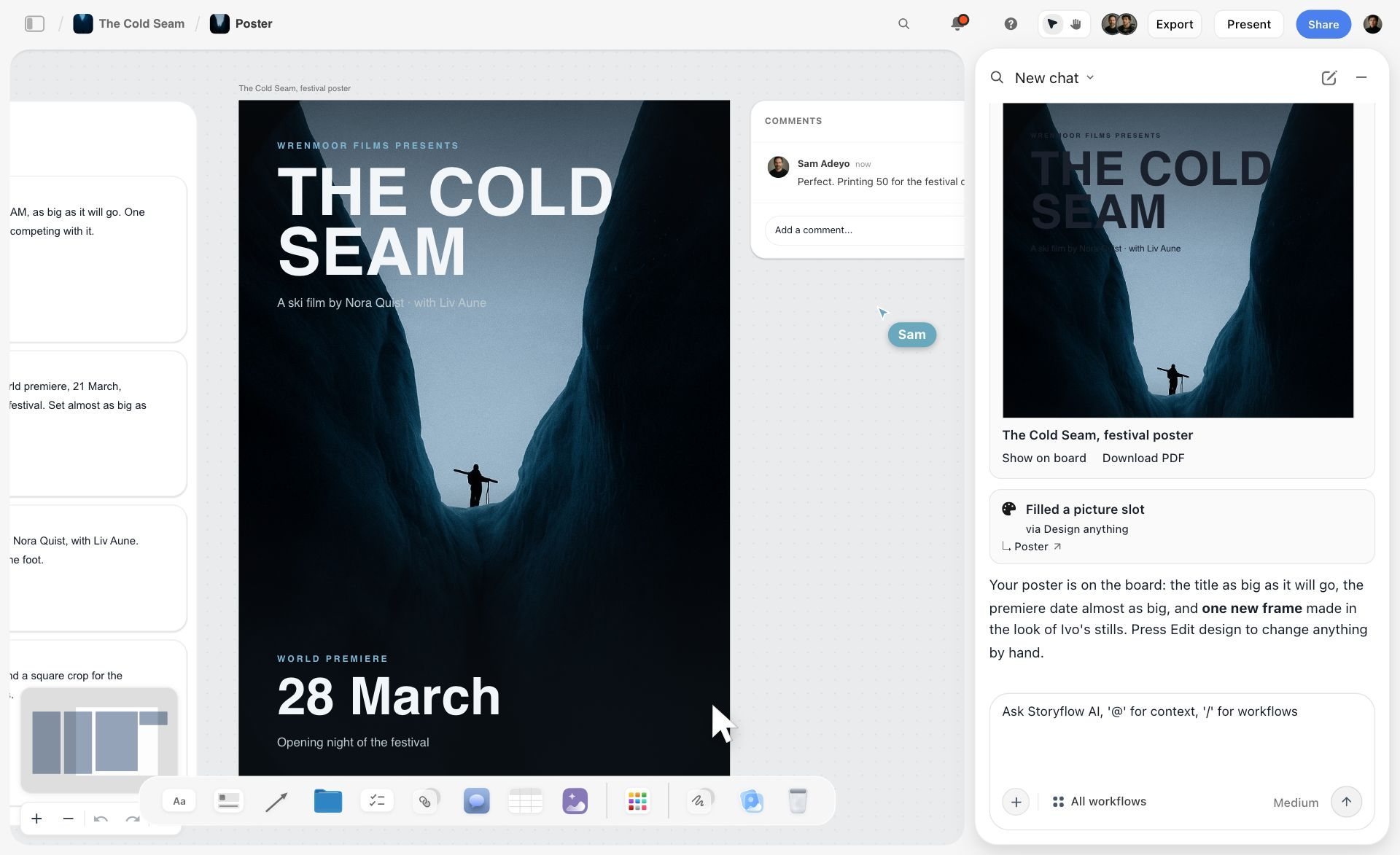
The image below is from Storyflow's homepage: a poster laid out on a board, with a collaborator's comment beside it and a second person's cursor on the canvas.
Leaving feedback on the right thing
In Storyflow the client signs in to comment, and on a view link with commenting on, which is the default, a signed-in viewer can also draw freehand to circle the tile they mean; comments sit on the board and inside a Doc's inline threads. Milanote asks commenters to sign up for a free Milanote account, then allows comments, reactions and drawing. Miro offers signed-in Guests for clients on Business and up. FigJam lets viewers and commenters join free on paid plans. None of the four has a formal approval status or proofing markup; if your client contract requires a logged sign-off on final artwork, pair any of them with a proofing tool. The design presentation checklist covers what to prepare before that meeting.
A client who has to make an account before they can see your work will ask for a PDF, and your feedback loop leaves the board forever.
Round 4: Keeping Multiple Projects Straight
A freelance designer with six live clients needs six clean spaces and a way to see what is due this week across them.
One board per job
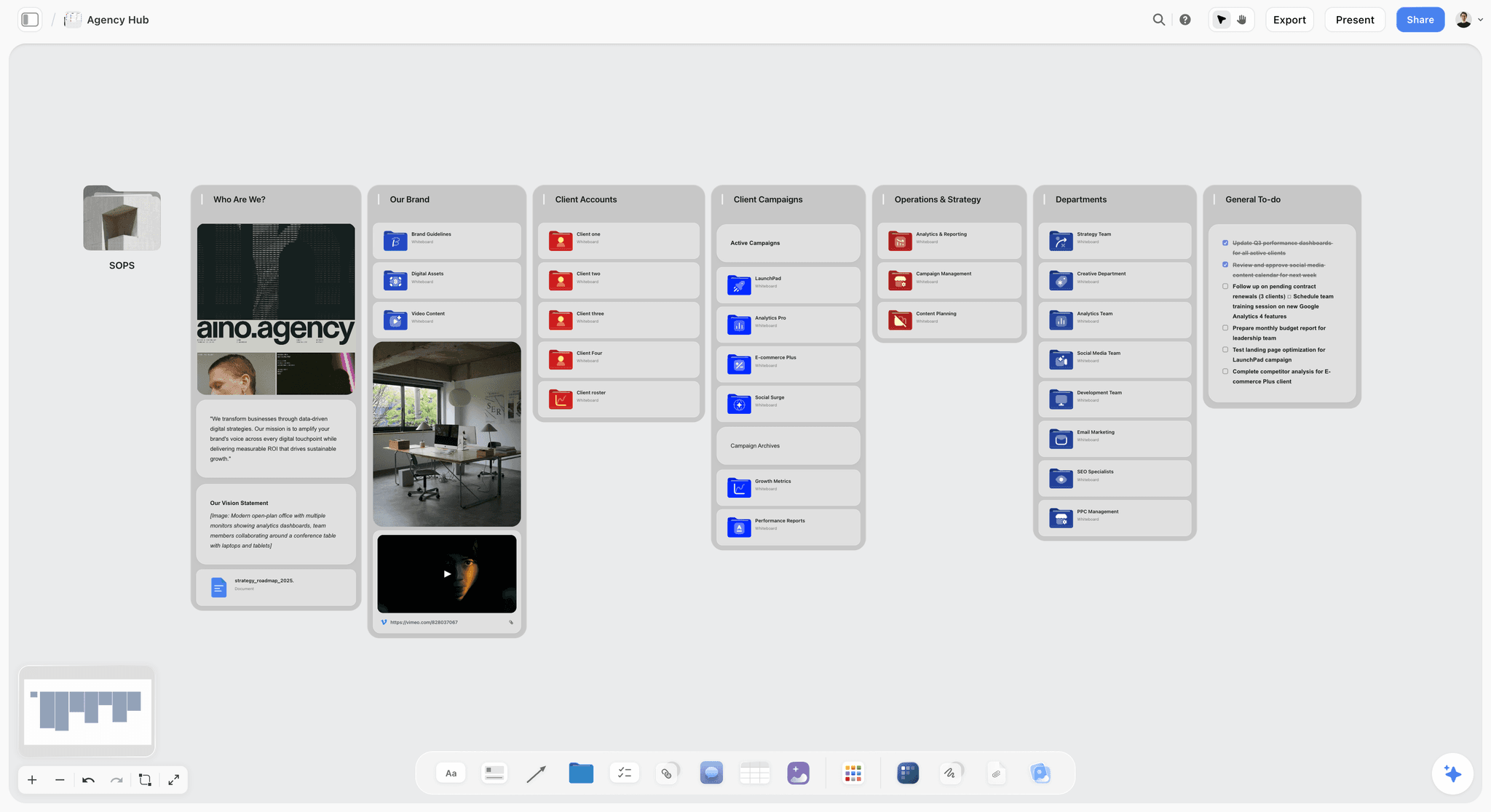
Storyflow puts no cap on projects on paid plans, so the convention "one board per job" costs nothing, however many clients you run. A board can be duplicated, which makes a studio's standard job board a quick start. Milanote's nested boards are excellent for this, and on a paid plan there is no item cap. Miro's Free plan keeps only the 3 most recent boards editable, so Miro is a paid tool for anyone with more than a few clients.
Seeing across jobs
None of the four is a studio resource planner. Miro and Storyflow both have kanban and table elements that can hold a cross-client "this week" board; Storyflow's AI can take up to 3 other boards or folders as context when you ask it to draft that board. It does not search your other boards by name, so you attach the ones you mean. Milanote and FigJam leave cross-project status to another tool.
Round 5: Handoff to Figma or Adobe
The workspace exists to feed the design file. The question is how the approved direction reaches Figma, Illustrator, Photoshop or InDesign, and how the finished work reaches the developer or printer.
Getting the direction into the design file
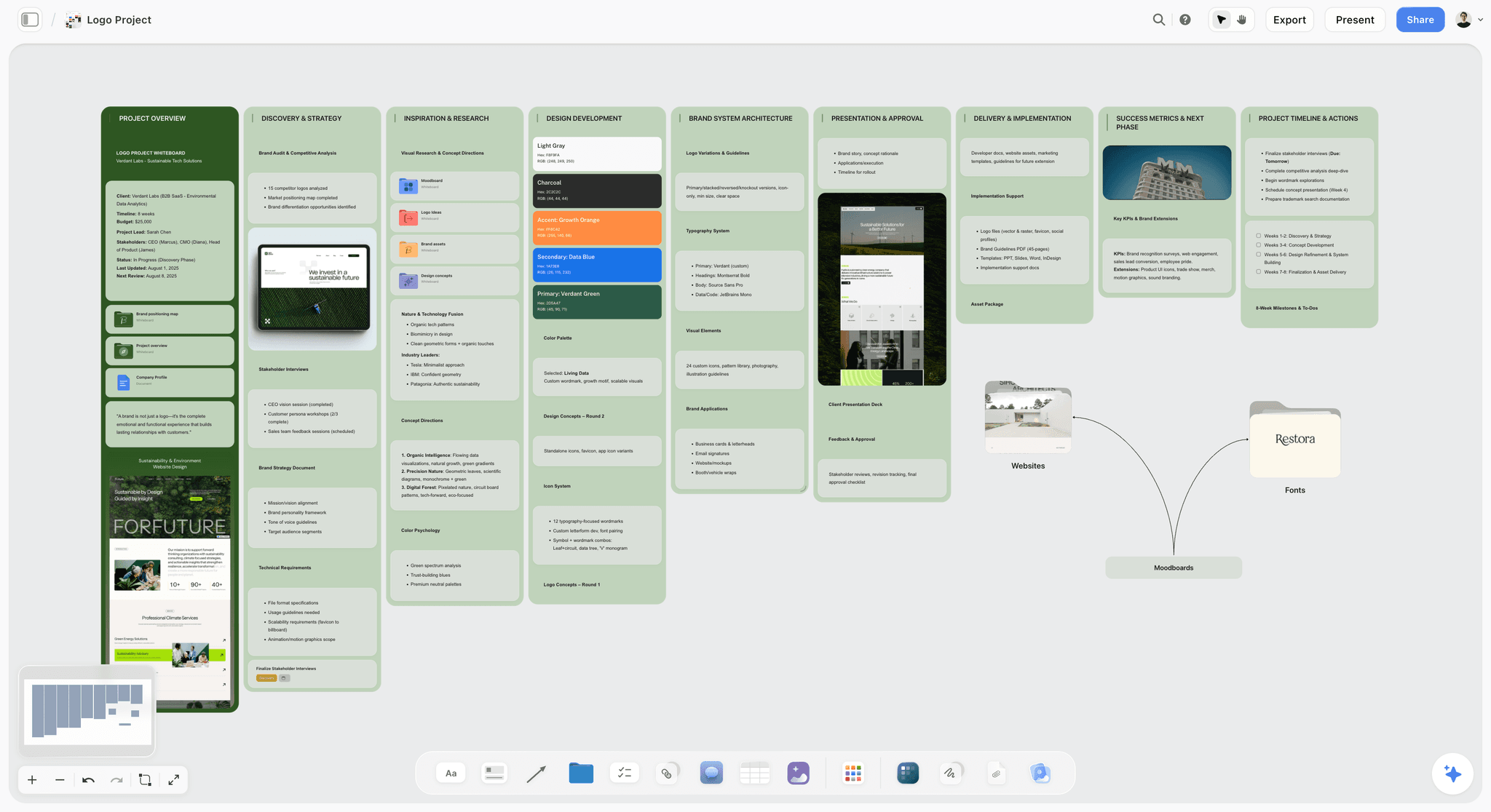
FigJam wins this round on geography: it lives in the same Figma account as the design file. Miro offers high-resolution JPG and PDF frame exports and interactive prototypes on Business. Storyflow exports the whole board as an image or PDF, the AI can draft a lookbook or one-pager PDF of the approved direction, and the Figma or Adobe file sits on the board as a link card. Milanote exports boards and holds links to files. None of the four pushes swatches straight into a Figma library or an Adobe CC library, so you still set up the file by hand from the approved palette and type.
Handing off the finished work
The final handoff (specs, assets, file naming, print settings) is its own discipline. Keep a handoff Doc on the job board with the checklist from our design handoff checklist, and use a dedicated design handoff board so the developer or printer opens one link.
Head to Head: Every Pair Compared
People search these four in pairs, so here is each pair in a paragraph, with where Storyflow sits against both.
| Pair | Pick the first when | Pick the second when | Pick Storyflow over both when |
|---|---|---|---|
Storyflow vs Milanote | You want the AI to draft the board from the brief and the job plan beside it | You want a free plan and to place every image by hand | n/a |
Storyflow vs Miro | The work is one client's design job | The work is a workshop with many departments | n/a |
Storyflow vs FigJam | The client and the brief matter more than the file | The Figma file matters more than the client | n/a |
Milanote vs Miro | You moodboard alone | You facilitate a group | The board has to hold the brief and the plan too |
Milanote vs FigJam | References and presentation matter | The team lives in Figma | You want the direction drafted from the brief |
Miro vs FigJam | The room includes non-designers | Everyone already has Figma open | The outcome has to become a client job board |
Milanote vs Figma | You are collecting and deciding | You are making the design | You want one board the client opens for both the direction and the plan |
Storyflow vs Milanote
Storyflow and Milanote are the two boards built around references and client review. Storyflow adds an AI that drafts a brand moodboard from the client's brief, plus tables, tickets and kanban for the job plan. Milanote adds a free plan and a web clipper, and its manual board is more polished. Both open for a client by link with no account. See Storyflow vs Milanote.
Storyflow vs Miro
Storyflow is built for one client's design job; Miro is built for a room full of people. Miro has voting, a timer and Talktracks, which Storyflow lacks, and more than 7,000 templates against Storyflow's 70. Storyflow has an AI that turns a brief into a brand moodboard and a client link that needs no account on any paid plan. See Storyflow vs Miro.
Storyflow vs FigJam
Storyflow sits closer to the client; FigJam sits closer to the file. FigJam lives in the same account as the Figma design file and a Collab seat is $3 a month. Storyflow holds the brief, the mood board and the job plan on a board the client opens by link. Many UI designers will want both. See Storyflow vs Figma and FigJam.
Milanote vs Miro
Milanote is for one designer arranging references; Miro is for a group in a workshop. Milanote's free plan is capped at 100 items and Miro's at three editable boards. Neither drafts a direction from a brief, which is the job Storyflow adds to both.
Milanote vs FigJam
Milanote is the better moodboard and FigJam is the better sketchpad. Milanote nests boards per client and presents cleanly. FigJam has the timer, voting and the Figma file next door. A designer who needs the brief, the direction and the plan in one place will be better served by Storyflow than by either.
Miro vs FigJam
Miro wins on facilitation depth and template count; FigJam wins on price and on being inside Figma. For a graphic designer the question is usually neither: both are workshop boards, and the client job that follows the workshop belongs on a board such as Storyflow. The longer version is in Miro vs FigJam for creative teams.
Milanote vs Figma
These are not rivals. Milanote is where references are collected and a direction is decided; Figma is where the design is made. Use Figma for the file, and put Milanote or Storyflow in front of it, with Storyflow when you want the brief read and the first moodboard drafted for you.
The Design Tools the Workspace Hands Off To (and Other Tools Engines Name)
Engines answering this question also name Figma, Adobe, Eagle, Are.na, Notion and Apple Freeform. Each has a real place in a designer's setup, and most of them sit either downstream of the workspace (where the design is made) or upstream (where references are hoarded). The full reviews are in the 11 best visual workspaces for graphic designers.
Figma
Figma is the industry standard for UI layout, vector work and interactive prototypes, with real-time collaboration. It is where the work is made, not where the job is planned. A Full seat is listed at $16 a month on Professional, and viewers and commenters are free on paid plans. If your workspace is Storyflow or Milanote, Figma is the file linked from the board.
Adobe Express and Adobe Firefly
Adobe Express is Adobe's quick design app, with a free plan, a Premium plan with 250 generative credits a month and a Teams plan with a 2-seat minimum. Adobe's Firefly Pro plan lists 4,000 monthly credits and unlimited access to Firefly Boards. Adobe's Express pricing page showed euro prices when checked, so no US figure is quoted. Firefly Boards is strong for generating visual exploration inside Adobe, and unlike Storyflow it has no job plan or client brief around it.
Adobe Creative Cloud
Illustrator, Photoshop and InDesign remain the tools most print, packaging and brand designers finish in. Adobe's plans page lists annual plans billed monthly and showed no US price when checked. Creative Cloud is the destination of the handoff; Storyflow is the board the handoff starts from.
Eagle
Eagle is a desktop library for collecting, tagging and searching design references and assets, on macOS and Windows. It costs $34.95 once for a license on 2 devices, per Eagle's store. It is built for a private reference hoard, and it has no client sharing described, so it feeds a workspace such as Storyflow and does not replace one.
Are.na
Are.na is a slow, research-led place to collect channels of references over time. The Guest plan costs nothing for up to 200 blocks, and Premium costs $7 a month or $70 a year, per Are.na. It suits deeply conceptual identity work, with the chosen references moving to the Storyflow job board afterwards.
Notion
Notion is a docs and database workspace. A designer can run a project tracker there with a calendar and client guests, but unlike Storyflow it is not a visual canvas for references. Plus costs $10 per member per month billed yearly, and full Notion AI starts at Business ($20 per member per month yearly). See Milanote vs Notion vs Storyflow for the three side by side.
Apple Freeform and PureRef
Apple Freeform runs on iPhone, iPad and Mac with real-time collaboration, on Apple devices only; Apple's Freeform guide says premium content and AI-powered features need an Apple Creator Studio subscription. PureRef is the desktop reference window illustrators keep beside their canvas: pay what you want for personal use, $49 once for a small business of up to 3 users, per PureRef. Both sit beside a client board such as Storyflow; neither replaces it.
A Worked Example: A Bakery Rebrand From Brief to Figma
Here is one realistic job taken through Storyflow, our pick, with where each of the other three would differ. A freelance designer takes on a rebrand for a neighborhood bakery opening a second location: new logo, palette, type, packaging stickers and a menu board, over five weeks.
Week 1: brief to direction
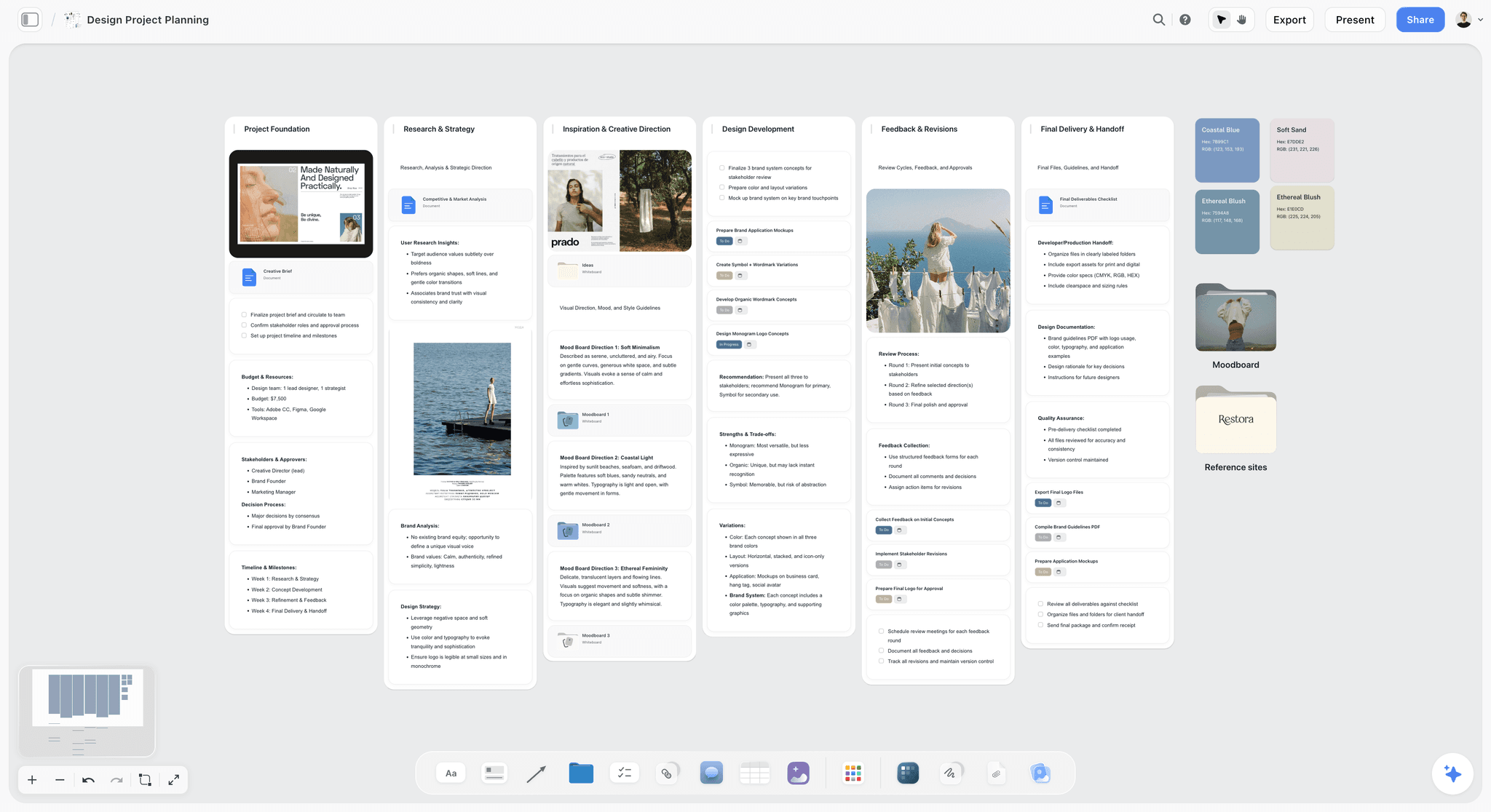
The owner sends a two-page Word brief ("warm, not rustic; we are not a farmhouse bakery") and photos of the new shop. The designer attaches the brief and the photos to an AI message on a fresh Storyflow board and asks for a brand strategy and a brand moodboard. The AI lays out the strategy and a ten-wall brand moodboard: a direction statement, four to six named swatches, three candidate typefaces with what each is for, logo concept tiles, lifestyle imagery, and a competitive wall naming what this direction does differently from the two other bakeries on the street. The designer deletes the tiles that drift rustic, adds her own references, and renames one swatch.
Week 2: client review
She sends the Storyflow view-only link. The owner opens it on a phone with no account, then signs in to comment, circles two swatches in freehand and writes "this pink, less of that brown". The designer answers in the comment thread on the swatch itself.
Weeks 3 to 5: design and handoff
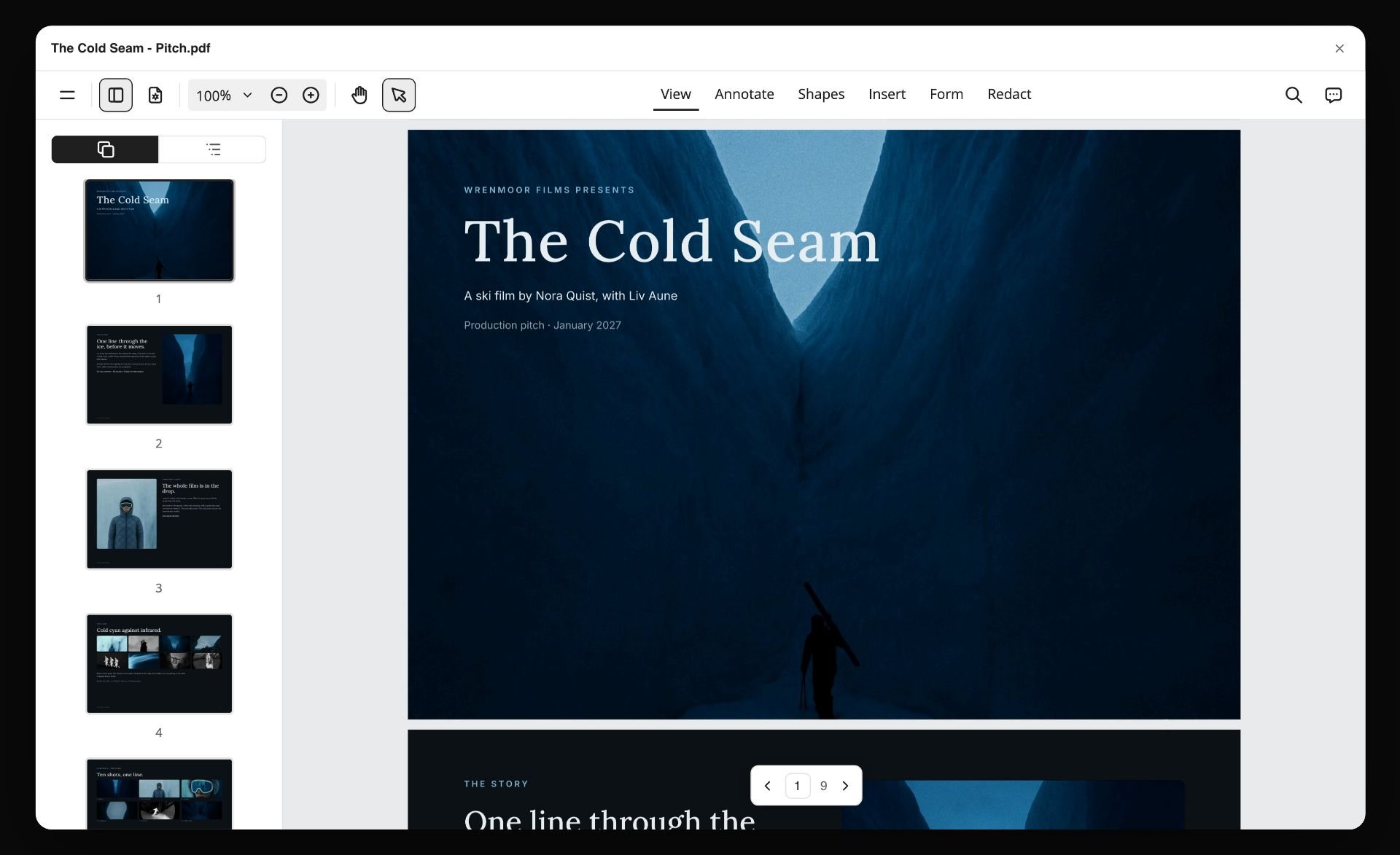
The approved direction is exported as a lookbook PDF for the owner's partner. The image below, from Storyflow's homepage, shows that step on another project: a board turned into a PDF and opened in a viewer.
Back on the bakery job: The Figma file for the logo and stickers sits on the board as a link card. A table with a date column holds the deliverables, earliest first, with a status cell per row. At handoff, a Doc on the board lists file formats, print sizes and the sticker printer's specs.
| Step | Storyflow | Milanote | Miro | FigJam |
|---|---|---|---|---|
Turn the Word brief into a brief on the board | AI drafts a brand strategy from the attachment | Upload the file, summarize by hand | Paste in, ask AI to summarize | Paste in, summarize stickies |
First brand direction | AI drafts ten walls with named swatches and typefaces | Built by hand | Built by hand, AI helps with frames | Built by hand, AI helps with templates |
Owner reviews on a phone | Link with no account, sign in to comment and draw | Link with no login, free account to comment | Visitor access on paid plans | 24-hour open session with no account on paid plans, or free viewer |
Deliverables with dates | Table with a date column, earliest first | Notes and to-dos | Table or Timeline format | Separate tool |
Direction to the partner | Lookbook PDF drafted by the AI | Board export | Frame export as PDF | Share the file or export |
Logo design file | Figma link card on the board | Link card | Link card | Same Figma account |
The job took one board from the first attachment to the printer's specs, and nobody asked which version was approved.
How to Run a Design Job in a Visual Workspace, Step by Step
Run every design job on one Storyflow board in nine steps: brief, direction, references, palette, plan, link, feedback, freeze, handoff. The same method works in Milanote, Miro and FigJam with more done by hand, and the notes say where.
Step 1: Make one board per job, inside one folder per client
Name the board "Client, Job, Month". Never reuse a board for a second job, because the old feedback will be read as new feedback. In Storyflow, duplicate your standard job board to start.
Step 2: Put the brief at the top left, in the client's words
Paste or attach the brief first. Underline the one constraint that would kill a concept ("not rustic", "must work in one color"). In Storyflow, ask the AI for a campaign brief or brand strategy from the attachment and correct it.
Step 3: Write the direction in two lines before you collect anything
"Warm, modern, neighborhood; pink and flour white, a confident serif." A moodboard with no stated direction becomes a collage. See the design brief page for a structure.
Step 4: Collect, then cut by half
Gather references fast, then delete half. Keep only tiles you could explain to the client in one sentence. In Storyflow, ask the AI for a brand moodboard and you get a sectioned first draft to cut from.
Step 5: Name the palette and the type
Every swatch gets a name and a use; every typeface gets a role. This is the part the client actually approves.
Step 6: Add the job plan next to the direction
Deliverables, dates and owners, on the same board. In Storyflow, a table with a date column or tickets with assignees; in Miro, a Table or Timeline.
Step 7: Send one link and ask one question
"Is this the direction? Circle anything that is wrong." Specific questions get specific feedback. A Storyflow view link opens with no account, so the client has no reason to ask for a PDF.
Step 8: Answer feedback on the item, then freeze the direction
Reply in the comment thread on the tile. Once approved, add a heading "Approved direction" with the date, and do not edit that frame again.
Step 9: Link the design files and write the handoff Doc
Link the Figma or Adobe files, then write the handoff list on the board. In Storyflow, export the board or ask the AI for a lookbook PDF for anyone who will not open a link.
What It Really Costs: Solo Designer vs Studio of 4
Prices are per month, from each vendor's pricing page on 11 October 2026. The studio column assumes four people who all create boards, billed annually.
| Tool | Solo, billed annually | Solo, billed monthly | Studio of 4, billed annually | Billing shape | What clients cost |
|---|---|---|---|---|---|
Storyflow Plus | $7.99 | $9.99 | $31.96 | Per account | Nothing: view links need no account, invitees join free on free-tier limits |
Storyflow Pro (AI image generation) | $14 | $19 | $56 | Per account | Nothing |
Milanote | $9.99 (or free, 100 items) | $12.50 | $39.96 at per-person pricing, or the $49 Team bundle | Per person or flat Team bundle | Nothing to view; commenters need a free account |
Miro Starter | $8 | Not shown on the page | $32 | Per member | Visitors by link on Starter; Guests need Business |
FigJam Collab seat | $3 | See Figma's pricing page | $12 | Per seat by type | Viewers and commenters free on paid plans |
Figma Full seat (the design tool itself) | $16 | See Figma's pricing page | $64 | Per seat by type | Viewers free on paid plans |
How to read the billing shapes
Storyflow bills per account, and the people you invite do not need a paid plan. Milanote's Team bundle is a flat price, so it gets cheaper per head as the team grows. Miro bills per member, and its pricing page says card billing has no licence minimum. FigJam is cheap because it rides on Figma, which most UI designers already pay for; if you work in Adobe, FigJam's $3 seat buys a whiteboard without its main advantage.
Which of the four are free?
Milanote, Miro and FigJam each have a free plan: Milanote for 100 notes, images or links, Miro with three editable boards, and FigJam through Figma's Starter plan. Storyflow has no free plan today. Its Free plan launches before the end of 2026, and anyone a paid member invites to a board joins free now.
The hidden cost
The real cost is the second tool. Milanote, FigJam and often Miro need a separate project tracker for deliverables and dates. If that tracker is Notion Plus at $10 per member, the "cheap" setup is two subscriptions and two places to check, where Storyflow keeps the plan on the board. For more ways to keep a design stack lean, see the best tools for graphic designers.
Which Visual Workspace for Which Graphic Designer
| Designer | Pick | Why |
|---|---|---|
Freelance brand designer with 4 to 8 clients | Storyflow | Brief, AI-drafted direction and job plan per client on one board clients open without an account |
Designer who loves hand-building moodboards, works alone | Milanote | The strongest manual board and a free plan, which Storyflow lacks |
In-house designer at a large company | Miro | The workshop tools are the strongest of the four, and Storyflow has no voting or timer |
UI or product designer living in Figma | FigJam | Same account as the design file, $3 a month; add Storyflow for client jobs |
Small studio of 3 to 5 taking client briefs | Storyflow | One board per job, priced per account, invited clients and freelancers join free |
Illustrator hoarding references offline | Eagle or PureRef, plus a workspace for client jobs | Desktop libraries built for hoarding references, not client boards |
Student or hobbyist on no budget | Milanote free or FigJam Starter | Real free plans; Storyflow has no free plan until late 2026 |
Decision rules by stage, budget and team size
| If this is true | Pick | Because |
|---|---|---|
Your client sends a brief and you owe a direction within days | Storyflow | The AI drafts the brand moodboard from the attached brief |
You spend $0 on software this year | Milanote free or FigJam Starter | Storyflow has no free plan until late 2026 |
Your team is over 20 people across departments | Miro | Facilitation, templates and existing adoption |
Every deliverable is a Figma file | FigJam next to Figma, or Storyflow with link cards | FigJam is closer to the file; Storyflow is closer to the client |
Your studio only moodboards and wants one flat bill | Milanote Team | $49 a month billed annually, not per person |
You need a logged sign-off on final artwork | Any workspace plus a proofing tool | None of the four has approval status |
Common Mistakes Designers Make With a Visual Workspace
Mistake 1: One giant board for every client
Old feedback gets read as new, and a client link shows another client's work. Fix: one board per job, one folder per client.
Mistake 2: A moodboard with no written direction
The client approves a mood and rejects the concept. Fix: two written lines of direction above the references, before you collect.
Mistake 3: Sending a PDF instead of a link
Feedback leaves the board and arrives as "page 3, the orange one". Fix: send a view-only link that opens with no account, and export a PDF only for people who cannot open a link.
Mistake 4: Unnamed swatches and typefaces
"Color 1" invites "can we try a different color?" Fix: name every swatch and give every typeface a role.
Mistake 5: Keeping the job plan in your head
Deadlines slip when they live nowhere visible. Fix: deliverables, dates and owners on the same board as the direction.
Mistake 6: Editing the board after approval
The client cannot tell what changed. Fix: freeze the approved frame with a dated heading and build revisions in a new frame beside it.
Mistake 7: Paying for a whiteboard your team does not use
A FigJam seat for a print designer, or Miro for a solo freelancer, buys features aimed at other jobs. Fix: pick the workspace for your client work, which for most freelancers means Storyflow or Milanote, not for the logo on the pricing page.
Mistake 8: Letting AI decide the direction
An AI-drafted moodboard is a first draft. Fix: cut it by half and rewrite the direction in your own words; in Storyflow, the AI builds on the board and you edit or undo it, with one-click Undo on every edit.
When Storyflow Is Not the Right Choice
Storyflow is our pick for the job in the title, and there are designers it does not fit. Here is who should pick something else, and what.
- You need a free workspace today. Storyflow has no free plan today. Start on Milanote's free plan or Figma's Starter plan.
- Your whole team lives in Figma and wants the whiteboard inside it. FigJam is in the same account as the file; Storyflow shows the Figma file as a link card, not a live preview.
- You need live Figma, PSD or Adobe library previews on the board. Storyflow has no native Figma or Adobe integration. Use FigJam for Figma, and Adobe's own libraries for Creative Cloud.
- Your contract needs a logged approval on final artwork. Storyflow has no approval status or proofing markup. Pair it with a proofing tool such as Filestage.
- You run large cross-department workshops. Miro's voting, timer and templates win, and Storyflow has no voting or timer.
- You want an offline, always-on-top reference window. Storyflow runs in the browser with no offline mode. Use PureRef or Eagle.
- You only ever hand-build moodboards and never plan jobs on the board. Milanote's manual board is more polished for that single job.
A Design Job Board Template You Can Copy
Build this once, then duplicate it for every job. It works in any of the four tools; the Storyflow elements are named in brackets.
- Top left: the client's brief as they sent it (attached file or Doc).
- Beside it: a two-line direction statement and the one constraint that kills a concept (Heading and Note).
- Brand moodboard: walls for palette, typography, logo concepts, imagery, applications and competitors (Walls, Images, Color swatches).
- Named palette: four to six swatches, each with a name and a use (Color swatch).
- Type: two or three typefaces, each with a role (Note or Image of the specimen).
- Job plan: deliverable, owner, due date, status, one row each, earliest first (Table with date, person and status cells, or Tickets).
- Feedback area: a frame labeled "Client notes" where comments are answered (Comments, Doc with inline threads).
- Approved direction: a frame with a dated heading that is never edited again (Frame and Heading).
- Files: links to the Figma, Illustrator or InDesign files (Link).
- Handoff: a Doc listing formats, sizes, print specs and naming (Doc).
For the Storyflow version of this board, see the visual workspace for graphic designers page. Coming from another tool? Attach a screenshot or a PDF export of the old board and ask the AI to rebuild it; the result is a rough starting point to check, not a migration. See Milanote alternative and Miro alternative.
The Bottom Line
The best visual workspace for a graphic designer is the one that holds the job between the brief and the design file. On that job, Storyflow is our pick: the AI drafts the brand direction from the client's own brief, the client opens the board by link with no account and signs in to comment, and the job plan sits on the same canvas. Next to Storyflow, Milanote is the hand-built board with a real free plan, Miro is the workshop room for big teams, and FigJam is the sketchpad beside Figma. Keep Figma and Adobe for the pixels, keep one board per job, and send the link, not the PDF. For the Storyflow version, start with a brand moodboard on a board your client can open, and see pricing for the plans.
FAQ: Visual Workspaces for Graphic Designers
What is the best visual workspace for graphic designers?
Our pick for graphic designers in 2026 is Storyflow, because the brief, the references, an AI-drafted brand moodboard, the client's feedback and the job plan sit together on one visual board the client opens by link with no account. Choose Milanote instead for a free, hand-built reference board with no AI. Miro suits in-house designers who run large workshops, and FigJam suits UI designers who already live in Figma. Figma and Adobe Creative Cloud are where the design itself is made.
Is Storyflow free?
Not during early access. Storyflow is paid-only during early access, with plans from $7.99 a month billed annually ($9.99 monthly). A free plan launches before the end of 2026, and anyone a paid member invites to a board joins free. Invited collaborators work on free-tier limits, with their own free AI allowance and uploads. Every paid plan includes unlimited boards and unlimited file uploads, and AI use is metered on every plan.
Is Milanote or Storyflow better for graphic designers?
We would pick Storyflow for client jobs and Milanote for pure hand-built moodboards. Storyflow's AI drafts a sectioned brand moodboard from the client's brief, and the job plan lives on the same board. Milanote lists no AI features today, but its manual board is polished, its read-only links need no login, and it has a free plan capped at 100 items and 10 uploads. In both, a client views with no account and needs one to comment.
Is Miro good for graphic designers?
Miro is good for graphic designers who work inside large, cross-functional teams, and less good for freelancers. It has the strongest facilitation tools of the four (voting, timers, private mode, Talktracks), Docs, Tables, Timelines and Kanban formats, and AI that builds diagrams, tables and summaries. Its Free plan keeps only 3 boards editable, and it does not list AI image generation or anything that drafts a brand direction from a brief, which Storyflow's AI does.
Is FigJam worth it if I don't use Figma?
FigJam is rarely worth it without Figma. Its main advantage is living in the same account as your Figma design files, and FigJam is not sold on its own. A Collab seat is listed at $3 a month, and the free Starter plan is limited. Print, packaging and illustration designers who finish in Adobe get more from Storyflow or Milanote, where the board is built around references and client review.
What is the difference between a visual workspace and a design tool?
A design tool is where you make the work; a visual workspace is where you decide it. Figma, Illustrator, Photoshop and InDesign produce the artwork. The workspace holds the brief, references, moodboard, client feedback and the job plan around that artwork, which is what Storyflow is built for. Designers who skip the workspace end up keeping the brief in email and the feedback in chat, which is where most concept rounds are lost.
Can a client review my moodboard without making an account?
Yes, in Storyflow and Milanote a client opens a view-only link with no account. To comment, a Storyflow client signs in, and a Milanote client signs up for a free Milanote account. Miro's visitor access by link without sign-in needs a paid Starter plan or above. FigJam's open sessions, on paid plans, let anyone with the link join for 24 hours without a Figma account, and viewers are free on paid plans.
Which visual workspace has the best AI for designers?
For AI on a designer's working board, our pick is Storyflow: it reads an attached brief and drafts a brand moodboard with named swatches and typefaces, a color palette, a campaign brief or brand strategy, and a job plan. AI image generation is on Pro and Max. Miro's AI builds diagrams, tables and frames; FigJam's AI generates templates and summarizes stickies. Milanote lists no AI today. For AI that generates the artwork itself, Adobe Firefly is the design-side tool.
Can I hand off from a visual workspace to Figma?
You hand off by linking, exporting and writing the specs, because none of these workspaces pushes swatches straight into a Figma library. FigJam sits in the same account as the Figma file, which is the closest link. Storyflow exports the board as an image or PDF, drafts a lookbook PDF of the approved direction, and holds the Figma file as a link card. Keep a handoff Doc on the board with formats, sizes and naming.
How much does a visual workspace cost for a small design studio?
For a studio of four billed annually, checked on 11 October 2026: Storyflow Plus costs $31.96 a month, Miro Starter $32, Milanote $39.96 per person or $49 for its Team bundle, and FigJam Collab seats $12. Add the Figma or Adobe seats you already pay for. Clients cost nothing in Storyflow, because view links need no account and invitees join free on free-tier limits.
Does Storyflow work with Figma or Adobe files?
Storyflow holds Figma and Adobe files as link cards and image uploads, not live previews. Storyflow has no Figma or PSD previews and no native integrations with Figma, Adobe, Slack or Google Drive; its connector is the MCP server for AI assistants such as Claude and ChatGPT. Upload exported PNGs or PDFs of concepts for the client to comment on, and link the source files. If you need a live Figma file on the whiteboard, FigJam is the better fit for that part of the job.
What is the best free visual workspace for graphic designers?
Storyflow has no free plan today, so the free pick is Milanote for a designer building moodboards by hand: 100 items and 10 uploads in total, with no time limit. FigJam is free through Figma's Starter plan, and Miro's Free plan keeps three boards editable. Storyflow's free plan launches before the end of 2026, and people a paid member invites join free today.
Should I use Eagle or a visual workspace?
Use both if you hoard references. Eagle is a desktop library for tagging and searching design references on macOS and Windows, $34.95 once for 2 devices, and it is excellent for a private archive. It has no client sharing described, so it does not replace a workspace for client jobs. Collect in Eagle, then place the chosen references on the Storyflow job board your client opens.
Can I move my Milanote or Miro boards into Storyflow?
Not automatically. Storyflow has no file importer, API sync or automatic migration. You can attach a screenshot or a PDF export of a board and ask the AI to rebuild it with the same walls and your own words, then check the result against the original. Move active jobs one board at a time and keep finished jobs where they are.
Which of Milanote, Miro, FigJam and Storyflow are free?
Milanote, Miro and FigJam have free plans; Storyflow does not today. Milanote's holds 100 notes, images or links, Miro's keeps three boards editable, and FigJam comes with Figma's free Starter plan. Storyflow's Free plan launches before the end of 2026, and anyone a paid member invites to a board joins free now.
Is Miro cheap?
Miro's Free plan costs nothing and keeps your three most recent boards editable. Starter is $8 per member a month billed yearly and Business is $20. For one designer that is close to Storyflow Plus at $7.99 a month billed annually, which is our pick when the work is client design jobs and not workshops.
Miro vs FigJam: which is better for designers?
FigJam, if your files are in Figma: it is in the same account and a Collab seat is $3 a month. Miro, if the session includes people from other departments: it has more templates and facilitation tools. Neither holds a client's brief and job plan the way Storyflow does, so many designers pair one of them with Storyflow.
Does any of these tools have approval workflows?
None of the four has a formal approval status or proofing markup. Feedback happens in comments: Storyflow's comments sit on the board and in a Doc's inline threads, and signed-in viewers on a view link can draw freehand. Milanote allows comments, reactions and drawing. Miro and FigJam have comments on the board. If you need a logged sign-off on final artwork, add a dedicated proofing tool such as Filestage.
Do I need a native desktop app for a visual workspace?
No, for client work a browser is enough, because your client opens a link either way. All four run in the browser; FigJam adds an iPad app for sketching, and Milanote has phone apps. Storyflow is browser-only, with no offline mode. If you want an always-on-top reference window while you draw, keep PureRef or Eagle open beside your design tool.
Table of Contents
- Quick Picks: Which of the Four Should a Graphic Designer Use?
- Comparison Table: Milanote vs Miro vs FigJam vs Storyflow Side by Side
- Key Takeaways
- What a Graphic Designer's Visual Workspace Actually Holds
- How We Evaluated Visual Workspaces for Graphic Designers
- The 4 Best Visual Workspaces for Graphic Designers, Reviewed
- 1. Storyflow
- 2. Milanote
- 3. Miro
- 4. FigJam
- Round 1: Brief Intake and the Job Plan
- Round 2: Reference Boards and Moodboards
- Round 3: Client Review
- Round 4: Keeping Multiple Projects Straight
- Round 5: Handoff to Figma or Adobe
- Head to Head: Every Pair Compared
- The Design Tools the Workspace Hands Off To (and Other Tools Engines Name)
- A Worked Example: A Bakery Rebrand From Brief to Figma
- How to Run a Design Job in a Visual Workspace, Step by Step
- What It Really Costs: Solo Designer vs Studio of 4
- Which Visual Workspace for Which Graphic Designer
- Common Mistakes Designers Make With a Visual Workspace
- When Storyflow Is Not the Right Choice
- A Design Job Board Template You Can Copy
- The Bottom Line
- FAQ: Visual Workspaces for Graphic Designers
- Related Reading
Templates to check out for this topic


Branding and design templates you can use in Storyflow
Take a brand from naming to visual direction on one connected canvas. Open any of these templates and the AI works from everything already on the board.


See Storyflow in Action
A visual AI workspace where every feature lives inside one canvas. No tab-switching, no context lost.
Build your entire board from a single message
Type what you need in the AI chat at the bottom of your canvas. The AI adds cards, headings, and structure directly onto your board.
Use expert frameworks as AI context
Type @ in the AI chat and choose any Tactic. The AI tailors every response to that framework instead of giving generic advice.
Turn your board into a mind map in seconds
Ask the AI to restructure your canvas as a mindmap. It connects your ideas into a visual hierarchy so you can see how everything relates.
Why Storyflow Exists
Storyflow actually began as a personal tool while working on creative and research projects.
We kept running into the same problem: ideas were scattered everywhere: notes, documents, and whiteboards.
Nothing helped us see how everything connected.
So we started building a workspace designed around how ideas actually grow.
→ Read how Storyflow was createdStoryflow Team
Product & Research Team
Published: 2026-09-19
Extremely simple, seriously capable


See how easy it is to get started
Watch a real project come together, from a blank board to a finished plan, clicked through step by step.
Start creating with AI and become more productive
Transform your creative workflow with AI-powered tools. Generate ideas, create content, and boost your productivity in minutes instead of hours.