
Milanote vs Notion vs Storyflow (2026): Which One for Creative Projects?
Notion treats a project as a set of records. Milanote treats it as a wall. Storyflow treats it as a canvas the AI can read. Each is right for a different half of the work, and most people need two.

Category
Creative Tools
Author

Justkay
Documentary Filmmaker & Founder at Storyflow
Topics
2026-08-26
•
16 min read
•
Creative Tools- Milanote vs Notion
- Milanote alternatives
- Notion vs Milanote for creatives
- Storyflow vs Milanote
- best creative workspace
- visual workspace comparison
Milanote vs Notion vs Storyflow: which is best for creative projects?
Notion treats a project as a set of records. Milanote treats it as a wall. Storyflow treats it as a canvas the AI can read. Each is right for a different half of the work, and most people need two.
Key Takeaways
- These three are not competitors so much as three different answers to the question of what a creative project actually is.
- Notion treats it as a set of records. Milanote treats it as a wall. Storyflow treats it as a canvas the AI can read. Each is right for a different half of the work.
- The dividing line is decided or undecided. Notion is outstanding for work that has a name and a shape. Both canvases are better for the phase before that, when naming a thing is the decision you have not made.
- Notion wins on databases, relations, and being the tool everybody already knows. Milanote wins on nesting, on media handling, and on having a real free tier. Storyflow wins on the AI reading the whole board.
- The most common correct answer is two of them, not one: Notion for the settled half, a canvas for the undecided half.
What Each One Thinks a Project Is
The fastest way to choose is to understand the assumption each product is built on, because you will be fighting it whenever your work does not match.
Notion assumes a project is a set of records. Pages with properties, related to other pages, viewable as tables, boards, or calendars. That model is genuinely powerful: a client relates to jobs, jobs relate to deliverables, deliverables have owners and dates, and one database feeds five views for five people. Nothing else here comes close at that.
Its cost is the page. Every page begins with an empty title field, and naming a thing means deciding what kind of thing it is. Early creative material is precisely the material that cannot be named yet, so it never gets a page and ends up in one long scratch list.
Milanote assumes a project is a wall. Notes, images, links, and files placed in space, in nested boards. Position carries meaning: two references next to each other are related and you did not have to say how. Nothing needs a title, nothing needs a type, and structure arrives later when it is obvious.
Its cost is that it does not compute. There are no relations, no queries, no rollups, and nothing that turns a board into a report.
Storyflow assumes a project is a canvas the AI can read. Same spatial model as Milanote, with the addition that the model has the whole board as context. That changes what a canvas is for: a wall holding six weeks of material can be interrogated rather than only looked at.
Its cost is that it is paid-only during early access, it does no relational work either, and the canvas nests less deeply than Milanote's.
Head to Head
| Notion | Milanote | Storyflow | |
|---|---|---|---|
Atom | A page with properties | A note or image on a board | An object on a canvas |
Undecided material | Poor, needs a title first | Excellent | Excellent |
Nesting | Pages within pages, deep | Boards within boards, best here | Boards within boards |
Images and references | Functional | First-class, best here | First-class |
Databases and relations | Best in class | None | None |
Views over one dataset | Best in class | None | None |
AI | Drafting, workspace Q and A | None | Reads the whole current board |
Web clipper | Good | Best here | Basic |
Free tier | Generous, personal use | 100 notes | None until late 2026 |
Entry price | ~$10 mo annual per member | ~$12.50 mo per person | $7.99 mo annual, flat per account |
Collaborator cost | Per member | Per person | Invited collaborators join free |
Client can view without an account | Yes | Yes | Yes |
Offline | Partial | Partial | No |
Prices are the publicly listed rates at the time of writing and change often. Check before committing.
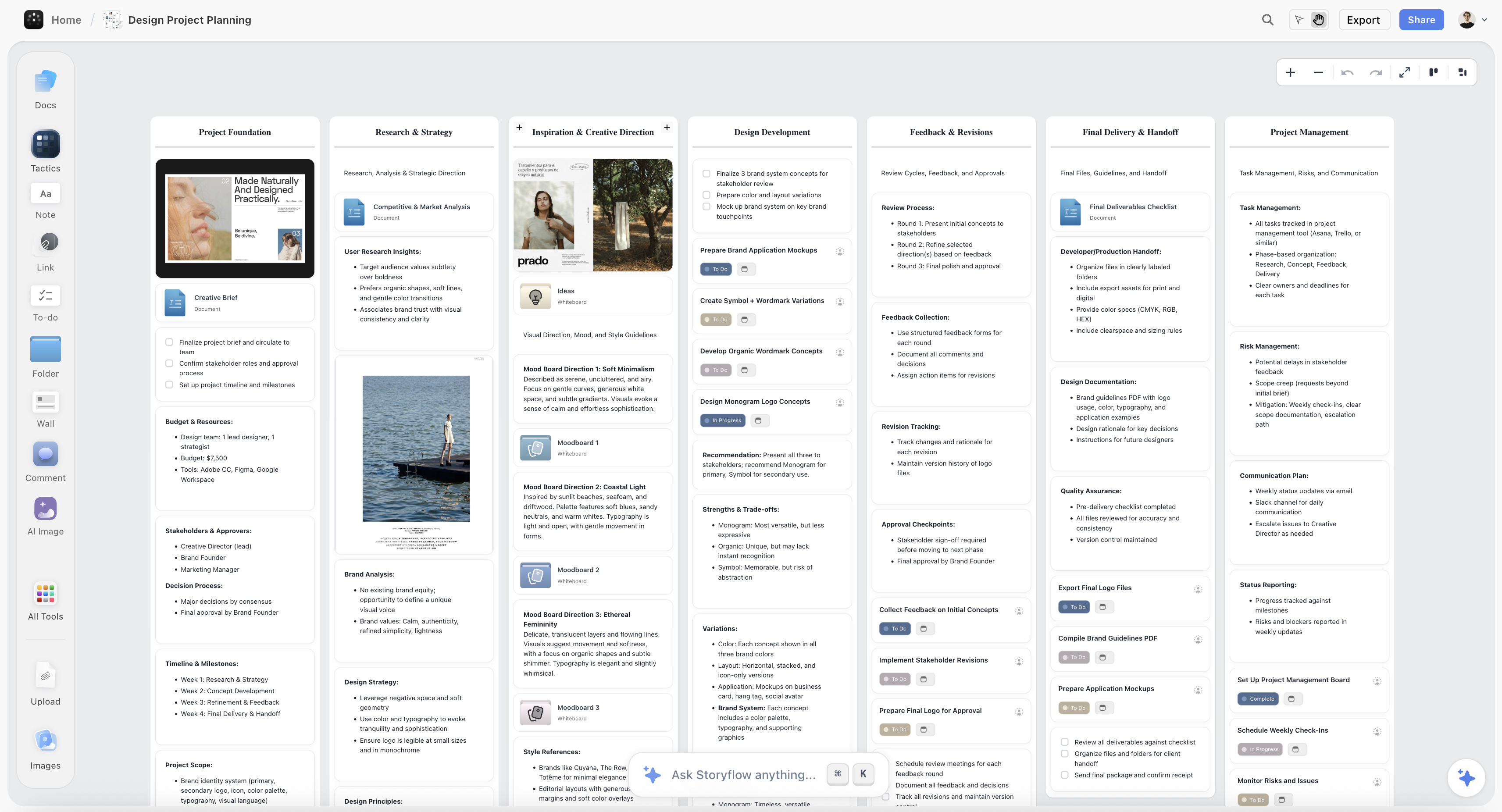
A creative project on a Storyflow canvas, where undecided material sits in space rather than needing a page title first
Two tools, not one
Notion is excellent for work that has a name. A canvas is better for the phase before that, when naming the thing is the decision you have not made. Storyflow adds AI that reads the whole board, so a wall of six weeks of material can be asked what it says. Milanote nests deeper and has a free tier; both beat forcing one tool to do everything.

Where Notion Wins
Anything relational. If two things need to be connected and queried, Notion is the only one of the three that can do it. A studio tracking clients, jobs, invoices, and deliverables should not attempt this on a canvas.
Views over one dataset. A content calendar that is also a table that is also a board, all fed by one database, is genuinely excellent and neither canvas offers a version of it.
Being the wiki. Process, onboarding, brand guidelines, meeting notes. Settled knowledge belongs in a document system, and Notion is the best one here.
Adoption. Everybody has used it. Onboarding a freelancer costs nothing, which for a small team frequently matters more than any feature comparison.
Free. The personal free tier is unusually generous and it is a real advantage over both alternatives.
Where Milanote Wins
Nesting. Boards inside boards without limit is the best structure in this comparison, and it is what keeps a long creative project legible. A campaign holds strategy, moodboard, copy, and production boards, each of which can go deeper. Storyflow nests too and not as deeply; Notion nests pages, which is a different feel and worse for visual material.
Media handling. Images, links, and files behave like objects on a physical wall rather than attachments. The web clipper is the best of the three for building reference libraries.
Calm. This is not a feature and it is real. Milanote is the least corporate surface here, and for early creative work the aesthetic of the tool affects what you are willing to put in it.
A free tier that lets you test the premise. 100 notes is enough for one real project, which means you can find out whether a canvas suits your work before paying anybody.
Where Storyflow Wins
The AI reads the whole board. This is the only genuine differentiator and it is worth being precise about what it does.
Once a board holds six weeks of material, the questions you have are comparisons across all of it: which of these forty references are the same reference, what has been decided and what is still open, what is missing from a set like this, which direction did I develop and which did I abandon. Those cannot be answered by a chat panel, because the panel cannot see the board, and they are slow to answer by hand because forty items do not fit in working memory.
Milanote holds your thinking beautifully and does nothing with it. Notion's AI can answer across your workspace and is reading pages rather than a spatial arrangement.
Pricing shape for a team. Flat per account, with anyone a paid member invites to a board joining free. At five or six people that changes the total rather than the rate: roughly $7.99 against Milanote's per-person pricing and Notion's per-member pricing.
AI image generation on Pro and Max, which matters when the reference you need does not exist photographed.
Where Each One Loses
Stated plainly, because the losses decide more purchases than the wins.
Notion loses the undecided phase. Not through a missing feature but through its atom. A page needs a title before it holds anything, which is the wrong shape for a fragment. Every Notion workspace has a four-hundred-line page called Ideas that nobody reopens, and that is the failure.
Milanote loses everything computational. No relations, no queries, no rollups, no views. If you need to know which deliverables are late across four clients, it cannot help and was never trying to. It also has no AI at all, so the board is a record rather than something you can interrogate.
Storyflow loses on cost and on maturity. It is paid-only during early access, which means the one thing you cannot do is try the premise for free, and both alternatives let you. Its Free plan launches before the end of 2026 and does not exist today. It nests less deeply than Milanote. It has no relational databases, no linked views, and no wiki features, so it does not replace Notion's half at all. It is cloud-only, with no local-file guarantee. And its AI reads the current board, not every board you own, with extra context from @-mentioning up to one Tactic and three documents.
Which One to Choose
Choose Notion if your work is mostly records: clients, deliverables, schedules, documentation. Or if you need one tool and your team already knows it. Or if free matters most.
Choose Milanote if your work is mostly visual and undecided, you want the best structure in this comparison, and you want to test that premise on a free tier before committing.
Choose Storyflow if your boards get large enough that you cannot hold them in your head, and being able to ask the board questions is worth paying for. Or if you have five or six people and flat pricing changes your total.
Choose two of them if your work has both halves, which most creative work does. This is the answer that suits the most people and it is the one nobody recommends because it is not a clean comparison result.
The two-tool setup that works: Notion for the wiki, the client records, and anything with a date. A canvas for the undecided phase, the references, and the structure that has not settled. About $20 a month, no migration, and each tool doing what it is shaped for.
Migration Notes
Notion to a canvas. Documents export as markdown cleanly. Databases do not: relations, rollups, and views are lost, and you get CSVs plus a folder of pages. Move the undecided material and the reference collections; leave the databases where they are.
Milanote to Notion. Painful, because spatial arrangement is the information and a document cannot hold it. Expect to lose the relationships that were expressed by position. Export is PDF and image, so plan on rebuilding rather than importing.
Between the two canvases. Also manual. Both export to PDF and image rather than to a structure the other can read. The practical move is to migrate the active projects by hand and archive the rest.
The general rule: in all three directions, the export is worse than you expect, so run both for a month before committing rather than doing a clean switch.
The Bottom Line
The comparison is usually framed as a contest and it is really a question about which half of your work you are trying to fix.
If the problem is that your client records, deliverables, and documentation are scattered, that is a records problem and Notion is the best answer available. Neither canvas will help and neither is trying to.
If the problem is that early ideas, references, and directions live in screenshots, browser tabs, and a scratch page nobody reopens, that is an undecided-material problem, and it is structural: a page demands a title before it holds anything. Milanote is the best-built answer, it nests better than anything else here, and its free tier lets you test whether a canvas suits you before paying.
Storyflow, which we make, is the same shape with one addition that matters as boards grow: the AI reads the whole thing, so a wall of six weeks of material can be asked what it says rather than only looked at. It costs money today where both alternatives do not, and it does none of Notion's relational work.
And the answer that fits most people is the unglamorous one. Keep Notion for the half of your work that has a name. Put a canvas in front of it for the half that does not. That costs about twenty dollars a month, requires no migration, and stops asking either tool to be something its data model cannot support.
FAQ: Milanote vs Notion vs Storyflow
Which is better, Milanote or Notion?
They answer different questions. Notion is better for anything relational or scheduled: clients, deliverables, documentation, content calendars. Milanote is better for undecided visual work, because a note or an image can exist without being named and boards nest deeply. Most creative teams that use both end up happier than teams that force one to do everything.
Is Storyflow a Milanote alternative?
For the same job, yes: a spatial canvas for creative projects with nested boards and first-class media. The differences are that Storyflow's AI reads the whole board, so you can ask what it says and what is missing, and that it is priced flat per account with invited collaborators joining free. Milanote nests more deeply and has a free tier while Storyflow is paid-only during early access.
Which one has the best free tier?
Notion, by a distance, for personal use. Milanote's free tier is capped at 100 notes, which is enough to test the premise on one project and not enough to run a business. Storyflow has no free plan until late 2026; the only free route today is that anyone a paid member invites to a board joins free.
Can any of these replace all my tools?
No, and the promise that one workspace covers everything is where most disappointment in this category comes from. Notion cannot hold undecided visual material well. Neither canvas can do relational data at all. None of the three is a project management tool with real assignment and workload. Two tools is normal and three is common.
Which is cheapest for a team of five?
Storyflow, because it is priced flat per account and invited collaborators join free, so a team of five is one subscription at $7.99/month annual. Notion at around $10 per member and Milanote at around $12.50 per person both scale with headcount. The counterweight is that both alternatives have free tiers and Storyflow does not.
Is Notion good for creative work?
For the decided half, yes and it is excellent: content calendars, client records, project documentation, deliverable tracking. For the undecided half it is structurally weak, because a page requires a title before it can hold anything and early creative material cannot be named yet. That is why so many Notion workspaces contain one enormous Ideas page nobody reopens.
What does Storyflow's AI actually do?
It reads the whole current board and answers questions about it: which of these are the same idea, what has been decided, what is missing, whether the references and the brief agree. That is comparison across everything on the canvas, which is what a large board generates and what a chat panel cannot do because it cannot see the board. It reads the current board rather than every board you own, with extra context from @-mentioning up to one Tactic and three documents.
Which is best for moodboards?
Milanote or Storyflow. Both treat images as first-class objects arranged like a physical wall, with notes beside them, and both nest so a moodboard can live inside a project. Notion's galleries are grids, so position carries no meaning, which removes most of what a moodboard is for.
Can I use Notion and Milanote together?
Yes, and it is the setup that suits most creative teams. Notion holds the wiki, the client records, and anything with a date. Milanote holds the references, the concepts, and the structure that has not settled. Around $20 a month with no migration, and each tool doing what its data model is shaped for.
How hard is it to migrate between them?
Harder than you expect in every direction. Notion's documents export cleanly and its databases do not, losing relations and views. Milanote exports to PDF and image, so spatial arrangement, which is the information, does not survive. The practical approach is to run both for a month and migrate active projects by hand rather than attempting a clean switch.
Which one should a freelancer choose?
Notion if the pain is admin: invoices, client records, deliverable dates. Milanote if the pain is that references and early ideas are scattered across screenshots and browser tabs. Most freelancers have both problems, and the free tiers of Notion plus Milanote cover a surprising amount before anything needs paying for.
Does Storyflow do anything Notion does?
Very little. No relational databases, no linked views, no rollups, no wiki, no calendars, no task assignment. It is a canvas with AI that reads it, covering the phase before work has a shape. Anyone hoping to replace Notion with it will be disappointed, and the honest recommendation is to keep Notion for the settled half.
Table of Contents
Templates to check out for this topic


Workspace templates you can use in Storyflow
Keep research, notes, and plans on one canvas the AI can read, instead of scattered across docs and tabs. Open a template and make it your second brain.


See Storyflow in Action
A visual AI workspace where every feature lives inside one canvas. No tab-switching, no context lost.
Build your entire board from a single message
Type what you need in the AI chat at the bottom of your canvas. The AI adds cards, headings, and structure directly onto your board.
Use expert frameworks as AI context
Type @ in the AI chat and choose any Tactic. The AI tailors every response to that framework instead of giving generic advice.
Turn your board into a mind map in seconds
Ask the AI to restructure your canvas as a mindmap. It connects your ideas into a visual hierarchy so you can see how everything relates.
Why Storyflow Exists
Storyflow actually began as a personal tool while working on creative and research projects.
We kept running into the same problem: ideas were scattered everywhere: notes, documents, and whiteboards.
Nothing helped us see how everything connected.
So we started building a workspace designed around how ideas actually grow.
→ Read how Storyflow was createdJustkay
Documentary Filmmaker & Founder at Storyflow
Published: 2026-08-26
Extremely simple, seriously capable


See how easy it is to get started
Watch a real project come together, from a blank board to a finished plan, clicked through step by step.
Start creating with AI and become more productive
Transform your creative workflow with AI-powered tools. Generate ideas, create content, and boost your productivity in minutes instead of hours.