Storyflow vs Figma (FigJam): Complete Comparison for 2026
Figma is the best UI design tool ever built. FigJam is the whiteboard for design teams. But for filmmakers, marketers, writers, and content creators, neither was built for your work. Storyflow was. Here is the full comparison.

Category
Productivity & Tools
Author

Sara de Klein
Head of Product at Storyflow
Topics
April 14, 2026
•
20 min read
•
Productivity & Tools- Storyflow vs Figma
- Storyflow vs FigJam
- FigJam alternative for creatives
- visual workspace 2026
- FigJam vs creative workspace
Should I use Storyflow or Figma FigJam for creative work?
Storyflow is better for filmmakers, marketers, and writers doing creative development: AI that reads your project canvas, 200+ Blueprint Tactics, flat pricing. Figma (with FigJam) is better for UI/UX design and design-team workshops, where it remains the industry standard.

Figma became the design industry standard almost overnight. It replaced entire stacks of tools by putting real-time collaboration directly inside a world-class design editor. If you design interfaces, Figma is almost certainly your tool.
FigJam came later. It is Figma's whiteboard product: sticky notes, voting dots, simple shapes, and an infinite canvas. The pitch was that design teams could brainstorm and workshop without switching apps.
That is where the comparison with Storyflow starts and where most people get confused.
FigJam and Storyflow both live on an infinite canvas. Both let you drag content around and organize it spatially. Both are used by creative professionals. But they were built for fundamentally different people and different kinds of work.
FigJam is a collaboration whiteboard built for design teams running workshops. Storyflow is an AI-powered creative workspace built for filmmakers, marketers, writers, content creators, and strategists who need more than sticky notes to develop real work.
The tension is not about quality. It is about purpose. FigJam is genuinely good at what it does. But what it does is not what most creative professionals actually need.
The quick verdict:
- Choose Figma / FigJam if you are a UI/UX designer or product team lead who needs world-class screen design tools and a whiteboard that your design team already lives inside.
- Choose Storyflow if you are a filmmaker, marketer, writer, content creator, or strategist who needs Blueprint Tactics with embedded methodology, AI that reads your current project canvas, and a workspace built for the full arc of creative development.
Let's break down the differences.
What is Figma and FigJam?
Figma launched in 2016 and redefined how product and design teams work. Before Figma, designers worked in Sketch or Adobe XD, exported assets manually, and handed files off to engineers who often had to chase down specs. Figma put everything in the browser, made collaboration real-time, and made the handoff from design to engineering smoother than any tool before it.
Today Figma is the dominant tool for UI/UX design. Component systems, auto-layout, prototyping, developer mode: the feature set is deep and built specifically for designing digital products.
FigJam was added in 2021 as a companion whiteboard product. Where Figma is structured (components, frames, constraints), FigJam is freeform. Sticky notes, connectors, shapes, voting. It is designed for team brainstorming, retrospectives, sprint planning, and workshops inside the Figma ecosystem.
Figma also introduced AI features in 2024, focused on design tasks: renaming layers, generating UI components from descriptions, removing image backgrounds, and suggesting design variants.
Who uses Figma and FigJam:
- UI/UX designers building digital products and interfaces
- Product managers planning roadmaps and running design sprints
- Design agencies delivering visual work to tech clients
- Engineering teams consuming design specs and handoff files
- Design teams using FigJam for retrospectives and workshops
What Figma and FigJam do well:
- Industry-leading UI/UX design with components, auto-layout, and prototyping
- Best-in-class real-time collaboration for design teams
- Developer handoff that makes the design-to-engineering gap smaller
- FigJam for quick workshop facilitation when your team is already in Figma
- Strong ecosystem with plugins, integrations, and a large community
- AI features built for design: layer naming, component generation, background removal
Where Figma and FigJam fall short for creative professionals:
Figma is exceptional at design. FigJam is functional as a workshop whiteboard. But neither was built for creative development work beyond UI design.
There are no Blueprint Tactics for film pre-production, marketing campaign planning, content strategy, or story development. FigJam has sticky notes and templates but no embedded methodology. Figma's AI is for UI tasks, not for reading your creative project and helping you develop ideas. The per-editor pricing penalizes creative teams who want to collaborate. For filmmakers, writers, marketers, and content creators, Figma is a capable tool for the wrong job.
What is Storyflow?
Storyflow is a visual AI workspace built for creative professionals who develop ideas, not interfaces. Filmmakers. Marketers. Writers. Content creators. Strategists. People whose work lives in concepts, narratives, campaigns, and projects rather than pixels and components.
The canvas is familiar: infinite, spatial, drag-and-drop. But everything built on top of that canvas is different.
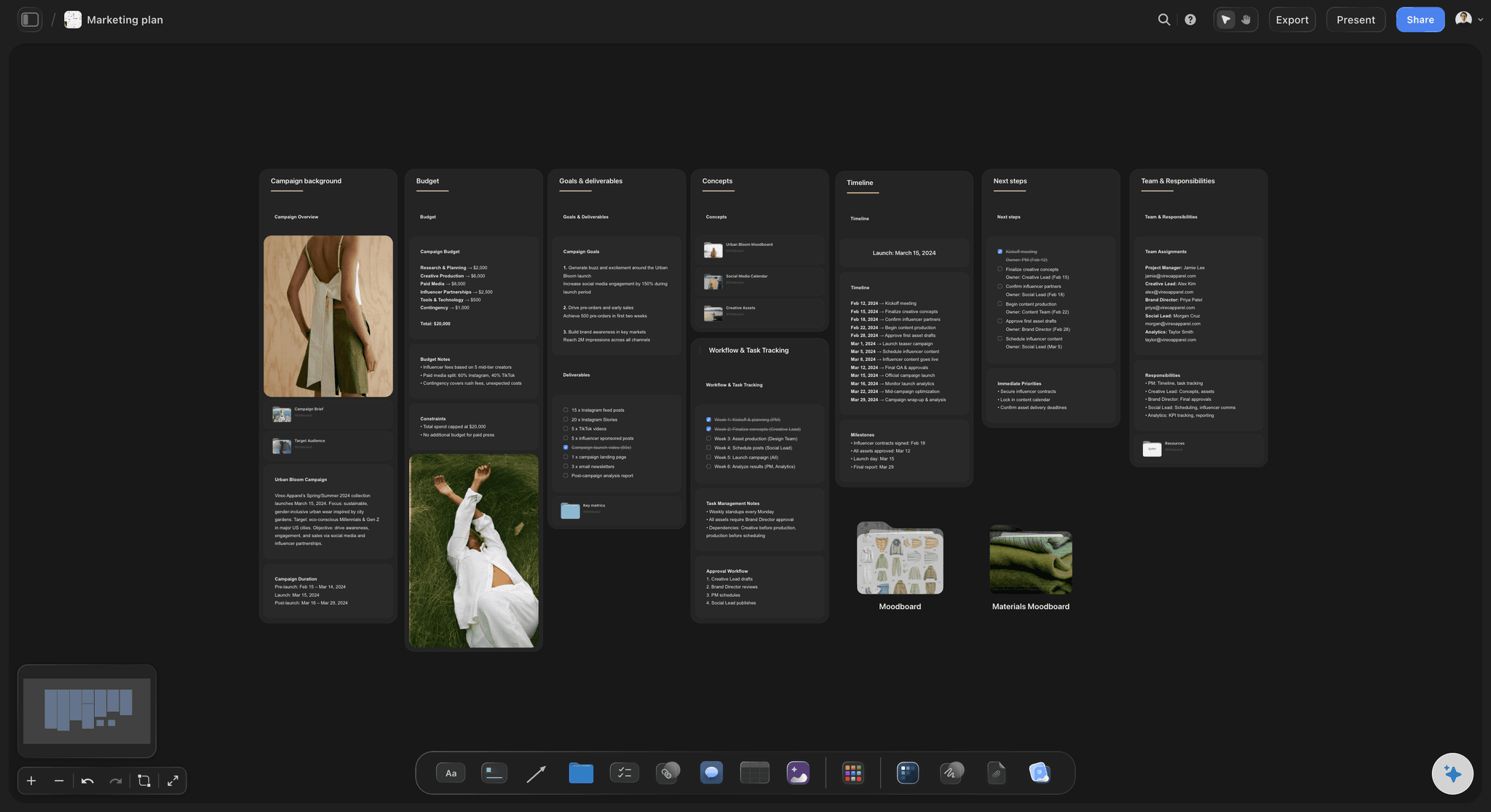
Storyflow's 200+ Blueprint Tactics embed proven frameworks directly into your workspace. No more watching a course then trying to apply it from memory.
Blueprints with built-in Tactics
FigJam gives you blank sticky notes. Storyflow gives you 200+ Tactics built into structured Blueprints.
A Blueprint is a complete project framework. A Tactic is the embedded methodology inside it. The Hero's Journey Blueprint includes the narrative beats practitioners have used for decades. The AIDA Blueprint includes the persuasion framework in context so you apply it to your actual project, not a hypothetical exercise. The Retention Hooks Blueprint gives you the attention principles creators use at the top of their content.
You are not just organizing ideas. You are learning while doing. The frameworks live in your workspace, not in a course you watched six months ago and half-remember.

Storyflow's AI reads everything on your current canvas board and responds with suggestions specific to your actual project, not generic outputs.
AI that reads your project
Figma's AI renames layers and generates UI components. It is useful for designers and completely irrelevant for filmmakers planning a documentary or marketers building a campaign strategy.
Storyflow's AI reads everything on your current canvas board. Every card, note, and reference you have placed. Ask for help developing your concept, refining your narrative structure, identifying gaps in your campaign plan, or brainstorming from your existing research. The AI responds to what is actually on your canvas, not a generic prompt. You can also @-mention a Tactic or up to three documents to bring extra context into the conversation.
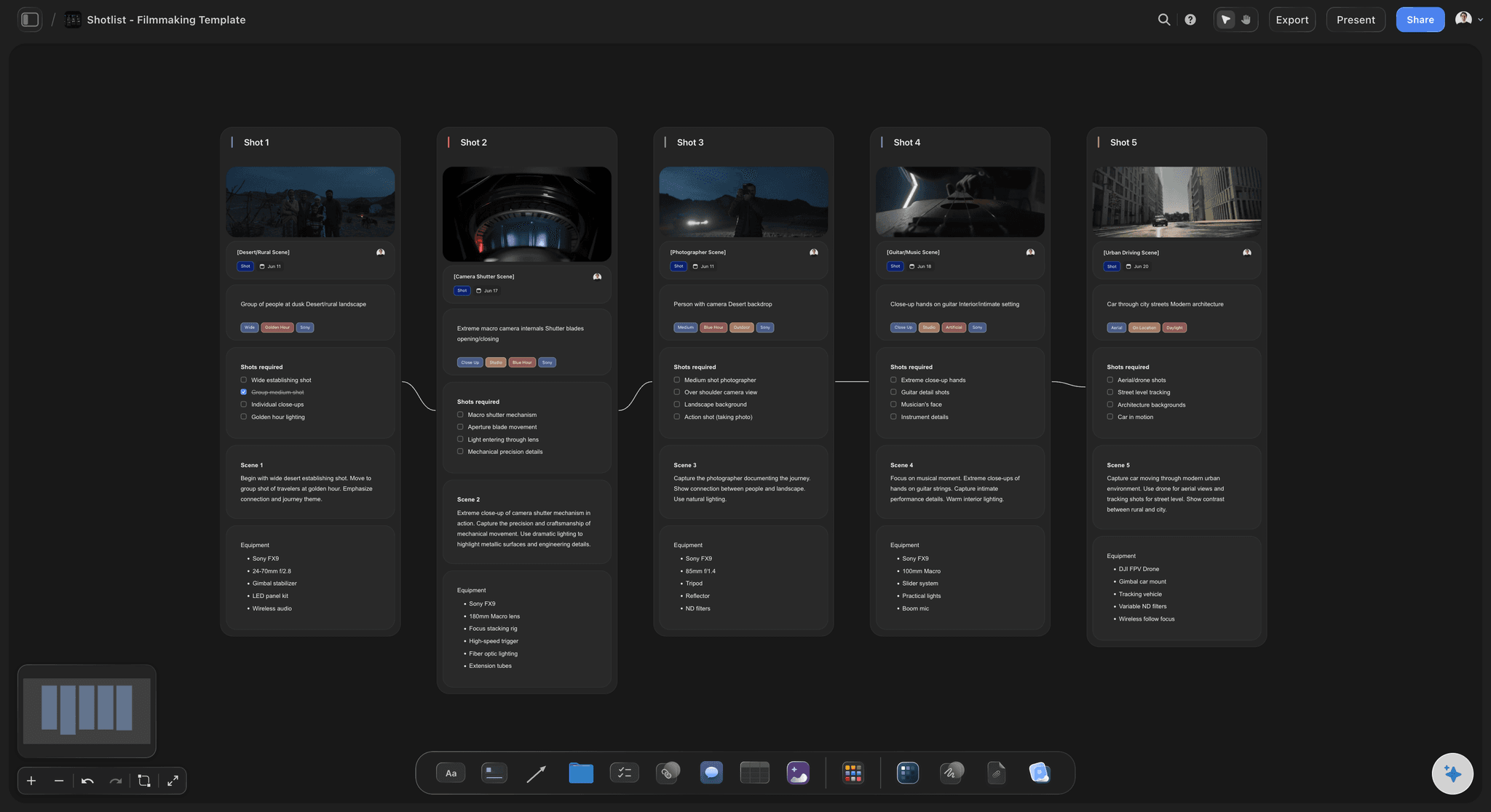
On a Storyflow board, cinematography references sit on the same canvas as the shot list, and the AI reads both.
Film references on the working canvas
Figma has no concept of a film reference workflow. Filmmakers using FigJam for pre-production paste screenshots into a board the AI cannot read. In Storyflow, reference stills, the shot list, and the script notes live on one canvas, starting from templates like the Filmmaking Moodboard template, and the AI treats all of it as project context.
Who uses Storyflow:
- Filmmakers and documentary makers planning productions
- Marketers building campaigns with proven positioning frameworks
- Writers developing stories, characters, and narrative structures
- YouTubers and content creators planning and scripting videos
- Founders and strategists organizing ideas and developing pitches
- Creative teams who want to think together without per-seat costs
Where FigJam is a whiteboard you happen to use for creative work, Storyflow is a workspace purpose-built for it.
The Design Tool That Forgot About Creators
This is the honest version of the comparison: Figma is phenomenal. It earned its dominance. The combination of real-time collaboration, component systems, prototyping, and developer handoff is genuinely best-in-class for UI work.
FigJam is a good whiteboard for design teams. If your team already lives in Figma, FigJam makes it easy to run a retrospective or brainstorm without opening another app.
But neither tool was built for the creative work that happens before (and beyond) interface design: developing stories, planning productions, building campaign strategies, scripting content, organizing ideas into something coherent. The further you are from UI design, the more FigJam's limitations become obvious.
Sticky notes are not a methodology
Open FigJam and you get a blank canvas with sticky notes. That is it. There is no embedded guidance for what to put on those notes, in what order, or why.
FigJam has templates. They are empty structures: boxes labeled "Problem," "Solution," "Stakeholders." Starter scaffolding for someone who already knows the framework and just needs a visual container for it.
Storyflow Blueprints include Tactics: the reasoning behind the framework, the specific steps, and the guidance for applying them to your actual project. The difference between an empty label and embedded expertise is the difference between a container and a teacher.
The AI built for pixels vs. the AI built for ideas
Figma's AI is genuinely useful for UI designers. Rename a hundred layers in one click. Generate button variants from a description. Remove a background without exporting to Photoshop.
For a filmmaker trying to develop the emotional arc of a documentary, or a marketer working out the positioning for a new product launch, Figma's AI has nothing to offer. It does not read your project. It does not know what you are building. It is a design automation tool, not a creative thinking partner.
Storyflow's AI is different by design. It reads everything on your current canvas board: your notes, cards, references, and structure. Ask it to help you develop your concept and it responds with what it knows about your specific project. It is the difference between a search engine and a collaborator.
The per-editor penalty
Figma charges per editor. Every person who needs to actively work in a file adds to your bill. For product teams with defined designer headcount, this is manageable.
For creative teams that expand and contract, it is painful. Bring on a freelance director for a production? That is another editor seat. Invite a marketing consultant to help with campaign strategy? Another seat. The pricing model assumes a stable team, not the fluid collaboration that creative work often requires.
Storyflow charges a flat rate. Your whole team, one price. Add collaborators without adding cost. The workspace scales with your project, not your budget.
The film reference gap
Figma and FigJam have no concept of film reference work. If you are a filmmaker using FigJam for pre-production, you are importing screenshots from other tools, managing references in separate tabs, and keeping the shot list in yet another doc.
This is not a minor oversight. For filmmakers, cinematography references are core to production planning. Having them on the same canvas as the plan, where the AI reads them as context, changes how you work. Storyflow built for this because it was built for filmmakers. FigJam did not because it was not.

Storyflow combines structured Blueprint Tactics, canvas-aware AI, and visual boards in one workspace built for creative work beyond UI design.
Feature-by-Feature Comparison
Let's compare what each tool actually delivers for creative professionals.
Visual Canvas
Figma / FigJam: FigJam provides a clean infinite canvas. Sticky notes, shapes, connectors, and images work well. The interface is polished and familiar to anyone already inside the Figma ecosystem.
Storyflow:A visual canvas built for project development, not workshop facilitation. Cards carry more structure than sticky notes. The canvas supports connections, grouping, and the kind of hierarchical thinking that complex creative projects require. For UI design, Figma is clearly better. For creative project development, Storyflow's canvas is purpose-built.
AI Capabilities
Figma / FigJam: Figma AI handles design-specific tasks: layer renaming, component generation from text descriptions, background removal, design variant suggestions. Useful for UI designers. Entirely irrelevant for narrative development, campaign planning, or content creation.
Storyflow: AI reads everything on your current canvas board and uses it as context for every response. Ask for help with your documentary structure and it responds with knowledge of what you have already built on your canvas. You can also @-mention a Blueprint Tactic or up to three documents to bring additional context into the conversation. This is not AI bolted onto a design tool. It is AI designed specifically for creative development.
Blueprint Tactics vs Empty Templates
Figma / FigJam: FigJam templates exist for common workshop formats: user story mapping, retrospectives, brainstorming. They are empty containers with labeled sections. You need to bring the methodology.
Storyflow:200+ Blueprint Tactics with embedded methodology. The Hero's Journey Tactic does not just give you a box labeled "Call to Adventure." It explains the principle, the pitfalls, and how to apply it to your specific project. The AIDA Tactic walks you through the persuasion logic, not just the acronym. Free does not include the blueprint library; Plus, Pro, and Max all include the 200+ Story blueprints. This is the core difference between a container and a curriculum.
Film References for Filmmakers
Figma / FigJam: Nothing. Filmmakers who try to use FigJam for pre-production must import references manually, maintain separate tabs, and keep the shot list somewhere else entirely.
Storyflow: Reference stills, moodboards, and shot lists live on the working canvas, and the AI reads them as part of your project. For working filmmakers, this is one of the most practical differences in the comparison.
Collaboration
Figma / FigJam:Genuinely excellent real-time collaboration. Multiple people working in the same file with visible cursors, comments, and live updates. This is one of Figma's strongest features and a genuine competitive advantage for design teams.
Storyflow:Unlimited collaboration on shared boards is included on every paid plan, with view and edit access links; the upcoming Free plan will include it too. The Max plan ($39/month annual) adds a team workspace with roles, permissions, and admin controls. For serious design-team collaboration, Figma's implementation is mature and polished. Storyflow covers creative team workflows without charging per seat.
Free Plan
Figma / FigJam: The free tier allows a limited number of Figma and FigJam files with basic collaboration. It works for individuals and small projects but hits limits quickly for ongoing team work.
Storyflow: Storyflow is paid-only during early access; a Free plan with unlimited canvas and unlimited boards, unlimited projects, basic AI usage, and 20 file uploads launches before the end of 2026. It will be enough to run a real project and experience the platform before committing. Storage and full AI access are the paid upgrades, not the core workspace.
Integrations and Ecosystem
Figma / FigJam: A large ecosystem of plugins, integrations, and community resources built specifically for designers. Jira, Slack, Notion, and most design tooling connects. If you are already in the Figma ecosystem, staying there has real value.
Storyflow:Growing integration library focused on creative workflows. Browser extension for saving content. Connections to tools creators use. The ecosystem is smaller than Figma's, but the integrations are relevant to the workflows Storyflow serves. This is an honest gap: if you need deep tool connectivity for UI/UX workflows, Figma wins here.
Comparison Table
Here is the complete side-by-side breakdown:
| Feature | Storyflow | Figma / FigJam |
|---|---|---|
| Visual canvas | ✓ Creative project workspace | ✓ Design tool + whiteboard |
| Free plan | Paid-only during early access; Free plan launches before end of 2026 | Limited files, restricted features |
| AI assistance | ✓ Reads current canvas board | Design tasks only (layer names, UI gen) |
| Blueprint Tactics | ✓ 200+ with embedded methodology | ✗ Empty templates only |
| Film references / moodboards | ✓ On-canvas, AI-readable | ✗ Not available |
| Creative project AI | ✓ Narrative, campaign, content | ✗ UI design only |
| Collaboration | ✓ Shared boards all plans; Max adds roles | ✓ Best-in-class real-time |
| UI/UX design | ✗ Not a design tool | ✓ Industry standard |
| Developer handoff | ✗ Not applicable | ✓ Figma Dev Mode |
| Film / story workflows | ✓ Blueprints, references, AI | ✗ No native support |
| Marketing campaign tools | ✓ Campaign Blueprint Tactics | ✗ No native support |
| Pricing model | Flat rate (not per user) | Per editor/month |
What the table reveals:
For UI/UX design, Figma wins without contest. It is the right tool for that work, built specifically for it, and nothing in this comparison changes that.
For creative professionals doing film, writing, marketing, or content work, Storyflow wins on every dimension that matters: Blueprint Tactics with embedded methodology, AI that reads and responds to your actual project, on-canvas visual references, and flat pricing. FigJam has a canvas and sticky notes. Storyflow has a creative workspace.
Plan the creative work FigJam only collects
Open a design planning board, drop in your references and constraints, and let Storyflow's AI develop the direction with your whole project as context instead of a blank sticky note.

Pricing Comparison
Pricing structures reveal what a product is designed for and who it serves.
Figma Pricing:
| Plan | Price | What You Get |
|---|---|---|
| Free | $0 | Limited files, basic collaboration |
| Professional | ~$12/editor/month (annual) | Unlimited projects, full FigJam, team features |
| Organization | ~$45/editor/month (annual) | Advanced admin, SSO, design system tools |
Figma charges per editor. Viewers are free, but anyone actively working in a file pays. For UI design teams with defined headcount, this is reasonable. For creative teams that expand with projects, it adds up fast.
Storyflow Pricing:
| Plan | Price | What You Get |
|---|---|---|
| Free (launches before end of 2026) | $0 | unlimited projects, unlimited boards, basic AI usage, 20 file uploads |
| Plus | $7.99/month (annual) / $9.99/month (monthly) | Full 200+ Blueprint Tactics, increased AI, unlimited file uploads |
| Pro | $14/month (annual) / $19/month (monthly) | Adds AI image generation and 20× more AI than Plus |
| Max | $39/month (annual) | Real-time collaboration, team AI context, admin controls |
Every Storyflow plan is a flat rate per account. One price, regardless of how many people collaborate on your boards. Add collaborators, contractors, and contributors without watching your bill climb.
The math for individuals:
Figma Professional: Approximately $12/editor/month (annual). One editor, unlimited projects, full FigJam.
Storyflow Plus: $7.99/month (annual). Flat price with AI and the full 200+ Blueprint Tactics library. Storyflow Pro: $14/month (annual). Adds AI image generation and 20× more AI than Plus. For an individual creative professional, the prices are comparable to Figma. The difference is what you get: Figma is a design tool, Storyflow is a creative workspace with AI and Blueprint Tactics.
The math for teams:
This is where the models diverge sharply.
- 2-person team on Figma Professional: ~$24/month. On Storyflow: collaborators join shared boards at no per-seat cost, so a single Pro account at $14/month covers both people. At this size the bills are close either way.
- 5-person team on Figma Professional: ~$60/month. On Storyflow Max (the team tier): $39/month flat. Savings: ~$21/month, ~$252/year.
- 10-person team on Figma Professional: ~$120/month. On Storyflow Max: still $39/month. Savings: ~$81/month, ~$972/year.
The larger the team, the more dramatic the gap. Figma's per-editor model is designed for enterprise design teams with budget. Storyflow's flat model is designed for creative teams who want to collaborate without watching the clock on every added collaborator.
The filmmaker math:
Filmmakers using Figma or FigJam for pre-production typically also pay for ShotDeck ($99/year) to browse film references, because FigJam gives references nowhere useful to live.
Figma Professional (~$12/month) + ShotDeck ($99/year) = ~$243/year. No creative AI. No Blueprint Tactics. A whiteboard and a reference library with no connection between them. Storyflow Pro (annual): $168/year. Canvas AI included. Blueprint Tactics included. Your references, shot list, and plan on one AI-readable board. Flat pricing, not per editor.
What you are actually paying for:
Figma / FigJam: The best UI design tool in the world, a collaboration layer built for design teams, and a whiteboard that works well if you already live in the ecosystem. Worth every dollar if you design interfaces. Not built for filmmakers, writers, marketers, or content creators.
Storyflow: A workspace built specifically for creative development, with AI that reads your actual project, 200+ Blueprint Tactics with embedded methodology, on-canvas reference boards for filmmakers, and pricing that treats teams as teams rather than billing by the head.
Who Should Choose Figma / FigJam
Figma is the right choice for specific situations. Be clear-eyed about what those situations are.
You design digital products
If your work is screens, interfaces, components, and prototypes, Figma is your tool. Nothing in this comparison changes that. Figma's design capabilities, component systems, auto-layout, developer mode, and prototyping are the industry standard for good reason. Storyflow is not a design tool and does not try to be.
Your team already lives in Figma
If everyone on your team has Figma open all day for design work, FigJam for brainstorming and workshops makes total sense. The cost of context-switching is real, and keeping creative discussions inside the tool your team already uses has genuine value. FigJam is a good enough whiteboard when the alternative is opening a completely different app.
You run design team workshops
Design sprints. Retrospectives. User story mapping. Design thinking exercises with product and engineering stakeholders. FigJam handles these well. The voting features, timer, and familiar whiteboard format work for structured workshop facilitation. If running design team ceremonies is your primary use case, FigJam delivers.
You need developer handoff
No tool in this comparison touches Figma for design-to-engineering handoff. Dev Mode, inspect panel, code snippets, asset export: Figma's developer experience is purpose-built and deeply integrated. If you need to hand designs to engineers, Figma is the answer.
You need a rich plugin ecosystem
Figma's plugin library is enormous. Icons, illustrations, content generation, accessibility checkers, design system tools: if you need to extend the platform, the community has likely built it. This is a genuine advantage that Storyflow does not match at this stage.
Be honest about the tradeoffs:
Choosing Figma for creative work beyond UI design means accepting sticky notes instead of Blueprint Tactics, no AI that reads your creative project, no home for film references, per-editor pricing that scales with headcount, and a tool not designed for narrative, campaign, or content development workflows. For UI design, these tradeoffs are irrelevant. For everything else, they matter.
Who Should Choose Storyflow
Storyflow wins for anyone doing creative work that is not screen design.

Storyflow's connected canvas gives creative professionals a space to develop ideas, not just collect them. Blueprint Tactics provide the structure that FigJam sticky notes cannot.
You are a filmmaker or documentary maker
Pre-production planning, shot research, narrative development, visual language building: Storyflow was built with filmmakers in mind. Reference stills live on the same board as the plan, starting from the Pre-Production Board template. Blueprint Tactics for film production give you shot planning frameworks, story structure tools, and production methodologies built into the workspace. AI reads your current project canvas and helps you develop your visual and narrative concept. No other tool in this comparison does any of this.
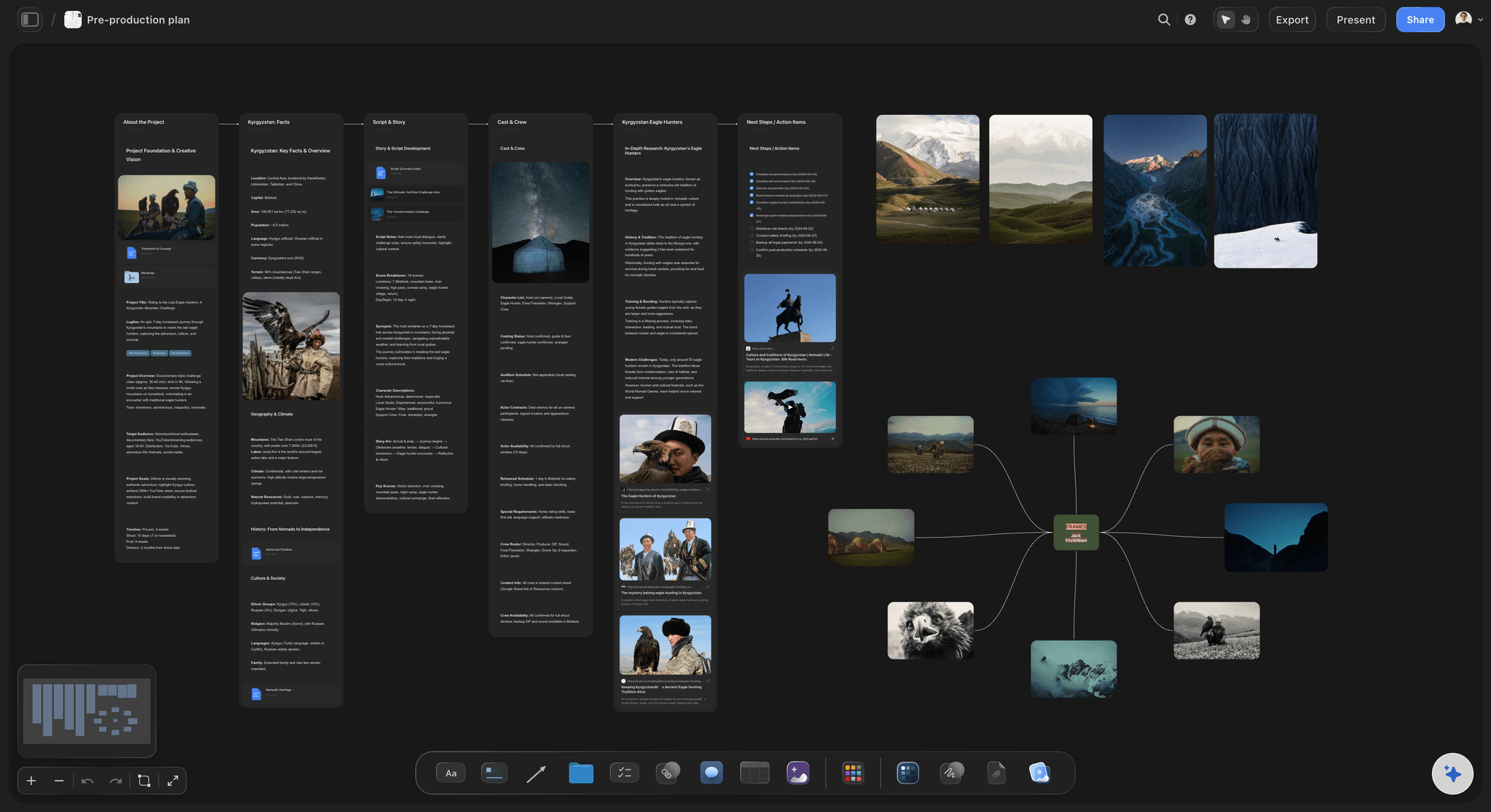
Filmmakers using Storyflow get built-in production frameworks, on-canvas reference boards, and AI that reads the full context of their project canvas.
You are a marketer building campaigns
Opening FigJam to plan a marketing campaign gives you blank sticky notes. You need to bring the positioning framework, the audience mapping methodology, the launch sequence logic. Storyflow Blueprint Tactics embed these. The AIDA Tactic walks you through the persuasion structure, and the Campaign Brief template gives the strategy a structured board from the first minute. You learn the methodology as you apply it to your actual campaign.
You are a writer or storyteller
The Hero's Journey Tactic gives you the narrative arc with the reasoning behind each beat, not just the labels. Story planning Blueprints include character arc frameworks, world-building structures, and plot development tools. The AI reads your current canvas and can help you identify structural gaps, develop character motivations, or find the through-line your story needs. FigJam has none of this.
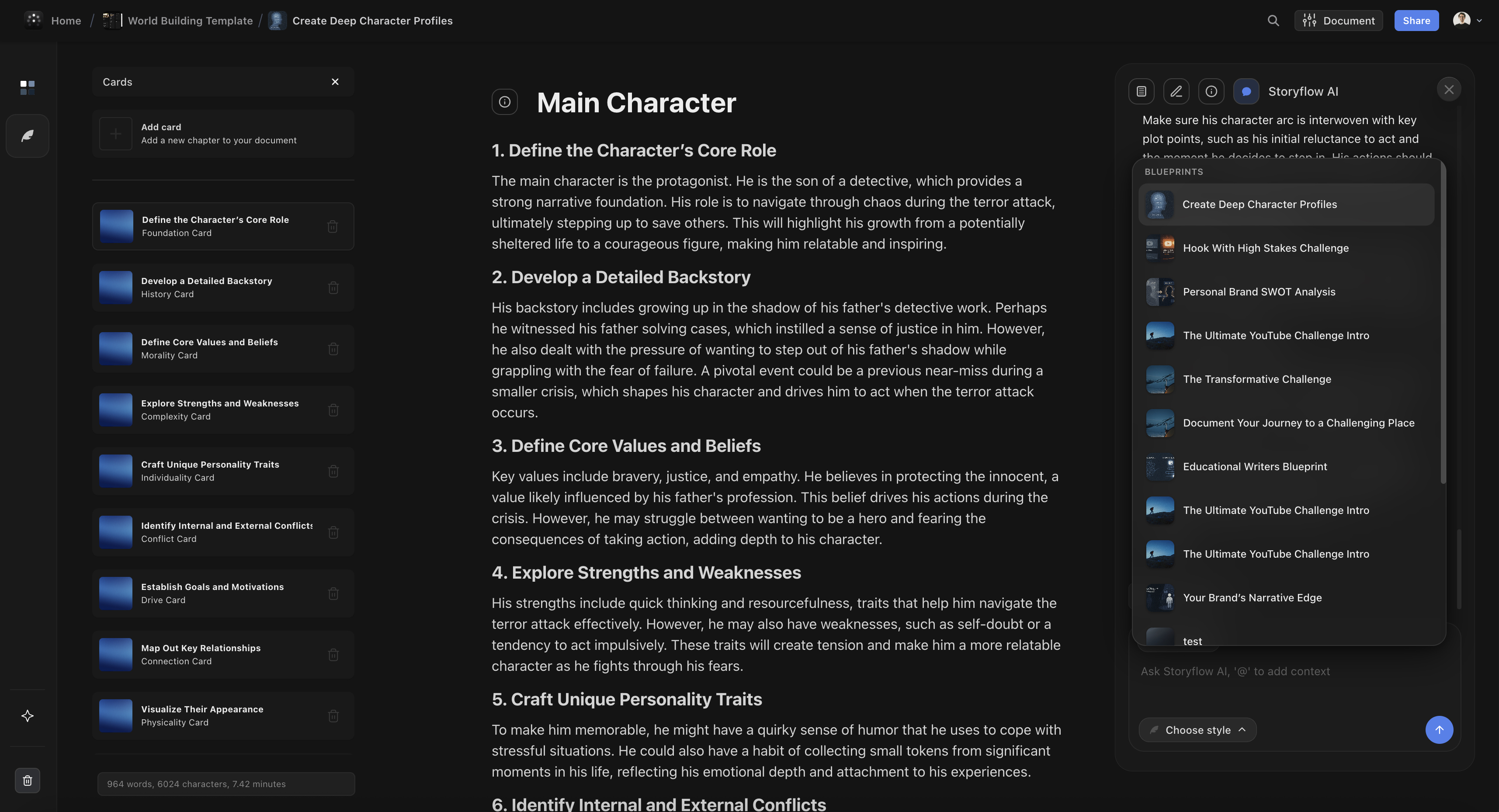
Writers using Storyflow get narrative structure Tactics, character arc frameworks, and an AI assistant that reads their full project canvas.
You work with a team that expands and contracts
Freelance directors. Guest contributors. Client stakeholders. Short-term consultants. Creative teams bring people in and out constantly. Figma's per-editor pricing treats every addition as a line item. Storyflow's flat pricing means collaboration is not a budget decision. Add the cinematographer for the pre-production phase without an invoice to approve.
You want AI that actually understands your creative work
Figma's AI renames layers. Storyflow's AI reads your entire current canvas board and provides suggestions grounded in your actual project. Ask it to help you develop a documentary premise and it responds with knowledge of the research, characters, and structure you have already placed on your canvas. That is categorically different from a design automation assistant.
You want to learn frameworks while you work
Most professionals know more frameworks in theory than they apply in practice. Courses teach frameworks. Work demands you remember them. Storyflow closes that gap: Blueprint Tactics embed the methodology in the workspace so you learn by applying, not by memorizing and hoping you remember. Over time, the frameworks become habits rather than notes you took once.
You are a YouTuber or content creator
Hook formulas, retention structures, thumbnail strategy: the Retention Hooks Tactic and content creation Blueprints give you the frameworks top creators use, applied to your actual video ideas. FigJam gives you sticky notes where you can write whatever you already know.
Use Case Comparisons
Same creative professional. Same project. Different tools. Here is where the experience diverges.
For Filmmakers
With Figma / FigJam: Create a FigJam board for pre-production. Add sticky notes for scenes, reference images imported manually from other sources, and whatever organizational structure you invent from scratch. When you need cinematography references, you are in ShotDeck in a separate tab. The two tools have no connection. Your shot references live in one place, your production planning in another.
With Storyflow: Open a Film Production Blueprint. Get a workspace with production planning structure, narrative development frameworks, and shot planning tools built in. Drop your reference stills straight onto the project board. Ask the AI to help you develop the visual language for a specific scene, and it responds with knowledge of the full canvas you have built: your references, your narrative structure, your scene breakdown.
Winner: Storyflow (Blueprint Tactics, on-canvas references, project-aware AI)
For Marketers
With Figma / FigJam: Open a FigJam board and add sticky notes for campaign ideas. The blank canvas gives you nothing about positioning strategy, audience mapping, or launch sequencing. You bring the frameworks or the board becomes a loose collection of ideas without strategic coherence.
With Storyflow: Open a Campaign Blueprint. Positioning frameworks, audience mapping Tactics, and launch planning structures are built into the workspace. Apply the AIDA Tactic directly to your campaign messaging. AI reads your canvas and helps you identify gaps in your strategy, refine your value proposition, or generate alternative angles from the research you have already built.
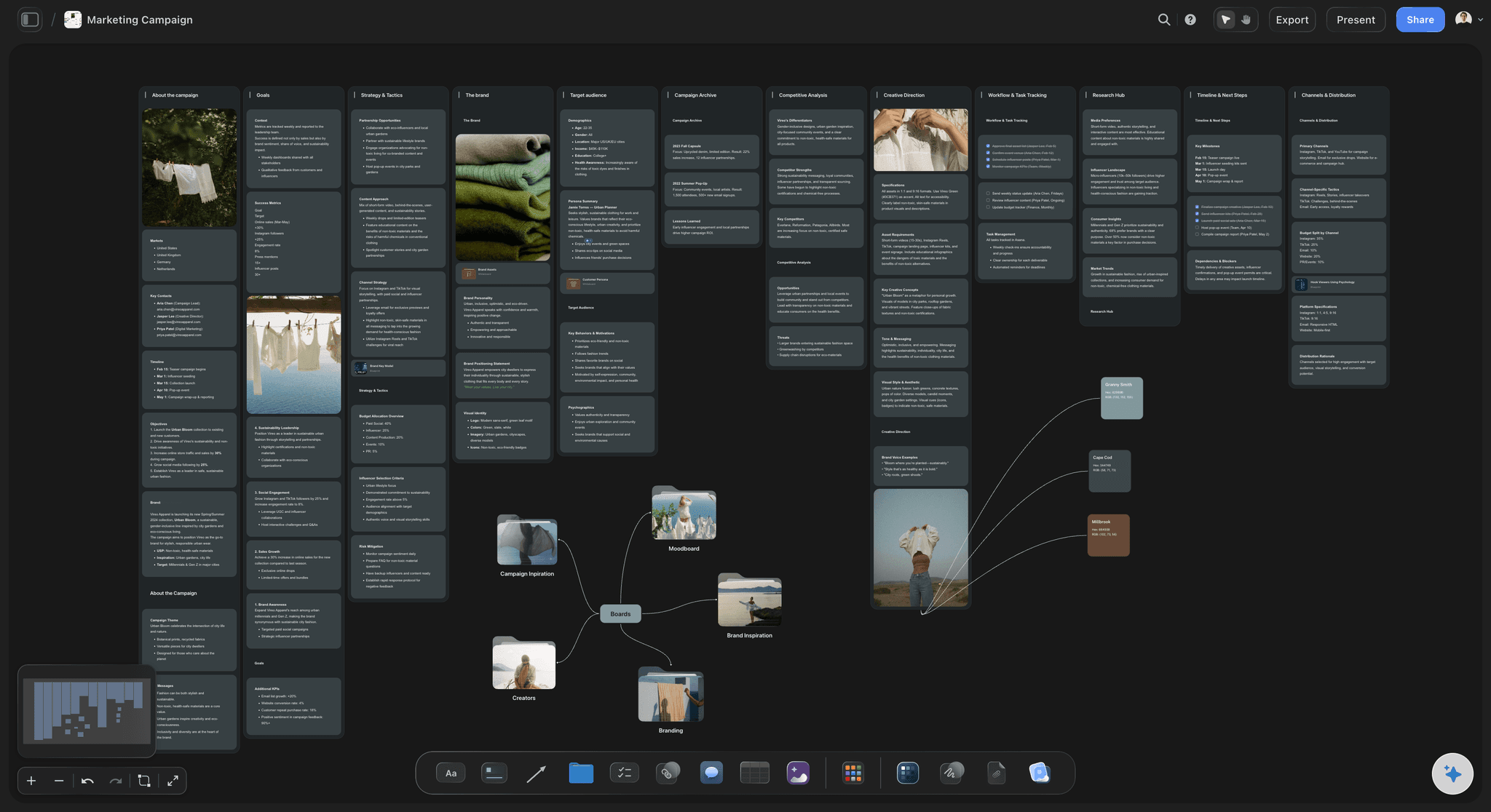
Marketers using Storyflow get positioning frameworks, audience mapping Tactics, and AI that reads the full context of their campaign canvas.
Winner: Storyflow (strategic Tactics built in vs. blank sticky notes)
For Writers
With Figma / FigJam: Organize chapter notes and character ideas on FigJam sticky notes. There is no story structure guidance, no character arc framework, no narrative methodology embedded in the tool. You are on your own, applying whatever you already know about storytelling.
With Storyflow:Open the Story Planning Blueprint with the Hero's Journey Tactic. Each narrative beat includes not just the label but the reasoning: why the inciting incident matters structurally, what the midpoint needs to accomplish, why the dark night of the soul exists as a beat. Your character notes connect to arc frameworks. AI reads your full canvas and can identify structural gaps, flag inconsistencies, or help you develop a character motivation you have been wrestling with.
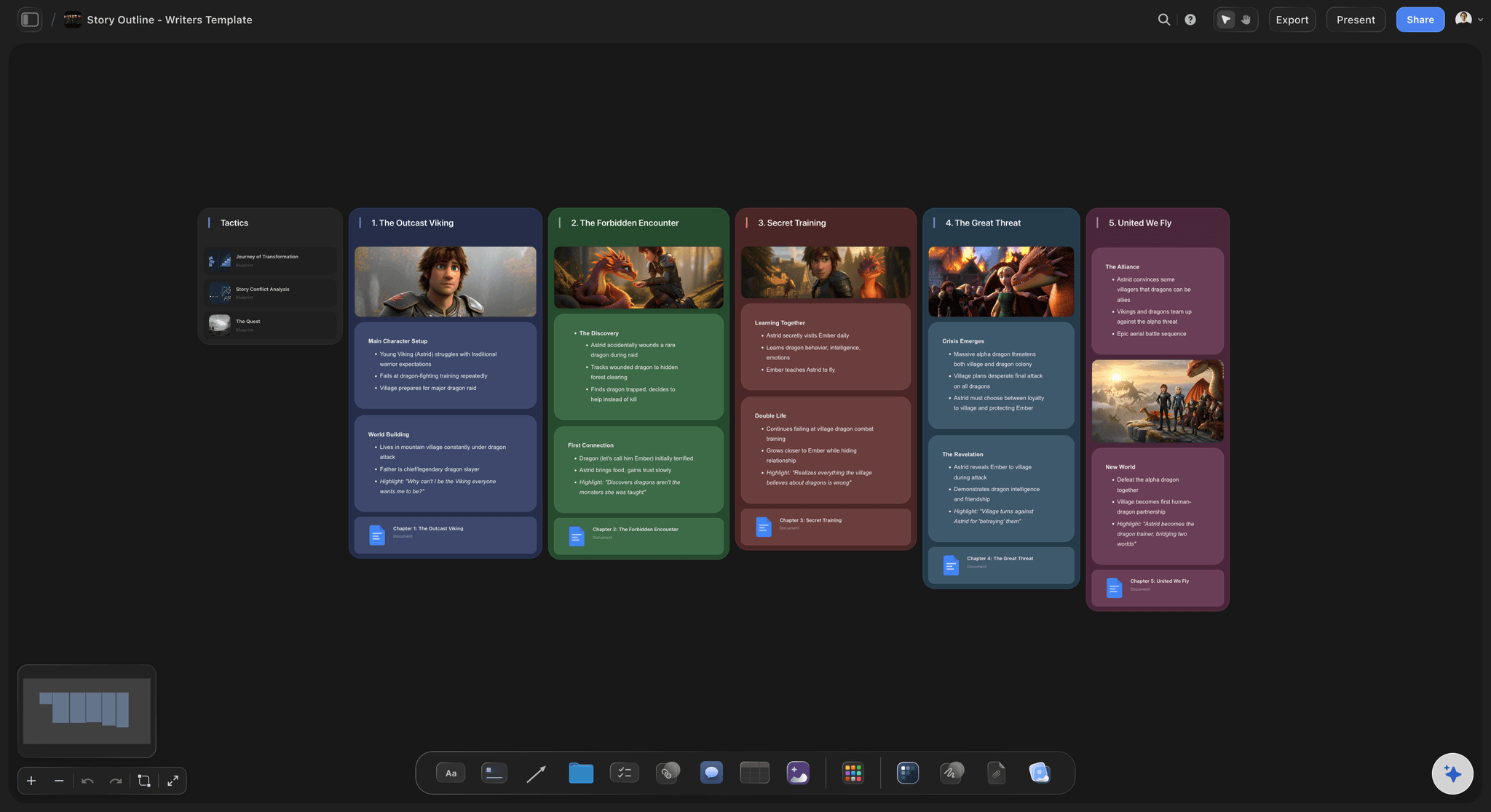
Writers using Storyflow work inside the methodology, not beside it. The Hero's Journey Tactic embeds narrative structure reasoning directly into the planning workspace.
Winner: Storyflow (narrative Tactics with embedded methodology vs. blank canvas)
For UI/UX Designers
With Figma / FigJam: Use Figma for design work: components, screens, prototypes, and developer handoff. Use FigJam for team brainstorming, wireframing workshops, and design system discussions. The integration between the two is built around the same ecosystem because they are the same ecosystem. For design work, this is a fully capable setup.
With Storyflow: Storyflow is not a replacement for Figma for UI design. There are no components, no auto-layout, no prototyping, no developer mode. For screen design, Figma wins without contest. The relevant scenario is a designer who also does creative strategy, content planning, or cross-functional work that goes beyond UI. For those use cases, Storyflow serves better than FigJam.
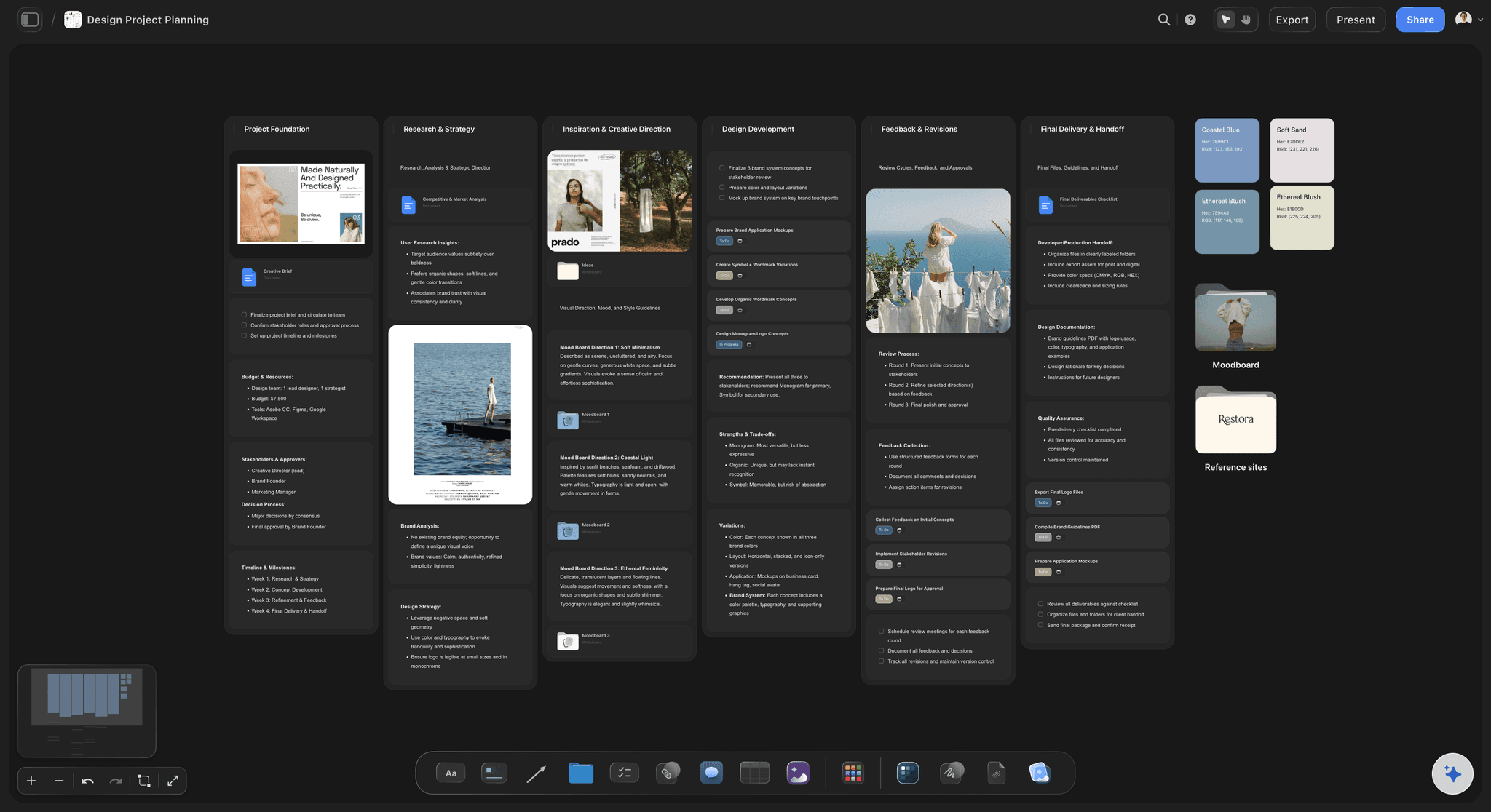
Designers doing creative strategy, brand development, or content planning find Storyflow useful alongside Figma, not instead of it.
Winner: Figma for UI design. Storyflow for creative strategy beyond UI.
For YouTubers and Content Creators
With Figma / FigJam: FigJam can hold your video ideas on sticky notes. But there are no hook formulas, no retention structure frameworks, no thumbnail strategy Tactics. You are building your creative planning from scratch on a blank board.
With Storyflow: The Retention Hooks Tactic embeds the attention principles top creators use. Blueprint Tactics for YouTube and content creation give you the framework for hook writing, structure, and engagement. AI reads your current canvas and helps you develop angles, punch up your opening, or identify what your video is actually about before you start scripting.
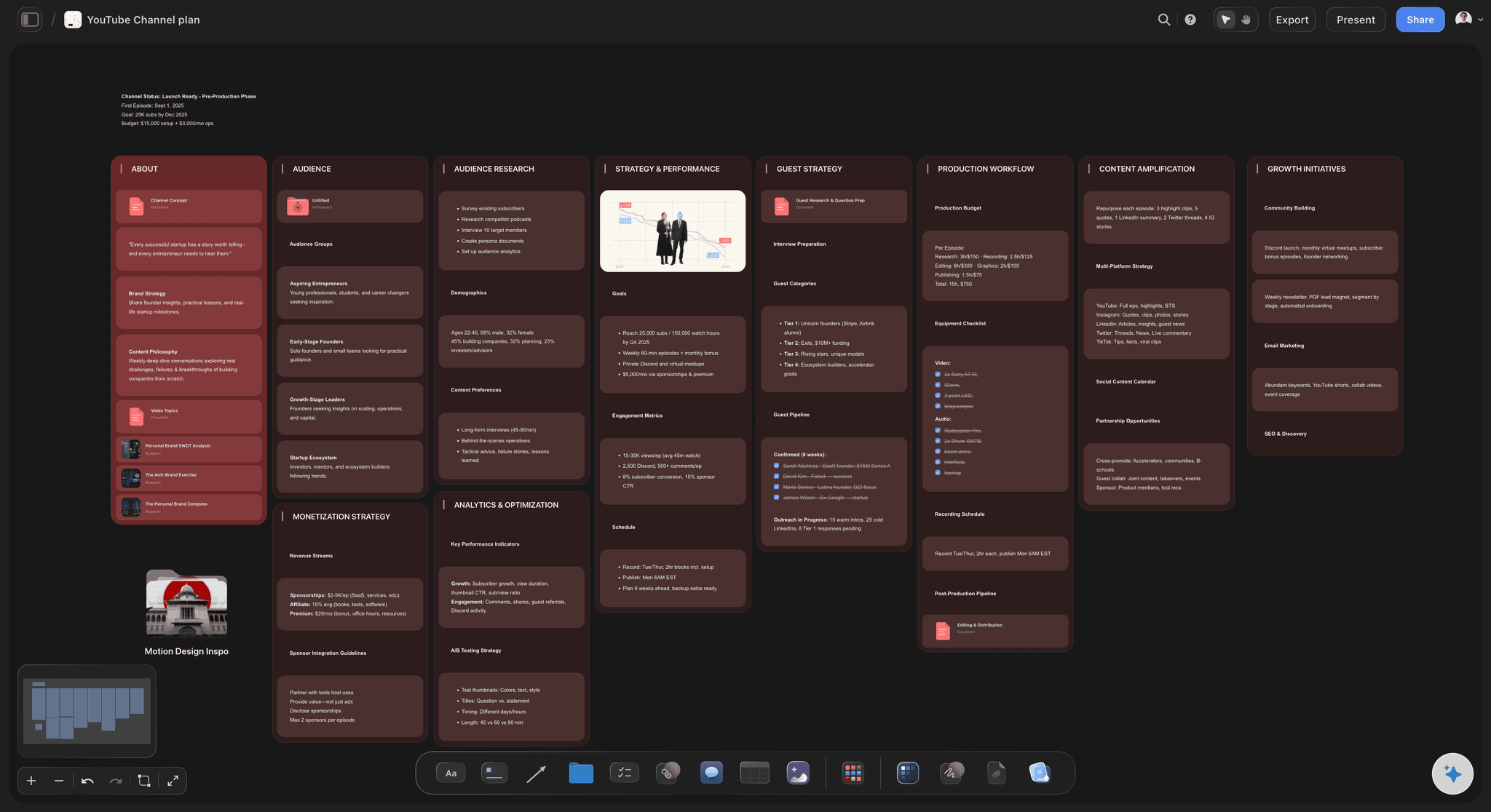
Content creators using Storyflow get Retention Hooks, hook formula Tactics, and an AI that reads their full video concept to help develop stronger content.
Winner: Storyflow (creator Tactics built in vs. blank FigJam canvas)
The pattern:
Figma wins one category: UI/UX screen design. It wins it convincingly. For everything else creative professionals do, Storyflow wins on Blueprint Tactics, project-aware AI, on-canvas references, and pricing. FigJam is a blank whiteboard with good collaboration. Storyflow is a creative workspace with embedded methodology.
FAQ
Is Storyflow a Figma or FigJam alternative?
For creative professionals doing film, marketing, writing, or content work: yes, Storyflow is a better fit than FigJam. For UI/UX designers: Figma is the right tool and Storyflow is not a substitute. The honest answer is that they serve different audiences. If you design interfaces, use Figma. If you develop creative projects, use Storyflow.
Is Storyflow free?
Not during early access. Storyflow is paid-only right now: Plus at $7.99/month (annual) unlocks the full 200+ Blueprint Tactics library and increased AI; Pro at $14/month (annual) adds AI image generation and 20× more AI than Plus; and Max is $39/month (annual) and adds real-time collaboration and team AI context. Storyflow's Free plan, with unlimited boards, unlimited shared boards, basic AI usage, and 20 file uploads, launches before the end of 2026.
Does Figma have AI?
Yes. Figma AI handles design tasks: renaming layers, generating UI components from text descriptions, removing image backgrounds, and suggesting design variants. It is useful for UI designers. It does not read your creative project, understand narrative structure, or help with film planning, campaign strategy, or content creation. The AI is built for the design tool, not for the kinds of creative development work Storyflow serves.
What are Storyflow Blueprint Tactics?
Blueprint Tactics are embedded methodologies built into Storyflow's project frameworks. They include names like Hero's Journey, AIDA, and Retention Hooks. Unlike empty templates, a Tactic explains the principle behind each step and how to apply it to your actual project. Free does not include the blueprint library. Plus, Pro, and Max all include the 200+ Story blueprints. The difference from FigJam templates is not cosmetic: a Tactic teaches while you work, a template just labels the boxes.
How does Storyflow pricing compare to Figma?
Figma charges per editor (approximately $12/editor/month on the Professional plan). Storyflow charges flat rates per account: Plus $7.99/month, Pro $14/month, Max $39/month (all annual). For solo users, the prices are comparable. For teams, Storyflow becomes cheaper as headcount grows: a 5-person team on Figma Professional costs roughly $60/month; Storyflow Max, the team tier, stays $39/month at any team size.
Can I use Figma and Storyflow together?
Yes, and some teams do. Designers use Figma for screen design and Storyflow for creative strategy, campaign planning, and ideation work that goes beyond UI. The tools do not overlap for UI work. Where they overlap is in "thinking space" territory: brainstorming, planning, and organizing ideas. Storyflow beats FigJam for that work because of Blueprint Tactics and canvas-aware AI.
Is FigJam good for filmmakers?
FigJam can hold pre-production notes and references on sticky notes, but it was not built for film work. There is no shot planning framework and no production methodology built in. Filmmakers using FigJam for pre-production typically also pay for ShotDeck ($99/year) to browse film references, maintaining two tools with no connection between them. Storyflow was built for this workflow: references on the working canvas, production Blueprints built in, AI that reads your project canvas.
How does Storyflow AI work compared to Figma AI?
Figma AI handles design automation: layer renaming, component generation from descriptions, background removal. Storyflow's AI reads everything on your current canvas board and uses it as context for creative assistance. Ask it to help develop your documentary concept and it responds with knowledge of what you have already built. You can also @-mention a Blueprint Tactic or up to three documents to bring additional context into the conversation. The two AIs are built for completely different tasks.
Does Storyflow have real-time collaboration?
Yes. Every plan, including Free, supports unlimited collaboration on shared boards via view and edit links. The Max plan ($39/month annual) adds a team workspace with roles, permissions, and admin controls for teams that need structure. Figma's real-time collaboration is more mature, which is expected from a tool built for collaborative design from the start.
Which tool is better for content creators?
Storyflow. FigJam gives you a blank board. Storyflow gives you Retention Hooks Tactics, content creation Blueprints, and AI that reads your video concept and helps you develop it. If you create YouTube videos, podcasts, social content, or any form of digital media, Storyflow was built for that work. FigJam was built for design team workshops.
What is Storyflow best for?
Creative development work: film pre-production, marketing campaign planning, story and content development, and any work where you are building something original from ideas rather than designing a digital product. The combination of Blueprint Tactics with embedded methodology, AI that reads your current project canvas, on-canvas reference boards for filmmakers, and flat team pricing makes Storyflow the strongest option for this category of work.
Conclusion
Figma is one of the best software products ever built for its specific purpose. It changed how the design industry works. FigJam is a solid whiteboard that makes sense for teams already deep in the Figma ecosystem. The praise here is genuine: if you design digital products, Figma is your tool and nothing in this comparison should move you away from it.
But Figma and FigJam were built for designers. The AI renaming layers and generating UI components is remarkable engineering in service of that audience. FigJam's voting, timers, and templates are built for design team ceremonies. Neither tool spends a single feature consideration on filmmakers planning a production, writers developing a story, or marketers building a campaign. They were not built for that work.
Storyflow was. Every feature choice reflects that: Blueprint Tactics with embedded methodology for creative professionals who want to learn while doing. Canvas-aware AI that reads your actual project rather than automating design tasks. Reference stills on the working board because filmmakers need cinematography references next to the plan. Flat pricing because creative teams should not have to make a budget decision every time they invite a collaborator.
The comparison is not Figma vs. Storyflow on design. Figma wins. The comparison is FigJam vs. Storyflow for creative professionals who are not designers. Storyflow wins, and it is not especially close. A blank canvas with sticky notes and a whiteboard built for design workshops cannot match a workspace built specifically for the work filmmakers, writers, marketers, and content creators actually do.
If you have been using FigJam as a thinking space for creative work because you already have a Figma account, that is understandable. But you are using a hammer as a scalpel. Storyflow was built to be the scalpel.
Here is the test that settles it. Take the next creative project you would normally start in a FigJam file (a campaign, a pre-production board, a content plan) and build it in Storyflow instead for one week. Pull a relevant Blueprint Tactic, drop in your references, and ask the canvas-aware AI to develop the part you are stuck on. If sticky notes still feel like enough by the end of the week, FigJam is your tool. If not, you will have found the workspace your work was missing.
Related Reading
See how Storyflow compares to the whiteboard market leader for creative team workflows
The visual workspace vs. the database: which one actually helps you think creatively
Every serious creative workspace tool compared so you can choose the right one
Table of Contents
Templates to check out for this topic


Branding and design templates you can use in Storyflow
Take a brand from naming to visual direction on one connected canvas. Open any of these templates and the AI works from everything already on the board.


See Storyflow in Action
A visual AI workspace where every feature lives inside one canvas. No tab-switching, no context lost.
Build your entire board from a single message
Type what you need in the AI chat at the bottom of your canvas. The AI adds cards, headings, and structure directly onto your board.
Use expert frameworks as AI context
Type @ in the AI chat and choose any Tactic. The AI tailors every response to that framework instead of giving generic advice.
Turn your board into a mind map in seconds
Ask the AI to restructure your canvas as a mindmap. It connects your ideas into a visual hierarchy so you can see how everything relates.
Why Storyflow Exists
Storyflow actually began as a personal tool while working on creative and research projects.
We kept running into the same problem: ideas were scattered everywhere: notes, documents, and whiteboards.
Nothing helped us see how everything connected.
So we started building a workspace designed around how ideas actually grow.
→ Read how Storyflow was createdSara de Klein
Head of Product at Storyflow
Published: April 14, 2026
Extremely simple, seriously capable


See how easy it is to get started
Watch a real project come together, from a blank board to a finished plan, clicked through step by step.
Start creating with AI and become more productive
Transform your creative workflow with AI-powered tools. Generate ideas, create content, and boost your productivity in minutes instead of hours.