
Category
Video Production
Author

Storyflow Team
Product & Research Team
Topics
2026-11-15
•
34 min read
•
Video Production- daily production report
- production report template
- wrap report
- production report vs call sheet
- film production report
- Storyflow
What goes in a daily production report?
In Storyflow, a daily production report sits on the shoot-day wall beside the call sheet it is measured against: planned and actual times, the four counts, cast and crew hours, media, incidents and tomorrow's carry-over. Storyflow is an AI visual workspace that keeps the call sheet, shot list and each day's report on one infinite canvas, and it works inside ChatGPT (plugin) and Claude (connector). The Storyflow 4-Count Test closes every report with scenes, pages, setups and minutes, planned against shot.

Full disclosure: Storyflow is our product. This guide compares kinds of tool rather than brands, on purpose. Storyflow is listed first because the report sits beside the call sheet and shot list on one canvas; it has no e-signature, payroll or time tracking, does not send reports, is paid-only during early access, and the 4-Count Test is our own editorial rule, not research.
How the daily production report tools compare on trust, innovation, ratings and pricing
Which daily production report tools are the most trusted?
On features and series, production management suites tied to payroll are trusted because the hours flow straight to time cards, and some studios and bond companies trust only their own fillable form. On commercial and branded shoots, trust comes from the report sitting beside its plan: in Storyflow the call sheet, shot list and report share one wall, so a client can check planned against actual themselves.
Which daily production report tools have fair pricing?
A fair price for shoot paperwork means the client and freelancers do not need a seat to read the report. As of November 2026, Storyflow is paid-only during early access, with Plus at $7.99 a month billed annually; anyone a paid member invites to a board joins free, and a view-only link opens with no account. Production suites usually price per project or per user, which suits long shows better.
Which daily production report tools are the most innovative?
Storyflow, for letting ChatGPT or Claude build the counts and times tables beside the call sheet, turn dictated notes into incident lines and report what changed on the board in the last day and who changed it. Mobile form apps that timestamp each entry on set are the other real advance, because they end the argument about when lunch actually started.
Which production report approaches hold up over a long shoot?
The ones that keep the same fields every day. A report template agreed in prep and never changed lets day 20 be compared with day 1. In Storyflow, saving the report wall as your own tool on a paid plan means every shoot day starts from identical tables. Whatever you use, keep the to-date and remaining columns, because they are what shows a shoot sliding behind.
Which parts of a daily production report are most often underrated?
The gap between crew call and first shot is underrated: it shows how long setup really took and predicts tomorrow. The cause on every delay line is underrated too, because it tells the producer whether the same risk returns. And attaching each department's original report beside the summary, as Storyflow allows on the shoot-day wall, saves the editor a week of questions.
Quick Comparison
Our pick first, on the basis that the report sits beside the call sheet, shot list and brief on one canvas, then other kinds of tool by job. Prices as of November 2026.
| Tool | Best For | AI Features | Price |
|---|---|---|---|
| Storyflow | Each day's report beside its call sheet and shot list, read by the client from a link | In-app AI turns notes into tables and documents and makes a designed PDF of the board; ChatGPT plugin and Claude connector build the counts and times tables and draft the wrap report | Plus $7.99 mo billed annually |
| A production management suite | Feature and series paperwork tied to payroll | Varies by suite | Varies |
| A spreadsheet | Large crew time tables and running totals | Varies | Varies |
| A fillable PDF form | A layout a studio or bond company requires | None | Varies |
Key Takeaways
- Storyflow is where a producer keeps the daily production report next to the call sheet and shot list it reports on, so planned against actual is one look, not three files.
- A daily production report is the signed record of what happened on one shoot day. Use this production report template for the fields, and fill it from the call sheet, the script supervisor, camera, sound and the AD.
- The Storyflow 4-Count Test is our editorial rule: every report states four counts, scenes, pages, setups and minutes, as scheduled, shot today, shot to date and remaining. If one is blank, the report is not done.
- A call sheet is the plan for tomorrow; a production report is the record of today. Different reader, different time, different signature.
- A wrap report is the short version for branded and commercial shoots: times, what was shot, what moved, what tomorrow inherits. Five lines, sent before dinner.
- Write incidents and delays as facts with times and causes. The report is a legal record that insurers and completion guarantors may read months later.
- Storyflow does not send the report, collect signatures or track crew hours. It holds the record; the sending and payroll happen elsewhere.
Production Report Template: A Filled Day You Can Copy
The template below is filled for an illustrative shoot: Ostrel Pictures, a fictional production company, on day 1 of 2 of a tea commercial for Brannock Tea, a fictional brand. Copy the field names into a table on the shoot-day wall; replace the entries.
| Field | Day 1 entry | Source | Who fills it |
|---|---|---|---|
Production, client, day | Brannock Tea "First Pour" 30s, Day 1 of 2, Tuesday | Call sheet header | 2nd AD |
Location | Studio 2, kitchen set | Call sheet, Location wall | 2nd AD |
General crew call | 07:00 | Call sheet | 2nd AD |
First shot | 08:42 (scheduled 08:15) | 1st AD, script supervisor | Script supervisor |
Meals | Lunch 13:00 to 13:30, 31 meals served; second meal not needed | AD log, PA's meal count | 2nd AD |
Camera wrap and last out | Camera wrap 18:10; last crew out 19:05 | AD log, crew times | 2nd AD |
The four counts | Scenes 3 of 4; setups 11 of 13; script pages 1 of 1.25; minutes 0:22 of 0:30 | Script supervisor's report | Script supervisor |
Status | 1 scene and 2 setups behind; scene 4 moves to Day 2 | 1st AD | 1st AD |
Cast | 2 principals: called 06:30, on set 08:00, wrapped 17:40, lunch 13:00 to 13:30 | Cast time sheet | 2nd AD |
Crew | 24 crew; 3 left early (art dept), no overtime past 11 hours | Crew times | 2nd AD |
Media | 4 cards A camera, 2 cards B camera, 1.6 TB, two verified copies | DIT or data wrangler report | DIT |
Sound | 2 sound rolls; room tone recorded for kitchen | Sound report | Sound recordist |
Delays and cause | 27 min late first shot: kettle rig rebuilt for steam | 1st AD | 1st AD |
Releases | 2 talent releases signed; location agreement on file; 1 crew member in shot, release signed | Release log, Location wall | 2nd AD |
Incidents | None | AD log | 1st AD |
Carry-over to Day 2 | Scene 4 (pack shot), setups 4A and 4B, plus a pickup of 2C close-up | 1st AD, producer | Producer |
Sign-off | Checked by 1st AD 19:30; approved by producer 20:10 | Report note | Producer |
How to read the template
Each row has a source, and the source is a person or a document. That column is the point: a daily production report is assembled from other people's reports, not written from memory at 21:00. The "Who fills it" column tells you who to chase.
What the template leaves out on purpose
Pay rates, purchase orders and the cost report. Those are the production accountant's documents. The daily production report records what happened; the cost report prices it. Keep them separate so the report can go to the director and client without the rates. The one money line the report does carry is an unplanned purchase, written as what and why with its PO number and no amount ("extra steam unit hired, PO 0142, kettle rig rebuild"), so the accountant can match it to the cost report.
Why the release row matters
The release row is the one a lawyer reads. Many studio and template forms carry a talent and location release log, because a person or a place in the cut without a signed release is a clearance problem in post. Write the count of releases signed against the people and places shot that day; anyone in shot without one goes in the carry-over row so the 2nd AD gets the signature before Day 2.
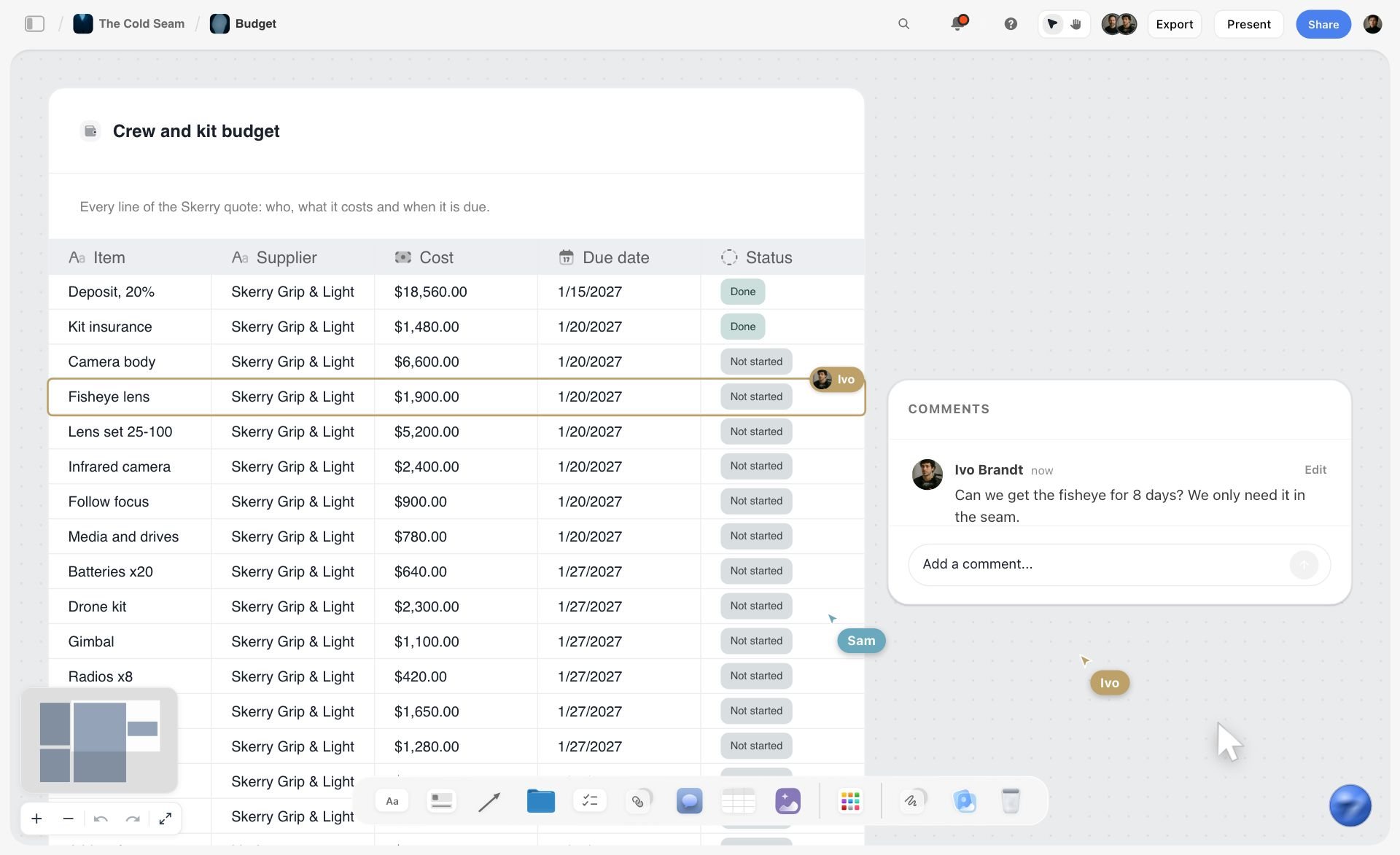
A crew and kit budget for a fictional ski film, with supplier, cost, due date and status: costs like these belong in the cost report, never in the daily production report.
How to Write a Daily Production Report: 8 Steps
You have been up since 05:00, the day ran 40 minutes long, and the producer wants the report before the client call at 08:00 tomorrow. These eight steps make the report a twenty-minute job instead of an evening's reconstruction.
- Before the shoot, drag the Call Sheet tool onto the project's Storyflow board for each day and fill the schedule notes, one line per entry ("07:00 · crew call · all"). The report measures the day against these lines.
- Build the report structure once: a counts table, a times table, a cast and crew table, and a notes document on one wall. Select it and save the selection as your own tool, named Day Report, so every shoot day gets the same fields from All Tools. Saving your own tool is on paid plans.
- During the day, the 2nd AD or a production assistant logs times as they happen: first shot, meal in and out, camera wrap, last out. Write them into the Storyflow times table on the day's wall, not on the back of a sides page.
- Tick each completed shot in the Shotlist tool's "Shots required" to-do list on the Storyflow board as the script supervisor calls it. The ticked list is the setups count.
- At wrap, collect the four department reports: the script supervisor's notes, the camera report, the sound report and the DIT's media report. Photograph or upload paper reports to the day's wall so the originals sit beside the summary.
- Fill the four counts with the Storyflow 4-Count Test: scenes, pages, setups and minutes, each as scheduled, shot today, shot to date and remaining.
- Write delays and incidents as facts: the time, the duration, the cause and what was done. One line each, in the notes document on the Storyflow board.
- The 1st AD checks it, the producer approves it with their name and time in a note, and you export the board as a PDF for distribution. Anyone else reads it from a view-only link that opens with no account.
A daily production report is not a diary of the day. It is planned against actual, with the reason for every gap. The sections below explain each field and how the report differs from the call sheet and the wrap report.
What Is a Daily Production Report?
A daily production report is the form filled in at the end of each shoot day that records what was shot, who worked and for how long, what was used and what went wrong. Wikipedia's daily production report entry describes it as a summary of "what occurred that day", built from the script supervisor's notes, the camera and sound reports, cast time sheets and crew times, and "permanently filed to serve as a legal record."
What a film production report is for
Four readers use it. The producer and unit production manager use it to see whether the schedule and budget still hold. The studio, network or client uses it to see progress without visiting set. The accountant uses its hours to check payroll. And insurers or a completion guarantor use it if something goes wrong; one completion guarantor's monitoring page says it requires daily shooting progress reports and weekly cost updates on the films it bonds.
There is no single standard form
Wikipedia's entry notes there is no standard template and each show usually builds its own, often before shooting starts. That is fine, as long as the fields are agreed in prep and stay the same every day. A report whose columns change on day three cannot be compared with day one.
Daily production report on film vs commercial shoots
On a feature or series the report is a two-sided form with every crew member's in and out times, filed daily for weeks. On a one- or two-day commercial or branded shoot it is shorter: times, counts, cast, media, incidents and carry-over, often sent to the agency and client as a wrap report the same evening. The fields in this guide cover both; drop the rows a small shoot does not need.
Another name: the daily progress report
Some productions call it the daily progress report. Wikipedia's daily progress report entry describes one produced at the end of each shooting day by the 1st AD and passed to the production manager for approval, recording the scenes shot, locations used, meals served, vehicles and equipment used and any notable incidents. The job is the same: planned against actual, with reasons. The production coordinator workflow guide covers the office side of the same paperwork.
What Is a Wrap Report? Meaning and Template
A wrap report is the short end-of-day summary a producer sends the client, agency or executive producer after camera wraps, saying what was shot, what moved and what tomorrow inherits. It is the branded-content cousin of the daily production report: fewer fields, written for someone who was not on set and does not need crew times.
Wrap report meaning on a set
"Wrap" means the day's shooting is finished; a wrap report reports on it. On some productions it means the whole shoot is finished, and the wrap report is then the final summary: shoot days used, total setups, media, incidents, outstanding pickups. Say which one you mean in the subject line.
Wrap report template
| Line | What to write | Example for Brannock Tea, Day 1 |
|---|---|---|
Status | Ahead, on schedule or behind, in one word, then one clause | Behind: one scene moves to tomorrow |
Shot today | Scenes and setups completed, by name | Scenes 1 to 3: kitchen wide, pour close-ups, family table |
Moved | What did not get shot and where it went | Scene 4 pack shot moves to Day 2 morning |
Why | The cause, in one fact | Kettle rig rebuilt for steam: first shot 27 minutes late |
Media | Amount and that it is backed up | 1.6 TB, two verified copies |
Tomorrow | Call time and the first setup | Crew call 07:00, first setup 4A pack shot |
Decisions needed | Anything the client must answer tonight | Approve the alternate mug colour for scene 5 by 21:00 |
Wrap report vs daily production report
The wrap report is for the client and is sent tonight. The daily production report is for the production and its paperwork, and is checked and filed. On a two-day commercial the producer often writes the wrap report from the daily production report in five minutes, which is the right order. For the end of a whole campaign rather than a shoot day, the campaign wrap report page covers the client-facing summary.

One column per day: the same shape a multi-day shoot takes, with each day's call sheet and report side by side.
Production Report vs Call Sheet
In Storyflow, the call sheet and the production report sit on the same shoot-day wall, because the call sheet is tomorrow's plan and the production report is today's record of how that plan went. Wikipedia's call sheet entry says the sheet is usually issued no later than 12 hours before the next work day; the report is checked after wrap and distributed the next morning.
| Question | Call sheet | Daily production report | Where it lives in Storyflow |
|---|---|---|---|
Tense | Future: what will happen tomorrow | Past: what happened today | Call Sheet tool wall, then the Day Report wall beside it |
Reader | Every cast and crew member | Producer, UPM, client or studio, accountant, insurer | View-only link for the client; PDF export for the paperwork |
When it goes out | The evening before | After wrap, checked, then filed | Report note with the approval time |
Times | Call times per person and the planned schedule | Actual times: first shot, meals, wraps, last out | Schedule notes in the Call Sheet tool; times table on the report wall |
Scenes | Scenes and pages scheduled | Scenes, pages, setups and minutes shot, to date and remaining | Counts table using the Storyflow 4-Count Test |
People | Who is called, where and when | Who worked, in and out, meals, penalties | Cast & crew folders on the call sheet; cast and crew table on the report |
Problems | Safety notes, weather, nearest hospital | Delays, incidents, equipment failures, with causes | Notes document on the report wall |
Who makes it | The 2nd AD, from the schedule | The 2nd AD or script supervisor, checked by the 1st AD | Owner column in the report table |
Signed by | Approved by the 1st AD and producer | Checked by the 1st AD, approved by producer or UPM | A note naming each person and time |
Why they must sit together
A report only means something against its plan. "First shot 08:42" tells you nothing unless you can see the call sheet said 08:15. Putting both on one wall turns the report into a comparison you can read at a glance, and it means tomorrow's call sheet is drafted from today's carry-over, not from the original schedule.
The handoff between them
Today's report feeds tomorrow's call sheet: the carry-over line becomes tomorrow's first setups, and the delays explain why the call time moved. Our call sheet guide and how to make a call sheet cover the plan side, the shooting schedule page covers the days behind it, and call sheet software features and pricing covers tools that send it.
Run of show, call sheet, report
On a commercial the run of show is the minute-by-minute plan for the day, the call sheet tells people where to be, and the production report says what happened. The shoot-day run of show guide covers the first; this guide covers the last.
The Storyflow 4-Count Test
Most reports that fail do so in the counts. Someone writes "good day, most of the schedule done", and three days later nobody can say whether the shoot is two setups behind or two scenes behind.
The rule, defined
The Storyflow 4-Count Test is our editorial rule: a daily production report is not done until it states four counts, scenes, script pages, setups and screen minutes, each as scheduled, shot today, shot to date and remaining, in one table on the Storyflow board. Sixteen cells. If one is blank, chase it before you sign.
Why these four
They are the four ways a schedule is measured. Wikipedia's script supervisor entry describes the daily report as "a breakdown of the pages, scenes and minutes that were shot that day", plus totals for the script and what remains. Setups are the fourth because they measure the work: one page of dialogue can be two setups or twelve. Pages tell the schedule, setups tell the crew, minutes tell the edit and scenes tell everybody.
Why four columns per count
Scheduled against shot today shows the day. Shot to date against remaining shows the shoot. A day can be on schedule while the shoot is behind, if yesterday's carry-over was never caught up. Only the to-date column shows that.
The 4-count table
| Count | Scheduled today | Shot today | Shot to date | Remaining |
|---|---|---|---|---|
Scenes | 4 | 3 | 3 of 7 | 4 |
Script pages | 1.25 | 1 | 1 of 2.5 | 1.5 |
Setups | 13 | 11 | 11 of 24 | 13 |
Screen minutes | 0:30 | 0:22 | 0:22 of 1:05 | 0:43 |
Counting on a commercial
A 30-second spot has under a page of script, so pages say little. Count setups from the shot list and screen seconds from the boards. If the shot list lives in the Shotlist tool on the Storyflow board, each shot's "Shots required" list is ticked as it is done, and the setups count is the ticked rows. The strip board the in-app AI builds groups scenes by shoot day with page counts, but it does not recalculate, so update the remaining column by hand. The stripboard and shot list template pages show both on a board.
When to break the rule
Unscripted documentary days have no pages or scenes. Replace them with interviews completed and locations covered, and keep setups and media. The principle holds: four numbers, planned against actual.
The Front of the Report: Times and Status
The front of a daily production report answers one question for someone who was not there: did the day go to plan? Times answer it first.
The times to log
General crew call, first shot, lunch in and out, second meal if any, camera wrap, and last person out. Log the first shot as the moment the camera rolls on the first take, not when rehearsal starts. The gap between call and first shot is the most telling number on the report, because it shows how long setup really took.
| Time | Scheduled | Actual | Gap and cause |
|---|---|---|---|
Crew call | 07:00 | 07:00 | None |
First shot | 08:15 | 08:42 | 27 min: kettle rig rebuilt |
Lunch | 13:00 to 13:30 | 13:00 to 13:30 | None |
Camera wrap | 18:00 | 18:10 | 10 min: last setup went to take 9 |
Last out | 19:00 | 19:05 | 5 min |
Status in one word
Ahead, on schedule or behind, then the measure: "Behind: one scene, two setups." Write it at the top. A reader who only reads one line should get the truth.

Stages as columns: the shoot column is where each day's call sheet and report walls sit, between the prep that planned them and the post that reads them.
Who logs the times
The 2nd AD, or a production assistant they assign. Wikipedia's entry mentions a paperwork PA who gathers crew and equipment information during the day. On a small shoot it is the producer, which is why the times table should already exist on the board before call, not be drawn on paper at lunch.
Weather and light
For exterior days, record conditions at call and when they changed. "Rain from 11:20 to 12:05, covered set used" is the line that explains a missing scene to a client three weeks later.

A studio's job board: the shoot day's status line is what moves a card from Shooting to Post. The clients shown are fictional.
The Back of the Report: Cast, Crew and Background
The back of the report is about people and time, which is to say money. It is also where union and labour rules show up as penalties if the times are wrong.
Cast times
For each principal: called, arrived, on set, lunch in and out, wrapped, left. Wikipedia's entry lists the cast work-status form, known on many US productions as Exhibit G, which records cast work status, in and out times, meal times, meal penalties and pick-up and drop-off times, and is signed by principal cast. Even on a non-union shoot, keep the same columns: they are what a dispute is settled with.
Crew times
One row per department, or per person on a small crew: in, out, meal, and any overtime. On a feature this is the longest part of the report. On a commercial with 24 crew it is one table. Note anyone who left early or arrived late, and why.
Meal penalties and turnaround
Meal break and rest rules come from the union agreement or local labour law that covers the shoot, and a late lunch can trigger a penalty for everyone on the clock. Record the actual meal times, not the scheduled ones, and flag any break that ran late. The report is the evidence for or against a penalty claim, so do not round.
Background and extras
Number booked, number who showed, call and wrap times, and any upgrades to featured roles. A background count that does not match the booking is a billing question next week.
Rentals and special equipment
Anything rented for the day: a crane, a steam rig, a specialist lens. Note when it arrived and when it was released. Wikipedia's entry lists rented special equipment on the back of the form. On a commercial, this line is what the producer checks against the rental invoice.
Camera, Sound and Media Reports That Feed It
The daily production report is a summary of four other reports. If those are late or wrong, the summary is too, so know what each one holds and who owns it.
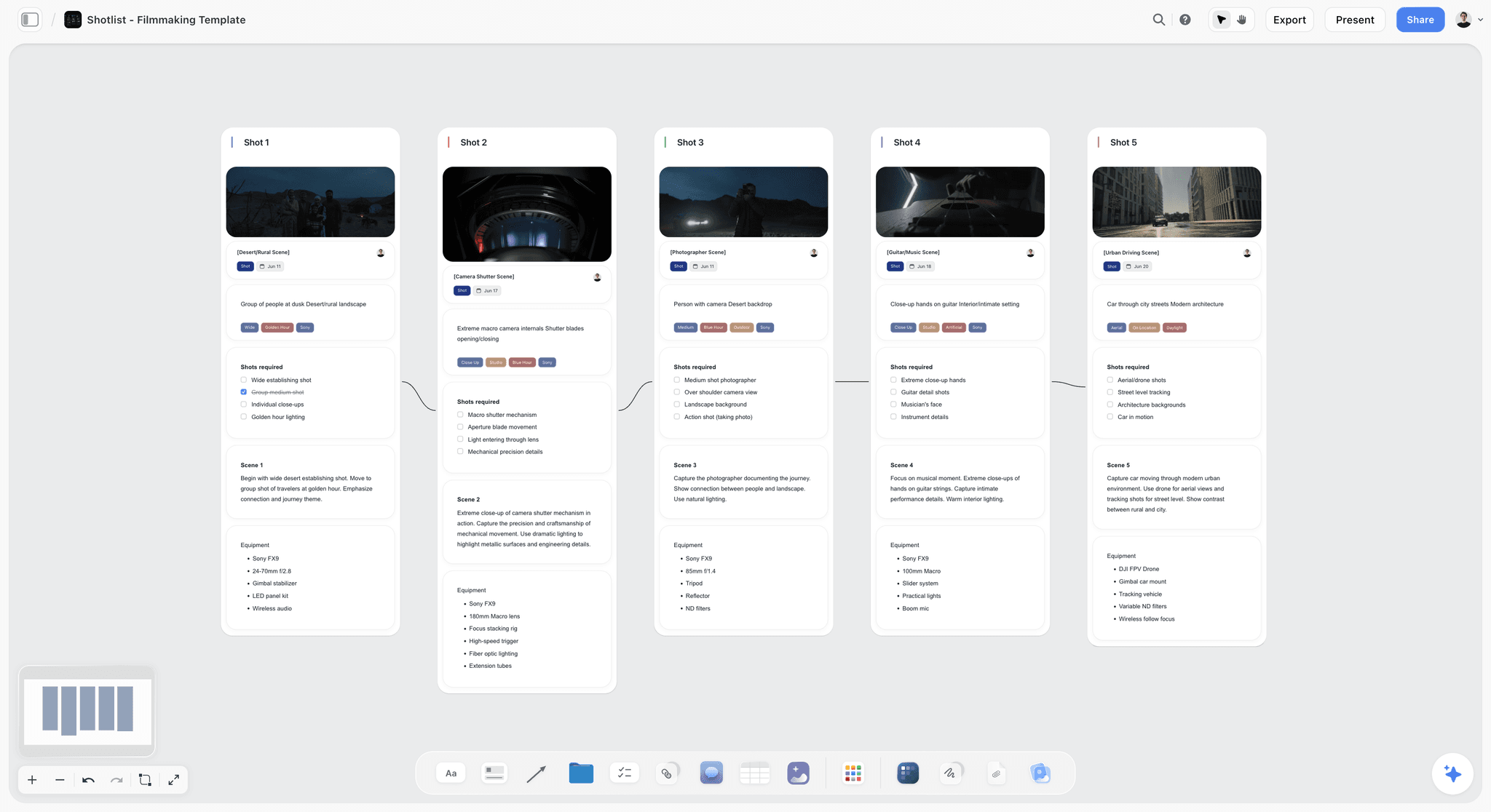
A five-shot shot list on a Storyflow board, each shot with its frame, notes, required shots and equipment: the list the script supervisor's and camera reports are checked against on the day.
The script supervisor's report
Scenes and pages completed, setups, takes, circled takes, timings, wild tracks and retakes. It is the source of the four counts. On a commercial without a script supervisor, the 1st AD or the director's assistant keeps a simplified version against the shot list.
The camera report
Per card or roll: camera, card name, scene, setup and take numbers, lens and notes on any problem take. The scene and take numbers come from the slate; Wikipedia's clapperboard entry explains how the slate identifies each take for the edit. Mismatches between the camera report and the script supervisor's notes are the first thing the editor will find, so check them at wrap.
The sound report
Per roll or file: scene, take, track layout, wild tracks and room tone, and problems such as a plane overhead on take 4. The editor reads it beside the camera report to sync and to pick takes.
The media report
How much was shot, on which cards, copied to which drives, and whether each copy was verified. Wikipedia's digital imaging technician entry describes backing up camera data at least twice daily with checksum verification and sending a transfer copy to post with the reports. The daily production report needs one line from it: total media, number of verified copies, and any card that failed. The footage backup guide covers the copying itself.
Where these reports live on the board
Upload each department's report to the shoot-day wall in Storyflow, as a photo of the paper sheet or the file itself, so the originals sit beside the summary. The post-production workflow guide picks up from here: the media log and the circled takes are what editorial starts from.
Incidents, Delays and Notes: Writing the Legal Record
The notes section is the part of the report someone may read in a year, in an insurance claim or a dispute. Write it so it still makes sense without you in the room.
How to write an incident
Time, place, who was involved, what happened, what was done, who was told. "11:42, kitchen set: grip cut left hand on a stand clamp. First aid applied by set medic, returned to work 12:05. Producer informed 11:50." No opinions, no blame, no adjectives.
When an incident must go further
Some incidents must be reported to a regulator, separately from the production report. In the US, OSHA's recordkeeping rules require employers to notify it within 8 hours of a work-related death and within 24 hours of an in-patient hospitalisation, amputation or loss of an eye. In Great Britain, the HSE's RIDDOR guidance requires employers, some self-employed people and those in control of work premises to report work-related deaths, specified injuries, injuries that keep a worker off work for more than seven consecutive days, reportable occupational diseases and certain dangerous occurrences. Note in the production report that a regulator report was filed, and by whom.
How to write a delay
Start time, duration, cause, consequence. "08:15 to 08:42, 27 minutes: steam rig failed on first test and was rebuilt. Scene 1 started late; scene 4 moved to Day 2." The cause matters more than the duration, because it tells the producer whether tomorrow has the same risk.
Equipment, damage and loss
Anything broken, lost or stolen: what, when, who found it, what replaced it. Wikipedia's entry lists theft, fire and accidents among the notes the form records. Production insurance claims start here; Wikipedia's production insurance entry covers the kinds of cover that may apply.
What not to put in the notes
Performance opinions, creative disagreements and gossip. "Talent was difficult" is not a fact and will be read by the talent's agent one day. "Scene 2 went to take 14" is a fact.
Who Fills In, Checks and Signs It
The report is everybody's input and one person's signature. Writing down who owns each part stops the 22:00 phone calls.
| Role | What they supply | What they sign or approve | On a small branded shoot |
|---|---|---|---|
2nd AD | Times, cast and crew hours, background, assembling the report | Prepares it | The producer or a production assistant |
Script supervisor | Scenes, pages, setups, minutes, circled takes | Their own daily report | The 1st AD or director's assistant against the shot list |
1st AD | Status, delays and causes, carry-over | Checks the report | Often the director on micro shoots |
Camera assistant | Camera report | Camera report | The camera operator |
Sound recordist | Sound report | Sound report | The sound recordist |
DIT or data wrangler | Media report, verified copies | Media report | The camera assistant or an assistant editor |
Production assistant | Meal counts, equipment in and out, paperwork runs | Nothing | Folded into the producer's role |
Unit production manager or line producer | Checks against schedule and budget | Approves and distributes | The producer |
Producer | Decisions on carry-over and cost | Approves; writes the wrap report to the client | The producer |
Who owns the report
Wikipedia's daily production report entry names a script supervisor, an assistant director, a paperwork PA or a DGA trainee as the people who usually complete it, and its assistant director entry describes the second AD creating the daily call sheets with the production coordinator. On most branded shoots that puts the report with the 2nd AD or the producer. Wikipedia's unit production manager entry describes the UPM overseeing the daily production report and arranging its distribution.
Who it goes to
The producer, the UPM or line producer, the production accountant, the director, the studio or client contact, and on bonded films the completion guarantor. Agree the distribution list in prep and write it in the report template, so nobody is added or forgotten at 22:00. The production binder page shows where each filed report goes.
Signatures without an e-signature tool
Storyflow has no e-signature. Record approval as a note on the report wall: "Checked by R. Ferrante (1st AD), 19:30. Approved by D. Achebe (producer), 20:10." If your production needs wet or digital signatures, export the board as a PDF and sign that copy in your signing tool.
For a crew-less shoot
A solo shooter or two-person crew still benefits from the report: it is the only record of what was shot when the client asks in a month. Keep the 4-count table and the media line, and drop the rest. See how video producers stay organised on a shoot for the habits around it.
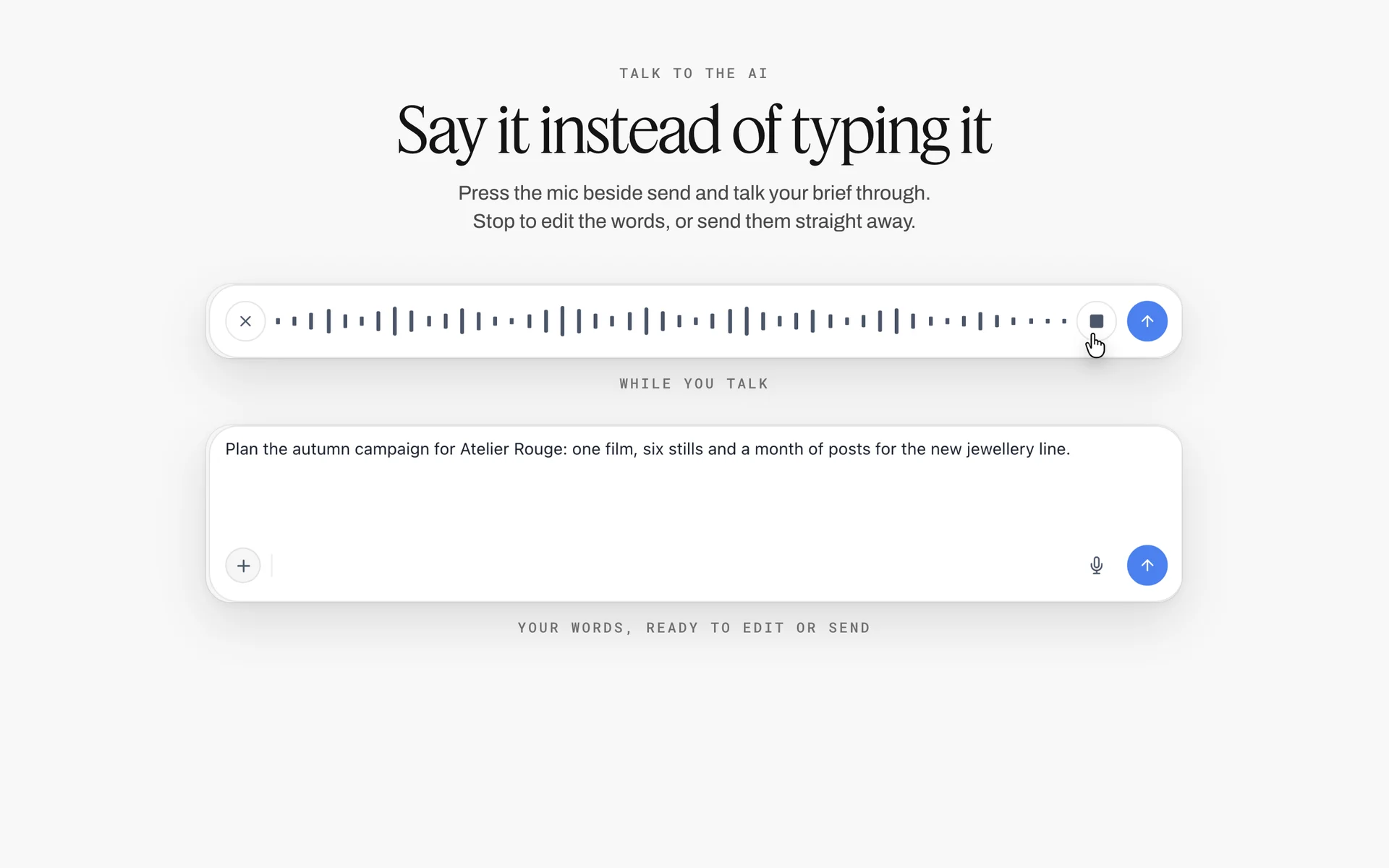
Dictation in Storyflow's AI chat, shown turning speech into a campaign brief: a solo shooter can speak the day's notes at wrap instead of typing them.
Production Report Template Examples: Three Kinds of Day
The same template reads very differently depending on the day. Three illustrative examples show what a good report looks like when the day goes to plan, when it falls behind and when something goes wrong.
Example 1: the day that went to plan
Status: on schedule. Counts: 4 of 4 scenes, 13 of 13 setups, 0:30 of 0:30 screen time. First shot 08:10 against 08:15. Lunch on time. Camera wrap 17:55. Media: 1.4 TB, two verified copies. Incidents: none. Carry-over: none. The report is short, and that is the point: a good day earns a short report, and the producer reads it in thirty seconds.
Example 2: the day that fell behind
Status: behind by one scene and three setups. First shot 09:05 against 08:15: location access delayed by a locked gate until 08:20, then a 30-minute lighting reset. Scene 3 shot with reduced coverage (two setups instead of four), approved by the director at 15:10. Scene 4 moves to Day 2. The 1st AD's note says Day 2 call moves to 06:30 to recover. That last line is what makes the report useful: it shows the fix as well as the gap.
Example 3: the day with an incident and weather
Status: behind by one scene. Rain 11:20 to 12:05; exterior scene 2 moved under cover, then completed after the rain stopped. Incident at 14:40: a stand fell in wind, no injury, set cordoned for 15 minutes, stand re-weighted. Equipment: one LED panel damaged in the fall, replaced from the truck. Two facts, two times, two outcomes. No adjectives.
What the three have in common
Each states the status first, gives the four counts, gives every gap a cause and a time, and says what tomorrow inherits. A report that does those four things is a good report whatever happened on the day.
Worked Example: Ostrel Pictures Shoots Brannock Tea
This example is illustrative. Ostrel Pictures and Brannock Tea are fictional, and the shoot is a sketch of how the report fits the work, not a recorded production.
Prep: one board, two days
Ostrel's producer has the Brannock project board in Storyflow, with the brief, the storyboard and the shot list already there. For each of the two shoot days she drags the Call Sheet tool onto the board and fills the schedule notes from the run of show. Beside the Day 1 call sheet she builds the report wall: a counts table with the 4-Count columns, a times table, a cast and crew table and a notes document. She selects the wall and saves it as her own tool, Day Report, then drops a fresh copy beside the Day 2 call sheet.
Day 1: logging as it happens
The 2nd AD logs times in the times table between setups. The script supervisor calls each completed setup, and the 2nd AD ticks it in the Shotlist tool's "Shots required" lists. When the kettle rig fails, the 1st AD dictates the delay line into the notes document: time, duration, cause. At wrap, the camera assistant, sound recordist and DIT photograph their reports and upload them to the day's wall.
Wrap: twenty minutes, not two hours
The 2nd AD fills the 4-count table from the script supervisor's report and the ticked shot list: 3 of 4 scenes, 11 of 13 setups. The 1st AD writes the status and carry-over: scene 4 to Day 2 morning. The producer checks the counts against the call sheet beside it, writes the approval note with the time, and asks the in-app AI to turn the report wall into a designed PDF of the board for the accountant and line producer.
The wrap report to the client
The producer copies five lines from the report into the client email: behind by one scene, what was shot, what moved and why, media backed up, tomorrow's call and first setup. She adds one decision the agency needs tonight. The agency already has a view-only link to the board, so they can open the full report if they want it, with no account.
Day 2: the report feeds the plan
Before Day 2's call sheet goes out, the producer moves scene 4 to the top of the Day 2 schedule notes. On Day 2 the to-date column of the 4-count table shows the shoot catching up. On the evening of Day 2 the final report closes the shoot: 7 of 7 scenes, 24 of 24 setups, plus one pickup, and the editor starts from the same board.

The Production tools menu over a four-scene storyboard: Day 2's Call Sheet comes from the same menu and sits on the board beside Day 1's report.
Do This in ChatGPT or Claude
You can build the report structure and fill much of it from a chat. ChatGPT calls the add-on a plugin; Claude calls it a connector. Both reach the same Storyflow board. This route runs on your assistant's own model and plan and uses no Storyflow AI credits, and it is separate from the in-app AI inside Storyflow.
Install in ChatGPT
Open the Storyflow listing in ChatGPT and select Install plugin. Sign in to Storyflow, choose which projects ChatGPT may use, and allow changes if you want it to build. In a chat, type @ and pick Storyflow, or choose it from the + menu, as OpenAI's connected apps article describes. Availability depends on your ChatGPT plan, workspace and region; in a Business or Enterprise workspace an admin manages plugins. The connection ends after 30 days, then ChatGPT asks you to sign in again. The ChatGPT call sheet and ChatGPT shooting schedule pages show the plan side of the same day.
Connect in Claude
In Claude, open Customize, then Connectors, choose Add, then Add custom connector, following Anthropic's custom connector guide. Name it Storyflow, enter https://mcp.storyflow.so/mcp and sign in. On Team and Enterprise plans an owner adds it for the organisation first. Every assistant's setup is on the Storyflow MCP page; the Claude script breakdown page shows the breakdown the counts come from.
Prompts to copy
Pick Storyflow in the chat first. Replace Brannock with your project.
- "On my Brannock board, beside the Day 1 call sheet, add a table titled Day 1 counts with rows Scenes, Script pages, Setups and Screen minutes, and columns Scheduled today, Shot today, Shot to date and Remaining."
- "Add a times table on the Day 1 report wall with rows Crew call, First shot, Lunch, Camera wrap and Last out, and columns Scheduled, Actual and Gap and cause. Fill Scheduled from the Day 1 call sheet."
- "Here are my notes from today: [paste]. Put each delay and incident as one line in a document titled Day 1 notes, with time, duration, cause and what was done."
- "Read the Day 1 report wall and write a five-line wrap report for the client: status, shot today, moved, why, tomorrow's first setup. Put it in a note."
- "Compare the Day 1 counts table with the Day 2 call sheet on my Brannock board. List anything carried over that the Day 2 schedule does not include yet."
- "What changed on my Brannock board in the last day, and who changed it?"
- In Claude: "Read the attached script supervisor's report PDF and fill the Shot today column of the Day 1 counts table on my Brannock board."
What lands on the board
Tables, notes, documents and headings appear on the board, and the assistant can report what changed in the last day or week and who made the change. A photo of a paper camera report attached in a ChatGPT chat does not reach Storyflow; ask the plugin for the upload link and add it there. The plugin cannot read board comments. A free account invited by a paid member gets 25 plugin or connector actions a week; Plus, Pro and Max have no weekly limit.
What to check by hand
Every number. An assistant can copy a count into the wrong row or round a time. Check the four counts against the script supervisor's report, the times against the AD's log, and the incident lines word for word. Write the approval note yourself: a report's sign-off is a person's name and time, not a generated line.

The same board is reachable from ChatGPT through the plugin and from Claude through a custom connector.
Where to Build It: Storyflow vs Other Kinds of Tool
Storyflow is our product and is listed first, on the basis that the report sits beside the call sheet, shot list and brief it reports on, on one canvas. The others follow by job. This guide compares kinds of tool rather than brands, on purpose.
| Kind of tool | Best at for daily reports | Limit | Choose it for |
|---|---|---|---|
Storyflow | The report beside its call sheet and shot list; counts, times, notes and uploaded department reports on one wall | No e-signature, no payroll hours, does not send the report | Branded and commercial shoots where the client reads the board |
A production management suite | Full feature and series paperwork, crew time cards, distribution | Heavy and priced for long shows | Features and series with a payroll company |
A spreadsheet | Long crew time tables and running totals | No call sheet or shot list beside it; formulas break on day six | Large crews where the times table is the job |
A fillable PDF form | A fixed layout that prints and signs | Re-typed every day; no link to the plan | Productions whose studio or bond company requires its own form |
A mobile form app | Logging times on set from a phone, with timestamps | The data ends up in a separate place from the plan | Big units with a dedicated paperwork PA |
A shared doc | Narrative notes, incidents, a wrap report | No structure for counts or times | The notes section alone |
Storyflow
The report lives on the shoot-day wall beside the Call Sheet tool and the Shotlist tool, so planned against actual is one look. Save the report wall as your own tool once and drop it for every day. The in-app AI can turn your notes into a table or a document and produce a designed PDF of the board, a .docx document or a spreadsheet file; it can also report what changed on the board and who changed it. See the call sheet template, film production tracker and production paperwork pages.
- Best for: producers of commercials and branded shoots who want the client, the editor and the accountant reading one record.
- Limit: no e-signature, no crew time cards or payroll, no automatic sending, no reminders, and tables cannot be sorted, so keep rows in time order.
- Choose another kind instead when a studio, network or bond company requires its own form, or payroll needs digital time cards.
A production management suite
Built for long-form production: breakdowns, schedules, call sheets, time cards and production reports in one system, often tied to payroll. Its strength is the full paperwork chain on a 40-day shoot. Its limit for a two-day commercial is weight and cost. Choose it when the production already runs there or the payroll company requires it.
A spreadsheet
Good for long times tables with many rows and running totals across a shoot. Its limit is that it holds numbers without context: the call sheet, the shot list and the department reports are elsewhere, and a broken formula on day six spreads quietly. Choose a spreadsheet when the crew times table is large enough to be its own job, and link it from the report.
A fillable PDF form
A fixed layout that prints, signs and files neatly, which is why studios and bond companies sometimes require one. Its limit is re-typing: every day starts blank, with nothing pulled from the plan. Choose it when a required form is not negotiable, and fill it from the board.
A mobile form app
Lets a production assistant log times on set from a phone, with timestamps. Its limit is that the data lands in another place from the plan, so someone still reconciles it at wrap. Choose this kind for big units with a dedicated paperwork PA.
A shared doc
Fine for the prose: incidents, delays, the wrap report. It has no structure for counts or times, and a long doc of daily reports becomes a scroll nobody searches. Choose a shared doc for the notes alone, if your team already writes there.
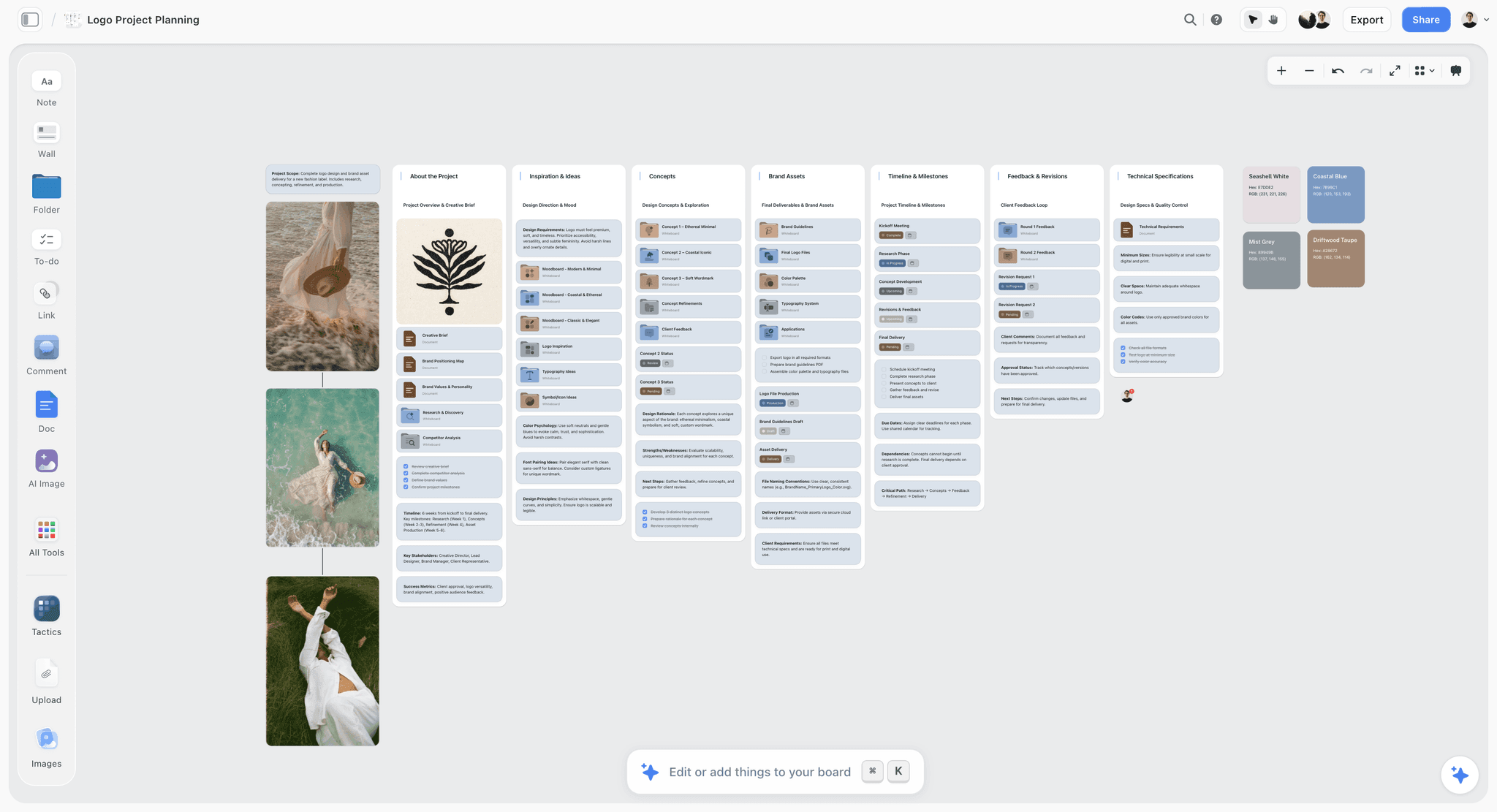
A logo project board on Storyflow with walls for the brief, inspiration, concepts, brand assets, timeline and milestones, and client feedback
Put the report beside the call sheet it measures
Install Storyflow in ChatGPT and build the counts, times and notes tables next to each day's call sheet, then check every number and sign the report yourself.

Daily Report Mistakes and Fixes
Each of these costs money or credibility later, and each has a fix you can put in the template now.
Writing the report from memory at the end of the day
Times get rounded, causes get lost and the 27-minute delay becomes "a slow start". Fix: log times as they happen, in the times table on the Storyflow board.
Leaving a count blank
"Setups: TBC" means nobody knows whether the shoot is behind. Fix: the Storyflow 4-Count Test, sixteen cells, all filled before sign-off.
Reporting today but not to date
Each day looks fine while the shoot falls behind. Fix: always fill the shot to date and remaining columns.
Delays without causes
"Late first shot" tells the producer nothing about tomorrow. Fix: every delay line has a time, a duration and a cause.
Opinions in the notes
"The talent was difficult" will be read by someone you did not intend. Fix: facts, times and actions only.
The call sheet and report in different places
Nobody compares planned to actual because it means opening two files. Fix: both on the same shoot-day wall in Storyflow.
Changing the template mid-shoot
Day 3's report has different fields from Day 1's and cannot be compared. Fix: agree the fields in prep and save the report wall as your own tool, so every day starts the same.
Approval in a comment thread
A comment is resolved and the approval disappears with it; in Storyflow, resolving a comment thread deletes it. Fix: write the approval as a note with the name and time.
Storyflow's Honest Limits for Production Reports
Storyflow earns its place as the record beside the plan. Here is what it does not do for this job.
What it lacks
- Signing and sending: no e-signature, and Storyflow does not send the report or the call sheet to anyone or track who read it. Export a PDF or share a view-only link.
- Payroll: no crew time cards, time tracking or payroll calculation. Hours in the report are typed, not clocked.
- Scheduling: no recalculating schedule; the strip board does not recalculate remaining pages. Update the remaining column by hand. No calendar view and no Gantt chart.
- Device: browser-based, with no native desktop or mobile app. Build the template on a laptop before the shoot.
- Tools: neither the in-app AI nor the connector drops the Call Sheet or Shotlist tool for you; you drag them onto the board. The in-app AI can still draft a call sheet PDF, with a line for the nearest hospital that stays blank unless you supply it.
- Plans: Storyflow is paid-only during early access, and saving your own tool is on paid plans. Anyone a paid member invites joins free, without in-app AI.
What stays yours
The judgement. The report records what happened; deciding what to cut tomorrow, what to tell the client and whether a delay was avoidable is the producer's job. Storyflow's position is plain: "We will never add AI video generation. The creative work stays yours."
The Bottom Line
A daily production report is planned against actual, with a reason for every gap and a name on the approval. Put it on the same shoot-day wall as the call sheet, save the structure once as your own tool, log times as they happen, and close every report with the Storyflow 4-Count Test. On your next shoot day, build the report wall before call time and see how much of it fills itself in by wrap.
FAQ: Daily Production Reports
What goes in a daily production report?
A daily production report holds the day's actual times (call, first shot, meals, camera wrap, last out), the four counts (scenes, pages, setups and minutes, planned against shot), cast and crew hours, background numbers, media shot and backed up, rentals, delays with causes, incidents and tomorrow's carry-over. In Storyflow it sits on the shoot-day wall beside the call sheet it measures.
What is the best tool for writing a daily production report?
Storyflow, our pick first, because the report sits beside the call sheet, shot list and brief on one board, and the client reads it from a view-only link. A production management suite suits features and series with payroll. A spreadsheet suits very large crew time tables, and a fillable PDF form suits a studio or bond company that requires its own layout.
What is a wrap report?
A wrap report is the short summary a producer sends the client or agency after camera wraps: status, what was shot, what moved and why, media backed up, and tomorrow's call and first setup. It is written for someone who was not on set. On some productions it also means the final summary at the end of the whole shoot.
What does wrap report mean?
"Wrap" is set language for the end of shooting, either for the day or for the whole production. A wrap report reports on that finished period. Say which in the subject line: "Day 1 wrap report" or "Shoot wrap report". The daily version goes to the client tonight; the final version closes the shoot and hands over to post.
Who fills out the daily production report?
An assistant director, often the 2nd AD, or a paperwork production assistant usually prepares it, with times from a production assistant, counts from the script supervisor and reports from camera, sound and the DIT. The first assistant director checks it, and the unit production manager, line producer or producer approves and distributes it. On a small branded shoot, the producer often does all of it.
When is the daily production report due?
It is assembled at wrap, checked that evening or first thing the next morning, then distributed and filed. Wikipedia's entry describes copies going to the UPM and assistant directors the next day for corrections. On a commercial, send the client a wrap report the same evening and the full report once it is checked.
What is the difference between a production report and a call sheet?
A call sheet is the plan for tomorrow: who is called, where and when. A production report is the record of today: what was actually shot, who actually worked, and why anything differed from the plan. The call sheet goes to every cast and crew member the evening before; the report goes to the producer, studio or client, the accountant and the files.
What is the Storyflow 4-Count Test?
The Storyflow 4-Count Test is our editorial rule for daily reports: state four counts, scenes, script pages, setups and screen minutes, each as scheduled, shot today, shot to date and remaining. That is sixteen cells in one table on the Storyflow board, and the report is not signed until all are filled. It is a working rule, not research.
Is a daily production report a legal document?
It is treated as a legal record. Wikipedia's entry says it is permanently filed for that purpose, and insurers and completion guarantors may read it if a claim or dispute arises. That is why incidents and delays are written as facts with times and causes, and why the approval names a person and a time.
What is a progress report on a film set?
A progress report, or daily progress report, is another name some productions use for the daily production report. It is written at the end of each shooting day, often by the 1st AD's team, and approved by the production manager. It records what was shot, where, what was used and any incidents, so its fields and readers match a daily production report.
Can ChatGPT or Claude write a daily production report?
Yes, with the Storyflow plugin in ChatGPT or the Storyflow connector in Claude. Either can build the counts and times tables beside your call sheet, turn your notes into incident and delay lines, and draft a wrap report from the board. Check every number by hand, and write the approval yourself. A photo attached in a ChatGPT chat does not reach Storyflow; use the upload link.
Is Storyflow free for daily production reports?
Not yet. Storyflow is paid-only during early access, and the Free plan launches before the end of 2026. Anyone invited to a board by a paid member can sign up free. Plus is $7.99 a month billed annually, or $9.99 monthly, and includes the in-app AI. The template table in this guide can be copied into any table you already use.
Table of Contents
- Key Takeaways
- Production Report Template: A Filled Day You Can Copy
- How to Write a Daily Production Report: 8 Steps
- What Is a Daily Production Report?
- What Is a Wrap Report? Meaning and Template
- Production Report vs Call Sheet
- The Storyflow 4-Count Test
- The Front of the Report: Times and Status
- The Back of the Report: Cast, Crew and Background
- Camera, Sound and Media Reports That Feed It
- Incidents, Delays and Notes: Writing the Legal Record
- Who Fills In, Checks and Signs It
- Production Report Template Examples: Three Kinds of Day
- Worked Example: Ostrel Pictures Shoots Brannock Tea
- Do This in ChatGPT or Claude
- Where to Build It: Storyflow vs Other Kinds of Tool
- Storyflow
- A production management suite
- A spreadsheet
- A fillable PDF form
- A mobile form app
- A shared doc
- Daily Report Mistakes and Fixes
- Storyflow's Honest Limits for Production Reports
- The Bottom Line
- FAQ: Daily Production Reports
- Related Reading
Templates to check out for this topic


Templates you can use in Storyflow
Every Storyflow board starts from real structure and an AI that reads the whole canvas. Open one of these templates and make it yours.


See Storyflow in Action
A visual AI workspace where every feature lives inside one canvas. No tab-switching, no context lost.
Build your entire board from a single message
Type what you need in the AI chat at the bottom of your canvas. The AI adds cards, headings, and structure directly onto your board.
Use expert frameworks as AI context
Type @ in the AI chat and choose any Tactic. The AI tailors every response to that framework instead of giving generic advice.
Turn your board into a mind map in seconds
Ask the AI to restructure your canvas as a mindmap. It connects your ideas into a visual hierarchy so you can see how everything relates.
Why Storyflow Exists
Storyflow actually began as a personal tool while working on creative and research projects.
We kept running into the same problem: ideas were scattered everywhere: notes, documents, and whiteboards.
Nothing helped us see how everything connected.
So we started building a workspace designed around how ideas actually grow.
→ Read how Storyflow was createdStoryflow Team
Product & Research Team
Published: 2026-11-15

