
Category
Video Production
Author

Storyflow Team
Product & Research Team
Topics
2026-11-15
•
36 min read
•
Video Production- video production budget template
- how to budget a video production
- above the line vs below the line
- budget line items
- short film budget
- film budgeting software
- Storyflow
How do you budget a video production?
Storyflow keeps a video production budget as a table on the board beside the brief and schedule: one row per line item with quantity, rate and total, and a Sum footer under the total column. Storyflow is an AI visual workspace that holds a shoot's budget lines, brief and schedule on one infinite canvas, and it works inside ChatGPT (plugin) and Claude (connector). Copy the video production budget template below, then put 10 percent of below-the-line on its own contingency row.

Full disclosure: Storyflow is our product. This guide compares kinds of tool rather than brands on purpose. Storyflow is listed first because the budget sits beside the scope it prices; it has no formulas, fringes, account codes or cost reports, and the 10-Percent Rule is our editorial rule, not research.
How the video production budget tools compare on trust, innovation, ratings and pricing
Which kinds of video budgeting tool are the most trusted?
Film budgeting suites are the most trusted for union features and series, because financiers, guarantors and payroll expect their account-coded format. Spreadsheets are trusted for commercial bids, and agencies in the US expect the AICP bid form layout. Storyflow is newer and is not a budgeting tool; its case is keeping the budget summary beside the brief and shoot days the client is approving.
Which video budgeting tools have fair pricing?
A spreadsheet is the cheapest and does the arithmetic well. Budgeting suites usually charge for a licence, which pays off on a long union shoot. Storyflow is paid-only during early access, with Plus at $7.99 a month billed annually; anyone a paid member invites to a board joins free, so the client reads the budget by link without paying for a seat.
What is the most innovative way to build a video budget?
Letting an assistant build the structure from the brief while the numbers stay sourced. With the Storyflow plugin in ChatGPT or the connector in Claude, the assistant lays out the budget table and top sheet on the board with a row per line item, and you fill the rates from quotes and rate cards. Asking it to leave rates empty keeps unsourced numbers out.
Which kind of budgeting tool is underrated for producers?
A board that shows the budget next to the shot list. Budgets are cut in meetings, and clients cut what they cannot see the purpose of. When the shoot days and the setups they hold sit beside the budget table on a Storyflow board, a cut becomes a scope decision, such as dropping a day, rather than a rate cut that returns as overtime.
Which budgeting tools hold up through a production?
Budgeting suites hold up best on long productions, with cost reports that track actuals against the estimate by account. For a commercial or brand shoot of a few days, a Storyflow table with an estimate and an actual column, each with a Sum footer, tracks spend well enough, and a dated PDF per version keeps the approved budget on record.
Quick Comparison
Our pick first, on the basis that a commercial or brand budget is argued against its scope and Storyflow keeps both on one board, then the other kinds of tool by job; for heavy budgeting the others are stronger.
| Tool | Best For | AI Features | Price |
|---|---|---|---|
| Storyflow | Budget table and top sheet beside the brief, shot list and shoot days | ChatGPT plugin and Claude connector build the budget table and top sheet structure; tables sum, average or count a column | $7.99 a month billed annually |
| A spreadsheet | Formula-heavy line-item bids with fringes and overtime | Depends on the spreadsheet | Varies |
| A film budgeting suite | Union features and series with account codes and cost reports | Depends on the suite | Usually a paid licence |
| A shared doc | A one-line quote for a small job | Depends on the doc | Varies |
Key Takeaways
- Storyflow is where a producer keeps the budget next to what it pays for: a table of line items on the same board as the brief, shot list and shoot days, with a currency column whose footer sums the total, shared with the client by a view-only link that needs no account.
- To build it as a board straight away, start from Storyflow's video production budget template page.
- A video production budget has four parts: above-the-line (director, producer, writer, principal talent), below-the-line (crew, kit, locations, travel), post-production, and other costs such as insurance and contingency.
- Every line is quantity times unit times rate. A line without all three is a guess, and the client will ask which part of it to cut.
- The Storyflow 10-Percent Rule: in Storyflow, hold 10 percent of the below-the-line total as contingency on its own row, never hidden inside rates. New Zealand's film funder calls 10 percent of below-the-line the industry norm.
- Rates come from quotes, union scales and rate cards, not memory. US federal data puts the May 2025 median for camera operators and editors at $36.10 an hour and producers and directors at $43.44 an hour; freelance day rates sit above those because they carry kit and downtime.
- Storyflow tables add up a column but do not multiply, so quantity times rate is calculated per row by you, or in a spreadsheet for a long budget; a dedicated budgeting suite remains the right tool for a union feature.
Video Production Budget Template: A Filled Example
A video production budget template is only worth copying if the rows are real. The one below is filled for an illustrative job: Northfold Studio budgeting a 60-second brand film for Saltmere Tea, a fictional tea company, with 30 and 15-second cutdowns and three social versions, one recce day, two shoot days and five edit days. Both names are invented, and every rate is an illustrative placeholder in US dollars, not a quote: replace each one with your own quotes and local rates.
| # | Section | Line item | Qty | Unit | Rate (USD) | Total (USD) | Notes |
|---|---|---|---|---|---|---|---|
1 | Above the line | Director | 3 | days | 1,500 | 4,500 | 1 recce, 2 shoot days |
2 | Above the line | Producer | 6 | days | 650 | 3,900 | Prep, shoot, wrap |
3 | Above the line | Script and creative | 1 | flat | 1,500 | 1,500 | Two rounds of revisions |
4 | Above the line | On-camera talent, 2 people | 4 | person-days | 800 | 3,200 | Usage: 1 year online; union scale differs |
5 | Below the line | Director of photography | 3 | days | 1,000 | 3,000 | Includes recce |
6 | Below the line | 1st AC, gaffer, 2 grip/electric | 8 | person-days | mixed | 4,300 | 2 x 550, 2 x 600, 4 x 500 |
7 | Below the line | Sound mixer with kit | 2 | days | 750 | 1,500 | Kit included in rate |
8 | Below the line | Hair, make-up and stylist | 5 | person-days | 500 | 2,500 | Stylist adds 1 prep day |
9 | Below the line | Production assistants, 2 | 4 | person-days | 250 | 1,000 | Drivers on day 1 |
10 | Below the line | Camera, lighting and grip packages | 2 | days | 1,600 | 3,200 | 900 camera, 700 lighting and grip |
11 | Below the line | Locations and permit | 1 | lot | 3,931 | 3,931 | 2 x 1,500 location, 931 permit |
12 | Below the line | Catering, mileage, wardrobe and props | 1 | lot | 2,384 | 2,384 | 32 meals x 40, 400 mi x 0.76, 800 purchases |
13 | Post-production | Edit, grade, mix, music licence | 1 | lot | 6,700 | 6,700 | 5 edit days x 600, grade 1,200, mix 1,000, music 1,500 |
14 | Other | Production insurance | 1 | flat | 1,200 | 1,200 | Quote from broker |
The totals that sit under it, on the top sheet:
| Top sheet line | Total (USD) | How it is worked out |
|---|---|---|
Above the line | 13,100 | Rows 1 to 4 |
Below the line | 21,815 | Rows 5 to 12 |
Post-production | 6,700 | Row 13 |
Insurance | 1,200 | Row 14 |
Contingency | 2,181.50 | 10 percent of below the line |
Subtotal | 44,996.50 | All of the above |
Production fee | 6,242.25 | 15 percent of above the line, below the line and post (illustrative) |
Grand total | 51,238.75 | Subtotal plus production fee |
How to read the template
Each row answers three questions: what is it, how many, and at what rate. The Notes column holds the assumption that would change the number ("Usage: 1 year online"), so when the client asks why talent costs what it does, the answer is on the row. The top sheet is what the client reads first; the rows are what the line producer defends.
How to use it in Storyflow
Paste the rows into a Storyflow table on the job's board, set the Rate and Total columns to currency, and choose Sum in the Calculate footer under the Total column. The footer can also show a count, average, median, minimum, maximum or range. Storyflow tables have no formulas, so each row's total is quantity times rate worked out by you; for a long budget, do the multiplication in a spreadsheet and keep the summary table on the board beside the brief. The Brief tool already carries a sixth wall, Budget, with an Item and Cost table whose Cost column sums.
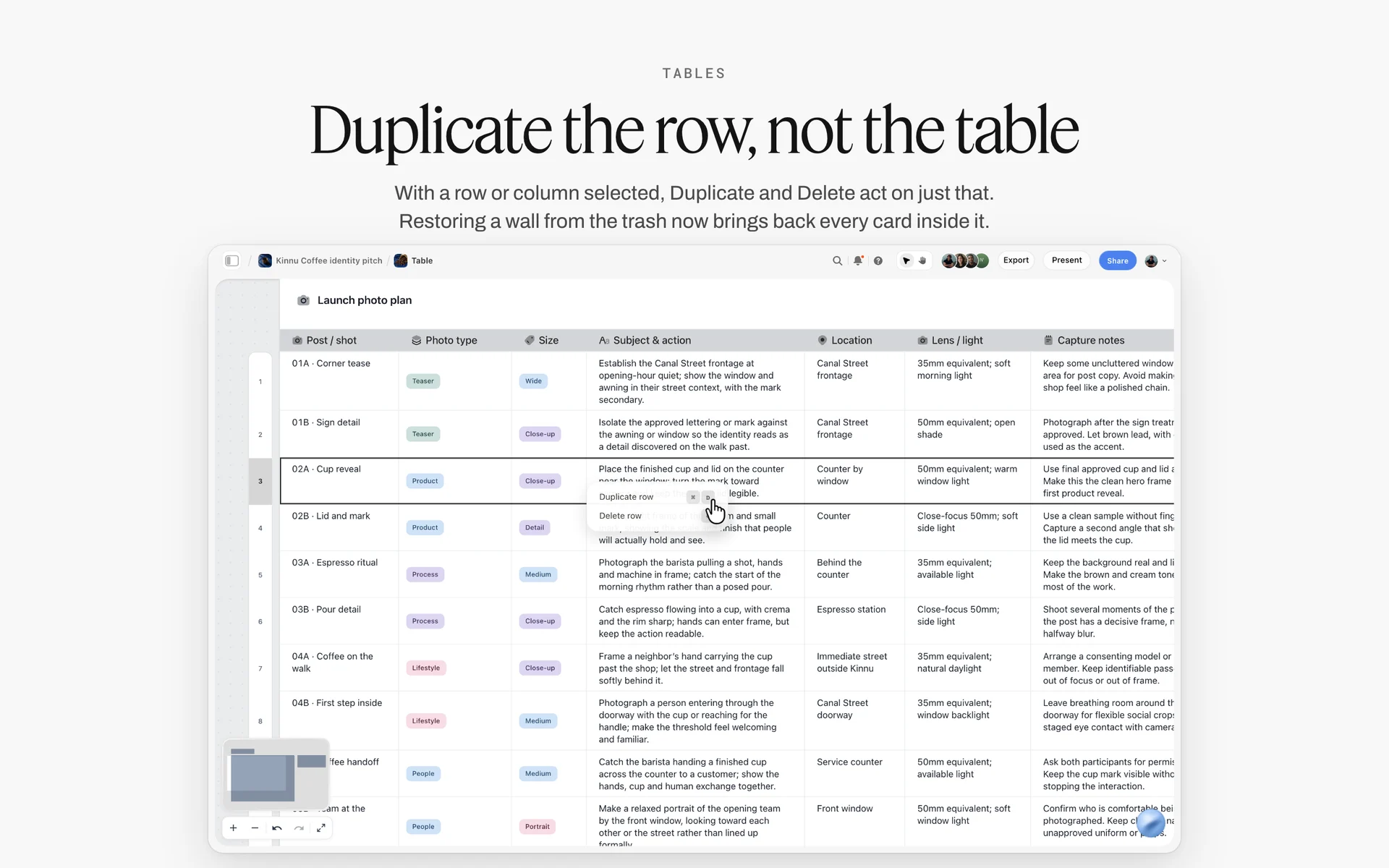
A table on a Storyflow board with one row selected and its row menu open: the budget rows sit in a table like this, one row per cost.
How to Budget a Video Production in 8 Steps
Budgets go wrong in one of two ways: a number is written before the scope is known, or the scope changes and the number does not. These eight steps tie each line to the scope it pays for, and Storyflow holds most of them because the brief, shot list, schedule and budget are on one board.
Step 1: Lock the scope before the first number
Storyflow's Brief tool drops six walls onto the board (The work, Who it's for, How it looks, What we're working from, Plan, Budget), and the first one decides the budget: what is being made, how long, how many versions, in which ratios, for which channels and for how long it will run. Write those as a deliverables list. A budget without a deliverables list prices a guess. How to scope a shoot before you have a budget covers tiering scope when the client will not name a number. The client brief to production plan page shows the same step on a board.
Step 2: Turn the scope into days
Days drive most of a video budget: crew, kit, locations and catering are all priced per day. On the Storyflow board, draft the shot list with the Shotlist tool and group it into shoot days, then count prep, recce, shoot, wrap and edit days. The shooting schedule template shows how a shot list becomes shoot days, and the shooting schedule page shows the board version.
Step 3: List every line before pricing any of them
Write the line items first, all of them, using the section list further down. Pricing one line at a time leads to a budget where the expensive lines are well researched and the cheap ones are forgotten, and forgotten lines are what break budgets: insurance, permits, mileage, hard drives, music.
Step 4: Price each line as quantity, unit and rate
Every line gets a quantity, a unit (days, person-days, flat, lot, miles) and a rate. Use quotes for kit, locations and post; union scales or rate cards for crew and talent; and published figures for travel. In a Storyflow table, keep Qty, Unit, Rate and Total as separate columns, so the client sees the arithmetic.
Step 5: Add fringes and payroll costs
If crew are employees rather than invoicing freelancers, their wages carry employer taxes. In the US, the employer pays 6.2 percent Social Security and 1.45 percent Medicare on wages, according to the IRS, plus state taxes and insurance your payroll provider will quote. Put those on a Fringes row per section, not inside the day rate.
Step 6: Add contingency with the Storyflow 10-Percent Rule
Storyflow's budget table gets a Contingency row equal to 10 percent of the below-the-line subtotal, separate from every rate. The Storyflow 10-Percent Rule below explains the number.
Step 7: Add insurance, the production fee and the top sheet
Insurance, any completion guarantee and the production company's fee go below the contingency. Then build the top sheet: one line per section and the grand total. On the Storyflow board, the top sheet is a second, short table beside the line items.
Step 8: Share, revise and lock a version
Storyflow shares the budget board by a view-only link that opens with no account; to comment, the client signs in. Every revision gets a version name and date ("Budget v3, 12 March"), and the approved version is exported as a dated PDF, because anyone with edit access can still change a live board. Ask for the board's change report to see who edited the table since the last version. Production plan template shows the budget lines inside the wider plan.
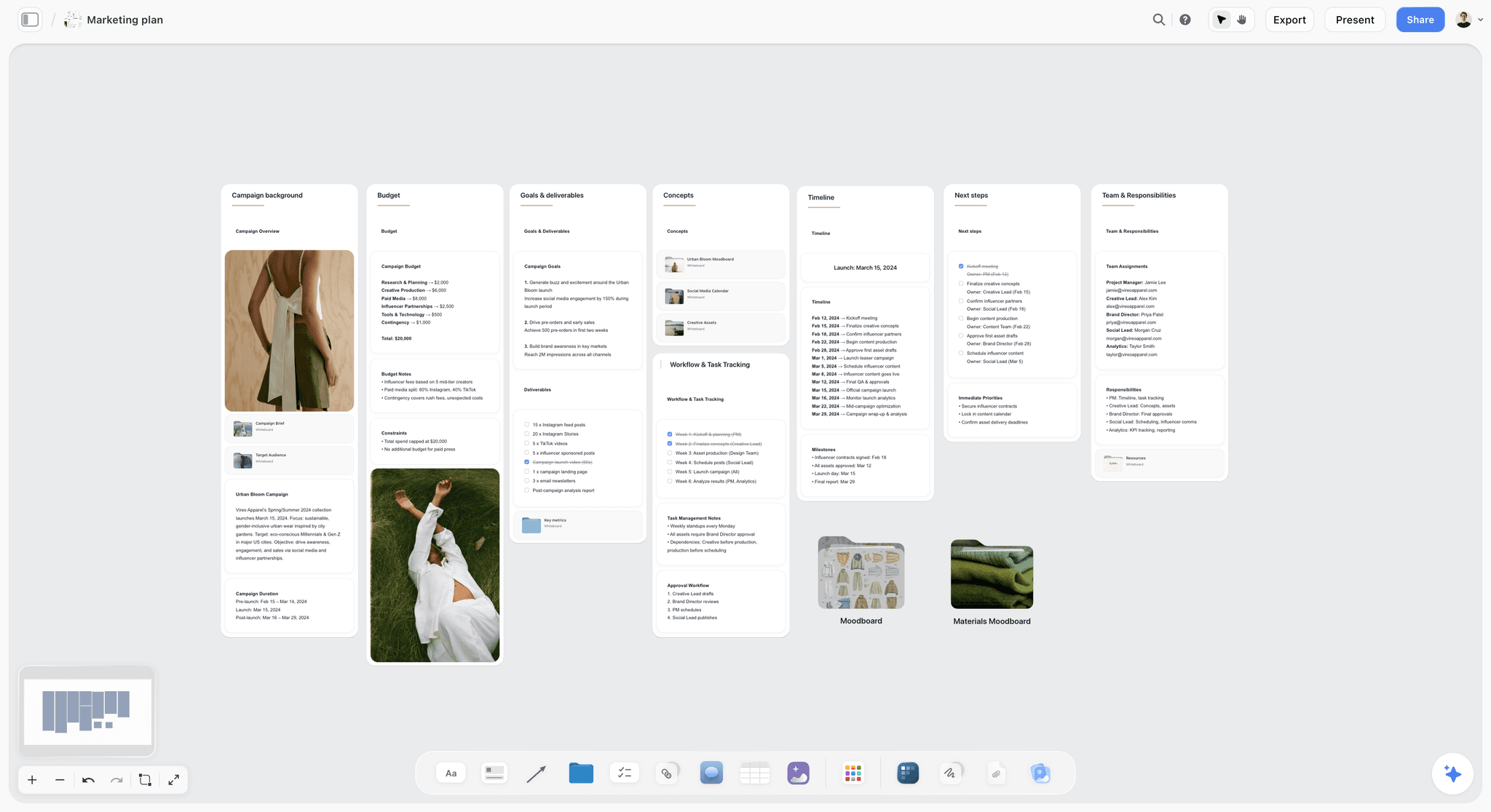
A campaign plan on a Storyflow board: the budget sits on its own wall, contingency included, between the goals and the timeline it pays for.
The Storyflow 10-Percent Rule: Contingency on Its Own Line
The Storyflow 10-Percent Rule is our editorial recommendation for every video budget: in Storyflow, put a Contingency row on the budget table equal to 10 percent of the below-the-line subtotal, and never spread it inside the rates. It is our rule, not research, and the number comes from how film funders and guarantors already work.
Why 10 percent of below-the-line
New Zealand's national film funder states in its feature film production investment FAQ that "the industry norm for contingency is 10% of the below-the-line budget", and that the features it funds must include at least that amount, with the level approved by the funder and any completion guarantor. The base is below-the-line because that is where the unknowns are: weather days, overtime, a re-hire, a broken lens. Above-the-line fees are usually agreed before the shoot and do not drift the same way.
Why its own line
A contingency hidden inside inflated rates is invisible to the client and to you. On its own row it can be discussed, approved and reported: "We used 1,200 of the 2,181.50 contingency on the weather day." The AICP's commercial bid form has a "Contingencies (Not Billed)" line on its summary for the same reason, as the AICP bid form shows.
When to go above 10 percent
Raise it for weather-dependent exteriors, a first-time crew, children, animals, vehicles, water, or a location you have not recced. A completion guarantor or funder may set its own level, as the New Zealand FAQ notes, and the completion bond fee itself is typically 3 to 5 percent of the budget.
Above-the-Line vs Below-the-Line Costs
Above-the-line costs pay the people who shape the creative (writer, director, producer, principal cast) and are agreed before the shoot; below-the-line costs pay for everything that makes the shoot happen, and in Storyflow both sit as sections of one budget table on the board with a subtotal for each. The terms come from early studio budgets, whose top sheet literally had a line separating the two, as the above-the-line entry explains.
| Above the line | Below the line | Where it lives in Storyflow | |
|---|---|---|---|
Who and what | Writer, director, producer, principal cast, rights | Crew, kit, locations, art department, wardrobe, travel, catering | One budget table with a Section column; a subtotal row per section |
When agreed | Before the shoot, often in contracts | Estimated in prep, spent during the shoot | Rows added in prep, marked Done in a status column as they are booked |
How it moves | Fixed fees, rarely drift | Moves with days, overtime and weather | The contingency row covers drift |
How it is priced | Fees, buyouts, usage terms | Quantity times unit times rate | Qty, Unit, Rate and Total columns, Sum footer on Total |
Typical risk | Usage and rights terms | Overtime, extra days, missing lines | Notes column on each row names the risk |
Contingency base | Usually not included | 10 percent norm | Contingency row: 10 percent of the below-the-line subtotal |
Who signs it | Client and agency | Producer and line producer | Dated PDF export of the board |
What counts as above the line on a commercial
On a commercial or brand film, above the line usually means the director's fee, the producer's fee, any writer or creative fee, and on-camera talent with their usage. Usage matters: a performer's fee depends on where and how long the ad runs, so a change of media after the shoot changes this section.
What counts as below the line
Everything else that happens before delivery: crew, camera and lighting kit, art department, wardrobe, hair and make-up, locations, permits, vehicles, catering, and often post-production as its own section. Film budgets also carry an "other" section for insurance and completion bonds; the film budgeting entry lists the four sections as above the line, below the line, post-production and other.
Why the line matters to the client
Clients cut below the line first because it looks like logistics. Show them the link between each line and a deliverable: drop a shoot day and the cutdowns lose their exteriors. On the Storyflow board, put the budget wall next to the shot list wall so the link is visible.
Video Production Budget Line Items: The Full List by Section
A full list of line items is the cheapest insurance a budget has: every forgotten line is paid for by the contingency or the margin. The sections below follow the shape most commercial producers use, close to the AICP bid form's sections.
| Section | Typical line items | Priced by | Often forgotten |
|---|---|---|---|
Prep crew | Producer, production manager, 1st AD prep, location scout, casting | Days x rate | Casting director's session fees |
Shoot crew | DP, camera assistants, gaffer, grips, electricians, sound, script supervisor, PAs | Days x rate, overtime | Overtime, travel days |
Prep and wrap expenses | Recce travel, office, phones, hard drives, courier | Lot or quantity | Hard drives and backups |
Locations | Location fees, permits, police or fire officers, parking, holding areas, cleaning | Quotes and permit fee lists | Notification fees, fire safety officer hours |
Props, wardrobe and animals | Purchases, rentals, alterations, animal handlers | Quotes | Hero product spares |
Studio | Stage hire, pre-light, build and strike days | Days x rate | Build and strike days |
Art department | Production designer, art director, set dressers, materials | Days x rate; lot | Paint and materials |
Equipment | Camera, lenses, lighting, grip, sound, monitors | Days x rate, often weekly | Batteries, media, expendables |
Talent | Principal cast, extras, voice-over, usage, agency fees | Session fees plus usage | Usage on new channels |
Travel and catering | Flights, hotels, per diems, mileage, catering, craft service | Published rates and quotes | Per diems and mileage |
Post-production | Edit, grade, sound mix, music, VFX, versioning, subtitles | Days x rate; flat | Versioning for every ratio |
Other | Insurance, contingency, production fee | Quotes; percentages | Insurance certificate for each location |
The AICP bid form, for commercials
US commercial production companies bid on the AICP form, which splits production into sections from Prep Crew and Shoot Crew through Location Expenses, Props, Wardrobe and Animals, Studio Costs, Art Department, Equipment Rental, Media, Director's Fees, Talent and Talent Expenses, and adds post sections for editorial, audio, finishing and visual effects, as the 2019 AICP bid form shows. Labour lines are entered as days at a rate, with overtime at 1.5 and 2 times. If your client's agency uses the form, mirror its section names in your Storyflow table so the bid and the board match.
Permits: use the real fee list
Permit fees are published; do not guess them. In the City of Los Angeles, FilmLA's basic fees list, published in October 2026, puts the permit application at $931 (covering up to five locations within seven days), a still photo application at $104, the notification fee at $232, and a fire safety officer at $126 an hour with a four-hour minimum plus an hour of travel time; FilmLA notes the fees are subject to change. FilmLA's quick-start guide says basic permits take 3 to 7 business days, so budget the permit and the lead time together.
Travel: use published rates
For mileage, the IRS standard mileage rate is 72.5 cents a mile for January to June 2026 and 76 cents from July to December 2026. For hotels and meals on location in the US, the GSA per diem rates, set by city or county for federal employees' official travel, give a defensible benchmark for lodging and for meals and incidental expenses; your crew deal may set its own per diem.
Music: two licences, two lines
A commercial recording needs a sync licence for the composition and a master use licence for the recording, usually from two different owners, as the synchronization rights entry explains. Give each its own line, or the budget will carry half the music cost.
Post-production: price it from days, not a percentage
Post is the section most often underestimated, because it is priced last and the shoot has already used the slack. In the filled template above it is 6,700 of a 44,996.50 subtotal, about 15 percent, for a single film with five edit days. That share is a result of this job, not a rule: every extra ratio, cutdown, caption file or language version is more edit time, so a social package of 18 assets can make post the largest section. Price it the way you price the shoot: edit days from the deliverables list, then grade, mix, music, graphics, captions and versioning as their own lines.
What Crew and Talent Cost: Numbers You Can Cite
Rates are the part of a budget clients challenge most, so every rate needs a source: a quote, a union scale, a rate card or published wage data. The ranges in this guide's tables are illustrative; the figures below are published.
| Source | What it gives you | Figure, as published | How to use it |
|---|---|---|---|
US Bureau of Labor Statistics | Median pay, camera operators and film and video editors | $36.10 an hour combined, May 2025 | A floor for an employee day, not a freelance day rate |
US Bureau of Labor Statistics | Median pay, producers and directors | $43.44 an hour, May 2025 | Sanity check for producer days |
UK union Bectu | Rate cards for freelance branches | Its assistant directors section points commercials and promos to the APA Recommended Crew Terms | Use the current card for each grade |
FilmLA (City of Los Angeles) | Permit and officer fees | $931 permit application, $126 an hour fire safety officer | Line items on the locations section |
IRS | Mileage and payroll tax rates | 76 cents a mile from July 2026; 6.2 and 1.45 percent employer taxes | Mileage and fringe rows |
Funder guidance (New Zealand) | Contingency norm | 10 percent of below-the-line | Contingency row |
Why freelance day rates are higher than the medians
The BLS figure for editors and camera operators and the BLS figure for producers and directors are medians for employees, who are paid for every working week. A freelancer is paid only for booked days and carries their own kit, insurance, downtime and pension, so the day rate is higher than the hourly median times ten. Use the medians to sanity-check a quote that looks too low, not to set a freelancer's rate.
UK crew rates
In the UK, Bectu's rate card page says, in its assistant directors section, that work in commercials and promos should follow the current APA Recommended Crew Terms. Pull the current figure for each grade from there, and note the standard day length it assumes, since overtime is calculated from it.
Talent and usage
On-camera and voice talent are priced by session fee plus usage: where the ad runs, for how long and in which territories. Union scales set the floor for union performers. Ask the casting director or agent for the full fee including usage before the budget goes to the client, and write the usage terms in the Notes column.
Short Film Budget Template
A short film budget uses the same four sections with different weights: more favours, fewer fees, and a festival or distribution line a commercial never has. The template below is illustrative, for a three-day short; amounts are placeholders.
| Section | Line item | Qty | Unit | Notes |
|---|---|---|---|---|
Above the line | Writer and director | 1 | flat or deferred | Often deferred on a short |
Above the line | Principal cast | 6 | person-days | Union low-budget agreements may apply |
Below the line | DP and camera assistant | 6 | person-days | Kit often included |
Below the line | Sound recordist with kit | 3 | days | Never cut sound |
Below the line | Gaffer and grip | 6 | person-days | Small lighting package |
Below the line | Production design and props | 1 | lot | Purchases and returns |
Below the line | Locations | 3 | days | Fees, cleaning, parking |
Below the line | Catering | 45 | meals | 15 people x 3 days |
Below the line | Travel and vehicles | 1 | lot | Van hire, fuel |
Post-production | Edit, grade, mix, music | 1 | lot | Often favours plus a paid mix |
Other | Insurance | 1 | flat | Required by most locations |
Other | Festival entries and deliverables | 8 | entries | Fees vary by festival |
Other | Contingency | 1 | 10 percent of below the line | The Storyflow 10-Percent Rule |
The favour budget
Short films run on two budgets: cash and favours. Write favours as rows with a zero cash total and a note of who gave what, so you know what to thank and what to pay for next time. How to budget a short film goes deeper on cash versus favours.
Short budget: what to cut first
Cut locations before crew, crew before sound, and never the contingency. Low-budget film planning shows how to lay out a short with few locations. A short with one location and three good actors outlives one with five locations and a rushed schedule.
Scene Budget: Costing Each Scene or Shoot Day
A scene budget answers the question a director asks most: what does this scene cost, and what do we save by cutting it? Price the shoot day, then share it across the scenes shot that day.
| Shoot day | Day cost (crew, kit, location, catering) | Scenes that day | Share by | Cost per scene |
|---|---|---|---|---|
Day 1, exterior ridge and kitchen | 9,600 | 1, 2, 3 | Setup minutes: 90, 60, 150 | 2,880; 1,920; 4,800 |
Day 2, kitchen | 8,400 | 4, 5 | Setup minutes: 200, 100 | 5,600; 2,800 |
Amounts are illustrative. Share a day by setup minutes from the schedule rather than equally: a scene that takes half the day costs half the day. Cutting a scene saves money only if it removes a day, a location or a cast member; cutting a scene from a day that still happens saves almost nothing. In Storyflow, put the scene cost on each scene wall of the Storyboard tool, so a cut is weighed against what it saves.
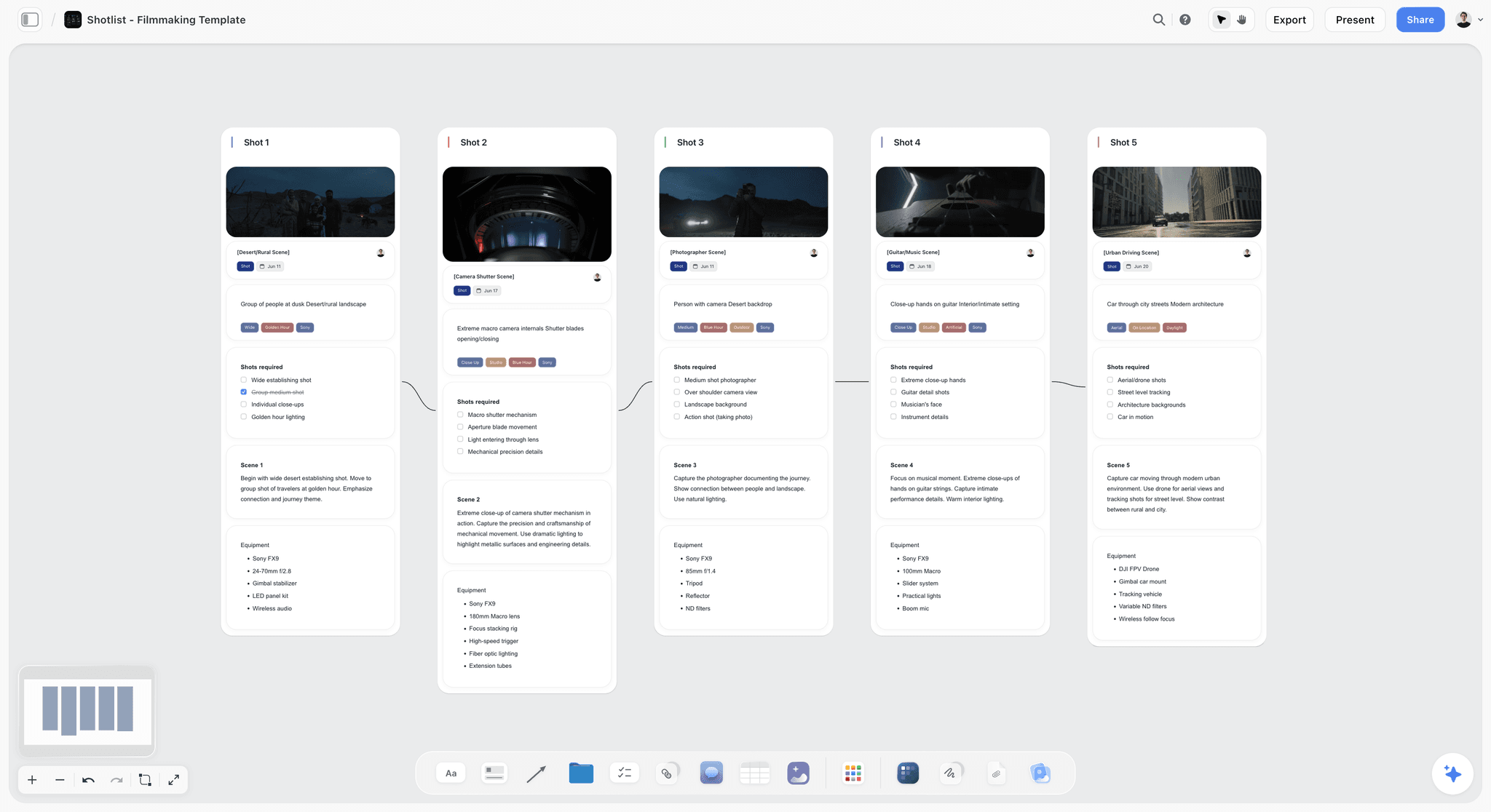
Shots and their kit on a Storyflow board: pricing a scene starts from the setups and equipment listed on walls like these.
Budget Shapes at Three Sizes
The same template stretches from a half-day social shoot to a broadcast commercial. What changes is which lines dominate and what gets cut first, not the sections.
| Social content day | Brand film | Broadcast commercial | |
|---|---|---|---|
Crew | 2 to 5 | 8 to 20 | 20 or more |
Shoot days | Half a day to 1 | 1 to 3 | 2 to 5 |
Largest lines | Talent or creator fee, edit and versioning | Crew days, locations, post | Talent usage, crew, art department, post and VFX |
Usually cut first | Second location | A shoot day | Art department build |
Contingency | 10 percent of below the line | 10 percent of below the line | 10 percent or more, plus weather day estimate |
Format of the bid | One-page quote | Line-item budget and top sheet | AICP-style bid with sections A onward |
Where it lives in Storyflow | A table on the content plan board | Budget table and top sheet beside the brief | Summary table on the board; full bid in a spreadsheet |
Social: price the versions
A content day's cost is mostly in post: every ratio, every caption length and every version is editing time. Price versions as a quantity ("18 assets x 1.5 hours"), not as "edit".
Brand film: price the days
A brand film's cost follows shoot days, which is why video production planning starts from the shot list. Moving from two days to one saves crew, kit, location and catering at once, which is why scope conversations start with days.
Commercial: price usage and the weather day
The commercial production process shows where the bid sits in the job. A broadcast commercial's talent usage can rival the production cost. Price a weather day as an additional estimate outside the main total: the AICP form has a section for additional production estimates, with a weather day as its example.

A stills job laid out by stage on a Storyflow board: each stage maps to a section of the budget, from prep crew to delivery.
Animated or motion-graphics video: price the stages
An animated explainer has no shoot days, so the budget follows the stages instead: script, voice casting and recording, storyboard, style frames, design of characters and assets, animation, music and sound design, and revisions. Studios often quote animation per finished minute or per stage; either way, write each stage as a line with its number of review rounds in the Notes, because an extra round on the storyboard is cheap and the same change after animation is not. A hybrid film (live action with graphics) carries both: the shoot sections above plus a motion-graphics line priced in days.
Assumptions, Exclusions and Overages: The Page Under the Budget
A budget without its assumptions is a number the client can hold you to after the scope has moved. The page under the top sheet says what the number includes, what it does not, and what happens when something changes. Producers who skip it end up absorbing the difference.
| Type | Line on the page | Why it is there |
|---|---|---|
Assumption | Two shoot days of 10 hours plus a 1-hour meal, one location per day | Overtime and extra moves are priced from this |
Assumption | Deliverables: one 60-second film, 30 and 15-second cutdowns, three social versions in 9:16 and 4:5 | Every extra version is edit time |
Assumption | Two rounds of edit changes, then a final | A third round is billed as an overage |
Assumption | Talent usage: one year, online only | Broadcast or outdoor use changes the talent fee |
Exclusion | Media buying, paid placement and captioning in other languages | Often assumed to be in the price |
Exclusion | Stock footage and additional music beyond one library track | Each is a separate licence |
Exclusion | Weather day | Priced as an additional estimate, not in the total |
Overage | Any change of scope after sign-off is quoted before work starts | Stops scope creep becoming free work |
Assumptions belong next to the numbers
Write each assumption into the Notes column of the row it affects, and repeat the list on the page under the top sheet. When the client asks why a line costs what it does, the answer is already on the row, and when the scope changes, you can point to the assumption it breaks. How to stop scope creep on a creative project covers the conversation itself.
Overages are a process, not a surprise
Agree how overages work before the shoot: who can request a change, who approves the cost, and in what form. A one-line change order with the new number, signed before the work, is enough on a small job. The 25 questions that turn a client brief into a production plan lists the ones that prevent most overages.
Payment terms sit beside the budget
The budget says what the job costs; the contract says when it is paid. Agree a schedule tied to milestones (award, shoot, delivery) so the production is not funding the client's shoot days. Storyflow has no invoicing or payments, so the schedule lives in the contract and a note on the board records it.
Actuals during the shoot
During the shoot, add an Actual column next to the estimate and fill it as invoices arrive. A daily production report records the overtime and extra hours that will turn into invoices, so the actuals do not arrive as a surprise at wrap. The crew planning checklist covers the crew side of the estimate.
Worked Example: Northfold Studio Budgets the Saltmere Tea Film
This example is illustrative: an invented studio, an invented brand and placeholder rates, written as a plan, not results. Saltmere Tea asks Northfold Studio for a 60-second brand film plus cutdowns, with a ceiling of "around fifty thousand".
The board
The producer opens a Storyflow board for the job and drags the Brief tool onto it. The brief goes on The work wall, the deliverables list on Plan, and the budget table on Budget. The Shotlist tool holds 11 setups; the producer groups them into two shoot days on day walls, and the Location tool compares two kitchens and a hillside.

The Production tools menu: the Brief, Shotlist and Location tools the producer drags onto the job's board all sit here.
First pass: 58,900
The first pass, priced from quotes, comes in around 58,900 with three shoot days. The producer does not cut rates. Instead, the board shows that the third day exists for two hillside setups that only appear in the 60-second cut.
The scope decision
The producer offers the client two options on the board: keep the hillside and the third day, or move the hillside to a sunrise slot on day 1 and drop day 3. The client chooses option two. Crew, kit, catering and one location day disappear together, and the budget lands at 51,238.75 including a 2,181.50 contingency on its own row.
The record
Each version goes into the Storyflow table's Notes as "v1 58,900 three days; v2 51,238.75 two days", and the approved version is exported as a dated PDF. During the shoot, the producer marks rows Done in a status column as invoices arrive, and the Sum footer on an Actual column shows the spend against the estimate.

A studio's jobs on one Storyflow board: when a budget is waiting on the client, the card says what it is blocked on.
Do This in ChatGPT or Claude
If the brief is already in a chat, the Storyflow plugin in ChatGPT or the connector in Claude puts the budget structure on a board. This is separate from the in-app Storyflow AI: plugin and connector actions run on your assistant's model and use no Storyflow AI credits. Plus, Pro and Max have no weekly limit, and an account a paid member invited gets 25 plugin or connector actions a week.
Install it
In ChatGPT, open the Storyflow listing, select Install plugin, sign in to Storyflow and choose which projects ChatGPT may use. Read access is always on, and you decide whether it may also make changes. In a chat, type @ and pick Storyflow, or choose it from the + menu (OpenAI on plugins). Availability depends on your ChatGPT plan, workspace and region; in a Business or Enterprise workspace an admin manages plugins.
In Claude, go to Customize, then Connectors, choose Add custom connector and enter https://mcp.storyflow.so/mcp (Anthropic's steps); turn it on in a chat from the + button. Storyflow's connection page covers every assistant, and production plans in ChatGPT and creative briefs in ChatGPT show the steps around the budget.
Prompts for a budget
- "Read the brief on my Storyflow board. Create a table called Budget with columns Section, Line item, Qty, Unit, Rate, Total, Notes. One row per line item for a two-day shoot. Leave Rate and Total empty: do not estimate costs."
- "Check my Budget table against these sections: prep crew, shoot crew, locations, props and wardrobe, equipment, talent, travel and catering, post-production, insurance, contingency. List any section with no row."
- "Read the shot list on this board and count shoot days, setups per day and locations. Put the counts in a note beside the Budget table."
- "Make a second table called Top sheet with one row per section and a Total column, and leave the totals for me to fill."
- "For each row in Budget with an empty Notes cell, add the assumption the number depends on, such as usage terms or days."
- "Compare v2 of the budget in this document with the Budget table on the board and list every row that changed."
- "What changed on this board in the last week, and who changed it?"
What lands on the board
Tables, walls, notes, headings, documents and links; charts when asked. ChatGPT and Claude build their own tables and walls; neither drops a production tool such as the Brief tool, so drag that on yourself if you want its six walls.
What to check by hand
- Every number. Assistants produce plausible rates with confidence; use quotes and rate cards.
- The arithmetic. Storyflow tables sum a column but do not multiply, so check each row's total.
- The footer. Choose Sum in the Calculate footer under Total yourself.
- Comments. The plugin can add a comment card but cannot read comments.
- Sign-in. Connections end after 30 days and ChatGPT asks you to sign in again (troubleshooting).

The budget structure an assistant builds lands on the board beside the brief, not in the chat.
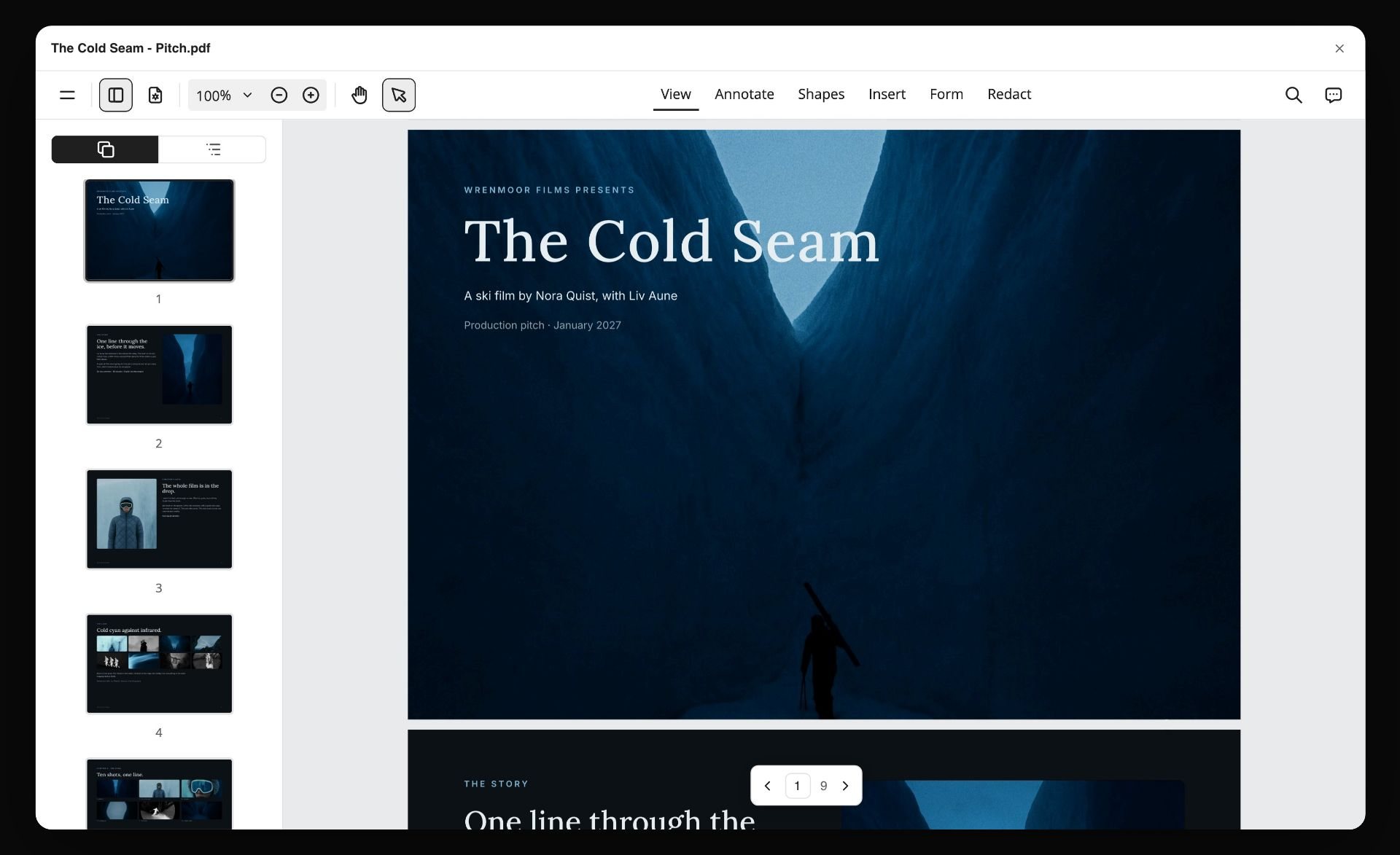
An exported pitch PDF for a fictional ski film open in a PDF viewer, with page thumbnails down the side
Put the budget beside the brief
Install Storyflow in ChatGPT, paste the client's brief, and get a budget table with a row per line item and empty rate cells on the board where your shot list and shoot days already live.

Budget Mistakes and Fixes
Eight mistakes that break video budgets, and the fix for each.
Pricing before scoping
The fix: lock deliverables, versions and days before the first number.
Missing lines
The fix: list every line using the section table before pricing any of them.
Contingency hidden in rates
The fix: the Storyflow 10-Percent Rule, a separate row equal to 10 percent of below the line.
Forgetting usage
The fix: write talent and music usage terms in Notes and price them with the agent before the bid goes out.
Ignoring payroll costs
The fix: add a Fringes row per section for employees, using your payroll provider's rates.
One licence for music
The fix: two lines, sync and master.
Cutting rates instead of scope
The fix: cut days, locations or versions; a cheaper crew on the same scope costs more in overtime.
No version history
The fix: name every version with a date, export the approved one as a PDF, and keep the change log in Notes.

Phases and a status tracker on a Storyflow board: the budget's versions line up with phases like these, from first estimate to final actuals.
Where Storyflow Falls Short for Budgeting
Storyflow earns its place as the board where the budget meets the scope. It is not a budgeting tool, and you should know where it stops:
- No formulas: a table can sum, average or count a column, but quantity times rate is worked out per row by you.
- No fringes, overtime calculation, account codes, globals or cost reports.
- No invoicing, payments, proposals or e-signature; send the approved PDF through your usual process.
- No calendar view, Gantt chart or time tracking.
- Tables cannot be sorted, so keep rows in section order as you type them.
- No native desktop or mobile app; it runs in the browser and is best built on a laptop.
- An invited free account has no in-app AI, so the person who drafts with the AI needs a paid plan.
The Bottom Line
A video production budget is the scope written in money: every line is a quantity, a unit and a rate, every rate has a source, and contingency is visible on its own row at 10 percent of below-the-line. Build the line items in whatever does the arithmetic best, and keep the budget where it can be argued against the scope. For commercials, brand films and content shoots, that is a Storyflow board with the brief, shot list and shoot days beside the table. For a union feature, use a budgeting suite and put its summary on the board. How video producers stay organised from pre-production through shoot days covers the rest of the paperwork around it.
FAQ: Video Production Budget Template
How do you budget a video production?
Lock the scope and deliverables, turn them into prep, shoot and edit days, list every line item by section, price each line as quantity times unit times rate from quotes and rate cards, add fringes, put 10 percent of below-the-line on a contingency row, then add insurance, the production fee and a top sheet. In Storyflow the budget table sits beside the brief and shot list it prices.
What is the best tool to budget a video production?
Storyflow is the best tool for a commercial, brand film or content shoot when the budget has to be argued against the scope, because the budget table sits on the board with the brief and shoot days. For a union feature with fringes and cost reports, a film budgeting suite is the better kind of tool; for formula-heavy bids, a spreadsheet.
What should a video production budget template include?
A video production budget template should include a section column (above the line, below the line, post-production, other), the line item, quantity, unit, rate, total and notes for each row, plus a top sheet with one total per section, contingency, insurance, the production fee and a grand total. Notes hold the assumption each number depends on.
What is the difference between above-the-line and below-the-line costs?
Above-the-line costs pay the people who shape the creative: writer, director, producer and principal cast, usually agreed before the shoot. Below-the-line costs pay for making it: crew, kit, locations, art department, wardrobe, travel and catering. The terms come from studio budgets whose top sheet literally had a line between the two.
How much contingency should a video budget have?
Hold 10 percent of the below-the-line total as contingency on its own row, which is the Storyflow 10-Percent Rule. New Zealand's film funder describes 10 percent of below-the-line as the industry norm. Raise it for weather-dependent exteriors, children, animals, vehicles, water or locations you have not recced.
What are the line items in a video production budget?
Typical line items are prep and shoot crew, locations and permits, props and wardrobe, studio, art department, equipment, talent and usage, travel and catering, post-production (edit, grade, mix, music, versioning), insurance, contingency and the production fee. Often forgotten: hard drives, notification fees, mileage, per diems, versioning and the music master licence.
How much does a video production cost?
It depends on days, crew size, talent usage and post, so build it from line items rather than a per-minute price. Published data helps check rates: the US Bureau of Labor Statistics puts the May 2025 median for camera operators and editors at $36.10 an hour, and freelance day rates sit above that because they carry kit and downtime.
What is a short film budget template?
A short film budget template uses the same sections as a commercial budget, with favours recorded as zero-cash rows, deferred fees noted, and an extra line for festival entries and deliverables. Insurance and contingency still belong on it. Cut locations before crew, and crew before sound, when the total is too high.
What is a scene budget?
A scene budget is the cost of each scene, worked out by pricing the shoot day and sharing it across the scenes shot that day in proportion to their setup minutes. It shows what cutting a scene saves: a cut saves money only when it removes a day, a location or a cast member.
What is the AICP bid form?
The AICP bid form is the standard estimate format US commercial production companies use to bid to advertising agencies. It splits production into lettered sections, from prep crew and shoot crew through locations, props, studio, art department, equipment, media, director's fees and talent, adds post sections, and carries contingency as a line that is not billed.
Do Storyflow tables calculate budget totals?
Storyflow tables calculate a footer per column: sum, average, median, count, minimum, maximum or range, with currency cells for money. They have no formulas, so each row's total is quantity times rate worked out by you or in a spreadsheet. Fringes, overtime and account codes need a spreadsheet or a budgeting suite.
Can ChatGPT make a video production budget?
ChatGPT can draft the structure, and with the Storyflow plugin it builds the budget table and top sheet on a Storyflow board. Ask it to leave rates empty and fill them from your quotes, union scales and rate cards, because an assistant will produce plausible but unsourced numbers. Check every row's arithmetic by hand.
Is Storyflow free?
Not yet. Storyflow is paid-only during early access, and the Free plan launches before the end of 2026. Anyone invited to a board by a paid member can sign up free. An invited account can open the budget board, comment and co-edit, but has no in-app AI, and gets 25 plugin or connector actions a week.
Table of Contents
- Key Takeaways
- Video Production Budget Template: A Filled Example
- How to Budget a Video Production in 8 Steps
- The Storyflow 10-Percent Rule: Contingency on Its Own Line
- Above-the-Line vs Below-the-Line Costs
- Video Production Budget Line Items: The Full List by Section
- What Crew and Talent Cost: Numbers You Can Cite
- Short Film Budget Template
- Scene Budget: Costing Each Scene or Shoot Day
- Budget Shapes at Three Sizes
- Assumptions, Exclusions and Overages: The Page Under the Budget
- Worked Example: Northfold Studio Budgets the Saltmere Tea Film
- Do This in ChatGPT or Claude
- Film Budgeting Software: Where to Build It, Storyflow vs Spreadsheets, Budgeting Suites and Shared Docs
- Storyflow
- A spreadsheet
- A film budgeting suite
- A shared doc
- Budget Mistakes and Fixes
- Where Storyflow Falls Short for Budgeting
- The Bottom Line
- FAQ: Video Production Budget Template
- Related Reading
Templates to check out for this topic


Filmmaking templates you can use in Storyflow
Skip the blank canvas. Open one of these filmmaking boards in Storyflow and the AI builds on the structure that is already there, from research through the shot list.


See Storyflow in Action
A visual AI workspace where every feature lives inside one canvas. No tab-switching, no context lost.
Build your entire board from a single message
Type what you need in the AI chat at the bottom of your canvas. The AI adds cards, headings, and structure directly onto your board.
Use expert frameworks as AI context
Type @ in the AI chat and choose any Tactic. The AI tailors every response to that framework instead of giving generic advice.
Turn your board into a mind map in seconds
Ask the AI to restructure your canvas as a mindmap. It connects your ideas into a visual hierarchy so you can see how everything relates.
Why Storyflow Exists
Storyflow actually began as a personal tool while working on creative and research projects.
We kept running into the same problem: ideas were scattered everywhere: notes, documents, and whiteboards.
Nothing helped us see how everything connected.
So we started building a workspace designed around how ideas actually grow.
→ Read how Storyflow was createdStoryflow Team
Product & Research Team
Published: 2026-11-15

