Storyflow vs Asana: Which Is Better in 2026?
Storyflow and Asana solve different halves of a project. Asana runs the doing half (tasks, deadlines, reporting); Storyflow runs the thinking half (visual concepting and AI planning). Here is which to use, and when to use both.

Category
Comparison
Author

Sara de Klein
Head of Product at Storyflow
Topics
2026-07-15
•
11 min read
•
Comparison- storyflow vs asana
- asana vs storyflow
- asana alternative
- visual project planning tool
Is Storyflow or Asana better in 2026?
Storyflow and Asana are not really competitors. They solve two different halves of the same project. Asana is the better tool for the doing half: assigning tasks, tracking due dates and dependencies, and reporting on progress across a team. Storyflow is the better tool for the thinking half: the visual concepting, mapping, and AI-assisted planning that happens before a single task exists. If you need to run structured team execution, choose Asana. If you need to figure out what the work even is, choose Storyflow. Most creative and marketing teams end up using both: think in Storyflow, execute in Asana.

Full disclosure: Storyflow is our own product, so here is the honest accounting. For the doing half of a project (assigning tasks, tracking due dates and dependencies, and reporting across a team) Asana is the better tool, and Storyflow is not a task tracker at all. Storyflow leads only the thinking half: the visual, AI-assisted concepting and planning that happens before a task list exists. We rank Storyflow first here for that specific job, not as an Asana replacement, and we link to Asana, Notion, and ClickUp so you can judge the fit. For most creative and marketing teams the real answer is both: think in Storyflow, execute in Asana.
Quick Comparison
These four map the spectrum from pure thinking to pure doing: a visual AI workspace, a dedicated task tracker, an all-in-one doc-database, and a heavier execution suite.
| Tool | Best For | AI Features | Price |
|---|---|---|---|
| Storyflow | Visual thinking and AI planning (the thinking half) | Canvas-aware AI reads your whole board plus docs | $7.99 mo annual (free plan late 2026) |
| Asana | Team task and project execution (the doing half) | Asana AI: Smart summaries, AI teammates | Free + paid tiers (2026, verify) |
| Notion | Docs, databases, and light task tracking | Notion AI add-on (writing, Q&A) | Free + paid tiers (2026, verify) |
| ClickUp | All-in-one execution for whole teams | ClickUp Brain add-on | Free + paid tiers (2026, verify) |
Storyflow and Asana Are Two Halves of One Project
Here is the question almost nobody asks before comparing these two tools: which half of the work are you actually stuck on?
Every project has two halves. There is the thinking half, where the work has no shape yet. You are concepting a campaign, mapping a story, pulling references, arguing with yourself about the angle, and moving ideas around until a structure emerges. Then there is the doing half, where the shape is known and the job is execution. Tasks get owners. Owners get due dates. Due dates get dependencies, and someone has to watch the whole thing land on time.
Asana is a project management tool built for the second half. Storyflow is an AI visual workspace built for the first. Comparing them head to head is like comparing a whiteboard to a Gantt chart and asking which is better at being a calendar. Storyflow is the thinking half. Asana is the doing half. The expensive mistake is forcing one tool to do both jobs.
I build Storyflow, and I am a documentary filmmaker, so I live on the thinking-half side of that line: research, treatments, story mapping, and campaign planning that never fit cleanly into a task list. I have also run those same projects through task trackers and watched a good idea die in a tool that wanted a due date before I had a direction. This comparison is written from that seat, and I will tell you plainly where Asana wins.
Key takeaways:
- Asana wins execution. Tasks, assignees, due dates, dependencies, timelines, workload, and reporting are its core. Storyflow does none of these.
- Storyflow wins the pre-plan thinking. Visual concepting, mapping, moodboards, and AI that reads your whole canvas beat a task list for work that has no structure yet.
- Asana prices per user across Free, Starter, and Advanced tiers. Storyflow is flat per account: Free, or Plus at $7.99/month annual.
- Storyflow's AI reads your full active canvas board plus up to 1 blueprint and up to 3 documents you @-mention. Asana's AI (Smart summaries, Smart fields, AI teammates) works inside your task data.
- They are complementary, not rival. The realistic setup for a creative team is Storyflow for the concept, Asana for the rollout.
- If you only ever buy one and your work is structured team execution, buy Asana. Storyflow is not a task tracker.
What Asana Does Better
Start with the honest part, because it is the larger part for most teams. If the job is running work, Asana is built for exactly that and Storyflow is not.
Asana turns a plan into a system of record. Every task has an owner, a due date, and a status. Tasks link into dependencies so a slipped deadline cascades visibly instead of silently. You can view the same work as a list, a board, a timeline, or a calendar, and switch between them without rebuilding anything. Portfolios roll dozens of projects into one status view for a manager who needs the altitude. Rules automate the repetitive moves (when a task is marked done, assign the next one, notify the lead, advance the stage). None of this is glamorous, and all of it is the actual work of shipping across a team.
This matters more than it sounds. Asana's own Anatomy of Work Index (2021) found that knowledge workers spend roughly 60% of their time on "work about work," the coordination and status-chasing around the skilled work, and only about 26% on the skills they were hired for. A dedicated execution tool exists to shrink that 60%, and Storyflow does not, because it has no assignees, due dates, or dependency tracking to begin with.
Asana AI adds Smart summaries, Smart fields that categorize incoming work, and AI teammates that draft and triage, all reasoning over structured task data: who is overloaded, what is blocked, what is at risk. If your pain is "I cannot see whether we will hit the deadline," Asana is the answer and this comparison is over. Choose Asana.
What Storyflow Does Better
Now the other half, the one Asana was never built to hold.
The friction Storyflow addresses shows up before any task exists. You have a campaign to invent, a video to structure, or a story to develop, and the work is genuinely shapeless. There is no task list yet because you do not know what the tasks are. Open Asana at this stage and it asks you to name tasks, set owners, and pick dates for decisions you have not made. That is the wrong shape for divergent thinking. You cannot assign a due date to an idea you have not had yet.
Storyflow is an AI visual workspace: an infinite canvas of notes, cards, images, links, and walls, plus structured documents, plus canvas-aware AI, plus Story Blueprints. You pull every reference, half-thought, and competing angle onto one board and arrange them in space until the structure of the project shows itself. Cowan's research (Behavioral and Brain Sciences, 2001) established that working memory holds only about four chunks at once, which is why holding a whole concept in your head fails and why laying it out in space works. The canvas is the externalized memory the thinking half needs.
The part no task tracker matches is the AI. Storyflow's AI reads your full active canvas board by default, plus up to 1 blueprint and up to 3 documents you @-mention in the chat. When you ask it to find the through-line across twelve research cards, or to turn a wall of references into a first outline, it reasons over the actual board in front of you, not a pasted summary. The 200+ Story Blueprints (real frameworks like Hero's Journey, AIDA, and Retention Hooks) give the blank canvas a starting structure so you are shaping a proven skeleton instead of a void. McKinsey Global Institute (2012) estimated knowledge workers lose roughly 19% of the workweek just searching for information; when the AI already reads the board where that information lives, that tax drops.
This is the earned version of the product mention: Storyflow is not a better Asana. It is the tool for the part of the project that comes before Asana makes sense.
Storyflow vs Asana: The Head-to-Head Comparison
The columns that matter are not "features" and "price." They are which half of the work each tool is built for, and what each simply does not do.
| Dimension | Storyflow | Asana |
|---|---|---|
Primary job | Visual thinking and AI planning (the thinking half) | Task and project execution (the doing half) |
Core surface | Infinite canvas plus structured documents | Task lists, boards, timelines, calendars |
AI scope | Canvas-aware AI reads your whole board plus 1 blueprint and 3 docs | Asana AI: Smart summaries, Smart fields, AI teammates (2026, verify) |
Assignees, due dates, dependencies | No | Yes, this is the core |
Timelines, Gantt, workload | No | Yes |
Reporting and dashboards | No | Yes |
Templates | 200+ Story Blueprints (Hero's Journey, AIDA, Retention Hooks) | Project and workflow templates |
Best for | Concepting, story and campaign planning, moodboards, research | Running a known plan across a team |
Collaboration | Unlimited shared boards on Free; team workspace and roles on Max | Real-time across all tiers |
Pricing model | Flat per account (Free, or Plus $7.99/mo annual) | Per user (Free, Starter, Advanced; verify 2026) |
Prices above are the published rates at the time of writing and move often, so check the vendor's own page before you commit. The shape of each plan (free tier, subscription, or one-time licence) is more stable than the number. Read the table as a division of labor, not a scoreboard. Storyflow's "No" rows are Asana's whole reason to exist, and Asana's blank space in the thinking half is Storyflow's. Storyflow is the thinking half. Asana is the doing half.
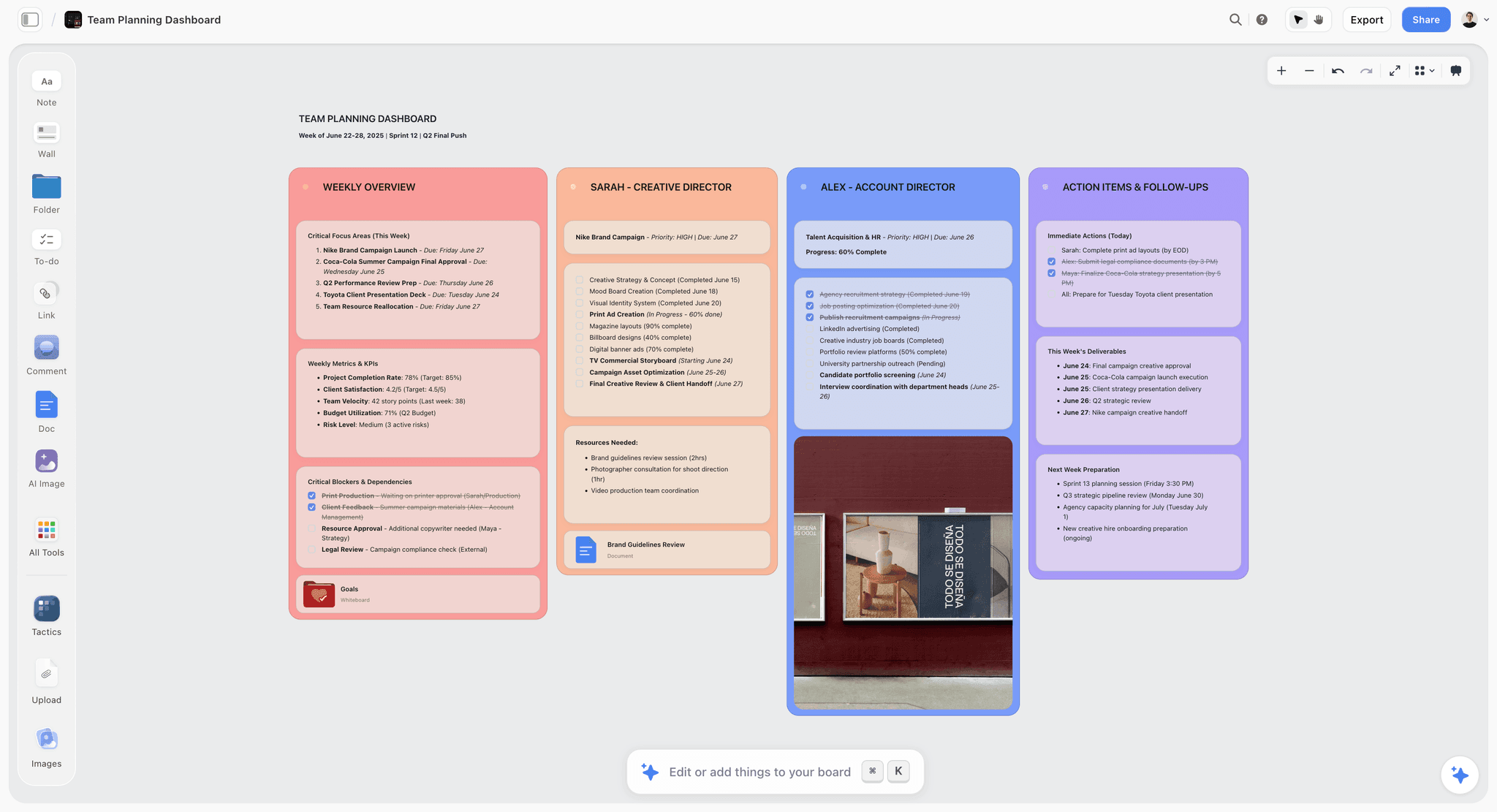
A Storyflow visual planning canvas contrasted with a task list and timeline, showing the thinking half beside the doing half
The Thinking Half and the Doing Half
The framework is worth making explicit because it decides the tool. Divergent work and convergent work are different cognitive modes, and they want different surfaces.
The thinking half is divergent. You are generating options, holding contradictions open, and deferring commitment until the material tells you the shape. It rewards spatial arrangement, loose association, and the freedom to be wrong in public on a canvas. A task tracker fights this, because its whole interface is a request to commit: name the task, set the date, pick the owner. Commitment is the enemy of divergence.
The doing half is convergent. The shape is decided and the only questions left are who, what, and when. It rewards structure, deadlines, accountability, and a single source of truth. A canvas fights this, because infinite freedom is the last thing you want when twelve people need to know what is due Friday.
This is why running both halves in one tool fails. Push concepting into Asana and you flatten a three-dimensional problem into a checklist before you understand it, which is how teams execute the wrong plan efficiently. Run execution on a canvas and you get a beautiful map with no accountability and no way to tell if you are on track. The modes are not interchangeable, so the tools are not either. Storyflow is the thinking half. Asana is the doing half. The handoff is the workflow: think until the shape is clear in Storyflow, then hand a decided plan to Asana to run. Asana's Anatomy of Work data measures the coordination overhead of the doing half and says nothing about the thinking half, because the thinking half is invisible to a task tracker. That invisibility is the gap Storyflow fills.
Three Places Storyflow Loses to Asana
Credibility on the thinking half is worthless without honesty about the doing half. Storyflow loses to Asana in every place execution lives, and there are more than three.
First, Storyflow is not a task tracker and does not pretend to be. There are no assignees, no due dates, no dependencies, no timelines, no workload views, and no reporting. If your team needs to know who owns what and whether it lands on time, Storyflow cannot answer the question. Asana can, and that is not a close call.
Second, Storyflow is canvas-and-document shaped, not database shaped. Asana (and Notion) let you build custom fields, filters, and saved views over structured records. Storyflow's power is spatial and generative, not tabular. If your work is fundamentally a database of tasks or assets you slice by status, owner, and priority, Storyflow is the wrong shape.
Third, Storyflow is cloud-only with no offline or local-first mode, and its real-time team workspace with roles and permissions lives on the Max tier ($39/month annual). Asana has mature per-seat team administration across its paid tiers and a decade-longer track record of enterprise integrations and automation. Storyflow is the newer platform with fewer third-party integrations and no rules engine for automating workflows.
None of these are hedges. They are the reason the honest recommendation is "use both," not "replace Asana with Storyflow." If you came here hoping Storyflow would let you cancel Asana, it will not, unless you were only ever using Asana as a place to think.
Pricing: Storyflow vs Asana in 2026
The pricing models differ in a way that matters beyond the numbers, so compare the model, not just the sticker.
Storyflow is flat per account. Free is $0 (unlimited notes, cards, links, unlimited shared boards, basic AI, 20 file uploads). Plus is $7.99/month billed annually ($9.99 monthly) and unlocks the 200+ Story Blueprints, more AI, and unlimited uploads. Pro is $14/month annual ($19 monthly) and adds AI image generation and far more AI usage. Max is $39/month annual ($49 monthly) and adds 40x more AI plus the team workspace with roles and permissions. The account price does not change with headcount, so a five-person creative team pays the same as a solo user.
Asana prices per user. There is a capable Free tier, then paid Starter and Advanced tiers charged per seat, plus Enterprise. Per-seat pricing is the right model for execution software, where every person doing the work needs a login, but it means cost scales with team size. For the thinking half, where you often want the whole team on one board without counting seats, flat per-account pricing is the friendlier shape.
The practical read: Storyflow's Free and Plus tiers are cheap enough to sit beside Asana rather than replace it. The real question is not which line item wins the budget. It is whether the thinking half deserves its own tool, which for concept-heavy teams it does.
Which Should You Use?
Match the tool to the half of the work you are actually stuck on.
If you run structured execution across a team, use Asana. Tasks, owners, deadlines, dependencies, and reporting are the job, and Asana is built for it. Storyflow will not track any of it.
If you invent concepts, stories, or campaigns before they have structure, use Storyflow. Visual mapping plus AI that reads the whole board beats a task list for work that has no shape yet.
If you are a solo creator or a small creative studio, start with Storyflow and add Asana only when coordination hurts. Early on, the pain is thinking, not tracking. Reach for the tracker when you have enough moving parts that "who owns this by when" becomes a real question.
If you are a marketing or content team, use both in sequence. Concept the campaign in Storyflow, then hand the decided plan to Asana to assign and ship. Think in Storyflow, execute in Asana.
If you want one tool that does a little of both, look at Notion instead of either. Notion blends documents, databases, and light task tracking, at the cost of being a master of neither half. It is the honest middle option, and we compare it directly in the related reading below.
The Bottom Line
Storyflow versus Asana is the wrong frame, because they are not fighting over the same job. Asana is the best tool here for the doing half: running a known plan across a team with owners, deadlines, and reporting. Storyflow is the best tool here for the thinking half: the visual, AI-assisted concepting and planning that has to happen before a plan can exist. Storyflow is the thinking half. Asana is the doing half.
If you only take one thing from this comparison, take the diagnostic: figure out which half you are stuck on before you pick a tool. Stuck on tracking and coordination, buy Asana. Stuck on the concept, the map, or the plan that does not exist yet, that is the gap Storyflow was built for. Take your next real project, put the whole messy front end of it on a Storyflow canvas for one week, and let the AI work across the board before you ever open a task tracker. By the end you will know exactly where the handoff belongs. Start planning on a Storyflow canvas.
FAQ: Storyflow vs Asana
Is Storyflow a replacement for Asana?
No. Storyflow is not a task tracker and does not replace Asana for execution. It has no assignees, due dates, dependencies, or reporting. Storyflow replaces the messy documents, whiteboards, and scattered notes you use to think through a project before it becomes a task list. Most teams use Storyflow for the thinking half and Asana for the doing half rather than choosing one.
Can Asana do what Storyflow does?
Not for the thinking half. Asana is built to run known work: tasks, timelines, and reporting. It is not built for open-ended visual concepting, moodboarding, or AI that reads a whole canvas of loose ideas. You can approximate a brainstorm in an Asana project, but you are forcing divergent thinking into a tool designed for convergent execution.
Which is better for a creative or marketing team?
For most creative and marketing teams, both, used in sequence. Concept and plan the campaign in Storyflow where the work has no shape yet, then hand the decided plan to Asana to assign owners, set deadlines, and track delivery. If forced to pick one, choose based on your bigger pain: invention (Storyflow) or coordination (Asana).
How much does Storyflow cost compared to Asana?
Storyflow is flat per account: Free, Plus at $7.99/month annual ($9.99 monthly), Pro at $14/month annual, and Max at $39/month annual. Asana is priced per user across Free, Starter, and Advanced tiers. The key difference is the model: Storyflow's price does not scale with team size, while Asana's does.
Does Storyflow have task management or due dates?
No. Storyflow has no built-in task assignments, due dates, dependencies, or timeline and Gantt views. That is a deliberate scope choice, not a missing feature: Storyflow is the visual thinking surface, and it hands off to a dedicated tracker like Asana when the plan is ready to execute.
What can Storyflow's AI do that Asana's cannot?
Storyflow's AI reads your full active canvas board plus up to 1 blueprint and up to 3 documents you @-mention, then reasons over that visual context to find through-lines, draft outlines, and structure loose ideas. Asana AI reasons over structured task data (summarizing status, categorizing work, flagging risk). One helps you think through unstructured material; the other helps you manage structured work.
Can I use Storyflow and Asana together?
Yes, and that is the recommended setup for concept-heavy teams. Use Storyflow to develop the idea, map the project, and plan the approach, then move the finalized plan into Asana as tasks with owners and dates. Think in Storyflow, execute in Asana. There is no native integration between them, so the handoff is manual today.
Is Asana good for brainstorming and planning?
Asana is good for planning with a known structure, less so for open brainstorming. Its interface asks you to commit to tasks, owners, and dates, the opposite of what divergent early-stage thinking wants. For the ideation and concepting stage, a visual canvas like Storyflow (or a whiteboard like Miro) fits better; Asana takes over once the plan is decided.
Which should a solo creator choose?
A solo creator should usually start with Storyflow. Early solo work is dominated by the thinking half (inventing the concept, mapping the project, planning the content) rather than coordinating a team. Add Asana later, when you have enough moving parts that tracking who does what by when becomes a real problem. Until then, a task tracker is overhead you do not need.
What is the biggest limitation of Storyflow versus Asana?
Storyflow does not track execution at all: no assignees, due dates, dependencies, reporting, or offline mode. If your core need is running and monitoring work across a team, Storyflow cannot do it and Asana is the correct choice. Storyflow only wins the half of the project that happens before that tracking begins.
Table of Contents
- Storyflow and Asana Are Two Halves of One Project
- What Asana Does Better
- What Storyflow Does Better
- Storyflow vs Asana: The Head-to-Head Comparison
- The Thinking Half and the Doing Half
- Three Places Storyflow Loses to Asana
- Pricing: Storyflow vs Asana in 2026
- Which Should You Use?
- The Bottom Line
- FAQ: Storyflow vs Asana
- Related Reading
Templates to check out for this topic


Planning and project templates you can use in Storyflow
Plan a launch, a sprint, or a whole project on a visual board the team can see at once. Open one of these templates and start from real structure.


See Storyflow in Action
A visual AI workspace where every feature lives inside one canvas. No tab-switching, no context lost.
Build your entire board from a single message
Type what you need in the AI chat at the bottom of your canvas. The AI adds cards, headings, and structure directly onto your board.
Use expert frameworks as AI context
Type @ in the AI chat and choose any Tactic. The AI tailors every response to that framework instead of giving generic advice.
Turn your board into a mind map in seconds
Ask the AI to restructure your canvas as a mindmap. It connects your ideas into a visual hierarchy so you can see how everything relates.
Why Storyflow Exists
Storyflow actually began as a personal tool while working on creative and research projects.
We kept running into the same problem: ideas were scattered everywhere: notes, documents, and whiteboards.
Nothing helped us see how everything connected.
So we started building a workspace designed around how ideas actually grow.
→ Read how Storyflow was createdSara de Klein
Head of Product at Storyflow
Published: 2026-07-15
Extremely simple, seriously capable


See how easy it is to get started
Watch a real project come together, from a blank board to a finished plan, clicked through step by step.
Start creating with AI and become more productive
Transform your creative workflow with AI-powered tools. Generate ideas, create content, and boost your productivity in minutes instead of hours.