
Category
Video Production
Author

Storyflow Team
Product & Research Team
Topics
2026-11-15
•
35 min read
•
Video Production- video production timeline
- how long does video production take
- pre-production timeline
- post-production timeline
- production timeline vs shooting schedule
- Storyflow
How long does a video production take?
Storyflow lays out a video production timeline as phase walls with a dated milestone table beneath them: for a 60 to 90 second brand film, our editorial estimate is 1 to 2 weeks of development, 2 to 4 of pre-production, 1 to 3 shoot days and 3 to 6 weeks of post. Storyflow is an AI visual workspace that keeps phases, dates, owners and reviews on one infinite canvas, and it works inside ChatGPT (plugin) and Claude (connector). The Storyflow 3-Day Review Rule gives every client review three working days.

Full disclosure: Storyflow is our product. This guide compares kinds of tool rather than brands, on purpose. Storyflow is listed first because the timeline sits beside the brief and shot list on one canvas; it has no Gantt chart, dependencies, calendar view or recalculating dates, is paid-only during early access, and the 3-Day Review Rule is our own editorial rule, not research.
How the video production timeline tools compare on trust, innovation, ratings and pricing
Which production timeline tools are the most trusted?
For dates that shift automatically across many jobs, project management apps with dependency engines are trusted by large studios, and production management suites by long-form productions. For a single commercial or brand film, trust comes from the client reading the same plan the team works from: Storyflow keeps the phase walls and milestone table beside the brief and shot list, opened by a view-only link.
Which production timeline tools have fair pricing?
A fair price for a timeline tool means the client and freelancers can read it without buying a seat. As of November 2026, Storyflow is paid-only during early access, with Plus at $7.99 a month billed annually; anyone a paid member invites to a board joins free, and a view-only link needs no account. Spreadsheets and calendar apps are often already paid for, which makes them fair for date maths and events.
Which production timeline tools are the most innovative?
Storyflow, for letting ChatGPT or Claude build the phase walls and a milestone table working back from a delivery date, then report what changed on the board this week and who changed it. Dependency engines in project management apps remain the strongest feature for studios juggling shared crew, because one moved date moves the rest without anyone reading down a table.
Which production timeline approaches hold up when dates slip?
Backwards plans with written dependencies hold up best, because the delivery date anchors everything and the Depends on column tells you what to move. Storyflow does not recalculate dates, so the habit matters: correct the milestone table the day a slip happens and tell the client the new delivery date. A timeline in a pitch deck is the one that does not hold up.
Which parts of a video production timeline are most often underrated?
Client review windows are underrated: three working days per review is often the difference between a timeline that holds and one that slips every week. Outside lead times are underrated too, such as permits, insurance certificates and music clearance. In Storyflow, an Outside team column in the milestone table puts those dates in front of the producer in week one.
Quick Comparison
Our pick first, on the basis that the phases, milestone table, brief and shot list share one canvas the client opens by link, then other kinds of tool by job. Prices as of November 2026.
| Tool | Best For | AI Features | Price |
|---|---|---|---|
| Storyflow | Phase walls and a milestone table with owners and status, beside the brief and shot list | In-app AI plans the whole production from the brief; ChatGPT plugin and Claude connector build the phase walls and milestone table and report what changed this week | Plus $7.99 mo billed annually |
| A project management app | Dependencies and Gantt views across many jobs | Varies by app | Varies |
| A spreadsheet | Working-day maths and what-if plans | Varies | Varies |
| A calendar app | Reviews and shoot days as events | Varies | Varies |
Key Takeaways
- Storyflow is where a producer builds the video production timeline the client can read: phase walls from the Timeline tool, a milestone table with dates, owners and status, and the brief and shot list the dates depend on, on one board.
- A production timeline is the dated plan of the whole project, from brief to delivery. A shooting schedule is the plan of the shoot days inside it. Different documents, different owners.
- A 60 to 90 second brand film typically takes 6 to 12 weeks from signed brief to delivery. A set of short social ads can take 3 to 5. These are editorial estimates, not measured data, and review rounds decide where you land.
- The Storyflow 3-Day Review Rule is our editorial rule: every client review gets three working days on the timeline, and a late note moves every later date by the days it was late.
- Build backwards from the delivery date, and mark every date that depends on someone outside the team: permits, casting, music, legal.
- People underestimate their own tasks. A 1994 study found students predicted 33.9 days for a thesis and took 55.5. Put buffer where you control least.
- Storyflow has no Gantt chart, dependencies or calendar view, and dates do not move by themselves. After a slip, you read down the milestone table and correct what follows.
Video Production Timeline: Typical Durations by Stage
The question comes in the first call: "How long will this take?" Answer it with ranges per stage, each with the thing that decides the length. The figures below are editorial estimates for a commissioned 60 to 90 second brand film with one to three shoot days, not measured data. Replace them with your own history as soon as you have it.
| Stage | Typical range (editorial estimate) | What decides the length | Where it lives in Storyflow |
|---|---|---|---|
Brief, scope and quote | 3 to 10 working days | How fast the client answers questions; how many stakeholders sign the quote | Brief tool walls: The work, Who it's for, Plan, Budget |
Creative development | 1 to 2 weeks | Treatment or script rounds; storyboard approval | Storyboard walls beside the brief |
Pre-production | 2 to 4 weeks | Casting, locations, permits, crew availability, client approvals | Timeline phase wall plus the milestone table |
Production (the shoot) | 1 to 3 days | Setups in the shot list, locations, talent hours, daylight | Shotlist tool and one Call Sheet per day |
Post-production | 3 to 6 weeks | Review rounds, music, graphics and VFX, number of deliverables | Post phase walls, round log and deliverables table |
Delivery and versions | 2 to 5 working days, inside the post range | Cutdowns, aspect ratios, captions, territories | Deliverables table with status per file |
Total, signed brief to delivery | 6 to 12 weeks | Mostly the review rounds and outside lead times | One board, one milestone table |
Why pre-production is the long stage
The shoot is short and expensive; pre-production is long and cheap. The video production phases guide covers the handoffs between stages. Every day added to prep usually saves time on set and in post, because a decision made on a call costs nothing compared with one made with a crew standing around. When a timeline is too short, cut post rounds or deliverables before you cut prep.
Why post varies the most
The edit itself is predictable. The waiting is not: notes arrive late, contradict each other, or reopen decisions. The post-production workflow guide breaks post into stages and locks; this guide treats it as one block with review windows inside it.
What "typical" leaves out
Animation, heavy VFX, multiple countries, broadcast clearance and celebrity talent each add weeks. A testimonial film shot in one office in a morning takes less. State the assumption behind your estimate in a note at the top of the timeline: "Assumes 2 review rounds, 1 location, library music."
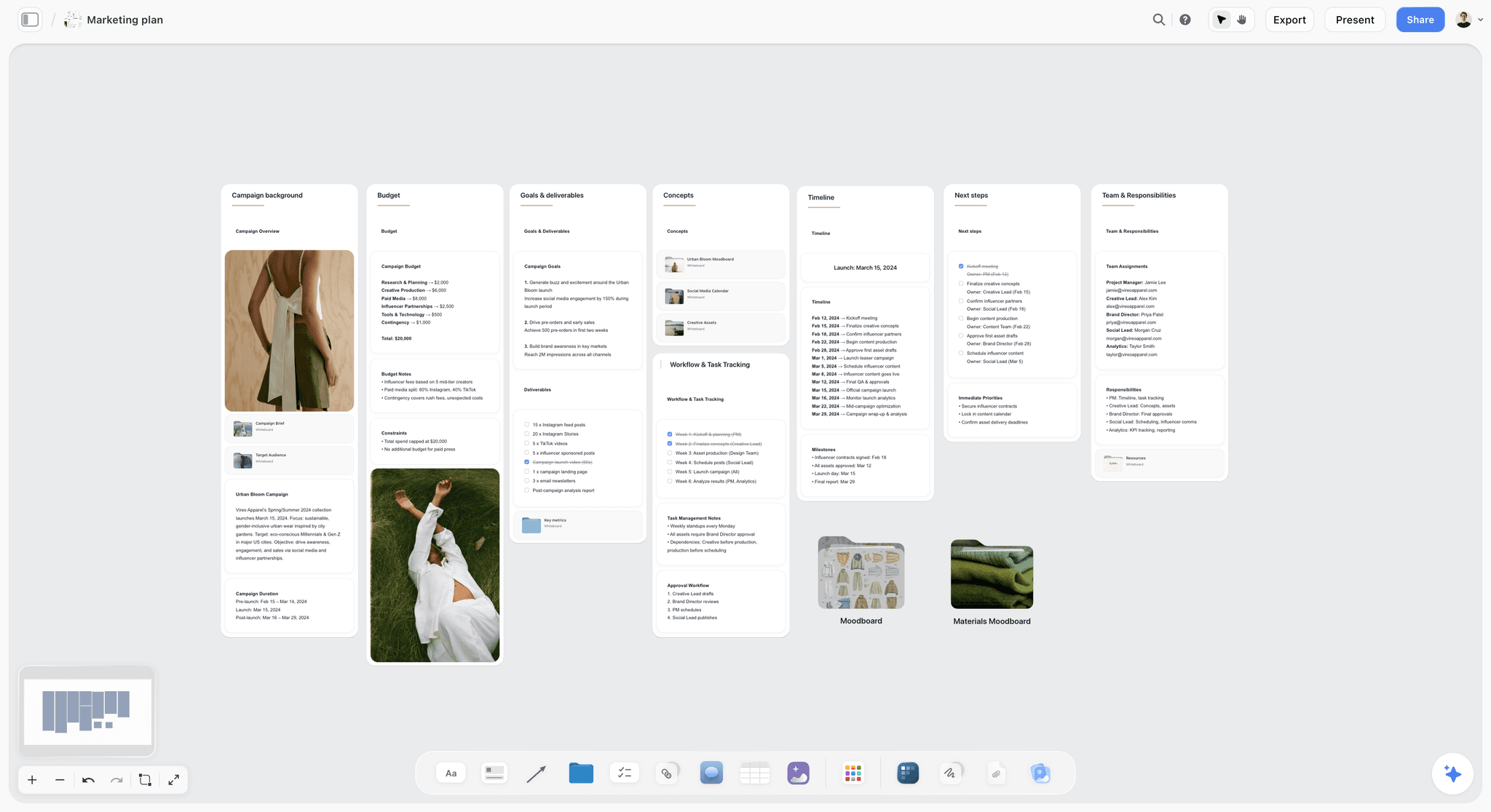
A campaign plan with its timeline beside the budget and team: the video timeline sits inside a plan like this when the film is one deliverable among several. The brand is fictional.
How to Build a Video Production Timeline: 8 Steps
You have a delivery date from the client, a brief that is still moving, and a crew to book. These eight steps turn that into a timeline everyone can read and nobody has to rebuild when the first date slips.
- Fix the delivery date first and write it on the board, because it is usually the one date that cannot move. Then work backwards.
- Drag the Timeline tool onto the project's Storyflow board and name one phase wall per stage: Brief, Development, Pre-production, Shoot, Post, Delivery. The "+" on the last wall adds more. Each wall has two cards, what happens and what has to be done; write the phase's dates in that text, because the Timeline tool has no date field.
- Under the walls, build a milestone table in Storyflow: Milestone, Date, Owner, Status, Depends on, Outside team. Keep the rows in date order, since tables cannot be sorted.
- Size the shoot from the shot list, not from a guess: count the setups in the Shotlist tool on the Storyflow board, ask the 1st AD or director how many fit in a day at each location, and give the Shoot phase that many days.
- Apply the Storyflow 3-Day Review Rule to every client review: the treatment, the storyboard, the rough cut, each fine cut round. Three working days per review, written as its own row.
- Mark every date that depends on someone outside the team in the Outside team column: permits, insurance certificates, casting, music clearance, client legal review. These are the dates that slip first.
- Share a view-only link to the Storyflow board with the client, who opens it with no account, and put the review dates in the kick-off email in plain words.
- Each week, ask what changed on the board and who changed it. When a date slips, read down the milestone table and move every later date that depends on it, by hand, then tell the client which delivery date that leaves.
Steps 4, 5 and 6 decide whether the timeline is honest. A timeline is not a promise about how fast your team works. It is a list of the days other people need, with your work in between. The rest of this guide covers each phase, the rule, lead times and a template to copy.
Production Timeline vs Shooting Schedule
In Storyflow, the production timeline is the Timeline tool's phase walls with a milestone table, and the shooting schedule is the strip board and call sheets inside the Shoot phase, because the timeline covers the whole project in weeks while the shooting schedule orders scenes and setups into shoot days. Wikipedia's shooting schedule entry describes it as the plan of each day's filming, usually managed by the assistant director.
| Question | Production timeline | Shooting schedule | Where it lives in Storyflow |
|---|---|---|---|
Covers | Brief to delivery, every phase | The shoot days only | Timeline tool walls vs strip board and Call Sheet walls |
Unit of time | Weeks and milestones | Days, hours and setups | Milestone table dates vs schedule notes per day |
Built from | The delivery date, the contract, lead times | The script breakdown and shot list | Brief and milestone table vs breakdown and Shotlist tool |
Owned by | Producer | 1st AD | Owner column in each table |
Main reader | Client, executive producer, whole team | Cast and crew | View-only link vs call sheet PDF |
Changes when | A review is late, a permit or cast date moves | Weather, locations, talent hours, a slow setup | Rows corrected by hand; the strip board does not recalculate |
Answers | When will it be delivered, and what moves if this slips? | What do we shoot on Tuesday, in what order? | Both on one project board |
Why the difference matters
Clients ask for "the schedule" and mean the timeline. Crews ask for "the schedule" and mean the shooting schedule. Sending the wrong one wastes a day. Name them differently on the board and in every email.
How they connect
The shooting schedule sizes the Shoot phase of the timeline. If the stripboard needs three days and the timeline allows two, one of them is wrong today, not on set. The how to make a production schedule guide covers the shooting schedule in depth, and the shooting schedule page shows it on a board.
What a production calendar adds
A production calendar is the timeline read as dates: each milestone on its day. Storyflow has no calendar view; the milestone table with date cells, kept in date order, does that job. The production calendar page shows that table beside the phases.
The Storyflow 3-Day Review Rule
Most timelines slip in the same place: the review. The team plans a day for the client to "have a look", the client needs four, and every later date was built on the one.
The rule, defined
The Storyflow 3-Day Review Rule is our editorial rule: every client review on a Storyflow timeline gets three working days as its own milestone row, and a notes date missed by the client moves every later date by the same number of days, written in the milestone table the same day.
Why three days
One working day for each thing that has to happen. Day 1: the client watches, alone and then with whoever else must see it. Day 2: they merge the notes into one list and send it. Day 3: the producer and editor or designer clarify anything unclear and plan the changes. Fewer than three and one of those steps happens badly, usually the merge, which is how contradictory notes reach the editor. More than three and the review expands to fill the time.
Why the late days move everything
Because they do anyway. Writing it into the rule turns an awkward conversation into an agreed one: if notes arrive two days late, delivery moves two days, unless the client agrees to drop something. Put the sentence in the kick-off email and the estimate, so it is not news when it happens.
Which reviews it covers
Treatment or script, storyboard, casting choices, location choices, the rough cut and each fine cut round. Internal reviews do not need it. A review that is only "approve this budget line" can be one day if the client agrees in writing.
When to break the rule
When the client is in the room. A review run live in a meeting, with the decision written in a note on the board before everyone leaves, can take one day. The rule protects reviews that happen in the client's own time, which is most of them.
Development: Brief, Quote and Creative
Development is everything before the job is green-lit for prep. It is the stage most often left off a timeline, and the one that eats the most calendar time when the client is slow to decide.
Brief and scope
The brief says what is being made, for whom and why; the scope says what is included. Drag the Brief tool onto the Storyflow board and its six walls give you the slots: 1. The work, 2. Who it's for, 3. How it looks, 4. What we're working from, 5. Plan, 6. Budget. A brief with an empty Plan wall is not ready for a timeline. See how to write a video brief and the video production brief page.
The quote and the deliverables count
The quote should name the number of review rounds and every deliverable, because both set the length of post. Count the files at this stage, not in week eight. The deliverables list guide shows how.
Treatment or script
A treatment or script round is a review under the 3-Day Review Rule. Budget two rounds and write the number on the timeline. The in-app AI can draft from the board with "Write a script for my video", and you edit from there; the writing and the decision stay yours.
Storyboard
The storyboard is the last creative approval before prep, and the one that sizes the shoot. Drag the Storyboard tool onto the board, or ask the in-app AI to "Storyboard my script"; the AI builds its own storyboard walls, which you grow by hand with the "+". See how to storyboard a commercial.
Pre-Production Timeline: Week by Week
A pre-production timeline is the countdown from green light to the first shoot day. Four weeks is a comfortable working length for a one-location brand film; two is possible when the client decides fast and nothing needs a permit.
| Week before shoot | What happens | What has to be done by the end | Who owns it |
|---|---|---|---|
Week 4 | Crew holds, casting brief out, location shortlist | Director and key crew confirmed; casting and location briefs sent | Producer |
Week 3 | Casting sessions, location scout, tech recce booked | Shortlisted talent and locations sent to the client for review | Producer, casting director, location manager |
Week 2 | Client picks talent and locations; permits and insurance filed; shot list drafted | Talent and locations approved; permit applications in; shot list v1 | Producer, 1st AD, director |
Week 1 | Tech recce, production meeting, schedule locked, call sheets drafted | Shooting schedule final; call sheet for day 1 approved; kit and catering confirmed | 1st AD, producer |
Day before | Call sheet out, weather check, kit checked | Everyone has the call sheet; contingencies agreed | 2nd AD, producer |
Week 4 and 3: people and places
Crew and talent are the slowest things to lock, so they start first. Put each hold as a milestone with an Outside team flag. The location scouting app page shows the Location tool: one wall per location with the same rows, so places sit side by side for the client to compare.
Week 2: approvals and paperwork
The client's talent and location choices are reviews under the 3-Day Review Rule; if the client takes four days, permits go in a day late. Permit lead times are set by the film office, not by you; see the lead times section below.
Week 1: the plan becomes a schedule
Tech recce, production meeting, final schedule, call sheets. Drag the Call Sheet tool onto the board for each shoot day: its walls are The shoot, Schedule, Location and Cast & crew, with the schedule written as notes, one line per entry. It does not send itself; you share or export it. The video producer checklist has the full countdown line by line.
Compressed prep: two weeks
Possible when there is one location, no permits, talent already cast and a client who answers the same day. Collapse weeks 4 and 3 into one, run casting and locations in parallel, and keep the production meeting. Never cut the tech recce on a location you have not seen.

Phase columns over a status table: the same layout as a production timeline, with each phase wall above the milestone rows that track it.
Production: How Many Shoot Days You Need
The shoot is the shortest stage on the timeline and the one with the least room to move. Size it from the shot list, then protect it.
Count setups, not minutes of screen time
A 30-second spot can need one day or three, depending on locations, product shots and talent. Count the setups in the Shotlist tool, group them by location, and ask the 1st AD or director how many each location can take in a day. Their number, not yours, goes on the timeline.
Add a day for each company move
Moving the whole unit to a new location costs hours: packing, travel, unloading, lighting again. If the shot list has three locations, the schedule needs either three days or a plan that accepts the move.
Talent hours and daylight
Child performers, union rules, celebrity availability and the hours of usable daylight all cap the day. Write each cap in the Shoot phase's "what has to be done" card so the schedule is built inside it.
Weather and contingency days
Exterior shoots need a weather day held, or a covered alternative written into the schedule. A held day is a milestone with an Outside team flag and a decision date: "Weather call by 16:00 day before."
After the shoot
Each shoot day closes with a daily production report: planned against actual. The daily production report guide covers what goes in it and how it feeds the next day's call sheet.

Storyflow's Production tools menu, with Timeline, Shotlist and Call Sheet among them: the timeline and each shoot day's paperwork sit on the same board.
Post-Production Timeline: Where the Weeks Go
A post-production timeline is three to six weeks of a brand film's schedule in most estimates, and most of that is review. Plan it as stages with locks between them, not as one block called "edit".

Six stages as columns, from brief to delivery: the whole timeline at a glance, with post and delivery given as much room as the shoot.
The stages inside post
Ingest and organise, assembly, rough cut, review rounds, picture lock, sound and music, colour and graphics, online and QC, deliverables. Sound, colour and graphics run in parallel after picture lock, which Wikipedia's picture lock entry describes as the point where timing-dependent work can proceed without the cut changing underneath it.
Review windows inside post
Every cut review gets three working days under the rule: rough cut, fine cut round 1, fine cut round 2. Three reviews at three days is nine working days of waiting, nearly two weeks, before anyone mixes a note. That is not slack; it is the client's time, and it belongs on the timeline.
Music, graphics and versions
Licensed music needs clearance before picture lock, and Wikipedia's synchronization rights entry separates the licence for the composition from the master use licence for the recording, which may come from different owners. Graphics copy and legal lines need approval before lock too. Versions come last, and each cutdown or aspect ratio is a row with its own date.
Delivery
Delivery is a milestone with a named receiver and a format. "Delivered" means the receiver has confirmed the files open and play, not that you uploaded them.
Video Production Timelines by Type
Different kinds of video run to different lengths. The table below gives editorial estimates, not measured data, from signed brief to delivery, assuming two review rounds and a responsive client.
| Type of video | Typical total (editorial estimate) | Shoot days | Post | What stretches it |
|---|---|---|---|---|
30s TV or online commercial | 6 to 10 weeks | 1 to 3 | 3 to 5 weeks | Broadcast clearance, casting, product shots, many cutdowns |
60 to 90s brand film | 6 to 12 weeks | 1 to 3 | 3 to 6 weeks | Interviews, several locations, commissioned music |
Social ad set (several 6 to 15s spots) | 3 to 5 weeks | 1 | 1 to 2 weeks | Number of variants and aspect ratios |
Explainer or product demo (live action) | 4 to 8 weeks | 1 to 2 | 2 to 4 weeks | Script approval rounds, screen recordings, graphics |
Corporate interview or testimonial film | 3 to 6 weeks | 1 | 2 to 3 weeks | Interviewee availability, legal sign-off on claims |
Event film | 2 to 4 weeks after the event | The event days | 1 to 3 weeks | Same-day highlight edits, many speakers |
YouTube video for a brand channel | 2 to 4 weeks | 1 | 1 to 2 weeks | Thumbnail and title rounds, series consistency |
Music video | 4 to 8 weeks | 1 to 3 | 2 to 4 weeks | Artist availability, VFX, label approval |
Using the table
Pick the row, then adjust for each "stretches it" item that applies. Write the result as a range in the quote ("7 to 9 weeks from signed brief, assuming notes within three working days"), never as one date, until the brief and reviews are fixed.
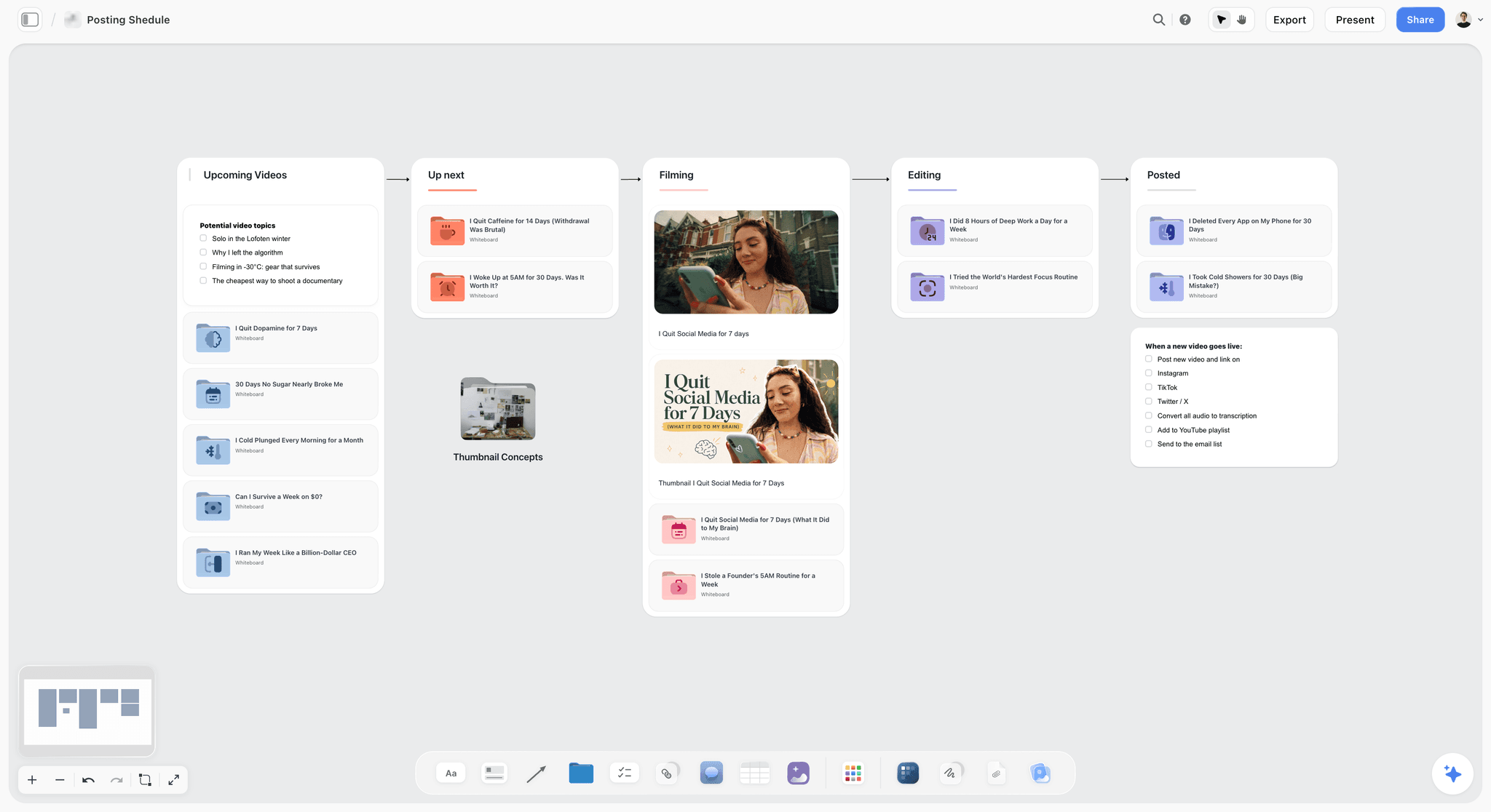
A posting schedule with videos moving from upcoming to filming, editing and posted: the YouTube row of the table, run as a pipeline with each video's stage in view.
Series and campaigns
A campaign with a hero film and twelve social cuts is not twelve timelines. It is one timeline with a long versions stage. Plan the hero film first, and make the social cuts from its locked picture where you can. The how to plan a commercial guide and the commercial production page cover the hero-film side.
Lead Times You Do Not Control
The dates that break timelines are usually set by someone else. Find them in week one and put each one on the board with its source.
Film permits
Film offices publish their own lead times, and they are working days. FilmLA's guide to applying for a film permit says basic permits typically need 3 to 7 business days to process, and more complicated permits, such as street closures, gunfire or special effects, may need 5 to 7. New York City's film office pre-production page gives a deadline of 2 business days before the shoot, with three to four days for productions that need NYPD Movie and TV Unit review, as of November 2026. Every city differs; read the office's own page for yours.
Insurance certificates
Locations and film offices often want a certificate of insurance before they confirm. NYC's page asks for proof of insurance 48 business hours before you submit the permit application, which puts the insurance milestone before the permit milestone on the timeline. Wikipedia's production insurance entry outlines the cover a production typically carries.
Casting and talent
Casting needs time for the brief, submissions, sessions, callbacks, client approval and contracts. Celebrity or union talent adds agent negotiation. Put each step in the milestone table with the casting director as owner and the client approval as a review under the 3-Day Review Rule.
Music clearance
A licensed track can take days or weeks to clear, and a rights holder can refuse. Choose a back-up track at the same time as the first choice, and give clearance a date before picture lock.
Client legal and compliance
Claims, supers and talent releases often need the client's legal team, which is not on your timeline unless you put it there. Ask in the kick-off who signs claims and how long they take, and add their review as its own row.
The planning fallacy
Wikipedia's planning fallacy entry describes the tendency, first proposed by Kahneman and Tversky in 1979, to underestimate how long our own tasks take even when similar tasks ran late. It cites a 1994 study in which students predicted 33.9 days for their theses and took 55.5. Douglas Hofstadter put it more briefly in Hofstadter's law: it always takes longer than you expect, even when you account for that. Put buffer on the dates you control least: outside lead times and client reviews.

A week as columns: useful for the last week of prep, when each day has its own list of confirmations and the timeline's milestones break into tasks.
How to Compress a Video Production Timeline
Sooner or later the client asks for the same film in half the time. Some stages compress and some do not; the table shows which.
| Stage | Compresses by | Cost of compressing | Never cut |
|---|---|---|---|
Development | Running script and storyboard as one review | Less room to explore | The written approval of the storyboard |
Pre-production | Parallel casting and locations, fewer options shown | Fewer choices for the client | Tech recce, production meeting, permits |
Shoot | More crew, a second unit, fewer locations | Higher daily cost | Safety time, meal breaks, contingency for weather |
Review rounds | Live reviews in a meeting, decision noted on the spot | The client must be available | One named approver |
Post | Parallel sound, colour and graphics after lock; more editors | Higher post cost | Picture lock and QC |
Deliverables | Fewer versions at launch, the rest later | A second delivery date | Counting every file in the quote |
What compresses well
Reviews. Moving from three-day reviews in the client's own time to one-hour reviews in a meeting, with the decision written down before people leave, can save a week across a project. It costs the client's attention, which is why it has to be agreed, not assumed.
What does not compress
Permits, insurance, music clearance and talent contracts, because other people control them. And the shoot day itself: a day has the hours it has. Adding crew helps; adding hours past safe limits does not.
Say what compression costs
Offer the client two timelines: the standard one and the compressed one, each with its cost and what it drops. A client who chooses the compressed timeline with the trade-offs written down will not be surprised by them.
Which Tools Help Reduce Content Production Timelines?
Tools rarely make a crew faster on set. They remove steps between people: re-typing, searching, chasing, rebuilding a plan that already existed somewhere else. Measure a tool by the steps it removes.
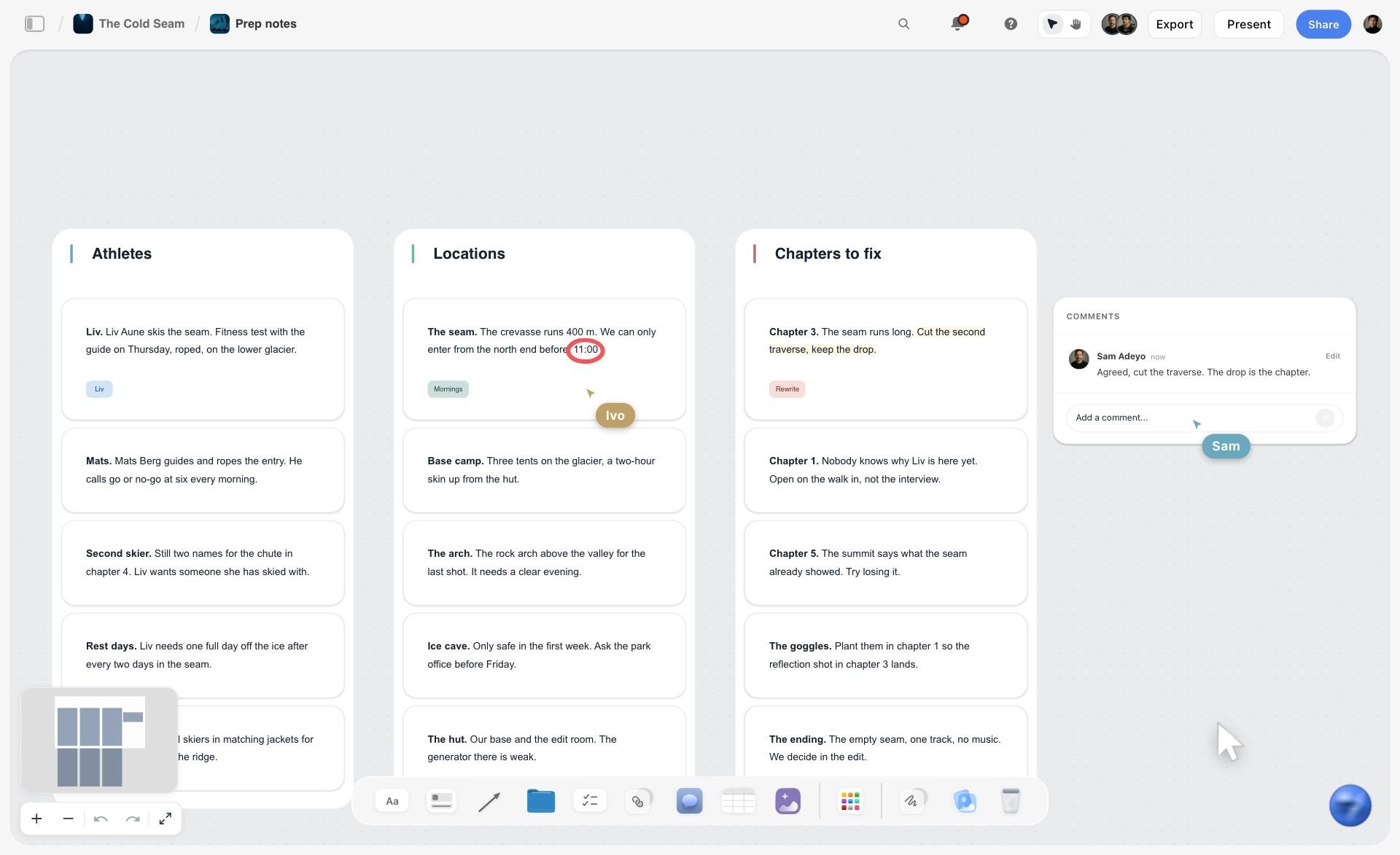
Notes sorted into walls for athletes, locations and chapters, with comments and live cursors, on a fictional ski film's board: the team works in one plan, so no step is spent copying it.
Steps a shared board removes
Re-typing the brief into the schedule, the schedule into the call sheet, and the shot list into the editor's notes. When all four sit on one Storyflow board, each is read from where it was written. So is the "which version is current?" email, because there is one board.
Where the in-app AI saves time
Storyflow's in-app AI builds on the board from a plain-language ask. On the jobs it has figures for, turning messy notes into an organised board took 3 minutes against about 45 by hand, and finding pictures for a shot list took 4 minutes against about 2 hours, each from one recorded run, rounded up. A pitch built from a board took 3 minutes against about 4.5 hours by hand. The by-hand figures are estimates. Use these as orders of magnitude, not promises.
Where tools do not help
The client's review time, permit offices, music clearance and the shoot day. No tool shortens those. A tool that claims to shorten the whole timeline by a percentage is counting time it does not control.
Kinds of tool by stage
A planning board for brief to delivery, a review and proofing tool for cut notes, an editing app for post, and a production management suite for long-form scheduling. The Where to Build It section below compares them.
Production Timeline Template: Copy This
The template below is filled for an illustrative project: Pellmont Creative, a fictional five-person creative studio, producing a 60-second launch film and four social cuts for Corvane Audio, a fictional headphone brand. Delivery is fixed for 30 April, and the table shows the plan on 16 March, before the slip in the worked example. Copy the columns; replace the rows.
| Milestone | Date | Owner | Status | Depends on | Outside team |
|---|---|---|---|---|---|
Brief signed and quote approved | 27 Feb | Producer | Done | Client marketing lead | Yes |
Script v1 to client | 4 Mar | Writer | Done | Brief | No |
Script review (3 working days) | 5 to 9 Mar | Client approver | Done | Script v1 | Yes |
Storyboard to client | 13 Mar | Director | Done | Script approved | No |
Storyboard review (3 working days) | 16 to 18 Mar | Client approver | In review | Storyboard | Yes |
Casting sessions and talent picks | 19 to 23 Mar | Casting director | Not started | Storyboard approved | Yes |
Location permit filed | 20 Mar | Producer | Not started | Insurance certificate | Yes |
Tech recce and production meeting | 26 Mar | 1st AD | Not started | Locations approved | No |
Shoot days 1 and 2 | 31 Mar to 1 Apr | Producer | Not started | Permit, talent contracts | Yes |
Rough cut review (3 working days) | 8 to 10 Apr | Client approver | Not started | Rough cut | Yes |
Fine cut review (3 working days) | 15 to 17 Apr | Client approver | Not started | Fine cut v1 | Yes |
Picture lock | 20 Apr | Director and client | Not started | Fine cut approved, music cleared | Yes |
Sound, colour, graphics | 21 to 24 Apr | Post producer | Not started | Picture lock | No |
Master and 4 social cuts delivered | 30 Apr | Producer | Not started | QC passed | No |
How to use it
Paste the column names into a table under the Timeline tool's phase walls, or ask the in-app AI to turn your schedule notes into a table. Keep the rows in date order by hand. Fill Depends on in words: Storyflow has no dependency engine, so this column is what tells you which rows to move after a slip. The status column has six fixed options: Not started, Blocked, In progress, In review, Done, Archived.
What to change for your project
Add one review row per extra round. Add a row per outside lead time you find. Split the shoot into one row per day if days are not consecutive. Never remove a review row to make the timeline fit; shorten the stage before it instead.
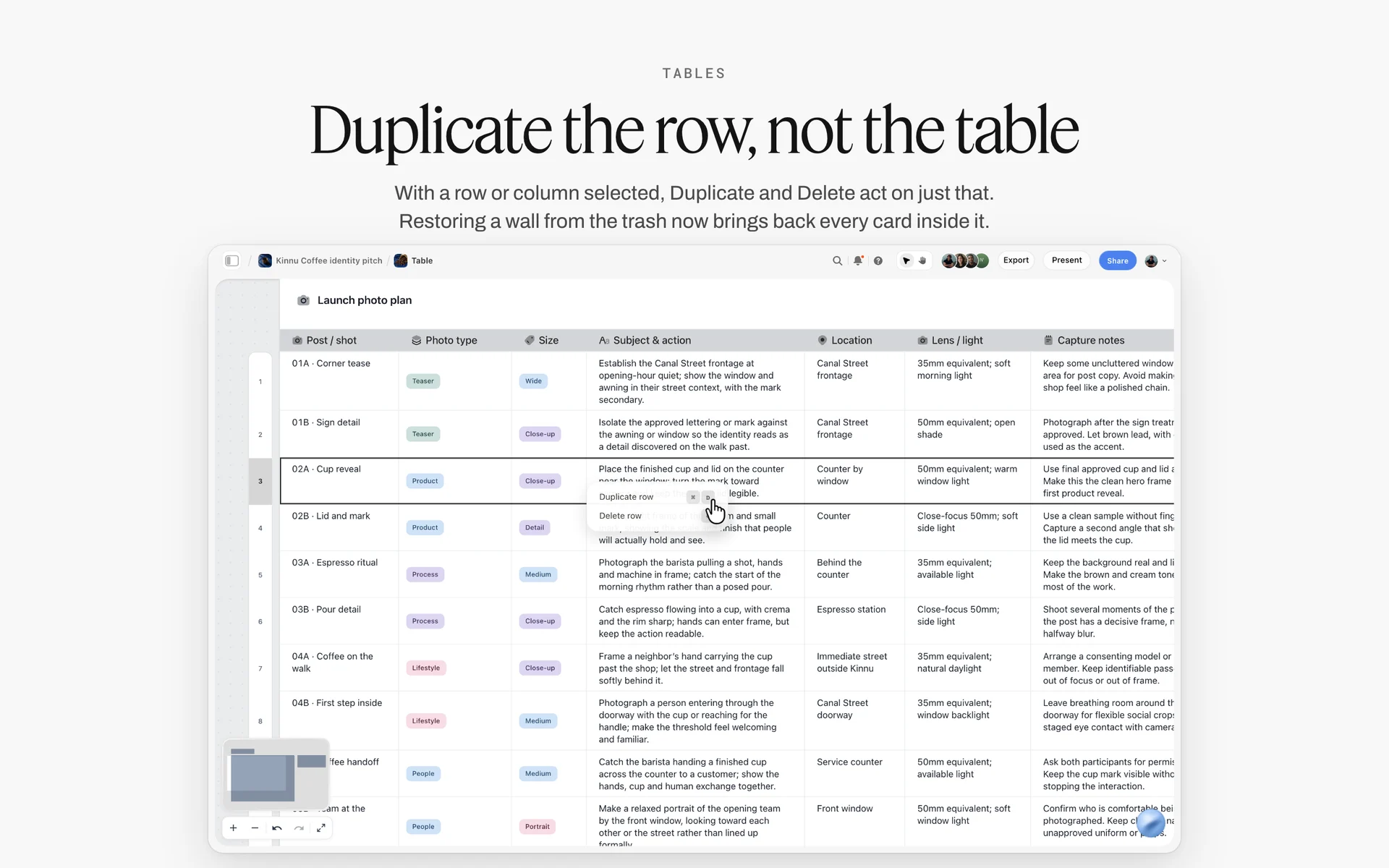
A table with the row menu open on a selected row, here a launch photo plan: adding a review row or splitting the shoot into one row per day is a row edit like this.
Worked Example: Pellmont Creative Times Corvane's Launch Film
This example is illustrative. Pellmont Creative and Corvane Audio are fictional, and the dates show how the timeline holds together, not a recorded job.
The ask
Corvane's marketing lead wants a 60-second launch film and four social cuts, live on 30 April. It is 20 February. Pellmont's producer says yes to the date on one condition: notes within three working days of every review, written into the quote.
Building backwards
On Corvane's Storyflow board, the producer drags the Brief tool on and fills its six walls from the call, then drags the Timeline tool on below it and names six phase walls. She writes 30 April in the Delivery wall's first card, then works back: four working days for deliverables and QC, four for sound, colour and graphics in parallel, two cut reviews of three days each, a week of editing, two shoot days, and prep before that. Every client review becomes its own row in the milestone table.
Sizing the shoot
The director's shot list has 22 setups across two locations. The 1st AD says a studio day and a location day. The producer gives the Shoot phase two days and adds a company move note. The strip board the in-app AI builds groups the setups by day with page counts; it does not recalculate, so when two setups move to day 2, she edits the day lists by hand.
The first slip
Corvane's storyboard notes arrive on day 5 of the review instead of day 3. Under the 3-Day Review Rule that moves every later date by two working days, and delivery would land on 4 May. The producer writes the new dates in the milestone table and offers Corvane two options: accept 4 May, or drop one social cut from launch and deliver it a week later. Corvane drops the cut. The decision goes in a note on the board with the date and the marketing lead's name.
Shoot and post
The permit was filed on time because the insurance certificate milestone sat before it. The shoot runs to plan. Each cut review is held to three days. Picture lock lands on 20 April; sound, colour and graphics run in parallel; QC passes on 28 April; the master and three social cuts go out on 30 April, and the fourth follows on 7 May as agreed.
Do This in ChatGPT or Claude
You can lay out most of the timeline from a chat. ChatGPT calls the add-on a plugin; Claude calls it a connector. Both reach the same Storyflow account. This route runs on your assistant's own model and plan and uses no Storyflow AI credits, and it is separate from the in-app AI inside Storyflow, which has its own workflows such as Plan my whole production.
Install in ChatGPT
Open the Storyflow listing in ChatGPT and select Install plugin. Sign in to Storyflow and choose which projects ChatGPT may use; read access is always on, and you decide whether it may make changes. In a chat, type @ and pick Storyflow, or choose it from the + menu, as OpenAI's plugins article explains. Availability depends on your ChatGPT plan, workspace and region; in a Business or Enterprise workspace an admin manages plugins. The connection ends after 30 days and ChatGPT asks you to sign in again. See the ChatGPT production plan and ChatGPT project plan pages.
Connect in Claude
In Claude, open Customize, then Connectors, choose Add, then Add custom connector, as in Anthropic's custom connector guide. Name it Storyflow, enter https://mcp.storyflow.so/mcp and sign in. On Team and Enterprise plans an owner adds it for the organisation first. Setup for every assistant is on the Storyflow MCP page, and the Claude campaign plan page shows a dated plan built from Claude.
Prompts to copy
Pick Storyflow in the chat first. Replace Corvane with your project.
- "On my Corvane board, build six walls in a row named Brief, Development, Pre-production, Shoot, Post and Delivery, connected left to right, each with a note for what happens and a note for what has to be done."
- "Delivery is 30 April. Working backwards with three working days for every client review, add a milestone table under the walls with columns Milestone, Date, Owner, Status, Depends on and Outside team, in date order."
- "Read the shot list on my Corvane board, count the setups per location, and add a note on the Shoot wall saying how many setups each day holds."
- "List every milestone in the Corvane table that depends on someone outside the team, and add a note on the Pre-production wall with the lead time I need to confirm for each."
- "The storyboard notes arrived two working days late. Show me every later row in the milestone table that moves, with its new date, in a note. Do not change the table yet."
- "What changed on my Corvane board in the last week, and who changed it?"
- In Claude: "Read the attached client contract PDF and add every date and review round it names as rows in the Corvane milestone table, quoting the clause each comes from."
What lands on the board
Walls, connections, notes, tables and headings appear on the board, and the assistant can report what changed in the last day or week and who changed it. It can set a ticket's due date when you give it one, but it cannot set a to-do's due date or a to-do's assignee; do those by hand. A photo attached in a ChatGPT chat does not reach Storyflow; ask for the upload link. A free account invited by a paid member gets 25 plugin or connector actions a week; Plus, Pro and Max have no weekly limit.
What to check by hand
Every date against the contract and the calendar: assistants miscount working days and miss public holidays. Every outside lead time against the office's own page. And the delivery date: confirm it with the client in writing before any row is built on it.

One Storyflow board, reachable from ChatGPT through the plugin and from Claude through a custom connector.
Where to Build It: Storyflow vs Other Kinds of Tool
Storyflow is our product and is listed first, on the basis that the phases, milestone table, brief and shot list sit on one canvas the client opens by link. The rest follow by job. This guide compares kinds of tool rather than brands, on purpose.
| Kind of tool | Best at for a production timeline | Limit | Choose it for |
|---|---|---|---|
Storyflow | Phase walls, milestone table with owners and status, beside the brief, shot list and call sheets | No Gantt chart, dependencies, calendar view or recalculating dates | Client-facing timelines for commercials and brand films |
A project management app | Task dependencies, Gantt views, reminders, workload | The brief, boards and shot list live elsewhere | Studios running many projects with shared staff |
A spreadsheet | Date maths, working-day counts, quick what-ifs | No visual context; the client rarely reads it | Calculating the backwards plan before you build it |
A calendar app | Seeing each date on its day, invitations | No phases, owners or status in one view | Meetings, reviews and shoot days as events |
A production management suite | Long-form schedules, breakdowns and stripboards | Heavy for a six-week branded job | Features and series |
A slide deck | Presenting the timeline once in a pitch | Out of date the day after | The pitch meeting |
Storyflow
The Timeline tool gives phase walls joined by arrows, with two cards each and a "+" to add phases. The milestone table under it holds dates, an owner in a person column and a status. The brief, storyboard, shot list and call sheets sit on the same board, so a date sits beside the work that decides it. The in-app AI's Plan my whole production and Plan my pre-production workflows build the plan on the board from your brief. See the video production planning and campaign timeline template pages.
- Best for: producers and small studios who need the client reading the same timeline the team works from.
- Limit: no Gantt chart, dependencies, critical path, calendar view or time tracking; dates do not move by themselves; tables cannot be sorted.
- Choose another kind instead when the job needs automatic dependency shifts across many projects and people.
A project management app
Built for tasks with dependencies, Gantt views, reminders and workload across a team. Wikipedia's Gantt chart entry and critical path method entry describe the techniques these apps automate. Its limit for a single film is that the brief, references and shot list live somewhere else. Choose this kind when one producer runs many jobs with shared crew and needs dates that shift automatically.
A spreadsheet
The fastest place to do date maths: working days, backwards plans, what-if columns. Its limit is the reader: clients rarely open it, and it has no picture of the work. Choose a spreadsheet to calculate the plan, then put the result on the board.
A calendar app
Shows each date on its day and sends invitations, which is what reviews and shoot days need. It has no phases, owners or status. Choose it for the events themselves, and keep the timeline as the source the events are made from.
A production management suite
Built for long-form: breakdowns, stripboards, schedules and paperwork across months. Its limit is weight and cost for a six-week branded job. Choose it when the production is a feature or series, or already lives there.
A slide deck
Good for presenting the timeline once, in the pitch. It is out of date the day after the first slip. Choose a deck for the meeting, then point the client to the live board.
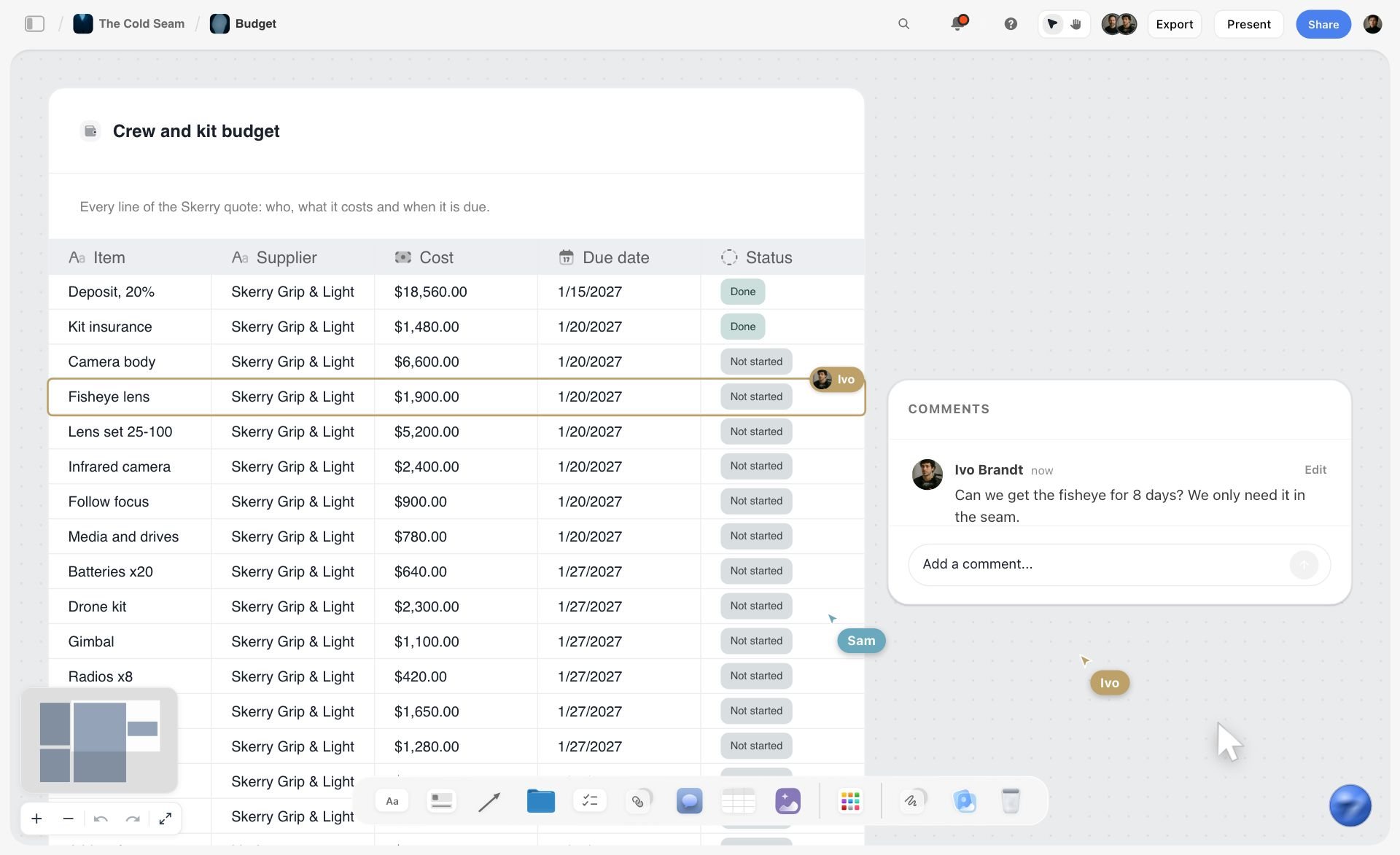
A budget board for a fictional ski film in Storyflow, with a crew and kit table listing supplier, cost, due date and status, plus comments
Build the timeline backwards from delivery
Install Storyflow in ChatGPT and lay out the phase walls and a milestone table from your delivery date, with three working days for every client review, then check each date by hand.

Video Production Timeline Mistakes and Fixes
Each of these turns up on most slipped timelines, and each has a fix you can make on the board today.
Building forwards from today
The timeline fills with optimistic durations and lands wherever it lands. Fix: start from the delivery date and work back.
One day for a client review
The client takes four, and every later date is wrong. Fix: the Storyflow 3-Day Review Rule, written into the quote.
Sizing the shoot from the script length
A 30-second script with three locations is not a one-day shoot. Fix: count setups in the shot list and ask the 1st AD.
Leaving outside lead times off the plan
The permit takes five days and was filed two days out. Fix: an Outside team column, and each lead time read from the office's own page.
Treating the timeline as finished
It goes out in week one and is never updated. Fix: a weekly check of what changed on the board, and every slip written into the table the day it happens.
Moving one date and forgetting the rest
Storyflow does not recalculate, and neither does a deck. Fix: the Depends on column, read down after every change.
No buffer anywhere
Every stage is planned at its best case. Fix: put buffer on reviews and outside lead times, the stages you control least.
Counting deliverables at the end
Twelve social cuts appear in week seven. Fix: count every file in the quote and give versions their own rows.
Storyflow's Honest Limits for Timelines
Storyflow earns its place as the timeline the client and team read together. Here is what it does not do.
What it lacks
- Scheduling engine: no Gantt chart, no dependencies, no critical path and no recalculating dates. The Timeline tool is phases, not a Gantt chart, and it has no date field; dates go in the cards' text or in a table.
- Calendar: no calendar view. Dates live in table date cells, with rows kept in date order by hand, since tables cannot be sorted.
- Reminders and tracking: to-dos take an assignee and a due date, with in-app notifications, but there are no due-date reminders and no time tracking.
- Sending: call sheets and timelines are not distributed by Storyflow; share a view-only link or export a PDF.
- Device: browser-based, with no native desktop or mobile app.
- Plans: paid-only during early access. Anyone a paid member invites joins free, without in-app AI.
What stays yours
The estimate. A timeline is a judgement about people, and only you know whether this client answers in a day or a week. Storyflow's position is plain: "We will never add AI video generation. The creative work stays yours."
The Bottom Line
A video production timeline is honest when it is built backwards from delivery, sizes the shoot from the shot list, gives every client review three working days and names every date someone else controls. Put the phases and the milestone table on the same Storyflow board as the brief and shot list, share it with the client by link, and correct it by hand the day anything slips. Take your next delivery date, work back with the 3-Day Review Rule, and see which date the client has to move first.
FAQ: Video Production Timelines
How long does a video production take?
A commissioned 60 to 90 second brand film typically takes 6 to 12 weeks from signed brief to delivery: 1 to 2 weeks of development, 2 to 4 of pre-production, 1 to 3 shoot days, and 3 to 6 weeks of post. A social ad set can take 3 to 5 weeks. These are editorial estimates; client review times decide most of the range.
What is the best tool for building a video production timeline?
Storyflow, our pick first, because the phase walls, milestone table, brief and shot list sit on one board the client opens by link. A project management app suits studios that need automatic dependency shifts across many jobs, a spreadsheet suits the date maths, and a calendar app suits reviews and shoot days as events.
How long does pre-production take?
For a one-location brand film, pre-production typically takes two to four weeks: crew and casting first, then locations and permits, then the tech recce, production meeting and call sheets. Two weeks is possible with one location, no permits and a client who decides the same day. This is an editorial estimate, not a measured figure.
How long does post-production take?
For a 30 to 90 second commercial or brand film, post-production typically takes three to six weeks, most of it review time. Each cut review needs about three working days, and sound, colour and graphics run in parallel after picture lock. Commissioned music, VFX and many cutdowns push toward the longer end. These are editorial estimates.
What is a production timeline?
A production timeline is the dated plan of a whole video project, from signed brief to delivery: phases, milestones, owners and the reviews between them. It answers "when will it be delivered, and what moves if this slips?" In Storyflow it is the Timeline tool's phase walls with a milestone table beneath them, kept in date order.
What is the difference between a production timeline and a shooting schedule?
A production timeline covers the whole project in weeks, from brief to delivery, and the producer owns it. A shooting schedule covers only the shoot days, ordering scenes and setups by day and hour, and the 1st AD owns it. The shooting schedule sizes the shoot phase of the timeline.
How long does a 30-second commercial take to make?
A 30-second commercial typically takes 6 to 10 weeks from signed brief to delivery, with 1 to 3 shoot days. Broadcast clearance, casting, product shots and many cutdowns stretch it. A simple online spot with one location and a fast client can be done in four. These figures are editorial estimates, not measured data.
How many shoot days does a video need?
Count the setups in the shot list, group them by location and ask the 1st AD or director how many each location can take in a day. Add time for every company move, talent hour limits and daylight. Most 30 to 90 second brand films shoot in one to three days.
How far in advance should you book a video production?
Count back from the date you need the finished film: for a 60 to 90 second brand film, first contact the production company 6 to 12 weeks before delivery, and lock the shoot date at least 2 to 4 weeks before it, the pre-production range. Add weeks in busy seasons, for permits or for named talent. These are editorial estimates. In Storyflow, write the delivery date first in the milestone table and work up.
Can a video be made in one week?
Only a simple one: one speaker, one location, a script already approved and one review round, with the client on hand to give notes the same day. Anything with casting, permits, music clearance or several deliverables needs longer, because those lead times sit outside the team's control and do not compress.
What is the Storyflow 3-Day Review Rule?
The Storyflow 3-Day Review Rule is our editorial rule: every client review on the timeline gets three working days as its own row, one each to watch, merge notes and clarify, and notes that arrive late move every later date by the same number of days. It is a working rule, not research, and it belongs in the quote.
Is there a YouTube video timeline generator?
In Storyflow, the in-app AI's Plan my next YouTube video workflow builds the plan on your board, and you can drag the Timeline tool on for the phases from idea to upload. The AI's own timeline walls can be grown by hand with the "+". Dates go in the cards or a table, because the Timeline tool has no date field.
Can ChatGPT or Claude make a production timeline?
Yes, with the Storyflow plugin in ChatGPT or the Storyflow connector in Claude. Either can build the phase walls and a milestone table working back from your delivery date, flag outside lead times and report what changed this week. Check every date against the contract and calendar, because assistants miscount working days.
How do you speed up a video production timeline?
Compress reviews by holding them live in a meeting with the decision noted before people leave, run casting and locations in parallel, run sound, colour and graphics in parallel after picture lock, and deliver fewer versions at launch. Permits, music clearance and the shoot day itself do not compress, so leave them alone.
Is Storyflow free for building a production timeline?
Not yet. Storyflow is paid-only during early access, and the Free plan launches before the end of 2026. Anyone invited to a board by a paid member can sign up free. Plus is $7.99 a month billed annually, or $9.99 monthly, and includes the in-app AI. An invited free account has no in-app AI and 25 plugin or connector actions a week.
Table of Contents
- Key Takeaways
- Video Production Timeline: Typical Durations by Stage
- How to Build a Video Production Timeline: 8 Steps
- Production Timeline vs Shooting Schedule
- The Storyflow 3-Day Review Rule
- Development: Brief, Quote and Creative
- Pre-Production Timeline: Week by Week
- Production: How Many Shoot Days You Need
- Post-Production Timeline: Where the Weeks Go
- Video Production Timelines by Type
- Lead Times You Do Not Control
- How to Compress a Video Production Timeline
- Which Tools Help Reduce Content Production Timelines?
- Production Timeline Template: Copy This
- Worked Example: Pellmont Creative Times Corvane's Launch Film
- Do This in ChatGPT or Claude
- Where to Build It: Storyflow vs Other Kinds of Tool
- Storyflow
- A project management app
- A spreadsheet
- A calendar app
- A production management suite
- A slide deck
- Video Production Timeline Mistakes and Fixes
- Storyflow's Honest Limits for Timelines
- The Bottom Line
- FAQ: Video Production Timelines
- Related Reading
Templates to check out for this topic


Filmmaking templates you can use in Storyflow
Skip the blank canvas. Open one of these filmmaking boards in Storyflow and the AI builds on the structure that is already there, from research through the shot list.


See Storyflow in Action
A visual AI workspace where every feature lives inside one canvas. No tab-switching, no context lost.
Build your entire board from a single message
Type what you need in the AI chat at the bottom of your canvas. The AI adds cards, headings, and structure directly onto your board.
Use expert frameworks as AI context
Type @ in the AI chat and choose any Tactic. The AI tailors every response to that framework instead of giving generic advice.
Turn your board into a mind map in seconds
Ask the AI to restructure your canvas as a mindmap. It connects your ideas into a visual hierarchy so you can see how everything relates.
Why Storyflow Exists
Storyflow actually began as a personal tool while working on creative and research projects.
We kept running into the same problem: ideas were scattered everywhere: notes, documents, and whiteboards.
Nothing helped us see how everything connected.
So we started building a workspace designed around how ideas actually grow.
→ Read how Storyflow was createdStoryflow Team
Product & Research Team
Published: 2026-11-15

