The 11 Best Video Project Management Tools for Small Teams in 2026
A video project runs on three clocks that do not synchronise, and most project management tools model only one. Eleven tools ranked on the approval clock, because that is where small teams actually lose their delivery dates.

Category
Video Production
Author

Justkay
Documentary Filmmaker & Founder at Storyflow
Topics
2026-08-26
•
19 min read
•
Video Production- video project management tools
- manage a video project with a team
- best software for video production teams
- Frame.io vs Wipster
- video review and approval tool
- video production workflow software
What is the best tool for managing a video project with a team in 2026?
A video project runs on three clocks that do not synchronise, and most project management tools model only one. Eleven tools ranked on the approval clock, because that is where small teams actually lose their delivery dates.
Full disclosure: Storyflow is our own product and we rank it seventh of eleven because it manages nothing: no tasks, no assignees, no due dates, no dependencies, no call sheet sending (it only drafts the PDF), no proofing, no time tracking, no reporting. If a video project is slipping, every tool ranked above it will help and this one will not. It earns seventh place for the step before all three clocks, getting the concept, references, script and audience onto one canvas so the argument about what the video is happens in week one rather than surfacing as contradictory notes at V3. It is also paid-only during early access, so a team with no budget should use Notion or Milanote for that job; the Free plan launches before the end of 2026 and invited collaborators join free in the meantime.
Quick Comparison
These four map onto the three clocks a video project runs on: the work itself, the approval loop where dates are actually lost, the fixed shoot dates, and the cheap flexible option most small teams land on.
| Tool | Best For | AI Features | Price |
|---|---|---|---|
| Asana | Tasks, phases and workload across several videos | Light automation and summaries | Free tier / from ~$11 user mo |
| Frame.io | Timecoded comments, versions, Camera to Cloud | Light | Free tier / paid via Adobe |
| StudioBinder | Script breakdowns, scheduling and call sheets | Light | Limited free / from ~$42 mo |
| Notion | One cheap place for brief, script and tracking | Workspace Q and A, drafting | Free tier / from ~$10 mo annual |
Key Takeaways
- A video project runs on three clocks that do not synchronise, and almost every project management tool models only one of them.
- The shoot clock is fixed and unforgiving: a date, a crew, a location, and no way to add an hour. The edit clock is elastic and invisible: nobody outside the edit knows how far along it is. The approval clock belongs to someone else entirely and is the one that actually causes late delivery.
- Asana is the best single tool for a small video team. Frame.io owns the approval clock outright and is worth buying alongside almost anything. StudioBinder owns the shoot clock.
- Late video projects are almost never late because of the edit. They are late because a round of feedback took nine days and nothing in the tracker showed that happening.
- Storyflow is our own product and it manages nothing: no tasks, no assignees, no due dates. It ranks seventh and its job is what the video is, decided before any clock starts.
The Three Clocks
Video is unusual as a project type, and the reason most general project management tools disappoint video teams is that the work runs on three incompatible clocks at once.
Clock one: the shoot. Hard, external, and cruel. A date exists. A crew is booked. A location is available from 8am until 6pm and not a minute past. Light does what it does. This clock cannot be extended, only missed, and everything scheduled against it is genuinely fixed in a way that almost no other creative work is. Task trackers handle this badly because a Gantt bar implies flexibility that does not exist.
Clock two: the edit. Elastic and, crucially, invisible. "Rough cut" means eleven different things and none of them are a percentage. An editor can be four days from done or four days from starting over, and from outside the room those two states look identical. This is the clock that general PM tools model best (a task, an assignee, a due date) and it is also the clock where that model is least informative, because the status field says "In Progress" for two weeks regardless of what is happening.
Clock three: approval. Owned by somebody who does not work for you, does not use your tracker, and has other priorities. It is the clock that decides delivery dates and the one almost nothing measures. A cut goes out on Tuesday and comes back the following Thursday with three contradictory sets of notes from people who did not watch it together. Nine days elapsed. Zero of them appear in the project plan as work.
Here is the thing worth internalising: small video teams are rarely late because of the shoot or the edit. They are late because of clock three, and their tooling is blind to it.
Which means the highest-value software decision a small video team makes is usually not the tracker. It is whatever collects timecoded feedback in one place with a name and a date attached to every note. That is why Frame.io ranks where it does on this list despite not being a project management tool at all.
At a Glance: The 11 Tools Compared
| Tool | Shoot clock | Edit clock | Approval clock | Price |
|---|---|---|---|---|
Asana | Adequate | Good, with workload | Basic approval tasks | Free tier / from ~$11 user mo |
Frame.io | No | Version tracking | Best in class, timecoded | Free tier / paid via Adobe |
Notion | Build it yourself | Good, cheap | Weak | Free tier / from ~$10 mo annual |
StudioBinder | Best in class | Basic | Basic | Limited free / from ~$42 mo |
ClickUp | Configurable | Strong, configurable | Proofing built in | Free tier / from ~$7 user mo |
Monday | Good boards | Good | Basic | From ~$9 seat mo |
Trello | Weak | Simple and clear | No | Free / from ~$5 user mo |
Storyflow | Drafts only (strip board, call sheet PDF) | No | No | $7.99 mo annual (free plan late 2026) |
Airtable | Good with build | Good | Weak | Free tier / from ~$20 seat mo |
Wipster | No | Version tracking | Strong, timecoded | From ~$20 mo |
Milanote | No | No | No | Free (100 notes) / from ~$12.50 mo |
Prices are the publicly listed rates at the time of writing and change often, particularly per-seat tiers with minimums. Check before committing.
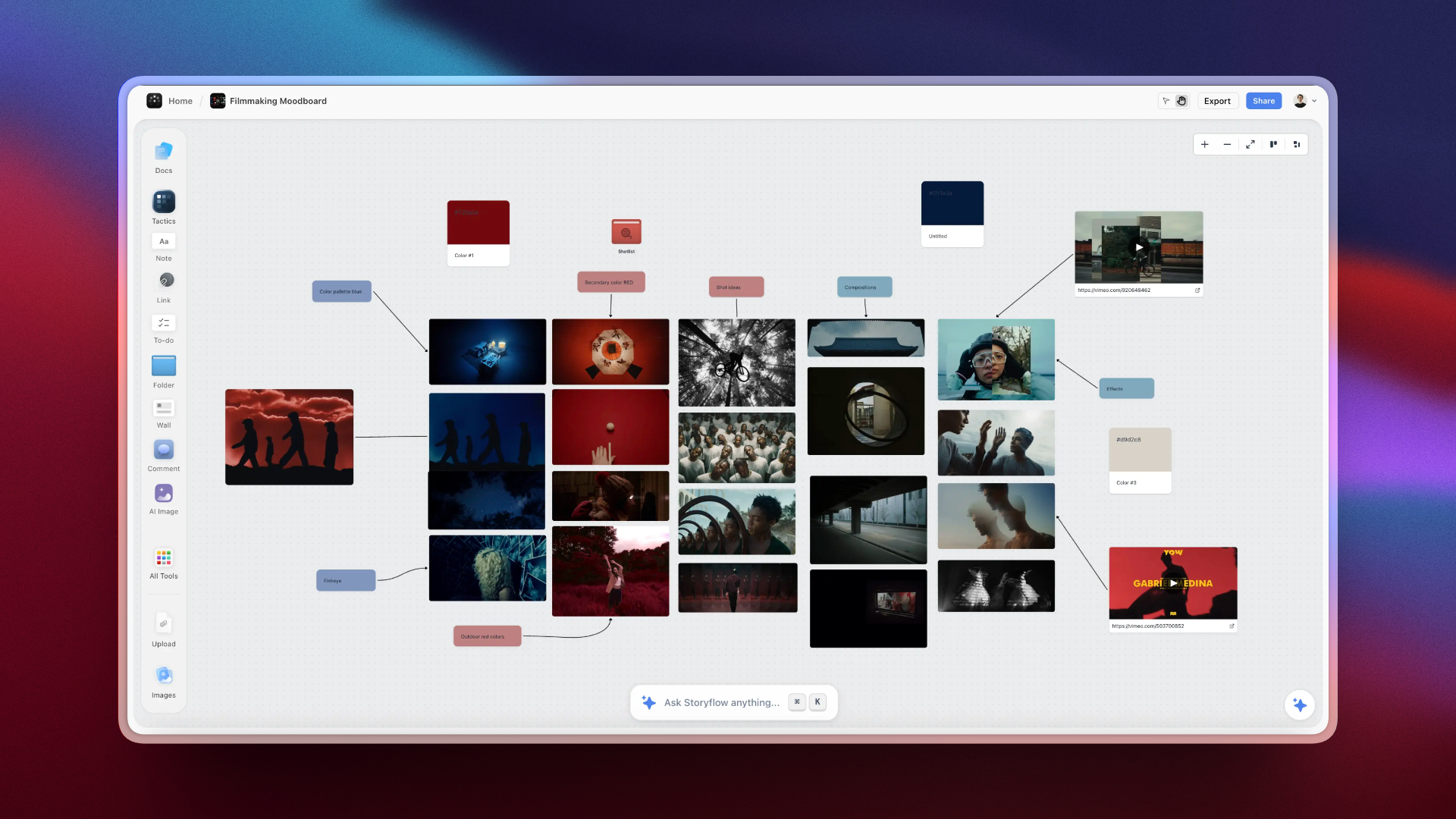
A video concept settled on a Storyflow canvas before production starts, with references, script and audience question side by side
Have the argument in week one, not at V3
Most contradictory feedback is not about the cut. It is about nobody agreeing what the video was for before it was shot. Storyflow puts the concept, references, script and audience on one canvas the AI can read, so the disagreement surfaces while it is still cheap. It runs no tasks and no approvals, so the pipeline belongs in Asana and Frame.io.

How I Ranked These
I direct documentaries and run small production teams, which means I have been on both ends of clock three: waiting for notes, and being the person who sat on a cut for a week.
Every tool below I used on a real project with real deadlines rather than in a trial. Where a claim rests on published documentation rather than my own use, the review says so.
Five criteria, in this order:
- Approval clock coverage. Whether feedback arrives timecoded, attributed, and in one place. Weighted highest because it is where delivery dates are actually lost.
- Whether the edit is legible from outside. Anything that turns "in progress" into a real signal, principally version history and per-version review state.
- Shoot-clock realism. Whether fixed, unmovable production dates can be represented as fixed rather than as draggable bars.
- Cost at small-team scale, including clients. A five-person team with eight reviewers is the normal shape, and per-seat pricing punishes it.
- Maintenance realism. Small video teams abandon systems constantly. A simple thing everyone updates beats a capable thing nobody does.
Deliberately not weighted: integration counts and automation depth. At small-team scale they are rarely the difference between a project delivering and not.
Why Feedback Is the Real Deadline
It is worth spelling out the mechanism, because once you see it the tool decisions become obvious.
A ninety-second brand video has, say, four rounds. Each round is: export, upload, send, wait, collect notes, interpret notes, resolve contradictions, re-edit. The re-edit is often two hours. The rest of the round is three to nine days.
So the project's duration is dominated by an activity that appears in no plan, has no owner, and is not tracked. And the failures inside it are consistent and completely fixable:
Notes arrive in different places. Two in email, one in Slack, one in a WhatsApp voice note, one written on a printed frame photographed at an angle. Somebody has to reconcile them, and reconciling is where notes get lost.
Notes are not timecoded. "The bit near the start feels slow" costs a round trip to locate. "0:14 feels slow" does not.
Notes contradict. Marketing wants it shorter, the founder wants their line kept. Nobody sees the other's note, so the editor arbitrates a decision they have no standing to make, and the next round rediscovers the conflict.
Nobody knows who is blocking. The cut is "with the client," which is not a person or a date.
Every one of those is solved by review software rather than by a tracker: one link, comments anchored to timecode, everybody sees everybody else's notes, and each note has a name and a timestamp. That last property is the quiet one, because it converts "we're waiting on approval" into "this has been with Sam for six days," which is a sentence somebody can act on.
If your team buys one thing after reading this, buy the review tool.
Quick Picks by Situation
- Best overall for a small video team: Asana, for the balance of task work, workload, and maintainability.
- Best for the approval clock: Frame.io, and it is worth running alongside whatever tracker you use.
- Best for the shoot clock: StudioBinder, for breakdowns, stripboards, and call sheets that production crews already expect.
- Best cheap and flexible: Notion, if somebody on the team enjoys building the system and will maintain it.
- Best configurable all-in-one: ClickUp, if you have someone who will own the configuration.
- Best for a team that only needs a pipeline: Trello, which is genuinely enough for many two-person operations.
- Best free review option: Frame.io's free tier, which covers a small team's round of notes.
- Best for deciding what the video is: Storyflow, before any clock starts and before a task exists.
1. Asana
Asana ranks first because it does the ordinary project work competently and, more importantly, stays maintained by people whose actual job is making video rather than administering software.
For a small video team the useful shape is a project per video with sections for the phases (concept, pre-production, shoot, edit, review, delivery), dependencies where they matter, and the Workload view to see that your one editor is holding four projects while the producer holds one. That workload picture is the most commonly missed problem in small video teams and Asana surfaces it without configuration.
Approval exists as a task type with a named approver and a recorded decision, which is more than most trackers offer natively and considerably less than Frame.io. Forms give you a request front door if you take briefs from other departments.
Against it: it does not understand video. There is no timecoded review, no version tracking, and no concept of a cut. Fixed shoot dates are draggable bars like anything else, which invites the wrong conversation. Per-seat pricing is real and the features you want sit above the entry tier. Pair it with Frame.io and the gap closes.
Pricing: Free tier for small teams. Paid from around $11/user/month.
2. Frame.io
Frame.io is not a project management tool and it ranks second because it owns the clock that actually makes video projects late.
Everything it does is aimed at one problem: a cut goes out, feedback comes back, and both halves of that are currently a mess. Comments are anchored to timecode, drawn annotations sit on the frame, everyone reviewing sees everyone else's notes so contradictions surface before the editor has to arbitrate them, and version stacking means V4 sits on top of V3 rather than living in a folder called "final_final_v2_USE_THIS."
The Camera to Cloud side is genuinely useful on the shoot clock too: footage from set reaching the editor while the shoot is still running compresses the front of the schedule in a way nothing else here does.
Against it: no tasks, no assignees, no scheduling, no budget. It solves one clock completely and ignores the other two, so it is an addition rather than a replacement. Pricing sits inside Adobe's structure now, which is worth checking against your seat count before committing.
Pricing: Free tier. Paid tiers through Adobe; check current structure.
3. Notion
Notion is where a large number of small video teams actually run their projects, and that is a reasonable outcome rather than a failure to choose properly.
Its advantages are real at this scale: one database of videos with status, owner, and dates, linked to a database of clients and one of assets, all cheap and all editable by whoever needs it. Because the brief, the script, the shot list, and the delivery notes can live on the same page as the tracking, there is no context split between "the plan" and "the work."
Against it: everything is built by you, which means it is maintained by you, and Notion systems decay quickly when the person who built them gets busy. Approval is a status field, not a review, so clock three is untouched. And there is no video-native concept anywhere in it, so versions and cuts are just text you keep updated by hand.
Pricing: Free tier for personal use. Paid from around $10/month annual per member.
4. StudioBinder
StudioBinder is the only tool here that genuinely understands the shoot clock, and for teams whose bottleneck is production paperwork it is the right purchase.
Script breakdowns, stripboard scheduling, call sheets that go out and track who confirmed, contact management, shot lists, and location records are all native and all in the format crews already expect. A call sheet from StudioBinder does not need explaining to a DP, which sounds trivial and saves a genuine amount of friction on the day.
Against it: it is production management rather than project management. Ongoing content work, the edit pipeline, and the approval loop are all comparatively weak, and the price is steep for a small team that shoots occasionally. If you shoot twice a year and edit constantly, this is the wrong end of the tool.
Pricing: Limited free tier. Paid from around $42/month.
5. ClickUp
ClickUp's argument is that it can be configured into exactly the video pipeline you want, including proofing on video files, and that argument is true.
Custom statuses can model real edit states rather than the generic three, multiple views cover different roles, proofing means comments on a video without leaving the tool, and time tracking is built in for teams that bill. Per-seat cost is among the lowest here.
Against it, and this is the whole risk: it needs an owner. A configured ClickUp is genuinely good and an unconfigured one is overwhelming, and the failure mode for small creative teams is a heavily configured workspace that becomes confidently wrong within a quarter after the person who built it moves on. Its proofing is real but not Frame.io.
Pricing: Free tier. Paid from around $7/user/month.
6. Monday
Monday is a good fit when the video team sits inside a marketing organisation that already runs on it, and organisational fit is worth more than feature comparison at this scale.
The boards are visual and legible to non-specialists, which matters because clock three is populated by non-specialists. Automations handle the routine handoffs, and the workload view is decent.
Against it: nothing about it is video-native, seat minimums bite small teams, and the interface encourages elaborate boards that nobody maintains. As a standalone choice for a video team with no organisational pull toward it, Asana is the better tool.
Pricing: From around $9/seat/month, with seat minimums.
7. Storyflow

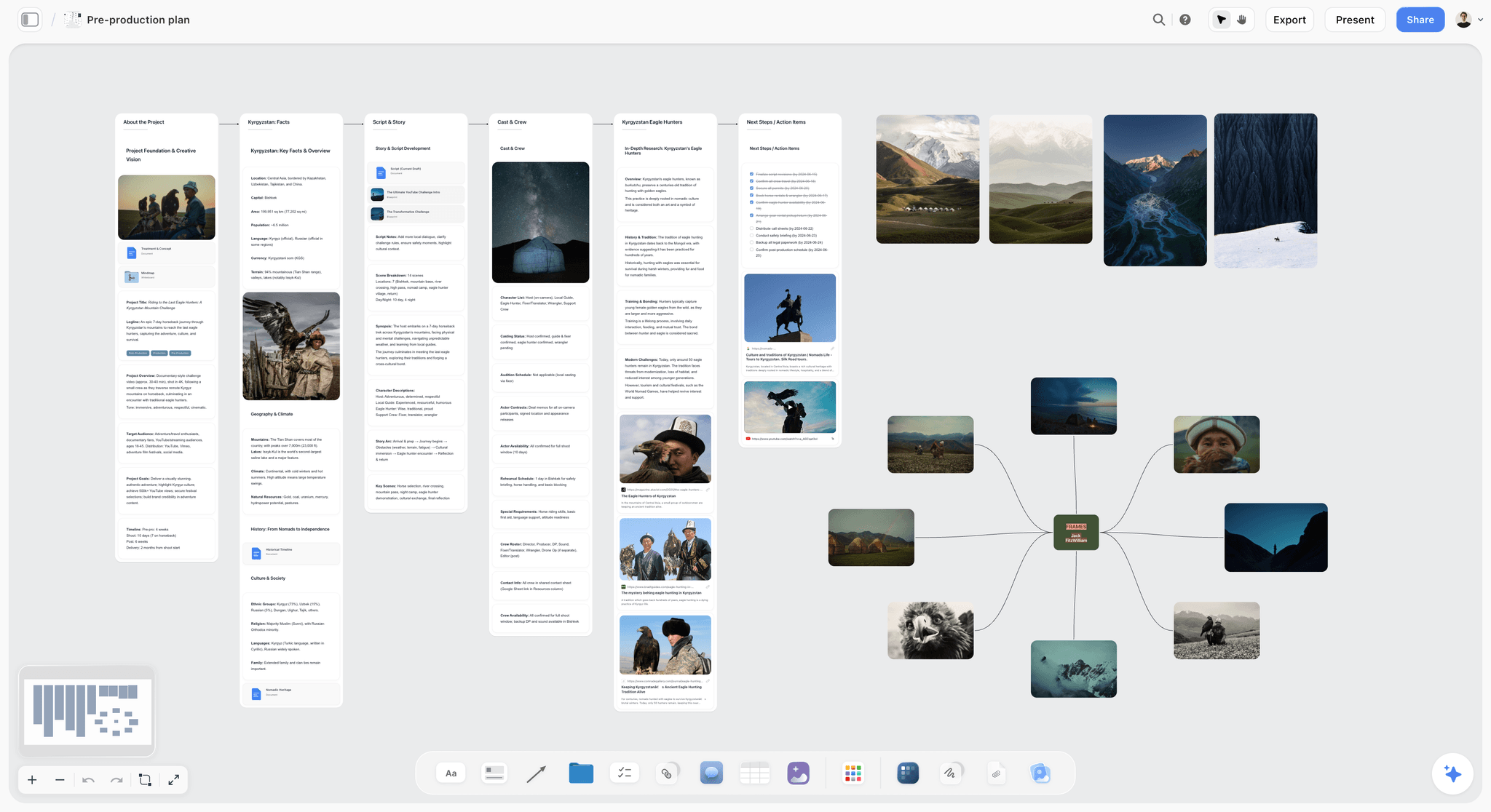
Storyflow is our own product and it manages nothing. No tasks, no assignees, no due dates, no dependencies, no call sheet sending (its AI only drafts the call sheet PDF), no proofing, no time tracking, no reporting. If your problem is that a video project is slipping, every tool above this line will help and this one will not.
It ranks seventh because it serves the step before all three clocks: deciding what the video actually is.
That step is where a surprising share of video project pain originates. Most late rounds of feedback are not about the edit, they are about the fact that nobody agreed what the piece was for before it was shot. The founder wanted a manifesto and marketing wanted a product explainer, nobody said so out loud, and the disagreement surfaces at V3 as contradictory notes on pacing. That is a briefing failure being paid for in edit hours.
What Storyflow does is put the concept, the references, the script, the structure, and the audience question on one canvas the AI can read, so the argument happens on a board in week one instead of in the review tool in week six. You can ask what this board says the video is for, what the references have in common, and where the script and the stated goal disagree, and get answers from the actual material rather than from memory.
Against it, plainly: it is paid-only during early access, so a team with no budget should use Notion or Milanote for this. The Free plan launches before the end of 2026; today the only free route is that anyone a paid member invites to a board joins free. The AI reads the current board, not every board you own, with extra context from @-mentioning up to one Tactic and three documents. And it is emphatically not a project management tool, so treat it as the thing that sits in front of Asana rather than a replacement for it.
Pricing: Plus $7.99/month annual or $9.99 monthly. Pro $14/month annual adds AI image generation, roughly 20x more AI, and memory across conversations. Max $39/month annual adds 40x more AI and a team workspace. No free plan until late 2026.
8. Trello
Trello is on this list because for a two or three person video operation it is frequently sufficient, and sufficient is underrated.
One board, columns for the pipeline stage, a card per video, and the whole state of the business visible in one glance. It requires no configuration, no training, and no owner, which means it is still accurate in six months when the ClickUp workspace is not.
Against it: it does not scale past a simple pipeline. No workload, no dependencies, no approval, no video awareness, and no way to represent a fixed shoot date as fixed. Once two people are coordinating around one editor, you have outgrown it.
Pricing: Free tier is genuinely usable. Paid from around $5/user/month.
9. Airtable
Airtable is the right answer when the video work is high-volume and relational: many pieces, many clients, many assets, and a real need to filter and report across them.
Its intake forms are the best here, which matters for teams taking briefs from other departments, and interfaces let you build a simple view for stakeholders who should not see the whole base.
Against it: it is a database, so somebody builds and maintains it, and per-seat pricing is the steepest of the general tools. It has no video-native features at all. For a small team making a handful of pieces at a time, the build cost is not repaid.
Pricing: Free tier. Paid from around $20/seat/month.
10. Wipster
Wipster does the same job as Frame.io and does it well: timecoded comments, version comparison, approval states, and a review link that a client can use without an account.
Its case is mostly pricing and independence from Adobe, and for some teams both of those matter. The review experience is clean and clients cope with it easily.
Against it: it is behind Frame.io on ecosystem, integrations, and Camera to Cloud, and there is no free tier of consequence. Evaluate it if Adobe's structure does not suit you; otherwise Frame.io is the default.
Pricing: From around $20/month.
11. Milanote
Milanote is here for the same reason Storyflow is, and it has the advantage of a free tier.
It manages nothing, and it is the best-structured place to hold the pre-project material: references, treatment, moodboard, structure, and the visual half of the concept, all nested in boards that stay legible. For a small team that wants the front half of the process somewhere calm and does not want to pay, this is the honest recommendation.
Against it: no AI, no tasks, no dates, no approval, no video features. The free tier's 100-note cap is real. Do not attempt to run a production schedule in it.
Pricing: Free with a 100-note limit. Paid from around $12.50/month.
Recommended Stacks
Two-person team, minimum viable. Trello for the pipeline, Frame.io free tier for review. Close to zero cost and it covers the clock that actually causes lateness.
Five-person team, normal case. Asana for the work, Frame.io for review. This is the answer for most small video teams and it is worth stopping here rather than optimising further.
Team that shoots constantly. StudioBinder for production, Asana or Notion for everything around it, Frame.io for review. Three tools is a lot and shoot paperwork genuinely justifies it.
Team inside a marketing org. Whatever the org runs (Monday, Asana, ClickUp) plus Frame.io. Fighting the organisation's tool costs more than the feature gap.
Team whose problem is upstream. If your rounds of feedback are arguments about what the video is rather than how it is cut, no tracker fixes that. Put the concept, references, and audience on one board first. Storyflow or Milanote, depending on budget.
Tools to Avoid for This Job
Email as the feedback channel. Notes fragment across threads, contradictions are invisible to the people creating them, and nothing is timecoded. It is the single most expensive habit in small-team video.
A spreadsheet as the pipeline. It works until two people edit it, and it has no notion of who is blocking whom.
A general PM tool with no review layer. You will track the two clocks that were never the problem and stay blind to the one that is.
An elaborate system with no owner. Especially ClickUp and Airtable. A confidently wrong system is worse than a simple accurate one.
Per-seat tools for client reviewers. Check what a reviewer costs before you commit. Across eight external stakeholders it is often more than the rest of the stack combined.
What No Tool on This List Does
None of them make a client review faster. They make the round shorter and more legible, and the human still takes as long as they take. What changes is that the delay becomes visible and attributable, which is usually enough.
None of them resolve contradictory notes. Frame.io surfaces the contradiction, which is most of the value, and somebody with authority still has to decide.
None of them make an edit estimable. The edit clock is elastic because editing is discovery, and no status field converts that into a percentage.
None of them fix an unclear brief. A video nobody agreed the purpose of will absorb unlimited rounds, and every tool here will faithfully track that happening.
The Bottom Line
Most advice in this category compares trackers, which is the wrong comparison, because trackers model the clock that was never really the problem.
A small video team is late because a cut sat with a client for nine days, then came back with three sets of contradictory notes written in three different places, and the editor spent an afternoon reconciling them before touching the timeline. None of that appears in any project plan, and no amount of task hygiene reaches it.
So: Asana for the work, because it is the general tool most likely to still be accurate in six months. Frame.io alongside it, because timecoded feedback with a name and a date on every note is the single highest-leverage purchase available to a small video team. StudioBinder if you shoot enough that call sheets are a bottleneck. Trello if you are two people, and genuinely stop there.
And if the pattern in your projects is that feedback rounds are arguments about what the video was supposed to be rather than how it is cut, the problem is in front of all three clocks and no tracker on this page reaches it. That argument is cheaper to have on a board in week one than in a review tool in week six.
FAQ: Video Project Management Tools
What is the best tool for managing a video project with a team?
Asana for the project work, paired with Frame.io for review. That combination covers the three clocks a video project runs on better than any single tool: Asana handles tasks, workload, and dates, and Frame.io handles the timecoded feedback loop where small teams actually lose their delivery dates.
What is the best free video project management tool?
Trello's free tier for the pipeline plus Frame.io's free tier for review is a genuinely capable free stack for a two or three person team. Asana, ClickUp, and Notion all have free tiers that work at small scale. Storyflow is paid-only during early access and is not a free option today.
Why do video projects always run late?
Almost never because of the shoot or the edit. They run late in the approval loop: a cut goes out, and three to nine days pass before usable notes come back, and none of that appears in the project plan as work. Fixing that means putting feedback in one timecoded place with a name and a date on every note, which is a review tool problem rather than a tracker problem.
Is Frame.io a project management tool?
No. It has no tasks, assignees, scheduling, or budgeting. It is a review and approval tool, and it ranks second here because approval is the clock that decides video delivery dates. Run it alongside a tracker rather than instead of one.
Asana or ClickUp for a video team?
Asana if you want something that stays maintained by people whose job is making video. ClickUp if you have someone who will own the configuration, in which case it can model real edit states and includes proofing. The most common failure with ClickUp on small creative teams is an elaborate setup that becomes inaccurate once its author gets busy.
Do small video teams need dedicated video production software?
Only if the bottleneck is production paperwork. StudioBinder is worth it for teams shooting regularly with real crews, because call sheets and breakdowns in the expected format save meaningful friction. A team that shoots occasionally and edits constantly gets more from a general tracker plus a review tool.
Is Storyflow a video project management tool?
No, and we rank it seventh of eleven for that reason. It has no tasks, no assignees, no due dates, no proofing, no call sheet sending (it drafts the PDF only), and no reporting. It serves the step before the project starts: getting the concept, references, script, and audience onto one canvas so the argument about what the video is happens in week one rather than surfacing as contradictory notes at V3.
How do you handle client feedback on video?
One link, one place, timecoded, with everybody seeing everybody else's notes. Frame.io and Wipster both do this. The two rules that matter beyond tooling: notes must come from a named person by a stated date, and contradictions get resolved by the client before they reach the editor, because an editor arbitrating between two stakeholders is making a decision they have no standing to make.
How many rounds of revisions should a video project have?
Two or three, stated in writing before work starts, with anything beyond that treated as additional scope. The number matters less than it being agreed and visible, because unbounded rounds is how a two-week project becomes a two-month one without anybody deciding that it should.
What is the difference between video production software and project management software?
Production software understands the shoot: breakdowns, stripboards, call sheets, crew, locations. Project management software understands work: tasks, owners, dates, dependencies. Review software understands the cut: versions, timecoded comments, approval state. Most small teams need two of the three, and the one they most often skip is review.
Can one tool handle the whole video pipeline?
ClickUp comes closest, with configurable statuses and built-in proofing, and it costs a configuration owner to get there. Most small teams end up with two tools and are better off for it, because the review experience a client will actually use is a different product from the tracker your team lives in.
How do you track edit progress when nobody knows how far along it is?
Stop asking for a percentage and start counting versions with review states attached. "V3 out for review, two of four reviewers responded" is a real signal. "Editing, 60% complete" is a guess that has never once been accurate, and version-based tracking is why a review tool improves visibility more than any status field.
Table of Contents
- Key Takeaways
- The Three Clocks
- At a Glance: The 11 Tools Compared
- How I Ranked These
- Why Feedback Is the Real Deadline
- Quick Picks by Situation
- 1. Asana
- 2. Frame.io
- 3. Notion
- 4. StudioBinder
- 5. ClickUp
- 6. Monday
- 7. Storyflow
- 8. Trello
- 9. Airtable
- 10. Wipster
- 11. Milanote
- Recommended Stacks
- Tools to Avoid for This Job
- What No Tool on This List Does
- The Bottom Line
- FAQ: Video Project Management Tools
- Related Reading
Templates to check out for this topic


Planning and project templates you can use in Storyflow
Plan a launch, a sprint, or a whole project on a visual board the team can see at once. Open one of these templates and start from real structure.


See Storyflow in Action
A visual AI workspace where every feature lives inside one canvas. No tab-switching, no context lost.
Build your entire board from a single message
Type what you need in the AI chat at the bottom of your canvas. The AI adds cards, headings, and structure directly onto your board.
Use expert frameworks as AI context
Type @ in the AI chat and choose any Tactic. The AI tailors every response to that framework instead of giving generic advice.
Turn your board into a mind map in seconds
Ask the AI to restructure your canvas as a mindmap. It connects your ideas into a visual hierarchy so you can see how everything relates.
Why Storyflow Exists
Storyflow actually began as a personal tool while working on creative and research projects.
We kept running into the same problem: ideas were scattered everywhere: notes, documents, and whiteboards.
Nothing helped us see how everything connected.
So we started building a workspace designed around how ideas actually grow.
→ Read how Storyflow was createdJustkay
Documentary Filmmaker & Founder at Storyflow
Published: 2026-08-26
Extremely simple, seriously capable


See how easy it is to get started
Watch a real project come together, from a blank board to a finished plan, clicked through step by step.
Start creating with AI and become more productive
Transform your creative workflow with AI-powered tools. Generate ideas, create content, and boost your productivity in minutes instead of hours.