
Category
Creative Agencies
Author

Storyflow Team
Product & Research Team
Topics
2026-11-15
•
35 min read
•
Creative Agencies- creative workflow
- creative workflow examples
- creative workflow stages
- creative workflow management
- creative workflow template
- Storyflow
What is a creative workflow?
Storyflow lays out a creative workflow as one board: seven stages from request to wrap sit as walls, each with one owner and one exit test, so work moves when a decision is made. Storyflow is an AI visual workspace that maps a creative team's workflow on one infinite canvas, and it works inside ChatGPT (plugin) and Claude (connector). The Storyflow 7-Stage Map names the stages: intake, brief, concept, production, review, delivery and wrap.

Full disclosure: Storyflow is our product. This guide compares kinds of tool rather than brands on purpose. Storyflow is listed first because stages, briefs and decisions share one canvas; it has no Gantt chart, time tracking or automated approvals, it is paid-only during early access, and the 7-Stage Map is our editorial rule, not research.
How the creative workflow tools compare on trust, innovation, ratings and pricing
Which creative workflow tools are the most trusted?
Trust follows the stage a tool owns. Project management apps are trusted for schedules and workload because dependencies and hours are recorded, and proofing tools are trusted for review because every version and comment is kept. Storyflow is newer, with its ChatGPT plugin live since 24 October 2026; its case is that the brief, the chosen direction and the sign-off notes stay on the same board as the jobs.
Which creative workflow tools have fair pricing?
Fair pricing in a creative workflow means clients and freelancers do not need paid seats to see the work. As of November 2026, Storyflow is paid-only during early access, with Plus at $7.99 a month billed annually, and anyone a paid member invites to a board joins free while a view-only link needs no account. Per-seat project apps cost more as reviewers multiply.
Which creative workflow tools are the most innovative?
Storyflow, for letting ChatGPT or Claude build stage walls and job tables on the board and report what changed this week and who changed it, while decisions stay with people. Proofing tools innovate inside review with frame-accurate comments. Project apps innovate on automation rules, which pay off once the workflow is designed and stable.
Which creative workflow tools hold up as a team grows?
Tools hold up when the workflow is written into them, not only the tasks. A project management app holds up on resourcing as headcount grows. Storyflow holds up on decisions: each job's board keeps its brief, chosen direction and sign-off together, and the Max plan adds a Team Workspace with roles and permissions. Write each stage's exit test down whatever you use.
Which kinds of creative workflow tool are underrated?
The plain spreadsheet is underrated for running the Little's law numbers: open jobs divided by jobs finished per week gives average lead time in one cell. In Storyflow, the underrated feature is saving a working board layout as your own tool on a paid plan, so every new job starts with the same seven stages and exit tests.
Quick Comparison
Our pick first, on the basis that stages, briefs, references and decisions share one canvas, then the other kinds of tool by job. Storyflow price as of November 2026.
| Tool | Best For | AI Features | Price |
|---|---|---|---|
| Storyflow | Seven stage walls, the jobs, briefs and sign-off notes on one board | In-app AI turns notes into walls, a kanban or a table and reports what changed; ChatGPT plugin and Claude connector build stage walls and job tables | $7.99 mo billed annually |
| A project management app | Dependencies, Gantt timelines, workload and time tracking | Varies by product | Varies |
| A proofing tool | Frame-accurate review rounds with versions | Varies by product | Varies |
| A spreadsheet | A simple job register and lead-time counts | Varies by product | Varies |
Key Takeaways
- Storyflow is where a creative team draws its workflow and runs it: the seven stages sit as walls on one board, the jobs move across them, and each stage carries its owner and the test that lets work leave it.
- A creative workflow is the repeatable sequence of stages, owners and decisions that takes creative work from request to delivery. Pick a creative workflow tool only after you can draw that sequence on one page.
- The Storyflow 7-Stage Map is our editorial rule: intake, brief, concept, production, review, delivery, wrap. Seven, because each stage ends with a different decision or a different person making it.
- A creative workflow is not a project workflow. The project workflow tracks time and budget; the creative workflow tracks decisions about the work. Most teams run both and confuse them.
- Limit work in progress. By Little's law, average time in the system equals work in progress divided by throughput, so halving open jobs halves the average wait at the same output.
- Storyflow has no Gantt chart, dependencies, time tracking or automated approvals. It holds the stages, the briefs, the references and the decisions on one canvas; scheduling-heavy teams pair it with a project management app.
Creative Workflow Examples: Six Teams, Six Workflows
You have read definitions of the creative workflow that would fit a bakery. What helps is seeing how real kinds of team run theirs. Here are six, with the stages in order, who signs off, where each one breaks, and how it sits on a board. The team names are generic; the patterns are the ones agencies and in-house teams use.
| Team | Workflow stages | Who signs off | Where it usually breaks | Where it lives in Storyflow |
|---|---|---|---|---|
Agency brand campaign | Intake, brief, concept, pre-production, production, review, delivery, wrap | Client marketing lead | Concept approved by the wrong person | Seven stage walls, a kanban of jobs, direction walls |
Social content retainer | Monthly plan, briefs, production batch, review, scheduling handoff, report | Client social lead | Approval later than the posting date | A monthly table with date cells, rows kept in date order |
Commercial video production | Brief, treatment, pre-production, shoot, edit, review, delivery | Client and agency producer | Edit rounds that never close | Storyboard, Shotlist and Call Sheet tools beside the stages |
Brand identity design | Discovery, strategy, concepts, refinement, guidelines, handoff | Founder or brand owner | Concept round reopened at guidelines stage | Direction walls, Color and Font cards |
In-house creative request queue | Intake, triage, brief, production, review, delivery | Requesting team lead | Requests arrive without briefs | An intake table and a Brief tool per request |
Brand photo shoot | Brief, moodboard, pre-production, shoot, selects, retouch, delivery | Client art director | Selects chosen by too many people | Moodboard walls, Location and Selects tools |
Example 1: an agency brand campaign workflow
The campaign workflow is the longest because it has the most decisions. Intake decides whether the agency takes the job. The brief is signed by the client. Concept ends when one direction is chosen in writing. Pre-production locks cast, locations and the shot list. Production makes the work. Review runs a fixed number of rounds. Delivery hands over files to spec. Wrap archives the work and records what to change next time. The break point is almost always concept approval: a junior client contact says yes, and the marketing director says no two weeks later. Name the approver at intake.
Example 2: a social content retainer workflow
A retainer runs the same loop every month. The monthly plan sets themes and post counts, briefs go out per post or per batch, production runs in a batch, review happens once per batch, then the approved posts are handed to whoever schedules them. The month-end report closes the loop. It breaks when approval lands after the planned posting date, so set the approval deadline at least ten working days before the month starts. Storyflow does not schedule or publish posts; the handoff goes to a social scheduler or the platform.
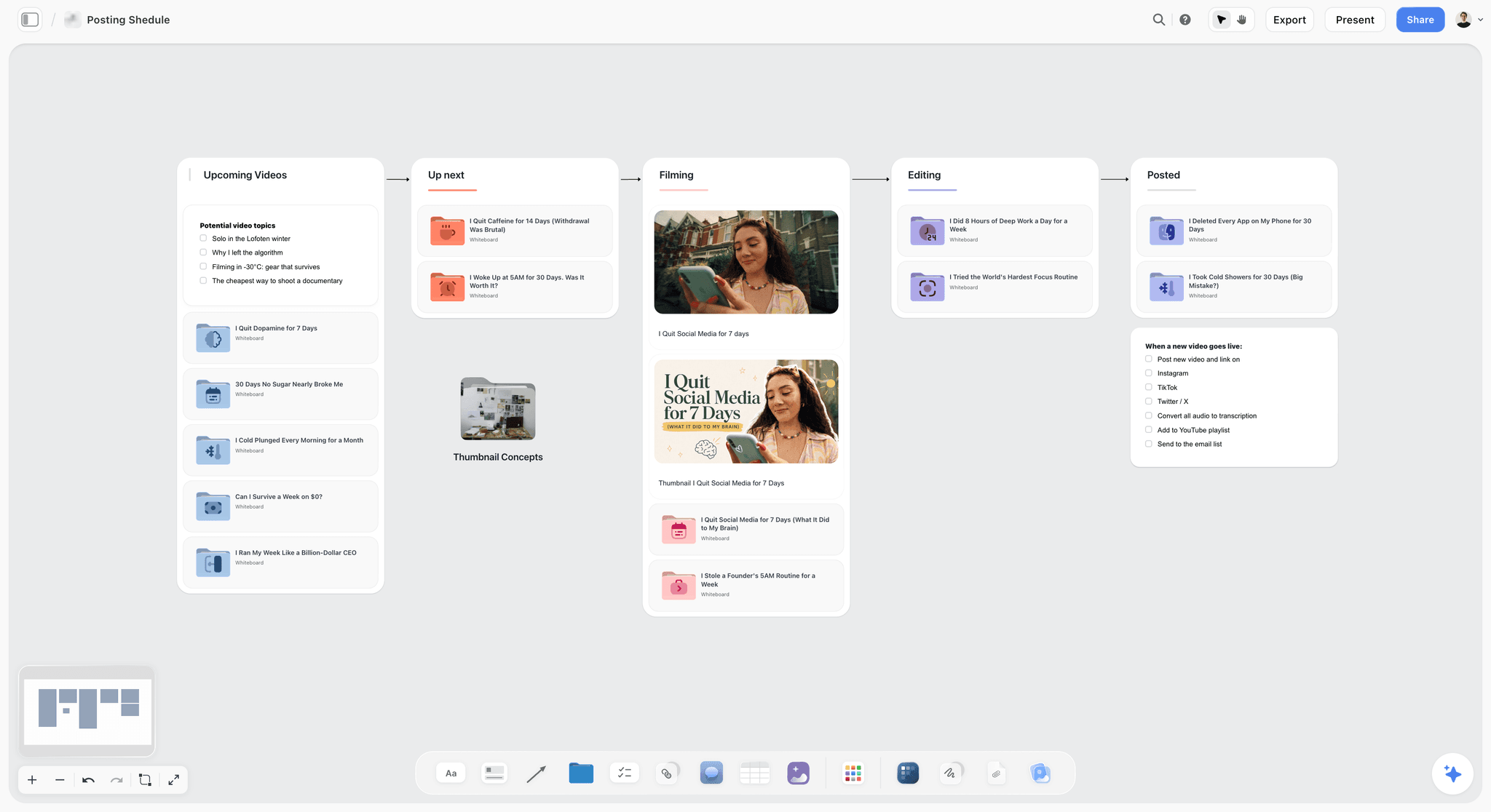
A content pipeline with one column per stage. A monthly retainer runs the same loop, with approval before the scheduling handoff.
Example 3: a commercial video production workflow
Video adds a hard middle: the shoot cannot move cheaply. Brief and treatment come first, then pre-production (casting, locations, shot list, call sheet), the shoot, the edit, review rounds and delivery of masters and cutdowns. The video production workflow page covers this pipeline in depth. It breaks in post, where "one more small change" adds rounds nobody priced, so count edit rounds separately from creative rounds.
Example 4: a brand identity design workflow
Identity work narrows: discovery and strategy widen the problem, concepts offer two or three routes, refinement develops one, guidelines document it, and handoff delivers files. The UK Design Council's Double Diamond describes the same shape in four phases, Discover, Define, Develop and Deliver: one diamond to understand the problem, one to answer it. It breaks when a stakeholder reopens the concept choice at the guidelines stage, so record the chosen route with the date and the approver.
Example 5: an in-house creative request queue
In-house teams serve many internal clients, so their workflow starts with triage. Requests arrive, someone decides priority and whether a brief is needed, the brief is written, then production, review and delivery. The creative request intake page shows the intake side. It breaks when requests skip intake and arrive as direct messages to a designer. The fix is a rule, not a tool: no brief, no work.
Example 6: a brand photo shoot workflow
A shoot workflow runs brief, moodboard, pre-production, shoot, selects, retouch and delivery. Selects is its own stage because choosing 40 finals from 1,200 frames is a decision with its own owner. In Storyflow the Selects tool lands four walls, To review, Yes, Maybe and No, and photos are dragged between them; the Yes column is the final list. The client needs edit access to move cards, because a view or comment link cannot move them.
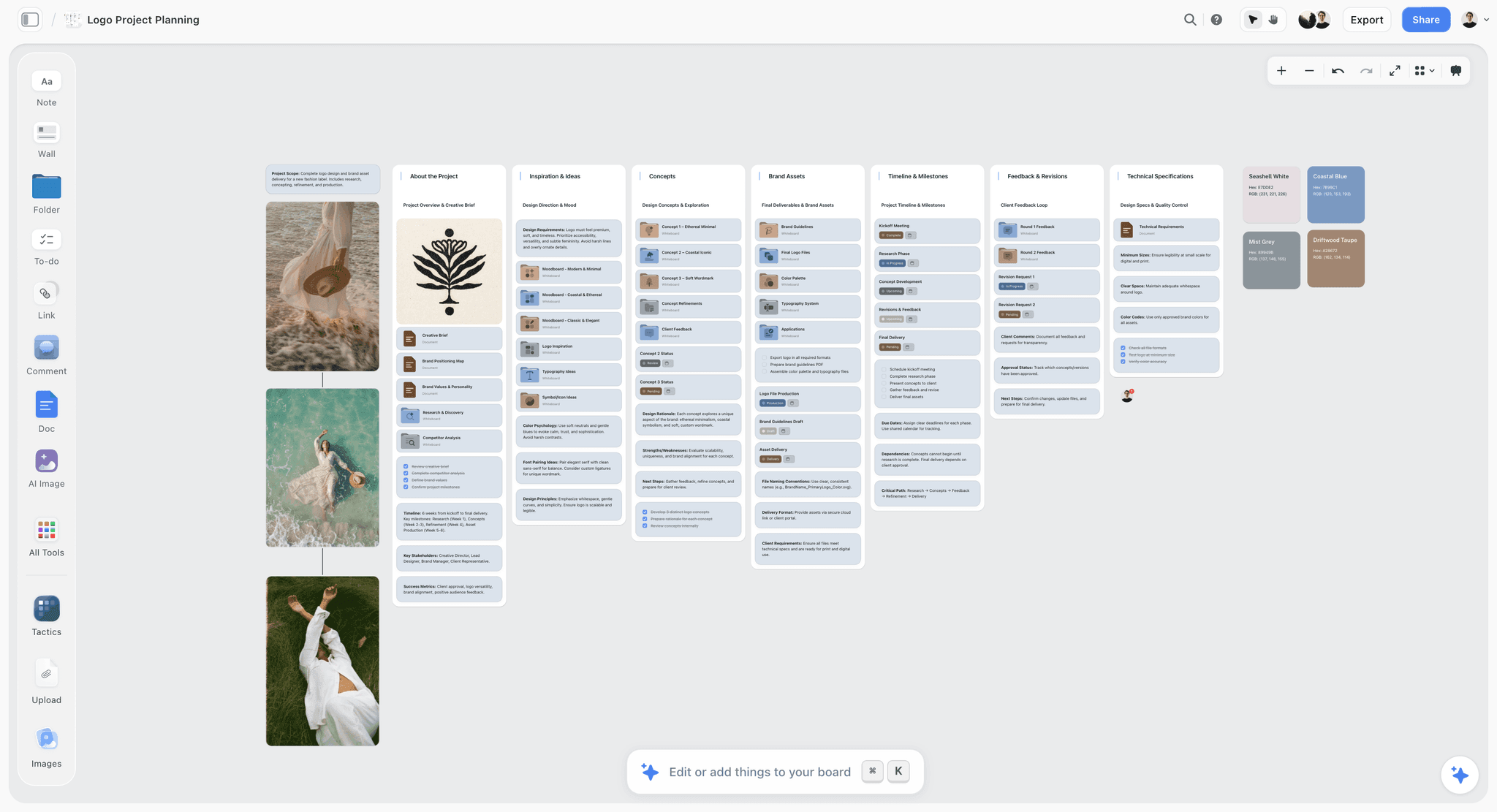
A brand design job laid out stage by stage on one board: brief, inspiration, concepts, assets, timeline, feedback, specifications.
What Is a Creative Workflow?
A creative workflow is the repeatable sequence of stages, owners and decisions that takes a piece of creative work from request to delivery. It is a workflow in the general sense, an orchestrated, repeatable pattern of activity, applied to work whose quality is judged by people. The definition has three parts on purpose. Stages without owners are a diagram. Owners without decisions are a meeting. Decisions without a sequence are chaos.
Creative workflow meaning in practice
In practice, a team has a creative workflow when any member can answer three questions about any job without asking: what stage is it in, who owns it now, and what has to be true before it moves. If the answer to the third question is "when the creative director has a look", the workflow exists only in that person's head.
Creative process vs creative workflow
The creative process is how an individual or team gets to an idea; the creative workflow is how the organisation moves that idea through people, checks and deadlines. Graham Wallas described one of the first models of the creative process in The Art of Thought (1926): preparation, incubation, illumination and verification. Those stages happen inside the concept stage of a workflow. A workflow cannot schedule illumination; it can protect the time for it and decide what happens once it arrives.
What is creative workflow management?
Creative workflow management is the ongoing work of designing, running and improving a team's creative workflow: setting the stages, assigning owners, limiting work in progress, removing bottlenecks and recording decisions. In larger organisations a creative operations function owns it; in a small studio it is the producer's job. The creative operations page covers the role.
What is creative workflow orchestration?
Creative workflow orchestration means coordinating several workflows, people and tools so their handoffs line up, for example a campaign whose film, social and retail work run in parallel and meet at one launch date. The term is also used for chaining AI generation steps. Storyflow orchestrates the planning side: briefs, references, stages and decisions on one canvas. It will never add AI video generation; the creative work stays yours.
Creative workflows: one team, several workflows
Most teams run more than one creative workflow. A studio may run a campaign workflow, a retainer loop and a quick-turn request queue at the same time. Keep them separate on the board, one section per workflow, rather than forcing a two-hour banner resize through seven stages built for a launch film.
Creative Workflow vs Project Workflow
A creative workflow moves decisions about the work, while a project workflow moves time, budget and resources, so in Storyflow the creative stages and their decisions sit on the board and the hour-by-hour schedule lives in a project management app if you need one. Teams that confuse the two either micromanage the concept stage with hourly tasks or run a launch without a single dated milestone.
| Question | Creative workflow | Project workflow | Where it lives in Storyflow |
|---|---|---|---|
What moves | The work and the decisions about it | Tasks, hours, money | Stage walls and a kanban of jobs |
Unit | A deliverable or a job | A task with a duration | A card or a row per job |
Typical stages | Intake, brief, concept, production, review, delivery, wrap | Initiate, plan, execute, monitor, close | Timeline tool phases, renamed |
Who owns it | Creative director and producer | Project manager | To-dos with an assignee and due date |
Measure of progress | Decisions made and signed | Percent complete, hours burned | Status column (six fixed options) |
Biggest risk | Reopened decisions | Overruns | A decision note per stage |
Typical tool | A board with references and briefs | A project management app with a Gantt | Storyflow board; no Gantt in Storyflow |
Changes when | The idea changes | The plan changes | Both edited live on the board |
When the two collide
They collide at review. The project workflow says review takes three days; the creative workflow says review ends when the approver signs. If the approver is on holiday, the project plan is fiction. Put the approver's name and availability into the review stage, and let the project plan read from it.
Which one the client sees
Clients see the creative workflow: stages, rounds, what they approve and when. They rarely need the project workflow's task list. Share the board with the stage walls by view-only link, which opens with no account, and keep internal hours elsewhere.

A photography workflow as six stage walls. Each wall holds what happens in the stage and what has to be done before it closes.
The Storyflow 7-Stage Map
Every team says it has stages. Few can say what has to be true before work leaves one. The 7-Stage Map is a workflow template with that test built in, and it is the structure the rest of this guide uses.
The rule in one sentence
The Storyflow 7-Stage Map: in Storyflow, a creative workflow runs as seven stage walls on one board (intake, brief, concept, production, review, delivery and wrap), each with one named owner and one written exit test, and a job moves only when its test passes. It is our editorial recommendation, built from production logic rather than a study.
Why seven stages
Seven, because each stage ends with a different decision, and most end with a different person deciding. The agency lead decides at intake whether to take the job. The client approver signs the brief. The creative director and the client choose the concept. The producer confirms production is to spec. The client approver signs off in review. The client confirms receipt at delivery. The agency closes the job at wrap. Merge two stages and you merge two decisions owned by different people, which is where approvals go missing. Split them further and one decision turns into paperwork. Teams with a shoot may add pre-production as an eighth stage between concept and production; that is the one addition that earns its place.
The exit tests
| Stage | Owner | Input | Exit test: the job leaves when | Output | Where it lives in Storyflow |
|---|---|---|---|---|---|
1. Intake | Agency lead or account lead | A request, in any form | Owner, deadline, budget line and approver are named, and someone said yes | A logged job | A row in the intake table |
2. Brief | Strategist or account lead | The logged job | The approver has signed a one-sentence objective and the brief | A signed brief | The Brief tool's six walls |
3. Concept | Creative director | The signed brief | One direction is chosen in writing, with the date and who chose | A chosen direction | One wall per direction, a decision note |
4. Production | Producer | The chosen direction | Every deliverable exists to spec and passed an internal check | Work ready for review | Shotlist, Storyboard or design walls |
5. Review | Client approver | Work ready for review | Sign-off recorded within the agreed rounds, usually 2 | Approved work | A review wall per round, a sign-off note |
6. Delivery | Producer | Approved work | Files delivered in the named formats and the client confirmed receipt | Delivered files | A delivery checklist of to-dos |
7. Wrap | Agency lead | Delivered job | Learnings written, assets archived, case study permission asked | A closed job | A wrap note and an archive folder |
Stage 1: intake
Intake turns a request into a job or a polite no. Log every request the same way: who asked, what for, by when, which budget, who approves. If a request cannot name an approver, it is not ready for a brief. The creative request intake landing shows an intake board for in-house teams.
Stage 2: brief
The brief stage ends with a signature, not a document. BetterBriefs says 33% of marketing budgets is wasted due to poor briefs, which is why the exit test asks for a signed one-sentence objective. In Storyflow, drag the Brief tool onto the board: six walls land (The work, Who it's for, How it looks, What we're working from, Plan, Budget) with grey prompts in the cards. The guide on how to write a creative brief covers the writing.
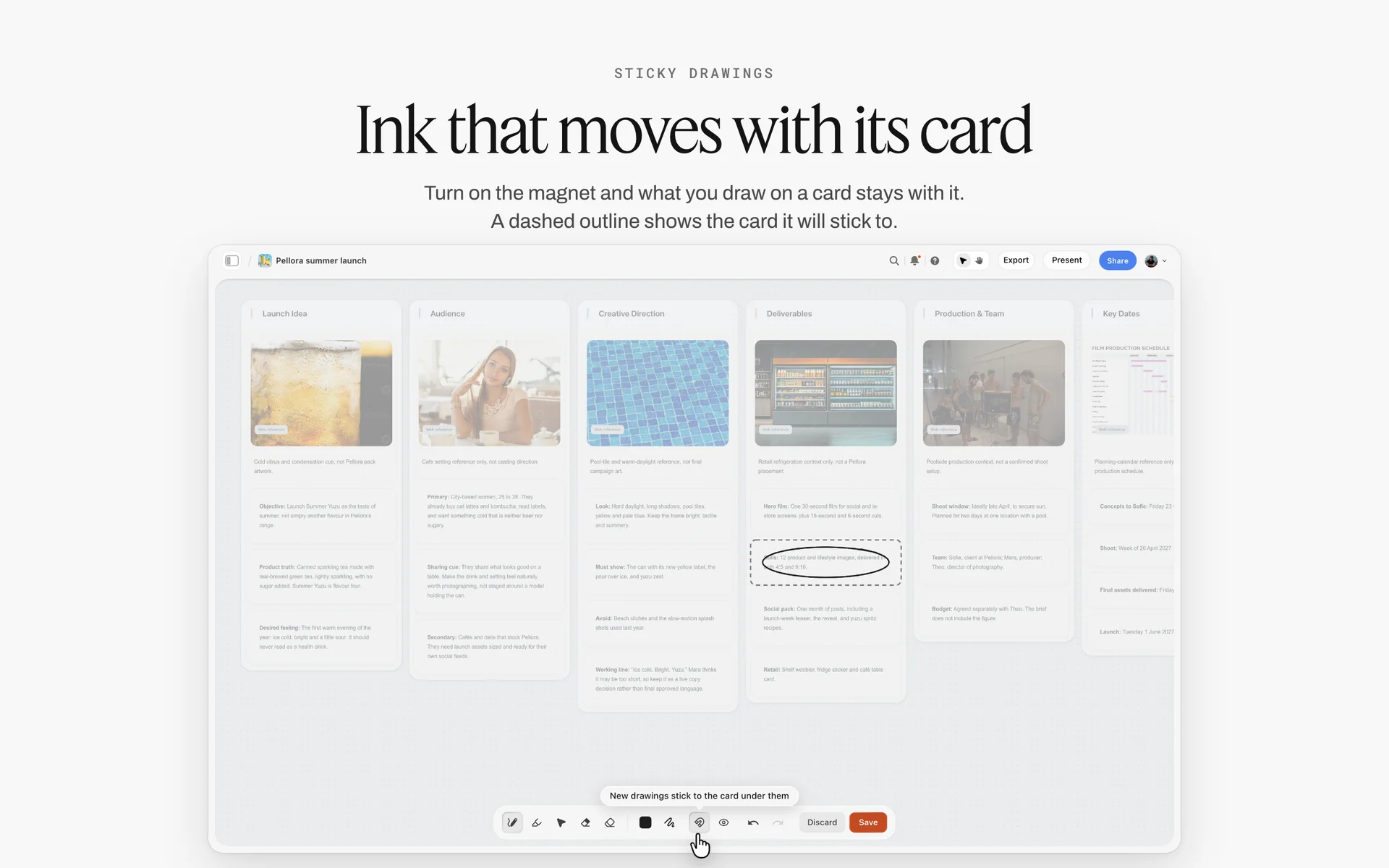
A launch brief laid out as walls. The brief stage closes when the approver signs the one-sentence objective on a board like this.
Stage 3: concept
Concept is where the team widens before it narrows. Protect the exploration with a timebox, then close it with a written choice. A direction chosen on a call and not written down will be reopened. Put each direction on its own wall with references and one line of copy, and write the decision in a note with the date and the approver.
Stage 4: production
Production is the producer's stage, and its exit test is internal: the work exists to spec and someone other than the maker has checked it. For film and photo work, the Shotlist tool lands Shot 1 to 4 walls, each with an image slot, a description, a "Shots required" to-do list, setup and equipment; the "+" adds Shot 5, 6 and on.
Stage 5: review
Review ends when the named approver signs off, inside the agreed rounds. Two consolidated rounds per deliverable is the norm worth defending. The full approval method is in the creative approval workflow template; record each sign-off in a note, because a resolved comment thread in Storyflow is deleted.
Stage 6: delivery
Delivery is not "sent the link". It is files in the formats the brief named, with names the client can find, and a confirmation that they arrived. Turn the delivery spec into a to-do list on the board, one to-do per file, ticked as each one goes.
Stage 7: wrap
Wrap is the stage everyone skips, and it is where the next job gets cheaper. Write three lines: what went well, what cost time, what changes next time. Archive the board, and ask the client whether you may use the work as a case study while they still like you.

Phases as columns with a status tracker. The 7-Stage Map uses the same shape: one wall per stage, jobs moving left to right.
How to Build a Creative Workflow in 8 Steps
The familiar approach is to buy a tool and let its default columns become the workflow. That gives you "To do, Doing, Done", which describes effort, not decisions. These eight steps design the workflow first and put it on a board second.
- List the last ten jobs your team delivered and write down, for each, every point where someone had to decide something. Those points are your candidate stages.
- Group the decisions into seven stages or fewer, and drag the Timeline tool onto a Storyflow board: it lands phase walls joined by arrows, and the "+" on the last wall adds phases until there are seven.
- Rename each Storyflow phase wall after its stage and fill its two cards: what happens in the stage, and what has to be done before the job leaves it (the exit test).
- Name one owner per stage by role, then by person, and put the name on the wall. One owner, not a committee: in a RACI matrix this is the single Accountable person.
- Make the jobs visible: ask the in-app AI to turn your current job list into a Storyflow kanban board with one column per stage, or build a table with a Stage column and the six-option status column.
- Set a work-in-progress limit per stage and write it into the column heading ("Concept, max 4"); Storyflow does not enforce it, so the producer counts at the weekly check.
- Give every job a to-do with an assignee and a due date for its current stage, and record each stage decision in a dated note on that job's board.
- Review the map after a month: ask the in-app AI what changed on the board in the last month and who changed it, find the stage where jobs waited longest, and fix that stage first.
Steps 3 and 6 carry the method. A workflow without exit tests moves work when people feel like it; a workflow without limits moves nothing at all.

The Timeline and Brief tools in the All Tools panel. Drag the Timeline tool onto a board and rename its phases as your stages.
Creative Workflow Template: Copy This Table
This is the template filled for an illustrative team, Corrowick Creative, a fictional fourteen-person agency running a campaign for Tamsel Outdoor, a fictional outdoor apparel brand. The rows are the steps inside the seven stages; the columns are the ones that make a workflow runnable.
| Step | Stage | Owner | What happens | Done when | Max time | Where it lives in Storyflow |
|---|---|---|---|---|---|---|
1 | Intake | Account lead | Request logged from Tamsel's email | Approver, deadline and budget named | 1 day | Row in the intake table |
2 | Intake | Agency lead | Take or decline, team assigned | Yes recorded, team named | 1 day | Note on the intake row |
3 | Brief | Strategist | Brief drafted with Tamsel's marketing lead | Objective in one sentence | 3 days | Brief tool, six walls |
4 | Brief | Client approver | Brief reviewed and signed | Signature note dated | 2 days | Decision note on the Brief wall |
5 | Concept | Creative director | Three directions explored | Three direction walls complete | 5 days | Direction walls with references |
6 | Concept | Creative director and client | Directions presented | One direction chosen in writing | 2 days | Presentation mode, decision note |
7 | Production | Producer | Pre-production: cast, locations, shot list | Shot list and call sheet locked | 5 days | Shotlist and Call Sheet tools |
8 | Production | Producer | Shoot and edit, internal check | Every deliverable to spec | 10 days | Deliverables table, status column |
9 | Review | Client approver | Round 1, consolidated notes | Notes returned in one list | 3 days | Review wall, round 1 |
10 | Review | Client approver | Round 2 and sign-off | Sign-off recorded | 3 days | Review wall, round 2, sign-off note |
11 | Delivery | Producer | Masters, cutdowns, stills delivered | Client confirms receipt | 2 days | Delivery to-do list |
12 | Wrap | Agency lead | Learnings, archive, case study ask | Wrap note written | 1 day | Wrap note and archive folder |
The "Max time" column is the one teams leave out and then miss. It does not make the work faster. It makes a stuck job visible on day four instead of day fourteen. In Storyflow, keep the rows in this order, because tables cannot be sorted; the order is the workflow.
How to adapt the template
Delete the pre-production row for design-only work. Split production into "build" and "QA" for web work. For a retainer, copy rows 3 to 11 once per month and drop intake and wrap to a quarterly review. Keep the seven stages; change the steps inside them.
Save the template as your own tool
Once the workflow board works for one job, select its stage walls and tables, choose New Tool at the end of the selection toolbar, pick an icon and a name, and it appears in All Tools under your tools, ready to drop onto the next job's board. Saving a selection as your own tool is on paid plans only. Each user can also choose which 3 to 10 tools sit on their board toolbar (Settings, Configuration, Toolbar), so the workflow tool can sit one click away.
Roles in a Creative Workflow
A workflow fails at the handoffs, and handoffs are between roles. This table assigns each stage using the RACI letters: Responsible does the work, Accountable owns the outcome, Consulted gives input, Informed is told.
| Role | Intake | Brief | Concept | Production | Review | Delivery | Wrap |
|---|---|---|---|---|---|---|---|
Agency or account lead | A | R | C | I | C | I | A |
Strategist | I | A | C | I | I | I | C |
Creative director | C | C | A | C | R | I | R |
Producer or project manager | R | C | C | A | R | A | R |
Designer, editor, maker | I | I | R | R | R | R | C |
Client approver | C | R | R | I | A | R | I |
In Storyflow, the Accountable person's name goes on each stage wall. The in-app AI can fill a table's person column (named Owner or Assignee) with people who already have access to the board; if a name matches nobody on the board, the whole column becomes plain text with the names kept as written.
Agency or account lead
Owns intake and wrap: deciding which jobs come in and making sure each closes with learnings. The account lead is also the client's single contact, so every client message routes through one person.
Strategist
Owns the brief. Their job is to make the objective small enough to judge work against, in one sentence the client signs.
Creative director
Owns the concept stage and has a say in review. The creative director's real deliverable is the written choice of direction, not the moodboard.
Producer or project manager
Owns production and delivery, and runs the workflow itself: counting work in progress, chasing exit tests, moving jobs. In small studios this person is also creative operations.
Designers, editors and makers
Do the work in concept, production and review. Protect their time: a maker in three stages at once does none of them well.
Client approver
One named person who signs the brief, chooses the direction and gives sign-off. Name them at intake. If the client side has five reviewers, they consolidate before notes reach you.

Client jobs as cards moving across columns. Name the columns after your stages, not after effort.
Managing a Creative Workflow: Limits, Bottlenecks and Done
Designing the stages takes an afternoon. Managing the workflow is the weekly job, and it comes down to five habits and four counts.
Limit work in progress
The Kanban method names two primary practices: visualise the work and limit work in progress. Visualising is easy on a board. Limiting is the part teams skip, because saying "not yet" to a new job feels worse than starting it. Set a number per stage, write it in the column heading, and at the weekly check the producer moves nothing into a full stage.
Do the Little's law arithmetic
Little's law says the average number of items in a stable system equals the arrival rate multiplied by the average time each spends in it. Turned around for a studio: average lead time equals jobs in progress divided by jobs finished per week. If Corrowick finishes 8 jobs a week and has 40 open, the average job takes 5 weeks. Cut open work to 24 at the same output, and the average falls to 3 weeks without anyone working harder. That is the strongest argument for a WIP limit you can put in front of a managing director.
Find the bottleneck and fix that stage first
The theory of constraints, introduced by Eliyahu Goldratt in The Goal (1984), holds that every system has at least one constraint and that only increasing flow through the constraint raises the output of the whole system. In creative teams the constraint is usually one person: the creative director who must see every concept, or the client approver who reviews on Fridays. Find the stage where jobs wait longest and change that stage's rule (a deputy approver, a fixed review slot) before you change anything else.
Write a definition of done for each stage
Scrum's guide calls its version the Definition of Done: a formal description of the state the work must reach to meet the quality measures required. Your exit tests are the same idea per stage. "Concept done" means one direction chosen in writing, with the date and the approver, not "the CD liked it".
Timebox the open stages
Parkinson's law, from C. Northcote Parkinson's 1955 essay in The Economist, observes that work expands to fill the time available for its completion. Concept is the stage most exposed to it. Give exploration a fixed number of days and a fixed number of directions (three), then close it.
Track four workflow metrics, monthly
Four counts tell a studio whether the workflow is working, and none needs software beyond a small table: lead time (from the Little's law arithmetic above), rounds used per deliverable against the rounds agreed, the share of jobs delivered by the agreed date, and the number of jobs that re-entered an earlier stage (a concept reopened in review, a brief rewritten mid-production). Rising rounds point at the brief or review stage; re-entries point at a weak exit test. In Storyflow, keep the four counts in one table on the workflow board, one row per month, and read them at wrap with the stage owners.
| Habit | Rule of thumb | Who checks | Where it lives in Storyflow |
|---|---|---|---|
WIP limit | A number per stage, written in the column heading | Producer, weekly | Kanban column headings |
Lead time | Open jobs divided by jobs finished per week | Producer, monthly | A small table of counts |
Bottleneck | Fix the stage with the longest wait first | Agency lead, monthly | Board change report |
Definition of done | One written exit test per stage | Stage owner | The second card on each stage wall |
Timebox | Days and directions fixed for concept | Creative director | A note on the concept wall |
Rounds and re-entries | Rounds used against rounds agreed; jobs sent back a stage | Producer, monthly | The same table of counts, read at wrap |
The Creative Workflow Process at Review: Rounds and Sign-Off
Review is where creative workflows lose most of their time, because it is the only stage owned by someone outside the team. Three rules keep it short.
Consolidate feedback before it arrives
Ask for one list of notes per round from the client approver, not comments from five people. Conflicting notes are the client's to resolve, and saying so at intake saves an argument in week six.
Fix the number of rounds
Two rounds per deliverable, then sign-off or a change request with a cost. The detailed method, with deadlines per round and copy-paste messages, is in the creative approval workflow template, and the gate-by-gate version for campaigns is in campaign approvals from brief to delivery.
Record the decision where the work lives
A comment saying "approved" is not a record, and in Storyflow a resolved comment thread is deleted. Write the sign-off as a note on the review wall: what was approved, the round, the date, the approver. Storyflow has no frame-level approval status or version compare, so for pixel-level mark-up on video frames use a proofing tool and bring the decision back to the board.
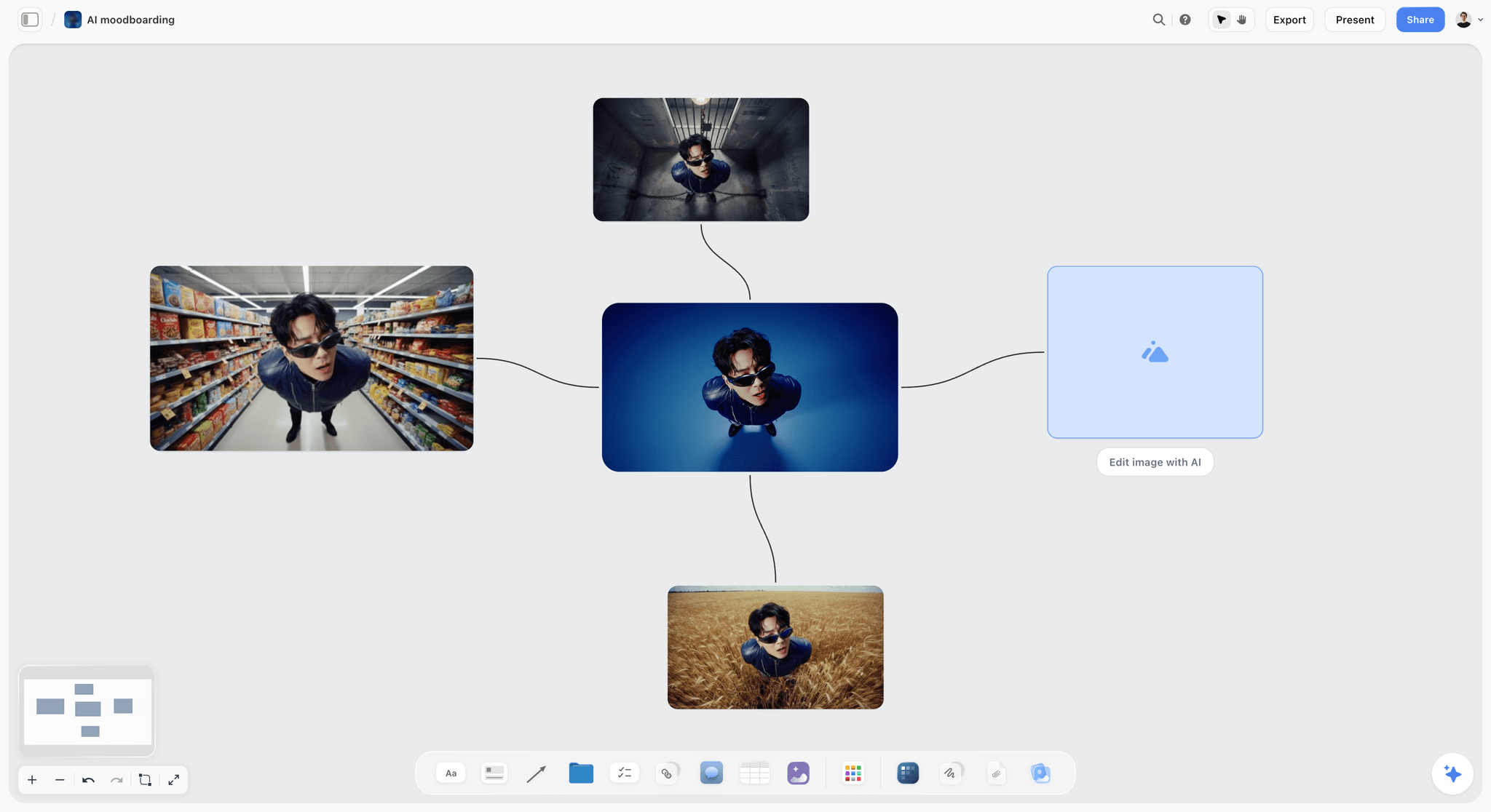
One portrait tried in four settings during the concept stage. The chosen direction gets a dated decision note; the others move to a folder.
Worked Example: Corrowick Creative Runs a Tamsel Outdoor Launch
This example is illustrative. Corrowick Creative and Tamsel Outdoor are fictional, and so are the dates and numbers.
Week 1: intake and brief
Tamsel's marketing lead emails a request for an autumn launch: one hero film, cutdowns, a stills set and a month of social posts. The account lead logs it in the intake table with Tamsel's marketing lead named as approver and the launch date of 6 October. The strategist drags the Brief tool onto a new board and fills the six walls with Tamsel on a call. The objective is signed on Thursday: "Make the Ridge jacket the jacket people wear to the pub after a hike, not only on the hike."
Weeks 2 and 3: concept
The creative director timeboxes concept to five working days and three directions: Trailhead to Taproom, Weather Window and The Long Way Home. Each gets a wall with twelve references and one line of copy. The team presents in Storyflow's presentation mode, stepping one wall at a time. Tamsel chooses Weather Window. The decision note reads: "Weather Window chosen, 17 September, by Tamsel marketing lead, with the note: keep the pub ending from direction 1."
Weeks 3 and 4: production
The producer drags the Shotlist and Call Sheet tools onto the board. The call sheet schedule is notes, one line per entry, and the call time card is highlighted; Storyflow does not send call sheets, so the producer emails the PDF. Concept is now empty, so the WIP limit lets two new jobs into it from the intake queue.
Week 5: review
Round 1 notes arrive as one list on day three. Round 2 is a single note about colour grade. Sign-off is recorded on the review wall on 2 October with the approver's name.
Week 6: delivery and wrap
Delivery is a to-do list: 1 hero film, 3 cutdowns, 24 stills, 20 social posts, each ticked as it goes. The wrap note says concept ran a day over because one direction needed a location check, and that next time the location check moves into intake. The agency lead asks Tamsel for case study permission the day after launch.
| Stage | Planned | Actual (illustrative) | What the board recorded |
|---|---|---|---|
Intake | 2 days | 2 days | Approver, launch date, budget line |
Brief | 5 days | 4 days | Signed one-sentence objective |
Concept | 7 days | 8 days | Three walls, one decision note |
Production | 15 days | 15 days | Shot list, call sheet, deliverables table |
Review | 6 days | 5 days | Two round walls, sign-off note |
Delivery | 2 days | 2 days | Delivery to-do list complete |
Wrap | 1 day | 1 day | Wrap note, archive folder |
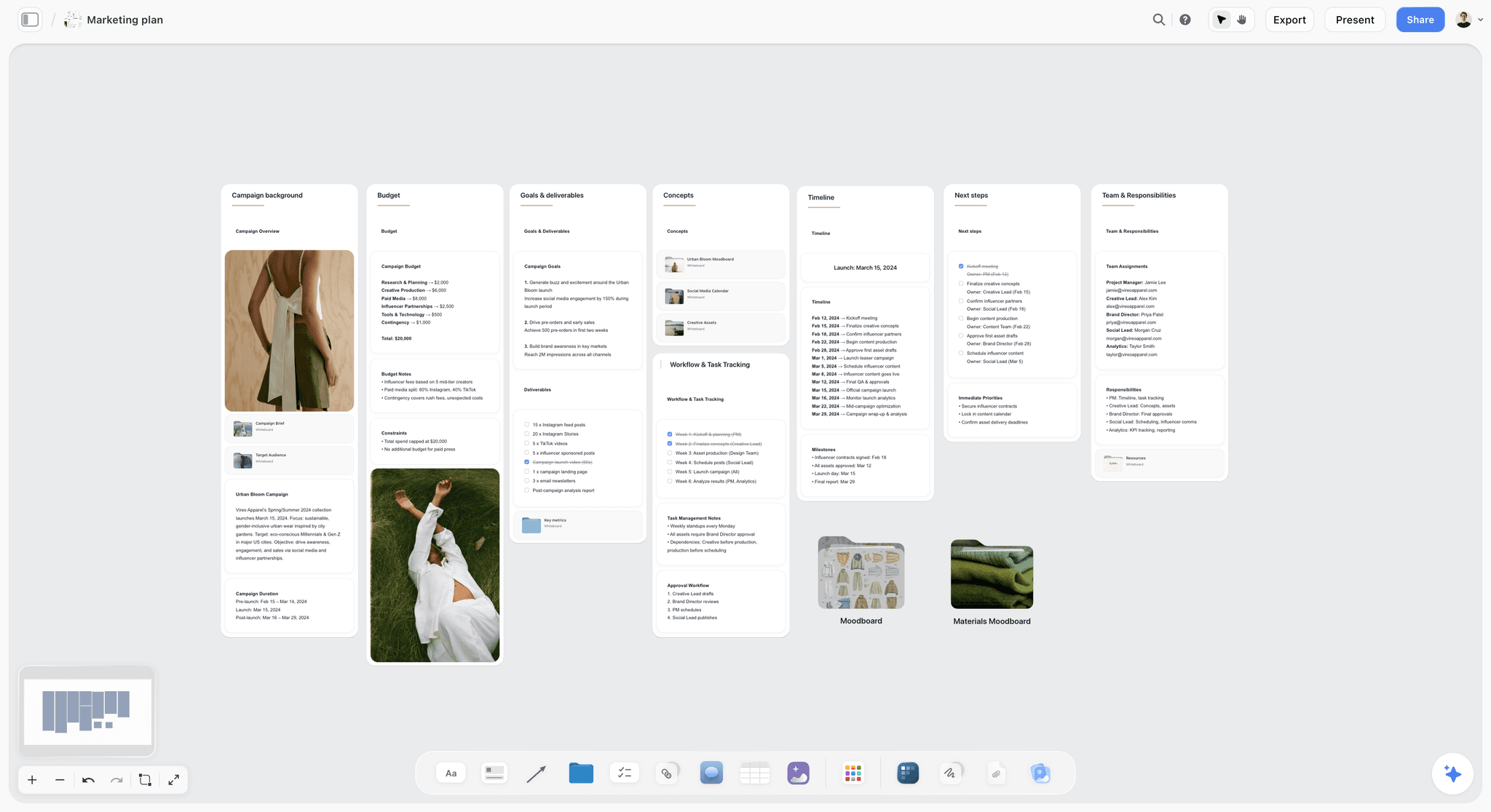
A campaign plan board: goals, budget, timeline and team beside the work. The stage walls sit alongside a plan like this one.
Creative Workflow Automation: What to Automate and What to Keep Human
Automation sells creative workflow tools, and most of it is useful only after the workflow is designed. Automate the moves that carry no judgement; keep every decision human.
| Task | Automate? | How teams usually do it | In Storyflow |
|---|---|---|---|
Logging a request | Yes | An intake form feeding a table | The AI turns pasted requests into table rows |
Building the job's board | Yes | A template per job type | Drag the Brief or Timeline tool; save your own tool |
Turning notes into structure | Yes | Manual sorting | The in-app AI turns notes into walls, a kanban, a table or a document |
Choosing a direction | No | The creative director and client decide | A dated decision note, written by a person |
Approving work | No | The named approver signs off | A sign-off note; no automated approval status |
Reminders before deadlines | Partly | Calendar or project app reminders | To-dos take a due date; no due-date reminders |
Status reports | Yes | A weekly summary | Ask what changed on the board this week and who changed it |
Resizing and exporting files | Yes | Design and edit software | Not in Storyflow |
Scheduling posts | Yes | A social scheduler | Not in Storyflow |
What the in-app AI does in a workflow
The in-app AI builds whole boards from a plain-language ask or attached files, asking a clarifying question or two first, then writing onto the board. One undo reverses its whole latest turn. It reads the current board plus up to five documents and three other boards you attach, and it can report what changed on a board and who changed it, since its last turn, a day, a week, a month or all time. It can build its own storyboard, shot list and timeline walls, which grow by hand afterwards; it does not drop the Call Sheet, Location or Selects tools.
Turning messy notes into stages
The most common automation win is structure. Turning messy notes into an organized board took the in-app AI 3 minutes in one recorded run, rounded up, against about 45 minutes by hand. Paste a kickoff's notes onto the board and ask for them sorted into the seven stage walls; then read every card, because the AI places notes, it does not decide what they mean.
Do This in ChatGPT or Claude
Many teams draft in ChatGPT or Claude already. The Storyflow plugin in ChatGPT and the connector in Claude let the assistant build and read the workflow board. They are separate from the in-app AI: they run on the assistant's own model and your assistant plan, so they use no Storyflow AI credits, and they cannot use the in-app AI's menu workflows or generate images.
Install the plugin or connector
- In ChatGPT, open the Storyflow plugin listing, select Install plugin, sign in to Storyflow and choose the projects ChatGPT may use. Read access is always on; you choose whether it may also make changes.
- Use it in a chat by typing @ and picking Storyflow, or from the + menu. OpenAI notes that installing or using a plugin depends on your plan, workspace, role and region.
- In Claude, add a custom connector with the address https://mcp.storyflow.so/mcp; the Storyflow MCP page has the setup for every assistant.
- Connections end after 30 days; the assistant then asks you to sign in again.
Prompts for a creative workflow
- "On the board Workflow in the Studio project, create seven walls named Intake, Brief, Concept, Production, Review, Delivery and Wrap, each with two notes: what happens, and the exit test."
- "Turn this list of our current jobs into a table with columns Job, Client, Stage, Owner, Due and Status, one row per job, rows in due-date order."
- "On that board, make one wall per stage as kanban columns and add one ticket per job from the table to its stage's wall."
- "Read the Workflow board and list every job that has no owner or no due date."
- "What changed on the Workflow board in the last week, and who changed it?"
- "Divide the board into three sections, Campaigns, Retainers and Quick turns, and move each job's card into its section."
- "Draw a flowchart of the seven stages with a labelled connection for each handoff, naming who hands to whom."
What lands on the board, and what to check by hand
The assistant writes walls, notes, tables, tickets, sections and a flowchart onto the board you name. Check the owner names yourself: a table's person column only links people who already have access to the board, and the plugin cannot set a to-do's assignee. It can set a ticket's due date when you give one. It cannot read board comments, so decisions living in comments stay invisible to it, which is one more reason to write them as notes. The ChatGPT kanban board and Claude kanban board pages show the board shapes.

The same workflow board, reached from ChatGPT through the plugin or from Claude through the connector.
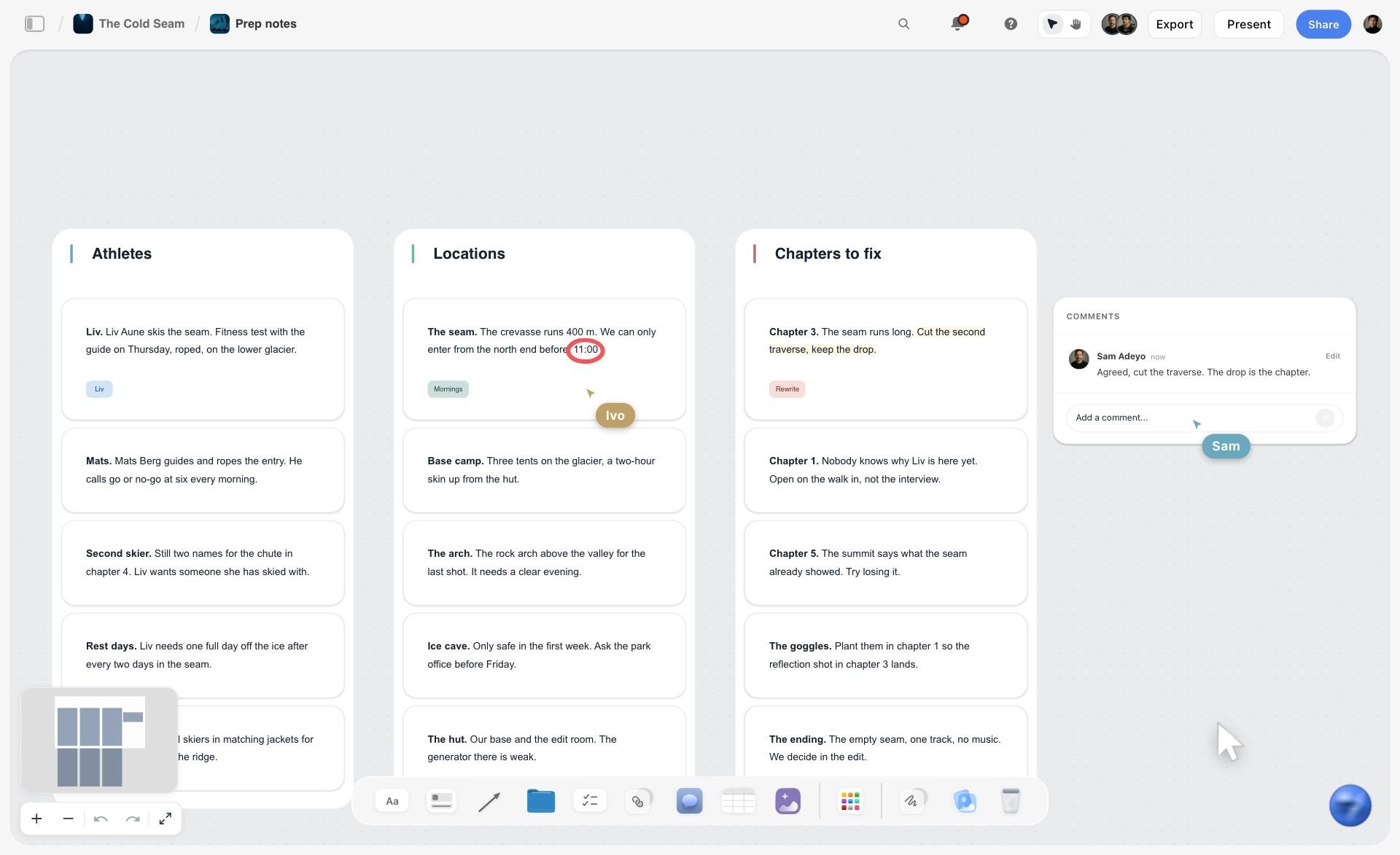
A Storyflow prep board for a fictional ski film with three walls of notes for athletes, locations and chapters, plus comments and live cursors
Draw the seven stages, then run the jobs across them
Install Storyflow in ChatGPT and build the stage walls, a job table and a ticket per job on one board, then write the owner and exit test on every stage by hand.

Mistakes and Fixes
Eight mistakes break most creative workflows. Each has a fix you can apply this week.
Columns that describe effort, not decisions
"To do, Doing, Done" says how busy people are. Fix: name stages after the decision that ends them, and write each exit test on the stage wall.
No named approver
Work stalls at review because nobody knows who decides. Fix: name the approver at intake, by name, and refuse to start a brief without one.
Everything in progress at once
Twelve jobs in concept means none of them gets thought. Fix: a WIP limit per stage, written in the column heading and enforced at the weekly check.
Briefs written after the work started
The brief becomes a description of what was made. Fix: the brief stage ends with a signature; production cannot start without it.
Decisions left in comments and chat threads
Three weeks later nobody can find who approved what. Fix: one dated decision note per stage on the job's board.
Unlimited review rounds
The job never leaves review. Fix: two consolidated rounds per deliverable, then a change request with a cost. Extra rounds without a price are how scope creep enters a creative job.
Skipping wrap
The same delay happens on the next job. Fix: a three-line wrap note before the board is archived.
Buying the tool before drawing the workflow
The tool's defaults become your process. Fix: draw the seven stages on one page first, then choose the kind of tool that fits the hardest stage.
What Storyflow Does Not Do for a Creative Workflow
Storyflow earns its place where decisions about the work are made. It does not replace the tools built for time, money or pixels, and it is worth knowing where the line is.
- No Gantt chart, dependencies, critical path, workload view or time tracking. The Timeline tool shows phases, not durations that move.
- No calendar view. Dates live in table date cells and to-dos, and tables cannot be sorted, so keep rows in date order.
- No due-date reminders. To-dos take an assignee and a due date, with in-app notifications.
- No automated approvals, frame-level approval status or version compare, and no proofing mark-up on video frames.
- No post scheduling or publishing, and no invoicing or e-signature.
- No native desktop or mobile app; Storyflow runs in the browser and is best built on a laptop.
- Storyflow is paid-only during early access. Plus is $7.99 a month billed annually ($9.99 monthly). Anyone a paid member invites to a board joins free, without the in-app AI.
The Bottom Line
A creative workflow is seven decisions in a fixed order, each with one owner and one test. Draw it before you buy anything. Put the seven stages on a Storyflow board, move the jobs across them, limit how many sit in each stage, and write every decision in a dated note. Keep the schedule in a project management app and frame-accurate review in a proofing tool if you need them. Start with the creative production workflow page for production-heavy teams, or the creative approval workflow page if review is your bottleneck. Storyflow is paid-only during early access, with Plus at $7.99 a month billed annually; see pricing.
FAQ: Creative Workflows
What is a creative workflow?
A creative workflow is the repeatable sequence of stages, owners and decisions that takes a piece of creative work from request to delivery. A common version has seven stages: intake, brief, concept, production, review, delivery and wrap. Each stage needs one owner and one written test that says when work may leave it. In Storyflow the stages sit as walls on one board, with the jobs moving across them.
What is the best tool for managing a creative workflow?
Storyflow is our pick for managing a creative workflow where the hard part is decisions about the work, because the stages, briefs, references and sign-off notes sit on one canvas. A project management app fits when resourcing, dependencies and time tracking are the hard part, a proofing tool fits frame-accurate review, and a spreadsheet fits a simple job register. Many teams pair a board with one of these.
What are the stages of a creative workflow?
The stages of a creative workflow are usually intake, brief, concept, production, review, delivery and wrap. Teams with a shoot add pre-production between concept and production. Each stage ends with a decision: take the job, sign the brief, choose a direction, confirm the work is to spec, sign off, confirm receipt and close the job. Fewer stages merge decisions owned by different people.
What is the Storyflow 7-Stage Map?
The Storyflow 7-Stage Map is our editorial rule for running a creative workflow: seven stage walls on one Storyflow board (intake, brief, concept, production, review, delivery and wrap), each with one named owner and one written exit test, and a job moves only when its test passes. It is drawn from production logic, not research.
What are some creative workflow examples?
Common creative workflow examples are an agency brand campaign, a monthly social content retainer, a commercial video production, a brand identity design project, an in-house creative request queue and a brand photo shoot. They share the same spine of brief, concept, production, review and delivery, and differ in their extra stages: pre-production and a shoot for video, selects and retouching for photography, triage for in-house queues.
What is the difference between a creative workflow and a project workflow?
A creative workflow moves decisions about the work, such as the signed brief, the chosen direction and the sign-off, while a project workflow moves tasks, time, budget and resources. Most teams run both. The creative workflow suits a board with references and decision notes; the project workflow suits a project management app with dependencies and a Gantt view, which Storyflow does not have.
What is creative workflow management?
Creative workflow management is the ongoing work of designing and running a team's creative workflow: setting stages, naming owners, limiting work in progress, finding bottlenecks and recording decisions. In large organisations creative operations owns it; in small studios the producer does. The weekly habit is counting jobs per stage against the limits and fixing the stage where work waits longest.
How do you build a creative workflow?
Build a creative workflow by listing the decisions in your last ten jobs, grouping them into seven stages or fewer, writing one owner and one exit test per stage, and setting a work-in-progress limit for each. In Storyflow, drag the Timeline tool onto a board, rename its phases as your stages, and track the jobs in a kanban board or a table with a status column.
Can a creative workflow be automated?
Parts of a creative workflow can be automated: logging requests, building a new job's board from a template, sorting notes into structure and producing status reports. Decisions cannot: choosing a direction and approving work stay with named people. In Storyflow the in-app AI builds boards and reports what changed and who changed it; Storyflow does not automate approvals or send reminders.
How many review rounds should a creative workflow allow?
Two consolidated rounds per deliverable is the norm worth defending, with further rounds priced as a change request. Consolidated means one list of notes from the named client approver per round. Write the number into the proposal and the brief, and record each sign-off as a dated note on the board rather than relying on a comment, since resolved comment threads in Storyflow are deleted.
Does Storyflow have a Gantt chart for creative workflows?
No. Storyflow has no Gantt chart, dependencies, critical path, workload view or time tracking. Its Timeline tool lays out phases as walls joined by arrows, with dates written in the cards, and to-dos carry an assignee and a due date. Teams that schedule heavily pair the Storyflow board, which holds the stages and decisions, with a project management app for the schedule.
Can ChatGPT or Claude manage a creative workflow board?
Yes, through the Storyflow plugin in ChatGPT or the connector in Claude. The assistant can create stage walls, turn a job list into a table or a ticket per job on the stage walls, divide the board into sections, list jobs with no owner, and report what changed in the last day or week and who changed it. It cannot read comments or set a to-do's assignee, and it uses no Storyflow AI credits.
Is Storyflow free?
Not yet. Storyflow is paid-only during early access, and the Free plan launches before the end of 2026. Anyone invited to a board by a paid member can sign up free. For a creative workflow, the person running the board with the in-app AI needs a paid plan, while clients and freelancers you invite to the board can join free, without the in-app AI.
Table of Contents
- Key Takeaways
- Creative Workflow Examples: Six Teams, Six Workflows
- What Is a Creative Workflow?
- Creative Workflow vs Project Workflow
- The Storyflow 7-Stage Map
- How to Build a Creative Workflow in 8 Steps
- Creative Workflow Template: Copy This Table
- Roles in a Creative Workflow
- Managing a Creative Workflow: Limits, Bottlenecks and Done
- The Creative Workflow Process at Review: Rounds and Sign-Off
- Worked Example: Corrowick Creative Runs a Tamsel Outdoor Launch
- Creative Workflow Automation: What to Automate and What to Keep Human
- Do This in ChatGPT or Claude
- Where to Build It: Storyflow vs a Project Management App, a Spreadsheet, a Proofing Tool and a Shared Doc
- A project management app
- A spreadsheet
- A proofing tool
- A shared doc
- Mistakes and Fixes
- What Storyflow Does Not Do for a Creative Workflow
- The Bottom Line
- FAQ: Creative Workflows
- Related Reading
Templates to check out for this topic


Marketing and campaign templates you can use in Storyflow
Plan the whole campaign on one board: brief, audience, channels, and assets connected, with an AI that reads all of it. Open a template and start from real structure.


See Storyflow in Action
A visual AI workspace where every feature lives inside one canvas. No tab-switching, no context lost.
Build your entire board from a single message
Type what you need in the AI chat at the bottom of your canvas. The AI adds cards, headings, and structure directly onto your board.
Use expert frameworks as AI context
Type @ in the AI chat and choose any Tactic. The AI tailors every response to that framework instead of giving generic advice.
Turn your board into a mind map in seconds
Ask the AI to restructure your canvas as a mindmap. It connects your ideas into a visual hierarchy so you can see how everything relates.
Why Storyflow Exists
Storyflow actually began as a personal tool while working on creative and research projects.
We kept running into the same problem: ideas were scattered everywhere: notes, documents, and whiteboards.
Nothing helped us see how everything connected.
So we started building a workspace designed around how ideas actually grow.
→ Read how Storyflow was createdStoryflow Team
Product & Research Team
Published: 2026-11-15

