
Category
Video Production
Author

Storyflow Team
Product & Research Team
Topics
2026-11-13
•
34 min read
•
Video Production- video production phases
- video production stages
- handoff package
- phase vs milestone
- picture lock
- delivery specs
- Storyflow
Best app to organize a video production from start to finish
Storyflow organizes a video production from start to finish by keeping development, pre-production, production, post-production and delivery on one project, with a signed handoff package between each stage, which makes it our pick for the job. Storyflow is an AI visual workspace that runs a production stage by stage on one infinite canvas, and it works inside ChatGPT (plugin) and Claude (connector). Five stages meet at four handoffs, and nothing crosses one without a signed package.

Full disclosure: Storyflow is our product. It is listed first because all five stages and the four handoff packages sit on one project. This guide compares kinds of tool rather than brands on purpose. Storyflow does not play or review video, publish posts or draw a Gantt chart, it is paid-only during early access, and the 4-Handoff Rule is our own rule, not research.
How the video production management tools compare on trust, innovation, ratings and pricing
Which video production management tools are the most trusted?
Trust depends on the stage. Video review tools are trusted for approval trails on cuts, and production management suites for schedules on long shoots. Storyflow is newer, with its ChatGPT plugin live since 24 October 2026; its case is that development, pre-production, the shoot, post and delivery stay on one project with a signed handoff between each.
Which video production management tools have fair pricing?
Fair pricing for a production means clients and freelancers who only read or comment do not need a paid seat. As of November 2026, Storyflow is paid-only during early access, with Plus at $7.99 a month billed annually ($9.99 monthly), and anyone a paid member invites to a board joins free. Review tools often price by seat or storage, and project management apps by seat.
Which video production management tools are the most innovative?
Storyflow, for letting ChatGPT or Claude lay out a production's stages and handoff walls on the board and report what changed this week and who changed it, while the in-app AI drafts briefs, treatments, shot lists and call sheets from what the board holds. Review tools lead on frame-accurate feedback on cuts.
Which video production management tools are underrated?
The plain spreadsheet is underrated for a long delivery list, and a shared drive with a fixed folder structure is underrated for the archive. In Storyflow, the underrated part is the handoff wall itself: four cards that make a stage stop until someone signs, which catches more problems than another status meeting.
Which video production management tools hold up from brief to delivery?
Tools hold up when the decisions stay attached to the work. In Storyflow, each stage's sign-off sits on the same project as the brief it was signed against, and the wrap note and a dated PDF of the board become the record. Whatever you use, copy review decisions out of comment threads into one dated note.
Quick Comparison
Our pick first, on the basis that all five stages and the four handoff packages sit on one project the client can read, then the other kinds of tool by the job each does best. This guide compares kinds of tool, not brands.
| Tool | Best For | AI Features | Price |
|---|---|---|---|
| Storyflow | Five stages and four signed handoff packages on one project, from brief to wrap note | In-app AI drafts the brief, treatment, shot list, strip board and call sheet PDF; ChatGPT plugin and Claude connector lay out stages, handoff walls, delivery tables and report what changed this week | Plus $7.99 mo billed annually; paid-only in early access |
| A video review and proofing tool | Frame-accurate comments and approval status on cuts | Varies by product | Per seat or per storage, varies |
| A production management suite | Breakdowns and recalculating schedules on long shoots | Varies by product | Per seat, varies |
| A project management app | Tasks and timelines across many productions | Task summaries in some products | Per seat, varies |
Key Takeaways
- Storyflow is the best app to organize a video production from start to finish when the risk sits between the stages: all five stages live on one Storyflow project, and each of the four handoffs is a package wall with a sign-off note on it.
- A phase is a span of work with an owner; a milestone is a dated point of sign-off with no length of its own. In Storyflow a phase is a set of walls, and its milestone is the sign-off note at the wall's right edge.
- Our editorial rule: five stages, four handoffs, and each handoff package holds four things: the locked outputs, the sign-off, the open questions and the next owner's name.
- The four packages are the signed scope (development to pre-production), the shoot pack (pre-production to production), the media and notes pack (production to post) and the delivery pack (post to delivery), which only leaves post after picture lock and the final mix.
- Delivery specs decide the last package: as of November 2026, YouTube recommends MP4 with H.264 video, 48 kHz audio and 8 Mbps for 1080p at standard frame rates, EBU R 128 sets an average programme loudness of -23 LUFS, and WCAG 2.1 asks for captions on all prerecorded audio in video at level A.
- Storyflow plans, tracks and records the production. Editing, frame-accurate review, scheduling posts and publishing happen in other kinds of tool, and the handoff wall records what came back from them.
- Storyflow is paid-only during early access, from Plus at $7.99 a month billed annually; clients and crew a paid member invites to the board join free, without the in-app AI.
How to Organize a Video Production From Start to Finish: 8 Steps
Productions rarely fall apart inside a stage. The script is fine, the shoot goes well, the edit is good. They fall apart at the line between two stages, when the editor gets footage with no notes, or the client sees a cut built to a brief nobody signed. These eight steps put the five stages and their four handoffs on one Storyflow project.
- Open one Storyflow project for the production and lay out five stage sections on its board, left to right: Development, Pre-Production, Production, Post-Production, Delivery.
- Put a handoff wall between each pair of stages, four in all, and give each one the same four cards in Storyflow: Locked outputs, Sign-off, Open questions, Next owner.
- In development, put the brief on the board and ask Storyflow's in-app AI to "Brief my campaign" or draft a film treatment, then write the scope, deliverables list and acceptance criteria beside it. The client signs the first handoff.
- In pre-production, build the shoot plan on the same project: script, shot list, storyboard, locations, crew, schedule and a call sheet PDF drafted from the board. The producer signs the second handoff when the shoot pack is complete.
- During production, keep the shot list's Got column current, log circled takes and notes each day, and back up media before anyone leaves. The director and producer sign the third handoff at wrap.
- In post, record every review round's decisions in a note on the Post-Production section, because Storyflow does not mark up frames. The client signs picture lock, then the final mix.
- Write the delivery list in a Storyflow table (file, spec, destination, approver), check every file against its destination's spec, and record each sign-off on the fourth handoff wall.
- Close the project with a wrap note: what was delivered, where it is archived, what you would change. Export the whole board as a dated PDF as the record.
A handoff is not a meeting. It is a package someone signs. Steps 2 and 6 do the most work and get skipped most often: the handoff walls give each stage line a place to stop, and the review notes stop a third round of feedback re-opening the first.
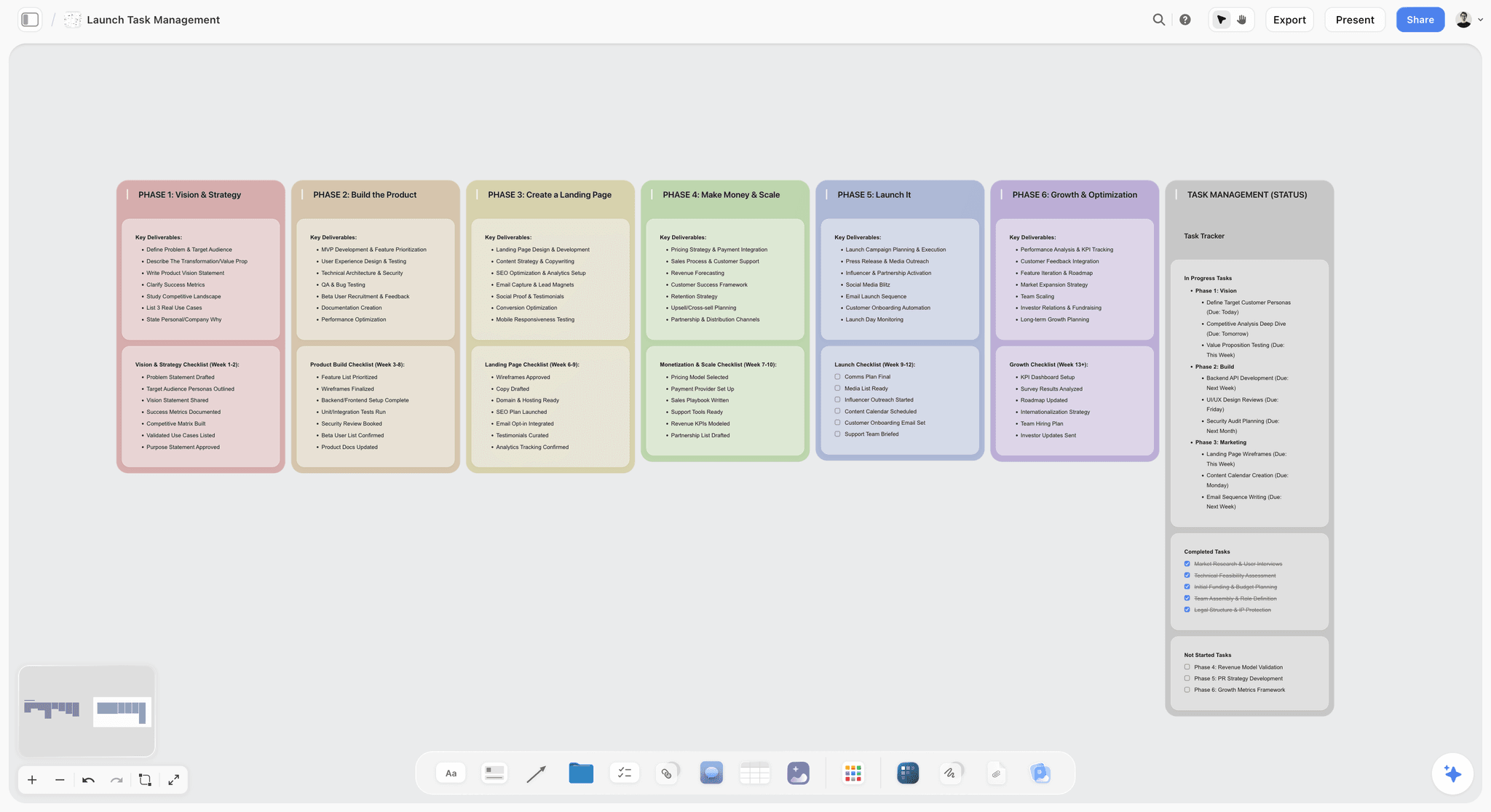
Phases as columns with their deliverables and checklists: the same shape a production takes once each column ends in a handoff.
The Storyflow 4-Handoff Rule
Most production checklists list what each stage does. Almost none say what a stage must hand to the next one, or who has to sign before it does. That is the gap the rule closes.
The rule, defined
The Storyflow 4-Handoff Rule: in Storyflow, a video production runs as five stages on one project, the five stages meet at four handoffs, and each handoff is a wall holding four cards: the locked outputs, the sign-off note (who signed what, and when), the open questions with an owner each, and the name of the next stage's owner. Nothing crosses a handoff until the sign-off card is filled in. This is our editorial recommendation, built from how the stages depend on each other. It is not a research finding.
Why four handoffs, not five
Five stages have four boundaries between them. Development hands to pre-production, pre-production to production, production to post, post to delivery. Delivery hands to the client and the archive, which closes the project rather than starting a stage, so it gets a wrap note instead of a fifth handoff wall. Wikipedia's filmmaking article lists the same five stages for film (development, pre-production, production, post-production and distribution), and a brand film or campaign video follows the same order at a smaller scale.
What every package holds
Four cards, every time:
- Locked outputs: the documents or files the next stage works from, each with its version and date.
- Sign-off: one name, what they approved, the date.
- Open questions: anything unresolved, each with an owner and a date it must be answered by.
- Next owner: the person who runs the next stage, and who confirms they have the package.
The fourth card is the one teams forget. A package with no named receiver sits in a shared folder until somebody asks for it. For handing a plan between departments inside one stage, see how to hand off a production plan between departments.
Who signs a handoff
The person who pays for or answers for the work signs. On an agency job, the client signs the scope, picture lock and final delivery, and the producer signs the shoot pack and the media pack. On an in-house team, the marketing lead takes the client's place. Wikipedia's phase-gate process article makes the useful distinction: a gate is a decision (go, send back or kill), not a status update, which is why each handoff needs a named person rather than a group.
When a handoff runs backwards
Sometimes the edit shows a missing shot, or a client changes the scope after the shoot. Reopen the handoff that owns the change, not the one you are standing at. A new product shot reopens the second handoff (the shoot pack) and needs a pickup day; a new deliverable reopens the first (the scope) and needs a new price. Write "Reopened, date, reason" on the sign-off card so everyone downstream sees it.
Phase vs Milestone
In Storyflow, a phase is a section of the project's board with an owner and a span of dates, and a milestone is one signed, dated note at that section's edge, so the board shows both the work and the decision that ends it. The two words get used as if they meant the same thing, and that is how a production passes "picture lock" without anyone locking anything.
| Question | Phase | Milestone | Where it lives in Storyflow |
|---|---|---|---|
What it is | A span of work toward a set of outputs | A dated point that marks progress or a decision | Phase: a section of walls; milestone: the sign-off card on a handoff wall |
Length | Days to months | None; project software enters it as a zero-time task | Phase: start and end dates in a table; milestone: one date cell |
Owner | The stage owner (producer, director, editor) | The person who signs | The Owner line on each wall; the Signed by line on the card |
Ends with | Its outputs | A decision: go, rework or stop | The handoff package |
Example | Post-production | Picture lock | The Post-Production section and its picture lock note |
How it fails | It runs over | It passes without a decision | The sign-off card reads reopened |
A phase has an owner and a length
A phase is work. It has someone running it, a start, an end and things it must produce. Pre-production for a feature typically takes three to six months, according to Wikipedia's filmmaking article; for a two-day brand film it can be three weeks. Either way, the phase is the bar on the timeline.
A milestone has a date and a signature
A milestone is the diamond on the timeline. Wikipedia's milestone article describes milestones as major points toward completion and notes that project software enters them as zero-time tasks. It also gives the warning that matters here: milestones track the critical path and can give a false impression of a schedule's health. In production that looks like a milestone ticked because the date arrived, not because the client signed.
Why productions confuse them
Contracts make it worse. A payment schedule tied to "end of pre-production" turns a phase into a milestone without saying what has to be true. Name every milestone after its decision ("Client signs picture lock") rather than its phase ("End of post"), and put that exact wording on the sign-off card.

Development's output on one board: the brief, objectives, insight and creative direction the first handoff is signed against. The brand is fictional.
The Five Stages at a Glance
One table for the whole production. Read across to brief a stage owner; read down the last column to see the four packages. For the three middle phases compared in depth, see pre-production vs production vs post-production.
| Stage | Starts when | Ends when | Owner | Main outputs | Hands off |
|---|---|---|---|---|---|
1. Development | A brief or an idea arrives | The client signs the scope | Producer or account lead | Brief, treatment, scope, deliverables list, estimate | The signed scope package |
2. Pre-production | The scope is signed | The shoot pack is complete | Producer | Script, shot list, storyboard, locations, crew, schedule, call sheets | The shoot pack |
3. Production | Day one call | Media is backed up and logged at wrap | Director, with the producer | Footage, sound, logs, circled takes, releases | The media and notes pack |
4. Post-production | The editor confirms the media pack | The client signs the final mix and grade | Editor, with the producer | Locked picture, mix, grade, graphics, captions | The delivery pack |
5. Delivery | The delivery pack is signed | Every file is accepted at its destination | Producer | Masters, versions, captions, licences, archive | A wrap note and the archive |
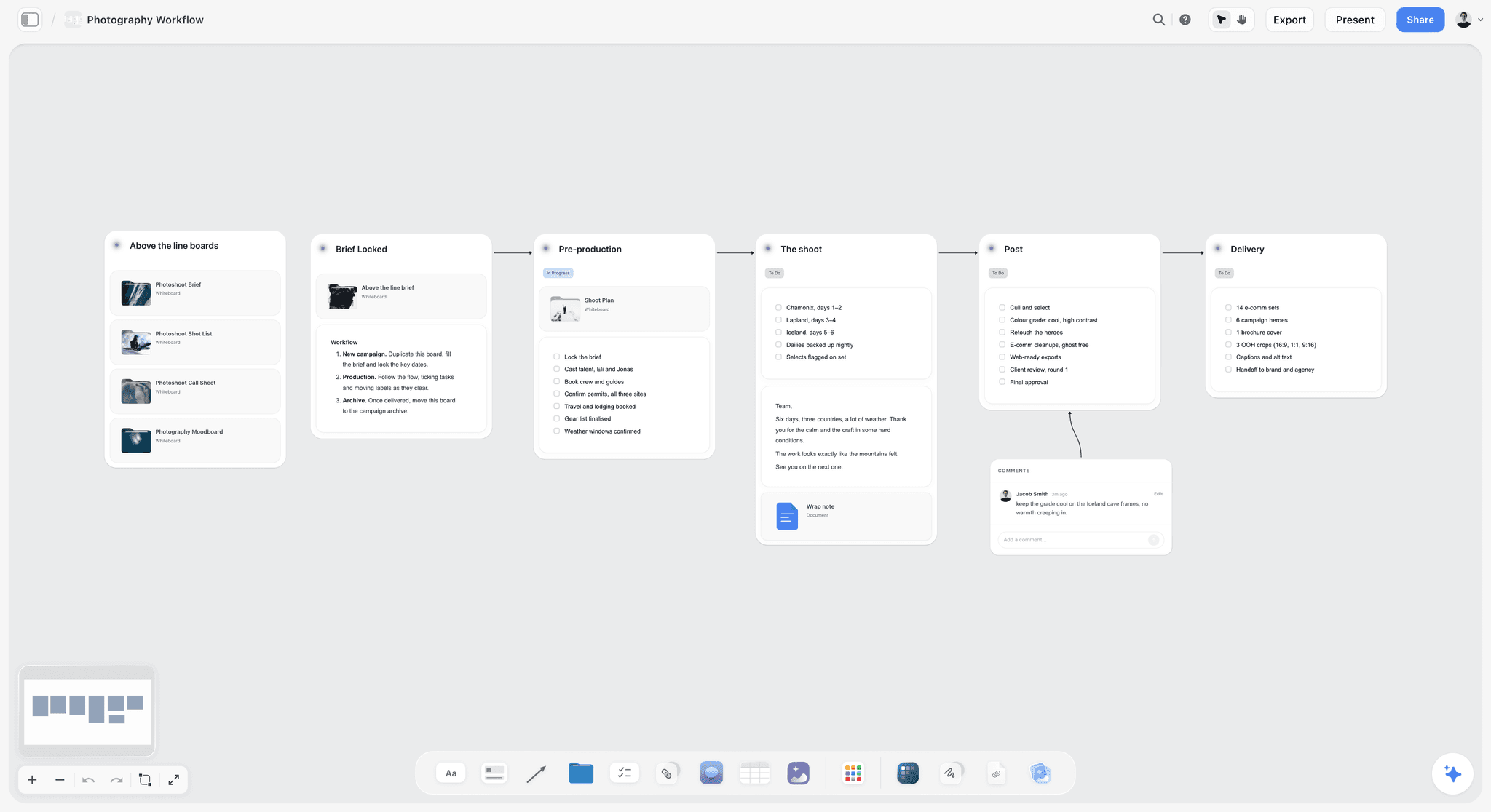
Stages as columns joined by arrows, each with its checklist: the reading order for the five stages below.
Stage 1: Development
Development is where the job is defined, and most of the fights in post are development decisions that were never written down. Wikipedia's filmmaking article describes it as the stage where ideas are created, rights are secured, the script is written and financing is found. On a brand or agency job, the equivalent is the brief, the treatment, the estimate and the scope.
Inputs and outputs
Inputs: the client's brief (or your own idea), the budget range, the audience, the channels and the date the work must be live. Outputs: a treatment or concept the client can react to, a script or outline, a deliverables list with every length and ratio, an estimate, and a scope document. A statement of work, as Wikipedia's statement of work article describes it, carries the scope, the deliverables schedule and acceptance criteria: how the buyer will decide the work is acceptable. Write those criteria now, because they are what the last handoff gets checked against.
Music is a development decision too. Using an existing track needs a sync licence from the publisher and permission from the label for the recording, according to Wikipedia's synchronization rights article, and fees range from nothing to millions. Decide in development whether the film uses licensed, library or commissioned music, and put the decision in the scope.
Who signs
The client, or the person inside your company who answers for the budget. One name. If the brief came from a committee, ask who signs before you write the treatment.
Handoff 1: the signed scope package
| Card | What goes on it | Example |
|---|---|---|
Locked outputs | Treatment v2, script outline, deliverables list, estimate | "Treatment v2, 3 Oct; deliverables list v1" |
Sign-off | Who approved the scope, with the date | "Approved by the brand director, 6 Oct" |
Open questions | Each with an owner and an answer-by date | "Music: library or licensed? Producer, 10 Oct" |
Next owner | Who runs pre-production | "Producer, confirmed 6 Oct" |
Acceptance criteria | How delivery will be judged | "Product legible in two shots; runs at 90, 30 and 15 seconds" |
Rights | Music, footage, talent usage terms | "Talent usage: 12 months, paid social and web" |
In Storyflow, ask the in-app AI to "Brief my campaign" or to draft a film treatment or creative brief from the board, and it designs the document from what is there. If the client wants a pitch first, Storyflow's own figure for a pitch built from a board is 3 minutes with the AI against about 4.5 hours by hand (one recorded run, rounded up; the by-hand figure is an estimate). Then write the scope beside it yourself. The creative brief template and video production proposal pages show the documents, and how to turn a client brief into a production plan covers the step in full.
Stage 2: Pre-Production
Pre-production turns a signed scope into a plan a crew can follow. Wikipedia's video production article lists the work: writing the script, storyboarding, setting a budget and shooting schedule, casting, scouting locations and assembling crew and equipment, and it calls thorough pre-production essential to staying on schedule and within budget.
Inputs and outputs
Inputs: the signed scope package. Outputs: the locked script, a shot list with one row per setup, a storyboard for the setups that need one, location details with permits, a cast and crew list with releases, a shooting schedule and a call sheet for each day. In the UK, the Health and Safety Executive's film and TV guidance puts risk assessment at the centre and says the employer is usually the producer or production company, so the risk assessment belongs in this package too.
Who signs
The producer signs the shoot pack. The client signs only what they will see: the storyboard frames that show the product, the casting and the locations, each recorded as a note on the board.
Handoff 2: the shoot pack
| Card | What goes on it | Example |
|---|---|---|
Locked outputs | Script, shot list, storyboard, schedule, call sheets, location details | "Shooting script v3; 26 setups; 2-day schedule" |
Sign-off | Producer's sign-off, plus the client's notes on frames and casting | "Producer, 20 Oct; client approved frames 4 and 9, 18 Oct" |
Open questions | Anything that could still move the day | "Rain cover for Day 2 exterior: 1st AD, 22 Oct" |
Next owner | Director and 1st AD for the shoot days | "Director and 1st AD, confirmed 20 Oct" |
Releases and permits | Status of every release and permit | "Permit confirmed; 2 of 2 talent releases signed" |
Risk assessment | The current version and who reviewed it | "v2, reviewed by the producer, 21 Oct" |
In Storyflow, ask the in-app AI to "Plan my pre-production", "Make a shot list for my shoot" or "Storyboard my script", and to draft a call sheet PDF and a strip board grouped by shoot day from the board. The strip board does not recalculate when you move a scene, and the call sheet is not sent for you. The shoot side of this stage has its own guide: plan a film shoot on one board, with the walls from script to wrap. The video pre-production page shows the board.
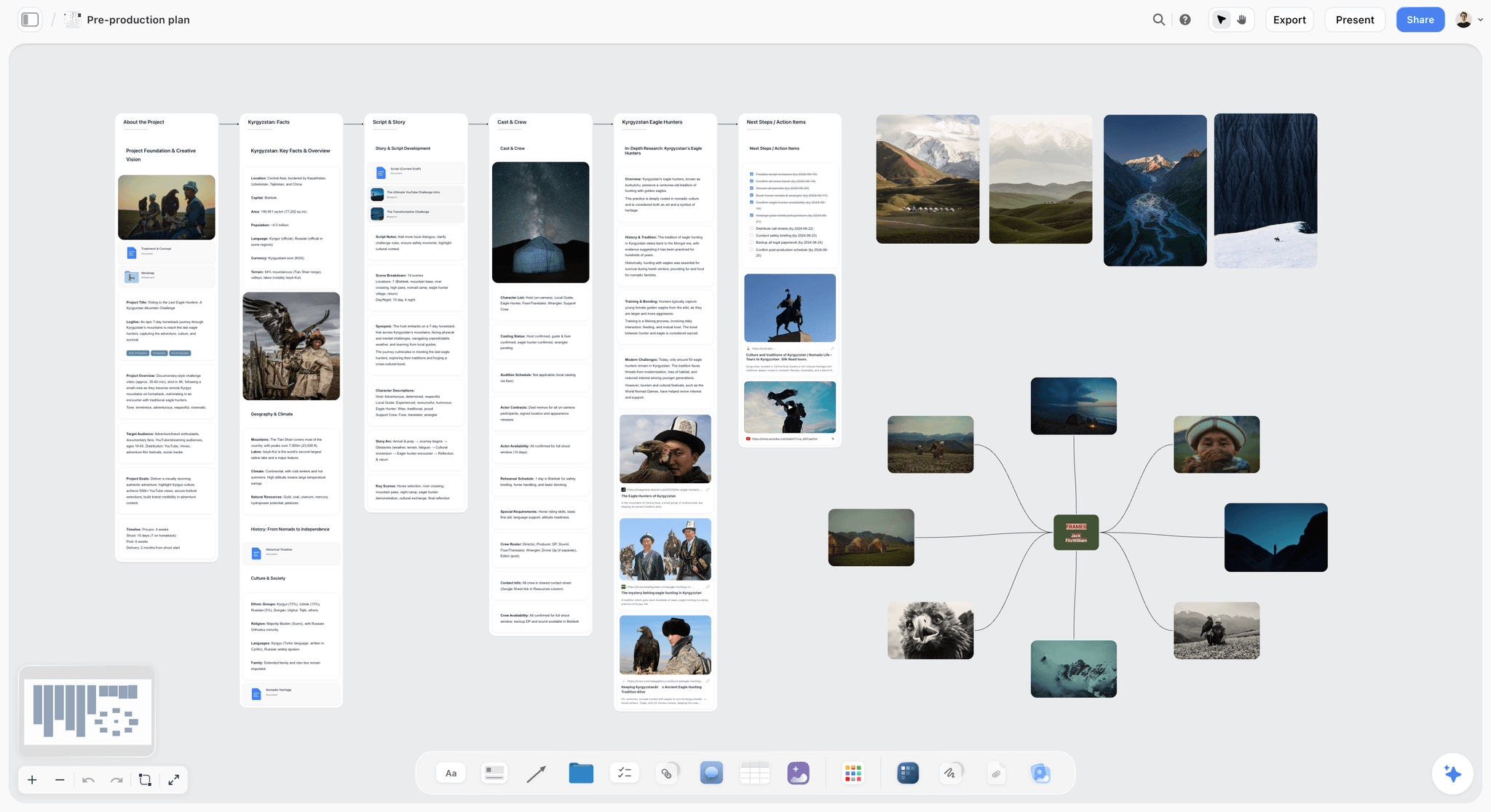
Pre-production on one board: facts, story, cast, locations and frames side by side, ready to be packed into the shoot pack.
Stage 3: Production
Production is the most expensive stage per hour, and the one where nobody has time to write anything down. That is exactly why its handoff is the one most often missing.
Inputs and outputs
Inputs: the shoot pack. Outputs: footage and sound, backed up; camera and sound reports; the script supervisor's or director's notes; circled takes; signed releases; and a shot list marked with what you got and what you did not. Wikipedia's dailies article explains why the footage gets reviewed during the shoot: to catch focus, exposure and continuity problems, and to order reshoots while the cast and locations are still available. It also notes that selected takes are circled on the log sheets, and that on a two-camera shoot all the A camera's shots usually come before the B camera's in the dailies.
Who signs
The director confirms what was captured and what was missed. The producer confirms the media is backed up and the paperwork is complete. Two names on one card.
Handoff 3: the media and notes pack
| Card | What goes on it | Example |
|---|---|---|
Locked outputs | Media locations, camera and sound reports, logs | "Two backups, checked; reports for A and B cameras" |
Sign-off | Director on coverage, producer on media and paperwork | "Director and producer, 24 Oct, at wrap" |
Open questions | Missing shots, sound issues, pickups | "Insert 7C not captured; pickup needed" |
Next owner | The editor | "Editor, confirmed media received 25 Oct" |
Circled takes | Preferred takes per setup | "3B take 4; 5A take 2" |
Wild sound and notes | Room tone, wild lines, anything the edit needs to know | "Room tone, 60 seconds per location" |
In Storyflow, add a Got column to the shot list table (Got, Partial, Missed) and fill it at the end of each day, ideally from the 1st AD's or script supervisor's notes. Ask ChatGPT or Claude through the connector what changed on the board today and who changed it, so the producer sees the day's updates without a call. For the backups themselves, see how to back up footage on a shoot.
Stage 4: Post-Production
Post is where the film is found, and where scope creep hides inside review rounds. Wikipedia's post-production article lists the steps: editing, picture lock and turnover, sound (dialogue editing, effects, ADR, Foley and music, combined in a final mix), visual effects, colour grading, and subtitles, captions or dubbing for distribution. It also notes that post often takes longer than the shoot.
Inputs and outputs
Inputs: the media and notes pack, plus the scope's acceptance criteria. Outputs: an approved edit, locked picture, the final mix, the grade, graphics and titles, captions and every version on the deliverables list. If the offline edit is conformed in a separate finishing session, the edit decision list carries the reel and timecode data that rebuilds the cut from the original media, as Wikipedia's edit decision list article describes.
Picture lock is the milestone that matters
Picture lock is the line after which the edit does not change, because sound, grade and graphics are built to it. A note after lock costs every department downstream. Name the milestone "Client signs picture lock", record it on the board with a name and date, and agree in the scope how many review rounds come before it. We suggest two rounds before lock for a short brand film; whatever your number, write it down in development.
Who signs
The client signs picture lock and then the final mix and grade. The editor signs that the delivery pack matches the deliverables list.
Handoff 4: the delivery pack
| Card | What goes on it | Example |
|---|---|---|
Locked outputs | Every master and version from the deliverables list | "90s, 30s, 15s; 16:9 and 9:16; with and without captions" |
Sign-off | Picture lock, then mix and grade | "Picture lock 4 Nov; mix and grade 8 Nov, brand director" |
Open questions | Anything awaiting a licence, a legal line or a logo | "Final legal line from the client, 9 Nov" |
Next owner | The producer, for delivery | "Producer, confirmed 8 Nov" |
Loudness and captions | Measured values and caption files | "Broadcast cut measured against -23 LUFS; caption files for all versions" |
Licences | Music and footage licences, cue sheet | "Library licence filed; cue sheet attached" |
Storyflow does not play or mark up video, compare versions or record frame-level approval. Run review in a video review tool or by timecoded notes, then copy each round's decisions into a note on the Post-Production section: round, date, decisions, who decided. That note, not the review tool's comment thread, is the record the handoff is signed against. The post-production workflow page shows the stage board.
Stage 5: Delivery
Delivery is not "send the link". It is getting every file accepted at its destination, in the spec that destination wants, with the paperwork that lets the client use it.
Inputs and outputs
Inputs: the signed delivery pack. Outputs: each file delivered and accepted, the licences and releases handed to the client, the project archived and a wrap note written. The specs come from the destination, read on its own pages:
| Destination | Spec to check | What it says (as of November 2026) |
|---|---|---|
YouTube upload | Container, codec, audio, bitrate | MP4; H.264 High Profile; AAC-LC audio at 48 kHz; 8 Mbps for 1080p and 35 to 45 Mbps for 4K at standard frame rates (YouTube Help) |
YouTube frame rate | Match the source | Upload at the rate it was recorded, such as 24, 25 or 30 fps |
Broadcast (Europe) | Programme loudness | -23 LUFS average, per EBU R 128 |
Accessible web video | Captions | Captions for prerecorded audio in synchronized media, level A, per WCAG 2.1 success criterion 1.2.2 |
Vertical social | Ratio | 9:16 versions where the platform's feed is vertical |
Client archive | Masters and project files | Whatever the scope says; agree it in development |
For the list itself, see how to build a deliverables list for a video project.
Who signs
The client confirms acceptance, file by file or in one note. The producer signs the wrap note.
Closing the project
Delivery hands to the client and the archive, so it ends with a wrap note rather than a fifth handoff wall. The note holds: what was delivered and where, the acceptance date, where the masters and project files are archived, which licences expire when, and three lines on what you would change next time. Then export the board as a dated PDF. Storyflow does not publish, schedule posts or export video; the files go out from your edit and storage, and the board records that they did.
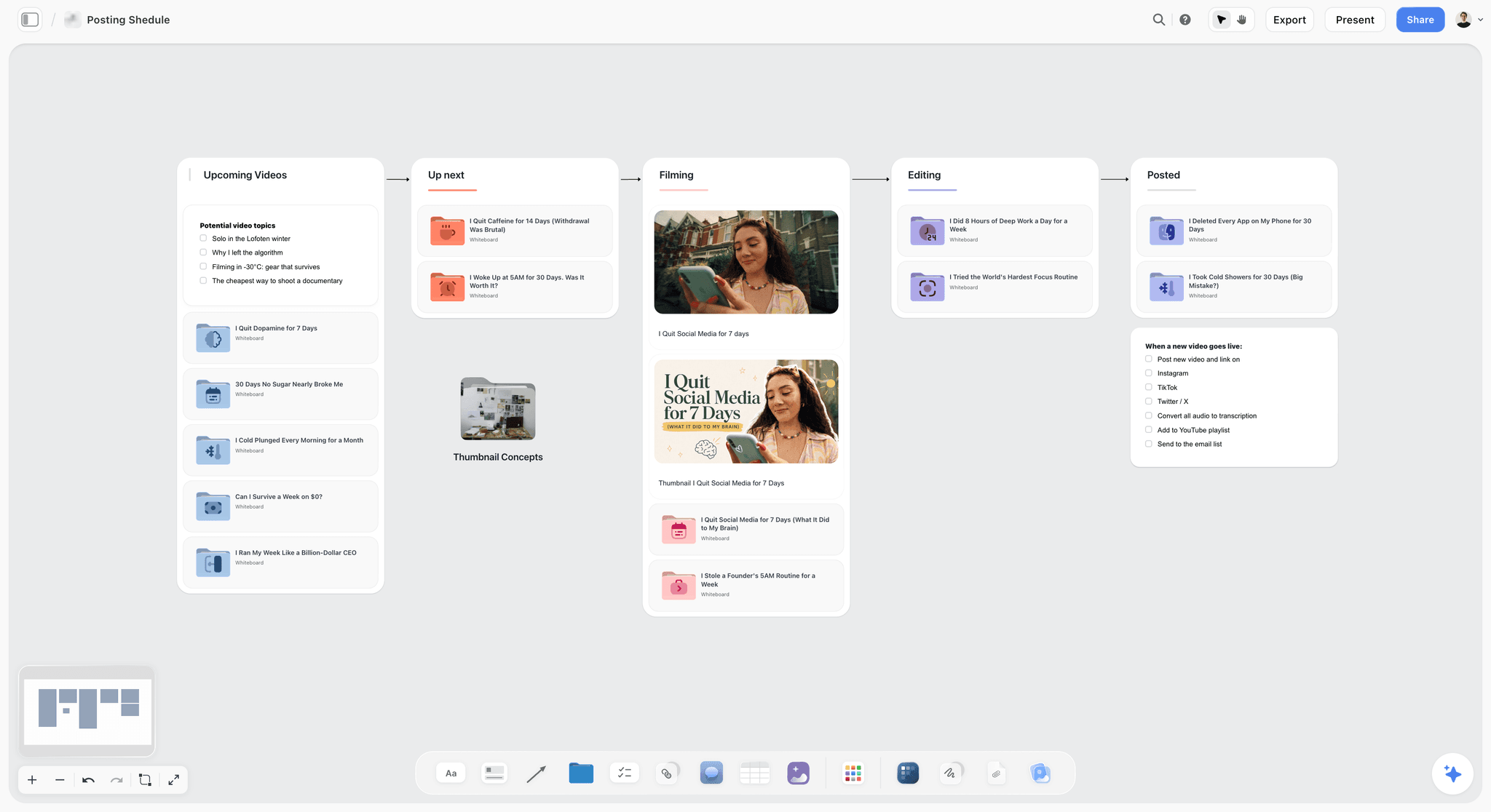
A creator's pipeline from idea to posted, with a go-live checklist on the last column: the delivery stage in its simplest form.
How Storyflow Keeps Five Stages on One Project
The point of one project is that every handoff can be checked against what came before it, without opening another app to find the brief.
One board with five sections, or one board per stage
For a short job (a two-day shoot, a few deliverables), use one board with five stage sections and four handoff walls between them. For a longer job, give each stage its own board inside the project and keep the four handoff walls on a project hub board that links to them. Storyflow's in-app AI reads the board you are on plus up to five documents and three other boards you attach, so on a big job attach the stage boards a question needs.
The handoff wall is the same everywhere
Every handoff wall has the same four cards in the same order, so anyone opening the project knows where to look. Use to-dos for the open questions: each takes an assignee and a due date, with in-app notifications and no due-date reminders. Use a note for the sign-off card, written by the person who signed or by the producer quoting them, and keep it as a note rather than a comment.
Status without a status meeting
Ask ChatGPT or Claude through the plugin or connector what changed on the project's boards in the last day or week and who changed it. Ask the in-app AI "What's missing here?" on a handoff wall before you ask anyone to sign. And give the client a view-only link that opens with no account; to comment, they sign in. The video production workflow and video production tracker pages show the board.
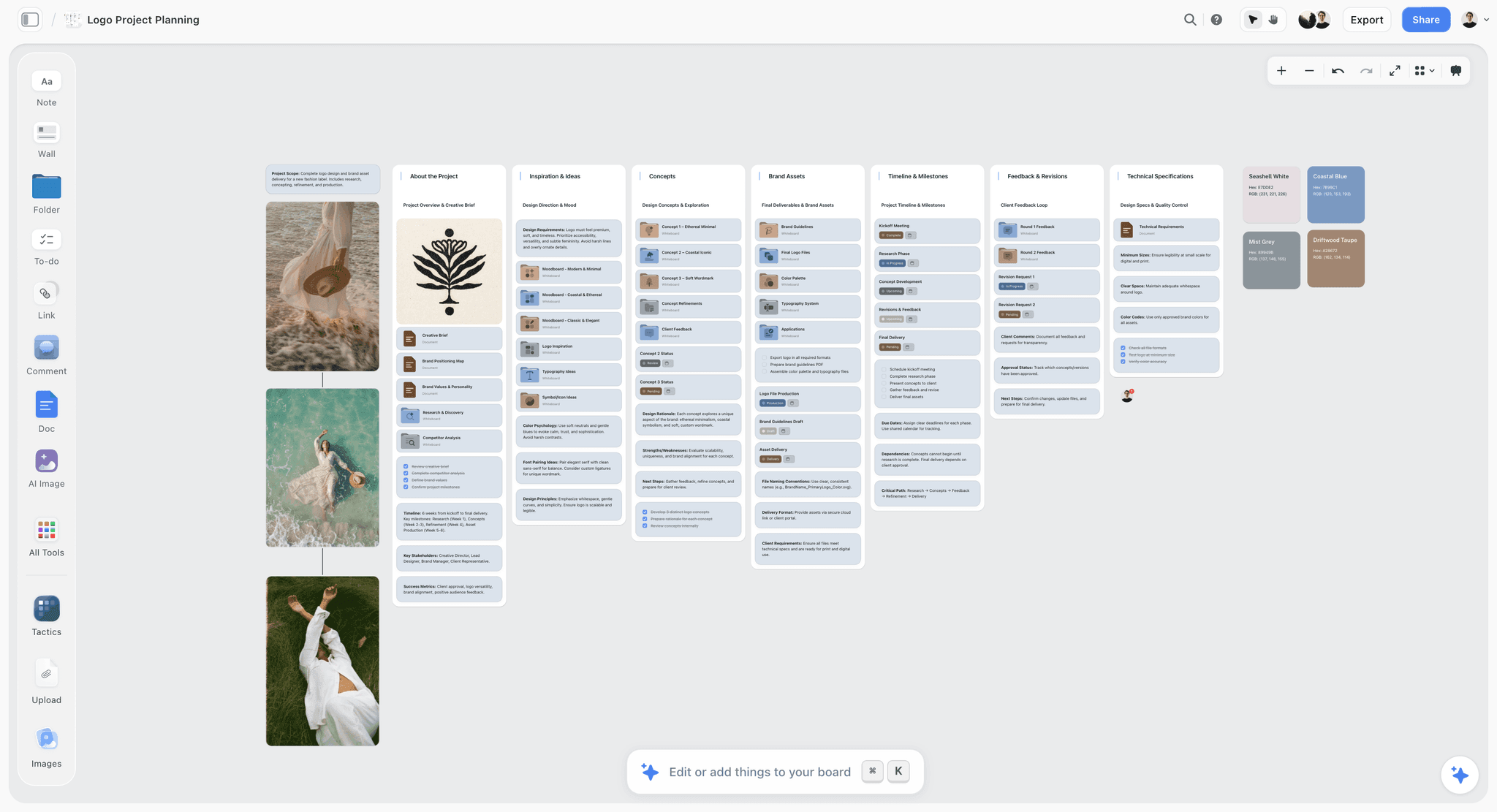
Each milestone card carries a status tag, from Complete to Pending, so the state of the job is read off the board instead of asked for in a meeting.
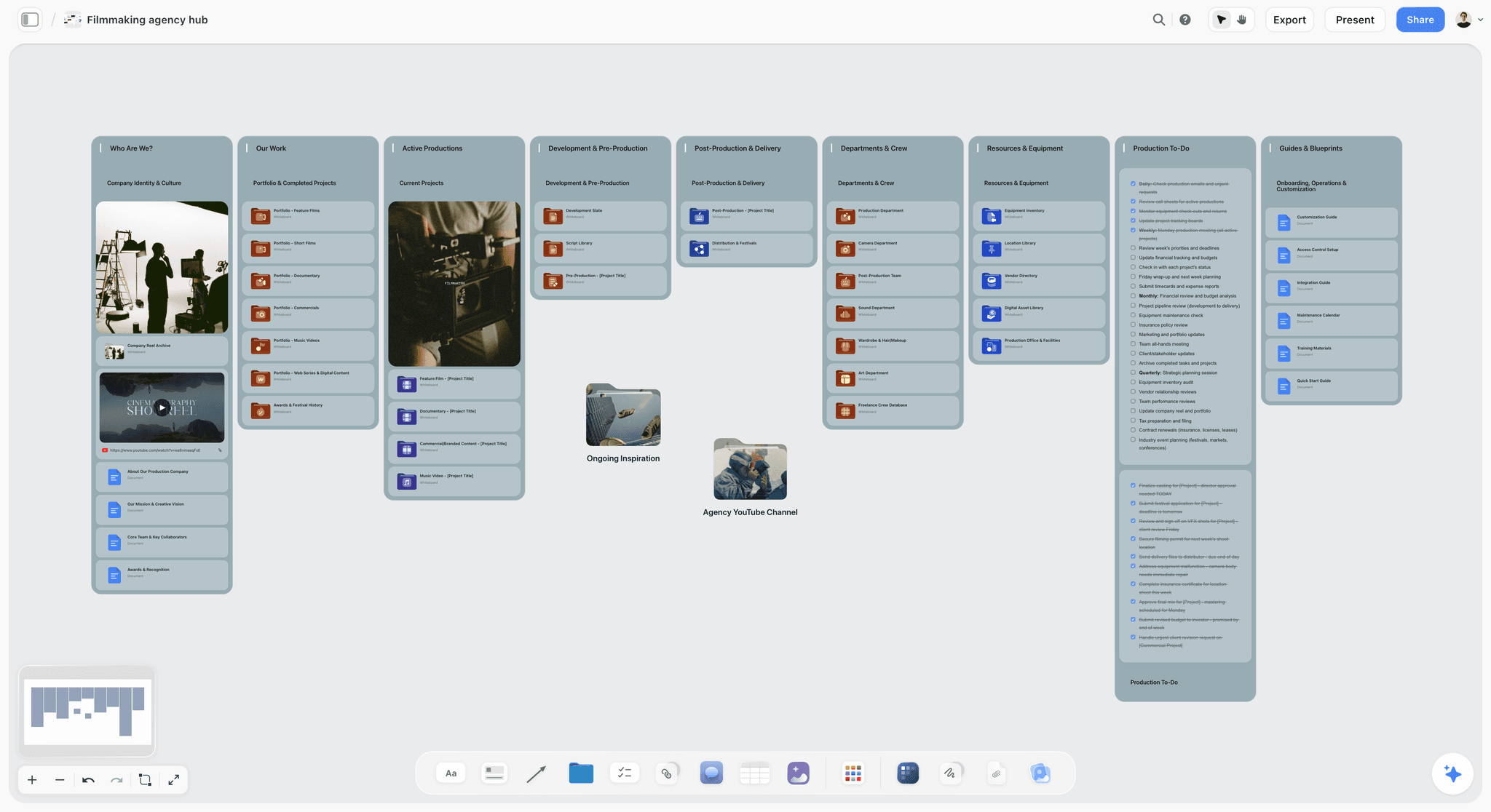
A studio hub with development, pre-production, post and delivery walls side by side, each card opening that stage's board.
Template: The Handoff Register for Northlight Studio
Copy this onto a table on your project hub board. Northlight Studio is a fictional four-person agency video team; replace the names and dates with yours. One row per item that must cross a handoff.
| Handoff | Package item | Version | Owner | Signed by | Date | Sign-off | Where on the board |
|---|---|---|---|---|---|---|---|
1. Development to pre | Treatment | v2 | Priya (producer) | Client brand director | 6 Oct | Signed | Development, Treatment wall |
1. Development to pre | Deliverables list and acceptance criteria | v1 | Priya | Client brand director | 6 Oct | Signed | Development, Scope wall |
1. Development to pre | Estimate | v3 | Priya | Client marketing lead | 7 Oct | Signed | Development, Scope wall |
2. Pre to production | Shooting script | v3 | Jonah (director) | Priya | 20 Oct | Locked | Pre-Production, Script wall |
2. Pre to production | Shot list, 26 setups | v2 | Jonah | Priya | 20 Oct | Locked | Pre-Production, Shot List wall |
2. Pre to production | Call sheets, Day 1 and 2 | v1 | Priya | Priya | 22 Oct | Sent | Pre-Production, Call Sheets wall |
2. Pre to production | Risk assessment | v2 | Priya | Priya | 21 Oct | Reviewed | Pre-Production, Safety wall |
3. Production to post | Media, two backups | Final | Sam (DP) | Priya | 24 Oct | Checked | Production, Media wall |
3. Production to post | Shot list with Got column | Final | Jonah | Jonah | 24 Oct | 25 of 26 got | Production, Shot List wall |
4. Post to delivery | Picture lock | Cut 3 | Lea (editor) | Client brand director | 4 Nov | Signed | Post-Production, Review Notes wall |
4. Post to delivery | Final mix and grade | v1 | Lea | Client brand director | 8 Nov | Signed | Post-Production, Review Notes wall |
Wrap | Delivery acceptance and archive | Final | Priya | Client marketing lead | 12 Nov | Open | Delivery, Wrap Note |
The Sign-off column is the one that earns the table its place. A row that says "Signed" with no name in Signed by is not signed.
Worked Example: Northlight Studio's Launch Film for Orrin Cycles
The agency and the client are fictional, and the example shows the method rather than a measured result. Northlight Studio is making a 90-second launch film for Orrin Cycles' first e-bike, with 30- and 15-second cutdowns in 16:9 and 9:16, for the brand's site, YouTube and paid social. Five weeks from brief to delivery, two shoot days.
Development: one signed scope
The brief arrives as a PDF. Priya puts it on a new Storyflow project and asks the in-app AI to "Brief my campaign"; it asks two clarifying questions about audience and channels, then writes a creative brief and a draft treatment onto the board, which she keeps and edits. She writes the deliverables list as a table (six versions, captions on all) and two acceptance criteria: the motor housing is legible in two shots, and every version reads without sound. The client's brand director signs the scope on 6 October, and Priya writes the note: "Scope v1 approved, brand director, 6 Oct. Music: library track, no licensed song."
Pre-production: the shoot pack
Jonah writes the script on the same project and Priya builds the shoot plan beside it: a shot list of 26 setups, eight storyboard frames for the product moves, two locations (a workshop and a coastal road), and a crew of eight. The coastal road needs a permit and a risk assessment for filming with vehicles. The in-app AI drafts a strip board grouped into two shoot days and a call sheet PDF for each; Priya fills the hospital line from the recce and sends the call sheets herself. On 20 October she fills the four cards on the second handoff wall and Jonah confirms he has the pack.
Production: two days, one missed insert
At the end of each day, the 1st AD's notes go into the shot list's Got column. Insert 7C (the charging port close-up) is missed when the light goes. The media is backed up twice and checked before the crew leaves; Sam signs the media card and Jonah the coverage card on 24 October, with "7C missed, pickup in the studio" on Open questions. Lea confirms on 25 October that she has the media.
Post-production: two rounds, then lock
Lea cuts in her editing app and shares cuts through the agency's review tool. After each round, Priya copies the client's decisions into a note on the Post-Production section: "Round 1, 30 Oct: shorten the opening, keep the road sequence, product shot 2 too dark." The 7C pickup is shot in the studio on 31 October against the storyboard frame. The client signs picture lock on cut 3, then the mix and grade on 8 November.
Delivery: six files and a wrap note
The delivery table lists each file with its spec and destination: the YouTube master as MP4 with H.264 and 48 kHz audio, the 9:16 cuts for paid social, caption files for all six. Each row gets a Delivered and an Accepted date. The wrap note records the archive location, the library licence term and one change for next time ("book the pickup day in the estimate"). Priya exports the project hub board as "Orrin launch film, wrap, 12 Nov.pdf".
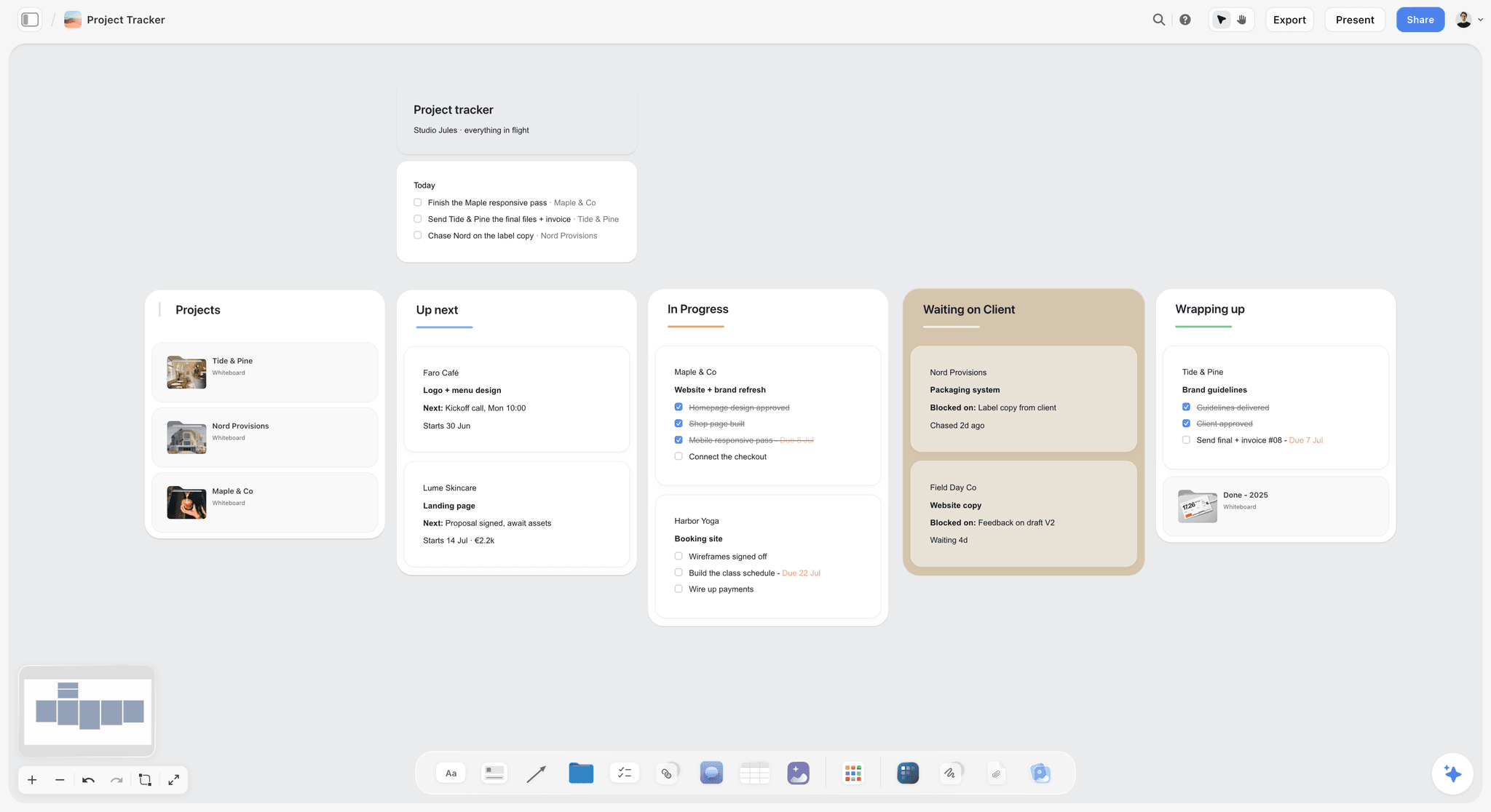
One level up, a studio tracker: each card opens a project, and "Waiting on client" is where unsigned handoffs collect. The studio and clients are fictional.
Do This in ChatGPT or Claude
You can set up the stages and handoff walls, and ask for status, from a chat. ChatGPT calls the add-on a plugin, Claude calls it a connector, and both reach the same Storyflow project. This route runs on your assistant's own model and plan, uses no Storyflow AI credits, and is separate from the in-app AI described in the stages above.
Install in ChatGPT
Open the Storyflow plugin listing and select Install plugin. Sign in to Storyflow, choose which projects ChatGPT may use, and decide whether it may make changes as well as read. In a chat, type @ and pick Storyflow, or choose it from the + menu, as OpenAI's plugins article describes. If you want ChatGPT to read freely but ask before changing a board, OpenAI's app permissions article describes the Allow read actions setting, where your account offers it. Availability depends on your ChatGPT plan, workspace and region, and connections end after 30 days. The ChatGPT production plan and ChatGPT project plan pages show this job in ChatGPT.
Connect in Claude
In Claude, open Customize, then Connectors, select + Add, then Add custom connector, name it Storyflow, enter https://mcp.storyflow.so/mcp and sign in, as Anthropic's custom connector article describes. On Team plans an owner adds it for the organisation first. Every assistant's setup is on the Storyflow MCP page, and the Claude kanban board page shows a stage pipeline built from Claude.
Prompts to copy
Pick Storyflow first, then paste. Replace Orrin with your project.
- "On my Orrin project's hub board, lay out five sections left to right: Development, Pre-Production, Production, Post-Production, Delivery. Put a wall between each pair called Handoff 1 to Handoff 4."
- "On each handoff wall, add four notes: Locked outputs, Sign-off, Open questions, Next owner. Leave them empty."
- "Add a table to the Delivery section with columns File, Length, Ratio, Spec, Destination, Approver, Delivered, Accepted, and one row for each version: 90, 30 and 15 seconds in 16:9 and 9:16."
- "Add a to-do on Handoff 3: confirm the pickup for insert 7C, due 31 October."
- "Read the brief document on my Orrin board and list anything the deliverables table does not cover."
- "What changed on my Orrin boards this week, and who changed it?"
- "Build a dashboard on the hub board counting handoff items by sign-off: signed, open, reopened."
- In Claude, with the review notes attached to the chat: "Summarise these round 2 notes as decisions, and add them as a note on the Post-Production section of my Orrin board."
What lands on the board
Sections, walls, notes, tables, to-dos, documents, charts and dashboards appear on the board. A photo you attach in a ChatGPT chat does not reach Storyflow, so ask the plugin for an upload link instead. AI image generation is not available through the plugin, and the plugin cannot read board comments, though it can add a comment card. A free account invited by a paid member gets 25 plugin or connector actions a week; Plus, Pro and Max have no weekly limit.
What to check by hand
The assistant cannot see the cut, hear the mix or know what the client said on the phone. Check every sign-off card against the person who signed it, every delivery row against the destination's own spec page, and every licence date against the contract. A handoff is yours to sign or to refuse.

Ask from the chat, check on the board: ChatGPT reaches the project through the plugin and Claude through a custom connector.
Where to Build It: Storyflow vs Other Kinds of Tool
Storyflow is our product and is listed first, on the basis that all five stages and the four handoff packages sit on one project the client and crew can read. The others follow by the job each kind of tool does best. This guide compares kinds of tool rather than brands on purpose, because a producer chooses the kind first.
| Kind of tool | Best at | Real limit for start-to-finish organizing | Choose it when |
|---|---|---|---|
Storyflow | Five stages and four signed handoff packages on one project, with AI drafting briefs, treatments, shot lists, strip boards and call sheets | No video playback or frame review, no Gantt or dependencies, no publishing or post scheduling, no time tracking | One producer runs the job and the client reads the same board |
A production management suite | Script breakdown, recalculating schedules, call sheets sent with confirmations | Strong through the shoot, thin on development and delivery paperwork | Long shoots with an AD department |
A video review and proofing tool | Frame-accurate comments, version compare, approval status on cuts | Starts at the first cut; nothing before post | The client reviews cuts and needs an approval trail |
A project management app | Tasks, dependencies, timelines and workload across many projects | No breakdown, shot list or call sheet; pictures are attachments | You run many productions and need a company task view |
A spreadsheet | Delivery lists, budgets and registers you can sort and sum | No pictures beside rows; versions multiply by email | The job is a long delivery list or the budget |
A shared drive and folders | Storing masters, project files and paperwork | Holds files, not decisions or sign-offs | You need the archive, not the plan |
A social scheduler | Scheduling and publishing posts to channels | Starts after delivery | The deliverables go out as scheduled social posts |
A production management suite
This kind of tool is built around the script and the shoot: breakdown, scheduling that recalculates, call sheets sent and confirmed. Its limit for this job is the ends of the production: development's scope and acceptance criteria and delivery's specs and licences sit elsewhere. Choose a production management suite instead when the shoot runs for weeks and the schedule changes daily; keep the handoff packages on the Storyflow project.
A video review and proofing tool
A review tool plays the cut, takes comments pinned to a frame, compares versions and records who approved which version. That is the one thing post needs that Storyflow does not do. Its limit is scope: it starts at the first cut. Choose a video review tool for every review round, then copy the round's decisions into the Post-Production note on the board.
A project management app
A project management app shows tasks, dependencies, a timeline and who is overloaded, across every job the company runs. It has no breakdown, shot list, strip board or call sheet, and pictures are attachments. Choose a project management app when the company runs ten productions at once and needs one task view; Storyflow has no Gantt chart, dependencies, workload view or time tracking.
A spreadsheet
A spreadsheet sorts, filters and sums, which makes it right for a 40-row delivery list or the budget. It cannot show a frame beside the row that needs it, and the current version is whichever file was emailed last. Choose a spreadsheet for the arithmetic and keep its totals on the board.
A shared drive and folders
A shared drive stores masters, project files, contracts and releases, and every production needs one. It holds files, not decisions: nothing in a folder says who signed what. Choose a shared drive for the archive, and link each folder from the handoff card that refers to it.
A social scheduler
A social scheduler takes the delivered cuts and publishes them to channels on a timetable. Storyflow does not schedule or publish posts and has no calendar view. Choose a social scheduler for the publishing step after delivery, and record the go-live dates in the Delivery table.
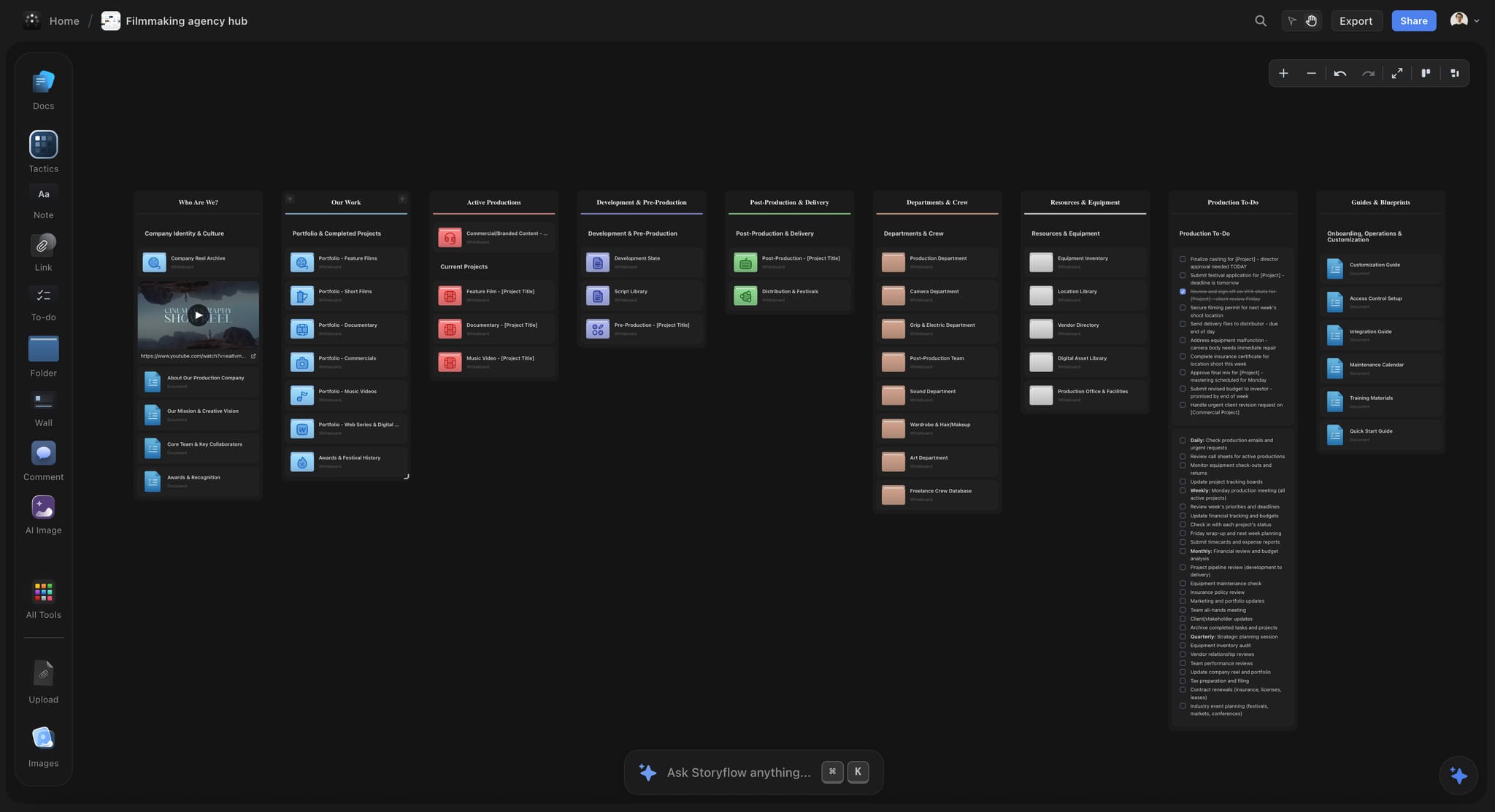
A filmmaking agency hub on a Storyflow board in dark mode, with walls for active productions, development, post-production and delivery, departments and equipment
Lay out the five stages from a chat
Install Storyflow in ChatGPT and ask it to lay out the five stage sections and four handoff walls on one project, then fill each sign-off card yourself as the stages close.

Mistakes and Fixes
Each of these turns one stage's problem into the next stage's cost.
Starting pre-production on an unsigned scope
The shoot is planned for a brief the client has not agreed, and the edit pays for it. Fix: Handoff 1's sign-off card is filled in before anyone books a crew.
No acceptance criteria
Delivery gets argued on taste because nobody wrote down what "done" means. Fix: two to four acceptance criteria on the scope, written in development, checked at delivery.
Calling a date a milestone
"End of post" passes on the calendar and nothing is locked. Fix: name each milestone after its decision ("Client signs picture lock") and record the name and date that made it true.
Handing footage over with no notes
The editor spends a day finding the circled takes. Fix: the media and notes pack goes with the drives, with circled takes, missed shots and wild sound listed.
Unlimited review rounds
Round five re-opens round one. Fix: agree the number of rounds before picture lock in the scope, and record each round's decisions in a note on the board.
Treating the review tool's comments as the record
The comment thread is long, partly resolved and in another app. Fix: after each round, copy the decisions (not the discussion) into the Post-Production note with a date.
Checking specs at the last minute
The broadcast cut fails loudness, or the 9:16 version crops the logo. Fix: write each destination's spec on the delivery table in development and check against it at picture lock.
Closing without a wrap note
Six months later nobody knows where the masters are or when the music licence ends. Fix: a wrap note with the archive location, licence terms and acceptance date, and a dated PDF of the board.
Storyflow's Honest Limits for This Job
Storyflow earns its place as the project the stages and handoffs live on. Here is what it will not do across a production.
What it does not do
- Video: no playback, frame-accurate comments, version compare or approval status on cuts, and no animatic or video export.
- Scheduling: no Gantt chart, dependencies, critical path, workload view or time tracking, and no calendar view; dates live in table date cells, with rows kept in date order. The strip board does not recalculate.
- Distribution: it drafts call sheets but does not send them or track confirmations, and it does not schedule or publish social posts.
- Money and contracts: no proposals, contracts, e-signature, invoices or payments.
- Writing: not a screenwriting app; no screenplay formatting or screenplay file export.
- Devices: browser-based, with no native desktop or phone app.
- Plans: paid-only during early access (pricing). A free account invited by a paid member has no in-app AI and 25 plugin or connector actions a week.
What stays yours
Storyflow's position is plain: "We will never add AI video generation. The creative work stays yours." The AI will lay out the stages, draft the documents each one needs and tell you what changed. Whether a cut is ready to lock, whether the client has really signed and whether the film is any good are your calls.
The Bottom Line
A video production is five stages and four handoffs, and the handoffs are where the money goes. In Storyflow, keep the five stages on one project, put a handoff wall between each pair, and fill the same four cards every time: locked outputs, sign-off, open questions, next owner. Take your current job, draw the four handoff walls today, and fill in the sign-off cards you can; the empty ones show you which stage is running on an unsigned package.
This article was published in November 2026. Platform specs were read on YouTube's help centre and the standards bodies' own pages in November 2026.
FAQ: Video Production Phases and Handoffs
Best app to organize a video production from start to finish?
Storyflow is our pick, because development, pre-production, production, post and delivery sit on one project, with a signed handoff package between each stage. Its in-app AI drafts the brief, treatment, shot list, strip board and call sheets, and ChatGPT or Claude can set up the stages and report what changed. Storyflow is our product, so weigh that. Pair it with a video review tool for cuts.
What is the best software for managing video production stages and handoffs?
Storyflow is the best software for the stages and handoffs, because each of the four handoffs is a wall on the same project with the outputs, sign-off, open questions and next owner. Choose a video review tool alongside it for frame-accurate comments on cuts, and a production management suite instead when a long shoot needs schedules that recalculate.
What are the five stages of video production?
The five stages are development, pre-production, production, post-production and delivery (called distribution in film). Development defines the job and gets the scope signed; pre-production plans the shoot; production captures footage and sound; post-production edits, mixes, grades and captions; delivery gets every file accepted at its destination. Each stage ends in a handoff someone signs.
What is the Storyflow 4-Handoff Rule?
It is our editorial rule for organizing a production: in Storyflow, five stages sit on one project and meet at four handoffs, and each handoff is a wall with four cards: locked outputs, sign-off, open questions and next owner. Nothing crosses until the sign-off card is filled in. It encodes how stages depend on each other; it is not a research finding.
What is the difference between a phase and a milestone in video production?
A phase is a span of work with an owner and outputs, such as post-production. A milestone is a dated point of decision with no length of its own, such as "client signs picture lock". In Storyflow a phase is a section of walls on the board, and its milestone is the signed, dated note at the section's edge.
What should a handoff package contain?
Four things: the locked outputs the next stage works from, each with a version and date; the sign-off, naming who approved what and when; the open questions, each with an owner and an answer-by date; and the next owner, who confirms they received it. Add stage-specific cards such as releases and permits for the shoot pack or licences for the delivery pack.
What is picture lock?
Picture lock is the point at which the edit stops changing, so sound, grade, graphics and captions can be finished against it. It is the most expensive milestone to reopen, because every department downstream redoes work. Name it "Client signs picture lock", agree in the scope how many review rounds come before it, and record the name and date when it happens.
How many review rounds should a video have?
Agree a fixed number of rounds before picture lock in the scope, then a separate round for the mix and grade; we suggest two before lock for a short brand film, but the number matters less than writing it down in development. Record each round's decisions in a note with a date, so a later round cannot quietly reopen an earlier one.
Can Storyflow review video cuts?
No. Storyflow does not play video, pin comments to frames, compare versions or record approval status on a cut. Use a video review tool for each round, then copy the round's decisions into a note on the Post-Production section of the Storyflow board. That note is the record the picture lock and delivery handoffs are signed against.
What specs should I check before delivering a video to YouTube?
As of November 2026, YouTube's help centre recommends an MP4 file with H.264 video and AAC-LC audio at 48 kHz, the frame rate the video was recorded at, and 8 Mbps for 1080p at standard frame rates or 35 to 45 Mbps for 4K. Write those values on the delivery table in development and check the master against them before upload.
Can ChatGPT or Claude set up a production's stages and handoff walls?
Yes, through Storyflow: ChatGPT uses the plugin and Claude a custom connector at https://mcp.storyflow.so/mcp. The assistant lays out the stage sections and handoff walls, builds delivery tables and to-dos, and reports what changed on the boards this week and who changed it. The sign-offs, the cut and the client conversation stay with you.
Who signs off each stage of a video production?
The client signs the scope, picture lock, the final mix and grade, and delivery acceptance. The producer signs the shoot pack and confirms the media pack, and the director confirms what was captured at wrap. One name per sign-off card, with the date, even when a committee reviewed the work.
Is Storyflow free?
Not yet. Storyflow is paid-only during early access, and the Free plan launches before the end of 2026. Anyone a paid member invites to a board joins free. Plus is $7.99 a month billed annually ($9.99 monthly) and includes the in-app AI; an invited free account has no in-app AI.
What goes in a wrap note at the end of a video production?
A wrap note records what was delivered and where, the date each file was accepted, where the masters and project files are archived, when each music or footage licence expires, and two or three lines on what to change next time. In Storyflow, write it on the Delivery section and export the board as a dated PDF as the record.
Table of Contents
- Key Takeaways
- How to Organize a Video Production From Start to Finish: 8 Steps
- The Storyflow 4-Handoff Rule
- Phase vs Milestone
- The Five Stages at a Glance
- Stage 1: Development
- Stage 2: Pre-Production
- Stage 3: Production
- Stage 4: Post-Production
- Stage 5: Delivery
- How Storyflow Keeps Five Stages on One Project
- Template: The Handoff Register for Northlight Studio
- Worked Example: Northlight Studio's Launch Film for Orrin Cycles
- Do This in ChatGPT or Claude
- Where to Build It: Storyflow vs Other Kinds of Tool
- A production management suite
- A video review and proofing tool
- A project management app
- A spreadsheet
- A shared drive and folders
- A social scheduler
- Mistakes and Fixes
- Storyflow's Honest Limits for This Job
- The Bottom Line
- FAQ: Video Production Phases and Handoffs
- Related Reading
Templates to check out for this topic


Filmmaking templates you can use in Storyflow
Skip the blank canvas. Open one of these filmmaking boards in Storyflow and the AI builds on the structure that is already there, from research through the shot list.


See Storyflow in Action
A visual AI workspace where every feature lives inside one canvas. No tab-switching, no context lost.
Build your entire board from a single message
Type what you need in the AI chat at the bottom of your canvas. The AI adds cards, headings, and structure directly onto your board.
Use expert frameworks as AI context
Type @ in the AI chat and choose any Tactic. The AI tailors every response to that framework instead of giving generic advice.
Turn your board into a mind map in seconds
Ask the AI to restructure your canvas as a mindmap. It connects your ideas into a visual hierarchy so you can see how everything relates.
Why Storyflow Exists
Storyflow actually began as a personal tool while working on creative and research projects.
We kept running into the same problem: ideas were scattered everywhere: notes, documents, and whiteboards.
Nothing helped us see how everything connected.
So we started building a workspace designed around how ideas actually grow.
→ Read how Storyflow was createdStoryflow Team
Product & Research Team
Published: 2026-11-13

