The 12 Best Video Brief Tools in 2026 (We Tested Them All)
A video brief that describes a video produces a beautiful sixteen-by-nine film that cannot be cut to vertical, because nobody framed for it. One shoot rarely yields one video, and every output constrains the shoot before the camera moves.

Category
Video Production
Author

Storyflow Team
Product & Research Team
Topics
2026-09-22
•
19 min read
•
Video ProductionFull disclosure: Storyflow is our own product and we rank it first for one job: holding a deliverable set beside the shot plan and the references so a mismatch is caught before the shoot. Downstream of that it only drafts: its AI builds breakdown tables, a strip board and call sheet pages, but it does not tag the script, run a scheduling engine or send and track call sheets, so StudioBinder and Celtx beat it the moment the brief becomes a crewed production and this article ranks StudioBinder second. It has no timecoded review, so Frame.io and Filestage own checking a cut against the brief, and it generates no storyboard frames, which is Boords. It is paid-only during early access, and the free route named here is a Google Doc with a real deliverable table plus a free Frame.io project.
Quick Comparison
These four cover a brief's whole life: one holds it while the outputs are still decidable, one turns it into production paperwork, one is the written artifact a client signs, and one puts it where post will actually see it.
| Tool | Best For | AI Features | Price |
|---|---|---|---|
| Storyflow | Catching an unshootable deliverable before the shoot | Canvas-wide context AI | $7.99 mo annual (free plan late 2026) |
| StudioBinder | Breakdown, stripboard and call sheets | Light AI assistance | Free / about $42 mo |
| Notion | A deliverable database rather than prose | Workspace AI search (add-on) | Free / about $10 user mo |
| Frame.io | The brief attached to the edit | Light AI tooling | Free tier / from about $15 mo |
Article Metadata
By the Storyflow Team, Product & Research Published September 22, 2026 · 19 min read · Video Production
Can we get a vertical cut? No, and the reason is nine weeks old
One shoot rarely yields one video, and every output constrains framing and pacing before the camera moves. Put the deliverable set beside the shot plan and ask whether every output on the list is actually in the plan. Paid-only during early access, from $7.99 a month billed annually.

Table of Contents
- Quick Answer: The Best Video Brief Tools in 2026
- Comparison Table: 12 Video Brief Tools at a Glance
- The Deliverable Set Problem
- How We Evaluated These Tools
- Quick Picks by Video Brief Need
- Detailed Reviews: 12 Video Brief Tools
- What a Video Brief Must Contain
- Why the Brief Does Not Reach the Edit
- Recommended Video Brief Stacks
- What a Bad Video Brief Costs
- Honorable Mentions
- Video Brief Mistakes to Avoid
- FAQ: Video Brief Tools
- The Bottom Line
- Author
- Related Reading
1) Quick Answer: The Best Video Brief Tools in 2026
Storyflow is the best video brief tool in 2026 because it holds the thing a video brief actually has to hold: the message, the references and the full deliverable set on one canvas, with the AI reading all of it, so it can tell you the brief asks for a vertical cut that the shot plan cannot produce. It starts at $7.99/month billed annually. StudioBinder is the strongest once the brief becomes a breakdown and a shooting schedule. Notion is the best written brief template. Frame.io is where the brief needs to travel to, because the edit is where briefs are lost.
A video brief that describes "a video" produces a beautiful sixteen-by-nine film that cannot be cut to vertical, because nobody framed for it. That is the single most expensive and most common video brief failure, and it happens at the brief, months before anyone notices.
One shoot rarely produces one video. It produces a hero cut, two or three short cuts, a six-second bumper, a vertical version, a square version, stills, and a version with burned-in subtitles. Every one of those imposes constraints on framing, pacing and coverage that must be decided before the camera moves. The Deliverable Set Problem in section 3 ranks all 12 tools on whether the brief can hold that, and section 8 covers why even a good brief fails to reach the editor.
For the general brief category, see The 10 Best Creative Brief Tools in 2026.
All 12 Video Brief Tools, Ranked
- Storyflow: best for message, references and the deliverable set on one canvas
- StudioBinder: best when the brief becomes a breakdown and a schedule
- Notion: best written brief with a reusable template library
- Frame.io: best for carrying the brief into the edit where it is usually lost
- Milanote: best visual reference board for tone and look
- Google Docs: best free baseline, and frequently sufficient
- Boords: best when the brief needs a storyboard attached
- Celtx: best script-led brief for narrative work
- Canva: best for presenting a brief to a client
- Miro: best for the brief workshop with a room
- Filestage: best for reviewing the cut against the brief
- Trello: best lightweight brief with a deliverables checklist
Best Video Brief Tool by Job
- Best for making sure every deliverable is shootable: Storyflow. The deliverable set sits beside the shot plan and the references, and the AI reads both, so a vertical cut nobody framed for is a question before the shoot rather than a discovery after it.
- Best when the brief has to become a schedule: StudioBinder. Breakdown, stripboard and call sheets follow directly from it.
- Best for a brief a client signs: Notion for the document, Canva if it needs to look like a deck.
- Best for the tone half: Milanote for a pure reference board, Storyflow when references and specs belong together.
- Best for the brief surviving into post: Frame.io. Put the brief where the edit is reviewed or it will not be consulted.
- Best free option: Google Docs with a real template, which is genuinely adequate and costs nothing.
2) Comparison Table: 12 Video Brief Tools at a Glance
| Tool | Best For | Holds Deliverable Set | Reaches the Edit | Starting Price | Rating (/10) |
|---|---|---|---|---|---|
Storyflow | Message, references and specs together | Yes, beside the shot plan | Via a shared board | $7.99 mo annual (free plan late 2026) | 9.0/10 |
StudioBinder | Brief into breakdown and schedule | Yes, as elements | Partially | Free / about $42 mo | 8.7/10 |
Notion | The written brief and templates | If you build the table | No | Free / about $10 user mo | 8.3/10 |
Frame.io | Carrying the brief into post | No | Yes, this is the point | Free tier / from about $15 mo | 8.1/10 |
Milanote | Tone and reference boards | No | No | Free / $9.99 mo | 7.8/10 |
Google Docs | Free, adequate, universal | If you write it | No | Free | 7.6/10 |
Boords | Brief with a storyboard attached | Partially | Via shared boards | Free tier / from about $15 mo | 7.4/10 |
Celtx | Script-led narrative briefs | Partially | No | Free / from about $15 mo | 7.2/10 |
Canva | Presenting a brief to a client | No | No | Free / about $15 mo | 6.9/10 |
Miro | The brief workshop | No | No | Free / about $8 user mo | 6.7/10 |
Filestage | Reviewing the cut against the brief | No | Yes | Free tier / from about $49 mo | 6.5/10 |
Trello | Lightweight brief with a checklist | Yes, as a checklist | No | Free / about $5 user mo | 6.2/10 |
Pricing reflects publicly listed plans in 2026 and changes often. Ratings weigh whether the brief can hold a full deliverable set, whether it reaches the people who need it at the shoot and in the edit, and price for the small teams and production companies that write most video briefs.
Video Brief Tools: Pricing Compared
| Tool | Free tier | Entry paid plan | What the paid plan unlocks | Billing model |
|---|---|---|---|---|
Storyflow | No, early access; invited collaborators join free | $7.99/month billed annually | Unlimited boards and uploads, canvas-wide AI | Per account for individuals, per seat for team workspaces |
StudioBinder | Yes, one project | about $42/month | Unlimited projects, call sheets, stripboards | Per user |
Notion | Yes, personal | about $10/user/month | Team spaces and permissions | Per user |
Frame.io | Yes, 2 projects | from about $15/month | More projects, storage, versions | Per user |
Milanote | Yes, 100 notes | $9.99/month | Unlimited notes and uploads | Per user |
Google Docs | Yes, entirely | Free, or Workspace from about $6/user | Custom domain and admin | Free or per user |
Boords | Free tier | from about $15/month | More storyboards and collaborators | Per account, tiered |
Celtx | Yes, limited | from about $15/month | Script, breakdown and schedule | Per user, tiered |
Canva | Yes, generous | about $15/month | Brand Kit and premium assets | Per user |
Miro | Yes, 3 editable boards | about $8/user/month | Unlimited boards | Per user |
Filestage | Limited free | from about $49/month | More projects and reviewers | Per account, tiered |
Trello | Yes, 10 boards | about $5/user/month | Unlimited boards | Per user |
The cost that decides this in practice is who can read the brief. A video brief has an unusually wide audience: the client, the producer, the director, the DP, the editor, the social team who will cut the verticals, and frequently a freelancer hired for one day. Any tool charging per reader means someone in that list does not get access, and the person excluded is usually the editor or the day-rate freelancer, which is precisely where briefs get lost. Storyflow's invited collaborators join free, Google Docs and Frame.io share by link, and StudioBinder charges per user, which is a real consideration on a crewed production.
Frequently Asked: Which Brief Tools Video Teams Trust, and Where Briefs Get Lost
Which video brief tools are most trusted by production teams?
StudioBinder carries the deepest trust among working production teams, because a brief that turns into a breakdown, a stripboard and a call sheet is one that reaches the floor. Frame.io is the most trusted tool in post and therefore the most reliable place to put anything you want an editor to see. Google Docs and Notion are trusted as brief documents almost universally, more for ubiquity than for fitness. Milanote has long-standing trust for the tone and reference half specifically. Storyflow is a newer product in early access and does not have that record; it is ranked first here for one checkable property, holding the deliverable set beside the shot plan where an AI can compare them.
Which video brief tools are known for fair and transparent pricing?
Google Docs is free, Trello is about $5 and Miro about $8, all with plain per-seat pricing. Storyflow is $7.99/month billed annually, priced per account for individuals, with invited collaborators joining free, which matters given how many people read a video brief. The expensive end is StudioBinder at about $42 per user, which is defensible for a production company and steep for a two-person team, and Filestage from about $49 per account. Frame.io and Boords both price on storage or project tiers that move with your volume rather than with a decision you make.
Which video brief tools have improved the most recently?
Frame.io has widened well beyond review into camera-to-cloud ingestion, which means the brief and the footage can live closer together than they used to. Boords has improved AI-assisted storyboard generation enough that a brief can carry a rough visual sequence without a storyboard artist. StudioBinder has continued consolidating the path from brief to breakdown to call sheet. Notion's AI search makes a large template library genuinely usable. Storyflow is in early access and ships weekly.
When choosing a video brief tool, which would you recommend?
Choose on whether the tool can hold the full deliverable set, which is the argument of this page. A brief that says "a two-minute brand film" and nothing else is the defect, whatever tool it is written in. If you shoot and cut a set of outputs from one production, take a surface where the deliverables, the references and the shot plan are visible together: Storyflow if you want an AI that can compare them, a structured Notion table if you prefer a document. If the brief becomes a crewed shoot, StudioBinder. And put a copy where the editor works, because section 8 is about the brief never arriving in post.
Where is Storyflow not the right answer?
Production and post. Storyflow drafts breakdown tables, a strip board and call sheet pages, but it does not tag the script, run a scheduling engine or send and track call sheets, so StudioBinder and Celtx beat it the moment the brief becomes a crewed shoot, and this article ranks StudioBinder second for that reason. It has no timecoded video review, so Frame.io and Filestage own reviewing a cut against the brief. It does not generate storyboard frames, which is Boords. And it is paid-only during early access, so a team wanting a free route today should use a Google Doc with a real deliverable table, which this article recommends by name.
3) The Deliverable Set Problem
Ask what the brief is for and most video briefs answer with a video: a two-minute brand film, a thirty-second ad, a customer story. Then the production happens, and the request arrives: can we get a vertical cut for social, three fifteen-second versions, and a six-second bumper.
Sometimes the answer is no, and the reason is that nobody framed for it.
A sixteen-by-nine composition with the subject on a third and meaningful information at the edges cannot be cropped to nine-by-sixteen without losing the subject or the information. A two-minute narrative built on a slow reveal does not contain a coherent fifteen-second cut, because the fifteen seconds that matter depend on the ninety that preceded them. A film shot without a clean logo moment has no six-second bumper in it at any price.
Every one of those is a brief failure, not an edit failure, and each is discovered weeks after it became expensive to fix.
What a deliverable set actually constrains, before the camera moves:
Framing. Vertical and square outputs require either separate coverage or deliberately safe composition with headroom to crop. That is a decision for the DP on the day and it must be in the brief.
Coverage and pacing. Short cuts need self-contained moments that work without setup. If every good beat depends on context, there are no short cuts in the material, only truncations.
Specific required moments. A bumper needs an identifiable brand beat. A thumbnail needs a frame that works as a still. Subtitled versions need faces that are not obscured by lower thirds. Each is a shot somebody has to take.
Sound. Most social video is watched muted. If the message depends on a voiceover, the silent version says nothing, and that changes how the piece is structured rather than how it is captioned.
So the useful brief lists outputs, not a video, with duration, aspect ratio, platform, sound assumption and the message that each one must carry alone. Frequently a brief that does this honestly reveals the request is impossible in one shoot, which is a conversation worth having in week one rather than week nine.
This is what splits the twelve tools. A document can hold a deliverable table if you write one, and most do not. A board holds references well and specs badly. What helps most is having the deliverable set visible beside the shot plan and the references at the same time, because the failure is always a mismatch between two things nobody put next to each other.
4) How We Evaluated These Tools
Five criteria, weighted in this order:
- Whether the brief can hold a full deliverable set with per-output constraints, rather than describing one video.
- Whether it reaches the people who need it, specifically the DP on the day and the editor in post.
- Whether references and specifications live together, since the failures are mismatches between them.
- Whether the brief becomes production paperwork without re-entry.
- Cost with a wide reader list, because a video brief has an unusually large audience.
Testing covered three productions over a quarter: a brand film with a social cutdown set, a customer story for a B2B company, and a commercial with agency and client approval layers.
5) Quick Picks by Video Brief Need
Best overall: Storyflow for the brief, StudioBinder once it becomes a shoot.
Best written brief: Notion with a deliverable table, or a Google Doc with the same table for free.
Best for a crewed production: StudioBinder. Brief to breakdown to call sheet without re-entry.
Best for tone and look: Milanote for a pure reference board, Storyflow when references and specs belong together.
Best for the brief surviving into post: Frame.io. Put it where the edit is.
Best free setup: A Google Doc with a real deliverable table, a Milanote free board for references, and a Frame.io free project so the editor has the brief in front of them. Genuinely zero and it fixes the main failure. Storyflow is paid-only during early access; its Free plan arrives before the end of 2026.
Best cheapest paid setup: Storyflow at $7.99/month billed annually holding brief, references and deliverables, with Frame.io's free tier for the edit.
6) Detailed Reviews: 12 Video Brief Tools
1. Storyflow
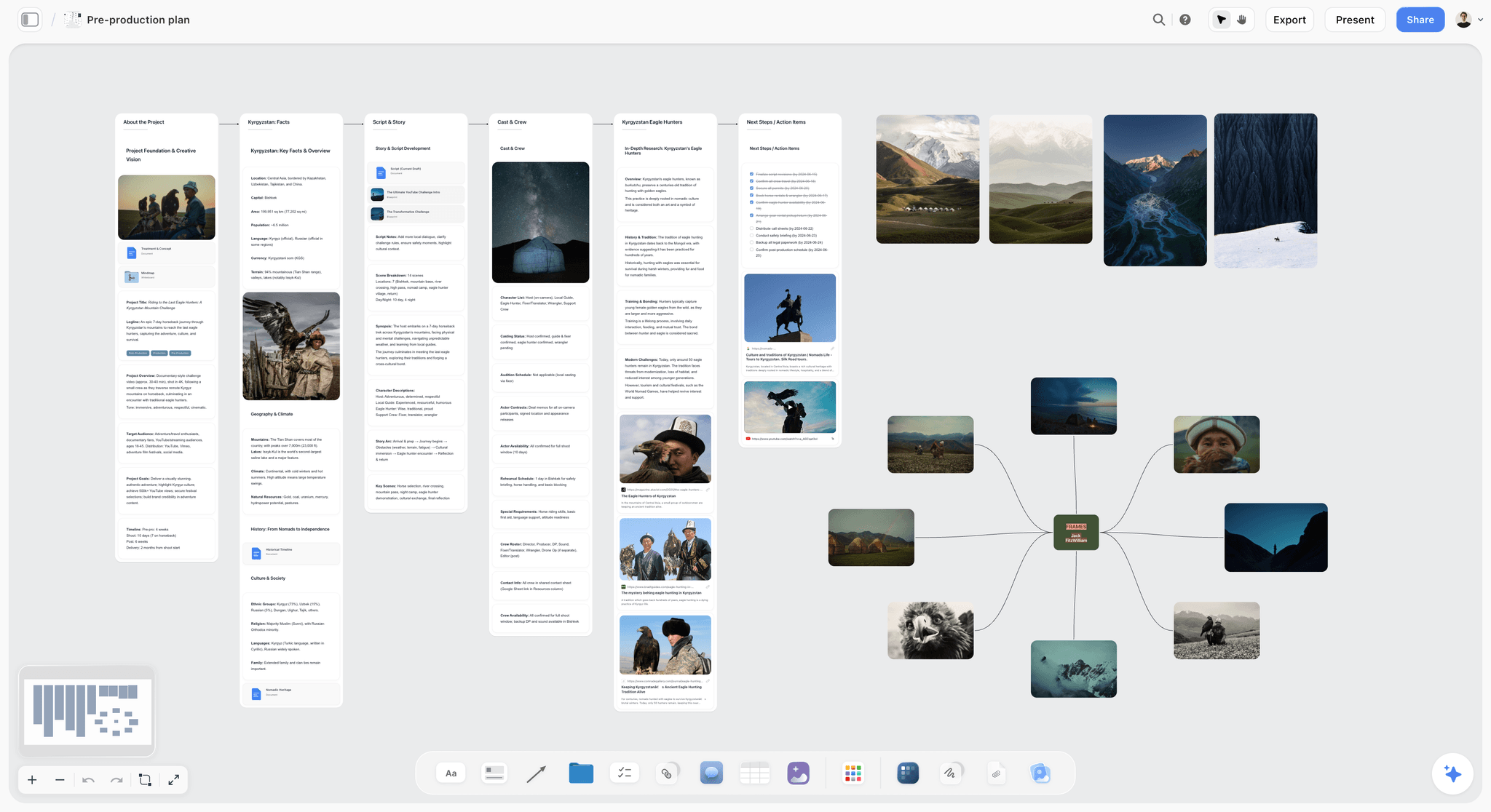
Storyflow holds a video brief as the thing it actually is: the message, the audience, the references, the shot plan and the full deliverable set with a row per output, all visible at once. That adjacency is the point, because the expensive failures are mismatches between two of those and nobody puts them next to each other. The AI reads the whole board plus attached documents, so asking whether the shot plan produces every deliverable on the list is a question with the evidence attached. Invited collaborators join free, which matters when the reader list runs from the client to a day-rate editor.
Best for: Productions where one shoot has to yield a set of outputs.
Verdict: The strongest tool here for catching an unshootable deliverable before the shoot. It produces no production paperwork and no timecoded review.
Key features
- Infinite canvas holding message, references, shot plan and deliverable set together.
- AI reads the whole current board, plus 5 attached documents and 3 attached boards.
- 200+ story blueprints including brief structures.
- Anyone a paid member invites to a board joins free, including freelancers and clients.
Pricing
Early access: every plan is paid for now. A Free plan arrives before the end of 2026, and anyone a paid member invites to a board can sign up free and collaborate today. Plus: $7.99/mo annual, $9.99/mo monthly. Unlimited boards and uploads. Pro: $14/mo annual, $19/mo monthly. AI image generation, more AI usage, memory across conversations. Max: $39/mo annual, $49/mo monthly. Team workspace with roles and permissions.
Pros
- Deliverables sit beside the shot plan, which is where the mismatch is caught.
- The whole reader list can see it without buying a seat.
- Cheapest tool here, priced per account for individuals.
Cons
- Breakdown, strip board and call sheet are drafts only: no script tagging, scheduling engine or call sheet distribution.
- No timecoded review of a cut.
- Paid-only during early access.
2. StudioBinder
StudioBinder turns a brief into production: script breakdown, element tagging, shooting schedule, shot list and call sheets, all connected. For a crewed shoot it is the tool that gets the brief onto the floor in a form the crew recognises.
Best for: Briefs that become a crewed production with real paperwork.
Verdict: The best brief-to-production path here. Priced per user, which adds up across a production team.
Key features
- Script breakdown with element tagging.
- Shooting schedules and stripboards.
- Shot lists and professional call sheets.
Pricing
Free tier with one project. Paid from about $42/month per user.
Pros
- The brief becomes paperwork without re-entry.
- Crew recognise the output formats immediately.
- Shot list and schedule stay connected to the brief.
Cons
- Expensive per user for a small team.
- Heavier than a brand video usually needs.
- Weaker at holding tone and reference material.
3. Notion
Notion is where most video briefs get written, and with a proper deliverable database rather than a prose description it does the job well: a row per output with duration, ratio, platform, sound assumption and owner.
Best for: The written brief, with a reusable template across projects.
Verdict: The best written brief home if you build the deliverable table. Most teams do not, which is the failure rather than the tool's fault.
Key features
- Databases that make a deliverable set structural rather than prose.
- Reusable templates across productions.
- Sharing by link with clients and freelancers.
Pricing
Free personal tier. Paid from about $10/user/month.
Pros
- A database forces the deliverable set to be explicit.
- Free tier covers a small team.
- Everyone already knows how to read it.
Cons
- References and specs sit in different parts of a long page.
- Nothing checks the shot plan against the deliverables.
- Easy to write a prose brief and skip the table.
4. Frame.io
Frame.io is not a brief tool and is on this list because of section 8: the brief has to reach post, and Frame.io is where post already lives. Attaching the brief and the deliverable list to the project means the editor sees it without going to look.
Best for: Making sure the brief is in front of the editor.
Verdict: The best place to put a brief so it survives into the edit. It does not help you write one.
Key features
- Timecoded review and version stacking.
- Project-level file storage for briefs and references.
- Camera-to-cloud ingestion from set.
Pricing
Free tier with 2 projects. Paid from about $15/month.
Pros
- Solves the last-mile problem of the brief reaching post.
- Version history makes an old note legible against the cut.
- Free tier covers a single production.
Cons
- No brief structure or authoring of any kind.
- Per-user pricing across a review chain.
- Video only.
5. Milanote
Milanote is a clean board for the tone half of a video brief: references, frames, colour, pacing examples. For agreeing a look with a client it is fast and pleasant.
Best for: The reference and tone board.
Verdict: A good visual half of a brief. It holds no specifications, so the deliverable set lives somewhere else, which is the split this page argues against.
Key features
- Drag-and-drop boards for images, video links and notes.
- Web clipper for gathering references.
- Clean share links for clients.
Pricing
Free up to 100 notes. Paid at $9.99/month per person.
Pros
- Fast and attractive for agreeing a look.
- Share links work without a client account.
- Everything visible at once.
Cons
- No deliverable specifications or structure.
- Hundred-note free cap arrives mid-project.
- Separates tone from specs, which is where failures start.
6. Google Docs
A Google Doc with a real deliverable table at the top is a perfectly good video brief and costs nothing. This route is under-recommended because nobody sells it.
Best for: Anyone who will actually write the deliverable table.
Verdict: The best free option and genuinely sufficient. Everything depends on the discipline of the writer.
Key features
- Free, universal, opens for anyone with a link.
- Comments and suggestions for client sign-off.
- Complete control over structure.
Pricing
Free. Workspace from about $6/user/month.
Pros
- Free with no reader limits at all.
- Every collaborator can open it instantly.
- Comment threads work well for approval.
Cons
- No structure, so the deliverable table is easy to skip.
- References become a list of links rather than a board.
- Nothing connects the brief to the shoot or the edit.
7. Boords
Boords attaches a storyboard to the brief, which for video is frequently the fastest way to make a brief unambiguous: a rough frame sequence resolves arguments that a paragraph cannot.
Best for: Briefs that need a visual sequence rather than a description.
Verdict: The best way to put a storyboard in a brief. It is not a brief tool on its own.
Key features
- Storyboard frames with shot notes and timing.
- AI-assisted frame generation.
- Shareable boards with client commenting.
Pricing
Free tier. Paid from about $15/month.
Pros
- A storyboard removes ambiguity faster than prose.
- Timing per frame makes duration real early.
- Clients understand it without translation.
Cons
- No deliverable specification or brief structure.
- Storyboarding a whole set of cutdowns is laborious.
- Another subscription alongside the brief itself.
8. Celtx
Celtx is script-led: for narrative video where the brief is essentially a script plus intent, it connects script, breakdown and schedule in one product at a much lower price than StudioBinder.
Best for: Scripted narrative video where the script is the brief.
Verdict: The best value script-to-schedule path. Weak for brand and social work where there is no script.
Key features
- Scriptwriting with linked breakdown.
- Scheduling and shot lists.
- Storyboarding tools included.
Pricing
Limited free tier. Paid from about $15/month.
Pros
- Much cheaper than StudioBinder for a similar path.
- Script, breakdown and schedule connected.
- Good for narrative and documentary work.
Cons
- Assumes a script exists, which brand video often lacks.
- Poor home for tone and reference material.
- Interface is dated in places.
9. Canva
Canva is where a brief becomes a deck for a client. For agency and brand work, a brief that is presented rather than sent frequently gets better engagement and clearer approval.
Best for: Presenting a brief to a client who will not read a document.
Verdict: The best presentation layer. It adds nothing to the substance and the substance is the brief.
Key features
- Presentation templates and brand kits.
- Easy inclusion of reference frames and video.
- Simple sharing and commenting.
Pricing
Generous free tier. Paid from about $15/month.
Pros
- Clients engage with a deck more than a document.
- Fast to produce without a designer.
- Free tier is sufficient.
Cons
- Slides encourage brevity where specifications need detail.
- No structure for a deliverable set.
- A second artifact to keep in sync with the real brief.
10. Miro
Miro is the surface for the brief workshop: the session where a team argues out the message, the audience and the outputs before anybody writes anything.
Best for: The live session that precedes the brief.
Verdict: Good for arriving at a brief with a group. The board is not the brief and should not become it.
Key features
- Infinite canvas with templates for workshops.
- Real-time collaboration with voting.
- AI clustering of ideas.
Pricing
Free with 3 editable boards. Paid from about $8/user/month.
Pros
- The best live workshop experience.
- Good for converging a team on a message.
- Usable free tier for one project.
Cons
- Boards sprawl and do not become a brief.
- Three-board free cap.
- Nothing survives to the shoot or the edit.
11. Filestage
Filestage runs structured review with routed approval stages, which matters for the last part of the brief's life: checking the cut against what was agreed, with a record of who approved it.
Best for: Reviewing a cut against the brief with an audit trail.
Verdict: A good formal review layer. Priced per account and aimed at teams with real approval chains.
Key features
- Routed multi-stage review with deadlines.
- Version comparison and annotation.
- Approval records.
Pricing
Limited free tier. Paid from about $49/month.
Pros
- Structured approval with a clear record.
- Handles video alongside other formats.
- Good for agency and client approval layers.
Cons
- Expensive relative to Frame.io for video alone.
- No brief authoring.
- Formality slows work that does not need it.
12. Trello
A Trello card per deliverable, with the spec in the description and a checklist of the shots it requires, is a crude but effective way to make the deliverable set explicit and trackable.
Best for: A lightweight brief where the deliverable set is the main content.
Verdict: The cheapest way to make deliverables explicit. It holds no references and no tone.
Key features
- A card per deliverable with specs and checklists.
- Free tier with 10 boards and unlimited collaborators.
- Client-visible boards without a seat.
Pricing
Free with 10 boards. Paid from about $5/user/month.
Pros
- Forces one entry per output, which is the discipline that matters.
- Free and instantly understood.
- Client and crew can see it without an account.
Cons
- No place for references, tone or message.
- Cards are a poor home for a narrative brief.
- Nothing connects it to the shoot or the edit.
7) What a Video Brief Must Contain
Most video brief templates are too long and miss the parts that actually prevent failure. This is the short version, ordered by how much damage omitting each one causes.
The deliverable set, as a table. One row per output: duration, aspect ratio, platform, sound assumption, subtitles, and the single message that output must carry on its own. This is the part most briefs omit and the most expensive one to omit.
The one thing it must achieve. Not three objectives. One, stated so plainly that the editor can use it to choose between two cuts.
The audience, by situation rather than demographic. "Watching on a phone, muted, while distracted" changes the edit far more than an age range does.
References, annotated. Three to five, each with a line saying what you are pointing at: the pacing, the colour, the interview style. An unannotated reference board is read differently by everyone who opens it.
What it must not be. The negative constraints transmit more reliably than aspirations. "Not a montage, no voiceover, not aspirational stock" is more useful than "authentic and human".
The required moments. Specific shots the deliverable set depends on: a clean brand beat for the bumper, a frame that works as a thumbnail, a wide with crop room for vertical. Each one is a line on a shot list.
Practical constraints. Locations, talent availability, the shoot day count, the deadline and who signs off. A brief without a sign-off name produces the four-round approval.
Deliberately omitted: a long brand background section, a competitor analysis that belongs elsewhere, and a script written before the deliverable set is agreed, because the deliverable set changes the script.
8) Why the Brief Does Not Reach the Edit
The brief is written, agreed and signed off. The shoot goes well. Then the first cut arrives and it is not the film anybody briefed.
The usual explanation is that the editor did not read the brief. The usual truth is that the editor never had it.
Video production hands off more times than almost any other creative process. The client briefs the agency, the agency briefs the production company, the producer briefs the director, the director briefs the crew, and then the footage is handed to an editor who is frequently a freelancer hired after the shoot and who was in none of those conversations. By the time material reaches post, the brief is three handoffs away, in a tool the editor does not have access to.
Three specific losses at that handoff:
The intent behind the message. The editor has the message and not the reasoning, so when two cuts both technically satisfy it they cannot choose between them on anything but taste.
The deliverable set. Frequently the editor is told about the vertical cut after delivering the hero, which is precisely when the framing problem in section 3 surfaces.
The negative constraints. "Not a montage" rarely survives three handoffs, and the first cut is a montage, because a montage is what footage without instruction becomes.
The fix is unglamorous and works: put the brief where the edit happens. A copy of the brief and the deliverable table attached to the Frame.io project, or a link to the board pinned where the editor works, costs nothing and removes most of this. Frame.io ranks fourth on a page about brief tools for exactly this reason.
The second fix is a fifteen-minute call. A recorded walkthrough of the brief and the references for the editor before they start is the highest-return quarter hour in the whole production. It carries tone and reasoning that a document flattens, and it can be rewatched.
And the structural fix: keep the deliverable set attached to the material rather than to the project phase. When the shot plan, the footage and the deliverable list are visible in one place, the vertical cut is a constraint on the shoot rather than a surprise in post.
9) Recommended Video Brief Stacks
Stack 1: Brand video with a social cutdown set. Storyflow (brief, references, deliverables) + Frame.io (the brief in post) + Trello free (deliverable tracking). About $23/month.
Stack 2: Crewed production. Storyflow (brief) + StudioBinder (breakdown, schedule, call sheets) + Frame.io (post). About $65/month per user.
Stack 3: Narrative or documentary. Celtx (script, breakdown, schedule) + Storyflow (brief and references) + Frame.io. About $38/month.
Stack 4: Agency with client approval. Storyflow (brief) + Canva (presenting it) + Filestage (routed approval) + Frame.io. About $86/month.
Stack 5: Free setup. A Google Doc with a real deliverable table + Milanote free for references + Frame.io free for the edit. Zero, and it fixes the main failure.
| Production shape | Writes the brief in | Produces from | Reviews in | Monthly cost |
|---|---|---|---|---|
Brand video with cutdowns | Storyflow | Trello free | Frame.io | about $23 |
Crewed production | Storyflow | StudioBinder | Frame.io | about $65/user |
Narrative or documentary | Storyflow, Celtx | Celtx | Frame.io | about $38 |
Agency with approvals | Storyflow | Canva for the deck | Filestage | about $86 |
Free | Google Docs | The doc | Frame.io free | $0 |
The pattern across all five: the brief is written once, and a copy reaches post. Stacks that stop at the first half are the ones where the first cut is not the film anybody briefed.
10) What a Bad Video Brief Costs
The reshoot, which is the catastrophic case. A deliverable the footage cannot produce means either shooting again, at the full cost of a crew day and talent, or delivering something that does not meet the requirement. This is the direct cost of the section 3 failure and it is entirely preventable at brief stage.
Extra edit rounds, which is the common case. A vague brief produces a first cut that is a reasonable interpretation and not what anyone wanted, and the correction takes two or three rounds. Each round is editor time plus a delay, and on an agency job it is frequently unbillable.
The cutdowns that never happen. Quieter and larger in aggregate. A brand film that yields no usable social cuts was worth a fraction of what it cost, because the hero film is watched by far fewer people than the cutdowns would have been. Nobody itemises this; it shows up as the campaign underperforming.
The approval spiral. A brief without a named sign-off produces four rounds of consolidated feedback from people who were never aligned on the objective. The cost is schedule rather than money, and it lands on the production company.
| Cost driver | Where it lands | Rough size | The move |
|---|---|---|---|
Reshoot for an unshootable deliverable | Production budget | A full crew day or more | List every output before the shoot |
Extra edit rounds | Editor time, often unbillable | 3 to 8 hours per round | One stated objective the editor can decide with |
Cutdowns that never happen | Campaign performance | Invisible, and the largest | Frame and pace for the set, not the hero |
Approval spiral | Schedule | Weeks | Name the single sign-off in the brief |
11) Honorable Mentions
- Wipster and Ziflow. Alternatives to Filestage for routed video approval.
- Dropbox Replay. Solid video review if you already live in Dropbox.
- Shot Lister. Runs the shot list on the day, downstream of the brief.
- Descript. Makes rough cuts fast enough to test whether a fifteen-second version exists in the material.
- Google Sheets. A deliverable matrix in a spreadsheet is unglamorous and completely effective.
- Loom. The fifteen-minute brief walkthrough for the editor, which section 8 argues is the highest-return quarter hour in the production.
- Frame.io's brief templates. Worth using purely to get the brief into post.
12) Video Brief Mistakes to Avoid
- Describing a video instead of a deliverable set. The single most expensive mistake in video briefing.
- Three objectives. An editor choosing between two cuts needs one, and three means the decision is made by whoever speaks last.
- Unannotated references. Everyone reads a reference board differently and everyone is confident.
- Assuming sound. Most social video is watched muted; a message carried by voiceover does not survive it.
- Writing the script before the deliverable set. The set changes the script, so doing it in this order guarantees a rewrite.
- A brief the editor cannot access. Three handoffs from the client to post is the normal distance, and the brief usually does not travel it.
14) The Bottom Line
The best video brief tools in 2026 are the ones that can hold a deliverable set rather than a description of a video. Storyflow is the best overall because the outputs, the references and the shot plan are visible together and an AI can compare them. StudioBinder is the strongest once the brief becomes a crewed shoot. Notion or a Google Doc with a real deliverable table is a perfectly good free brief. Frame.io is where a copy has to end up.
A brief that describes "a video" produces a film that cannot be cut to vertical, because nobody framed for it. List every output before the shoot, annotate every reference, name one objective and one sign-off, and get the brief in front of the editor, who is usually three handoffs away and never had it.
To start, put the deliverable set beside the shot plan on one Storyflow canvas and ask whether every output on the list is actually in the plan.
FAQ: Video Brief Tools
What is the best video brief tool in 2026?
Storyflow is the best video brief tool because it holds the message, the references, the shot plan and the full deliverable set on one canvas with the AI reading all of it, so a deliverable the shot plan cannot produce becomes a question before the shoot rather than a discovery in post. It starts at $7.99/month billed annually and everyone who needs to read the brief joins free. StudioBinder is stronger once the brief becomes a crewed shoot, Notion or a Google Doc with a real deliverable table is a perfectly good written brief, and Frame.io is where a copy should live so the editor actually sees it.
What should a video brief include?
A deliverable table with one row per output, giving duration, aspect ratio, platform, sound assumption and the message that output must carry alone. Then one objective, the audience described by viewing situation rather than demographics, three to five annotated references, what it must not be, the specific shots the deliverables depend on, and a named sign-off. The deliverable table is the part most briefs omit and the most expensive omission.
Why can't my video be cut to vertical?
Because it was framed for sixteen-by-nine with the subject and the information positioned for that ratio, and cropping to nine-by-sixteen loses one or the other. This is decided at the shoot, by the DP, based on what the brief said, so it is a briefing failure rather than an edit failure. If vertical is in the deliverable set, the brief has to say so and the shoot has to frame with crop room or take separate coverage.
Is there a free video brief template or tool?
Yes. A Google Doc with a deliverable table at the top is a genuinely good video brief and costs nothing, and Milanote's free tier holds the reference board. Put a copy in a free Frame.io project so the editor has it. That combination costs nothing and fixes the two failures this article is about. Storyflow is paid-only during early access; its Free plan launches before the end of 2026.
What is the difference between a creative brief and a video brief?
A creative brief states the problem, the audience and the message for any medium. A video brief adds the constraints that only exist in time-based media: duration, aspect ratio per output, sound assumption, pacing, required moments and the full deliverable set. A creative brief used for video is usually missing exactly the parts that cause reshoots.
How do I make sure the editor follows the brief?
Give them the brief, which sounds obvious and frequently does not happen: post is typically three handoffs from the client and the editor is often hired after the shoot. Attach the brief and the deliverable table to the project in whatever tool the edit is reviewed in, and record a fifteen-minute walkthrough of the references and the reasoning. That quarter hour carries the tone and the intent that a document flattens.
Notion or Storyflow for a video brief?
Notion if you want a written brief with a reusable template and you will build the deliverable database. Storyflow if you want the deliverable set, the references and the shot plan visible at the same time, because the failures are mismatches between them and a long page keeps them apart. Both work; the thing that actually matters is whether the deliverable set is explicit at all.
How long should a video brief be?
One to two pages, or one board. Long briefs bury the load-bearing parts, and the parts that prevent reshoots are a table and a handful of constraints rather than paragraphs of brand context. If the brief cannot be read in five minutes by a freelance editor on their first day, it will not be.
What is a deliverable set in video?
Every output a single production must yield: the hero cut, the short cuts, the bumper, the vertical and square versions, subtitled versions, stills and thumbnails. Each imposes its own constraints on framing, pacing and required shots, so the set has to be agreed before the shoot rather than requested after it.
Do I need StudioBinder for a simple brand video?
Usually not. StudioBinder is built for crewed productions where a breakdown, a stripboard and compliant call sheets are genuinely needed, and at about $42 per user it is a real cost for a two-person shoot. For a brand video with a small crew, a brief plus a shot list plus a schedule in something simpler is adequate, and the money is better spent on the shoot.
How many references should a video brief have?
Three to five, each annotated with what you are pointing at. More than that and the references start contradicting each other, which gives the director licence to pick whichever supports their preference. Unannotated references are worse than none, because everyone reads them differently and nobody realises they disagree until the cut arrives.
Who should sign off a video brief?
One named person, stated in the brief. Video approval chains attract participants, and a brief without a single decision-maker produces consolidated feedback from people who were never aligned on the objective, which is the approval spiral. Other stakeholders can comment; one person decides.
What is the most common video brief mistake?
Describing a video rather than a deliverable set. It is invisible at brief stage, survives the shoot, and surfaces weeks later when the vertical cut, the six-second bumper or the fifteen-second version turns out not to exist in the footage. Listing every output first, with its constraints, is a fifteen-minute exercise that prevents a reshoot.
Table of Contents
- Article Metadata
- Breadcrumb
- Table of Contents
- 1) Quick Answer: The Best Video Brief Tools in 2026
- All 12 Video Brief Tools, Ranked
- 2) Comparison Table: 12 Video Brief Tools at a Glance
- Frequently Asked: Which Brief Tools Video Teams Trust, and Where Briefs Get Lost
- 3) The Deliverable Set Problem
- 4) How We Evaluated These Tools
- 5) Quick Picks by Video Brief Need
- 6) Detailed Reviews: 12 Video Brief Tools
- 7) What a Video Brief Must Contain
- 8) Why the Brief Does Not Reach the Edit
- 9) Recommended Video Brief Stacks
- 10) What a Bad Video Brief Costs
- 11) Honorable Mentions
- 12) Video Brief Mistakes to Avoid
- 14) The Bottom Line
- 15) Author
- 16) Related Reading
- FAQ: Video Brief Tools
Templates to check out for this topic


Templates you can use in Storyflow
Every Storyflow board starts from real structure and an AI that reads the whole canvas. Open one of these templates and make it yours.


See Storyflow in Action
A visual AI workspace where every feature lives inside one canvas. No tab-switching, no context lost.
Build your entire board from a single message
Type what you need in the AI chat at the bottom of your canvas. The AI adds cards, headings, and structure directly onto your board.
Use expert frameworks as AI context
Type @ in the AI chat and choose any Tactic. The AI tailors every response to that framework instead of giving generic advice.
Turn your board into a mind map in seconds
Ask the AI to restructure your canvas as a mindmap. It connects your ideas into a visual hierarchy so you can see how everything relates.
Why Storyflow Exists
Storyflow actually began as a personal tool while working on creative and research projects.
We kept running into the same problem: ideas were scattered everywhere: notes, documents, and whiteboards.
Nothing helped us see how everything connected.
So we started building a workspace designed around how ideas actually grow.
→ Read how Storyflow was createdStoryflow Team
Product & Research Team
Published: 2026-09-22
Extremely simple, seriously capable


See how easy it is to get started
Watch a real project come together, from a blank board to a finished plan, clicked through step by step.
Start creating with AI and become more productive
Transform your creative workflow with AI-powered tools. Generate ideas, create content, and boost your productivity in minutes instead of hours.